Facebook
Tips Tricks and Best Practices
Contents
Introduction
How it Works
Best Practices
Creator Studio
Premium Music Videos
Facebook Live
Stories
Insights
03
04
09
16
21
23
26
29
Introduction
With over 2.74 billion monthly active users as of the second quarter of 2020, Facebook is the biggest social network
worldwide. Facebook has seen a year-over-year increase of 12% in its active users since September 2019 (active users are
those who have logged onto Facebook during the last 30 days).
However, it’s worth noting the demographics on the platform have changed in recent years. 32.4% of Facebook’s audience
is aged 25-34 - the largest audience segment by age. The next largest group is aged 18-24, representing 23.5% of
Facebook’s audience. Only 4.7% of Facebook’s audience is 65 or older, and only 5.8% is 17 or under.
While that’s the overall figure, the percentage of American adults using Facebook varies by age range: 64% of 12- to
34-years olds, 74% of 35- to 54-year-olds and 52% of those 55 and over.
Facebook can be complicated, but successfully managing a page becomes a lot easier thanks to simple changes you can
make in your content strategy. This guide will show you how to improve your Facebook posts and go from “stressful” to
“social.”
*stats via hootsuite
How it Works
H: 4.45”
W: 4.0”
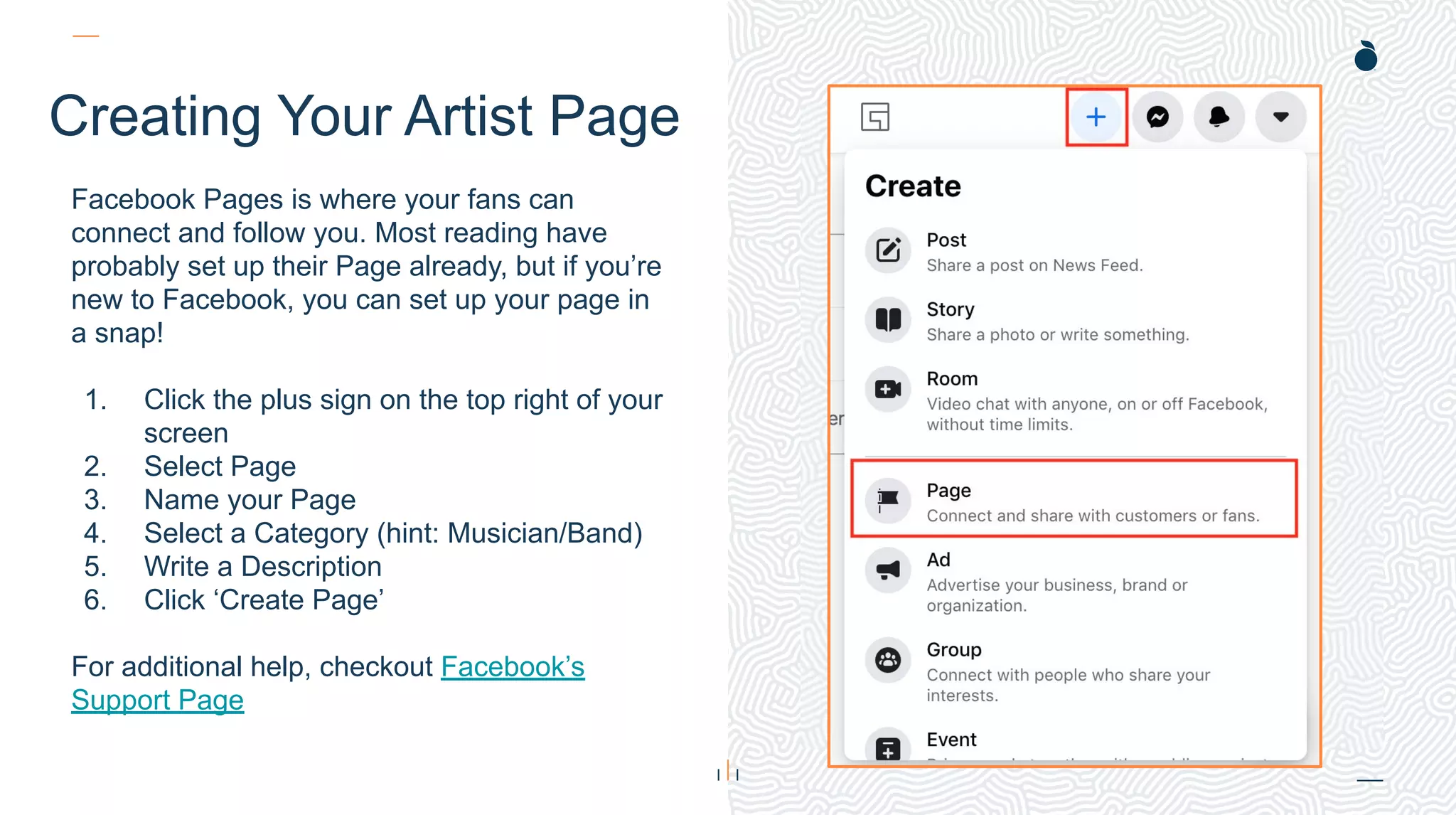
Creating Your Artist Page
Facebook Pages is where your fans can
connect and follow you. Most reading have
probably set up their Page already, but if you’re
new to Facebook, you can set up your page in
a snap!
1. Click the plus sign on the top right of your
screen
2. Select Page
3. Name your Page
4. Select a Category (hint: Musician/Band)
5. Write a Description
6. Click ‘Create Page’
For additional help, checkout Facebook’s
Support Page
H: 4.0”
W: 4.4”
H: 4.0”
W: 4.4”
The New Page
6
The biggest change this year for Facebook is their Page update!
What’s New:
● Shift of focus from Likes to Followers
● Redesigned simple intuitive layout
● Easier navigation between personal
profile and Pages
● Updated task-based admin controls
● Actionable insights and more relevant
notifications
● Safety and integrity features to detect
spammy content and impersonator
accounts
● New Q&A Format
What’s The Same:
● Existing posts, content, and information
will all remain
● Ads will not change and existing
campaigns are not affected
● Existing Admins will remain and receive
an automatic invitation to manage the
Page when you switch to the new
experience
via Facebook
H: 4.45”
W: 4.0”
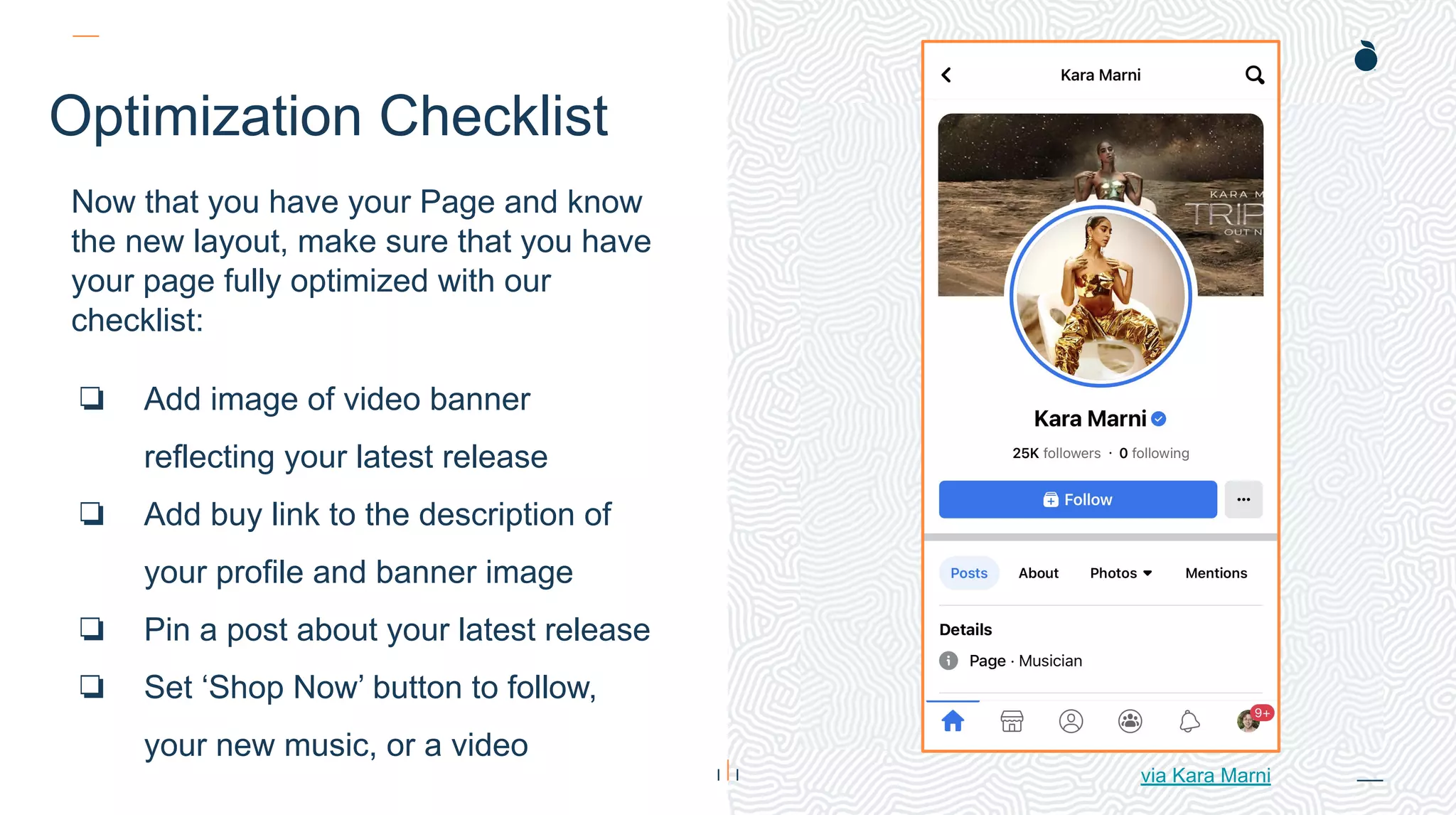
Optimization Checklist
Now that you have your Page and know
the new layout, make sure that you have
your page fully optimized with our
checklist:
❏ Add image of video banner
reflecting your latest release
❏ Add buy link to the description of
your profile and banner image
❏ Pin a post about your latest release
❏ Set ‘Shop Now’ button to follow,
your new music, or a video
via Kara Marni
With any platform, Facebook works best when you
post authentic, conversational content. Throughout
these best practices we’ll discuss all the different
Facebook tools you can utilize to share your story
with fans!
You can also check out the Essential Guide to
Facebook Posts here.
What To Post
While there are a plethora of posts you
can make, there are a few things to avoid
on Facebook. Here’s our list of don’ts:
Do Not Post:
● Misinformation
● Engagement-bait
● Too Many Hashtags
● Misuse of Trending Hashtags
● Hate Speech
Best Practices
Tagging Accounts
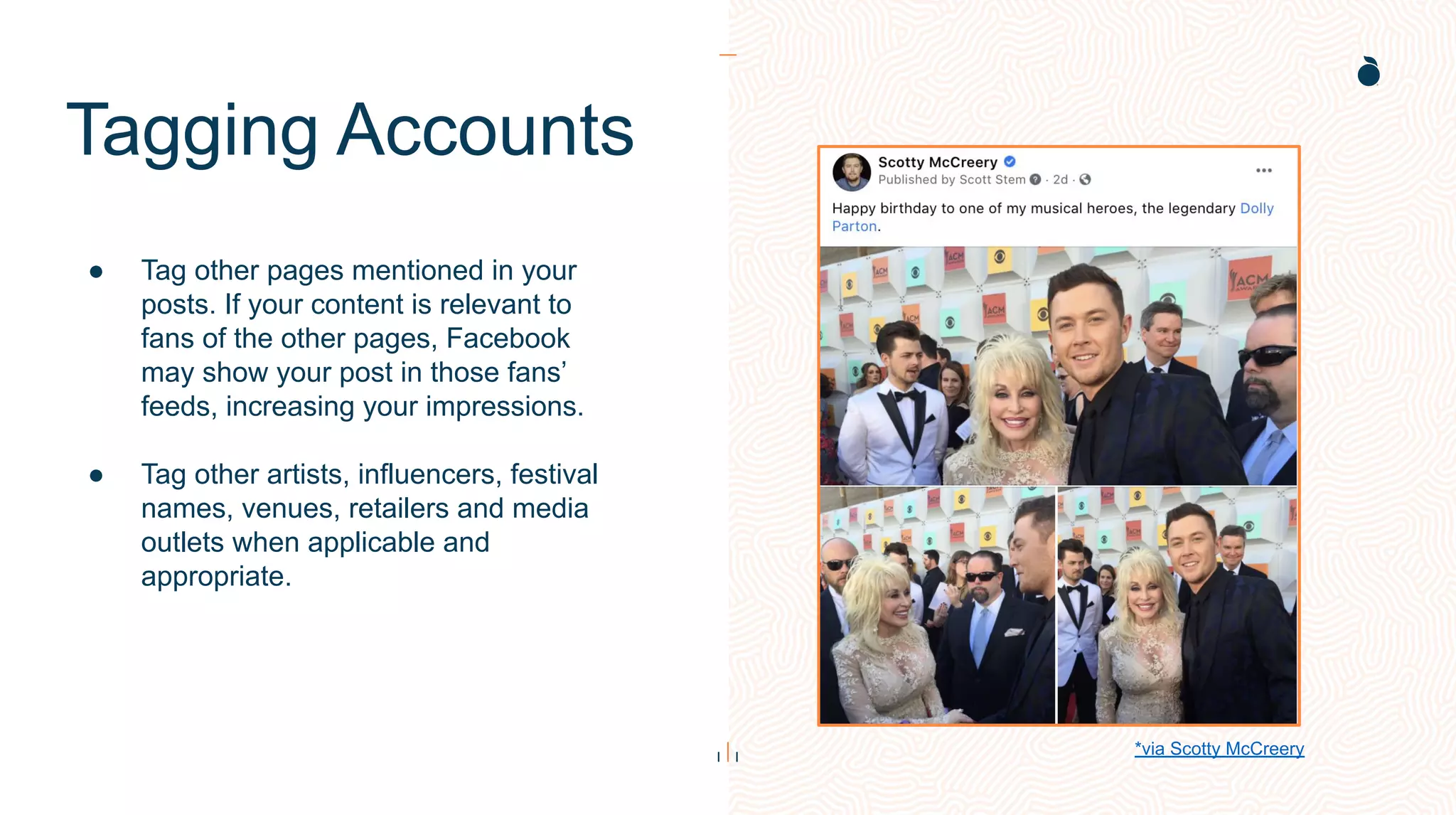
● Tag other pages mentioned in your
posts. If your content is relevant to
fans of the other pages, Facebook
may show your post in those fans’
feeds, increasing your impressions.
● Tag other artists, influencers, festival
names, venues, retailers and media
outlets when applicable and
appropriate.
*via Scotty McCreery
Link Sharing
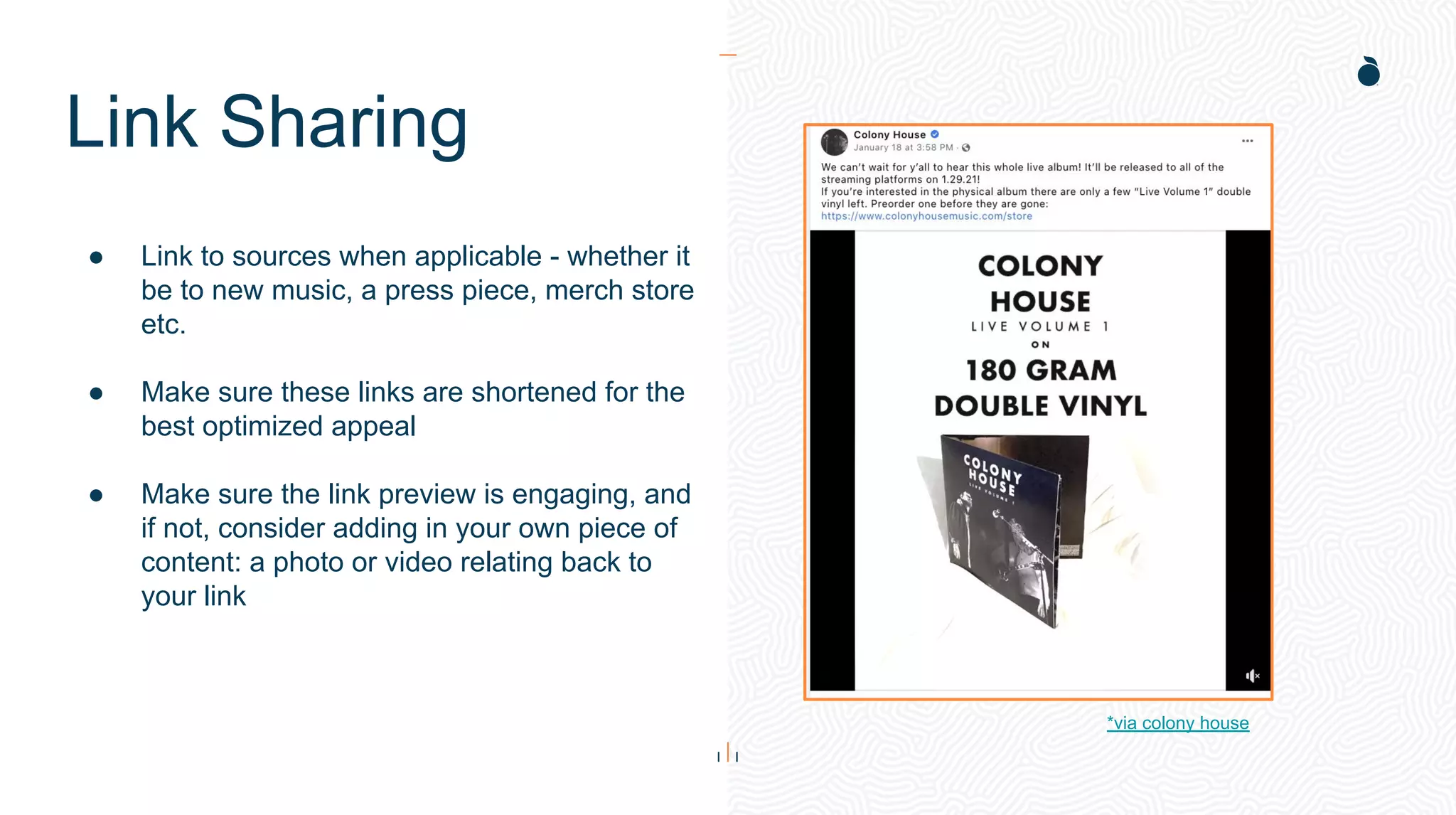
● Link to sources when applicable - whether it
be to new music, a press piece, merch store
etc.
● Make sure these links are shortened for the
best optimized appeal
● Make sure the link preview is engaging, and
if not, consider adding in your own piece of
content: a photo or video relating back to
your link
*via colony house
Reply Feature
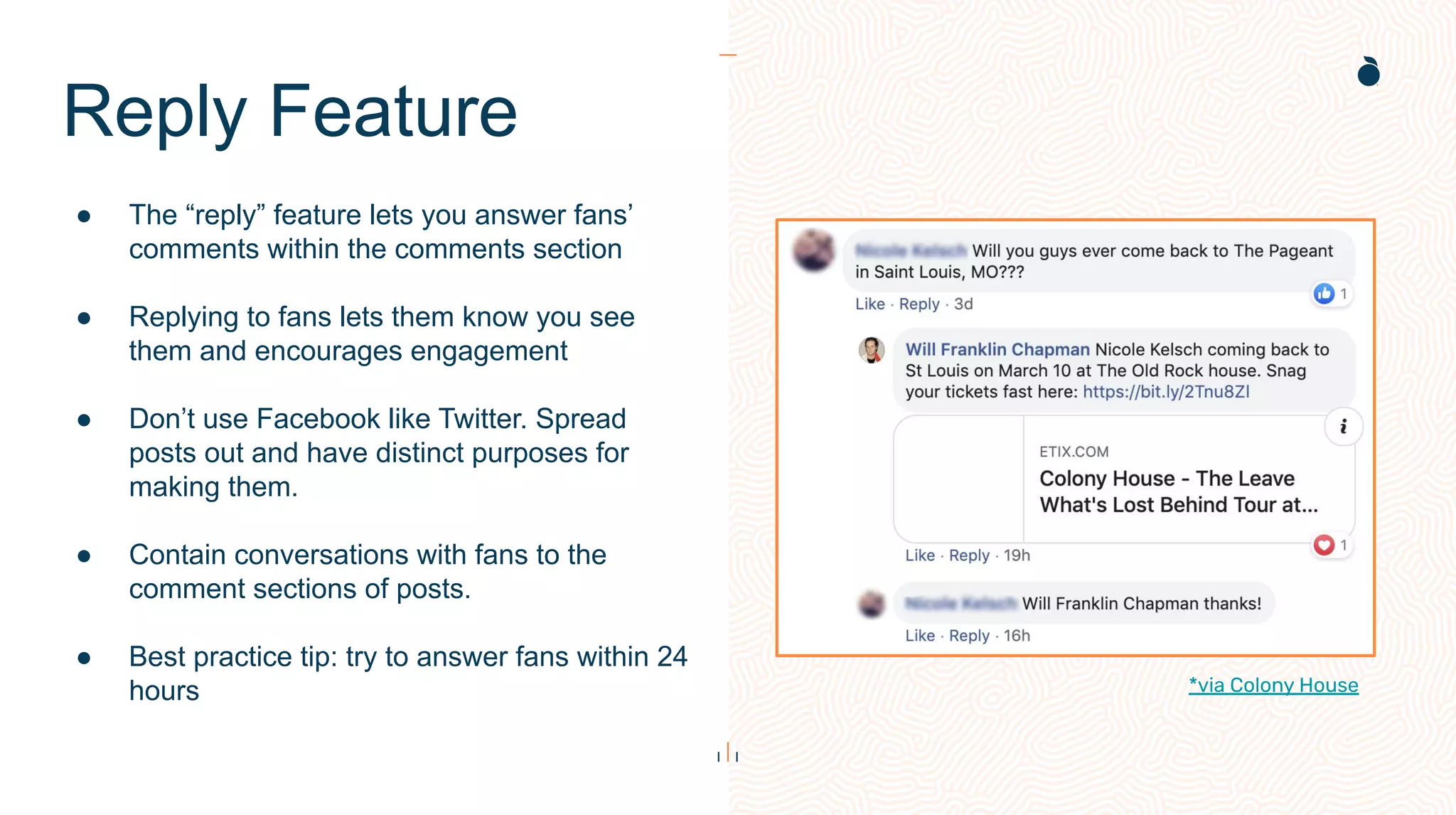
● The “reply” feature lets you answer fans’
comments within the comments section
● Replying to fans lets them know you see
them and encourages engagement
● Don’t use Facebook like Twitter. Spread
posts out and have distinct purposes for
making them.
● Contain conversations with fans to the
comment sections of posts.
● Best practice tip: try to answer fans within 24
hours *via Colony House
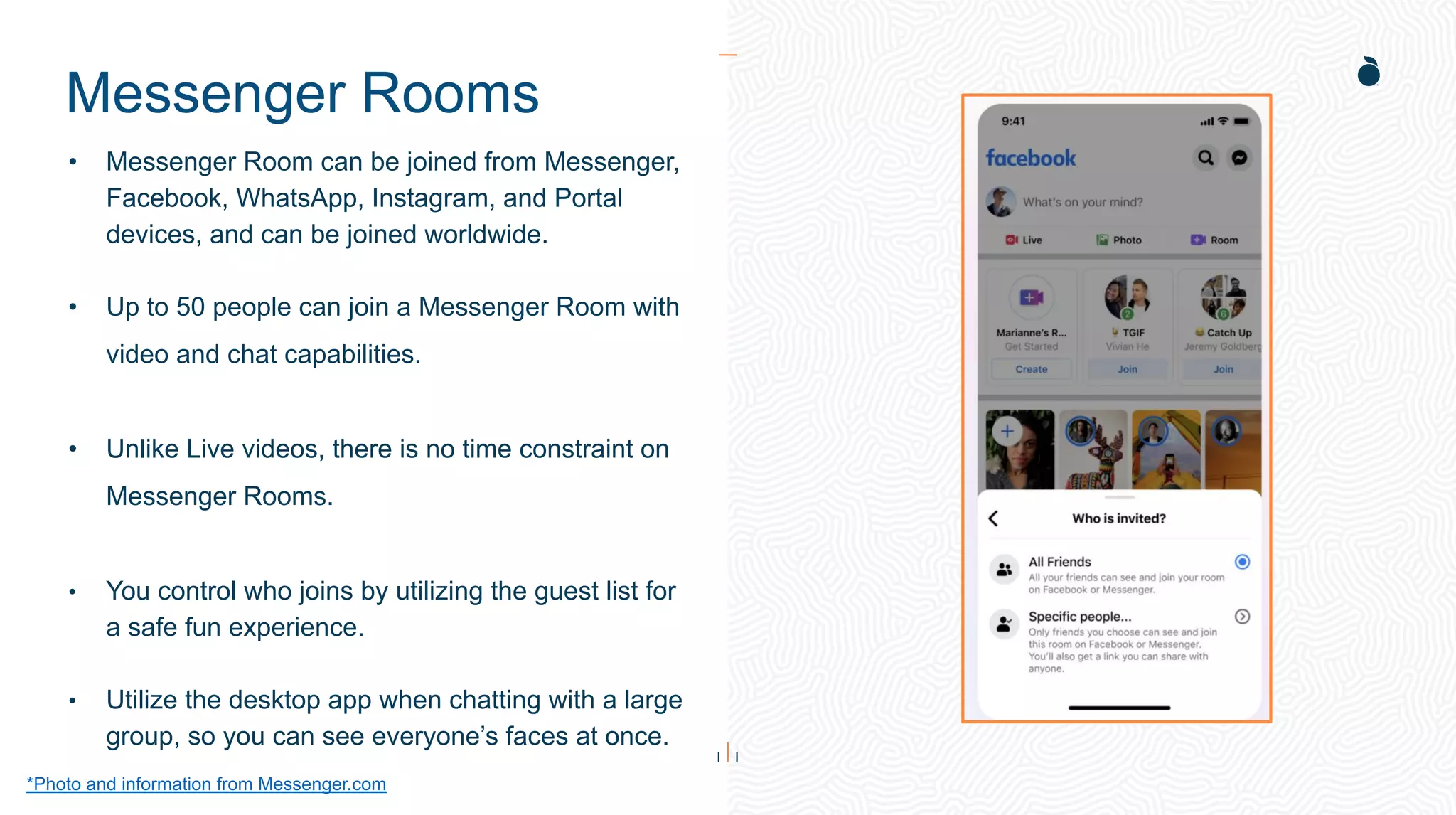
Messenger Rooms
*Photo and information from Messenger.com
• Messenger Room can be joined from Messenger,
Facebook, WhatsApp, Instagram, and Portal
devices, and can be joined worldwide.
• Up to 50 people can join a Messenger Room with
video and chat capabilities.
• Unlike Live videos, there is no time constraint on
Messenger Rooms.
• You control who joins by utilizing the guest list for
a safe fun experience.
• Utilize the desktop app when chatting with a large
group, so you can see everyone’s faces at once.
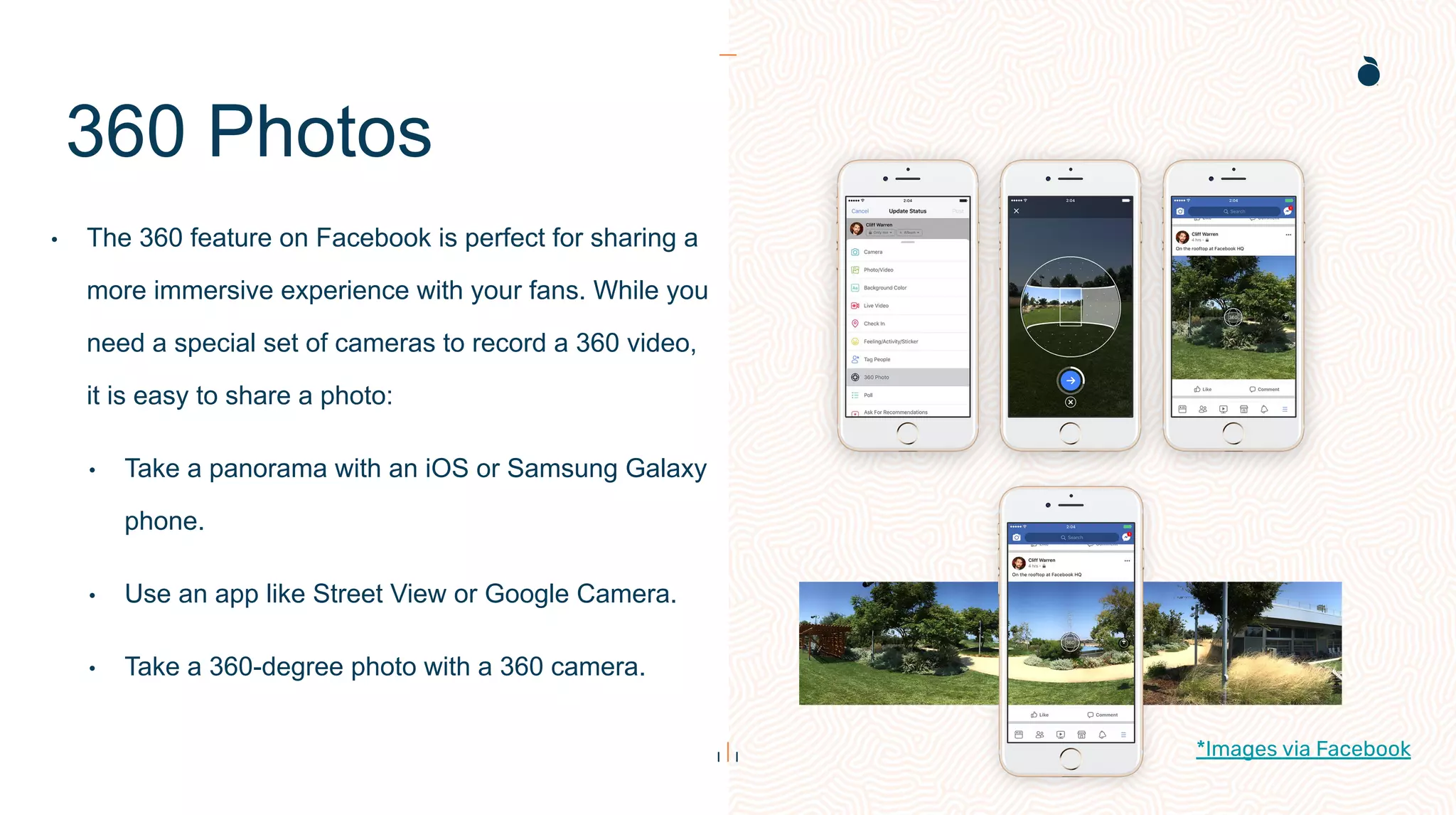
360 Photos
• The 360 feature on Facebook is perfect for sharing a
more immersive experience with your fans. While you
need a special set of cameras to record a 360 video,
it is easy to share a photo:
• Take a panorama with an iOS or Samsung Galaxy
phone.
• Use an app like Street View or Google Camera.
• Take a 360-degree photo with a 360 camera.
*Images via Facebook
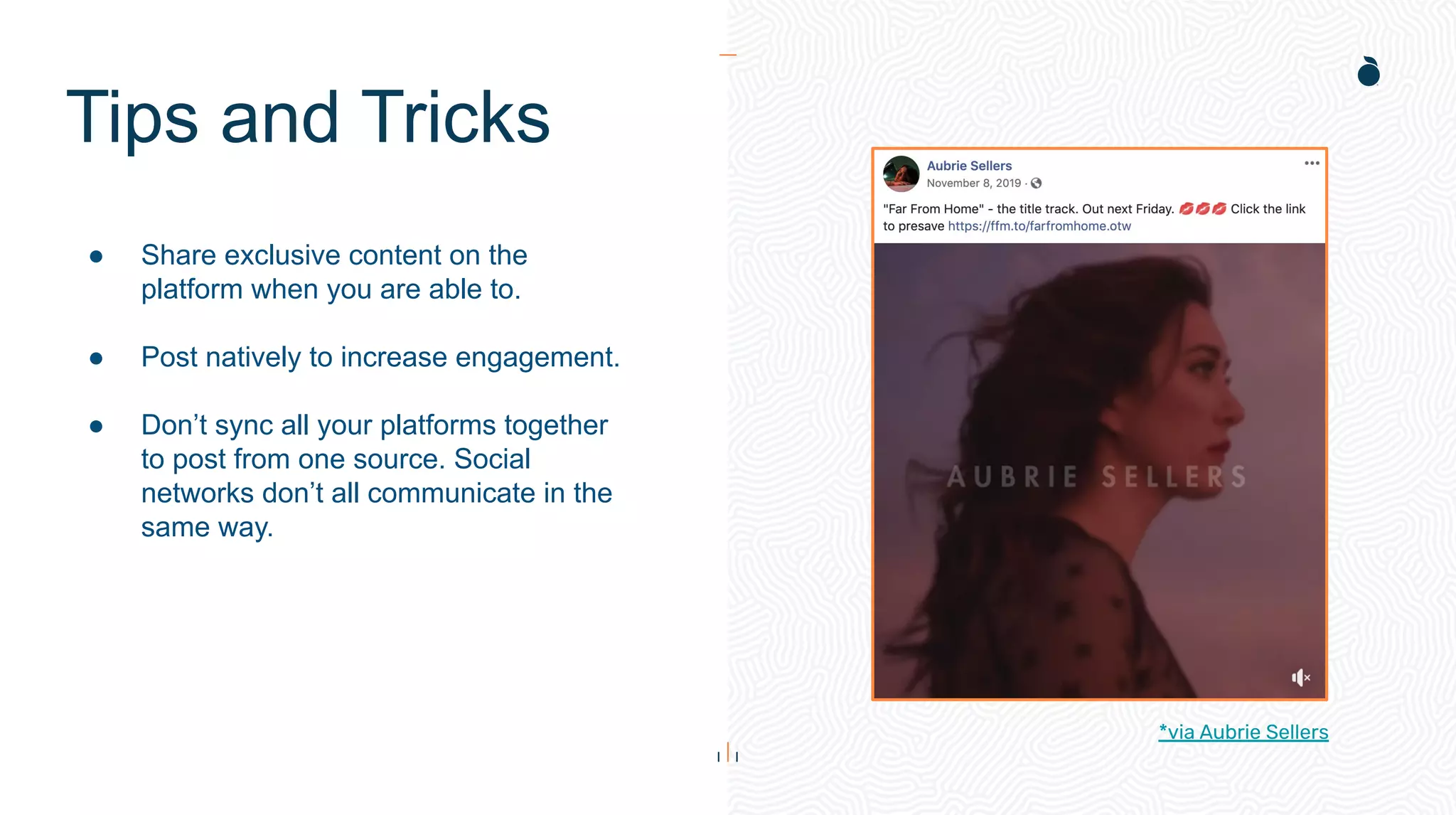
Tips and Tricks
● Share exclusive content on the
platform when you are able to.
● Post natively to increase engagement.
● Don’t sync all your platforms together
to post from one source. Social
networks don’t all communicate in the
same way.
*via Aubrie Sellers
Creator Studio
Facebook Creator Studio
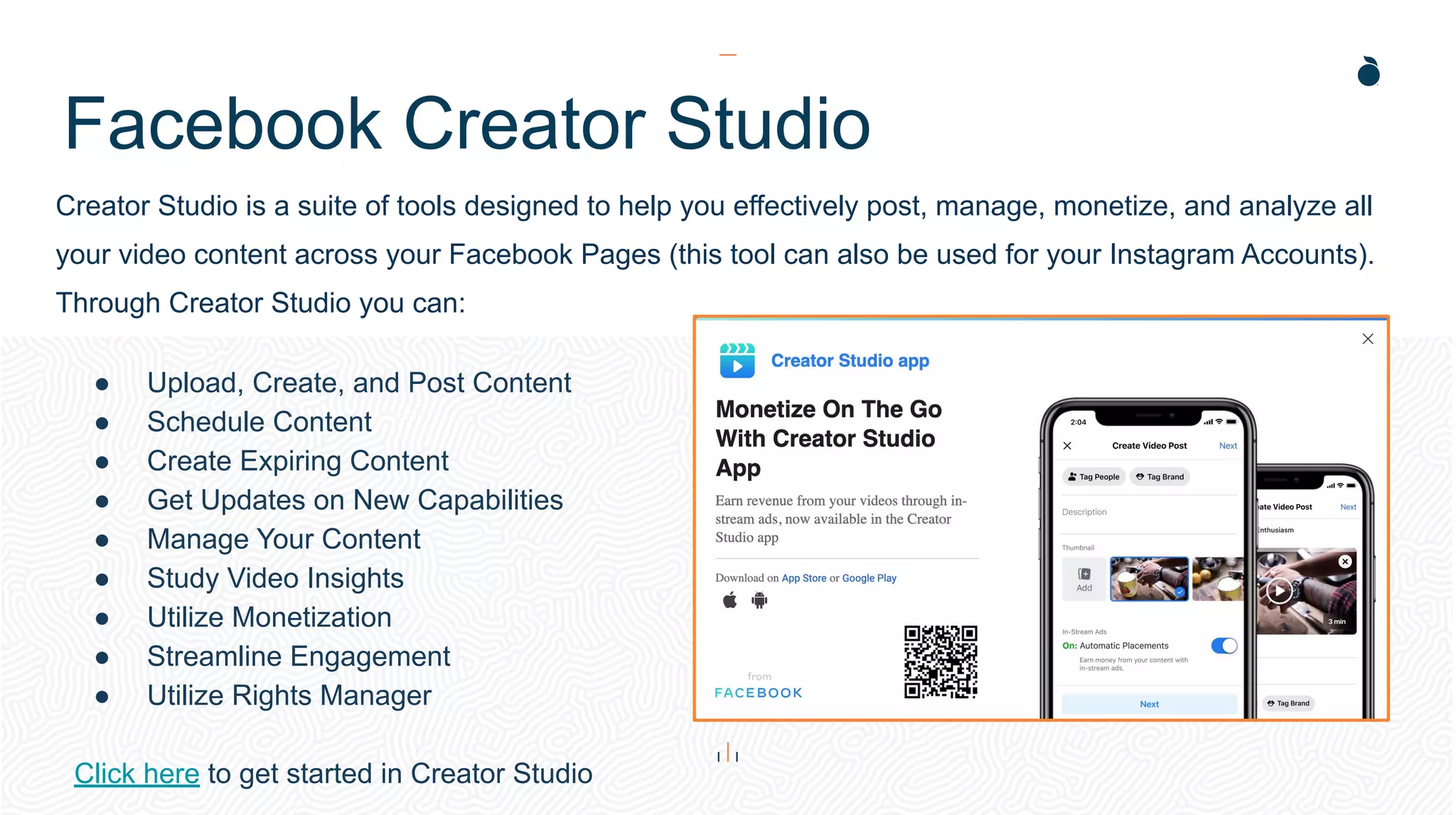
Creator Studio is a suite of tools designed to help you effectively post, manage, monetize, and analyze all
your video content across your Facebook Pages (this tool can also be used for your Instagram Accounts).
Through Creator Studio you can:
● Upload, Create, and Post Content
● Schedule Content
● Create Expiring Content
● Get Updates on New Capabilities
● Manage Your Content
● Study Video Insights
● Utilize Monetization
● Streamline Engagement
● Utilize Rights Manager
Click here to get started in Creator Studio
H: 4.45”
W: 4.0”
Insights
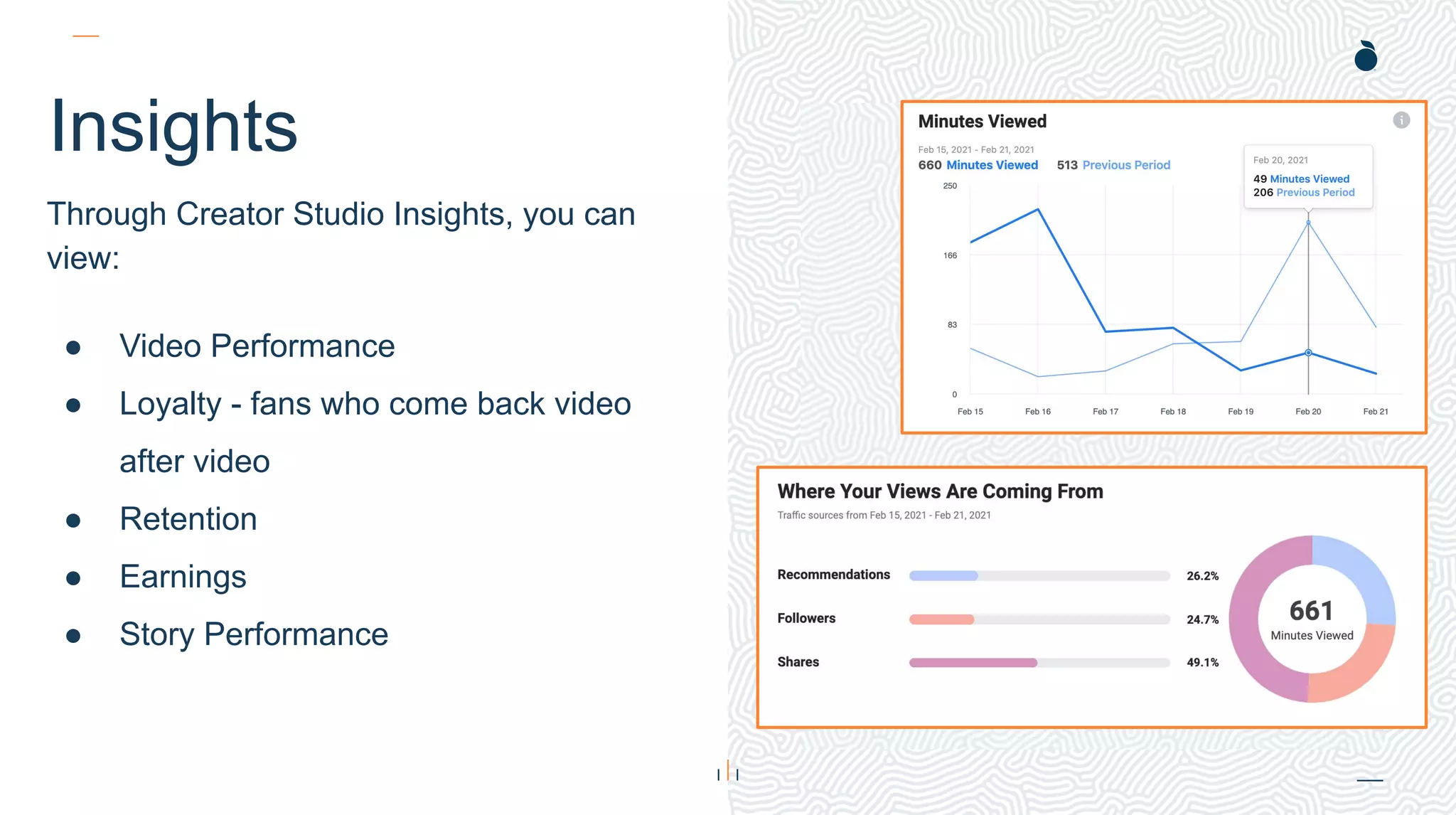
Through Creator Studio Insights, you can
view:
● Video Performance
● Loyalty - fans who come back video
after video
● Retention
● Earnings
● Story Performance
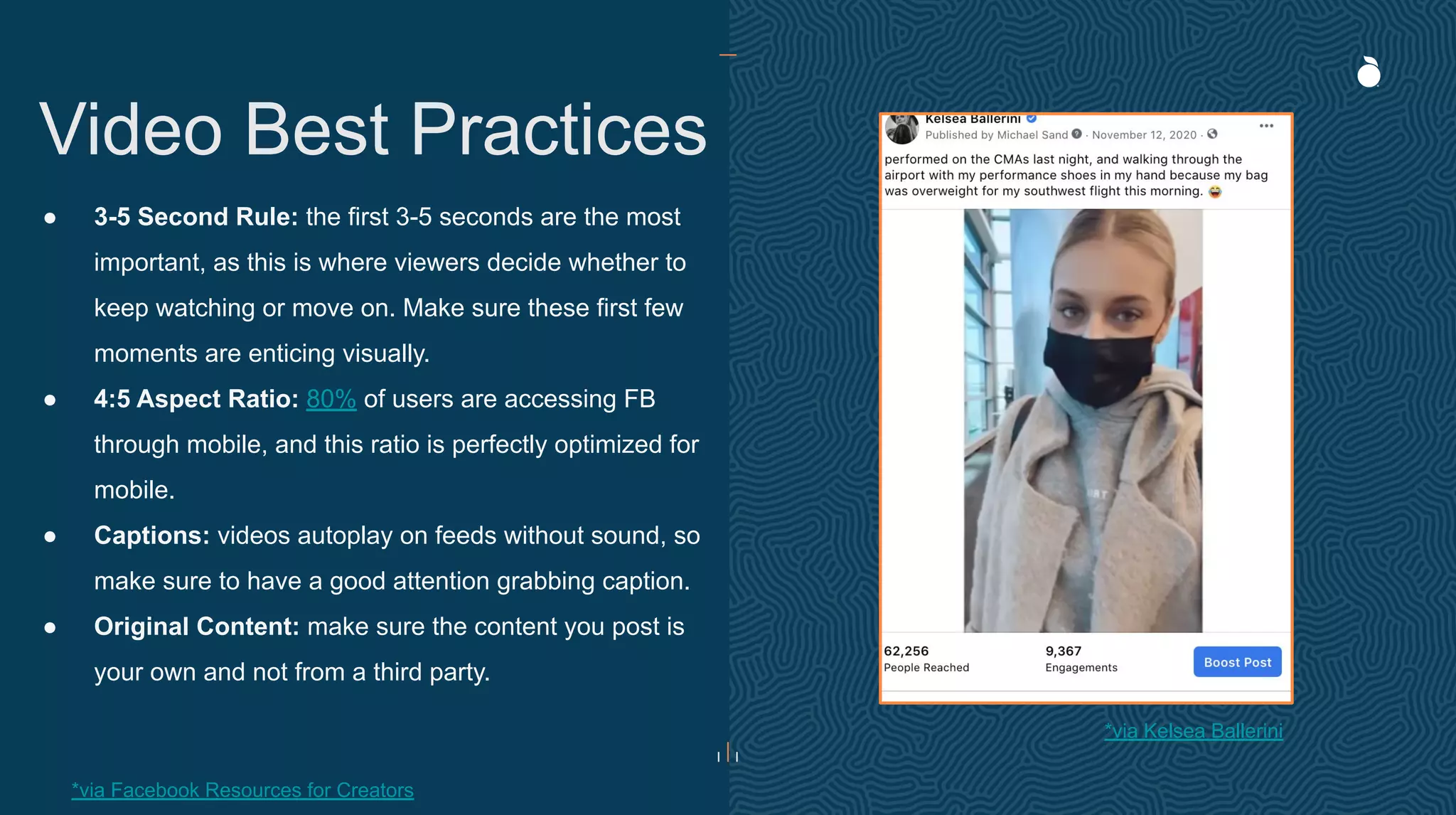
● 3-5 Second Rule: the first 3-5 seconds are the most
important, as this is where viewers decide whether to
keep watching or move on. Make sure these first few
moments are enticing visually.
● 4:5 Aspect Ratio: 80% of users are accessing FB
through mobile, and this ratio is perfectly optimized for
mobile.
● Captions: videos autoplay on feeds without sound, so
make sure to have a good attention grabbing caption.
● Original Content: make sure the content you post is
your own and not from a third party.
Video Best Practices
*via Kelsea Ballerini
*via Facebook Resources for Creators
Watch Party
A fun way to engage with your fans and continue to promote your video content is through Watch Parties.
Watch Party lets you playlist some of your videos, and then watch them all in real-time with followers. You
and your followers have a chat functionality available to comment and talk as you watch.
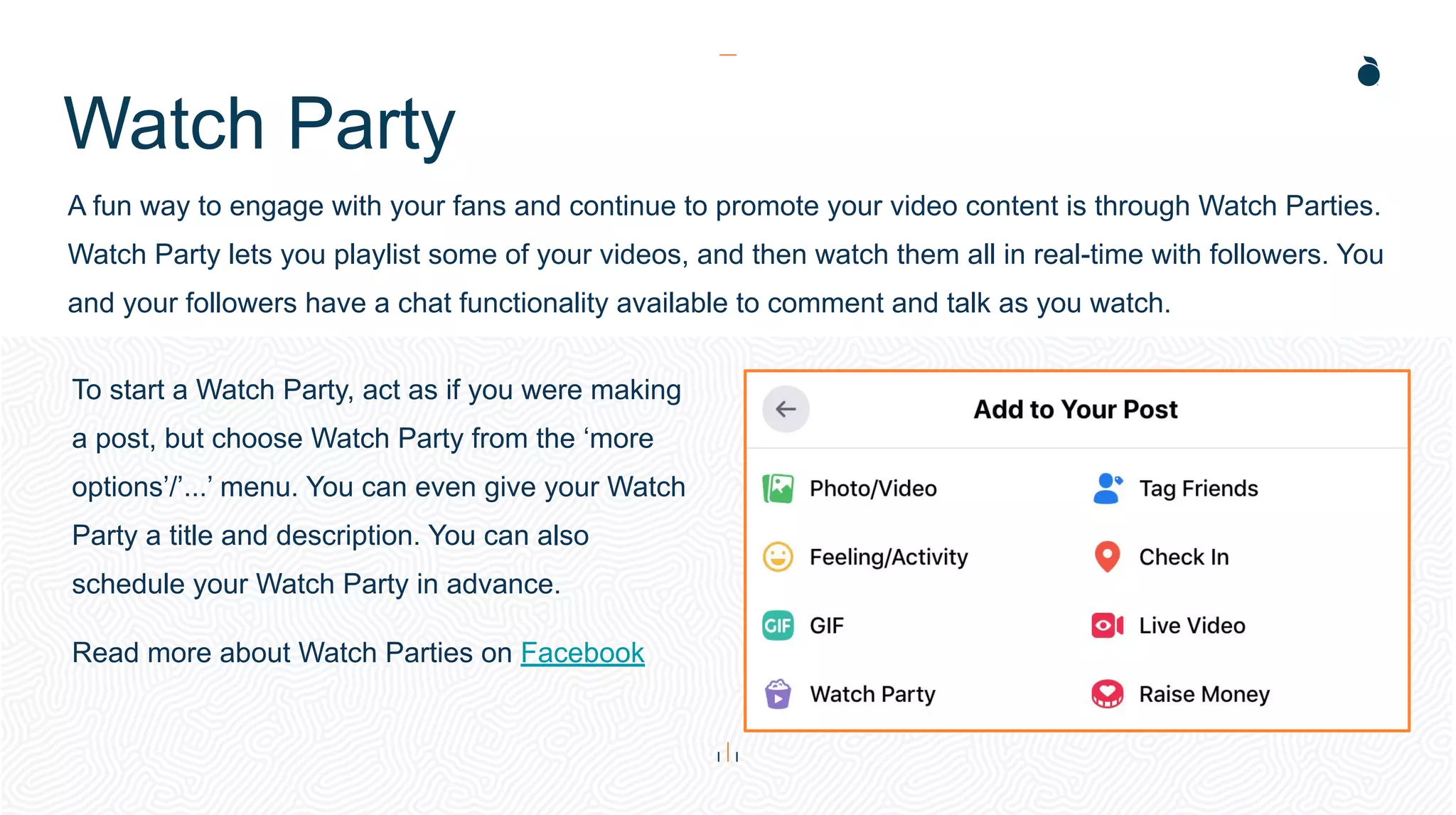
To start a Watch Party, act as if you were making
a post, but choose Watch Party from the ‘more
options’/’...’ menu. You can even give your Watch
Party a title and description. You can also
schedule your Watch Party in advance.
Read more about Watch Parties on Facebook
Premium Music
Videos
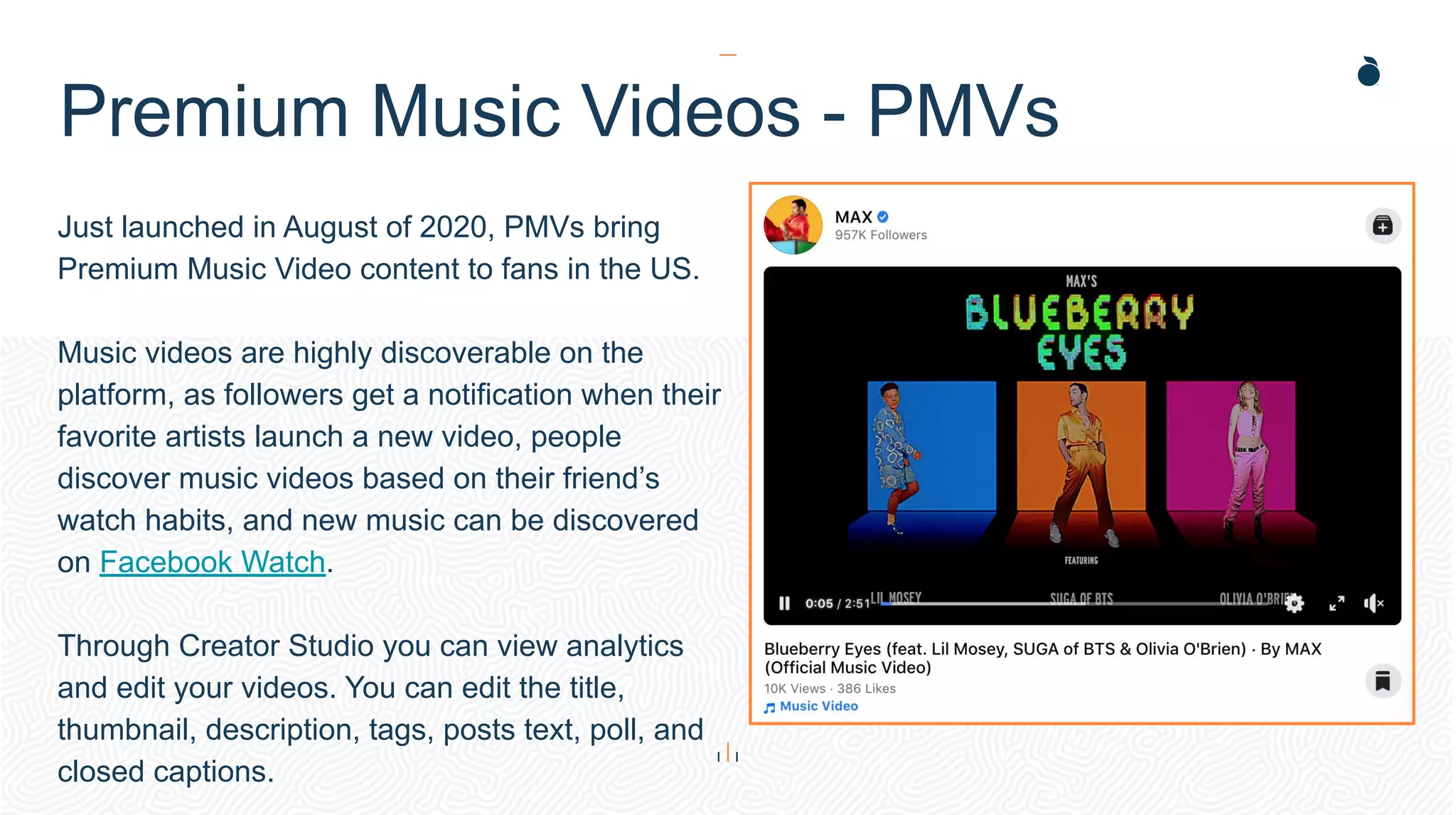
Just launched in August of 2020, PMVs bring
Premium Music Video content to fans in the US.
Music videos are highly discoverable on the
platform, as followers get a notification when their
favorite artists launch a new video, people
discover music videos based on their friend’s
watch habits, and new music can be discovered
on Facebook Watch.
Through Creator Studio you can view analytics
and edit your videos. You can edit the title,
thumbnail, description, tags, posts text, poll, and
closed captions.
Premium Music Videos - PMVs
H: 4.0”
W: 4.4”
H: 4.0”
W: 4.4”
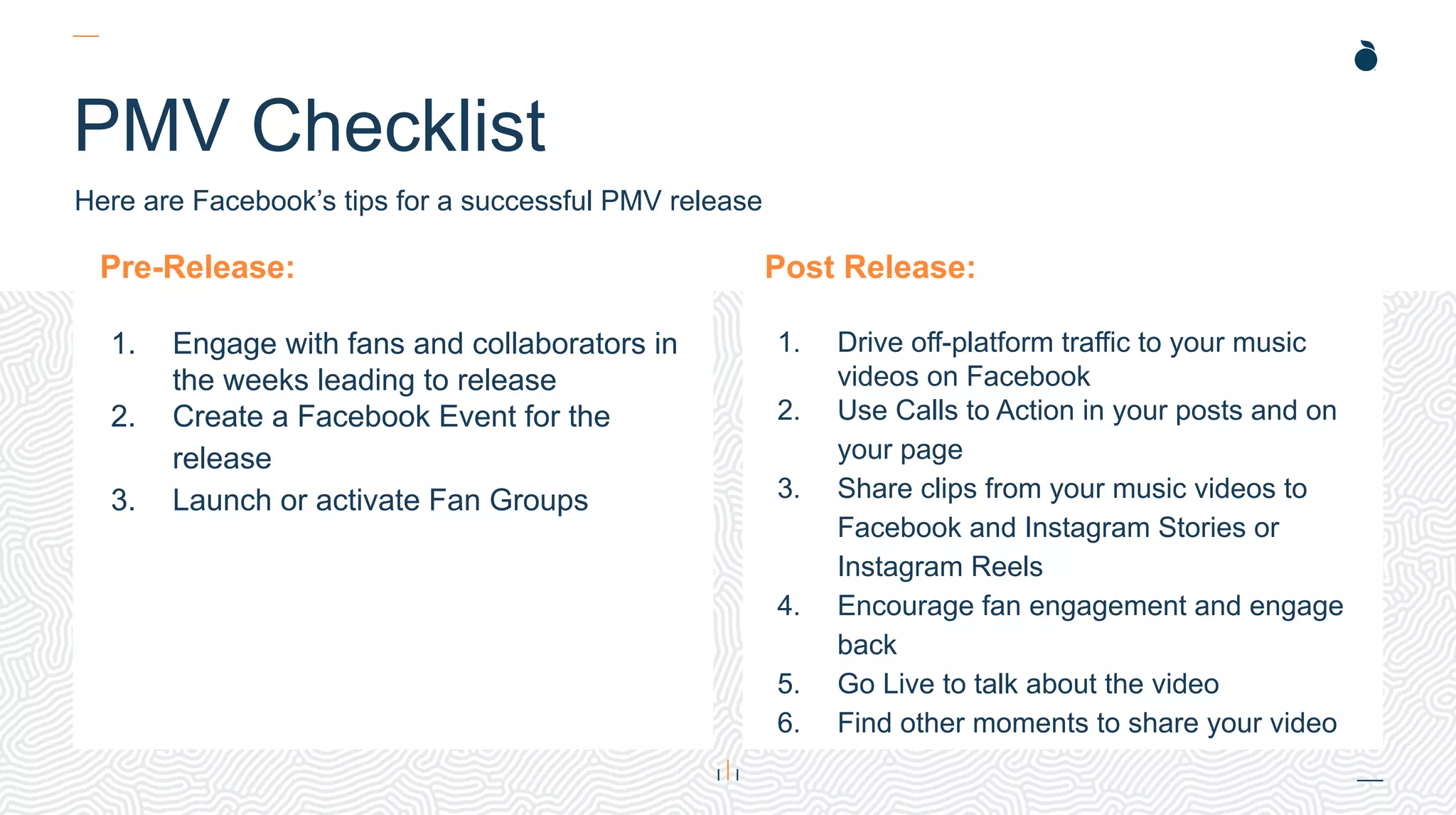
PMV Checklist
Pre-Release:
1. Engage with fans and collaborators in
the weeks leading to release
2. Create a Facebook Event for the
release
3. Launch or activate Fan Groups
Post Release:
1. Drive off-platform traffic to your music
videos on Facebook
2. Use Calls to Action in your posts and on
your page
3. Share clips from your music videos to
Facebook and Instagram Stories or
Instagram Reels
4. Encourage fan engagement and engage
back
5. Go Live to talk about the video
6. Find other moments to share your video
Here are Facebook’s tips for a successful PMV release
Facebook Live
Facebook Live
Live is a great way to connect with your fans in real time! You can go
Live from desktop, mobile, or Creator Studio, and your followers will be
notified. Visit Facebook for instructions on how to go Live from each
platform.
Going Live doesn’t have to be just from a Page, you can go Live in a
Group or an Event’s Page.
If you’re really into video production and want that perfect set up,
Facebook has you covered with their encoding software options and
then go Live using Live Producer.
You can schedule a Live so your followers can put it on their calendar
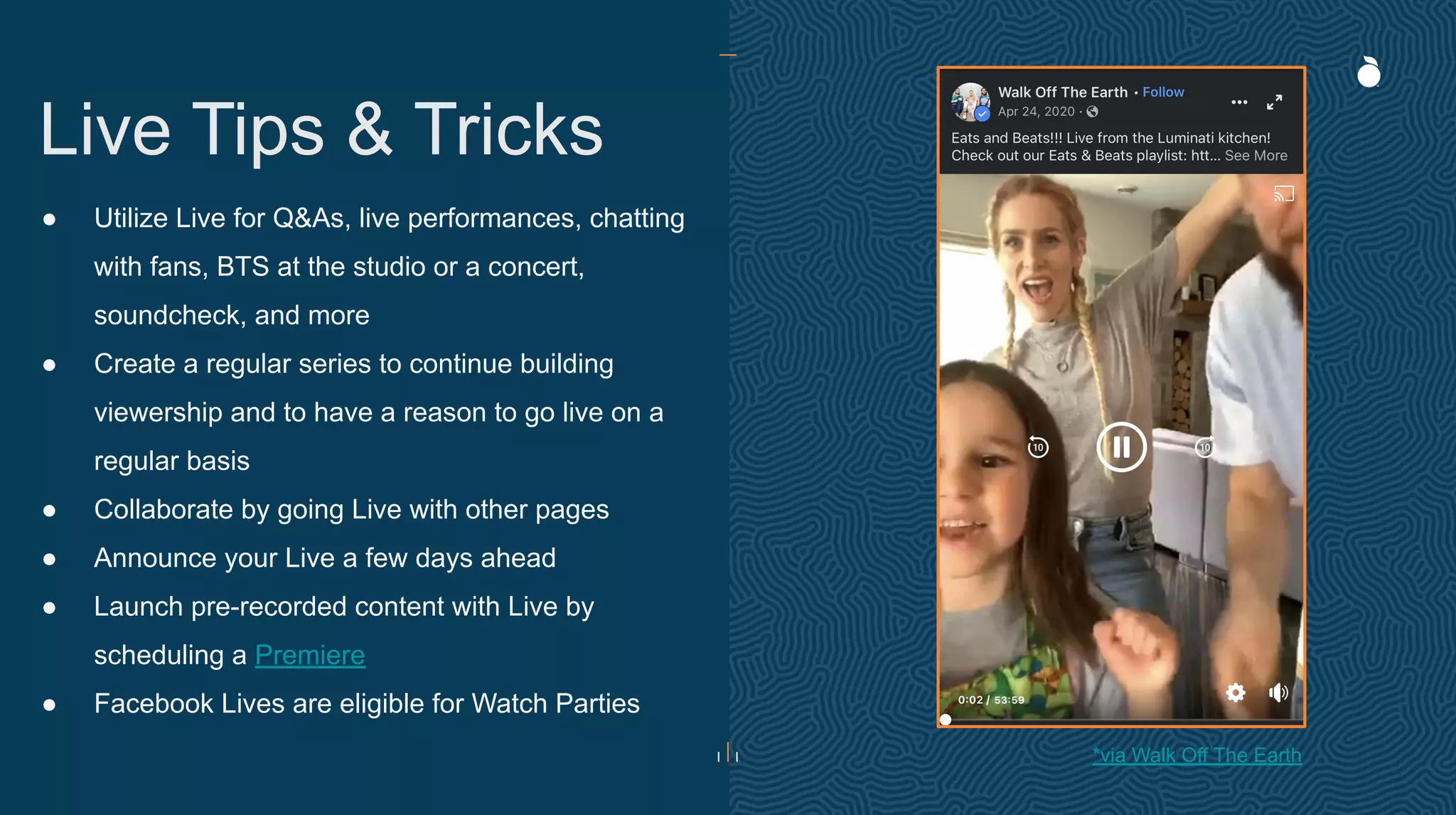
● Utilize Live for Q&As, live performances, chatting
with fans, BTS at the studio or a concert,
soundcheck, and more
● Create a regular series to continue building
viewership and to have a reason to go live on a
regular basis
● Collaborate by going Live with other pages
● Announce your Live a few days ahead
● Launch pre-recorded content with Live by
scheduling a Premiere
● Facebook Lives are eligible for Watch Parties
Live Tips & Tricks
*via Walk Off The Earth
Stories
H: 4.45”
W: 4.0”
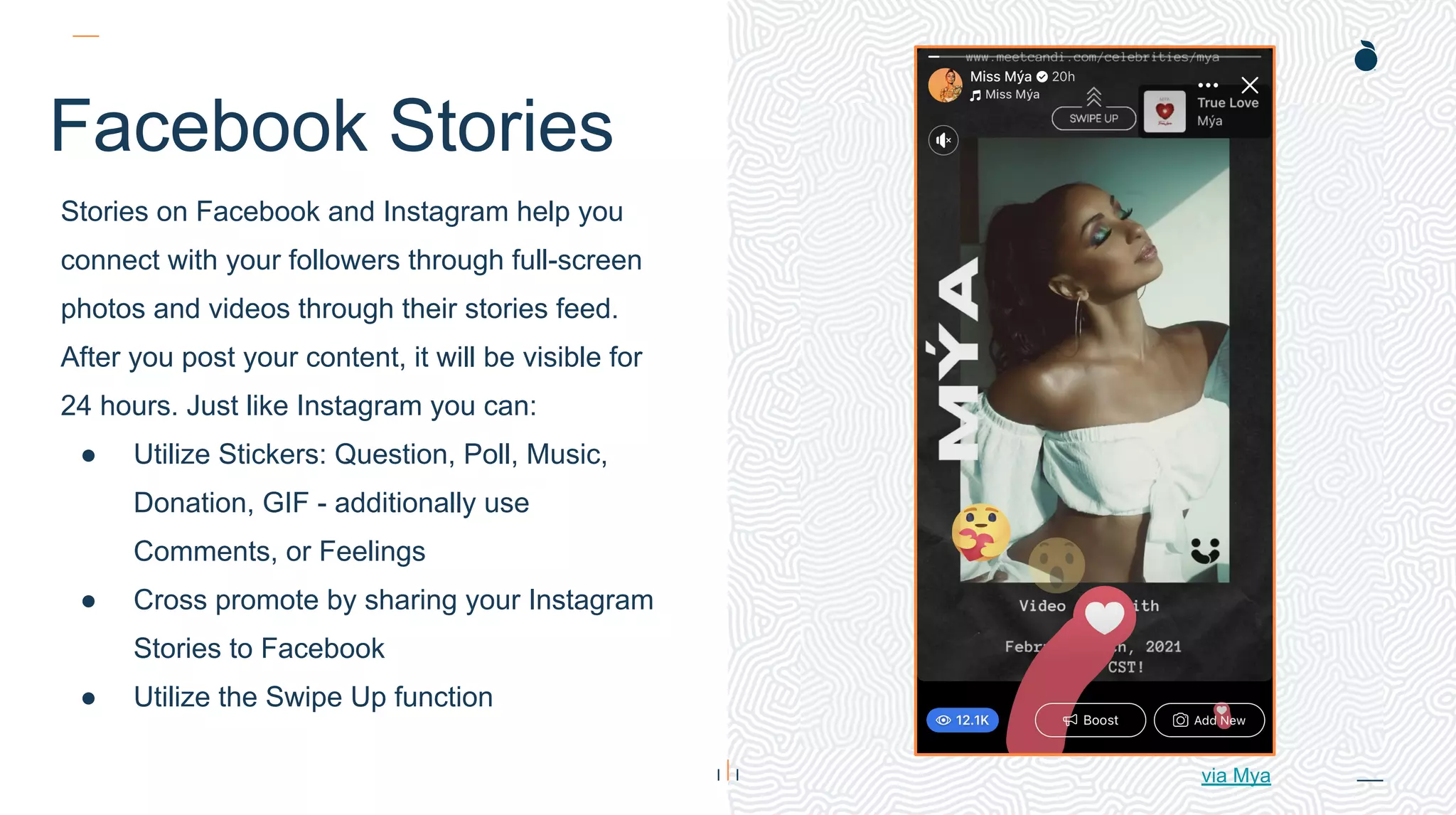
Facebook Stories
Stories on Facebook and Instagram help you
connect with your followers through full-screen
photos and videos through their stories feed.
After you post your content, it will be visible for
24 hours. Just like Instagram you can:
● Utilize Stickers: Question, Poll, Music,
Donation, GIF - additionally use
Comments, or Feelings
● Cross promote by sharing your Instagram
Stories to Facebook
● Utilize the Swipe Up function
via Mya
Spark AR
Instructions
uctions
● Spark AR Studio is Facebook’s tool for
building augmented reality effects that can be
used on Facebook and Instagram stories.
● Anyone can design, upload and publish the
filter to the page with admin access.
● Create filters that have a colorful overlays,
animated objects, randomizers & more. There
are hundreds of things you can incorporate to
make your filter custom and recognizable to
your brand.
Insights
Insights
While we’ve discussed Creator Studio earlier for video analytics,
Facebook offers its full Facebook Insights for overall Page analytics.
You can view:
● Overview
● Ads
● Followers
● Likes
● Reach
● Page Views
● Actions on Page
● Post
● Branded Content
● Events
● Movies
● Stories
● People
● Messages
● Orders
Thank You

Facebook Best Practices 2021

  • 1.
  • 2.
    Contents Introduction How it Works BestPractices Creator Studio Premium Music Videos Facebook Live Stories Insights 03 04 09 16 21 23 26 29
  • 3.
    Introduction With over 2.74billion monthly active users as of the second quarter of 2020, Facebook is the biggest social network worldwide. Facebook has seen a year-over-year increase of 12% in its active users since September 2019 (active users are those who have logged onto Facebook during the last 30 days). However, it’s worth noting the demographics on the platform have changed in recent years. 32.4% of Facebook’s audience is aged 25-34 - the largest audience segment by age. The next largest group is aged 18-24, representing 23.5% of Facebook’s audience. Only 4.7% of Facebook’s audience is 65 or older, and only 5.8% is 17 or under. While that’s the overall figure, the percentage of American adults using Facebook varies by age range: 64% of 12- to 34-years olds, 74% of 35- to 54-year-olds and 52% of those 55 and over. Facebook can be complicated, but successfully managing a page becomes a lot easier thanks to simple changes you can make in your content strategy. This guide will show you how to improve your Facebook posts and go from “stressful” to “social.” *stats via hootsuite
  • 4.
  • 5.
    H: 4.45” W: 4.0” CreatingYour Artist Page Facebook Pages is where your fans can connect and follow you. Most reading have probably set up their Page already, but if you’re new to Facebook, you can set up your page in a snap! 1. Click the plus sign on the top right of your screen 2. Select Page 3. Name your Page 4. Select a Category (hint: Musician/Band) 5. Write a Description 6. Click ‘Create Page’ For additional help, checkout Facebook’s Support Page
  • 6.
    H: 4.0” W: 4.4” H:4.0” W: 4.4” The New Page 6 The biggest change this year for Facebook is their Page update! What’s New: ● Shift of focus from Likes to Followers ● Redesigned simple intuitive layout ● Easier navigation between personal profile and Pages ● Updated task-based admin controls ● Actionable insights and more relevant notifications ● Safety and integrity features to detect spammy content and impersonator accounts ● New Q&A Format What’s The Same: ● Existing posts, content, and information will all remain ● Ads will not change and existing campaigns are not affected ● Existing Admins will remain and receive an automatic invitation to manage the Page when you switch to the new experience via Facebook
  • 7.
    H: 4.45” W: 4.0” OptimizationChecklist Now that you have your Page and know the new layout, make sure that you have your page fully optimized with our checklist: ❏ Add image of video banner reflecting your latest release ❏ Add buy link to the description of your profile and banner image ❏ Pin a post about your latest release ❏ Set ‘Shop Now’ button to follow, your new music, or a video via Kara Marni
  • 8.
    With any platform,Facebook works best when you post authentic, conversational content. Throughout these best practices we’ll discuss all the different Facebook tools you can utilize to share your story with fans! You can also check out the Essential Guide to Facebook Posts here. What To Post While there are a plethora of posts you can make, there are a few things to avoid on Facebook. Here’s our list of don’ts: Do Not Post: ● Misinformation ● Engagement-bait ● Too Many Hashtags ● Misuse of Trending Hashtags ● Hate Speech
  • 9.
  • 10.
    Tagging Accounts ● Tagother pages mentioned in your posts. If your content is relevant to fans of the other pages, Facebook may show your post in those fans’ feeds, increasing your impressions. ● Tag other artists, influencers, festival names, venues, retailers and media outlets when applicable and appropriate. *via Scotty McCreery
  • 11.
    Link Sharing ● Linkto sources when applicable - whether it be to new music, a press piece, merch store etc. ● Make sure these links are shortened for the best optimized appeal ● Make sure the link preview is engaging, and if not, consider adding in your own piece of content: a photo or video relating back to your link *via colony house
  • 12.
    Reply Feature ● The“reply” feature lets you answer fans’ comments within the comments section ● Replying to fans lets them know you see them and encourages engagement ● Don’t use Facebook like Twitter. Spread posts out and have distinct purposes for making them. ● Contain conversations with fans to the comment sections of posts. ● Best practice tip: try to answer fans within 24 hours *via Colony House
  • 13.
    Messenger Rooms *Photo andinformation from Messenger.com • Messenger Room can be joined from Messenger, Facebook, WhatsApp, Instagram, and Portal devices, and can be joined worldwide. • Up to 50 people can join a Messenger Room with video and chat capabilities. • Unlike Live videos, there is no time constraint on Messenger Rooms. • You control who joins by utilizing the guest list for a safe fun experience. • Utilize the desktop app when chatting with a large group, so you can see everyone’s faces at once.
  • 14.
    360 Photos • The360 feature on Facebook is perfect for sharing a more immersive experience with your fans. While you need a special set of cameras to record a 360 video, it is easy to share a photo: • Take a panorama with an iOS or Samsung Galaxy phone. • Use an app like Street View or Google Camera. • Take a 360-degree photo with a 360 camera. *Images via Facebook
  • 15.
    Tips and Tricks ●Share exclusive content on the platform when you are able to. ● Post natively to increase engagement. ● Don’t sync all your platforms together to post from one source. Social networks don’t all communicate in the same way. *via Aubrie Sellers
  • 16.
  • 17.
    Facebook Creator Studio CreatorStudio is a suite of tools designed to help you effectively post, manage, monetize, and analyze all your video content across your Facebook Pages (this tool can also be used for your Instagram Accounts). Through Creator Studio you can: ● Upload, Create, and Post Content ● Schedule Content ● Create Expiring Content ● Get Updates on New Capabilities ● Manage Your Content ● Study Video Insights ● Utilize Monetization ● Streamline Engagement ● Utilize Rights Manager Click here to get started in Creator Studio
  • 18.
    H: 4.45” W: 4.0” Insights ThroughCreator Studio Insights, you can view: ● Video Performance ● Loyalty - fans who come back video after video ● Retention ● Earnings ● Story Performance
  • 19.
    ● 3-5 SecondRule: the first 3-5 seconds are the most important, as this is where viewers decide whether to keep watching or move on. Make sure these first few moments are enticing visually. ● 4:5 Aspect Ratio: 80% of users are accessing FB through mobile, and this ratio is perfectly optimized for mobile. ● Captions: videos autoplay on feeds without sound, so make sure to have a good attention grabbing caption. ● Original Content: make sure the content you post is your own and not from a third party. Video Best Practices *via Kelsea Ballerini *via Facebook Resources for Creators
  • 20.
    Watch Party A funway to engage with your fans and continue to promote your video content is through Watch Parties. Watch Party lets you playlist some of your videos, and then watch them all in real-time with followers. You and your followers have a chat functionality available to comment and talk as you watch. To start a Watch Party, act as if you were making a post, but choose Watch Party from the ‘more options’/’...’ menu. You can even give your Watch Party a title and description. You can also schedule your Watch Party in advance. Read more about Watch Parties on Facebook
  • 21.
  • 22.
    Just launched inAugust of 2020, PMVs bring Premium Music Video content to fans in the US. Music videos are highly discoverable on the platform, as followers get a notification when their favorite artists launch a new video, people discover music videos based on their friend’s watch habits, and new music can be discovered on Facebook Watch. Through Creator Studio you can view analytics and edit your videos. You can edit the title, thumbnail, description, tags, posts text, poll, and closed captions. Premium Music Videos - PMVs
  • 23.
    H: 4.0” W: 4.4” H:4.0” W: 4.4” PMV Checklist Pre-Release: 1. Engage with fans and collaborators in the weeks leading to release 2. Create a Facebook Event for the release 3. Launch or activate Fan Groups Post Release: 1. Drive off-platform traffic to your music videos on Facebook 2. Use Calls to Action in your posts and on your page 3. Share clips from your music videos to Facebook and Instagram Stories or Instagram Reels 4. Encourage fan engagement and engage back 5. Go Live to talk about the video 6. Find other moments to share your video Here are Facebook’s tips for a successful PMV release
  • 24.
  • 25.
    Facebook Live Live isa great way to connect with your fans in real time! You can go Live from desktop, mobile, or Creator Studio, and your followers will be notified. Visit Facebook for instructions on how to go Live from each platform. Going Live doesn’t have to be just from a Page, you can go Live in a Group or an Event’s Page. If you’re really into video production and want that perfect set up, Facebook has you covered with their encoding software options and then go Live using Live Producer. You can schedule a Live so your followers can put it on their calendar
  • 26.
    ● Utilize Livefor Q&As, live performances, chatting with fans, BTS at the studio or a concert, soundcheck, and more ● Create a regular series to continue building viewership and to have a reason to go live on a regular basis ● Collaborate by going Live with other pages ● Announce your Live a few days ahead ● Launch pre-recorded content with Live by scheduling a Premiere ● Facebook Lives are eligible for Watch Parties Live Tips & Tricks *via Walk Off The Earth
  • 27.
  • 28.
    H: 4.45” W: 4.0” FacebookStories Stories on Facebook and Instagram help you connect with your followers through full-screen photos and videos through their stories feed. After you post your content, it will be visible for 24 hours. Just like Instagram you can: ● Utilize Stickers: Question, Poll, Music, Donation, GIF - additionally use Comments, or Feelings ● Cross promote by sharing your Instagram Stories to Facebook ● Utilize the Swipe Up function via Mya
  • 29.
    Spark AR Instructions uctions ● SparkAR Studio is Facebook’s tool for building augmented reality effects that can be used on Facebook and Instagram stories. ● Anyone can design, upload and publish the filter to the page with admin access. ● Create filters that have a colorful overlays, animated objects, randomizers & more. There are hundreds of things you can incorporate to make your filter custom and recognizable to your brand.
  • 30.
  • 31.
    Insights While we’ve discussedCreator Studio earlier for video analytics, Facebook offers its full Facebook Insights for overall Page analytics. You can view: ● Overview ● Ads ● Followers ● Likes ● Reach ● Page Views ● Actions on Page ● Post ● Branded Content ● Events ● Movies ● Stories ● People ● Messages ● Orders
  • 32.