

Twitter
Tips, Tricks, and Best Practices
Contents
Intro
Basics
Key Features
Best Practices
Analytics
03
06
08
17
20
Introduction
Twitter for many can feel daunting, like the open range to some users, but for those who know how to use it there
is still great reward. With over 145 million monetizable (ad seeing) daily active users, Twitter has the potential to
connect you to new and loyal fans alike.
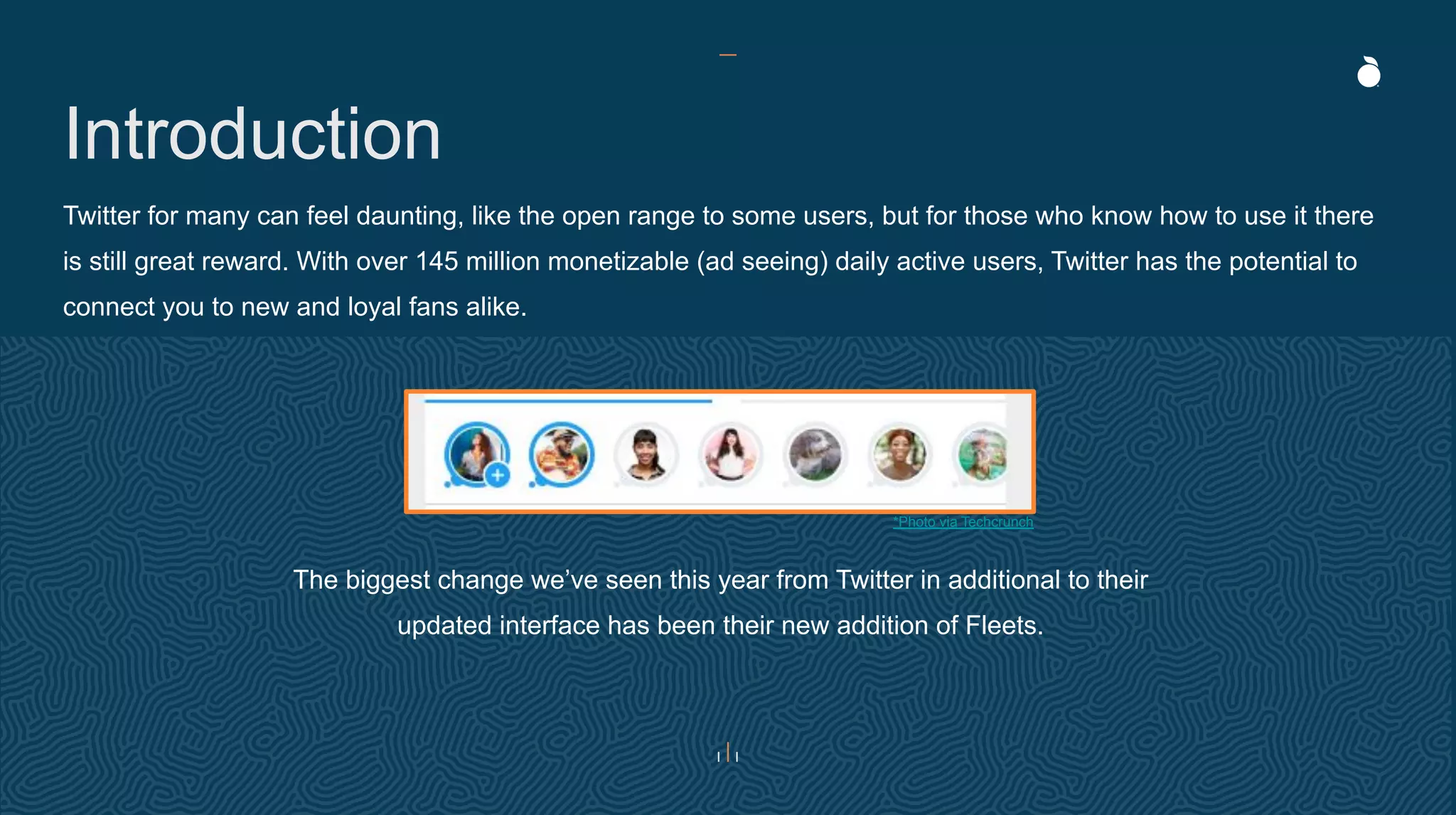
The biggest change we’ve seen this year from Twitter in additional to their
updated interface has been their new addition of Fleets.
*Photo via Techcrunch
Your basic Twitter Encyclopedia
Terminology
Tweet – the messages posted on Twitter.
Retweet (RT) - when you repost something from another person.
Modified Tweet (MT) - when you share someone else’s tweet, but make edits to include your own thoughts.
Subtweet - a tweet written about a person without a direct mention of that person.
Trending Topic (TT) - discussed by many people at one time.
Direct Message (DM) - a private message that you send to a follower.
Handle – the name you choose to represent yourself on Twitter.
Verified Account - accounts that have certified that the user is who they claim to be. These profiles are marked with a blue
checkmark.
Fleets - a shared tweet, image, or text which is share to the top of the newsfeed for 24 hours. This is a new feature meant
for momentary thoughts.
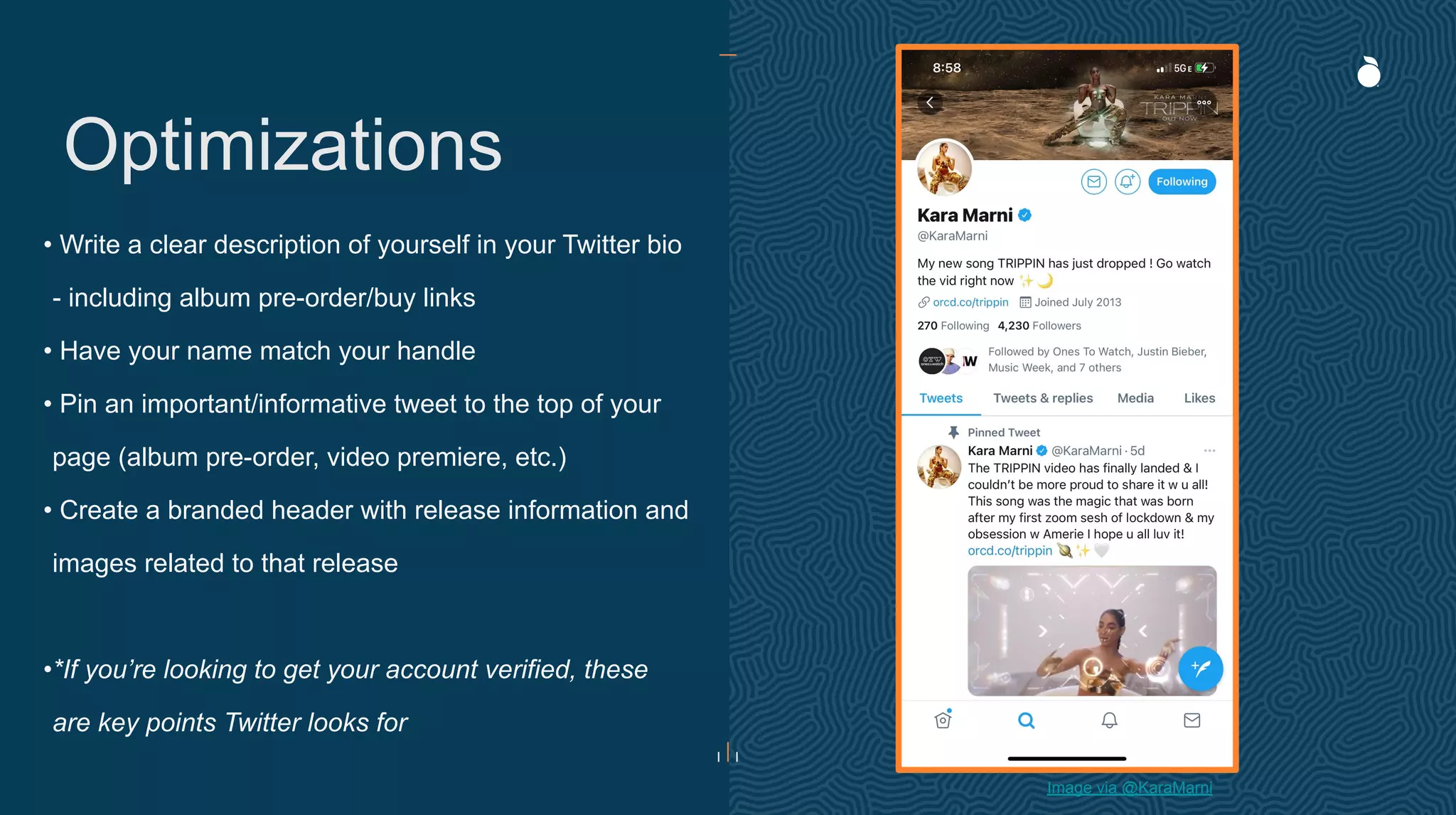
• Write a clear description of yourself in your Twitter bio
- including album pre-order/buy links
• Have your name match your handle
• Pin an important/informative tweet to the top of your
page (album pre-order, video premiere, etc.)
• Create a branded header with release information and
images related to that release
•*If you’re looking to get your account verified, these
are key points Twitter looks for
Optimizations
Image via @KaraMarni
Basics
How does it work?
Basics
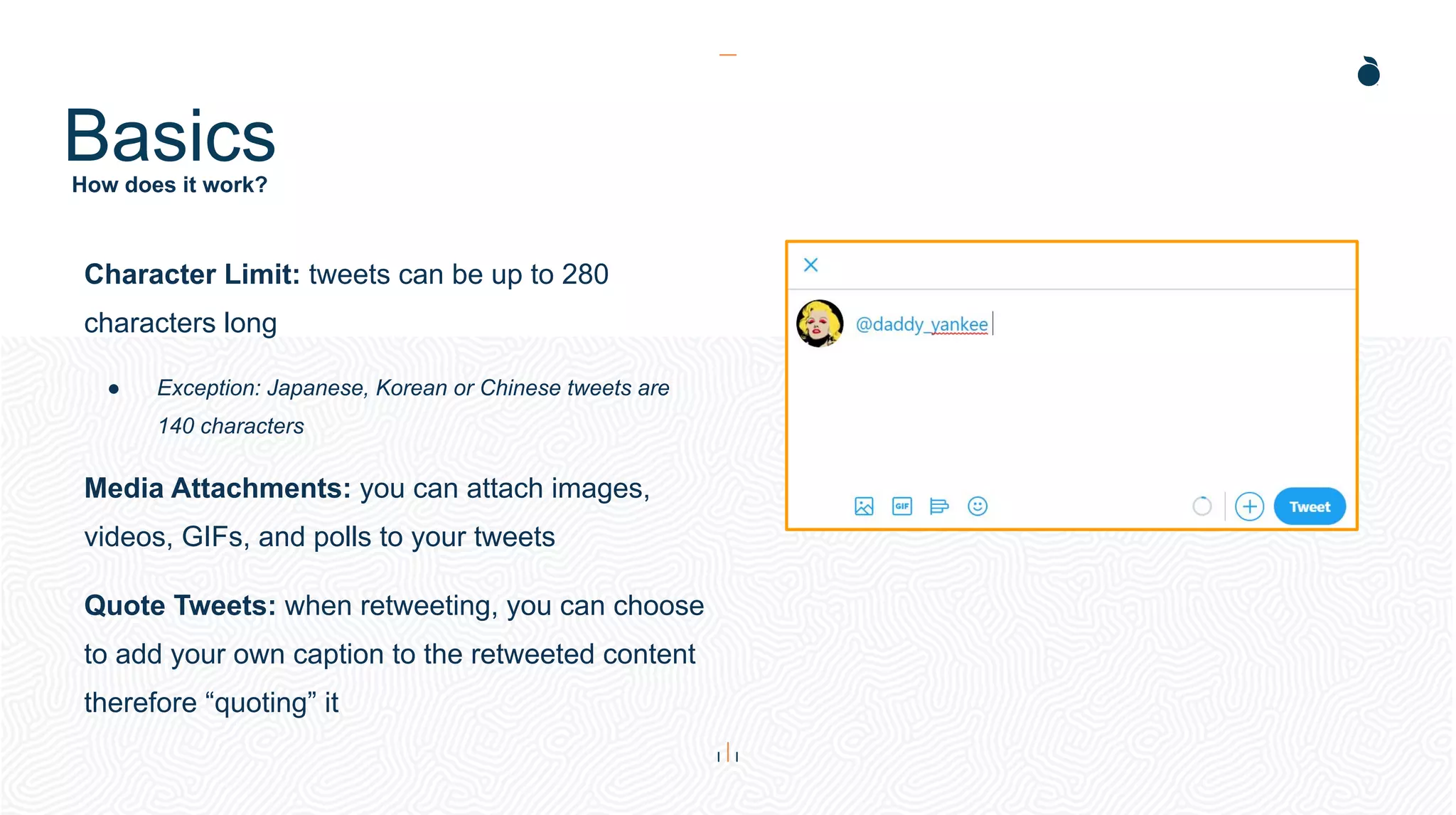
Character Limit: tweets can be up to 280
characters long
● Exception: Japanese, Korean or Chinese tweets are
140 characters
Media Attachments: you can attach images,
videos, GIFs, and polls to your tweets
Quote Tweets: when retweeting, you can choose
to add your own caption to the retweeted content
therefore “quoting” it
Key Features
Fleets
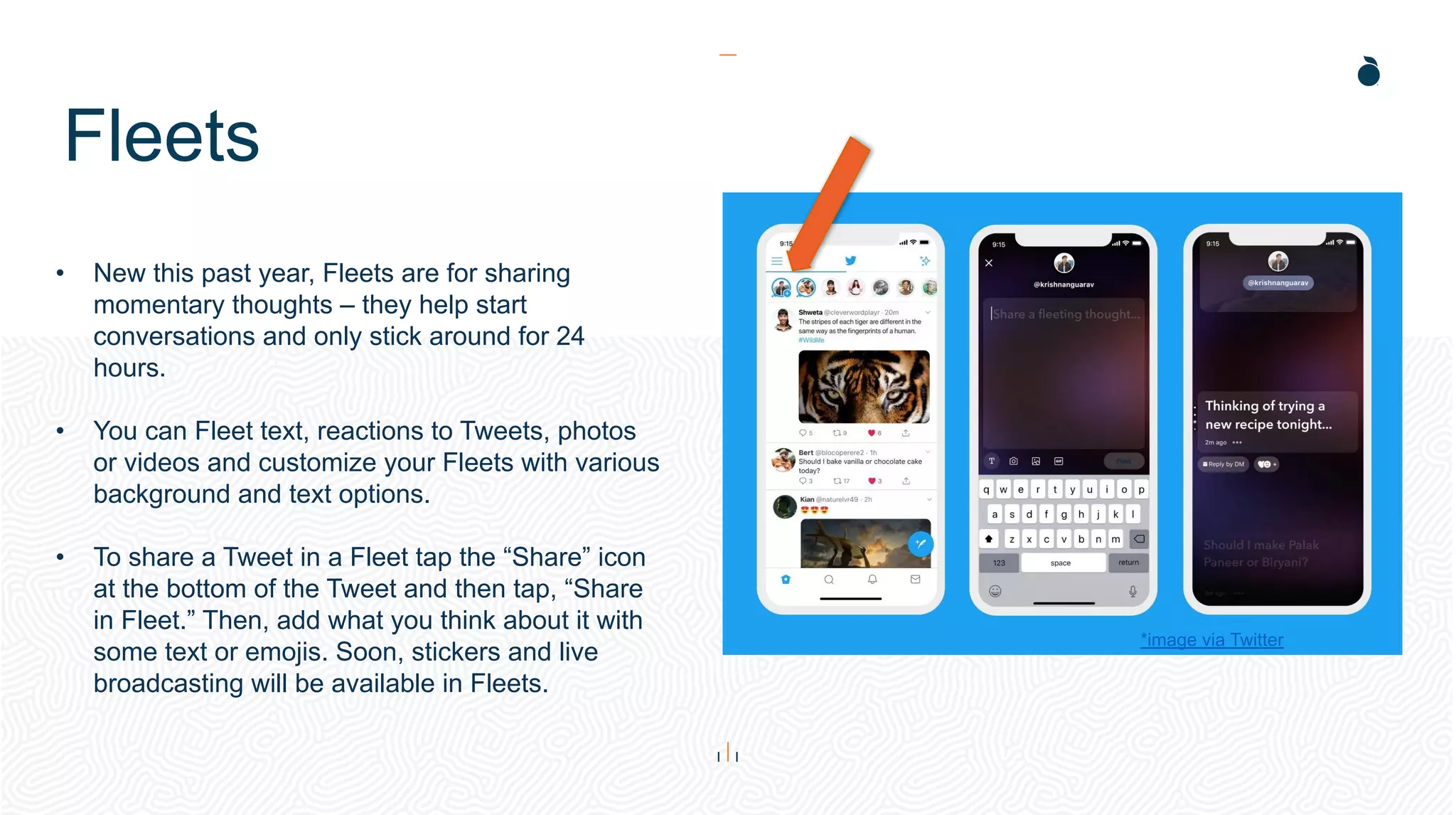
• New this past year, Fleets are for sharing
momentary thoughts – they help start
conversations and only stick around for 24
hours.
• You can Fleet text, reactions to Tweets, photos
or videos and customize your Fleets with various
background and text options.
• To share a Tweet in a Fleet tap the “Share” icon
at the bottom of the Tweet and then tap, “Share
in Fleet.” Then, add what you think about it with
some text or emojis. Soon, stickers and live
broadcasting will be available in Fleets.
*image via Twitter
Auto-Playing Video
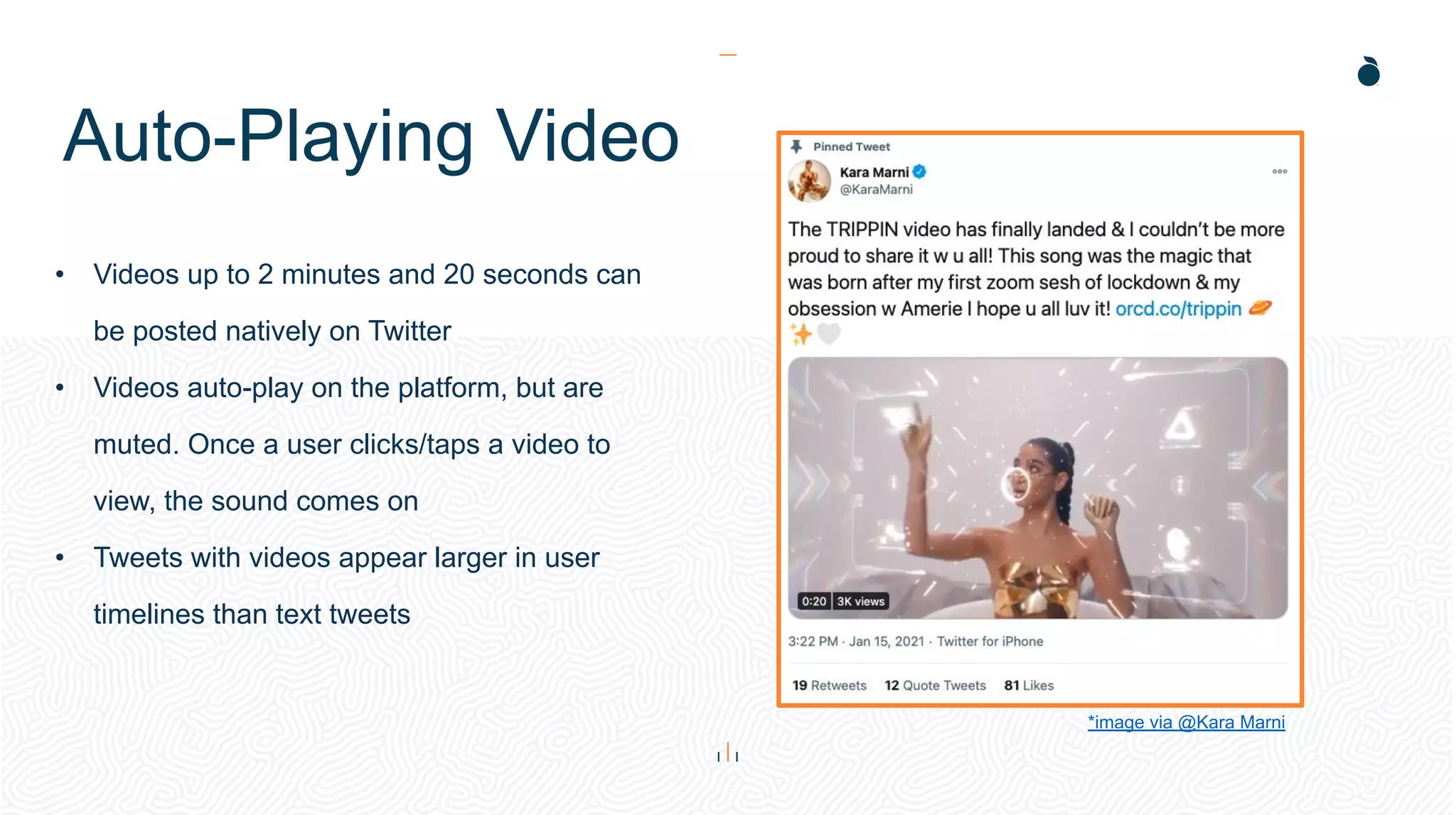
• Videos up to 2 minutes and 20 seconds can
be posted natively on Twitter
• Videos auto-play on the platform, but are
muted. Once a user clicks/taps a video to
view, the sound comes on
• Tweets with videos appear larger in user
timelines than text tweets
*image via @Kara Marni
Polls
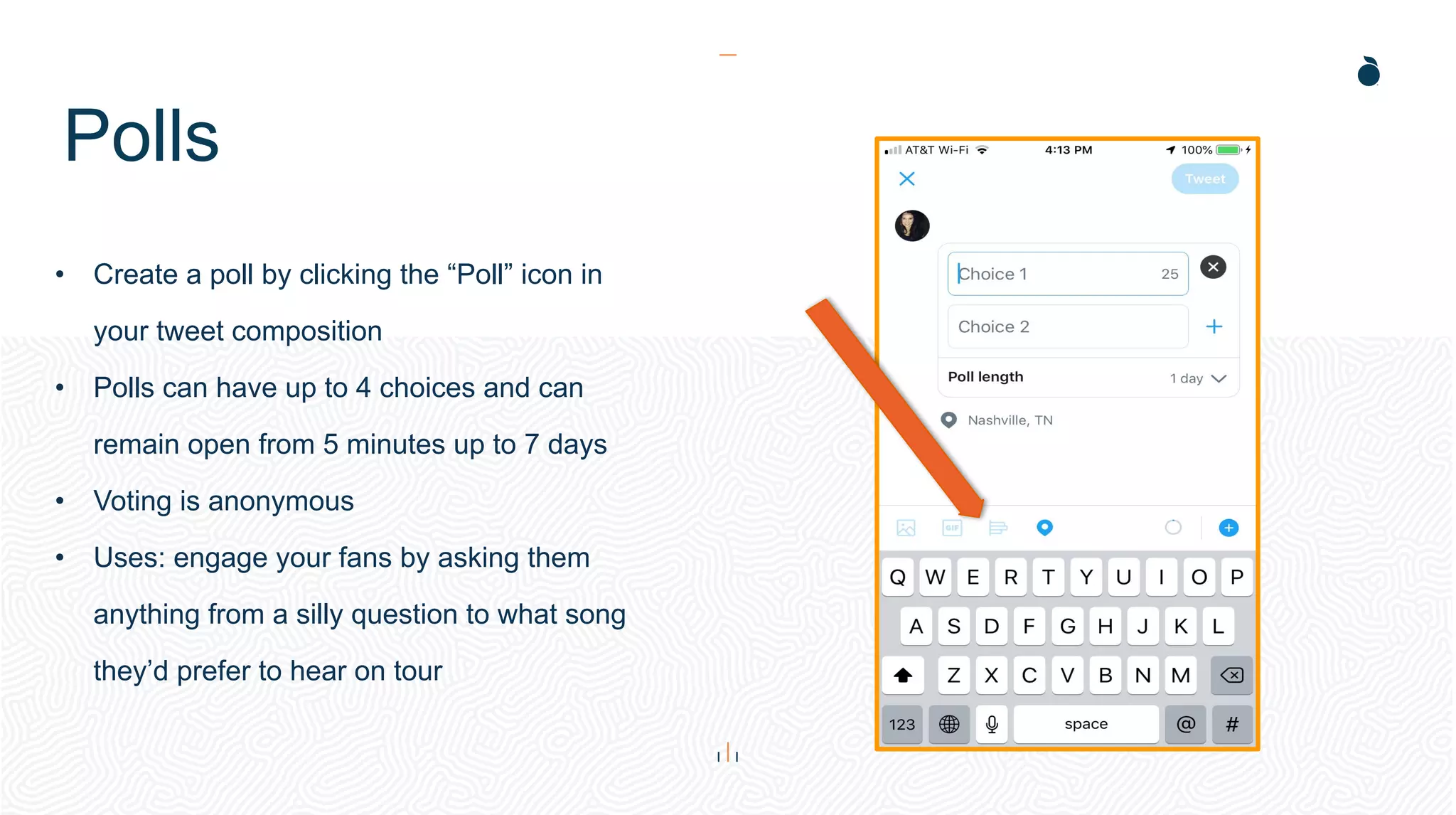
• Create a poll by clicking the “Poll” icon in
your tweet composition
• Polls can have up to 4 choices and can
remain open from 5 minutes up to 7 days
• Voting is anonymous
• Uses: engage your fans by asking them
anything from a silly question to what song
they’d prefer to hear on tour
Threads
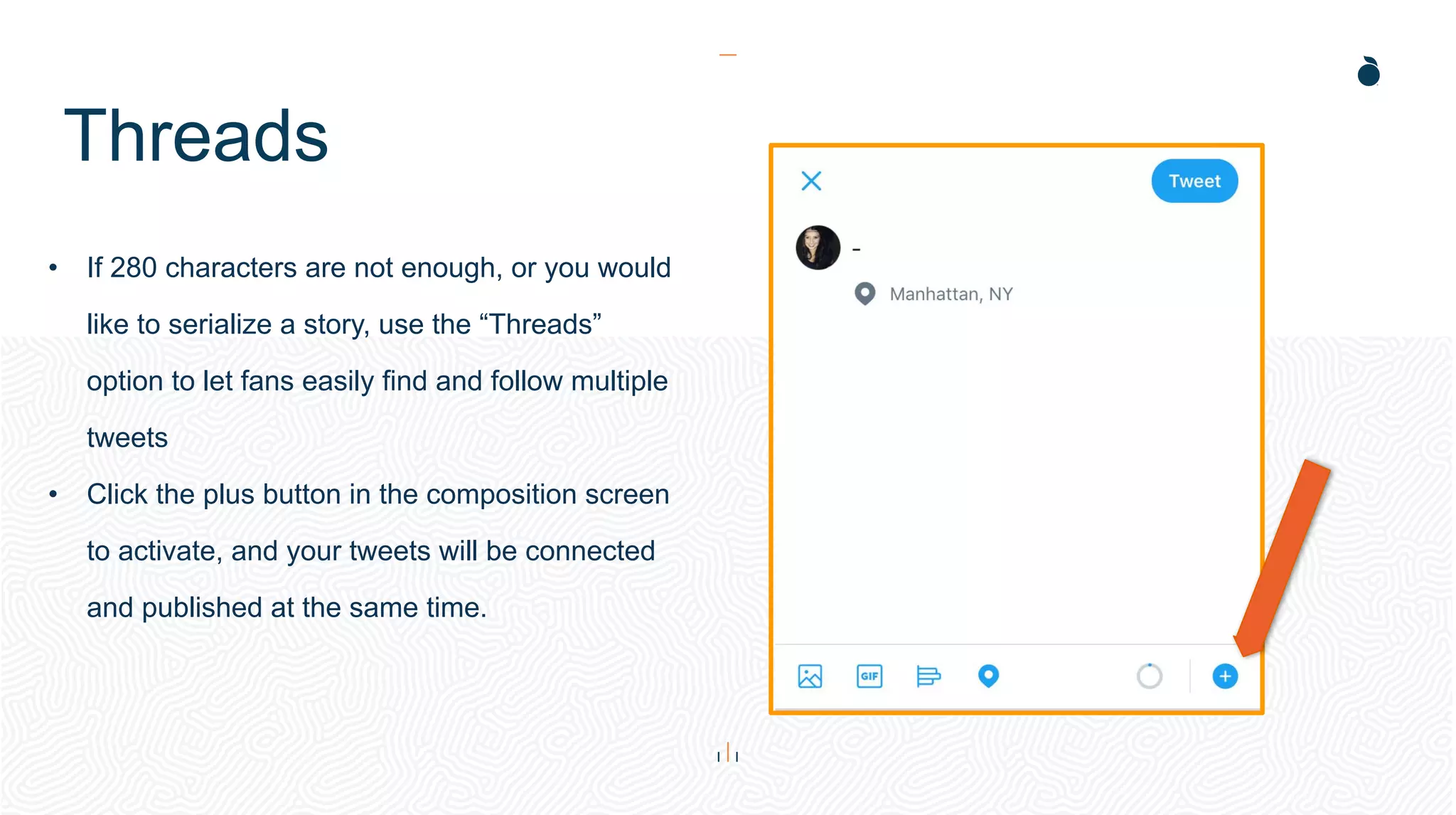
• If 280 characters are not enough, or you would
like to serialize a story, use the “Threads”
option to let fans easily find and follow multiple
tweets
• Click the plus button in the composition screen
to activate, and your tweets will be connected
and published at the same time.
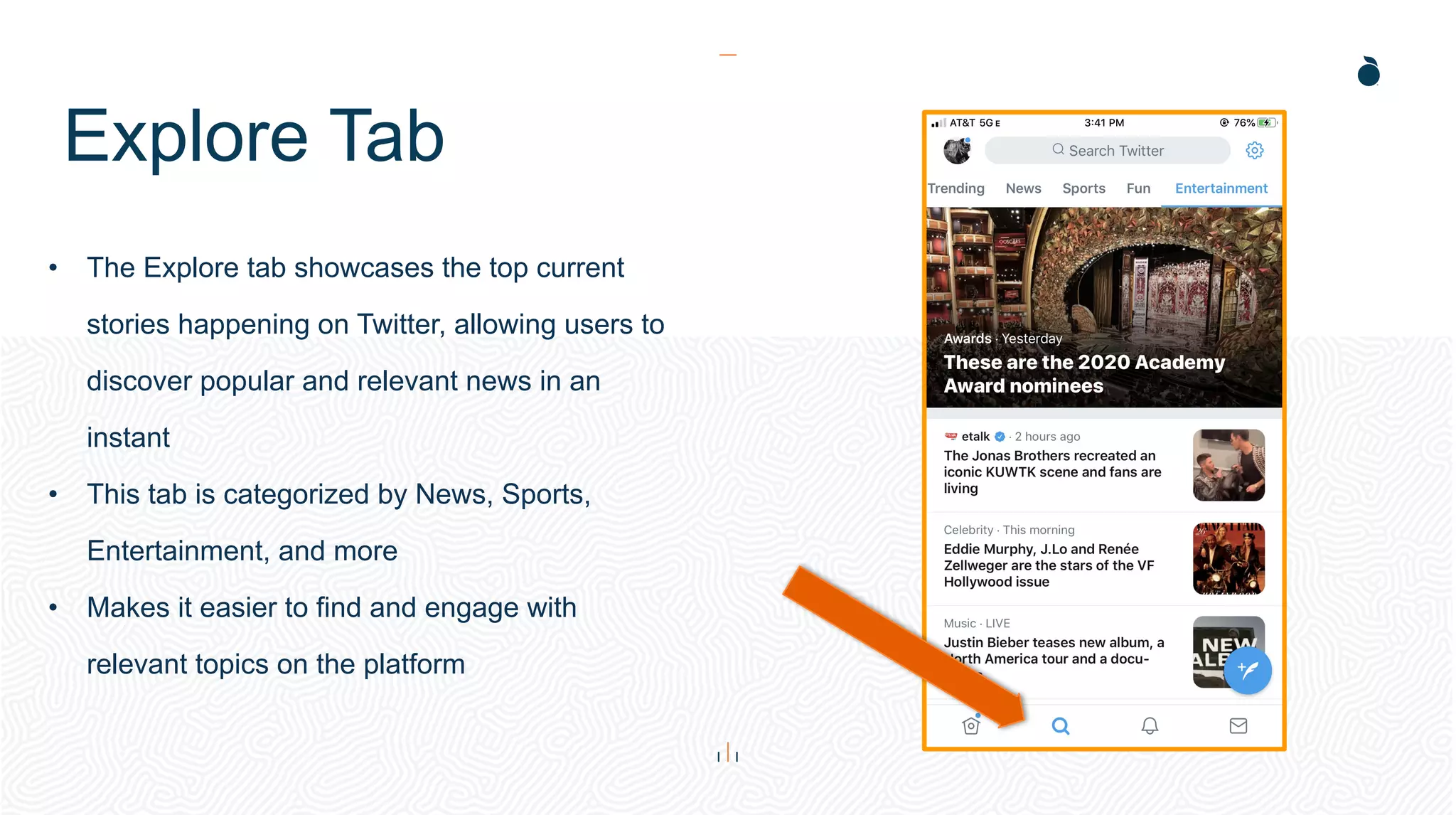
Explore Tab
• The Explore tab showcases the top current
stories happening on Twitter, allowing users to
discover popular and relevant news in an
instant
• This tab is categorized by News, Sports,
Entertainment, and more
• Makes it easier to find and engage with
relevant topics on the platform
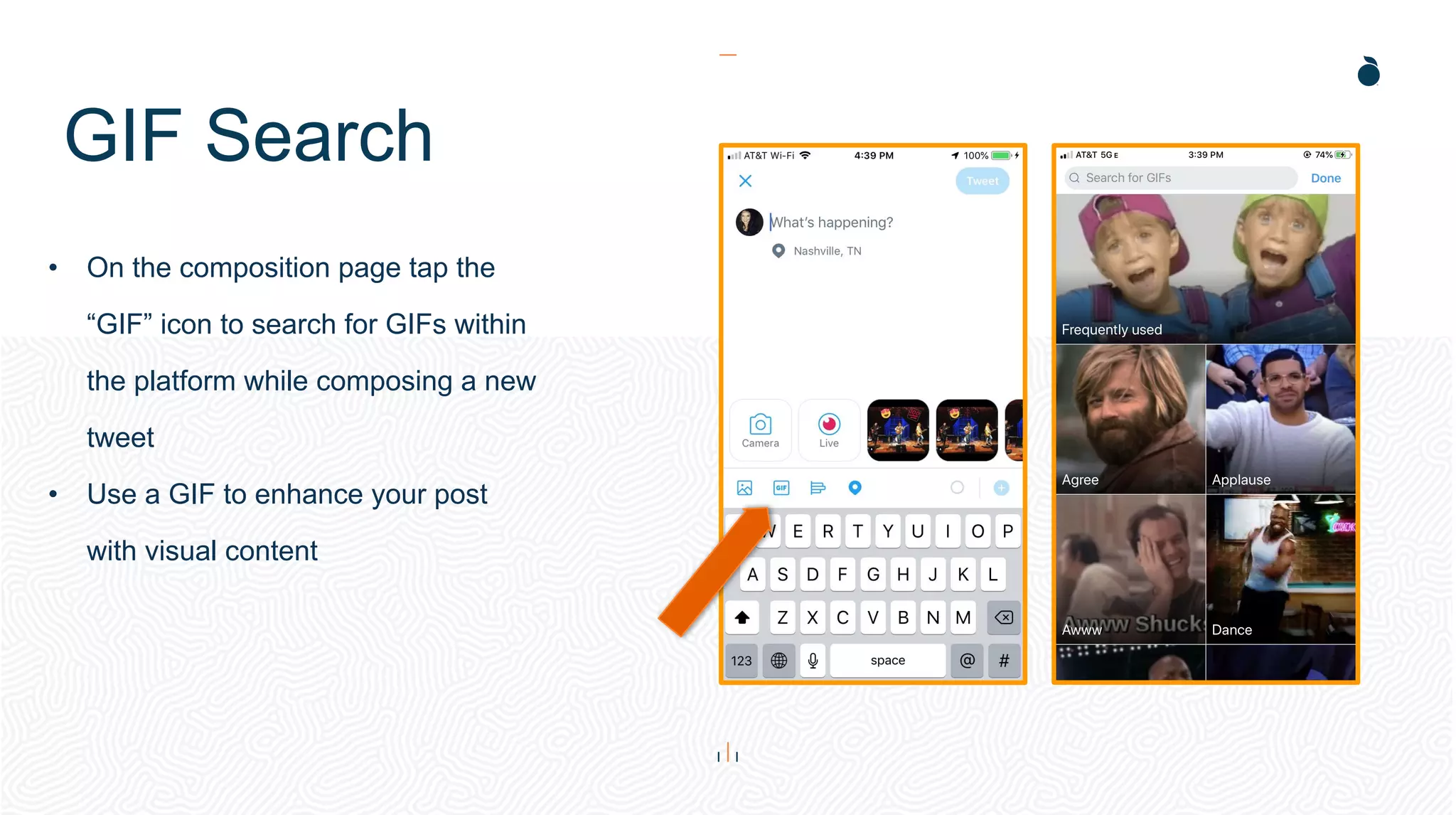
GIF Search
• On the composition page tap the
“GIF” icon to search for GIFs within
the platform while composing a new
tweet
• Use a GIF to enhance your post
with visual content
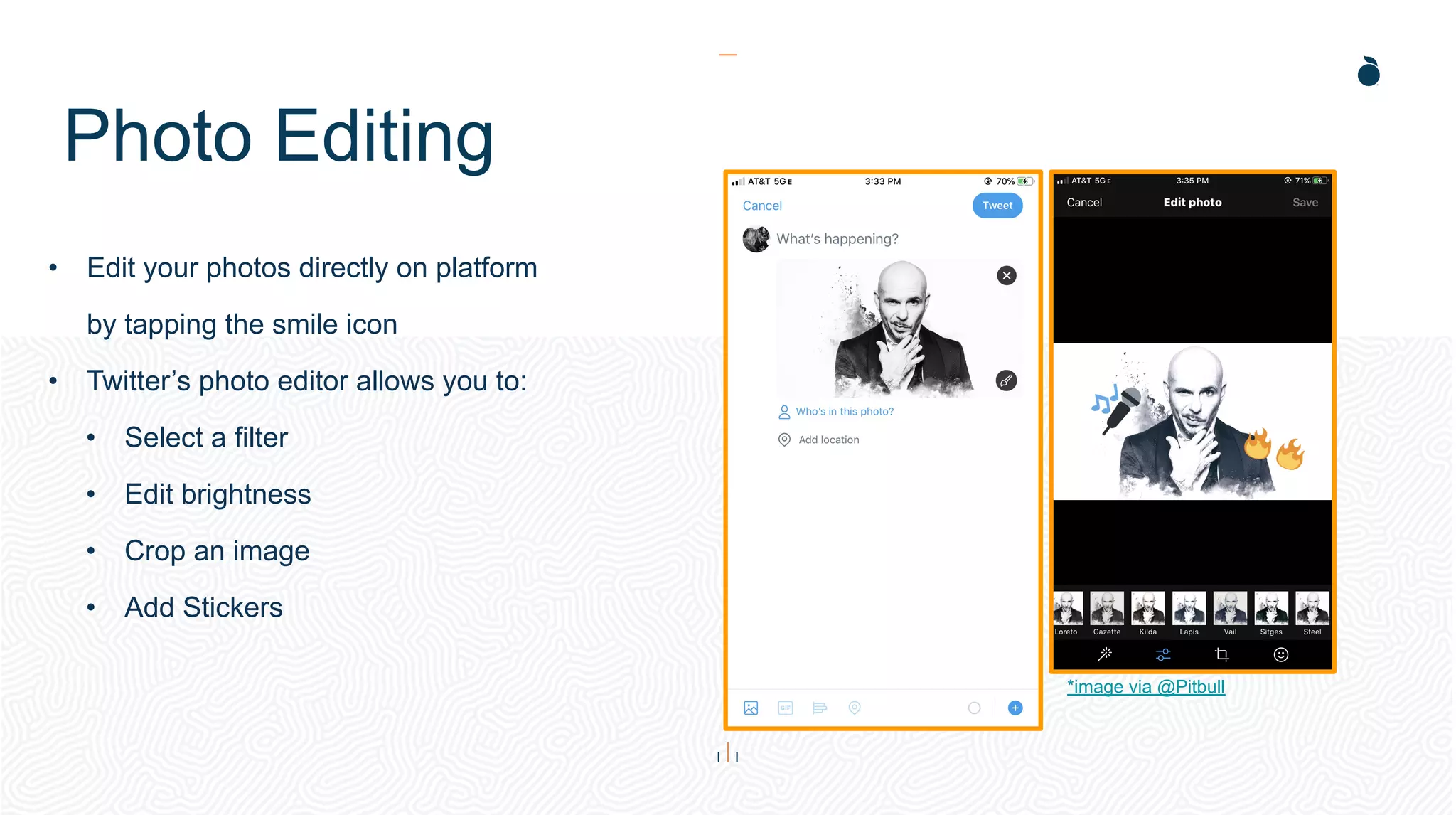
Photo Editing
• Edit your photos directly on platform
by tapping the smile icon
• Twitter’s photo editor allows you to:
• Select a filter
• Edit brightness
• Crop an image
• Add Stickers
*image via @Pitbull
Best Practices
Do...
• Engage your fans by replying to their questions and
comments
• Plan your tweets often - around 3 to 5 times a day
• Keep tweets concise
• Use relevant hashtags in posts to allow users tracking
a hashtag to see your posts - even if they do not
follow you
• Tweet about relevant trending topics
• Retweet yourself to bring new light to an old tweet
• Engage with other Twitter accounts - be a part of the
community
• Over promote - excessive selling, self-promotions,
and retweeting will clutter fan feeds and not
engage - aim for 70% personal tweets, 30%
promotional
• Link to other social networks - sharing from
Facebook and Instagram looks messy on this
platform and is very unengaging for fans
• Share news without a link
• Use too many hashtags - aim for 3 or less per
posts to avoid looking like spam
Do Not...
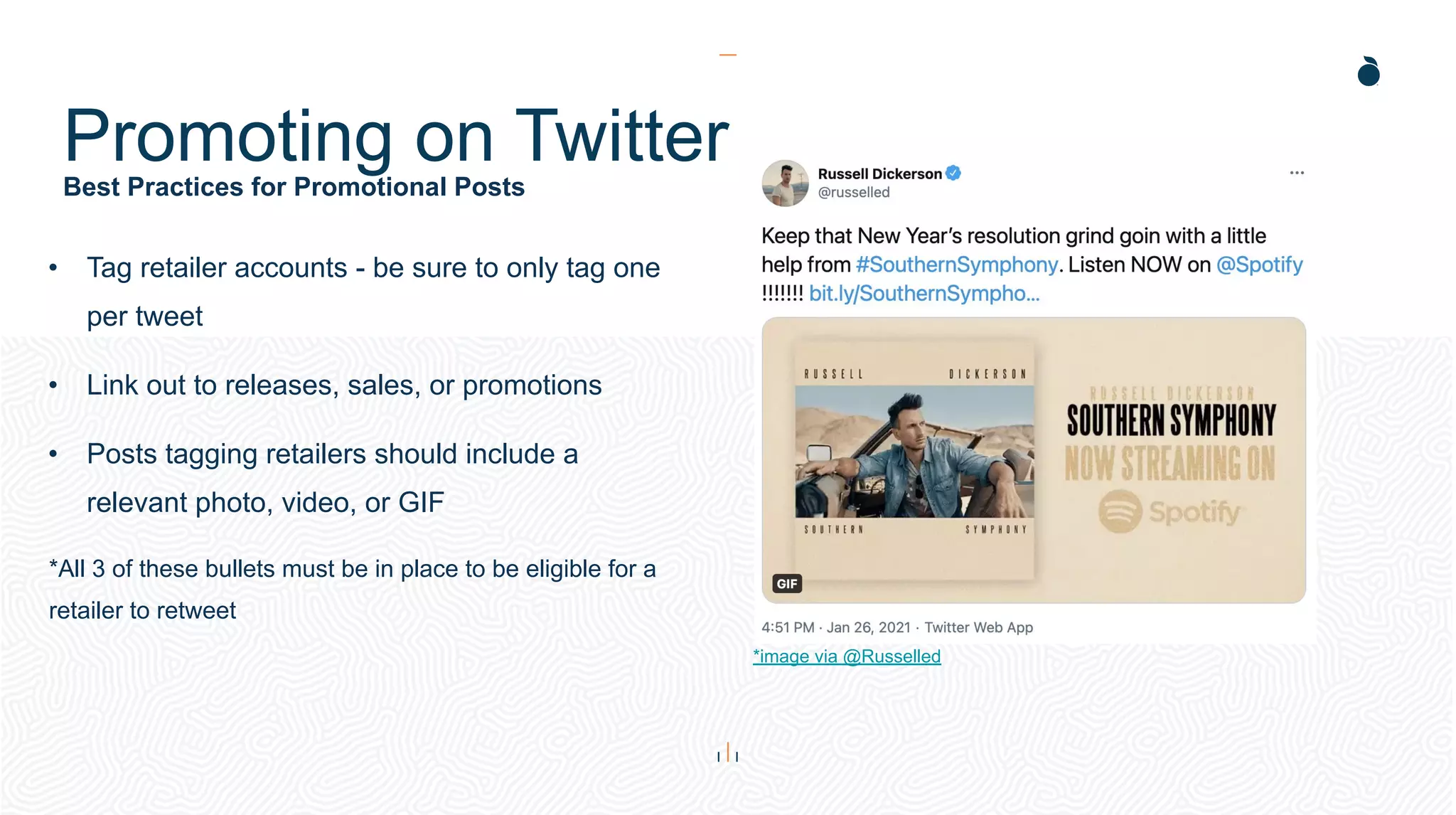
Best Practices for Promotional Posts
Promoting on Twitter
• Tag retailer accounts - be sure to only tag one
per tweet
• Link out to releases, sales, or promotions
• Posts tagging retailers should include a
relevant photo, video, or GIF
*All 3 of these bullets must be in place to be eligible for a
retailer to retweet
*image via @Russelled
Analytics
Analytics
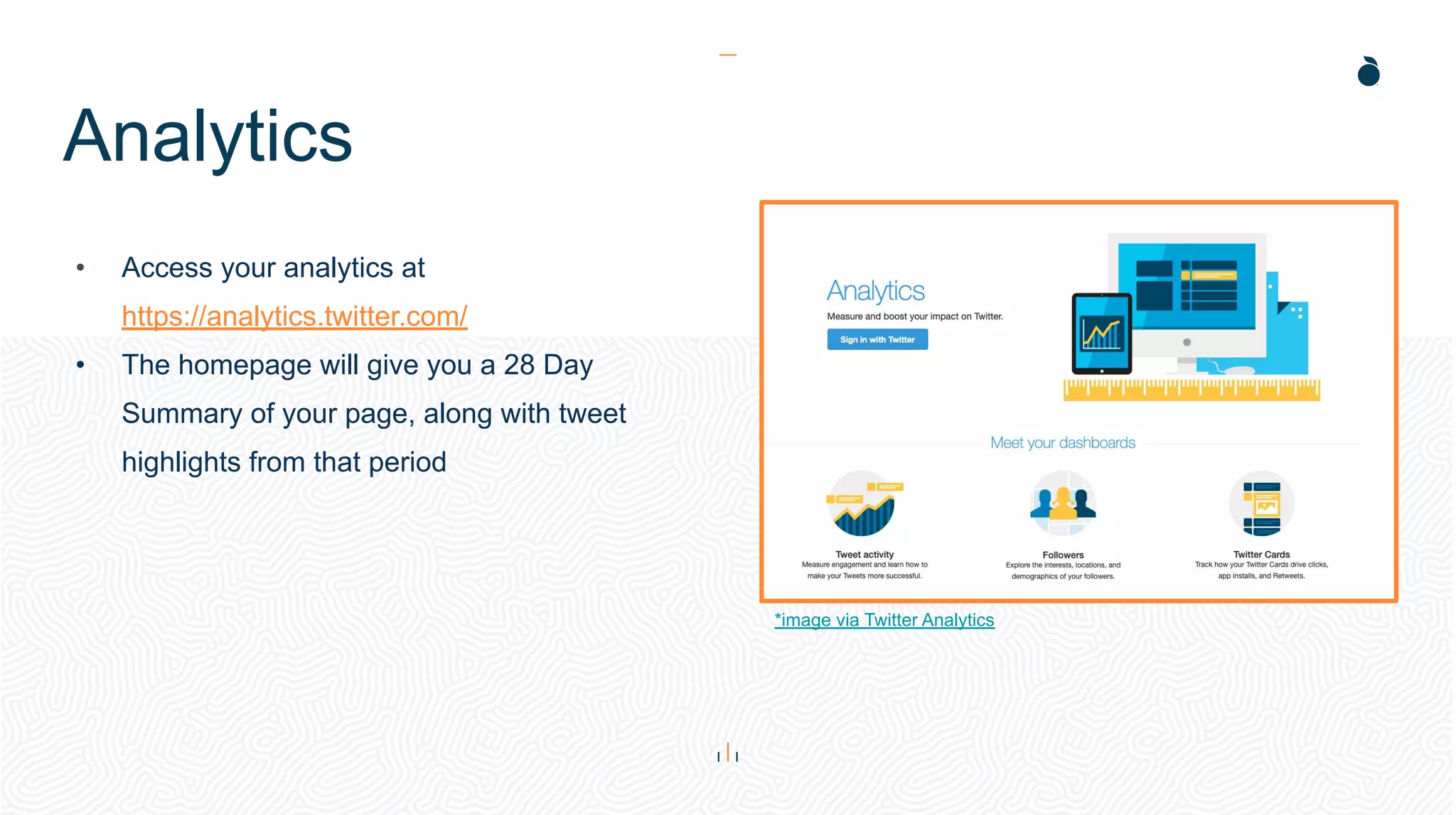
• Access your analytics at
https://analytics.twitter.com/
• The homepage will give you a 28 Day
Summary of your page, along with tweet
highlights from that period
*image via Twitter Analytics
Analytics
• Monitors your impressions, engagement rate, link clicks, retweets, likes, and replies over a
certain amount of time
• You can view the information by: the last 7 days, the last 28 days, by month, or for a
customized amount of time
• Use the Export Data feature to download a .csv file of all your data
• Gives a look at your audience’s top interests, country, region, and demographic breakdown
• View by your followers, all twitter users, or your organic audience
• Use the ‘Comparison Audience’ to see how your fan’s interest match up with different
audiences across Twitter based on: personas, demographics, lifestyle, consumer behavior, or
mobile footprint
Thank You

Twitter 2021 Best Practices

  • 1.
  • 2.
  • 3.
    Introduction Twitter for manycan feel daunting, like the open range to some users, but for those who know how to use it there is still great reward. With over 145 million monetizable (ad seeing) daily active users, Twitter has the potential to connect you to new and loyal fans alike. The biggest change we’ve seen this year from Twitter in additional to their updated interface has been their new addition of Fleets. *Photo via Techcrunch
  • 4.
    Your basic TwitterEncyclopedia Terminology Tweet – the messages posted on Twitter. Retweet (RT) - when you repost something from another person. Modified Tweet (MT) - when you share someone else’s tweet, but make edits to include your own thoughts. Subtweet - a tweet written about a person without a direct mention of that person. Trending Topic (TT) - discussed by many people at one time. Direct Message (DM) - a private message that you send to a follower. Handle – the name you choose to represent yourself on Twitter. Verified Account - accounts that have certified that the user is who they claim to be. These profiles are marked with a blue checkmark. Fleets - a shared tweet, image, or text which is share to the top of the newsfeed for 24 hours. This is a new feature meant for momentary thoughts.
  • 5.
    • Write aclear description of yourself in your Twitter bio - including album pre-order/buy links • Have your name match your handle • Pin an important/informative tweet to the top of your page (album pre-order, video premiere, etc.) • Create a branded header with release information and images related to that release •*If you’re looking to get your account verified, these are key points Twitter looks for Optimizations Image via @KaraMarni
  • 6.
  • 7.
    How does itwork? Basics Character Limit: tweets can be up to 280 characters long ● Exception: Japanese, Korean or Chinese tweets are 140 characters Media Attachments: you can attach images, videos, GIFs, and polls to your tweets Quote Tweets: when retweeting, you can choose to add your own caption to the retweeted content therefore “quoting” it
  • 8.
  • 9.
    Fleets • New thispast year, Fleets are for sharing momentary thoughts – they help start conversations and only stick around for 24 hours. • You can Fleet text, reactions to Tweets, photos or videos and customize your Fleets with various background and text options. • To share a Tweet in a Fleet tap the “Share” icon at the bottom of the Tweet and then tap, “Share in Fleet.” Then, add what you think about it with some text or emojis. Soon, stickers and live broadcasting will be available in Fleets. *image via Twitter
  • 10.
    Auto-Playing Video • Videosup to 2 minutes and 20 seconds can be posted natively on Twitter • Videos auto-play on the platform, but are muted. Once a user clicks/taps a video to view, the sound comes on • Tweets with videos appear larger in user timelines than text tweets *image via @Kara Marni
  • 11.
    Polls • Create apoll by clicking the “Poll” icon in your tweet composition • Polls can have up to 4 choices and can remain open from 5 minutes up to 7 days • Voting is anonymous • Uses: engage your fans by asking them anything from a silly question to what song they’d prefer to hear on tour
  • 12.
    Threads • If 280characters are not enough, or you would like to serialize a story, use the “Threads” option to let fans easily find and follow multiple tweets • Click the plus button in the composition screen to activate, and your tweets will be connected and published at the same time.
  • 13.
    Explore Tab • TheExplore tab showcases the top current stories happening on Twitter, allowing users to discover popular and relevant news in an instant • This tab is categorized by News, Sports, Entertainment, and more • Makes it easier to find and engage with relevant topics on the platform
  • 14.
    GIF Search • Onthe composition page tap the “GIF” icon to search for GIFs within the platform while composing a new tweet • Use a GIF to enhance your post with visual content
  • 15.
    Photo Editing • Edityour photos directly on platform by tapping the smile icon • Twitter’s photo editor allows you to: • Select a filter • Edit brightness • Crop an image • Add Stickers *image via @Pitbull
  • 16.
  • 17.
    Do... • Engage yourfans by replying to their questions and comments • Plan your tweets often - around 3 to 5 times a day • Keep tweets concise • Use relevant hashtags in posts to allow users tracking a hashtag to see your posts - even if they do not follow you • Tweet about relevant trending topics • Retweet yourself to bring new light to an old tweet • Engage with other Twitter accounts - be a part of the community • Over promote - excessive selling, self-promotions, and retweeting will clutter fan feeds and not engage - aim for 70% personal tweets, 30% promotional • Link to other social networks - sharing from Facebook and Instagram looks messy on this platform and is very unengaging for fans • Share news without a link • Use too many hashtags - aim for 3 or less per posts to avoid looking like spam Do Not...
  • 18.
    Best Practices forPromotional Posts Promoting on Twitter • Tag retailer accounts - be sure to only tag one per tweet • Link out to releases, sales, or promotions • Posts tagging retailers should include a relevant photo, video, or GIF *All 3 of these bullets must be in place to be eligible for a retailer to retweet *image via @Russelled
  • 19.
  • 20.
    Analytics • Access youranalytics at https://analytics.twitter.com/ • The homepage will give you a 28 Day Summary of your page, along with tweet highlights from that period *image via Twitter Analytics
  • 21.
    Analytics • Monitors yourimpressions, engagement rate, link clicks, retweets, likes, and replies over a certain amount of time • You can view the information by: the last 7 days, the last 28 days, by month, or for a customized amount of time • Use the Export Data feature to download a .csv file of all your data • Gives a look at your audience’s top interests, country, region, and demographic breakdown • View by your followers, all twitter users, or your organic audience • Use the ‘Comparison Audience’ to see how your fan’s interest match up with different audiences across Twitter based on: personas, demographics, lifestyle, consumer behavior, or mobile footprint
  • 22.