Open Street Map (OSM)

It’s Linux to Windows

It’s about claiming our own world and space


                 Team_PRAT
                 Prashant Menon(10BM60061)
                 Prabhat Agarwal(10BM60059)
Introduction
   OpenStreetMap (OSM) was founded in July 2004
    by Steve Coast
   In April 2006, the OpenStreetMap Foundation (OSMF)
    was established to encourage the growth, development
    and distribution of free geospatial data and provide
    geospatial data for anybody to use and share.
   In March 2008, founders announced that they have
    received venture capital funding of 2.4 million euros
    for CloudMade, a commercial company that will use
    OpenStreetMap data
   In Nov 2011, OpenStreetMap is having 500,000
    registered users
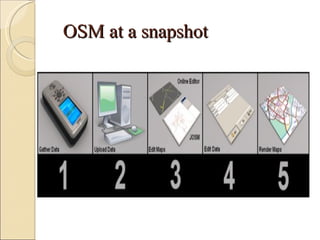
OSM at a snapshot
Methodology
   Download the data from
    http://planet.openstreetmap.org/
   Check the authenticity of the data
   Edit the map
   Edit the data
   Download the latest available map to check if any
    changes has been made to the map
   Upload the map
Data Collection
  Data can be collected by the following methods:
 GPS- This is currently the most common way of
  gathering data for OSM, and often preferred or
  even essential for collecting the initial geometry
  of roads, paths and other ways.
 Local knowledge - Perhaps the best source of
  data, though, is if one simply happen to know the
  area very well, and thus for example the names
  of the roads, which shops or buildings there are,
  the local traffic rules and restrictions, or what
  ever else one might want to add to OSM.
 Seeing mistakes in a map and fixing them.
What data to add
There are lot of data that can be gathered and put
  into OSM:
 Parks and playgrounds
 Shopping malls and supermarket
 Accomodation
 Transport areas
 Water-bodies, Lakes and drains
 Power Supply
 Barriers
 Man-made structures.
Editing the Map

  The map can be edited in the following two
  ways:
 Front End: Using the inbuilt software Potlatch
  in the openstreetmap website
 Back End: Map editing can be done using
  JOSM editor and upload the edited map in the
  OSM website
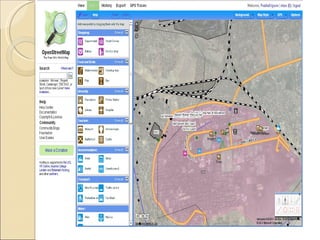
Editing in the website
   Create a user id login
   Click on Edit map to enable editing
   Type the name of place in search tab to get the
    map
   Use potlatch to edit the map
   Once editing is done save the data
   Changes will be reflected in the map
Creating maps using OSM

1. Install JOSM
  First we need to go to the JOSM download site (
  http://josm.openstreetmap.de/) and get the latest
  version. At the bottom of the page we'll find the
  'download' link. Save the 'josm-latest.jar' file on
  your desktop.
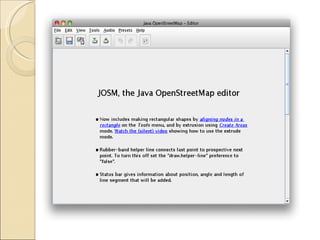
  If everything is okay, one should have the JOSM
  editor application now running and the page
  looks like:
Map Downloading

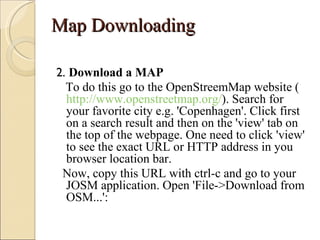
2. Download a MAP
  To do this go to the OpenStreemMap website (
  http://www.openstreetmap.org/). Search for
  your favorite city e.g. 'Copenhagen'. Click first
  on a search result and then on the 'view' tab on
  the top of the webpage. One need to click 'view'
  to see the exact URL or HTTP address in you
  browser location bar.
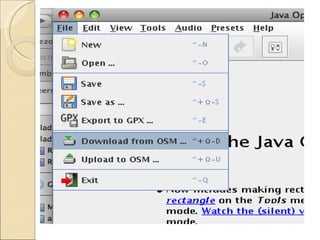
 Now, copy this URL with ctrl-c and go to your
  JOSM application. Open 'File->Download from
  OSM...':
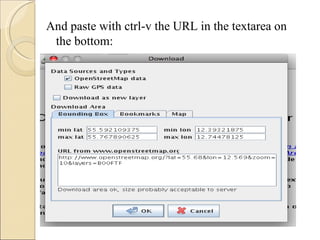
And paste with ctrl-v the URL in the textarea on
 the bottom:
Data Composition
OSM's data is made up from the following elements:
 Nodes: The dots that are used to mark specific locations
  (such as a post box) or for drawing segments between.
 Ways: An ordered list of nodes, displayed as connected
  by line segments. They are used to describe roads, paths
  etc.
 Closed Ways: Closed ways are ways which go in a
  complete loop. They are used to describe areas like parks,
  lakes, islands or buildings.
 Relations: When different ways are linked to each other,
  but do not represent the same physical thing, a relation is
  used to describe the role of each way. They are used to
  describe things like cycling routes, turn restrictions and
  areas with holes.
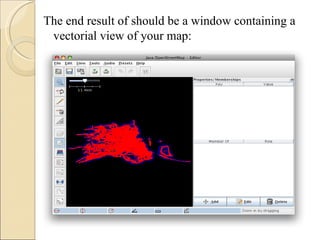
The end result of should be a window containing a
 vectorial view of your map:
Map Rendering
3. Render a MAP
 To transform the vectorial view of the map into
  something more artistic is called rendering. We
  need to process the sample.osm file with some
  tools (eg:osmarender) and calculate all colors,
  images, streets, waterways we need to put on the
  map. One need to download two files and save
  them into the 'openstreetmap' directory:
 osm-map-features-z17.xml
 osmarender.xsl
   The first file is a features file which tells the
  osmarender what you want to put on the map. The
  second file is a stylesheet that directs the actual
  rendering work
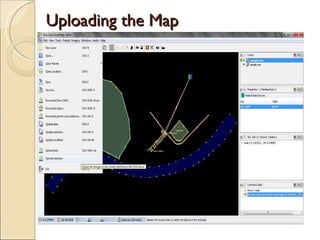
Uploading the Map
Uses/Advantages
    OpenStreetMap can use available satellite
    imagery to map the roads, buildings and refugee
    camps during crisis conditions like earthquake,
    floods or other natural disasters.
   The resulting data and maps can be used by
    several organizations providing relief aid, such as
    Red Cross, etc
   It is compatible with Ushahidi mobile platform (a
    non-profit tech company that develops free and
    open source software for information collection,
    visualization and interactive mapping).
Business Value
   We can form association with different mobile service
    provider which will use this data to display maps on
    mobile phones and other GPS supporting devices.
   The data will also be of use to different Driving Teaching
    agencies which uses street information to teach driving.
   The data of the street maps can be sold to different game
    developing vendors which use street information in their
    high end games.
   We can also use the data to make segmentation for doing
    market survey of some particular products.
   The data can also be used by financial intermediaries like
    bank etc to prepare a loan portfolio of a particular region
    or to prepare credit default rating of a region.
Demonstrating Business Value

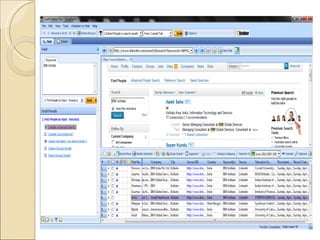
   We have downloaded data about individuals from
    social networking sites like LinkedIn, Jigsaw,
    Spoke, etc using LeadGrabber Pro software
   The addresses of the software professionals can be
    used to make a route map in OSM.
Open street map final ppt

Open street map final ppt

  • 1.
    Open Street Map(OSM) It’s Linux to Windows It’s about claiming our own world and space Team_PRAT Prashant Menon(10BM60061) Prabhat Agarwal(10BM60059)
  • 2.
    Introduction  OpenStreetMap (OSM) was founded in July 2004 by Steve Coast  In April 2006, the OpenStreetMap Foundation (OSMF) was established to encourage the growth, development and distribution of free geospatial data and provide geospatial data for anybody to use and share.  In March 2008, founders announced that they have received venture capital funding of 2.4 million euros for CloudMade, a commercial company that will use OpenStreetMap data  In Nov 2011, OpenStreetMap is having 500,000 registered users
  • 3.
    OSM at asnapshot
  • 4.
    Methodology  Download the data from http://planet.openstreetmap.org/  Check the authenticity of the data  Edit the map  Edit the data  Download the latest available map to check if any changes has been made to the map  Upload the map
  • 5.
    Data Collection Data can be collected by the following methods:  GPS- This is currently the most common way of gathering data for OSM, and often preferred or even essential for collecting the initial geometry of roads, paths and other ways.  Local knowledge - Perhaps the best source of data, though, is if one simply happen to know the area very well, and thus for example the names of the roads, which shops or buildings there are, the local traffic rules and restrictions, or what ever else one might want to add to OSM.  Seeing mistakes in a map and fixing them.
  • 6.
    What data toadd There are lot of data that can be gathered and put into OSM:  Parks and playgrounds  Shopping malls and supermarket  Accomodation  Transport areas  Water-bodies, Lakes and drains  Power Supply  Barriers  Man-made structures.
  • 7.
    Editing the Map The map can be edited in the following two ways:  Front End: Using the inbuilt software Potlatch in the openstreetmap website  Back End: Map editing can be done using JOSM editor and upload the edited map in the OSM website
  • 8.
    Editing in thewebsite  Create a user id login  Click on Edit map to enable editing  Type the name of place in search tab to get the map  Use potlatch to edit the map  Once editing is done save the data  Changes will be reflected in the map
  • 10.
    Creating maps usingOSM 1. Install JOSM First we need to go to the JOSM download site ( http://josm.openstreetmap.de/) and get the latest version. At the bottom of the page we'll find the 'download' link. Save the 'josm-latest.jar' file on your desktop. If everything is okay, one should have the JOSM editor application now running and the page looks like:
  • 12.
    Map Downloading 2. Downloada MAP To do this go to the OpenStreemMap website ( http://www.openstreetmap.org/). Search for your favorite city e.g. 'Copenhagen'. Click first on a search result and then on the 'view' tab on the top of the webpage. One need to click 'view' to see the exact URL or HTTP address in you browser location bar. Now, copy this URL with ctrl-c and go to your JOSM application. Open 'File->Download from OSM...':
  • 14.
    And paste withctrl-v the URL in the textarea on the bottom:
  • 15.
    Data Composition OSM's datais made up from the following elements:  Nodes: The dots that are used to mark specific locations (such as a post box) or for drawing segments between.  Ways: An ordered list of nodes, displayed as connected by line segments. They are used to describe roads, paths etc.  Closed Ways: Closed ways are ways which go in a complete loop. They are used to describe areas like parks, lakes, islands or buildings.  Relations: When different ways are linked to each other, but do not represent the same physical thing, a relation is used to describe the role of each way. They are used to describe things like cycling routes, turn restrictions and areas with holes.
  • 16.
    The end resultof should be a window containing a vectorial view of your map:
  • 17.
    Map Rendering 3. Rendera MAP  To transform the vectorial view of the map into something more artistic is called rendering. We need to process the sample.osm file with some tools (eg:osmarender) and calculate all colors, images, streets, waterways we need to put on the map. One need to download two files and save them into the 'openstreetmap' directory:  osm-map-features-z17.xml  osmarender.xsl The first file is a features file which tells the osmarender what you want to put on the map. The second file is a stylesheet that directs the actual rendering work
  • 18.
  • 19.
    Uses/Advantages  OpenStreetMap can use available satellite imagery to map the roads, buildings and refugee camps during crisis conditions like earthquake, floods or other natural disasters.  The resulting data and maps can be used by several organizations providing relief aid, such as Red Cross, etc  It is compatible with Ushahidi mobile platform (a non-profit tech company that develops free and open source software for information collection, visualization and interactive mapping).
  • 20.
    Business Value  We can form association with different mobile service provider which will use this data to display maps on mobile phones and other GPS supporting devices.  The data will also be of use to different Driving Teaching agencies which uses street information to teach driving.  The data of the street maps can be sold to different game developing vendors which use street information in their high end games.  We can also use the data to make segmentation for doing market survey of some particular products.  The data can also be used by financial intermediaries like bank etc to prepare a loan portfolio of a particular region or to prepare credit default rating of a region.
  • 21.
    Demonstrating Business Value  We have downloaded data about individuals from social networking sites like LinkedIn, Jigsaw, Spoke, etc using LeadGrabber Pro software  The addresses of the software professionals can be used to make a route map in OSM.