Pentesting iPhone Applications


            satishb3@hotmail.com
Agenda
• iPhone App Basics
   – App development
   – App distribution


• Pentesting iPhone Apps
   – Methodology
   – Areas of focus


• Major Mobile Threats
Who am I

     <1            • Framework for functional testing tools
 Development


                   • Web application hacking, Network assessments,
5+ Information       Reverse engineering, Mobile application hacking…
   Security


                   • OWASP Hyderabad Contributor
Other Activities   • Blogging - Securitylearn.wordpress.com


                                                                        3
iPhone App Basics
• iPhone released in 2007
   – 110 million sales till March 2011

• Browser based Applications
   – HTML + CSS + JavaScript

• Native iOS Applications
   – Objective C & Cocoa Touch API
       • Super set of C, Compiles into native code (ARM)


• App Store
   – Centralized mechanism to distribute software
   – Only Apple signed application are available
   – Designed to protect the Apps from piracy & No malware
Why to build iPhone Application?
•   New business
•   Good way to launch new services
•   Urgency for clients
•   Users want them
•   Quick to develop
•   Fame and Fortune
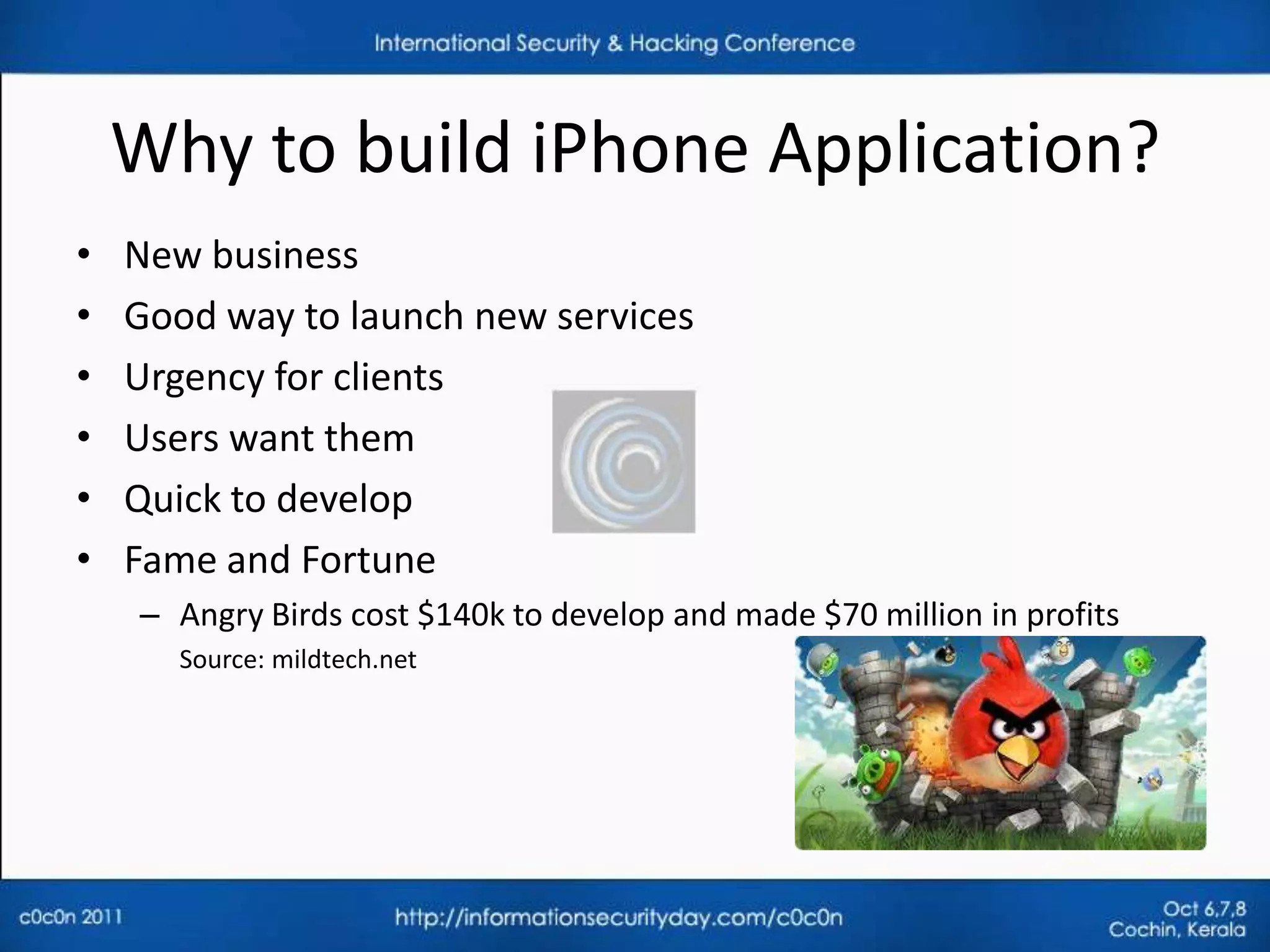
    – Angry Birds cost $140k to develop and made $70 million in profits
       Source: mildtech.net
iPhone Application Distribution
Distributed as .ipa files

•   iOS Simulator
•   Device testing
•   Ad-Hoc Distribution
•   In-House Distribution
•   Over The Air Distribution
•   App Store Distribution
    – Apps have to obey Apple Review guidelines
Pentesting of iPhone Applications
• Areas of focus include
   –   Network communication
   –   Privacy Issues
   –   Application Data Storage
   –   Reverse Engineering
   –   URL Schemes
   –   Push Notifications


• Overlap between iPhone security and iPhone App security
JailBreaking
• iPhone does not allow unsigned applications
• Jailbreak gives a full access to the device
• Allows to install Apps which are not authorized (via Cydia)
• Can put your phone at increased risk to some security
  vulnerabilities
• Tools: PwnageTool, redsn0w, Sn0wbreeze,
         Greenpois0n, jailbreakMe…

• JailBreaking makes our work easy
Useful Cydia Apps
•   Openssh : SSH to phone
•   Adv-cmds : process commands like ps, kill…
•   Sqlite3 : Sqlite database client
•   GNU Debugger: Reverse engineering
•   Syslogd : To view iPhone logs
•   Tcpdump: capture traffic on phone
•   com.ericasadun.utlities: plutil (view plist files)
•   Darwin tools: Strings command
•   Odcctools: otool, nm …
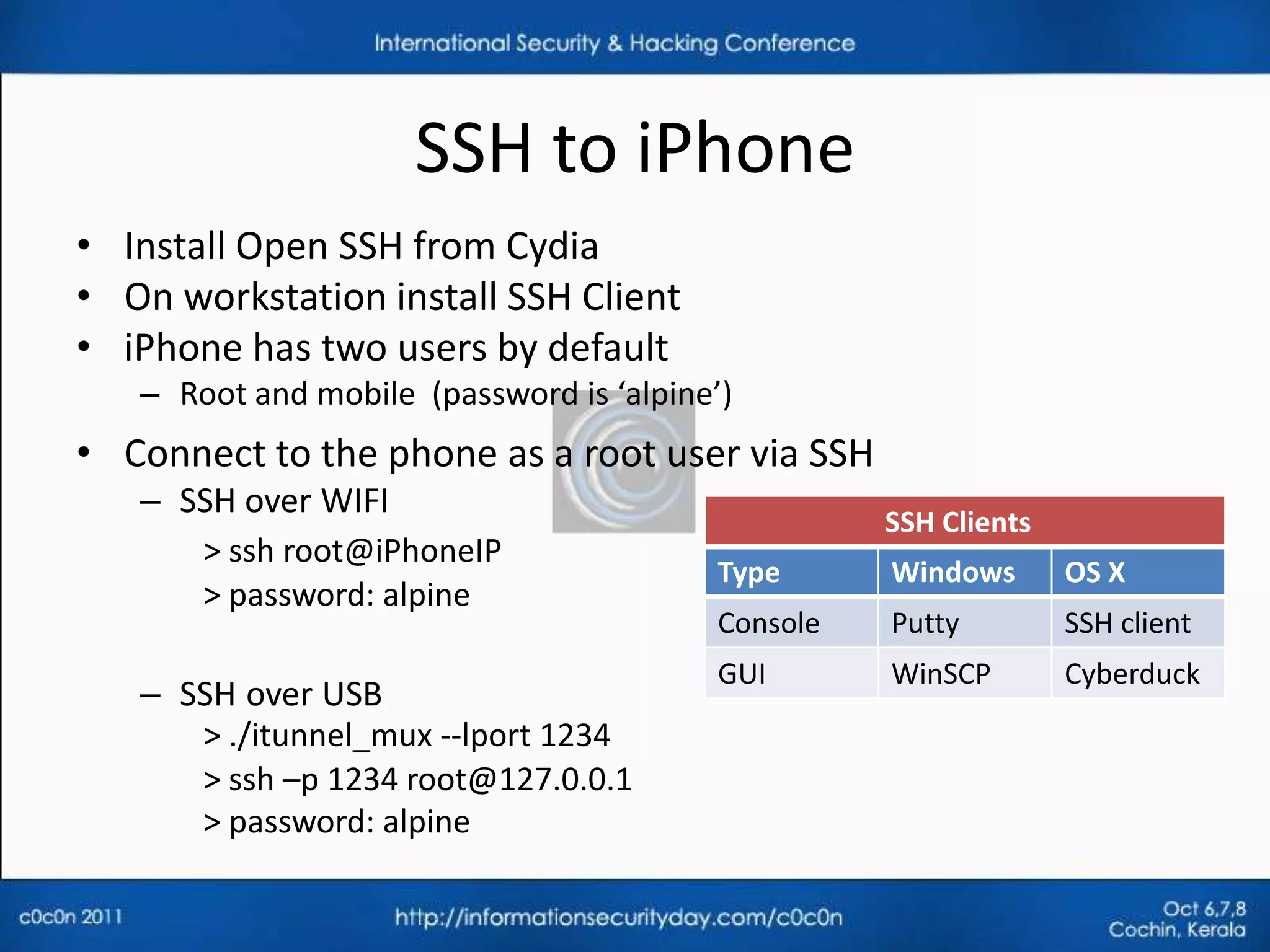
SSH to iPhone
• Install Open SSH from Cydia
• On workstation install SSH Client
• iPhone has two users by default
   – Root and mobile (password is ‘alpine’)
• Connect to the phone as a root user via SSH
   – SSH over WIFI
                                                   SSH Clients
      > ssh root@iPhoneIP
                                         Type      Windows       OS X
      > password: alpine
                                         Console   Putty         SSH client
                                         GUI       WinSCP        Cyberduck
   – SSH over USB
      > ./itunnel_mux --lport 1234
      > ssh –p 1234 root@127.0.0.1
      > password: alpine
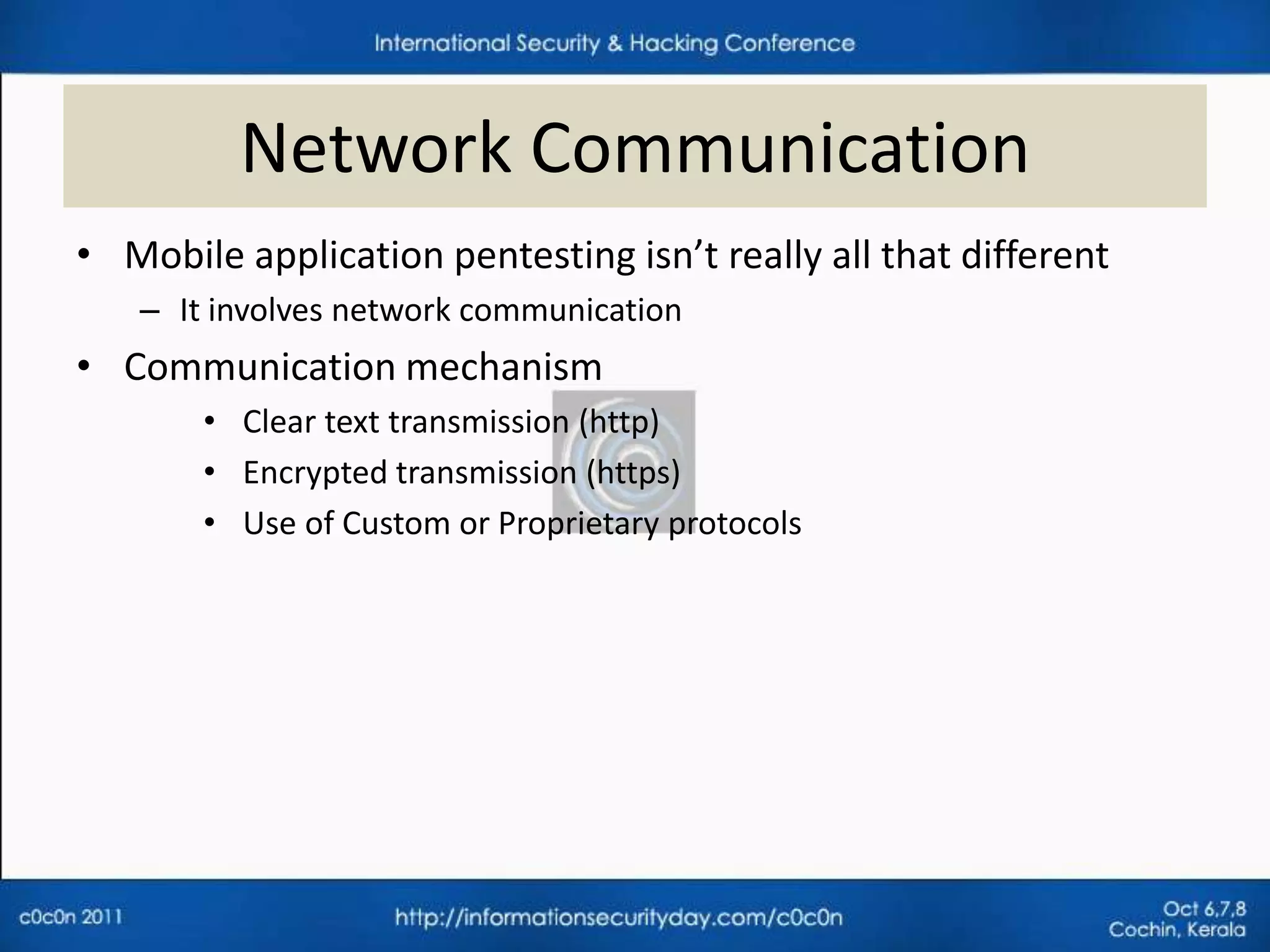
Network Communication
• Mobile application pentesting isn’t really all that different
   – It involves network communication
• Communication mechanism
       • Clear text transmission (http)
       • Encrypted transmission (https)
       • Use of Custom or Proprietary protocols
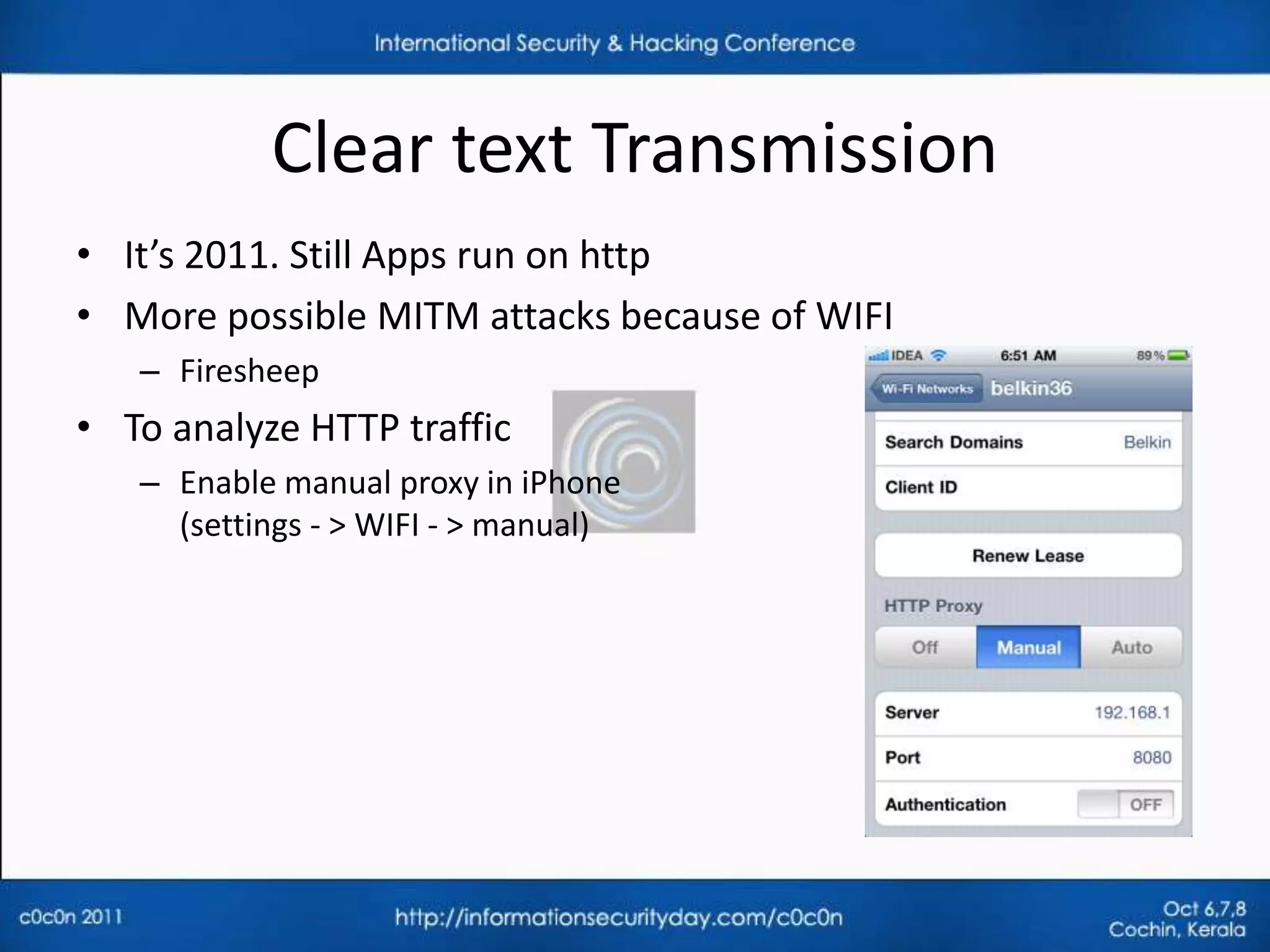
Clear text Transmission
• It’s 2011. Still Apps run on http
• More possible MITM attacks because of WIFI
   – Firesheep
• To analyze HTTP traffic
   – Enable manual proxy in iPhone
     (settings - > WIFI - > manual)
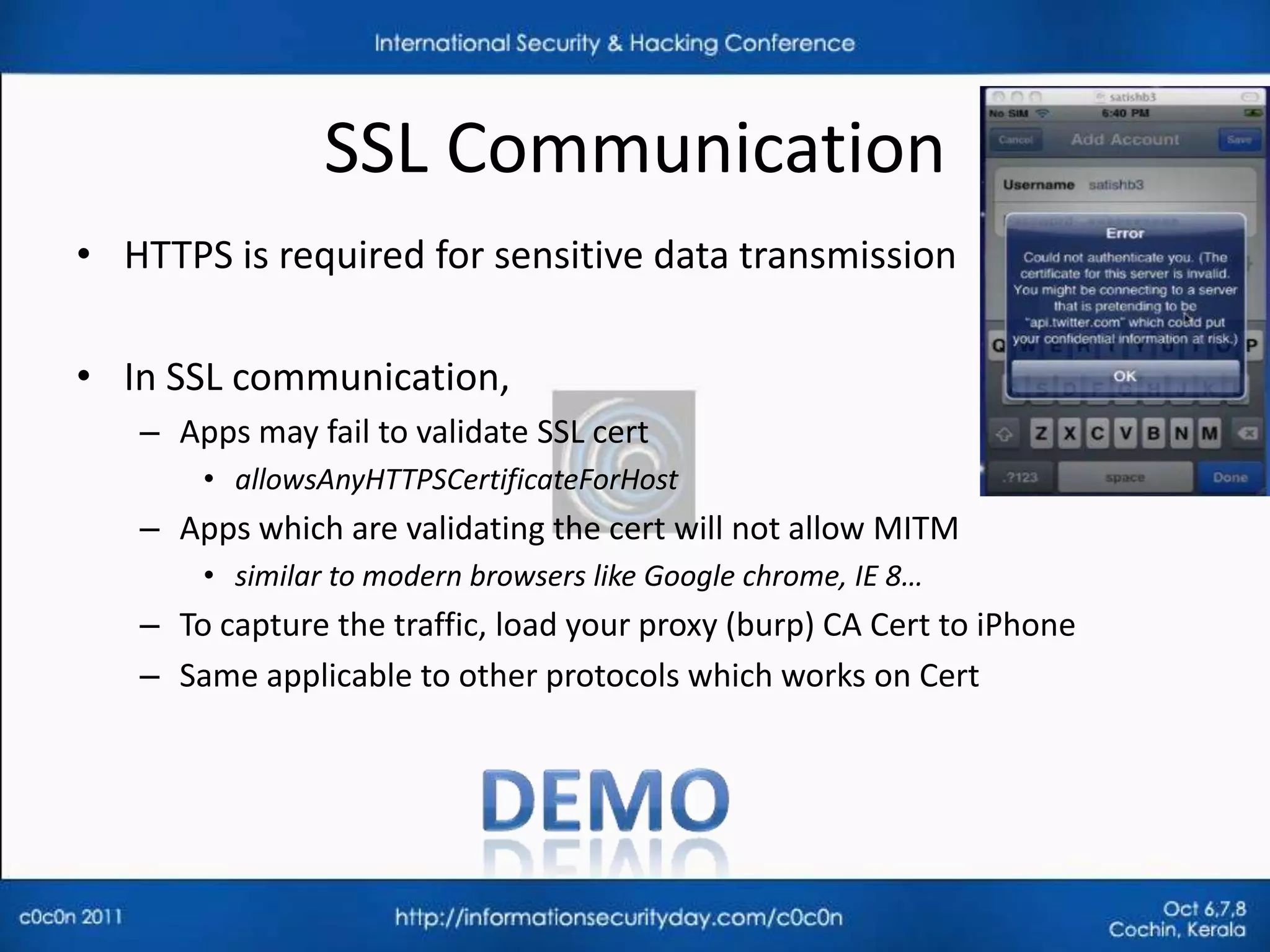
SSL Communication
• HTTPS is required for sensitive data transmission

• In SSL communication,
   – Apps may fail to validate SSL cert
       • allowsAnyHTTPSCertificateForHost
   – Apps which are validating the cert will not allow MITM
       • similar to modern browsers like Google chrome, IE 8…
   – To capture the traffic, load your proxy (burp) CA Cert to iPhone
   – Same applicable to other protocols which works on Cert
Custom Protocols
• Identify the communication protocol
   – On SSH Terminal:
      > tcpdump -w traffic.pcap
   – Load the .pcap in wireshark and analyze
• May not respect iPhone proxy settings
• DNS Spoofing techniques to MITM

• Once you capture the traffic it is a typical web application
  pentesting in which attacks are done on the application server
   -Authentication, Authorization, Session management, weak ciphers….
Privacy Issues
• Every iPhone has an unique device identifier called UDID
• Apps may collect the device UDID
• With UDID
   – Possible to observe the user browsing patterns
   – Feasible to locate user Geo location
   – More possible attacks are documented in “Eric Smith: iPhone-
     Applications-Privacy-Issues.pdf”
• One such application is
   – Openfient : mobile social gaming network
     http://corte.si/posts/security/openfeint-udid-deanonymization/

• Observe the network traffic to find out UDID transmission
Application Data Storage
• 76 percent of mobile Apps store user data on phone
• 10 percent Apps store passwords in clear text
  Source: viaforensics.com/appwatchdog

• Apps store information on phone
   – For better performance
   – Offline access

• Data storage locations
       •   Plist files
       •   Keychain
       •   Logs
       •   Screenshots
       •   Home directory
Application Directory Structure
• Application run in a sandbox (seatbelt) with ‘mobile’ privileges
• Each application gets a private area of the file system
   – App Home directory: /var/mobile/Applications/[GUID]
    SubDirectory                               Description
    Appname.app                Contains the application code and static data

     Documents             Data that may be shared with desktop through iTunes

       Library                            Application support files

 Library/Preferences/                     App specific preferences

                         Data that should persist across successive launches of the
   Library/Caches/
                                application but not needed to be backed up
                        Temporary files that do not need to persist across successive
         tmp
                                         launches of the application
Plist files
• Property list files
    – often used to store user’s properties of an App
    – /var/mobile/Applications/[appid]/Documents/Preferences
•   Key value pairs are stored in binary format
•   Easily extracted and modified with property list editor, plutil
•   Look for usernames , passwords, cookies…
•   Apps may take Authentication/Authorization decisions
    – Ex: admin=1, timeout=10


• Do not store clear text data in plist files
Keychain
•   SQLite database for sensitive data storage
•   Four tables: genp, inet, cert, keys
•   Located at: /var/Keychains/keychain-2.db
•   Keychain data is encrypted
    – Uses hardware encryption key
    – Uses user passcode for encryption
        • Depends on accessibility constant of keychain entry
    – Can not be moved to other device
• Idea is, developers can leverage keychains to have the OS to
  store information securely
    – Not any more
Keychain
• Accessible to all the applications
• Application can only access it’s key chain items
   – On a JailBroken device It can be bypassed
• Keychain Dumper Tool – by github
   – Displays keychain entries of all the installed applications

• Use data protection API while storing data in keychain
• Use kSecAttrAccessibleWhenUnlocked accessibility constant
   – If phone is lost & user sets a passcode, it is difficult to retrieve
     protected contents in keychain
   – Keychain data is encrypted with User Passcode
Error Logs
• Apps may write sensitive data in logs
   –   Debugging (NSLog calls)
   –   Trouble shooting
   –   Requests & Responses
   –   /private/var/log/syslog

• To view iPhone logs
   – Console App (from AppStore)
   – Sync to iTunes
        • Mac OS X : ~/Library/Logs/CrashReporter/MobileDevice/<DEVICE_NAME>
        • Windows XP:
          C:Documents and Settings<USERNAME>Application DataApple
          computerLogsCrashReporter/<DEVICE_NAME>
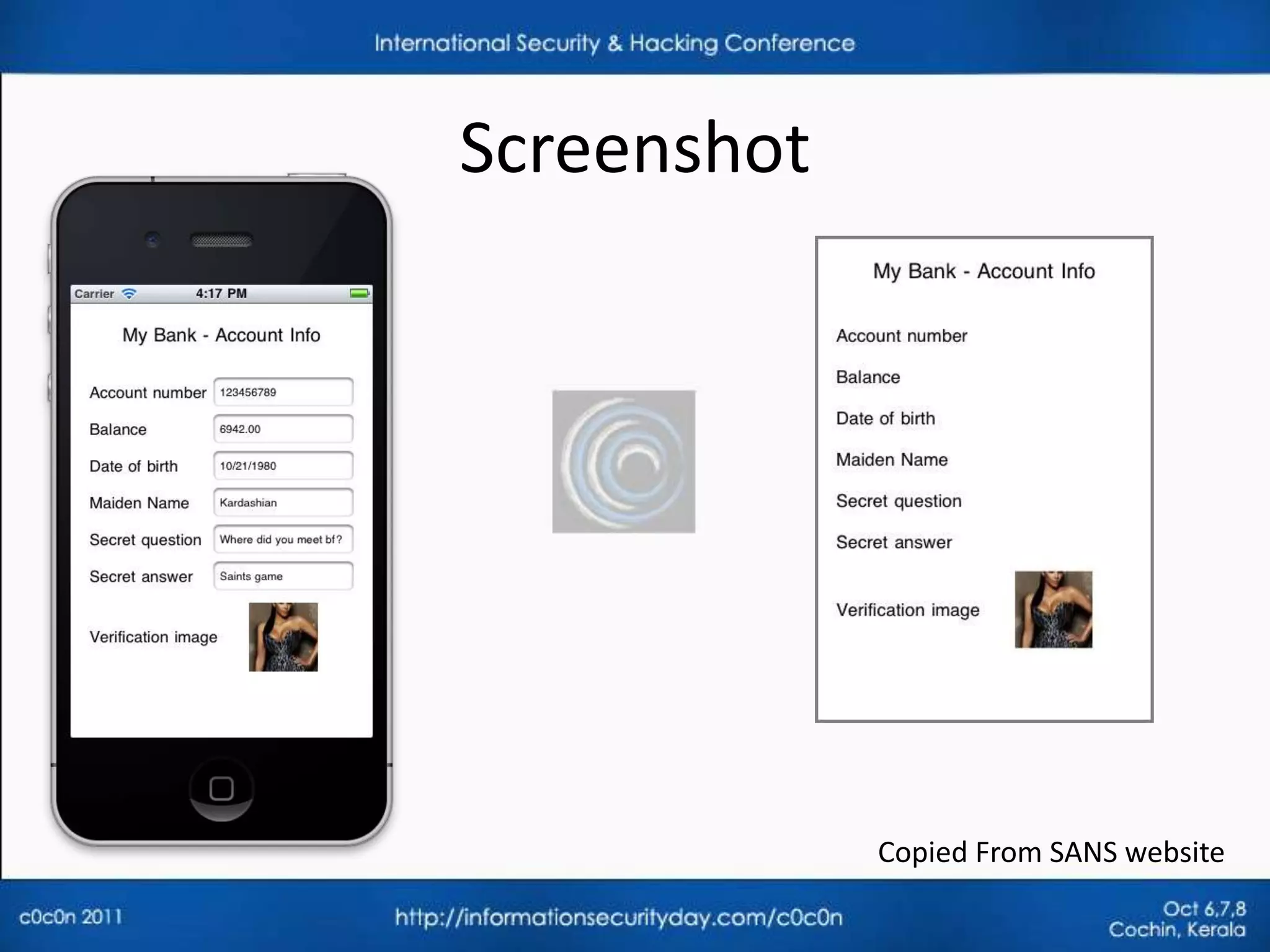
Screenshot
• Home button shrinks your application with a nice effect
• iOS takes screen shots of the application to create that effect
• Sensitive data may get cached
   – App directory/Library/Caches/Snapshots


• Solution
   – Remove sensitive data or change the screen before the
     applicationDidEnterBackground() function returns
   – Instead of hiding or removing sensitive data you can also prevent
     back- grounding altogether by setting the "Application does not run in
     background" property in the application's Info.plist file
Screenshot


             Copied From SANS website
Home directory
•   Apps can store data in application home directory
•   Custom encryption mechanism can be used to store files
•   Use Reverse engineering techniques to find encryption key
•   Write tools to break the custom encryption
Reverse Engineering
• Apps downloaded from AppStore are encrypted
    – Fairplay DRM (AES)
• On a JailBroken device, we can decrypt Apps easily
    – Craculous : decrypts Apps on device
    – Installous : installs decrypted Apps on device
•   Self distributed Apps are not encrypted
•   Hex Rays decompiler & Run time debugger (gdb)
•   Look for Hard coded passwords and encryption keys
•   Buffer Overflows
    – iOS 4.3 introduced ASLR support
        • Apps must be compiled with PIE (position independent executable) for full support
URL Scheme
• Protocol Handlers - mailto:, tel:
• Browser to App interaction
• View Info.plist for supported schemes
       > plutil Facebook.app/Info.plist
          CFBundleURLName = "com.facebook";
          CFBundleURLSchemes = ( fbauth, fb );
• Parameters are supplied to the application
      Mailto:securitylearn.wordpress@gmail.com
      twitter://post?message=visit%20maniacdev.com
   – Bad Input crash Apps
URL Scheme
• Decrypt the App to find parameters
     > strings Facebook.app/Facebook | grep 'fb:'
       fb://online#offline
       fb://birthdays/(initWithMonth:)/(year:)
       fb://userset
       fb://nearby
       fb://place/(initWithPageId:)
   – http://wiki.akosma.com/IPhone_URL_Schemes
• Remote attacks
   – URL Scheme allows to edit or delete data without user permission
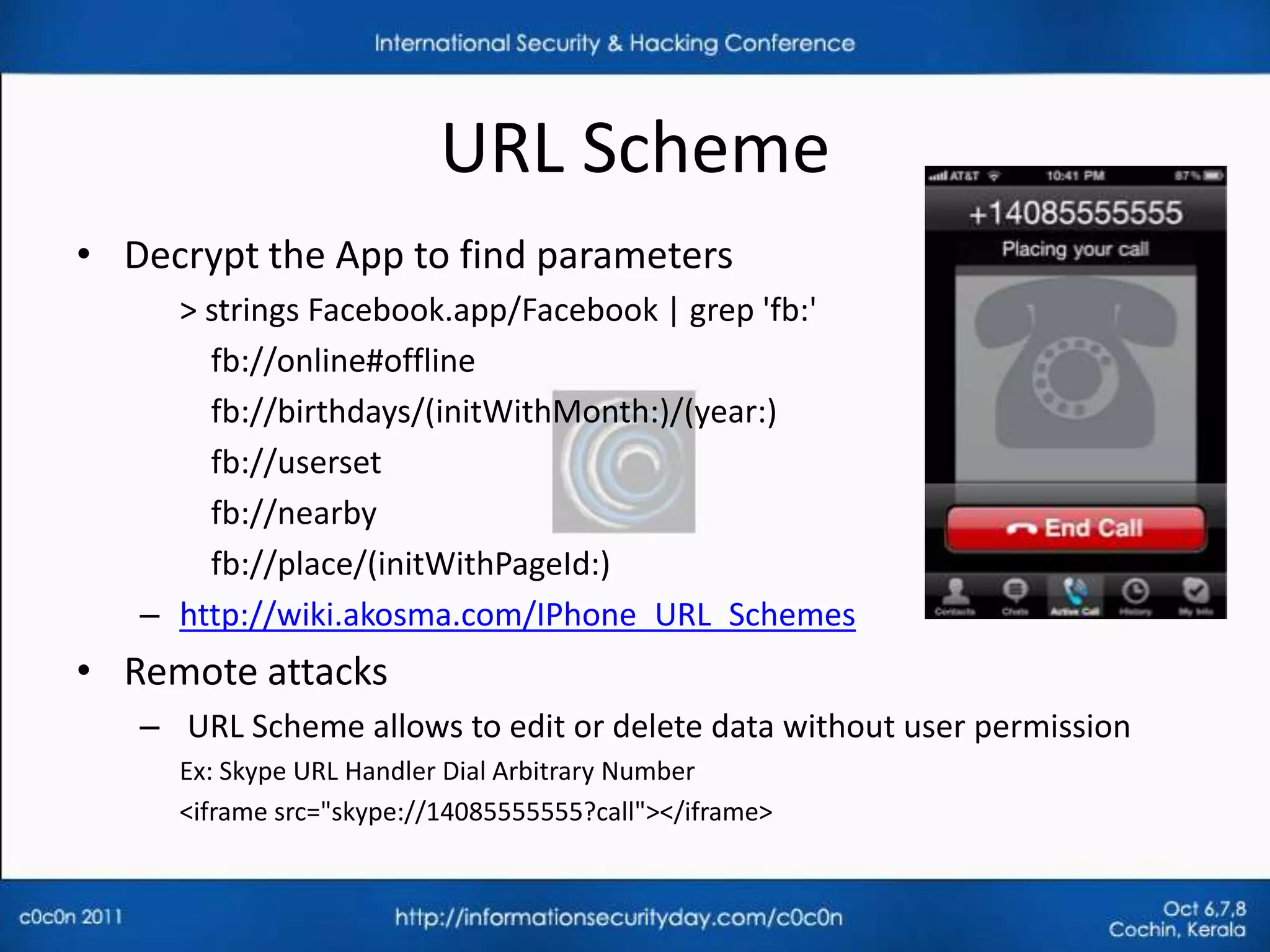
     Ex: Skype URL Handler Dial Arbitrary Number
     <iframe src="skype://14085555555?call"></iframe>
Push Notifications
• App vendors use this service to push notifications to the
  user's device even when the app is in a frozen state
   – Instant Messenger alerts the user when a new message is
     received even though the user is using another app
• Device token unique to ios instance is required
• Push notification data can be read by Apple
   – Do not send Confidential data in notifications
• Do not allow push notifications to modify App data
Major mobile Threats
• Easy to lose phones
   – Device is protected with passcode
   – Sensitive files on the device are encrypted
   – What’s the threat?
• Data encryption in mobile is only available after boot up
   – Boot Rom exploits
       • all files on the device can be copied with in 10 minutes
   – Passcode brute force
       • 4 digit passcode can be brute forced with in 20 minutes

• Mobile App Risks
   – Veracode Top 10
   – OWASP Top 10
References
• BlackHat 2011 - DaiZovi_iOS_Security
• Fraunhofer iOS Device encryption security
• GitHub – Keychain Dumper
Thank You


Email : Satishb3@securitylearn.net

Blog: http://www.securitylearn.net

Pentesting iPhone applications

  • 1.
    Pentesting iPhone Applications satishb3@hotmail.com
  • 2.
    Agenda • iPhone AppBasics – App development – App distribution • Pentesting iPhone Apps – Methodology – Areas of focus • Major Mobile Threats
  • 3.
    Who am I <1 • Framework for functional testing tools Development • Web application hacking, Network assessments, 5+ Information Reverse engineering, Mobile application hacking… Security • OWASP Hyderabad Contributor Other Activities • Blogging - Securitylearn.wordpress.com 3
  • 4.
    iPhone App Basics •iPhone released in 2007 – 110 million sales till March 2011 • Browser based Applications – HTML + CSS + JavaScript • Native iOS Applications – Objective C & Cocoa Touch API • Super set of C, Compiles into native code (ARM) • App Store – Centralized mechanism to distribute software – Only Apple signed application are available – Designed to protect the Apps from piracy & No malware
  • 5.
    Why to buildiPhone Application? • New business • Good way to launch new services • Urgency for clients • Users want them • Quick to develop • Fame and Fortune – Angry Birds cost $140k to develop and made $70 million in profits Source: mildtech.net
  • 6.
    iPhone Application Distribution Distributedas .ipa files • iOS Simulator • Device testing • Ad-Hoc Distribution • In-House Distribution • Over The Air Distribution • App Store Distribution – Apps have to obey Apple Review guidelines
  • 7.
    Pentesting of iPhoneApplications • Areas of focus include – Network communication – Privacy Issues – Application Data Storage – Reverse Engineering – URL Schemes – Push Notifications • Overlap between iPhone security and iPhone App security
  • 8.
    JailBreaking • iPhone doesnot allow unsigned applications • Jailbreak gives a full access to the device • Allows to install Apps which are not authorized (via Cydia) • Can put your phone at increased risk to some security vulnerabilities • Tools: PwnageTool, redsn0w, Sn0wbreeze, Greenpois0n, jailbreakMe… • JailBreaking makes our work easy
  • 9.
    Useful Cydia Apps • Openssh : SSH to phone • Adv-cmds : process commands like ps, kill… • Sqlite3 : Sqlite database client • GNU Debugger: Reverse engineering • Syslogd : To view iPhone logs • Tcpdump: capture traffic on phone • com.ericasadun.utlities: plutil (view plist files) • Darwin tools: Strings command • Odcctools: otool, nm …
  • 10.
    SSH to iPhone •Install Open SSH from Cydia • On workstation install SSH Client • iPhone has two users by default – Root and mobile (password is ‘alpine’) • Connect to the phone as a root user via SSH – SSH over WIFI SSH Clients > ssh root@iPhoneIP Type Windows OS X > password: alpine Console Putty SSH client GUI WinSCP Cyberduck – SSH over USB > ./itunnel_mux --lport 1234 > ssh –p 1234 root@127.0.0.1 > password: alpine
  • 11.
    Network Communication • Mobileapplication pentesting isn’t really all that different – It involves network communication • Communication mechanism • Clear text transmission (http) • Encrypted transmission (https) • Use of Custom or Proprietary protocols
  • 12.
    Clear text Transmission •It’s 2011. Still Apps run on http • More possible MITM attacks because of WIFI – Firesheep • To analyze HTTP traffic – Enable manual proxy in iPhone (settings - > WIFI - > manual)
  • 13.
    SSL Communication • HTTPSis required for sensitive data transmission • In SSL communication, – Apps may fail to validate SSL cert • allowsAnyHTTPSCertificateForHost – Apps which are validating the cert will not allow MITM • similar to modern browsers like Google chrome, IE 8… – To capture the traffic, load your proxy (burp) CA Cert to iPhone – Same applicable to other protocols which works on Cert
  • 14.
    Custom Protocols • Identifythe communication protocol – On SSH Terminal: > tcpdump -w traffic.pcap – Load the .pcap in wireshark and analyze • May not respect iPhone proxy settings • DNS Spoofing techniques to MITM • Once you capture the traffic it is a typical web application pentesting in which attacks are done on the application server -Authentication, Authorization, Session management, weak ciphers….
  • 15.
    Privacy Issues • EveryiPhone has an unique device identifier called UDID • Apps may collect the device UDID • With UDID – Possible to observe the user browsing patterns – Feasible to locate user Geo location – More possible attacks are documented in “Eric Smith: iPhone- Applications-Privacy-Issues.pdf” • One such application is – Openfient : mobile social gaming network http://corte.si/posts/security/openfeint-udid-deanonymization/ • Observe the network traffic to find out UDID transmission
  • 16.
    Application Data Storage •76 percent of mobile Apps store user data on phone • 10 percent Apps store passwords in clear text Source: viaforensics.com/appwatchdog • Apps store information on phone – For better performance – Offline access • Data storage locations • Plist files • Keychain • Logs • Screenshots • Home directory
  • 17.
    Application Directory Structure •Application run in a sandbox (seatbelt) with ‘mobile’ privileges • Each application gets a private area of the file system – App Home directory: /var/mobile/Applications/[GUID] SubDirectory Description Appname.app Contains the application code and static data Documents Data that may be shared with desktop through iTunes Library Application support files Library/Preferences/ App specific preferences Data that should persist across successive launches of the Library/Caches/ application but not needed to be backed up Temporary files that do not need to persist across successive tmp launches of the application
  • 18.
    Plist files • Propertylist files – often used to store user’s properties of an App – /var/mobile/Applications/[appid]/Documents/Preferences • Key value pairs are stored in binary format • Easily extracted and modified with property list editor, plutil • Look for usernames , passwords, cookies… • Apps may take Authentication/Authorization decisions – Ex: admin=1, timeout=10 • Do not store clear text data in plist files
  • 19.
    Keychain • SQLite database for sensitive data storage • Four tables: genp, inet, cert, keys • Located at: /var/Keychains/keychain-2.db • Keychain data is encrypted – Uses hardware encryption key – Uses user passcode for encryption • Depends on accessibility constant of keychain entry – Can not be moved to other device • Idea is, developers can leverage keychains to have the OS to store information securely – Not any more
  • 20.
    Keychain • Accessible toall the applications • Application can only access it’s key chain items – On a JailBroken device It can be bypassed • Keychain Dumper Tool – by github – Displays keychain entries of all the installed applications • Use data protection API while storing data in keychain • Use kSecAttrAccessibleWhenUnlocked accessibility constant – If phone is lost & user sets a passcode, it is difficult to retrieve protected contents in keychain – Keychain data is encrypted with User Passcode
  • 21.
    Error Logs • Appsmay write sensitive data in logs – Debugging (NSLog calls) – Trouble shooting – Requests & Responses – /private/var/log/syslog • To view iPhone logs – Console App (from AppStore) – Sync to iTunes • Mac OS X : ~/Library/Logs/CrashReporter/MobileDevice/<DEVICE_NAME> • Windows XP: C:Documents and Settings<USERNAME>Application DataApple computerLogsCrashReporter/<DEVICE_NAME>
  • 22.
    Screenshot • Home buttonshrinks your application with a nice effect • iOS takes screen shots of the application to create that effect • Sensitive data may get cached – App directory/Library/Caches/Snapshots • Solution – Remove sensitive data or change the screen before the applicationDidEnterBackground() function returns – Instead of hiding or removing sensitive data you can also prevent back- grounding altogether by setting the "Application does not run in background" property in the application's Info.plist file
  • 23.
    Screenshot Copied From SANS website
  • 24.
    Home directory • Apps can store data in application home directory • Custom encryption mechanism can be used to store files • Use Reverse engineering techniques to find encryption key • Write tools to break the custom encryption
  • 25.
    Reverse Engineering • Appsdownloaded from AppStore are encrypted – Fairplay DRM (AES) • On a JailBroken device, we can decrypt Apps easily – Craculous : decrypts Apps on device – Installous : installs decrypted Apps on device • Self distributed Apps are not encrypted • Hex Rays decompiler & Run time debugger (gdb) • Look for Hard coded passwords and encryption keys • Buffer Overflows – iOS 4.3 introduced ASLR support • Apps must be compiled with PIE (position independent executable) for full support
  • 26.
    URL Scheme • ProtocolHandlers - mailto:, tel: • Browser to App interaction • View Info.plist for supported schemes > plutil Facebook.app/Info.plist CFBundleURLName = "com.facebook"; CFBundleURLSchemes = ( fbauth, fb ); • Parameters are supplied to the application Mailto:securitylearn.wordpress@gmail.com twitter://post?message=visit%20maniacdev.com – Bad Input crash Apps
  • 27.
    URL Scheme • Decryptthe App to find parameters > strings Facebook.app/Facebook | grep 'fb:' fb://online#offline fb://birthdays/(initWithMonth:)/(year:) fb://userset fb://nearby fb://place/(initWithPageId:) – http://wiki.akosma.com/IPhone_URL_Schemes • Remote attacks – URL Scheme allows to edit or delete data without user permission Ex: Skype URL Handler Dial Arbitrary Number <iframe src="skype://14085555555?call"></iframe>
  • 28.
    Push Notifications • Appvendors use this service to push notifications to the user's device even when the app is in a frozen state – Instant Messenger alerts the user when a new message is received even though the user is using another app • Device token unique to ios instance is required • Push notification data can be read by Apple – Do not send Confidential data in notifications • Do not allow push notifications to modify App data
  • 29.
    Major mobile Threats •Easy to lose phones – Device is protected with passcode – Sensitive files on the device are encrypted – What’s the threat? • Data encryption in mobile is only available after boot up – Boot Rom exploits • all files on the device can be copied with in 10 minutes – Passcode brute force • 4 digit passcode can be brute forced with in 20 minutes • Mobile App Risks – Veracode Top 10 – OWASP Top 10
  • 30.
    References • BlackHat 2011- DaiZovi_iOS_Security • Fraunhofer iOS Device encryption security • GitHub – Keychain Dumper
  • 31.
    Thank You Email :Satishb3@securitylearn.net Blog: http://www.securitylearn.net