iOS (Vulner)ability
Subho Halder
Co Founder
AppKnox
./WhoAmI
Co Founder of AppKnox ( XYSec Labs )
Python Lover
Sole Creator and Developer of Android Framework for Exploitation (AFE)
Found Security Bugs in Apple, Google, Skype, Webkit, Facebook, Microsoft, …..
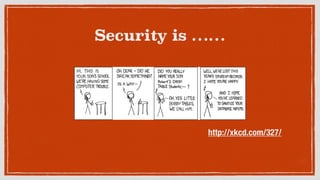
Security is ……
http://xkcd.com/327/
NSLog [@“Agenda”];
Quick overview of iPhone iOS Platform.
iOS Security Structure
What is a Jailbreak?
iOS App (IN)Securities
Peek into a state-of-art Prison
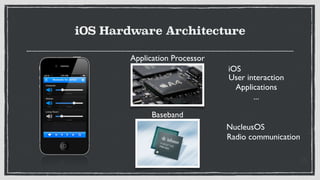
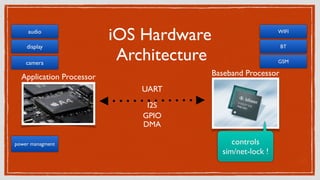
iOS Hardware Architecture
Application Processor
Baseband
iOS
User interaction	

Applications	

...
NucleusOS
Radio communication
iOS Hardware
Architecture
Application Processor Baseband Processor
audio
display
power managment
camera
WIFI
BT
GSM
UART
I2S

GPIO

DMA

controls 	

sim/net-lock !
Phew, Security Architecture
***[Sandboxing]***
NAND Flash
FTL: converts logical partition to NAND flash architecture
looks like BLOCK device
System Partition / (Read Only)
User Partition /private/var
NAND
FTL
Block Device
/ (RO)

(System Partition)
/private/var (RW)

(User Partition)
***[Sandboxing]***
3rd Party lives only on User Partition
Apps run as mobile user
Kernel Signature checks executables 

in system-call execve()
%{ How did you Jailbreak it? }%
NAND
FTL
Block Device
/ (RO)

(System Partition)
/private/var (RW)

(User Partition)
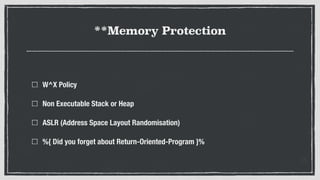
**Memory Protection
W^X Policy
Non Executable Stack or Heap
ASLR (Address Space Layout Randomisation)
%{ Did you forget about Return-Oriented-Program }%
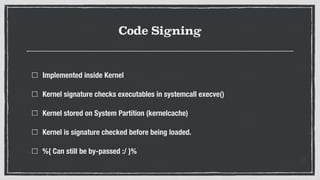
Code Signing
Implemented inside Kernel
Kernel signature checks executables in systemcall execve()
Kernel stored on System Partition (kernelcache)
Kernel is signature checked before being loaded.
%{ Can still be by-passed :/ }%
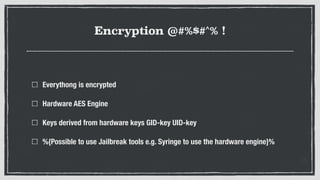
Encryption @#%$#^% !
Everythong is encrypted
Hardware AES Engine
Keys derived from hardware keys GID-key UID-key
%{Possible to use Jailbreak tools e.g. Syringe to use the hardware engine}%
What is J@!lbr3@k ?
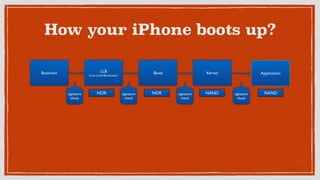
How your iPhone boots up?
signature
check
signature
check
signature
check
signature
check
Bootrom LLB	

(Low Level Bootloader)
iBoot Kernel Application
NOR NOR NAND NAND
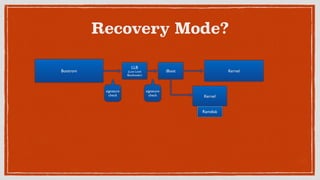
Recovery Mode?
Bootrom
LLB	

(Low Level
Bootloader)
iBoot
signature
check
signature
check
Kernel
Kernel
Ramdisk
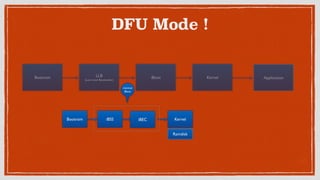
DFU Mode !
Bootrom iBSS iBEC Kernel
Ramdisk
Bootrom LLB	

(Low Level Bootloader)
iBoot Kernel Application
minimal

iBoot
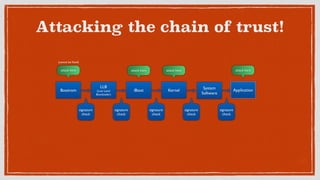
Attacking the chain of trust!
signature
check
Bootrom
LLB	

(Low Level
Bootloader)
iBoot Kernel Application
signature
check
signature
check
signature
check
signature
check
attack here	

(cannot be fixed)
attack here	

 attack here	

 attack here	

System
Software
Where do we go wrong?
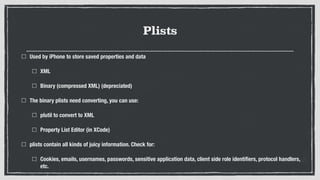
Plists
Used by iPhone to store saved properties and data
XML
Binary (compressed XML) (depreciated)
The binary plists need converting, you can use:
plutil to convert to XML
Property List Editor (in XCode)
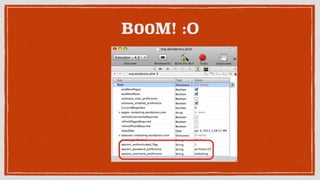
plists contain all kinds of juicy information. Check for:
Cookies, emails, usernames, passwords, sensitive application data, client side role identifiers, protocol handlers,
etc.
B00M! :O
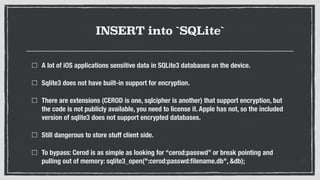
INSERT into `SQLite`
A lot of iOS applications sensitive data in SQLite3 databases on the device.
Sqlite3 does not have built-in support for encryption.
There are extensions (CEROD is one, sqlcipher is another) that support encryption, but
the code is not publicly available, you need to license it. Apple has not, so the included
version of sqlite3 does not support encrypted databases.
Still dangerous to store stuff client side.
To bypass: Cerod is as simple as looking for “cerod:passwd” or break pointing and
pulling out of memory: sqlite3_open(":cerod:passwd:filename.db", &db);
)()()( Keychains )()()(
Keychain = Encrypted container for storing sensitive information
Smarter devs store passwords and sensitive data using the keychain.
Unfortunately with access to a phone and jailbreaking we can decrypt the
keychain and dump the contents.
tail -f /var/logs/
iOS Logs lots of data, NSLog especially, They can be viewed after the fact in:
~/Library/Logs/CrashReporter/MobileDevice/<Device name>/private/var/
log/system.log
Can be viewed in you mac “console” app under utilities
File Caching m/m/
If the application uses PDF, Excel, or other files it may be possible that these
files may have been cached on the device.
These can be found at: ~/Library/Application Support/iPhone simulator/x.x.x/
Applications/<application folder>/Documents/temp.pdf
$(`Keyboard Caching`)
Keystrokes for predictive spellcheck are stored in:
~/Library/Application Support/iPhone Simulator/x.x.x/Library/Keyboard/
dynamic-text.dat
This issue is similar to autocomplete for web browsers.
Already disabled for password fields Should be disabled for any potentially sensitive
fields (account numbers, SSN, etc, etc…)
Set UITextField property autocorrectionType = UITextAutocorrectionNo for mitigation.
Snapshot Caching
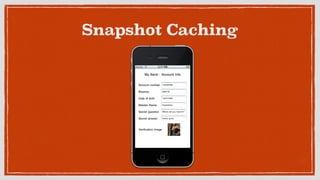
When in an application and the home button is pushed, the application stores a
snapshot (screenshot) in the apps snapshot folder
~/Library/Application Support/iPhone Simulator/x.x.x/Applications/
<application folder>/Library/Caches/Snapshots/
These persist until reboot. Hopefully you weren’t on a screen with any sensitive
data!
Snapshot Caching
SQL Injection Client-Side
SQL injection is a problem on the client side too!
BAD:
NSString *sql = [NSString stringWithFormat:@"SELECT name FROM products
WHERE id = '%@'", id]; const char *query = [sql UTF8String];
GOOD:
const char *sql = "SELECT name FROM products WHERE id = ?";
sqlite3_prepare_v2(database, sql, -1, &sql_statement, NULL);
sqlite3_bind_text(&sql_statement, 1, id, -1, SQLITE_TRANSIENT);
XSS Client-Side
Can occur whenever user controlled Objective C variables populated in to
WebView
stringByEvaluatingJavaScriptFromString 


NSString *javascript = [[NSString alloc] initWithFormat:@"var myvar="%@";",
username]; 

[mywebView stringByEvaluatingJavaScriptFromString:javascript];
Vulnerable Obj-C Methods
NSLog()
[NSString stringWithFormat:]
[NSString initWithFormat:]
[NSMutableString appendFormat:]
[NSAlert informativeTextWithFormat:]
[NSPredicate predicateWithFormat:]
[NSException format:]
NSRunAlertPanel
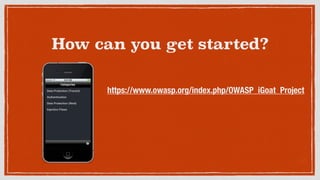
How can you get started?
https://www.owasp.org/index.php/OWASP_iGoat_Project
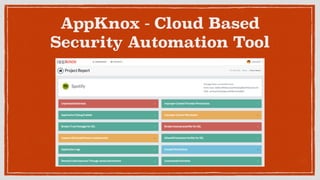
AppKnox - Cloud Based
Security Automation Tool
Available for Android
Coming soon for iOS
–Cicero
“There is no castle so strong that it cannot be
overthrown”
Thank You
https://www.appknox.com
http://subho.me
@sunnyrockzzs
subho.halder@gmail.com

iOS (Vulner)ability

  • 1.
  • 3.
    ./WhoAmI Co Founder ofAppKnox ( XYSec Labs ) Python Lover Sole Creator and Developer of Android Framework for Exploitation (AFE) Found Security Bugs in Apple, Google, Skype, Webkit, Facebook, Microsoft, …..
  • 4.
  • 5.
    NSLog [@“Agenda”]; Quick overviewof iPhone iOS Platform. iOS Security Structure What is a Jailbreak? iOS App (IN)Securities
  • 6.
    Peek into astate-of-art Prison
  • 7.
    iOS Hardware Architecture ApplicationProcessor Baseband iOS User interaction Applications ... NucleusOS Radio communication
  • 8.
    iOS Hardware Architecture Application ProcessorBaseband Processor audio display power managment camera WIFI BT GSM UART I2S
 GPIO
 DMA
 controls sim/net-lock !
  • 9.
  • 10.
    ***[Sandboxing]*** NAND Flash FTL: convertslogical partition to NAND flash architecture looks like BLOCK device System Partition / (Read Only) User Partition /private/var NAND FTL Block Device / (RO)
 (System Partition) /private/var (RW)
 (User Partition)
  • 11.
    ***[Sandboxing]*** 3rd Party livesonly on User Partition Apps run as mobile user Kernel Signature checks executables 
 in system-call execve() %{ How did you Jailbreak it? }% NAND FTL Block Device / (RO)
 (System Partition) /private/var (RW)
 (User Partition)
  • 12.
    **Memory Protection W^X Policy NonExecutable Stack or Heap ASLR (Address Space Layout Randomisation) %{ Did you forget about Return-Oriented-Program }%
  • 13.
    Code Signing Implemented insideKernel Kernel signature checks executables in systemcall execve() Kernel stored on System Partition (kernelcache) Kernel is signature checked before being loaded. %{ Can still be by-passed :/ }%
  • 14.
    Encryption @#%$#^% ! Everythongis encrypted Hardware AES Engine Keys derived from hardware keys GID-key UID-key %{Possible to use Jailbreak tools e.g. Syringe to use the hardware engine}%
  • 15.
  • 16.
    How your iPhoneboots up? signature check signature check signature check signature check Bootrom LLB (Low Level Bootloader) iBoot Kernel Application NOR NOR NAND NAND
  • 17.
  • 18.
    DFU Mode ! BootromiBSS iBEC Kernel Ramdisk Bootrom LLB (Low Level Bootloader) iBoot Kernel Application minimal
 iBoot
  • 19.
    Attacking the chainof trust! signature check Bootrom LLB (Low Level Bootloader) iBoot Kernel Application signature check signature check signature check signature check attack here (cannot be fixed) attack here attack here attack here System Software
  • 20.
    Where do wego wrong?
  • 21.
    Plists Used by iPhoneto store saved properties and data XML Binary (compressed XML) (depreciated) The binary plists need converting, you can use: plutil to convert to XML Property List Editor (in XCode) plists contain all kinds of juicy information. Check for: Cookies, emails, usernames, passwords, sensitive application data, client side role identifiers, protocol handlers, etc.
  • 22.
  • 23.
    INSERT into `SQLite` Alot of iOS applications sensitive data in SQLite3 databases on the device. Sqlite3 does not have built-in support for encryption. There are extensions (CEROD is one, sqlcipher is another) that support encryption, but the code is not publicly available, you need to license it. Apple has not, so the included version of sqlite3 does not support encrypted databases. Still dangerous to store stuff client side. To bypass: Cerod is as simple as looking for “cerod:passwd” or break pointing and pulling out of memory: sqlite3_open(":cerod:passwd:filename.db", &db);
  • 24.
    )()()( Keychains )()()( Keychain= Encrypted container for storing sensitive information Smarter devs store passwords and sensitive data using the keychain. Unfortunately with access to a phone and jailbreaking we can decrypt the keychain and dump the contents.
  • 25.
    tail -f /var/logs/ iOSLogs lots of data, NSLog especially, They can be viewed after the fact in: ~/Library/Logs/CrashReporter/MobileDevice/<Device name>/private/var/ log/system.log Can be viewed in you mac “console” app under utilities
  • 26.
    File Caching m/m/ Ifthe application uses PDF, Excel, or other files it may be possible that these files may have been cached on the device. These can be found at: ~/Library/Application Support/iPhone simulator/x.x.x/ Applications/<application folder>/Documents/temp.pdf
  • 27.
    $(`Keyboard Caching`) Keystrokes forpredictive spellcheck are stored in: ~/Library/Application Support/iPhone Simulator/x.x.x/Library/Keyboard/ dynamic-text.dat This issue is similar to autocomplete for web browsers. Already disabled for password fields Should be disabled for any potentially sensitive fields (account numbers, SSN, etc, etc…) Set UITextField property autocorrectionType = UITextAutocorrectionNo for mitigation.
  • 28.
    Snapshot Caching When inan application and the home button is pushed, the application stores a snapshot (screenshot) in the apps snapshot folder ~/Library/Application Support/iPhone Simulator/x.x.x/Applications/ <application folder>/Library/Caches/Snapshots/ These persist until reboot. Hopefully you weren’t on a screen with any sensitive data!
  • 29.
  • 30.
    SQL Injection Client-Side SQLinjection is a problem on the client side too! BAD: NSString *sql = [NSString stringWithFormat:@"SELECT name FROM products WHERE id = '%@'", id]; const char *query = [sql UTF8String]; GOOD: const char *sql = "SELECT name FROM products WHERE id = ?"; sqlite3_prepare_v2(database, sql, -1, &sql_statement, NULL); sqlite3_bind_text(&sql_statement, 1, id, -1, SQLITE_TRANSIENT);
  • 31.
    XSS Client-Side Can occurwhenever user controlled Objective C variables populated in to WebView stringByEvaluatingJavaScriptFromString 
 
 NSString *javascript = [[NSString alloc] initWithFormat:@"var myvar="%@";", username]; 
 [mywebView stringByEvaluatingJavaScriptFromString:javascript];
  • 32.
    Vulnerable Obj-C Methods NSLog() [NSStringstringWithFormat:] [NSString initWithFormat:] [NSMutableString appendFormat:] [NSAlert informativeTextWithFormat:] [NSPredicate predicateWithFormat:] [NSException format:] NSRunAlertPanel
  • 33.
    How can youget started? https://www.owasp.org/index.php/OWASP_iGoat_Project
  • 34.
    AppKnox - CloudBased Security Automation Tool
  • 35.
  • 36.
    –Cicero “There is nocastle so strong that it cannot be overthrown”
  • 37.