
LAI YOONG SENG, MVP VIRTUAL MACHINE
WWW.MS4U.INFO     INFRONT CONSULTING
Session Objective and Takeaways


    Session Objectives:                 Key Takeaways

• Understand different scenario   • Build highly available and
  on the usage of Storage in        reliable storage solutions with
  Windows Server 2012               cost effective hardware in
• Demo                              Windows Server 2012
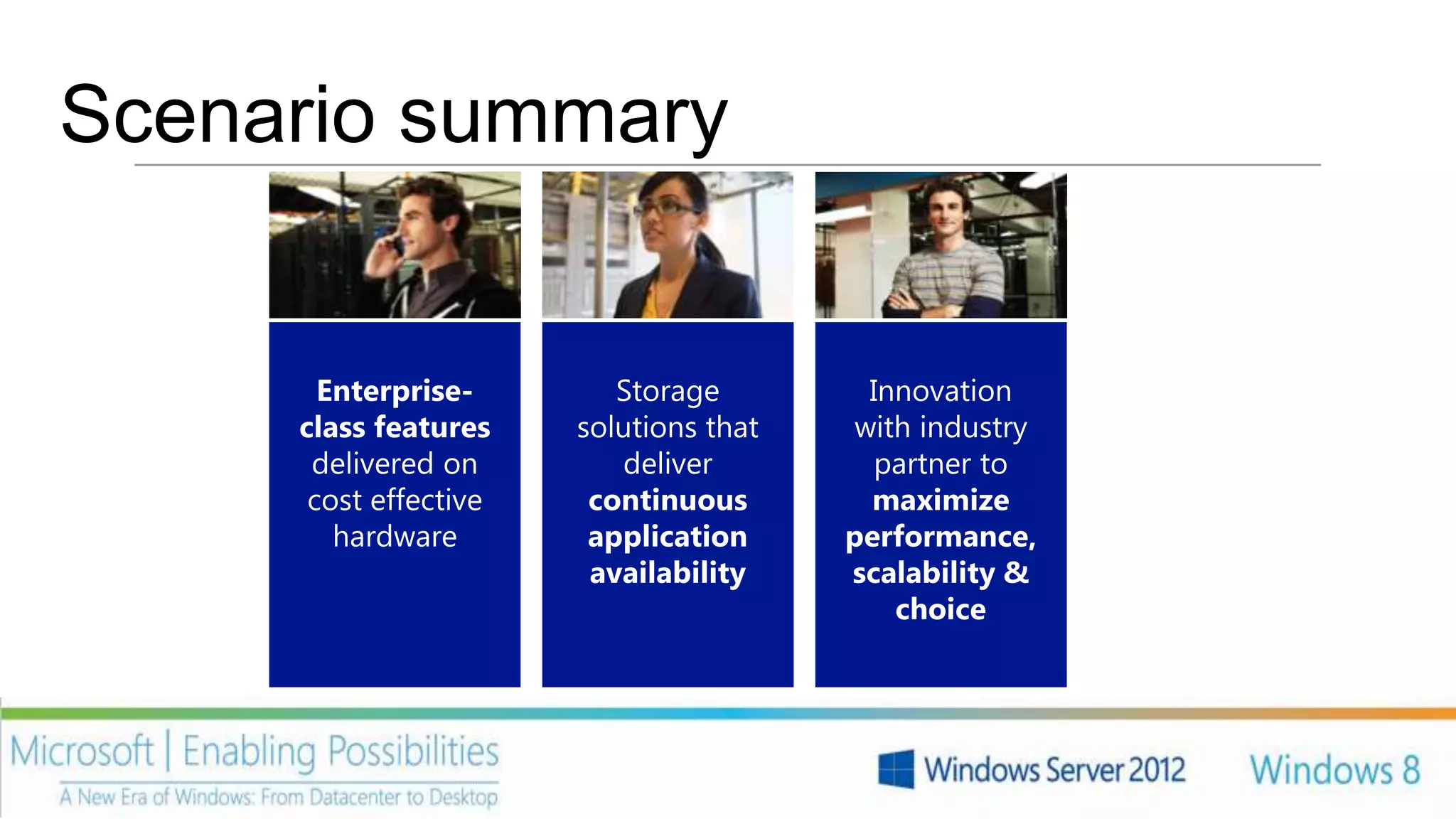
Scenario summary
              Dynamic memory              Network
            increase assigned to      virtualization for
             virtual machines to     multitenancy and IP
            increase capacity with        portability
                 no downtime
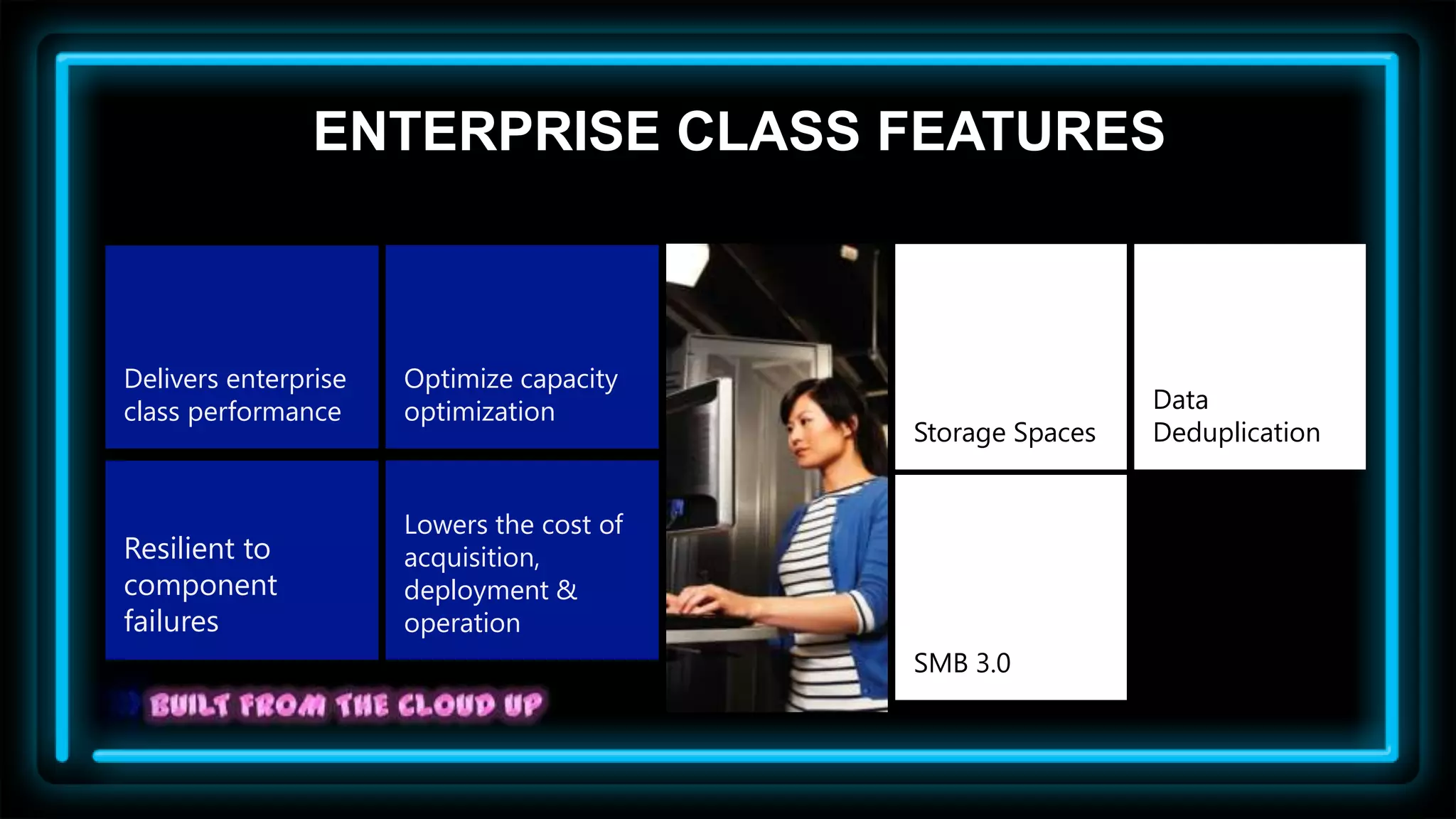
ENTERPRISE CLASS FEATURES


Delivers enterprise   Optimize capacity
class performance     optimization                          Data
                                           Storage Spaces   Deduplication


                      Lowers the cost of
Resilient to          acquisition,
component             deployment &
failures              operation
                                           SMB 3.0
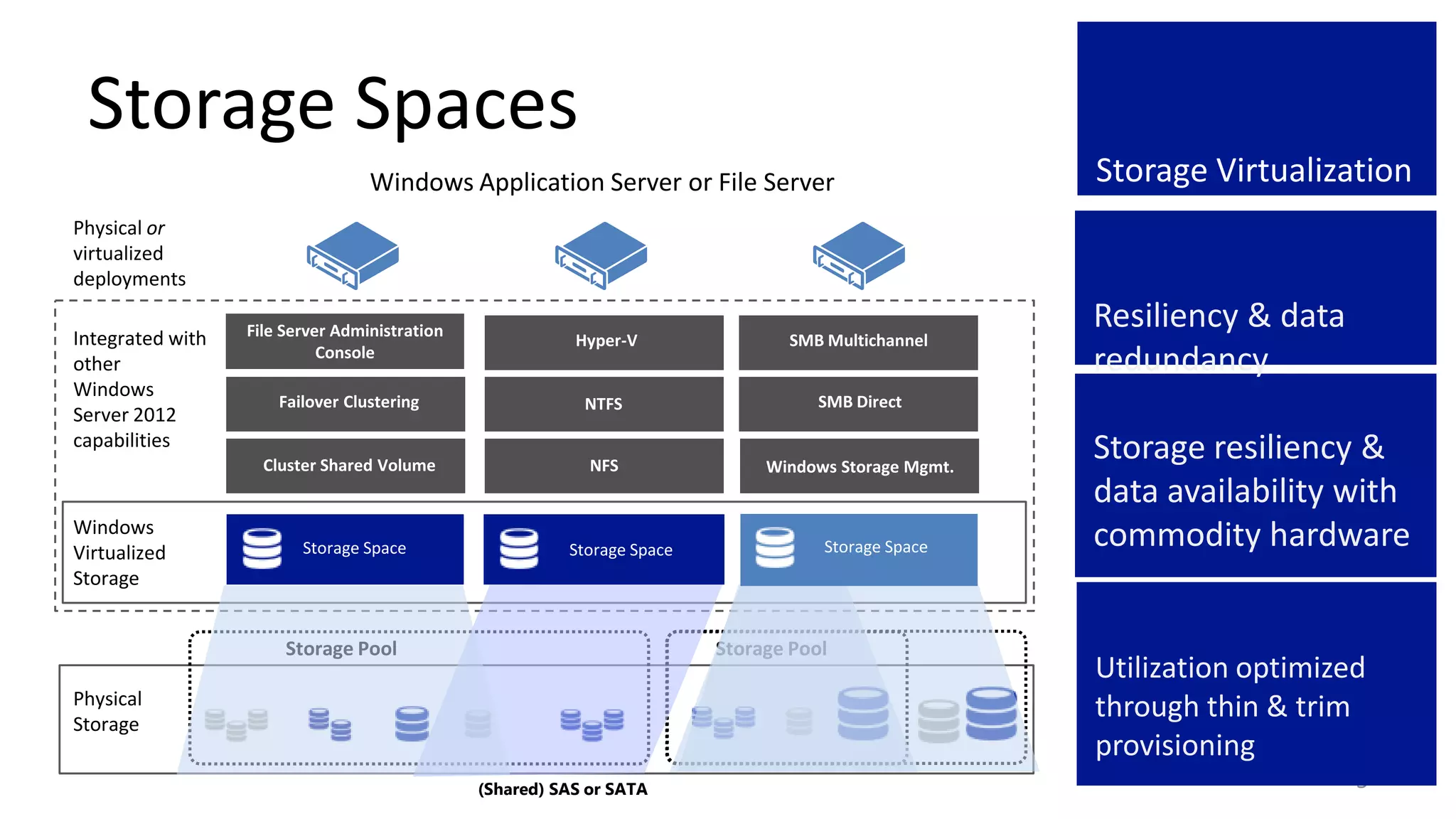
Storage Spaces
                                  Windows Application Server or File Server                           Storage Virtualization
Physical or
virtualized
deployments

                  File Server Administration
                                                                                                      Resiliency & data
Integrated with                                           Hyper-V               SMB Multichannel
other
                            Console
                                                                                                      redundancy
Windows
                      Failover Clustering                  NTFS                     SMB Direct
Server 2012
capabilities
                    Cluster Shared Volume                   NFS               Windows Storage Mgmt.
                                                                                                      Storage resiliency &
                                                                                                      data availability with
Windows
Virtualized              Storage Space                   Storage Space              Storage Space     commodity hardware
Storage


                       Storage Pool                                      Storage Pool
                                                                                                      Utilization optimized
Physical
Storage
                                                                                                      through thin & trim
                                                                                                      provisioning
                                               (Shared) SAS or SATA                                                       5
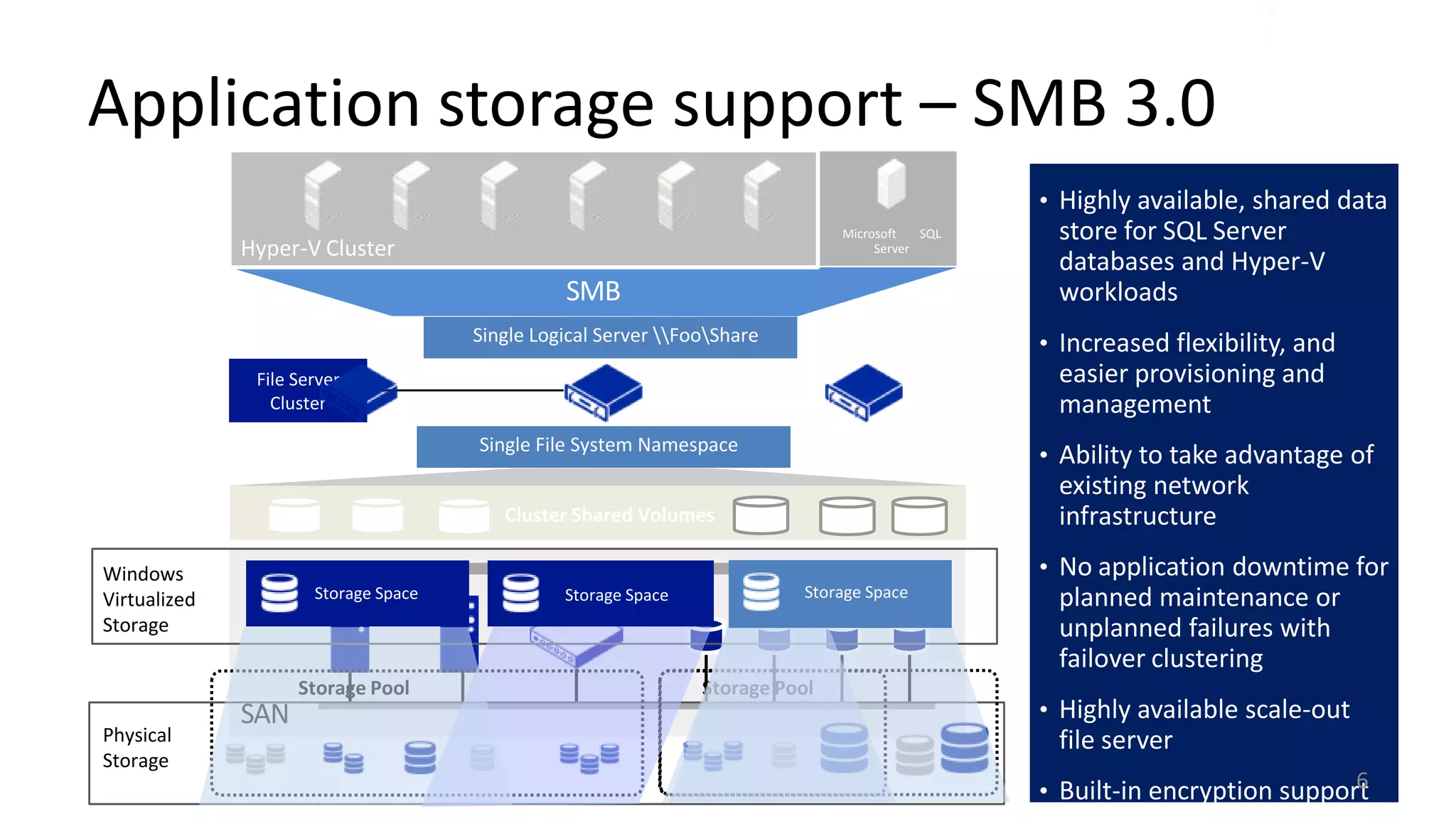
Application storage support – SMB 3.0
                                                                                                 • Highly available, shared data
                                                                               Microsoft   SQL    store for SQL Server
              Hyper-V Cluster                                                       Server
                                                                                                  databases and Hyper-V
                                                SMB                                               workloads
                                      Single Logical Server FooShare                          • Increased flexibility, and
               File Server                                                                        easier provisioning and
                 Cluster                                                                          management
                                      Single File System Namespace
                                                                                                 • Ability to take advantage of
                                                                                                  existing network
                                         Cluster Shared Volumes                                   infrastructure
Windows                                                                                          • No application downtime for
Virtualized                RAID
                      Storage Space                      RAID
                                                Storage Space              Storage Space RAID     planned maintenance or
                             Array                      Array                            Array
Storage                                                                                           unplanned failures with
                                                                                                  failover clustering
                    Storage Pool                                Storage Pool
              SAN                                                                                • Highly available scale-out
Physical                                                                                          file server
Storage
                                                                                                                             6
                                                                                                 • Built-in encryption support
Video       STORAGE SPACES


        8
Video       DATA DEDUPLICATION


        9
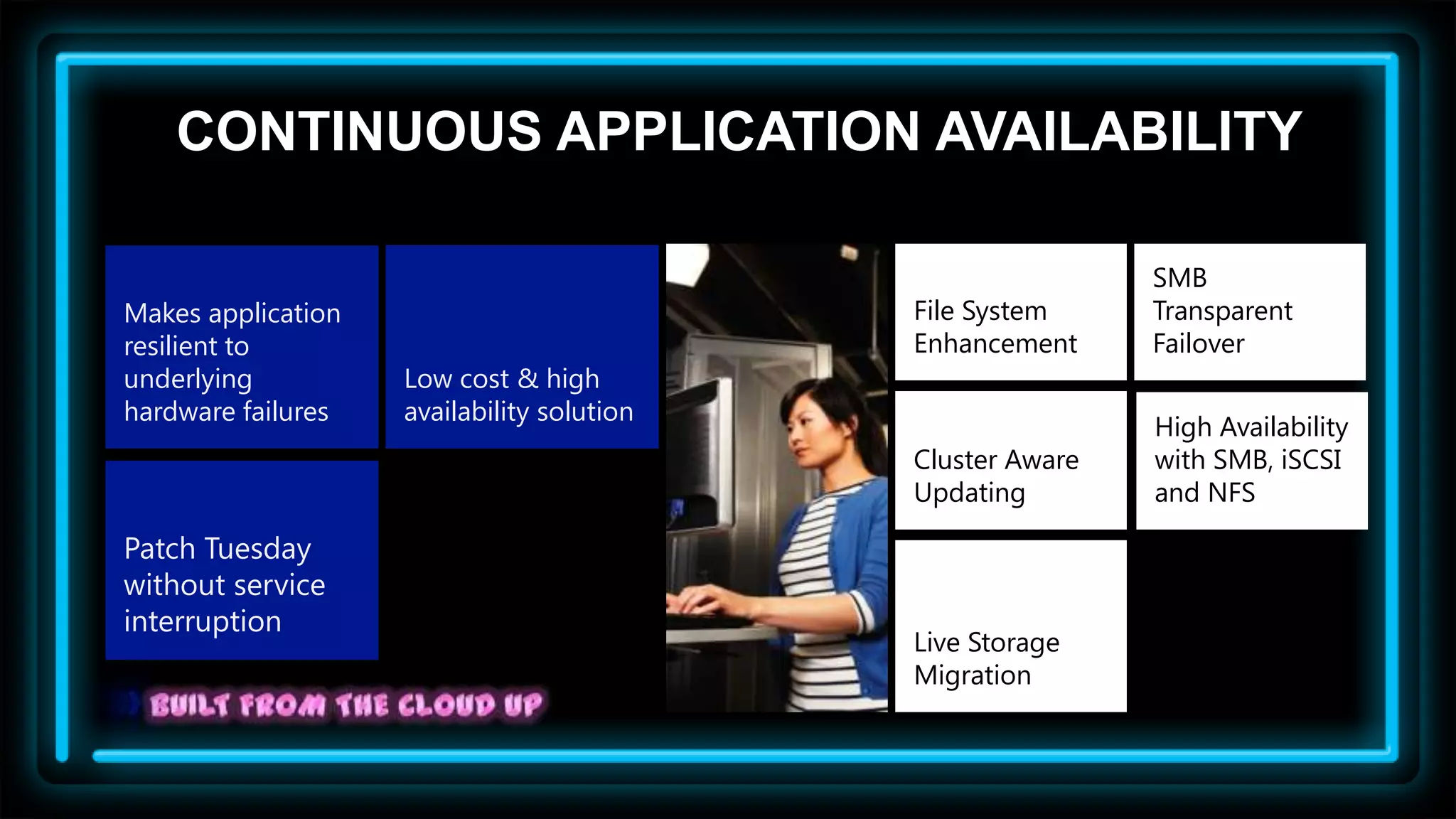
CONTINUOUS APPLICATION AVAILABILITY

                                                            SMB
Makes application                           File System     Transparent
resilient to                                Enhancement     Failover
underlying          Low cost & high
hardware failures   availability solution
                                                            High Availability
                                            Cluster Aware   with SMB, iSCSI
                                            Updating        and NFS

Patch Tuesday
without service
interruption
                                            Live Storage
                                            Migration
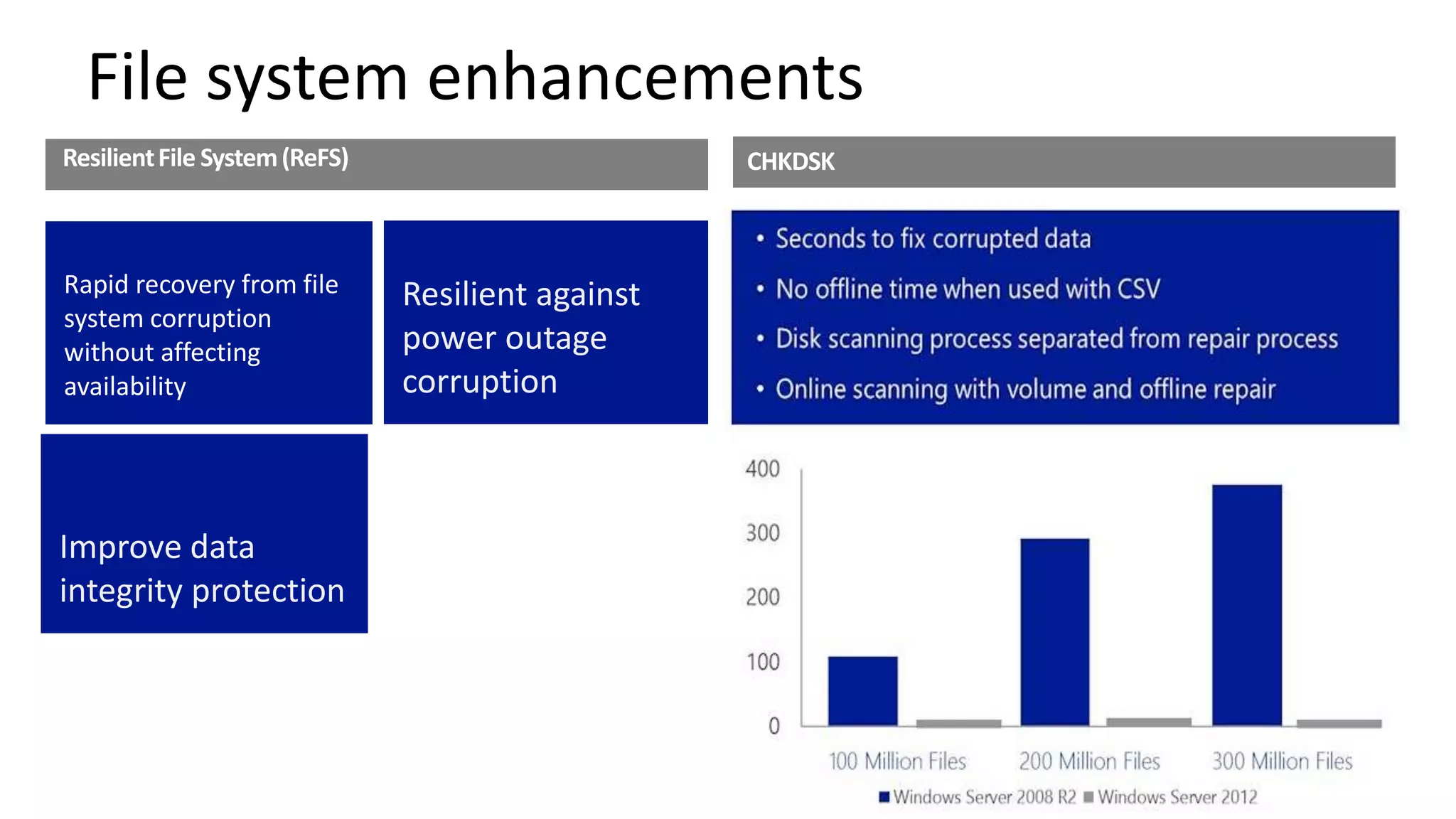
File system enhancements
Resilient File System (ReFS)                       CHKDSK

                                                   • Seconds to fix corrupted data

Rapid recovery from file                           • Online scanning with volume, offline repair
                               Resilient against
system corruption
without affecting              power outage
availability                   corruption


Improve data
integrity protection
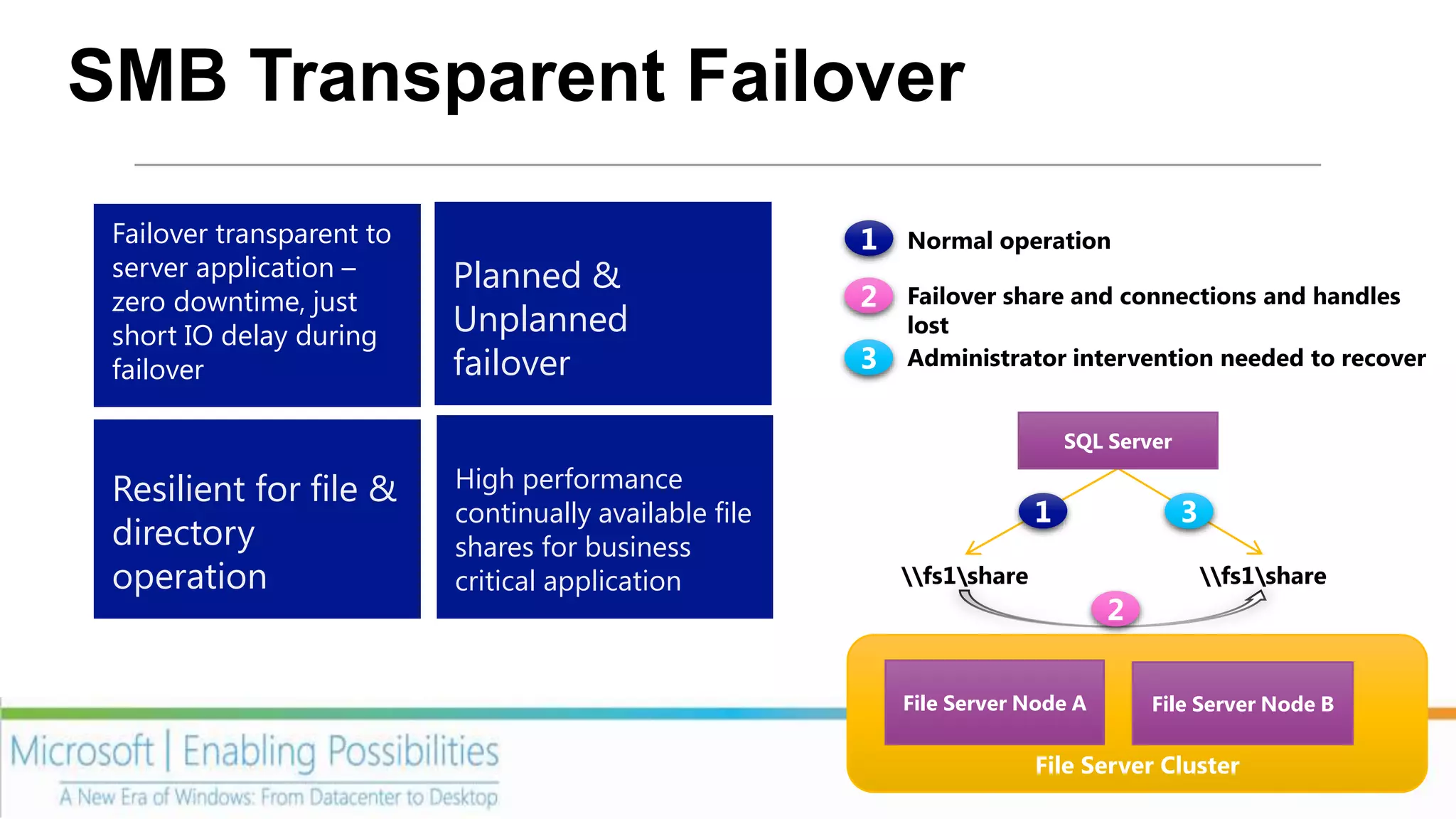
SMB Transparent Failover
 Failover transparent to
 server application –      Planned &
 zero downtime, just
 short IO delay during     Unplanned
 failover                  failover

                                                                        SQL Server

 Resilient for file &      High performance
                           continually available file
 directory                 shares for business
 operation                 critical application         fs1share                  fs1share


                                                        File Server Node A      File Server Node B

                                                                      File Server Cluster
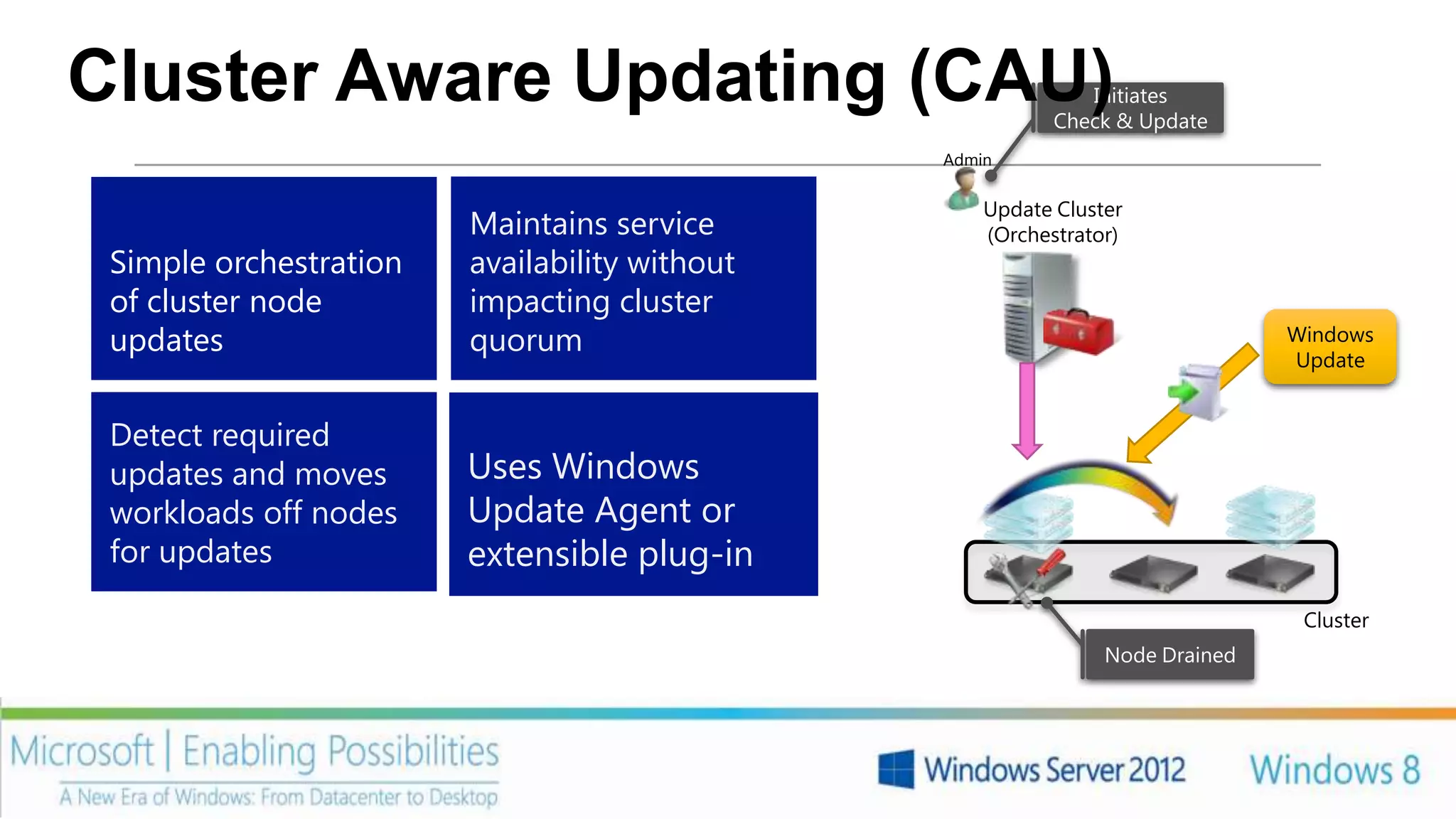
Cluster Aware Updating (CAU)                                 Initiates
                                                          Check & Update
                                               Admin


                                                   Update Cluster
                        Maintains service          (Orchestrator)
 Simple orchestration   availability without
 of cluster node        impacting cluster
 updates                quorum                                                Windows
                                                                              Update


 Detect required
 updates and moves      Uses Windows
 workloads off nodes    Update Agent or
 for updates            extensible plug-in
                                                                               Cluster
                                                               Node Drained
Video             CLUSTER AWARE UPDATING


        PAGE 14
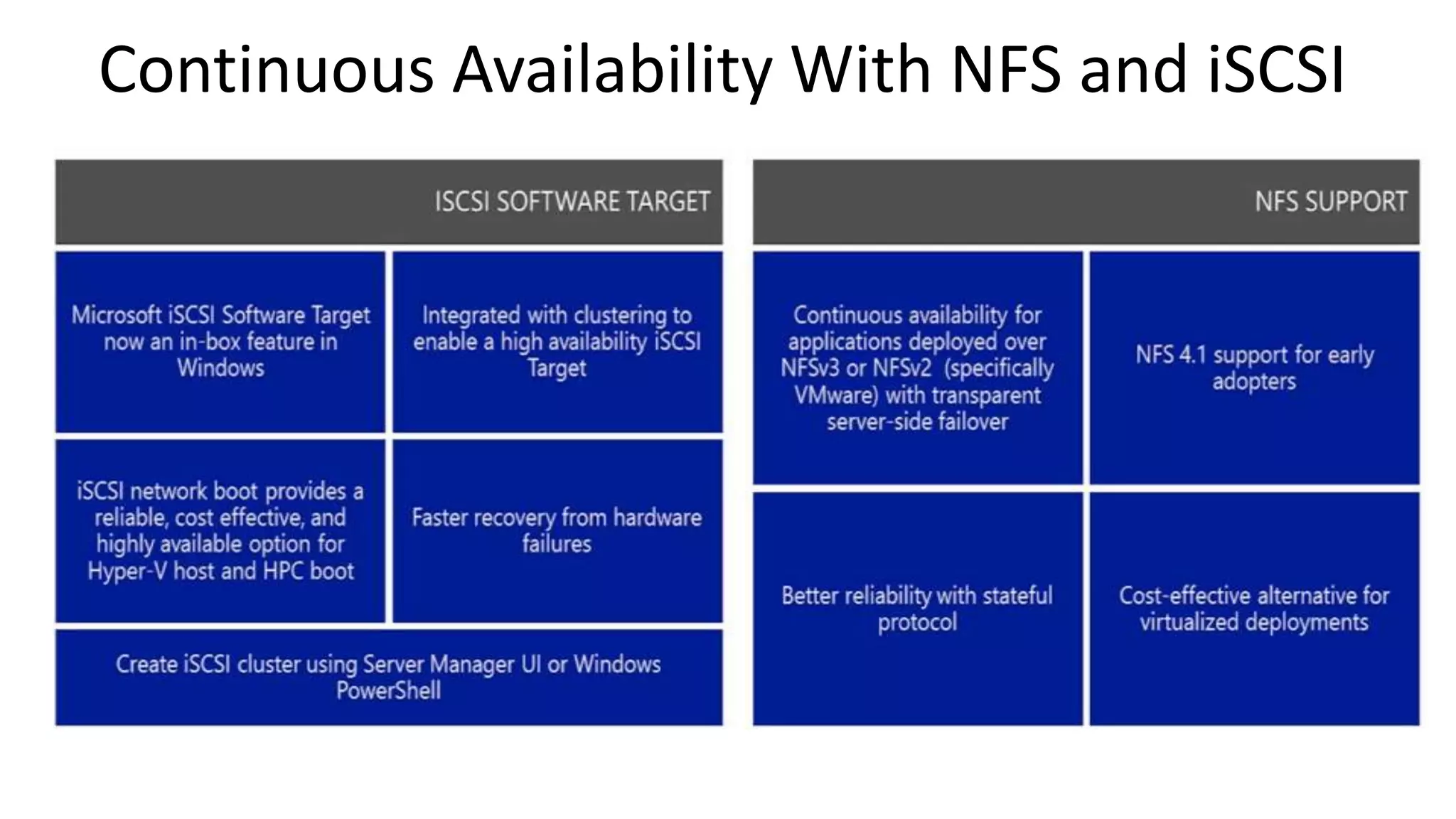
Continuous Availability With NFS and iSCSI
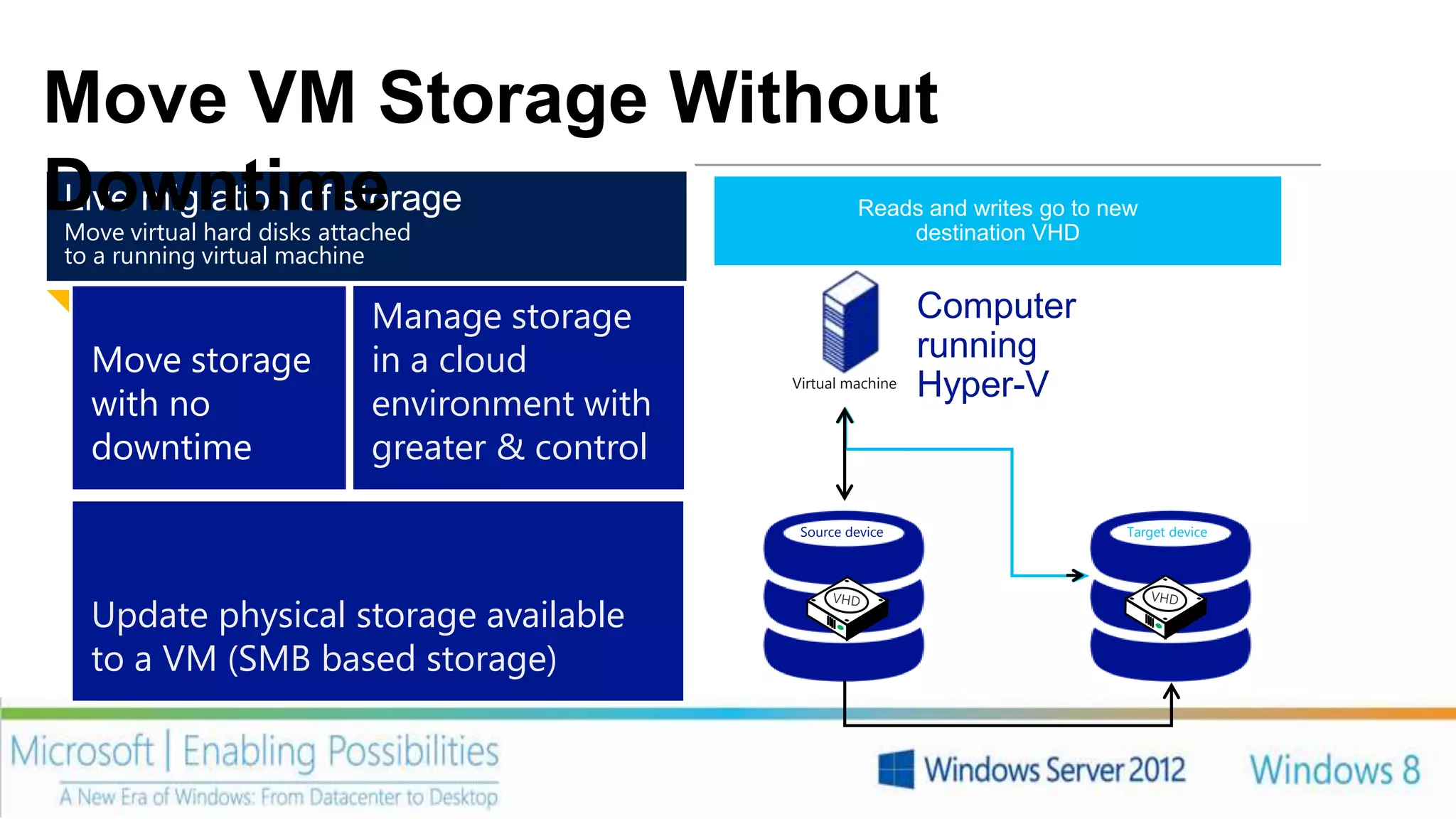
Move VM Storage Without
Downtime
Live migration of storage
Move virtual hard disks attached
                                                Disk writes Reads and writes go to new
                                                            are mirrored; outstanding changes are
                                                Disk Reads and writes go to new source VHDVHD
                                                     contents are copied to the destination
                                                                 destination VHD
                                                                     replicated
to a running virtual machine

                            Manage storage                            Computer
  Move storage              in a cloud                                running
                                                    Virtual machine
                                                                      Hyper-V
  with no                   environment with
  downtime                  greater & control

                                                     Source device                   Target device


  Update physical storage available
  to a VM (SMB based storage)
Video        LIVE STORAGE MIGRATION


        17
IMPROVED PERFORMANCE & RICHER
                   ECOSYSTEM
Delivery enterprise
ready performance
on a wide range of    Maximize return on
hardware              storage investment   Offloaded Data
                                           Transfer (ODX)     RDMa


                                           Windows            Windows
                                           Cluster in a Box   Storage Server
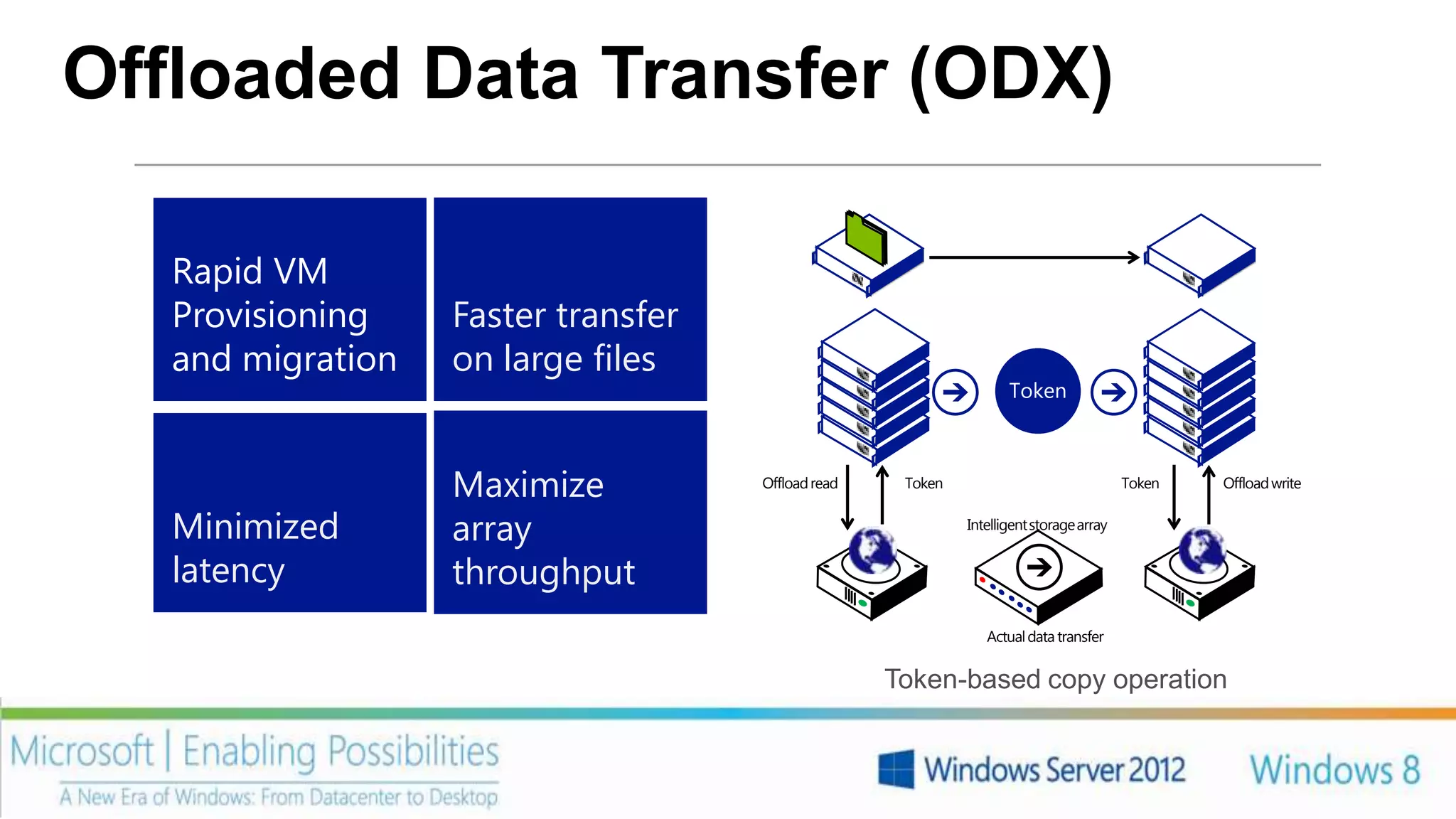
Offloaded Data Transfer (ODX)

   Rapid VM
   Provisioning    Faster transfer
   and migration   on large files
                                                                    Token


                   Maximize          Offload read    Token                               Token   Offload write


   Minimized       array                                     Intelligent storage array


   latency         throughput
                                                                Actual data transfer


                                                    Token-based copy operation
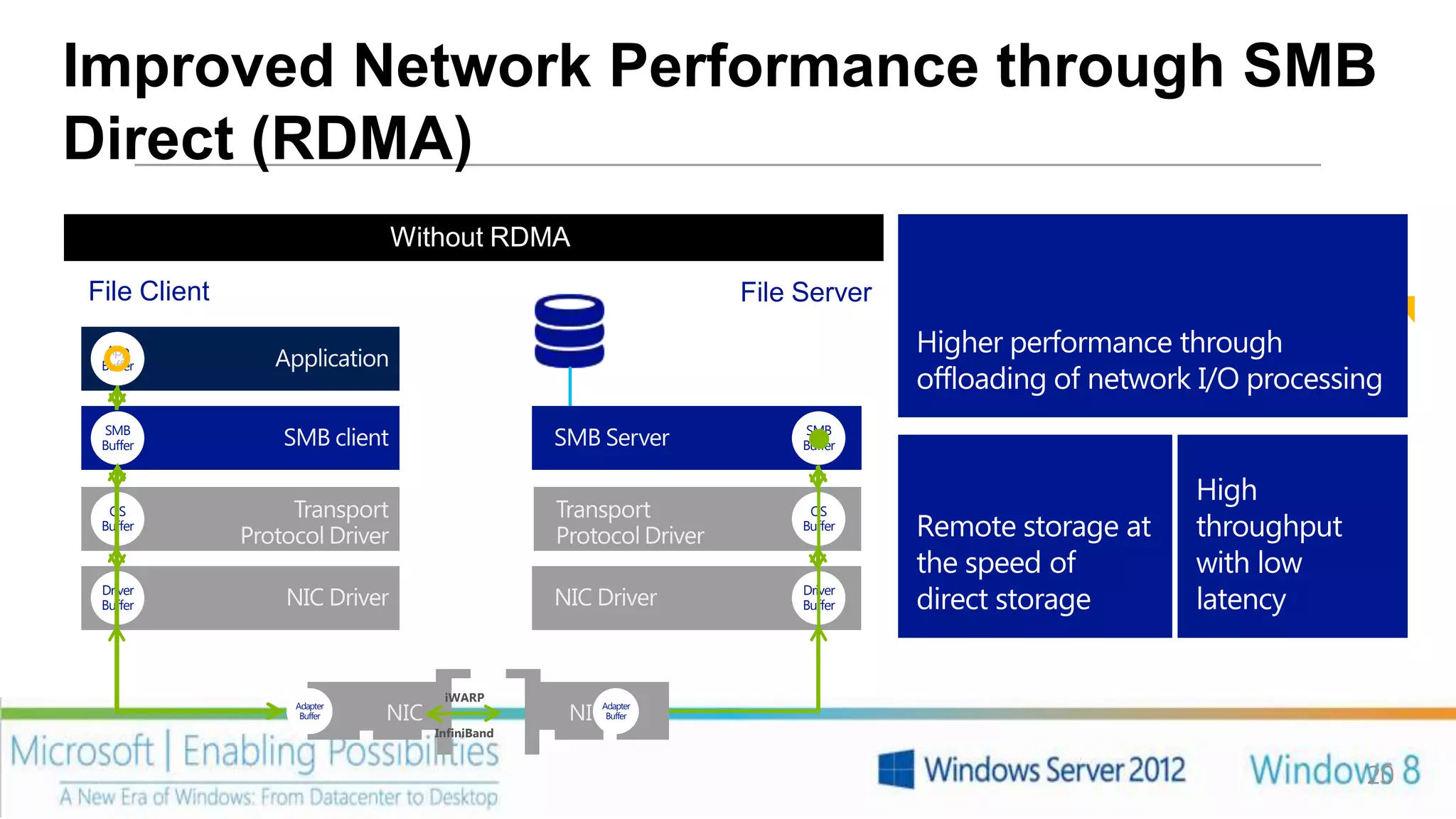
Improved Network Performance through SMB
Direct (RDMA)
                         Without RDMA
                          With RDMA
File Client                                               File Server
  App                                                                   Higher performance through
 Buffer
                                                                        offloading of network I/O processing
 SMB                                                           SMB
 Buffer                                                        Buffer


                                                                                             High
  OS                                                            OS
 Buffer                                                        Buffer   Remote storage at    throughput
                                                                        the speed of         with low
 Driver
 Buffer
                                                               Driver
                                                               Buffer   direct storage       latency


                                 iWARP
              Adapter
               Buffer   rNIC
                          NIC                rNIC
                                             NICAdapter
                                                 Buffer
                                InfiniBand


                                                                                                          20
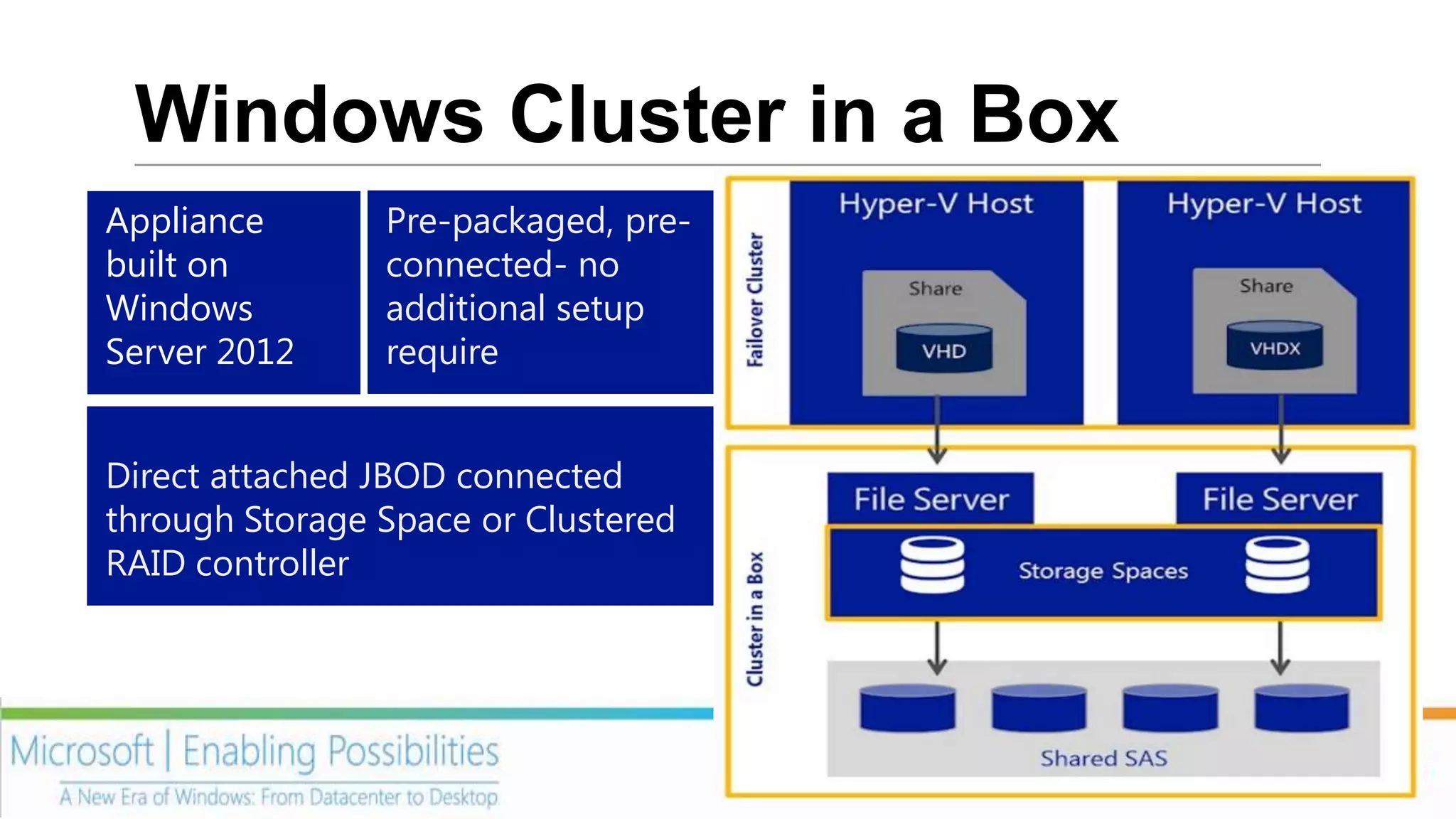
Windows Cluster in a Box
Appliance       Pre-packaged, pre-
built on        connected- no
Windows         additional setup
Server 2012     require


Direct attached JBOD connected
through Storage Space or Clustered
RAID controller
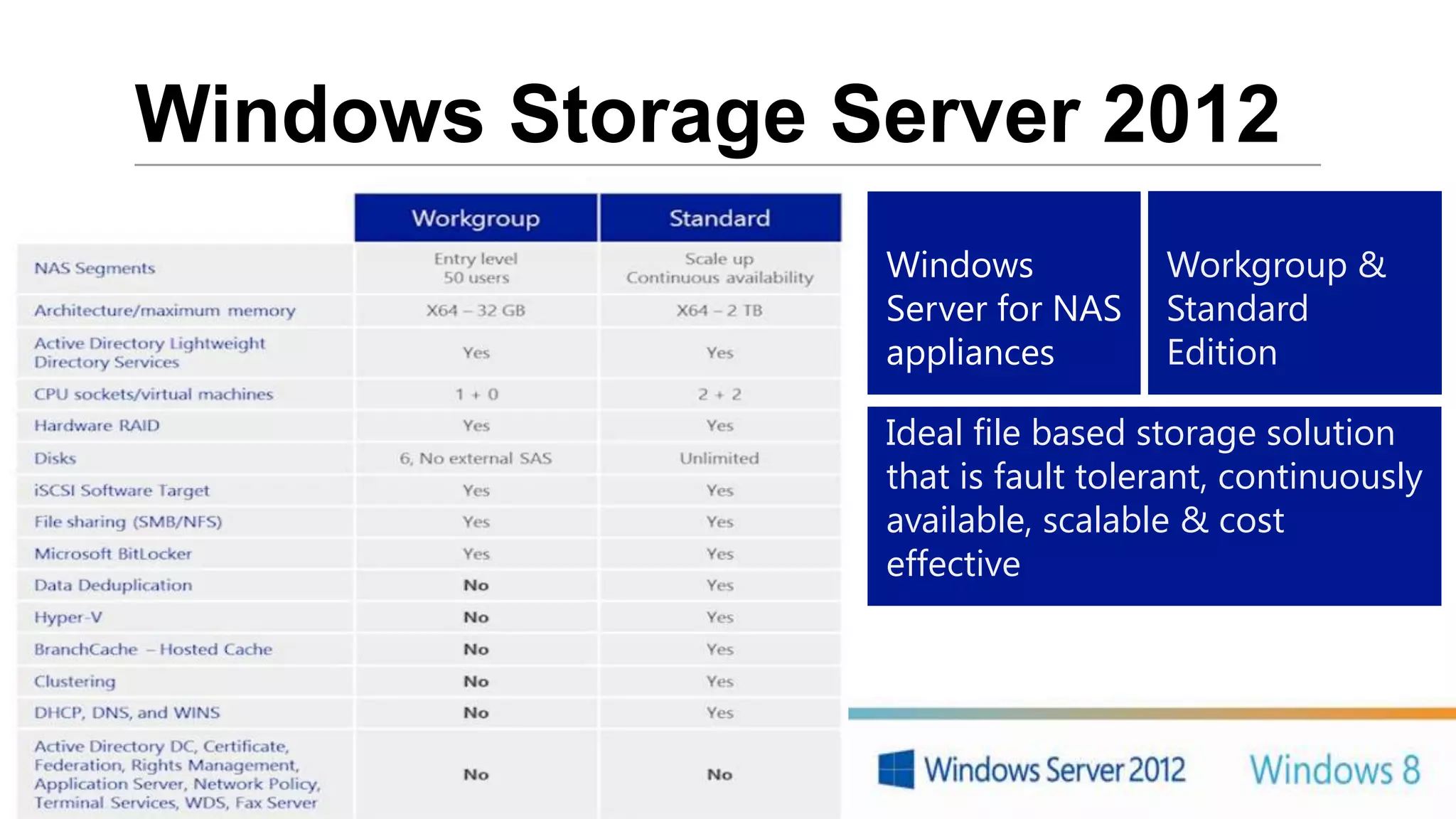
Windows Storage Server 2012
                  Windows           Workgroup &
                  Server for NAS    Standard
                  appliances        Edition

                  Ideal file based storage solution
                  that is fault tolerant, continuously
                  available, scalable & cost
                  effective


             22
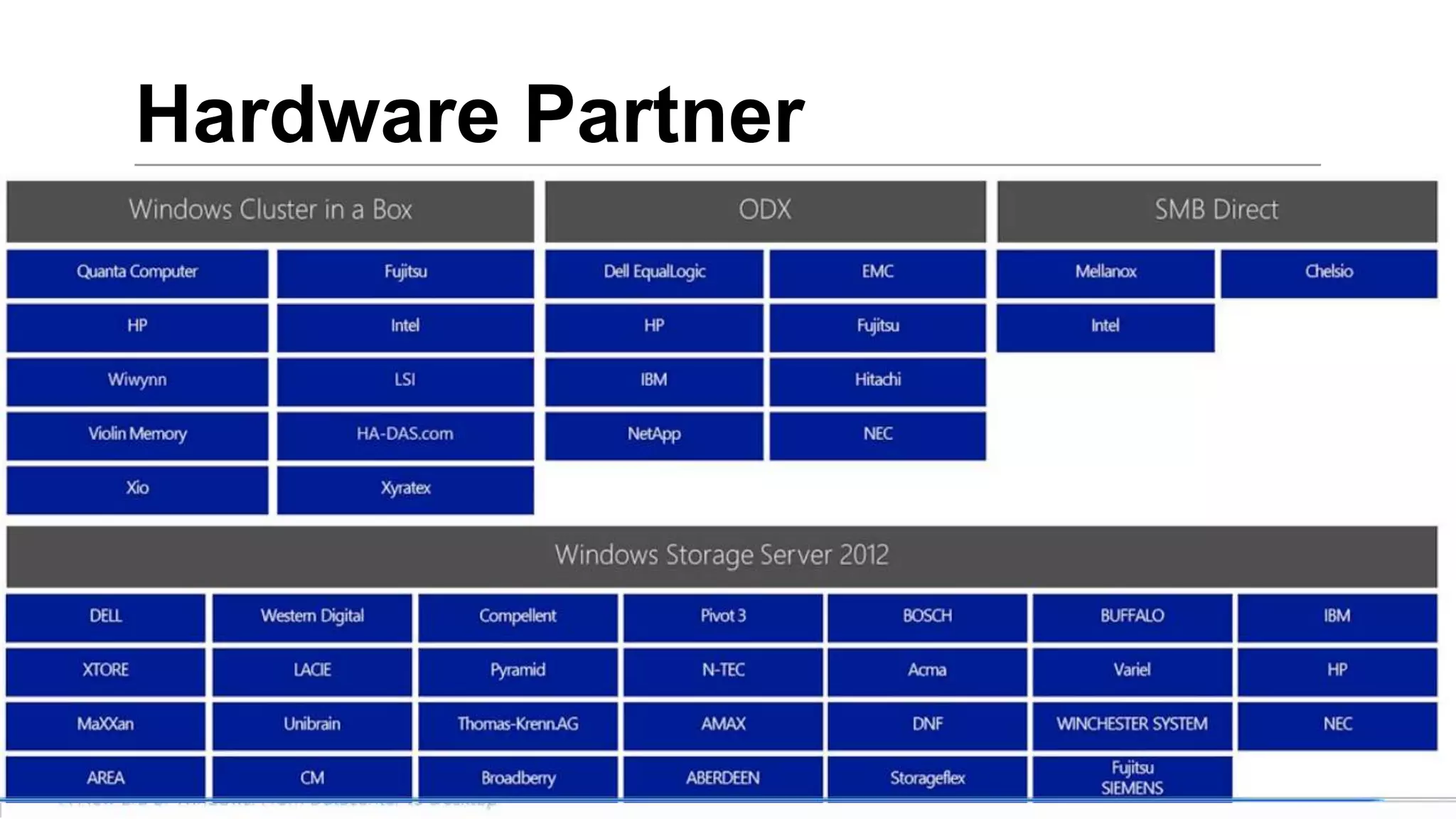
Hardware Partner


             23
Video        ODX


        24
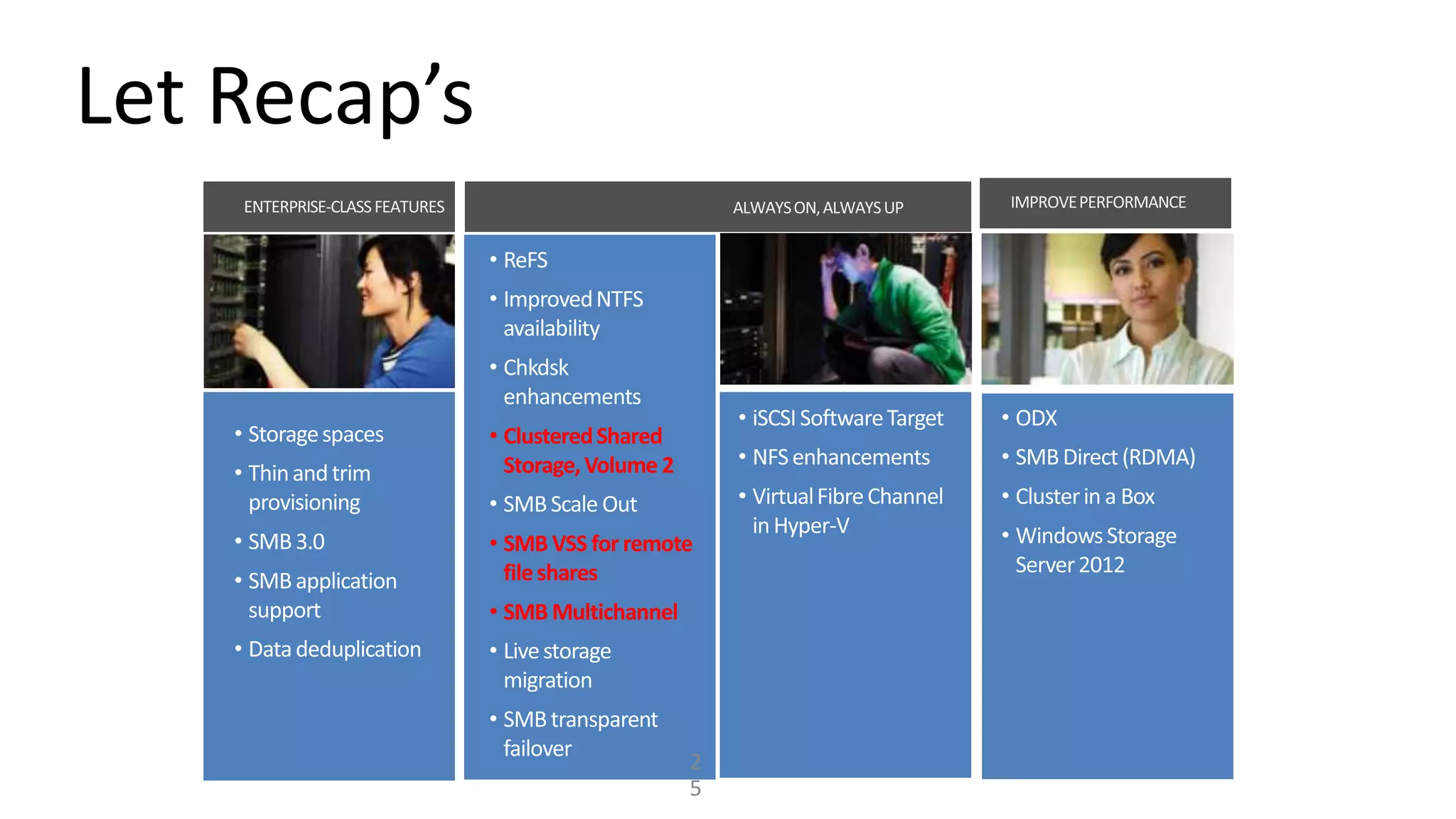
Let Recap’s


              • Clustered Shared
                Storage, Volume 2


              • SMB VSS for remote
                file shares
              • SMB Multichannel


                                    2
                                    5
Q&A
              Virtual
              Lai’s Blog

     www.ms4u.info

                                  DOWNLOAD Windows
     MVUG User Group              Server 2012
     https://www.facebook.com/g   http://technet.microsoft.com/en-
     roups/mvuggroup/             us/evalcenter/hh670538.aspx


26
Additional Windows Server 2012 Readiness
Resources


                Microsoft IT Camps are expert led, no-
                cost, freestyle, hands-on training
                events for IT professionals, centered on
                the issues and workloads you’re
                tackling in your environment today.
                www.aka.ms/SGITCamps
Storage Options in Windows Server 2012

Storage Options in Windows Server 2012

  • 1.
    LAI YOONG SENG,MVP VIRTUAL MACHINE WWW.MS4U.INFO INFRONT CONSULTING
  • 2.
    Session Objective andTakeaways Session Objectives: Key Takeaways • Understand different scenario • Build highly available and on the usage of Storage in reliable storage solutions with Windows Server 2012 cost effective hardware in • Demo Windows Server 2012
  • 3.
    Scenario summary Dynamic memory Network increase assigned to virtualization for virtual machines to multitenancy and IP increase capacity with portability no downtime
  • 4.
    ENTERPRISE CLASS FEATURES Deliversenterprise Optimize capacity class performance optimization Data Storage Spaces Deduplication Lowers the cost of Resilient to acquisition, component deployment & failures operation SMB 3.0
  • 5.
    Storage Spaces Windows Application Server or File Server Storage Virtualization Physical or virtualized deployments File Server Administration Resiliency & data Integrated with Hyper-V SMB Multichannel other Console redundancy Windows Failover Clustering NTFS SMB Direct Server 2012 capabilities Cluster Shared Volume NFS Windows Storage Mgmt. Storage resiliency & data availability with Windows Virtualized Storage Space Storage Space Storage Space commodity hardware Storage Storage Pool Storage Pool Utilization optimized Physical Storage through thin & trim provisioning (Shared) SAS or SATA 5
  • 6.
    Application storage support– SMB 3.0 • Highly available, shared data Microsoft SQL store for SQL Server Hyper-V Cluster Server databases and Hyper-V SMB workloads Single Logical Server FooShare • Increased flexibility, and File Server easier provisioning and Cluster management Single File System Namespace • Ability to take advantage of existing network Cluster Shared Volumes infrastructure Windows • No application downtime for Virtualized RAID Storage Space RAID Storage Space Storage Space RAID planned maintenance or Array Array Array Storage unplanned failures with failover clustering Storage Pool Storage Pool SAN • Highly available scale-out Physical file server Storage 6 • Built-in encryption support
  • 8.
    Video STORAGE SPACES 8
  • 9.
    Video DATA DEDUPLICATION 9
  • 10.
    CONTINUOUS APPLICATION AVAILABILITY SMB Makes application File System Transparent resilient to Enhancement Failover underlying Low cost & high hardware failures availability solution High Availability Cluster Aware with SMB, iSCSI Updating and NFS Patch Tuesday without service interruption Live Storage Migration
  • 11.
    File system enhancements ResilientFile System (ReFS) CHKDSK • Seconds to fix corrupted data Rapid recovery from file • Online scanning with volume, offline repair Resilient against system corruption without affecting power outage availability corruption Improve data integrity protection
  • 12.
    SMB Transparent Failover Failover transparent to server application – Planned & zero downtime, just short IO delay during Unplanned failover failover SQL Server Resilient for file & High performance continually available file directory shares for business operation critical application fs1share fs1share File Server Node A File Server Node B File Server Cluster
  • 13.
    Cluster Aware Updating(CAU) Initiates Check & Update Admin Update Cluster Maintains service (Orchestrator) Simple orchestration availability without of cluster node impacting cluster updates quorum Windows Update Detect required updates and moves Uses Windows workloads off nodes Update Agent or for updates extensible plug-in Cluster Node Drained
  • 14.
    Video CLUSTER AWARE UPDATING PAGE 14
  • 15.
  • 16.
    Move VM StorageWithout Downtime Live migration of storage Move virtual hard disks attached Disk writes Reads and writes go to new are mirrored; outstanding changes are Disk Reads and writes go to new source VHDVHD contents are copied to the destination destination VHD replicated to a running virtual machine Manage storage Computer Move storage in a cloud running Virtual machine Hyper-V with no environment with downtime greater & control Source device Target device Update physical storage available to a VM (SMB based storage)
  • 17.
    Video LIVE STORAGE MIGRATION 17
  • 18.
    IMPROVED PERFORMANCE &RICHER ECOSYSTEM Delivery enterprise ready performance on a wide range of Maximize return on hardware storage investment Offloaded Data Transfer (ODX) RDMa Windows Windows Cluster in a Box Storage Server
  • 19.
    Offloaded Data Transfer(ODX) Rapid VM Provisioning Faster transfer and migration on large files Token Maximize Offload read Token Token Offload write Minimized array Intelligent storage array latency throughput Actual data transfer Token-based copy operation
  • 20.
    Improved Network Performancethrough SMB Direct (RDMA) Without RDMA With RDMA File Client File Server App Higher performance through Buffer offloading of network I/O processing SMB SMB Buffer Buffer High OS OS Buffer Buffer Remote storage at throughput the speed of with low Driver Buffer Driver Buffer direct storage latency iWARP Adapter Buffer rNIC NIC rNIC NICAdapter Buffer InfiniBand 20
  • 21.
    Windows Cluster ina Box Appliance Pre-packaged, pre- built on connected- no Windows additional setup Server 2012 require Direct attached JBOD connected through Storage Space or Clustered RAID controller
  • 22.
    Windows Storage Server2012 Windows Workgroup & Server for NAS Standard appliances Edition Ideal file based storage solution that is fault tolerant, continuously available, scalable & cost effective 22
  • 23.
  • 24.
    Video ODX 24
  • 25.
    Let Recap’s • Clustered Shared Storage, Volume 2 • SMB VSS for remote file shares • SMB Multichannel 2 5
  • 26.
    Q&A Virtual Lai’s Blog www.ms4u.info DOWNLOAD Windows MVUG User Group Server 2012 https://www.facebook.com/g http://technet.microsoft.com/en- roups/mvuggroup/ us/evalcenter/hh670538.aspx 26
  • 27.
    Additional Windows Server2012 Readiness Resources Microsoft IT Camps are expert led, no- cost, freestyle, hands-on training events for IT professionals, centered on the issues and workloads you’re tackling in your environment today. www.aka.ms/SGITCamps

Editor's Notes

  • #3 With Win2012 designed for cloud deployment, we want to have a scenario to support not only FS, but HV, SQL, IIS natively run in Windows environment and at the same time reduce CAPEX and reduce ongoing maintenance cost.There are 3 scenario:As a customer, we want an Enterprise class solution with a lower costWith the cheapest solution, we want to make sure the storage be a able support always on- always up applicationWithout buffer of waiting time, we want a solution that deliver the highest performance, scalability and give us an additional choice in term of storage,
  • #5 Let look into 1st ScenarioThe goal is Enterprise class solution which as the same performance as iSCSI & FCOptimize as much storage as possibleNo matter what happen, the system must up and runningLowest cost
  • #6 Hyper-V as the virtualization platform.Next, we are now introducing Storage virtualization (aka Storage Spaces) which give you ability to virtualize storage solution.This option allow us to combine a bunch of disk , just standard disk (cheap disk) and use the functionality of Win2012 to consolidate them together as storage pool.Storage Pool -> Virtual Disk (Logical disk)VD -> RAID 0, RAID1, & RAID 5 to offer various level of performance and data protection as neededThin provisioning / Fixed Provisioning.Storage Spaces compatible with Win2012 features. This can turn inexpensive storage into enterprise class storage which allow you to run FS, Hyper-V & SQL Server
  • #7 Windows Server 2012 now offers support for application-based file shares. SMB 3.0 support running Hyper-V & SQL Server.Previous we have iSCSI & FC to store HA VM & SQL DB.For HA, we will configure as cluster and store VM & SQL DB. With SMB 3.0, you will have a features called SMB direct & SMB Multichannel which I’m going to cover later.
  • #8 Let look into data dedup. It is a feature which available in file shares. It eliminate your redundant data & fully optimize your storage.Example:- 10TB of file shareBenefit of having dedup:-Space OptimizationReduce your backup data & save your WAN bandwidth.
  • #11 Storage that can stand forH/w FailureLow cost Cater for patch Tuesday that cost server downtimeContinues availability on Hyper-V, storage & network
  • #12 Previously we have NTFS file format. Now we have Resilient File System (ReFS) .Key goad:_Compatibility with NTFSMaintain high level of system availability & reliabilityMore resilient especially during power outageCheckdisk improvementTake sec to fix corrupted dataNo more offline disk when perform checking
  • #13 As I just mentioned, you can use Hyper-V over SMB & SQL over SMB. With SMB transparent failover, there is no loss connection especially when perform planned / unplanned failover.You will not reliase any downtime.
  • #14 Now let look into how we cater for patch Tuesday.
  • #16 With Win2012 we can now configure block level storage. You can setup iSCSI Target. In the past, we need to download separate component. But now iSCSI is ship in the box. To ensure HA, we can configure clustering.Talking about NFS- We can setup and deploy cluster NFS to ensure continuos high availability to use by Vmware.
  • #17 NOTE: This slide is animated and has 3 clicksNot only can we live migrate a virtual machine between two physical hosts, Hyper‑V in Windows Server 2012 introduces live storage migration, which lets you move virtual hard disks that are attached to a running virtual machine without downtime. Through this feature, you can transfer virtual hard disks, with no downtime, to a new location for upgrading or migrating storage, performing backend storage maintenance, or redistributing your storage load. You can perform this operation by using a new wizard in Hyper‑V Manager or the new Hyper‑V cmdlets for Windows PowerShell. Live storage migration is available for both storage area network (SAN)-based and file-based storage.When you move a running virtual machine’s virtual hard disks, Hyper‑V performs the following steps to move storage:Throughout most of the move operation, disk reads and writes go to the source virtual hard disk.[Click]After live storage migration is initiated, a new virtual hard disk is created on the target storage device. While reads and writes occur on the source virtual hard disk, the disk contents are copied to the new destination virtual hard disk.[Click]After the initial disk copy is complete, disk writes are mirrored to both the source and destination virtual hard disks while outstanding disk changes are replicated.[Click]After the source and destination virtual hard disks are synchronized, the virtual machine switches over to using the destination virtual hard disk.The source virtual hard disk is deleted.Just as virtual machines might need to be dynamically moved in a cloud data center, allocated storage for running virtual hard disks might sometimes need to be moved for storage load distribution, storage device servicing, or other reasons.[Additional information]Updating the physical storage that is available to Hyper‑V is the most common reason for moving a virtual machine’s storage. You also may want to move virtual machine storage between physical storage devices, at runtime, to take advantage of new, lower-cost storage that is supported in this version of Hyper‑V, such as SMB-based storage, or to respond to reduced performance that can result from bottlenecks in the storage throughput. Windows Server 2012 provides the flexibility to move virtual hard disks both on shared storage subsystems and on non-shared storage as long as a Windows Server 2012 SMB3 network shared folder is visible to both Hyper‑V hosts.You can add physical storage to either a stand-alone system or to a Hyper‑V cluster and then move the virtual machine’s virtual hard disks to the new physical storage while the virtual machines continue to run.Storage migration, combined with live migration, also lets you move a virtual machine between hosts on different servers that are not using the same storage. For example, if two Hyper‑V servers are each configured to use different storage devices and a virtual machine must be migrated between these two servers, you can use storage migration to a shared folder on a file server that is accessible to both servers and then migrate the virtual machine between the servers (because they both have access to that share). Following the live migration, you can use another storage migration to move the virtual hard disk to the storage that is allocated for the target server.You can easily perform the live storage migration using a wizard in Hyper‑V Manager or Hyper‑V cmdlets for Windows PowerShell.BenefitsHyper‑V in Windows Server 2012 lets you manage the storage of your cloud environment with greater flexibility and control while you avoid disruption of user productivity. Storage migration with Hyper‑V in Windows Server 2012 gives you the flexibility to perform maintenance on storage subsystems, upgrade storage appliance firmware and software, and balance loads as capacity is used without shutting down virtual machines.Requirements for live storage migrationWindows Server 2012.The Hyper‑V role.Virtual machines configured to use virtual hard disks for storage.
  • #20 ODX (offload and get the best out of the array) - You can do copy and moving of data within an array.Let say, you a have large file, you can leverage ODX capable to faster transfer file within an array without using network & reduce CPU resource utilization.
  • #21 SMB Direct. Without attach FC attached storage, we can also achieve high performance storage.Example:- FS Client & FS ServerIt will go through different layer and Data break into smaller packet and transfer between S & C. All this consume a lot of CPU utilization.To solve this problem, with RDMA compliant network adapter, we can bypass network layer & give full performance capacity. It will bypass CPU & give it to do other thing.RDMA compatibility is currently limited to InfiniBand, iWARP, and RoCE (RDMA over Converged Ethernet)RDMA wont work in Win 2012 NIC Teaming. But MPIO and SMB Multi Channel are preferred.
  • #22 For those who do not want to hassle to setup SMB as storage. We also have Windows Cluster in a box. It is just a box. Low cost solutionAll you do is plug the box with power.It is suitable for branch / medium business. 2 option:- one with Storage Space / Cluster RAID controller.It is JBOD enclosure.
  • #23 The next topic is Windows Storage Server 2012. It is ship with full blown of Win 2012 and do not need to configure a lot of setting.In the past we have 4 edition, now we reduce to 2. Here is a table of the comparison of two versionEntry level – WorkgrouoStandard – for HAFor Hyper-V use, Deducp, Branch cache, it is recommend to get Standard Edition.