Order Independent Transparency Alessandro Rigazzi Data Analysis and Visualization Group July 1, 2008
INTRODUCTION A brief summary of Order Independent Transparency
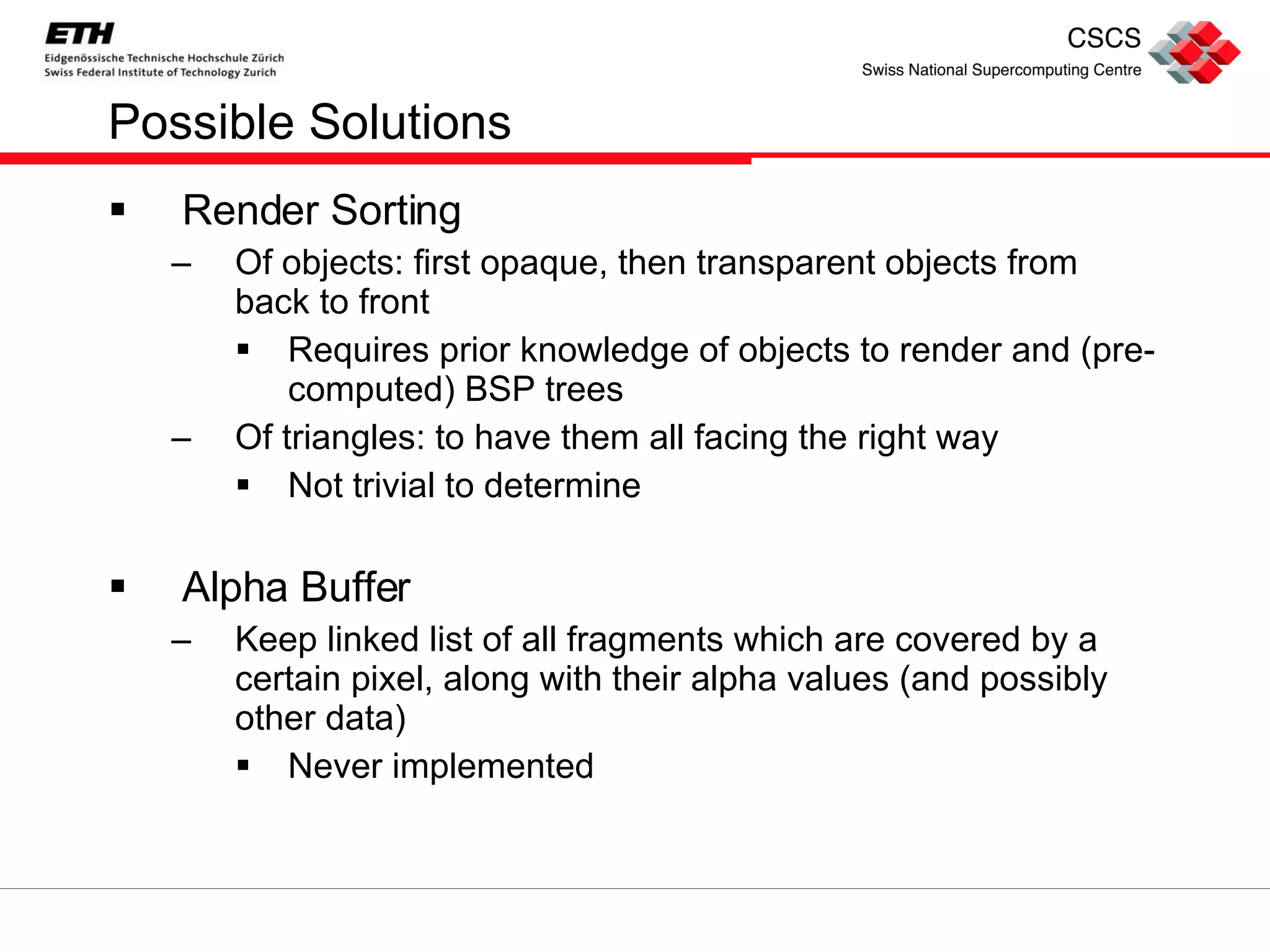
The Problem No standard implementation for Order Independent Transparency (OIT) in OpenGL
Possible Solutions Render Sorting Of objects: first opaque, then transparent objects from back to front Requires prior knowledge of objects to render and (pre-computed) BSP trees Of triangles: to have them all facing the right way Not trivial to determine Alpha Buffer Keep linked list of all fragments which are covered by a certain pixel, along with their alpha values (and possibly other data) Never implemented
With new graphic cards Possibility for advanced algorithms: Depth Peeling (Everitt 2001) : at each pass “ peel ” a layer, i.e. only render what is farther from the camera than the last fragment belonging to that pixel.  Blend  the various  layers . Weighted Sum (Meshkin 2007) :  expand  alpha blending  equation  and  discard terms  which are order dependent. Weighted Average (Bavoil & Myers 2008) : average all fragments belonging to a pixel and keep an index of “ depth complexity ” (number of fragments for that pixel). Dual Depth Peeling (Bavoil & Myers 2008) : perform depth peeling, from front to back and from back to front  at the same time .
Where should I look? Lack of  efficient  OIT algorithms in high level libraries such as: Open Inventor VTK Open SG Open Scene Graph … We did it! We ported to Open Scene Graph some GLUT code provided by NVidia for  dual depth peeling  and  weighted average  algorithms
Why complicate life? Dual Depth Peeling Exact Math result identical to alpha blending equation Slow Requires N/2+1 geometry passes, where N is the maximum depth complexity of the scene Weighted Average Approximated Sum of fragment colors, fragment depth not used Very fast Just one pass to sum all the fragments and one to render to a quad We decided to implement both dual depth peeling and weighted average algorithms because of substantial differences between the two
DUAL DEPTH PEELING Algorithm and OSG implementation overview
From classic to dual Depth peeling is an  OIT technique  described by  Everitt  in  2001 The idea is to  iteratively  get the  nearest layer of fragments , store their color, then look for the next layer. At each pass the color of the  current layer is blended with the previous ones Needs  as many passes as maximum number of overlapping layers  (depth complexity) With support for  multiple render targets , we can start depth peeling from two sides, front and back
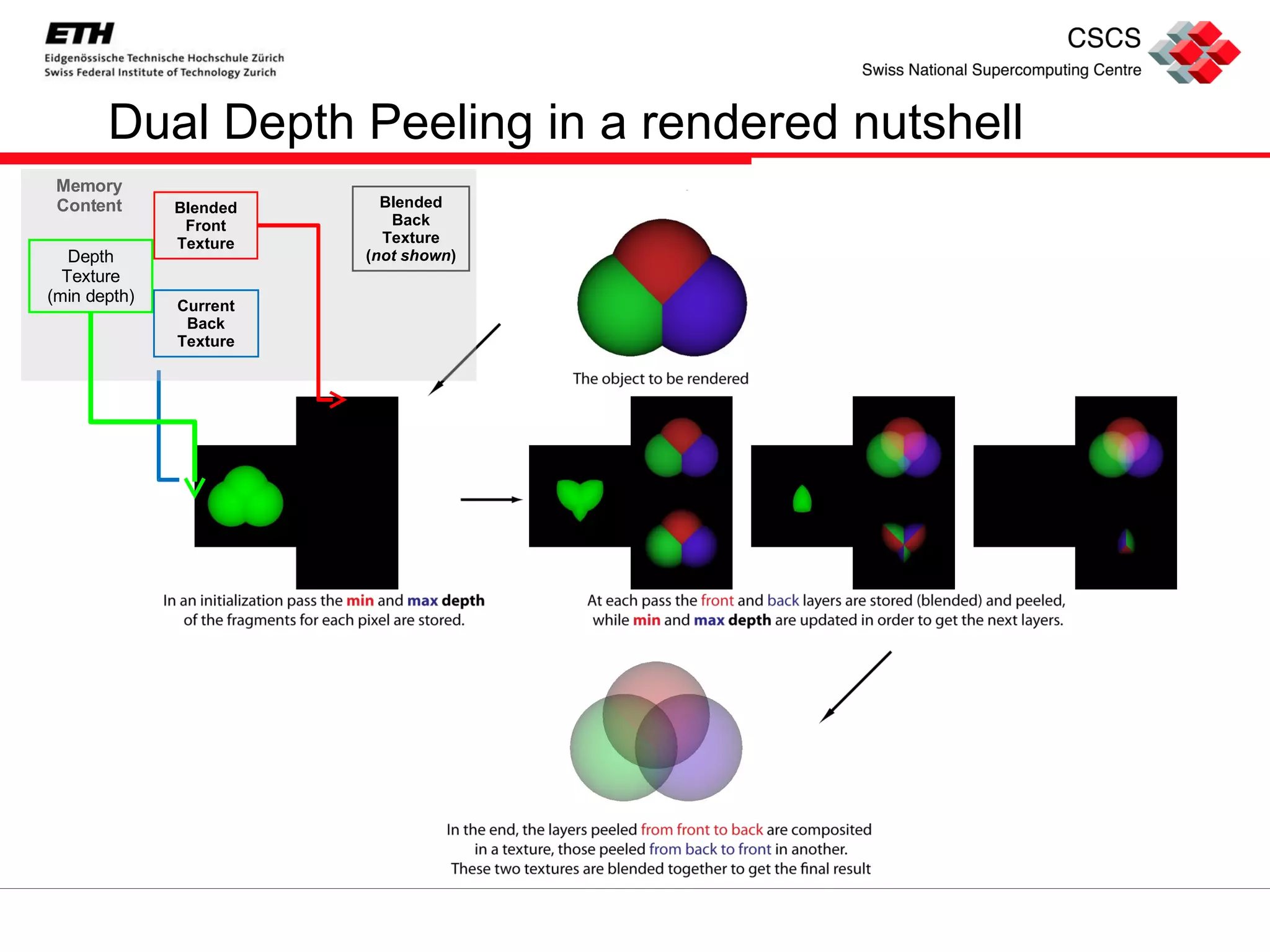
Dual Depth Peeling in a nutshell
Dual Depth Peeling Complete Graph
Step by step: initialization Clear accumulated textures Initialize the depth texture with (-minDepth, maxDepth) Since we need both the min and max depth of the fragments belonging to a pixel, we store for each fragment (–gl_FragCoord.z, gl_FragCoord.z) in the 32 bit depth texture and use MAX_BLEND: this keeps the smallest value saved as negative in the first component and the largest saved in the second component
Step by step: peel passes (I), idea Basic idea: at each peel pass get the nearest and the farthest fragments which have not been peeled yet Therefore: at each pass we must Update the depth texture Store the back and front fragment colors Can we do it in one shader? Almost, but no.
Step by step: peel pass (II), MAX_BLEND We  update the depth texture  the same way we initialized it, this time  discarding fragments with depths  which have  already  been  peeled Similarly to the initialization pass, we use  MAX_BLEND We  sum  the  contribute  of the  front layer  fragments in the  blended front texture Front to back alpha blend  equation :  dst_color = dst_color + src_color * src_alpha * dst_alpha This could be done with the OpenGL built in blend functions But  GLSL  only  allows  for  one blend function per shader , we want to use the  same shader for depth texture and front color We have to adapt alpha blend to  MAX_BLEND!
Step by step: peel pass (III), front texture resolved  Idea: since  front to back color can only increase  at each layer, we load the  previous colors  (passed in a  texture ) and write in the texture the result of alpha blend in the shader The  new value  will be  greater   than  the  previous   one , MAX_BLEND will then  overwrite  the  texture We are not done, what about  back to front blend? Back to front alpha blend equation dst_color =  src_color * dst_alpha + (1-src_alpha) * dst_color This does not monotonically increase! We can not use MAX_BLEND, but we have to!
Step by step: peel pass (IV), back texture resolved Since using MAX_BLEND we  can not update the blended back texture , we need to find an alternative solution, i.e., we  need another shader In the  peel shader  we  only write the current value of the back layer  (clearing the texture to black, in order to overwrite it with MAX_BLEND) We use a  blend shader  to get the texture and the OpenGL built in blend function to  accumulate  at  each pass  the  current back layers  in the  blended back texture To do the blend in a full screen pass, we render to a textured screen aligned quad
Step by step: final switch (I), swapping After all  the  peel passes  we have the  blended front and back textures , we just have to blend them  together  and we get the final image that we draw on a second  textured   screen aligned quad This should be easy, but: To  avoid read-write hazards  in the peel passes we have to use  different textures to read from and write to  the fragment colors This means that we have  two depth, two front and two temporary back textures At each pass we  swap destination and source  for rendering Where should we  read from in the final pass?
Step by step: final switch (II), why the switch Since we allow for  dynamic change of number of peel passes , we don’t know which frame buffer object will contain the final blended front texture We have to  set  the  render targets  of each camera (i.e. the final camera too)  at initialization time How? We create a  final pass  for the case when the number of peel passes is  even  and one for the case it is  odd We  switch  to the correct final pass  at run time , depending on the number of peel passes of the  current traversal
Variable number of passes The number of peel passes one decides to use determines the quality of the output Depending on the point of view, for the same object we can need a different number of passes The exact number of needed passes can be determined with an occlusion query Scene graphs are  rigid structures Adding or removing branches at run time is complicated We prefer to build the tree for a maximum number of passes and activate/deactivate some of them as needed.
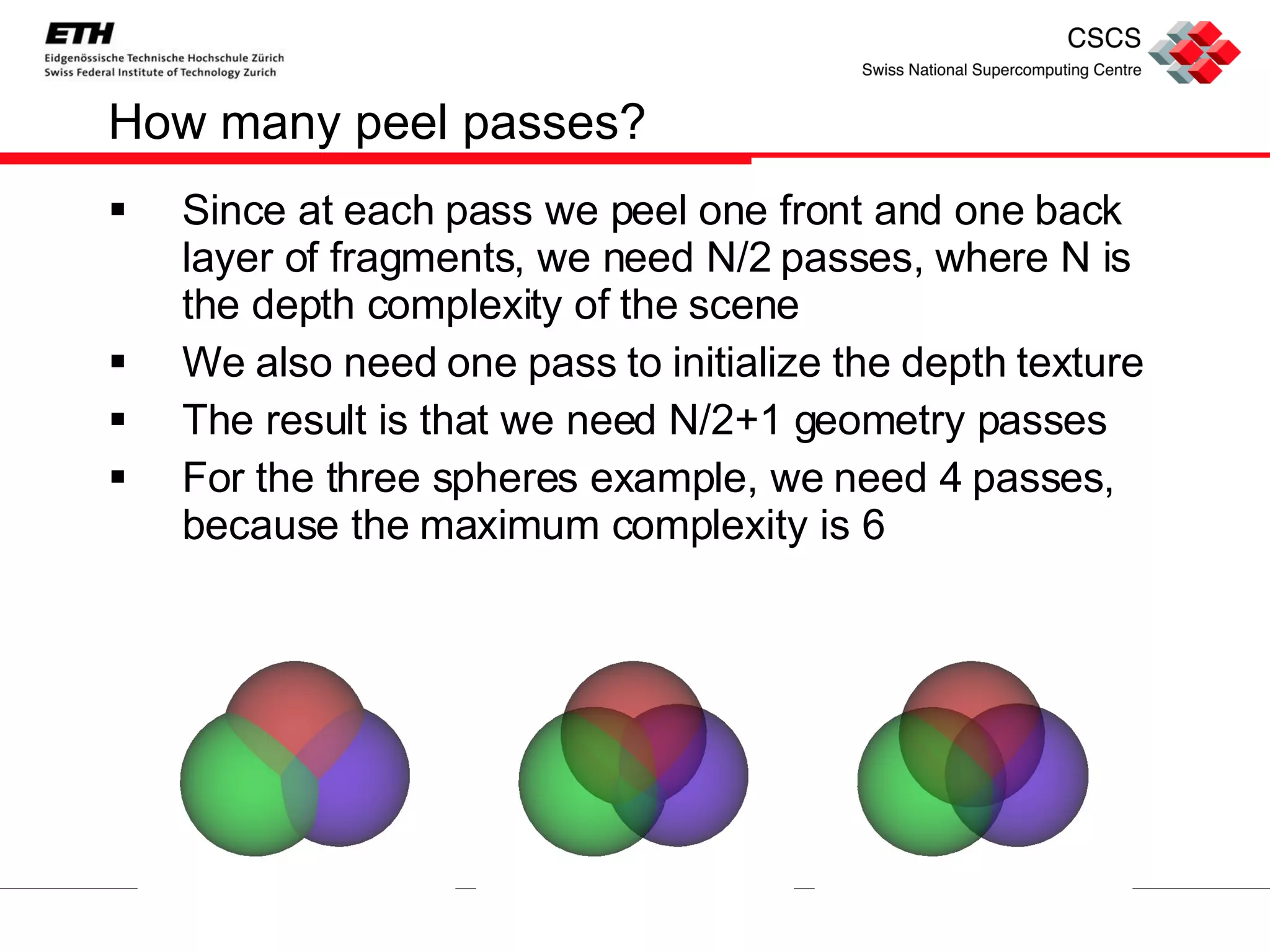
How many peel passes? Since at each pass we peel one front and one back layer of fragments, we need N/2 passes, where N is the depth complexity of the scene We also need one pass to initialize the depth texture The result is that we need N/2+1 geometry passes For the three spheres example, we need 4 passes, because the maximum complexity is 6
Dual Depth Peeling in a rendered nutshell Blended Front Texture Depth Texture (min depth) Current Back Texture Blended Back Texture ( not shown ) Memory Content
WEIGHTED AVERAGE Algorithm and OSG implementation overview
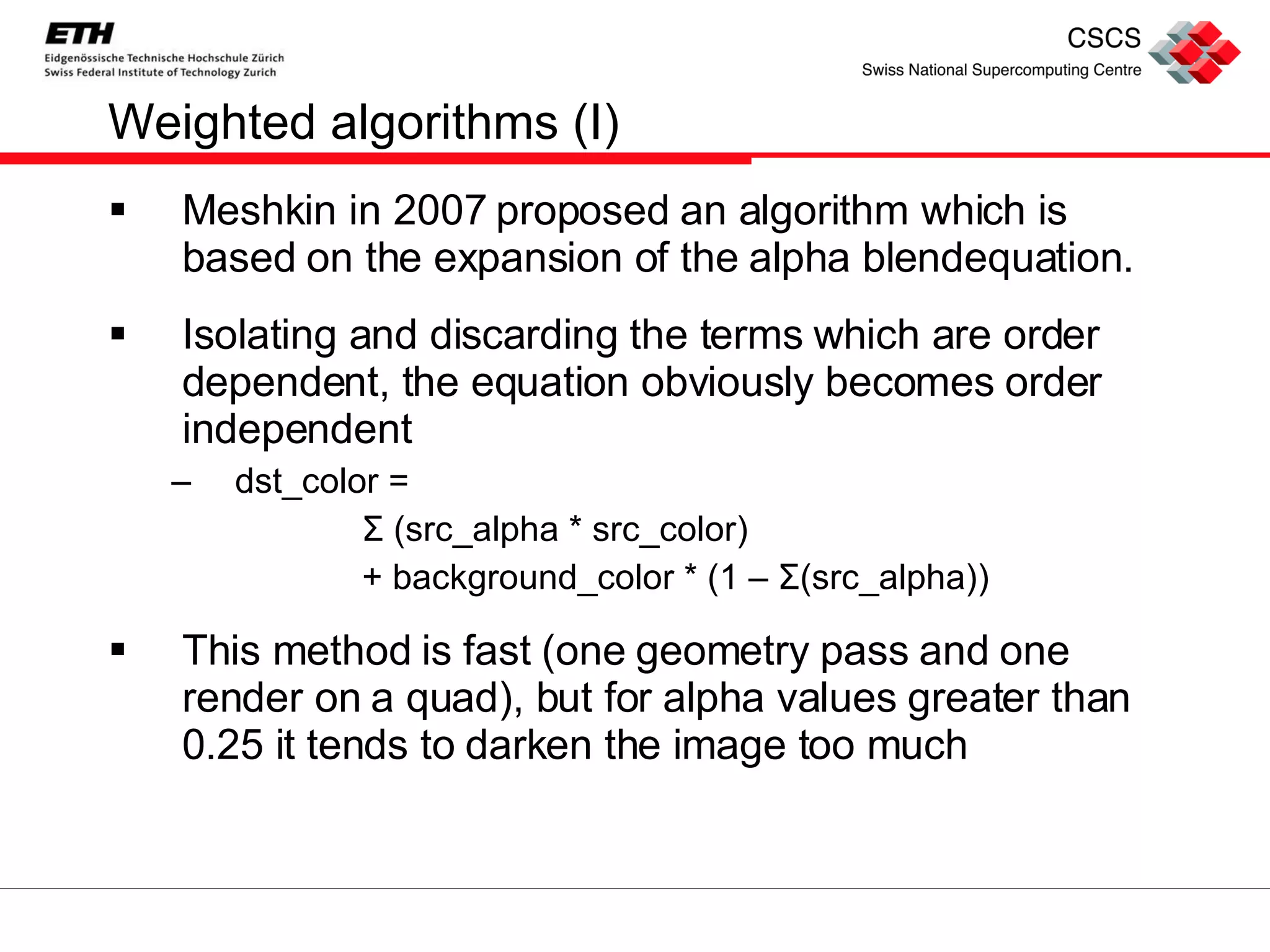
Weighted algorithms (I) Meshkin in 2007 proposed an algorithm which is based on the expansion of the alpha blendequation. Isolating and discarding the terms which are order dependent, the equation obviously becomes order independent dst_color =  Σ  (src_alpha * src_color) + background_color * (1 –  Σ (src_alpha)) This method is fast (one geometry pass and one render on a quad), but for alpha values greater than 0.25 it tends to darken the image too much
Weighted algorithms (II) Bavoil and Myers proposed the weighted average algorithm It averages the color of all the fragments belonging to a certain pixel and substitute any color in the alpha blend equation with the average color It takes into account the depth complexity for each fragment It only needs one geometry pass and one render to a screen aligned quad, therefore it is very fast
Weighted average complete graph
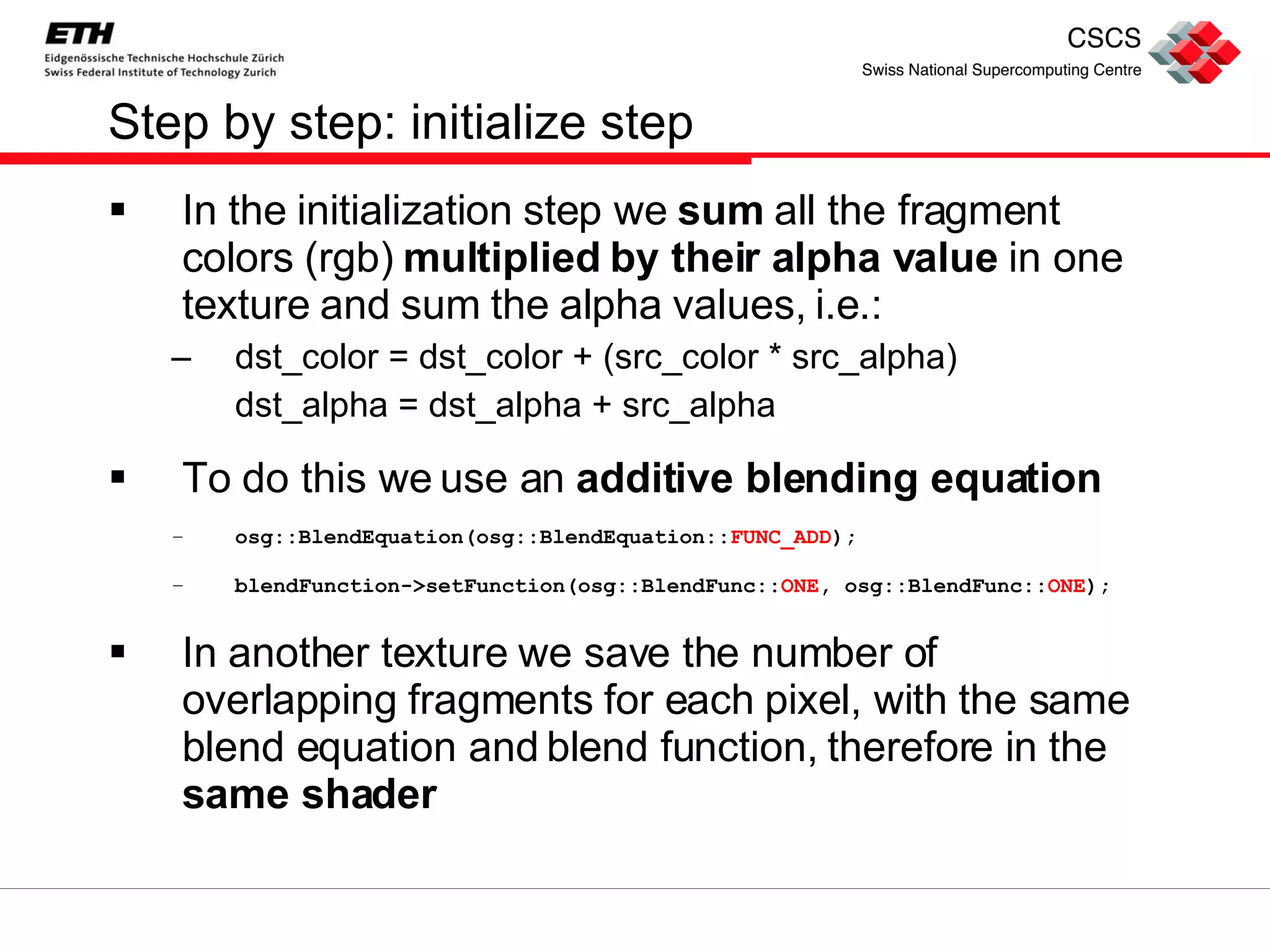
Step by step: initialize step In the initialization step we  sum  all the fragment colors (rgb)  multiplied by their alpha value  in one texture and sum the alpha values, i.e.: dst_color = dst_color + (src_color * src_alpha) dst_alpha = dst_alpha + src_alpha To do this we use an  additive blending equation osg::BlendEquation(osg::BlendEquation:: FUNC_ADD );  blendFunction->setFunction(osg::BlendFunc:: ONE , osg::BlendFunc:: ONE ); In another texture we save the number of overlapping fragments for each pixel, with the same blend equation and blend function, therefore in the  same shader
Step by step: final pass In the final pass we  average the pixel color , dividing the sum of all pixels by the number of overlapping fragments For the  final alpha value  we do the  same thing , then we need to mix the fragment color with the  background The simplified equation is dst_color = avg_color * (1-(1-avg_alpha)^ n )    + bg_color (1-avg_alpha)^ n , where  n  is the depth complexity Full  explanation  to be found in original  whitepaper
RESULTS Comparison of the two algorithms and OpenGL approach
Some words We compared the three approaches on different datasets OpenGL  transparency without sorting gives  wrong results Weighted average  is  fast , but since it averages fragment colors, it gives  no information about different layers depth  and  order Dual depth peeling  is  correct , it is the  slowest , but for most models it results in  sufficiently high frame rates
Some images OpenGL Dual Depth Peeling Weighted Average
Some images: details (I) Dual depth peeling Weighted average
Some images: detail (II) Dual depth peeling Weighted average
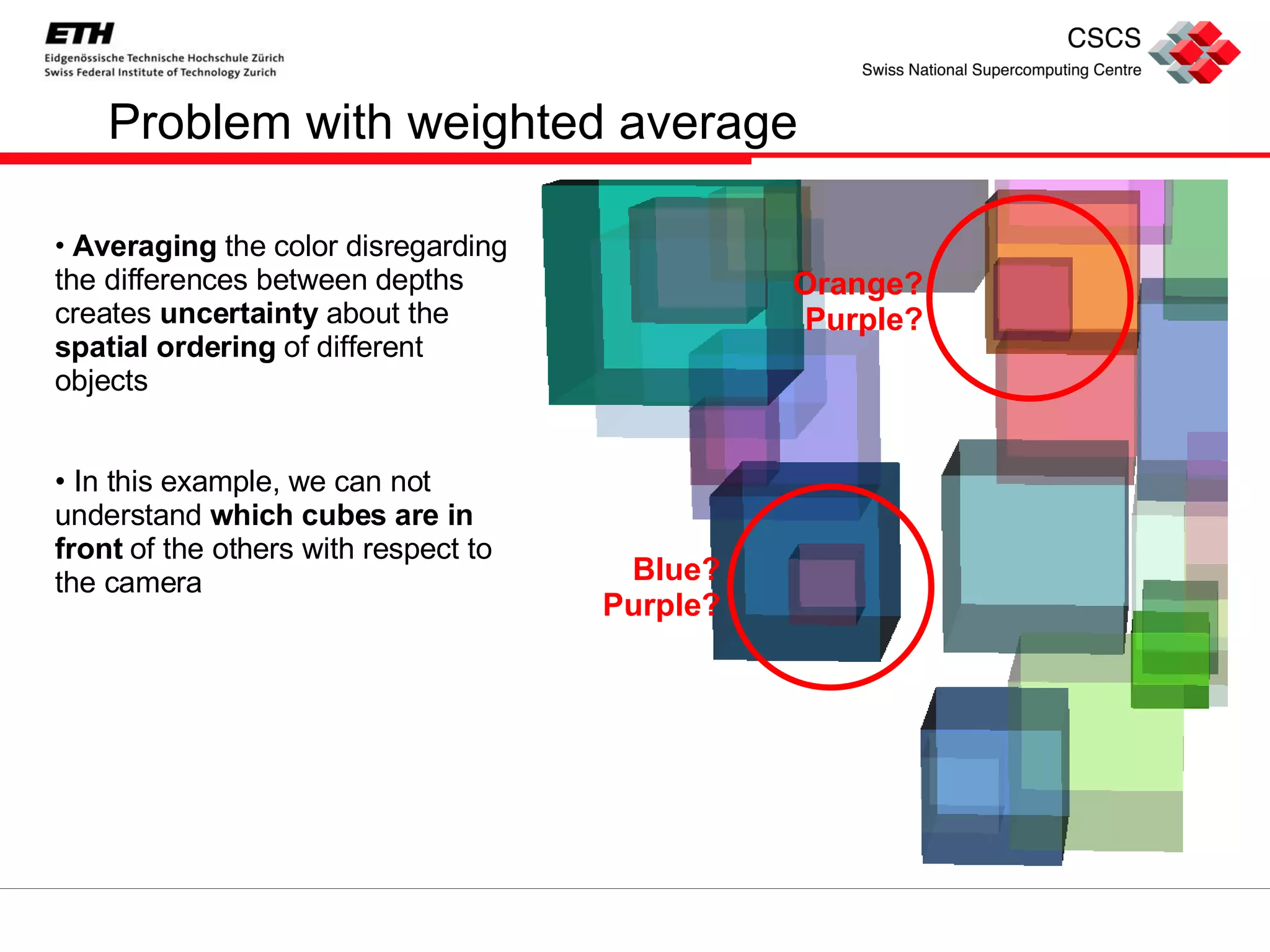
Problem with weighted average Averaging  the color disregarding the differences between depths creates  uncertainty  about the  spatial ordering  of different objects In this example, we can not  understand  which cubes are in front  of the others with respect to the camera Orange? Purple? Blue? Purple?
No problem with dual depth peeling Since dual depth peeling effectively  respects the alpha blend equation , those cubes which are  in front  of the others give a  higher contribute  to the pixel All  uncertainties  can be easily  clarified Orange!  Purple?  Blue?  Purple!

Order Independent Transparency

  • 1.
    Order Independent TransparencyAlessandro Rigazzi Data Analysis and Visualization Group July 1, 2008
  • 2.
    INTRODUCTION A briefsummary of Order Independent Transparency
  • 3.
    The Problem Nostandard implementation for Order Independent Transparency (OIT) in OpenGL
  • 4.
    Possible Solutions RenderSorting Of objects: first opaque, then transparent objects from back to front Requires prior knowledge of objects to render and (pre-computed) BSP trees Of triangles: to have them all facing the right way Not trivial to determine Alpha Buffer Keep linked list of all fragments which are covered by a certain pixel, along with their alpha values (and possibly other data) Never implemented
  • 5.
    With new graphiccards Possibility for advanced algorithms: Depth Peeling (Everitt 2001) : at each pass “ peel ” a layer, i.e. only render what is farther from the camera than the last fragment belonging to that pixel. Blend the various layers . Weighted Sum (Meshkin 2007) : expand alpha blending equation and discard terms which are order dependent. Weighted Average (Bavoil & Myers 2008) : average all fragments belonging to a pixel and keep an index of “ depth complexity ” (number of fragments for that pixel). Dual Depth Peeling (Bavoil & Myers 2008) : perform depth peeling, from front to back and from back to front at the same time .
  • 6.
    Where should Ilook? Lack of efficient OIT algorithms in high level libraries such as: Open Inventor VTK Open SG Open Scene Graph … We did it! We ported to Open Scene Graph some GLUT code provided by NVidia for dual depth peeling and weighted average algorithms
  • 7.
    Why complicate life?Dual Depth Peeling Exact Math result identical to alpha blending equation Slow Requires N/2+1 geometry passes, where N is the maximum depth complexity of the scene Weighted Average Approximated Sum of fragment colors, fragment depth not used Very fast Just one pass to sum all the fragments and one to render to a quad We decided to implement both dual depth peeling and weighted average algorithms because of substantial differences between the two
  • 8.
    DUAL DEPTH PEELINGAlgorithm and OSG implementation overview
  • 9.
    From classic todual Depth peeling is an OIT technique described by Everitt in 2001 The idea is to iteratively get the nearest layer of fragments , store their color, then look for the next layer. At each pass the color of the current layer is blended with the previous ones Needs as many passes as maximum number of overlapping layers (depth complexity) With support for multiple render targets , we can start depth peeling from two sides, front and back
  • 10.
    Dual Depth Peelingin a nutshell
  • 11.
    Dual Depth PeelingComplete Graph
  • 12.
    Step by step:initialization Clear accumulated textures Initialize the depth texture with (-minDepth, maxDepth) Since we need both the min and max depth of the fragments belonging to a pixel, we store for each fragment (–gl_FragCoord.z, gl_FragCoord.z) in the 32 bit depth texture and use MAX_BLEND: this keeps the smallest value saved as negative in the first component and the largest saved in the second component
  • 13.
    Step by step:peel passes (I), idea Basic idea: at each peel pass get the nearest and the farthest fragments which have not been peeled yet Therefore: at each pass we must Update the depth texture Store the back and front fragment colors Can we do it in one shader? Almost, but no.
  • 14.
    Step by step:peel pass (II), MAX_BLEND We update the depth texture the same way we initialized it, this time discarding fragments with depths which have already been peeled Similarly to the initialization pass, we use MAX_BLEND We sum the contribute of the front layer fragments in the blended front texture Front to back alpha blend equation : dst_color = dst_color + src_color * src_alpha * dst_alpha This could be done with the OpenGL built in blend functions But GLSL only allows for one blend function per shader , we want to use the same shader for depth texture and front color We have to adapt alpha blend to MAX_BLEND!
  • 15.
    Step by step:peel pass (III), front texture resolved Idea: since front to back color can only increase at each layer, we load the previous colors (passed in a texture ) and write in the texture the result of alpha blend in the shader The new value will be greater than the previous one , MAX_BLEND will then overwrite the texture We are not done, what about back to front blend? Back to front alpha blend equation dst_color = src_color * dst_alpha + (1-src_alpha) * dst_color This does not monotonically increase! We can not use MAX_BLEND, but we have to!
  • 16.
    Step by step:peel pass (IV), back texture resolved Since using MAX_BLEND we can not update the blended back texture , we need to find an alternative solution, i.e., we need another shader In the peel shader we only write the current value of the back layer (clearing the texture to black, in order to overwrite it with MAX_BLEND) We use a blend shader to get the texture and the OpenGL built in blend function to accumulate at each pass the current back layers in the blended back texture To do the blend in a full screen pass, we render to a textured screen aligned quad
  • 17.
    Step by step:final switch (I), swapping After all the peel passes we have the blended front and back textures , we just have to blend them together and we get the final image that we draw on a second textured screen aligned quad This should be easy, but: To avoid read-write hazards in the peel passes we have to use different textures to read from and write to the fragment colors This means that we have two depth, two front and two temporary back textures At each pass we swap destination and source for rendering Where should we read from in the final pass?
  • 18.
    Step by step:final switch (II), why the switch Since we allow for dynamic change of number of peel passes , we don’t know which frame buffer object will contain the final blended front texture We have to set the render targets of each camera (i.e. the final camera too) at initialization time How? We create a final pass for the case when the number of peel passes is even and one for the case it is odd We switch to the correct final pass at run time , depending on the number of peel passes of the current traversal
  • 19.
    Variable number ofpasses The number of peel passes one decides to use determines the quality of the output Depending on the point of view, for the same object we can need a different number of passes The exact number of needed passes can be determined with an occlusion query Scene graphs are rigid structures Adding or removing branches at run time is complicated We prefer to build the tree for a maximum number of passes and activate/deactivate some of them as needed.
  • 20.
    How many peelpasses? Since at each pass we peel one front and one back layer of fragments, we need N/2 passes, where N is the depth complexity of the scene We also need one pass to initialize the depth texture The result is that we need N/2+1 geometry passes For the three spheres example, we need 4 passes, because the maximum complexity is 6
  • 21.
    Dual Depth Peelingin a rendered nutshell Blended Front Texture Depth Texture (min depth) Current Back Texture Blended Back Texture ( not shown ) Memory Content
  • 22.
    WEIGHTED AVERAGE Algorithmand OSG implementation overview
  • 23.
    Weighted algorithms (I)Meshkin in 2007 proposed an algorithm which is based on the expansion of the alpha blendequation. Isolating and discarding the terms which are order dependent, the equation obviously becomes order independent dst_color = Σ (src_alpha * src_color) + background_color * (1 – Σ (src_alpha)) This method is fast (one geometry pass and one render on a quad), but for alpha values greater than 0.25 it tends to darken the image too much
  • 24.
    Weighted algorithms (II)Bavoil and Myers proposed the weighted average algorithm It averages the color of all the fragments belonging to a certain pixel and substitute any color in the alpha blend equation with the average color It takes into account the depth complexity for each fragment It only needs one geometry pass and one render to a screen aligned quad, therefore it is very fast
  • 25.
  • 26.
    Step by step:initialize step In the initialization step we sum all the fragment colors (rgb) multiplied by their alpha value in one texture and sum the alpha values, i.e.: dst_color = dst_color + (src_color * src_alpha) dst_alpha = dst_alpha + src_alpha To do this we use an additive blending equation osg::BlendEquation(osg::BlendEquation:: FUNC_ADD ); blendFunction->setFunction(osg::BlendFunc:: ONE , osg::BlendFunc:: ONE ); In another texture we save the number of overlapping fragments for each pixel, with the same blend equation and blend function, therefore in the same shader
  • 27.
    Step by step:final pass In the final pass we average the pixel color , dividing the sum of all pixels by the number of overlapping fragments For the final alpha value we do the same thing , then we need to mix the fragment color with the background The simplified equation is dst_color = avg_color * (1-(1-avg_alpha)^ n ) + bg_color (1-avg_alpha)^ n , where n is the depth complexity Full explanation to be found in original whitepaper
  • 28.
    RESULTS Comparison ofthe two algorithms and OpenGL approach
  • 29.
    Some words Wecompared the three approaches on different datasets OpenGL transparency without sorting gives wrong results Weighted average is fast , but since it averages fragment colors, it gives no information about different layers depth and order Dual depth peeling is correct , it is the slowest , but for most models it results in sufficiently high frame rates
  • 30.
    Some images OpenGLDual Depth Peeling Weighted Average
  • 31.
    Some images: details(I) Dual depth peeling Weighted average
  • 32.
    Some images: detail(II) Dual depth peeling Weighted average
  • 33.
    Problem with weightedaverage Averaging the color disregarding the differences between depths creates uncertainty about the spatial ordering of different objects In this example, we can not understand which cubes are in front of the others with respect to the camera Orange? Purple? Blue? Purple?
  • 34.
    No problem withdual depth peeling Since dual depth peeling effectively respects the alpha blend equation , those cubes which are in front of the others give a higher contribute to the pixel All uncertainties can be easily clarified Orange! Purple? Blue? Purple!