Linux Containers – NextGen
Virtualization for Cloud
Boden Russell (brussell@us.ibm.com)
OpenStack Summit
May 12 – 16, 2014
Atlanta, Georgia
Definitions
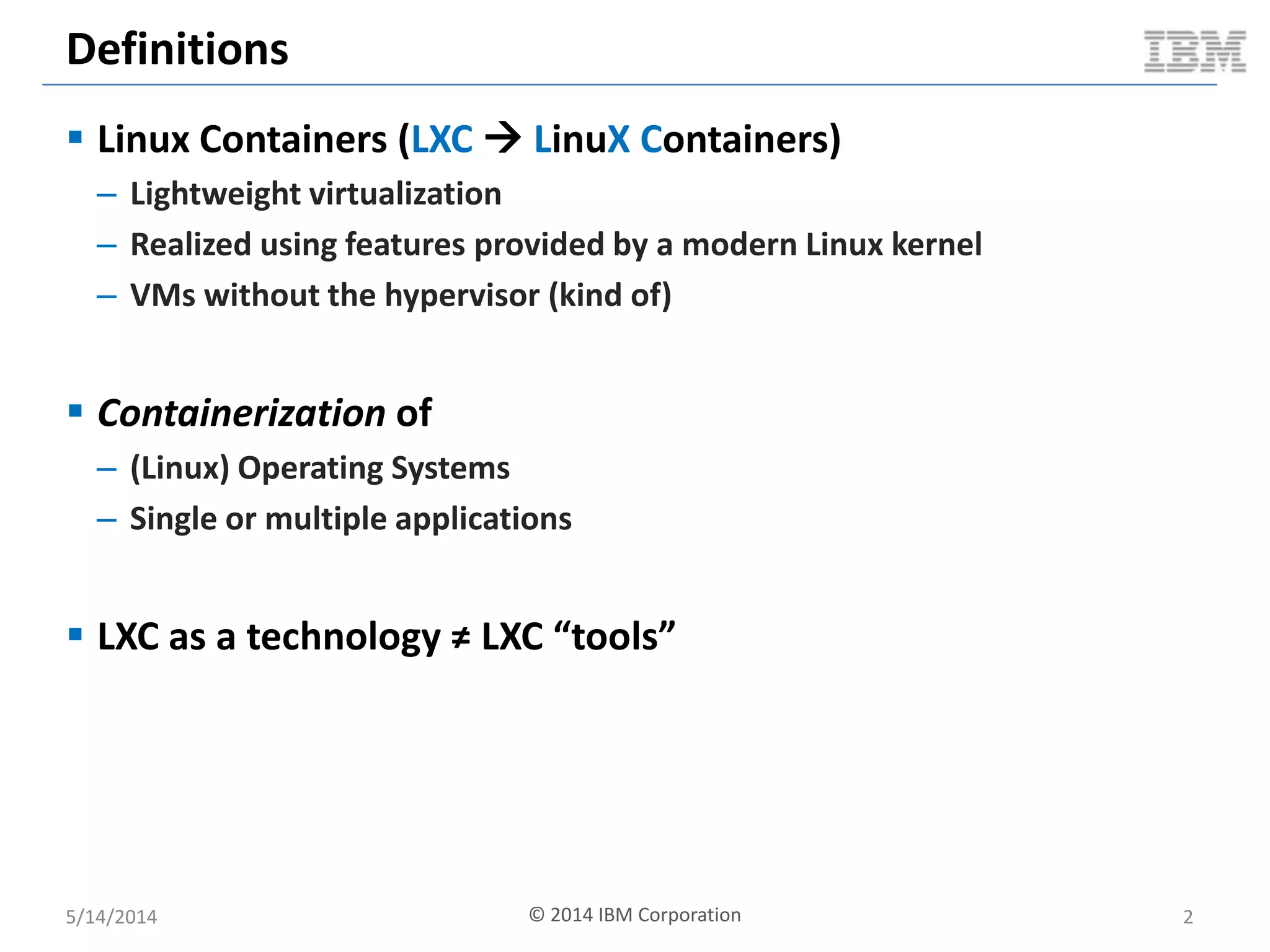
 Linux Containers (LXC  LinuX Containers)
– Lightweight virtualization
– Realized using features provided by a modern Linux kernel
– VMs without the hypervisor (kind of)
 Containerization of
– (Linux) Operating Systems
– Single or multiple applications
 LXC as a technology ≠ LXC “tools”
5/14/2014 © 2014 IBM Corporation 2
Hypervisors vs. Linux Containers
Hardware
Operating System
Hypervisor
Virtual Machine
Operating
System
Bins / libs
App App
Virtual Machine
Operating
System
Bins / libs
App App
Hardware
Hypervisor
Virtual Machine
Operating
System
Bins / libs
App App
Virtual Machine
Operating
System
Bins / libs
App App
Hardware
Operating System
Container
Bins / libs
App App
Container
Bins / libs
App App
Type 1 Hypervisor Type 2 Hypervisor Linux Containers
5/14/2014 3
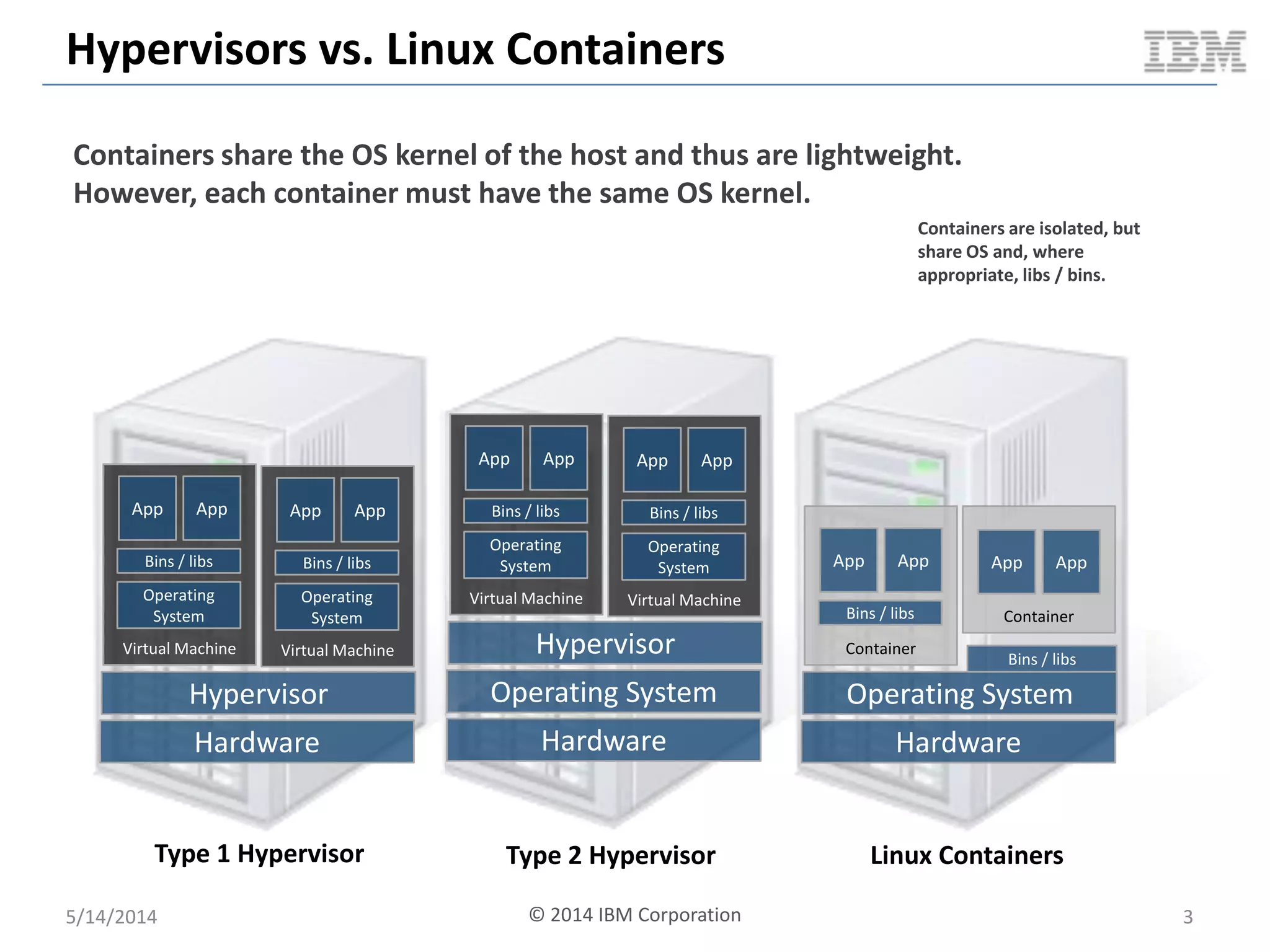
Containers share the OS kernel of the host and thus are lightweight.
However, each container must have the same OS kernel.
Containers are isolated, but
share OS and, where
appropriate, libs / bins.
© 2014 IBM Corporation
LXC Technology Stack
5/14/2014 © 2014 IBM Corporation 4
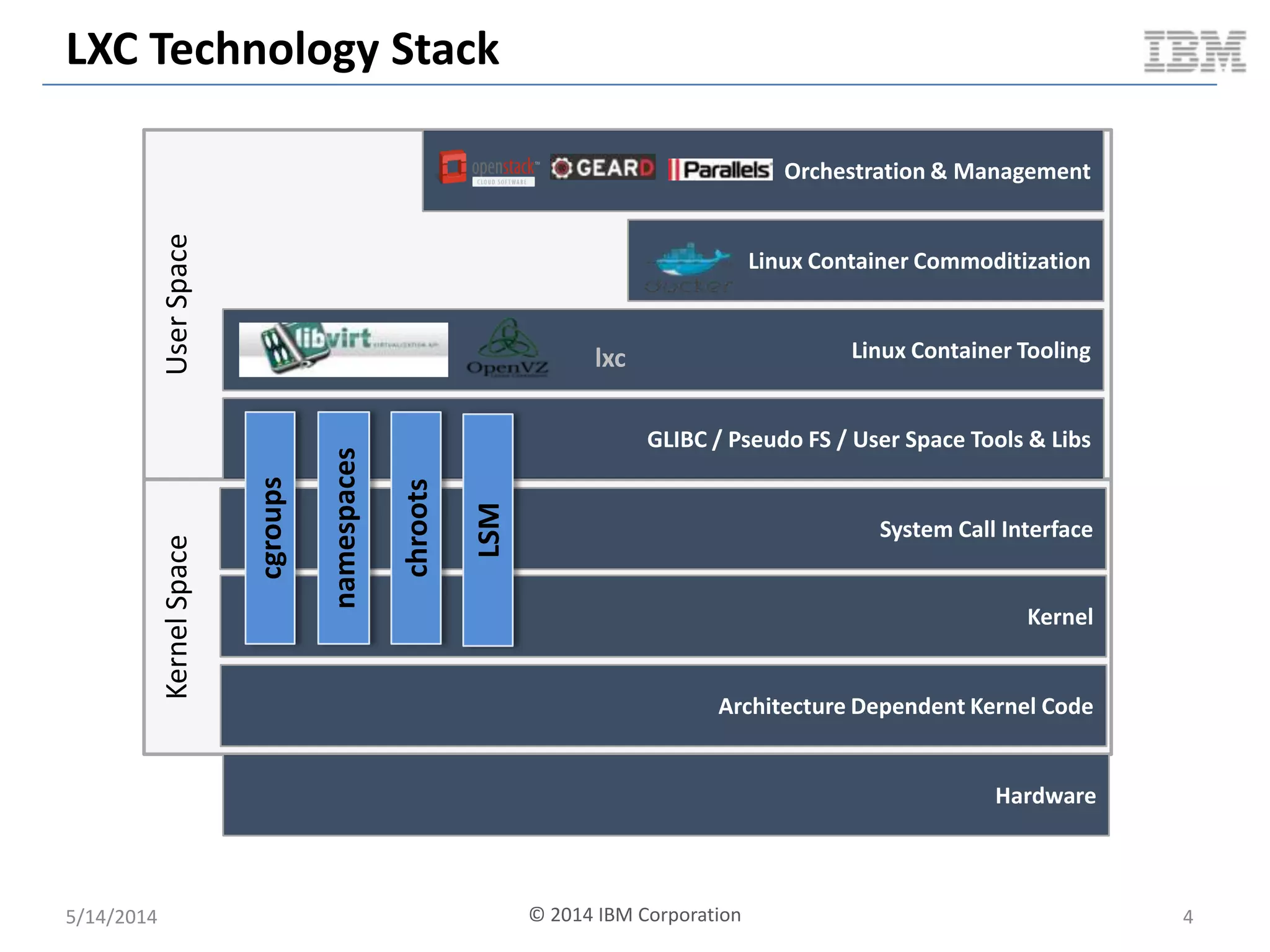
UserSpaceKernelSpace
Kernel
System Call Interface
Architecture Dependent Kernel Code
GLIBC / Pseudo FS / User Space Tools & Libs
Linux Container Tooling
Linux Container Commoditization
Orchestration & Management
Hardware
cgroups
namespaces
chroots
LSM
lxc
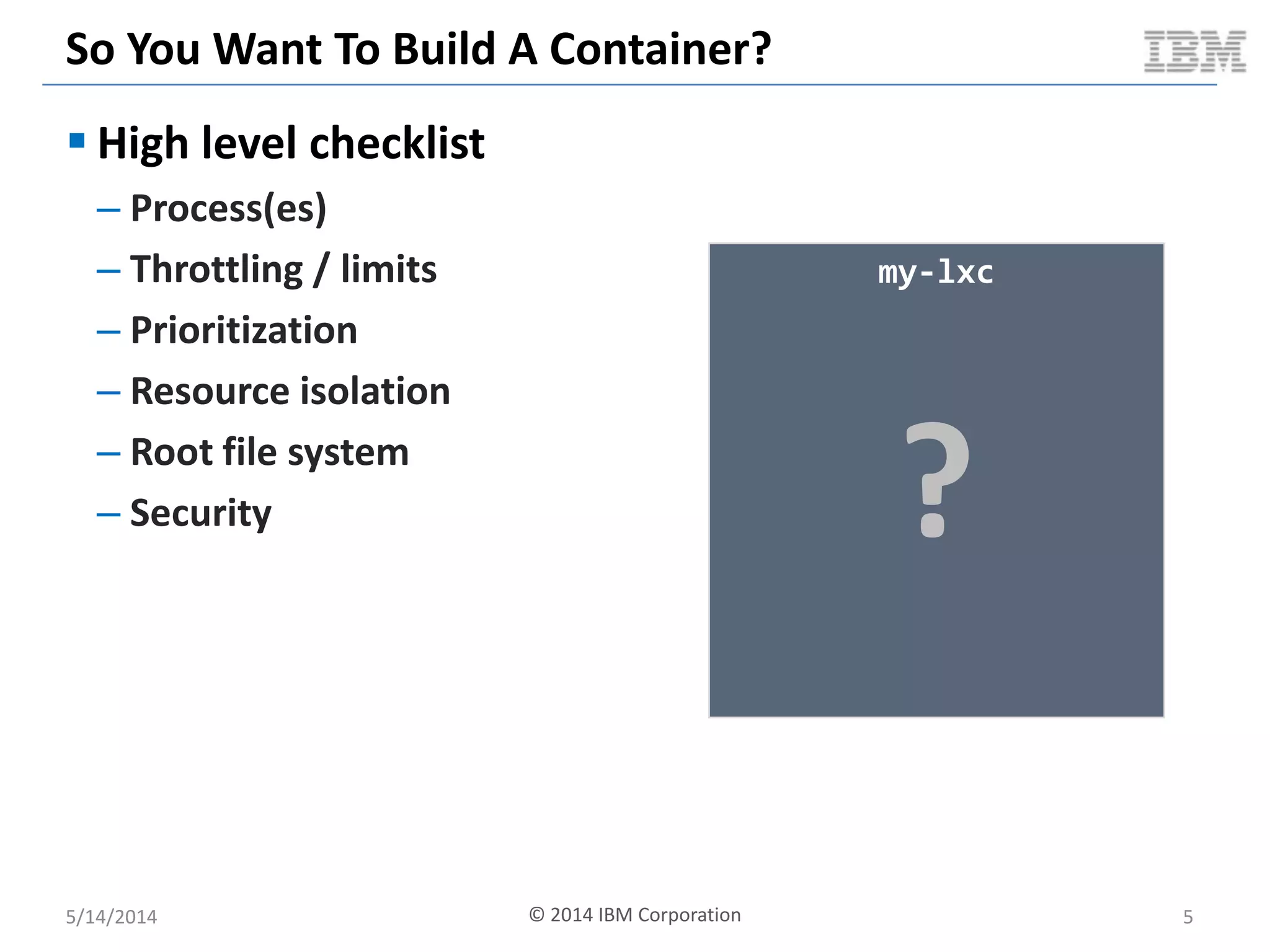
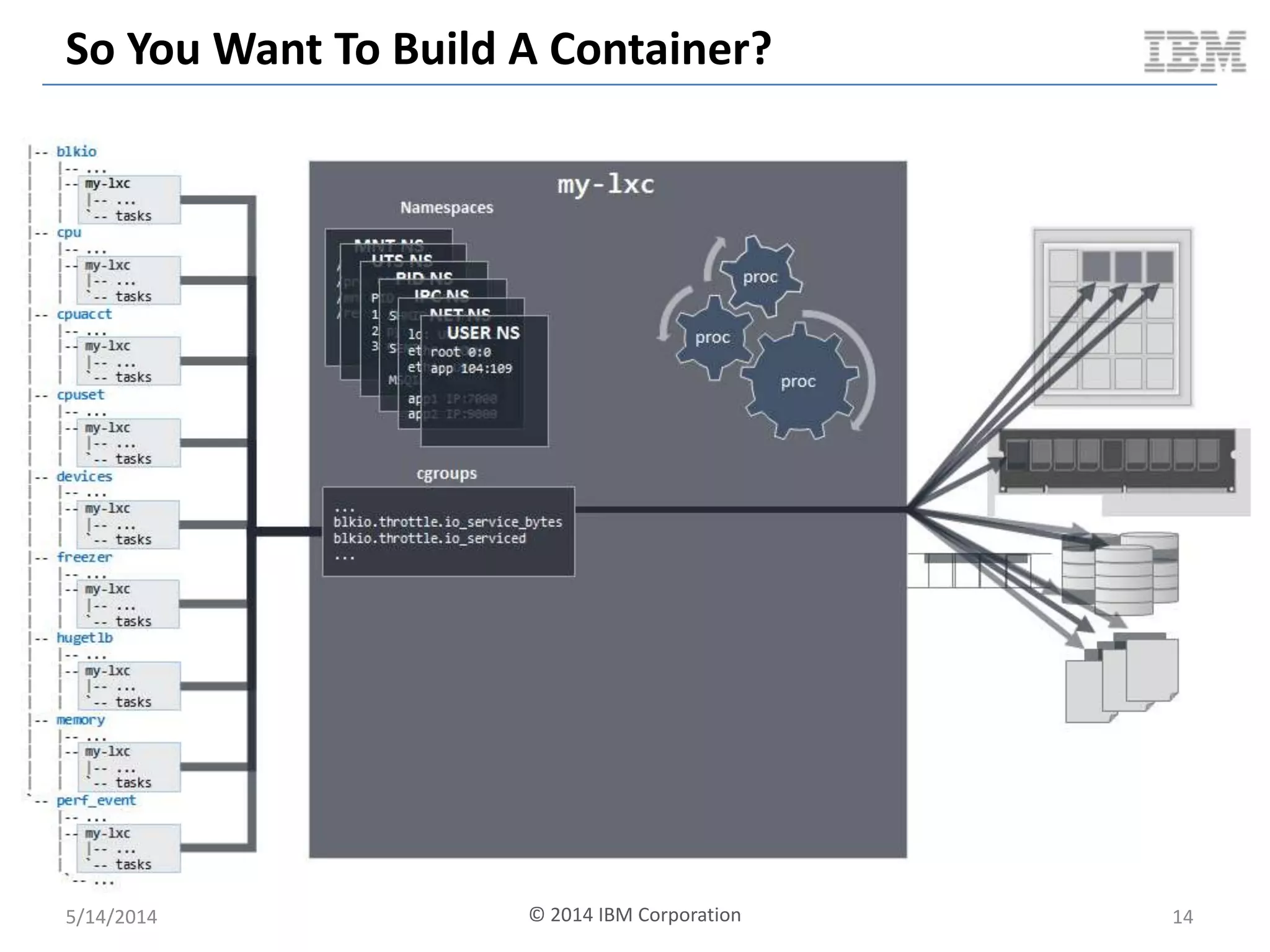
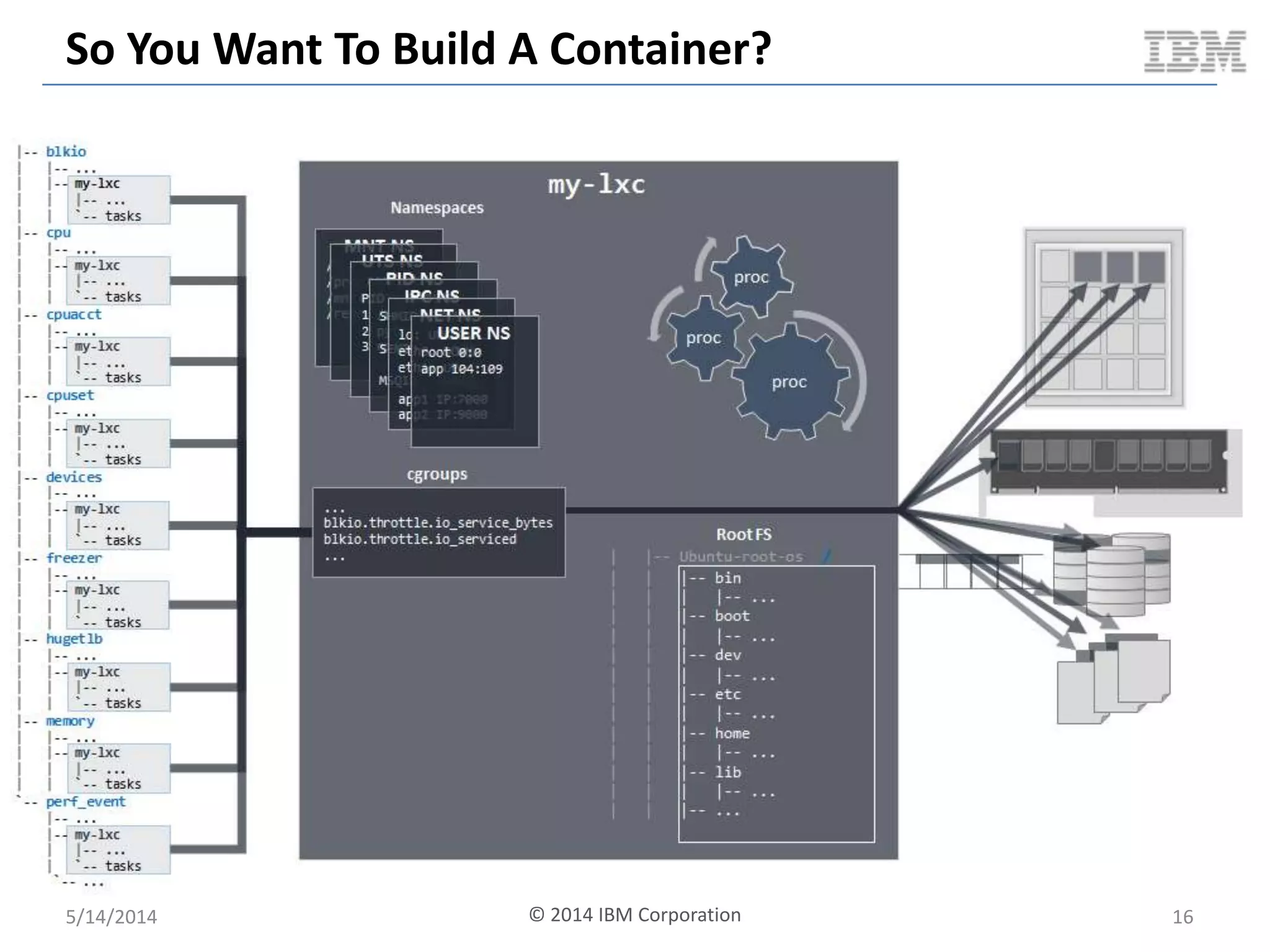
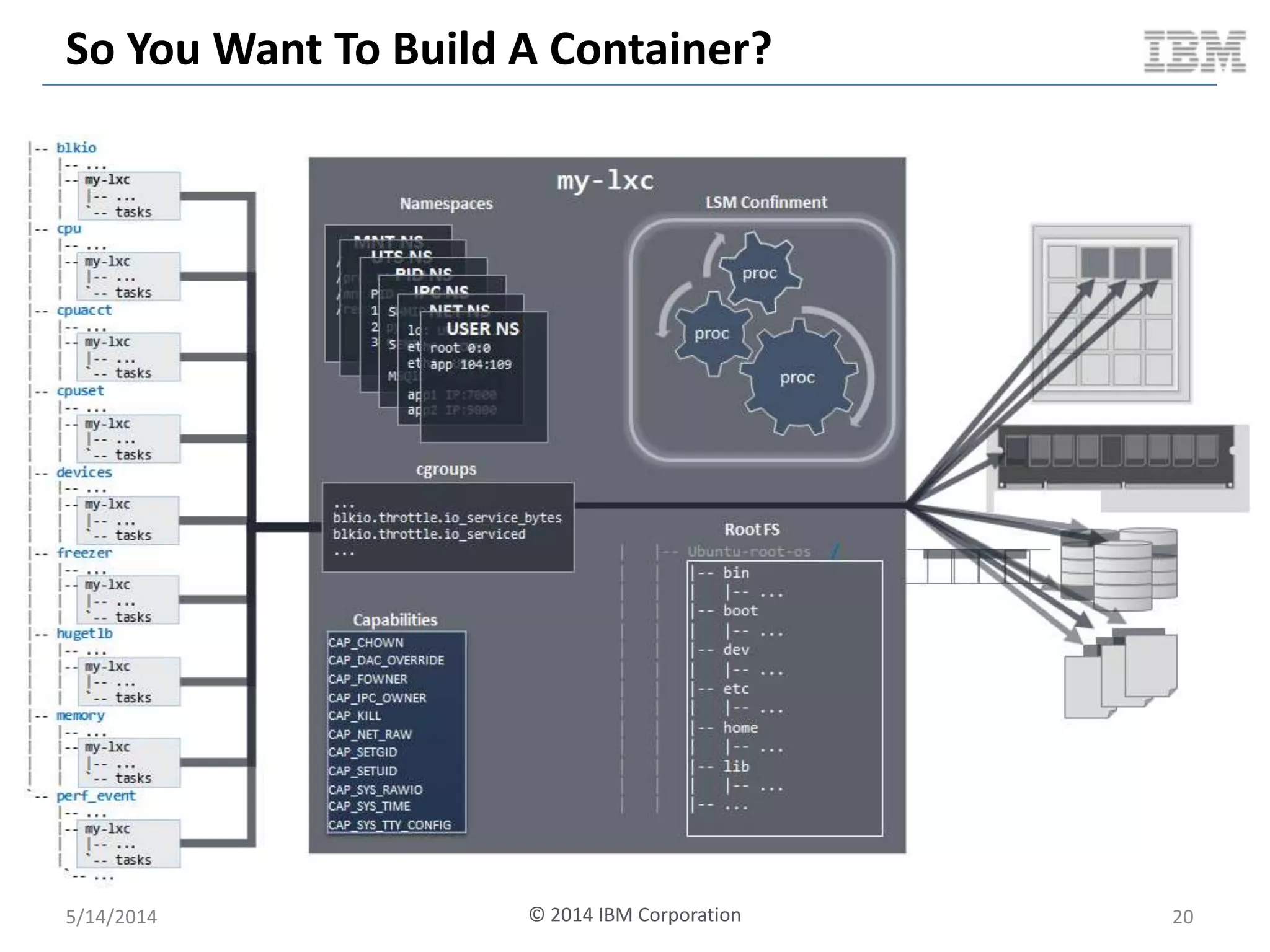
So You Want To Build A Container?
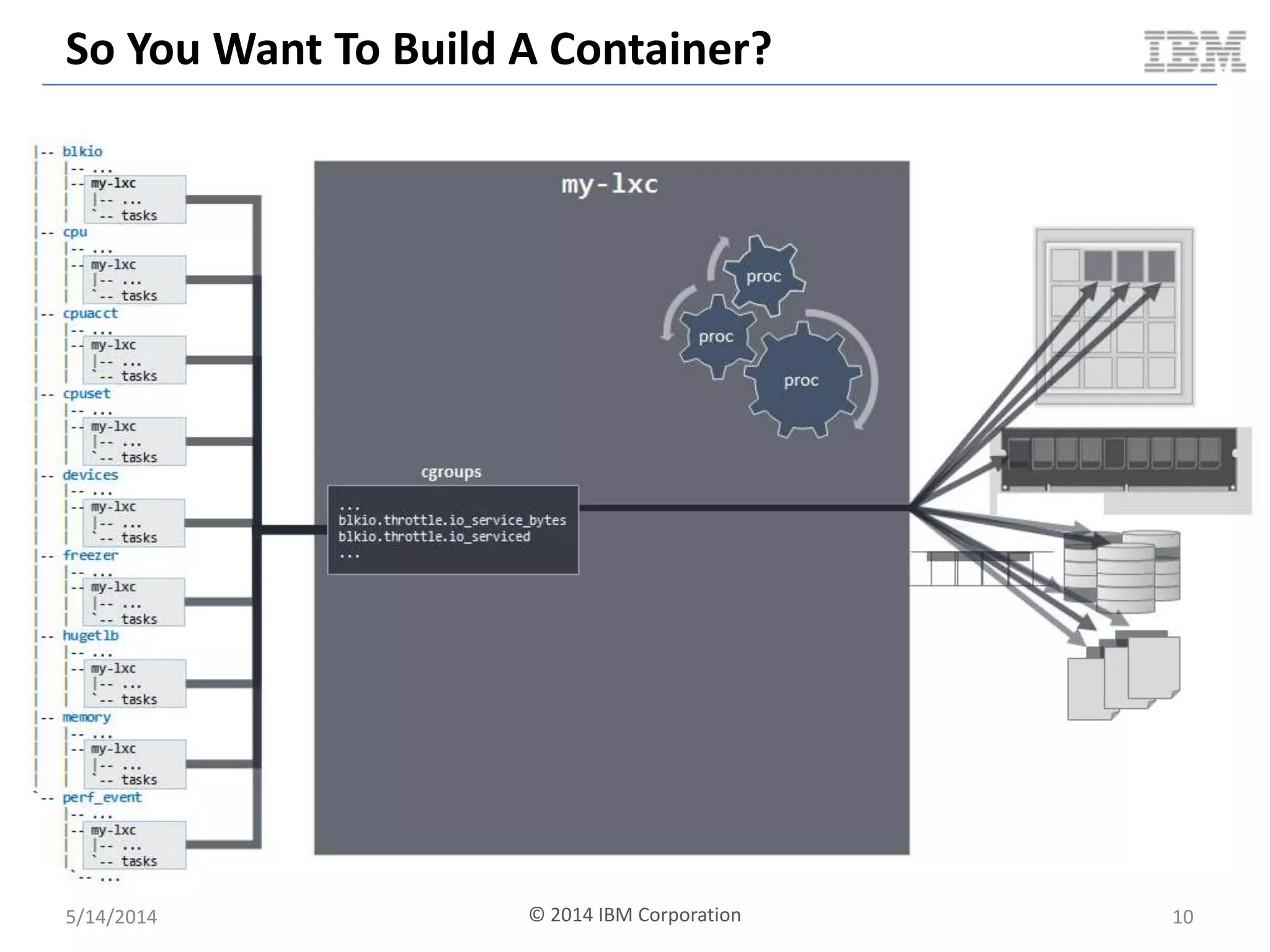
 High level checklist
– Process(es)
– Throttling / limits
– Prioritization
– Resource isolation
– Root file system
– Security
5/14/2014 © 2014 IBM Corporation 5
my-lxc
?
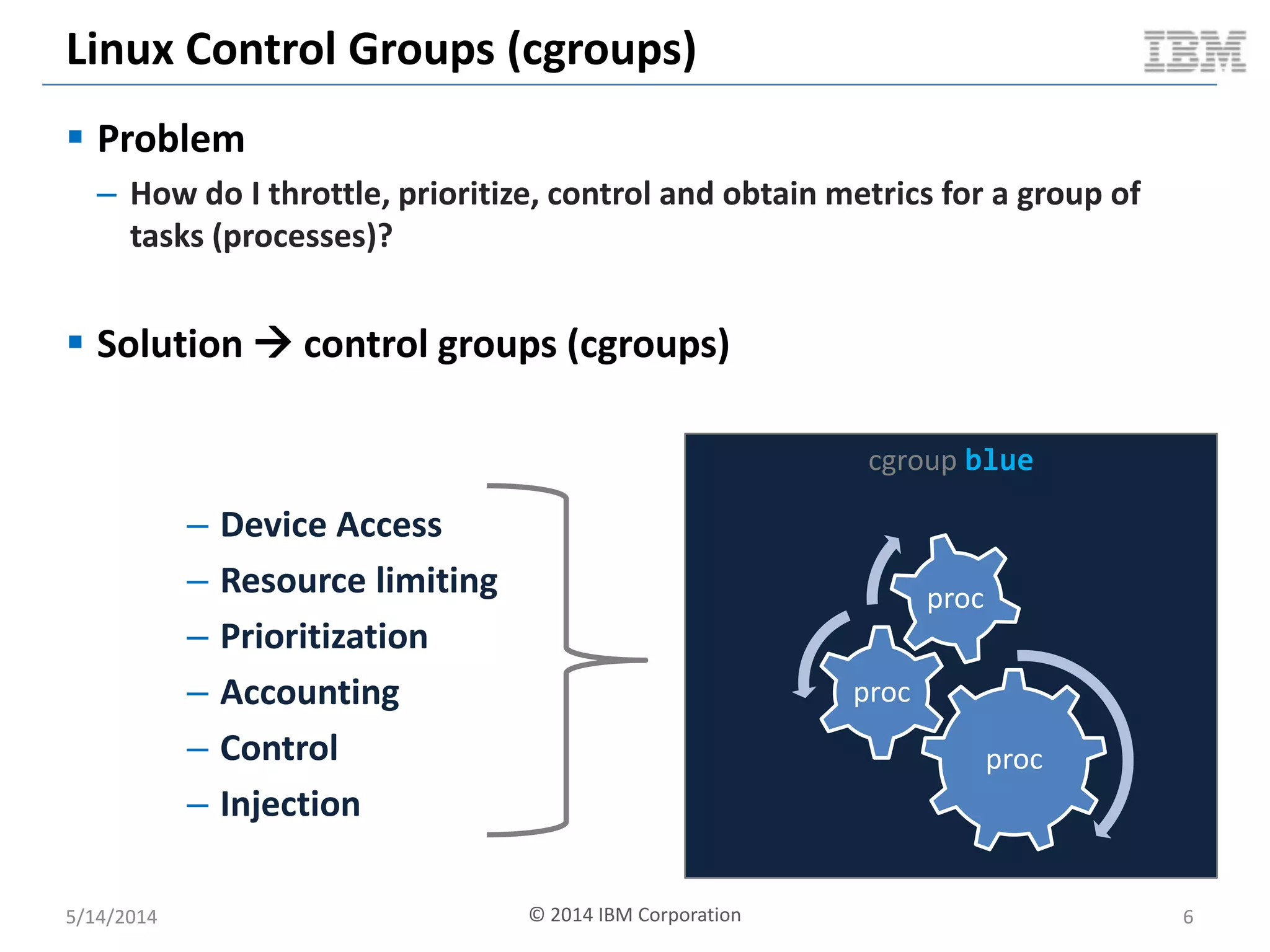
Linux Control Groups (cgroups)
 Problem
– How do I throttle, prioritize, control and obtain metrics for a group of
tasks (processes)?
 Solution  control groups (cgroups)
5/14/2014 © 2014 IBM Corporation 6
cgroup blue
proc
proc
proc
– Device Access
– Resource limiting
– Prioritization
– Accounting
– Control
– Injection
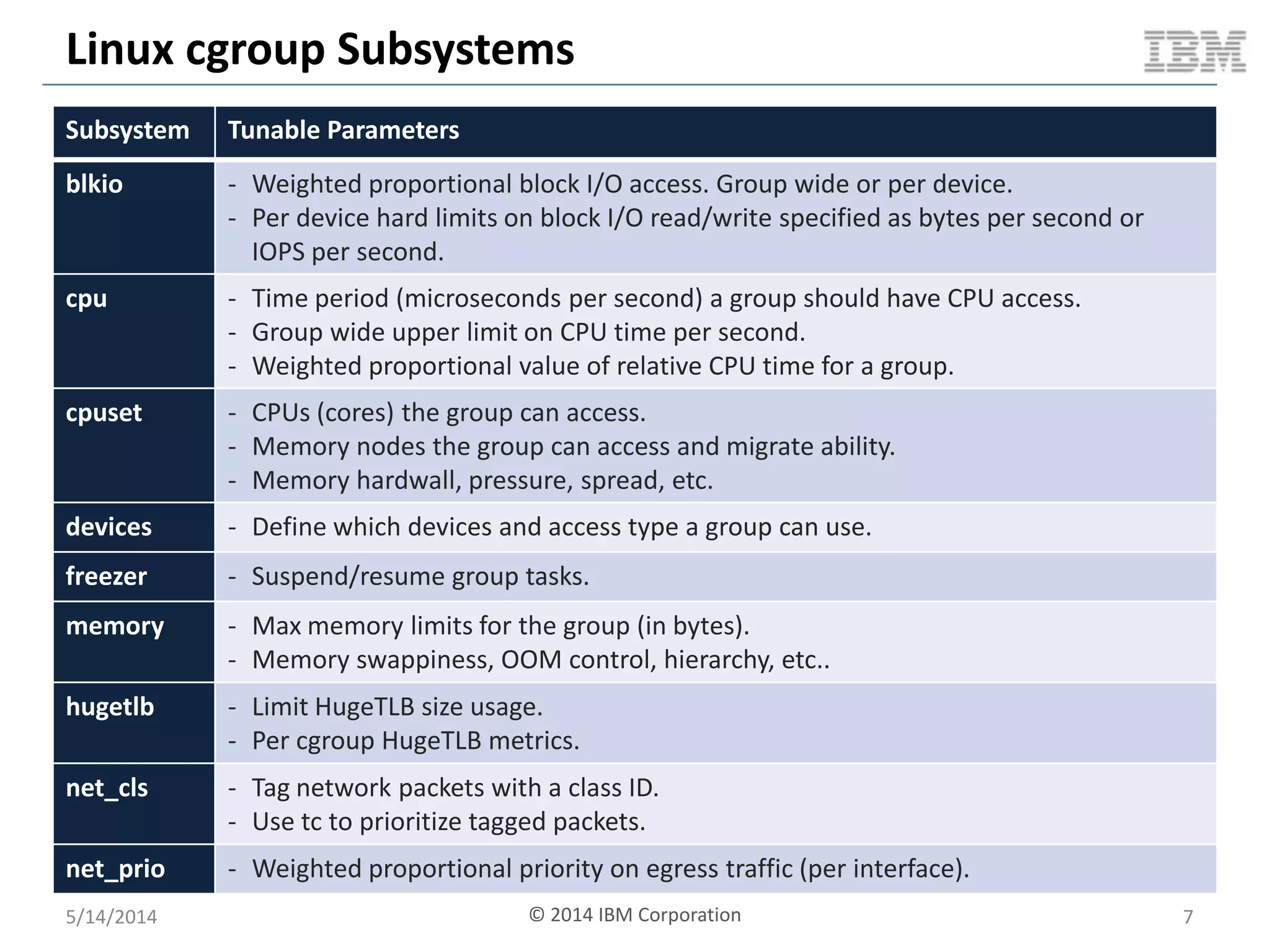
Linux cgroup Subsystems
5/14/2014 © 2014 IBM Corporation 7
Subsystem Tunable Parameters
blkio - Weighted proportional block I/O access. Group wide or per device.
- Per device hard limits on block I/O read/write specified as bytes per second or
IOPS per second.
cpu - Time period (microseconds per second) a group should have CPU access.
- Group wide upper limit on CPU time per second.
- Weighted proportional value of relative CPU time for a group.
cpuset - CPUs (cores) the group can access.
- Memory nodes the group can access and migrate ability.
- Memory hardwall, pressure, spread, etc.
devices - Define which devices and access type a group can use.
freezer - Suspend/resume group tasks.
memory - Max memory limits for the group (in bytes).
- Memory swappiness, OOM control, hierarchy, etc..
hugetlb - Limit HugeTLB size usage.
- Per cgroup HugeTLB metrics.
net_cls - Tag network packets with a class ID.
- Use tc to prioritize tagged packets.
net_prio - Weighted proportional priority on egress traffic (per interface).
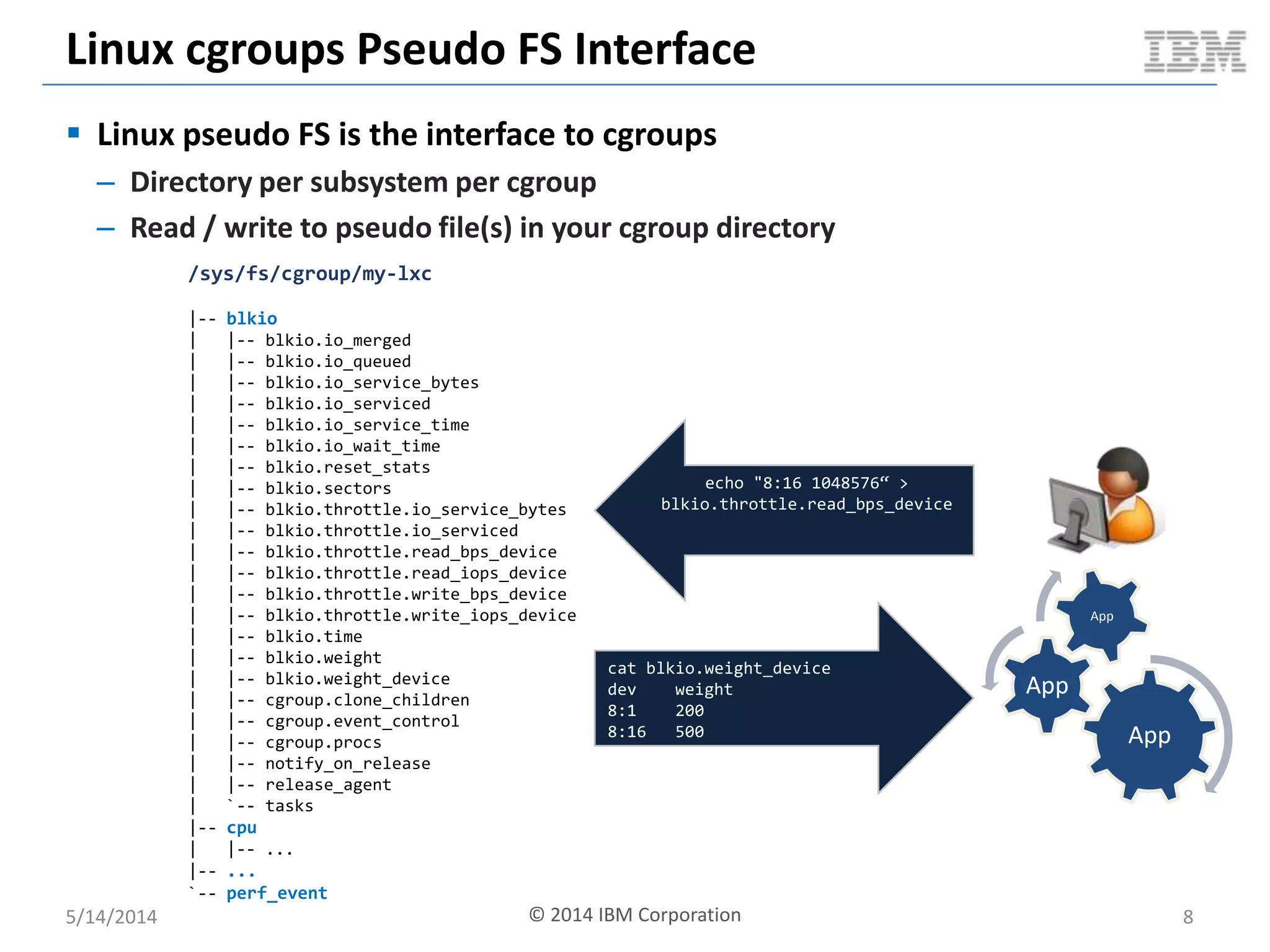
Linux cgroups Pseudo FS Interface
5/14/2014 8
/sys/fs/cgroup/my-lxc
|-- blkio
| |-- blkio.io_merged
| |-- blkio.io_queued
| |-- blkio.io_service_bytes
| |-- blkio.io_serviced
| |-- blkio.io_service_time
| |-- blkio.io_wait_time
| |-- blkio.reset_stats
| |-- blkio.sectors
| |-- blkio.throttle.io_service_bytes
| |-- blkio.throttle.io_serviced
| |-- blkio.throttle.read_bps_device
| |-- blkio.throttle.read_iops_device
| |-- blkio.throttle.write_bps_device
| |-- blkio.throttle.write_iops_device
| |-- blkio.time
| |-- blkio.weight
| |-- blkio.weight_device
| |-- cgroup.clone_children
| |-- cgroup.event_control
| |-- cgroup.procs
| |-- notify_on_release
| |-- release_agent
| `-- tasks
|-- cpu
| |-- ...
|-- ...
`-- perf_event
echo "8:16 1048576“ >
blkio.throttle.read_bps_device
cat blkio.weight_device
dev weight
8:1 200
8:16 500 App
App
App
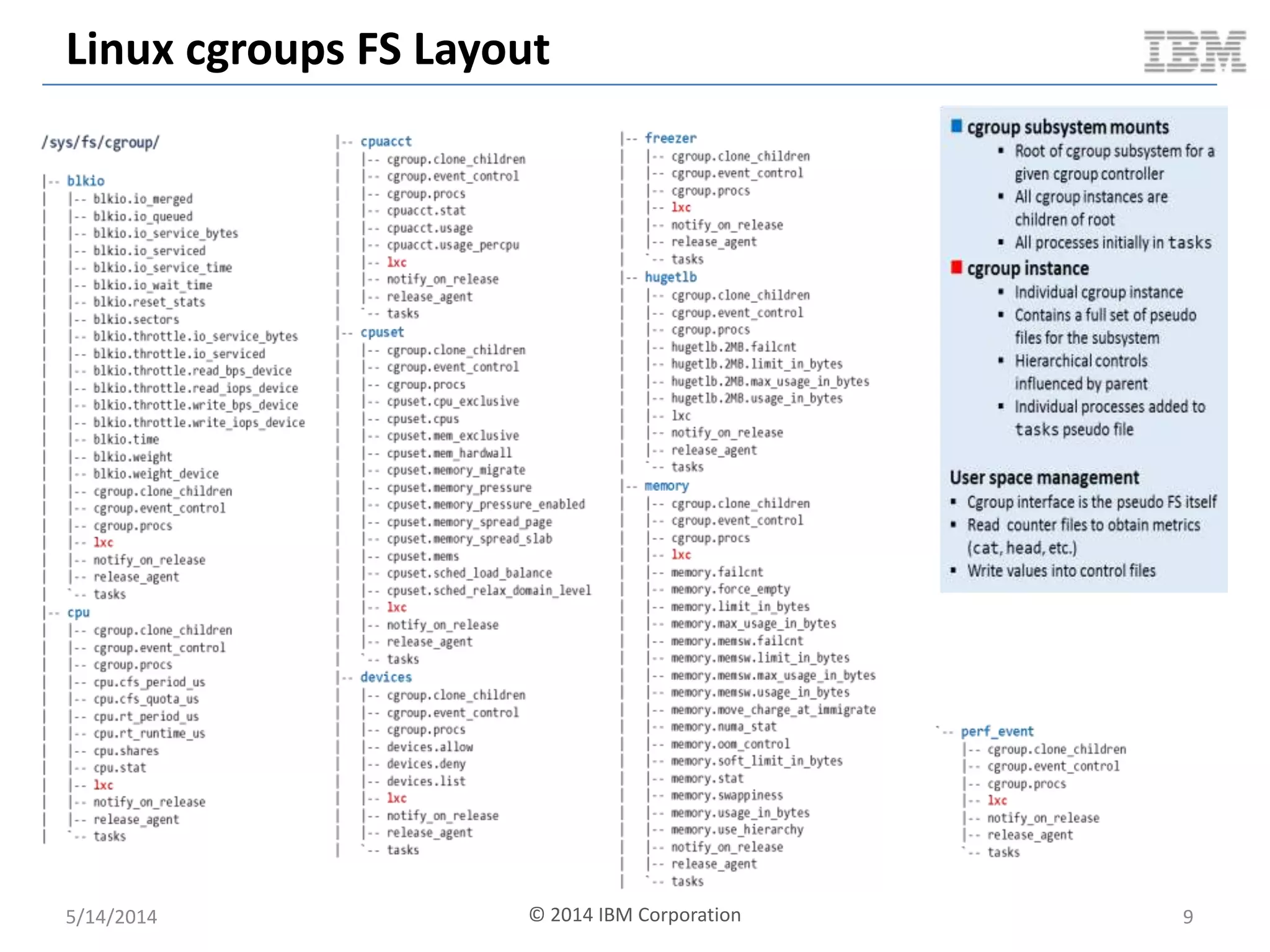
 Linux pseudo FS is the interface to cgroups
– Directory per subsystem per cgroup
– Read / write to pseudo file(s) in your cgroup directory
© 2014 IBM Corporation
Linux cgroups FS Layout
5/14/2014 9© 2014 IBM Corporation
So You Want To Build A Container?
5/14/2014 © 2014 IBM Corporation 10
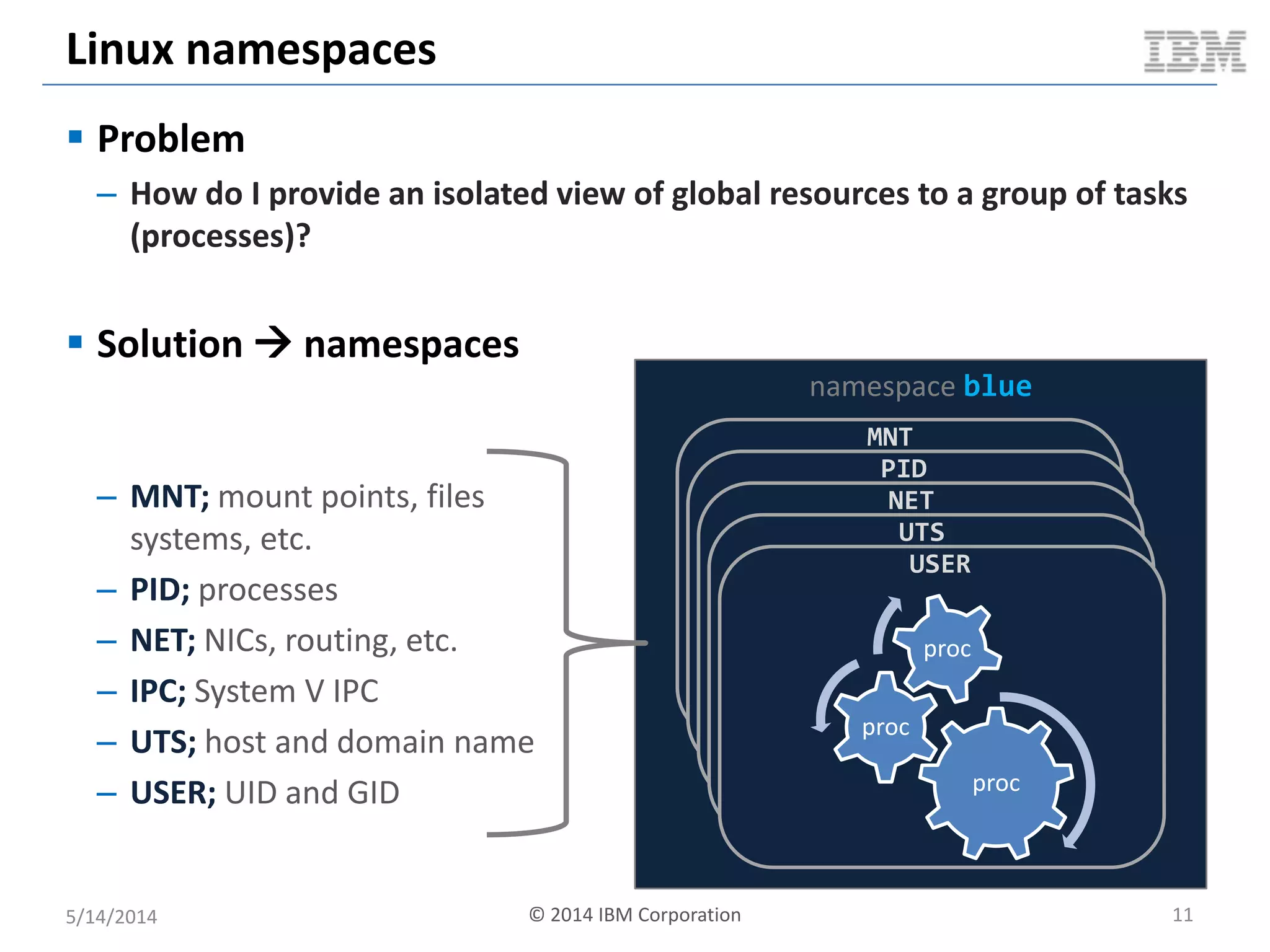
Linux namespaces
 Problem
– How do I provide an isolated view of global resources to a group of tasks
(processes)?
 Solution  namespaces
5/14/2014 © 2014 IBM Corporation 11
namespace blue
– MNT; mount points, files
systems, etc.
– PID; processes
– NET; NICs, routing, etc.
– IPC; System V IPC
– UTS; host and domain name
– USER; UID and GID
MNT
PID
NET
UTS
USER
proc
proc
proc
Linux namespaces: Conceptual Overview
5/14/2014 © 2014 IBM Corporation 12
global (i.e. root) namespace
MNT NS
/
/proc
/mnt/fsrd
/mnt/fsrw
/mnt/cdrom
/run2
UTS NS
globalhost
rootns.com
PID NS
PID COMMAND
1 /sbin/init
2 [kthreadd]
3 [ksoftirqd]
4 [cpuset]
5 /sbin/udevd
6 /bin/sh
7 /bin/bash
IPC NS
SHMID OWNER
32452 root
43321 boden
SEMID OWNER
0 root
1 Boden
MSQID OWNER
NET NS
lo: UNKNOWN…
eth0: UP…
eth1: UP…
br0: UP…
app1 IP:5000
app2 IP:6000
app3 IP:7000
USER NS
root 0:0
ntp 104:109
mysql 105:110
boden 106:111
purple namespace
MNT NS
/
/proc
/mnt/purplenfs
/mnt/fsrw
/mnt/cdrom
UTS NS
purplehost
purplens.com
PID NS
PID COMMAND
1 /bin/bash
2 /bin/vim
IPC NS
SHMID OWNER
SEMID OWNER
0 root
MSQID OWNER
NET NS
lo: UNKNOWN…
eth0: UP…
app1 IP:1000
app2 IP:7000
USER NS
root 0:0
app 106:111
blue namespace
MNT NS
/
/proc
/mnt/cdrom
/bluens
UTS NS
bluehost
bluens.com
PID NS
PID COMMAND
1 /bin/bash
2 python
3 node
IPC NS
SHMID OWNER
SEMID OWNER
MSQID OWNER
NET NS
lo: UNKNOWN…
eth0: DOWN…
eth1: UP
app1 IP:7000
app2 IP:9000
USER NS
root 0:0
app 104:109
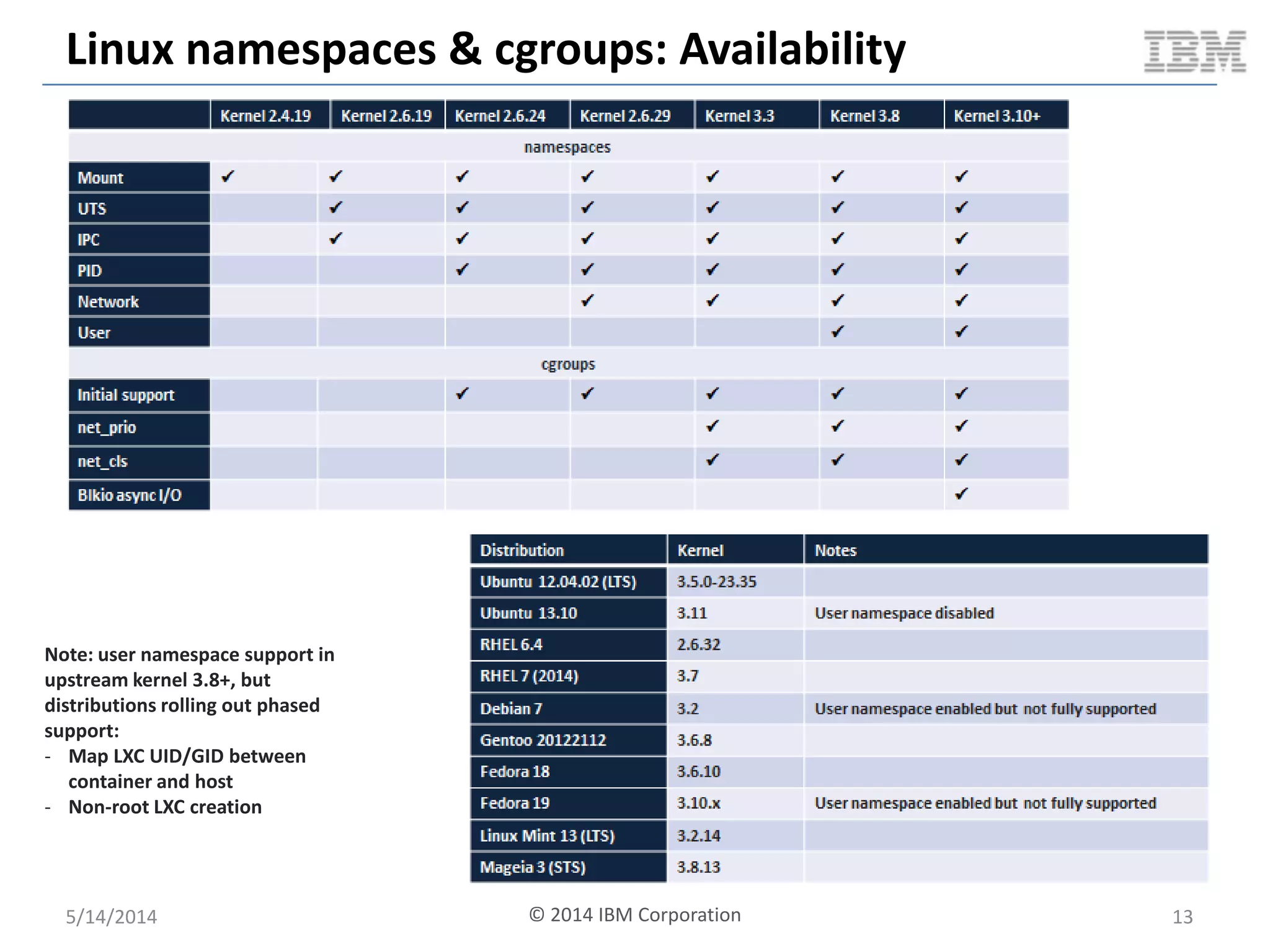
Linux namespaces & cgroups: Availability
5/14/2014 13
Note: user namespace support in
upstream kernel 3.8+, but
distributions rolling out phased
support:
- Map LXC UID/GID between
container and host
- Non-root LXC creation
© 2014 IBM Corporation
So You Want To Build A Container?
5/14/2014 © 2014 IBM Corporation 14
Linux chroot & pivot_root
5/14/2014 15
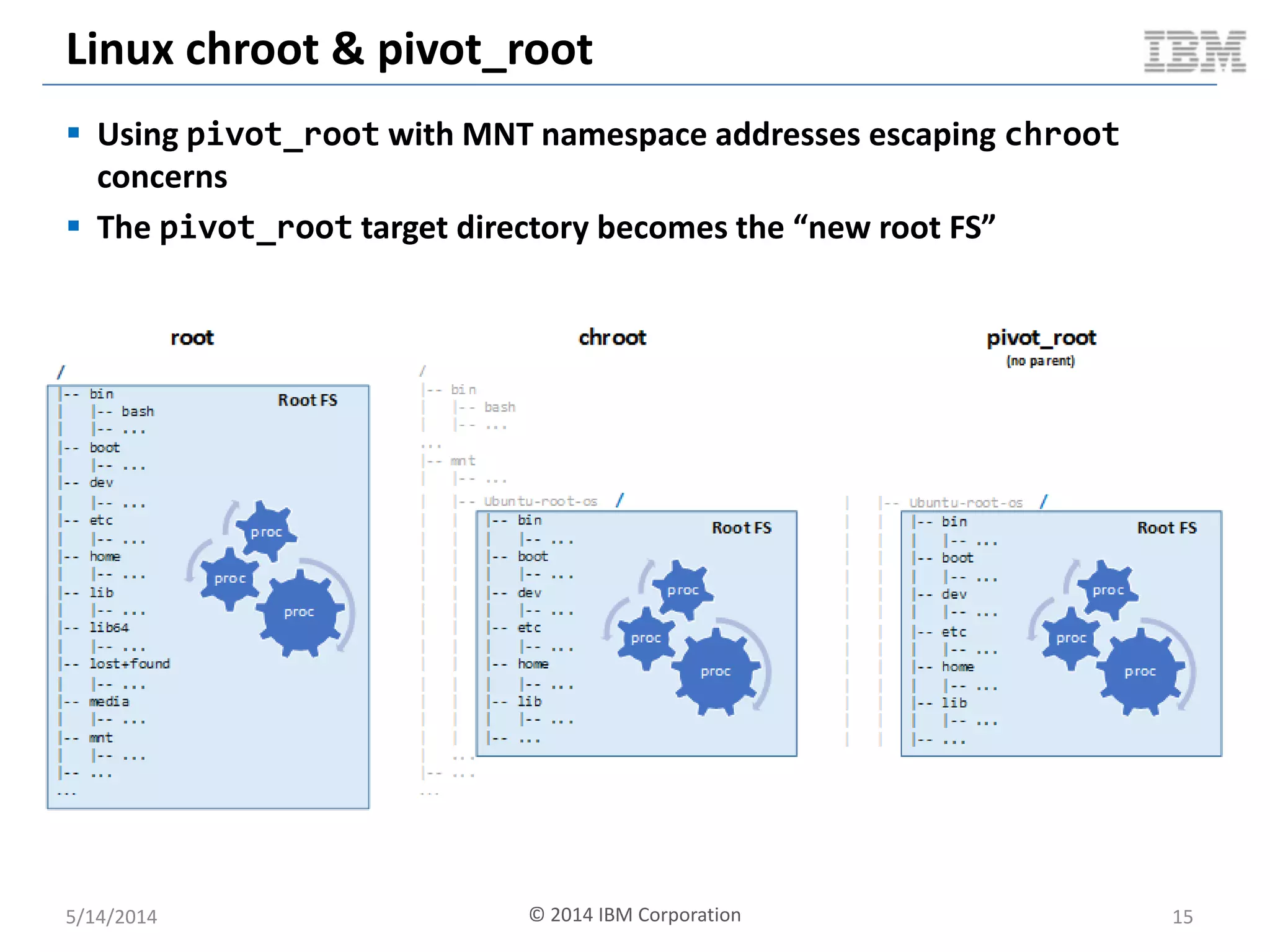
 Using pivot_root with MNT namespace addresses escaping chroot
concerns
 The pivot_root target directory becomes the “new root FS”
© 2014 IBM Corporation
So You Want To Build A Container?
5/14/2014 © 2014 IBM Corporation 16
Linux Security Modules & MAC
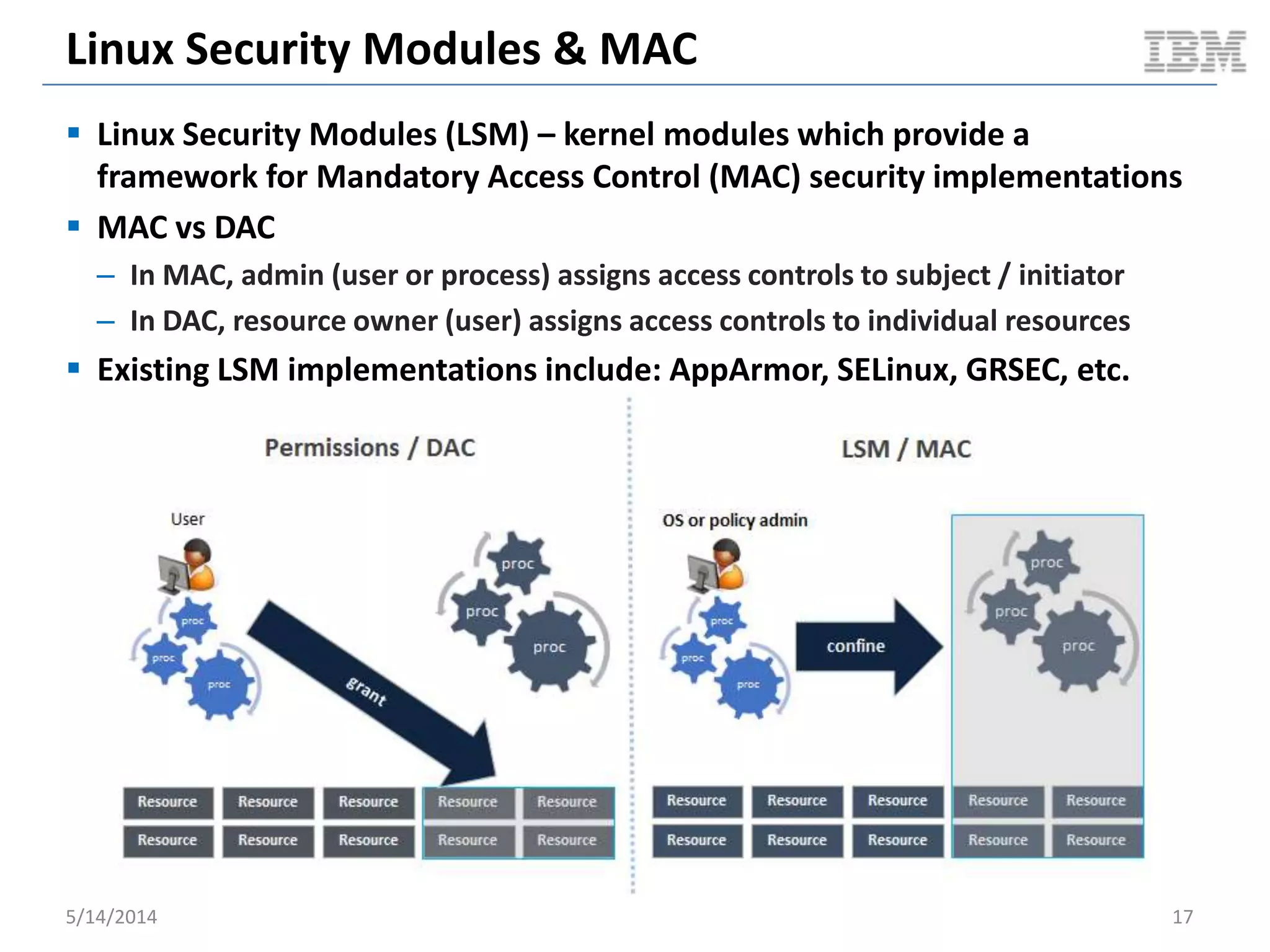
 Linux Security Modules (LSM) – kernel modules which provide a
framework for Mandatory Access Control (MAC) security implementations
 MAC vs DAC
– In MAC, admin (user or process) assigns access controls to subject / initiator
– In DAC, resource owner (user) assigns access controls to individual resources
 Existing LSM implementations include: AppArmor, SELinux, GRSEC, etc.
5/14/2014 17
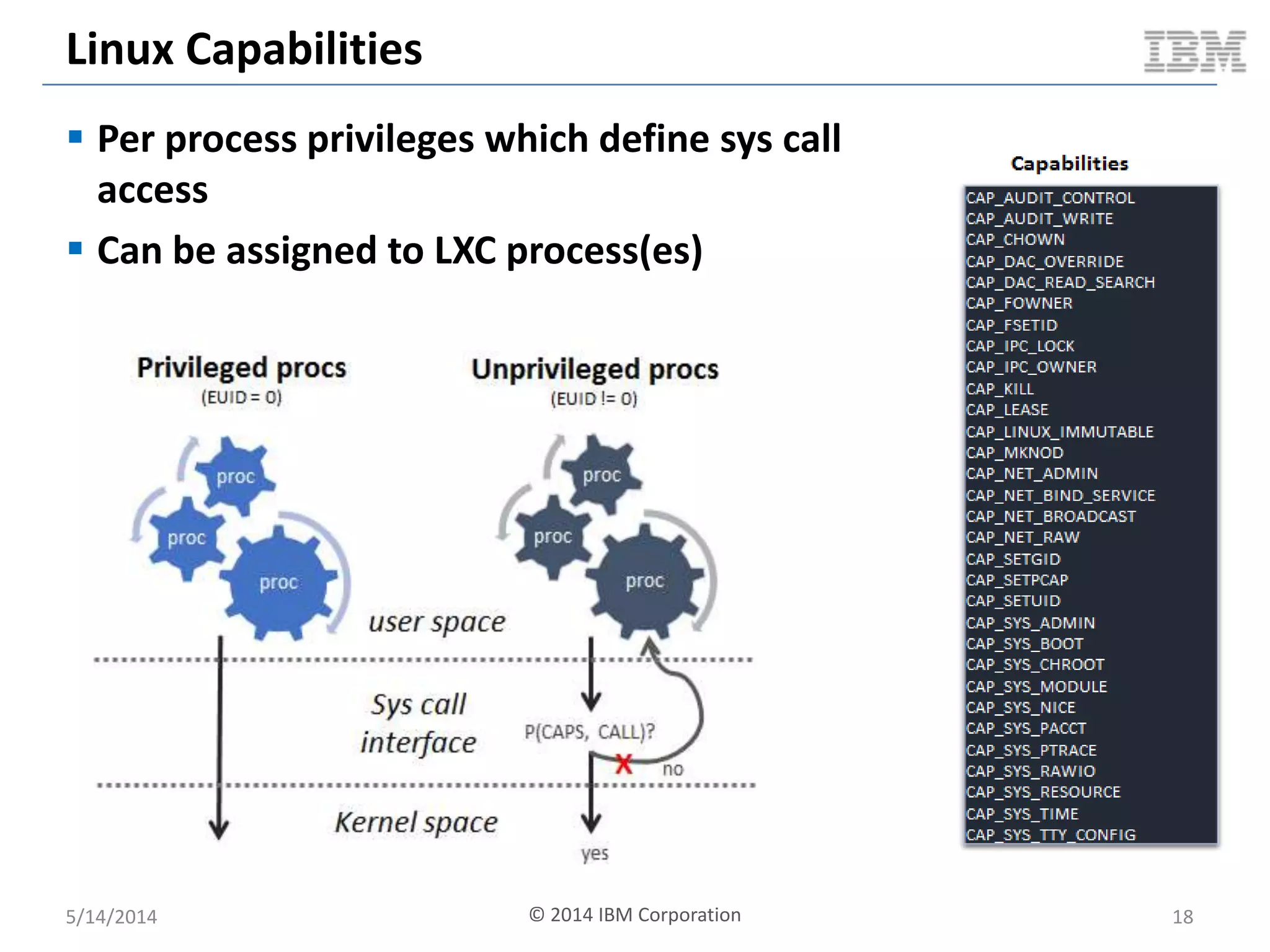
Linux Capabilities
 Per process privileges which define sys call
access
 Can be assigned to LXC process(es)
5/14/2014 18© 2014 IBM Corporation
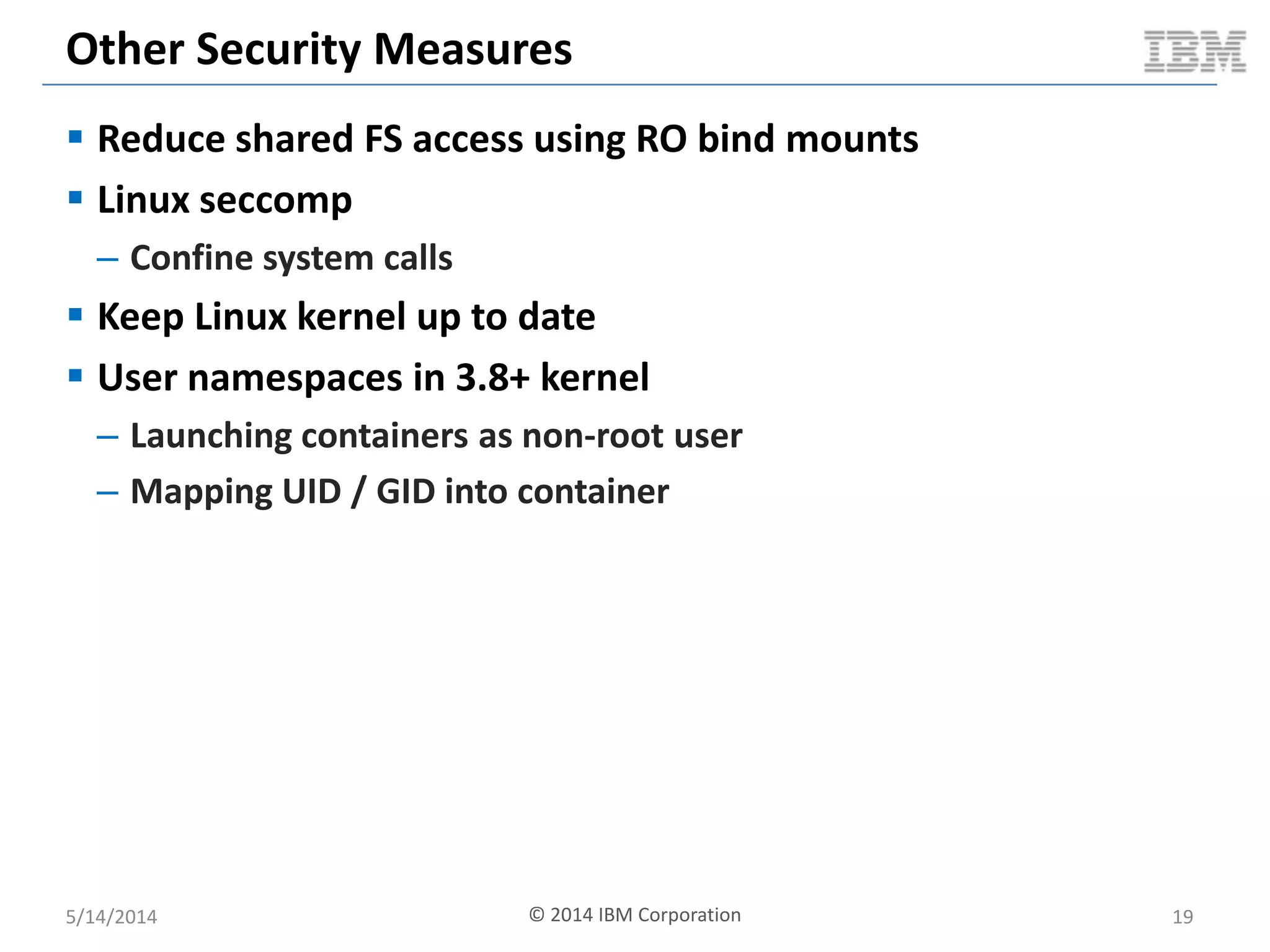
Other Security Measures
 Reduce shared FS access using RO bind mounts
 Linux seccomp
– Confine system calls
 Keep Linux kernel up to date
 User namespaces in 3.8+ kernel
– Launching containers as non-root user
– Mapping UID / GID into container
5/14/2014 © 2014 IBM Corporation 19
So You Want To Build A Container?
5/14/2014 20© 2014 IBM Corporation
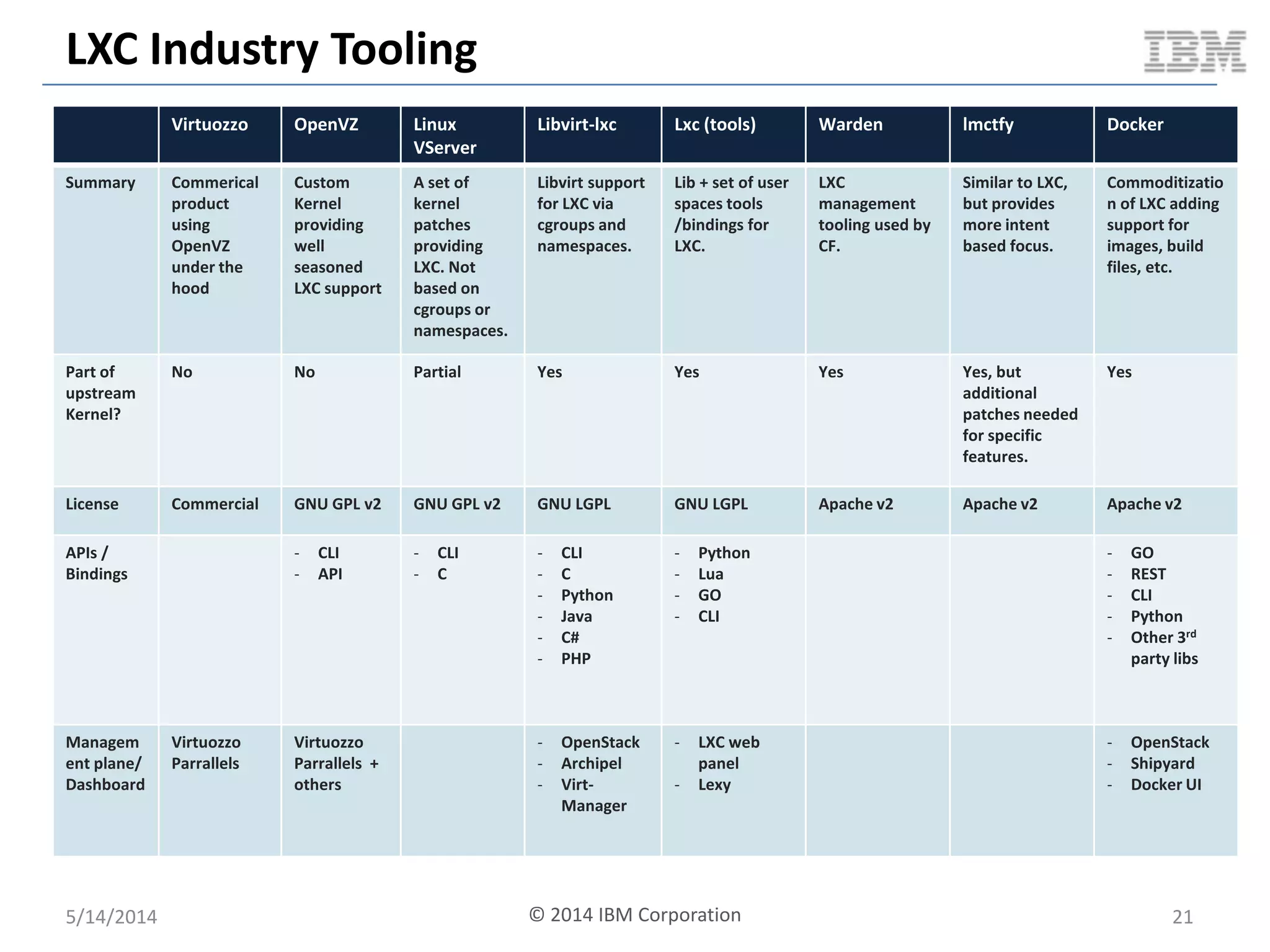
LXC Industry Tooling
Virtuozzo OpenVZ Linux
VServer
Libvirt-lxc Lxc (tools) Warden lmctfy Docker
Summary Commerical
product
using
OpenVZ
under the
hood
Custom
Kernel
providing
well
seasoned
LXC support
A set of
kernel
patches
providing
LXC. Not
based on
cgroups or
namespaces.
Libvirt support
for LXC via
cgroups and
namespaces.
Lib + set of user
spaces tools
/bindings for
LXC.
LXC
management
tooling used by
CF.
Similar to LXC,
but provides
more intent
based focus.
Commoditizatio
n of LXC adding
support for
images, build
files, etc.
Part of
upstream
Kernel?
No No Partial Yes Yes Yes Yes, but
additional
patches needed
for specific
features.
Yes
License Commercial GNU GPL v2 GNU GPL v2 GNU LGPL GNU LGPL Apache v2 Apache v2 Apache v2
APIs /
Bindings
- CLI
- API
- CLI
- C
- CLI
- C
- Python
- Java
- C#
- PHP
- Python
- Lua
- GO
- CLI
- GO
- REST
- CLI
- Python
- Other 3rd
party libs
Managem
ent plane/
Dashboard
Virtuozzo
Parrallels
Virtuozzo
Parrallels +
others
- OpenStack
- Archipel
- Virt-
Manager
- LXC web
panel
- Lexy
- OpenStack
- Shipyard
- Docker UI
5/14/2014 © 2014 IBM Corporation 21
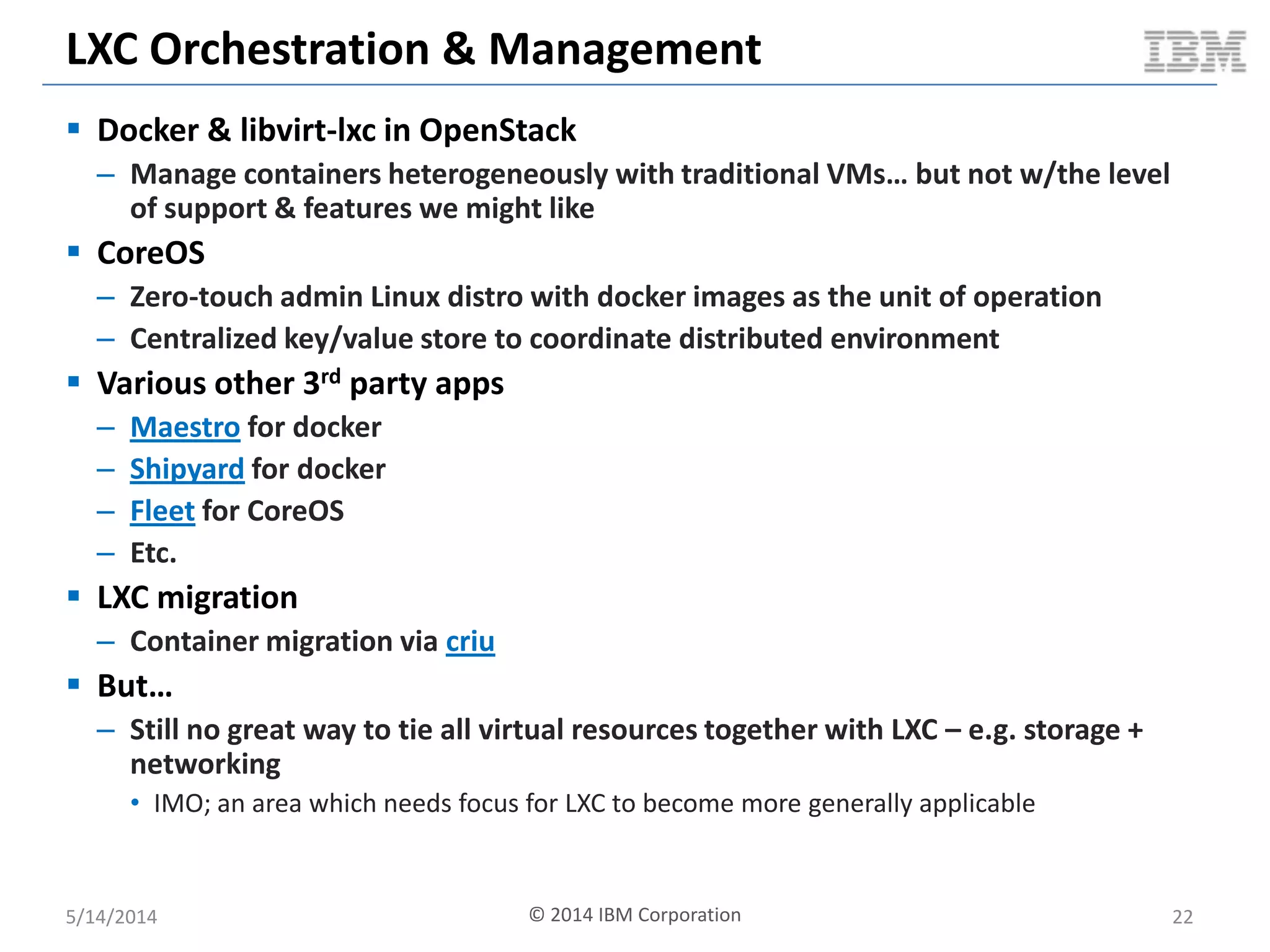
LXC Orchestration & Management
 Docker & libvirt-lxc in OpenStack
– Manage containers heterogeneously with traditional VMs… but not w/the level
of support & features we might like
 CoreOS
– Zero-touch admin Linux distro with docker images as the unit of operation
– Centralized key/value store to coordinate distributed environment
 Various other 3rd party apps
– Maestro for docker
– Shipyard for docker
– Fleet for CoreOS
– Etc.
 LXC migration
– Container migration via criu
 But…
– Still no great way to tie all virtual resources together with LXC – e.g. storage +
networking
• IMO; an area which needs focus for LXC to become more generally applicable
5/14/2014 22© 2014 IBM Corporation
CLOUDY BENCHMARKING WITH
KVM, DOCKER AND OPENSTACK
5/14/2014 © 2014 IBM Corporation 23
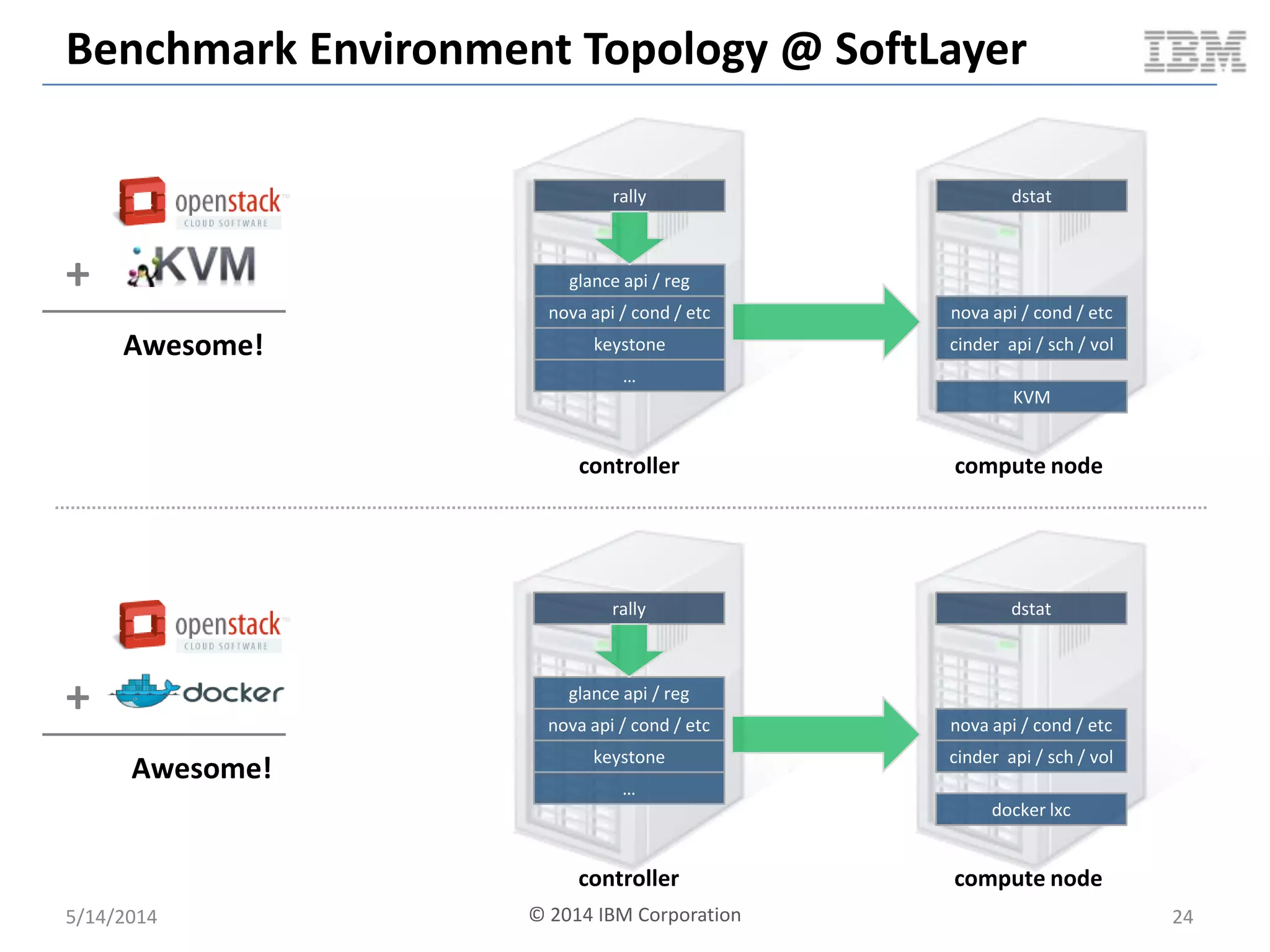
Benchmark Environment Topology @ SoftLayer
glance api / reg
nova api / cond / etc
keystone
…
rally
nova api / cond / etc
cinder api / sch / vol
docker lxc
dstat
controller compute node
glance api / reg
nova api / cond / etc
keystone
…
rally
nova api / cond / etc
cinder api / sch / vol
KVM
dstat
controller compute node
5/14/2014 24
+
Awesome!
+
Awesome!
© 2014 IBM Corporation
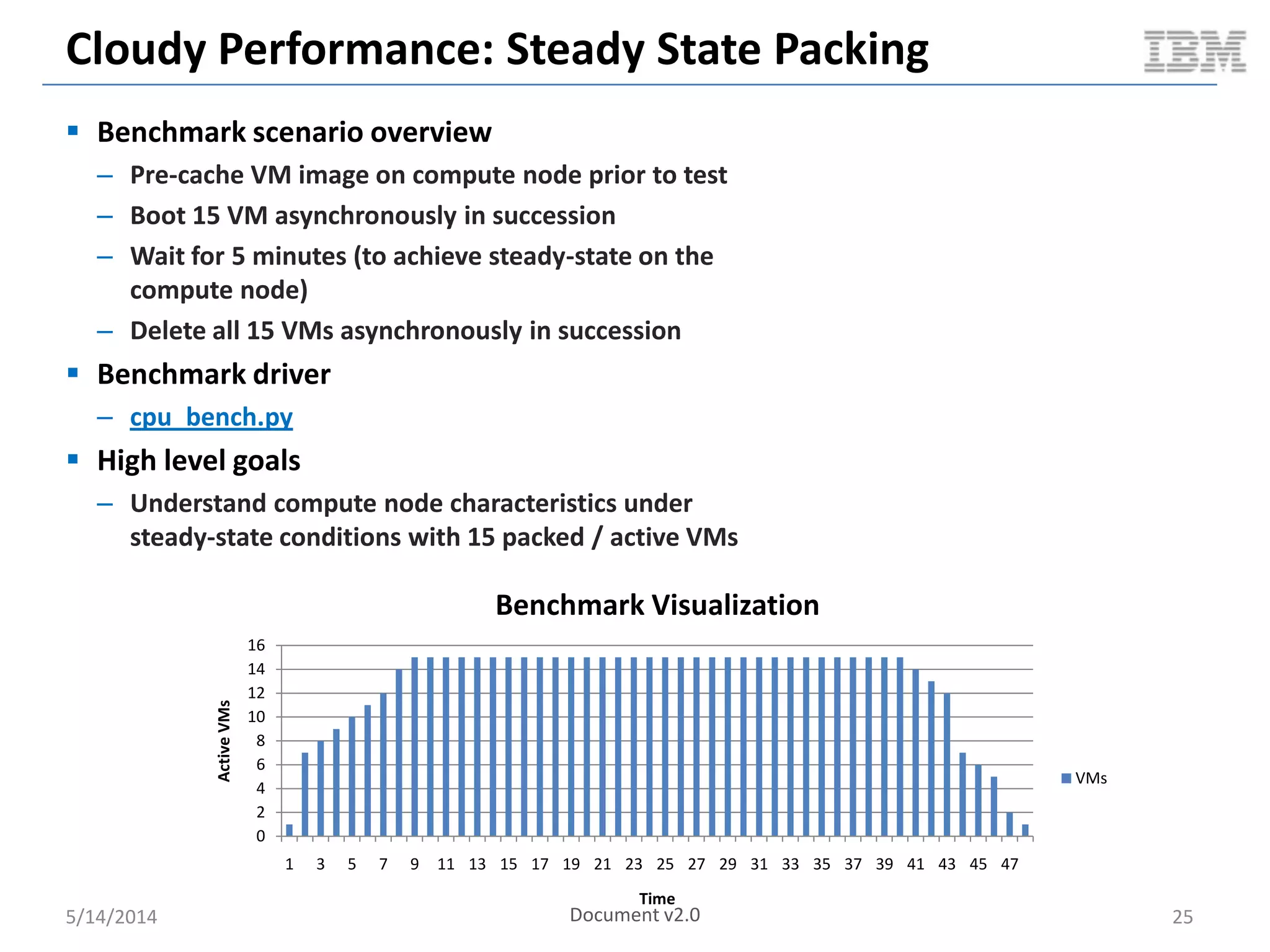
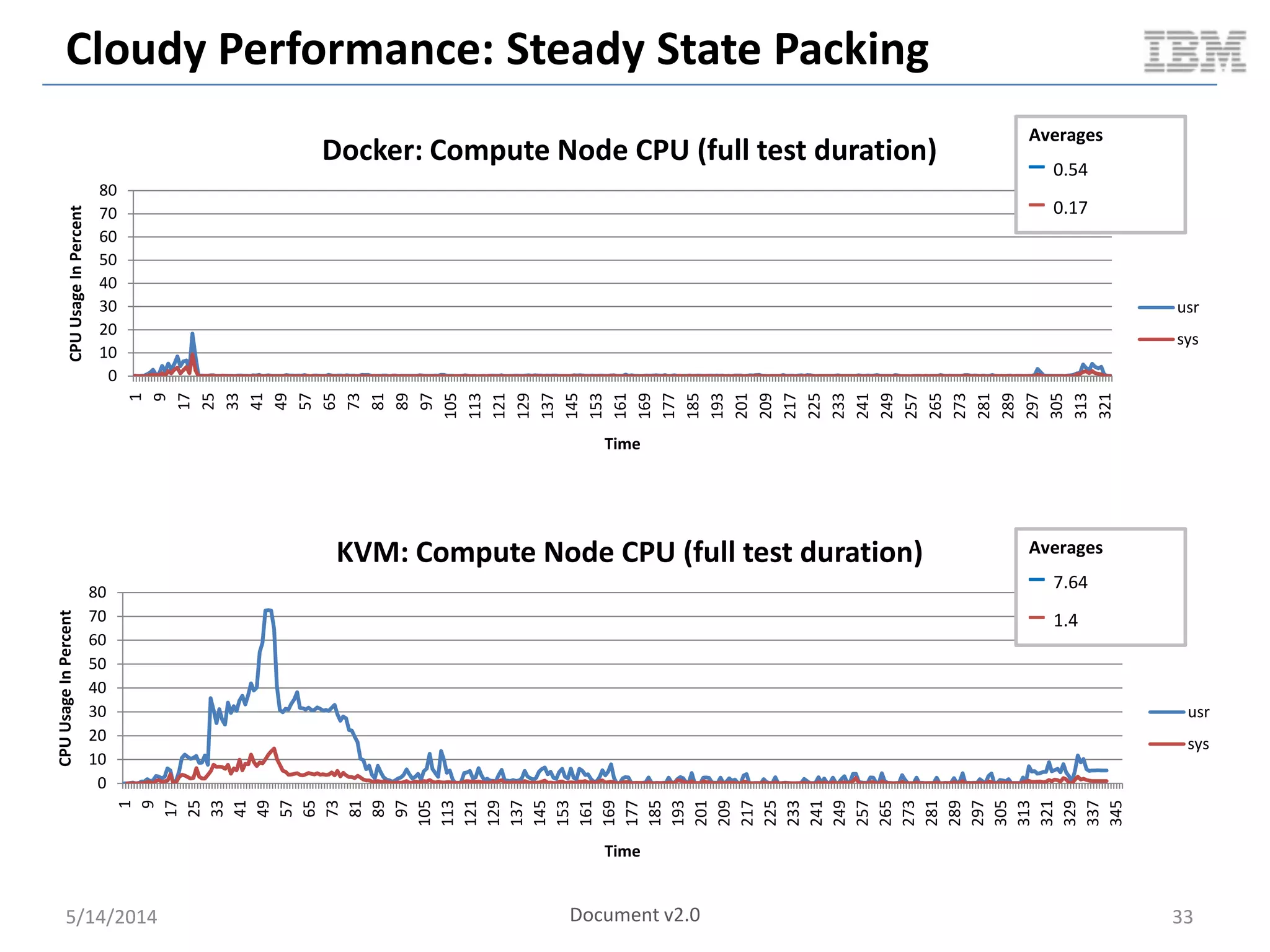
Cloudy Performance: Steady State Packing
 Benchmark scenario overview
– Pre-cache VM image on compute node prior to test
– Boot 15 VM asynchronously in succession
– Wait for 5 minutes (to achieve steady-state on the
compute node)
– Delete all 15 VMs asynchronously in succession
 Benchmark driver
– cpu_bench.py
 High level goals
– Understand compute node characteristics under
steady-state conditions with 15 packed / active VMs
5/14/2014 25
0
2
4
6
8
10
12
14
16
1 3 5 7 9 11 13 15 17 19 21 23 25 27 29 31 33 35 37 39 41 43 45 47
ActiveVMs
Time
Benchmark Visualization
VMs
Document v2.0
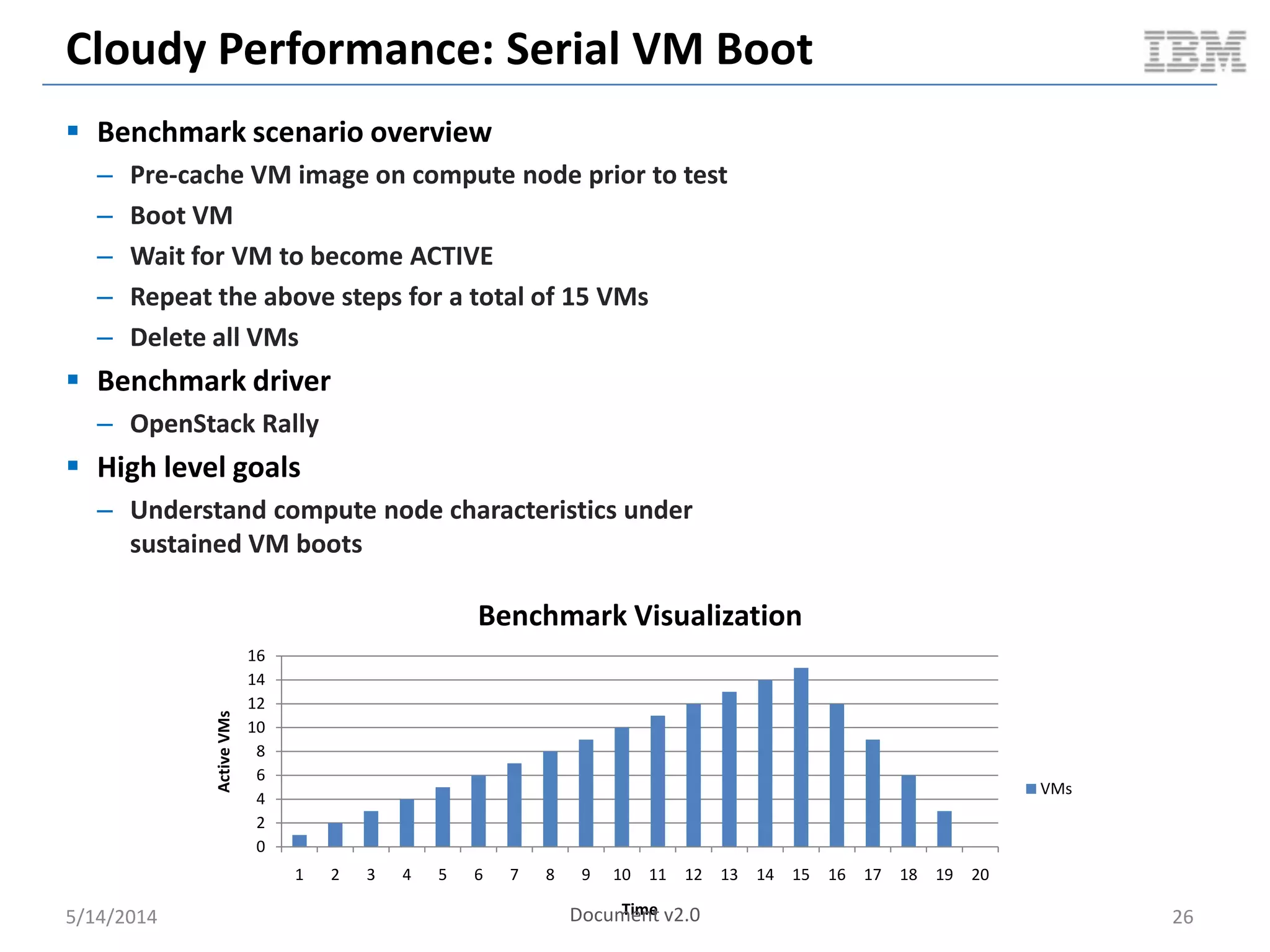
Cloudy Performance: Serial VM Boot
 Benchmark scenario overview
– Pre-cache VM image on compute node prior to test
– Boot VM
– Wait for VM to become ACTIVE
– Repeat the above steps for a total of 15 VMs
– Delete all VMs
 Benchmark driver
– OpenStack Rally
 High level goals
– Understand compute node characteristics under
sustained VM boots
5/14/2014 26
0
2
4
6
8
10
12
14
16
1 2 3 4 5 6 7 8 9 10 11 12 13 14 15 16 17 18 19 20
ActiveVMs
Time
Benchmark Visualization
VMs
Document v2.0
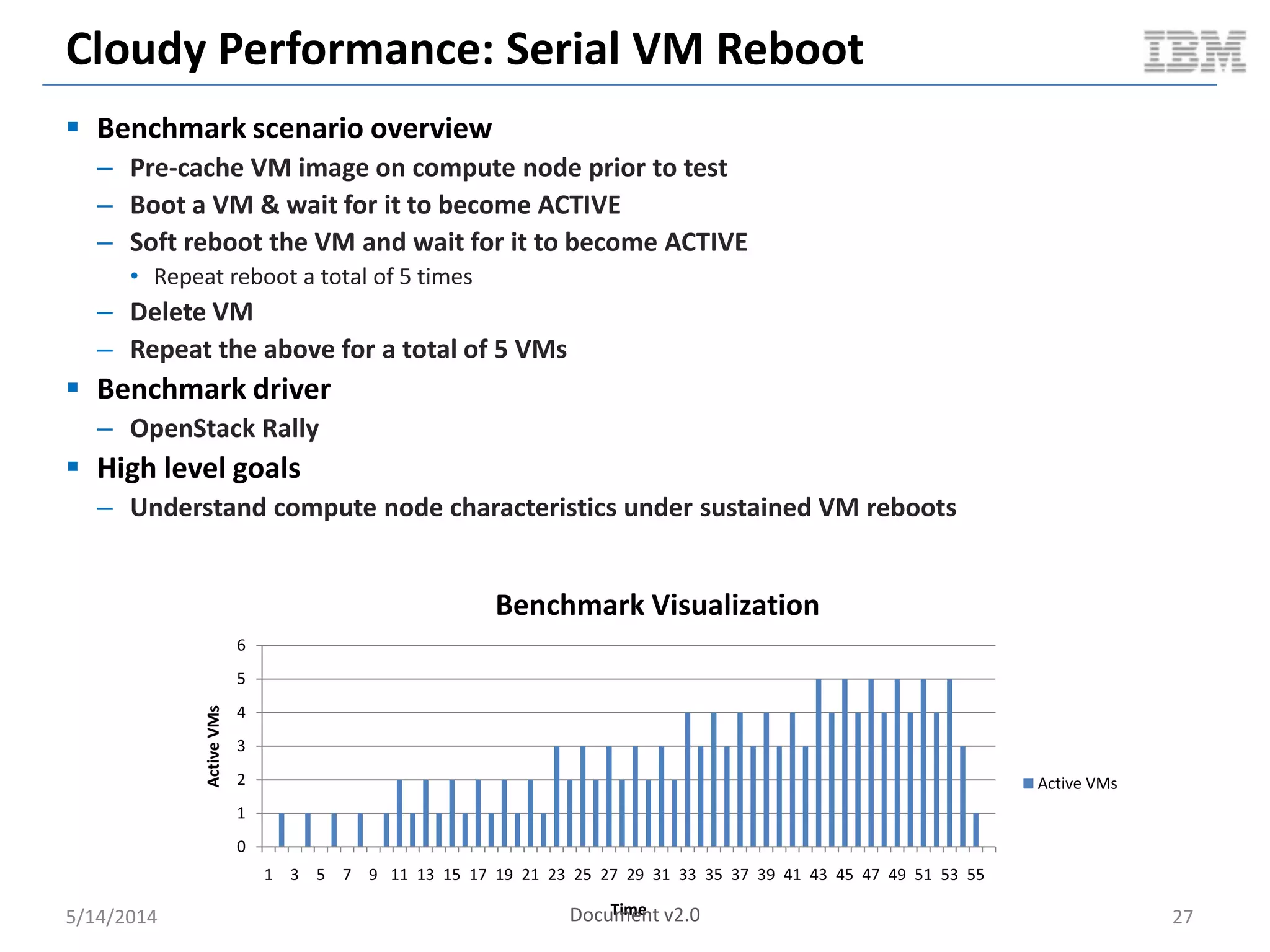
Cloudy Performance: Serial VM Reboot
 Benchmark scenario overview
– Pre-cache VM image on compute node prior to test
– Boot a VM & wait for it to become ACTIVE
– Soft reboot the VM and wait for it to become ACTIVE
• Repeat reboot a total of 5 times
– Delete VM
– Repeat the above for a total of 5 VMs
 Benchmark driver
– OpenStack Rally
 High level goals
– Understand compute node characteristics under sustained VM reboots
5/14/2014 27
0
1
2
3
4
5
6
1 3 5 7 9 11 13 15 17 19 21 23 25 27 29 31 33 35 37 39 41 43 45 47 49 51 53 55
ActiveVMs
Time
Benchmark Visualization
Active VMs
Document v2.0
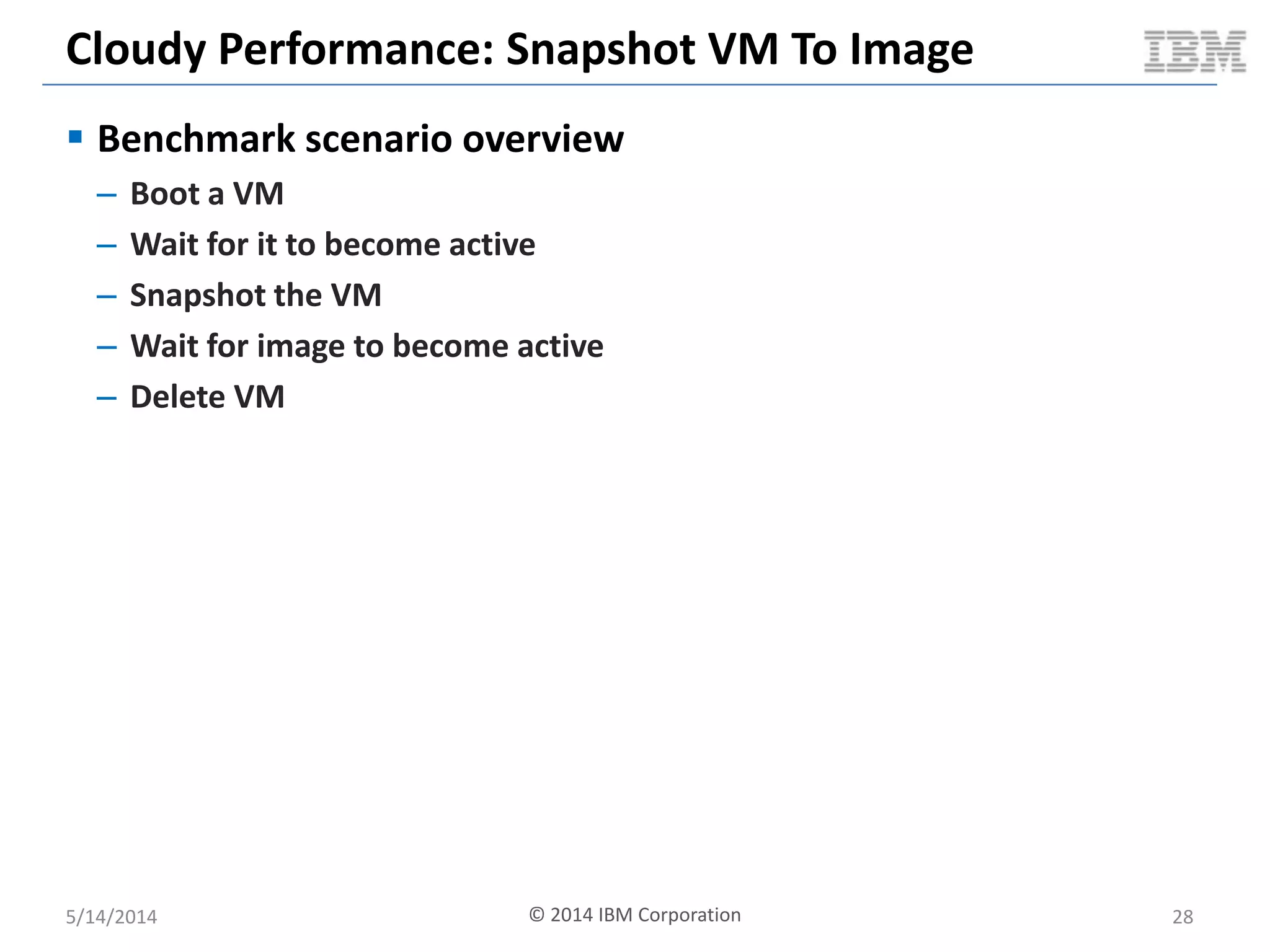
Cloudy Performance: Snapshot VM To Image
 Benchmark scenario overview
– Boot a VM
– Wait for it to become active
– Snapshot the VM
– Wait for image to become active
– Delete VM
5/14/2014 28© 2014 IBM Corporation
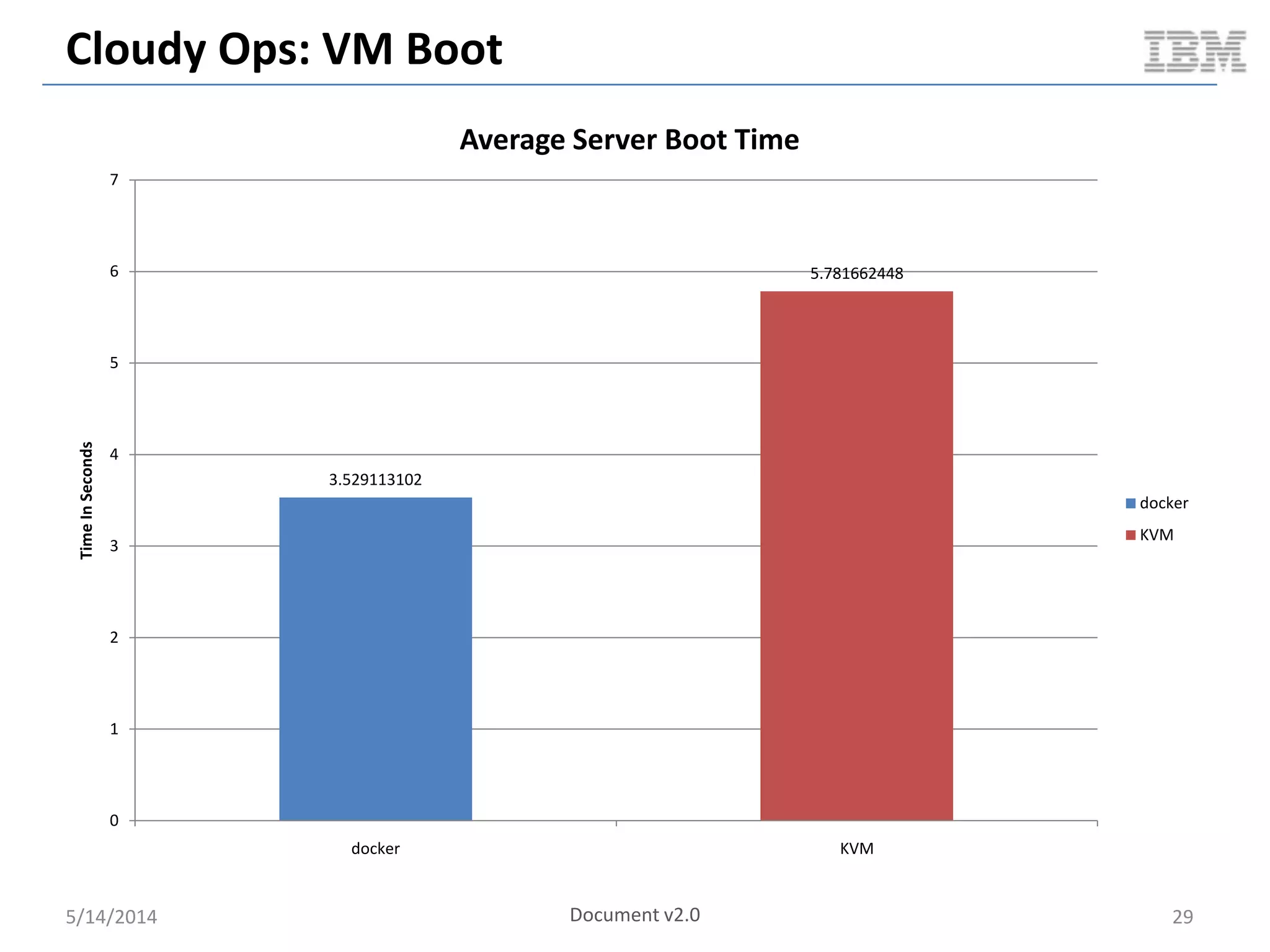
Cloudy Ops: VM Boot
5/14/2014 29
3.529113102
5.781662448
0
1
2
3
4
5
6
7
docker KVM
TimeInSeconds
Average Server Boot Time
docker
KVM
Document v2.0
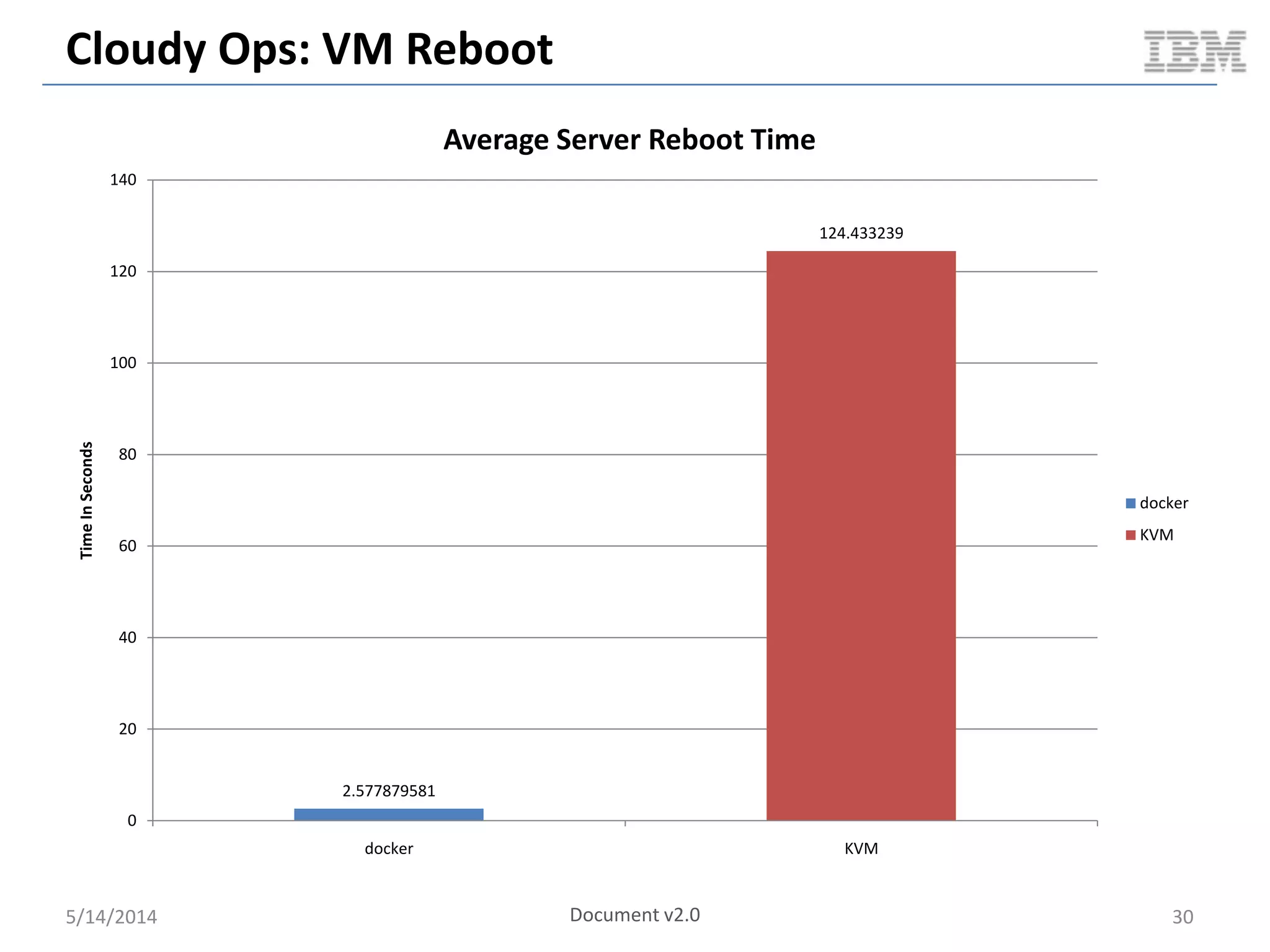
Cloudy Ops: VM Reboot
5/14/2014 30
2.577879581
124.433239
0
20
40
60
80
100
120
140
docker KVM
TimeInSeconds
Average Server Reboot Time
docker
KVM
Document v2.0
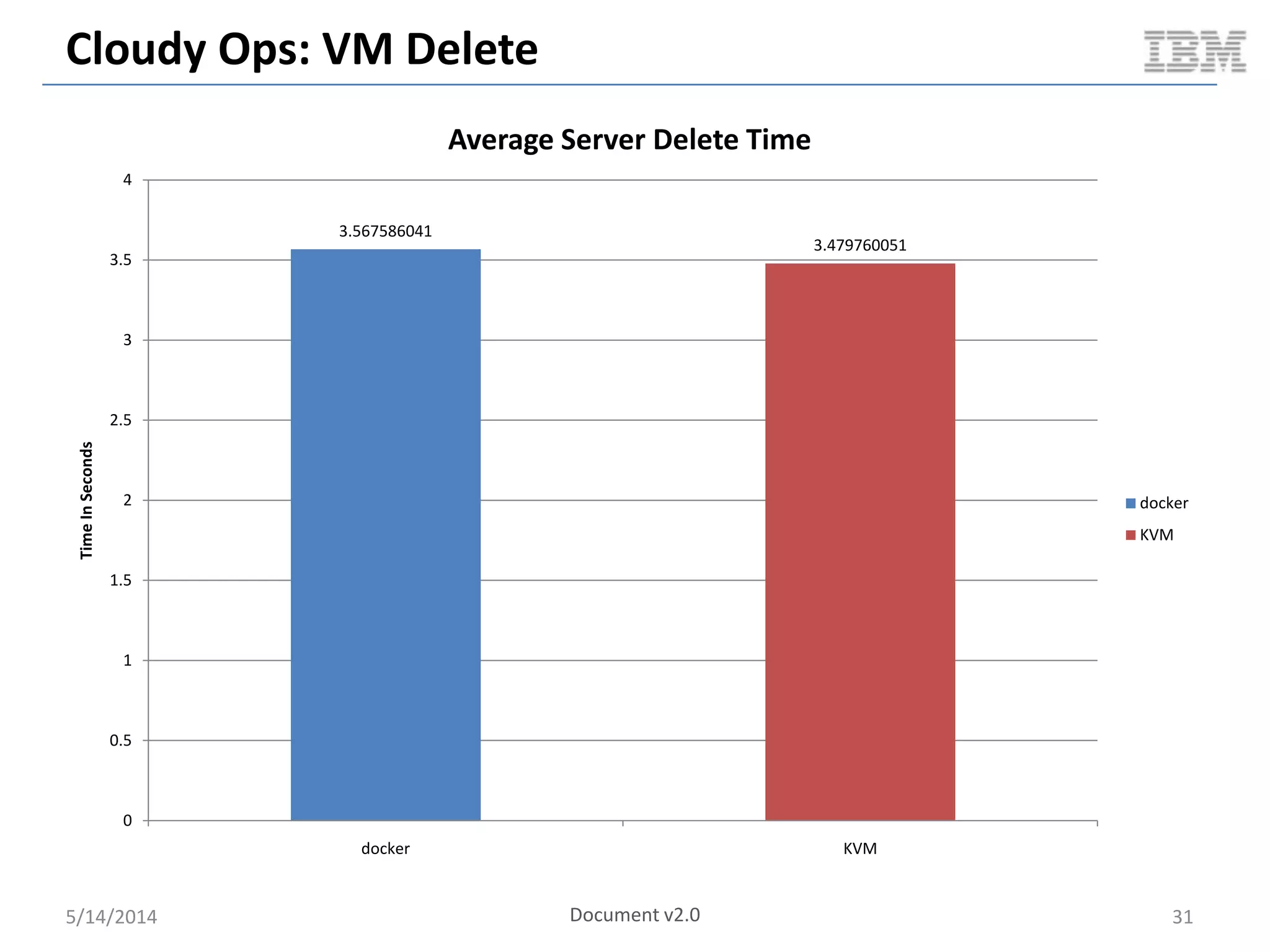
Cloudy Ops: VM Delete
5/14/2014 31
3.567586041
3.479760051
0
0.5
1
1.5
2
2.5
3
3.5
4
docker KVM
TimeInSeconds
Average Server Delete Time
docker
KVM
Document v2.0
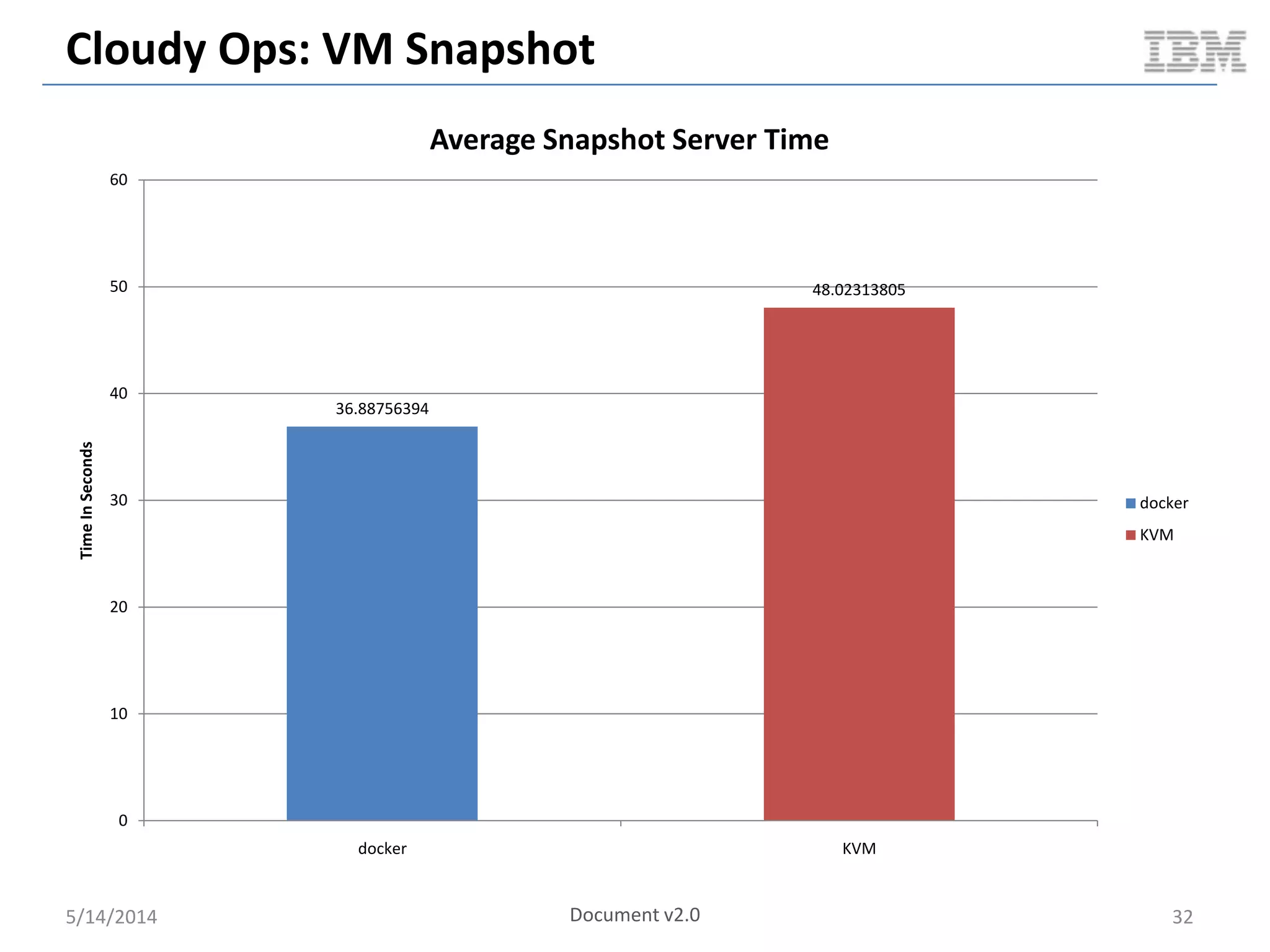
Cloudy Ops: VM Snapshot
5/14/2014 32
36.88756394
48.02313805
0
10
20
30
40
50
60
docker KVM
TimeInSeconds
Average Snapshot Server Time
docker
KVM
Document v2.0
Cloudy Performance: Steady State Packing
5/14/2014 33
0
10
20
30
40
50
60
70
80
1
9
17
25
33
41
49
57
65
73
81
89
97
105
113
121
129
137
145
153
161
169
177
185
193
201
209
217
225
233
241
249
257
265
273
281
289
297
305
313
321
CPUUsageInPercent
Time
Docker: Compute Node CPU (full test duration)
usr
sys
Averages
– 0.54
– 0.17
0
10
20
30
40
50
60
70
80
1
9
17
25
33
41
49
57
65
73
81
89
97
105
113
121
129
137
145
153
161
169
177
185
193
201
209
217
225
233
241
249
257
265
273
281
289
297
305
313
321
329
337
345
CPUUsageInPercent
Time
KVM: Compute Node CPU (full test duration)
usr
sys
Averages
– 7.64
– 1.4
Document v2.0
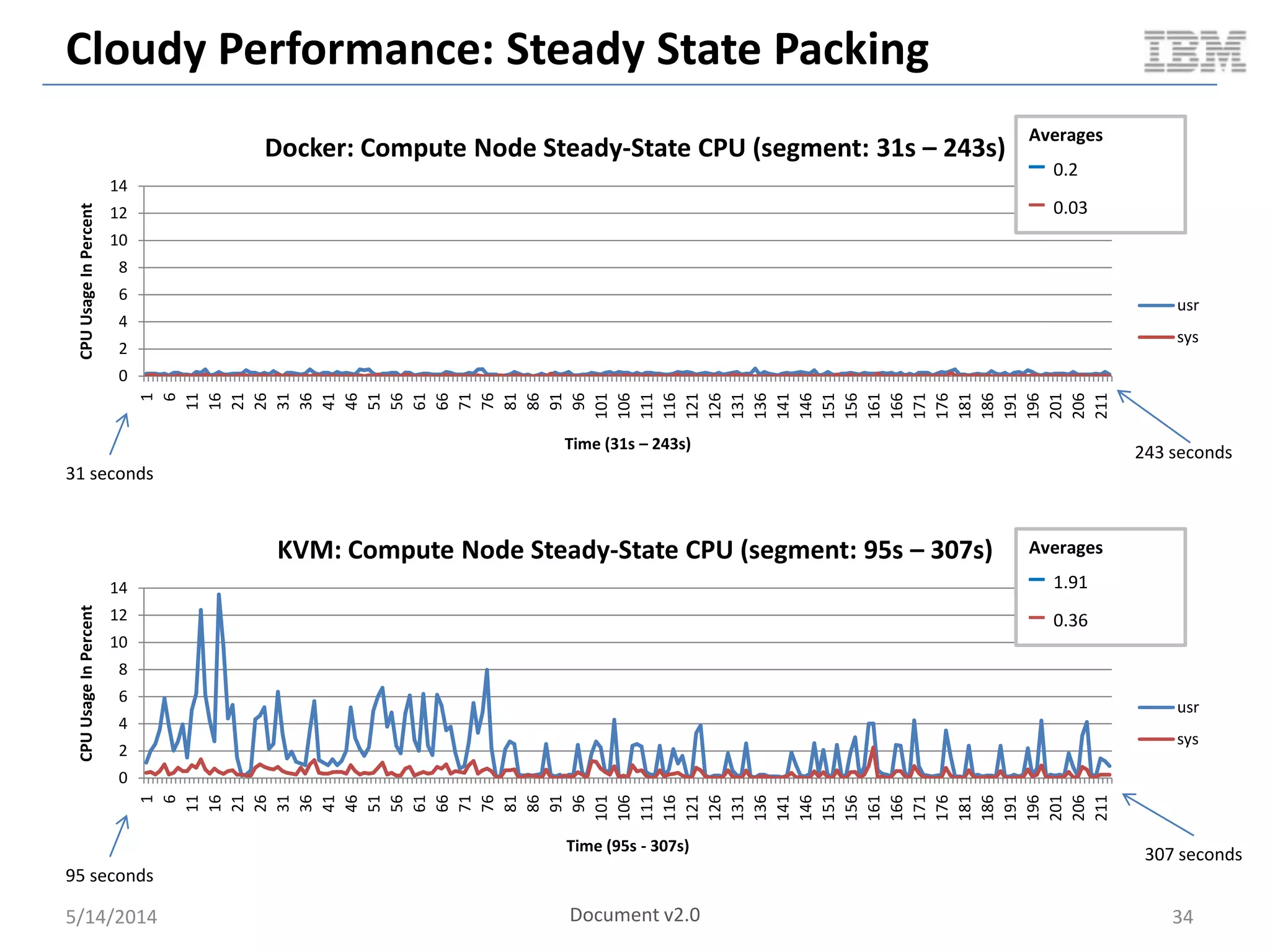
Cloudy Performance: Steady State Packing
5/14/2014 34
0
2
4
6
8
10
12
14
1
6
11
16
21
26
31
36
41
46
51
56
61
66
71
76
81
86
91
96
101
106
111
116
121
126
131
136
141
146
151
156
161
166
171
176
181
186
191
196
201
206
211
CPUUsageInPercent
Time (31s – 243s)
Docker: Compute Node Steady-State CPU (segment: 31s – 243s)
usr
sys
0
2
4
6
8
10
12
14
1
6
11
16
21
26
31
36
41
46
51
56
61
66
71
76
81
86
91
96
101
106
111
116
121
126
131
136
141
146
151
156
161
166
171
176
181
186
191
196
201
206
211
CPUUsageInPercent
Time (95s - 307s)
KVM: Compute Node Steady-State CPU (segment: 95s – 307s)
usr
sys
Averages
– 0.2
– 0.03
Averages
– 1.91
– 0.36
31 seconds
243 seconds
95 seconds
307 seconds
Document v2.0
Cloudy Performance: Steady State Packing
5/14/2014 35
0.00E+00
1.00E+09
2.00E+09
3.00E+09
4.00E+09
5.00E+09
6.00E+09
7.00E+09
1
10
19
28
37
46
55
64
73
82
91
100
109
118
127
136
145
154
163
172
181
190
199
208
217
226
235
244
253
262
271
280
289
298
307
316
325
334
MemoryUsed
Axis Title
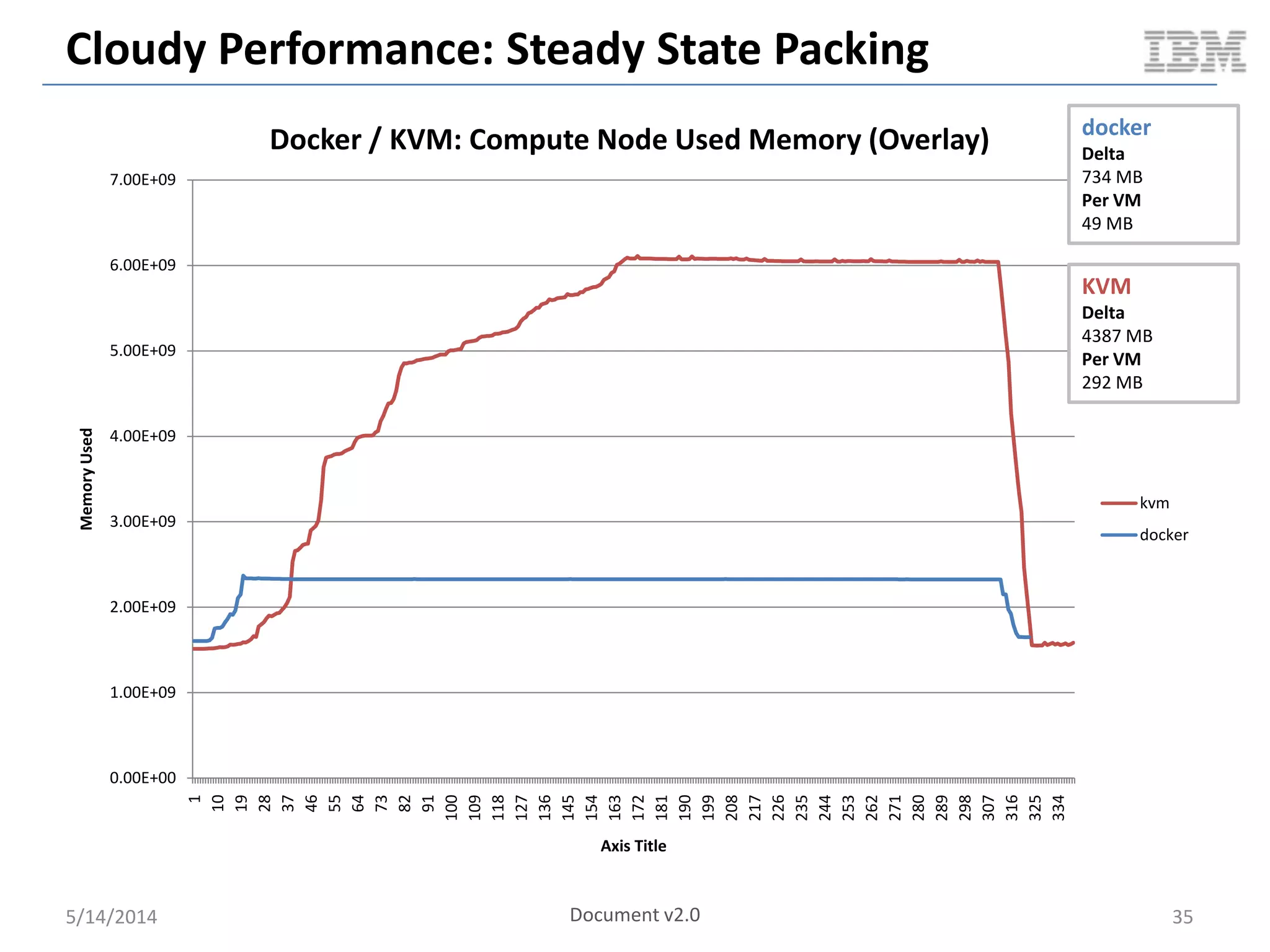
Docker / KVM: Compute Node Used Memory (Overlay)
kvm
docker
Document v2.0
docker
Delta
734 MB
Per VM
49 MB
KVM
Delta
4387 MB
Per VM
292 MB
Cloudy Performance: Serial VM Boot
5/14/2014 36
0
5
10
15
20
25
30
35
1 3 5 7 9 11 13 15 17 19 21 23 25 27 29 31 33 35 37 39 41 43 45 47 49 51 53 55 57 59 61 63 65 67 69 71 73 75 77 79
CPUUsageInPercent
Time
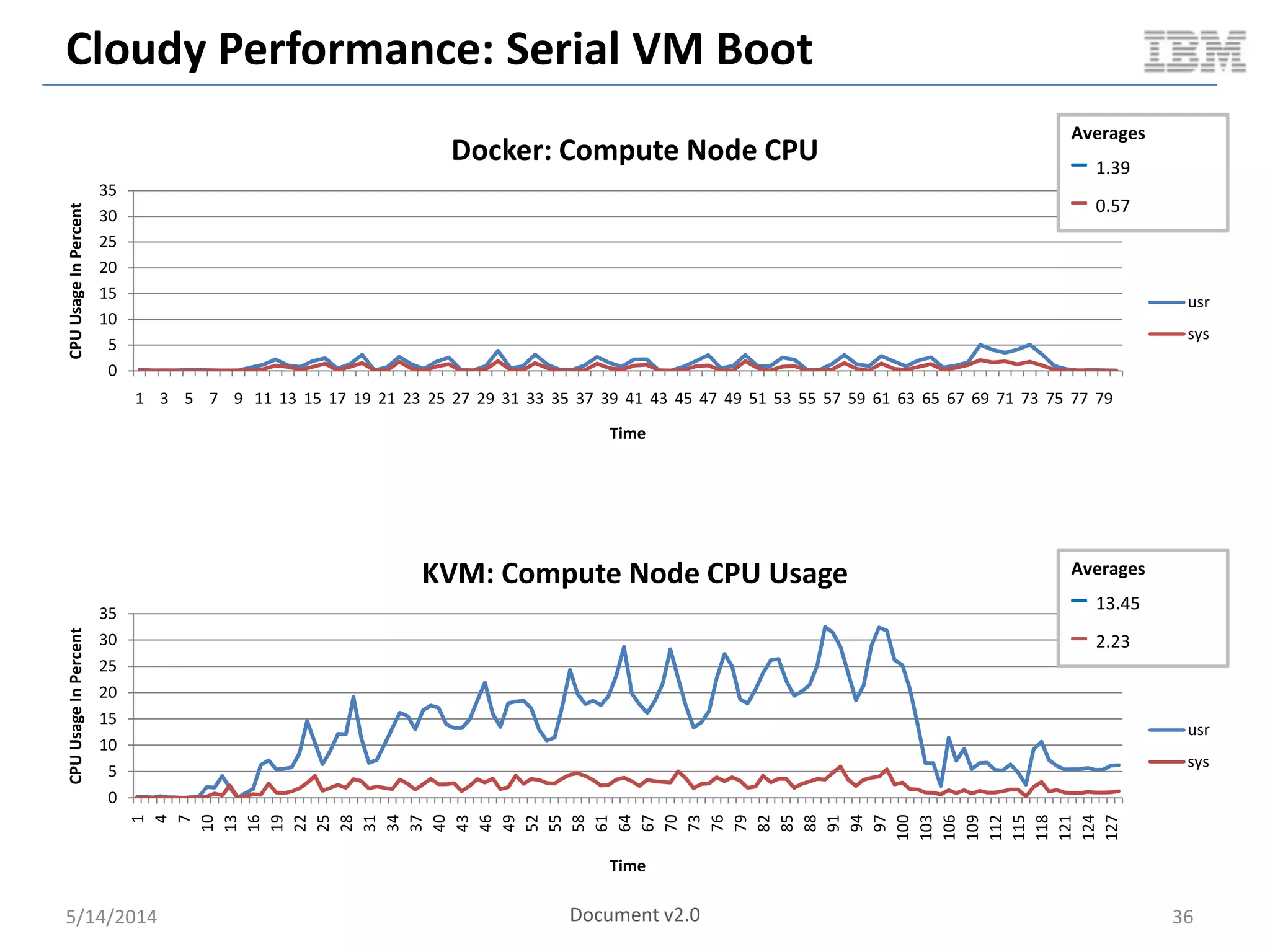
Docker: Compute Node CPU
usr
sys
Averages
– 1.39
– 0.57
0
5
10
15
20
25
30
35
1
4
7
10
13
16
19
22
25
28
31
34
37
40
43
46
49
52
55
58
61
64
67
70
73
76
79
82
85
88
91
94
97
100
103
106
109
112
115
118
121
124
127
CPUUsageInPercent
Time
KVM: Compute Node CPU Usage
usr
sys
Averages
– 13.45
– 2.23
Document v2.0
Cloudy Performance: Serial VM Boot
5/14/2014 37
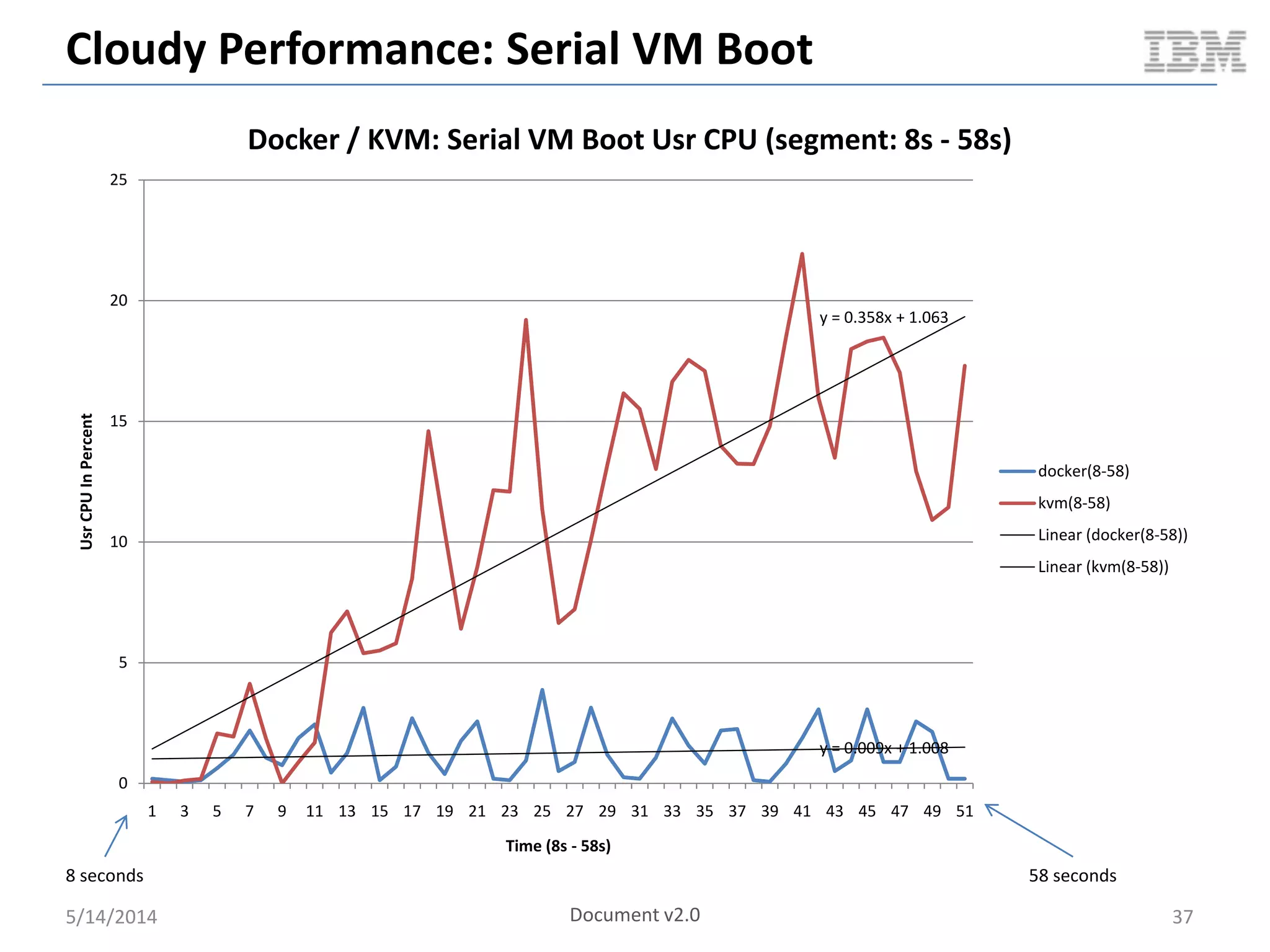
y = 0.009x + 1.008
y = 0.358x + 1.063
0
5
10
15
20
25
1 3 5 7 9 11 13 15 17 19 21 23 25 27 29 31 33 35 37 39 41 43 45 47 49 51
UsrCPUInPercent
Time (8s - 58s)
Docker / KVM: Serial VM Boot Usr CPU (segment: 8s - 58s)
docker(8-58)
kvm(8-58)
Linear (docker(8-58))
Linear (kvm(8-58))
8 seconds 58 seconds
Document v2.0
Cloudy Performance: Serial VM Boot
5/14/2014 38
0.00E+00
5.00E+08
1.00E+09
1.50E+09
2.00E+09
2.50E+09
3.00E+09
3.50E+09
4.00E+09
4.50E+09
5.00E+09
1 5 9 13 17 21 25 29 33 37 41 45 49 53 57 61 65 69 73 77 81 85 89 93 97 101105109113117121125
MemoryUsed
Time
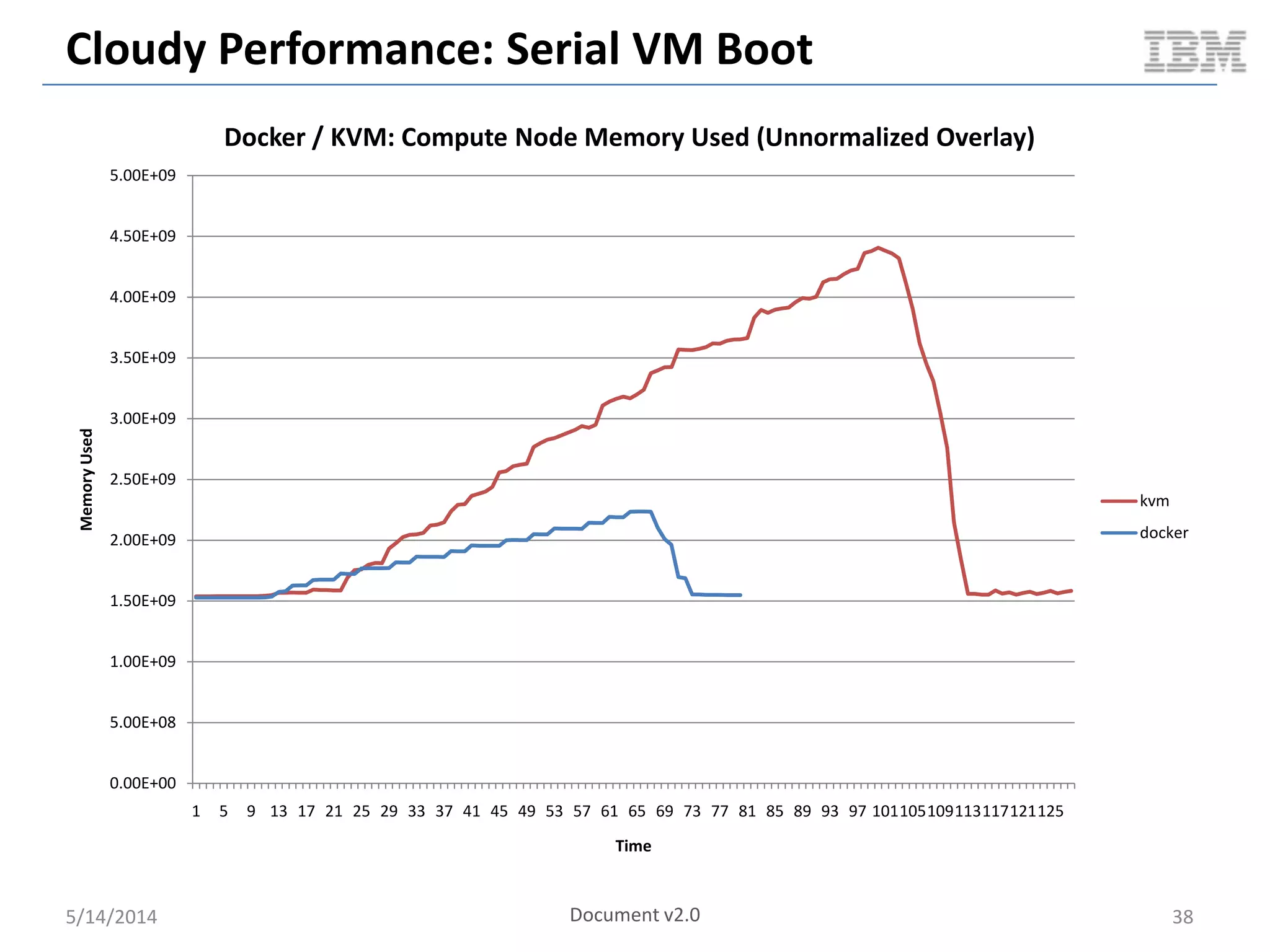
Docker / KVM: Compute Node Memory Used (Unnormalized Overlay)
kvm
docker
Document v2.0
Cloudy Performance: Serial VM Boot
5/14/2014 39
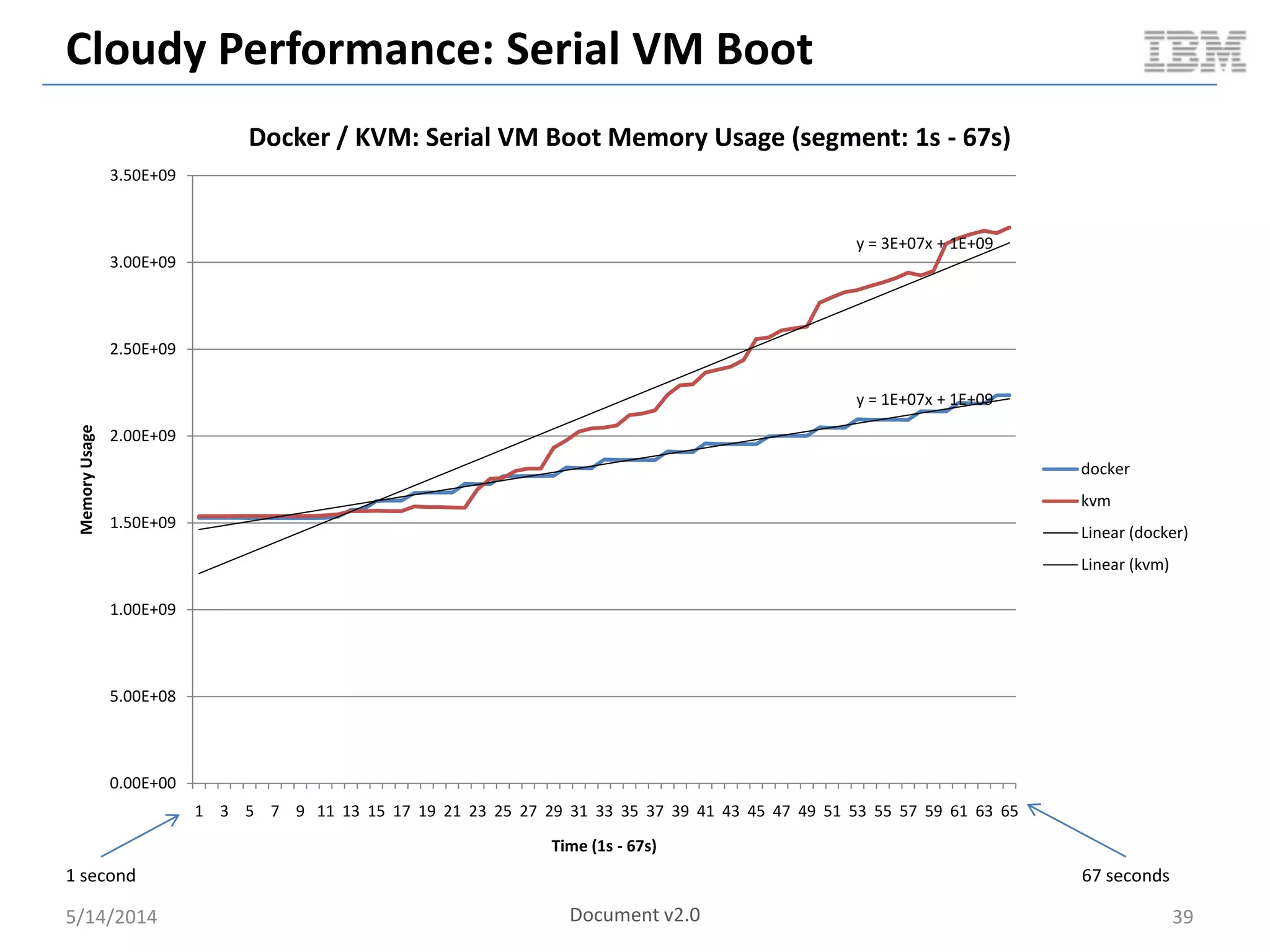
y = 1E+07x + 1E+09
y = 3E+07x + 1E+09
0.00E+00
5.00E+08
1.00E+09
1.50E+09
2.00E+09
2.50E+09
3.00E+09
3.50E+09
1 3 5 7 9 11 13 15 17 19 21 23 25 27 29 31 33 35 37 39 41 43 45 47 49 51 53 55 57 59 61 63 65
MemoryUsage
Time (1s - 67s)
Docker / KVM: Serial VM Boot Memory Usage (segment: 1s - 67s)
docker
kvm
Linear (docker)
Linear (kvm)
1 second 67 seconds
Document v2.0
Guest Ops: Network
5/14/2014 40
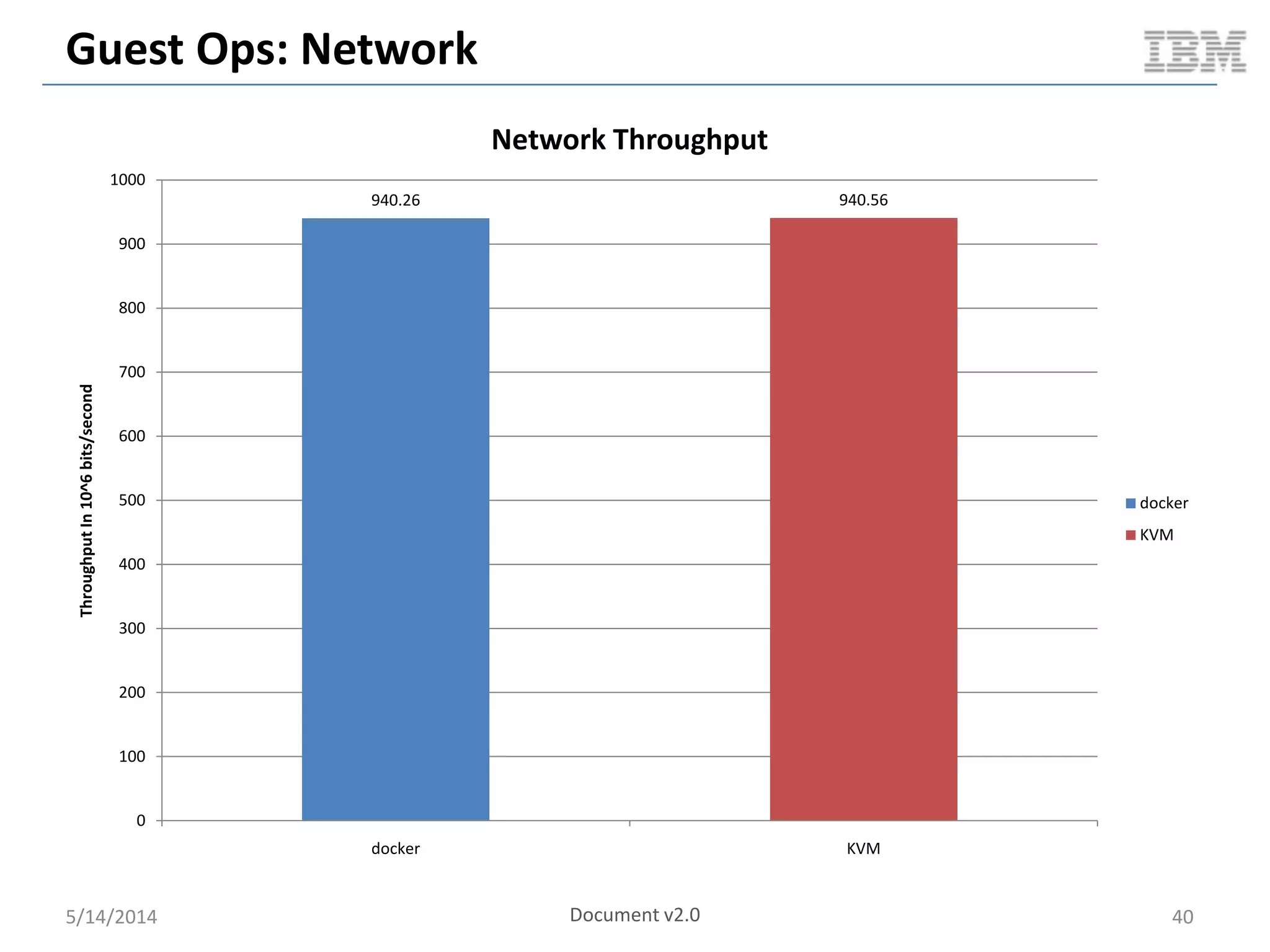
940.26 940.56
0
100
200
300
400
500
600
700
800
900
1000
docker KVM
ThroughputIn10^6bits/second
Network Throughput
docker
KVM
Document v2.0
Guest Ops: Near Bare Metal Performance
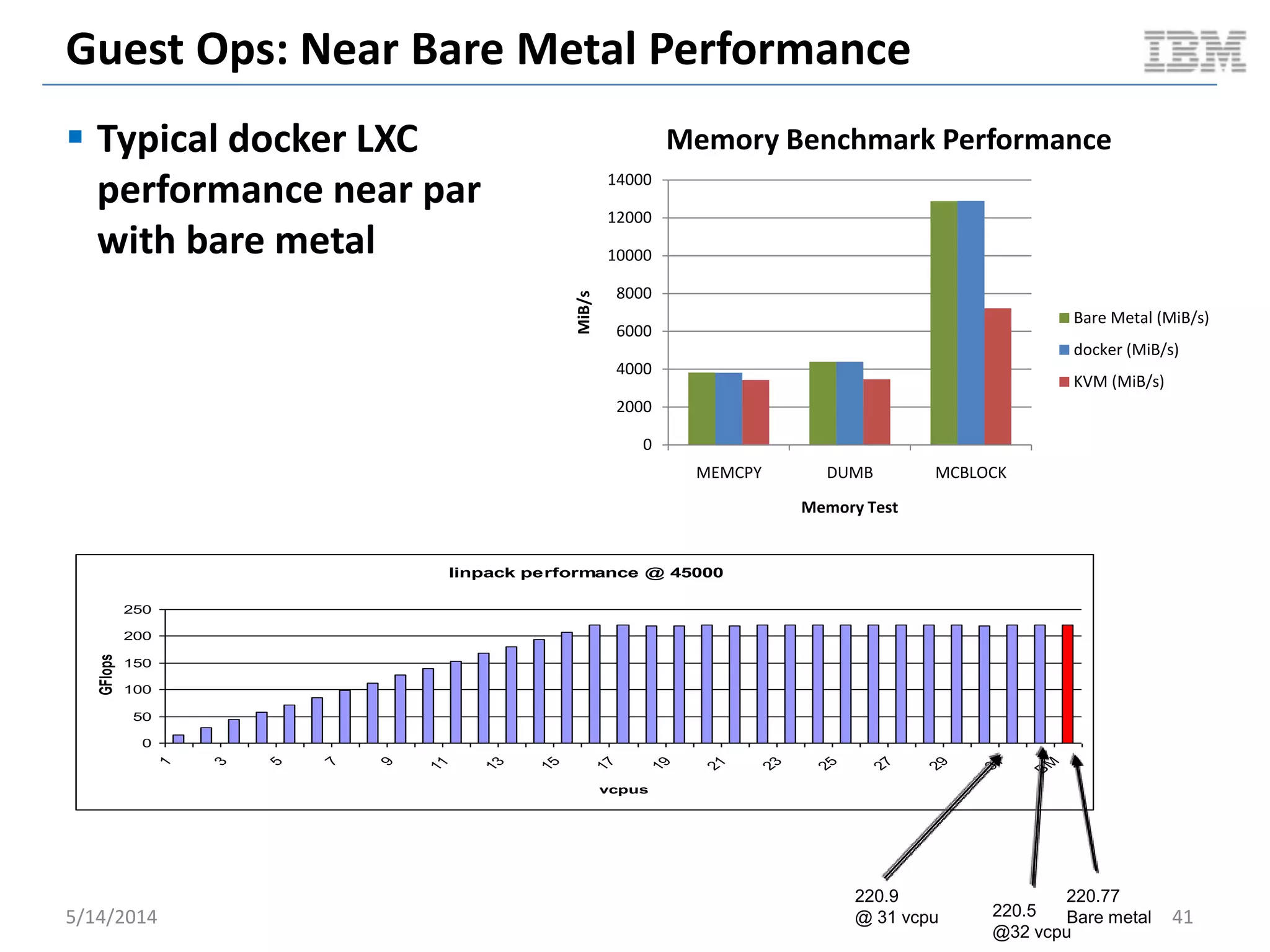
 Typical docker LXC
performance near par
with bare metal
5/14/2014 41
linpack performance @ 45000
0
50
100
150
200
250
1
3
5
7
9
11
13
15
17
19
21
23
25
27
29
31
B
M
vcpus
GFlops
220.77
Bare metal220.5
@32 vcpu
220.9
@ 31 vcpu
0
2000
4000
6000
8000
10000
12000
14000
MEMCPY DUMB MCBLOCK
MiB/s
Memory Test
Memory Benchmark Performance
Bare Metal (MiB/s)
docker (MiB/s)
KVM (MiB/s)
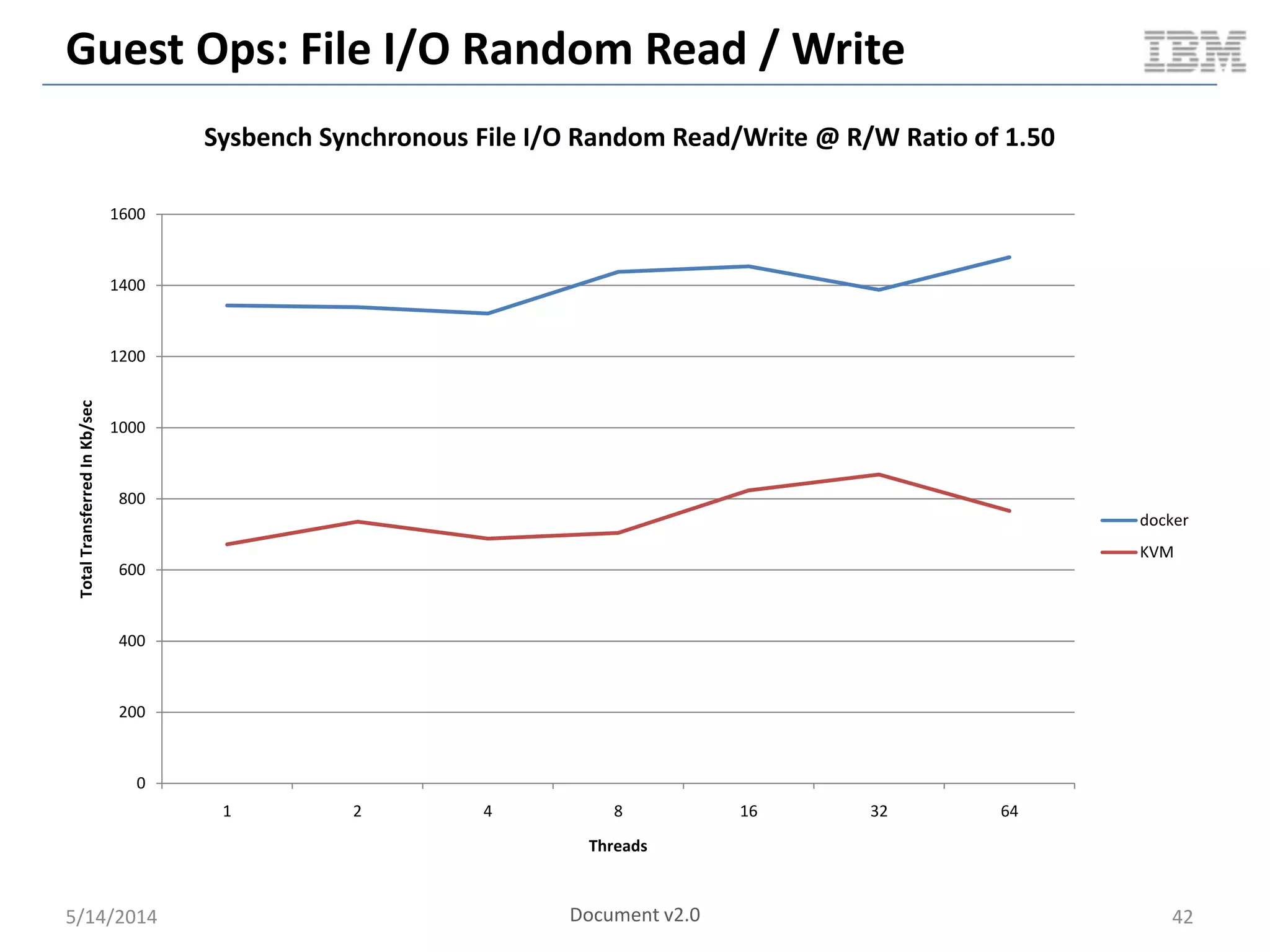
Guest Ops: File I/O Random Read / Write
5/14/2014 42
0
200
400
600
800
1000
1200
1400
1600
1 2 4 8 16 32 64
TotalTransferredInKb/sec
Threads
Sysbench Synchronous File I/O Random Read/Write @ R/W Ratio of 1.50
docker
KVM
Document v2.0
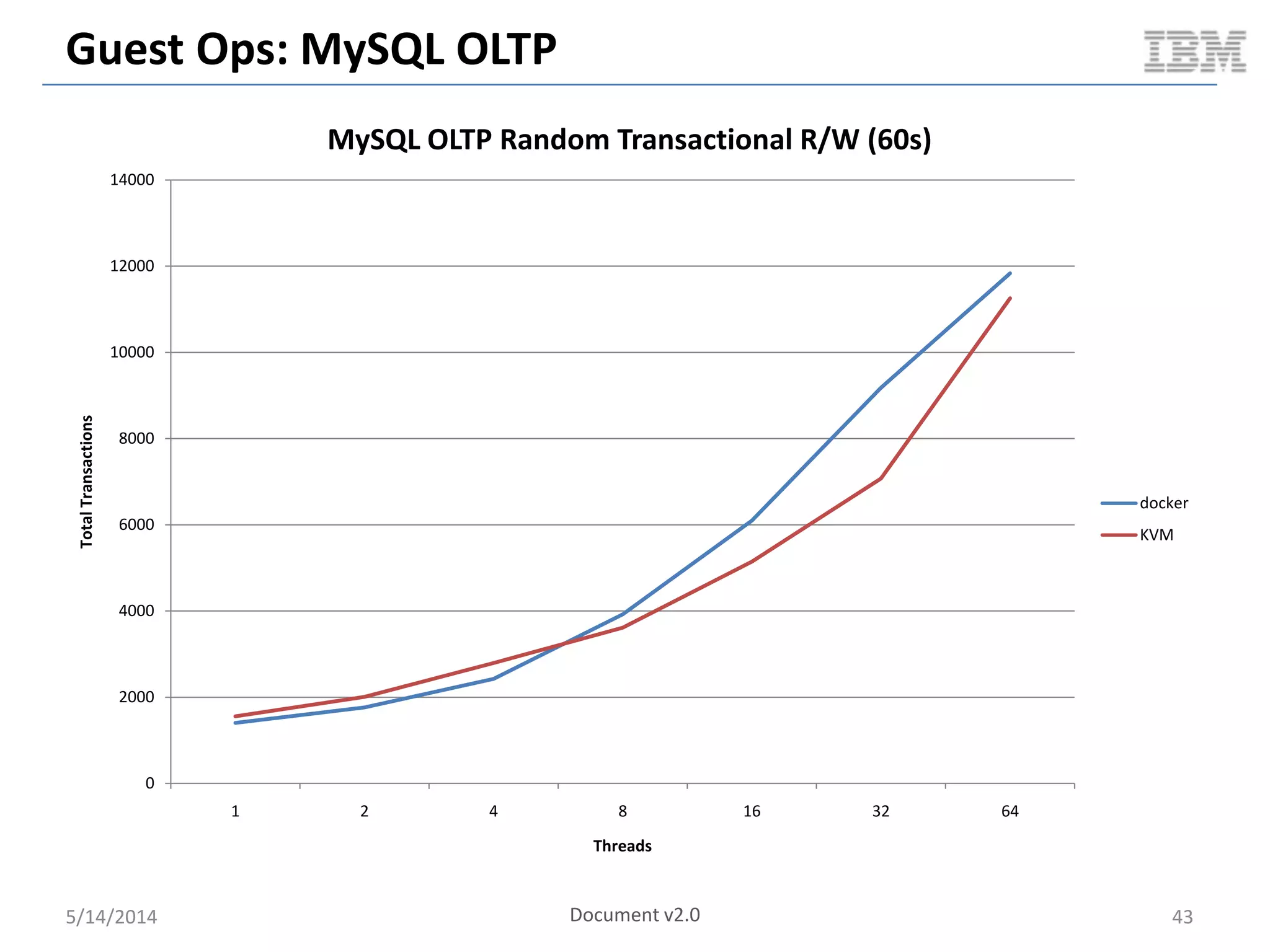
Guest Ops: MySQL OLTP
5/14/2014 43
0
2000
4000
6000
8000
10000
12000
14000
1 2 4 8 16 32 64
TotalTransactions
Threads
MySQL OLTP Random Transactional R/W (60s)
docker
KVM
Document v2.0
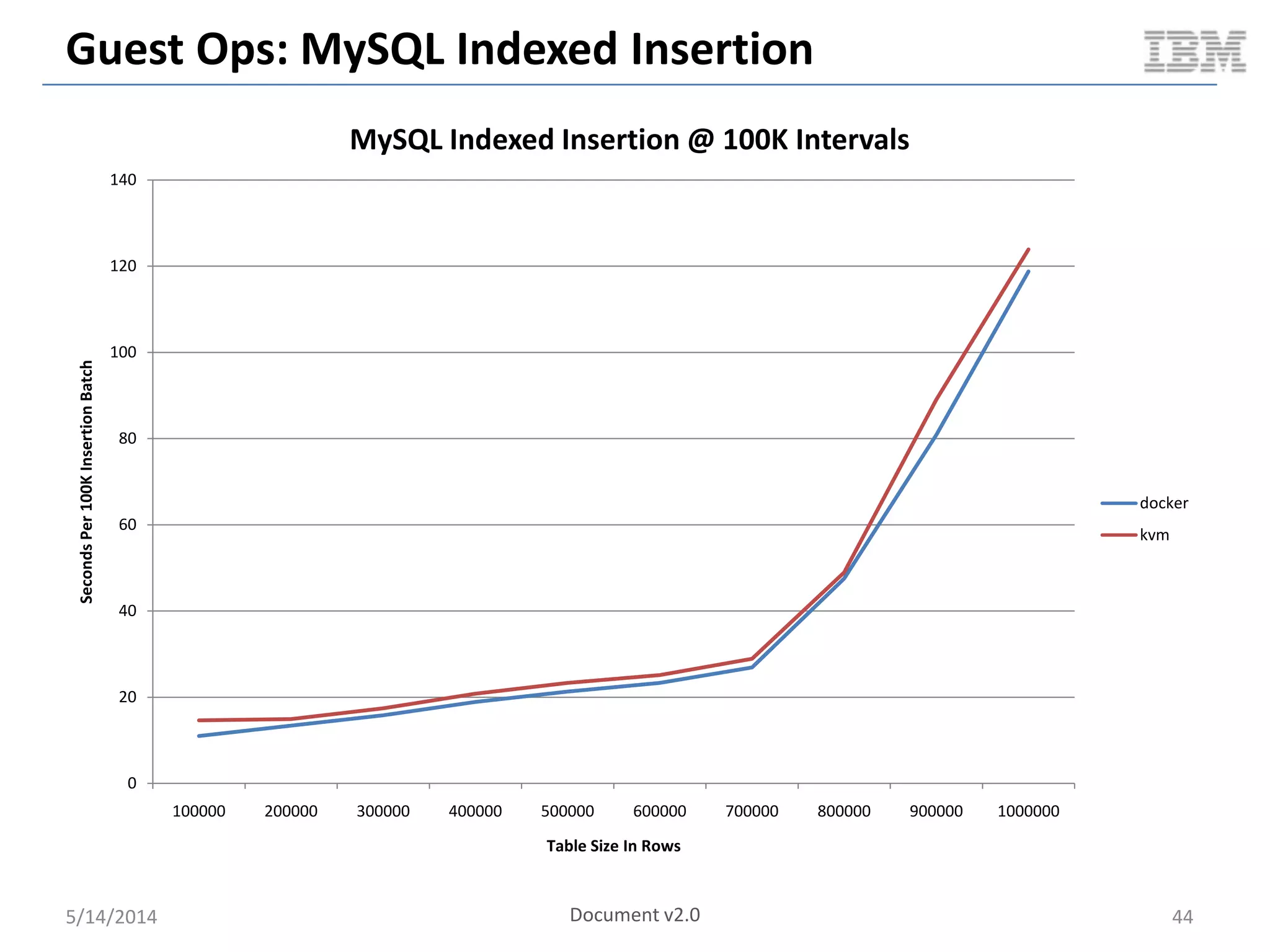
Guest Ops: MySQL Indexed Insertion
5/14/2014 44
0
20
40
60
80
100
120
140
100000 200000 300000 400000 500000 600000 700000 800000 900000 1000000
SecondsPer100KInsertionBatch
Table Size In Rows
MySQL Indexed Insertion @ 100K Intervals
docker
kvm
Document v2.0
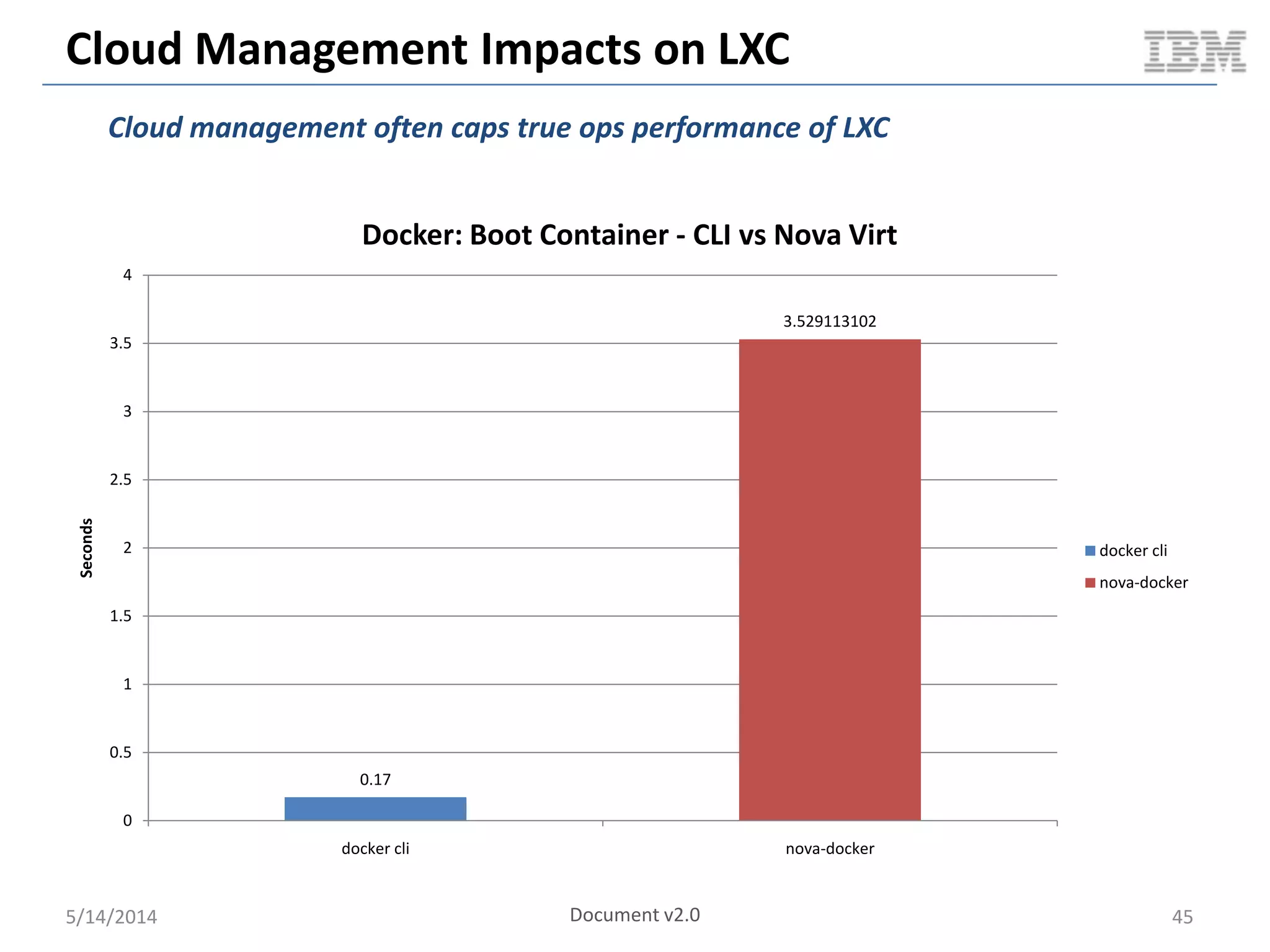
Cloud Management Impacts on LXC
5/14/2014 45
0.17
3.529113102
0
0.5
1
1.5
2
2.5
3
3.5
4
docker cli nova-docker
Seconds
Docker: Boot Container - CLI vs Nova Virt
docker cli
nova-docker
Cloud management often caps true ops performance of LXC
Document v2.0
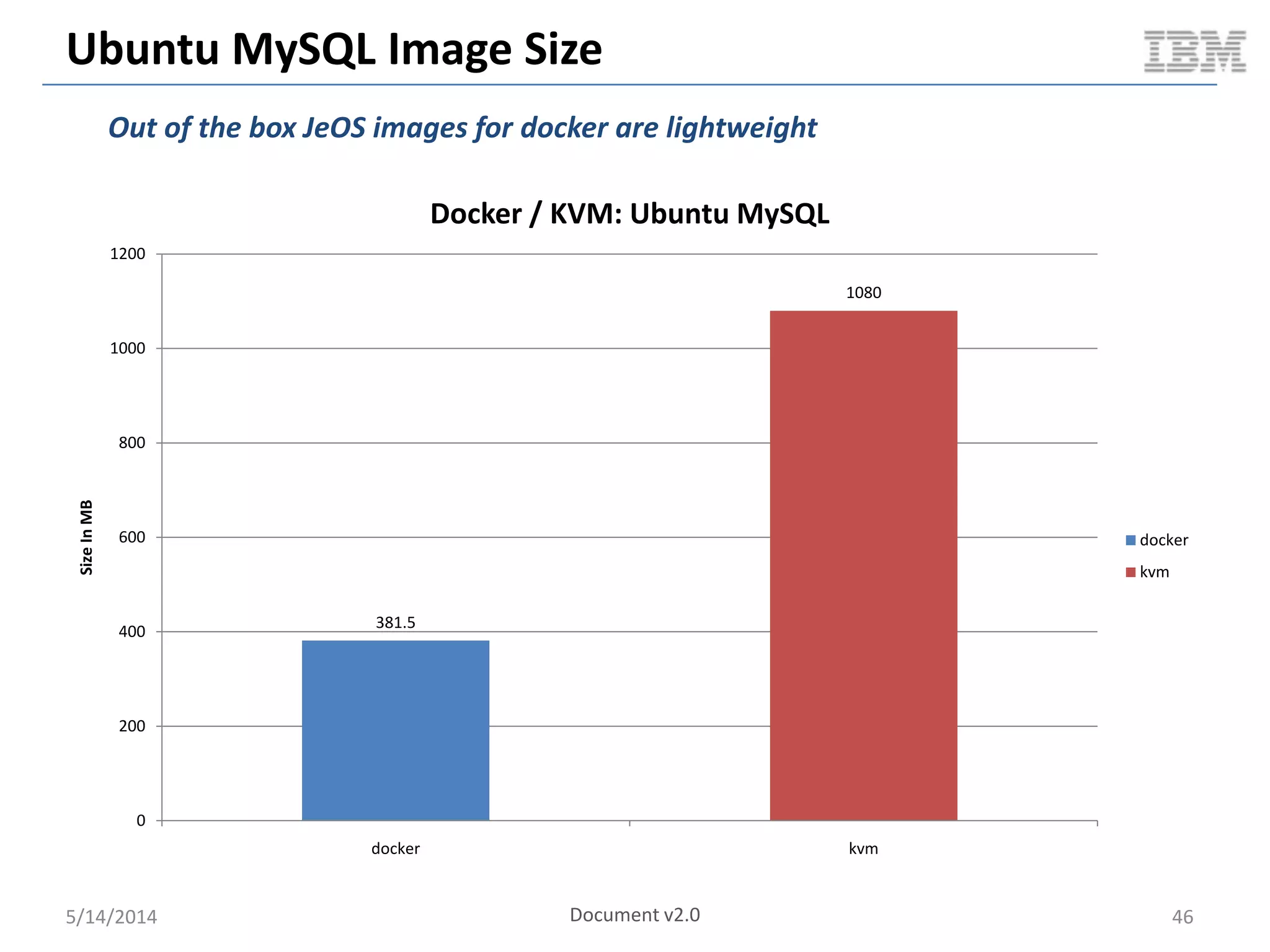
Ubuntu MySQL Image Size
5/14/2014 Document v2.0 46
381.5
1080
0
200
400
600
800
1000
1200
docker kvm
SizeInMB
Docker / KVM: Ubuntu MySQL
docker
kvm
Out of the box JeOS images for docker are lightweight
LXC In Summary
 Near bare metal performance in the guest
 Fast operations in the Cloud
 Reduced resource consumption (CPU, MEM) on the compute
node
 Out of the box smaller image footprint
5/14/2014 47
LXC Gaps
There are gaps…
 Lack of industry tooling / support
 Live migration still a WIP
 Full orchestration across resources (compute / storage / networking)
 Fears of security
 Not a well known technology… yet
 Integration with existing virtualization and Cloud tooling
 Not much / any industry standards
 Missing skillset
 Slower upstream support due to kernel dev process
 Memory /CPU proc FS not cgroup aware
 Etc.
5/14/2014 48
References & Related Links
 http://www.slideshare.net/BodenRussell/realizing-linux-containerslxc
 http://bodenr.blogspot.com/2014/05/kvm-and-docker-lxc-benchmarking-
with.html
 https://www.docker.io/
 http://sysbench.sourceforge.net/
 http://dag.wiee.rs/home-made/dstat/
 http://www.openstack.org/
 https://wiki.openstack.org/wiki/Rally
 https://wiki.openstack.org/wiki/Docker
 http://devstack.org/
 http://www.linux-kvm.org/page/Main_Page
 https://github.com/stackforge/nova-docker
 https://github.com/dotcloud/docker-registry
 http://www.netperf.org/netperf/
 http://www.tokutek.com/products/iibench/
 http://www.brendangregg.com/activebenchmarking.html
 http://wiki.openvz.org/Performance
5/14/2014 49
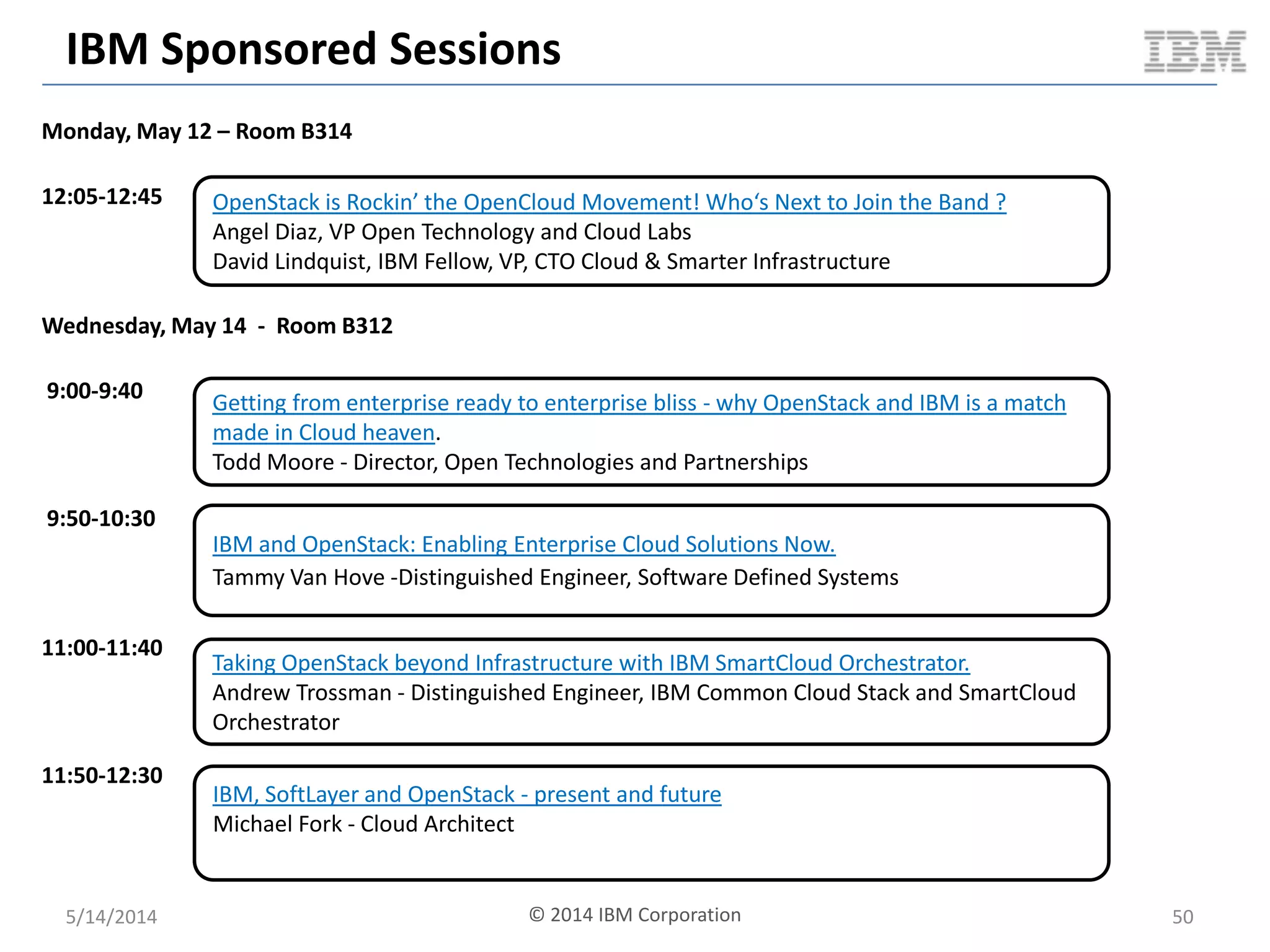
IBM Sponsored Sessions
Monday, May 12 – Room B314
12:05-12:45
Wednesday, May 14 - Room B312
9:00-9:40
9:50-10:30
11:00-11:40
11:50-12:30
OpenStack is Rockin’ the OpenCloud Movement! Who‘s Next to Join the Band ?
Angel Diaz, VP Open Technology and Cloud Labs
David Lindquist, IBM Fellow, VP, CTO Cloud & Smarter Infrastructure
Getting from enterprise ready to enterprise bliss - why OpenStack and IBM is a match
made in Cloud heaven.
Todd Moore - Director, Open Technologies and Partnerships
Taking OpenStack beyond Infrastructure with IBM SmartCloud Orchestrator.
Andrew Trossman - Distinguished Engineer, IBM Common Cloud Stack and SmartCloud
Orchestrator
IBM, SoftLayer and OpenStack - present and future
Michael Fork - Cloud Architect
IBM and OpenStack: Enabling Enterprise Cloud Solutions Now.
Tammy Van Hove -Distinguished Engineer, Software Defined Systems
5/14/2014 50© 2014 IBM Corporation
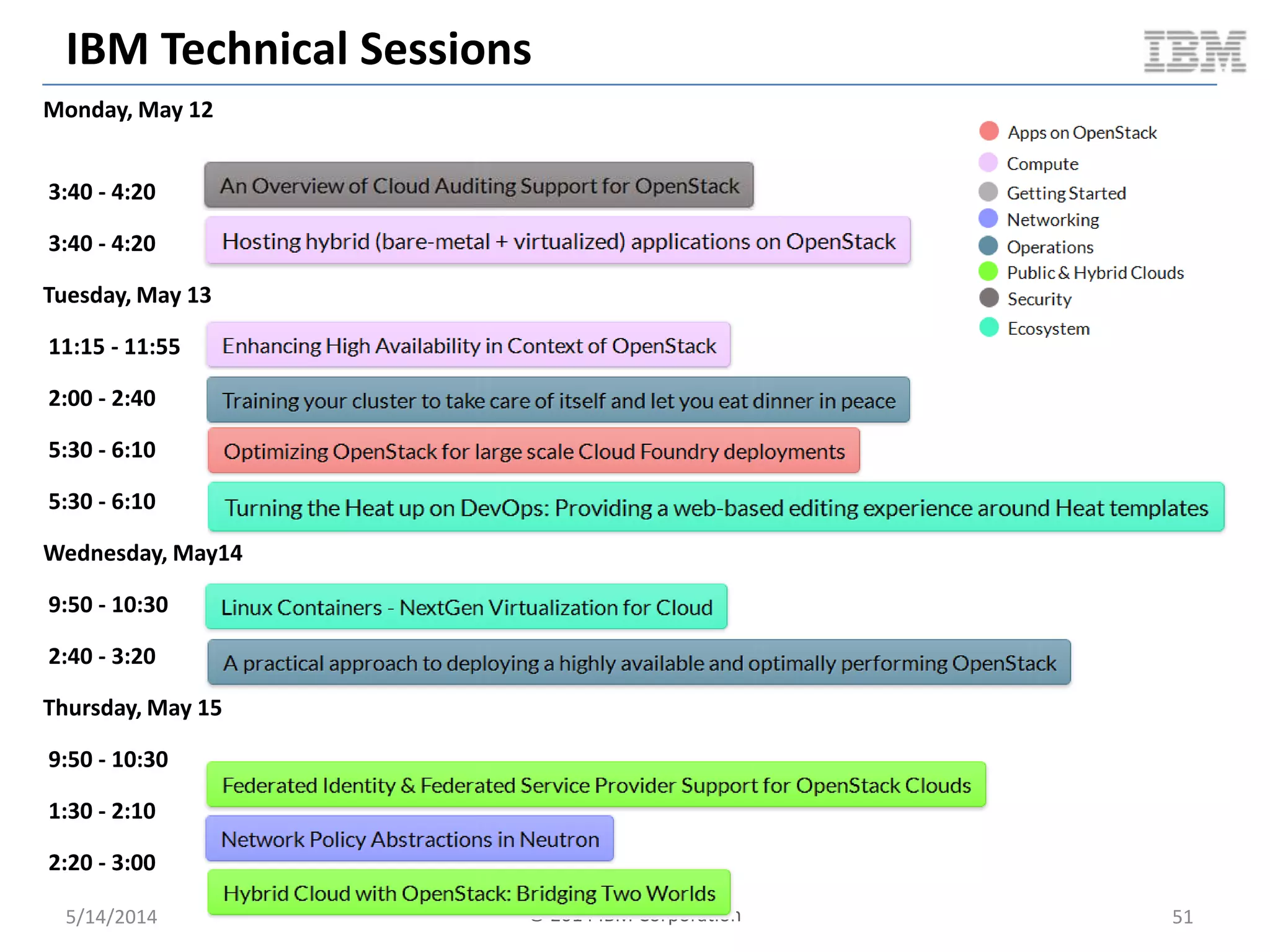
IBM Technical Sessions
5/14/2014 © 2014 IBM Corporation 51
Monday, May 12
3:40 - 4:20
3:40 - 4:20
Tuesday, May 13
11:15 - 11:55
2:00 - 2:40
5:30 - 6:10
5:30 - 6:10
Wednesday, May14
9:50 - 10:30
2:40 - 3:20
Thursday, May 15
9:50 - 10:30
1:30 - 2:10
2:20 - 3:00
Be sure to stop by the IBM booth to see some demos and
get your rockin’ OpenStack t-shirt while they last.
Don’t miss Monday evening’s booth crawl where you can
enjoy Atlanta’s own SWEET WATER IPA!
Thank you!
5/14/2014 © 2014 IBM Corporation 52

Linux containers – next gen virtualization for cloud (atl summit) ar4 3 - copy
  • 1.
    Linux Containers –NextGen Virtualization for Cloud Boden Russell (brussell@us.ibm.com) OpenStack Summit May 12 – 16, 2014 Atlanta, Georgia
  • 2.
    Definitions  Linux Containers(LXC  LinuX Containers) – Lightweight virtualization – Realized using features provided by a modern Linux kernel – VMs without the hypervisor (kind of)  Containerization of – (Linux) Operating Systems – Single or multiple applications  LXC as a technology ≠ LXC “tools” 5/14/2014 © 2014 IBM Corporation 2
  • 3.
    Hypervisors vs. LinuxContainers Hardware Operating System Hypervisor Virtual Machine Operating System Bins / libs App App Virtual Machine Operating System Bins / libs App App Hardware Hypervisor Virtual Machine Operating System Bins / libs App App Virtual Machine Operating System Bins / libs App App Hardware Operating System Container Bins / libs App App Container Bins / libs App App Type 1 Hypervisor Type 2 Hypervisor Linux Containers 5/14/2014 3 Containers share the OS kernel of the host and thus are lightweight. However, each container must have the same OS kernel. Containers are isolated, but share OS and, where appropriate, libs / bins. © 2014 IBM Corporation
  • 4.
    LXC Technology Stack 5/14/2014© 2014 IBM Corporation 4 UserSpaceKernelSpace Kernel System Call Interface Architecture Dependent Kernel Code GLIBC / Pseudo FS / User Space Tools & Libs Linux Container Tooling Linux Container Commoditization Orchestration & Management Hardware cgroups namespaces chroots LSM lxc
  • 5.
    So You WantTo Build A Container?  High level checklist – Process(es) – Throttling / limits – Prioritization – Resource isolation – Root file system – Security 5/14/2014 © 2014 IBM Corporation 5 my-lxc ?
  • 6.
    Linux Control Groups(cgroups)  Problem – How do I throttle, prioritize, control and obtain metrics for a group of tasks (processes)?  Solution  control groups (cgroups) 5/14/2014 © 2014 IBM Corporation 6 cgroup blue proc proc proc – Device Access – Resource limiting – Prioritization – Accounting – Control – Injection
  • 7.
    Linux cgroup Subsystems 5/14/2014© 2014 IBM Corporation 7 Subsystem Tunable Parameters blkio - Weighted proportional block I/O access. Group wide or per device. - Per device hard limits on block I/O read/write specified as bytes per second or IOPS per second. cpu - Time period (microseconds per second) a group should have CPU access. - Group wide upper limit on CPU time per second. - Weighted proportional value of relative CPU time for a group. cpuset - CPUs (cores) the group can access. - Memory nodes the group can access and migrate ability. - Memory hardwall, pressure, spread, etc. devices - Define which devices and access type a group can use. freezer - Suspend/resume group tasks. memory - Max memory limits for the group (in bytes). - Memory swappiness, OOM control, hierarchy, etc.. hugetlb - Limit HugeTLB size usage. - Per cgroup HugeTLB metrics. net_cls - Tag network packets with a class ID. - Use tc to prioritize tagged packets. net_prio - Weighted proportional priority on egress traffic (per interface).
  • 8.
    Linux cgroups PseudoFS Interface 5/14/2014 8 /sys/fs/cgroup/my-lxc |-- blkio | |-- blkio.io_merged | |-- blkio.io_queued | |-- blkio.io_service_bytes | |-- blkio.io_serviced | |-- blkio.io_service_time | |-- blkio.io_wait_time | |-- blkio.reset_stats | |-- blkio.sectors | |-- blkio.throttle.io_service_bytes | |-- blkio.throttle.io_serviced | |-- blkio.throttle.read_bps_device | |-- blkio.throttle.read_iops_device | |-- blkio.throttle.write_bps_device | |-- blkio.throttle.write_iops_device | |-- blkio.time | |-- blkio.weight | |-- blkio.weight_device | |-- cgroup.clone_children | |-- cgroup.event_control | |-- cgroup.procs | |-- notify_on_release | |-- release_agent | `-- tasks |-- cpu | |-- ... |-- ... `-- perf_event echo "8:16 1048576“ > blkio.throttle.read_bps_device cat blkio.weight_device dev weight 8:1 200 8:16 500 App App App  Linux pseudo FS is the interface to cgroups – Directory per subsystem per cgroup – Read / write to pseudo file(s) in your cgroup directory © 2014 IBM Corporation
  • 9.
    Linux cgroups FSLayout 5/14/2014 9© 2014 IBM Corporation
  • 10.
    So You WantTo Build A Container? 5/14/2014 © 2014 IBM Corporation 10
  • 11.
    Linux namespaces  Problem –How do I provide an isolated view of global resources to a group of tasks (processes)?  Solution  namespaces 5/14/2014 © 2014 IBM Corporation 11 namespace blue – MNT; mount points, files systems, etc. – PID; processes – NET; NICs, routing, etc. – IPC; System V IPC – UTS; host and domain name – USER; UID and GID MNT PID NET UTS USER proc proc proc
  • 12.
    Linux namespaces: ConceptualOverview 5/14/2014 © 2014 IBM Corporation 12 global (i.e. root) namespace MNT NS / /proc /mnt/fsrd /mnt/fsrw /mnt/cdrom /run2 UTS NS globalhost rootns.com PID NS PID COMMAND 1 /sbin/init 2 [kthreadd] 3 [ksoftirqd] 4 [cpuset] 5 /sbin/udevd 6 /bin/sh 7 /bin/bash IPC NS SHMID OWNER 32452 root 43321 boden SEMID OWNER 0 root 1 Boden MSQID OWNER NET NS lo: UNKNOWN… eth0: UP… eth1: UP… br0: UP… app1 IP:5000 app2 IP:6000 app3 IP:7000 USER NS root 0:0 ntp 104:109 mysql 105:110 boden 106:111 purple namespace MNT NS / /proc /mnt/purplenfs /mnt/fsrw /mnt/cdrom UTS NS purplehost purplens.com PID NS PID COMMAND 1 /bin/bash 2 /bin/vim IPC NS SHMID OWNER SEMID OWNER 0 root MSQID OWNER NET NS lo: UNKNOWN… eth0: UP… app1 IP:1000 app2 IP:7000 USER NS root 0:0 app 106:111 blue namespace MNT NS / /proc /mnt/cdrom /bluens UTS NS bluehost bluens.com PID NS PID COMMAND 1 /bin/bash 2 python 3 node IPC NS SHMID OWNER SEMID OWNER MSQID OWNER NET NS lo: UNKNOWN… eth0: DOWN… eth1: UP app1 IP:7000 app2 IP:9000 USER NS root 0:0 app 104:109
  • 13.
    Linux namespaces &cgroups: Availability 5/14/2014 13 Note: user namespace support in upstream kernel 3.8+, but distributions rolling out phased support: - Map LXC UID/GID between container and host - Non-root LXC creation © 2014 IBM Corporation
  • 14.
    So You WantTo Build A Container? 5/14/2014 © 2014 IBM Corporation 14
  • 15.
    Linux chroot &pivot_root 5/14/2014 15  Using pivot_root with MNT namespace addresses escaping chroot concerns  The pivot_root target directory becomes the “new root FS” © 2014 IBM Corporation
  • 16.
    So You WantTo Build A Container? 5/14/2014 © 2014 IBM Corporation 16
  • 17.
    Linux Security Modules& MAC  Linux Security Modules (LSM) – kernel modules which provide a framework for Mandatory Access Control (MAC) security implementations  MAC vs DAC – In MAC, admin (user or process) assigns access controls to subject / initiator – In DAC, resource owner (user) assigns access controls to individual resources  Existing LSM implementations include: AppArmor, SELinux, GRSEC, etc. 5/14/2014 17
  • 18.
    Linux Capabilities  Perprocess privileges which define sys call access  Can be assigned to LXC process(es) 5/14/2014 18© 2014 IBM Corporation
  • 19.
    Other Security Measures Reduce shared FS access using RO bind mounts  Linux seccomp – Confine system calls  Keep Linux kernel up to date  User namespaces in 3.8+ kernel – Launching containers as non-root user – Mapping UID / GID into container 5/14/2014 © 2014 IBM Corporation 19
  • 20.
    So You WantTo Build A Container? 5/14/2014 20© 2014 IBM Corporation
  • 21.
    LXC Industry Tooling VirtuozzoOpenVZ Linux VServer Libvirt-lxc Lxc (tools) Warden lmctfy Docker Summary Commerical product using OpenVZ under the hood Custom Kernel providing well seasoned LXC support A set of kernel patches providing LXC. Not based on cgroups or namespaces. Libvirt support for LXC via cgroups and namespaces. Lib + set of user spaces tools /bindings for LXC. LXC management tooling used by CF. Similar to LXC, but provides more intent based focus. Commoditizatio n of LXC adding support for images, build files, etc. Part of upstream Kernel? No No Partial Yes Yes Yes Yes, but additional patches needed for specific features. Yes License Commercial GNU GPL v2 GNU GPL v2 GNU LGPL GNU LGPL Apache v2 Apache v2 Apache v2 APIs / Bindings - CLI - API - CLI - C - CLI - C - Python - Java - C# - PHP - Python - Lua - GO - CLI - GO - REST - CLI - Python - Other 3rd party libs Managem ent plane/ Dashboard Virtuozzo Parrallels Virtuozzo Parrallels + others - OpenStack - Archipel - Virt- Manager - LXC web panel - Lexy - OpenStack - Shipyard - Docker UI 5/14/2014 © 2014 IBM Corporation 21
  • 22.
    LXC Orchestration &Management  Docker & libvirt-lxc in OpenStack – Manage containers heterogeneously with traditional VMs… but not w/the level of support & features we might like  CoreOS – Zero-touch admin Linux distro with docker images as the unit of operation – Centralized key/value store to coordinate distributed environment  Various other 3rd party apps – Maestro for docker – Shipyard for docker – Fleet for CoreOS – Etc.  LXC migration – Container migration via criu  But… – Still no great way to tie all virtual resources together with LXC – e.g. storage + networking • IMO; an area which needs focus for LXC to become more generally applicable 5/14/2014 22© 2014 IBM Corporation
  • 23.
    CLOUDY BENCHMARKING WITH KVM,DOCKER AND OPENSTACK 5/14/2014 © 2014 IBM Corporation 23
  • 24.
    Benchmark Environment Topology@ SoftLayer glance api / reg nova api / cond / etc keystone … rally nova api / cond / etc cinder api / sch / vol docker lxc dstat controller compute node glance api / reg nova api / cond / etc keystone … rally nova api / cond / etc cinder api / sch / vol KVM dstat controller compute node 5/14/2014 24 + Awesome! + Awesome! © 2014 IBM Corporation
  • 25.
    Cloudy Performance: SteadyState Packing  Benchmark scenario overview – Pre-cache VM image on compute node prior to test – Boot 15 VM asynchronously in succession – Wait for 5 minutes (to achieve steady-state on the compute node) – Delete all 15 VMs asynchronously in succession  Benchmark driver – cpu_bench.py  High level goals – Understand compute node characteristics under steady-state conditions with 15 packed / active VMs 5/14/2014 25 0 2 4 6 8 10 12 14 16 1 3 5 7 9 11 13 15 17 19 21 23 25 27 29 31 33 35 37 39 41 43 45 47 ActiveVMs Time Benchmark Visualization VMs Document v2.0
  • 26.
    Cloudy Performance: SerialVM Boot  Benchmark scenario overview – Pre-cache VM image on compute node prior to test – Boot VM – Wait for VM to become ACTIVE – Repeat the above steps for a total of 15 VMs – Delete all VMs  Benchmark driver – OpenStack Rally  High level goals – Understand compute node characteristics under sustained VM boots 5/14/2014 26 0 2 4 6 8 10 12 14 16 1 2 3 4 5 6 7 8 9 10 11 12 13 14 15 16 17 18 19 20 ActiveVMs Time Benchmark Visualization VMs Document v2.0
  • 27.
    Cloudy Performance: SerialVM Reboot  Benchmark scenario overview – Pre-cache VM image on compute node prior to test – Boot a VM & wait for it to become ACTIVE – Soft reboot the VM and wait for it to become ACTIVE • Repeat reboot a total of 5 times – Delete VM – Repeat the above for a total of 5 VMs  Benchmark driver – OpenStack Rally  High level goals – Understand compute node characteristics under sustained VM reboots 5/14/2014 27 0 1 2 3 4 5 6 1 3 5 7 9 11 13 15 17 19 21 23 25 27 29 31 33 35 37 39 41 43 45 47 49 51 53 55 ActiveVMs Time Benchmark Visualization Active VMs Document v2.0
  • 28.
    Cloudy Performance: SnapshotVM To Image  Benchmark scenario overview – Boot a VM – Wait for it to become active – Snapshot the VM – Wait for image to become active – Delete VM 5/14/2014 28© 2014 IBM Corporation
  • 29.
    Cloudy Ops: VMBoot 5/14/2014 29 3.529113102 5.781662448 0 1 2 3 4 5 6 7 docker KVM TimeInSeconds Average Server Boot Time docker KVM Document v2.0
  • 30.
    Cloudy Ops: VMReboot 5/14/2014 30 2.577879581 124.433239 0 20 40 60 80 100 120 140 docker KVM TimeInSeconds Average Server Reboot Time docker KVM Document v2.0
  • 31.
    Cloudy Ops: VMDelete 5/14/2014 31 3.567586041 3.479760051 0 0.5 1 1.5 2 2.5 3 3.5 4 docker KVM TimeInSeconds Average Server Delete Time docker KVM Document v2.0
  • 32.
    Cloudy Ops: VMSnapshot 5/14/2014 32 36.88756394 48.02313805 0 10 20 30 40 50 60 docker KVM TimeInSeconds Average Snapshot Server Time docker KVM Document v2.0
  • 33.
    Cloudy Performance: SteadyState Packing 5/14/2014 33 0 10 20 30 40 50 60 70 80 1 9 17 25 33 41 49 57 65 73 81 89 97 105 113 121 129 137 145 153 161 169 177 185 193 201 209 217 225 233 241 249 257 265 273 281 289 297 305 313 321 CPUUsageInPercent Time Docker: Compute Node CPU (full test duration) usr sys Averages – 0.54 – 0.17 0 10 20 30 40 50 60 70 80 1 9 17 25 33 41 49 57 65 73 81 89 97 105 113 121 129 137 145 153 161 169 177 185 193 201 209 217 225 233 241 249 257 265 273 281 289 297 305 313 321 329 337 345 CPUUsageInPercent Time KVM: Compute Node CPU (full test duration) usr sys Averages – 7.64 – 1.4 Document v2.0
  • 34.
    Cloudy Performance: SteadyState Packing 5/14/2014 34 0 2 4 6 8 10 12 14 1 6 11 16 21 26 31 36 41 46 51 56 61 66 71 76 81 86 91 96 101 106 111 116 121 126 131 136 141 146 151 156 161 166 171 176 181 186 191 196 201 206 211 CPUUsageInPercent Time (31s – 243s) Docker: Compute Node Steady-State CPU (segment: 31s – 243s) usr sys 0 2 4 6 8 10 12 14 1 6 11 16 21 26 31 36 41 46 51 56 61 66 71 76 81 86 91 96 101 106 111 116 121 126 131 136 141 146 151 156 161 166 171 176 181 186 191 196 201 206 211 CPUUsageInPercent Time (95s - 307s) KVM: Compute Node Steady-State CPU (segment: 95s – 307s) usr sys Averages – 0.2 – 0.03 Averages – 1.91 – 0.36 31 seconds 243 seconds 95 seconds 307 seconds Document v2.0
  • 35.
    Cloudy Performance: SteadyState Packing 5/14/2014 35 0.00E+00 1.00E+09 2.00E+09 3.00E+09 4.00E+09 5.00E+09 6.00E+09 7.00E+09 1 10 19 28 37 46 55 64 73 82 91 100 109 118 127 136 145 154 163 172 181 190 199 208 217 226 235 244 253 262 271 280 289 298 307 316 325 334 MemoryUsed Axis Title Docker / KVM: Compute Node Used Memory (Overlay) kvm docker Document v2.0 docker Delta 734 MB Per VM 49 MB KVM Delta 4387 MB Per VM 292 MB
  • 36.
    Cloudy Performance: SerialVM Boot 5/14/2014 36 0 5 10 15 20 25 30 35 1 3 5 7 9 11 13 15 17 19 21 23 25 27 29 31 33 35 37 39 41 43 45 47 49 51 53 55 57 59 61 63 65 67 69 71 73 75 77 79 CPUUsageInPercent Time Docker: Compute Node CPU usr sys Averages – 1.39 – 0.57 0 5 10 15 20 25 30 35 1 4 7 10 13 16 19 22 25 28 31 34 37 40 43 46 49 52 55 58 61 64 67 70 73 76 79 82 85 88 91 94 97 100 103 106 109 112 115 118 121 124 127 CPUUsageInPercent Time KVM: Compute Node CPU Usage usr sys Averages – 13.45 – 2.23 Document v2.0
  • 37.
    Cloudy Performance: SerialVM Boot 5/14/2014 37 y = 0.009x + 1.008 y = 0.358x + 1.063 0 5 10 15 20 25 1 3 5 7 9 11 13 15 17 19 21 23 25 27 29 31 33 35 37 39 41 43 45 47 49 51 UsrCPUInPercent Time (8s - 58s) Docker / KVM: Serial VM Boot Usr CPU (segment: 8s - 58s) docker(8-58) kvm(8-58) Linear (docker(8-58)) Linear (kvm(8-58)) 8 seconds 58 seconds Document v2.0
  • 38.
    Cloudy Performance: SerialVM Boot 5/14/2014 38 0.00E+00 5.00E+08 1.00E+09 1.50E+09 2.00E+09 2.50E+09 3.00E+09 3.50E+09 4.00E+09 4.50E+09 5.00E+09 1 5 9 13 17 21 25 29 33 37 41 45 49 53 57 61 65 69 73 77 81 85 89 93 97 101105109113117121125 MemoryUsed Time Docker / KVM: Compute Node Memory Used (Unnormalized Overlay) kvm docker Document v2.0
  • 39.
    Cloudy Performance: SerialVM Boot 5/14/2014 39 y = 1E+07x + 1E+09 y = 3E+07x + 1E+09 0.00E+00 5.00E+08 1.00E+09 1.50E+09 2.00E+09 2.50E+09 3.00E+09 3.50E+09 1 3 5 7 9 11 13 15 17 19 21 23 25 27 29 31 33 35 37 39 41 43 45 47 49 51 53 55 57 59 61 63 65 MemoryUsage Time (1s - 67s) Docker / KVM: Serial VM Boot Memory Usage (segment: 1s - 67s) docker kvm Linear (docker) Linear (kvm) 1 second 67 seconds Document v2.0
  • 40.
    Guest Ops: Network 5/14/201440 940.26 940.56 0 100 200 300 400 500 600 700 800 900 1000 docker KVM ThroughputIn10^6bits/second Network Throughput docker KVM Document v2.0
  • 41.
    Guest Ops: NearBare Metal Performance  Typical docker LXC performance near par with bare metal 5/14/2014 41 linpack performance @ 45000 0 50 100 150 200 250 1 3 5 7 9 11 13 15 17 19 21 23 25 27 29 31 B M vcpus GFlops 220.77 Bare metal220.5 @32 vcpu 220.9 @ 31 vcpu 0 2000 4000 6000 8000 10000 12000 14000 MEMCPY DUMB MCBLOCK MiB/s Memory Test Memory Benchmark Performance Bare Metal (MiB/s) docker (MiB/s) KVM (MiB/s)
  • 42.
    Guest Ops: FileI/O Random Read / Write 5/14/2014 42 0 200 400 600 800 1000 1200 1400 1600 1 2 4 8 16 32 64 TotalTransferredInKb/sec Threads Sysbench Synchronous File I/O Random Read/Write @ R/W Ratio of 1.50 docker KVM Document v2.0
  • 43.
    Guest Ops: MySQLOLTP 5/14/2014 43 0 2000 4000 6000 8000 10000 12000 14000 1 2 4 8 16 32 64 TotalTransactions Threads MySQL OLTP Random Transactional R/W (60s) docker KVM Document v2.0
  • 44.
    Guest Ops: MySQLIndexed Insertion 5/14/2014 44 0 20 40 60 80 100 120 140 100000 200000 300000 400000 500000 600000 700000 800000 900000 1000000 SecondsPer100KInsertionBatch Table Size In Rows MySQL Indexed Insertion @ 100K Intervals docker kvm Document v2.0
  • 45.
    Cloud Management Impactson LXC 5/14/2014 45 0.17 3.529113102 0 0.5 1 1.5 2 2.5 3 3.5 4 docker cli nova-docker Seconds Docker: Boot Container - CLI vs Nova Virt docker cli nova-docker Cloud management often caps true ops performance of LXC Document v2.0
  • 46.
    Ubuntu MySQL ImageSize 5/14/2014 Document v2.0 46 381.5 1080 0 200 400 600 800 1000 1200 docker kvm SizeInMB Docker / KVM: Ubuntu MySQL docker kvm Out of the box JeOS images for docker are lightweight
  • 47.
    LXC In Summary Near bare metal performance in the guest  Fast operations in the Cloud  Reduced resource consumption (CPU, MEM) on the compute node  Out of the box smaller image footprint 5/14/2014 47
  • 48.
    LXC Gaps There aregaps…  Lack of industry tooling / support  Live migration still a WIP  Full orchestration across resources (compute / storage / networking)  Fears of security  Not a well known technology… yet  Integration with existing virtualization and Cloud tooling  Not much / any industry standards  Missing skillset  Slower upstream support due to kernel dev process  Memory /CPU proc FS not cgroup aware  Etc. 5/14/2014 48
  • 49.
    References & RelatedLinks  http://www.slideshare.net/BodenRussell/realizing-linux-containerslxc  http://bodenr.blogspot.com/2014/05/kvm-and-docker-lxc-benchmarking- with.html  https://www.docker.io/  http://sysbench.sourceforge.net/  http://dag.wiee.rs/home-made/dstat/  http://www.openstack.org/  https://wiki.openstack.org/wiki/Rally  https://wiki.openstack.org/wiki/Docker  http://devstack.org/  http://www.linux-kvm.org/page/Main_Page  https://github.com/stackforge/nova-docker  https://github.com/dotcloud/docker-registry  http://www.netperf.org/netperf/  http://www.tokutek.com/products/iibench/  http://www.brendangregg.com/activebenchmarking.html  http://wiki.openvz.org/Performance 5/14/2014 49
  • 50.
    IBM Sponsored Sessions Monday,May 12 – Room B314 12:05-12:45 Wednesday, May 14 - Room B312 9:00-9:40 9:50-10:30 11:00-11:40 11:50-12:30 OpenStack is Rockin’ the OpenCloud Movement! Who‘s Next to Join the Band ? Angel Diaz, VP Open Technology and Cloud Labs David Lindquist, IBM Fellow, VP, CTO Cloud & Smarter Infrastructure Getting from enterprise ready to enterprise bliss - why OpenStack and IBM is a match made in Cloud heaven. Todd Moore - Director, Open Technologies and Partnerships Taking OpenStack beyond Infrastructure with IBM SmartCloud Orchestrator. Andrew Trossman - Distinguished Engineer, IBM Common Cloud Stack and SmartCloud Orchestrator IBM, SoftLayer and OpenStack - present and future Michael Fork - Cloud Architect IBM and OpenStack: Enabling Enterprise Cloud Solutions Now. Tammy Van Hove -Distinguished Engineer, Software Defined Systems 5/14/2014 50© 2014 IBM Corporation
  • 51.
    IBM Technical Sessions 5/14/2014© 2014 IBM Corporation 51 Monday, May 12 3:40 - 4:20 3:40 - 4:20 Tuesday, May 13 11:15 - 11:55 2:00 - 2:40 5:30 - 6:10 5:30 - 6:10 Wednesday, May14 9:50 - 10:30 2:40 - 3:20 Thursday, May 15 9:50 - 10:30 1:30 - 2:10 2:20 - 3:00
  • 52.
    Be sure tostop by the IBM booth to see some demos and get your rockin’ OpenStack t-shirt while they last. Don’t miss Monday evening’s booth crawl where you can enjoy Atlanta’s own SWEET WATER IPA! Thank you! 5/14/2014 © 2014 IBM Corporation 52