Containerization
By Imesha Sudasingha
Virtualization
Virtualization allows
distributed computing
models without creating
dependencies on physical
resources
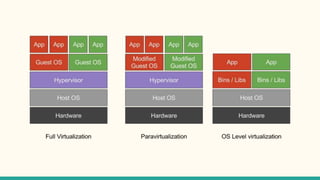
Types of
Virtualization
● Native/Full
virtualization
● Hardware assisted
virtualization
● Para-virtualization
● Containerization (OS
level virtualization)
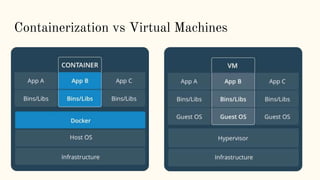
Containerization vs Virtual Machines
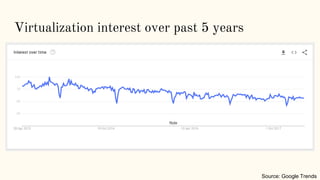
Virtualization interest over past 5 years
Source: Google Trends
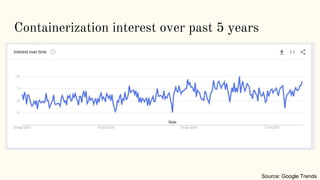
Containerization interest over past 5 years
Source: Google Trends
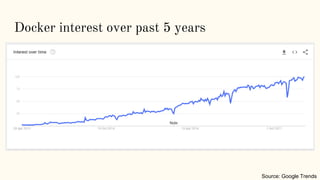
Docker interest over past 5 years
Source: Google Trends
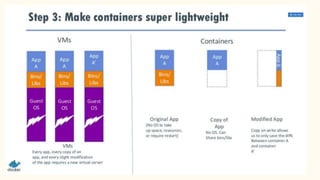
Containers vs VMs
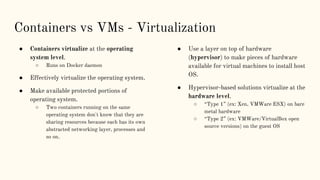
Containers vs VMs - Virtualization
● Containers virtualize at the operating
system level.
○ Runs on Docker daemon
● Effectively virtualize the operating system.
● Make available protected portions of
operating system.
○ Two containers running on the same
operating system don't know that they are
sharing resources because each has its own
abstracted networking layer, processes and
so on.
● Use a layer on top of hardware
(hypervisor) to make pieces of hardware
available for virtual machines to install host
OS.
● Hypervisor-based solutions virtualize at the
hardware level.
○ “Type 1” (ex: Xen, VMWare ESX) on bare
metal hardware
○ “Type 2” (ex: VMWare/VirtualBox open
source versions) on the guest OS
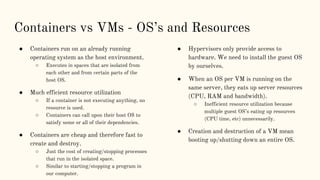
Containers vs VMs - OS’s and Resources
● Containers run on an already running
operating system as the host environment.
○ Executes in spaces that are isolated from
each other and from certain parts of the
host OS.
● Much efficient resource utilization
○ If a container is not executing anything, no
resource is used.
○ Containers can call upon their host OS to
satisfy some or all of their dependencies.
● Containers are cheap and therefore fast to
create and destroy.
○ Just the cost of creating/stopping processes
that run in the isolated space.
○ Similar to starting/stopping a program in
our computer.
● Hypervisors only provide access to
hardware. We need to install the guest OS
by ourselves.
● When an OS per VM is running on the
same server, they eats up server resources
(CPU, RAM and bandwidth).
○ Inefficient resource utilization because
multiple guest OS’s eating up resources
(CPU time, etc) unnecessarily.
● Creation and destruction of a VM mean
booting up/shutting down an entire OS.
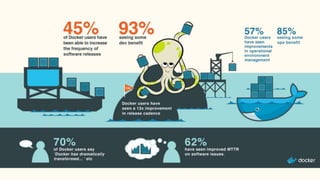
Interesting Stats
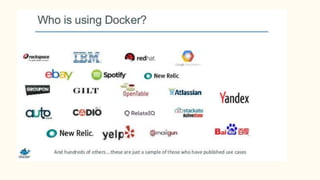
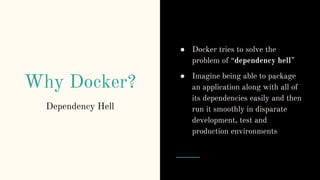
Why Docker?
● Docker tries to solve the
problem of “dependency hell”
● Imagine being able to package
an application along with all of
its dependencies easily and then
run it smoothly in disparate
development, test and
production environments
Dependency Hell
What is Docker?
Under the hood
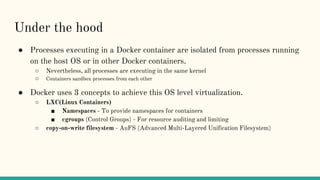
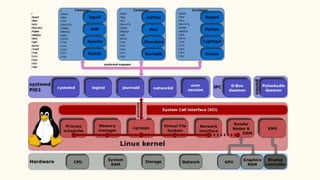
● Processes executing in a Docker container are isolated from processes running
on the host OS or in other Docker containers.
○ Nevertheless, all processes are executing in the same kernel
○ Containers sandbox processes from each other
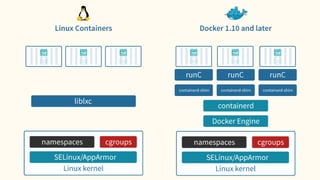
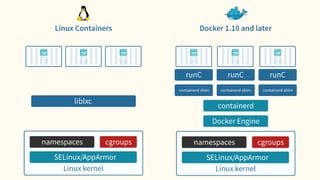
● Docker uses 3 concepts to achieve this OS level virtualization.
○ LXC(Linux Containers)
■ Namespaces - To provide namespaces for containers
■ cgroups (Control Groups) - For resource auditing and limiting
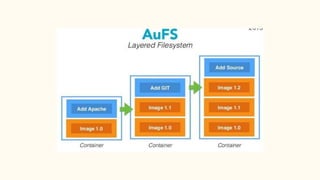
○ copy-on-write filesystem - AuFS (Advanced Multi-Layered Unification Filesystem)
LXC Namespaces
LXC Namespaces
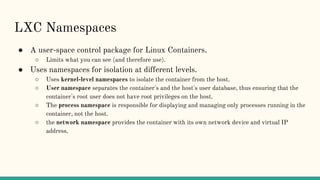
● A user-space control package for Linux Containers.
○ Limits what you can see (and therefore use).
● Uses namespaces for isolation at different levels.
○ Uses kernel-level namespaces to isolate the container from the host.
○ User namespace separates the container's and the host's user database, thus ensuring that the
container's root user does not have root privileges on the host.
○ The process namespace is responsible for displaying and managing only processes running in the
container, not the host.
○ the network namespace provides the container with its own network device and virtual IP
address.
LXC Namespaces contd ...
● Provide processes with their own view of the system
● Multiple namespaces:
○ pid
○ net
○ mnt
○ uts
○ ipc
○ user
● Each process is in one namespace of each type
PID Namespaces
● Processes within a PID namespace only see processes in the same PID
namespace.
● Each PID namespace has its own numbering.
○ Starting at 1
○ When PID 1 goes away, the whole namespace is killed.
● Those namespaces can be nested.
● A process ends up having multiple PIDs
○ One per namespace in which its nested
Net Namespaces
● Processes within a given network namespace get their own private network
stack, including:
○ network interfaces (including lo)
○ routing tables
○ iptables rules
○ sockets (ss, netstat)
● You can move a network interface from a netns to another
○ ip link set dev eth0 netns PID
Mnt Namespaces
● Processes can have their own root fs (chroot)
● Processes can also have "private" mounts
○ /tmp (scoped per user, per service...)
○ Masking of /proc, /sys
○ NFS automounts
● Mounts can be totally private, or shared
IPC Namespaces
● Allows a process (or group of processes) to have own:
○ IPC semaphores
○ IPC message queues
○ IPC shared memory
● without risk of conflict with other instances
User Namespaces
● Allows to map UID/GID; e.g.:
○ UID 0→1999 in container C1 is mapped to
○ UID 10000→11999 on host
○ UID 0→1999 in container C2 is mapped to
○ UID 12000→13999 on host
○ etc.
● Avoids extra configuration in containers
● UID 0 (root) can be squashed to a non-privileged user
● Security improvement
LXC cgroups
LXC cgroups
● Older than namespaces concept.
● Resource metering and limiting
○ Memory
○ CPU
○ block I/O
○ network
● Device node (/dev/*) access control
● While allowing Docker to limit the resources being consumed by a container
also output lots of metrics about these resources.
○ Allow Docker to monitor the resource consumption of the various processes within the
containers and make sure that each gets only its fair share of the available resources.
Copy-on-write file
system
Copy-on-write filesystem
● Create a new container instantly
○ Instead of copying its whole filesystem
○ Allows Docker to use certain images as the basis for containers
● Storage keeps track of what has changed
● Many options available
○ AuFS (Advanced Multi-Layered Unification Filesystem), overlay (file level)
○ BTRFS, VFS
○ Device-Mapper
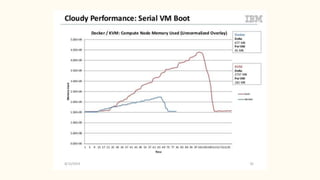
● Considerably reduces footprint and "boot" times
Performance
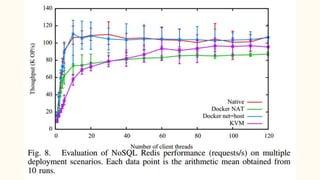
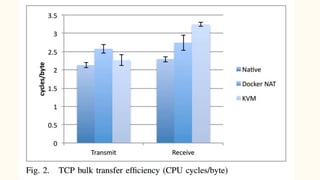
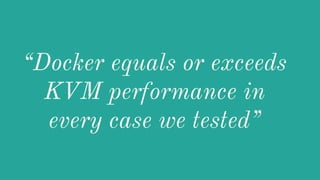
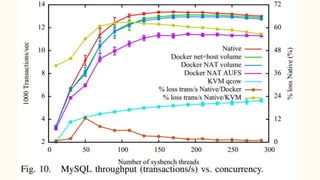
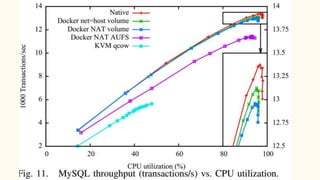
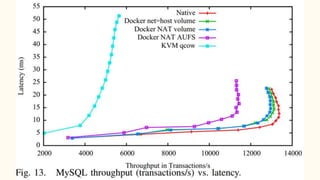
“Docker equals or exceeds
KVM performance in
every case we tested”
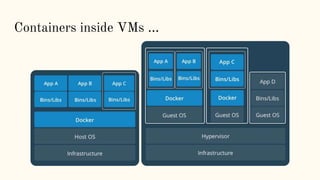
Containers inside VMs ...
Future of
Containerization
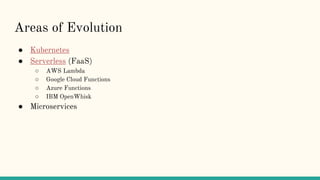
Areas of Evolution
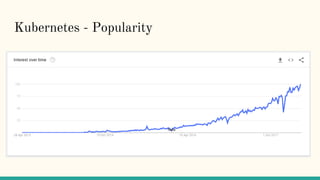
● Kubernetes
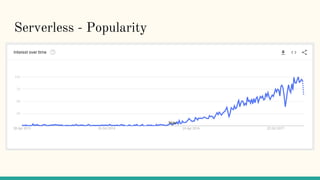
● Serverless (FaaS)
○ AWS Lambda
○ Google Cloud Functions
○ Azure Functions
○ IBM OpenWhisk
● Microservices
Kubernetes - Popularity
Serverless - Popularity
Thank you!
References
● Docker: lightweight linux containers for consistent development and
deployment [2014]
● An updated performance comparison of virtual machines and Linux containers
[2015]
● https://www.slideshare.net/jpetazzo/anatomy-of-a-container-namespaces-
cgroups-some-filesystem-magic-linuxcon
● https://www.slideshare.net/Docker/golubbenarevmspasse-
140402122017phpapp02-37589021
● https://www.slideshare.net/julienbarbier42/docker-the-future-of-distributed-
applications-docker-tour-de-france-2014

Containerization & Docker - Under the Hood

  • 1.
  • 2.
    Virtualization Virtualization allows distributed computing modelswithout creating dependencies on physical resources
  • 3.
    Types of Virtualization ● Native/Full virtualization ●Hardware assisted virtualization ● Para-virtualization ● Containerization (OS level virtualization)
  • 5.
  • 6.
    Virtualization interest overpast 5 years Source: Google Trends
  • 7.
    Containerization interest overpast 5 years Source: Google Trends
  • 8.
    Docker interest overpast 5 years Source: Google Trends
  • 10.
  • 11.
    Containers vs VMs- Virtualization ● Containers virtualize at the operating system level. ○ Runs on Docker daemon ● Effectively virtualize the operating system. ● Make available protected portions of operating system. ○ Two containers running on the same operating system don't know that they are sharing resources because each has its own abstracted networking layer, processes and so on. ● Use a layer on top of hardware (hypervisor) to make pieces of hardware available for virtual machines to install host OS. ● Hypervisor-based solutions virtualize at the hardware level. ○ “Type 1” (ex: Xen, VMWare ESX) on bare metal hardware ○ “Type 2” (ex: VMWare/VirtualBox open source versions) on the guest OS
  • 12.
    Containers vs VMs- OS’s and Resources ● Containers run on an already running operating system as the host environment. ○ Executes in spaces that are isolated from each other and from certain parts of the host OS. ● Much efficient resource utilization ○ If a container is not executing anything, no resource is used. ○ Containers can call upon their host OS to satisfy some or all of their dependencies. ● Containers are cheap and therefore fast to create and destroy. ○ Just the cost of creating/stopping processes that run in the isolated space. ○ Similar to starting/stopping a program in our computer. ● Hypervisors only provide access to hardware. We need to install the guest OS by ourselves. ● When an OS per VM is running on the same server, they eats up server resources (CPU, RAM and bandwidth). ○ Inefficient resource utilization because multiple guest OS’s eating up resources (CPU time, etc) unnecessarily. ● Creation and destruction of a VM mean booting up/shutting down an entire OS.
  • 13.
  • 15.
    Why Docker? ● Dockertries to solve the problem of “dependency hell” ● Imagine being able to package an application along with all of its dependencies easily and then run it smoothly in disparate development, test and production environments Dependency Hell
  • 16.
  • 17.
    Under the hood ●Processes executing in a Docker container are isolated from processes running on the host OS or in other Docker containers. ○ Nevertheless, all processes are executing in the same kernel ○ Containers sandbox processes from each other ● Docker uses 3 concepts to achieve this OS level virtualization. ○ LXC(Linux Containers) ■ Namespaces - To provide namespaces for containers ■ cgroups (Control Groups) - For resource auditing and limiting ○ copy-on-write filesystem - AuFS (Advanced Multi-Layered Unification Filesystem)
  • 19.
  • 20.
    LXC Namespaces ● Auser-space control package for Linux Containers. ○ Limits what you can see (and therefore use). ● Uses namespaces for isolation at different levels. ○ Uses kernel-level namespaces to isolate the container from the host. ○ User namespace separates the container's and the host's user database, thus ensuring that the container's root user does not have root privileges on the host. ○ The process namespace is responsible for displaying and managing only processes running in the container, not the host. ○ the network namespace provides the container with its own network device and virtual IP address.
  • 21.
    LXC Namespaces contd... ● Provide processes with their own view of the system ● Multiple namespaces: ○ pid ○ net ○ mnt ○ uts ○ ipc ○ user ● Each process is in one namespace of each type
  • 22.
    PID Namespaces ● Processeswithin a PID namespace only see processes in the same PID namespace. ● Each PID namespace has its own numbering. ○ Starting at 1 ○ When PID 1 goes away, the whole namespace is killed. ● Those namespaces can be nested. ● A process ends up having multiple PIDs ○ One per namespace in which its nested
  • 23.
    Net Namespaces ● Processeswithin a given network namespace get their own private network stack, including: ○ network interfaces (including lo) ○ routing tables ○ iptables rules ○ sockets (ss, netstat) ● You can move a network interface from a netns to another ○ ip link set dev eth0 netns PID
  • 24.
    Mnt Namespaces ● Processescan have their own root fs (chroot) ● Processes can also have "private" mounts ○ /tmp (scoped per user, per service...) ○ Masking of /proc, /sys ○ NFS automounts ● Mounts can be totally private, or shared
  • 25.
    IPC Namespaces ● Allowsa process (or group of processes) to have own: ○ IPC semaphores ○ IPC message queues ○ IPC shared memory ● without risk of conflict with other instances
  • 26.
    User Namespaces ● Allowsto map UID/GID; e.g.: ○ UID 0→1999 in container C1 is mapped to ○ UID 10000→11999 on host ○ UID 0→1999 in container C2 is mapped to ○ UID 12000→13999 on host ○ etc. ● Avoids extra configuration in containers ● UID 0 (root) can be squashed to a non-privileged user ● Security improvement
  • 27.
  • 28.
    LXC cgroups ● Olderthan namespaces concept. ● Resource metering and limiting ○ Memory ○ CPU ○ block I/O ○ network ● Device node (/dev/*) access control ● While allowing Docker to limit the resources being consumed by a container also output lots of metrics about these resources. ○ Allow Docker to monitor the resource consumption of the various processes within the containers and make sure that each gets only its fair share of the available resources.
  • 29.
  • 30.
    Copy-on-write filesystem ● Createa new container instantly ○ Instead of copying its whole filesystem ○ Allows Docker to use certain images as the basis for containers ● Storage keeps track of what has changed ● Many options available ○ AuFS (Advanced Multi-Layered Unification Filesystem), overlay (file level) ○ BTRFS, VFS ○ Device-Mapper ● Considerably reduces footprint and "boot" times
  • 35.
  • 42.
    “Docker equals orexceeds KVM performance in every case we tested”
  • 43.
  • 44.
  • 45.
    Areas of Evolution ●Kubernetes ● Serverless (FaaS) ○ AWS Lambda ○ Google Cloud Functions ○ Azure Functions ○ IBM OpenWhisk ● Microservices
  • 47.
  • 48.
  • 49.
  • 50.
    References ● Docker: lightweightlinux containers for consistent development and deployment [2014] ● An updated performance comparison of virtual machines and Linux containers [2015] ● https://www.slideshare.net/jpetazzo/anatomy-of-a-container-namespaces- cgroups-some-filesystem-magic-linuxcon ● https://www.slideshare.net/Docker/golubbenarevmspasse- 140402122017phpapp02-37589021 ● https://www.slideshare.net/julienbarbier42/docker-the-future-of-distributed- applications-docker-tour-de-france-2014

Editor's Notes

  • #5 Full/Native - The virtual machine simulates enough hardware to allow an unmodified "guest" OS (one designed for the same CPU) to be run in isolation. Hardware Assisted - The virtual machine has its own hardware and allows a guest OS to be run in isolation. Paravirtualization - The virtual machine does not necessarily simulate hardware, but instead (or in addition) offers a special API that can only be used by modifying the "guest" OS.
  • #21 A technology that has been present in Linux kernels for 5+ years and is considered fairly mature.
  • #31 A layered file system that can transparently overlay one or more existing filesystems. When a process needs to modify a file, AuFS creates a copy of that file. AuFS is capable of merging multiple layers into a single representation of a filesystem. This process is called copy-on-write