Slide 1/28
Lightweight Virtualization:
LXC Best Practices
Christoph Mitasch
LinuxTag Berlin 2013
Slide 2/28
About
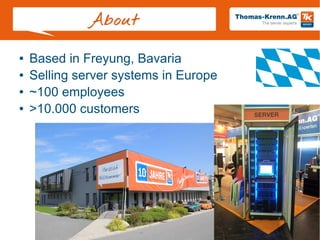
● Based in Freyung, Bavaria
● Selling server systems in Europe
● ~100 employees
● >10.000 customers
Slide 3/28
Agenda
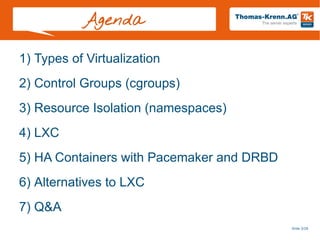
1) Types of Virtualization
2) Control Groups (cgroups)
3) Resource Isolation (namespaces)
4) LXC
5) HA Containers with Pacemaker and DRBD
6) Alternatives to LXC
7) Q&A
Slide 4/28
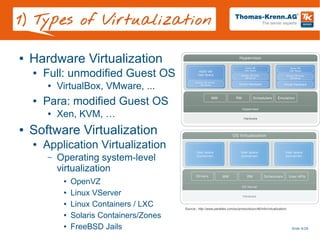
1) Types of Virtualization
● Hardware Virtualization
● Full: unmodified Guest OS
● VirtualBox, VMware, ...
● Para: modified Guest OS
● Xen, KVM, …
● Software Virtualization
● Application Virtualization
– Operating system-level
virtualization
● OpenVZ
● Linux VServer
● Linux Containers / LXC
● Solaris Containers/Zones
● FreeBSD Jails
Source:: http://www.parallels.com/eu/products/pvc46/info/virtualization/
Slide 5/28
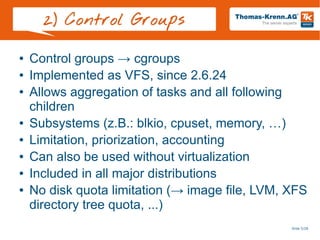
2) Control Groups
● Control groups → cgroups
● Implemented as VFS, since 2.6.24
● Allows aggregation of tasks and all following
children
● Subsystems (z.B.: blkio, cpuset, memory, …)
● Limitation, priorization, accounting
● Can also be used without virtualization
● Included in all major distributions
● No disk quota limitation (→ image file, LVM, XFS
directory tree quota, ...)
Slide 6/28
2) Control Groups
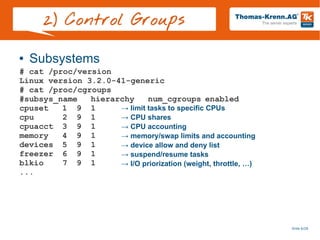
● Subsystems
# cat /proc/version
Linux version 3.2.0-41-generic
# cat /proc/cgroups
#subsys_name hierarchy num_cgroups enabled
cpuset 1 9 1
cpu 2 9 1
cpuacct 3 9 1
memory 4 9 1
devices 5 9 1
freezer 6 9 1
blkio 7 9 1
...
→ limit tasks to specific CPUs
→ CPU shares
→ CPU accounting
→ memory/swap limits and accounting
→ device allow and deny list
→ suspend/resume tasks
→ I/O priorization (weight, throttle, …)
Slide 7/28
2) Control Groups
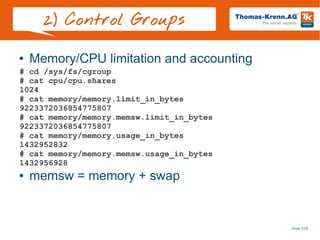
● Memory/CPU limitation and accounting
● memsw = memory + swap
# cd /sys/fs/cgroup
# cat cpu/cpu.shares
1024
# cat memory/memory.limit_in_bytes
9223372036854775807
# cat memory/memory.memsw.limit_in_bytes
9223372036854775807
# cat memory/memory.usage_in_bytes
1432952832
# cat memory/memory.memsw.usage_in_bytes
1432956928
Slide 8/28
2) Control Groups
● Cgroups Demo
Slide 9/28
3) Resource Isolation
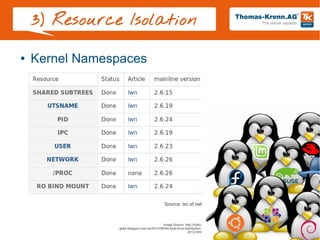
● Kernel Namespaces
Source: lxc.sf.net
Image Source: http://hobo-
geek.blogspot.com.es/2012/08/the-best-linux-distribution-
2012.html
Slide 10/28
4) LXC - Intro
● LXC = userspace tools for Linux containers
based on mainline kernel
● Linux containers are
based on:
● Kernel namespaces for
resource isolation
● Cgroups for limitation
and accounting
● Can be used since 2.6.29
● Latest LXC version: 0.9
Image Source: http://www.linux-
magazin.de/var/linux_magazin/storage/images/linux-
magazin.de/heft-abo/ausgaben/2011/08/dualstack/po-
22148-fotolia-sculpies_123rf-container.png/617255-1-ger-
DE/PO-22148-Fotolia-Sculpies_123RF-
Container.png_lightbox.png
Slide 11/28
4) LXC – Distro
● Debian – since Squeeze
● apt-get install lxc
● No special kernel required
● Ubuntu – since Lucid (10.04)
● RHEL – since RHEL 6 as Technology Preview
● Full support with RHEL 7
● SUSE – since openSUSE 11.2
● Since SLES 11 SP2
● Every other Linux kernel starting with 2.6.29
+ userspacetools
Slide 12/28
4) LXC – Userspace
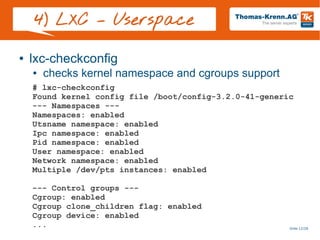
● lxc-checkconfig
● checks kernel namespace and cgroups support
# lxc-checkconfig
Found kernel config file /boot/config-3.2.0-41-generic
--- Namespaces ---
Namespaces: enabled
Utsname namespace: enabled
Ipc namespace: enabled
Pid namespace: enabled
User namespace: enabled
Network namespace: enabled
Multiple /dev/pts instances: enabled
--- Control groups ---
Cgroup: enabled
Cgroup clone_children flag: enabled
Cgroup device: enabled
...
Slide 13/28
4) LXC – Userspace
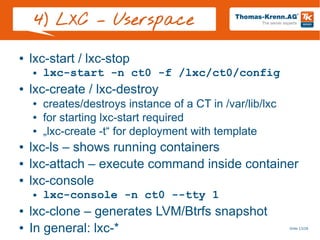
● lxc-start / lxc-stop
● lxc-start -n ct0 -f /lxc/ct0/config
● lxc-create / lxc-destroy
● creates/destroys instance of a CT in /var/lib/lxc
● for starting lxc-start required
● „lxc-create -t“ for deployment with template
● lxc-ls – shows running containers
● lxc-attach – execute command inside container
● lxc-console
● lxc-console -n ct0 --tty 1
● lxc-clone – generates LVM/Btrfs snapshot
● In general: lxc-*
Slide 14/28
4) LXC – Userspace
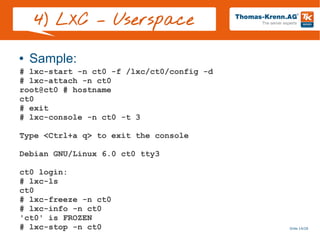
● Sample:
# lxc-start -n ct0 -f /lxc/ct0/config -d
# lxc-attach -n ct0
root@ct0 # hostname
ct0
# exit
# lxc-console -n ct0 -t 3
Type <Ctrl+a q> to exit the console
Debian GNU/Linux 6.0 ct0 tty3
ct0 login:
# lxc-ls
ct0
# lxc-freeze -n ct0
# lxc-info -n ct0
'ct0' is FROZEN
# lxc-stop -n ct0
Slide 15/28
4) LXC – Configuration
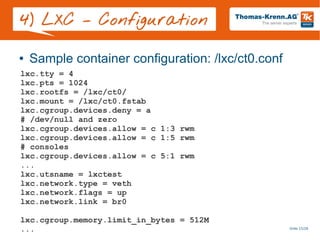
● Sample container configuration: /lxc/ct0.conf
lxc.tty = 4
lxc.pts = 1024
lxc.rootfs = /lxc/ct0/
lxc.mount = /lxc/ct0.fstab
lxc.cgroup.devices.deny = a
# /dev/null and zero
lxc.cgroup.devices.allow = c 1:3 rwm
lxc.cgroup.devices.allow = c 1:5 rwm
# consoles
lxc.cgroup.devices.allow = c 5:1 rwm
...
lxc.utsname = lxctest
lxc.network.type = veth
lxc.network.flags = up
lxc.network.link = br0
lxc.cgroup.memory.limit_in_bytes = 512M
...
Slide 16/28
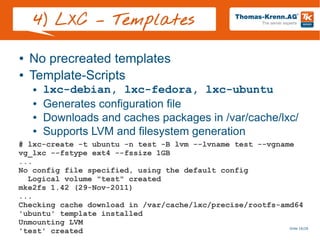
4) LXC – Templates
● No precreated templates
● Template-Scripts
● lxc-debian, lxc-fedora, lxc-ubuntu
● Generates configuration file
● Downloads and caches packages in /var/cache/lxc/
● Supports LVM and filesystem generation
# lxc-create -t ubuntu -n test -B lvm --lvname test --vgname
vg_lxc --fstype ext4 --fssize 1GB
...
No config file specified, using the default config
Logical volume "test" created
mke2fs 1.42 (29-Nov-2011)
...
Checking cache download in /var/cache/lxc/precise/rootfs-amd64
'ubuntu' template installed
Unmounting LVM
'test' created
Slide 17/28
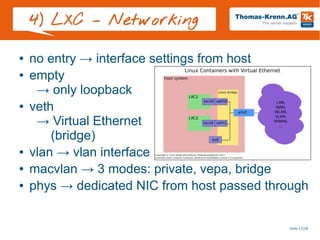
4) LXC – Networking
● no entry → interface settings from host
● empty
→ only loopback
● veth
→ Virtual Ethernet
(bridge)
● vlan → vlan interface
● macvlan → 3 modes: private, vepa, bridge
● phys → dedicated NIC from host passed through
Slide 18/28
4) LXC – Freeze / CPT
● At the moment only freeze/unfreeze per default
● No complete freeze, networking is still working
● lxc-freeze / lxc-unfreeze
● Checkpointing for live migration is planned
● Checkpoint/Restore In Userspace
● http://criu.org/LXC
Slide 19/28
4) LXC – Recommendations
● Libvirt supports Linux Containers
● → LXC tools support more features
● LXC is still in development – see man lxc:
● man lxc
„The lxc is still in development, so
the command syntax and the API can
change. The version 1.0.0 will be the
frozen version.“
● Don't give container root to someone you don't
trust
● Future: run containers as unpriviliged user
Slide 20/28
4) LXC – Pittfalls
● echo b > /proc/sysrq-trigger inside container
● Mount /proc and /sys readonly inside container
● Drop sys_admin capability
● Use Ubuntu Apparmor profile
„lxc-default“ since 12.04
● If distribution does not care
about Linux Containers
→ Modify/disable Apparmor/
SELinux
● Deactivate kernel logging in container
● Check Hwclock setting problems
Image Source:
http://www.grossglockner.at/static/cms/grossglockner/bilder/grossglockner01.jpg
Slide 21/28
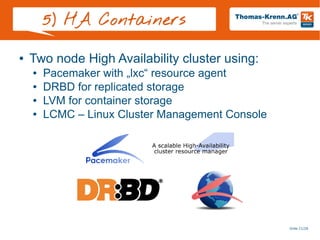
5) HA Containers
● Two node High Availability cluster using:
● Pacemaker with „lxc“ resource agent
● DRBD for replicated storage
● LVM for container storage
● LCMC – Linux Cluster Management Console
Slide 22/28
5) HA Containers
● HOWTO (short version)
● Install two servers identically (I used Ubuntu 12.04)
● apt-get install lxc lvm2 screen
● Modify LVM filter
http://www.drbd.org/users-guide/s-lvm-drbd-as-pv.html
● Install and configure Pacemaker, Heartbeat and
DRBD with LCMC
● Activate dopd – DRBD outdate-peer-daemon
http://www.drbd.org/users-guide/s-pacemaker-fencing.html
● Create one LVM VG per server on top of DRBD
● Install latest lxc Resource Agent
https://github.com/ClusterLabs/resource-agents/blob/master/heartbeat/lxc
● Set „lxc“, „resource-agents“ and „lvm“ package on
„hold“ in package management
Slide 23/28
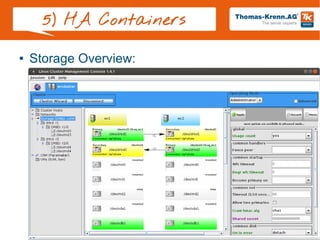
5) HA Containers
● Storage Overview:
Slide 24/28
5) HA Containers
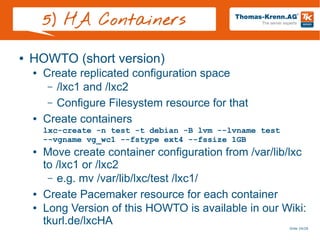
● HOWTO (short version)
● Create replicated configuration space
– /lxc1 and /lxc2
– Configure Filesystem resource for that
● Create containers
lxc-create -n test -t debian -B lvm --lvname test
--vgname vg_wc1 --fstype ext4 --fssize 1GB
● Move create container configuration from /var/lib/lxc
to /lxc1 or /lxc2
– e.g. mv /var/lib/lxc/test /lxc1/
● Create Pacemaker resource for each container
● Long Version of this HOWTO is available in our Wiki:
tkurl.de/lxcHA
Slide 25/28
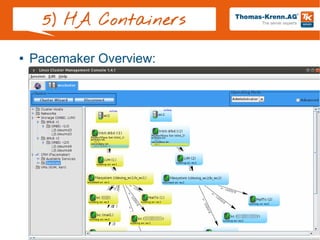
5) HA Containers
● Pacemaker Overview:
Slide 26/28
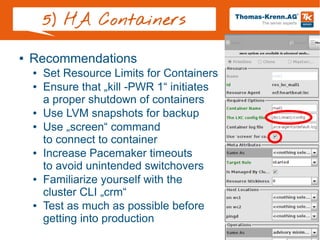
5) HA Containers
● Recommendations
● Set Resource Limits for Containers
● Ensure that „kill -PWR 1“ initiates
a proper shutdown of containers
● Use LVM snapshots for backup
● Use „screen“ command
to connect to container
● Increase Pacemaker timeouts
to avoid unintended switchovers
● Familiarize yourself with the
cluster CLI „crm“
● Test as much as possible before
getting into production
Slide 27/28
6) Alternatives
● OpenVZ
● commercial product „Virtuozzo“ since 2001
● GPLed in 2005
● OpenVirtuozzo → OpenVZ
● Kernel patch:
– RHEL5: ~4MB uncompressed
– RHEL6: ~5,4MB uncompressed
● Parts are continuously merged into mainline
● currently 2.6.32 stable (RHEL6)
● planned to be rebased to 3.6 kernel (RHEL7)
● Linux Vserver
Slide 28/28
7) Q+A
● Questions
● Now
● And later at our booth:
hall 7.1c, booth 152

Lightweight Virtualization: LXC Best Practices

  • 1.
    Slide 1/28 Lightweight Virtualization: LXCBest Practices Christoph Mitasch LinuxTag Berlin 2013
  • 2.
    Slide 2/28 About ● Basedin Freyung, Bavaria ● Selling server systems in Europe ● ~100 employees ● >10.000 customers
  • 3.
    Slide 3/28 Agenda 1) Typesof Virtualization 2) Control Groups (cgroups) 3) Resource Isolation (namespaces) 4) LXC 5) HA Containers with Pacemaker and DRBD 6) Alternatives to LXC 7) Q&A
  • 4.
    Slide 4/28 1) Typesof Virtualization ● Hardware Virtualization ● Full: unmodified Guest OS ● VirtualBox, VMware, ... ● Para: modified Guest OS ● Xen, KVM, … ● Software Virtualization ● Application Virtualization – Operating system-level virtualization ● OpenVZ ● Linux VServer ● Linux Containers / LXC ● Solaris Containers/Zones ● FreeBSD Jails Source:: http://www.parallels.com/eu/products/pvc46/info/virtualization/
  • 5.
    Slide 5/28 2) ControlGroups ● Control groups → cgroups ● Implemented as VFS, since 2.6.24 ● Allows aggregation of tasks and all following children ● Subsystems (z.B.: blkio, cpuset, memory, …) ● Limitation, priorization, accounting ● Can also be used without virtualization ● Included in all major distributions ● No disk quota limitation (→ image file, LVM, XFS directory tree quota, ...)
  • 6.
    Slide 6/28 2) ControlGroups ● Subsystems # cat /proc/version Linux version 3.2.0-41-generic # cat /proc/cgroups #subsys_name hierarchy num_cgroups enabled cpuset 1 9 1 cpu 2 9 1 cpuacct 3 9 1 memory 4 9 1 devices 5 9 1 freezer 6 9 1 blkio 7 9 1 ... → limit tasks to specific CPUs → CPU shares → CPU accounting → memory/swap limits and accounting → device allow and deny list → suspend/resume tasks → I/O priorization (weight, throttle, …)
  • 7.
    Slide 7/28 2) ControlGroups ● Memory/CPU limitation and accounting ● memsw = memory + swap # cd /sys/fs/cgroup # cat cpu/cpu.shares 1024 # cat memory/memory.limit_in_bytes 9223372036854775807 # cat memory/memory.memsw.limit_in_bytes 9223372036854775807 # cat memory/memory.usage_in_bytes 1432952832 # cat memory/memory.memsw.usage_in_bytes 1432956928
  • 8.
    Slide 8/28 2) ControlGroups ● Cgroups Demo
  • 9.
    Slide 9/28 3) ResourceIsolation ● Kernel Namespaces Source: lxc.sf.net Image Source: http://hobo- geek.blogspot.com.es/2012/08/the-best-linux-distribution- 2012.html
  • 10.
    Slide 10/28 4) LXC- Intro ● LXC = userspace tools for Linux containers based on mainline kernel ● Linux containers are based on: ● Kernel namespaces for resource isolation ● Cgroups for limitation and accounting ● Can be used since 2.6.29 ● Latest LXC version: 0.9 Image Source: http://www.linux- magazin.de/var/linux_magazin/storage/images/linux- magazin.de/heft-abo/ausgaben/2011/08/dualstack/po- 22148-fotolia-sculpies_123rf-container.png/617255-1-ger- DE/PO-22148-Fotolia-Sculpies_123RF- Container.png_lightbox.png
  • 11.
    Slide 11/28 4) LXC– Distro ● Debian – since Squeeze ● apt-get install lxc ● No special kernel required ● Ubuntu – since Lucid (10.04) ● RHEL – since RHEL 6 as Technology Preview ● Full support with RHEL 7 ● SUSE – since openSUSE 11.2 ● Since SLES 11 SP2 ● Every other Linux kernel starting with 2.6.29 + userspacetools
  • 12.
    Slide 12/28 4) LXC– Userspace ● lxc-checkconfig ● checks kernel namespace and cgroups support # lxc-checkconfig Found kernel config file /boot/config-3.2.0-41-generic --- Namespaces --- Namespaces: enabled Utsname namespace: enabled Ipc namespace: enabled Pid namespace: enabled User namespace: enabled Network namespace: enabled Multiple /dev/pts instances: enabled --- Control groups --- Cgroup: enabled Cgroup clone_children flag: enabled Cgroup device: enabled ...
  • 13.
    Slide 13/28 4) LXC– Userspace ● lxc-start / lxc-stop ● lxc-start -n ct0 -f /lxc/ct0/config ● lxc-create / lxc-destroy ● creates/destroys instance of a CT in /var/lib/lxc ● for starting lxc-start required ● „lxc-create -t“ for deployment with template ● lxc-ls – shows running containers ● lxc-attach – execute command inside container ● lxc-console ● lxc-console -n ct0 --tty 1 ● lxc-clone – generates LVM/Btrfs snapshot ● In general: lxc-*
  • 14.
    Slide 14/28 4) LXC– Userspace ● Sample: # lxc-start -n ct0 -f /lxc/ct0/config -d # lxc-attach -n ct0 root@ct0 # hostname ct0 # exit # lxc-console -n ct0 -t 3 Type <Ctrl+a q> to exit the console Debian GNU/Linux 6.0 ct0 tty3 ct0 login: # lxc-ls ct0 # lxc-freeze -n ct0 # lxc-info -n ct0 'ct0' is FROZEN # lxc-stop -n ct0
  • 15.
    Slide 15/28 4) LXC– Configuration ● Sample container configuration: /lxc/ct0.conf lxc.tty = 4 lxc.pts = 1024 lxc.rootfs = /lxc/ct0/ lxc.mount = /lxc/ct0.fstab lxc.cgroup.devices.deny = a # /dev/null and zero lxc.cgroup.devices.allow = c 1:3 rwm lxc.cgroup.devices.allow = c 1:5 rwm # consoles lxc.cgroup.devices.allow = c 5:1 rwm ... lxc.utsname = lxctest lxc.network.type = veth lxc.network.flags = up lxc.network.link = br0 lxc.cgroup.memory.limit_in_bytes = 512M ...
  • 16.
    Slide 16/28 4) LXC– Templates ● No precreated templates ● Template-Scripts ● lxc-debian, lxc-fedora, lxc-ubuntu ● Generates configuration file ● Downloads and caches packages in /var/cache/lxc/ ● Supports LVM and filesystem generation # lxc-create -t ubuntu -n test -B lvm --lvname test --vgname vg_lxc --fstype ext4 --fssize 1GB ... No config file specified, using the default config Logical volume "test" created mke2fs 1.42 (29-Nov-2011) ... Checking cache download in /var/cache/lxc/precise/rootfs-amd64 'ubuntu' template installed Unmounting LVM 'test' created
  • 17.
    Slide 17/28 4) LXC– Networking ● no entry → interface settings from host ● empty → only loopback ● veth → Virtual Ethernet (bridge) ● vlan → vlan interface ● macvlan → 3 modes: private, vepa, bridge ● phys → dedicated NIC from host passed through
  • 18.
    Slide 18/28 4) LXC– Freeze / CPT ● At the moment only freeze/unfreeze per default ● No complete freeze, networking is still working ● lxc-freeze / lxc-unfreeze ● Checkpointing for live migration is planned ● Checkpoint/Restore In Userspace ● http://criu.org/LXC
  • 19.
    Slide 19/28 4) LXC– Recommendations ● Libvirt supports Linux Containers ● → LXC tools support more features ● LXC is still in development – see man lxc: ● man lxc „The lxc is still in development, so the command syntax and the API can change. The version 1.0.0 will be the frozen version.“ ● Don't give container root to someone you don't trust ● Future: run containers as unpriviliged user
  • 20.
    Slide 20/28 4) LXC– Pittfalls ● echo b > /proc/sysrq-trigger inside container ● Mount /proc and /sys readonly inside container ● Drop sys_admin capability ● Use Ubuntu Apparmor profile „lxc-default“ since 12.04 ● If distribution does not care about Linux Containers → Modify/disable Apparmor/ SELinux ● Deactivate kernel logging in container ● Check Hwclock setting problems Image Source: http://www.grossglockner.at/static/cms/grossglockner/bilder/grossglockner01.jpg
  • 21.
    Slide 21/28 5) HAContainers ● Two node High Availability cluster using: ● Pacemaker with „lxc“ resource agent ● DRBD for replicated storage ● LVM for container storage ● LCMC – Linux Cluster Management Console
  • 22.
    Slide 22/28 5) HAContainers ● HOWTO (short version) ● Install two servers identically (I used Ubuntu 12.04) ● apt-get install lxc lvm2 screen ● Modify LVM filter http://www.drbd.org/users-guide/s-lvm-drbd-as-pv.html ● Install and configure Pacemaker, Heartbeat and DRBD with LCMC ● Activate dopd – DRBD outdate-peer-daemon http://www.drbd.org/users-guide/s-pacemaker-fencing.html ● Create one LVM VG per server on top of DRBD ● Install latest lxc Resource Agent https://github.com/ClusterLabs/resource-agents/blob/master/heartbeat/lxc ● Set „lxc“, „resource-agents“ and „lvm“ package on „hold“ in package management
  • 23.
    Slide 23/28 5) HAContainers ● Storage Overview:
  • 24.
    Slide 24/28 5) HAContainers ● HOWTO (short version) ● Create replicated configuration space – /lxc1 and /lxc2 – Configure Filesystem resource for that ● Create containers lxc-create -n test -t debian -B lvm --lvname test --vgname vg_wc1 --fstype ext4 --fssize 1GB ● Move create container configuration from /var/lib/lxc to /lxc1 or /lxc2 – e.g. mv /var/lib/lxc/test /lxc1/ ● Create Pacemaker resource for each container ● Long Version of this HOWTO is available in our Wiki: tkurl.de/lxcHA
  • 25.
    Slide 25/28 5) HAContainers ● Pacemaker Overview:
  • 26.
    Slide 26/28 5) HAContainers ● Recommendations ● Set Resource Limits for Containers ● Ensure that „kill -PWR 1“ initiates a proper shutdown of containers ● Use LVM snapshots for backup ● Use „screen“ command to connect to container ● Increase Pacemaker timeouts to avoid unintended switchovers ● Familiarize yourself with the cluster CLI „crm“ ● Test as much as possible before getting into production
  • 27.
    Slide 27/28 6) Alternatives ●OpenVZ ● commercial product „Virtuozzo“ since 2001 ● GPLed in 2005 ● OpenVirtuozzo → OpenVZ ● Kernel patch: – RHEL5: ~4MB uncompressed – RHEL6: ~5,4MB uncompressed ● Parts are continuously merged into mainline ● currently 2.6.32 stable (RHEL6) ● planned to be rebased to 3.6 kernel (RHEL7) ● Linux Vserver
  • 28.
    Slide 28/28 7) Q+A ●Questions ● Now ● And later at our booth: hall 7.1c, booth 152