Container Technology 101
The bits and pieces
Christian Kniep, v2018-01-18
Technical Account Manager
Container History
Back in the days...
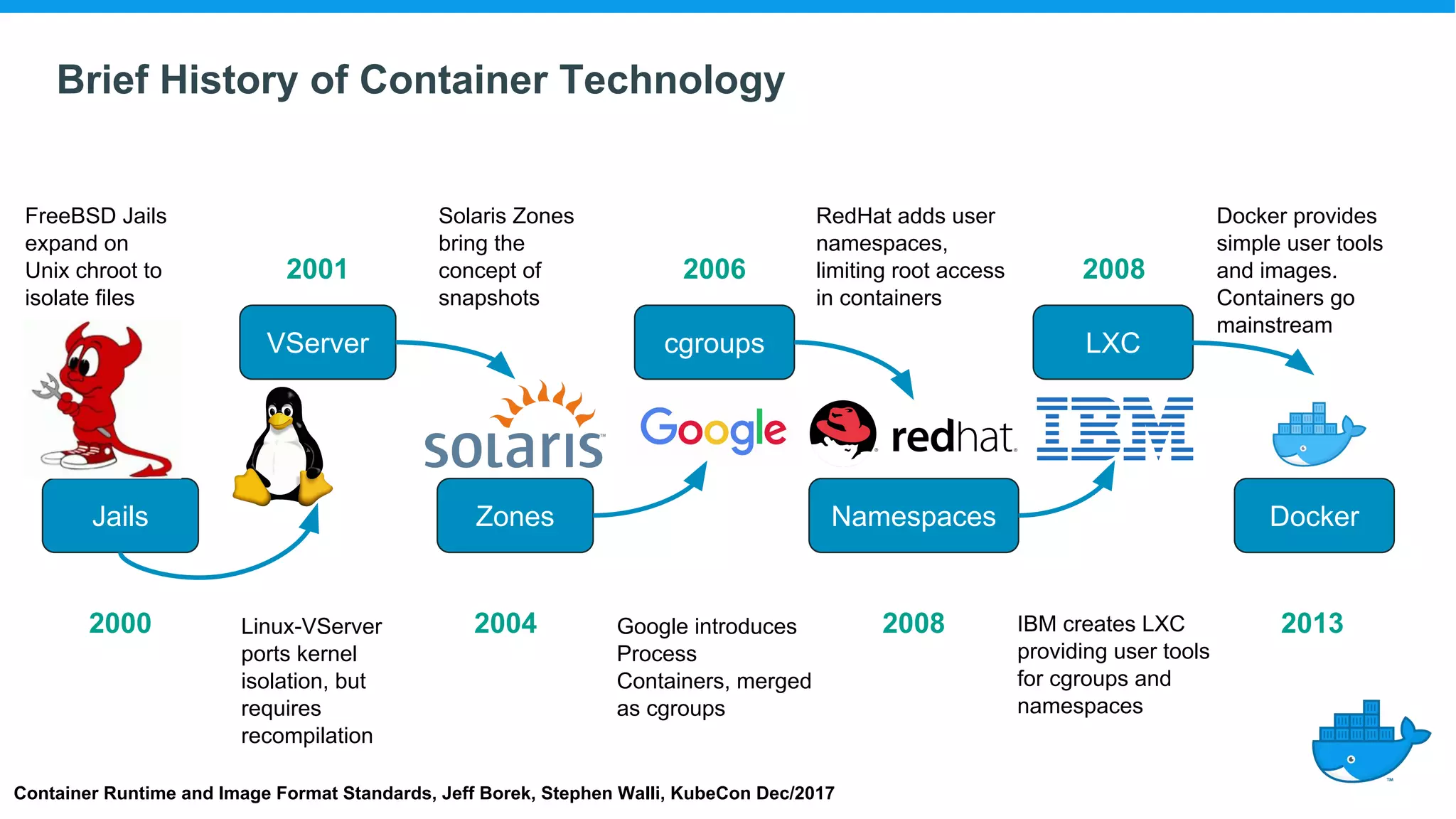
Brief History of Container Technology
Jails Zones Namespaces Docker
VServer cgroups LXC
Container Runtime and Image Format Standards, Jeff Borek, Stephen Walli, KubeCon Dec/2017
FreeBSD Jails
expand on
Unix chroot to
isolate files
Linux-VServer
ports kernel
isolation, but
requires
recompilation
Solaris Zones
bring the
concept of
snapshots
Google introduces
Process
Containers, merged
as cgroups
RedHat adds user
namespaces,
limiting root access
in containers
IBM creates LXC
providing user tools
for cgroups and
namespaces
Docker provides
simple user tools
and images.
Containers go
mainstream
2000
2001
2004
2006
2008
2008
2013
Linux Namespaces 101
Short Recap
Example PID
Processes Isolation
● host sees all processes with real PID from the Kernels perspective
● first process within PID namespace gets PID=1
Host
cnt0
ps -ef
cnt1
start.sh
java -jar ..
cnt2
start.sh
java -jar ..
health.sh
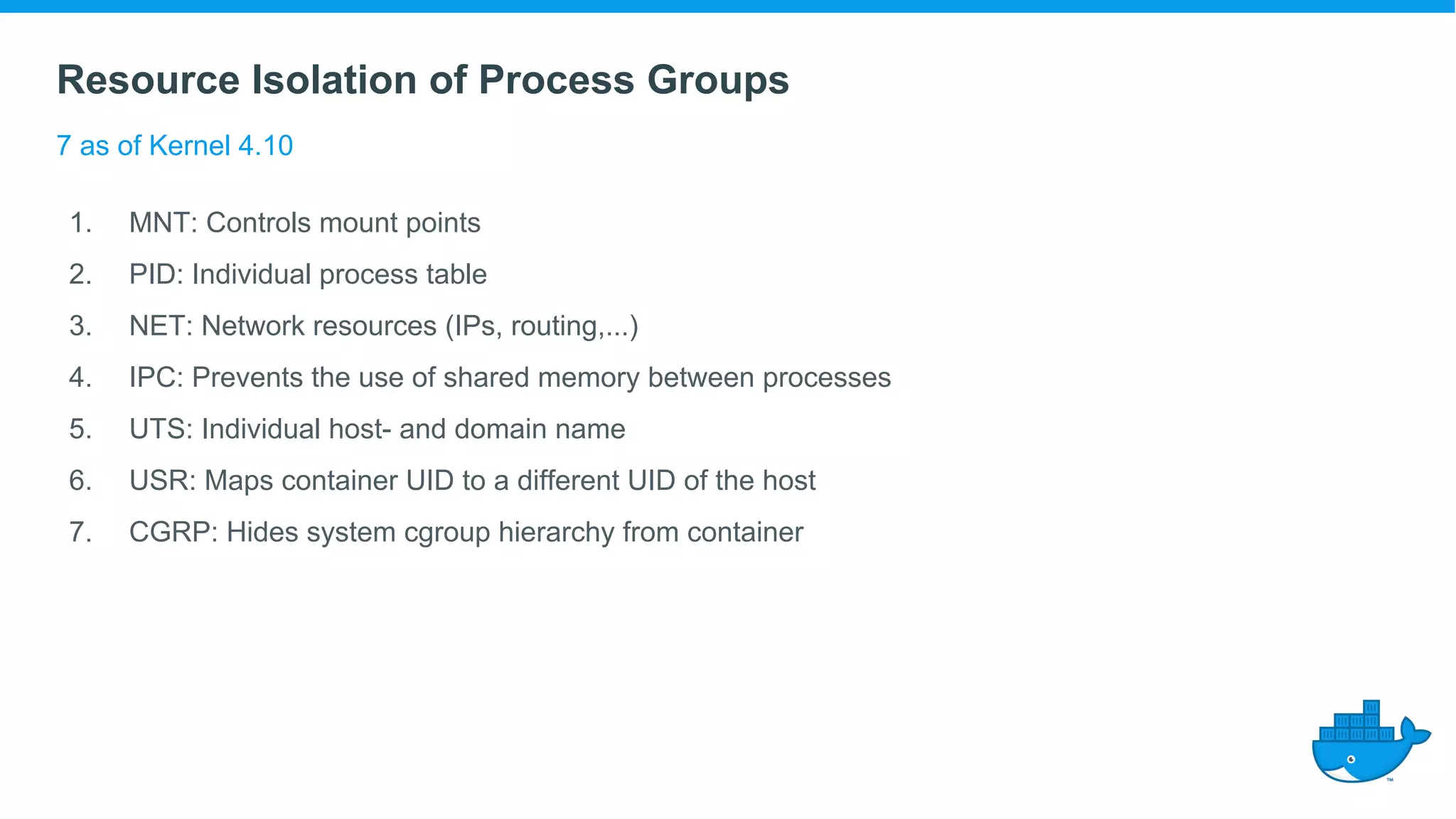
Resource Isolation of Process Groups
7 as of Kernel 4.10
1. MNT: Controls mount points
2. PID: Individual process table
3. NET: Network resources (IPs, routing,...)
4. IPC: Prevents the use of shared memory between processes
5. UTS: Individual host- and domain name
6. USR: Maps container UID to a different UID of the host
7. CGRP: Hides system cgroup hierarchy from container
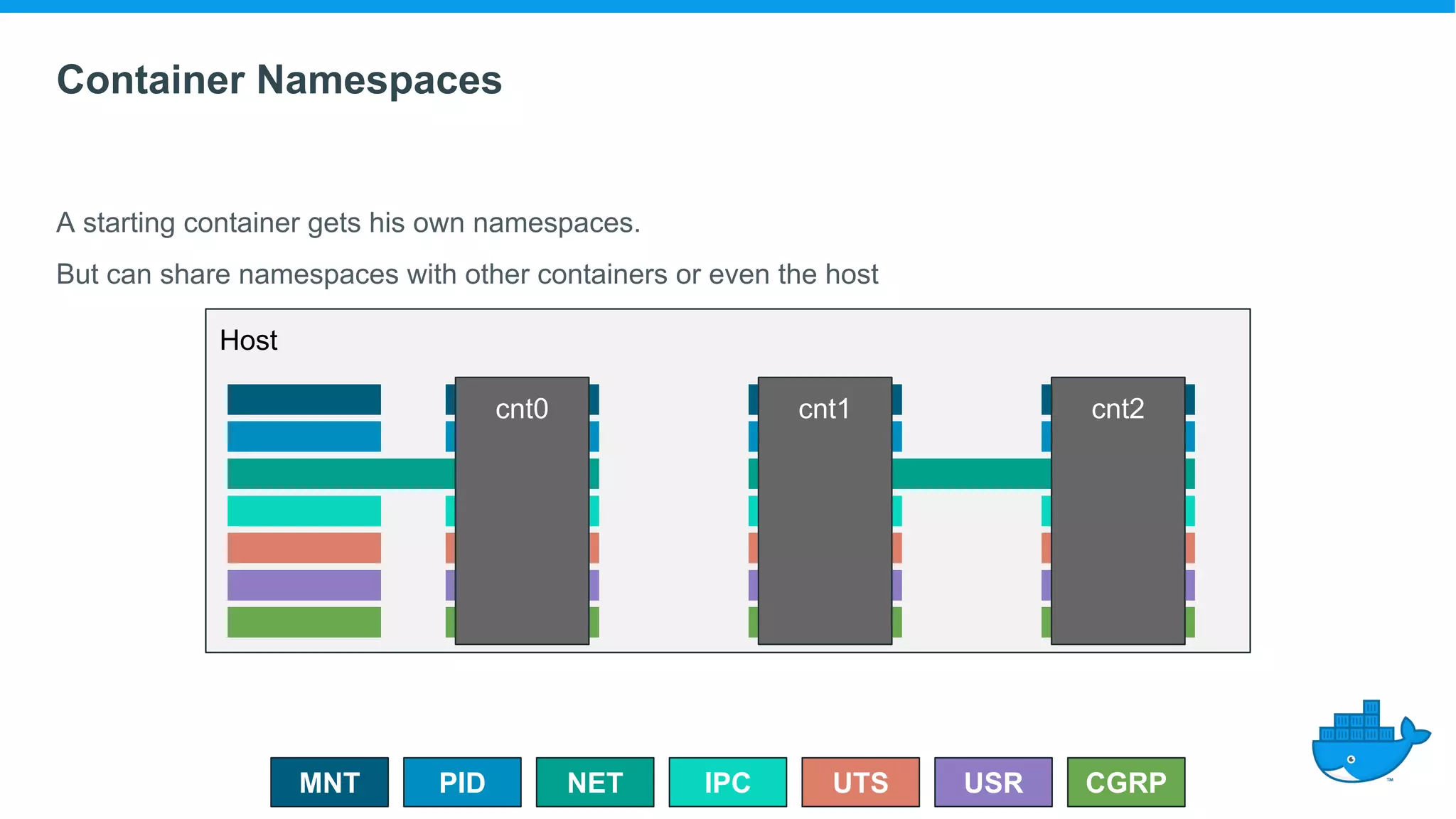
Container Namespaces
A starting container gets his own namespaces.
PIDMNT IPCNET USR
Host
UTS CGRP
cnt0 cnt1 cnt2
But can share namespaces with other containers or even the host
All In
When using all host namespaces - we are on the host (almost like ssh).
PIDMNT IPCNET USR
Host
UTS CGRP
cnt0
$ docker run -ti --rm 
--privileged 
--security-opt=seccomp=unconfined 
--pid=host 
--uts=host 
--ipc=host 
--net=host 
-v /:/host 
ubuntu bash
root@linuxkit-025000000001:/# chroot /host
/ # ash
/ #
CGroups
While namespaces isolate,
Control Groups constraint resources.
CGroups / Filesystem Layering
Short Recap [cont]
Overlay Filesystem
Compose a FS from multiple pieces
ubuntu:16.04
openjre:9-b114
appA.jar:1.1 appB.jar
ARG FROM openjre:9-b114
COPY appB.jar /usr/local/bin/
CMD [“java”, “-jar”, “/usr/local/bin/appB.jar”]
ARG FROM openjre:9-b114
COPY appA.jar /usr/local/bin/
CMD [“java”, “-jar”, “/usr/local/bin/appA.jar”]
FROM ubuntu:16.04
ARG JRE_VER=9~b114-0ubuntu1
RUN apt-get update 
&& apt-get install -y openjdk-9-jre-headless=${JRE_VER} 
&& java -version
openjre:9-b117
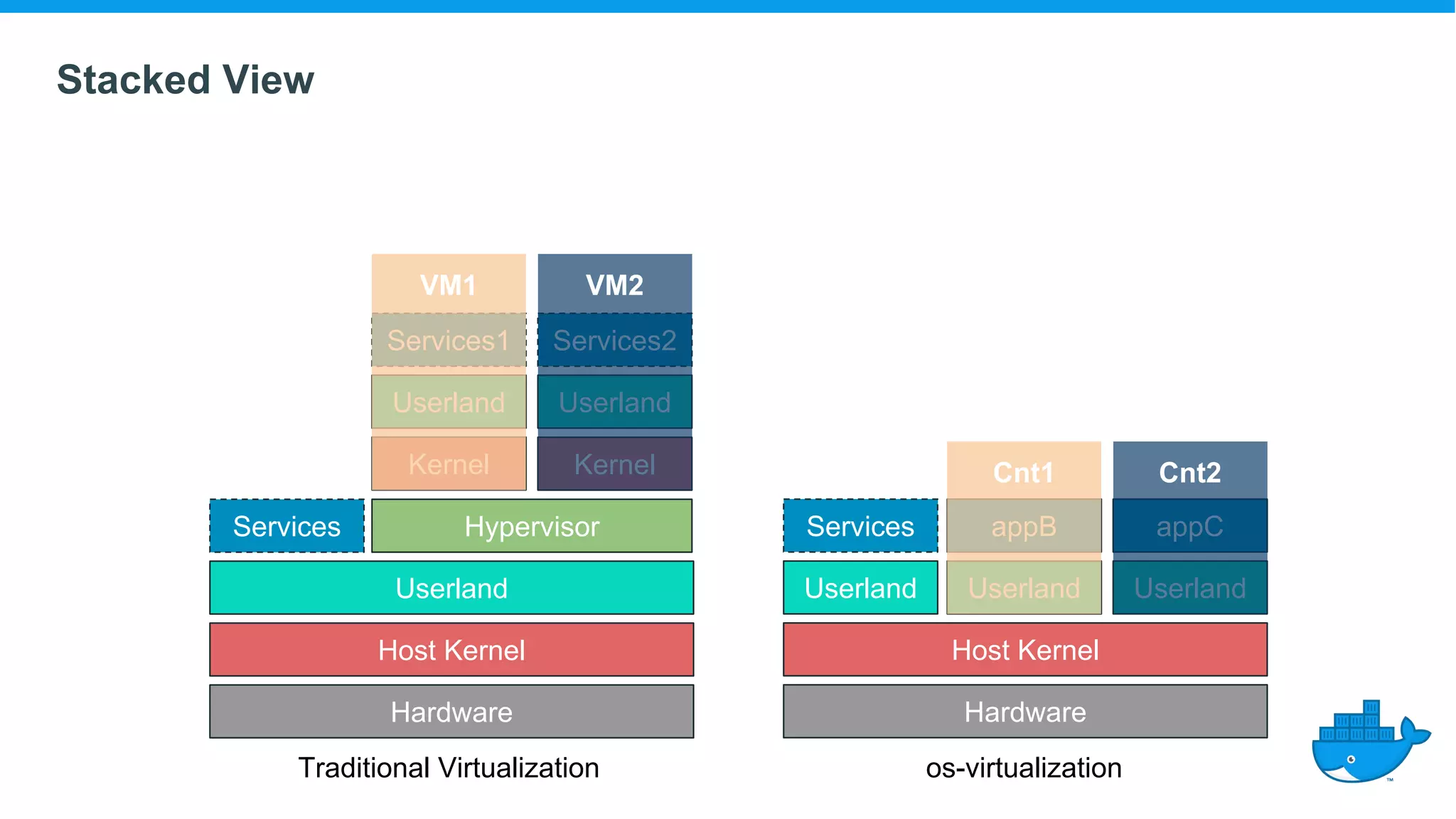
Stacked View
Hardware
Host Kernel
Userland
Services Hypervisor
Kernel
Userland
Services1 Services2
Userland
Kernel
Hardware
Host Kernel
Userland
Services
Userland
appB appC
Userland
Cnt1 Cnt2
VM1 VM2
Traditional Virtualization os-virtualization
Traditional Virtualization
hardware
kernel
hypervisor
kernel
Interface View
libs
From Application to Kernel
application
libs
application
lib-calls
102
syscalls
101
hypercalls
hardware
kernel
hw-calls
container
VM-shortcuts
(PVM,pci-passthrough)
os-virtualization
THANK YOU :)
@CQnib

Linux Container Technology 101

  • 1.
    Container Technology 101 Thebits and pieces Christian Kniep, v2018-01-18 Technical Account Manager
  • 2.
  • 3.
    Brief History ofContainer Technology Jails Zones Namespaces Docker VServer cgroups LXC Container Runtime and Image Format Standards, Jeff Borek, Stephen Walli, KubeCon Dec/2017 FreeBSD Jails expand on Unix chroot to isolate files Linux-VServer ports kernel isolation, but requires recompilation Solaris Zones bring the concept of snapshots Google introduces Process Containers, merged as cgroups RedHat adds user namespaces, limiting root access in containers IBM creates LXC providing user tools for cgroups and namespaces Docker provides simple user tools and images. Containers go mainstream 2000 2001 2004 2006 2008 2008 2013
  • 4.
  • 5.
    Example PID Processes Isolation ●host sees all processes with real PID from the Kernels perspective ● first process within PID namespace gets PID=1 Host cnt0 ps -ef cnt1 start.sh java -jar .. cnt2 start.sh java -jar .. health.sh
  • 6.
    Resource Isolation ofProcess Groups 7 as of Kernel 4.10 1. MNT: Controls mount points 2. PID: Individual process table 3. NET: Network resources (IPs, routing,...) 4. IPC: Prevents the use of shared memory between processes 5. UTS: Individual host- and domain name 6. USR: Maps container UID to a different UID of the host 7. CGRP: Hides system cgroup hierarchy from container
  • 7.
    Container Namespaces A startingcontainer gets his own namespaces. PIDMNT IPCNET USR Host UTS CGRP cnt0 cnt1 cnt2 But can share namespaces with other containers or even the host
  • 8.
    All In When usingall host namespaces - we are on the host (almost like ssh). PIDMNT IPCNET USR Host UTS CGRP cnt0 $ docker run -ti --rm --privileged --security-opt=seccomp=unconfined --pid=host --uts=host --ipc=host --net=host -v /:/host ubuntu bash root@linuxkit-025000000001:/# chroot /host / # ash / #
  • 9.
    CGroups While namespaces isolate, ControlGroups constraint resources.
  • 10.
    CGroups / FilesystemLayering Short Recap [cont]
  • 11.
    Overlay Filesystem Compose aFS from multiple pieces ubuntu:16.04 openjre:9-b114 appA.jar:1.1 appB.jar ARG FROM openjre:9-b114 COPY appB.jar /usr/local/bin/ CMD [“java”, “-jar”, “/usr/local/bin/appB.jar”] ARG FROM openjre:9-b114 COPY appA.jar /usr/local/bin/ CMD [“java”, “-jar”, “/usr/local/bin/appA.jar”] FROM ubuntu:16.04 ARG JRE_VER=9~b114-0ubuntu1 RUN apt-get update && apt-get install -y openjdk-9-jre-headless=${JRE_VER} && java -version openjre:9-b117
  • 12.
    Stacked View Hardware Host Kernel Userland ServicesHypervisor Kernel Userland Services1 Services2 Userland Kernel Hardware Host Kernel Userland Services Userland appB appC Userland Cnt1 Cnt2 VM1 VM2 Traditional Virtualization os-virtualization
  • 13.
    Traditional Virtualization hardware kernel hypervisor kernel Interface View libs FromApplication to Kernel application libs application lib-calls 102 syscalls 101 hypercalls hardware kernel hw-calls container VM-shortcuts (PVM,pci-passthrough) os-virtualization
  • 14.