
Unit 2 : Physical Layer
Chandan Gupta Bhagat
The Physical Layer and Network Media
 Network Devices: Repeater, Hub, Switch, Bridge, Router
 Different types of transmission medias:
 wired: twisted pair, coaxial, fiber optic
 Wireless: Radio waves, micro waves, infrared
 Ethernet Cable Standards
 UTP
 Fiber cable standards
 Circuit, Message & Packet Switching
 ISDN: Interface and Standards
Network Devices:
 NIC
 Repeater
 Hub
 Switch
 Bridge
 Router
Network Devices:
 Hardware devices that are used to connect computers, printers, fax
machines and other electronic devices to a network are called network
devices.
 Network devices, or networking hardware, are physical devices that are
required for communication and interaction between hardware on a
computer network.
 Network devices may be inter-network or intra-network.
 Some devices are installed on the device, like NIC card or RJ45 connector
etc
Network Devices: NIC
 NIC(Network Interface Card) also called Network Adapter
 It is a part of computer which provide communication
 The network adapter provides one or more ports for the network cable to
connect to, and it transmits and receives data onto the network cable
 NIC may be wired or wireless
 Every networked computer must also have a network adapter driver, which
controls the network adapter.
 Each network adapter driver is configured to run with a certain type of
network adapter
Network Devices: NIC
 Functions of NIC
 Data encapsulation
 Signal encoding and decoding
 Transmission and reception
 Data buffering
 Serial/parallel conversion
 Media access control
 Network protocols
Network Devices:
 Repeater
 A repeater is an electronic device that amplifies the signal it receives.
 You can think of repeater as a device which receives a signal and retransmits it
at a higher level or higher power so that the signal can cover longer distances,
more than 100 meters for standard LAN cables.
 Repeaters work on the Physical layer
Network Devices:
 Hub
 Hubs connect multiple computer networking devices together.
 A hub also acts as a repeater in that it amplifies signals that traveling long
distances over connecting cables.
 Hubs do not perform packet filtering or addressing functions; they just send
data packets to all connected devices.
 Hubs operate at the Physical layer of the Open Systems Interconnection (OSI)
model.
 There are two types of hubs: simple and multiple port
Network Devices:
 Switch
 Switches generally have a more intelligent role than hubs.
 A switch is a multiport bridge with a buffer and a design that can boost its
efficiency(a large number of ports imply less traffic) and performance.
 A switch is a data link layer device. (Layer 2)
 The switch can perform error checking before forwarding data, that makes it
very efficient as it does not forward packets that have errors and forward good
packets selectively to correct port only.
Network Devices:
 Bridge
 A bridge operates at data link layer.
 A bridge is a repeater, with add on the functionality of filtering content by
reading the MAC addresses of source and destination.
 It is also used for interconnecting two LANs working on the same protocol.
 Bridges work only at the Physical and Data Link layers of the OSI model.
Network Devices:
 Types of Bridges
 Transparent Bridges:- These are the bridge in which the stations are completely
unaware of the bridge’s existence i.e. whether or not a bridge is added or
deleted from the network, reconfiguration of the stations is unnecessary. These
bridges make use of two processes i.e. bridge forwarding and bridge learning.
 Source Routing Bridges:- In these bridges, routing operation is performed by
source station and the frame specifies which route to follow. The hot can
discover frame by sending a special frame called discovery frame, which
spreads through the entire network using all possible paths to destination.
Network Devices:
 Routers
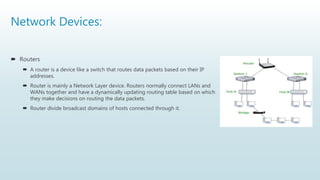
 A router is a device like a switch that routes data packets based on their IP
addresses.
 Router is mainly a Network Layer device. Routers normally connect LANs and
WANs together and have a dynamically updating routing table based on which
they make decisions on routing the data packets.
 Router divide broadcast domains of hosts connected through it.
Different types of transmission medias
 Wired:
 Twisted pair
 Coaxial
 Fiber optic
 Wireless:
 Radio waves
 Microwaves
 Infrared
Different types of transmission medias
Some factors need to be considered for designing the transmission media:
 Bandwidth: It refers to the data carrying capacity of a channel or medium.
Higher bandwidth communication channels support higher data rates.
 Transmission impairment: When the received signal is not identical to the
transmitted one due to the transmission impairment. The quality of the signals
will get destroyed due to transmission impairment.
 Interference: An interference is defined as the process of interrupt a signal
when it travels over a communication medium on the addition of some
unwanted signal.
 Radiation. It refers to the leakage of signal from the medium due to
undesirable electrical characteristics of the medium.
Different types of transmission medias
Causes Of Transmission Impairment:
 Attenuation: Attenuation means the loss of energy, i.e., the strength of the
signal decreases with increasing the distance which causes the loss of
energy.
 Distortion: Distortion occurs when there is a change in the shape of the
signal. This type of distortion is examined from different signals having
different frequencies. Each frequency component has its own propagation
speed, so they reach at a different time which leads to the delay distortion.
 Noise: When data is travelled over a transmission medium, some
unwanted signal is added to it which creates the noise
Different types of transmission medias
 Conducted or guided media or wire or Bounded
 use a conductor such as a wire or a fiber optic cable to move the signal from
sender to receiver
 Wireless or unguided media or Unbounded
 use radio waves of different frequencies and do not need a wire or cable
conductor to transmit signals
Guided Transmission Media
Transmission capacity depends on the distance and on whether the medium is
point-to-point or multipoint.
 Guided Media:
 It is also referred to as Wired or Bounded transmission media. Signals being
transmitted are directed and confined in a narrow pathway by using physical links.
 Features:
 High Speed
 Secure
 Used for shorter distances
 Examples
 twisted pair wires
 coaxial cables
 optical fiber
Twisted Pair Wires
 Consists of two insulated copper wires arranged in a regular spiral pattern
to minimize the electromagnetic interference between adjacent pairs
 Often used at customer facilities and also over distances to carry voice as
well as data communications
 Low frequency transmission medium
Twisted Pair Wires
Types of Twisted Pair
 STP (shielded twisted pair)
 the pair is wrapped with metallic foil or braid to insulate the pair from
electromagnetic interference
 UTP (unshielded twisted pair)
 each wire is insulated with plastic wrap, but the pair is encased in an outer
covering
Twisted Pair Wires
Ratings of Twisted Pair
 Category 3 UTP
 data rates of up to 16mbps are achievable
 Category 5 UTP
 data rates of up to 100mbps are achievable
 more tightly twisted than Category 3 cables
 more expensive, but better performance
 STP
 More expensive, harder to work with
Coaxial Cable (or Coax)
 Used for cable television, LANs, telephony
 Has an inner conductor surrounded by a braided mesh
 Both conductors share a common center axial, hence the term “co-axial”
 Higher bandwidth
 400 to 600Mhz
 up to 10,800 voice conversation
Fiber Optic Cable
 Relatively new transmission medium used by telephone companies
in place of long-distance lines
 Also used by private companies in implementing local data
communications networks
 Require a light source with injection laser diode (ILD) or light-
emitting diodes (LED)
Wireless
Unguided Media:
 It is also referred to as Wireless or Unbounded transmission media.
 No physical medium is required for the transmission of
electromagnetic signals.
 Features:
 Signal is broadcasted through air
 Less Secure
 Used for larger distances
 There are 3 major types of Unguided Media:
 Radio waves
 Microwaves
 Infrared
Wireless
Radiowaves
 These are easy to generate and can penetrate through buildings.
 The sending and receiving antennas does not need be aligned.
 Frequency Range: 3KHz – 1GHz.
 Amplitude Modulation(AM) and Frequency Modulation(FM )
 radios and cordless phones use Radiowaves for transmission.
 Further Categorized
 Terrestrial
 Satellite.
Wireless
Microwaves
 It is a line of sight transmission i.e. the sending and receiving
antennas need to be properly aligned with each other.
 The distance covered by the signal is directly proportional to the
height of the antenna.
 Frequency Range:1GHz – 300GHz.
 These are majorly used for mobile phone communication and
television distribution.
Wireless
Infrared
 Infrared waves are used for very short distance communication.
 They cannot penetrate through obstacles. This prevents
interference between systems.
 Frequency Range:300GHz – 400THz.
 It is used in TV remotes, wireless mouse, keyboard, printer, etc.
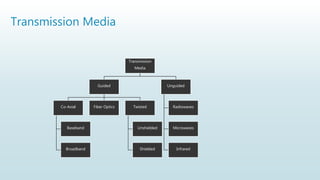
Transmission Media
Transmission
Media
Guided
Co-Axial
Baseband
Broadband
Fiber Optics Twisted
Unshielded
Shielded
Unguided
Radiowaves
Microwaves
Infrared
Ethernet Cable Standards
 UTP
 Fiber cable standards
Ethernet Cable Standards
 IEEE shorthand identifiers, such as 10Base5, 10Base2, 10BaseT, and 10BaseF include three
pieces of information:
 The number 10: At the front of each identifier, 10 denotes the standard data transfer speed
over these media - ten megabits per second (10Mbps).
 The word Base: Short for Baseband, this part of the identifier signifies a type of network that
uses only one carrier frequency for signaling and requires all network stations to share its use.
 The segment type or segment length: This part of the identifier can be a digit or a letter:
 Digit: shorthand for how long (in meters) a cable segment may be before attenuation sets in. For
example, a 10Base5 segment can be no more than 500 meters long.
 Letter: identifies a specific physical type of cable. For example, the T at the end of 10BaseT stands
for twisted-pair & F at the end of stands for Fiber.
Ethernet Cable Standards
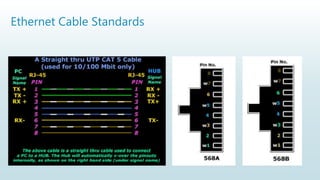
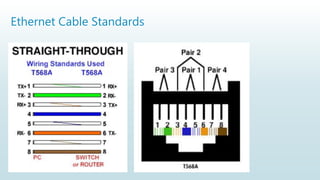
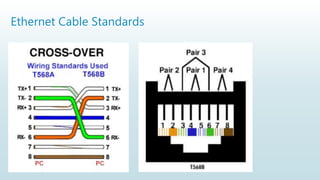
UTP Cable Standards
 UTP (Unshielded Twisted Pair) is a regular copper wire that joins many home and many business computers to the telephone
company. UTP is the most common form of twisted pair wiring, because it is less expensive and easier to work with than STP
(Shielded Twisted Pair).
The following are a few UTP Cable standards used in the market:
 Cat 3 UTP
 Category 3 UTP is rated to carry data up to 10Mbit/s.
 Cat 3 UTP was the standard cable used with Ethernet 10Base-T.
 Cat 5 UTP
 Category 5 UTP is rated to carry Ethernet up to 100Mbit/s and ATM up to 155Mbit/s.
 Cat 5 UTP was the standard cable used with Ethernet 100Base-TX.
 Cat 5e UTP
 Category 5e UTP is an enhanced version of Cat 5 UTP.
 Cat 5e UTP is rated to carry data up to 1000Mbit/s.
 Cat 5e UTP is the standard cable used with Ethernet 1000Base-T.
 Cat 5e can also be used to extend the distance of 100Base-TX cable runs up to 350 meters.
Ethernet Cable Standards
 Cat 6 UTP
 Category 6 UTP is very similar to Cat 5 UTP, except that it is
designed and manufactured to standards.
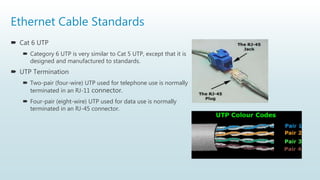
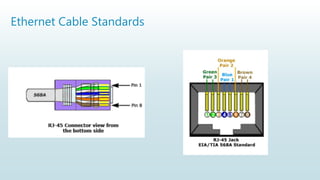
 UTP Termination
 Two-pair (four-wire) UTP used for telephone use is normally
terminated in an RJ-11 connector.
 Four-pair (eight-wire) UTP used for data use is normally
terminated in an RJ-45 connector.
Ethernet Cable Standards
Ethernet Cable Standards : Fiber Optics
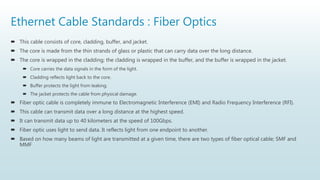
 This cable consists of core, cladding, buffer, and jacket.
 The core is made from the thin strands of glass or plastic that can carry data over the long distance.
 The core is wrapped in the cladding; the cladding is wrapped in the buffer, and the buffer is wrapped in the jacket.
 Core carries the data signals in the form of the light.
 Cladding reflects light back to the core.
 Buffer protects the light from leaking.
 The jacket protects the cable from physical damage.
 Fiber optic cable is completely immune to Electromagnetic Interference (EMI) and Radio Frequency Interference (RFI).
 This cable can transmit data over a long distance at the highest speed.
 It can transmit data up to 40 kilometers at the speed of 100Gbps.
 Fiber optic uses light to send data. It reflects light from one endpoint to another.
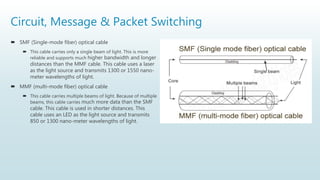
 Based on how many beams of light are transmitted at a given time, there are two types of fiber optical cable; SMF and
MMF
Circuit, Message & Packet Switching
 SMF (Single-mode fiber) optical cable
 This cable carries only a single beam of light. This is more
reliable and supports much higher bandwidth and longer
distances than the MMF cable. This cable uses a laser
as the light source and transmits 1300 or 1550 nano-
meter wavelengths of light.
 MMF (multi-mode fiber) optical cable
 This cable carries multiple beams of light. Because of multiple
beams, this cable carries much more data than the SMF
cable. This cable is used in shorter distances. This
cable uses an LED as the light source and transmits
850 or 1300 nano-meter wavelengths of light.
Circuit, Message & Packet Switching
 Switching is process to forward packets coming in from one port to a port
leading towards the destination.
 When data comes on a port it is called ingress, and when data leaves a port or
goes out it is called egress.
 A communication system may include number of switches and nodes.
Circuit, Message & Packet Switching
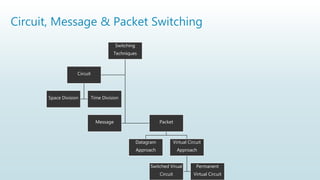
Switching
Techniques
Message Packet
Datagram
Approach
Virtual Circuit
Approach
Switched Virual
Circuit
Permanent
Virtual Circuit
Circuit
Space Division Time Division
Circuit Switching
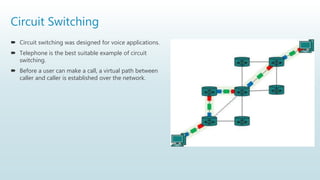
 When two nodes communicate with each other over a dedicated
communication path, it is called circuit switching.
 There 'is a need of pre-specified route from which data will travels and no other
data is permitted.
 In circuit switching, to transfer the data, circuit must be established so that the
data transfer can take place.
 Circuits can be permanent or temporary.
 Communication through circuit switching has 3 phases:
 Circuit establishment
 Data transfer
 Circuit Disconnect
Circuit Switching
 Circuit switching was designed for voice applications.
 Telephone is the best suitable example of circuit
switching.
 Before a user can make a call, a virtual path between
caller and caller is established over the network.
Circuit Switching
Advantages Of Circuit Switching:
 In the case of Circuit Switching technique, the communication channel is
dedicated.
 It has fixed bandwidth.
Disadvantages Of Circuit Switching:
 Once the dedicated path is established, the only delay occurs in the speed of
data transmission.
 It is more expensive than other switching techniques as a dedicated path is
required for each connection
Message Switching
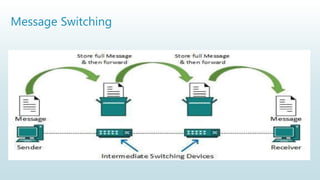
 Message Switching is a switching technique in which a message is transferred as
a complete unit and routed through intermediate nodes at which it is stored
and forwarded.
 In Message Switching technique, there is no establishment of a dedicated path
between the sender and receiver.
 The destination address is appended to the message.
 Message Switching provides a dynamic routing as the message is routed
through the intermediate nodes based on the information available in the
message.
 Message switches are programmed in such a way so that they can provide the
most efficient routes.
 Each and every node stores the entire message and then forward it to the next
node.
 This type of network is known as store and forward network.
Message Switching
 They provide 2 distinct and important characteristics:
 Store and forward
 The intermediate nodes have the responsibility of transferring the entire message
to the next node.
 Each node must have storage capacity.
 Message delivery
 This implies wrapping the entire information in a single message and transferring
it from the source to the destination node.
Message Switching
Message Switching
 Advantages Of Message Switching
 As message switching is able to store the message for which communication channel
is not available, it helps in reducing the traffic congestion in network.
 In message switching, the data channels are shared by the network devices.
 It makes the traffic management efficient by assigning priorities to the messages.
 Disadvantages Of Message Switching
 Message switching cannot be used for real time applications as storing of messages
causes delay.
 In message switching, message has to be stored for which every intermediate devices
in the network requires a large storing capacity.
 Applications
 The store-and-forward method was implemented in telegraph message switching
centers.
Packet Switching
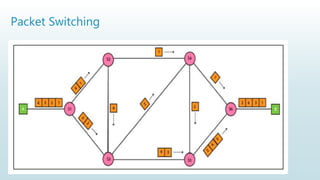
 The packet switching is a switching technique in which the message is sent in
one go, but it is divided into smaller pieces, and they are sent individually.
 The message splits into smaller pieces known as packets and packets are given
a unique number to identify their order at the receiving end.
 Every packet contains some information in its headers such as source address,
destination address and sequence number.
 Packets will travel across the network, taking the shortest path as possible.
 All the packets are reassembled at the receiving end in correct order.
 If any packet is missing or corrupted, then the message will be sent to resend
the message.
 If the correct order of the packets is reached, then the acknowledgment
message will be sent
Packet Switching
Packet Switching : Approaches
 Datagram Packet switching:
 It is a packet switching technology in which packet is known as a datagram, is
considered as an independent entity.
 Each packet contains the information about the destination and switch uses this
information to forward the packet to the correct destination.
 It is also known as connectionless switching.
 Virtual Circuit Switching
 Virtual Circuit Switching is also known as connection-oriented switching.
 In the case of Virtual circuit switching, a preplanned route is established before the
messages are sent.
Packet Switching
 Advantages Of Packet Switching:
 Cost-effective
 Reliable
 Efficient
 Disadvantages Of Packet Switching:
 Packet Switching technique cannot be implemented in those applications that require
low delay and high-quality services.
 The protocols used in a packet switching technique are very complex and requires
high implementation cost.
ISDN
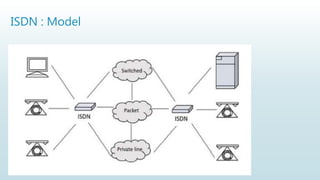
 The Integrated Services of Digital Networking, in short ISDN is a telephone
network based infrastructure that allows the transmission of voice and data
simultaneously at a high speed with greater efficiency.
 This is a circuit switched telephone network system, which also provides access
to Packet switched networks.
ISDN : Model
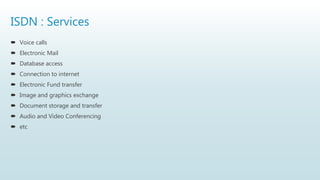
ISDN : Services
 Voice calls
 Electronic Mail
 Database access
 Connection to internet
 Electronic Fund transfer
 Image and graphics exchange
 Document storage and transfer
 Audio and Video Conferencing
 etc
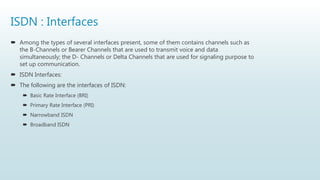
ISDN : Interfaces
 Among the types of several interfaces present, some of them contains channels such as
the B-Channels or Bearer Channels that are used to transmit voice and data
simultaneously; the D- Channels or Delta Channels that are used for signaling purpose to
set up communication.
 ISDN Interfaces:
 The following are the interfaces of ISDN:
 Basic Rate Interface (BRI)
 Primary Rate Interface (PRI)
 Narrowband ISDN
 Broadband ISDN
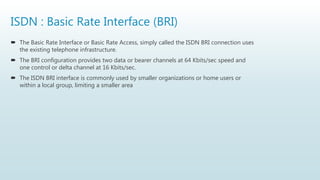
ISDN : Basic Rate Interface (BRI)
 The Basic Rate Interface or Basic Rate Access, simply called the ISDN BRI connection uses
the existing telephone infrastructure.
 The BRI configuration provides two data or bearer channels at 64 Kbits/sec speed and
one control or delta channel at 16 Kbits/sec.
 The ISDN BRI interface is commonly used by smaller organizations or home users or
within a local group, limiting a smaller area
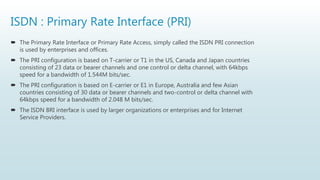
ISDN : Primary Rate Interface (PRI)
 The Primary Rate Interface or Primary Rate Access, simply called the ISDN PRI connection
is used by enterprises and offices.
 The PRI configuration is based on T-carrier or T1 in the US, Canada and Japan countries
consisting of 23 data or bearer channels and one control or delta channel, with 64kbps
speed for a bandwidth of 1.544M bits/sec.
 The PRI configuration is based on E-carrier or E1 in Europe, Australia and few Asian
countries consisting of 30 data or bearer channels and two-control or delta channel with
64kbps speed for a bandwidth of 2.048 M bits/sec.
 The ISDN BRI interface is used by larger organizations or enterprises and for Internet
Service Providers.
Broadband-ISDN (B-ISDN)
 Narrowband ISDN has been designed to operate over the current
communications infrastructure, which is heavily dependent on the copper cable
however B-ISDN relies mainly on the evolution of fiber optics.
 According to CCITT B-ISDN is best described as ‘a service requiring transmission
channels capable of supporting rates greater than the primary rate’.
 ISDN Services:
 ISDN provides a fully integrated digital service to users. These services fall into 3
categories
 Bearer services
 Teleservices
 Supplementary services
ISDN: Bearer Services
 Transfer of information (voice, data and video) between users without the
network manipulating the content of that information is provided by the bearer
network.
 There is no need for the network to process the information and therefore does
not change the content.
 Bearer services belong to the first three layers of the OSI model. They are well
defined in the ISDN standard.
 They can be provided using circuit-switched, packet-switched, frame-switched,
or cell-switched networks
ISDN: Teleservices
 In this the network may change or process the contents of the data.
 These services corresponds to layers 4-7 of the OSI model.
 Teleservices relay on the facilities of the bearer services and are designed to
accommodate complex user needs.
 The user need not to be aware of the details of the process.
 Teleservices include telephony, teletex, telefax, videotex, telex and
teleconferencing.
 Though the ISDN defines these services by name yet they have not yet become
standards.
ISDN: Supplementary Services
 Additional functionality to the bearer services and teleservices are provided by
supplementary services.
 Reverse charging, call waiting, and message handling are examples of
supplementary services which are all familiar with today’s telephone company
services.
ISDN: Principle
 The ISDN works based on the standards defined by ITU-T (formerly CCITT).
 The Telecommunication Standardization Sector (ITU-T) coordinates standards
for telecommunications on behalf of the International Telecommunication
Union (ITU) and is based in Geneva, Switzerland.
 The various principles of ISDN as per ITU-T recommendation are:
 To support switched and non-switched applications
 To support voice and non-voice applications
 Intelligence in the network
 Layered protocol architecture
 Variety of configurations
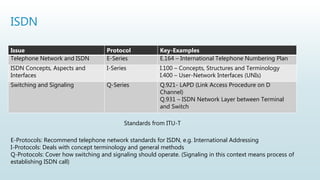
ISDN
Issue Protocol Key-Examples
Telephone Network and ISDN E-Series E.164 – International Telephone Numbering Plan
ISDN Concepts, Aspects and
Interfaces
I-Series I.100 – Concepts, Structures and Terminology
I.400 – User-Network Interfaces (UNIs)
Switching and Signaling Q-Series Q.921- LAPD (Link Access Procedure on D
Channel)
Q.931 – ISDN Network Layer between Terminal
and Switch
Standards from ITU-T
E-Protocols: Recommend telephone network standards for ISDN, e.g. International Addressing
I-Protocols: Deals with concept terminology and general methods
Q-Protocols: Cover how switching and signaling should operate. (Signaling in this context means process of
establishing ISDN call)
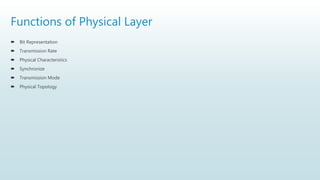
Functions of Physical Layer
 Bit Representation
 Transmission Rate
 Physical Characteristics
 Synchronize
 Transmission Mode
 Physical Topology
Functions of Physical Layer (Bit Representation)
 The physical layer data involves a stream of bits (sequence of 0's and 1's) without any
interpretation. To be transmitted bits must be encoded into the signals - electrical or
optical.
 The physical layer defines the type of encoding (how 0's and 1's are changed in signals).
 This layer is responsible for the bit by bit delivery of the data to its upper layer called the
MAC layer. Physical layer obtains data in the form of signals or the radio signals or the
optical signals.
 The physical layer is responsible for delivering those signals from a cable, a Wi-Fi router
or an optical fiber.
Functions of Physical Layer
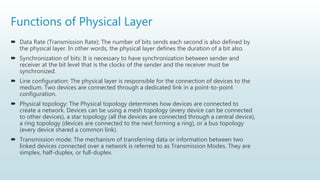
 Data Rate (Transmission Rate): The number of bits sends each second is also defined by
the physical layer. In other words, the physical layer defines the duration of a bit also.
 Synchronization of bits: It is necessary to have synchronization between sender and
receiver at the bit level that is the clocks of the sender and the receiver must be
synchronized.
 Line configuration: The physical layer is responsible for the connection of devices to the
medium. Two devices are connected through a dedicated link in a point-to-point
configuration.
 Physical topology: The Physical topology determines how devices are connected to
create a network. Devices can be using a mesh topology (every device can be connected
to other devices), a star topology (all the devices are connected through a central device),
a ring topology (devices are connected to the next forming a ring), or a bus topology
(every device shared a common link).
 Transmission mode: The mechanism of transferring data or information between two
linked devices connected over a network is referred to as Transmission Modes. They are
simplex, half-duplex, or full-duplex.
Analog signals
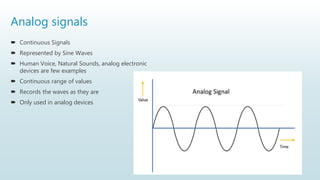
 Continuous Signals
 Represented by Sine Waves
 Human Voice, Natural Sounds, analog electronic
devices are few examples
 Continuous range of values
 Records the waves as they are
 Only used in analog devices
Digital signals
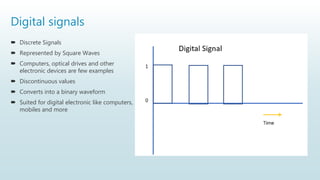
 Discrete Signals
 Represented by Square Waves
 Computers, optical drives and other
electronic devices are few examples
 Discontinuous values
 Converts into a binary waveform
 Suited for digital electronic like computers,
mobiles and more
Analog and digital signals
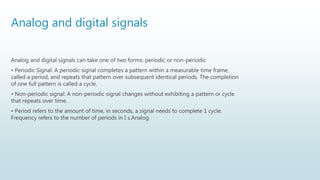
Analog and digital signals can take one of two forms: periodic or non-periodic
• Periodic Signal: A periodic signal completes a pattern within a measurable time frame,
called a period, and repeats that pattern over subsequent identical periods. The completion
of one full pattern is called a cycle.
• Non-periodic signal: A non-periodic signal changes without exhibiting a pattern or cycle
that repeats over time.
• Period refers to the amount of time, in seconds, a signal needs to complete 1 cycle.
Frequency refers to the number of periods in I s.Analog
Composite Signals
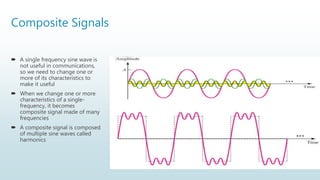
 A single frequency sine wave is
not useful in communications,
so we need to change one or
more of its characteristics to
make it useful
 When we change one or more
characteristics of a single-
frequency, it becomes
composite signal made of many
frequencies
 A composite signal is composed
of multiple sine waves called
harmonics
Transmission Impairment
When a signal transmits from one transmission medium to other, the signal that is received
may differ from the signal that is transmitted, due to various transmission impairments.
Consequences:
o For analog signals: degradation of signal quality
o For digital signals: bit errors
The most significant impairments include
 Attenuation
 Distortion
 Noise
Attenuation
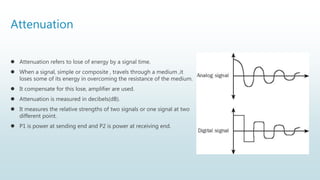
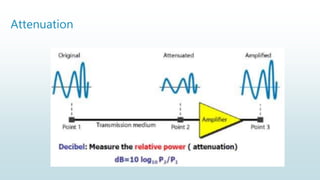
 Attenuation refers to lose of energy by a signal time.
 When a signal, simple or composite , travels through a medium ,it
loses some of its energy in overcoming the resistance of the medium.
 It compensate for this lose, amplifier are used.
 Attenuation is measured in decibels(dB).
 It measures the relative strengths of two signals or one signal at two
different point.
 P1 is power at sending end and P2 is power at receiving end.
Attenuation
Distortion
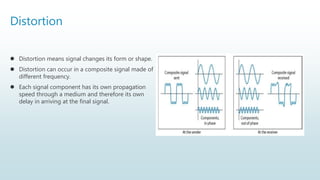
 Distortion means signal changes its form or shape.
 Distortion can occur in a composite signal made of
different frequency.
 Each signal component has its own propagation
speed through a medium and therefore its own
delay in arriving at the final signal.
Noise
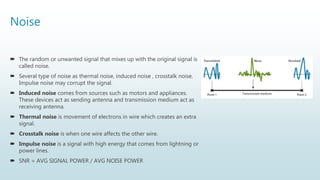
 The random or unwanted signal that mixes up with the original signal is
called noise.
 Several type of noise as thermal noise, induced noise , crosstalk noise,
Impulse noise may corrupt the signal.
 Induced noise comes from sources such as motors and appliances.
These devices act as sending antenna and transmission medium act as
receiving antenna.
 Thermal noise is movement of electrons in wire which creates an extra
signal.
 Crosstalk noise is when one wire affects the other wire.
 Impulse noise is a signal with high energy that comes from lightning or
power lines.
 SNR = AVG SIGNAL POWER / AVG NOISE POWER
Data rate Limits
 Data rate governs the speed of data transmission.
 Greater the bandwidth, higher the data rate
 A very important consideration in data communication is how fast we can send
data, in bits per second, over a channel.
 Data rate depends upon 3 factors:
1. The bandwidth available
2. Number of levels in digital signal
3. The quality of the channel – level of noise
Formulas to calculate the data rate
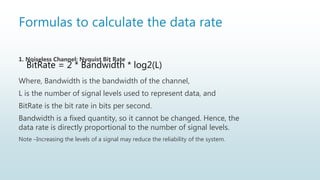
1. Noiseless Channel: Nyquist Bit Rate
Where, Bandwidth is the bandwidth of the channel,
L is the number of signal levels used to represent data, and
BitRate is the bit rate in bits per second.
Bandwidth is a fixed quantity, so it cannot be changed. Hence, the
data rate is directly proportional to the number of signal levels.
Note –Increasing the levels of a signal may reduce the reliability of the system.
BitRate = 2 * Bandwidth * log2(L)
Formulas to calculate the data rate
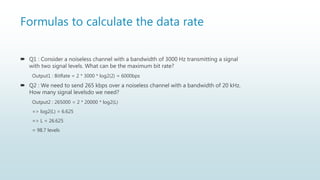
 Q1 : Consider a noiseless channel with a bandwidth of 3000 Hz transmitting a signal
with two signal levels. What can be the maximum bit rate?
Output1 : BitRate = 2 * 3000 * log2(2) = 6000bps
 Q2 : We need to send 265 kbps over a noiseless channel with a bandwidth of 20 kHz.
How many signal levelsdo we need?
Output2 : 265000 = 2 * 20000 * log2(L)
=> log2(L) = 6.625
=> L = 26.625
= 98.7 levels
Formulas to calculate the data rate
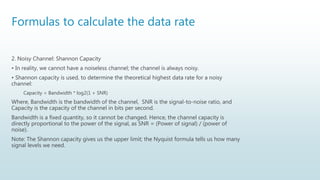
2. Noisy Channel: Shannon Capacity
• In reality, we cannot have a noiseless channel; the channel is always noisy.
• Shannon capacity is used, to determine the theoretical highest data rate for a noisy
channel:
Capacity = Bandwidth * log2(1 + SNR)
Where, Bandwidth is the bandwidth of the channel, SNR is the signal-to-noise ratio, and
Capacity is the capacity of the channel in bits per second.
Bandwidth is a fixed quantity, so it cannot be changed. Hence, the channel capacity is
directly proportional to the power of the signal, as SNR = (Power of signal) / (power of
noise).
Note: The Shannon capacity gives us the upper limit; the Nyquist formula tells us how many
signal levels we need.
Formulas to calculate the data rate
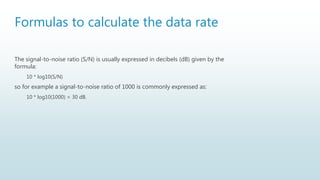
The signal-to-noise ratio (S/N) is usually expressed in decibels (dB) given by the
formula:
10 * log10(S/N)
so for example a signal-to-noise ratio of 1000 is commonly expressed as:
10 * log10(1000) = 30 dB.
Formulas to calculate the data rate
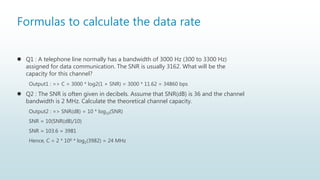
 Q1 : A telephone line normally has a bandwidth of 3000 Hz (300 to 3300 Hz)
assigned for data communication. The SNR is usually 3162. What will be the
capacity for this channel?
Output1 : => C = 3000 * log2(1 + SNR) = 3000 * 11.62 = 34860 bps
 Q2 : The SNR is often given in decibels. Assume that SNR(dB) is 36 and the channel
bandwidth is 2 MHz. Calculate the theoretical channel capacity.
Output2 : => SNR(dB) = 10 * log10(SNR)
SNR = 10(SNR(dB)/10)
SNR = 103.6 = 3981
Hence, C = 2 * 106 * log2(3982) = 24 MHz
Formulas to calculate the data rate
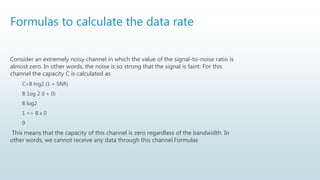
Consider an extremely noisy channel in which the value of the signal-to-noise ratio is
almost zero. In other words, the noise is so strong that the signal is faint. For this
channel the capacity C is calculated as
C=B log2 (1 + SNR)
B 1og 2 (l + 0)
B log2
1 => B x 0
0
This means that the capacity of this channel is zero regardless of the bandwidth. In
other words, we cannot receive any data through this channel.Formulas
PERFORMANCE
1. Bandwidth
2. Throughput
3. Latency (Delay)
4. Bandwidth Delay Product
5. Jitter
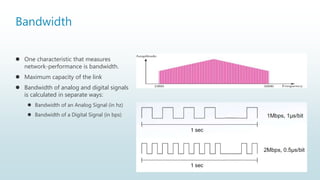
Bandwidth
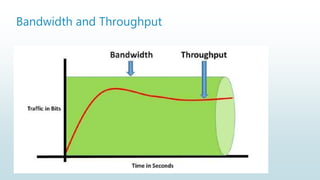
 One characteristic that measures
network-performance is bandwidth.
 Maximum capacity of the link
 Bandwidth of analog and digital signals
is calculated in separate ways:
 Bandwidth of an Analog Signal (in hz)
 Bandwidth of a Digital Signal (in bps)
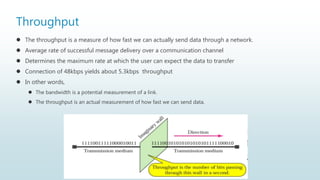
Throughput
 The throughput is a measure of how fast we can actually send data through a network.
 Average rate of successful message delivery over a communication channel
 Determines the maximum rate at which the user can expect the data to transfer
 Connection of 48kbps yields about 5.3kbps throughput
 In other words,
 The bandwidth is a potential measurement of a link.
 The throughput is an actual measurement of how fast we can send data.
Bandwidth and Throughput
Latency (Delay)
 The latency defines how long it takes for an entire message to completely arrive at
the destination from the time
 the first bit is sent out from the source.
 Latency=Propagation time+Transmission time+queueing time+Processing delay
 Propagation time is defined as the time required for a bit to travel from source to
destination.ation
 Propagation time=Distance/(Propagation speed)
Latency (Delay)
 Queuing-time is the time needed for each intermediate-device to hold the message
before it can be processed. (Intermediate device may be a router or a switch)
 the queuing-time is not a fixed factor. This is because
 Queuing-time changes with the load imposed on the network.
 When there is heavy traffic on the network, the queuing-time increases
 An intermediate-device
 queues they arrived messages and
 processes the messages one by one.
 If there are many messages, each message will have to wait.
 Processing Delay is the time taken by the routers to process the packet header.
Bandwidth Delay Product
Two performance-metrics of a link are 1) Bandwidth and 2) Delay
• The bandwidth-delay product is very important in data-communications.
Jitter
 Another performance issue that is related to delay is jitter.
 We can say that jitter is a problem
 if different packets of data encounter different delays and
 if the application using the data at the receiver site is time-sensitive (for ex: audio/video).
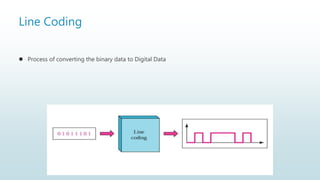
Line Coding
 Process of converting the binary data to Digital Data
Thank you
Contact: https://chandanbhagat.com.np/me

Computer Network - Unit 2

  • 1.
    Unit 2 :Physical Layer Chandan Gupta Bhagat
  • 2.
    The Physical Layerand Network Media  Network Devices: Repeater, Hub, Switch, Bridge, Router  Different types of transmission medias:  wired: twisted pair, coaxial, fiber optic  Wireless: Radio waves, micro waves, infrared  Ethernet Cable Standards  UTP  Fiber cable standards  Circuit, Message & Packet Switching  ISDN: Interface and Standards
  • 3.
    Network Devices:  NIC Repeater  Hub  Switch  Bridge  Router
  • 4.
    Network Devices:  Hardwaredevices that are used to connect computers, printers, fax machines and other electronic devices to a network are called network devices.  Network devices, or networking hardware, are physical devices that are required for communication and interaction between hardware on a computer network.  Network devices may be inter-network or intra-network.  Some devices are installed on the device, like NIC card or RJ45 connector etc
  • 5.
    Network Devices: NIC NIC(Network Interface Card) also called Network Adapter  It is a part of computer which provide communication  The network adapter provides one or more ports for the network cable to connect to, and it transmits and receives data onto the network cable  NIC may be wired or wireless  Every networked computer must also have a network adapter driver, which controls the network adapter.  Each network adapter driver is configured to run with a certain type of network adapter
  • 6.
    Network Devices: NIC Functions of NIC  Data encapsulation  Signal encoding and decoding  Transmission and reception  Data buffering  Serial/parallel conversion  Media access control  Network protocols
  • 7.
    Network Devices:  Repeater A repeater is an electronic device that amplifies the signal it receives.  You can think of repeater as a device which receives a signal and retransmits it at a higher level or higher power so that the signal can cover longer distances, more than 100 meters for standard LAN cables.  Repeaters work on the Physical layer
  • 8.
    Network Devices:  Hub Hubs connect multiple computer networking devices together.  A hub also acts as a repeater in that it amplifies signals that traveling long distances over connecting cables.  Hubs do not perform packet filtering or addressing functions; they just send data packets to all connected devices.  Hubs operate at the Physical layer of the Open Systems Interconnection (OSI) model.  There are two types of hubs: simple and multiple port
  • 9.
    Network Devices:  Switch Switches generally have a more intelligent role than hubs.  A switch is a multiport bridge with a buffer and a design that can boost its efficiency(a large number of ports imply less traffic) and performance.  A switch is a data link layer device. (Layer 2)  The switch can perform error checking before forwarding data, that makes it very efficient as it does not forward packets that have errors and forward good packets selectively to correct port only.
  • 10.
    Network Devices:  Bridge A bridge operates at data link layer.  A bridge is a repeater, with add on the functionality of filtering content by reading the MAC addresses of source and destination.  It is also used for interconnecting two LANs working on the same protocol.  Bridges work only at the Physical and Data Link layers of the OSI model.
  • 11.
    Network Devices:  Typesof Bridges  Transparent Bridges:- These are the bridge in which the stations are completely unaware of the bridge’s existence i.e. whether or not a bridge is added or deleted from the network, reconfiguration of the stations is unnecessary. These bridges make use of two processes i.e. bridge forwarding and bridge learning.  Source Routing Bridges:- In these bridges, routing operation is performed by source station and the frame specifies which route to follow. The hot can discover frame by sending a special frame called discovery frame, which spreads through the entire network using all possible paths to destination.
  • 12.
    Network Devices:  Routers A router is a device like a switch that routes data packets based on their IP addresses.  Router is mainly a Network Layer device. Routers normally connect LANs and WANs together and have a dynamically updating routing table based on which they make decisions on routing the data packets.  Router divide broadcast domains of hosts connected through it.
  • 13.
    Different types oftransmission medias  Wired:  Twisted pair  Coaxial  Fiber optic  Wireless:  Radio waves  Microwaves  Infrared
  • 14.
    Different types oftransmission medias Some factors need to be considered for designing the transmission media:  Bandwidth: It refers to the data carrying capacity of a channel or medium. Higher bandwidth communication channels support higher data rates.  Transmission impairment: When the received signal is not identical to the transmitted one due to the transmission impairment. The quality of the signals will get destroyed due to transmission impairment.  Interference: An interference is defined as the process of interrupt a signal when it travels over a communication medium on the addition of some unwanted signal.  Radiation. It refers to the leakage of signal from the medium due to undesirable electrical characteristics of the medium.
  • 15.
    Different types oftransmission medias Causes Of Transmission Impairment:  Attenuation: Attenuation means the loss of energy, i.e., the strength of the signal decreases with increasing the distance which causes the loss of energy.  Distortion: Distortion occurs when there is a change in the shape of the signal. This type of distortion is examined from different signals having different frequencies. Each frequency component has its own propagation speed, so they reach at a different time which leads to the delay distortion.  Noise: When data is travelled over a transmission medium, some unwanted signal is added to it which creates the noise
  • 16.
    Different types oftransmission medias  Conducted or guided media or wire or Bounded  use a conductor such as a wire or a fiber optic cable to move the signal from sender to receiver  Wireless or unguided media or Unbounded  use radio waves of different frequencies and do not need a wire or cable conductor to transmit signals
  • 17.
    Guided Transmission Media Transmissioncapacity depends on the distance and on whether the medium is point-to-point or multipoint.  Guided Media:  It is also referred to as Wired or Bounded transmission media. Signals being transmitted are directed and confined in a narrow pathway by using physical links.  Features:  High Speed  Secure  Used for shorter distances  Examples  twisted pair wires  coaxial cables  optical fiber
  • 18.
    Twisted Pair Wires Consists of two insulated copper wires arranged in a regular spiral pattern to minimize the electromagnetic interference between adjacent pairs  Often used at customer facilities and also over distances to carry voice as well as data communications  Low frequency transmission medium
  • 19.
    Twisted Pair Wires Typesof Twisted Pair  STP (shielded twisted pair)  the pair is wrapped with metallic foil or braid to insulate the pair from electromagnetic interference  UTP (unshielded twisted pair)  each wire is insulated with plastic wrap, but the pair is encased in an outer covering
  • 20.
    Twisted Pair Wires Ratingsof Twisted Pair  Category 3 UTP  data rates of up to 16mbps are achievable  Category 5 UTP  data rates of up to 100mbps are achievable  more tightly twisted than Category 3 cables  more expensive, but better performance  STP  More expensive, harder to work with
  • 21.
    Coaxial Cable (orCoax)  Used for cable television, LANs, telephony  Has an inner conductor surrounded by a braided mesh  Both conductors share a common center axial, hence the term “co-axial”  Higher bandwidth  400 to 600Mhz  up to 10,800 voice conversation
  • 22.
    Fiber Optic Cable Relatively new transmission medium used by telephone companies in place of long-distance lines  Also used by private companies in implementing local data communications networks  Require a light source with injection laser diode (ILD) or light- emitting diodes (LED)
  • 23.
    Wireless Unguided Media:  Itis also referred to as Wireless or Unbounded transmission media.  No physical medium is required for the transmission of electromagnetic signals.  Features:  Signal is broadcasted through air  Less Secure  Used for larger distances  There are 3 major types of Unguided Media:  Radio waves  Microwaves  Infrared
  • 24.
    Wireless Radiowaves  These areeasy to generate and can penetrate through buildings.  The sending and receiving antennas does not need be aligned.  Frequency Range: 3KHz – 1GHz.  Amplitude Modulation(AM) and Frequency Modulation(FM )  radios and cordless phones use Radiowaves for transmission.  Further Categorized  Terrestrial  Satellite.
  • 25.
    Wireless Microwaves  It isa line of sight transmission i.e. the sending and receiving antennas need to be properly aligned with each other.  The distance covered by the signal is directly proportional to the height of the antenna.  Frequency Range:1GHz – 300GHz.  These are majorly used for mobile phone communication and television distribution.
  • 26.
    Wireless Infrared  Infrared wavesare used for very short distance communication.  They cannot penetrate through obstacles. This prevents interference between systems.  Frequency Range:300GHz – 400THz.  It is used in TV remotes, wireless mouse, keyboard, printer, etc.
  • 27.
    Transmission Media Transmission Media Guided Co-Axial Baseband Broadband Fiber OpticsTwisted Unshielded Shielded Unguided Radiowaves Microwaves Infrared
  • 28.
    Ethernet Cable Standards UTP  Fiber cable standards
  • 29.
    Ethernet Cable Standards IEEE shorthand identifiers, such as 10Base5, 10Base2, 10BaseT, and 10BaseF include three pieces of information:  The number 10: At the front of each identifier, 10 denotes the standard data transfer speed over these media - ten megabits per second (10Mbps).  The word Base: Short for Baseband, this part of the identifier signifies a type of network that uses only one carrier frequency for signaling and requires all network stations to share its use.  The segment type or segment length: This part of the identifier can be a digit or a letter:  Digit: shorthand for how long (in meters) a cable segment may be before attenuation sets in. For example, a 10Base5 segment can be no more than 500 meters long.  Letter: identifies a specific physical type of cable. For example, the T at the end of 10BaseT stands for twisted-pair & F at the end of stands for Fiber.
  • 30.
    Ethernet Cable Standards UTPCable Standards  UTP (Unshielded Twisted Pair) is a regular copper wire that joins many home and many business computers to the telephone company. UTP is the most common form of twisted pair wiring, because it is less expensive and easier to work with than STP (Shielded Twisted Pair). The following are a few UTP Cable standards used in the market:  Cat 3 UTP  Category 3 UTP is rated to carry data up to 10Mbit/s.  Cat 3 UTP was the standard cable used with Ethernet 10Base-T.  Cat 5 UTP  Category 5 UTP is rated to carry Ethernet up to 100Mbit/s and ATM up to 155Mbit/s.  Cat 5 UTP was the standard cable used with Ethernet 100Base-TX.  Cat 5e UTP  Category 5e UTP is an enhanced version of Cat 5 UTP.  Cat 5e UTP is rated to carry data up to 1000Mbit/s.  Cat 5e UTP is the standard cable used with Ethernet 1000Base-T.  Cat 5e can also be used to extend the distance of 100Base-TX cable runs up to 350 meters.
  • 31.
    Ethernet Cable Standards Cat 6 UTP  Category 6 UTP is very similar to Cat 5 UTP, except that it is designed and manufactured to standards.  UTP Termination  Two-pair (four-wire) UTP used for telephone use is normally terminated in an RJ-11 connector.  Four-pair (eight-wire) UTP used for data use is normally terminated in an RJ-45 connector.
  • 32.
  • 33.
  • 34.
  • 35.
  • 36.
    Ethernet Cable Standards: Fiber Optics  This cable consists of core, cladding, buffer, and jacket.  The core is made from the thin strands of glass or plastic that can carry data over the long distance.  The core is wrapped in the cladding; the cladding is wrapped in the buffer, and the buffer is wrapped in the jacket.  Core carries the data signals in the form of the light.  Cladding reflects light back to the core.  Buffer protects the light from leaking.  The jacket protects the cable from physical damage.  Fiber optic cable is completely immune to Electromagnetic Interference (EMI) and Radio Frequency Interference (RFI).  This cable can transmit data over a long distance at the highest speed.  It can transmit data up to 40 kilometers at the speed of 100Gbps.  Fiber optic uses light to send data. It reflects light from one endpoint to another.  Based on how many beams of light are transmitted at a given time, there are two types of fiber optical cable; SMF and MMF
  • 37.
    Circuit, Message &Packet Switching  SMF (Single-mode fiber) optical cable  This cable carries only a single beam of light. This is more reliable and supports much higher bandwidth and longer distances than the MMF cable. This cable uses a laser as the light source and transmits 1300 or 1550 nano- meter wavelengths of light.  MMF (multi-mode fiber) optical cable  This cable carries multiple beams of light. Because of multiple beams, this cable carries much more data than the SMF cable. This cable is used in shorter distances. This cable uses an LED as the light source and transmits 850 or 1300 nano-meter wavelengths of light.
  • 38.
    Circuit, Message &Packet Switching  Switching is process to forward packets coming in from one port to a port leading towards the destination.  When data comes on a port it is called ingress, and when data leaves a port or goes out it is called egress.  A communication system may include number of switches and nodes.
  • 39.
    Circuit, Message &Packet Switching Switching Techniques Message Packet Datagram Approach Virtual Circuit Approach Switched Virual Circuit Permanent Virtual Circuit Circuit Space Division Time Division
  • 40.
    Circuit Switching  Whentwo nodes communicate with each other over a dedicated communication path, it is called circuit switching.  There 'is a need of pre-specified route from which data will travels and no other data is permitted.  In circuit switching, to transfer the data, circuit must be established so that the data transfer can take place.  Circuits can be permanent or temporary.  Communication through circuit switching has 3 phases:  Circuit establishment  Data transfer  Circuit Disconnect
  • 41.
    Circuit Switching  Circuitswitching was designed for voice applications.  Telephone is the best suitable example of circuit switching.  Before a user can make a call, a virtual path between caller and caller is established over the network.
  • 42.
    Circuit Switching Advantages OfCircuit Switching:  In the case of Circuit Switching technique, the communication channel is dedicated.  It has fixed bandwidth. Disadvantages Of Circuit Switching:  Once the dedicated path is established, the only delay occurs in the speed of data transmission.  It is more expensive than other switching techniques as a dedicated path is required for each connection
  • 43.
    Message Switching  MessageSwitching is a switching technique in which a message is transferred as a complete unit and routed through intermediate nodes at which it is stored and forwarded.  In Message Switching technique, there is no establishment of a dedicated path between the sender and receiver.  The destination address is appended to the message.  Message Switching provides a dynamic routing as the message is routed through the intermediate nodes based on the information available in the message.  Message switches are programmed in such a way so that they can provide the most efficient routes.  Each and every node stores the entire message and then forward it to the next node.  This type of network is known as store and forward network.
  • 44.
    Message Switching  Theyprovide 2 distinct and important characteristics:  Store and forward  The intermediate nodes have the responsibility of transferring the entire message to the next node.  Each node must have storage capacity.  Message delivery  This implies wrapping the entire information in a single message and transferring it from the source to the destination node.
  • 45.
  • 46.
    Message Switching  AdvantagesOf Message Switching  As message switching is able to store the message for which communication channel is not available, it helps in reducing the traffic congestion in network.  In message switching, the data channels are shared by the network devices.  It makes the traffic management efficient by assigning priorities to the messages.  Disadvantages Of Message Switching  Message switching cannot be used for real time applications as storing of messages causes delay.  In message switching, message has to be stored for which every intermediate devices in the network requires a large storing capacity.  Applications  The store-and-forward method was implemented in telegraph message switching centers.
  • 47.
    Packet Switching  Thepacket switching is a switching technique in which the message is sent in one go, but it is divided into smaller pieces, and they are sent individually.  The message splits into smaller pieces known as packets and packets are given a unique number to identify their order at the receiving end.  Every packet contains some information in its headers such as source address, destination address and sequence number.  Packets will travel across the network, taking the shortest path as possible.  All the packets are reassembled at the receiving end in correct order.  If any packet is missing or corrupted, then the message will be sent to resend the message.  If the correct order of the packets is reached, then the acknowledgment message will be sent
  • 48.
  • 49.
    Packet Switching :Approaches  Datagram Packet switching:  It is a packet switching technology in which packet is known as a datagram, is considered as an independent entity.  Each packet contains the information about the destination and switch uses this information to forward the packet to the correct destination.  It is also known as connectionless switching.  Virtual Circuit Switching  Virtual Circuit Switching is also known as connection-oriented switching.  In the case of Virtual circuit switching, a preplanned route is established before the messages are sent.
  • 50.
    Packet Switching  AdvantagesOf Packet Switching:  Cost-effective  Reliable  Efficient  Disadvantages Of Packet Switching:  Packet Switching technique cannot be implemented in those applications that require low delay and high-quality services.  The protocols used in a packet switching technique are very complex and requires high implementation cost.
  • 51.
    ISDN  The IntegratedServices of Digital Networking, in short ISDN is a telephone network based infrastructure that allows the transmission of voice and data simultaneously at a high speed with greater efficiency.  This is a circuit switched telephone network system, which also provides access to Packet switched networks.
  • 52.
  • 53.
    ISDN : Services Voice calls  Electronic Mail  Database access  Connection to internet  Electronic Fund transfer  Image and graphics exchange  Document storage and transfer  Audio and Video Conferencing  etc
  • 54.
    ISDN : Interfaces Among the types of several interfaces present, some of them contains channels such as the B-Channels or Bearer Channels that are used to transmit voice and data simultaneously; the D- Channels or Delta Channels that are used for signaling purpose to set up communication.  ISDN Interfaces:  The following are the interfaces of ISDN:  Basic Rate Interface (BRI)  Primary Rate Interface (PRI)  Narrowband ISDN  Broadband ISDN
  • 55.
    ISDN : BasicRate Interface (BRI)  The Basic Rate Interface or Basic Rate Access, simply called the ISDN BRI connection uses the existing telephone infrastructure.  The BRI configuration provides two data or bearer channels at 64 Kbits/sec speed and one control or delta channel at 16 Kbits/sec.  The ISDN BRI interface is commonly used by smaller organizations or home users or within a local group, limiting a smaller area
  • 56.
    ISDN : PrimaryRate Interface (PRI)  The Primary Rate Interface or Primary Rate Access, simply called the ISDN PRI connection is used by enterprises and offices.  The PRI configuration is based on T-carrier or T1 in the US, Canada and Japan countries consisting of 23 data or bearer channels and one control or delta channel, with 64kbps speed for a bandwidth of 1.544M bits/sec.  The PRI configuration is based on E-carrier or E1 in Europe, Australia and few Asian countries consisting of 30 data or bearer channels and two-control or delta channel with 64kbps speed for a bandwidth of 2.048 M bits/sec.  The ISDN BRI interface is used by larger organizations or enterprises and for Internet Service Providers.
  • 57.
    Broadband-ISDN (B-ISDN)  NarrowbandISDN has been designed to operate over the current communications infrastructure, which is heavily dependent on the copper cable however B-ISDN relies mainly on the evolution of fiber optics.  According to CCITT B-ISDN is best described as ‘a service requiring transmission channels capable of supporting rates greater than the primary rate’.  ISDN Services:  ISDN provides a fully integrated digital service to users. These services fall into 3 categories  Bearer services  Teleservices  Supplementary services
  • 58.
    ISDN: Bearer Services Transfer of information (voice, data and video) between users without the network manipulating the content of that information is provided by the bearer network.  There is no need for the network to process the information and therefore does not change the content.  Bearer services belong to the first three layers of the OSI model. They are well defined in the ISDN standard.  They can be provided using circuit-switched, packet-switched, frame-switched, or cell-switched networks
  • 59.
    ISDN: Teleservices  Inthis the network may change or process the contents of the data.  These services corresponds to layers 4-7 of the OSI model.  Teleservices relay on the facilities of the bearer services and are designed to accommodate complex user needs.  The user need not to be aware of the details of the process.  Teleservices include telephony, teletex, telefax, videotex, telex and teleconferencing.  Though the ISDN defines these services by name yet they have not yet become standards.
  • 60.
    ISDN: Supplementary Services Additional functionality to the bearer services and teleservices are provided by supplementary services.  Reverse charging, call waiting, and message handling are examples of supplementary services which are all familiar with today’s telephone company services.
  • 61.
    ISDN: Principle  TheISDN works based on the standards defined by ITU-T (formerly CCITT).  The Telecommunication Standardization Sector (ITU-T) coordinates standards for telecommunications on behalf of the International Telecommunication Union (ITU) and is based in Geneva, Switzerland.  The various principles of ISDN as per ITU-T recommendation are:  To support switched and non-switched applications  To support voice and non-voice applications  Intelligence in the network  Layered protocol architecture  Variety of configurations
  • 62.
    ISDN Issue Protocol Key-Examples TelephoneNetwork and ISDN E-Series E.164 – International Telephone Numbering Plan ISDN Concepts, Aspects and Interfaces I-Series I.100 – Concepts, Structures and Terminology I.400 – User-Network Interfaces (UNIs) Switching and Signaling Q-Series Q.921- LAPD (Link Access Procedure on D Channel) Q.931 – ISDN Network Layer between Terminal and Switch Standards from ITU-T E-Protocols: Recommend telephone network standards for ISDN, e.g. International Addressing I-Protocols: Deals with concept terminology and general methods Q-Protocols: Cover how switching and signaling should operate. (Signaling in this context means process of establishing ISDN call)
  • 63.
    Functions of PhysicalLayer  Bit Representation  Transmission Rate  Physical Characteristics  Synchronize  Transmission Mode  Physical Topology
  • 64.
    Functions of PhysicalLayer (Bit Representation)  The physical layer data involves a stream of bits (sequence of 0's and 1's) without any interpretation. To be transmitted bits must be encoded into the signals - electrical or optical.  The physical layer defines the type of encoding (how 0's and 1's are changed in signals).  This layer is responsible for the bit by bit delivery of the data to its upper layer called the MAC layer. Physical layer obtains data in the form of signals or the radio signals or the optical signals.  The physical layer is responsible for delivering those signals from a cable, a Wi-Fi router or an optical fiber.
  • 65.
    Functions of PhysicalLayer  Data Rate (Transmission Rate): The number of bits sends each second is also defined by the physical layer. In other words, the physical layer defines the duration of a bit also.  Synchronization of bits: It is necessary to have synchronization between sender and receiver at the bit level that is the clocks of the sender and the receiver must be synchronized.  Line configuration: The physical layer is responsible for the connection of devices to the medium. Two devices are connected through a dedicated link in a point-to-point configuration.  Physical topology: The Physical topology determines how devices are connected to create a network. Devices can be using a mesh topology (every device can be connected to other devices), a star topology (all the devices are connected through a central device), a ring topology (devices are connected to the next forming a ring), or a bus topology (every device shared a common link).  Transmission mode: The mechanism of transferring data or information between two linked devices connected over a network is referred to as Transmission Modes. They are simplex, half-duplex, or full-duplex.
  • 66.
    Analog signals  ContinuousSignals  Represented by Sine Waves  Human Voice, Natural Sounds, analog electronic devices are few examples  Continuous range of values  Records the waves as they are  Only used in analog devices
  • 67.
    Digital signals  DiscreteSignals  Represented by Square Waves  Computers, optical drives and other electronic devices are few examples  Discontinuous values  Converts into a binary waveform  Suited for digital electronic like computers, mobiles and more
  • 68.
    Analog and digitalsignals Analog and digital signals can take one of two forms: periodic or non-periodic • Periodic Signal: A periodic signal completes a pattern within a measurable time frame, called a period, and repeats that pattern over subsequent identical periods. The completion of one full pattern is called a cycle. • Non-periodic signal: A non-periodic signal changes without exhibiting a pattern or cycle that repeats over time. • Period refers to the amount of time, in seconds, a signal needs to complete 1 cycle. Frequency refers to the number of periods in I s.Analog
  • 69.
    Composite Signals  Asingle frequency sine wave is not useful in communications, so we need to change one or more of its characteristics to make it useful  When we change one or more characteristics of a single- frequency, it becomes composite signal made of many frequencies  A composite signal is composed of multiple sine waves called harmonics
  • 70.
    Transmission Impairment When asignal transmits from one transmission medium to other, the signal that is received may differ from the signal that is transmitted, due to various transmission impairments. Consequences: o For analog signals: degradation of signal quality o For digital signals: bit errors The most significant impairments include  Attenuation  Distortion  Noise
  • 71.
    Attenuation  Attenuation refersto lose of energy by a signal time.  When a signal, simple or composite , travels through a medium ,it loses some of its energy in overcoming the resistance of the medium.  It compensate for this lose, amplifier are used.  Attenuation is measured in decibels(dB).  It measures the relative strengths of two signals or one signal at two different point.  P1 is power at sending end and P2 is power at receiving end.
  • 72.
  • 73.
    Distortion  Distortion meanssignal changes its form or shape.  Distortion can occur in a composite signal made of different frequency.  Each signal component has its own propagation speed through a medium and therefore its own delay in arriving at the final signal.
  • 74.
    Noise  The randomor unwanted signal that mixes up with the original signal is called noise.  Several type of noise as thermal noise, induced noise , crosstalk noise, Impulse noise may corrupt the signal.  Induced noise comes from sources such as motors and appliances. These devices act as sending antenna and transmission medium act as receiving antenna.  Thermal noise is movement of electrons in wire which creates an extra signal.  Crosstalk noise is when one wire affects the other wire.  Impulse noise is a signal with high energy that comes from lightning or power lines.  SNR = AVG SIGNAL POWER / AVG NOISE POWER
  • 75.
    Data rate Limits Data rate governs the speed of data transmission.  Greater the bandwidth, higher the data rate  A very important consideration in data communication is how fast we can send data, in bits per second, over a channel.  Data rate depends upon 3 factors: 1. The bandwidth available 2. Number of levels in digital signal 3. The quality of the channel – level of noise
  • 76.
    Formulas to calculatethe data rate 1. Noiseless Channel: Nyquist Bit Rate Where, Bandwidth is the bandwidth of the channel, L is the number of signal levels used to represent data, and BitRate is the bit rate in bits per second. Bandwidth is a fixed quantity, so it cannot be changed. Hence, the data rate is directly proportional to the number of signal levels. Note –Increasing the levels of a signal may reduce the reliability of the system. BitRate = 2 * Bandwidth * log2(L)
  • 77.
    Formulas to calculatethe data rate  Q1 : Consider a noiseless channel with a bandwidth of 3000 Hz transmitting a signal with two signal levels. What can be the maximum bit rate? Output1 : BitRate = 2 * 3000 * log2(2) = 6000bps  Q2 : We need to send 265 kbps over a noiseless channel with a bandwidth of 20 kHz. How many signal levelsdo we need? Output2 : 265000 = 2 * 20000 * log2(L) => log2(L) = 6.625 => L = 26.625 = 98.7 levels
  • 78.
    Formulas to calculatethe data rate 2. Noisy Channel: Shannon Capacity • In reality, we cannot have a noiseless channel; the channel is always noisy. • Shannon capacity is used, to determine the theoretical highest data rate for a noisy channel: Capacity = Bandwidth * log2(1 + SNR) Where, Bandwidth is the bandwidth of the channel, SNR is the signal-to-noise ratio, and Capacity is the capacity of the channel in bits per second. Bandwidth is a fixed quantity, so it cannot be changed. Hence, the channel capacity is directly proportional to the power of the signal, as SNR = (Power of signal) / (power of noise). Note: The Shannon capacity gives us the upper limit; the Nyquist formula tells us how many signal levels we need.
  • 79.
    Formulas to calculatethe data rate The signal-to-noise ratio (S/N) is usually expressed in decibels (dB) given by the formula: 10 * log10(S/N) so for example a signal-to-noise ratio of 1000 is commonly expressed as: 10 * log10(1000) = 30 dB.
  • 80.
    Formulas to calculatethe data rate  Q1 : A telephone line normally has a bandwidth of 3000 Hz (300 to 3300 Hz) assigned for data communication. The SNR is usually 3162. What will be the capacity for this channel? Output1 : => C = 3000 * log2(1 + SNR) = 3000 * 11.62 = 34860 bps  Q2 : The SNR is often given in decibels. Assume that SNR(dB) is 36 and the channel bandwidth is 2 MHz. Calculate the theoretical channel capacity. Output2 : => SNR(dB) = 10 * log10(SNR) SNR = 10(SNR(dB)/10) SNR = 103.6 = 3981 Hence, C = 2 * 106 * log2(3982) = 24 MHz
  • 81.
    Formulas to calculatethe data rate Consider an extremely noisy channel in which the value of the signal-to-noise ratio is almost zero. In other words, the noise is so strong that the signal is faint. For this channel the capacity C is calculated as C=B log2 (1 + SNR) B 1og 2 (l + 0) B log2 1 => B x 0 0 This means that the capacity of this channel is zero regardless of the bandwidth. In other words, we cannot receive any data through this channel.Formulas
  • 82.
    PERFORMANCE 1. Bandwidth 2. Throughput 3.Latency (Delay) 4. Bandwidth Delay Product 5. Jitter
  • 83.
    Bandwidth  One characteristicthat measures network-performance is bandwidth.  Maximum capacity of the link  Bandwidth of analog and digital signals is calculated in separate ways:  Bandwidth of an Analog Signal (in hz)  Bandwidth of a Digital Signal (in bps)
  • 84.
    Throughput  The throughputis a measure of how fast we can actually send data through a network.  Average rate of successful message delivery over a communication channel  Determines the maximum rate at which the user can expect the data to transfer  Connection of 48kbps yields about 5.3kbps throughput  In other words,  The bandwidth is a potential measurement of a link.  The throughput is an actual measurement of how fast we can send data.
  • 85.
  • 86.
    Latency (Delay)  Thelatency defines how long it takes for an entire message to completely arrive at the destination from the time  the first bit is sent out from the source.  Latency=Propagation time+Transmission time+queueing time+Processing delay  Propagation time is defined as the time required for a bit to travel from source to destination.ation  Propagation time=Distance/(Propagation speed)
  • 87.
    Latency (Delay)  Queuing-timeis the time needed for each intermediate-device to hold the message before it can be processed. (Intermediate device may be a router or a switch)  the queuing-time is not a fixed factor. This is because  Queuing-time changes with the load imposed on the network.  When there is heavy traffic on the network, the queuing-time increases  An intermediate-device  queues they arrived messages and  processes the messages one by one.  If there are many messages, each message will have to wait.  Processing Delay is the time taken by the routers to process the packet header.
  • 88.
    Bandwidth Delay Product Twoperformance-metrics of a link are 1) Bandwidth and 2) Delay • The bandwidth-delay product is very important in data-communications.
  • 89.
    Jitter  Another performanceissue that is related to delay is jitter.  We can say that jitter is a problem  if different packets of data encounter different delays and  if the application using the data at the receiver site is time-sensitive (for ex: audio/video).
  • 90.
    Line Coding  Processof converting the binary data to Digital Data
  • 91.