Data Communication and Internet
Technology
DM211
Presentation to Diploma in Management Class of 2023
Date: 17 October 2023
Presenter: Pamela F. Mudzamba
Data Communications
Objectives:
 Explain data communication concepts
 Components of data communication
 Data flow: Simplex, Half duplex and Full duplex
 Signals: Analog and Digital
 Transmission media: Guided and Unguided
 Networking devices
Data Communications Defined
• Exchange of data between two devices via some forms of
transmission medium (such as wire cable)
• Requires that communicating devices be part of a communication
system (combination of hardware and software)
• Effectiveness of a data communication system depends on four
fundamental characteristics: delivery, accuracy, timeliness and jitter
Components of Data Communications
1. Message – information to be communicated e.g. text. Pictures, audio or
video
2. Sender – device which sends the data messages e.g. computer,
workstation, telephone handset
3. Receiver – device which receives data messages e.g. computer,
workstation, telephone handset
4. Transmission medium – Physical path by which a message travels from
sender to receiver e.g. twisted-pair wire, coaxial cable, radio waves
5. Protocol – Set of rule that govern data comms, representing an
agreement between communicating devices—without protocol, no
communication
Data flow can occur in three ways:
1. Simplex – communication is unidirectional, only one device on a link
can transmit, the other can only receive e.g. keyboards, monitors
etc.
2. Half-duplex – Each station can both transmit and receive but not at
the same time. When one device is sending, the other can only
receive and vice-versa e.g. walkie-talkies, CB (Citizens band) etc.
3. Full duplex – both stations can transmit and receive simultaneously.
E.g. telephone networks-when two people are communicating by
telephone, both can talk and listen at the same time, used when
communication in both directions is required all the time.
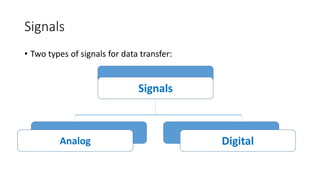
Signals
• Two types of signals for data transfer:
Signals
Digital
Analog
Analog Signals
• Continuous
• Pass through an infinite number of continuous values along its path
(diagram)
Digital Signals
• Limited number of defined values
• Each number simply 1 or 0
• (diagram)
Transmission Media
• Means of transforming data from one place to another
• Categorised into two : electromagnetic and sound
• Electromagnetic radiation-transmitted through optical media e.g.
optical fiber, twisted pair wires, coaxial cables. May also pas through
any physical material that is transparent to the wavelength including
water, air, glass or concrete
• Sound-vibration of matter therefore requires a physical medium of
transmission just like other kinds of mechanical waves and heat
energy
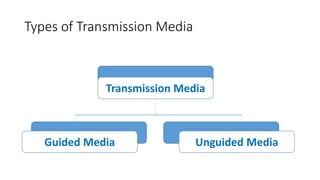
Types of Transmission Media
Transmission Media
Unguided Media
Guided Media
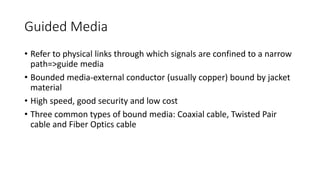
Guided Media
• Refer to physical links through which signals are confined to a narrow
path=>guide media
• Bounded media-external conductor (usually copper) bound by jacket
material
• High speed, good security and low cost
• Three common types of bound media: Coaxial cable, Twisted Pair
cable and Fiber Optics cable
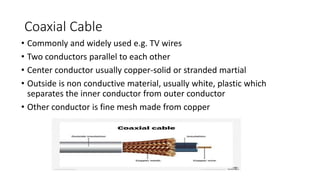
Coaxial Cable
• Commonly and widely used e.g. TV wires
• Two conductors parallel to each other
• Center conductor usually copper-solid or stranded martial
• Outside is non conductive material, usually white, plastic which
separates the inner conductor from outer conductor
• Other conductor is fine mesh made from copper
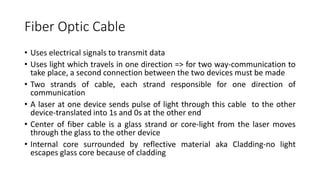
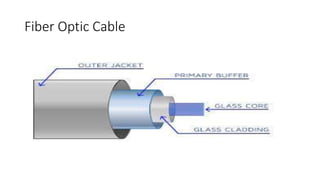
Fiber Optic Cable
• Uses electrical signals to transmit data
• Uses light which travels in one direction => for two way-communication to
take place, a second connection between the two devices must be made
• Two strands of cable, each strand responsible for one direction of
communication
• A laser at one device sends pulse of light through this cable to the other
device-translated into 1s and 0s at the other end
• Center of fiber cable is a glass strand or core-light from the laser moves
through the glass to the other device
• Internal core surrounded by reflective material aka Cladding-no light
escapes glass core because of cladding
Fiber Optic Cable
Twisted Pair Cable
• Most popular networking cable
• Light weight, easy to install, inexpensive and supports many different
types of network
• Pairs of soli or stranded copper twisted along each other
• Twists done to reduce vulnerability to EMI and crosstalk
• Two types: Unshielded twisted pair (UTP) and Shielded twisted pair
(STP)
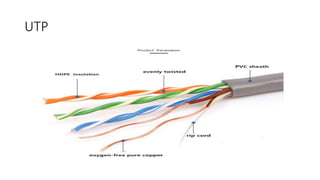
Unshielded Twisted Pair
• Voice or data grade depending on condition
• Impedance of 100 ohm
• Cost less than STP
• Easily available
UTP
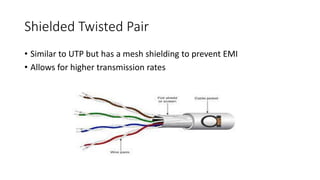
Shielded Twisted Pair
• Similar to UTP but has a mesh shielding to prevent EMI
• Allows for higher transmission rates
Unguided Media
• AKA wireless media
• No physical connectors between two devices
• Transmission done through the atmosphere
• Used when there is physical obstruction or distance which blocks use
of physical media
• Three types of wireless media: radio waves, micro waves, infrared
waves
Devices used in networking
• Hub
• Switch
• Router
• Modem
Hub
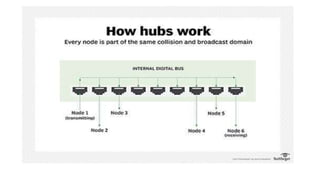
• Hubs connect multiple computer networking devices together
• Acts as a repeater in that it amplifies signals that deteriorate after traveling long
distances over connecting cables
• Simplest in the family of network connecting devices because it connects LAN
components with identical protocols
• Used with both digital and analog data, provided its settings have been
configured to prepare for the formatting of the incoming data e.g. if the incoming
data is in digital format, the hub must pass it on as packets; however, if the
incoming data is analog, then the hub passes it on in signal form
• Hubs do not perform packet filtering or addressing functions; they just send data
packets to all connected devices. Hubs operate at the Physical layer of the Open
Systems Interconnection (OSI) model. There are two types of hubs: simple and
multiple port
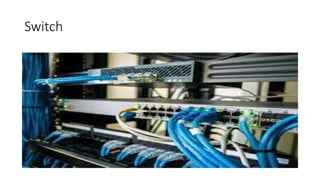
Switch
• More intelligent role than hubs
• Multiport device that improves network efficiency
• Maintains limited routing information about nodes in the internal network, and it allows connections to
systems like hubs or routers
• Strands of LANs are usually connected using switches
• Improves network efficiency over hubs or routers because of the virtual circuit capability
• Improve network security because the virtual circuits are more difficult to examine with network monitors.
• Has some of the best capabilities of routers and hubs combined.
• Work at either the Data Link layer or the Network layer of the OSI model
• A multilayer switch is one that can operate at both layers, which means that it can operate as both a switch
and a router. A multilayer switch is a high-performance device that supports the same routing protocols as
routers.
• Subject to distributed denial of service (DDoS) attacks however, flood guards are used to prevent malicious
traffic from bringing the switch to a halt. (switch security)
Switch
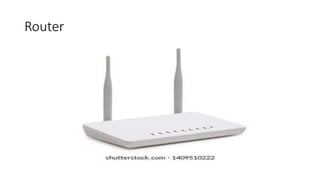
Router
• Help transmit packets to their destinations by charting a path through the sea of interconnected networking
devices using different network topologies
• Intelligent devices, and they store information about the networks they’re connected to
• Most routers can be configured to operate as packet-filtering firewalls and use access control lists (ACLs).
• Routers, in conjunction with a channel service unit/data service unit (CSU/DSU), are also used to translate
from LAN framing to WAN framing (N.B. LANs and WANs use different network protocols) Such routers are
known as border routers. They serve as the outside connection of a LAN to a WAN, and they operate at the
border of your network.
• Divide internal networks into two or more subnetworks. Routers can also be connected internally to other
routers, creating zones that operate independently. Routers establish communication by maintaining tables
about destinations and local connections. A router contains information about the systems connected to it
and where to send requests if the destination isn’t known. Routers usually communicate routing and other
information using one of three standard protocols: Routing Information Protocol (RIP), Border Gateway
Protocol (BGP) or Open Shortest Path First (OSPF).
• Normally work at the Network layer of the OSI model.
Router
Modem
• Modems (modulators-demodulators)
• Transmit digital signals over analog telephone lines
• Digital signals are converted by the modem into analog signals of different
frequencies and transmitted to a modem at the receiving location
• Receiving modem performs the reverse transformation and provides a
digital output to a device connected to a modem, usually a computer
• Digital data is usually transferred to or from the modem over a serial line
through an industry standard interface, RS-232
• Many telephone companies offer DSL services, and many cable operators
use modems as end terminals for identification and recognition of home
and personal users
• Modems work on both the Physical and Data Link layers.
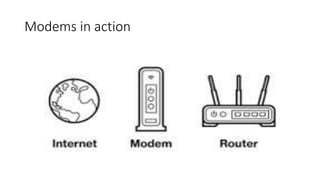
Modems in action
Reading Assignment:
• Explain the OSI Model

Chapter 5 - Data Communication and Internet Technology Pt.1.pptx

  • 1.
    Data Communication andInternet Technology DM211 Presentation to Diploma in Management Class of 2023 Date: 17 October 2023 Presenter: Pamela F. Mudzamba
  • 2.
    Data Communications Objectives:  Explaindata communication concepts  Components of data communication  Data flow: Simplex, Half duplex and Full duplex  Signals: Analog and Digital  Transmission media: Guided and Unguided  Networking devices
  • 3.
    Data Communications Defined •Exchange of data between two devices via some forms of transmission medium (such as wire cable) • Requires that communicating devices be part of a communication system (combination of hardware and software) • Effectiveness of a data communication system depends on four fundamental characteristics: delivery, accuracy, timeliness and jitter
  • 4.
    Components of DataCommunications 1. Message – information to be communicated e.g. text. Pictures, audio or video 2. Sender – device which sends the data messages e.g. computer, workstation, telephone handset 3. Receiver – device which receives data messages e.g. computer, workstation, telephone handset 4. Transmission medium – Physical path by which a message travels from sender to receiver e.g. twisted-pair wire, coaxial cable, radio waves 5. Protocol – Set of rule that govern data comms, representing an agreement between communicating devices—without protocol, no communication
  • 5.
    Data flow canoccur in three ways: 1. Simplex – communication is unidirectional, only one device on a link can transmit, the other can only receive e.g. keyboards, monitors etc. 2. Half-duplex – Each station can both transmit and receive but not at the same time. When one device is sending, the other can only receive and vice-versa e.g. walkie-talkies, CB (Citizens band) etc. 3. Full duplex – both stations can transmit and receive simultaneously. E.g. telephone networks-when two people are communicating by telephone, both can talk and listen at the same time, used when communication in both directions is required all the time.
  • 6.
    Signals • Two typesof signals for data transfer: Signals Digital Analog
  • 7.
    Analog Signals • Continuous •Pass through an infinite number of continuous values along its path (diagram)
  • 8.
    Digital Signals • Limitednumber of defined values • Each number simply 1 or 0 • (diagram)
  • 9.
    Transmission Media • Meansof transforming data from one place to another • Categorised into two : electromagnetic and sound • Electromagnetic radiation-transmitted through optical media e.g. optical fiber, twisted pair wires, coaxial cables. May also pas through any physical material that is transparent to the wavelength including water, air, glass or concrete • Sound-vibration of matter therefore requires a physical medium of transmission just like other kinds of mechanical waves and heat energy
  • 10.
    Types of TransmissionMedia Transmission Media Unguided Media Guided Media
  • 11.
    Guided Media • Referto physical links through which signals are confined to a narrow path=>guide media • Bounded media-external conductor (usually copper) bound by jacket material • High speed, good security and low cost • Three common types of bound media: Coaxial cable, Twisted Pair cable and Fiber Optics cable
  • 12.
    Coaxial Cable • Commonlyand widely used e.g. TV wires • Two conductors parallel to each other • Center conductor usually copper-solid or stranded martial • Outside is non conductive material, usually white, plastic which separates the inner conductor from outer conductor • Other conductor is fine mesh made from copper
  • 13.
    Fiber Optic Cable •Uses electrical signals to transmit data • Uses light which travels in one direction => for two way-communication to take place, a second connection between the two devices must be made • Two strands of cable, each strand responsible for one direction of communication • A laser at one device sends pulse of light through this cable to the other device-translated into 1s and 0s at the other end • Center of fiber cable is a glass strand or core-light from the laser moves through the glass to the other device • Internal core surrounded by reflective material aka Cladding-no light escapes glass core because of cladding
  • 14.
  • 15.
    Twisted Pair Cable •Most popular networking cable • Light weight, easy to install, inexpensive and supports many different types of network • Pairs of soli or stranded copper twisted along each other • Twists done to reduce vulnerability to EMI and crosstalk • Two types: Unshielded twisted pair (UTP) and Shielded twisted pair (STP)
  • 16.
    Unshielded Twisted Pair •Voice or data grade depending on condition • Impedance of 100 ohm • Cost less than STP • Easily available
  • 17.
  • 18.
    Shielded Twisted Pair •Similar to UTP but has a mesh shielding to prevent EMI • Allows for higher transmission rates
  • 19.
    Unguided Media • AKAwireless media • No physical connectors between two devices • Transmission done through the atmosphere • Used when there is physical obstruction or distance which blocks use of physical media • Three types of wireless media: radio waves, micro waves, infrared waves
  • 20.
    Devices used innetworking • Hub • Switch • Router • Modem
  • 21.
    Hub • Hubs connectmultiple computer networking devices together • Acts as a repeater in that it amplifies signals that deteriorate after traveling long distances over connecting cables • Simplest in the family of network connecting devices because it connects LAN components with identical protocols • Used with both digital and analog data, provided its settings have been configured to prepare for the formatting of the incoming data e.g. if the incoming data is in digital format, the hub must pass it on as packets; however, if the incoming data is analog, then the hub passes it on in signal form • Hubs do not perform packet filtering or addressing functions; they just send data packets to all connected devices. Hubs operate at the Physical layer of the Open Systems Interconnection (OSI) model. There are two types of hubs: simple and multiple port
  • 23.
    Switch • More intelligentrole than hubs • Multiport device that improves network efficiency • Maintains limited routing information about nodes in the internal network, and it allows connections to systems like hubs or routers • Strands of LANs are usually connected using switches • Improves network efficiency over hubs or routers because of the virtual circuit capability • Improve network security because the virtual circuits are more difficult to examine with network monitors. • Has some of the best capabilities of routers and hubs combined. • Work at either the Data Link layer or the Network layer of the OSI model • A multilayer switch is one that can operate at both layers, which means that it can operate as both a switch and a router. A multilayer switch is a high-performance device that supports the same routing protocols as routers. • Subject to distributed denial of service (DDoS) attacks however, flood guards are used to prevent malicious traffic from bringing the switch to a halt. (switch security)
  • 24.
  • 25.
    Router • Help transmitpackets to their destinations by charting a path through the sea of interconnected networking devices using different network topologies • Intelligent devices, and they store information about the networks they’re connected to • Most routers can be configured to operate as packet-filtering firewalls and use access control lists (ACLs). • Routers, in conjunction with a channel service unit/data service unit (CSU/DSU), are also used to translate from LAN framing to WAN framing (N.B. LANs and WANs use different network protocols) Such routers are known as border routers. They serve as the outside connection of a LAN to a WAN, and they operate at the border of your network. • Divide internal networks into two or more subnetworks. Routers can also be connected internally to other routers, creating zones that operate independently. Routers establish communication by maintaining tables about destinations and local connections. A router contains information about the systems connected to it and where to send requests if the destination isn’t known. Routers usually communicate routing and other information using one of three standard protocols: Routing Information Protocol (RIP), Border Gateway Protocol (BGP) or Open Shortest Path First (OSPF). • Normally work at the Network layer of the OSI model.
  • 26.
  • 27.
    Modem • Modems (modulators-demodulators) •Transmit digital signals over analog telephone lines • Digital signals are converted by the modem into analog signals of different frequencies and transmitted to a modem at the receiving location • Receiving modem performs the reverse transformation and provides a digital output to a device connected to a modem, usually a computer • Digital data is usually transferred to or from the modem over a serial line through an industry standard interface, RS-232 • Many telephone companies offer DSL services, and many cable operators use modems as end terminals for identification and recognition of home and personal users • Modems work on both the Physical and Data Link layers.
  • 28.
  • 29.