Workshop
Kyushu Institute of Technology
Kazuaki Tanaka
2023/9/11-2023/9/15
About Me
• Kazuaki TANAKA(たなか かずあき)
• Kyushu Institute of Technology, JAPAN
Associate Professor
• Ph. D in Information Science
• Research topics: embedded systems, IoT,
mruby, wireless communication
Research topic:
mruby and mruby/c
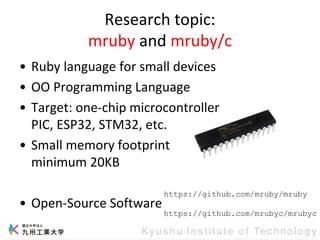
• Ruby language for small devices
• OO Programming Language
• Target: one-chip microcontroller
PIC, ESP32, STM32, etc.
• Small memory footprint
minimum 20KB
• Open-Source Software
https://github.com/mruby/mruby
https://github.com/mrubyc/mrubyc
What is Ruby language?
• Object Oriented Programming Language
– Scripting language
– Web application, Ruby on Rails
• Matsumoto has said that Ruby is designed
for programmer productivity and fun.
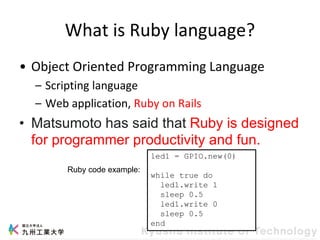
led1 = GPIO.new(0)
while true do
led1.write 1
sleep 0.5
led1.write 0
sleep 0.5
end
Ruby code example:
Research topic:
wireless communication
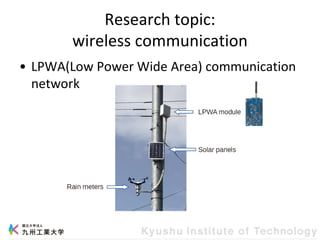
• LPWA(Low Power Wide Area) communication
network
LPWA
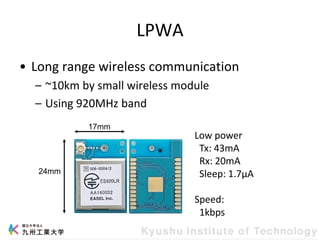
• Long range wireless communication
– ~10km by small wireless module
– Using 920MHz band
24mm
17mm
Low power
Tx: 43mA
Rx: 20mA
Sleep: 1.7μA
Speed:
1kbps
Introduction
This workshop
• Experience in embedded software
development.
• mruby programming
• Controlling electronic circuits
• Brightness sensor
Simple Circuit
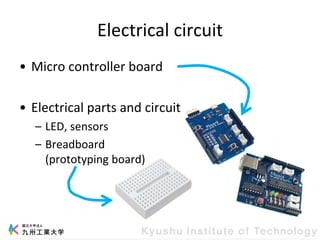
Electrical circuit
• Micro controller board
• Electrical parts and circuit
– LED, sensors
– Breadboard
(prototyping board)
Run the first program
• Coding
• Compile and Download
Download= transfer compiled program into
microcontroller board
• Execute
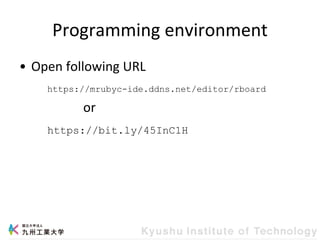
Programming environment
• Open following URL
or
https://mrubyc-ide.ddns.net/editor/rboard
https://bit.ly/45InC1H
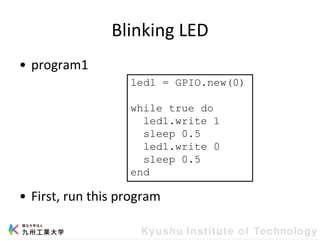
Blinking LED
• program1
• First, run this program
led1 = GPIO.new(0)
while true do
led1.write 1
sleep 0.5
led1.write 0
sleep 0.5
end
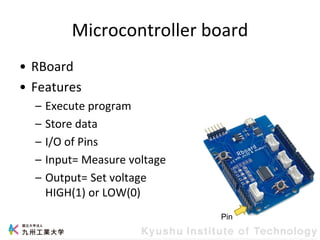
Microcontroller board
• RBoard
• Features
– Execute program
– Store data
– I/O of Pins
– Input= Measure voltage
– Output= Set voltage
HIGH(1) or LOW(0)
Pin
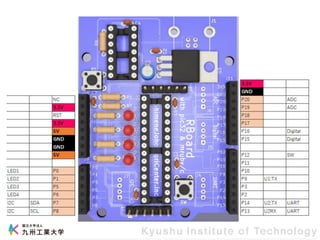
Onboard LEDs
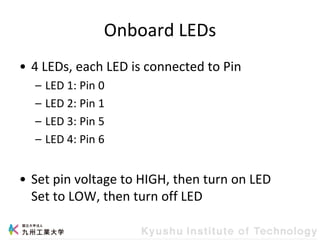
• 4 LEDs, each LED is connected to Pin
– LED 1: Pin 0
– LED 2: Pin 1
– LED 3: Pin 5
– LED 4: Pin 6
• Set pin voltage to HIGH, then turn on LED
Set to LOW, then turn off LED
Program
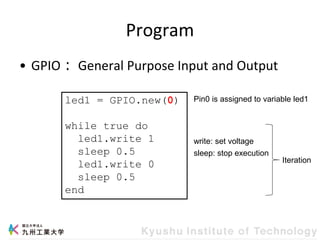
• GPIO: General Purpose Input and Output
led1 = GPIO.new(0)
while true do
led1.write 1
sleep 0.5
led1.write 0
sleep 0.5
end
Pin0 is assigned to variable led1
Iteration
write: set voltage
sleep: stop execution
Exercises
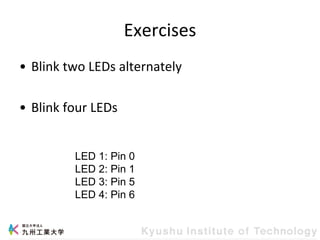
• Blink two LEDs alternately
• Blink four LEDs
LED 1: Pin 0
LED 2: Pin 1
LED 3: Pin 5
LED 4: Pin 6
LED
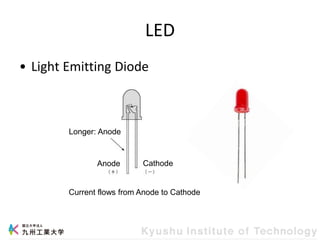
• Light Emitting Diode
Current flows from Anode to Cathode
Longer: Anode
Anode Cathode
LED Circuit
• Make LED on
– Current flowing through the LED
• Rboard feature
– Set voltage of Pin
– Set HIGH or LOW
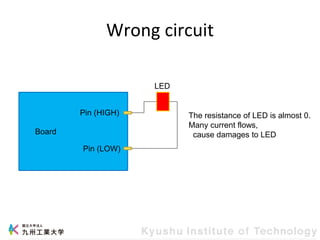
Wrong circuit
Board
Pin (HIGH)
Pin (LOW)
LED
The resistance of LED is almost 0.
Many current flows,
cause damages to LED
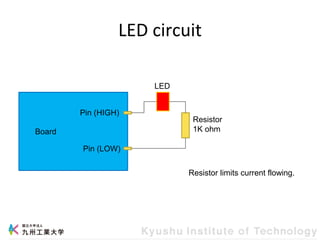
LED circuit
Board
Pin (HIGH)
Pin (LOW)
LED
Resistor
1K ohm
Resistor limits current flowing.
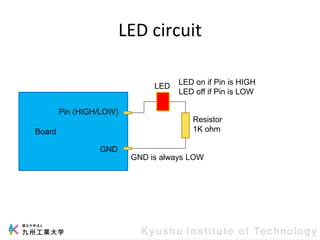
LED circuit
Board
Pin (HIGH/LOW)
GND
LED
Resistor
1K ohm
GND is always LOW
LED on if Pin is HIGH
LED off if Pin is LOW
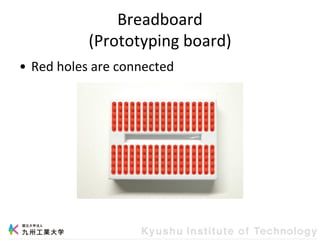
Breadboard
(Prototyping board)
• Red holes are connected
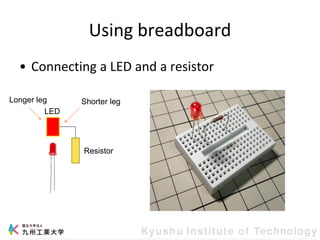
Using breadboard
• Connecting a LED and a resistor
LED
Resistor
Longer leg Shorter leg
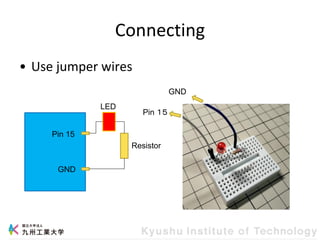
Connecting
• Use jumper wires
Pin 15
GND
LED
Resistor
Pin 15
GND
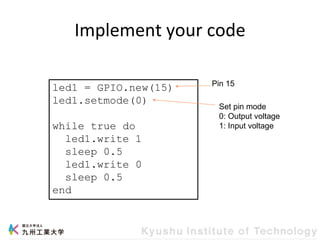
Implement your code
led1 = GPIO.new(15)
led1.setmode(0)
while true do
led1.write 1
sleep 0.5
led1.write 0
sleep 0.5
end
Set pin mode
0: Output voltage
1: Input voltage
Pin 15
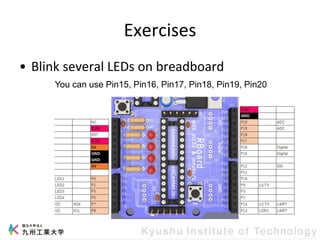
Exercises
• Blink several LEDs on breadboard
You can use Pin15, Pin16, Pin17, Pin18, Pin19, Pin20
PWM
PWM
Analog output
• Output of microcontrollers: Digital
– HIGH or LOW voltage
– In LED, ON or OFF
• We want: Analog
– Change voltage
– In LED, ON…bright…dark…OFF
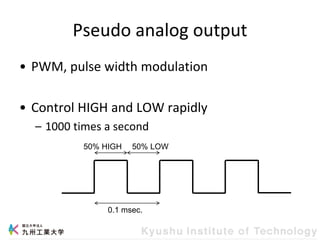
Pseudo analog output
• PWM, pulse width modulation
• Control HIGH and LOW rapidly
– 1000 times a second
0.1 msec.
50% HIGH 50% LOW
Change brightness
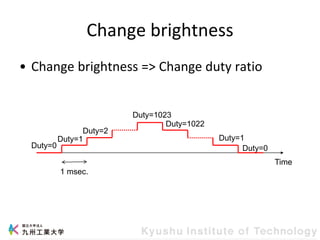
• Change brightness => Change duty ratio
Time
1 msec.
Duty=1
Duty=2
Duty=1023
Duty=1022
Duty=1
Duty=0
Duty=0
PWM example
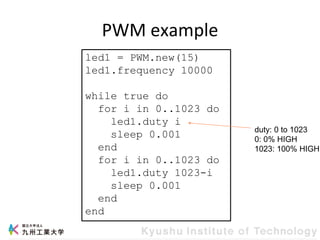
led1 = PWM.new(15)
led1.frequency 10000
while true do
for i in 0..1023 do
led1.duty i
sleep 0.001
end
for i in 0..1023 do
led1.duty 1023-i
sleep 0.001
end
end
duty: 0 to 1023
0: 0% HIGH
1023: 100% HIGH
Brightness Sensor
CdS
• CdS: Resistance changes with varying light
levels.
• Microcontroller can detect VOLTAGE
CdS circuit
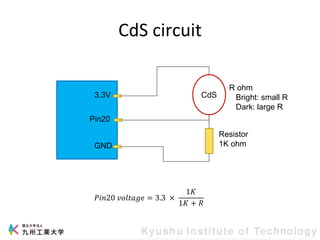
CdS
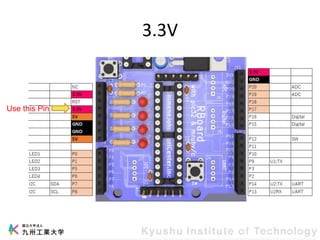
3.3V
Pin20
GND
Resistor
1K ohm
R ohm
Bright: small R
Dark: large R
𝑃𝑖𝑛20 𝑣𝑜𝑙𝑡𝑎𝑔𝑒 = 3.3 ×
1𝐾
1𝐾 + 𝑅
3.3V
Use this Pin
ADC
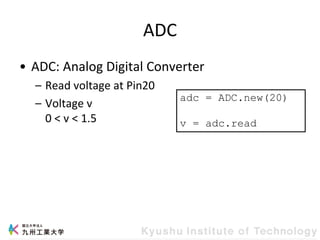
• ADC: Analog Digital Converter
– Read voltage at Pin20
– Voltage v
0 < v < 1.5
adc = ADC.new(20)
v = adc.read
CdS example
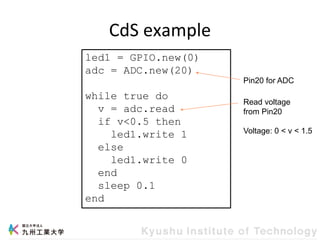
led1 = GPIO.new(0)
adc = ADC.new(20)
while true do
v = adc.read
if v<0.5 then
led1.write 1
else
led1.write 0
end
sleep 0.1
end
Read voltage
from Pin20
Voltage: 0 < v < 1.5
Pin20 for ADC
Exercises
• Brightness sensor
• LED changes by brightness
– Green: bright
– Yellow: a little dark
– Red: dark
• adc.read returns around 0.2 in dark, and
returns around 0.9 in bright
Conclusion
Embedded systems
• Software and Hardware integration
• Software controls hardware
– Requires both software and hardware knowledge
workshop slide.pdf

workshop slide.pdf

  • 1.
    Workshop Kyushu Institute ofTechnology Kazuaki Tanaka 2023/9/11-2023/9/15
  • 2.
    About Me • KazuakiTANAKA(たなか かずあき) • Kyushu Institute of Technology, JAPAN Associate Professor • Ph. D in Information Science • Research topics: embedded systems, IoT, mruby, wireless communication
  • 3.
    Research topic: mruby andmruby/c • Ruby language for small devices • OO Programming Language • Target: one-chip microcontroller PIC, ESP32, STM32, etc. • Small memory footprint minimum 20KB • Open-Source Software https://github.com/mruby/mruby https://github.com/mrubyc/mrubyc
  • 4.
    What is Rubylanguage? • Object Oriented Programming Language – Scripting language – Web application, Ruby on Rails • Matsumoto has said that Ruby is designed for programmer productivity and fun. led1 = GPIO.new(0) while true do led1.write 1 sleep 0.5 led1.write 0 sleep 0.5 end Ruby code example:
  • 5.
    Research topic: wireless communication •LPWA(Low Power Wide Area) communication network
  • 6.
    LPWA • Long rangewireless communication – ~10km by small wireless module – Using 920MHz band 24mm 17mm Low power Tx: 43mA Rx: 20mA Sleep: 1.7μA Speed: 1kbps
  • 7.
  • 8.
    This workshop • Experiencein embedded software development. • mruby programming • Controlling electronic circuits • Brightness sensor
  • 9.
  • 10.
    Electrical circuit • Microcontroller board • Electrical parts and circuit – LED, sensors – Breadboard (prototyping board)
  • 11.
    Run the firstprogram • Coding • Compile and Download Download= transfer compiled program into microcontroller board • Execute
  • 12.
    Programming environment • Openfollowing URL or https://mrubyc-ide.ddns.net/editor/rboard https://bit.ly/45InC1H
  • 13.
    Blinking LED • program1 •First, run this program led1 = GPIO.new(0) while true do led1.write 1 sleep 0.5 led1.write 0 sleep 0.5 end
  • 14.
    Microcontroller board • RBoard •Features – Execute program – Store data – I/O of Pins – Input= Measure voltage – Output= Set voltage HIGH(1) or LOW(0) Pin
  • 15.
    Onboard LEDs • 4LEDs, each LED is connected to Pin – LED 1: Pin 0 – LED 2: Pin 1 – LED 3: Pin 5 – LED 4: Pin 6 • Set pin voltage to HIGH, then turn on LED Set to LOW, then turn off LED
  • 16.
    Program • GPIO: GeneralPurpose Input and Output led1 = GPIO.new(0) while true do led1.write 1 sleep 0.5 led1.write 0 sleep 0.5 end Pin0 is assigned to variable led1 Iteration write: set voltage sleep: stop execution
  • 17.
    Exercises • Blink twoLEDs alternately • Blink four LEDs LED 1: Pin 0 LED 2: Pin 1 LED 3: Pin 5 LED 4: Pin 6
  • 18.
    LED • Light EmittingDiode Current flows from Anode to Cathode Longer: Anode Anode Cathode
  • 19.
    LED Circuit • MakeLED on – Current flowing through the LED • Rboard feature – Set voltage of Pin – Set HIGH or LOW
  • 20.
    Wrong circuit Board Pin (HIGH) Pin(LOW) LED The resistance of LED is almost 0. Many current flows, cause damages to LED
  • 21.
    LED circuit Board Pin (HIGH) Pin(LOW) LED Resistor 1K ohm Resistor limits current flowing.
  • 22.
    LED circuit Board Pin (HIGH/LOW) GND LED Resistor 1Kohm GND is always LOW LED on if Pin is HIGH LED off if Pin is LOW
  • 23.
  • 24.
    Using breadboard • Connectinga LED and a resistor LED Resistor Longer leg Shorter leg
  • 26.
    Connecting • Use jumperwires Pin 15 GND LED Resistor Pin 15 GND
  • 27.
    Implement your code led1= GPIO.new(15) led1.setmode(0) while true do led1.write 1 sleep 0.5 led1.write 0 sleep 0.5 end Set pin mode 0: Output voltage 1: Input voltage Pin 15
  • 28.
    Exercises • Blink severalLEDs on breadboard You can use Pin15, Pin16, Pin17, Pin18, Pin19, Pin20
  • 29.
  • 30.
    PWM Analog output • Outputof microcontrollers: Digital – HIGH or LOW voltage – In LED, ON or OFF • We want: Analog – Change voltage – In LED, ON…bright…dark…OFF
  • 31.
    Pseudo analog output •PWM, pulse width modulation • Control HIGH and LOW rapidly – 1000 times a second 0.1 msec. 50% HIGH 50% LOW
  • 32.
    Change brightness • Changebrightness => Change duty ratio Time 1 msec. Duty=1 Duty=2 Duty=1023 Duty=1022 Duty=1 Duty=0 Duty=0
  • 33.
    PWM example led1 =PWM.new(15) led1.frequency 10000 while true do for i in 0..1023 do led1.duty i sleep 0.001 end for i in 0..1023 do led1.duty 1023-i sleep 0.001 end end duty: 0 to 1023 0: 0% HIGH 1023: 100% HIGH
  • 34.
  • 35.
    CdS • CdS: Resistancechanges with varying light levels. • Microcontroller can detect VOLTAGE
  • 36.
    CdS circuit CdS 3.3V Pin20 GND Resistor 1K ohm Rohm Bright: small R Dark: large R 𝑃𝑖𝑛20 𝑣𝑜𝑙𝑡𝑎𝑔𝑒 = 3.3 × 1𝐾 1𝐾 + 𝑅
  • 37.
  • 38.
    ADC • ADC: AnalogDigital Converter – Read voltage at Pin20 – Voltage v 0 < v < 1.5 adc = ADC.new(20) v = adc.read
  • 39.
    CdS example led1 =GPIO.new(0) adc = ADC.new(20) while true do v = adc.read if v<0.5 then led1.write 1 else led1.write 0 end sleep 0.1 end Read voltage from Pin20 Voltage: 0 < v < 1.5 Pin20 for ADC
  • 40.
    Exercises • Brightness sensor •LED changes by brightness – Green: bright – Yellow: a little dark – Red: dark • adc.read returns around 0.2 in dark, and returns around 0.9 in bright
  • 41.
  • 42.
    Embedded systems • Softwareand Hardware integration • Software controls hardware – Requires both software and hardware knowledge