The Arduino
Workshop on Arduino Embedded Development Board
1
Embedded Systems
Arduino Basics
Arduino Architecture
Arduino board layout. What are the resources available
Arduino IDE
Programming fundamentals
Learn by Doing – Sense, Control & Actuate
Project 1: LED Blinking
Project 2: RGB LED Interfacing & PWM Control
Project 3: Interfacing Sensors (Light, Temperature, etc.,)
Project 4: Interfacing Actuators (Motor Speed Control using PWM)
Introduction
2
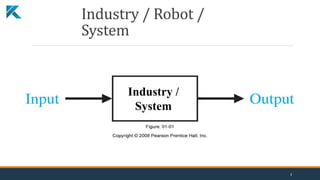
Industry / Robot /
System
Industry /
System
3
System & Control
System / Plant: “A system may be a piece of equipment, perhaps just a set of machine
parts functioning together, the purpose of which is to perform a particular operation”.
Control System: “A control system is an interconnection of components forming a system
configuration that provide a desired system performance”
4
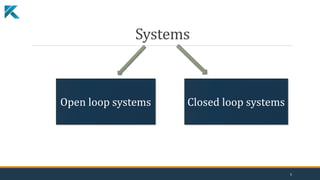
Systems
Open loop systems Closed loop systems
5
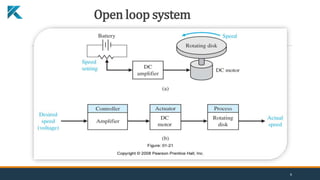
Open loop system
6
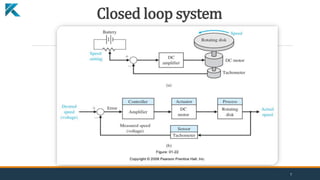
Closed loop system
7
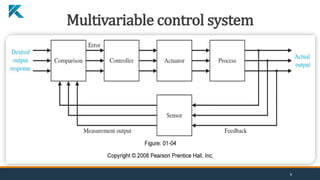
Multivariable control system
8
Embedded Systems
"It is a combination of hardware and software to perform a specific task"
“An embedded system is a computer system with a dedicated function
within a larger mechanical or electrical system, often with real-time
computing constraints. It is embedded as part of a complete device often
including hardware and mechanical parts. Embedded systems control
many devices in common use today.”
9
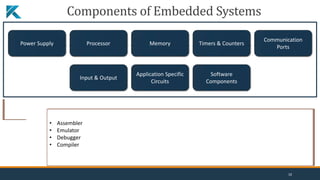
Components of Embedded Systems
Power Supply Processor Memory Timers & Counters
Communication
Ports
Input & Output
Application Specific
Circuits
Software
Components
Stable & Smooth Output
Proper Output Current to Drive the Load
Perfect Power Efficiency
Stable in Different Temperature Range
Proper Noise Filtering
Proper Decoupling
Line Regulation changes
Load Regulation – Fluctuation in output voltage when
load current changes
Efficiency
Input/Output Ripple Voltage
Transient Response
Allowable Dissipation
• Speed
• Unit Price
• Packaging
• Performance
• Peripheral Set
• Timer on the Chip
• Operating Voltage
• Number of I/O Pins
• Power Consumption
• Amount of RAM and ROM
• Specialized Processing Units
• Architecture 8-bit, 16-bit, or 32-bit
• Read-Only memory(RAM)
• Random Access Memory(ROM)
• Electrically Erasable Programmable Read-Only
Memory (EEPROM)
• UART
• CAN
• SPI
• I2C
• USB
• Ethernet
• RS-232
• RS-423
• RS-485
• UART
• I2C
• SPI
• Power Supply
• Processor
• Display Device
• Buzzer for Alert
• Device Drivers
• MEMS devices
• Assembler
• Emulator
• Debugger
• Compiler
10
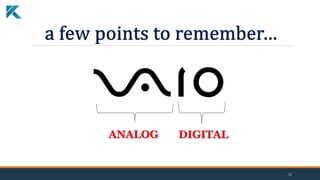
ANALOG DIGITAL
11
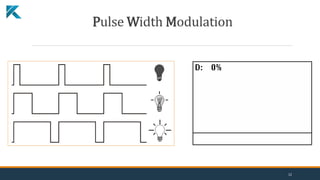
Pulse Width Modulation
12
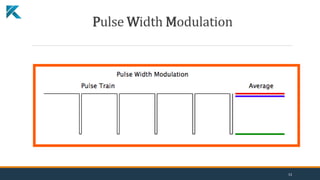
Pulse Width Modulation
13
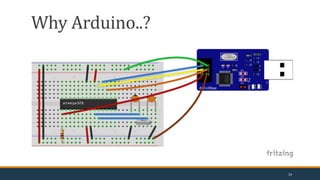
Why Arduino..?
14
arduino ( arrr-dween-oh )
(n.) It's an open-source physical computing platform based
on a simple microcontroller board, and a development
environment for writing software for the board.
Arduino Basics
15
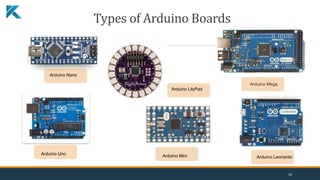
Arduino Nano
Arduino Mega
Arduino LilyPad
Arduino Mini Arduino Leonardo
Arduino Uno
Types of Arduino Boards
16
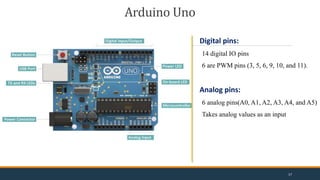
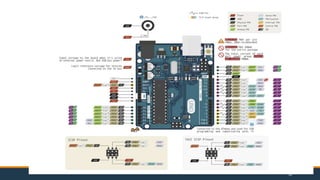
Arduino Uno
Digital pins:
14 digital IO pins
6 are PWM pins (3, 5, 6, 9, 10, and 11).
Analog pins:
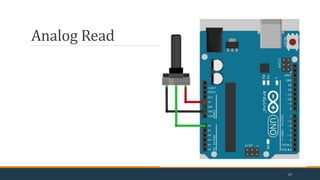
6 analog pins(A0, A1, A2, A3, A4, and A5)
Takes analog values as an input
17
18
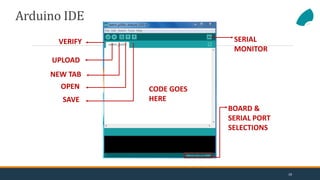
VERIFY
UPLOAD
NEW TAB
OPEN
SAVE
SERIAL
MONITOR
BOARD &
SERIAL PORT
SELECTIONS
CODE GOES
HERE
Arduino IDE
19
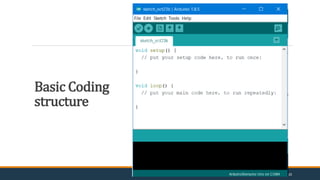
Basic Coding
structure
20
setup() function
•Called when a sketch starts.
•To initialize variables, pin modes, start using libraries, etc.
•Will only run once, after each power-up or reset of the Arduino
board.
loop() function
•Loops consecutively.
•Code in the loop() section of the sketch is used to actively
control the Arduino board.
Commenting
•Any line that starts with two slashes (//) will not be read by the
compiler, so you can write anything you want after it.
Basic Coding structure
21
 pinMode()
Instruction used to set the mode (INPUT or OUTPUT) in
which we are going to use a pin.
Eg: pinMode (13, OUTPUT);
ie. setting pin13 as output.
 digitalWrite()
•Write a HIGH or a LOW value to a digital pin.
•Eg: digitalWrite (11, HIGH);
•ie. setting pin 11 to high.
22
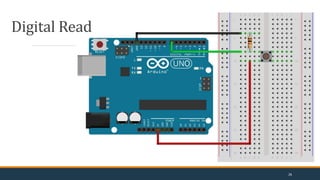
 digitalRead()
•Reads the value from a specified digital pin,
either HIGH or LOW
•Eg: int inPin=7;
val = digitalRead(inPin);
•ie. reads the value from inPin and assigns it to val.
 delay()
•Pauses the program for the amount of time (in milliseconds)
specified as parameter.
•Eg: delay(1000);
•ie. waits for a second (1000 ms = 1 s)
23
Component List
 Arduino Uno
 USB cable
 LED, RGB LED
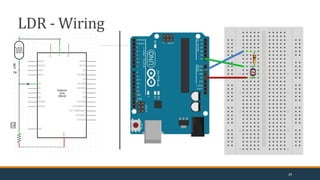
 LDR
 POT(10k)
 Resistors
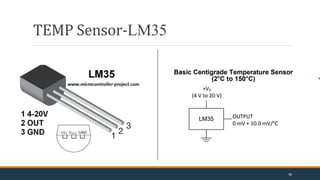
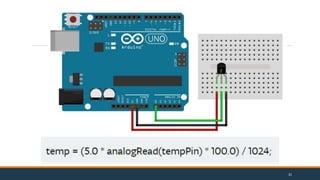
 Temp sensor LM-35
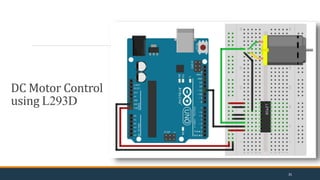
 Motor Driver L293D, DC Motor
Connecting wire
24
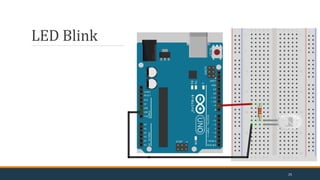
LED Blink
25
Digital Read
26
Analog Read
27
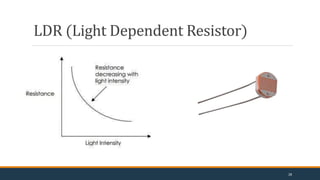
LDR (Light Dependent Resistor)
28
LDR - Wiring
29
TEMP Sensor-LM35
30
31
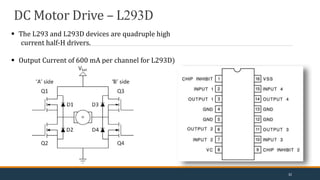
Motor Driver Circuit (L293D)
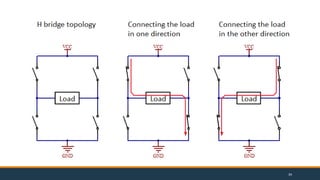
 The L293 and L293D devices are quadruple high
current half-H drivers.
 Output Current of 600 mA per channel for L293D)
DC Motor Drive – L293D
32
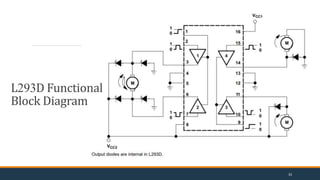
L293D Functional
Block Diagram
33
34
DC Motor Control
using L293D
35
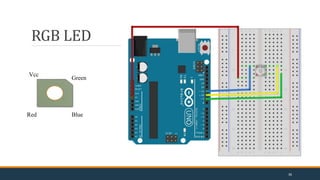
RGB LED
Vcc
Green
Blue
Red
36
“How much more Arduino can
do is only left to your
imagination”
37
Thank you
38

Arduino_Beginner.pptx

  • 1.
    The Arduino Workshop onArduino Embedded Development Board 1
  • 2.
    Embedded Systems Arduino Basics ArduinoArchitecture Arduino board layout. What are the resources available Arduino IDE Programming fundamentals Learn by Doing – Sense, Control & Actuate Project 1: LED Blinking Project 2: RGB LED Interfacing & PWM Control Project 3: Interfacing Sensors (Light, Temperature, etc.,) Project 4: Interfacing Actuators (Motor Speed Control using PWM) Introduction 2
  • 3.
    Industry / Robot/ System Industry / System 3
  • 4.
    System & Control System/ Plant: “A system may be a piece of equipment, perhaps just a set of machine parts functioning together, the purpose of which is to perform a particular operation”. Control System: “A control system is an interconnection of components forming a system configuration that provide a desired system performance” 4
  • 5.
    Systems Open loop systemsClosed loop systems 5
  • 6.
  • 7.
  • 8.
  • 9.
    Embedded Systems "It isa combination of hardware and software to perform a specific task" “An embedded system is a computer system with a dedicated function within a larger mechanical or electrical system, often with real-time computing constraints. It is embedded as part of a complete device often including hardware and mechanical parts. Embedded systems control many devices in common use today.” 9
  • 10.
    Components of EmbeddedSystems Power Supply Processor Memory Timers & Counters Communication Ports Input & Output Application Specific Circuits Software Components Stable & Smooth Output Proper Output Current to Drive the Load Perfect Power Efficiency Stable in Different Temperature Range Proper Noise Filtering Proper Decoupling Line Regulation changes Load Regulation – Fluctuation in output voltage when load current changes Efficiency Input/Output Ripple Voltage Transient Response Allowable Dissipation • Speed • Unit Price • Packaging • Performance • Peripheral Set • Timer on the Chip • Operating Voltage • Number of I/O Pins • Power Consumption • Amount of RAM and ROM • Specialized Processing Units • Architecture 8-bit, 16-bit, or 32-bit • Read-Only memory(RAM) • Random Access Memory(ROM) • Electrically Erasable Programmable Read-Only Memory (EEPROM) • UART • CAN • SPI • I2C • USB • Ethernet • RS-232 • RS-423 • RS-485 • UART • I2C • SPI • Power Supply • Processor • Display Device • Buzzer for Alert • Device Drivers • MEMS devices • Assembler • Emulator • Debugger • Compiler 10

  • 11.
  • 12.
  • 13.
  • 14.
  • 15.
    arduino ( arrr-dween-oh) (n.) It's an open-source physical computing platform based on a simple microcontroller board, and a development environment for writing software for the board. Arduino Basics 15
  • 16.
    Arduino Nano Arduino Mega ArduinoLilyPad Arduino Mini Arduino Leonardo Arduino Uno Types of Arduino Boards 16
  • 17.
    Arduino Uno Digital pins: 14digital IO pins 6 are PWM pins (3, 5, 6, 9, 10, and 11). Analog pins: 6 analog pins(A0, A1, A2, A3, A4, and A5) Takes analog values as an input 17
  • 18.
  • 19.
    VERIFY UPLOAD NEW TAB OPEN SAVE SERIAL MONITOR BOARD & SERIALPORT SELECTIONS CODE GOES HERE Arduino IDE 19
  • 20.
  • 21.
    setup() function •Called whena sketch starts. •To initialize variables, pin modes, start using libraries, etc. •Will only run once, after each power-up or reset of the Arduino board. loop() function •Loops consecutively. •Code in the loop() section of the sketch is used to actively control the Arduino board. Commenting •Any line that starts with two slashes (//) will not be read by the compiler, so you can write anything you want after it. Basic Coding structure 21
  • 22.
     pinMode() Instruction usedto set the mode (INPUT or OUTPUT) in which we are going to use a pin. Eg: pinMode (13, OUTPUT); ie. setting pin13 as output.  digitalWrite() •Write a HIGH or a LOW value to a digital pin. •Eg: digitalWrite (11, HIGH); •ie. setting pin 11 to high. 22
  • 23.
     digitalRead() •Reads thevalue from a specified digital pin, either HIGH or LOW •Eg: int inPin=7; val = digitalRead(inPin); •ie. reads the value from inPin and assigns it to val.  delay() •Pauses the program for the amount of time (in milliseconds) specified as parameter. •Eg: delay(1000); •ie. waits for a second (1000 ms = 1 s) 23
  • 24.
    Component List  ArduinoUno  USB cable  LED, RGB LED  LDR  POT(10k)  Resistors  Temp sensor LM-35  Motor Driver L293D, DC Motor Connecting wire 24
  • 25.
  • 26.
  • 27.
  • 28.
  • 29.
  • 30.
  • 31.
  • 32.
    Motor Driver Circuit(L293D)  The L293 and L293D devices are quadruple high current half-H drivers.  Output Current of 600 mA per channel for L293D) DC Motor Drive – L293D 32
  • 33.
  • 34.
  • 35.
  • 36.
  • 37.
    “How much moreArduino can do is only left to your imagination” 37
  • 38.