
WORDPRESS
SECURITY & PERFORMANCE
A BEGINNERS GUIDE
Carel Bekker: President/Owner
Copyright & trademark ClickHOST.com
What we’ll cover
2
ClickHOST Overview
WordPress Security tips
WordPress performance tips
Copyright & trademark ClickHOST.com
ClickHOST
Blazing fast & secure Website Hosting based SSD storage
WordPress Hosting
Flex/VPS Hosting
Domain Names
Amazon Web Services Managed Hosting
Free Malware monitoring
Free Premium Spam Filtering
Free Cloudflare WAF
3
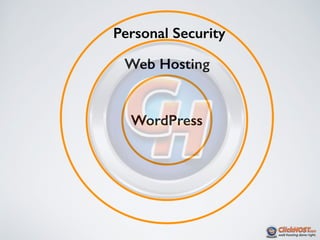
Personal Security
Web Hosting
WordPress
Copyright & trademark ClickHOST.com
Personal Security
•Use https access where possible
•Don’t use public (including Starbucks) WiFi
unless you have to.
•Remember your smart phone connects
automatically
•Make sure you use a industrial strength spam
filter like, Gmail or SpamExperts.
6
Copyright & trademark ClickHOST.com
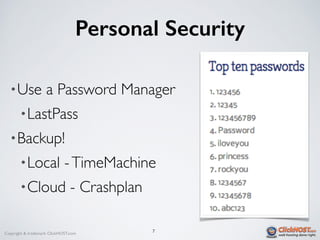
Personal Security
•Use a Password Manager
•LastPass
•Backup!
•Local -TimeMachine
•Cloud - Crashplan
7
Copyright & trademark ClickHOST.com
Backup Basics
8
• What is a backup?
•Reliable recent copy of your website.
•Should be easy to restore from your backup.
• Why should I backup?
•Bad things happen, especially in the WWW = wild, wild west.
• How often & when should I backup?
•Before any major updates to your website
•Before updating WordPress, plugins or themes
•Daily,Weekly, Monthly.
•1-2 different backup copies.
Copyright & trademark ClickHOST.com
Website Security Myths
• 1:Who would want to hack my website
• 2: I will see when my website is hacked
• 3: My website is 100% secure
• 4: My hosting provider will have a backup for me
• 5: I use strong passwords -- I’m ok
9
Copyright & trademark ClickHOST.com 10
Top Tips to
Secure WordPress
Copyright & trademark ClickHOST.com
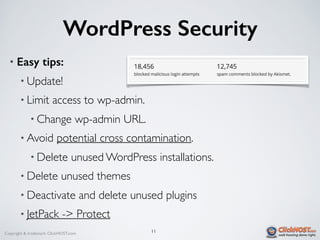
WordPress Security
• Easy tips:
• Update!
• Limit access to wp-admin.
• Change wp-admin URL.
• Avoid potential cross contamination.
• Delete unused WordPress installations.
• Delete unused themes
• Deactivate and delete unused plugins
• JetPack -> Protect
11
Copyright & trademark ClickHOST.com
WordPress Security
12
• Don’t use admin as your username.
• This is the default when installing
• Almost as bad as using password for your password :)
• How to fix this!
• Create a new administrator user.
• Log out, then log in as the new admin user.
• Delete the old “admin” user.
Copyright & trademark ClickHOST.com
WordPress Security Plugins
• Most include:
• One-click hardening
• File monitoring
• Personal Firewall (IP blocking)
• Install at least one Security plugin
• Sucuri
• iThemes
• Wordfence
• Akismet for spam control
• Tip: Set Alerts only for successful actions. Not failed actions.
13
Copyright & trademark ClickHOST.com
WAF
• WAF:Web Application Firewall
• Sucuri CloudProxy
• Cloudflare
• AWS WAF
• Note:All traffic flows via WAF
14
Copyright & trademark ClickHOST.com 15
WordPress
performance tips
Copyright & trademark ClickHOST.com
WordPress Stack
•To understand WordPress performance, you
need to understand the WordPress stack.
•HTML/PHP
•MYSQL
•Linux
•Which component is the slowest?
•WordPress content is mostly dynamically
generated version static HTML.
16
Copyright & trademark ClickHOST.com
Should I use a CDN?
•What is a CDN?
•Content Deliver Network.
•Requested resources are geographically closer to you.
•Why should you use a CDN?
•Users in different parts of the world.
•Need faster loading.
•Answer: It depends…
17
Copyright & trademark ClickHOST.com
CDNs
•Cloudflare
•Akamai
•MaxCDN
•Amazon Cloudfront
•Great tip: JetPack Photon. Images only.
18
Copyright & trademark ClickHOST.com
Caching
•What is caching?
•Load cached version of HTML from memory.
•Minify Javascript, CSS files — compress & combine.
•Use Basics settings for best performance.
•Plugins:
•W3Total Cache
•SuperCache
•WPRocket
19
Copyright & trademark ClickHOST.com
Easy Performance tips
•Use SSD hosting for fast DB access
•Enabled gzip compression
•Fewer plugins are better
•De-active rarely used plugins.
•Use Lightweight themes or frameworks
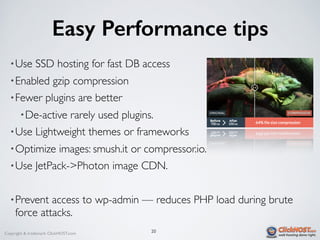
•Optimize images: smush.it or compressor.io.
•Use JetPack->Photon image CDN.
•Prevent access to wp-admin — reduces PHP load during brute
force attacks.
20
Copyright & trademark ClickHOST.com
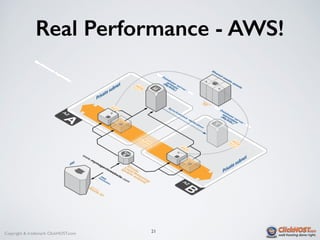
Real Performance - AWS!
21
Copyright & trademark ClickHOST.com
Carel Bekker
President&Owner
carel@clickhost.com
http://www.clickhost.com/
Tel: 404.220.8110
Mobile: 404.216.5201
22

WordPress security & performance a beginners guide

  • 1.
    WORDPRESS SECURITY & PERFORMANCE ABEGINNERS GUIDE Carel Bekker: President/Owner
  • 2.
    Copyright & trademarkClickHOST.com What we’ll cover 2 ClickHOST Overview WordPress Security tips WordPress performance tips
  • 3.
    Copyright & trademarkClickHOST.com ClickHOST Blazing fast & secure Website Hosting based SSD storage WordPress Hosting Flex/VPS Hosting Domain Names Amazon Web Services Managed Hosting Free Malware monitoring Free Premium Spam Filtering Free Cloudflare WAF 3
  • 5.
  • 6.
    Copyright & trademarkClickHOST.com Personal Security •Use https access where possible •Don’t use public (including Starbucks) WiFi unless you have to. •Remember your smart phone connects automatically •Make sure you use a industrial strength spam filter like, Gmail or SpamExperts. 6
  • 7.
    Copyright & trademarkClickHOST.com Personal Security •Use a Password Manager •LastPass •Backup! •Local -TimeMachine •Cloud - Crashplan 7
  • 8.
    Copyright & trademarkClickHOST.com Backup Basics 8 • What is a backup? •Reliable recent copy of your website. •Should be easy to restore from your backup. • Why should I backup? •Bad things happen, especially in the WWW = wild, wild west. • How often & when should I backup? •Before any major updates to your website •Before updating WordPress, plugins or themes •Daily,Weekly, Monthly. •1-2 different backup copies.
  • 9.
    Copyright & trademarkClickHOST.com Website Security Myths • 1:Who would want to hack my website • 2: I will see when my website is hacked • 3: My website is 100% secure • 4: My hosting provider will have a backup for me • 5: I use strong passwords -- I’m ok 9
  • 10.
    Copyright & trademarkClickHOST.com 10 Top Tips to Secure WordPress
  • 11.
    Copyright & trademarkClickHOST.com WordPress Security • Easy tips: • Update! • Limit access to wp-admin. • Change wp-admin URL. • Avoid potential cross contamination. • Delete unused WordPress installations. • Delete unused themes • Deactivate and delete unused plugins • JetPack -> Protect 11
  • 12.
    Copyright & trademarkClickHOST.com WordPress Security 12 • Don’t use admin as your username. • This is the default when installing • Almost as bad as using password for your password :) • How to fix this! • Create a new administrator user. • Log out, then log in as the new admin user. • Delete the old “admin” user.
  • 13.
    Copyright & trademarkClickHOST.com WordPress Security Plugins • Most include: • One-click hardening • File monitoring • Personal Firewall (IP blocking) • Install at least one Security plugin • Sucuri • iThemes • Wordfence • Akismet for spam control • Tip: Set Alerts only for successful actions. Not failed actions. 13
  • 14.
    Copyright & trademarkClickHOST.com WAF • WAF:Web Application Firewall • Sucuri CloudProxy • Cloudflare • AWS WAF • Note:All traffic flows via WAF 14
  • 15.
    Copyright & trademarkClickHOST.com 15 WordPress performance tips
  • 16.
    Copyright & trademarkClickHOST.com WordPress Stack •To understand WordPress performance, you need to understand the WordPress stack. •HTML/PHP •MYSQL •Linux •Which component is the slowest? •WordPress content is mostly dynamically generated version static HTML. 16
  • 17.
    Copyright & trademarkClickHOST.com Should I use a CDN? •What is a CDN? •Content Deliver Network. •Requested resources are geographically closer to you. •Why should you use a CDN? •Users in different parts of the world. •Need faster loading. •Answer: It depends… 17
  • 18.
    Copyright & trademarkClickHOST.com CDNs •Cloudflare •Akamai •MaxCDN •Amazon Cloudfront •Great tip: JetPack Photon. Images only. 18
  • 19.
    Copyright & trademarkClickHOST.com Caching •What is caching? •Load cached version of HTML from memory. •Minify Javascript, CSS files — compress & combine. •Use Basics settings for best performance. •Plugins: •W3Total Cache •SuperCache •WPRocket 19
  • 20.
    Copyright & trademarkClickHOST.com Easy Performance tips •Use SSD hosting for fast DB access •Enabled gzip compression •Fewer plugins are better •De-active rarely used plugins. •Use Lightweight themes or frameworks •Optimize images: smush.it or compressor.io. •Use JetPack->Photon image CDN. •Prevent access to wp-admin — reduces PHP load during brute force attacks. 20
  • 21.
    Copyright & trademarkClickHOST.com Real Performance - AWS! 21
  • 22.
    Copyright & trademarkClickHOST.com Carel Bekker President&Owner carel@clickhost.com http://www.clickhost.com/ Tel: 404.220.8110 Mobile: 404.216.5201 22