WORDPRESS IN THE
AMAZON EC2 CLOUD
Southern California WordPress Meetup, May 21st,
2013
Belsien Thomas, @belsien
http://wppowerguide.com
WHO AM I?
 I’m Belsien Thomas (@belsien), building websites with PHP,
JAVA, and various programming languages for over 12+ years.
Worked with WordPresss since 2006 (version 2.0). Spoken at
WordCamp LA.
 Run a WordPress blog http://wppowerguide.com has guides and
tips on how to utilize WordPress as a CMS in powerful ways,
other than just a blog.
 Built free video guided tutorial at http://buildyourwpsite.com , will
be putting up more free tutorials soon. Check out these two sites.
TOPICS COVERED
Why EC2?
Advantages/Disadvantages
What is Bitnami?
AWS Marketplace 1-Click Installers
Customize the default setup
WHY RUN ON EC2
• Micro instance is free for 1st year, after that basic costs
~$15/month (depending on # of services)
Cost Effective
• Micro instance has 613MB, more than most VPS
Fast
• EC2 is very secure, requires keypairs to connect and security
groups to open ports
Secure
• Start with “micro” and ramp up.
Scales well
ADVANTAGES
Create an unlimited number of websites, no
restrictions on WordPress instances
Same world class infrastructure as
Amazon.com
Already PCI Compliant, great for eCommerce!
Established and popular, easy to find people
who know AWS Systems and API’s
Everything can automated.
DISADVANTAGES
No Cpanel, Plesk style software, need to get
comfortable using Virtual Console or Remote
Desktop
Takes some learning to understand the “AWS
language” (Elastic IP, RDS, etc.)
No support from Amazon technical staff unless
you pay big $$$
A bit of a learning curve to setup initially
WHAT IS BITNAMI?
Preconfigured virtual server with entire stack
LAMP stack setup
Popular Linux flavors: Ubuntu 64-bit, Red Hat,
etc.
Creates default users for Apache and
databases for MySQL
Multiple Setup Options – 1 click installations
Completely Free software!
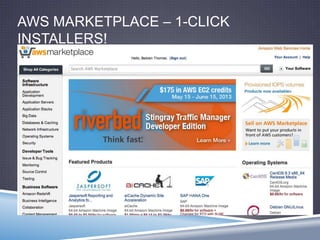
AWS MARKETPLACE – 1-CLICK
INSTALLERS!
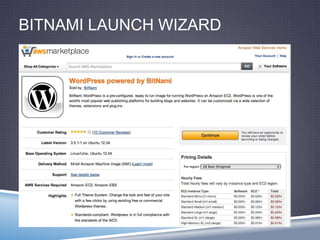
BITNAMI LAUNCH WIZARD
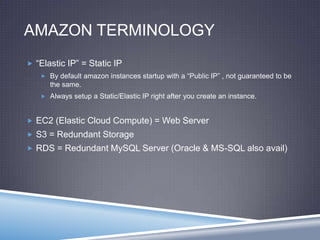
AMAZON TERMINOLOGY
 “Elastic IP” = Static IP
 By default amazon instances startup with a “Public IP” , not guaranteed to be
the same.
 Always setup a Static/Elastic IP right after you create an instance.
 EC2 (Elastic Cloud Compute) = Web Server
 S3 = Redundant Storage
 RDS = Redundant MySQL Server (Oracle & MS-SQL also avail)
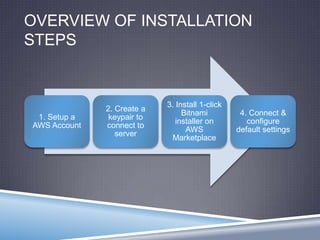
OVERVIEW OF INSTALLATION
STEPS
1. Setup a
AWS Account
2. Create a
keypair to
connect to
server
3. Install 1-click
Bitnami
installer on
AWS
Marketplace
4. Connect &
configure
default settings
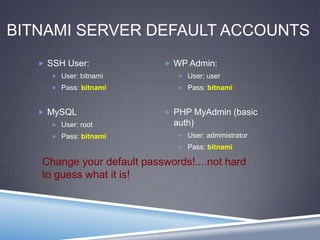
BITNAMI SERVER DEFAULT ACCOUNTS
 SSH User:
 User: bitnami
 Pass: bitnami
 MySQL
 User: root
 Pass: bitnami
 WP Admin:
 User: user
 Pass: bitnami
 PHP MyAdmin (basic
auth)
 User: administrator
 Pass: bitnami
Change your default passwords!....not hard
to guess what it is!
LETS DO THIS LIVE!!
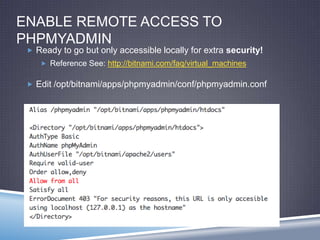
ENABLE REMOTE ACCESS TO
PHPMYADMIN
 Ready to go but only accessible locally for extra security!
 Reference See: http://bitnami.com/faq/virtual_machines
 Edit /opt/bitnami/apps/phpmyadmin/conf/phpmyadmin.conf
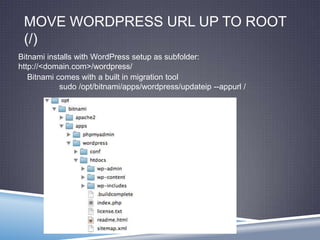
MOVE WORDPRESS URL UP TO ROOT
(/)
Bitnami comes with a built in migration tool
sudo /opt/bitnami/apps/wordpress/updateip --appurl /
Bitnami installs with WordPress setup as subfolder:
http://<domain.com>/wordpress/
THANKS!
Find more guides and videos online
at:
http://wppowerguide.com
http://buildyourwpsite.com
Twitter: @belsien

WordPress on Amazon ec2

  • 1.
    WORDPRESS IN THE AMAZONEC2 CLOUD Southern California WordPress Meetup, May 21st, 2013 Belsien Thomas, @belsien http://wppowerguide.com
  • 2.
    WHO AM I? I’m Belsien Thomas (@belsien), building websites with PHP, JAVA, and various programming languages for over 12+ years. Worked with WordPresss since 2006 (version 2.0). Spoken at WordCamp LA.  Run a WordPress blog http://wppowerguide.com has guides and tips on how to utilize WordPress as a CMS in powerful ways, other than just a blog.  Built free video guided tutorial at http://buildyourwpsite.com , will be putting up more free tutorials soon. Check out these two sites.
  • 3.
    TOPICS COVERED Why EC2? Advantages/Disadvantages Whatis Bitnami? AWS Marketplace 1-Click Installers Customize the default setup
  • 4.
    WHY RUN ONEC2 • Micro instance is free for 1st year, after that basic costs ~$15/month (depending on # of services) Cost Effective • Micro instance has 613MB, more than most VPS Fast • EC2 is very secure, requires keypairs to connect and security groups to open ports Secure • Start with “micro” and ramp up. Scales well
  • 5.
    ADVANTAGES Create an unlimitednumber of websites, no restrictions on WordPress instances Same world class infrastructure as Amazon.com Already PCI Compliant, great for eCommerce! Established and popular, easy to find people who know AWS Systems and API’s Everything can automated.
  • 6.
    DISADVANTAGES No Cpanel, Pleskstyle software, need to get comfortable using Virtual Console or Remote Desktop Takes some learning to understand the “AWS language” (Elastic IP, RDS, etc.) No support from Amazon technical staff unless you pay big $$$ A bit of a learning curve to setup initially
  • 7.
    WHAT IS BITNAMI? Preconfiguredvirtual server with entire stack LAMP stack setup Popular Linux flavors: Ubuntu 64-bit, Red Hat, etc. Creates default users for Apache and databases for MySQL Multiple Setup Options – 1 click installations Completely Free software!
  • 8.
    AWS MARKETPLACE –1-CLICK INSTALLERS!
  • 9.
  • 10.
    AMAZON TERMINOLOGY  “ElasticIP” = Static IP  By default amazon instances startup with a “Public IP” , not guaranteed to be the same.  Always setup a Static/Elastic IP right after you create an instance.  EC2 (Elastic Cloud Compute) = Web Server  S3 = Redundant Storage  RDS = Redundant MySQL Server (Oracle & MS-SQL also avail)
  • 11.
    OVERVIEW OF INSTALLATION STEPS 1.Setup a AWS Account 2. Create a keypair to connect to server 3. Install 1-click Bitnami installer on AWS Marketplace 4. Connect & configure default settings
  • 12.
    BITNAMI SERVER DEFAULTACCOUNTS  SSH User:  User: bitnami  Pass: bitnami  MySQL  User: root  Pass: bitnami  WP Admin:  User: user  Pass: bitnami  PHP MyAdmin (basic auth)  User: administrator  Pass: bitnami Change your default passwords!....not hard to guess what it is!
  • 13.
  • 14.
    ENABLE REMOTE ACCESSTO PHPMYADMIN  Ready to go but only accessible locally for extra security!  Reference See: http://bitnami.com/faq/virtual_machines  Edit /opt/bitnami/apps/phpmyadmin/conf/phpmyadmin.conf
  • 15.
    MOVE WORDPRESS URLUP TO ROOT (/) Bitnami comes with a built in migration tool sudo /opt/bitnami/apps/wordpress/updateip --appurl / Bitnami installs with WordPress setup as subfolder: http://<domain.com>/wordpress/
  • 16.
    THANKS! Find more guidesand videos online at: http://wppowerguide.com http://buildyourwpsite.com Twitter: @belsien