SECURITY
More important than ever
– Kevin Fu
“Much web security rests on illusion and hope.”
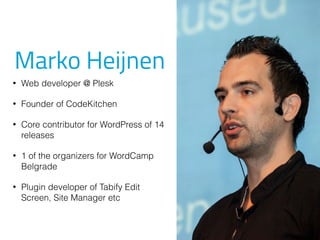
Marko Heijnen
• Web developer @ Plesk
• Founder of CodeKitchen
• Core contributor for WordPress of 14
releases
• 1 of the organizers for WordCamp
Belgrade
• Plugin developer of Tabify Edit
Screen, Site Manager etc
Today’s topics
Today’s topics
Current
Status Hardening
Current Status
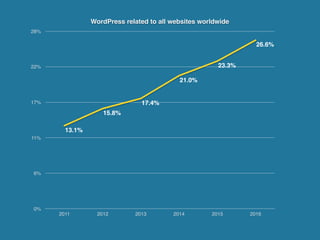
WordPress related to all websites worldwide
0%
6%
11%
17%
22%
28%
2011 2012 2013 2014 2015 2016
13.1%
15.8%
17.4%
21.0%
23.3%
26.6%
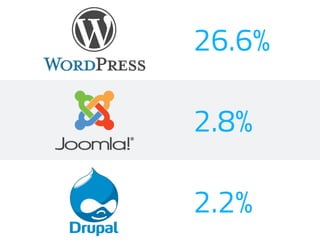
26.6%
2.8%
2.2%
Target
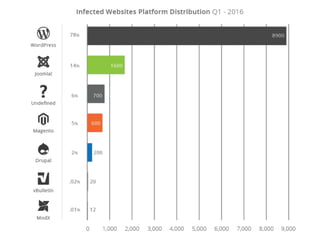
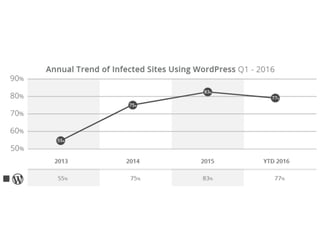
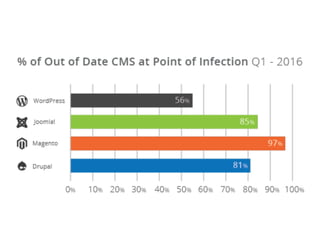
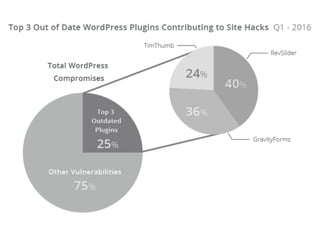
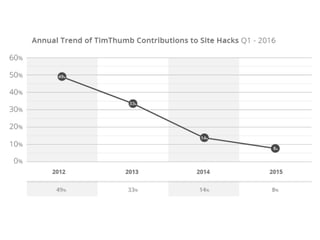
https://sucuri.net/website-security/website-hacked-report
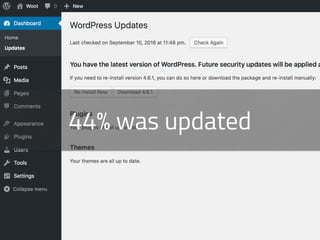
44% was updated
The S0P is a Dutch community program for
everyone with interest in software security.
From enthusiastic beginners to the 1337est
hackers out there.
So Students, Learners, Coders, Hackers,
Breakers and... BBQ Kings, join us!
One team, One month,
One target.
Only popular plugins

with at least 10k+ installs
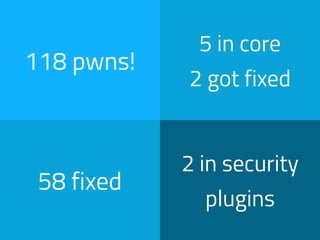
118 pwns!
5 in core
2 got fixed
58 fixed
2 in security
plugins
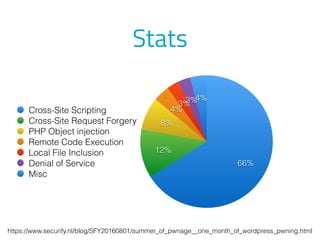
Stats
4%3%3%
4%
8%
12%
66%
Cross-Site Scripting
Cross-Site Request Forgery
PHP Object injection
Remote Code Execution
Local File Inclusion
Denial of Service
Misc
https://www.securify.nl/blog/SFY20160801/summer_of_pwnage__one_month_of_wordpress_pwning.html
Hardening
It’s time to update
Lock things down
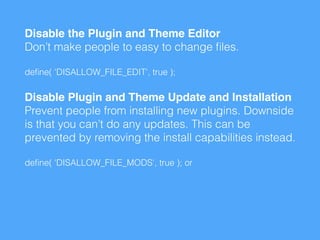
Disable the Plugin and Theme Editor

Don’t make people to easy to change files.
define( 'DISALLOW_FILE_EDIT', true );
Disable Plugin and Theme Update and Installation

Prevent people from installing new plugins. Downside
is that you can’t do any updates. This can be
prevented by removing the install capabilities instead.
define( 'DISALLOW_FILE_MODS', true ); or
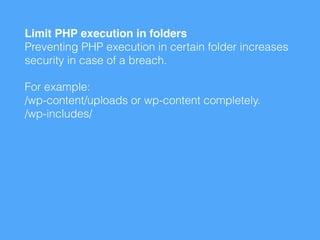
Limit PHP execution in folders

Preventing PHP execution in certain folder increases
security in case of a breach.
For example:

/wp-content/uploads or wp-content completely.

/wp-includes/
Login
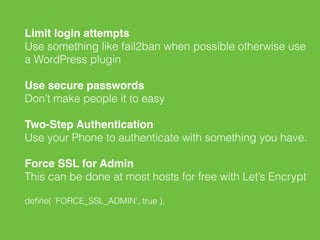
Limit login attempts

Use something like fail2ban when possible otherwise use
a WordPress plugin
Use secure passwords

Don’t make people it to easy
Two-Step Authentication

Use your Phone to authenticate with something you have.
Force SSL for Admin

This can be done at most hosts for free with Let’s Encrypt
define( 'FORCE_SSL_ADMIN', true );
wp-config magic
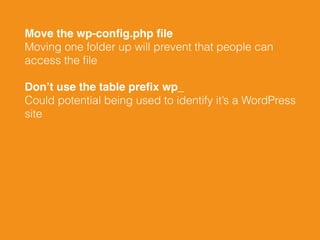
Move the wp-config.php file

Moving one folder up will prevent that people can
access the file
Don’t use the table prefix wp_

Could potential being used to identify it’s a WordPress
site
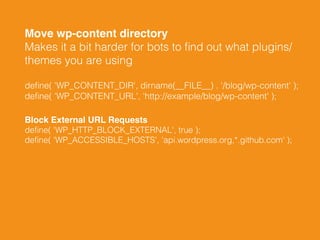
Move wp-content directory

Makes it a bit harder for bots to find out what plugins/
themes you are using
define( 'WP_CONTENT_DIR', dirname(__FILE__) . '/blog/wp-content' );

define( 'WP_CONTENT_URL', 'http://example/blog/wp-content' );
Block External URL Requests

define( 'WP_HTTP_BLOCK_EXTERNAL', true );

define( 'WP_ACCESSIBLE_HOSTS', 'api.wordpress.org,*.github.com' );
Server software
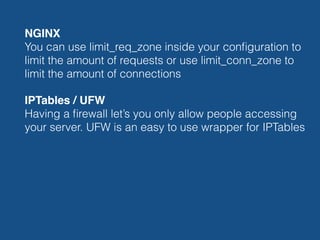
NGINX

You can use limit_req_zone inside your configuration to
limit the amount of requests or use limit_conn_zone to
limit the amount of connections
IPTables / UFW

Having a firewall let’s you only allow people accessing
your server. UFW is an easy to use wrapper for IPTables
fail2ban

Fail2ban scans log files and bans IPs that show the
malicious signs, mostly focussing on authentication
ModSecurity

An open source web application firewall (WAF). Default
with not that many rules but there are some good open
source sets available.
Keep everything

up-to-date!
External services
Cloudflare

CloudFlare is best known for their free CDN service.
They specialize in mitigating DDOS attacks using their
Website Application Firewall product. For WAF it starts
at $20 a month.
Sucuri

Sucuri is one of the most reputable website security and
monitoring service. They offer comprehensive website
monitoring, scanning for malware, DDoS protection, and
malware removal services. Starts at $16.99 per month.

Akismet

Akismet is an advanced hosted anti-spam service. Not
directly security protection but could jump in when
needed. Free for basic spam protection and they do
malware scanning at the price of $9/month per site.
VaultPress or something similar

Daily or realtime backups but in combination with daily
malware scanning. With their premium plan you also get
Automated Threat Resolution. $9/month or $29/month.
Obscurity?
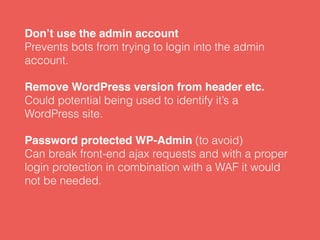
Don’t use the admin account

Prevents bots from trying to login into the admin
account.
Remove WordPress version from header etc.

Could potential being used to identify it’s a
WordPress site.
Password protected WP-Admin (to avoid)

Can break front-end ajax requests and with a proper
login protection in combination with a WAF it would
not be needed.
Security plugins
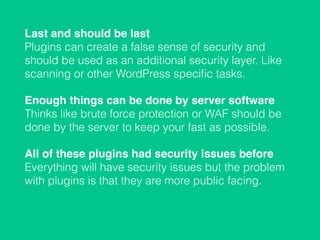
Last and should be last

Plugins can create a false sense of security and
should be used as an additional security layer. Like
scanning or other WordPress specific tasks.
Enough things can be done by server software

Thinks like brute force protection or WAF should be
done by the server to keep your fast as possible.
All of these plugins had security issues before

Everything will have security issues but the problem
with plugins is that they are more public facing.
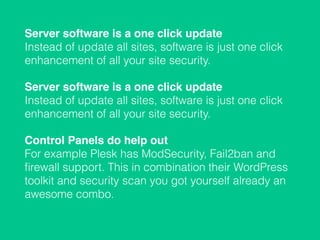
Server software is a one click update

Instead of update all sites, software is just one click
enhancement of all your site security.
Server software is a one click update

Instead of update all sites, software is just one click
enhancement of all your site security.
Control Panels do help out

For example Plesk has ModSecurity, Fail2ban and
firewall support. This in combination their WordPress
toolkit and security scan you got yourself already an
awesome combo.
Marko Heijnen
Web developer @ Plesk
Founder of CodeKitchen
@MarkoHeijnen
info@markoheijnen.com
markoheijnen.com

Security, more important than ever!

  • 1.
  • 2.
    – Kevin Fu “Muchweb security rests on illusion and hope.”
  • 3.
    Marko Heijnen • Webdeveloper @ Plesk • Founder of CodeKitchen • Core contributor for WordPress of 14 releases • 1 of the organizers for WordCamp Belgrade • Plugin developer of Tabify Edit Screen, Site Manager etc
  • 4.
  • 5.
  • 6.
  • 7.
    WordPress related toall websites worldwide 0% 6% 11% 17% 22% 28% 2011 2012 2013 2014 2015 2016 13.1% 15.8% 17.4% 21.0% 23.3% 26.6%
  • 8.
  • 9.
  • 10.
  • 14.
  • 18.
    The S0P isa Dutch community program for everyone with interest in software security. From enthusiastic beginners to the 1337est hackers out there. So Students, Learners, Coders, Hackers, Breakers and... BBQ Kings, join us!
  • 19.
    One team, Onemonth, One target.
  • 20.
    Only popular plugins
 withat least 10k+ installs
  • 23.
    118 pwns! 5 incore 2 got fixed 58 fixed 2 in security plugins
  • 24.
    Stats 4%3%3% 4% 8% 12% 66% Cross-Site Scripting Cross-Site RequestForgery PHP Object injection Remote Code Execution Local File Inclusion Denial of Service Misc https://www.securify.nl/blog/SFY20160801/summer_of_pwnage__one_month_of_wordpress_pwning.html
  • 25.
  • 26.
  • 27.
  • 28.
    Disable the Pluginand Theme Editor
 Don’t make people to easy to change files. define( 'DISALLOW_FILE_EDIT', true ); Disable Plugin and Theme Update and Installation
 Prevent people from installing new plugins. Downside is that you can’t do any updates. This can be prevented by removing the install capabilities instead. define( 'DISALLOW_FILE_MODS', true ); or
  • 29.
    Limit PHP executionin folders
 Preventing PHP execution in certain folder increases security in case of a breach. For example:
 /wp-content/uploads or wp-content completely.
 /wp-includes/
  • 30.
  • 31.
    Limit login attempts
 Usesomething like fail2ban when possible otherwise use a WordPress plugin Use secure passwords
 Don’t make people it to easy Two-Step Authentication
 Use your Phone to authenticate with something you have. Force SSL for Admin
 This can be done at most hosts for free with Let’s Encrypt define( 'FORCE_SSL_ADMIN', true );
  • 32.
  • 33.
    Move the wp-config.phpfile
 Moving one folder up will prevent that people can access the file Don’t use the table prefix wp_
 Could potential being used to identify it’s a WordPress site
  • 34.
    Move wp-content directory
 Makesit a bit harder for bots to find out what plugins/ themes you are using define( 'WP_CONTENT_DIR', dirname(__FILE__) . '/blog/wp-content' );
 define( 'WP_CONTENT_URL', 'http://example/blog/wp-content' ); Block External URL Requests
 define( 'WP_HTTP_BLOCK_EXTERNAL', true );
 define( 'WP_ACCESSIBLE_HOSTS', 'api.wordpress.org,*.github.com' );
  • 35.
  • 36.
    NGINX
 You can uselimit_req_zone inside your configuration to limit the amount of requests or use limit_conn_zone to limit the amount of connections IPTables / UFW
 Having a firewall let’s you only allow people accessing your server. UFW is an easy to use wrapper for IPTables
  • 37.
    fail2ban
 Fail2ban scans logfiles and bans IPs that show the malicious signs, mostly focussing on authentication ModSecurity
 An open source web application firewall (WAF). Default with not that many rules but there are some good open source sets available.
  • 38.
  • 39.
  • 40.
    Cloudflare
 CloudFlare is bestknown for their free CDN service. They specialize in mitigating DDOS attacks using their Website Application Firewall product. For WAF it starts at $20 a month. Sucuri
 Sucuri is one of the most reputable website security and monitoring service. They offer comprehensive website monitoring, scanning for malware, DDoS protection, and malware removal services. Starts at $16.99 per month.

  • 41.
    Akismet
 Akismet is anadvanced hosted anti-spam service. Not directly security protection but could jump in when needed. Free for basic spam protection and they do malware scanning at the price of $9/month per site. VaultPress or something similar
 Daily or realtime backups but in combination with daily malware scanning. With their premium plan you also get Automated Threat Resolution. $9/month or $29/month.
  • 42.
  • 43.
    Don’t use theadmin account
 Prevents bots from trying to login into the admin account. Remove WordPress version from header etc.
 Could potential being used to identify it’s a WordPress site. Password protected WP-Admin (to avoid)
 Can break front-end ajax requests and with a proper login protection in combination with a WAF it would not be needed.
  • 44.
  • 45.
    Last and shouldbe last
 Plugins can create a false sense of security and should be used as an additional security layer. Like scanning or other WordPress specific tasks. Enough things can be done by server software
 Thinks like brute force protection or WAF should be done by the server to keep your fast as possible. All of these plugins had security issues before
 Everything will have security issues but the problem with plugins is that they are more public facing.
  • 46.
    Server software isa one click update
 Instead of update all sites, software is just one click enhancement of all your site security. Server software is a one click update
 Instead of update all sites, software is just one click enhancement of all your site security. Control Panels do help out
 For example Plesk has ModSecurity, Fail2ban and firewall support. This in combination their WordPress toolkit and security scan you got yourself already an awesome combo.
  • 47.
    Marko Heijnen Web developer@ Plesk Founder of CodeKitchen @MarkoHeijnen info@markoheijnen.com markoheijnen.com