

WordPress
Optimization & Security
     London Affiliate Conference
                February 2013


             http://gdig.de/lac13


  Bastian Grimm, Managing Partner - Grimm Digital
About me


SEO Trainings, Seminars & Strategy Consulting


WordPress Security, Consulting & Development


                                                @basgr
International „Expired Domains“ marketplace


                                                         2
Get the Slide-Deck


              http://gdig.de/lac13


                                     3
Who is running WordPress?!
See… that‘s the issue!
It’s the “hackers” most-loved target!
Section #1: Security
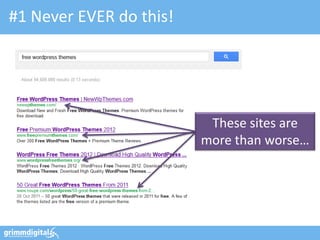
#1 Never EVER do this!


                          These sites are
                         more than worse…
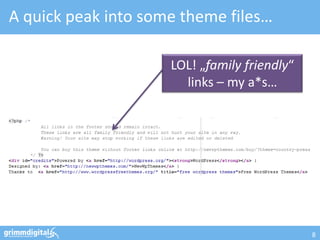
A quick peak into some theme files…

                     LOL! „family friendly“
                       links – my a*s…


                                              8
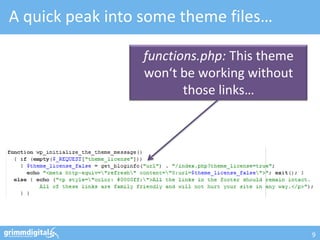
A quick peak into some theme files…

                 functions.php: This theme
                 won‘t be working without
                        those links…


                                             9
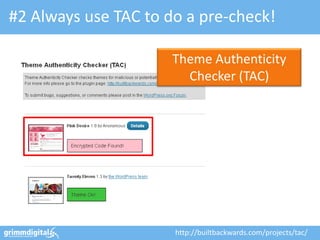
#2 Always use TAC to do a pre-check!

                      Theme Authenticity
                        Checker (TAC)


                      http://builtbackwards.com/projects/tac/
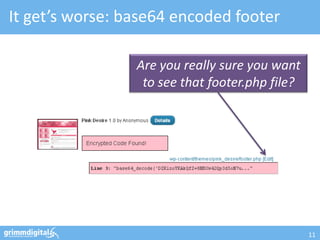
It get’s worse: base64 encoded footer

                 Are you really sure you want
                  to see that footer.php file?


                                                 11
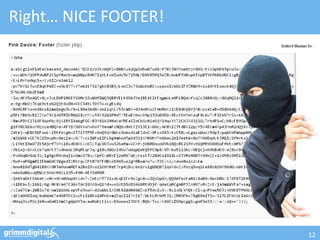
Right… NICE FOOTER!


                      12
If you are REALLY curious…
   http://ottodestruct.com/decoder.php
   http://www.tareeinternet.com/scripts/byterun.php
   http://www.tareeinternet.com/scripts/decrypt.php
   http://rot13-encoder-decoder.waraxe.us/


                               The PHP code isn’t “really”
                          encrypted, rather kind of obfuscated.
                                 Reversing is possible!
PLEASE… stay away
from “free” WordPress
 themes – they’re not
     free, really!
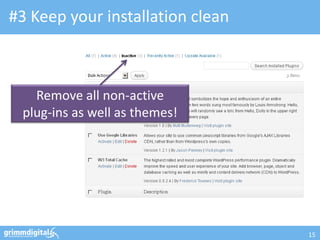
#3 Keep your installation clean


   Remove all non-active
 plug-ins as well as themes!


                                  15
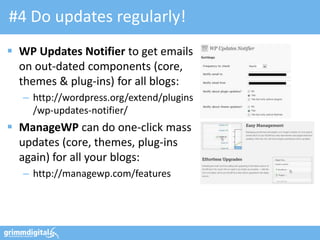
#4 Do updates regularly!
 WP Updates Notifier to get emails
  on out-dated components (core,
  themes & plug-ins) for all blogs:
   – http://wordpress.org/extend/plugins
     /wp-updates-notifier/
 ManageWP can do one-click mass
  updates (core, themes, plug-ins
  again) for all your blogs:
   – http://managewp.com/features
#5 Daily scan your Theme

                                   WP AntiVirus


                  http://wordpress.org/extend/plugins/antivirus/
Register now!
                    Really, it’s free!


http://bluemonitor.net/en/
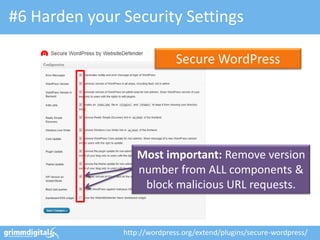
#6 Harden your Security Settings

                              Secure WordPress


                  Most important: Remove version
                  number from ALL components &
                   block malicious URL requests.


               http://wordpress.org/extend/plugins/secure-wordpress/
#7 Protect wp-admin by .htaccess


                            Put an .htaccess to your
                             /wp-admin/ for basic
                              passwd. protection.


                   You can also try the “Lockdown WP
                  Admin” plug-in to protect PHP files in
                   wp-admin as well as the login itself.


             http://wordpress.org/extend/plugins/lockdown-wp-admin/
#8 Fix File & Folder Permissions

                                 WP-Security Scan


  Very important: chmod your
 wp-config.php to be read-only!
                  http://wordpress.org/extend/plugins/wp-security-scan/
#9 Moving the “wp-content” folder

define('WP_CONTENT_DIR', $_SERVER['DOCUMENT_ROOT'].'/blog/my-wp-content');


                             WP_CONTENT_DIR points to “new”
                             the full local path (no trailing slash)


define('WP_CONTENT_URL', 'http://domain.com/blog/my-wp-content');


                             WP_CONTENT_URL points to “new”
                              full URI (no trailing slash either)
#10 SSL Logins & Administration

define('FORCE_SSL_LOGIN', true);


                                Set FORCE_SSL_LOGIN to “true” to
                                force all logins to happen over SSL.
                               (still allows non-SSL admin sessions)

define('FORCE_SSL_ADMIN', true);

                                   Use FORCE_SSL_ADMIN to force all
                                    logins and all admin sessions to
                                    happen over SSL (can be slow…)
BTW: How to do it?

                       Just find this
                          beast…


              … don’t use this
              piece of sh*t…

… and put directives
   before here!
Section #2: WordPress SEO
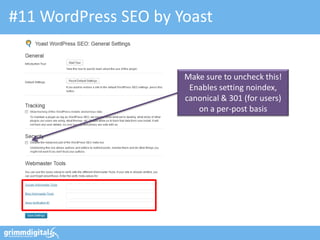
#11 WordPress SEO by Yoast


                      Make sure to uncheck this!
                       Enables setting noindex,
                      canonical & 301 (for users)
                         on a per-post basis
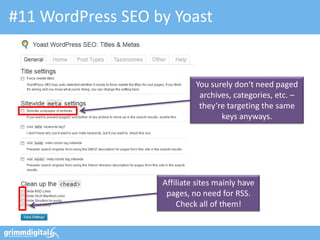
#11 WordPress SEO by Yoast


                            You surely don‘t need paged
                             archives, categories, etc. –
                             they‘re targeting the same
                                   keys anyways.


                   Affiliate sites mainly have
                    pages, no need for RSS.
                       Check all of them!
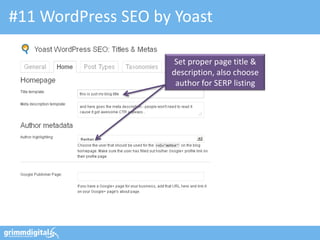
#11 WordPress SEO by Yoast

                     Set proper page title &
                    description, also choose
                     author for SERP listing
#11 WordPress SEO by Yoast


                                   Use help section to get
                                 details an all 30+ variables!

       Keep unchecked unless
       you’re publishing news.
        Default value has been
       changed w/ last update.
In addition: Post-level settings


                       You can overwrite defaults
                        on a per-post level using
                        the “Advanced” settings.


                                                    30
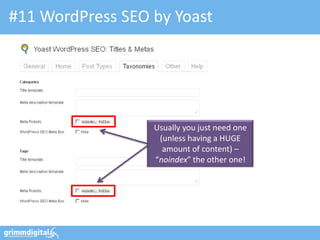
#11 WordPress SEO by Yoast


                  Usually you just need one
                   (unless having a HUGE
                    amount of content) –
                  “noindex” the other one!
#11 WordPress SEO by Yoast


                 Especially w/ single-authored
                 blogs, those are a 1:1 copy of
                        your homepage.
                  301 is the better solution!
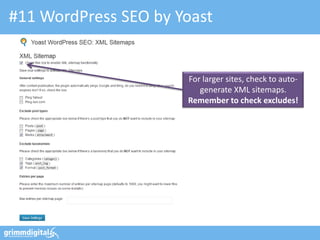
#11 WordPress SEO by Yoast


                      For larger sites, check to auto-
                         generate XML sitemaps.
                      Remember to check excludes!
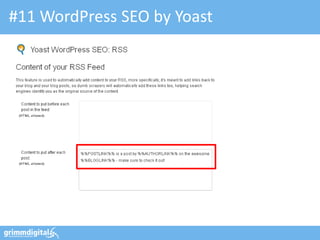
#11 WordPress SEO by Yoast
                     Make absolutely sure
                      you‘re using these!
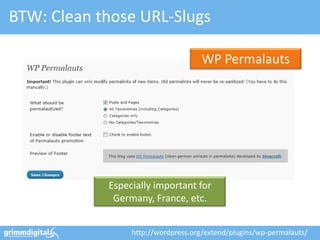
BTW: Clean those URL-Slugs

                                    WP Permalauts


            Especially important for
             Germany, France, etc.


                 http://wordpress.org/extend/plugins/wp-permalauts/
#11 WordPress SEO by Yoast
Trust me… things change!


Check out SEO data transporter
    to switch SEO plug-ins!
Migration made easy: Painless switching!

                              SEO Data Transporter


              http://wordpress.org/extend/plugins/seo-data-transporter/
Section #3: Plug-ins
Credits: http://bit.ly/T8wMwO


  Make absolutely sure you only
use plug-ins from trusted authors!
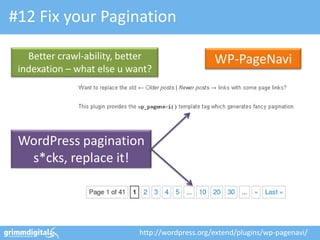
#12 Fix your Pagination

   Better crawl-ability, better                  WP-PageNavi
 indexation – what else u want?


 WordPress pagination
  s*cks, replace it!


                            http://wordpress.org/extend/plugins/wp-pagenavi/
#13 Improve internal Cross-Linking

                                     Yet Another Related
                                         Posts Plugin


        http://wordpress.org/extend/plugins/yet-another-related-posts-plugin/
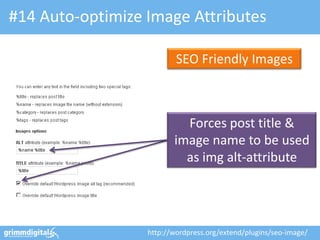
#14 Auto-optimize Image Attributes

                          SEO Friendly Images


                           Forces post title &
                         image name to be used
                           as img alt-attribute


                  http://wordpress.org/extend/plugins/seo-image/
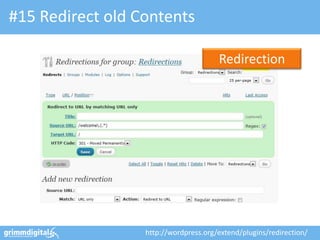
#15 Redirect old Contents

                                       Redirection


                  http://wordpress.org/extend/plugins/redirection/
#16 Mask your Affiliate Links

                      Eclipse Link Cloaker


                                http://eclipsecloaker.com/
Don’t forget to tweak your robots.txt

                            We don‘t want some WP
User-Agent: *                specific files & folders
Disallow: /wp-admin/
Disallow: /feed/
Disallow: /comments/feed/
Disallow: /*/trackback/$
Disallow: /*/feed/$
Disallow: /*.css$           Adjust according to your
Disallow: /*.js$
Disallow: /r/
                             Link Cloaker settings.


                                                        46
#17 Have Rich-Snippets if possible

                                 Schema Creator


                http://wordpress.org/extend/plugins/schema-creator/
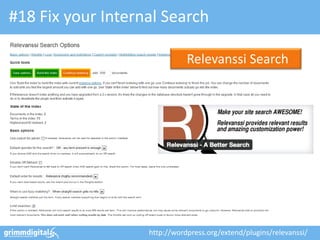
#18 Fix your Internal Search

                              Relevanssi Search


                   http://wordpress.org/extend/plugins/relevanssi/
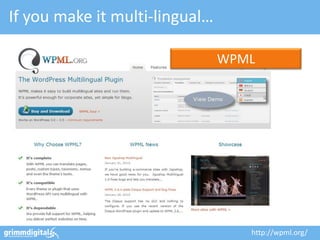
If you make it multi-lingual…

                                WPML


                                   http://wpml.org/
Section #4: Mobile
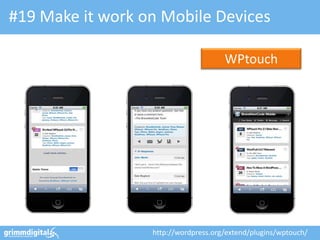
#19 Make it work on Mobile Devices

                                      WPtouch


                  http://wordpress.org/extend/plugins/wptouch/
Or try: WordPress Mobile Pack

                                           Mobile Pack


                        Contains various add-ins such as
                      Mobile Theme, Widgets, Switcher, etc.


            http://wordpress.org/extend/plugins/wordpress-mobile-pack/
Section #5: Maintenance
                          53
#20 Do a Theme Test Drive

                        Live-Testing a new theme
                           without anyone else
                             noticing… nice!


               http://wordpress.org/extend/plugins/theme-test-drive/
#21 Debug your WordPress

                  P3 (Plugin Perf. Profiler)


                http://wordpress.org/extend/plugins/p3-profiler/
#21 Debug your WordPress

                  P3 (Plugin Perf. Profiler)


                http://wordpress.org/extend/plugins/p3-profiler/
#21 Debug your WordPress

                  P3 (Plugin Perf. Profiler)


                http://wordpress.org/extend/plugins/p3-profiler/
#21 Debug your WordPress

                                    Debug Objects


               http://wordpress.org/extend/plugins/debug-objects/
#22 Enable Akismet


                Just enable, get an API key
                and turn „auto-delete“ on!
#23 Backup Database & Files

                                       BackWPup


                  http://wordpress.org/extend/plugins/backwpup/
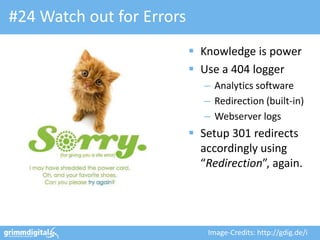
#24 Watch out for Errors
                            Knowledge is power
                            Use a 404 logger
                              – Analytics software
                              – Redirection (built-in)
                              – Webserver logs
                            Setup 301 redirects
                             accordingly using
                             “Redirection”, again.


                              Image-Credits: http://gdig.de/i
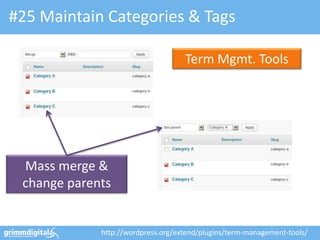
#25 Maintain Categories & Tags

                                    Term Mgmt. Tools


 Mass merge &
 change parents


             http://wordpress.org/extend/plugins/term-management-tools/
Section #6: Performance
Scoring domains by
performance; check it out!


        https://developers.google.com/pagespeed/
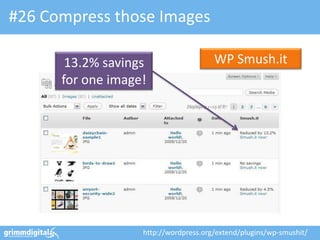
#26 Compress those Images

       13.2% savings                   WP Smush.it
      for one image!


                   http://wordpress.org/extend/plugins/wp-smushit/
Or try this one - if you don’t like Yahoo…

       Run‘s awesome                              CW Image
     image optimization                           Optimizer
      but requires Unix
         „littleutils“


                 http://wordpress.org/extend/plugins/cw-image-optimizer/
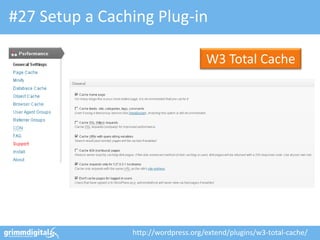
#27 Setup a Caching Plug-in

                                     W3 Total Cache


                http://wordpress.org/extend/plugins/w3-total-cache/
#28 Combine multiple CSS files
 Combine CSS files into one to
  reduce the number of HTTP requests
 Minify the big file by removing white-
  spaces, etc. to reduce file size per request
  – Check: W3Total > Performance > Minify!
 Same goes for JavaScript as well… and put those
  JS files into the footer, if possible!


                                                    68
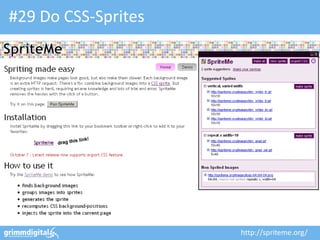
#29 Do CSS-Sprites


                     http://spriteme.org/
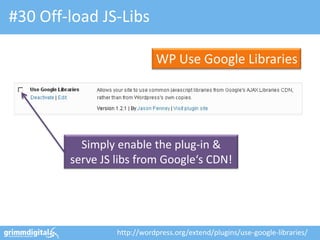
#30 Off-load JS-Libs

                            WP Use Google Libraries


          Simply enable the plug-in &
        serve JS libs from Google‘s CDN!


                 http://wordpress.org/extend/plugins/use-google-libraries/
How to make your site lightning-fast…


            http://gdig.de/smxspeed

                                        71
OMCap 2011 - Online Marketing Konferenz Berlin


                      And that’s it! …
13.10.2011
                  Wait, still not enough?                     72
If you’re into automation…

                              Auto Poster


                             http://www.nextscripts.com/
Thanks! Questions?
  mail@grimm-digital.com
  twitter.com/basgr
  linkedin.com/in/bastiangrimm
  facebook.com/grimm.digital

  http://gdig.de/lac13

 Bastian Grimm, Managing Partner - Grimm Digital

WordPress Optimization & Security - LAC 2013, London

  • 1.
    WordPress Optimization & Security London Affiliate Conference February 2013 http://gdig.de/lac13 Bastian Grimm, Managing Partner - Grimm Digital
  • 2.
    About me SEO Trainings,Seminars & Strategy Consulting WordPress Security, Consulting & Development @basgr International „Expired Domains“ marketplace 2
  • 3.
    Get the Slide-Deck http://gdig.de/lac13 3
  • 4.
    Who is runningWordPress?!
  • 5.
    See… that‘s theissue! It’s the “hackers” most-loved target!
  • 6.
  • 7.
    #1 Never EVERdo this! These sites are more than worse…
  • 8.
    A quick peakinto some theme files… LOL! „family friendly“ links – my a*s… 8
  • 9.
    A quick peakinto some theme files… functions.php: This theme won‘t be working without those links… 9
  • 10.
    #2 Always useTAC to do a pre-check! Theme Authenticity Checker (TAC) http://builtbackwards.com/projects/tac/
  • 11.
    It get’s worse:base64 encoded footer Are you really sure you want to see that footer.php file? 11
  • 12.
  • 13.
    If you areREALLY curious…  http://ottodestruct.com/decoder.php  http://www.tareeinternet.com/scripts/byterun.php  http://www.tareeinternet.com/scripts/decrypt.php  http://rot13-encoder-decoder.waraxe.us/ The PHP code isn’t “really” encrypted, rather kind of obfuscated. Reversing is possible!
  • 14.
    PLEASE… stay away from“free” WordPress themes – they’re not free, really!
  • 15.
    #3 Keep yourinstallation clean Remove all non-active plug-ins as well as themes! 15
  • 16.
    #4 Do updatesregularly!  WP Updates Notifier to get emails on out-dated components (core, themes & plug-ins) for all blogs: – http://wordpress.org/extend/plugins /wp-updates-notifier/  ManageWP can do one-click mass updates (core, themes, plug-ins again) for all your blogs: – http://managewp.com/features
  • 17.
    #5 Daily scanyour Theme WP AntiVirus http://wordpress.org/extend/plugins/antivirus/
  • 18.
    Register now! Really, it’s free! http://bluemonitor.net/en/
  • 19.
    #6 Harden yourSecurity Settings Secure WordPress Most important: Remove version number from ALL components & block malicious URL requests. http://wordpress.org/extend/plugins/secure-wordpress/
  • 20.
    #7 Protect wp-adminby .htaccess Put an .htaccess to your /wp-admin/ for basic passwd. protection. You can also try the “Lockdown WP Admin” plug-in to protect PHP files in wp-admin as well as the login itself. http://wordpress.org/extend/plugins/lockdown-wp-admin/
  • 21.
    #8 Fix File& Folder Permissions WP-Security Scan Very important: chmod your wp-config.php to be read-only! http://wordpress.org/extend/plugins/wp-security-scan/
  • 22.
    #9 Moving the“wp-content” folder define('WP_CONTENT_DIR', $_SERVER['DOCUMENT_ROOT'].'/blog/my-wp-content'); WP_CONTENT_DIR points to “new” the full local path (no trailing slash) define('WP_CONTENT_URL', 'http://domain.com/blog/my-wp-content'); WP_CONTENT_URL points to “new” full URI (no trailing slash either)
  • 23.
    #10 SSL Logins& Administration define('FORCE_SSL_LOGIN', true); Set FORCE_SSL_LOGIN to “true” to force all logins to happen over SSL. (still allows non-SSL admin sessions) define('FORCE_SSL_ADMIN', true); Use FORCE_SSL_ADMIN to force all logins and all admin sessions to happen over SSL (can be slow…)
  • 24.
    BTW: How todo it? Just find this beast… … don’t use this piece of sh*t… … and put directives before here!
  • 25.
  • 26.
    #11 WordPress SEOby Yoast Make sure to uncheck this! Enables setting noindex, canonical & 301 (for users) on a per-post basis
  • 27.
    #11 WordPress SEOby Yoast You surely don‘t need paged archives, categories, etc. – they‘re targeting the same keys anyways. Affiliate sites mainly have pages, no need for RSS. Check all of them!
  • 28.
    #11 WordPress SEOby Yoast Set proper page title & description, also choose author for SERP listing
  • 29.
    #11 WordPress SEOby Yoast Use help section to get details an all 30+ variables! Keep unchecked unless you’re publishing news. Default value has been changed w/ last update.
  • 30.
    In addition: Post-levelsettings You can overwrite defaults on a per-post level using the “Advanced” settings. 30
  • 31.
    #11 WordPress SEOby Yoast Usually you just need one (unless having a HUGE amount of content) – “noindex” the other one!
  • 32.
    #11 WordPress SEOby Yoast Especially w/ single-authored blogs, those are a 1:1 copy of your homepage. 301 is the better solution!
  • 33.
    #11 WordPress SEOby Yoast For larger sites, check to auto- generate XML sitemaps. Remember to check excludes!
  • 34.
    #11 WordPress SEOby Yoast Make absolutely sure you‘re using these!
  • 35.
    BTW: Clean thoseURL-Slugs WP Permalauts Especially important for Germany, France, etc. http://wordpress.org/extend/plugins/wp-permalauts/
  • 36.
  • 37.
    Trust me… thingschange! Check out SEO data transporter to switch SEO plug-ins!
  • 38.
    Migration made easy:Painless switching! SEO Data Transporter http://wordpress.org/extend/plugins/seo-data-transporter/
  • 39.
  • 40.
    Credits: http://bit.ly/T8wMwO Make absolutely sure you only use plug-ins from trusted authors!
  • 41.
    #12 Fix yourPagination Better crawl-ability, better WP-PageNavi indexation – what else u want? WordPress pagination s*cks, replace it! http://wordpress.org/extend/plugins/wp-pagenavi/
  • 42.
    #13 Improve internalCross-Linking Yet Another Related Posts Plugin http://wordpress.org/extend/plugins/yet-another-related-posts-plugin/
  • 43.
    #14 Auto-optimize ImageAttributes SEO Friendly Images Forces post title & image name to be used as img alt-attribute http://wordpress.org/extend/plugins/seo-image/
  • 44.
    #15 Redirect oldContents Redirection http://wordpress.org/extend/plugins/redirection/
  • 45.
    #16 Mask yourAffiliate Links Eclipse Link Cloaker http://eclipsecloaker.com/
  • 46.
    Don’t forget totweak your robots.txt We don‘t want some WP User-Agent: * specific files & folders Disallow: /wp-admin/ Disallow: /feed/ Disallow: /comments/feed/ Disallow: /*/trackback/$ Disallow: /*/feed/$ Disallow: /*.css$ Adjust according to your Disallow: /*.js$ Disallow: /r/ Link Cloaker settings. 46
  • 47.
    #17 Have Rich-Snippetsif possible Schema Creator http://wordpress.org/extend/plugins/schema-creator/
  • 48.
    #18 Fix yourInternal Search Relevanssi Search http://wordpress.org/extend/plugins/relevanssi/
  • 49.
    If you makeit multi-lingual… WPML http://wpml.org/
  • 50.
  • 51.
    #19 Make itwork on Mobile Devices WPtouch http://wordpress.org/extend/plugins/wptouch/
  • 52.
    Or try: WordPressMobile Pack Mobile Pack Contains various add-ins such as Mobile Theme, Widgets, Switcher, etc. http://wordpress.org/extend/plugins/wordpress-mobile-pack/
  • 53.
  • 54.
    #20 Do aTheme Test Drive Live-Testing a new theme without anyone else noticing… nice! http://wordpress.org/extend/plugins/theme-test-drive/
  • 55.
    #21 Debug yourWordPress P3 (Plugin Perf. Profiler) http://wordpress.org/extend/plugins/p3-profiler/
  • 56.
    #21 Debug yourWordPress P3 (Plugin Perf. Profiler) http://wordpress.org/extend/plugins/p3-profiler/
  • 57.
    #21 Debug yourWordPress P3 (Plugin Perf. Profiler) http://wordpress.org/extend/plugins/p3-profiler/
  • 58.
    #21 Debug yourWordPress Debug Objects http://wordpress.org/extend/plugins/debug-objects/
  • 59.
    #22 Enable Akismet Just enable, get an API key and turn „auto-delete“ on!
  • 60.
    #23 Backup Database& Files BackWPup http://wordpress.org/extend/plugins/backwpup/
  • 61.
    #24 Watch outfor Errors  Knowledge is power  Use a 404 logger – Analytics software – Redirection (built-in) – Webserver logs  Setup 301 redirects accordingly using “Redirection”, again. Image-Credits: http://gdig.de/i
  • 62.
    #25 Maintain Categories& Tags Term Mgmt. Tools Mass merge & change parents http://wordpress.org/extend/plugins/term-management-tools/
  • 63.
  • 64.
    Scoring domains by performance;check it out! https://developers.google.com/pagespeed/
  • 65.
    #26 Compress thoseImages 13.2% savings WP Smush.it for one image! http://wordpress.org/extend/plugins/wp-smushit/
  • 66.
    Or try thisone - if you don’t like Yahoo… Run‘s awesome CW Image image optimization Optimizer but requires Unix „littleutils“ http://wordpress.org/extend/plugins/cw-image-optimizer/
  • 67.
    #27 Setup aCaching Plug-in W3 Total Cache http://wordpress.org/extend/plugins/w3-total-cache/
  • 68.
    #28 Combine multipleCSS files  Combine CSS files into one to reduce the number of HTTP requests  Minify the big file by removing white- spaces, etc. to reduce file size per request – Check: W3Total > Performance > Minify!  Same goes for JavaScript as well… and put those JS files into the footer, if possible! 68
  • 69.
    #29 Do CSS-Sprites http://spriteme.org/
  • 70.
    #30 Off-load JS-Libs WP Use Google Libraries Simply enable the plug-in & serve JS libs from Google‘s CDN! http://wordpress.org/extend/plugins/use-google-libraries/
  • 71.
    How to makeyour site lightning-fast… http://gdig.de/smxspeed 71
  • 72.
    OMCap 2011 -Online Marketing Konferenz Berlin And that’s it! … 13.10.2011 Wait, still not enough? 72
  • 73.
    If you’re intoautomation… Auto Poster http://www.nextscripts.com/
  • 75.
    Thanks! Questions? mail@grimm-digital.com twitter.com/basgr linkedin.com/in/bastiangrimm facebook.com/grimm.digital http://gdig.de/lac13 Bastian Grimm, Managing Partner - Grimm Digital