Microsoft


       Consumer Preview
Contents
   Introduction
   Windows 8
   What’s New
   Major Features
   Sys Requirements
   Final Note
Introduction
   Operating Systems from Microsoft Corporation.

   First was Microsoft Windows 1.01 in 1985.
   Windows 8 is Latest OS, to be launched in Q4 of 2012.
   Windows 8 “Developers Preview” Launched in Sep. 2011 .
   Windows 8“Consumer Preview” Launched on 29th Feb. 2012.
Windows 8: Overview
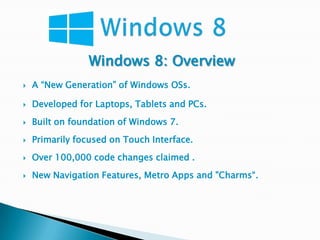
   A “New Generation” of Windows OSs.

   Developed for Laptops, Tablets and PCs.
   Built on foundation of Windows 7.
   Primarily focused on Touch Interface.
   Over 100,000 code changes claimed .
   New Navigation Features, Metro Apps and "Charms“.
What’s New
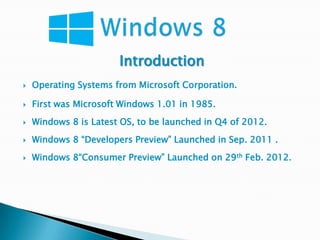
   Metro interface and “Charms”.

   Windows Store with an “App Preview” of new apps.

   Internet Explorer 10: the web by touch.

   Connecting to the cloud across Windows PCs &Phones.

   Windows To Go.

   Support for USB 3.0
Major Features
   New Lock Screen.

   Faster boot time.

   Reset and Refresh feature.

   New File Copy Confirmation dialog box.

   New Ribbon interface.

   Native support for mounting VHD and ISO disc images.
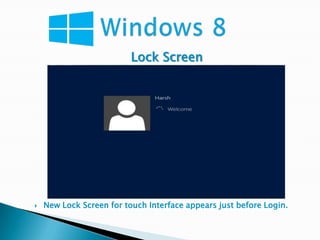
Lock Screen


   New Lock Screen for touch Interface appears just before Login.
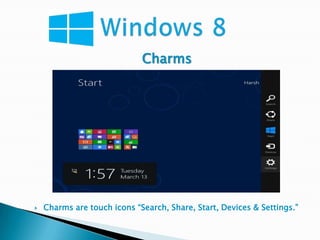
Charms


   Charms are touch icons “Search, Share, Start, Devices & Settings.”
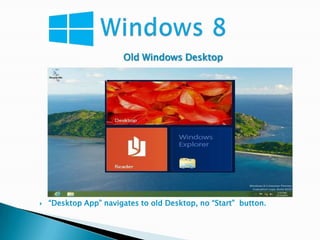
Old Windows Desktop


   “Desktop App” navigates to old Desktop, no “Start” button.
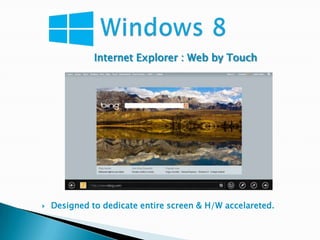
Internet Explorer : Web by Touch


   Designed to dedicate entire screen & H/W accelareted.
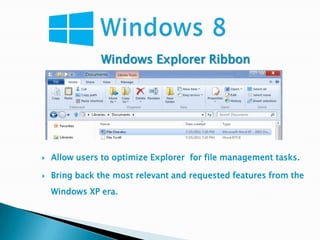
Windows Explorer Ribbon


   Allow users to optimize Explorer for file management tasks.

   Bring back the most relevant and requested features from the
    Windows XP era.
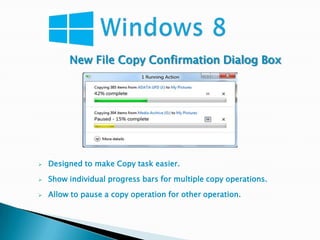
New File Copy Confirmation Dialog Box


   Designed to make Copy task easier.

   Show individual progress bars for multiple copy operations.

   Allow to pause a copy operation for other operation.
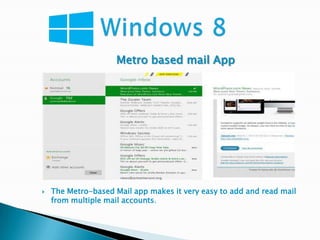
Metro based mail App


   The Metro-based Mail app makes it very easy to add and read mail
    from multiple mail accounts.
System Requirements for PCs.
   1 GHz or faster processor .

   RAM :1 GB (32-bit) or 2 GB (64-bit).
   Hard Disk Space : 16 GB (32-bit) or 20 GB (64-bit).
   DirectX 9 graphics device with Latest driver.
   A minimum of 1024x768 screen resolution.
Final Note
   It’s only Prerelease version, finished product yet to come.
   No Activation.
   Who Should try ?
    Those who enjoy experimenting with new technology and
    comfortable with Troubleshooting.
   Availability of Consumer Preview
    http://windows.microsoft.com/en-US/windows-8/iso
   www.redmondpie.com
   www.techrepublic.com
   www.computerworld.com

Windows 8 CP

  • 1.
    Microsoft Consumer Preview
  • 2.
    Contents  Introduction  Windows 8  What’s New  Major Features  Sys Requirements  Final Note
  • 3.
    Introduction  Operating Systems from Microsoft Corporation.  First was Microsoft Windows 1.01 in 1985.  Windows 8 is Latest OS, to be launched in Q4 of 2012.  Windows 8 “Developers Preview” Launched in Sep. 2011 .  Windows 8“Consumer Preview” Launched on 29th Feb. 2012.
  • 4.
    Windows 8: Overview  A “New Generation” of Windows OSs.  Developed for Laptops, Tablets and PCs.  Built on foundation of Windows 7.  Primarily focused on Touch Interface.  Over 100,000 code changes claimed .  New Navigation Features, Metro Apps and "Charms“.
  • 5.
    What’s New  Metro interface and “Charms”.  Windows Store with an “App Preview” of new apps.  Internet Explorer 10: the web by touch.  Connecting to the cloud across Windows PCs &Phones.  Windows To Go.  Support for USB 3.0
  • 6.
    Major Features  New Lock Screen.  Faster boot time.  Reset and Refresh feature.  New File Copy Confirmation dialog box.  New Ribbon interface.  Native support for mounting VHD and ISO disc images.
  • 7.
    Lock Screen  New Lock Screen for touch Interface appears just before Login.
  • 8.
    Charms  Charms are touch icons “Search, Share, Start, Devices & Settings.”
  • 9.
    Old Windows Desktop  “Desktop App” navigates to old Desktop, no “Start” button.
  • 10.
    Internet Explorer :Web by Touch  Designed to dedicate entire screen & H/W accelareted.
  • 11.
    Windows Explorer Ribbon  Allow users to optimize Explorer for file management tasks.  Bring back the most relevant and requested features from the Windows XP era.
  • 12.
    New File CopyConfirmation Dialog Box  Designed to make Copy task easier.  Show individual progress bars for multiple copy operations.  Allow to pause a copy operation for other operation.
  • 13.
    Metro based mailApp  The Metro-based Mail app makes it very easy to add and read mail from multiple mail accounts.
  • 14.
    System Requirements forPCs.  1 GHz or faster processor .  RAM :1 GB (32-bit) or 2 GB (64-bit).  Hard Disk Space : 16 GB (32-bit) or 20 GB (64-bit).  DirectX 9 graphics device with Latest driver.  A minimum of 1024x768 screen resolution.
  • 15.
    Final Note  It’s only Prerelease version, finished product yet to come.  No Activation.  Who Should try ? Those who enjoy experimenting with new technology and comfortable with Troubleshooting.  Availability of Consumer Preview http://windows.microsoft.com/en-US/windows-8/iso
  • 17.
    www.redmondpie.com  www.techrepublic.com  www.computerworld.com