Title: [Graphic Guide]: What’s Windows 11 & How to Install Windows 11?
Keywords: install windows11, windows11 updates, microsoftwindows11,new windows11,
upgrade to windows11,what iswindows11, windows11 operatingsystem
Description: What is Windows 11? Is there a Windows 11? What’s Windows 11 release date? Where
to download Windows 11? How to install Windows 11? Get some answers here!
URL: https://www.minitool.com/news/install-windows-11.html
Summary: This article composed by MiniTool will tell you much information related to the
upcoming Microsoft Windows 11 operating system like rollout time and upgrade methods. Yet,it will
focus on how to install Windows 11 and offers you a step-by-step guide with screenshots.
June 24, 2021, may be a commonday as usual as all otherstomany people.Yet, itcanbe a bigday
for techactivistsandWindowssoftware companies. Yes,the nextgenerationof Windowssoftware –
Windows11 was revealedthatday!
You will be able toupgrade to Windows11 for free if youare alreadya Windows10 user.Youcan
use the PC HealthCheckapp to checkyour computertosee whetheritiseligible toupgrade to
Windows11. Or, checkfor the Windows11 systemrequirements andcompare themwithyour
hardware/softwareequipmenttofigure outwhetheryouare able to upgrade toWindows11 or not.
What Is Windows 11?
Windows11, code name sun valley,isthe nextversionof the MicrosoftWindowsoperatingsystem
afterthe current Windows10. It wasrevealedonJune 24, 2021, officially. And, MicrosoftWindows
11 updates are goingto roll out duringthe 2021 holidayseasonandinto2022 (the exactdate isstill
beingfinalized).
https://www.minitool.com/news/microsoft-windows-11-leak-information.html
How to Install Windows 11?
To upgrade to Windows11 operating system,ingeneral,there are twoways.
Install Windows 11 via Windows 10 Settings
On the one hand,you can directlyupgrade to MS Windows11 from currentWindows10 through
WindowsUpdate.Indetail,goto Start > Settings> Update & Security> Windows Update and click
Checkfor Updates.
Whenthe Windows11 updates are available,youwill see aFeature update to Windows11 or
somethingsimilar.Then,justclick Downloadand install to install the newWindows11.
Fresh Install Windows 11 with ISO Image or Installation CD/DVD
Justlike the previousWindowsversionupgrade,youcantake a freshinstallationof the OSto
achieve upgrading.Whenyougetthe Windows11 ISOimage or installationmedia,clickthe .isofile
to triggerthe installationorconnectthe installationdevice tothe targetcomputer.
Then,justfollowthe step-by-stepguide like the followingtofinishinstalling Windows11OS.
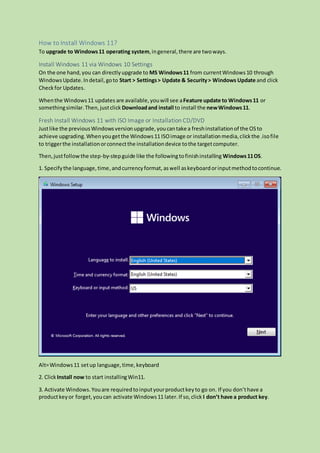
1. Specifythe language,time, andcurrencyformat, aswell askeyboardorinputmethodtocontinue.
Alt=Windows11 setup language,time,keyboard
2. ClickInstall now to start installingWin11.
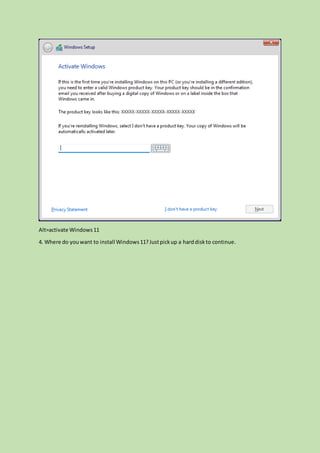
3. Activate Windows.Youare requiredtoinputyourproductkeyto go on. If you don’thave a
productkeyor forget,youcan activate Windows11 later.If so,click I don’t have a product key.
Alt=activate Windows11
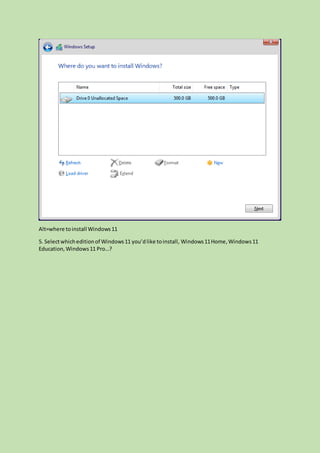
4. Where do youwant to install Windows11?Justpickup a harddiskto continue.
Alt=where toinstall Windows11
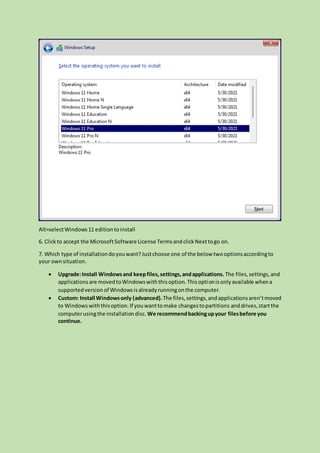
5. Selectwhicheditionof Windows11 you’dlike toinstall, Windows11Home,Windows11
Education,Windows11 Pro…?
Alt=selectWindows11 editiontoinstall
6. Clickto accept the MicrosoftSoftware License TermsandclickNexttogo on.
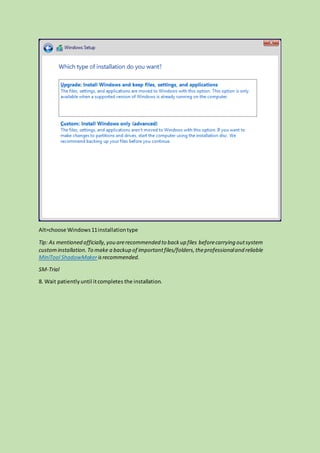
7. Which type of installationdoyouwant?Justchoose one of the below twooptionsaccordingto
your ownsituation.
 Upgrade:Install Windowsand keepfiles,settings,andapplications. The files,settings,and
applicationsare movedtoWindowswiththisoption.Thisoptionisonlyavailable whena
supportedversionof Windowsisalreadyrunningonthe computer.
 Custom: Install Windowsonly (advanced).The files,settings,andapplicationsaren’tmoved
to Windowswiththisoption.If youwanttomake changestopartitions anddrives,startthe
computerusingthe installationdisc. We recommendbackingupyour filesbefore you
continue.
Alt=choose Windows11installationtype
Tip: As mentioned officially,you arerecommended to backup files beforecarrying outsystem
custominstallation.To make a backup of importantfiles/folders,theprofessionaland reliable
MiniTool ShadowMakerisrecommended.
SM-Trial
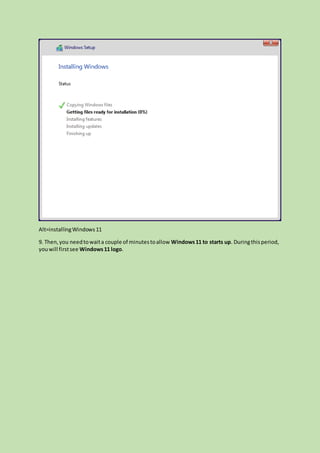
8. Wait patientlyuntil itcompletes the installation.
Alt=installingWindows11
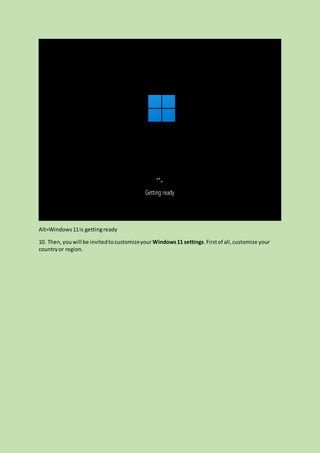
9. Then,you needtowaita couple of minutestoallow Windows11 to starts up. Duringthisperiod,
youwill firstsee Windows11 logo.
Alt=Windows11is gettingready
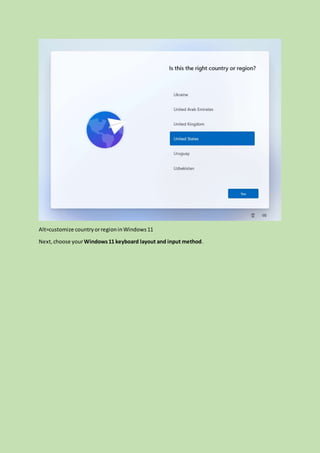
10. Then, youwill be invitedtocustomizeyour Windows11 settings.Firstof all,customize your
countryor region.
Alt=customize countryorregioninWindows11
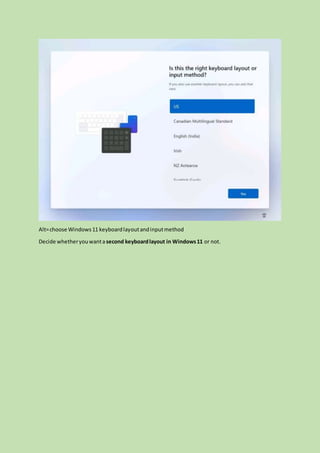
Next,choose yourWindows11 keyboard layout and input method.
Alt=choose Windows11 keyboardlayoutandinputmethod
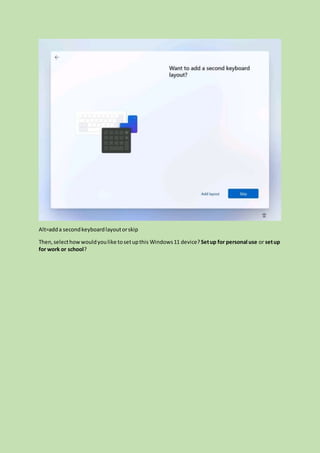
Decide whetheryouwanta second keyboardlayout in Windows11 or not.
Alt=adda secondkeyboardlayoutorskip
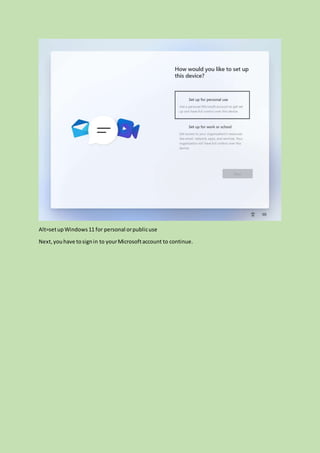
Then,selecthowwouldyoulike tosetupthis Windows11 device?Setup for personal use or setup
for work or school?
Alt=setupWindows11 for personal orpublicuse
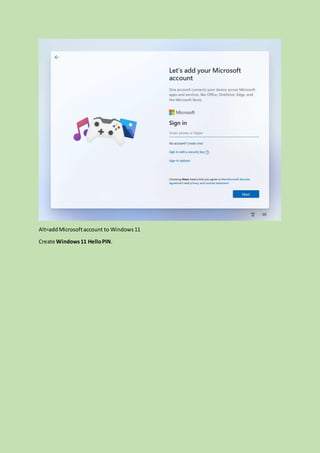
Next, youhave tosignin to yourMicrosoftaccount to continue.
Alt=addMicrosoftaccount to Windows11
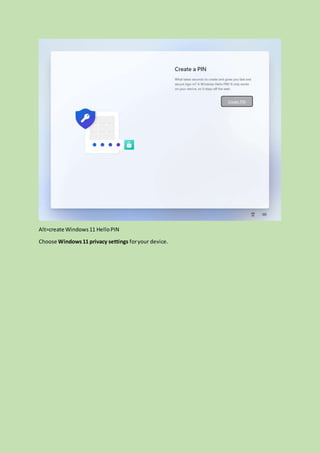
Create Windows11 HelloPIN.
Alt=create Windows11 HelloPIN
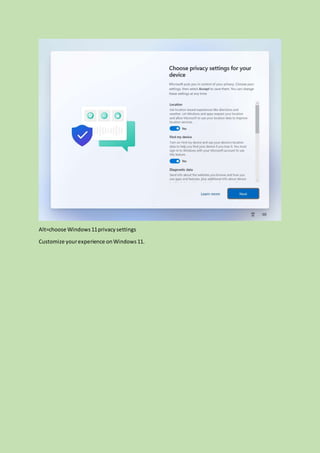
Choose Windows11 privacy settings foryour device.
Alt=choose Windows11privacysettings
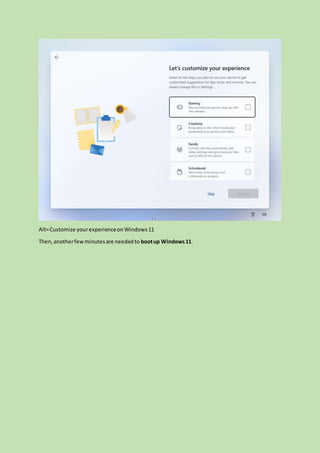
Customize yourexperience onWindows11.
Alt=Customize yourexperienceonWindows11
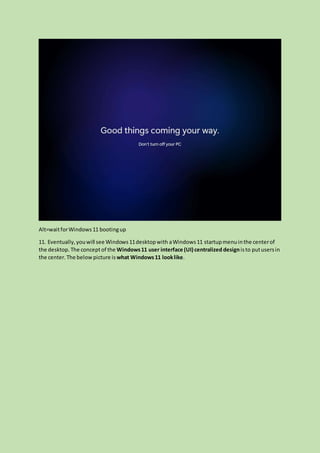
Then,anotherfewminutesare neededto bootup Windows11.
Alt=waitforWindows11 bootingup
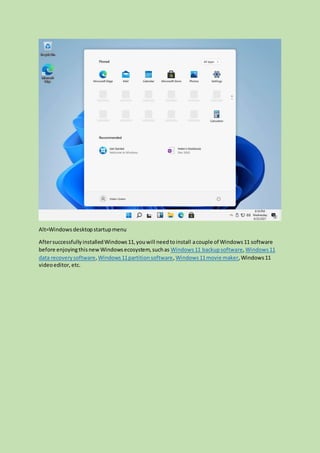
11. Eventually,youwill see Windows11desktopwith aWindows11 startupmenuinthe centerof
the desktop. The conceptof the Windows11 user interface (UI) centralized designisto putusersin
the center. The belowpicture is what Windows11 looklike.
Alt=Windows desktopstartupmenu
AftersuccessfullyinstalledWindows11,youwill needtoinstall acouple of Windows11 software
before enjoyingthisnewWindowsecosystem,suchas Windows11 backupsoftware,Windows11
data recoverysoftware,Windows11partitionsoftware, Windows11movie maker,Windows11
videoeditor, etc.

Install windows 11

  • 1.
    Title: [Graphic Guide]:What’s Windows 11 & How to Install Windows 11? Keywords: install windows11, windows11 updates, microsoftwindows11,new windows11, upgrade to windows11,what iswindows11, windows11 operatingsystem Description: What is Windows 11? Is there a Windows 11? What’s Windows 11 release date? Where to download Windows 11? How to install Windows 11? Get some answers here! URL: https://www.minitool.com/news/install-windows-11.html Summary: This article composed by MiniTool will tell you much information related to the upcoming Microsoft Windows 11 operating system like rollout time and upgrade methods. Yet,it will focus on how to install Windows 11 and offers you a step-by-step guide with screenshots. June 24, 2021, may be a commonday as usual as all otherstomany people.Yet, itcanbe a bigday for techactivistsandWindowssoftware companies. Yes,the nextgenerationof Windowssoftware – Windows11 was revealedthatday! You will be able toupgrade to Windows11 for free if youare alreadya Windows10 user.Youcan use the PC HealthCheckapp to checkyour computertosee whetheritiseligible toupgrade to Windows11. Or, checkfor the Windows11 systemrequirements andcompare themwithyour hardware/softwareequipmenttofigure outwhetheryouare able to upgrade toWindows11 or not. What Is Windows 11? Windows11, code name sun valley,isthe nextversionof the MicrosoftWindowsoperatingsystem afterthe current Windows10. It wasrevealedonJune 24, 2021, officially. And, MicrosoftWindows 11 updates are goingto roll out duringthe 2021 holidayseasonandinto2022 (the exactdate isstill beingfinalized). https://www.minitool.com/news/microsoft-windows-11-leak-information.html
  • 2.
    How to InstallWindows 11? To upgrade to Windows11 operating system,ingeneral,there are twoways. Install Windows 11 via Windows 10 Settings On the one hand,you can directlyupgrade to MS Windows11 from currentWindows10 through WindowsUpdate.Indetail,goto Start > Settings> Update & Security> Windows Update and click Checkfor Updates. Whenthe Windows11 updates are available,youwill see aFeature update to Windows11 or somethingsimilar.Then,justclick Downloadand install to install the newWindows11. Fresh Install Windows 11 with ISO Image or Installation CD/DVD Justlike the previousWindowsversionupgrade,youcantake a freshinstallationof the OSto achieve upgrading.Whenyougetthe Windows11 ISOimage or installationmedia,clickthe .isofile to triggerthe installationorconnectthe installationdevice tothe targetcomputer. Then,justfollowthe step-by-stepguide like the followingtofinishinstalling Windows11OS. 1. Specifythe language,time, andcurrencyformat, aswell askeyboardorinputmethodtocontinue. Alt=Windows11 setup language,time,keyboard 2. ClickInstall now to start installingWin11. 3. Activate Windows.Youare requiredtoinputyourproductkeyto go on. If you don’thave a productkeyor forget,youcan activate Windows11 later.If so,click I don’t have a product key.
  • 3.
    Alt=activate Windows11 4. Wheredo youwant to install Windows11?Justpickup a harddiskto continue.
  • 4.
    Alt=where toinstall Windows11 5.Selectwhicheditionof Windows11 you’dlike toinstall, Windows11Home,Windows11 Education,Windows11 Pro…?
  • 5.
    Alt=selectWindows11 editiontoinstall 6. Clicktoaccept the MicrosoftSoftware License TermsandclickNexttogo on. 7. Which type of installationdoyouwant?Justchoose one of the below twooptionsaccordingto your ownsituation.  Upgrade:Install Windowsand keepfiles,settings,andapplications. The files,settings,and applicationsare movedtoWindowswiththisoption.Thisoptionisonlyavailable whena supportedversionof Windowsisalreadyrunningonthe computer.  Custom: Install Windowsonly (advanced).The files,settings,andapplicationsaren’tmoved to Windowswiththisoption.If youwanttomake changestopartitions anddrives,startthe computerusingthe installationdisc. We recommendbackingupyour filesbefore you continue.
  • 6.
    Alt=choose Windows11installationtype Tip: Asmentioned officially,you arerecommended to backup files beforecarrying outsystem custominstallation.To make a backup of importantfiles/folders,theprofessionaland reliable MiniTool ShadowMakerisrecommended. SM-Trial 8. Wait patientlyuntil itcompletes the installation.
  • 7.
    Alt=installingWindows11 9. Then,you needtowaitacouple of minutestoallow Windows11 to starts up. Duringthisperiod, youwill firstsee Windows11 logo.
  • 8.
    Alt=Windows11is gettingready 10. Then,youwill be invitedtocustomizeyour Windows11 settings.Firstof all,customize your countryor region.
  • 9.
  • 10.
    Alt=choose Windows11 keyboardlayoutandinputmethod Decidewhetheryouwanta second keyboardlayout in Windows11 or not.
  • 11.
    Alt=adda secondkeyboardlayoutorskip Then,selecthowwouldyoulike tosetupthisWindows11 device?Setup for personal use or setup for work or school?
  • 12.
    Alt=setupWindows11 for personalorpublicuse Next, youhave tosignin to yourMicrosoftaccount to continue.
  • 13.
  • 14.
    Alt=create Windows11 HelloPIN ChooseWindows11 privacy settings foryour device.
  • 15.
  • 16.
  • 17.
    Alt=waitforWindows11 bootingup 11. Eventually,youwillsee Windows11desktopwith aWindows11 startupmenuinthe centerof the desktop. The conceptof the Windows11 user interface (UI) centralized designisto putusersin the center. The belowpicture is what Windows11 looklike.
  • 18.
    Alt=Windows desktopstartupmenu AftersuccessfullyinstalledWindows11,youwill needtoinstallacouple of Windows11 software before enjoyingthisnewWindowsecosystem,suchas Windows11 backupsoftware,Windows11 data recoverysoftware,Windows11partitionsoftware, Windows11movie maker,Windows11 videoeditor, etc.