

Introduction
 Windows 8 is an operating system produced by
Microsoft for use on personal computers, including
home and business desktops, laptops, tablets, and home
theater PCs.
 Windows 8 introduces significant changes to the
operating system's graphical user interface and
platform.
 such as a new interface design incorporating a new
design language used by other Microsoft products.
windows8
 Windows 8 introduces
significant changes to the
operating system's graphical
user interface and platform.

 such as a new interface design
incorporating a new design
language used by other
Microsoft products.
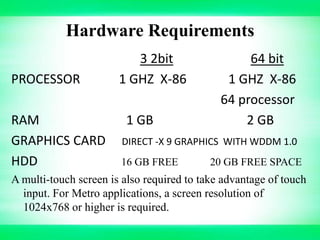
Hardware Requirements
PROCESSOR
RAM
GRAPHICS CARD
HDD

3 2bit
1 GHZ X-86
1 GB

64 bit
1 GHZ X-86
64 processor
2 GB

DIRECT -X 9 GRAPHICS WITH WDDM 1.0
16 GB FREE

20 GB FREE SPACE

A multi-touch screen is also required to take advantage of touch
input. For Metro applications, a screen resolution of
1024x768 or higher is required.
Development & Platforms
•

Windows 8 represents a reimagining of Windows from the
chipset to the experience. Since this is a week focused on
developers, we also detailed the bold underpinnings of the reimagination of the Windows platform, tools, and APIs We will
show the brand new tools that allow you to code Metro style
applications in HTML5/JavaScript, C/C++, and/or C#/XAML.
• Metro is an internal code name for a typography-based design
language created by Microsoft, originally for use in Windows
Phone 7. Early uses of the Metro principles, such as the
typography, began as early as Microsoft Windows 8. "Metro" is
based on the design principles of classic Swiss graphic design.
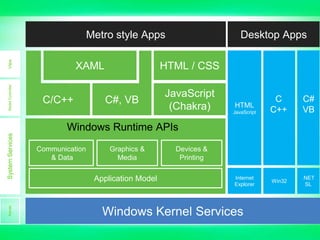
Model Controller

View

Metro style Apps
XAML
C/C++

Desktop Apps

HTML / CSS
C#, VB

JavaScript
(Chakra)

HTML
JavaScript

C
C++

C#
VB

Win32

.NET
SL

Kernel

System Services

Windows Runtime APIs
Communication
& Data

Graphics &
Media

Application Model

Devices &
Printing
Internet
Explorer

Windows Kernel Services
Who To Use & What To Use
• Web developers can use their HTML5, CSS3, and JavaScript
skills to build native applications for Windows.
• NET Developers can use XAML, C#, and Visual Basic to build
beautiful Metro style apps.

• Game developers can use the power of DirectX 11.1 to build
amazing, immersive gaming experiences.
• Driver developers can use the new, integrated
Visual
Studio development environment
productivity.

Microsoft
to increase
Features
 Windows Live ID Integration
With Windows 8 you could now move to clouds.
With this new feature you can integrate your local
account with Windows Live ID account and
synchronize your data online. Undoubtedly it’s one of
the remarkable features as it ensures that whether your
system crashes or you lose your device, all your data
will be safe and secure.
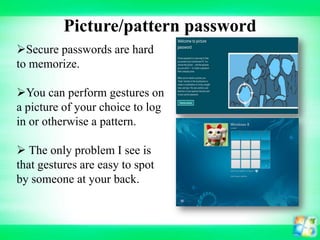
Picture/pattern password
Secure passwords are hard
to memorize.
You can perform gestures on
a picture of your choice to log
in or otherwise a pattern.
 The only problem I see is
that gestures are easy to spot
by someone at your back.
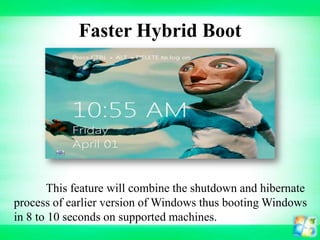
Faster Hybrid Boot

This feature will combine the shutdown and hibernate
process of earlier version of Windows thus booting Windows
in 8 to 10 seconds on supported machines.
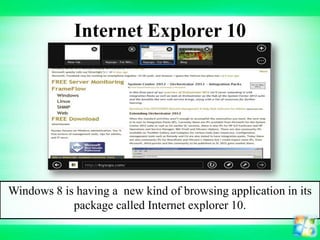
Internet Explorer 10

Windows 8 is having a new kind of browsing application in its
package called Internet explorer 10.
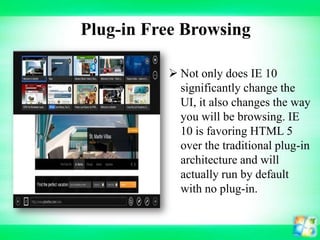
Plug-in Free Browsing
 Not only does IE 10
significantly change the
UI, it also changes the way
you will be browsing. IE
10 is favoring HTML 5
over the traditional plug-in
architecture and will
actually run by default
with no plug-in.
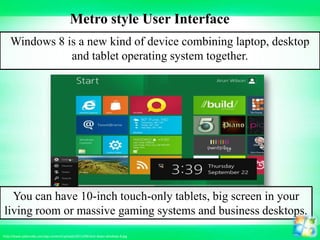
Metro style User Interface
Windows 8 is a new kind of device combining laptop, desktop
and tablet operating system together.

You can have 10-inch touch-only tablets, big screen in your
living room or massive gaming systems and business desktops.
http://www.cybervally.com/wp-content/uploads/2011/09/shut-down-windows-8.jpg
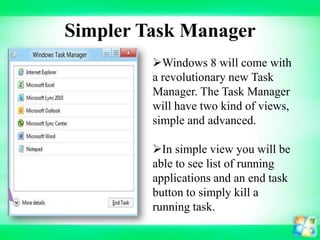
Simpler Task Manager
Windows 8 will come with
a revolutionary new Task
Manager. The Task Manager
will have two kind of views,
simple and advanced.
In simple view you will be
able to see list of running
applications and an end task
button to simply kill a
running task.
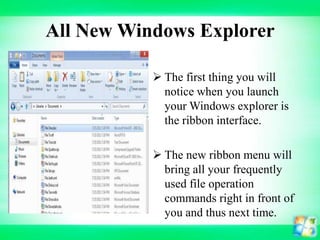
All New Windows Explorer
 The first thing you will
notice when you launch
your Windows explorer is
the ribbon interface.
 The new ribbon menu will
bring all your frequently
used file operation
commands right in front of
you and thus next time.
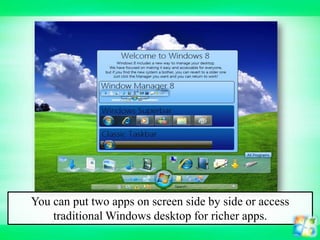
You can put two apps on screen side by side or access
traditional Windows desktop for richer apps.
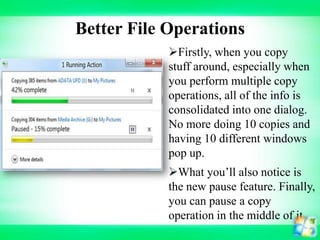
Better File Operations
Firstly, when you copy
stuff around, especially when
you perform multiple copy
operations, all of the info is
consolidated into one dialog.
No more doing 10 copies and
having 10 different windows
pop up.
What you’ll also notice is
the new pause feature. Finally,
you can pause a copy
operation in the middle of it
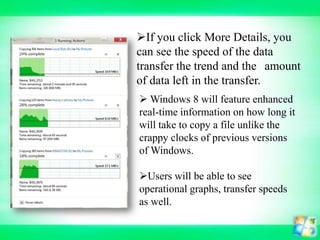
If you click More Details, you
can see the speed of the data
transfer the trend and the amount
of data left in the transfer.
 Windows 8 will feature enhanced
real-time information on how long it
will take to copy a file unlike the
crappy clocks of previous versions
of Windows.
Users will be able to see
operational graphs, transfer speeds
as well.
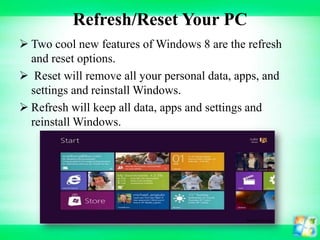
Refresh/Reset Your PC
 Two cool new features of Windows 8 are the refresh
and reset options.
 Reset will remove all your personal data, apps, and
settings and reinstall Windows.
 Refresh will keep all data, apps and settings and
reinstall Windows.
Built-in Antivirus
Moreover, Windows 8 has an antivirus present
inside the kernel of the operating system.
This means that your system won’t boot if a
corrupt USB device is plugged in.

It sounds impressive though I don’t know whether
it would pass the test of time…. and viruses
I genuinely believe that Microsoft is finally ready
to launch an OS which will take the world by storm!
Scaling for Different Screen Sizes
 Along with the new UI interface, there have been many
improvements in Windows 8 for scaling to different
screen resolutions, screen sizes and pixel densities.
 Even though this may seem minor, you will be able to
use Windows 8 on everything from a small Windows
phone to a giant 30 inch screen with a 2560 1600
resolution
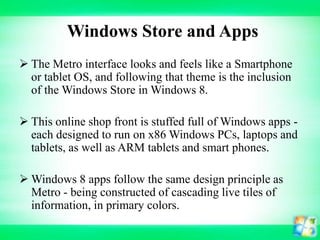
Windows Store and Apps
 The Metro interface looks and feels like a Smartphone
or tablet OS, and following that theme is the inclusion
of the Windows Store in Windows 8.
 This online shop front is stuffed full of Windows apps each designed to run on x86 Windows PCs, laptops and
tablets, as well as ARM tablets and smart phones.
 Windows 8 apps follow the same design principle as
Metro - being constructed of cascading live tiles of
information, in primary colors.
Security, Cloud, Task manager
 There are a couple of other relatively minor, but
significant changes in Windows 8 that may make it
worth an upgrade for Windows 7 users.
 Windows 8 has a cloud focus to it which might be a
tempting feature.
 Microsoft stores all your settings and customizations in
the cloud so whenever you log on to a Windows 8
machine you will have it looking and working your
way.
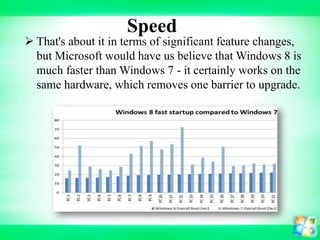
Speed

 That's about it in terms of significant feature changes,
but Microsoft would have us believe that Windows 8 is
much faster than Windows 7 - it certainly works on the
same hardware, which removes one barrier to upgrade.
Conclusion
 These ten features only touch the surface of what is
available to developers for building applications that
target the new Windows 8 Metro platform. Microsoft
has created a platform that allows you to develop
using the language and design tool of your choice,
implements complex interfaces in a simple way, and
creates unprecedented interoperability between
different applications.
Windows8 vdt
Windows8 vdt

Windows8 vdt

  • 2.
    Introduction  Windows 8is an operating system produced by Microsoft for use on personal computers, including home and business desktops, laptops, tablets, and home theater PCs.  Windows 8 introduces significant changes to the operating system's graphical user interface and platform.  such as a new interface design incorporating a new design language used by other Microsoft products.
  • 3.
    windows8  Windows 8introduces significant changes to the operating system's graphical user interface and platform.  such as a new interface design incorporating a new design language used by other Microsoft products.
  • 4.
    Hardware Requirements PROCESSOR RAM GRAPHICS CARD HDD 32bit 1 GHZ X-86 1 GB 64 bit 1 GHZ X-86 64 processor 2 GB DIRECT -X 9 GRAPHICS WITH WDDM 1.0 16 GB FREE 20 GB FREE SPACE A multi-touch screen is also required to take advantage of touch input. For Metro applications, a screen resolution of 1024x768 or higher is required.
  • 5.
    Development & Platforms • Windows8 represents a reimagining of Windows from the chipset to the experience. Since this is a week focused on developers, we also detailed the bold underpinnings of the reimagination of the Windows platform, tools, and APIs We will show the brand new tools that allow you to code Metro style applications in HTML5/JavaScript, C/C++, and/or C#/XAML. • Metro is an internal code name for a typography-based design language created by Microsoft, originally for use in Windows Phone 7. Early uses of the Metro principles, such as the typography, began as early as Microsoft Windows 8. "Metro" is based on the design principles of classic Swiss graphic design.
  • 6.
    Model Controller View Metro styleApps XAML C/C++ Desktop Apps HTML / CSS C#, VB JavaScript (Chakra) HTML JavaScript C C++ C# VB Win32 .NET SL Kernel System Services Windows Runtime APIs Communication & Data Graphics & Media Application Model Devices & Printing Internet Explorer Windows Kernel Services
  • 7.
    Who To Use& What To Use • Web developers can use their HTML5, CSS3, and JavaScript skills to build native applications for Windows. • NET Developers can use XAML, C#, and Visual Basic to build beautiful Metro style apps. • Game developers can use the power of DirectX 11.1 to build amazing, immersive gaming experiences. • Driver developers can use the new, integrated Visual Studio development environment productivity. Microsoft to increase
  • 8.
    Features  Windows LiveID Integration With Windows 8 you could now move to clouds. With this new feature you can integrate your local account with Windows Live ID account and synchronize your data online. Undoubtedly it’s one of the remarkable features as it ensures that whether your system crashes or you lose your device, all your data will be safe and secure.
  • 9.
    Picture/pattern password Secure passwordsare hard to memorize. You can perform gestures on a picture of your choice to log in or otherwise a pattern.  The only problem I see is that gestures are easy to spot by someone at your back.
  • 10.
    Faster Hybrid Boot Thisfeature will combine the shutdown and hibernate process of earlier version of Windows thus booting Windows in 8 to 10 seconds on supported machines.
  • 11.
    Internet Explorer 10 Windows8 is having a new kind of browsing application in its package called Internet explorer 10.
  • 12.
    Plug-in Free Browsing Not only does IE 10 significantly change the UI, it also changes the way you will be browsing. IE 10 is favoring HTML 5 over the traditional plug-in architecture and will actually run by default with no plug-in.
  • 13.
    Metro style UserInterface Windows 8 is a new kind of device combining laptop, desktop and tablet operating system together. You can have 10-inch touch-only tablets, big screen in your living room or massive gaming systems and business desktops. http://www.cybervally.com/wp-content/uploads/2011/09/shut-down-windows-8.jpg
  • 14.
    Simpler Task Manager Windows8 will come with a revolutionary new Task Manager. The Task Manager will have two kind of views, simple and advanced. In simple view you will be able to see list of running applications and an end task button to simply kill a running task.
  • 15.
    All New WindowsExplorer  The first thing you will notice when you launch your Windows explorer is the ribbon interface.  The new ribbon menu will bring all your frequently used file operation commands right in front of you and thus next time.
  • 16.
    You can puttwo apps on screen side by side or access traditional Windows desktop for richer apps.
  • 17.
    Better File Operations Firstly,when you copy stuff around, especially when you perform multiple copy operations, all of the info is consolidated into one dialog. No more doing 10 copies and having 10 different windows pop up. What you’ll also notice is the new pause feature. Finally, you can pause a copy operation in the middle of it
  • 18.
    If you clickMore Details, you can see the speed of the data transfer the trend and the amount of data left in the transfer.  Windows 8 will feature enhanced real-time information on how long it will take to copy a file unlike the crappy clocks of previous versions of Windows. Users will be able to see operational graphs, transfer speeds as well.
  • 19.
    Refresh/Reset Your PC Two cool new features of Windows 8 are the refresh and reset options.  Reset will remove all your personal data, apps, and settings and reinstall Windows.  Refresh will keep all data, apps and settings and reinstall Windows.
  • 20.
    Built-in Antivirus Moreover, Windows8 has an antivirus present inside the kernel of the operating system. This means that your system won’t boot if a corrupt USB device is plugged in. It sounds impressive though I don’t know whether it would pass the test of time…. and viruses I genuinely believe that Microsoft is finally ready to launch an OS which will take the world by storm!
  • 21.
    Scaling for DifferentScreen Sizes  Along with the new UI interface, there have been many improvements in Windows 8 for scaling to different screen resolutions, screen sizes and pixel densities.  Even though this may seem minor, you will be able to use Windows 8 on everything from a small Windows phone to a giant 30 inch screen with a 2560 1600 resolution
  • 22.
    Windows Store andApps  The Metro interface looks and feels like a Smartphone or tablet OS, and following that theme is the inclusion of the Windows Store in Windows 8.  This online shop front is stuffed full of Windows apps each designed to run on x86 Windows PCs, laptops and tablets, as well as ARM tablets and smart phones.  Windows 8 apps follow the same design principle as Metro - being constructed of cascading live tiles of information, in primary colors.
  • 23.
    Security, Cloud, Taskmanager  There are a couple of other relatively minor, but significant changes in Windows 8 that may make it worth an upgrade for Windows 7 users.  Windows 8 has a cloud focus to it which might be a tempting feature.  Microsoft stores all your settings and customizations in the cloud so whenever you log on to a Windows 8 machine you will have it looking and working your way.
  • 24.
    Speed  That's aboutit in terms of significant feature changes, but Microsoft would have us believe that Windows 8 is much faster than Windows 7 - it certainly works on the same hardware, which removes one barrier to upgrade.
  • 25.
    Conclusion  These tenfeatures only touch the surface of what is available to developers for building applications that target the new Windows 8 Metro platform. Microsoft has created a platform that allows you to develop using the language and design tool of your choice, implements complex interfaces in a simple way, and creates unprecedented interoperability between different applications.