Wireless Ethernet
By Javier Torres
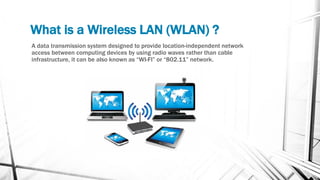
What is a Wireless LAN (WLAN) ?
A data transmission system designed to provide location-independent network
access between computing devices by using radio waves rather than cable
infrastructure, it can be also known as “WI-FI” or “802.11” network.
Benefits of using WLAN instead of wired
network connection
• Increased productivity – WLAN provides “untethered” network and internet
access.
• Fast & Simple network set up – There are no cables to install at a user's desk or
work area.
• Installation flexibility – WLANs can be installed in places where wires can’t, and
they facilitate temporary set-up and relocation.
• Reduced Cost-of-Ownership – Wireless LANS reduce installation cost because
there is no cabling.
• Scalability – Network expansion and reconfiguration may be less complicated
than expanding a wired network.
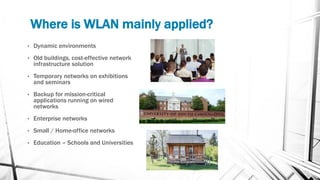
Where is WLAN mainly applied?
• Dynamic environments
• Old buildings, cost-effective network
infrastructure solution
• Temporary networks on exhibitions
and seminars
• Backup for mission-critical
applications running on wired
networks
• Enterprise networks
• Small / Home-office networks
• Education – Schools and Universities
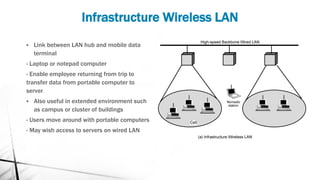
Infrastructure Wireless LAN
▪ Link between LAN hub and mobile data
terminal
- Laptop or notepad computer
- Enable employee returning from trip to
transfer data from portable computer to
server
▪ Also useful in extended environment such
as campus or cluster of buildings
- Users move around with portable computers
- May wish access to servers on wired LAN
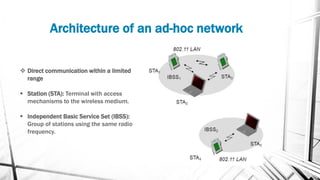
Architecture of an ad-hoc network
❖ Direct communication within a limited
range
▪ Station (STA): Terminal with access
mechanisms to the wireless medium.
▪ Independent Basic Service Set (IBSS):
Group of stations using the same radio
frequency.
Range & Throughput
▪ 802.11b data rate
- 5 Mbps
- 11 Mbps
▪ Indoor range (typical) – 45 to 90 meters
▪ Outdoor range – *Kilometers ( depends on external antenna )
▪ Throughput decreases with distance
Wireless Lan security
To secure a WLAN, the following components
are required:
▪ Authentication: To ensure that legitimate
clients and users access the network via
trusted access points
▪ Encryption: To provide privacy and
confidentiality
▪ Intrusion Detection Systems (IDS) and
Intrusion Protection Systems (IPS): To
protect from security risks and availability

Wireless ethernet

  • 1.
  • 2.
    What is aWireless LAN (WLAN) ? A data transmission system designed to provide location-independent network access between computing devices by using radio waves rather than cable infrastructure, it can be also known as “WI-FI” or “802.11” network.
  • 3.
    Benefits of usingWLAN instead of wired network connection • Increased productivity – WLAN provides “untethered” network and internet access. • Fast & Simple network set up – There are no cables to install at a user's desk or work area. • Installation flexibility – WLANs can be installed in places where wires can’t, and they facilitate temporary set-up and relocation. • Reduced Cost-of-Ownership – Wireless LANS reduce installation cost because there is no cabling. • Scalability – Network expansion and reconfiguration may be less complicated than expanding a wired network.
  • 4.
    Where is WLANmainly applied? • Dynamic environments • Old buildings, cost-effective network infrastructure solution • Temporary networks on exhibitions and seminars • Backup for mission-critical applications running on wired networks • Enterprise networks • Small / Home-office networks • Education – Schools and Universities
  • 5.
    Infrastructure Wireless LAN ▪Link between LAN hub and mobile data terminal - Laptop or notepad computer - Enable employee returning from trip to transfer data from portable computer to server ▪ Also useful in extended environment such as campus or cluster of buildings - Users move around with portable computers - May wish access to servers on wired LAN
  • 6.
    Architecture of anad-hoc network ❖ Direct communication within a limited range ▪ Station (STA): Terminal with access mechanisms to the wireless medium. ▪ Independent Basic Service Set (IBSS): Group of stations using the same radio frequency.
  • 7.
    Range & Throughput ▪802.11b data rate - 5 Mbps - 11 Mbps ▪ Indoor range (typical) – 45 to 90 meters ▪ Outdoor range – *Kilometers ( depends on external antenna ) ▪ Throughput decreases with distance
  • 8.
    Wireless Lan security Tosecure a WLAN, the following components are required: ▪ Authentication: To ensure that legitimate clients and users access the network via trusted access points ▪ Encryption: To provide privacy and confidentiality ▪ Intrusion Detection Systems (IDS) and Intrusion Protection Systems (IPS): To protect from security risks and availability