WHAT MAKES A GOOD INTRANET? __________________________ AND CAN YOU BUILD IT IN MS SHAREPOINT ? Jed Cawthorne, Prescient Digital Media JBoye09, Philadelphia, May 2009
Who is Prescient? An end to end Intranet consultancy Benchmarked best practices and a wide variety of website case studies that is drawn upon for every client endeavor. A well defined and proven methodology that formally aligns the Intranet with the organization’s business and objectives. Prescient owns no software or hardware; we are technology neutral.  A focus on measured success, proven value and ROI © 2009 Prescient Digital Media
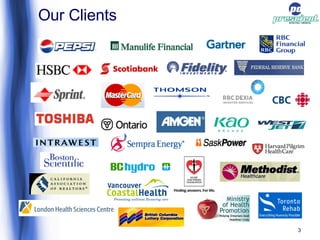
Our Clients
Part 1 – What makes a good intranet
What makes a good intranet? It depends ! What do you want to do with it? How do you know what you want to do with it? Ask key business stakeholders Ask the users  Align the intranet to organisational strategy In other words, develop an intranet strategy in order to provide some direction © 2009 Prescient Digital Media
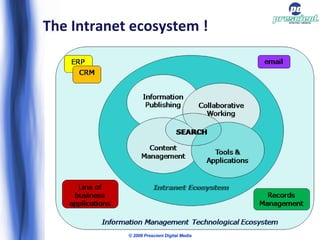
Where is the focus for your intranet? Four major categories or elements of organisational need an intranet can address: Internal Communications Publishing content / information Collaboration Activities – actually doing something © 2009 Prescient Digital Media
Communications The Communications unit is often the business owner of the intranet Intranet possibly just one of many internal communications channels for broadcasting news and important internal messages There is a trend towards more conversational two-way communications There is also a trend towards multi-media delivery rather than just textual presentation © 2009 Prescient Digital Media
Publishing The ability for all units and even individuals to publish content for others within the organization to consume The single source of truth ! Links to the wider information and knowledge management environment, including document management systems etc Web 2.0 trends, blogging, UGC, etc © 2009 Prescient Digital Media
Collaboration Web based intranet collaboration as replacement for or adjunct to other groupware and messaging systems Web based workspaces Web interfaces to email or Instant Messaging systems, document management systems etc For developing the 'work in progress' (before 'publishing' the final version) © 2009 Prescient Digital Media
Activities Going to the intranet to actually do something ! Interactive online forms Applications like staff directories Access to all sorts of applications and systems that provide 'web' interfaces © 2009 Prescient Digital Media
The Intranet ecosystem ! © 2009 Prescient Digital Media
but........ Whether you focus on all of these elements, or in your own context you only need your intranet to provide one or two of these, what makes it  good  ? © 2009 Prescient Digital Media
To build a good intranet..... Make sure you consider: Design and Usability Information Organisation and Access, including:  Information Architecture Findability  &  Search Content Tools and Applications Strategy, Planning and Resources © 2009 Prescient Digital Media
Design and usability User centric design Persona development Use cases Graphic design and layout Accessibility Usability testing © 2009 Prescient Digital Media
Information Organisation & Access Structures ! Information Architecture Categorization of content Navigation schemas Findability = Metadata Metadata for navigation & search  Taxonomies, folksonomies and ontology's Search facilities Security – access control and authentication © 2009 Prescient Digital Media
Content Content is king ! Tools and training for content authors / editors Processes and workflow Make it easy to create compelling content and provide 'stickiness' © 2009 Prescient Digital Media
Tools and applications To be a truly useful business tool the intranet must facilitate activity A home for interactive tools and utilities, and navigation to and access point for other applications The intranet as the 'front end' for business processes, for example HR self service tools Keep it simple, but be innovative, add value ! © 2009 Prescient Digital Media
A slight diversion - portals A 'portal' is just a 'way in'  Portals don't necessarily mean portal software An intranet can have more than one portal Different flavours of portal: Collaboration centric  Business process centric Application centric  © 2009 Prescient Digital Media
Strategy, planning and resources Strategy is an absolute necessity, including appropriate governance structures and policies Planning is also key – hence the 5P's: P rior  P lanning  P revents  P oor  P erformance Resources are often not given enough consideration – do not forget the people! Don't forget to measure intranet performance © 2009 Prescient Digital Media
Part 2 – Sharepointy stuff......
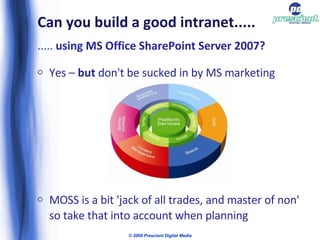
Can you build a good intranet..... .....  using MS Office SharePoint Server 2007? Yes –  but  don't be sucked in by MS marketing MOSS is a bit 'jack of all trades, and master of non' so take that into account when planning © 2009 Prescient Digital Media
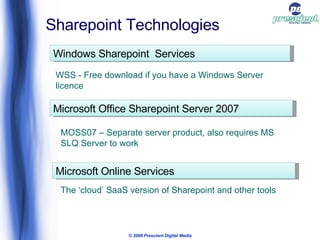
© 2009 Prescient Digital Media Sharepoint Technologies Windows Sharepoint  Services WSS - Free download if you have a Windows Server licence Microsoft Office Sharepoint Server 2007 The ‘cloud’ SaaS version of Sharepoint and other tools Microsoft Online Services MOSS07 – Separate server product, also requires MS SLQ Server to work
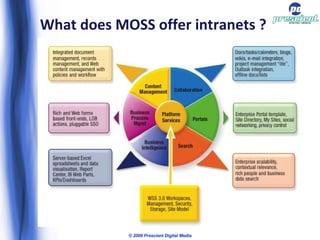
What does MOSS offer intranets ? © 2009 Prescient Digital Media
SharePoint for Intranets WSS – hosted for small business, on internal for workgroup team sites  We will examine MOSS' facilities for: Providing Communications channels Publishing content & information Collaboration Facilitating business activities © 2009 Prescient Digital Media
Communications  Out of the box 'Publishing Portal' provides a news site template, with news archive and 'news article' content type 2 way communications channels (blogs, forums) Out of the box multimedia capabilities are weak No Digital Asset Management (DAM) features for managing audio and video content 2 way comms – not best of breed functionality © 2009 Prescient Digital Media
Publishing Content Replaced MS Content Management Server as the Microsoft WCM product WCM in MOSS ('Publishing' features) is not configured as 'on' by default, it must be turned on and configured for a particular installation Out of the box Publishing Site templates are available to build upon including a 'Publishing Portal' MOSS blurs the traditional lines between designer and developer Accessibility is not good – requires 3 rd  party tool kit © 2009 Prescient Digital Media
Collaboration Divisional / business unit level collaboration portal is often touted as MOSS sweet spot Collaboration is firmly document centric Everything can be published as RSS Summary: a quote from Michael Sampson’s, “7 pillars of IT-enabled Team Productivity”: © 2009 Prescient Digital Media “ SharePoint’s collaboration features leave much to be desired. SharePoint can not be said to a mature collaboration product. If you want more than shared access to team data, SharePoint is not the tool for your organisation”
Facilitating Activities  More complex activities include providing access to other applications via WebParts etc It can be used to publish InfoPath forms to users who don't have the InfoPath client SharePoint Designer and / or Visual Studio needed for coding more complex workflows MOSS is just a front end for Windows Workflow Foundation services .Net development platform – you can build just about anything with it, but how much will that cost ? © 2009 Prescient Digital Media
Conclusions
SharePoint can be your intranet But.............. Don't let IT foist it on you because they have licences – business and user requirements have to be met ! If you don't have MS skills or .Net expertise on site or the budget to hire it, then keep it simple As a general rule MOSS is good for an SMB intranet, or divisional intranet portal, but not enterprise level (1,000 seat plus) intranets.
Jed Cawthorne MBA MBCS CITP Senior Business Consultant Prescient Digital Media 416.926.8800 www.PrescientDigital.com www.intranetblog.com www.ecm-stuff.blogspot.com Twitter: @jedpc & @Intranet2 © 2009 Prescient Digital Media

What Makes A Good Intranet

  • 1.
    WHAT MAKES AGOOD INTRANET? __________________________ AND CAN YOU BUILD IT IN MS SHAREPOINT ? Jed Cawthorne, Prescient Digital Media JBoye09, Philadelphia, May 2009
  • 2.
    Who is Prescient?An end to end Intranet consultancy Benchmarked best practices and a wide variety of website case studies that is drawn upon for every client endeavor. A well defined and proven methodology that formally aligns the Intranet with the organization’s business and objectives. Prescient owns no software or hardware; we are technology neutral. A focus on measured success, proven value and ROI © 2009 Prescient Digital Media
  • 3.
  • 4.
    Part 1 –What makes a good intranet
  • 5.
    What makes agood intranet? It depends ! What do you want to do with it? How do you know what you want to do with it? Ask key business stakeholders Ask the users Align the intranet to organisational strategy In other words, develop an intranet strategy in order to provide some direction © 2009 Prescient Digital Media
  • 6.
    Where is thefocus for your intranet? Four major categories or elements of organisational need an intranet can address: Internal Communications Publishing content / information Collaboration Activities – actually doing something © 2009 Prescient Digital Media
  • 7.
    Communications The Communicationsunit is often the business owner of the intranet Intranet possibly just one of many internal communications channels for broadcasting news and important internal messages There is a trend towards more conversational two-way communications There is also a trend towards multi-media delivery rather than just textual presentation © 2009 Prescient Digital Media
  • 8.
    Publishing The abilityfor all units and even individuals to publish content for others within the organization to consume The single source of truth ! Links to the wider information and knowledge management environment, including document management systems etc Web 2.0 trends, blogging, UGC, etc © 2009 Prescient Digital Media
  • 9.
    Collaboration Web basedintranet collaboration as replacement for or adjunct to other groupware and messaging systems Web based workspaces Web interfaces to email or Instant Messaging systems, document management systems etc For developing the 'work in progress' (before 'publishing' the final version) © 2009 Prescient Digital Media
  • 10.
    Activities Going tothe intranet to actually do something ! Interactive online forms Applications like staff directories Access to all sorts of applications and systems that provide 'web' interfaces © 2009 Prescient Digital Media
  • 11.
    The Intranet ecosystem! © 2009 Prescient Digital Media
  • 12.
    but........ Whether youfocus on all of these elements, or in your own context you only need your intranet to provide one or two of these, what makes it good ? © 2009 Prescient Digital Media
  • 13.
    To build agood intranet..... Make sure you consider: Design and Usability Information Organisation and Access, including: Information Architecture Findability & Search Content Tools and Applications Strategy, Planning and Resources © 2009 Prescient Digital Media
  • 14.
    Design and usabilityUser centric design Persona development Use cases Graphic design and layout Accessibility Usability testing © 2009 Prescient Digital Media
  • 15.
    Information Organisation &Access Structures ! Information Architecture Categorization of content Navigation schemas Findability = Metadata Metadata for navigation & search Taxonomies, folksonomies and ontology's Search facilities Security – access control and authentication © 2009 Prescient Digital Media
  • 16.
    Content Content isking ! Tools and training for content authors / editors Processes and workflow Make it easy to create compelling content and provide 'stickiness' © 2009 Prescient Digital Media
  • 17.
    Tools and applicationsTo be a truly useful business tool the intranet must facilitate activity A home for interactive tools and utilities, and navigation to and access point for other applications The intranet as the 'front end' for business processes, for example HR self service tools Keep it simple, but be innovative, add value ! © 2009 Prescient Digital Media
  • 18.
    A slight diversion- portals A 'portal' is just a 'way in' Portals don't necessarily mean portal software An intranet can have more than one portal Different flavours of portal: Collaboration centric Business process centric Application centric © 2009 Prescient Digital Media
  • 19.
    Strategy, planning andresources Strategy is an absolute necessity, including appropriate governance structures and policies Planning is also key – hence the 5P's: P rior P lanning P revents P oor P erformance Resources are often not given enough consideration – do not forget the people! Don't forget to measure intranet performance © 2009 Prescient Digital Media
  • 20.
    Part 2 –Sharepointy stuff......
  • 21.
    Can you builda good intranet..... ..... using MS Office SharePoint Server 2007? Yes – but don't be sucked in by MS marketing MOSS is a bit 'jack of all trades, and master of non' so take that into account when planning © 2009 Prescient Digital Media
  • 22.
    © 2009 PrescientDigital Media Sharepoint Technologies Windows Sharepoint Services WSS - Free download if you have a Windows Server licence Microsoft Office Sharepoint Server 2007 The ‘cloud’ SaaS version of Sharepoint and other tools Microsoft Online Services MOSS07 – Separate server product, also requires MS SLQ Server to work
  • 23.
    What does MOSSoffer intranets ? © 2009 Prescient Digital Media
  • 24.
    SharePoint for IntranetsWSS – hosted for small business, on internal for workgroup team sites We will examine MOSS' facilities for: Providing Communications channels Publishing content & information Collaboration Facilitating business activities © 2009 Prescient Digital Media
  • 25.
    Communications Outof the box 'Publishing Portal' provides a news site template, with news archive and 'news article' content type 2 way communications channels (blogs, forums) Out of the box multimedia capabilities are weak No Digital Asset Management (DAM) features for managing audio and video content 2 way comms – not best of breed functionality © 2009 Prescient Digital Media
  • 26.
    Publishing Content ReplacedMS Content Management Server as the Microsoft WCM product WCM in MOSS ('Publishing' features) is not configured as 'on' by default, it must be turned on and configured for a particular installation Out of the box Publishing Site templates are available to build upon including a 'Publishing Portal' MOSS blurs the traditional lines between designer and developer Accessibility is not good – requires 3 rd party tool kit © 2009 Prescient Digital Media
  • 27.
    Collaboration Divisional /business unit level collaboration portal is often touted as MOSS sweet spot Collaboration is firmly document centric Everything can be published as RSS Summary: a quote from Michael Sampson’s, “7 pillars of IT-enabled Team Productivity”: © 2009 Prescient Digital Media “ SharePoint’s collaboration features leave much to be desired. SharePoint can not be said to a mature collaboration product. If you want more than shared access to team data, SharePoint is not the tool for your organisation”
  • 28.
    Facilitating Activities More complex activities include providing access to other applications via WebParts etc It can be used to publish InfoPath forms to users who don't have the InfoPath client SharePoint Designer and / or Visual Studio needed for coding more complex workflows MOSS is just a front end for Windows Workflow Foundation services .Net development platform – you can build just about anything with it, but how much will that cost ? © 2009 Prescient Digital Media
  • 29.
  • 30.
    SharePoint can beyour intranet But.............. Don't let IT foist it on you because they have licences – business and user requirements have to be met ! If you don't have MS skills or .Net expertise on site or the budget to hire it, then keep it simple As a general rule MOSS is good for an SMB intranet, or divisional intranet portal, but not enterprise level (1,000 seat plus) intranets.
  • 31.
    Jed Cawthorne MBAMBCS CITP Senior Business Consultant Prescient Digital Media 416.926.8800 www.PrescientDigital.com www.intranetblog.com www.ecm-stuff.blogspot.com Twitter: @jedpc & @Intranet2 © 2009 Prescient Digital Media