What is Object-Based Image
Analysis?
                                                          Kirk Benell


              The information contained in this document pertains to software products and
              services that are subject to the controls of the Export Administration Regulations
              (EAR). The recipient is responsible for ensuring compliance to all applicable U.S.
              Export Control laws and regulations.
Object-Based Image Analysis
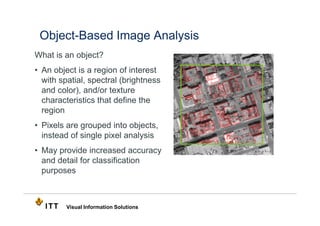
What is an object?
• An object is a region of interest
  with spatial, spectral (brightness
  and color), and/or texture
  characteristics that define the
  region
• Pixels are grouped into objects,
  instead of single pixel analysis
• May provide increased accuracy
  and detail for classification
  purposes


         Visual Information Solutions
Object-Based Image Analysis
Traditional pixel-based classification
  •   Based on reflectance values of pixels
  •   Works for low and medium resolution imagery
  •   Works for mass area-based features
  •   Multispectral or hyperspectral imagery

Limitations of pixel-based analysis
  •   Only spectral, seldom spatial and contextual
  •   Results with inconsistent salt-and-pepper noise
  •   Inaccurate borders for texture computation
  •   Limited extraction of small-scale objects


         Visual Information Solutions
Pixel-based Classification                                       1.0

                                                                       Water
                                          Pixels
              Image                                              0.5
       6
      5
     4
    3
   2                                                             0.0
  1
                                                                 1.0
                                                                           Veg


                                                   Reflectance
                                                                 0.5


                                                                 0.0
                                                                 1.0
                                                                       Soil
                                                                 0.5


                                                                 0.0
                                                                       1    2    3   4   5   6
                                                                                 Band
Group materials based on their reflectance
response per pixel

           Visual Information Solutions
Object-Based Image Analysis


 Image                     Segmented      Merged
                                                               Feature
 Pixels                     Objects      Segmented         The Letter ‘E’
                                          Objects
• Group contiguous pixels into objects
• Objects are classified into feature classes based on their
  spatial, textural and spectral attributes


          Visual Information Solutions
Object-Based Image Analysis
• Greater accuracy from input: tone, color, texture, shape, size,
  orientation, pattern, shadow, situations
• Advanced visualizations: Computer vision technique using
  image segmentation
• Use homogeneous regions as basic analysis elements
• Additional spatial, contextual and semantic information


         Visual Information Solutions
ENVI Feature Extraction
• Uses an object-based approach to classify imagery
• The ENVI tool provides an easy to use method for extracting
  information from panchromatic, multispectral, hyperspectral,
  and elevation data
  • Vehicles
  • Buildings
  • Transportation
  • Natural Features


        Visual Information Solutions
ENVI Feature Extraction
Needs for Feature Extraction
  • Increased availability of high-
    resolution images
  • Manual digitization, labor intensive
  • Semi-automated solution is highly
    desired
Applications
  • Defense and Intelligence
  • Geographic Information Systems
  • Transportation
  • Urban planning and mapping


        Visual Information Solutions
ENVI Feature Extraction
Workflow:
  • Spectral/spatial/texture attributes
  • Object-based fuzzy rule-based
    classification
  • Object-based supervised
    classification
Preview Window for instant feedback
  prior to processing an entire image
Post-Classification Vector Tool
  • Centerline extraction
  • Snapping, smoothing
  • Vector editing


         Visual Information Solutions
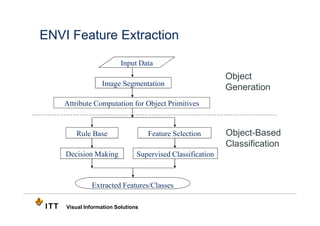
ENVI Feature Extraction

                         Input Data
                                                           Object
                 Image Segmentation
                                                           Generation
    Attribute Computation for Object Primitives


       Rule Base                   Feature Selection       Object-Based
                                                           Classification
    Decision Making            Supervised Classification


             Extracted Features/Classes

    Visual Information Solutions
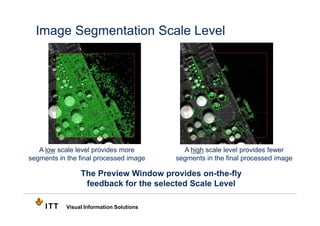
Image Segmentation Scale Level


   A low scale level provides more           A high scale level provides fewer
segments in the final processed image      segments in the final processed image

                 The Preview Window provides on-the-fly
                  feedback for the selected Scale Level

            Visual Information Solutions
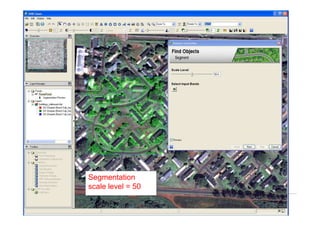
Segmentation
        scale level = 50

Visual Information Solutions
Under segemented
        scale level = 70

Visual Information Solutions
Over segmented
        scale level = 30

Visual Information Solutions
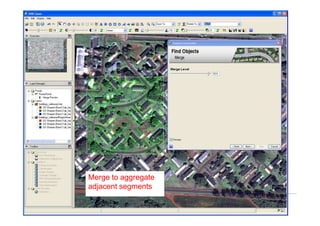
Merge to aggregate
        adjacent segments

Visual Information Solutions
Select Classification Method
• Select Classify by
  Selecting Examples to
  select training data and
  perform a supervised
  classification
• Select Classify by
  Creating Rules to
  select attribute
  parameters to perform a
  classification
• Select Export Vectors
  to export without
  performing a
  classification


          Visual Information Solutions
View attributes to
     characterize feature
     of interest
Visual Information Solutions
Create rules to define
      features of interest


Visual Information Solutions
ENVI Feature Extraction
Spatial Attributes
  • Region area, length, compactness, convexity, solidity, form factor,
     rectangular fit, roundness, elongation, main axis direction, axes length,
     number of holes, hole/solidity ratio
Spectral Attributes
  • Band minimum, maximum, average and standard deviation
Texture Attributes
  • Variance, range, mean, and entropy
Color Space and Band Ratio
  • Hue, saturation, intensity, NDVI, NDWI, other ratios


         Visual Information Solutions
Preview
      classification results
      and adjust training
      data on-the-fly


Visual Information Solutions
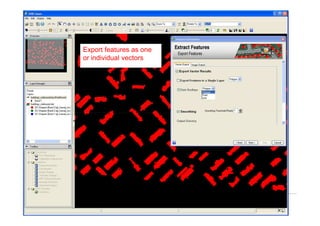
Export features as one
      or individual vectors


Visual Information Solutions
View Feature Extraction Report

•   View parameters
    used and statistics
    of exported vectors

•   Save as a text
    report to share with
    colleagues


         Visual Information Solutions
• Edit vector properties
      • View Attribute
        Information
      • Square-up building
        sides
      • Smooth vectors


Visual Information Solutions
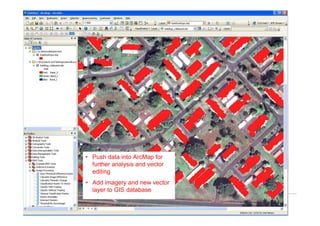
• Push data into ArcMap for
         further analysis and vector
         editing
       • Add imagery and new vector
         layer to GIS database

Visual Information Solutions
Thank You


   Visual Information Solutions

What is Object-Based Analysis

  • 1.
    What is Object-BasedImage Analysis? Kirk Benell The information contained in this document pertains to software products and services that are subject to the controls of the Export Administration Regulations (EAR). The recipient is responsible for ensuring compliance to all applicable U.S. Export Control laws and regulations.
  • 2.
    Object-Based Image Analysis Whatis an object? • An object is a region of interest with spatial, spectral (brightness and color), and/or texture characteristics that define the region • Pixels are grouped into objects, instead of single pixel analysis • May provide increased accuracy and detail for classification purposes Visual Information Solutions
  • 3.
    Object-Based Image Analysis Traditionalpixel-based classification • Based on reflectance values of pixels • Works for low and medium resolution imagery • Works for mass area-based features • Multispectral or hyperspectral imagery Limitations of pixel-based analysis • Only spectral, seldom spatial and contextual • Results with inconsistent salt-and-pepper noise • Inaccurate borders for texture computation • Limited extraction of small-scale objects Visual Information Solutions
  • 4.
    Pixel-based Classification 1.0 Water Pixels Image 0.5 6 5 4 3 2 0.0 1 1.0 Veg Reflectance 0.5 0.0 1.0 Soil 0.5 0.0 1 2 3 4 5 6 Band Group materials based on their reflectance response per pixel Visual Information Solutions
  • 5.
    Object-Based Image Analysis Image Segmented Merged Feature Pixels Objects Segmented The Letter ‘E’ Objects • Group contiguous pixels into objects • Objects are classified into feature classes based on their spatial, textural and spectral attributes Visual Information Solutions
  • 6.
    Object-Based Image Analysis •Greater accuracy from input: tone, color, texture, shape, size, orientation, pattern, shadow, situations • Advanced visualizations: Computer vision technique using image segmentation • Use homogeneous regions as basic analysis elements • Additional spatial, contextual and semantic information Visual Information Solutions
  • 7.
    ENVI Feature Extraction •Uses an object-based approach to classify imagery • The ENVI tool provides an easy to use method for extracting information from panchromatic, multispectral, hyperspectral, and elevation data • Vehicles • Buildings • Transportation • Natural Features Visual Information Solutions
  • 8.
    ENVI Feature Extraction Needsfor Feature Extraction • Increased availability of high- resolution images • Manual digitization, labor intensive • Semi-automated solution is highly desired Applications • Defense and Intelligence • Geographic Information Systems • Transportation • Urban planning and mapping Visual Information Solutions
  • 9.
    ENVI Feature Extraction Workflow: • Spectral/spatial/texture attributes • Object-based fuzzy rule-based classification • Object-based supervised classification Preview Window for instant feedback prior to processing an entire image Post-Classification Vector Tool • Centerline extraction • Snapping, smoothing • Vector editing Visual Information Solutions
  • 10.
    ENVI Feature Extraction Input Data Object Image Segmentation Generation Attribute Computation for Object Primitives Rule Base Feature Selection Object-Based Classification Decision Making Supervised Classification Extracted Features/Classes Visual Information Solutions
  • 11.
    Image Segmentation ScaleLevel A low scale level provides more A high scale level provides fewer segments in the final processed image segments in the final processed image The Preview Window provides on-the-fly feedback for the selected Scale Level Visual Information Solutions
  • 12.
    Segmentation scale level = 50 Visual Information Solutions
  • 13.
    Under segemented scale level = 70 Visual Information Solutions
  • 14.
    Over segmented scale level = 30 Visual Information Solutions
  • 15.
    Merge to aggregate adjacent segments Visual Information Solutions
  • 16.
    Select Classification Method •Select Classify by Selecting Examples to select training data and perform a supervised classification • Select Classify by Creating Rules to select attribute parameters to perform a classification • Select Export Vectors to export without performing a classification Visual Information Solutions
  • 17.
    View attributes to characterize feature of interest Visual Information Solutions
  • 18.
    Create rules todefine features of interest Visual Information Solutions
  • 19.
    ENVI Feature Extraction SpatialAttributes • Region area, length, compactness, convexity, solidity, form factor, rectangular fit, roundness, elongation, main axis direction, axes length, number of holes, hole/solidity ratio Spectral Attributes • Band minimum, maximum, average and standard deviation Texture Attributes • Variance, range, mean, and entropy Color Space and Band Ratio • Hue, saturation, intensity, NDVI, NDWI, other ratios Visual Information Solutions
  • 20.
    Preview classification results and adjust training data on-the-fly Visual Information Solutions
  • 21.
    Export features asone or individual vectors Visual Information Solutions
  • 22.
    View Feature ExtractionReport • View parameters used and statistics of exported vectors • Save as a text report to share with colleagues Visual Information Solutions
  • 23.
    • Edit vectorproperties • View Attribute Information • Square-up building sides • Smooth vectors Visual Information Solutions
  • 24.
    • Push datainto ArcMap for further analysis and vector editing • Add imagery and new vector layer to GIS database Visual Information Solutions
  • 25.
    Thank You Visual Information Solutions