z
z
computer
 A computer is an electronic device that manipulates information, or
data. It has the ability to store, retrieve, and process data.
 computer is a programmable machine that receives input, stores
and manipulates data, and provides output in a useful format.
 Computer was used as an electronic device that allows inputting
data and having it stored, processed, or otherwise manipulated
quickly and efficiently.
 A computer system includes a computer, peripheral devices, and
software.
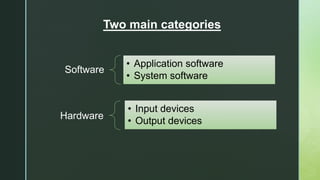
Software
• Application software
• System software
Hardware
• Input devices
• Output devices
Two main categories
z
Computer SOFTWARE
• A set of instructions that enables physical components of a computer to work in
a synchronize way is known as Software .
• This set of instructions is often called a program.
• Computers cannot do any useful work without instructions from software
• Example MS word
• Excel & Power point
• Spread sheets
• Computer software is also divided in major types
• Application Software.
• system Software
z
Application Software
• Enables the users to accomplish certain specific tasks. Following are the types
of application software
• WEB BROWSING SOFTWARE It allows one to surf the Web.
• WORD PROCCESSING SOFTWARE Allows users to create, edit a document.
• Example MS Word
• Payroll systems
• Inventory Control
• Manage student database
• Spreadsheet and Database Management System etc
z
SYSTEM SOFTWARE
• System software helps in running the computer hardware and the
computer system. Main system soft wares are
• The System Software consist of the Operating System and all the
utilities that enable the computer to function.
• System software actually controls the hardware
• Examples Operating systems
• Device drivers
• Utilities
• Language Translators
z
Computer Hardware
The physical component of computer system which can be installed an operating
system and a multitude of software to perform the operator’s desired functions.
Hardware is the component that can be seen and touched.
Hardware Components
Input Devices
Input devices are things we use to put information INTO a computer.
 Keyboard
 Mouse
 Joystick
 Scanner
z
Output Devices
 Output devices are things we use to get information OUT of a computer.
 Output devices Output devices are used to supply processed data.
 Some output devices are:
 Monitor
 Printers
 Speakers
 Plotters
 Processing devices.
z
Elements of A Computer
 People: They run and operate the computer
 Procedure: are normally written in manuals of hardware and software
manufacturers
 Software: is to do process data into useful information for people
 Hardware: the physical equipment that you can feel and touch.
 Data: include texts and numbers, sounds, images, and videos that you
input into the computer for processing.
 Connectivity A computer must be connected to other computers especially
through the internet.- using the internet, people can share and access data
from all over the world.
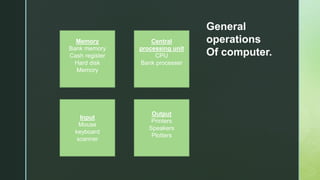
Memory
Bank memory
Cash register
Hard disk
Memory
Central
processing unit
CPU
Bank processer
Input
Mouse
keyboard
scanner
Output
Printers
Speakers
Plotters
General
operations
Of computer.
z
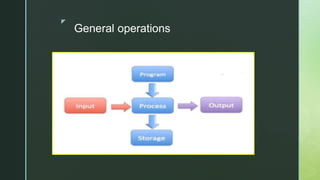
General operations

what is computer

  • 1.
  • 2.
    z computer  A computeris an electronic device that manipulates information, or data. It has the ability to store, retrieve, and process data.  computer is a programmable machine that receives input, stores and manipulates data, and provides output in a useful format.  Computer was used as an electronic device that allows inputting data and having it stored, processed, or otherwise manipulated quickly and efficiently.  A computer system includes a computer, peripheral devices, and software.
  • 3.
    Software • Application software •System software Hardware • Input devices • Output devices Two main categories
  • 4.
    z Computer SOFTWARE • Aset of instructions that enables physical components of a computer to work in a synchronize way is known as Software . • This set of instructions is often called a program. • Computers cannot do any useful work without instructions from software • Example MS word • Excel & Power point • Spread sheets • Computer software is also divided in major types • Application Software. • system Software
  • 5.
    z Application Software • Enablesthe users to accomplish certain specific tasks. Following are the types of application software • WEB BROWSING SOFTWARE It allows one to surf the Web. • WORD PROCCESSING SOFTWARE Allows users to create, edit a document. • Example MS Word • Payroll systems • Inventory Control • Manage student database • Spreadsheet and Database Management System etc
  • 6.
    z SYSTEM SOFTWARE • Systemsoftware helps in running the computer hardware and the computer system. Main system soft wares are • The System Software consist of the Operating System and all the utilities that enable the computer to function. • System software actually controls the hardware • Examples Operating systems • Device drivers • Utilities • Language Translators
  • 7.
    z Computer Hardware The physicalcomponent of computer system which can be installed an operating system and a multitude of software to perform the operator’s desired functions. Hardware is the component that can be seen and touched. Hardware Components Input Devices Input devices are things we use to put information INTO a computer.  Keyboard  Mouse  Joystick  Scanner
  • 8.
    z Output Devices  Outputdevices are things we use to get information OUT of a computer.  Output devices Output devices are used to supply processed data.  Some output devices are:  Monitor  Printers  Speakers  Plotters  Processing devices.
  • 9.
    z Elements of AComputer  People: They run and operate the computer  Procedure: are normally written in manuals of hardware and software manufacturers  Software: is to do process data into useful information for people  Hardware: the physical equipment that you can feel and touch.  Data: include texts and numbers, sounds, images, and videos that you input into the computer for processing.  Connectivity A computer must be connected to other computers especially through the internet.- using the internet, people can share and access data from all over the world.
  • 10.
    Memory Bank memory Cash register Harddisk Memory Central processing unit CPU Bank processer Input Mouse keyboard scanner Output Printers Speakers Plotters General operations Of computer.
  • 11.