HARDWARE AND SOFTWARE

           PRESENTED TO
           MR.SAEED AHMED


           PRESENTED BY
           MUBASHIR AHMED 10019
           AROOBA ARIF     19958
           AYESHA NADEEM  10271
AGENDA
 INTRODUCTION


 HARWARE


 TYPES OF HARDWARE


 SOFTWARE


 TYPES OF SOFTWARE
INTRODUCTION
A computer is an electronic device that accept data (input)
and, process data arithmetically and logically, produce
information (output).

It is divided into two main categories

 Hardware


 Software
HARDWARE
 Hardware is the physical aspect of computers,
  telecommunications, and other devices.

 It includes not only the computer proper but also the
  cables, connectors, power supply units, and peripheral
  devices such as the keyboard, mouse, audio speakers, and
  printers.
TYPES OF HARDWARE
INTERNAL HARDWARE
Internal hardware is also called components. It includes

 CPU
 Motherboard
 RAM
 ROM
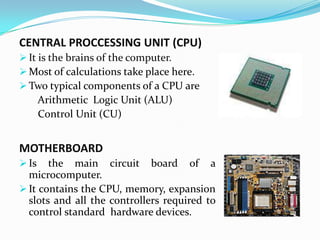
CENTRAL PROCCESSING UNIT (CPU)
 It is the brains of the computer.
 Most of calculations take place here.
 Two typical components of a CPU are
       Arithmetic Logic Unit (ALU)
       Control Unit (CU)


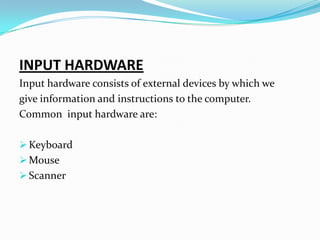
MOTHERBOARD
 Is   the main circuit board of a
  microcomputer.
 It contains the CPU, memory, expansion
  slots and all the controllers required to
  control standard hardware devices.
RANDOM ACCESS MEMORY (RAM)
 RAM is the place in a computer where the
  operating system, application programs,
  and data in current use are kept .
 It is a temporary memory and can be
  compared to a person's short-term
  memory

READ ONLY MEMORY (ROM)
 It is a technology that allows you to write
  data only once. After the data has been
  written, you can read it an unlimited
  number of times.
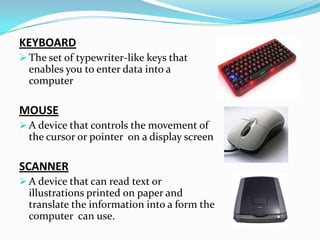
INPUT HARDWARE
Input hardware consists of external devices by which we
give information and instructions to the computer.
Common input hardware are:

 Keyboard
 Mouse
 Scanner
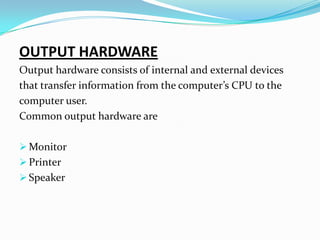
KEYBOARD
 The set of typewriter-like keys that
  enables you to enter data into a
  computer

MOUSE
 A device that controls the movement of
  the cursor or pointer on a display screen

SCANNER
 A device that can read text or
  illustrations printed on paper and
  translate the information into a form the
  computer can use.
OUTPUT HARDWARE
Output hardware consists of internal and external devices
that transfer information from the computer’s CPU to the
computer user.
Common output hardware are

 Monitor
 Printer
 Speaker
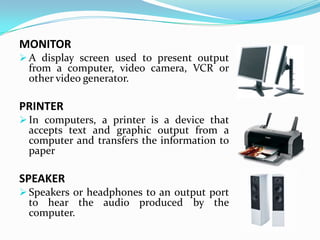
MONITOR
 A display screen used to present output
 from a computer, video camera, VCR or
 other video generator.

PRINTER
 In computers, a printer is a device that
 accepts text and graphic output from a
 computer and transfers the information to
 paper

SPEAKER
 Speakers or headphones to an output port
 to hear the audio produced by the
 computer.
CONNECTING HARDWARE
Connecting device allow hardware devices to
communicate with each other
Common devices are

 Modem
 LAN Card
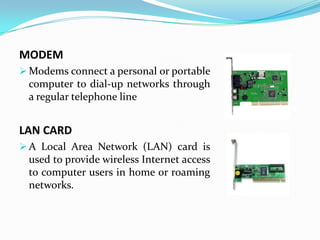
MODEM
 Modems connect a personal or portable
 computer to dial-up networks through
 a regular telephone line


LAN CARD
 A Local Area Network (LAN) card is
 used to provide wireless Internet access
 to computer users in home or roaming
 networks.
STORAGE HARDWARE
A computer storage device is any type of hardware that
stores data. Some common storage devices are

 Hard Disc
 Floppy Disc
 CD ROM
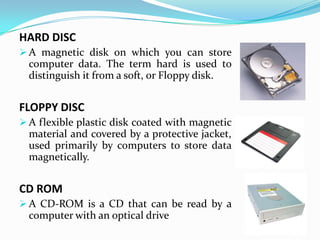
HARD DISC
 A magnetic disk on which you can store
  computer data. The term hard is used to
  distinguish it from a soft, or Floppy disk.


FLOPPY DISC
 A flexible plastic disk coated with magnetic
  material and covered by a protective jacket,
  used primarily by computers to store data
  magnetically.


CD ROM
 A CD-ROM is a CD that can be read by a
  computer with an optical drive
SOFTWARE
 A set of instructions that enables physical components
  of a computer to work in a synchronize way is known
  as Software .

 This set of instructions is often called a program.


 Computers cannot do any useful work without instructions
  from software
TYPES OF SOFTWARE
Computer software is also divided in four major types

 System Software
 Programming Software
 Application Software
 Utility Software
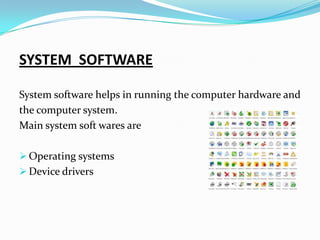
SYSTEM SOFTWARE

System software helps in running the computer hardware and
the computer system.
Main system soft wares are

 Operating systems
 Device drivers
DEVICE DRIVERS
 In computing, a device driver is a computer program
  allowing higher-level computer programs to interact
  with a hardware device


OPERATING SYSTEMS
 An operating system is an interface between hardware
  and user; it is responsible for the management and
  coordination of activities and the sharing of the limited
  resources of the computer.
APPLICATION SOFTWARE
It enables the users to accomplish
certain specific tasks. Following are the
types of application software

WEB BROWSING SOFTWARE
  It allows one to surf the Web. Example MS
  Internet Explorer

WORD PROCCESSING SOFTWARE
  Allows users to create, edit a document.
  Example MS Word
SPREADSHEET SOFTWARE
 Allows users to create document and perform calculation.
 Example: MS Excel etc


DATABASE SOFTWARE
 Allows users to store and retrieve vast amount of data.
 Example: MS Access etc.


PRESENTATION GRAPHICS SOFTWARE
 Allows users to create visual presentation. Example MS
 Power Point
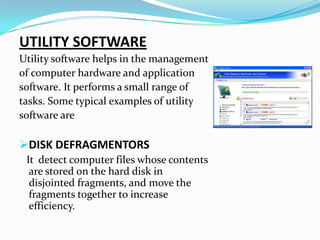
UTILITY SOFTWARE
Utility software helps in the management
of computer hardware and application
software. It performs a small range of
tasks. Some typical examples of utility
software are

DISK DEFRAGMENTORS
 It detect computer files whose contents
  are stored on the hard disk in
  disjointed fragments, and move the
  fragments together to increase
  efficiency.
BACKUP
 This utility make a copy of all information stored on a
 disk, and restore either the entire disk or selected files


DISK PARTITIONER
 It divide an individual drive into multiple logical drives,
 each with its own file system which can be mounted by the
 operating system and treated as an individual drive.


ANTI-VIRUS
 These utilities scan computer for viruses.
PROGRAMMING SOFTWARE

This is one of the most commonly known and popularly
used forms of computer software. These software come in
forms of tools that assist a programmer in writing computer
Programs.
The tools that help the programmers in instructing a
computer system include
 text editors
 compilers
 interpreters
Hardware & Software

Hardware & Software

  • 1.
    HARDWARE AND SOFTWARE PRESENTED TO MR.SAEED AHMED PRESENTED BY MUBASHIR AHMED 10019 AROOBA ARIF 19958 AYESHA NADEEM 10271
  • 2.
    AGENDA  INTRODUCTION  HARWARE TYPES OF HARDWARE  SOFTWARE  TYPES OF SOFTWARE
  • 3.
    INTRODUCTION A computer isan electronic device that accept data (input) and, process data arithmetically and logically, produce information (output). It is divided into two main categories  Hardware  Software
  • 4.
    HARDWARE  Hardware isthe physical aspect of computers, telecommunications, and other devices.  It includes not only the computer proper but also the cables, connectors, power supply units, and peripheral devices such as the keyboard, mouse, audio speakers, and printers.
  • 5.
    TYPES OF HARDWARE INTERNALHARDWARE Internal hardware is also called components. It includes  CPU  Motherboard  RAM  ROM
  • 6.
    CENTRAL PROCCESSING UNIT(CPU)  It is the brains of the computer.  Most of calculations take place here.  Two typical components of a CPU are Arithmetic Logic Unit (ALU) Control Unit (CU) MOTHERBOARD  Is the main circuit board of a microcomputer.  It contains the CPU, memory, expansion slots and all the controllers required to control standard hardware devices.
  • 7.
    RANDOM ACCESS MEMORY(RAM)  RAM is the place in a computer where the operating system, application programs, and data in current use are kept .  It is a temporary memory and can be compared to a person's short-term memory READ ONLY MEMORY (ROM)  It is a technology that allows you to write data only once. After the data has been written, you can read it an unlimited number of times.
  • 8.
    INPUT HARDWARE Input hardwareconsists of external devices by which we give information and instructions to the computer. Common input hardware are:  Keyboard  Mouse  Scanner
  • 9.
    KEYBOARD  The setof typewriter-like keys that enables you to enter data into a computer MOUSE  A device that controls the movement of the cursor or pointer on a display screen SCANNER  A device that can read text or illustrations printed on paper and translate the information into a form the computer can use.
  • 10.
    OUTPUT HARDWARE Output hardwareconsists of internal and external devices that transfer information from the computer’s CPU to the computer user. Common output hardware are  Monitor  Printer  Speaker
  • 11.
    MONITOR  A displayscreen used to present output from a computer, video camera, VCR or other video generator. PRINTER  In computers, a printer is a device that accepts text and graphic output from a computer and transfers the information to paper SPEAKER  Speakers or headphones to an output port to hear the audio produced by the computer.
  • 12.
    CONNECTING HARDWARE Connecting deviceallow hardware devices to communicate with each other Common devices are  Modem  LAN Card
  • 13.
    MODEM  Modems connecta personal or portable computer to dial-up networks through a regular telephone line LAN CARD  A Local Area Network (LAN) card is used to provide wireless Internet access to computer users in home or roaming networks.
  • 14.
    STORAGE HARDWARE A computerstorage device is any type of hardware that stores data. Some common storage devices are  Hard Disc  Floppy Disc  CD ROM
  • 15.
    HARD DISC  Amagnetic disk on which you can store computer data. The term hard is used to distinguish it from a soft, or Floppy disk. FLOPPY DISC  A flexible plastic disk coated with magnetic material and covered by a protective jacket, used primarily by computers to store data magnetically. CD ROM  A CD-ROM is a CD that can be read by a computer with an optical drive
  • 16.
    SOFTWARE  A setof instructions that enables physical components of a computer to work in a synchronize way is known as Software .  This set of instructions is often called a program.  Computers cannot do any useful work without instructions from software
  • 17.
    TYPES OF SOFTWARE Computersoftware is also divided in four major types  System Software  Programming Software  Application Software  Utility Software
  • 18.
    SYSTEM SOFTWARE System softwarehelps in running the computer hardware and the computer system. Main system soft wares are  Operating systems  Device drivers
  • 19.
    DEVICE DRIVERS  Incomputing, a device driver is a computer program allowing higher-level computer programs to interact with a hardware device OPERATING SYSTEMS  An operating system is an interface between hardware and user; it is responsible for the management and coordination of activities and the sharing of the limited resources of the computer.
  • 20.
    APPLICATION SOFTWARE It enablesthe users to accomplish certain specific tasks. Following are the types of application software WEB BROWSING SOFTWARE It allows one to surf the Web. Example MS Internet Explorer WORD PROCCESSING SOFTWARE Allows users to create, edit a document. Example MS Word
  • 21.
    SPREADSHEET SOFTWARE Allowsusers to create document and perform calculation. Example: MS Excel etc DATABASE SOFTWARE Allows users to store and retrieve vast amount of data. Example: MS Access etc. PRESENTATION GRAPHICS SOFTWARE Allows users to create visual presentation. Example MS Power Point
  • 22.
    UTILITY SOFTWARE Utility softwarehelps in the management of computer hardware and application software. It performs a small range of tasks. Some typical examples of utility software are DISK DEFRAGMENTORS It detect computer files whose contents are stored on the hard disk in disjointed fragments, and move the fragments together to increase efficiency.
  • 23.
    BACKUP This utilitymake a copy of all information stored on a disk, and restore either the entire disk or selected files DISK PARTITIONER It divide an individual drive into multiple logical drives, each with its own file system which can be mounted by the operating system and treated as an individual drive. ANTI-VIRUS These utilities scan computer for viruses.
  • 24.
    PROGRAMMING SOFTWARE This isone of the most commonly known and popularly used forms of computer software. These software come in forms of tools that assist a programmer in writing computer Programs. The tools that help the programmers in instructing a computer system include  text editors  compilers  interpreters