WEKA Manual (IT for Business Intelligence)                                     Sagar (10BM60075)


                 IT for Business Intelligence (BM61080)


     Data Mining Techniques using WEKA


Sagar (10BM60075)


This term paper contains a brief introduction to WEKA – a powerful data mining tool along with a
guide to two data mining techniques - Clustering (k-means) and Linear Regression, using WEKA tool.


                                                                                               Page 1
                               Vinod Gupta School of Management
WEKA Manual (IT for Business Intelligence)                                                 Sagar (10BM60075)


Data Mining Techniques using WEKA:

WEKA: Weka (Waikato Environment for Knowledge Analysis) is a popular suite of machine learning software
written in Java, developed at the University of Waikato, New Zealand. The Weka workbench contains a collection
of visualization tools and algorithms for data analysis and predictive modeling, together with graphical user
interfaces for easy access to this functionality. Weka supports several standard data mining tasks, more
specifically, data preprocessing, clustering, classification, regression, visualization, and feature selection. Weka's
main user interface is the explorer, but essentially the same functionality can be accessed through the component-
based knowledge Flow interface and from the command line. There is also the experimenter, which allows the
systematic comparison of the predictive performance of Weka's machine learning algorithms on a collection of
datasets.

Interfaces –
      Command Line Interface (CLI)
      Graphical User Interface (GUI)

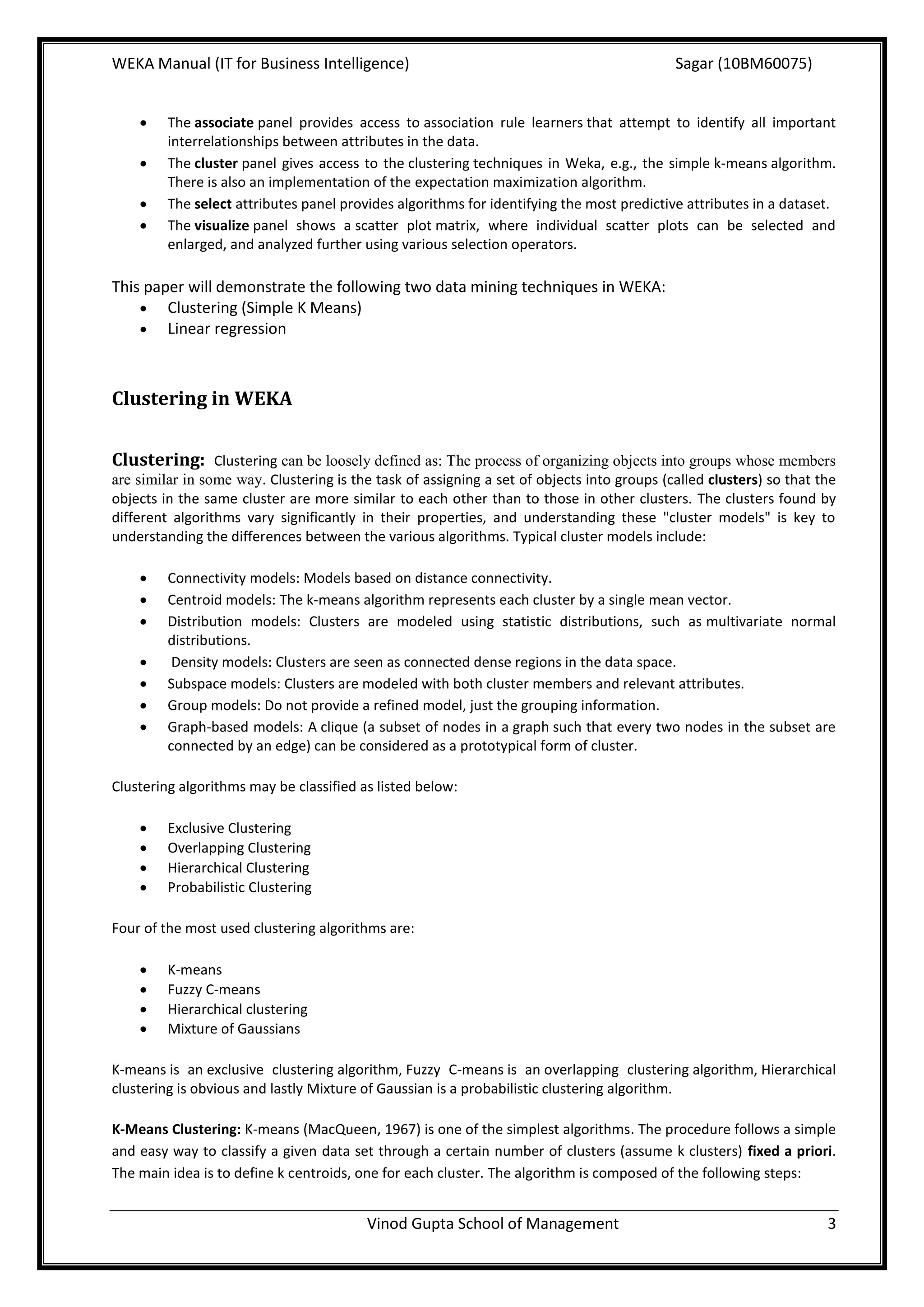
         The WEKA GUI Chooser –


                                                       Fig. 1

The buttons can be used to start the following applications –
     Explorer – this is the environment for exploring data with WEKA and gives access to all the facilities using
        menu selection and form filling.
     Experimenter – Gives the answer for the question: Which methods and parameter values work best for
        the given problem?
     Knowledge Flow – Supports incremental learning and allows designing configurations for streamed data
        processing. Incremental algorithms can be used to process very large datasets.
     Simple CLI – A simple Command Line Interface for executing WEKA commands directly.


The Explorer interface features several panels providing access to the main components of the
workbench:

        The preprocess panel has facilities for importing data from a database, a CSV file, etc., and for
         preprocessing this data using a filtering algorithm. It is possible to transform the data and delete
         instances and attributes according to specific criteria.
        The classify panel enable to apply classification and regression algorithms, to estimate the accuracy of the
         resulting predictive model, and to visualize erroneous predictions, ROC curves, etc.


                                         Vinod Gupta School of Management                                           2
WEKA Manual (IT for Business Intelligence)                                                  Sagar (10BM60075)


        The associate panel provides access to association rule learners that attempt to identify all important
         interrelationships between attributes in the data.
        The cluster panel gives access to the clustering techniques in Weka, e.g., the simple k-means algorithm.
         There is also an implementation of the expectation maximization algorithm.
        The select attributes panel provides algorithms for identifying the most predictive attributes in a dataset.
        The visualize panel shows a scatter plot matrix, where individual scatter plots can be selected and
         enlarged, and analyzed further using various selection operators.

This paper will demonstrate the following two data mining techniques in WEKA:
     Clustering (Simple K Means)
     Linear regression


Clustering in WEKA


Clustering: Clustering can be loosely defined as: The process of organizing objects into groups whose members
are similar in some way. Clustering is the task of assigning a set of objects into groups (called clusters) so that the
objects in the same cluster are more similar to each other than to those in other clusters. The clusters found by
different algorithms vary significantly in their properties, and understanding these "cluster models" is key to
understanding the differences between the various algorithms. Typical cluster models include:

        Connectivity models: Models based on distance connectivity.
        Centroid models: The k-means algorithm represents each cluster by a single mean vector.
        Distribution models: Clusters are modeled using statistic distributions, such as multivariate normal
         distributions.
         Density models: Clusters are seen as connected dense regions in the data space.
        Subspace models: Clusters are modeled with both cluster members and relevant attributes.
        Group models: Do not provide a refined model, just the grouping information.
        Graph-based models: A clique (a subset of nodes in a graph such that every two nodes in the subset are
         connected by an edge) can be considered as a prototypical form of cluster.

Clustering algorithms may be classified as listed below:

        Exclusive Clustering
        Overlapping Clustering
        Hierarchical Clustering
        Probabilistic Clustering

Four of the most used clustering algorithms are:

        K-means
        Fuzzy C-means
        Hierarchical clustering
        Mixture of Gaussians

K-means is an exclusive clustering algorithm, Fuzzy C-means is an overlapping clustering algorithm, Hierarchical
clustering is obvious and lastly Mixture of Gaussian is a probabilistic clustering algorithm.

K-Means Clustering: K-means (MacQueen, 1967) is one of the simplest algorithms. The procedure follows a simple
and easy way to classify a given data set through a certain number of clusters (assume k clusters) fixed a priori.
The main idea is to define k centroids, one for each cluster. The algorithm is composed of the following steps:


                                         Vinod Gupta School of Management                                            3
WEKA Manual (IT for Business Intelligence)                                                Sagar (10BM60075)


    1.   Place K points into the space represented by the objects that are being clustered. These points represent
         initial group centroids.
    2.   Assign each object to the group that has the closest centroid.
    3.   When all objects have been assigned, recalculate the positions of the K centroids.
    4.   Repeat Steps 2 and 3 until the centroids no longer move. This produces a separation of the objects into
         groups from which the metric to be minimized can be calculated.

The k-means algorithm does not necessarily find the most optimal configuration. The algorithm is also significantly
sensitive to the initial randomly selected cluster centres. There is no general theoretical solution to find the
optimal number of clusters for any given data set. A simple approach is to compare the results of multiple runs
with different k classes and choose the best one.

Why to do Clustering (Business Applications)?

        Market Segmentation
        Identifying market needs
        To better understand the relationships between different groups of consumers/potential customers
        Product positioning
        New product opportunities
        Selecting test markets
        Clustering can be used to group all the shopping items available on the web into a set of unique products

K-Means Clustering in WEKA:

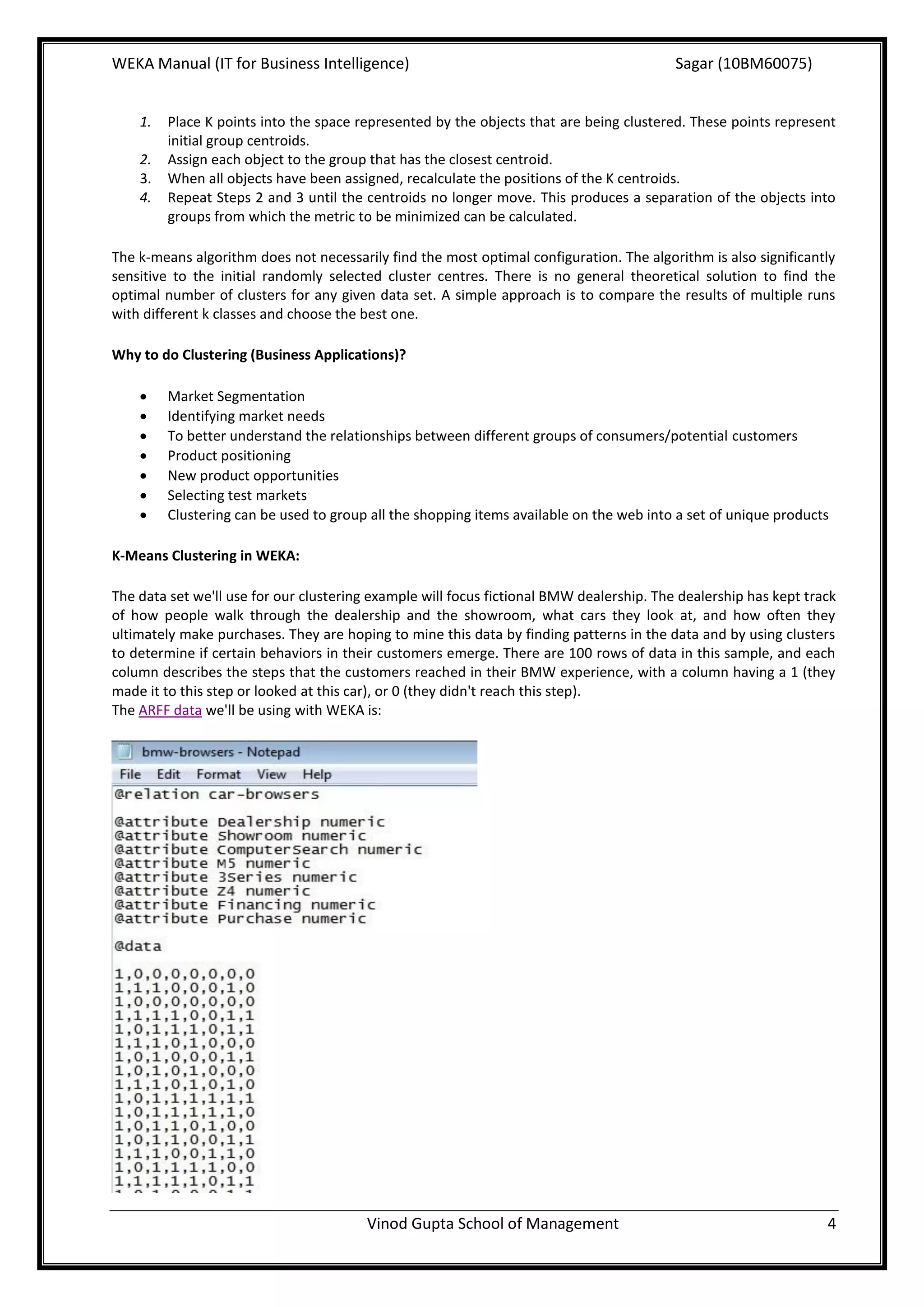
The data set we'll use for our clustering example will focus fictional BMW dealership. The dealership has kept track
of how people walk through the dealership and the showroom, what cars they look at, and how often they
ultimately make purchases. They are hoping to mine this data by finding patterns in the data and by using clusters
to determine if certain behaviors in their customers emerge. There are 100 rows of data in this sample, and each
column describes the steps that the customers reached in their BMW experience, with a column having a 1 (they
made it to this step or looked at this car), or 0 (they didn't reach this step).
The ARFF data we'll be using with WEKA is:


                                        Vinod Gupta School of Management                                          4
WEKA Manual (IT for Business Intelligence)                                                  Sagar (10BM60075)


Steps to be followed for doing K-Means Clustering in WEKA:

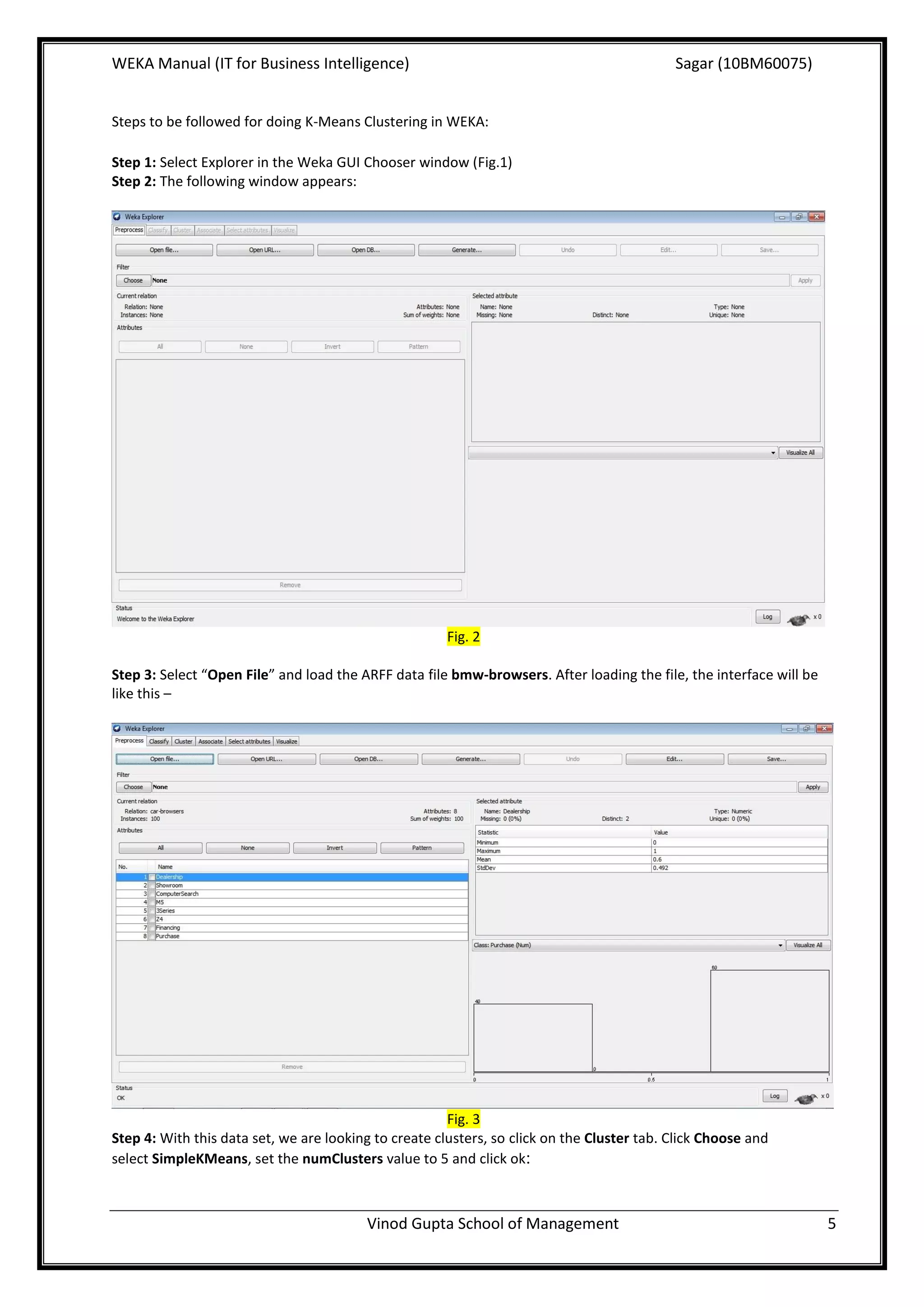
Step 1: Select Explorer in the Weka GUI Chooser window (Fig.1)
Step 2: The following window appears:


                                                       Fig. 2

Step 3: Select “Open File” and load the ARFF data file bmw-browsers. After loading the file, the interface will be
like this –


                                                       Fig. 3
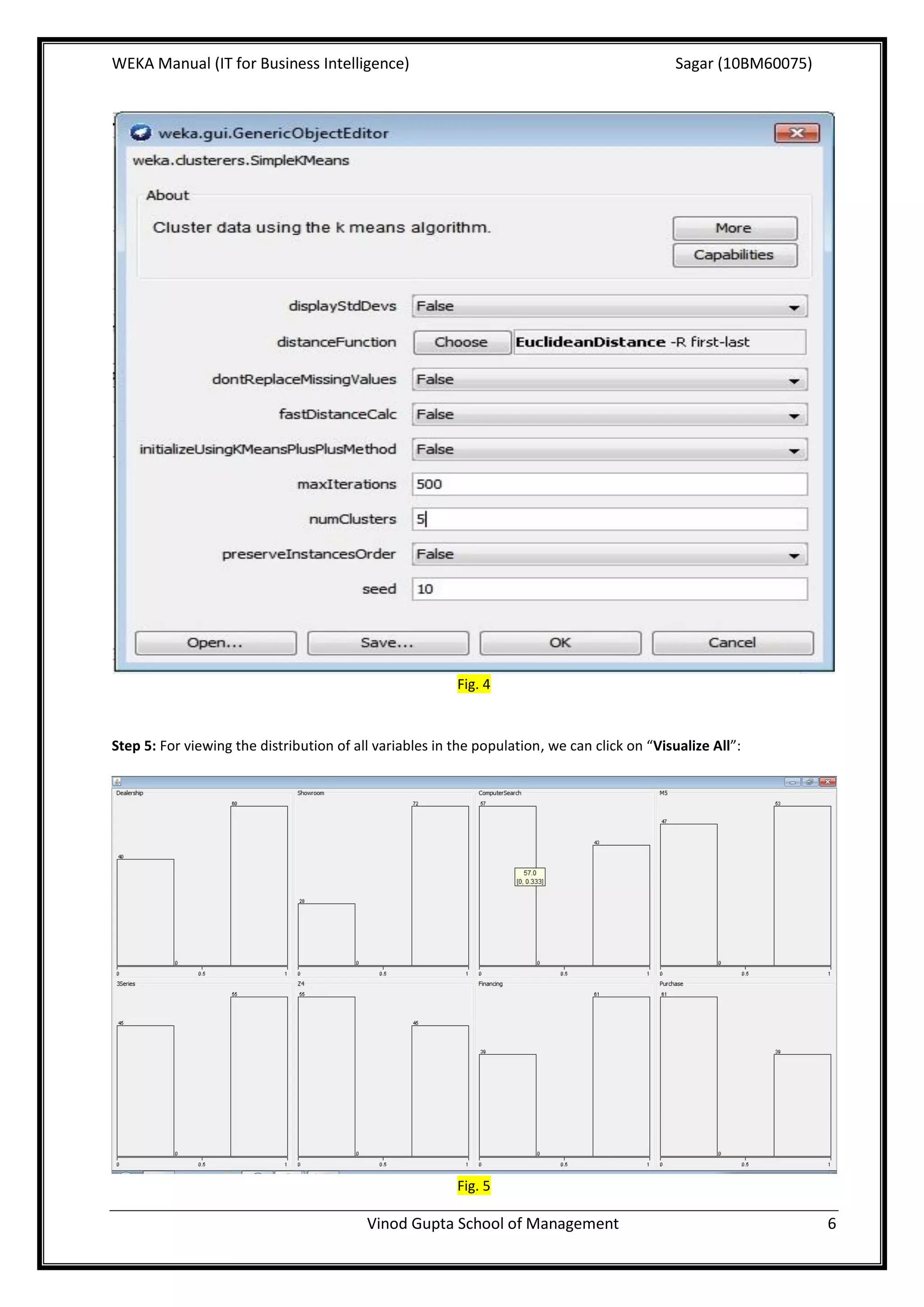
Step 4: With this data set, we are looking to create clusters, so click on the Cluster tab. Click Choose and
select SimpleKMeans, set the numClusters value to 5 and click ok:


                                         Vinod Gupta School of Management                                            5
WEKA Manual (IT for Business Intelligence)                                                    Sagar (10BM60075)


                                                         Fig. 4


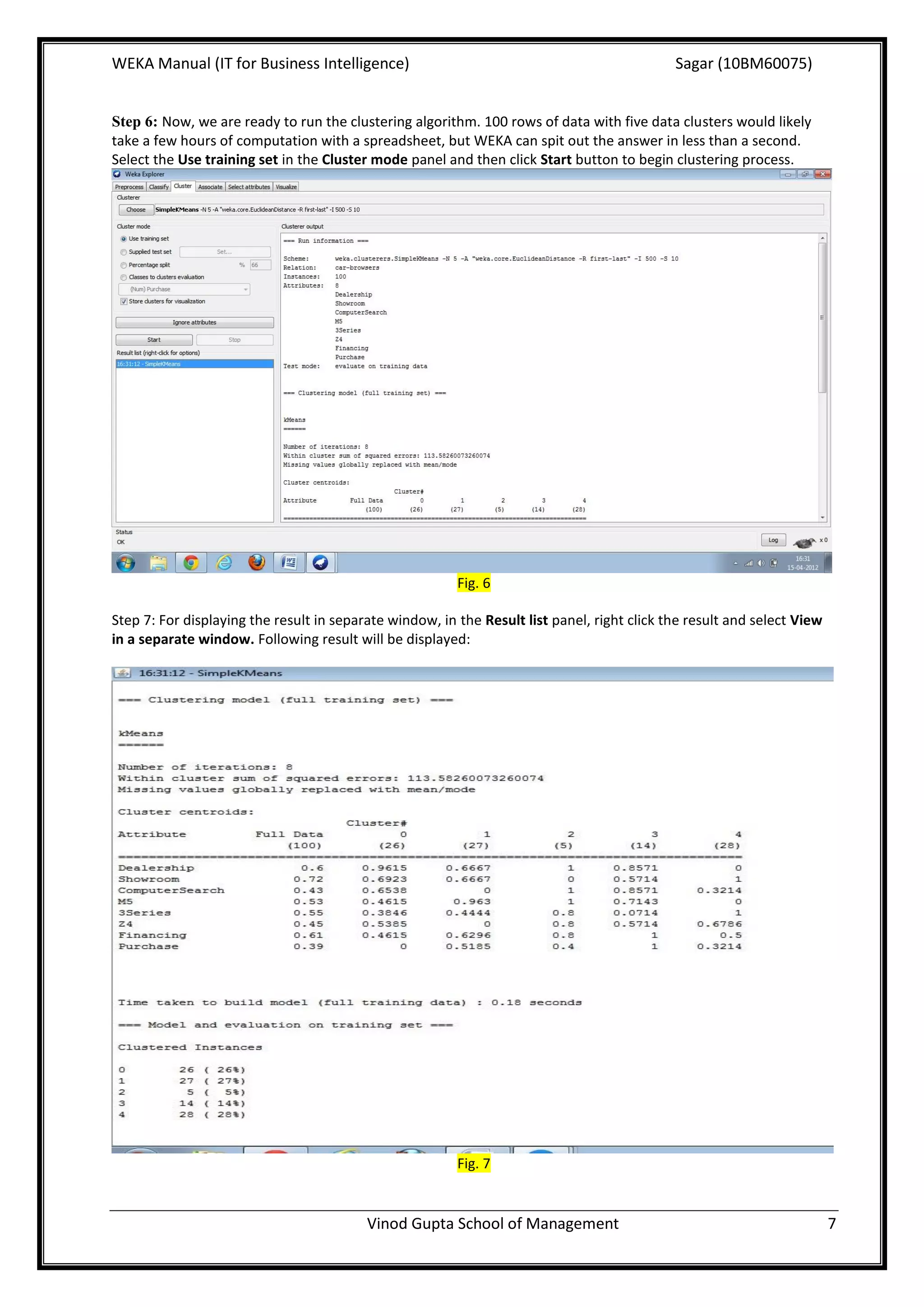
Step 5: For viewing the distribution of all variables in the population, we can click on “Visualize All”:


                                                         Fig. 5

                                          Vinod Gupta School of Management                                        6
WEKA Manual (IT for Business Intelligence)                                                   Sagar (10BM60075)


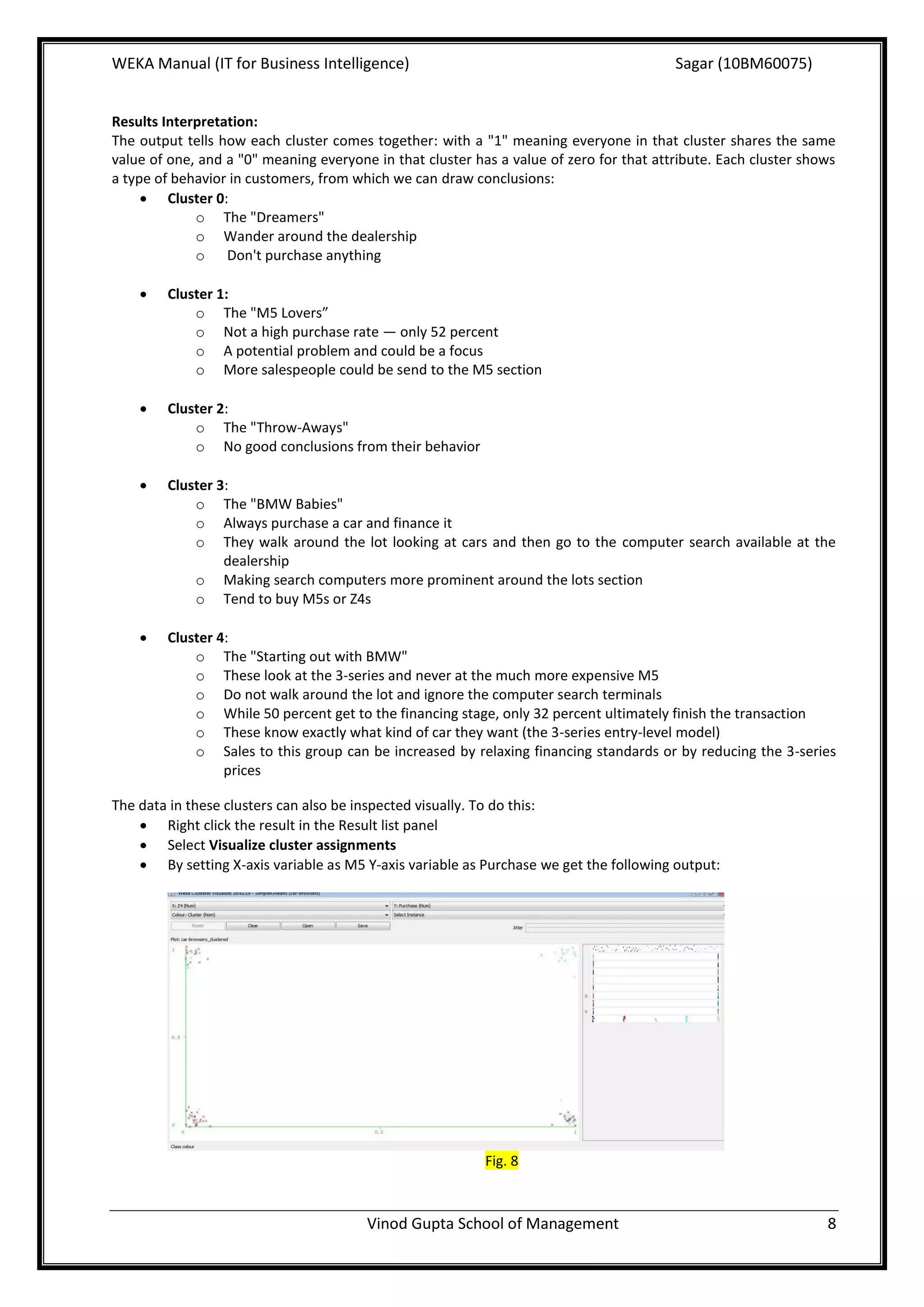
Step 6: Now, we are ready to run the clustering algorithm. 100 rows of data with five data clusters would likely
take a few hours of computation with a spreadsheet, but WEKA can spit out the answer in less than a second.
Select the Use training set in the Cluster mode panel and then click Start button to begin clustering process.


                                                         Fig. 6

Step 7: For displaying the result in separate window, in the Result list panel, right click the result and select View
in a separate window. Following result will be displayed:


                                                         Fig. 7


                                          Vinod Gupta School of Management                                               7
WEKA Manual (IT for Business Intelligence)                                               Sagar (10BM60075)


Results Interpretation:
The output tells how each cluster comes together: with a "1" meaning everyone in that cluster shares the same
value of one, and a "0" meaning everyone in that cluster has a value of zero for that attribute. Each cluster shows
a type of behavior in customers, from which we can draw conclusions:
      Cluster 0:
             o The "Dreamers"
             o Wander around the dealership
             o Don't purchase anything

       Cluster 1:
            o The "M5 Lovers”
            o Not a high purchase rate — only 52 percent
            o A potential problem and could be a focus
            o More salespeople could be send to the M5 section

       Cluster 2:
            o The "Throw-Aways"
            o No good conclusions from their behavior

       Cluster 3:
            o The "BMW Babies"
            o Always purchase a car and finance it
            o They walk around the lot looking at cars and then go to the computer search available at the
                 dealership
            o Making search computers more prominent around the lots section
            o Tend to buy M5s or Z4s

       Cluster 4:
            o The "Starting out with BMW"
            o These look at the 3-series and never at the much more expensive M5
            o Do not walk around the lot and ignore the computer search terminals
            o While 50 percent get to the financing stage, only 32 percent ultimately finish the transaction
            o These know exactly what kind of car they want (the 3-series entry-level model)
            o Sales to this group can be increased by relaxing financing standards or by reducing the 3-series
                 prices

The data in these clusters can also be inspected visually. To do this:
     Right click the result in the Result list panel
     Select Visualize cluster assignments
     By setting X-axis variable as M5 Y-axis variable as Purchase we get the following output:


                                                           Fig. 8


                                        Vinod Gupta School of Management                                         8
WEKA Manual (IT for Business Intelligence)                                                 Sagar (10BM60075)


This figure shows in a chart how the clusters are grouped in terms of who looked at the M5 and who purchased
one. Also, turn up the "Jitter" to about three-fourths of the way maxed out, which will artificially scatter the plot
points to allow us to see them more easily.

The visual results match the conclusions we drew above. We can see in the X=1, Y=1 point (those who looked at
M5s and made a purchase) that the only clusters represented here are 1 and 3. We also see that the only clusters
at point X=0, Y=0 are 4 and 0. Clusters 1 and 3 were buying the M5s, while cluster 0 wasn't buying anything, and
cluster 4 was only looking at the 3-series. By changing X and Y axes, we can identify other trends and patterns.

Other clustering methods can also be used to group the data into clusters. WEKA is very useful in the clustering
process when the size of data is huge. It can generate clusters pretty quickly even with huge data. As business has
huge applications of clustering, WEKA is very useful in the clustering of data in real business scenarios.


Linear Regression using WEKA
Regression: Regression is the easiest technique to use, but is also probably the least powerful. This model can
be as easy as one input variable and one output variable (Scatter diagram in Excel, or an XY Diagram in
OpenOffice.org). It can get more complex than that, including dozens of input variables. Regression models all fit
the same general pattern: there are a number of independent variables, which, when taken together, produce a
result — a dependent variable. The regression model is then used to predict the result of an unknown dependent
variable, given the values of the independent variables. Correlation analysis can be applied to determine the
degree to which variables are related. Broadly, regression can be classified into two types:
      Simple linear regression (one dependent variable and one independent variable)

        Multiple regression (one dependent variable and many independent variables)

The process of Multiple regression in WEKA is described with an example in this term paper.

Business applications of Regression
     Pricing decisions

        Trend Line Analysis

        Risk Analysis for Investments

        Sales or Market Forecasts

        To predict the demographics and types of future work forces for large companies.

        Total quality control

Regression in WEKA:

The price of the house (the dependent variable) is the result of many independent variables — the square footage
of the house, the size of the lot, whether granite is in the kitchen, bathrooms are upgraded, etc. Let's continue this
example of a house price-based regression model, and create some real data to examine. These are actual
numbers from houses for sale, and we will try to find the value for a house.
House values for regression model:
House size (square feet) Lot size Bedrooms Granite Upgraded bathroom? Selling price
3529                     9191     6           0        0                      $205,000
3247                     10061 5              1        1                      $224,900
4032                     10150 5              0        1                      $197,900
2397                     14156 4              1        0                      $189,900
2200                     9600     4           0        1`                     $195,000
3536                     19994 6              1        1                      $325,000


                                         Vinod Gupta School of Management                                           9
WEKA Manual (IT for Business Intelligence)                                                 Sagar (10BM60075)


2983                     9365     5           0        1                      $230,000

3198                     9669     5           1        1                      ????


Steps to be followed:
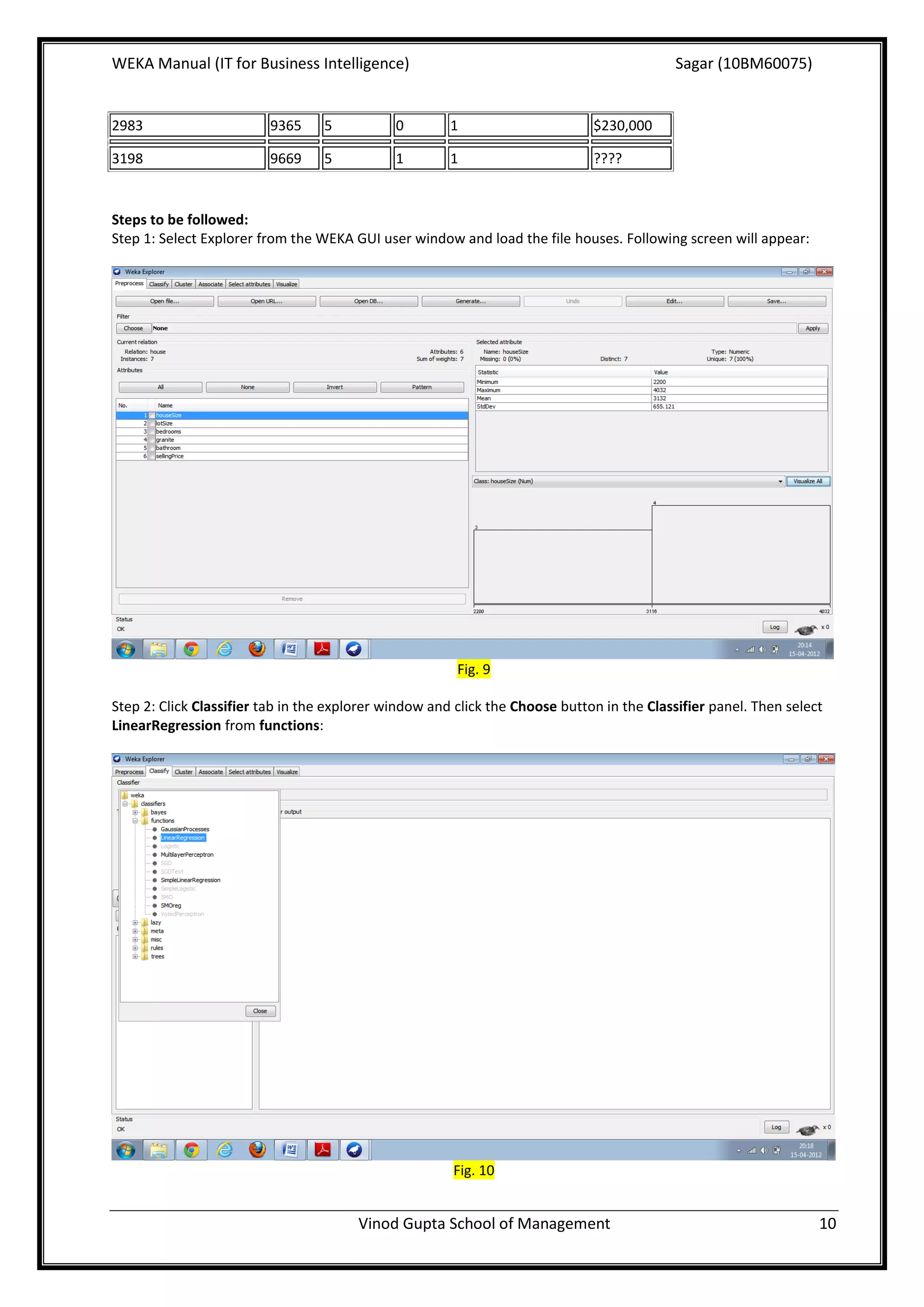
Step 1: Select Explorer from the WEKA GUI user window and load the file houses. Following screen will appear:


                                                        Fig. 9

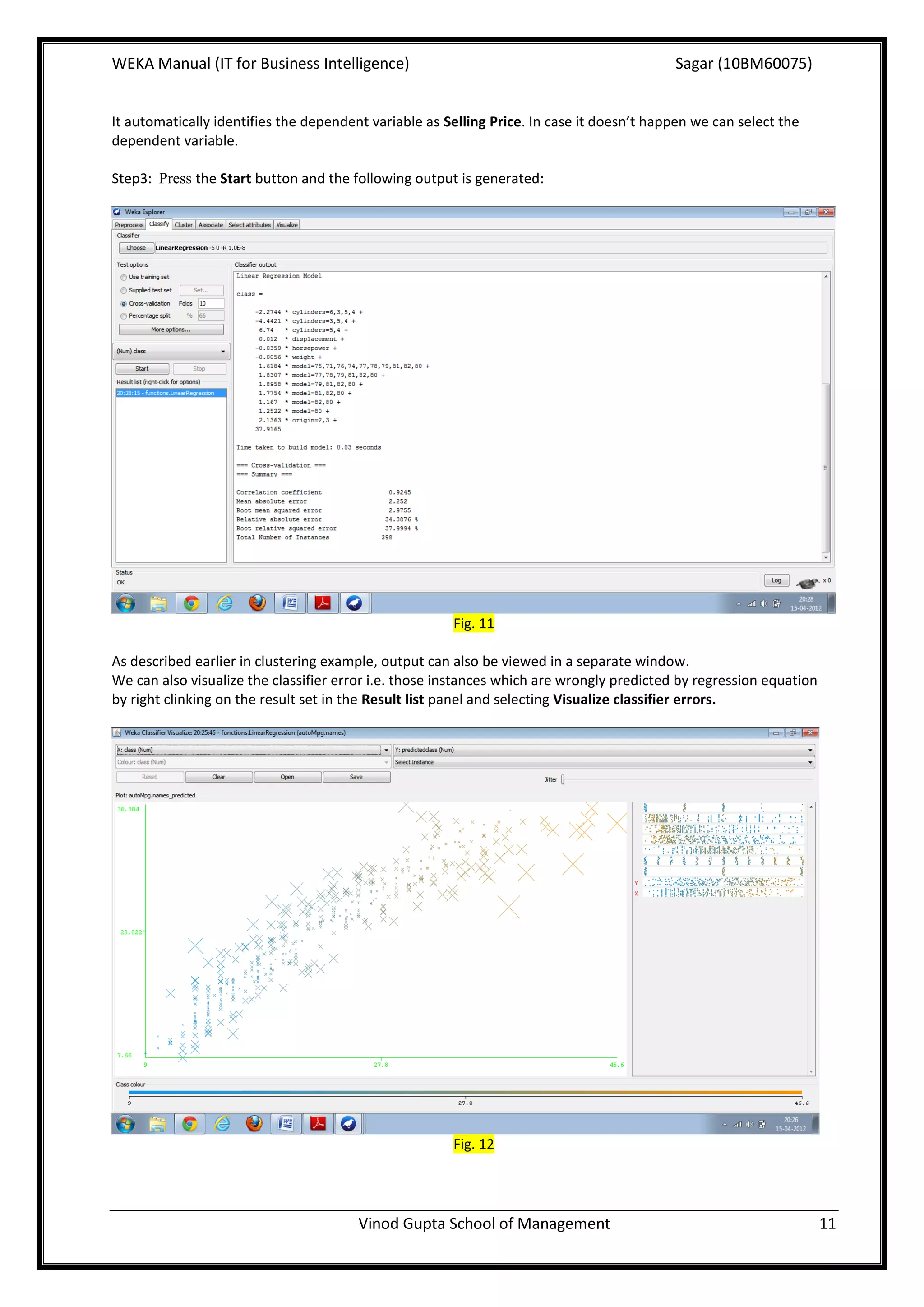
Step 2: Click Classifier tab in the explorer window and click the Choose button in the Classifier panel. Then select
LinearRegression from functions:


                                                       Fig. 10


                                        Vinod Gupta School of Management                                           10
WEKA Manual (IT for Business Intelligence)                                                 Sagar (10BM60075)


It automatically identifies the dependent variable as Selling Price. In case it doesn’t happen we can select the
dependent variable.

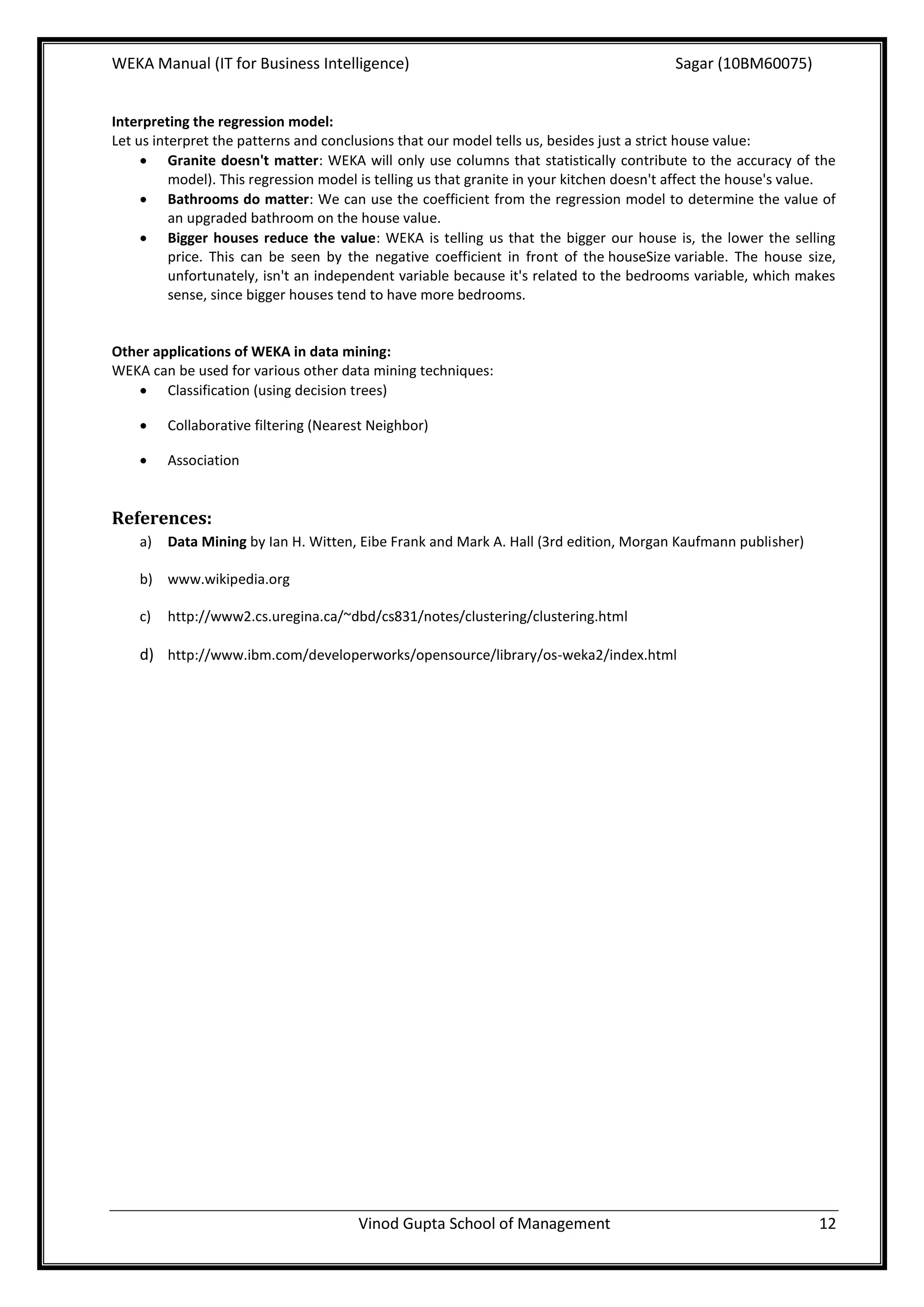
Step3: Press the Start button and the following output is generated:


                                                       Fig. 11

As described earlier in clustering example, output can also be viewed in a separate window.
We can also visualize the classifier error i.e. those instances which are wrongly predicted by regression equation
by right clinking on the result set in the Result list panel and selecting Visualize classifier errors.


                                                       Fig. 12


                                        Vinod Gupta School of Management                                             11
WEKA Manual (IT for Business Intelligence)                                                Sagar (10BM60075)


Interpreting the regression model:
Let us interpret the patterns and conclusions that our model tells us, besides just a strict house value:
      Granite doesn't matter: WEKA will only use columns that statistically contribute to the accuracy of the
          model). This regression model is telling us that granite in your kitchen doesn't affect the house's value.
      Bathrooms do matter: We can use the coefficient from the regression model to determine the value of
          an upgraded bathroom on the house value.
      Bigger houses reduce the value: WEKA is telling us that the bigger our house is, the lower the selling
          price. This can be seen by the negative coefficient in front of the houseSize variable. The house size,
          unfortunately, isn't an independent variable because it's related to the bedrooms variable, which makes
          sense, since bigger houses tend to have more bedrooms.


Other applications of WEKA in data mining:
WEKA can be used for various other data mining techniques:
    Classification (using decision trees)

        Collaborative filtering (Nearest Neighbor)

        Association


References:
    a)   Data Mining by Ian H. Witten, Eibe Frank and Mark A. Hall (3rd edition, Morgan Kaufmann publisher)

    b) www.wikipedia.org

    c)   http://www2.cs.uregina.ca/~dbd/cs831/notes/clustering/clustering.html

    d) http://www.ibm.com/developerworks/opensource/library/os-weka2/index.html


                                       Vinod Gupta School of Management                                          12

Weka_Manual_Sagar

  • 1.
    WEKA Manual (ITfor Business Intelligence) Sagar (10BM60075) IT for Business Intelligence (BM61080) Data Mining Techniques using WEKA Sagar (10BM60075) This term paper contains a brief introduction to WEKA – a powerful data mining tool along with a guide to two data mining techniques - Clustering (k-means) and Linear Regression, using WEKA tool. Page 1 Vinod Gupta School of Management
  • 2.
    WEKA Manual (ITfor Business Intelligence) Sagar (10BM60075) Data Mining Techniques using WEKA: WEKA: Weka (Waikato Environment for Knowledge Analysis) is a popular suite of machine learning software written in Java, developed at the University of Waikato, New Zealand. The Weka workbench contains a collection of visualization tools and algorithms for data analysis and predictive modeling, together with graphical user interfaces for easy access to this functionality. Weka supports several standard data mining tasks, more specifically, data preprocessing, clustering, classification, regression, visualization, and feature selection. Weka's main user interface is the explorer, but essentially the same functionality can be accessed through the component- based knowledge Flow interface and from the command line. There is also the experimenter, which allows the systematic comparison of the predictive performance of Weka's machine learning algorithms on a collection of datasets. Interfaces –  Command Line Interface (CLI)  Graphical User Interface (GUI) The WEKA GUI Chooser – Fig. 1 The buttons can be used to start the following applications –  Explorer – this is the environment for exploring data with WEKA and gives access to all the facilities using menu selection and form filling.  Experimenter – Gives the answer for the question: Which methods and parameter values work best for the given problem?  Knowledge Flow – Supports incremental learning and allows designing configurations for streamed data processing. Incremental algorithms can be used to process very large datasets.  Simple CLI – A simple Command Line Interface for executing WEKA commands directly. The Explorer interface features several panels providing access to the main components of the workbench:  The preprocess panel has facilities for importing data from a database, a CSV file, etc., and for preprocessing this data using a filtering algorithm. It is possible to transform the data and delete instances and attributes according to specific criteria.  The classify panel enable to apply classification and regression algorithms, to estimate the accuracy of the resulting predictive model, and to visualize erroneous predictions, ROC curves, etc. Vinod Gupta School of Management 2
  • 3.
    WEKA Manual (ITfor Business Intelligence) Sagar (10BM60075)  The associate panel provides access to association rule learners that attempt to identify all important interrelationships between attributes in the data.  The cluster panel gives access to the clustering techniques in Weka, e.g., the simple k-means algorithm. There is also an implementation of the expectation maximization algorithm.  The select attributes panel provides algorithms for identifying the most predictive attributes in a dataset.  The visualize panel shows a scatter plot matrix, where individual scatter plots can be selected and enlarged, and analyzed further using various selection operators. This paper will demonstrate the following two data mining techniques in WEKA:  Clustering (Simple K Means)  Linear regression Clustering in WEKA Clustering: Clustering can be loosely defined as: The process of organizing objects into groups whose members are similar in some way. Clustering is the task of assigning a set of objects into groups (called clusters) so that the objects in the same cluster are more similar to each other than to those in other clusters. The clusters found by different algorithms vary significantly in their properties, and understanding these "cluster models" is key to understanding the differences between the various algorithms. Typical cluster models include:  Connectivity models: Models based on distance connectivity.  Centroid models: The k-means algorithm represents each cluster by a single mean vector.  Distribution models: Clusters are modeled using statistic distributions, such as multivariate normal distributions.  Density models: Clusters are seen as connected dense regions in the data space.  Subspace models: Clusters are modeled with both cluster members and relevant attributes.  Group models: Do not provide a refined model, just the grouping information.  Graph-based models: A clique (a subset of nodes in a graph such that every two nodes in the subset are connected by an edge) can be considered as a prototypical form of cluster. Clustering algorithms may be classified as listed below:  Exclusive Clustering  Overlapping Clustering  Hierarchical Clustering  Probabilistic Clustering Four of the most used clustering algorithms are:  K-means  Fuzzy C-means  Hierarchical clustering  Mixture of Gaussians K-means is an exclusive clustering algorithm, Fuzzy C-means is an overlapping clustering algorithm, Hierarchical clustering is obvious and lastly Mixture of Gaussian is a probabilistic clustering algorithm. K-Means Clustering: K-means (MacQueen, 1967) is one of the simplest algorithms. The procedure follows a simple and easy way to classify a given data set through a certain number of clusters (assume k clusters) fixed a priori. The main idea is to define k centroids, one for each cluster. The algorithm is composed of the following steps: Vinod Gupta School of Management 3
  • 4.
    WEKA Manual (ITfor Business Intelligence) Sagar (10BM60075) 1. Place K points into the space represented by the objects that are being clustered. These points represent initial group centroids. 2. Assign each object to the group that has the closest centroid. 3. When all objects have been assigned, recalculate the positions of the K centroids. 4. Repeat Steps 2 and 3 until the centroids no longer move. This produces a separation of the objects into groups from which the metric to be minimized can be calculated. The k-means algorithm does not necessarily find the most optimal configuration. The algorithm is also significantly sensitive to the initial randomly selected cluster centres. There is no general theoretical solution to find the optimal number of clusters for any given data set. A simple approach is to compare the results of multiple runs with different k classes and choose the best one. Why to do Clustering (Business Applications)?  Market Segmentation  Identifying market needs  To better understand the relationships between different groups of consumers/potential customers  Product positioning  New product opportunities  Selecting test markets  Clustering can be used to group all the shopping items available on the web into a set of unique products K-Means Clustering in WEKA: The data set we'll use for our clustering example will focus fictional BMW dealership. The dealership has kept track of how people walk through the dealership and the showroom, what cars they look at, and how often they ultimately make purchases. They are hoping to mine this data by finding patterns in the data and by using clusters to determine if certain behaviors in their customers emerge. There are 100 rows of data in this sample, and each column describes the steps that the customers reached in their BMW experience, with a column having a 1 (they made it to this step or looked at this car), or 0 (they didn't reach this step). The ARFF data we'll be using with WEKA is: Vinod Gupta School of Management 4
  • 5.
    WEKA Manual (ITfor Business Intelligence) Sagar (10BM60075) Steps to be followed for doing K-Means Clustering in WEKA: Step 1: Select Explorer in the Weka GUI Chooser window (Fig.1) Step 2: The following window appears: Fig. 2 Step 3: Select “Open File” and load the ARFF data file bmw-browsers. After loading the file, the interface will be like this – Fig. 3 Step 4: With this data set, we are looking to create clusters, so click on the Cluster tab. Click Choose and select SimpleKMeans, set the numClusters value to 5 and click ok: Vinod Gupta School of Management 5
  • 6.
    WEKA Manual (ITfor Business Intelligence) Sagar (10BM60075) Fig. 4 Step 5: For viewing the distribution of all variables in the population, we can click on “Visualize All”: Fig. 5 Vinod Gupta School of Management 6
  • 7.
    WEKA Manual (ITfor Business Intelligence) Sagar (10BM60075) Step 6: Now, we are ready to run the clustering algorithm. 100 rows of data with five data clusters would likely take a few hours of computation with a spreadsheet, but WEKA can spit out the answer in less than a second. Select the Use training set in the Cluster mode panel and then click Start button to begin clustering process. Fig. 6 Step 7: For displaying the result in separate window, in the Result list panel, right click the result and select View in a separate window. Following result will be displayed: Fig. 7 Vinod Gupta School of Management 7
  • 8.
    WEKA Manual (ITfor Business Intelligence) Sagar (10BM60075) Results Interpretation: The output tells how each cluster comes together: with a "1" meaning everyone in that cluster shares the same value of one, and a "0" meaning everyone in that cluster has a value of zero for that attribute. Each cluster shows a type of behavior in customers, from which we can draw conclusions:  Cluster 0: o The "Dreamers" o Wander around the dealership o Don't purchase anything  Cluster 1: o The "M5 Lovers” o Not a high purchase rate — only 52 percent o A potential problem and could be a focus o More salespeople could be send to the M5 section  Cluster 2: o The "Throw-Aways" o No good conclusions from their behavior  Cluster 3: o The "BMW Babies" o Always purchase a car and finance it o They walk around the lot looking at cars and then go to the computer search available at the dealership o Making search computers more prominent around the lots section o Tend to buy M5s or Z4s  Cluster 4: o The "Starting out with BMW" o These look at the 3-series and never at the much more expensive M5 o Do not walk around the lot and ignore the computer search terminals o While 50 percent get to the financing stage, only 32 percent ultimately finish the transaction o These know exactly what kind of car they want (the 3-series entry-level model) o Sales to this group can be increased by relaxing financing standards or by reducing the 3-series prices The data in these clusters can also be inspected visually. To do this:  Right click the result in the Result list panel  Select Visualize cluster assignments  By setting X-axis variable as M5 Y-axis variable as Purchase we get the following output: Fig. 8 Vinod Gupta School of Management 8
  • 9.
    WEKA Manual (ITfor Business Intelligence) Sagar (10BM60075) This figure shows in a chart how the clusters are grouped in terms of who looked at the M5 and who purchased one. Also, turn up the "Jitter" to about three-fourths of the way maxed out, which will artificially scatter the plot points to allow us to see them more easily. The visual results match the conclusions we drew above. We can see in the X=1, Y=1 point (those who looked at M5s and made a purchase) that the only clusters represented here are 1 and 3. We also see that the only clusters at point X=0, Y=0 are 4 and 0. Clusters 1 and 3 were buying the M5s, while cluster 0 wasn't buying anything, and cluster 4 was only looking at the 3-series. By changing X and Y axes, we can identify other trends and patterns. Other clustering methods can also be used to group the data into clusters. WEKA is very useful in the clustering process when the size of data is huge. It can generate clusters pretty quickly even with huge data. As business has huge applications of clustering, WEKA is very useful in the clustering of data in real business scenarios. Linear Regression using WEKA Regression: Regression is the easiest technique to use, but is also probably the least powerful. This model can be as easy as one input variable and one output variable (Scatter diagram in Excel, or an XY Diagram in OpenOffice.org). It can get more complex than that, including dozens of input variables. Regression models all fit the same general pattern: there are a number of independent variables, which, when taken together, produce a result — a dependent variable. The regression model is then used to predict the result of an unknown dependent variable, given the values of the independent variables. Correlation analysis can be applied to determine the degree to which variables are related. Broadly, regression can be classified into two types:  Simple linear regression (one dependent variable and one independent variable)  Multiple regression (one dependent variable and many independent variables) The process of Multiple regression in WEKA is described with an example in this term paper. Business applications of Regression  Pricing decisions  Trend Line Analysis  Risk Analysis for Investments  Sales or Market Forecasts  To predict the demographics and types of future work forces for large companies.  Total quality control Regression in WEKA: The price of the house (the dependent variable) is the result of many independent variables — the square footage of the house, the size of the lot, whether granite is in the kitchen, bathrooms are upgraded, etc. Let's continue this example of a house price-based regression model, and create some real data to examine. These are actual numbers from houses for sale, and we will try to find the value for a house. House values for regression model: House size (square feet) Lot size Bedrooms Granite Upgraded bathroom? Selling price 3529 9191 6 0 0 $205,000 3247 10061 5 1 1 $224,900 4032 10150 5 0 1 $197,900 2397 14156 4 1 0 $189,900 2200 9600 4 0 1` $195,000 3536 19994 6 1 1 $325,000 Vinod Gupta School of Management 9
  • 10.
    WEKA Manual (ITfor Business Intelligence) Sagar (10BM60075) 2983 9365 5 0 1 $230,000 3198 9669 5 1 1 ???? Steps to be followed: Step 1: Select Explorer from the WEKA GUI user window and load the file houses. Following screen will appear: Fig. 9 Step 2: Click Classifier tab in the explorer window and click the Choose button in the Classifier panel. Then select LinearRegression from functions: Fig. 10 Vinod Gupta School of Management 10
  • 11.
    WEKA Manual (ITfor Business Intelligence) Sagar (10BM60075) It automatically identifies the dependent variable as Selling Price. In case it doesn’t happen we can select the dependent variable. Step3: Press the Start button and the following output is generated: Fig. 11 As described earlier in clustering example, output can also be viewed in a separate window. We can also visualize the classifier error i.e. those instances which are wrongly predicted by regression equation by right clinking on the result set in the Result list panel and selecting Visualize classifier errors. Fig. 12 Vinod Gupta School of Management 11
  • 12.
    WEKA Manual (ITfor Business Intelligence) Sagar (10BM60075) Interpreting the regression model: Let us interpret the patterns and conclusions that our model tells us, besides just a strict house value:  Granite doesn't matter: WEKA will only use columns that statistically contribute to the accuracy of the model). This regression model is telling us that granite in your kitchen doesn't affect the house's value.  Bathrooms do matter: We can use the coefficient from the regression model to determine the value of an upgraded bathroom on the house value.  Bigger houses reduce the value: WEKA is telling us that the bigger our house is, the lower the selling price. This can be seen by the negative coefficient in front of the houseSize variable. The house size, unfortunately, isn't an independent variable because it's related to the bedrooms variable, which makes sense, since bigger houses tend to have more bedrooms. Other applications of WEKA in data mining: WEKA can be used for various other data mining techniques:  Classification (using decision trees)  Collaborative filtering (Nearest Neighbor)  Association References: a) Data Mining by Ian H. Witten, Eibe Frank and Mark A. Hall (3rd edition, Morgan Kaufmann publisher) b) www.wikipedia.org c) http://www2.cs.uregina.ca/~dbd/cs831/notes/clustering/clustering.html d) http://www.ibm.com/developerworks/opensource/library/os-weka2/index.html Vinod Gupta School of Management 12