
WEKA Training Software
Content
 What is WEKA?
 Data set in WEKA
 The Explorer :
 Preprocess data
 Classification
 Clustering
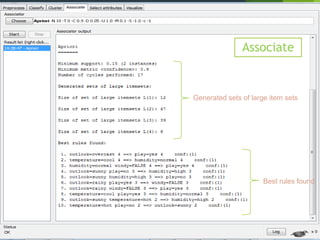
 Association Rules
 Attribute Selection
 Data Visualization
 References and Resources
2
What is WEKA?
 Waikato Environment for Knowledge Analysis
 It’s a data mining/machine learning tool developed by Department of
 Computer Science, University of Waikato, New Zealand.
 Weka is a collection of machine learning algorithms for data mining tasks.
 Weka is open source software issued under the GNU General Public
License.
3
Main Features
 49 data preprocessing tools
 76 classification/regression algorithms
 8 clustering algorithms
 3 algorithms for finding association rules
 15 attribute/subset evaluators + 10 search algorithms
for feature selection
4
Main GUI
 Three graphical user interfaces
 “The Explorer” (exploratory data analysis)
 “The Experimenter” (experimental environment)
 “The KnowledgeFlow” (new process model inspired interface)
 Simple CLI (Command prompt)
Offers some functionality not available via the GUI1
5
1.Graphic User Interface
Datasets in Weka
 Each entry in a dataset is an instance of the java class:
 weka.core.Instance
 Each instance consists of a number of attributes
 Nominal: one of a predefined list of values
e.g. red, green, blue
 Numeric: A real or integer number
 String: Enclosed in “double quotes”
 Date
 Relational
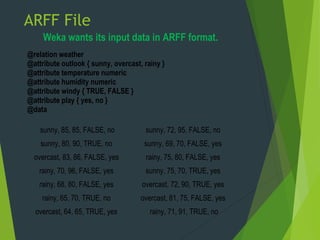
ARFF File
Weka wants its input data in ARFF format.
@relation weather
@attribute outlook { sunny, overcast, rainy }
@attribute temperature numeric
@attribute humidity numeric
@attribute windy { TRUE, FALSE }
@attribute play { yes, no }
@data
sunny, 85, 85, FALSE, no
sunny, 80, 90, TRUE, no
overcast, 83, 86, FALSE, yes
rainy, 70, 96, FALSE, yes
rainy, 68, 80, FALSE, yes
rainy, 65, 70, TRUE, no
overcast, 64, 65, TRUE, yes
sunny, 72, 95, FALSE, no
sunny, 69, 70, FALSE, yes
rainy, 75, 80, FALSE, yes
sunny, 75, 70, TRUE, yes
overcast, 72, 90, TRUE, yes
overcast, 81, 75, FALSE, yes
rainy, 71, 91, TRUE, no
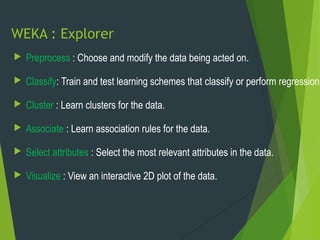
WEKA : Explorer
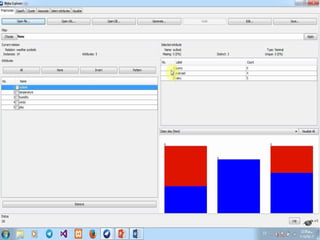
 Preprocess : Choose and modify the data being acted on.
 Classify: Train and test learning schemes that classify or perform regression.
 Cluster : Learn clusters for the data.
 Associate : Learn association rules for the data.
 Select attributes : Select the most relevant attributes in the data.
 Visualize : View an interactive 2D plot of the data.
07/11/17 10
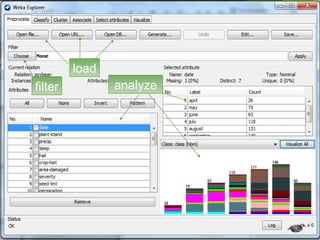
analyze
load
filter
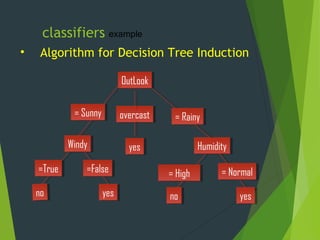
classifiers
• Algorithm for Decision Tree Induction
OutLookOutLook
overcastovercast
HumidityHumidity
= Sunny= Sunny = Rainy= Rainy
nono yesyes
yesyes
= Normal= Normal= High= High
example
WindyWindy
yesyesnono
=False=False=True=True
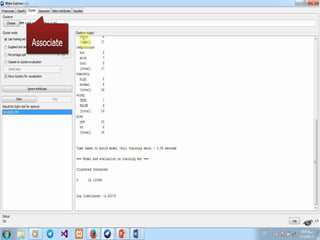
Explorer : clustering data
14
Scheme:weka.clusterers.EM -I 100 -N -1 -M 1.0E-6
-S 100
Relation: weather.symbolic
Instances: 14
Attributes: 5
outlook
temperature
humidity
windy
play
Test mode : evaluate on training data
Cluster
Attribute 0
(1)
outlook
sunny 6
overcast 5
rainy 6
[total] 17
temperature
hot 5
mild 7
cool 5
[total] 17
Cluster
humidity
high 8
normal 8
[total] 16
windy
TRUE 7
FALSE 9
[total] 16
play
yes 10
no 6
[total] 16
Associate
Generated sets of large item sets
Best rules found
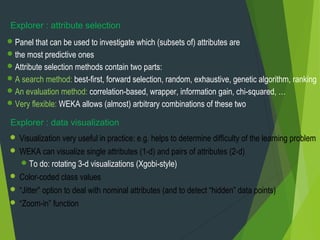
Panel that can be used to investigate which (subsets of) attributes are
the most predictive ones
Attribute selection methods contain two parts:
A search method: best-first, forward selection, random, exhaustive, genetic algorithm, ranking
An evaluation method: correlation-based, wrapper, information gain, chi-squared, …
Very flexible: WEKA allows (almost) arbitrary combinations of these two
Explorer : attribute selection
Explorer : data visualization
 Visualization very useful in practice: e.g. helps to determine difficulty of the learning problem
 WEKA can visualize single attributes (1-d) and pairs of attributes (2-d)
To do: rotating 3-d visualizations (Xgobi-style)
 Color-coded class values
 “Jitter” option to deal with nominal attributes (and to detect “hidden” data points)
 “Zoom-in” function
 References:
 WEKA website: http://www.cs.waikato.ac.nz/~ml/weka/index.html
 WEKA Tutorial:
 Machine Learning with WEKA: A presentation demonstrating all graphical user interfaces
(GUI) in Weka.
 A presentation which explains how to use Weka for exploratory data mining.
 WEKA Data Mining Book:
 Ian H. Witten and Eibe Frank, Data Mining: Practical Machine Learning Tools and
Techniques (Second Edition)
 WEKA Wiki: http://weka.sourceforge.net/wiki/index.php/Main_Page
 Others:
 Jiawei Han and Micheline Kamber, Data Mining: Concepts and Techniques, 2nd ed.
You Have Question ?You Have Question ?

data mining with weka application

  • 1.
  • 2.
    Content  What isWEKA?  Data set in WEKA  The Explorer :  Preprocess data  Classification  Clustering  Association Rules  Attribute Selection  Data Visualization  References and Resources 2
  • 3.
    What is WEKA? Waikato Environment for Knowledge Analysis  It’s a data mining/machine learning tool developed by Department of  Computer Science, University of Waikato, New Zealand.  Weka is a collection of machine learning algorithms for data mining tasks.  Weka is open source software issued under the GNU General Public License. 3
  • 4.
    Main Features  49data preprocessing tools  76 classification/regression algorithms  8 clustering algorithms  3 algorithms for finding association rules  15 attribute/subset evaluators + 10 search algorithms for feature selection 4
  • 5.
    Main GUI  Threegraphical user interfaces  “The Explorer” (exploratory data analysis)  “The Experimenter” (experimental environment)  “The KnowledgeFlow” (new process model inspired interface)  Simple CLI (Command prompt) Offers some functionality not available via the GUI1 5 1.Graphic User Interface
  • 7.
    Datasets in Weka Each entry in a dataset is an instance of the java class:  weka.core.Instance  Each instance consists of a number of attributes  Nominal: one of a predefined list of values e.g. red, green, blue  Numeric: A real or integer number  String: Enclosed in “double quotes”  Date  Relational
  • 8.
    ARFF File Weka wantsits input data in ARFF format. @relation weather @attribute outlook { sunny, overcast, rainy } @attribute temperature numeric @attribute humidity numeric @attribute windy { TRUE, FALSE } @attribute play { yes, no } @data sunny, 85, 85, FALSE, no sunny, 80, 90, TRUE, no overcast, 83, 86, FALSE, yes rainy, 70, 96, FALSE, yes rainy, 68, 80, FALSE, yes rainy, 65, 70, TRUE, no overcast, 64, 65, TRUE, yes sunny, 72, 95, FALSE, no sunny, 69, 70, FALSE, yes rainy, 75, 80, FALSE, yes sunny, 75, 70, TRUE, yes overcast, 72, 90, TRUE, yes overcast, 81, 75, FALSE, yes rainy, 71, 91, TRUE, no
  • 9.
    WEKA : Explorer Preprocess : Choose and modify the data being acted on.  Classify: Train and test learning schemes that classify or perform regression.  Cluster : Learn clusters for the data.  Associate : Learn association rules for the data.  Select attributes : Select the most relevant attributes in the data.  Visualize : View an interactive 2D plot of the data.
  • 10.
  • 12.
    classifiers • Algorithm forDecision Tree Induction OutLookOutLook overcastovercast HumidityHumidity = Sunny= Sunny = Rainy= Rainy nono yesyes yesyes = Normal= Normal= High= High example WindyWindy yesyesnono =False=False=True=True
  • 14.
    Explorer : clusteringdata 14 Scheme:weka.clusterers.EM -I 100 -N -1 -M 1.0E-6 -S 100 Relation: weather.symbolic Instances: 14 Attributes: 5 outlook temperature humidity windy play Test mode : evaluate on training data Cluster Attribute 0 (1) outlook sunny 6 overcast 5 rainy 6 [total] 17 temperature hot 5 mild 7 cool 5 [total] 17 Cluster humidity high 8 normal 8 [total] 16 windy TRUE 7 FALSE 9 [total] 16 play yes 10 no 6 [total] 16
  • 15.
    Associate Generated sets oflarge item sets Best rules found
  • 16.
    Panel that canbe used to investigate which (subsets of) attributes are the most predictive ones Attribute selection methods contain two parts: A search method: best-first, forward selection, random, exhaustive, genetic algorithm, ranking An evaluation method: correlation-based, wrapper, information gain, chi-squared, … Very flexible: WEKA allows (almost) arbitrary combinations of these two Explorer : attribute selection Explorer : data visualization  Visualization very useful in practice: e.g. helps to determine difficulty of the learning problem  WEKA can visualize single attributes (1-d) and pairs of attributes (2-d) To do: rotating 3-d visualizations (Xgobi-style)  Color-coded class values  “Jitter” option to deal with nominal attributes (and to detect “hidden” data points)  “Zoom-in” function
  • 18.
     References:  WEKAwebsite: http://www.cs.waikato.ac.nz/~ml/weka/index.html  WEKA Tutorial:  Machine Learning with WEKA: A presentation demonstrating all graphical user interfaces (GUI) in Weka.  A presentation which explains how to use Weka for exploratory data mining.  WEKA Data Mining Book:  Ian H. Witten and Eibe Frank, Data Mining: Practical Machine Learning Tools and Techniques (Second Edition)  WEKA Wiki: http://weka.sourceforge.net/wiki/index.php/Main_Page  Others:  Jiawei Han and Micheline Kamber, Data Mining: Concepts and Techniques, 2nd ed.
  • 19.
    You Have Question?You Have Question ?