Weka
Waikato Environment for Knowledge Analysis
Popular suite of machine learning software
Written in JAVA
Developed at University of Waikato, New Zealand
Free. Licensed under the GNU General Public License
Data Analysis , Predictive Modelling and many more
Makes Machine Learning Easy, Efficient and Fun!
GUI tool allows to
 load dataset
 run algorithm
 design and run experiments with results
  
Download and install Weka!
Visit
http://www.cs.waikato.ac.nz/ml/weka/
downloading.html
Locate suitable version of Weka for your computer
If you do NOT have JAVA 64 bit
If you DO have JAVA 64 bit
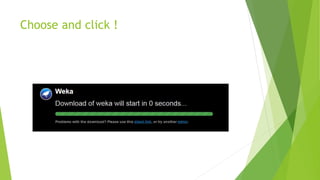
Choose and click !
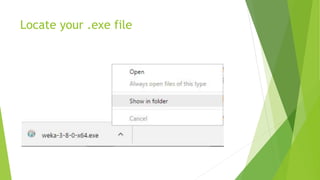
Locate your .exe file
You know what to do next
Install!
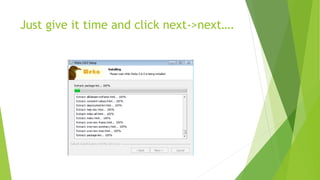
Just give it time and click next->next….
Hopefully you have now a fresh copy of
Weka, yay!
Start Weka!
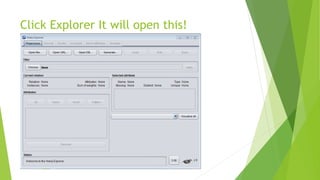
Click Explorer It will open this!
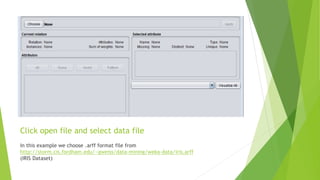
Click open file and select data file
In this example we choose .arff format file from
http://storm.cis.fordham.edu/~gweiss/data-mining/weka-data/iris.arff
(IRIS Dataset)
You may have different location
Probably where you downloaded data file
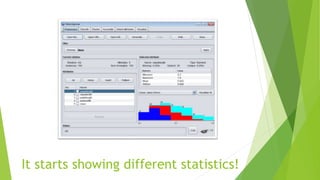
It starts showing different statistics!
Click Classify tab in the Weka Explorer
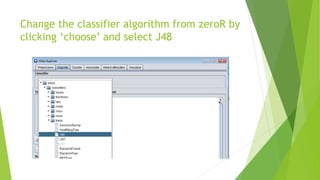
Change the classifier algorithm from zeroR by
clicking ‘choose’ and select J48
Click Start and et Voila!
Congrats You have just finished your first
ML algorithm in Weka!
You can click visualize and see the data

For better view customize plot, point
size and click update!
This is just a simple
demo of Weka can do
For More Info
Visit
http://weka.wikispaces.com/
http://www.cs.waikato.ac.nz/ml/weka/documentation.html
Thank you


Weka