a) Installation of WEKA Tool, Understand the features of
WEKA toolkit, Explore the available data sets.
b) Demonstration of preprocessing on .arff file using student
data .arff
1
An Introduction to WEKA
2
Content
 What is WEKA?
 The Explorer:
 Preprocess data
 Classification
 Clustering
 Association Rules
 Attribute Selection
 Data Visualization
 References and Resources
3
What is WEKA?
 Waikato Environment for Knowledge Analysis
 It’s a data mining/machine learning tool developed by
Department of Computer Science, University of
Waikato, New Zealand.
 Data mining software written in Java
 distributed under the GNU Public License
 Used for research, education, and applications
 Main features:
 Comprehensive set of data pre-processing tools,
learning algorithms and evaluation methods
 Multiple interfaces that do not require programming
 Experimenter can compare learning algorithms
 Weka is also a bird found only on the islands of New
4
Download and Install WEKA
 Website:
http://www.cs.waikato.ac.nz/~ml/weka/index.html
 Support multiple platforms (written in java):
 Windows, Mac OS X and Linux
5
Why Weka?
 There are many options on what data mining
suite or toolkit one can use
 Weka has the following advantages:
 Easy to learn
 Free and open-source
 Easy to download and runs on many platforms
 Does not require programming knowledge
 This is important since a few students may not have much
programming experience
6
Main Features
 49 data preprocessing tools
 76 classification/regression algorithms
 8 clustering algorithms
 3 algorithms for finding association rules
 15 attribute/subset evaluators + 10 search
algorithms for feature selection
7
8
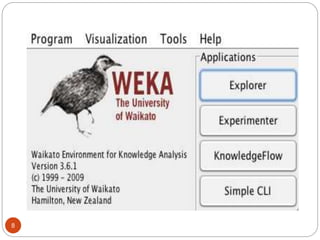
The Weka Interfaces
 Explorer:
 We cover in detail
 Enables you to apply multiple actions but does not explicitly
model them
 Experimenter
 Run many experiments in controlled manner and compare
results
 KnowledgeFlow:
 Like Explorer but each step is represented as a node in a
graph, so flow explicitly represented
 Workbench
 Combines all GUI interfaces into one
 Simple CLI (command line interface)
 No GUI so can use shell scripts to control experiments
 Similar to using Python where each command is a function
9
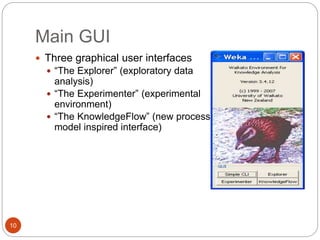
Main GUI
 Three graphical user interfaces
 “The Explorer” (exploratory data
analysis)
 “The Experimenter” (experimental
environment)
 “The KnowledgeFlow” (new process
model inspired interface)
10
Content
 What is WEKA?
 The Explorer:
 Preprocess data
 Classification
 Clustering
 Association Rules
 Attribute Selection
 Data Visualization
 References and Resources
11
12
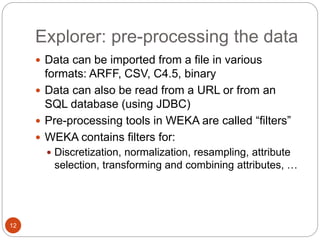
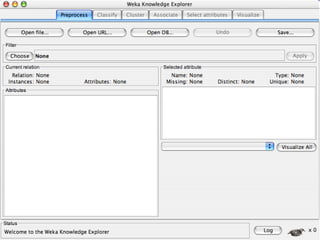
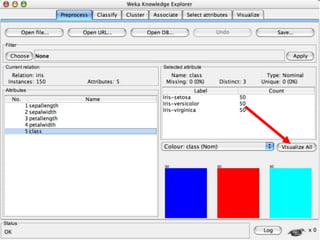
Explorer: pre-processing the data
 Data can be imported from a file in various
formats: ARFF, CSV, C4.5, binary
 Data can also be read from a URL or from an
SQL database (using JDBC)
 Pre-processing tools in WEKA are called “filters”
 WEKA contains filters for:
 Discretization, normalization, resampling, attribute
selection, transforming and combining attributes, …
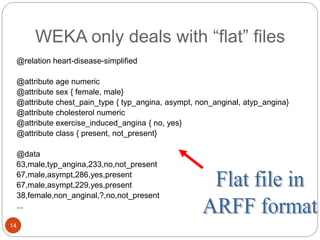
Weka ARFF File Format
 ARFF= Attribute Relation File Format
 Weka ARFF files include two main parts:
 Specification of the features
 The actual data
 Files are “flat files” usually comma separated
 Other tools use a separate file for each part
 C4.5 decision tree tool, which was once very
popular, had a “names” and “data” file
 I find the single file format odd, since specification is
short but actual data can be millions of lines
13
14
@relation heart-disease-simplified
@attribute age numeric
@attribute sex { female, male}
@attribute chest_pain_type { typ_angina, asympt, non_anginal, atyp_angina}
@attribute cholesterol numeric
@attribute exercise_induced_angina { no, yes}
@attribute class { present, not_present}
@data
63,male,typ_angina,233,no,not_present
67,male,asympt,286,yes,present
67,male,asympt,229,yes,present
38,female,non_anginal,?,no,not_present
...
WEKA only deals with “flat” files
15
@relation heart-disease-simplified
@attribute age numeric
@attribute sex { female, male}
@attribute chest_pain_type { typ_angina, asympt, non_anginal, atyp_angina}
@attribute cholesterol numeric
@attribute exercise_induced_angina { no, yes}
@attribute class { present, not_present}
@data
63,male,typ_angina,233,no,not_present
67,male,asympt,286,yes,present
67,male,asympt,229,yes,present
38,female,non_anginal,?,no,not_present
...
WEKA only deals with “flat” files
This just defines dataset name
Categorical feature must list
values
16
17
18
19
20
21
22
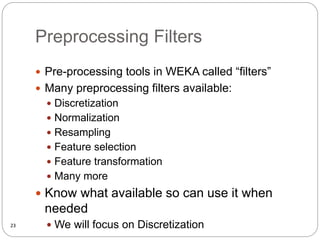
Preprocessing Filters
 Pre-processing tools in WEKA called “filters”
 Many preprocessing filters available:
 Discretization
 Normalization
 Resampling
 Feature selection
 Feature transformation
 Many more
 Know what available so can use it when
needed
 We will focus on Discretization
23
24
25
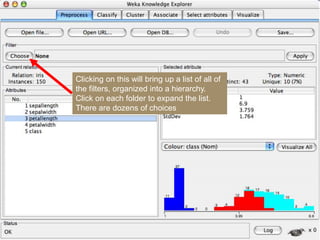
Clicking on this will bring up a list of all of
the filters, organized into a hierarchy.
Click on each folder to expand the list.
There are dozens of choices
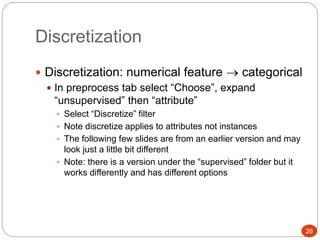
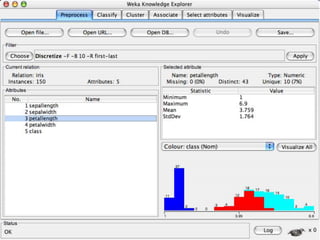
Discretization
 Discretization: numerical feature  categorical
 In preprocess tab select “Choose”, expand
“unsupervised” then “attribute”
 Select “Discretize” filter
 Note discretize applies to attributes not instances
 The following few slides are from an earlier version and may
look just a little bit different
 Note: there is a version under the “supervised” folder but it
works differently and has different options
26
Discretization
27
Age 1,5,9,4,7,11,14,17,13,18, 19,31,33,36,42,44,46,70,74,78,77
Attribute Age Age Age Age
1,5,4,9,7 11,14,17,13,18,19 31,33,36,42,44,46 70,74,77,78
After Discretization Child Young Mature Old
28
29
30
31
This shows the command line
with options. Click within this
region to bring up a window
with the options and more
info
32
33
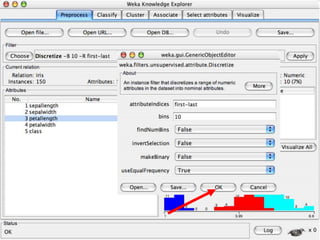
1) Toggle to “True”
Click for documentation
2) Click OK
Create 10 equal frequency bins
Will do for all numerical features given “attributeIndices” value
34
35
36
37
38
39
40
41
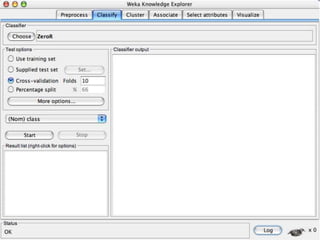
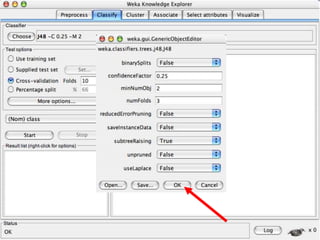
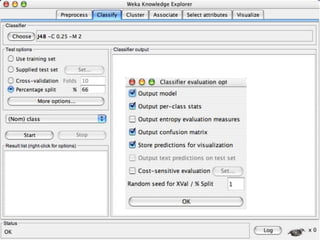
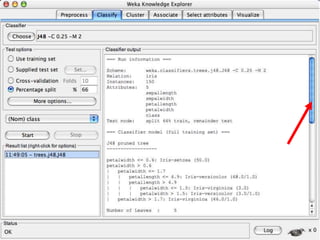
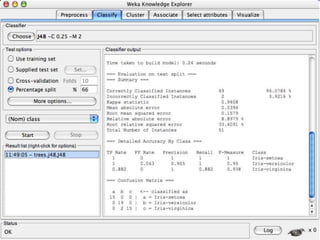
Explorer: building “classifiers”
 Classifiers in WEKA are models for predicting
nominal or numeric quantities
 Implemented learning schemes include:
 Decision trees and lists, instance-based classifiers,
support vector machines, multi-layer perceptrons,
logistic regression, Bayes’ nets, …
42
age income student credit_rating buys_computer
<=30 high no fair no
<=30 high no excellent no
31…40 high no fair yes
>40 medium no fair yes
>40 low yes fair yes
>40 low yes excellent no
31…40 low yes excellent yes
<=30 medium no fair no
<=30 low yes fair yes
>40 medium yes fair yes
<=30 medium yes excellent yes
31…40 medium no excellent yes
31…40 high yes fair yes
>40 medium no excellent no
This
follows an
example of
Quinlan’s
ID3
(Playing
Tennis)
Decision Tree Induction: Training Dataset
43
age?
overcast
student? credit rating?
<=30 >40
no yes yes
yes
31..40
fair
excellent
yes
no
Output: A Decision Tree for “buys_computer”
45
46
47
48
49
50
51
52
53
54
55
56
57
58
59
60
61
62
63
64
65
66
70
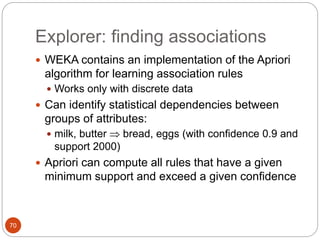
Explorer: finding associations
 WEKA contains an implementation of the Apriori
algorithm for learning association rules
 Works only with discrete data
 Can identify statistical dependencies between
groups of attributes:
 milk, butter  bread, eggs (with confidence 0.9 and
support 2000)
 Apriori can compute all rules that have a given
minimum support and exceed a given confidence
71
Basic Concepts: Frequent
Patterns
 itemset: A set of one or more
items
 k-itemset X = {x1, …, xk}
 (absolute) support, or, support
count of X: Frequency or
occurrence of an itemset X
 (relative) support, s, is the
fraction of transactions that
contains X (i.e., the probability
that a transaction contains X)
 An itemset X is frequent if X’s
support is no less than a minsup
threshold
Customer
buys diaper
Customer
buys both
Customer
buys beer
Tid Items bought
10 Beer, Nuts, Diaper
20 Beer, Coffee, Diaper
30 Beer, Diaper, Eggs
40 Nuts, Eggs, Milk
50 Nuts, Coffee, Diaper, Eggs, Milk
72
Basic Concepts: Association
Rules
 Find all the rules X  Y with
minimum support and confidence
 support, s, probability that a
transaction contains X  Y
 confidence, c, conditional
probability that a transaction
having X also contains Y
Let minsup = 50%, minconf = 50%
Freq. Pat.: Beer:3, Nuts:3, Diaper:4, Eggs:3,
{Beer, Diaper}:3
Customer
buys
diaper
Customer
buys both
Customer
buys beer
Nuts, Eggs, Milk
40
Nuts, Coffee, Diaper, Eggs, Milk
50
Beer, Diaper, Eggs
30
Beer, Coffee, Diaper
20
Beer, Nuts, Diaper
10
Items bought
Tid
 Association rules: (many more!)
 Beer  Diaper (60%, 100%)
 Diaper  Beer (60%, 75%)
73
74
75
76
77
78
Explorer: attribute selection
 Panel that can be used to investigate which
(subsets of) attributes are the most predictive
ones
 Attribute selection methods contain two parts:
 A search method: best-first, forward selection,
random, exhaustive, genetic algorithm, ranking
 An evaluation method: correlation-based, wrapper,
information gain, chi-squared, …
 Very flexible: WEKA allows (almost) arbitrary
combinations of these two
79
80
81
82
83
84
85
86
87
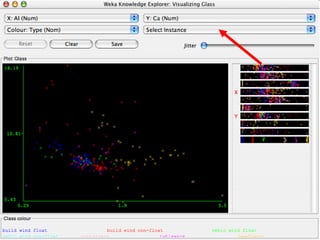
Explorer: data visualization
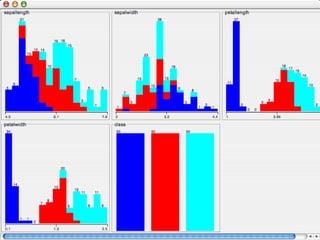
 Visualization very useful in practice: e.g. helps to
determine difficulty of the learning problem
 WEKA can visualize single attributes (1-d) and
pairs of attributes (2-d)
 To do: rotating 3-d visualizations (Xgobi-style)
 Color-coded class values
 “Jitter” option to deal with nominal attributes (and
to detect “hidden” data points)
 “Zoom-in” function
88
89
90
91
92
93
94
95
96
97
References and Resources
 References:
 WEKA website:
http://www.cs.waikato.ac.nz/~ml/weka/index.html
 WEKA Tutorial:
 Machine Learning with WEKA: A presentation demonstrating all
graphical user interfaces (GUI) in Weka.
 A presentation which explains how to use Weka for exploratory
data mining.
 WEKA Data Mining Book:
 Ian H. Witten and Eibe Frank, Data Mining: Practical Machine
Learning Tools and Techniques (Second Edition)
 WEKA Wiki:
http://weka.sourceforge.net/wiki/index.php/Main_Page
 Others:
 Jiawei Han and Micheline Kamber, Data Mining: Concepts and
Techniques, 2nd ed.
98

Introduction to Weka and Preprocessing.ppt

  • 1.
    a) Installation ofWEKA Tool, Understand the features of WEKA toolkit, Explore the available data sets. b) Demonstration of preprocessing on .arff file using student data .arff 1
  • 2.
  • 3.
    Content  What isWEKA?  The Explorer:  Preprocess data  Classification  Clustering  Association Rules  Attribute Selection  Data Visualization  References and Resources 3
  • 4.
    What is WEKA? Waikato Environment for Knowledge Analysis  It’s a data mining/machine learning tool developed by Department of Computer Science, University of Waikato, New Zealand.  Data mining software written in Java  distributed under the GNU Public License  Used for research, education, and applications  Main features:  Comprehensive set of data pre-processing tools, learning algorithms and evaluation methods  Multiple interfaces that do not require programming  Experimenter can compare learning algorithms  Weka is also a bird found only on the islands of New 4
  • 5.
    Download and InstallWEKA  Website: http://www.cs.waikato.ac.nz/~ml/weka/index.html  Support multiple platforms (written in java):  Windows, Mac OS X and Linux 5
  • 6.
    Why Weka?  Thereare many options on what data mining suite or toolkit one can use  Weka has the following advantages:  Easy to learn  Free and open-source  Easy to download and runs on many platforms  Does not require programming knowledge  This is important since a few students may not have much programming experience 6
  • 7.
    Main Features  49data preprocessing tools  76 classification/regression algorithms  8 clustering algorithms  3 algorithms for finding association rules  15 attribute/subset evaluators + 10 search algorithms for feature selection 7
  • 8.
  • 9.
    The Weka Interfaces Explorer:  We cover in detail  Enables you to apply multiple actions but does not explicitly model them  Experimenter  Run many experiments in controlled manner and compare results  KnowledgeFlow:  Like Explorer but each step is represented as a node in a graph, so flow explicitly represented  Workbench  Combines all GUI interfaces into one  Simple CLI (command line interface)  No GUI so can use shell scripts to control experiments  Similar to using Python where each command is a function 9
  • 10.
    Main GUI  Threegraphical user interfaces  “The Explorer” (exploratory data analysis)  “The Experimenter” (experimental environment)  “The KnowledgeFlow” (new process model inspired interface) 10
  • 11.
    Content  What isWEKA?  The Explorer:  Preprocess data  Classification  Clustering  Association Rules  Attribute Selection  Data Visualization  References and Resources 11
  • 12.
    12 Explorer: pre-processing thedata  Data can be imported from a file in various formats: ARFF, CSV, C4.5, binary  Data can also be read from a URL or from an SQL database (using JDBC)  Pre-processing tools in WEKA are called “filters”  WEKA contains filters for:  Discretization, normalization, resampling, attribute selection, transforming and combining attributes, …
  • 13.
    Weka ARFF FileFormat  ARFF= Attribute Relation File Format  Weka ARFF files include two main parts:  Specification of the features  The actual data  Files are “flat files” usually comma separated  Other tools use a separate file for each part  C4.5 decision tree tool, which was once very popular, had a “names” and “data” file  I find the single file format odd, since specification is short but actual data can be millions of lines 13
  • 14.
    14 @relation heart-disease-simplified @attribute agenumeric @attribute sex { female, male} @attribute chest_pain_type { typ_angina, asympt, non_anginal, atyp_angina} @attribute cholesterol numeric @attribute exercise_induced_angina { no, yes} @attribute class { present, not_present} @data 63,male,typ_angina,233,no,not_present 67,male,asympt,286,yes,present 67,male,asympt,229,yes,present 38,female,non_anginal,?,no,not_present ... WEKA only deals with “flat” files
  • 15.
    15 @relation heart-disease-simplified @attribute agenumeric @attribute sex { female, male} @attribute chest_pain_type { typ_angina, asympt, non_anginal, atyp_angina} @attribute cholesterol numeric @attribute exercise_induced_angina { no, yes} @attribute class { present, not_present} @data 63,male,typ_angina,233,no,not_present 67,male,asympt,286,yes,present 67,male,asympt,229,yes,present 38,female,non_anginal,?,no,not_present ... WEKA only deals with “flat” files This just defines dataset name Categorical feature must list values
  • 16.
  • 17.
  • 18.
  • 19.
  • 20.
  • 21.
  • 22.
  • 23.
    Preprocessing Filters  Pre-processingtools in WEKA called “filters”  Many preprocessing filters available:  Discretization  Normalization  Resampling  Feature selection  Feature transformation  Many more  Know what available so can use it when needed  We will focus on Discretization 23
  • 24.
  • 25.
    25 Clicking on thiswill bring up a list of all of the filters, organized into a hierarchy. Click on each folder to expand the list. There are dozens of choices
  • 26.
    Discretization  Discretization: numericalfeature  categorical  In preprocess tab select “Choose”, expand “unsupervised” then “attribute”  Select “Discretize” filter  Note discretize applies to attributes not instances  The following few slides are from an earlier version and may look just a little bit different  Note: there is a version under the “supervised” folder but it works differently and has different options 26
  • 27.
    Discretization 27 Age 1,5,9,4,7,11,14,17,13,18, 19,31,33,36,42,44,46,70,74,78,77 AttributeAge Age Age Age 1,5,4,9,7 11,14,17,13,18,19 31,33,36,42,44,46 70,74,77,78 After Discretization Child Young Mature Old
  • 28.
  • 29.
  • 30.
  • 31.
    31 This shows thecommand line with options. Click within this region to bring up a window with the options and more info
  • 32.
  • 33.
  • 34.
    1) Toggle to“True” Click for documentation 2) Click OK Create 10 equal frequency bins Will do for all numerical features given “attributeIndices” value 34
  • 35.
  • 36.
  • 37.
  • 38.
  • 39.
  • 40.
  • 41.
    41 Explorer: building “classifiers” Classifiers in WEKA are models for predicting nominal or numeric quantities  Implemented learning schemes include:  Decision trees and lists, instance-based classifiers, support vector machines, multi-layer perceptrons, logistic regression, Bayes’ nets, …
  • 42.
    42 age income studentcredit_rating buys_computer <=30 high no fair no <=30 high no excellent no 31…40 high no fair yes >40 medium no fair yes >40 low yes fair yes >40 low yes excellent no 31…40 low yes excellent yes <=30 medium no fair no <=30 low yes fair yes >40 medium yes fair yes <=30 medium yes excellent yes 31…40 medium no excellent yes 31…40 high yes fair yes >40 medium no excellent no This follows an example of Quinlan’s ID3 (Playing Tennis) Decision Tree Induction: Training Dataset
  • 43.
    43 age? overcast student? credit rating? <=30>40 no yes yes yes 31..40 fair excellent yes no Output: A Decision Tree for “buys_computer”
  • 44.
  • 45.
  • 46.
  • 47.
  • 48.
  • 49.
  • 50.
  • 51.
  • 52.
  • 53.
  • 54.
  • 55.
  • 56.
  • 57.
  • 58.
  • 59.
  • 60.
  • 61.
  • 62.
  • 63.
  • 64.
  • 65.
  • 66.
    70 Explorer: finding associations WEKA contains an implementation of the Apriori algorithm for learning association rules  Works only with discrete data  Can identify statistical dependencies between groups of attributes:  milk, butter  bread, eggs (with confidence 0.9 and support 2000)  Apriori can compute all rules that have a given minimum support and exceed a given confidence
  • 67.
    71 Basic Concepts: Frequent Patterns itemset: A set of one or more items  k-itemset X = {x1, …, xk}  (absolute) support, or, support count of X: Frequency or occurrence of an itemset X  (relative) support, s, is the fraction of transactions that contains X (i.e., the probability that a transaction contains X)  An itemset X is frequent if X’s support is no less than a minsup threshold Customer buys diaper Customer buys both Customer buys beer Tid Items bought 10 Beer, Nuts, Diaper 20 Beer, Coffee, Diaper 30 Beer, Diaper, Eggs 40 Nuts, Eggs, Milk 50 Nuts, Coffee, Diaper, Eggs, Milk
  • 68.
    72 Basic Concepts: Association Rules Find all the rules X  Y with minimum support and confidence  support, s, probability that a transaction contains X  Y  confidence, c, conditional probability that a transaction having X also contains Y Let minsup = 50%, minconf = 50% Freq. Pat.: Beer:3, Nuts:3, Diaper:4, Eggs:3, {Beer, Diaper}:3 Customer buys diaper Customer buys both Customer buys beer Nuts, Eggs, Milk 40 Nuts, Coffee, Diaper, Eggs, Milk 50 Beer, Diaper, Eggs 30 Beer, Coffee, Diaper 20 Beer, Nuts, Diaper 10 Items bought Tid  Association rules: (many more!)  Beer  Diaper (60%, 100%)  Diaper  Beer (60%, 75%)
  • 69.
  • 70.
  • 71.
  • 72.
  • 73.
  • 74.
    78 Explorer: attribute selection Panel that can be used to investigate which (subsets of) attributes are the most predictive ones  Attribute selection methods contain two parts:  A search method: best-first, forward selection, random, exhaustive, genetic algorithm, ranking  An evaluation method: correlation-based, wrapper, information gain, chi-squared, …  Very flexible: WEKA allows (almost) arbitrary combinations of these two
  • 75.
  • 76.
  • 77.
  • 78.
  • 79.
  • 80.
  • 81.
  • 82.
  • 83.
    87 Explorer: data visualization Visualization very useful in practice: e.g. helps to determine difficulty of the learning problem  WEKA can visualize single attributes (1-d) and pairs of attributes (2-d)  To do: rotating 3-d visualizations (Xgobi-style)  Color-coded class values  “Jitter” option to deal with nominal attributes (and to detect “hidden” data points)  “Zoom-in” function
  • 84.
  • 85.
  • 86.
  • 87.
  • 88.
  • 89.
  • 90.
  • 91.
  • 92.
  • 93.
  • 94.
    References and Resources References:  WEKA website: http://www.cs.waikato.ac.nz/~ml/weka/index.html  WEKA Tutorial:  Machine Learning with WEKA: A presentation demonstrating all graphical user interfaces (GUI) in Weka.  A presentation which explains how to use Weka for exploratory data mining.  WEKA Data Mining Book:  Ian H. Witten and Eibe Frank, Data Mining: Practical Machine Learning Tools and Techniques (Second Edition)  WEKA Wiki: http://weka.sourceforge.net/wiki/index.php/Main_Page  Others:  Jiawei Han and Micheline Kamber, Data Mining: Concepts and Techniques, 2nd ed. 98