Interacting with
BigQuery
Working with Advanced Queries
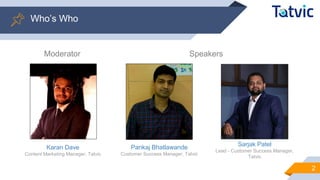
SpeakersModerator
Pankaj Bhatlawande
Customer Success Manager, Tatvic
Sarjak Patel
Lead - Customer Success Manager,
Tatvic
2
Who’s Who
Karan Dave
Content Marketing Manager, Tatvic
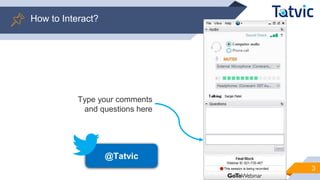
Type your comments
and questions here
@Tatvic
3
How to Interact?
Recap of Webinar #1
4
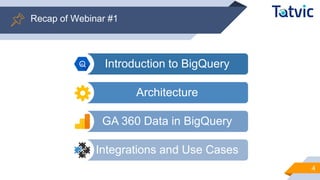
Introduction to BigQuery
Architecture
GA 360 Data in BigQuery
Integrations and Use Cases
OUTLINE
5
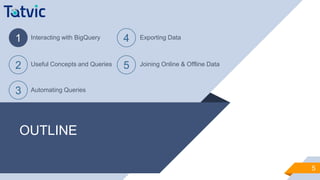
1 Interacting with BigQuery
2 Useful Concepts and Queries
3 Automating Queries
4 Exporting Data
5 Joining Online & Offline Data
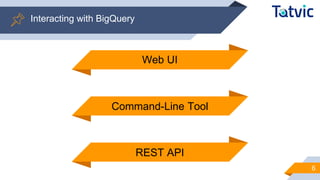
Interacting with BigQuery
6
Web UI
REST API
Command-Line Tool
Interacting with BigQuery
7
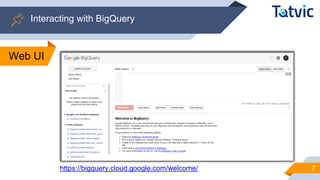
Web UI
https://bigquery.cloud.google.com/welcome/
Interacting with BigQuery
8
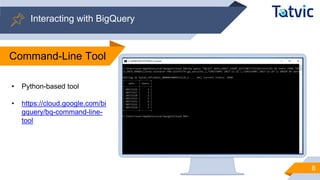
Command-Line Tool
• Python-based tool
• https://cloud.google.com/bi
gquery/bq-command-line-
tool
Interacting with BigQuery
9
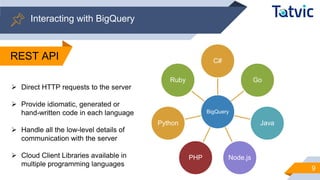
BigQuery
C#
Go
Java
Node.jsPHP
Python
Ruby
➢ Direct HTTP requests to the server
➢ Provide idiomatic, generated or
hand-written code in each language
➢ Handle all the low-level details of
communication with the server
➢ Cloud Client Libraries available in
multiple programming languages
REST API
OUTLINE
10
1 Interacting with BigQuery
2 Useful Concepts and Queries
3 Automating Queries
4 Exporting Data
5 Joining Online & Offline Data
Useful Concepts and Queries
11
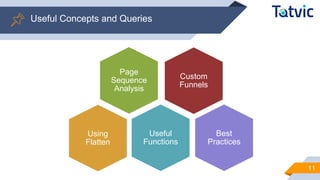
Custom
Funnels
Page
Sequence
Analysis
Useful
Functions
Best
Practices
Custom
Funnels
Using
Flatten
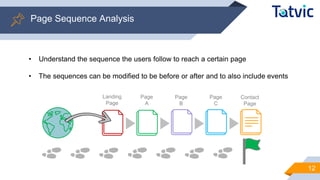
Page Sequence Analysis
12
• Understand the sequence the users follow to reach a certain page
• The sequences can be modified to be before or after and to also include events
Landing
Page
Page
A
Page
B
Page
C
Contact
Page
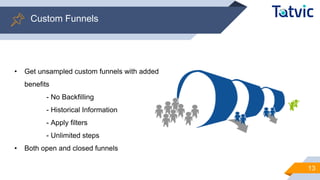
Custom Funnels
13
• Get unsampled custom funnels with added
benefits
- No Backfilling
- Historical Information
- Apply filters
- Unlimited steps
• Both open and closed funnels
14
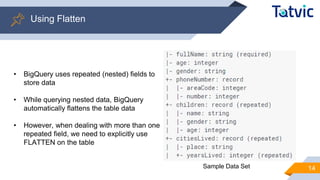
Using Flatten
Sample Data Set
• BigQuery uses repeated (nested) fields to
store data
• While querying nested data, BigQuery
automatically flattens the table data
• However, when dealing with more than one
repeated field, we need to explicitly use
FLATTEN on the table
15
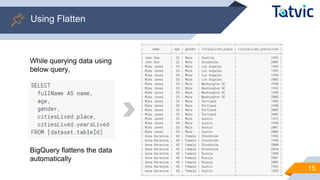
Using Flatten
While querying data using
below query,
BigQuery flattens the data
automatically
16
Using Flatten
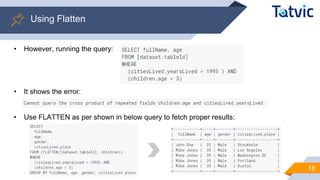
• However, running the query:
• It shows the error:
• Use FLATTEN as per shown in below query to fetch proper results:
17
Useful Functions
• BigQuery functions are more or less similar in nature to that of regular SQL
• However, there are some functions which act differently to an extent
COUNT([DISTINCT] field [, n]) REGEXP_MATCH('str', 'reg_exp')
EXACT_COUNT_DISTINCT(field) REGEXP_REPLACE('orig_str', 'reg_exp', 'replace_str')
GROUP_CONCAT('str' [, separator]) DATEDIFF(<timestamp1>,<timestamp2>)
FIRST(expr), LAST(field) DAY/MONTH/HOUR/MINUTE(<timestamp>)
STRING(numeric_expr),
INTEGER(expr)
TABLE_DATE_RANGE(prefix, timestamp1, timestamp
2)
CONCAT('str1', 'str2', '...') ROW_NUMBER()
DATE(<timestamp>) RANK()
Best Practices
18
✓ Start by sketching the expected result
before writing your query
✓ Only select the relevant fields; The
more fields you select, the more data
it has to process and eventually
leading to more time and cost
✓ Avoid using functions as fields when
possible and prefer specific times and
dates, to allow caching
✓ Use intermediate tables for commonly
used subqueries
✓ Use caching whenever possible,
reduce execution time and costing
✓ Format and comment your queries, it
will be easier to read, understand and
debug
✓ Statements are not case-sensitive but
it’s a best practice to capitalize
OUTLINE
19
1 Interacting with BigQuery
2 Useful Concepts and Queries
3 Automating Queries
4 Exporting Data
5 Joining Online & Offline Data
Automating Queries
20
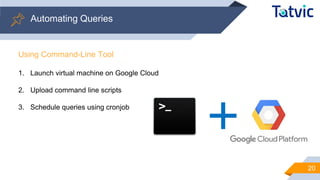
Using Command-Line Tool
1. Launch virtual machine on Google Cloud
2. Upload command line scripts
3. Schedule queries using cronjob
Automating Queries
21
Using Apps Script
• Google Apps Script is a scripting language based on JavaScript
• Uses Google BigQuery API
Manage BigQuery projects
Upload new data
Execute queries
• https://developers.google.com/apps-script/advanced/bigquery
OUTLINE
22
1 Interacting with BigQuery
2 Useful Concepts and Queries
3 Automating Queries
4 Exporting Data
5 Joining Online & Offline Data
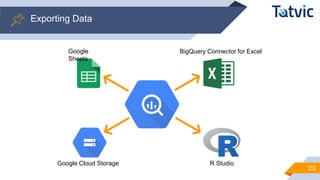
Exporting Data
23
BigQuery Connector for Excel
Google Cloud Storage R Studio
Google
Sheets
OUTLINE
24
1 Interacting with BigQuery
2 Useful Concepts and Queries
3 Automating Queries
4 Exporting Data
5 Joining Online & Offline Data
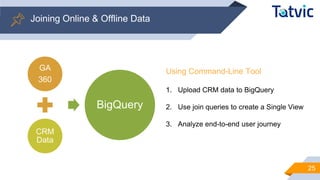
Joining Online & Offline Data
25
GA
360
CRM
Data
BigQuery
Using Command-Line Tool
1. Upload CRM data to BigQuery
2. Use join queries to create a Single View
3. Analyze end-to-end user journey
Type your comments
and questions here
@Tatvic
26
Any Questions?
Title: How to Make the Best Use of Your Google Analytics 360
Data for eCommerce Businesses
Speakers: Bismayy Mohapatra and Anshul Bhatt
Date: December 14, 2017
Time: 8:30 PM IST
27
Upcoming Webinar
THANKS!
28
●Your data speaks. We help you listen to your data.

[Webinar] Interacting with BigQuery and Working with Advanced Queries

  • 1.
  • 2.
    SpeakersModerator Pankaj Bhatlawande Customer SuccessManager, Tatvic Sarjak Patel Lead - Customer Success Manager, Tatvic 2 Who’s Who Karan Dave Content Marketing Manager, Tatvic
  • 3.
    Type your comments andquestions here @Tatvic 3 How to Interact?
  • 4.
    Recap of Webinar#1 4 Introduction to BigQuery Architecture GA 360 Data in BigQuery Integrations and Use Cases
  • 5.
    OUTLINE 5 1 Interacting withBigQuery 2 Useful Concepts and Queries 3 Automating Queries 4 Exporting Data 5 Joining Online & Offline Data
  • 6.
    Interacting with BigQuery 6 WebUI REST API Command-Line Tool
  • 7.
    Interacting with BigQuery 7 WebUI https://bigquery.cloud.google.com/welcome/
  • 8.
    Interacting with BigQuery 8 Command-LineTool • Python-based tool • https://cloud.google.com/bi gquery/bq-command-line- tool
  • 9.
    Interacting with BigQuery 9 BigQuery C# Go Java Node.jsPHP Python Ruby ➢Direct HTTP requests to the server ➢ Provide idiomatic, generated or hand-written code in each language ➢ Handle all the low-level details of communication with the server ➢ Cloud Client Libraries available in multiple programming languages REST API
  • 10.
    OUTLINE 10 1 Interacting withBigQuery 2 Useful Concepts and Queries 3 Automating Queries 4 Exporting Data 5 Joining Online & Offline Data
  • 11.
    Useful Concepts andQueries 11 Custom Funnels Page Sequence Analysis Useful Functions Best Practices Custom Funnels Using Flatten
  • 12.
    Page Sequence Analysis 12 •Understand the sequence the users follow to reach a certain page • The sequences can be modified to be before or after and to also include events Landing Page Page A Page B Page C Contact Page
  • 13.
    Custom Funnels 13 • Getunsampled custom funnels with added benefits - No Backfilling - Historical Information - Apply filters - Unlimited steps • Both open and closed funnels
  • 14.
    14 Using Flatten Sample DataSet • BigQuery uses repeated (nested) fields to store data • While querying nested data, BigQuery automatically flattens the table data • However, when dealing with more than one repeated field, we need to explicitly use FLATTEN on the table
  • 15.
    15 Using Flatten While queryingdata using below query, BigQuery flattens the data automatically
  • 16.
    16 Using Flatten • However,running the query: • It shows the error: • Use FLATTEN as per shown in below query to fetch proper results:
  • 17.
    17 Useful Functions • BigQueryfunctions are more or less similar in nature to that of regular SQL • However, there are some functions which act differently to an extent COUNT([DISTINCT] field [, n]) REGEXP_MATCH('str', 'reg_exp') EXACT_COUNT_DISTINCT(field) REGEXP_REPLACE('orig_str', 'reg_exp', 'replace_str') GROUP_CONCAT('str' [, separator]) DATEDIFF(<timestamp1>,<timestamp2>) FIRST(expr), LAST(field) DAY/MONTH/HOUR/MINUTE(<timestamp>) STRING(numeric_expr), INTEGER(expr) TABLE_DATE_RANGE(prefix, timestamp1, timestamp 2) CONCAT('str1', 'str2', '...') ROW_NUMBER() DATE(<timestamp>) RANK()
  • 18.
    Best Practices 18 ✓ Startby sketching the expected result before writing your query ✓ Only select the relevant fields; The more fields you select, the more data it has to process and eventually leading to more time and cost ✓ Avoid using functions as fields when possible and prefer specific times and dates, to allow caching ✓ Use intermediate tables for commonly used subqueries ✓ Use caching whenever possible, reduce execution time and costing ✓ Format and comment your queries, it will be easier to read, understand and debug ✓ Statements are not case-sensitive but it’s a best practice to capitalize
  • 19.
    OUTLINE 19 1 Interacting withBigQuery 2 Useful Concepts and Queries 3 Automating Queries 4 Exporting Data 5 Joining Online & Offline Data
  • 20.
    Automating Queries 20 Using Command-LineTool 1. Launch virtual machine on Google Cloud 2. Upload command line scripts 3. Schedule queries using cronjob
  • 21.
    Automating Queries 21 Using AppsScript • Google Apps Script is a scripting language based on JavaScript • Uses Google BigQuery API Manage BigQuery projects Upload new data Execute queries • https://developers.google.com/apps-script/advanced/bigquery
  • 22.
    OUTLINE 22 1 Interacting withBigQuery 2 Useful Concepts and Queries 3 Automating Queries 4 Exporting Data 5 Joining Online & Offline Data
  • 23.
    Exporting Data 23 BigQuery Connectorfor Excel Google Cloud Storage R Studio Google Sheets
  • 24.
    OUTLINE 24 1 Interacting withBigQuery 2 Useful Concepts and Queries 3 Automating Queries 4 Exporting Data 5 Joining Online & Offline Data
  • 25.
    Joining Online &Offline Data 25 GA 360 CRM Data BigQuery Using Command-Line Tool 1. Upload CRM data to BigQuery 2. Use join queries to create a Single View 3. Analyze end-to-end user journey
  • 26.
    Type your comments andquestions here @Tatvic 26 Any Questions?
  • 27.
    Title: How toMake the Best Use of Your Google Analytics 360 Data for eCommerce Businesses Speakers: Bismayy Mohapatra and Anshul Bhatt Date: December 14, 2017 Time: 8:30 PM IST 27 Upcoming Webinar
  • 28.
    THANKS! 28 ●Your data speaks.We help you listen to your data.