Supercharge your data analytics with
Márton Kodok / @martonkodok
Google Developer Expert at REEA.net
September 2019 - Tbilisi, Georgia
● Among the Top3 romanians on Stackoverflow 135k reputation
● Google Developer Expert on Cloud technologies
● Crafting Web/Mobile backends at REEA.net
● BigQuery + Redis and database engine expert
Slideshare: martonkodok
Twitter: @martonkodok
StackOverflow: pentium10
GitHub: pentium10
Supercharge your data analytics with BigQuery @martonkodok
About me
Crafting a solution for building high-performance,
petabyte scale data analytics, serverless
reporting system on Google Cloud Platform
Goal today
Supercharge your data analytics with BigQuery @martonkodok
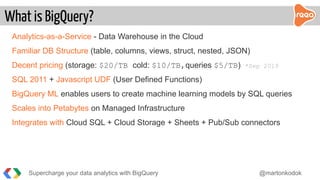
Analytics-as-a-Service - Data Warehouse in the Cloud
Familiar DB Structure (table, columns, views, struct, nested, JSON)
Decent pricing (storage: $20/TB cold: $10/TB,queries $5/TB) *Sep 2019
SQL 2011 + Javascript UDF (User Defined Functions)
BigQuery ML enables users to create machine learning models by SQL queries
Scales into Petabytes on Managed Infrastructure
Integrates with Cloud SQL + Cloud Storage + Sheets + Pub/Sub connectors
What is BigQuery?
Supercharge your data analytics with BigQuery @martonkodok
+--------------------------+-----------+----------+
| order_id | INTEGER | REQUIRED |
| timestamp | TIMESTAMP | REQUIRED |
| ... | | | Example:
| products | <STRUCT> | REPEATED | ”products”:[p1,p2]
| products.name | STRING | NULLABLE |
| products.product_id | INTEGER | NULLABLE | ”products”:[{”name”:”p1”,
| products.attributes | STRING | REPEATED | ”product_id”:10,
| products.price | FLOAT | NULLABLE | ”attributes”:[”red”,”xl”]
| ... | | | ,”price”:9.99},
| bq | <STRUCT> | REQUIRED | {”name”:”p2”,
| bq.created | TIMESTAMP | REQUIRED | ”product_id”:20,
| bq.insert_id | <ANY> | REQUIRED | ”attributes”:[“red”,”xl”]
| meta | STRING | NULLABLE | ,”price”:9.99}]
+--------------------------+-----------+----------+
Schema modelling / JSON
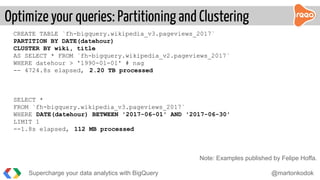
CREATE TABLE `fh-bigquery.wikipedia_v3.pageviews_2017`
PARTITION BY DATE(datehour)
CLUSTER BY wiki, title
AS SELECT * FROM `fh-bigquery.wikipedia_v2.pageviews_2017`
WHERE datehour > '1990-01-01' # nag
-- 4724.8s elapsed, 2.20 TB processed
SELECT *
FROM `fh-bigquery.wikipedia_v3.pageviews_2017`
WHERE DATE(datehour) BETWEEN '2017-06-01' AND '2017-06-30'
LIMIT 1
--1.8s elapsed, 112 MB processed
Note: Examples published by Felipe Hoffa.
Supercharge your data analytics with BigQuery @martonkodok
Optimize your queries: Partitioning and Clustering
Load from file - either local or from GCS (max 5TB each)
Streaming rows - event driven approach - high throughput 1M rows/sec
Functions - observer-trigger based (Google Cloud Functions)
Pipelines - flexibility to do ETL - FluentD, Kafka, Google Dataflow
Load from connected services - Firestore/Datastore, Billing, AuditLogs, Stackdriver
Firebase - Analytics - Messaging - Crashlytics - Perf. Monitoring - Predictions
Loading Data into BigQuery
Supercharge your data analytics with BigQuery @martonkodok
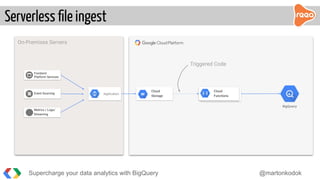
Serverless file ingest
BigQuery
On-Premises Servers
ApplicationEvent Sourcing
Frontend
Platform Services
Metrics / Logs/
Streaming
Cloud
Storage
Cloud
Functions
Triggered Code
Supercharge your data analytics with BigQuery @martonkodok
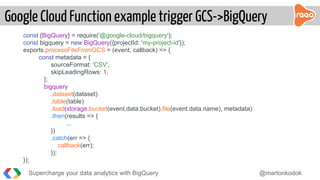
const {BigQuery} = require('@google-cloud/bigquery');
const bigquery = new BigQuery({projectId: 'my-project-id'});
exports.processFileFromGCS = (event, callback) => {
const metadata = {
sourceFormat: 'CSV',
skipLeadingRows: 1,
};
bigquery
.dataset(dataset)
.table(table)
.load(storage.bucket(event.data.bucket).file(event.data.name), metadata)
.then(results => {
...
})
.catch(err => {
callback(err);
});
});
Supercharge your data analytics with BigQuery @martonkodok
Google Cloud Function example trigger GCS->BigQuery
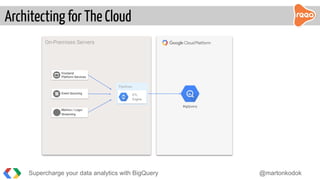
Architecting for The Cloud
BigQuery
On-Premises Servers
Pipelines
ETL
Engine
Event Sourcing
Frontend
Platform Services
Metrics / Logs/
Streaming
Supercharge your data analytics with BigQuery @martonkodok
“ We have our app outside of GCP.
How can we use the benefits of BigQuery?
Supercharge your data analytics with BigQuery @martonkodok
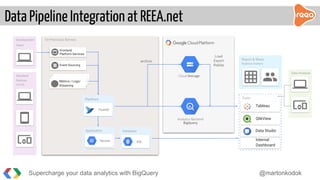
Data Pipeline Integration at REEA.net
Analytics Backend
BigQuery
On-Premises Servers
Pipelines
FluentD
Event Sourcing
Frontend
Platform Services
Metrics / Logs/
Streaming
Development
Team
Data Analysts
Report & Share
Business Analysis
Tools
Tableau
QlikView
Data Studio
Internal
Dashboard
Database
SQL
Application
ServersServers
Cloud Storage
archive
Load
Export
Replay
Standard
Devices
HTTPS
Supercharge your data analytics with BigQuery @martonkodok
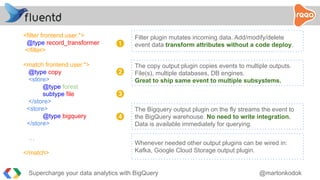
<filter frontend.user.*>
@type record_transformer
</filter>
<match frontend.user.*>
@type copy
<store>
@type forest
subtype file
</store>
<store>
@type bigquery
</store>
…
</match>
Filter plugin mutates incoming data. Add/modify/delete
event data transform attributes without a code deploy.1
2
3
4
The copy output plugin copies events to multiple outputs.
File(s), multiple databases, DB engines.
Great to ship same event to multiple subsystems.
The Bigquery output plugin on the fly streams the event to
the BigQuery warehouse. No need to write integration.
Data is available immediately for querying.
Whenever needed other output plugins can be wired in:
Kafka, Google Cloud Storage output plugin.
Supercharge your data analytics with BigQuery @martonkodok
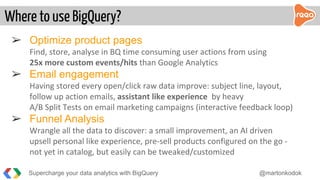
➢ Optimize product pages
Find, store, analyse in BQ time consuming user actions from using
25x more custom events/hits than Google Analytics
➢ Email engagement
Having stored every open/click raw data improve: subject line, layout,
follow up action emails, assistant like experience by heavy
A/B Split Tests on email marketing campaigns (interactive feedback loop)
➢ Funnel Analysis
Wrangle all the data to discover: a small improvement, an AI driven
upsell personal like experience, pre-sell products configured on the go -
not yet in catalog, but easily can be tweaked/customized
Where to use BigQuery?
Supercharge your data analytics with BigQuery @martonkodok
● SQL language to run BigData queries
● run raw ad-hoc queries (either by analysts/sales or Devs)
● no more throwing away-, expiring-, aggregating old data
● it’s serverless
● no provisioning/deploy
● no running out of resources
● no more focus on large scale execution plan
Our benefits
Supercharge your data analytics with BigQuery @martonkodok
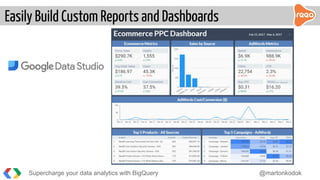
Easily Build Custom Reports and Dashboards
Supercharge your data analytics with BigQuery @martonkodok
What is BigQueryML?
Supercharge your data analytics with BigQuery @martonkodok
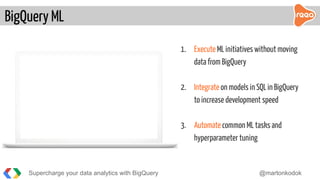
BigQuery ML
1. Execute ML initiatives without moving
data from BigQuery
2. Integrate on models in SQL in BigQuery
to increase development speed
3. Automate common ML tasks and
hyperparameter tuning
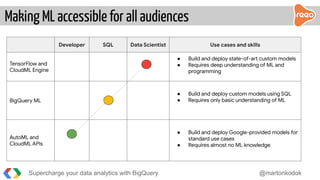
Developer SQL Data Scientist Use cases and skills
TensorFlow and
CloudML Engine
● Build and deploy state-of-art custom models
● Requires deep understanding of ML and
programming
BigQuery ML
● Build and deploy custom models using SQL
● Requires only basic understanding of ML
AutoML and
CloudML APIs
● Build and deploy Google-provided models for
standard use cases
● Requires almost no ML knowledge
Supercharge your data analytics with BigQuery @martonkodok
Making ML accessible for all audiences
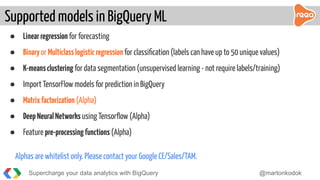
● Linearregression for forecasting
● Binaryor Multiclasslogisticregression for classification (labels can have up to 50 unique values)
● K-meansclustering for data segmentation (unsupervised learning - not require labels/training)
● Import TensorFlow models for prediction in BigQuery
● Matrixfactorization (Alpha)
● DeepNeuralNetworks using Tensorflow (Alpha)
● Feature pre-processingfunctions (Alpha)
Alphas are whitelist only. Please contact your Google CE/Sales/TAM.
Supported models in BigQuery ML
Supercharge your data analytics with BigQuery @martonkodok
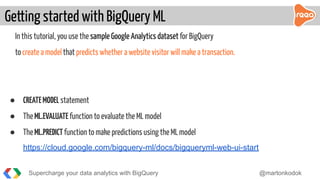
In this tutorial, you use the sample Google Analytics dataset for BigQuery
to create a modelthat predicts whether a website visitor will make a transaction.
● CREATEMODEL statement
● TheML.EVALUATE function to evaluate the ML model
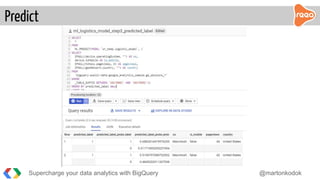
● TheML.PREDICTfunction to make predictions using the ML model
https://cloud.google.com/bigquery-ml/docs/bigqueryml-web-ui-start
Getting started with BigQuery ML
Supercharge your data analytics with BigQuery @martonkodok
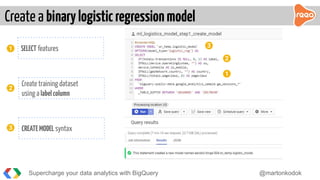
Create a binarylogisticregressionmodel
Supercharge your data analytics with BigQuery @martonkodok
3
2
Create training dataset
using a labelcolumn
CREATEMODEL syntax
1
2
SELECT features
3
1
Predict
Supercharge your data analytics with BigQuery @martonkodok
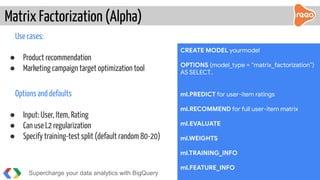
Use cases:
● Product recommendation
● Marketing campaign target optimization tool
Options and defaults
● Input: User, Item, Rating
● Can use L2 regularization
● Specify training-test split (default random 80-20)
Matrix Factorization (Alpha)
Supercharge your data analytics with BigQuery @martonkodok
CREATE MODEL yourmodel
OPTIONS (model_type = “matrix_factorization”)
AS SELECT..
ml.PREDICT for user-item ratings
ml.RECOMMEND for full user-item matrix
ml.EVALUATE
ml.WEIGHTS
ml.TRAINING_INFO
ml.FEATURE_INFO
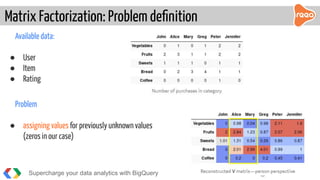
Available data:
● User
● Item
● Rating
Problem
● assigning values for previously unknown values
(zeros in our case)
Matrix Factorization: Problem definition
Supercharge your data analytics with BigQuery @martonkodok
Conclusion
Supercharge your data analytics with BigQuery @martonkodok
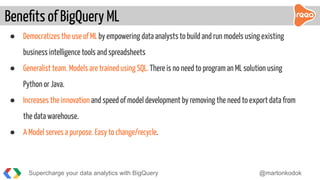
● Democratizes the use of ML by empowering data analysts to build and run models using existing
business intelligence tools and spreadsheets
● Generalist team. Models are trained using SQL. There is no need to program an ML solution using
Python or Java.
● Increases the innovation and speed of model development by removing the need to export data from
the data warehouse.
● A Model serves a purpose. Easy to change/recycle.
Benefits of BigQuery ML
Supercharge your data analytics with BigQuery @martonkodok
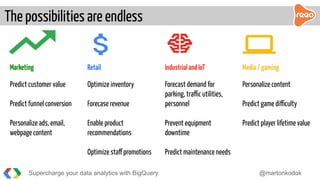
The possibilities are endless
Supercharge your data analytics with BigQuery @martonkodok
Marketing Retail IndustrialandIoT Media/gaming
Predict customer value
Predict funnel conversion
Personalize ads, email,
webpage content
Optimize inventory
Forecase revenue
Enable product
recommendations
Optimize staff promotions
Forecast demand for
parking, traffic utilities,
personnel
Prevent equipment
downtime
Predict maintenance needs
Personalize content
Predict game difficulty
Predict player lifetime value
დიდი მადლობა
Thank you.
Slides available on: slideshare.net/martonkodok
Reea.net - Integrated web solutions driven by creativity to deliver projects.

Supercharge your data analytics with BigQuery

  • 1.
    Supercharge your dataanalytics with Márton Kodok / @martonkodok Google Developer Expert at REEA.net September 2019 - Tbilisi, Georgia
  • 2.
    ● Among theTop3 romanians on Stackoverflow 135k reputation ● Google Developer Expert on Cloud technologies ● Crafting Web/Mobile backends at REEA.net ● BigQuery + Redis and database engine expert Slideshare: martonkodok Twitter: @martonkodok StackOverflow: pentium10 GitHub: pentium10 Supercharge your data analytics with BigQuery @martonkodok About me
  • 3.
    Crafting a solutionfor building high-performance, petabyte scale data analytics, serverless reporting system on Google Cloud Platform Goal today Supercharge your data analytics with BigQuery @martonkodok
  • 4.
    Supercharge your dataanalytics with BigQuery @martonkodok
  • 5.
    Analytics-as-a-Service - DataWarehouse in the Cloud Familiar DB Structure (table, columns, views, struct, nested, JSON) Decent pricing (storage: $20/TB cold: $10/TB,queries $5/TB) *Sep 2019 SQL 2011 + Javascript UDF (User Defined Functions) BigQuery ML enables users to create machine learning models by SQL queries Scales into Petabytes on Managed Infrastructure Integrates with Cloud SQL + Cloud Storage + Sheets + Pub/Sub connectors What is BigQuery? Supercharge your data analytics with BigQuery @martonkodok
  • 6.
    Supercharge your dataanalytics with BigQuery @martonkodok +--------------------------+-----------+----------+ | order_id | INTEGER | REQUIRED | | timestamp | TIMESTAMP | REQUIRED | | ... | | | Example: | products | <STRUCT> | REPEATED | ”products”:[p1,p2] | products.name | STRING | NULLABLE | | products.product_id | INTEGER | NULLABLE | ”products”:[{”name”:”p1”, | products.attributes | STRING | REPEATED | ”product_id”:10, | products.price | FLOAT | NULLABLE | ”attributes”:[”red”,”xl”] | ... | | | ,”price”:9.99}, | bq | <STRUCT> | REQUIRED | {”name”:”p2”, | bq.created | TIMESTAMP | REQUIRED | ”product_id”:20, | bq.insert_id | <ANY> | REQUIRED | ”attributes”:[“red”,”xl”] | meta | STRING | NULLABLE | ,”price”:9.99}] +--------------------------+-----------+----------+ Schema modelling / JSON
  • 7.
    CREATE TABLE `fh-bigquery.wikipedia_v3.pageviews_2017` PARTITIONBY DATE(datehour) CLUSTER BY wiki, title AS SELECT * FROM `fh-bigquery.wikipedia_v2.pageviews_2017` WHERE datehour > '1990-01-01' # nag -- 4724.8s elapsed, 2.20 TB processed SELECT * FROM `fh-bigquery.wikipedia_v3.pageviews_2017` WHERE DATE(datehour) BETWEEN '2017-06-01' AND '2017-06-30' LIMIT 1 --1.8s elapsed, 112 MB processed Note: Examples published by Felipe Hoffa. Supercharge your data analytics with BigQuery @martonkodok Optimize your queries: Partitioning and Clustering
  • 8.
    Load from file- either local or from GCS (max 5TB each) Streaming rows - event driven approach - high throughput 1M rows/sec Functions - observer-trigger based (Google Cloud Functions) Pipelines - flexibility to do ETL - FluentD, Kafka, Google Dataflow Load from connected services - Firestore/Datastore, Billing, AuditLogs, Stackdriver Firebase - Analytics - Messaging - Crashlytics - Perf. Monitoring - Predictions Loading Data into BigQuery Supercharge your data analytics with BigQuery @martonkodok
  • 9.
    Serverless file ingest BigQuery On-PremisesServers ApplicationEvent Sourcing Frontend Platform Services Metrics / Logs/ Streaming Cloud Storage Cloud Functions Triggered Code Supercharge your data analytics with BigQuery @martonkodok
  • 10.
    const {BigQuery} =require('@google-cloud/bigquery'); const bigquery = new BigQuery({projectId: 'my-project-id'}); exports.processFileFromGCS = (event, callback) => { const metadata = { sourceFormat: 'CSV', skipLeadingRows: 1, }; bigquery .dataset(dataset) .table(table) .load(storage.bucket(event.data.bucket).file(event.data.name), metadata) .then(results => { ... }) .catch(err => { callback(err); }); }); Supercharge your data analytics with BigQuery @martonkodok Google Cloud Function example trigger GCS->BigQuery
  • 11.
    Architecting for TheCloud BigQuery On-Premises Servers Pipelines ETL Engine Event Sourcing Frontend Platform Services Metrics / Logs/ Streaming Supercharge your data analytics with BigQuery @martonkodok
  • 12.
    “ We haveour app outside of GCP. How can we use the benefits of BigQuery? Supercharge your data analytics with BigQuery @martonkodok
  • 13.
    Data Pipeline Integrationat REEA.net Analytics Backend BigQuery On-Premises Servers Pipelines FluentD Event Sourcing Frontend Platform Services Metrics / Logs/ Streaming Development Team Data Analysts Report & Share Business Analysis Tools Tableau QlikView Data Studio Internal Dashboard Database SQL Application ServersServers Cloud Storage archive Load Export Replay Standard Devices HTTPS Supercharge your data analytics with BigQuery @martonkodok
  • 14.
    <filter frontend.user.*> @type record_transformer </filter> <matchfrontend.user.*> @type copy <store> @type forest subtype file </store> <store> @type bigquery </store> … </match> Filter plugin mutates incoming data. Add/modify/delete event data transform attributes without a code deploy.1 2 3 4 The copy output plugin copies events to multiple outputs. File(s), multiple databases, DB engines. Great to ship same event to multiple subsystems. The Bigquery output plugin on the fly streams the event to the BigQuery warehouse. No need to write integration. Data is available immediately for querying. Whenever needed other output plugins can be wired in: Kafka, Google Cloud Storage output plugin. Supercharge your data analytics with BigQuery @martonkodok
  • 15.
    ➢ Optimize productpages Find, store, analyse in BQ time consuming user actions from using 25x more custom events/hits than Google Analytics ➢ Email engagement Having stored every open/click raw data improve: subject line, layout, follow up action emails, assistant like experience by heavy A/B Split Tests on email marketing campaigns (interactive feedback loop) ➢ Funnel Analysis Wrangle all the data to discover: a small improvement, an AI driven upsell personal like experience, pre-sell products configured on the go - not yet in catalog, but easily can be tweaked/customized Where to use BigQuery? Supercharge your data analytics with BigQuery @martonkodok
  • 16.
    ● SQL languageto run BigData queries ● run raw ad-hoc queries (either by analysts/sales or Devs) ● no more throwing away-, expiring-, aggregating old data ● it’s serverless ● no provisioning/deploy ● no running out of resources ● no more focus on large scale execution plan Our benefits Supercharge your data analytics with BigQuery @martonkodok
  • 17.
    Easily Build CustomReports and Dashboards Supercharge your data analytics with BigQuery @martonkodok
  • 18.
    What is BigQueryML? Superchargeyour data analytics with BigQuery @martonkodok
  • 19.
    Supercharge your dataanalytics with BigQuery @martonkodok BigQuery ML 1. Execute ML initiatives without moving data from BigQuery 2. Integrate on models in SQL in BigQuery to increase development speed 3. Automate common ML tasks and hyperparameter tuning
  • 20.
    Developer SQL DataScientist Use cases and skills TensorFlow and CloudML Engine ● Build and deploy state-of-art custom models ● Requires deep understanding of ML and programming BigQuery ML ● Build and deploy custom models using SQL ● Requires only basic understanding of ML AutoML and CloudML APIs ● Build and deploy Google-provided models for standard use cases ● Requires almost no ML knowledge Supercharge your data analytics with BigQuery @martonkodok Making ML accessible for all audiences
  • 21.
    ● Linearregression forforecasting ● Binaryor Multiclasslogisticregression for classification (labels can have up to 50 unique values) ● K-meansclustering for data segmentation (unsupervised learning - not require labels/training) ● Import TensorFlow models for prediction in BigQuery ● Matrixfactorization (Alpha) ● DeepNeuralNetworks using Tensorflow (Alpha) ● Feature pre-processingfunctions (Alpha) Alphas are whitelist only. Please contact your Google CE/Sales/TAM. Supported models in BigQuery ML Supercharge your data analytics with BigQuery @martonkodok
  • 22.
    In this tutorial,you use the sample Google Analytics dataset for BigQuery to create a modelthat predicts whether a website visitor will make a transaction. ● CREATEMODEL statement ● TheML.EVALUATE function to evaluate the ML model ● TheML.PREDICTfunction to make predictions using the ML model https://cloud.google.com/bigquery-ml/docs/bigqueryml-web-ui-start Getting started with BigQuery ML Supercharge your data analytics with BigQuery @martonkodok
  • 23.
    Create a binarylogisticregressionmodel Superchargeyour data analytics with BigQuery @martonkodok 3 2 Create training dataset using a labelcolumn CREATEMODEL syntax 1 2 SELECT features 3 1
  • 24.
    Predict Supercharge your dataanalytics with BigQuery @martonkodok
  • 25.
    Use cases: ● Productrecommendation ● Marketing campaign target optimization tool Options and defaults ● Input: User, Item, Rating ● Can use L2 regularization ● Specify training-test split (default random 80-20) Matrix Factorization (Alpha) Supercharge your data analytics with BigQuery @martonkodok CREATE MODEL yourmodel OPTIONS (model_type = “matrix_factorization”) AS SELECT.. ml.PREDICT for user-item ratings ml.RECOMMEND for full user-item matrix ml.EVALUATE ml.WEIGHTS ml.TRAINING_INFO ml.FEATURE_INFO
  • 26.
    Available data: ● User ●Item ● Rating Problem ● assigning values for previously unknown values (zeros in our case) Matrix Factorization: Problem definition Supercharge your data analytics with BigQuery @martonkodok
  • 27.
    Conclusion Supercharge your dataanalytics with BigQuery @martonkodok
  • 28.
    ● Democratizes theuse of ML by empowering data analysts to build and run models using existing business intelligence tools and spreadsheets ● Generalist team. Models are trained using SQL. There is no need to program an ML solution using Python or Java. ● Increases the innovation and speed of model development by removing the need to export data from the data warehouse. ● A Model serves a purpose. Easy to change/recycle. Benefits of BigQuery ML Supercharge your data analytics with BigQuery @martonkodok
  • 29.
    The possibilities areendless Supercharge your data analytics with BigQuery @martonkodok Marketing Retail IndustrialandIoT Media/gaming Predict customer value Predict funnel conversion Personalize ads, email, webpage content Optimize inventory Forecase revenue Enable product recommendations Optimize staff promotions Forecast demand for parking, traffic utilities, personnel Prevent equipment downtime Predict maintenance needs Personalize content Predict game difficulty Predict player lifetime value
  • 30.
    დიდი მადლობა Thank you. Slidesavailable on: slideshare.net/martonkodok Reea.net - Integrated web solutions driven by creativity to deliver projects.