
Dell flexiLabs
computer classrooms made flexible!
DELL speakers:
Antonio Apollonio
Matteo Mazzari
Genaro Escudero
2
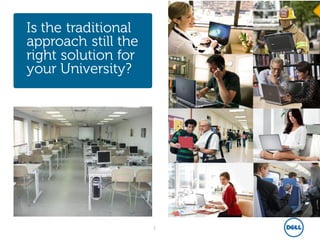
Is the traditional
approach still the
right solution for
your University?
3
1. PC costs: computer-classrooms
needs to be equipped with updated
technology.
2. Management costs: managing
hundreds of physical PC is cumbersome:
HW breaks, SW updates & refresh,
move&changes, security concerns,….
3. Facilities costs: computer-
classrooms are single-purposed and can
very rarely be leveraged for others needs
4. Un-Flexibility : a physical
environment is ether fully busy….or fully
un-used.
key pain
points of
traditional classrooms
4
1. Initial investment: big-bang
transformation are not always easy in
complex organization; would need an
incrementalapproach…..
2. Technology: virtualizationtechnology
is mature; what about my skillset?
3. Management: will the virtual
environment really be easy to
manage?
Key road-
blockers to
future-ready
class-rooms
5
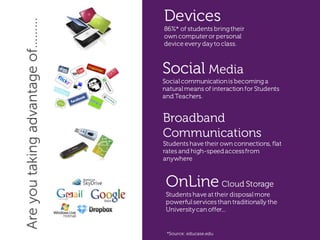
Social Media
Socialcommunicationis becominga
naturalmeans of interaction for Students
and Teachers.
Broadband
Communications
Students have their own connections, flat
rates and high-speedaccessfrom
anywhere
OnLine Cloud Storage
Students have at their disposalmore
powerfulservices than traditionally the
Universitycan offer...
Devices
86%* of students bringtheir
own computeror personal
device every dayto class.
Areyoutakingadvantageof………
*Source: educase.edu
6
The Power to
Do More
The Dell Vision
Provide students with access to their
applications, from anywhere, anytime
and any device.
Let University access best in class
technology, enabling easy scalability
and simplifying management.
Zero set-up costs, pay as you grow
all-inclusive competitive price-model
7
flexiLabs
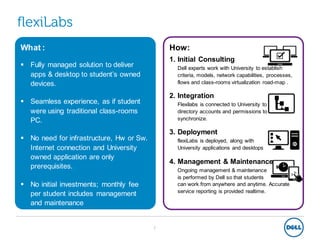
What :
 Fully managed solution to deliver
apps & desktop to student’s owned
devices.
 Seamless experience, as if student
were using traditional class-rooms
PC.
 No need for infrastructure, Hw or Sw.
Internet connection and University
owned application are only
prerequisites.
 No initial investments; monthly fee
per student includes management
and maintenance
How:
1. Initial Consulting
Dell experts work with University to establish
criteria, models, network capabilities, processes,
flows and class-rooms virtualization road-map .
2. Integration
Flexilabs is connected to University to allow
directory accounts and permissions to
synchronize.
3. Deployment
flexiLabs is deployed, along with
University applications and desktops
4. Management & Maintenance
Ongoing management & maintenance
is performed by Dell so that students
can work from anywhere and anytime. Accurate
service reporting is provided realtime.
8
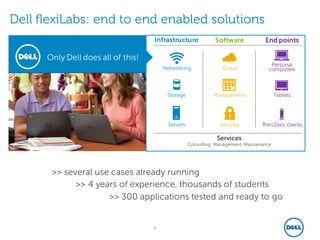
Only Dell does all of this!
Dell flexiLabs: end to end enabled solutions
Services
Consulting, Management, Maintenance
Networking
Storage
Servers
Cloud
Management
Security
Tablets
Thin/Zero clients
Personal
computers
Infrastructure Software End points
>> several use cases already running
>> 4 years of experience, thousands of students
>> 300 applications tested and ready to go
9
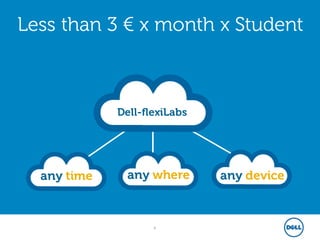
Less than 3 € x month x Student
any time any where any device
Dell-flexiLabs
10
The Power to
Do More
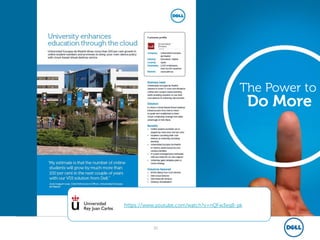
https://www.youtube.com/watch?v=nQFw3eqB-pk
11
The Power to
Do More
demo
12
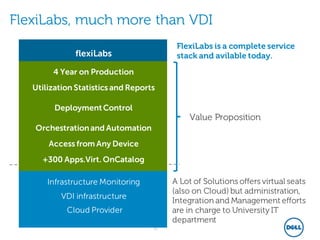
FlexiLabs, much more than VDI
Infrastructure Monitoring
VDI infrastructure
Cloud Provider
flexiLabs
FlexiLabs is a complete service
stack and avilable today.
A Lot of Solutions offers virtual seats
(also on Cloud) but administration,
Integration and Management efforts
are in charge to University IT
department
+300 Apps.Virt. OnCatalog
Access from Any Device
Orchestrationand Automation
DeploymentControl
Utilization Statistics and Reports
4 Year on Production
Value Proposition
13
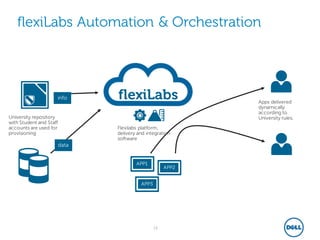
flexiLabs Automation & Orchestration
flexiLabs
APP1
APP2
APP3
data
info
University repository
with Student and Staff
accounts are used for
provisioning
Flexilabs platform,
delivery and integration
software
Apps delivered
dynamically
according to
University rules.
14
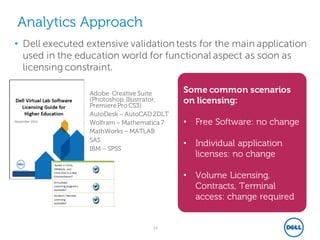
Analytics Approach
• Dell executed extensive validation tests for the main application
used in the education world for functional aspect as soon as
licensing constraint.
– Adobe Creative Suite
(Photoshop,Illustrator,
PremierePro CS3)
– AutoDesk – AutoCAD 2DLT
– Wolfram – Mathematica 7
– MathWorks – MATLAB
– SAS
– IBM – SPSS
Some common scenarios
on licensing:
• Free Software: no change
• Individual application
licenses: no change
• Volume Licensing,
Contracts, Terminal
access: change required
15
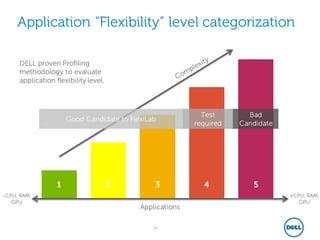
Application “Flexibility” level categorization
1 2 3 4 5
+CPU, RAM,
GPU
Applications
Good Candidate to FlexiLab
-CPU, RAM,
GPU
Test
required
Bad
Candidate
DELL proven Profiling
methodology to evaluate
application flexibility level.
16
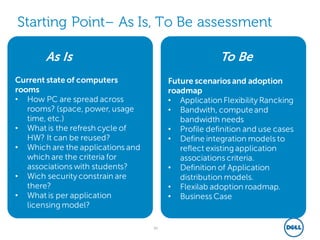
Starting Point– As Is, To Be assessment
Current state of computers
rooms
• How PC are spread across
rooms? (space, power, usage
time, etc.)
• What is the refresh cycle of
HW? It can be reused?
• Which are the applications and
which are the criteria for
associations with students?
• Wich security constrain are
there?
• What is per application
licensing model?
Future scenarios and adoption
roadmap
• Application Flexibility Rancking
• Bandwith, computeand
bandwidth needs
• Profile definition and use cases
• Define integration models to
reflect existing application
associations criteria.
• Definition of Application
distribution models.
• Flexilab adoption roadmap.
• Business Case
As Is To Be
17
Is your University
ready for the Future?
Contatti:
Luigi_Russo@dell.com
Account executive – higher
education
Matteo_Mazzari@dell.com
Dell Services, PrincipalConsultant
Genaro_Escudero@dell.com
Dell Services,flexiLab Product Group
Antonio_Apollonio@dell.com
Dell Services,Country Manager
flexiLabs

Webinar CRUI Dell: flexilab, computer classroom made flexible

  • 1.
    Dell flexiLabs computer classroomsmade flexible! DELL speakers: Antonio Apollonio Matteo Mazzari Genaro Escudero
  • 2.
    2 Is the traditional approachstill the right solution for your University?
  • 3.
    3 1. PC costs:computer-classrooms needs to be equipped with updated technology. 2. Management costs: managing hundreds of physical PC is cumbersome: HW breaks, SW updates & refresh, move&changes, security concerns,…. 3. Facilities costs: computer- classrooms are single-purposed and can very rarely be leveraged for others needs 4. Un-Flexibility : a physical environment is ether fully busy….or fully un-used. key pain points of traditional classrooms
  • 4.
    4 1. Initial investment:big-bang transformation are not always easy in complex organization; would need an incrementalapproach….. 2. Technology: virtualizationtechnology is mature; what about my skillset? 3. Management: will the virtual environment really be easy to manage? Key road- blockers to future-ready class-rooms
  • 5.
    5 Social Media Socialcommunicationis becominga naturalmeansof interaction for Students and Teachers. Broadband Communications Students have their own connections, flat rates and high-speedaccessfrom anywhere OnLine Cloud Storage Students have at their disposalmore powerfulservices than traditionally the Universitycan offer... Devices 86%* of students bringtheir own computeror personal device every dayto class. Areyoutakingadvantageof……… *Source: educase.edu
  • 6.
    6 The Power to DoMore The Dell Vision Provide students with access to their applications, from anywhere, anytime and any device. Let University access best in class technology, enabling easy scalability and simplifying management. Zero set-up costs, pay as you grow all-inclusive competitive price-model
  • 7.
    7 flexiLabs What :  Fullymanaged solution to deliver apps & desktop to student’s owned devices.  Seamless experience, as if student were using traditional class-rooms PC.  No need for infrastructure, Hw or Sw. Internet connection and University owned application are only prerequisites.  No initial investments; monthly fee per student includes management and maintenance How: 1. Initial Consulting Dell experts work with University to establish criteria, models, network capabilities, processes, flows and class-rooms virtualization road-map . 2. Integration Flexilabs is connected to University to allow directory accounts and permissions to synchronize. 3. Deployment flexiLabs is deployed, along with University applications and desktops 4. Management & Maintenance Ongoing management & maintenance is performed by Dell so that students can work from anywhere and anytime. Accurate service reporting is provided realtime.
  • 8.
    8 Only Dell doesall of this! Dell flexiLabs: end to end enabled solutions Services Consulting, Management, Maintenance Networking Storage Servers Cloud Management Security Tablets Thin/Zero clients Personal computers Infrastructure Software End points >> several use cases already running >> 4 years of experience, thousands of students >> 300 applications tested and ready to go
  • 9.
    9 Less than 3€ x month x Student any time any where any device Dell-flexiLabs
  • 10.
    10 The Power to DoMore https://www.youtube.com/watch?v=nQFw3eqB-pk
  • 11.
  • 12.
    12 FlexiLabs, much morethan VDI Infrastructure Monitoring VDI infrastructure Cloud Provider flexiLabs FlexiLabs is a complete service stack and avilable today. A Lot of Solutions offers virtual seats (also on Cloud) but administration, Integration and Management efforts are in charge to University IT department +300 Apps.Virt. OnCatalog Access from Any Device Orchestrationand Automation DeploymentControl Utilization Statistics and Reports 4 Year on Production Value Proposition
  • 13.
    13 flexiLabs Automation &Orchestration flexiLabs APP1 APP2 APP3 data info University repository with Student and Staff accounts are used for provisioning Flexilabs platform, delivery and integration software Apps delivered dynamically according to University rules.
  • 14.
    14 Analytics Approach • Dellexecuted extensive validation tests for the main application used in the education world for functional aspect as soon as licensing constraint. – Adobe Creative Suite (Photoshop,Illustrator, PremierePro CS3) – AutoDesk – AutoCAD 2DLT – Wolfram – Mathematica 7 – MathWorks – MATLAB – SAS – IBM – SPSS Some common scenarios on licensing: • Free Software: no change • Individual application licenses: no change • Volume Licensing, Contracts, Terminal access: change required
  • 15.
    15 Application “Flexibility” levelcategorization 1 2 3 4 5 +CPU, RAM, GPU Applications Good Candidate to FlexiLab -CPU, RAM, GPU Test required Bad Candidate DELL proven Profiling methodology to evaluate application flexibility level.
  • 16.
    16 Starting Point– AsIs, To Be assessment Current state of computers rooms • How PC are spread across rooms? (space, power, usage time, etc.) • What is the refresh cycle of HW? It can be reused? • Which are the applications and which are the criteria for associations with students? • Wich security constrain are there? • What is per application licensing model? Future scenarios and adoption roadmap • Application Flexibility Rancking • Bandwith, computeand bandwidth needs • Profile definition and use cases • Define integration models to reflect existing application associations criteria. • Definition of Application distribution models. • Flexilab adoption roadmap. • Business Case As Is To Be
  • 17.
    17 Is your University readyfor the Future? Contatti: Luigi_Russo@dell.com Account executive – higher education Matteo_Mazzari@dell.com Dell Services, PrincipalConsultant Genaro_Escudero@dell.com Dell Services,flexiLab Product Group Antonio_Apollonio@dell.com Dell Services,Country Manager flexiLabs