End-user computing is not a trend, it's a transformational shift 
www.unisystems.com 
1
End-user computing is not a trend; it's a transformational shift 
–In the new end-user computing environment, people want to stay connected and have access to the best networks and services as a seamless extension of their traditional desktop. 
–Where does the end-user computing environment start and end in your organization? How will a user-centric environment impact your IT infrastructure, security, compliance, and governance? 
2
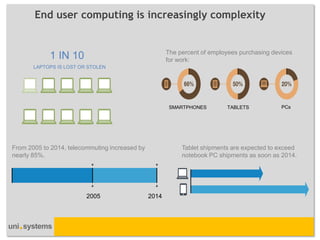
The percent of employees purchasing devices for work: 
SMARTPHONES 
TABLETS 
PCs 
LAPTOPS IS LOST OR STOLEN 
1 IN 10 
From 2005 to 2014, telecommuting increased by nearly 85%. 
2005 
2014 
Tablet shipments are expected to exceed notebook PC shipments as soon as 2014. 
End user computing is increasingly complexity
End-user computing is not a trend; it's a transformational shift 
–End-user computing is no longer about managing laptops and desktops. 
–Today, you need to support user access to services, applications, and data on any device and in any location. 
–This revolution promises greater flexibility, productivity enhancements, staff morale improvements, and cost savings. 
–Your business can benefit from these changes. 
–These days, your end users are using two or three, even four computing devices. 
–In addition, the applications served up to these devices are undergoing a metamorphosis in terms of the way that they're consumed. 
–Transitioning to user-centric computing calls for a new approach ... and Uni Systems can help. 
4
The ability to move or be moved
People, business, apps, data & desktops
Productivity & agility for people, business & IT
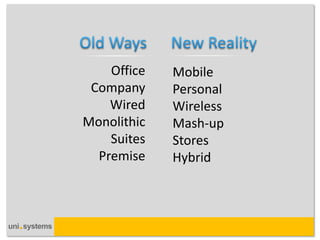
Mobile 
Personal 
Wireless 
Mash-up 
Stores 
Hybrid 
Office 
Company 
Wired 
Monolithic 
Suites 
Premise
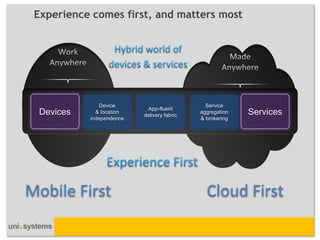
Device & location independence 
App-fluent delivery fabric 
Service aggregation & brokering 
Cloud First 
Mobile First 
Devices 
Services 
Experience comes first, and matters most
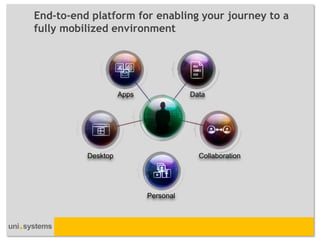
Apps 
Data 
Desktop 
Collaboration 
Personal 
End-to-end platform for enabling your journey to a 
fully mobilized environment
...so any device can be a state-of-the-art workspace
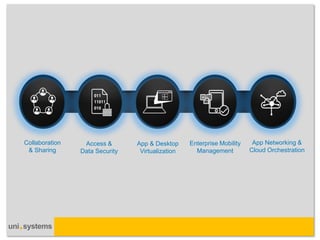
Collaboration & Sharing 
Access & Data Security 
App & Desktop Virtualization 
Enterprise Mobility Management 
App Networking & Cloud Orchestration
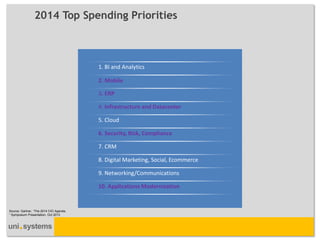
2014 Top Spending Priorities 
Source: Gartner, “The 2014 CIO Agenda, ” Symposium Presentation, Oct 2013 
1. BI and Analytics 
2. Mobile 
3. ERP 
4. Infrastructure and Datacenter 
5. Cloud 
6. Security, Risk, Compliance 
7. CRM 
8. Digital Marketing, Social, Ecommerce 
9. Networking/Communications 
10. Applications Modernization
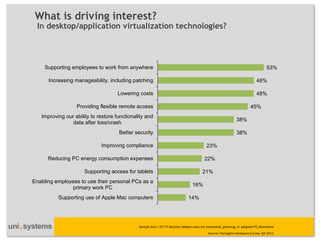
What is driving interest? 
In desktop/application virtualization technologies? 
Source: Forrsights Hardware Survey, Q3 2012 
14% 
16% 
21% 
22% 
23% 
38% 
38% 
45% 
48% 
48% 
53% 
Supporting use of Apple Mac computers 
Enabling employees to use their personal PCs as a 
primary work PC 
Supporting access for tablets 
Reducing PC energy consumption expenses 
Improving compliance 
Better security 
Improving our ability to restore functionality and 
data after loss/crash 
Providing flexible remote access 
Lowering costs 
Increasing manageability, including patching 
Supporting employees to work from anywhere 
Sample Size = 977 IT Decision Makers who are interested, planning, or adopted PC alternative
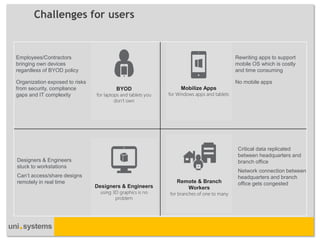
Challenges for users 
Rewriting apps to support mobile OS which is costly and time consuming 
No mobile apps 
Designers & Engineers stuck to workstations Can’t access/share designs remotely in real time 
Employees/Contractors bringing own devices regardless of BYOD policy 
Organization exposed to risks from security, compliance gaps and IT complexity 
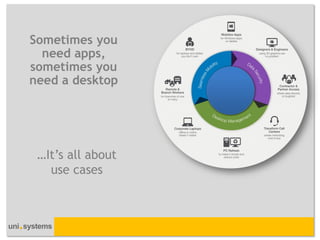
Mobilize Apps for Windows apps and tablets 
Designers & Engineers using 3D graphics is no problem 
BYOD for laptops and tablets you don’t own 
Critical data replicated between headquarters and branch office 
Network connection between headquarters and branch office gets congested 
Remote & Branch Workers for branches of one to many
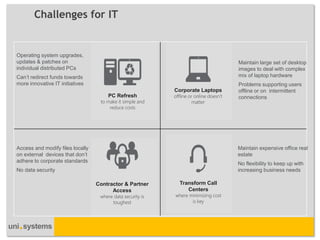
Challenges for IT 
Operating system upgrades, updates & patches on individual distributed PCs 
Can’t redirect funds towards more innovative IT initiatives 
Maintain large set of desktop images to deal with complex mix of laptop hardware 
Problems supporting users offline or on intermittent connections 
Maintain expensive office real estate 
No flexibility to keep up with increasing business needs 
PC Refresh to make it simple and reduce costs 
Corporate Laptops offline or online doesn’t matter 
Transform Call Centers where minimizing cost is key 
Access and modify files locally on external devices that don’t adhere to corporate standards 
No data security 
Contractor & Partner Access where data security is toughest
Apps 
Devices 
Data 
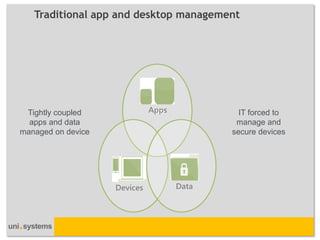
Traditional app and desktop management 
Apps 
Data 
Devices 
Tightly coupled apps and data managed on device 
IT forced to manage and secure devices
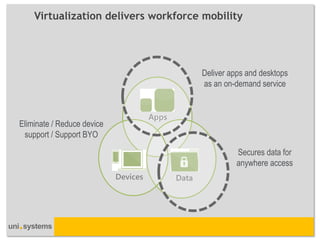
Virtualization delivers workforce mobility 
Deliver apps and desktops as an on-demand service 
Secures data for anywhere access 
Eliminate / Reduce device support / Support BYO 
Apps 
Data 
Data 
Devices 
Devices
Sometimes you need apps, sometimes you need a desktop 
…It’s all about use cases
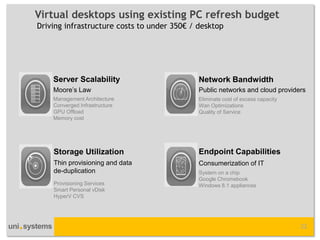
Virtual desktops using existing PC refresh budget 
Driving infrastructure costs to under 350€ / desktop 
22 
Moore’s Law 
Management Architecture 
Converged Infrastructure 
GPU Offload 
Memory cost 
Thin provisioning and data de-duplication 
Public networks and cloud providers 
Consumerization of IT 
Provisioning Services 
Smart Personal vDisk 
HyperV CVS 
Eliminate cost of excess capacity 
Wan Optimizations 
Quality of Service 
System on a chip 
Google Chromebook 
Windows 8.1 appliances
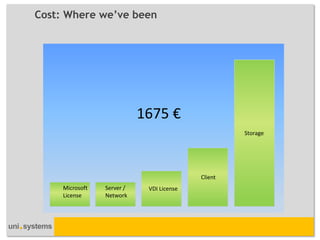
Cost: Where we’ve been 
Microsoft License 
Server / Network 
VDI License 
Client 
Storage 
1675 €
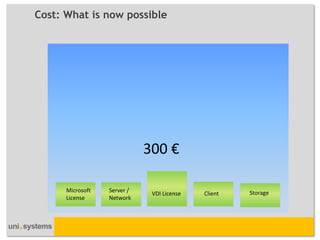
Cost: What is now possible 
Microsoft License 
Server / Network 
VDI License 
Client 
Storage 
300 €
End-user computing is not a trend; it's a transformational shift 
•We use our extensive experience and broad expertise to help you find ways to create an end-user computing environment by reviewing the following: 
–Strategy, architecture and deployment. 
–Application management. 
–Extensive device policy frameworks. 
–Identity management. 
–Expense management. 
–Compliance. 
–Security. 
–Procurement. 
–End-user support. 
26
End-user computing 
•With Uni Systems’s desktop deployment and management capabilities you can: 
–Optimize the desktop with a new standard operating environment. 
–Improve the desktop lifecycle with the latest management tools. 
–Take advantage of advances in application &desktop virtualization. 
–Remove common inhibitors to deployment. 
–Integrate all technology components. 
•We’ve applied our expertise and solutions to migrate 100K desktops worldwide. 
•Our services include: 
–Desktop Deployment Planning Services. 
–Application &Desktop Virtualization. 
–Mobile Device Management. 
–App Networking/Wan Optimization/QoS. 
–Client Computing. 
–DaaS. 
27
Thank you! 
28 
www.unisystems.com

End-user computing is not a trend, it's a transformational shift

  • 1.
    End-user computing isnot a trend, it's a transformational shift www.unisystems.com 1
  • 2.
    End-user computing isnot a trend; it's a transformational shift –In the new end-user computing environment, people want to stay connected and have access to the best networks and services as a seamless extension of their traditional desktop. –Where does the end-user computing environment start and end in your organization? How will a user-centric environment impact your IT infrastructure, security, compliance, and governance? 2
  • 3.
    The percent ofemployees purchasing devices for work: SMARTPHONES TABLETS PCs LAPTOPS IS LOST OR STOLEN 1 IN 10 From 2005 to 2014, telecommuting increased by nearly 85%. 2005 2014 Tablet shipments are expected to exceed notebook PC shipments as soon as 2014. End user computing is increasingly complexity
  • 4.
    End-user computing isnot a trend; it's a transformational shift –End-user computing is no longer about managing laptops and desktops. –Today, you need to support user access to services, applications, and data on any device and in any location. –This revolution promises greater flexibility, productivity enhancements, staff morale improvements, and cost savings. –Your business can benefit from these changes. –These days, your end users are using two or three, even four computing devices. –In addition, the applications served up to these devices are undergoing a metamorphosis in terms of the way that they're consumed. –Transitioning to user-centric computing calls for a new approach ... and Uni Systems can help. 4
  • 6.
    The ability tomove or be moved
  • 7.
    People, business, apps,data & desktops
  • 9.
    Productivity & agilityfor people, business & IT
  • 10.
    Mobile Personal Wireless Mash-up Stores Hybrid Office Company Wired Monolithic Suites Premise
  • 11.
    Device & locationindependence App-fluent delivery fabric Service aggregation & brokering Cloud First Mobile First Devices Services Experience comes first, and matters most
  • 12.
    Apps Data Desktop Collaboration Personal End-to-end platform for enabling your journey to a fully mobilized environment
  • 13.
    ...so any devicecan be a state-of-the-art workspace
  • 14.
    Collaboration & Sharing Access & Data Security App & Desktop Virtualization Enterprise Mobility Management App Networking & Cloud Orchestration
  • 15.
    2014 Top SpendingPriorities Source: Gartner, “The 2014 CIO Agenda, ” Symposium Presentation, Oct 2013 1. BI and Analytics 2. Mobile 3. ERP 4. Infrastructure and Datacenter 5. Cloud 6. Security, Risk, Compliance 7. CRM 8. Digital Marketing, Social, Ecommerce 9. Networking/Communications 10. Applications Modernization
  • 16.
    What is drivinginterest? In desktop/application virtualization technologies? Source: Forrsights Hardware Survey, Q3 2012 14% 16% 21% 22% 23% 38% 38% 45% 48% 48% 53% Supporting use of Apple Mac computers Enabling employees to use their personal PCs as a primary work PC Supporting access for tablets Reducing PC energy consumption expenses Improving compliance Better security Improving our ability to restore functionality and data after loss/crash Providing flexible remote access Lowering costs Increasing manageability, including patching Supporting employees to work from anywhere Sample Size = 977 IT Decision Makers who are interested, planning, or adopted PC alternative
  • 17.
    Challenges for users Rewriting apps to support mobile OS which is costly and time consuming No mobile apps Designers & Engineers stuck to workstations Can’t access/share designs remotely in real time Employees/Contractors bringing own devices regardless of BYOD policy Organization exposed to risks from security, compliance gaps and IT complexity Mobilize Apps for Windows apps and tablets Designers & Engineers using 3D graphics is no problem BYOD for laptops and tablets you don’t own Critical data replicated between headquarters and branch office Network connection between headquarters and branch office gets congested Remote & Branch Workers for branches of one to many
  • 18.
    Challenges for IT Operating system upgrades, updates & patches on individual distributed PCs Can’t redirect funds towards more innovative IT initiatives Maintain large set of desktop images to deal with complex mix of laptop hardware Problems supporting users offline or on intermittent connections Maintain expensive office real estate No flexibility to keep up with increasing business needs PC Refresh to make it simple and reduce costs Corporate Laptops offline or online doesn’t matter Transform Call Centers where minimizing cost is key Access and modify files locally on external devices that don’t adhere to corporate standards No data security Contractor & Partner Access where data security is toughest
  • 19.
    Apps Devices Data Traditional app and desktop management Apps Data Devices Tightly coupled apps and data managed on device IT forced to manage and secure devices
  • 20.
    Virtualization delivers workforcemobility Deliver apps and desktops as an on-demand service Secures data for anywhere access Eliminate / Reduce device support / Support BYO Apps Data Data Devices Devices
  • 21.
    Sometimes you needapps, sometimes you need a desktop …It’s all about use cases
  • 22.
    Virtual desktops usingexisting PC refresh budget Driving infrastructure costs to under 350€ / desktop 22 Moore’s Law Management Architecture Converged Infrastructure GPU Offload Memory cost Thin provisioning and data de-duplication Public networks and cloud providers Consumerization of IT Provisioning Services Smart Personal vDisk HyperV CVS Eliminate cost of excess capacity Wan Optimizations Quality of Service System on a chip Google Chromebook Windows 8.1 appliances
  • 23.
    Cost: Where we’vebeen Microsoft License Server / Network VDI License Client Storage 1675 €
  • 24.
    Cost: What isnow possible Microsoft License Server / Network VDI License Client Storage 300 €
  • 26.
    End-user computing isnot a trend; it's a transformational shift •We use our extensive experience and broad expertise to help you find ways to create an end-user computing environment by reviewing the following: –Strategy, architecture and deployment. –Application management. –Extensive device policy frameworks. –Identity management. –Expense management. –Compliance. –Security. –Procurement. –End-user support. 26
  • 27.
    End-user computing •WithUni Systems’s desktop deployment and management capabilities you can: –Optimize the desktop with a new standard operating environment. –Improve the desktop lifecycle with the latest management tools. –Take advantage of advances in application &desktop virtualization. –Remove common inhibitors to deployment. –Integrate all technology components. •We’ve applied our expertise and solutions to migrate 100K desktops worldwide. •Our services include: –Desktop Deployment Planning Services. –Application &Desktop Virtualization. –Mobile Device Management. –App Networking/Wan Optimization/QoS. –Client Computing. –DaaS. 27
  • 28.
    Thank you! 28 www.unisystems.com