Value & Power of
NComputing Solution
2Confidential
About Ncomputing …
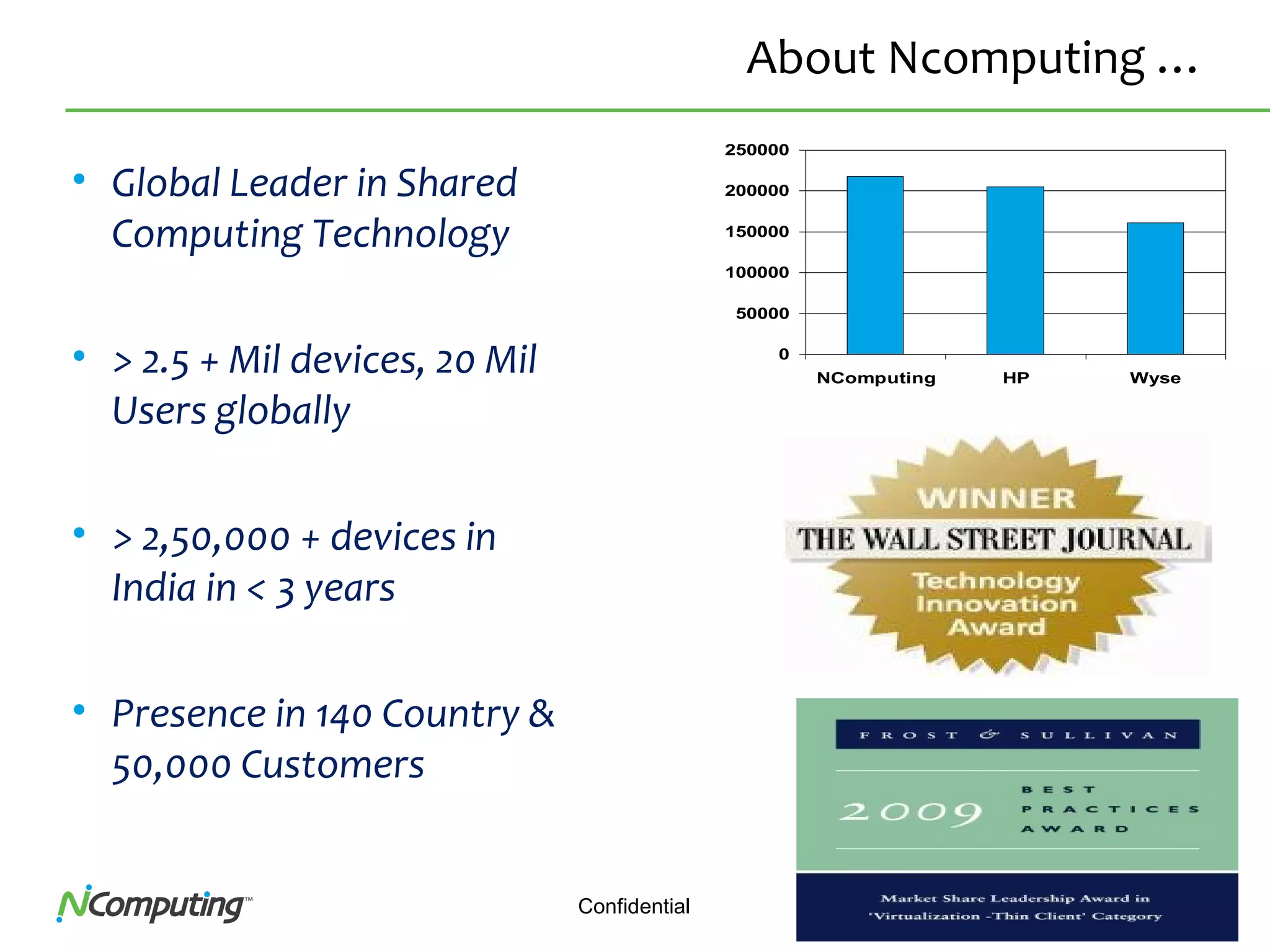
• Global Leader in Shared
Computing Technology
• > 2.5 + Mil devices, 20 Mil
Users globally
• > 2,50,000 + devices in
India in < 3 years
• Presence in 140 Country &
50,000 Customers
0
50000
100000
150000
200000
250000
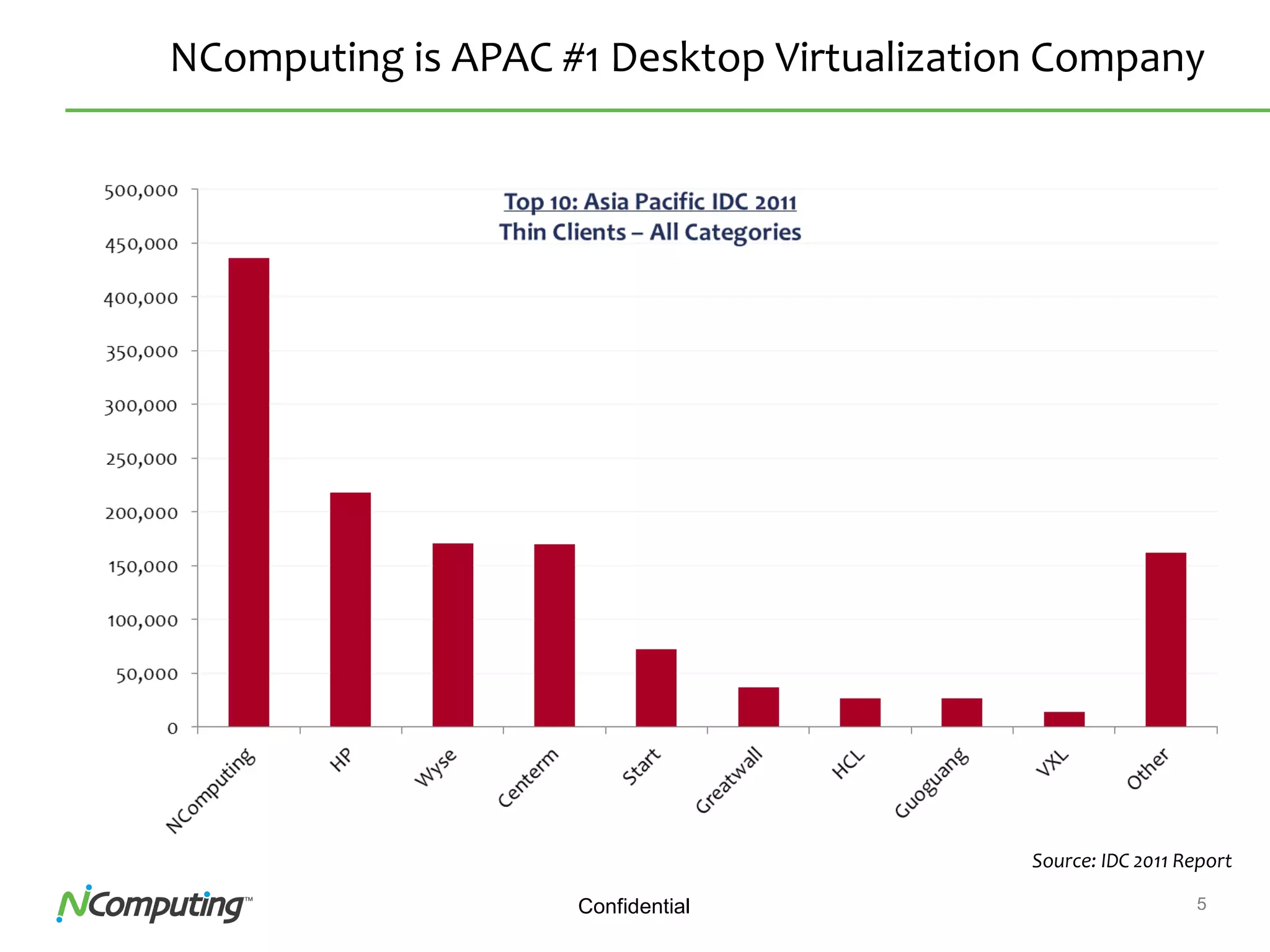
NComputing HP Wyse
3Confidential
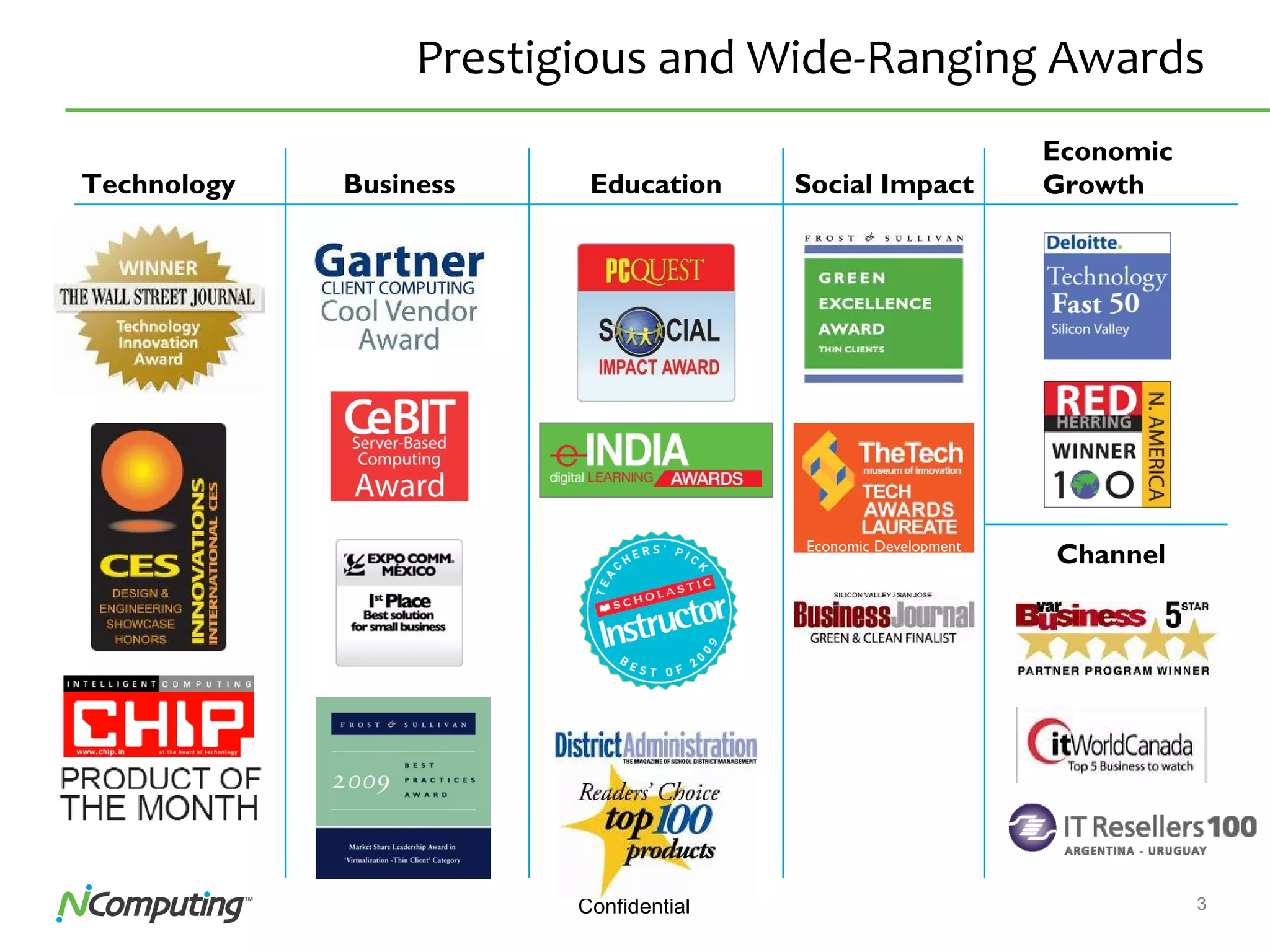
Prestigious and Wide-Ranging Awards
Business Education
Channel
Social ImpactTechnology
Economic
Growth
Economic Development
4Confidential 4
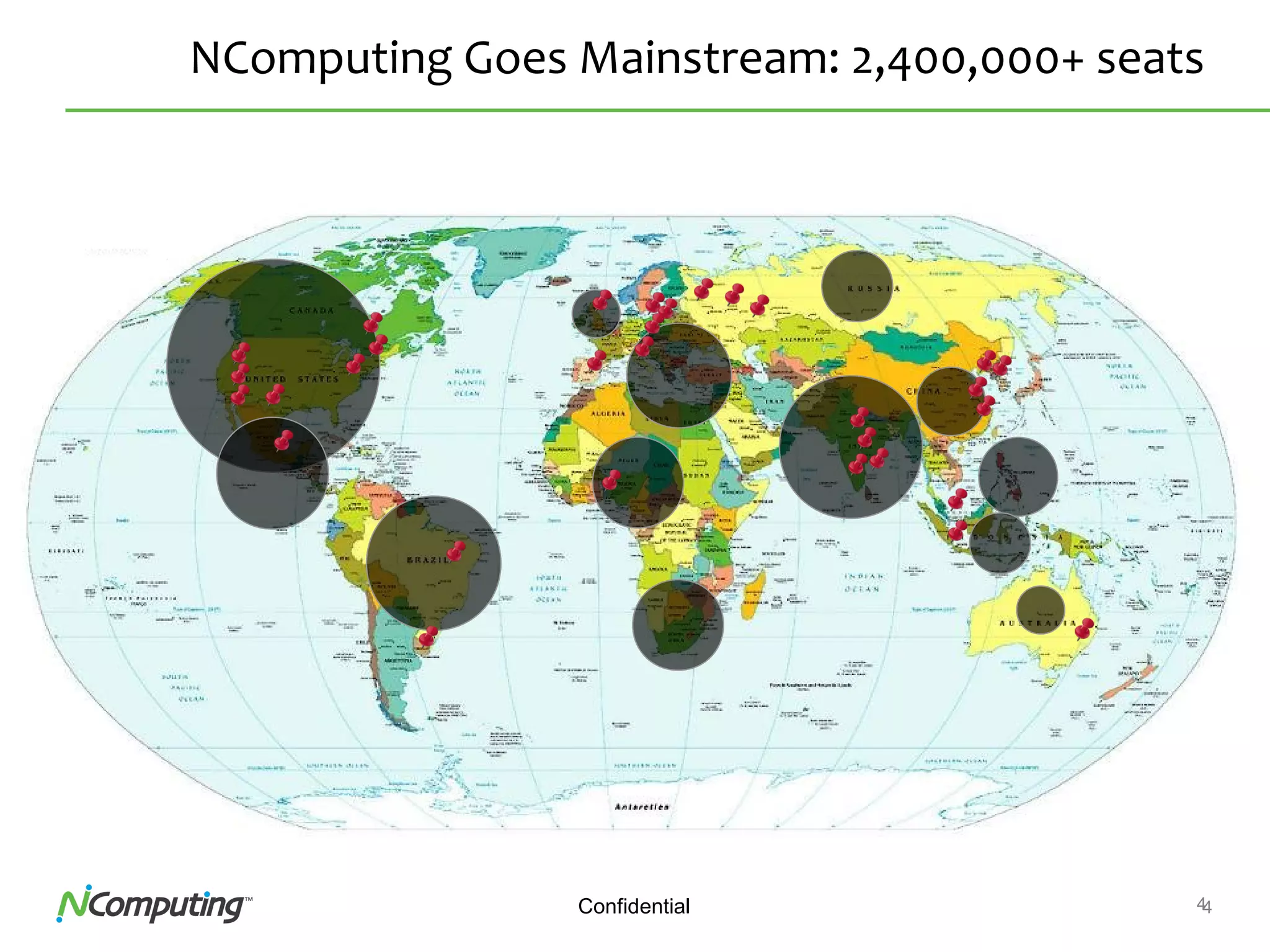
NComputing Goes Mainstream: 2,400,000+ seats
5Confidential
NComputing is APAC #1 Desktop Virtualization Company
Source: IDC 2011 Report
6Confidential 6
Where are those 2,400,000 seats?
Branch offices Public access Factories
Retail Call centers Education
Limited IT staff Cost & maintenance Reliability
Cost & reliability Cost, space, heat, flexibility Cost and obsolescence
7Confidential
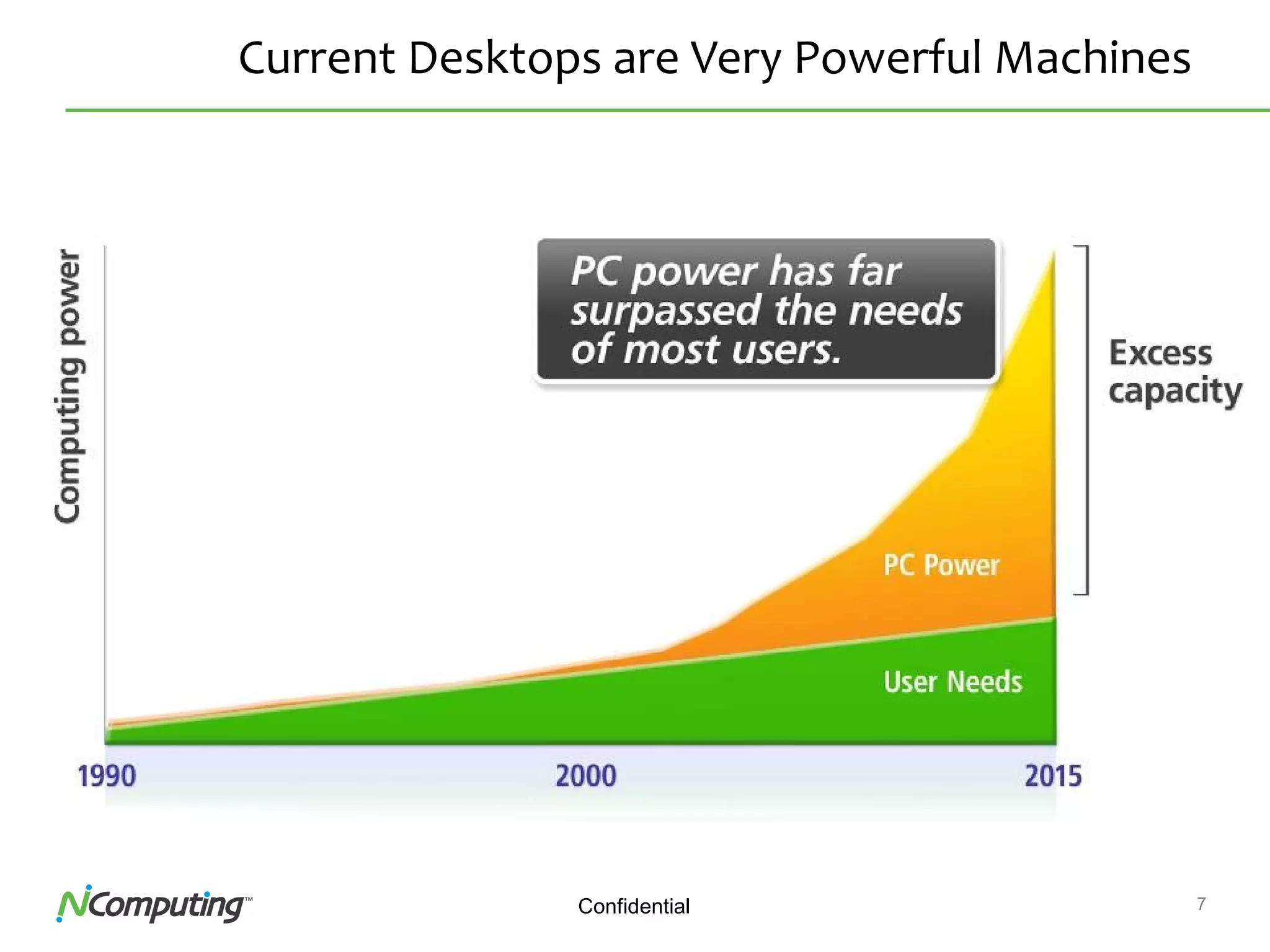
Current Desktops are Very Powerful Machines
8Confidential
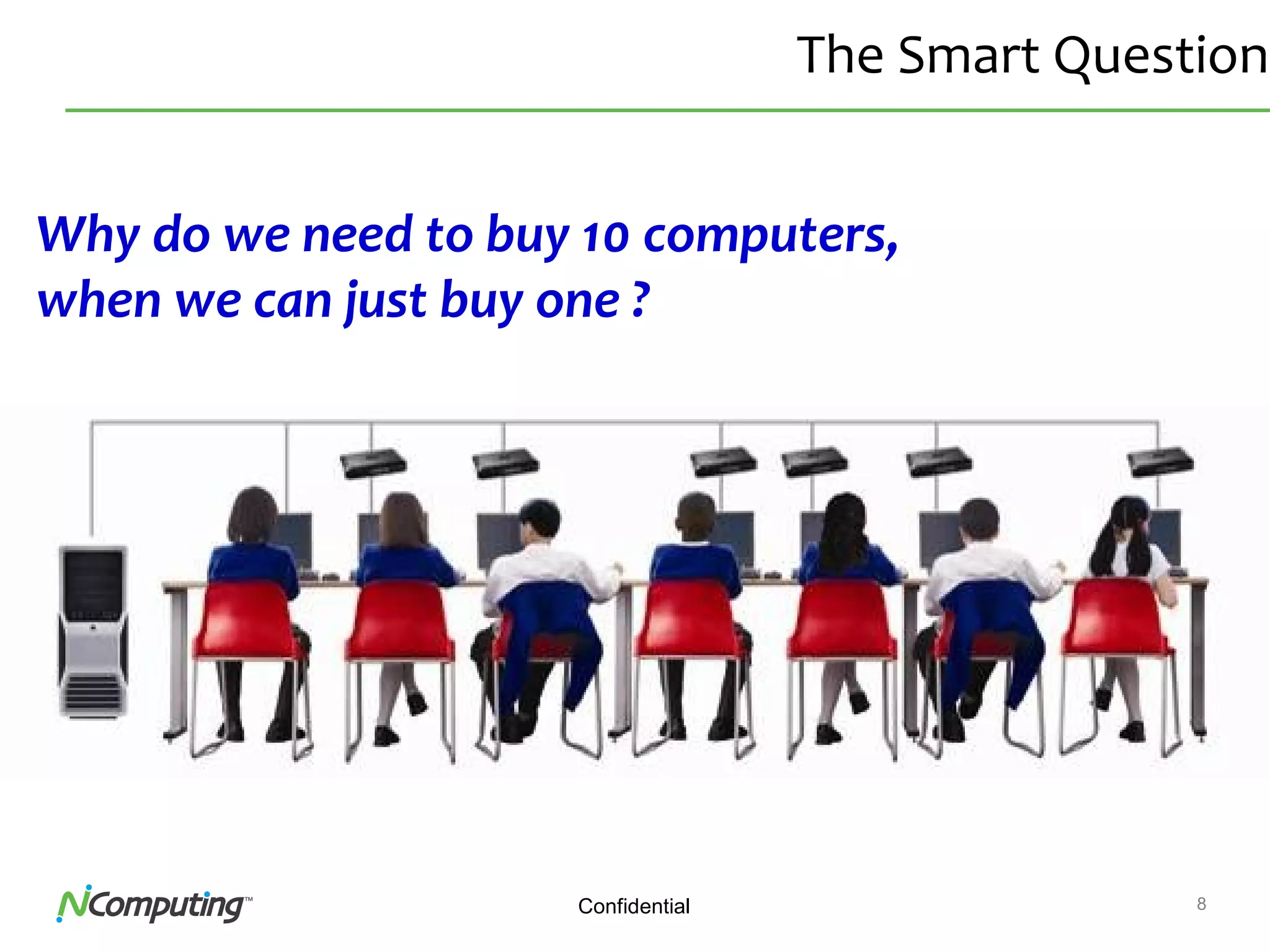
The Smart Question
Why do we need to buy 10 computers,
when we can just buy one ?
9Confidential
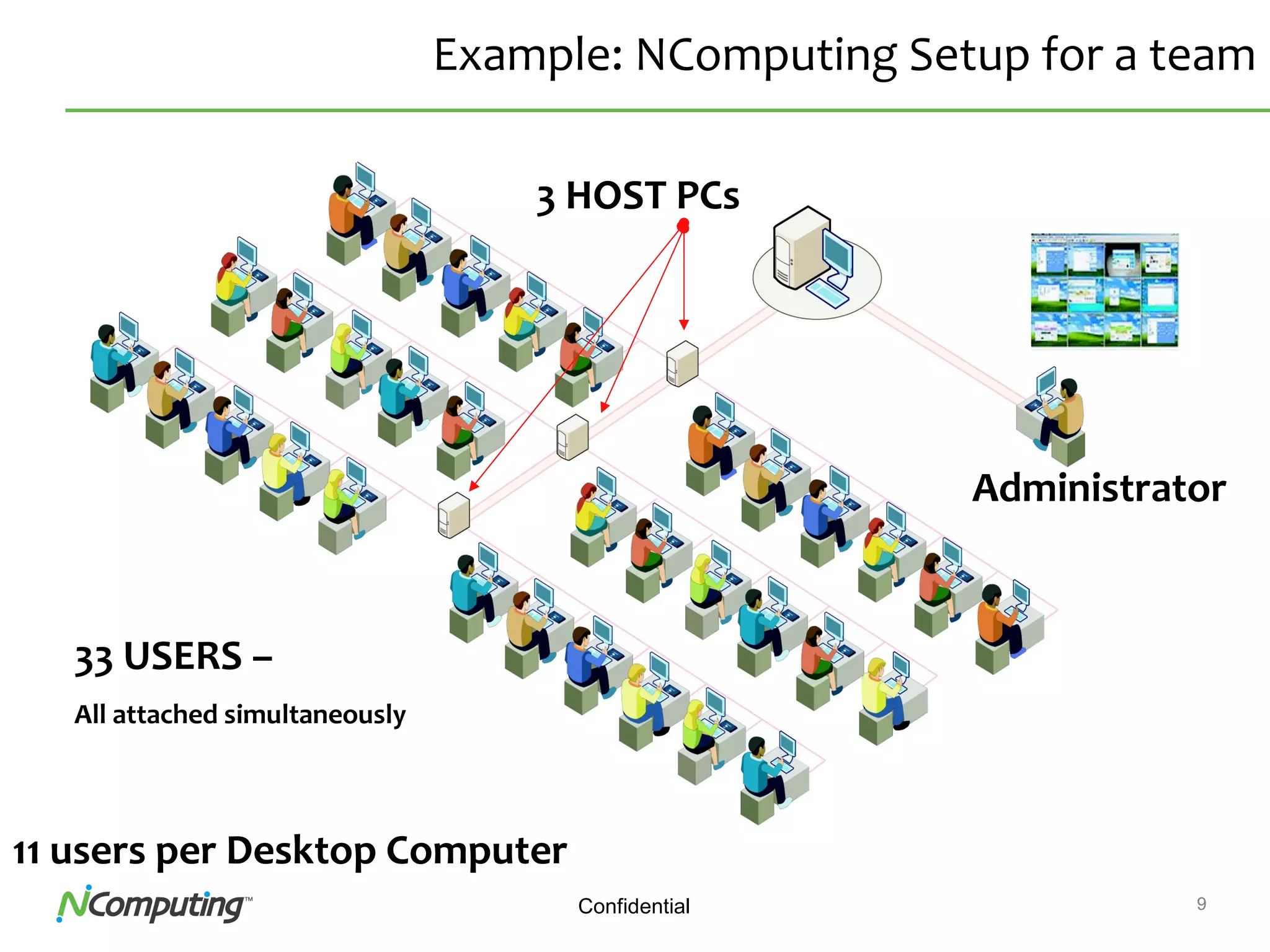
Example: NComputing Setup for a team
3 HOST PCs
Administrator
33 USERS –
All attached simultaneously
11 users per Desktop Computer
10
vSpaceTM
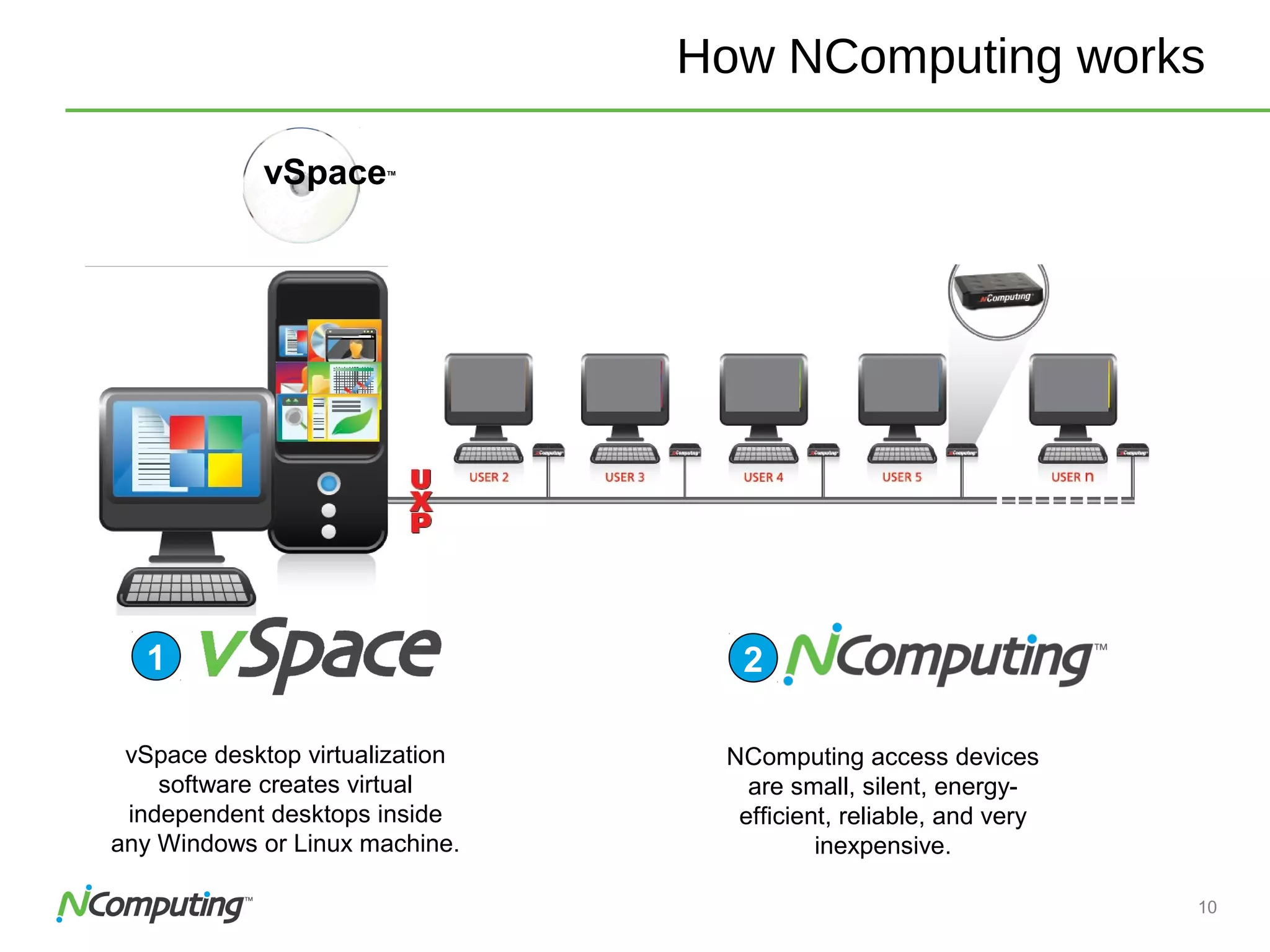
How NComputing works
vSpace desktop virtualization
software creates virtual
independent desktops inside
any Windows or Linux machine.
1
NComputing access devices
are small, silent, energy-
efficient, reliable, and very
inexpensive.
2
11
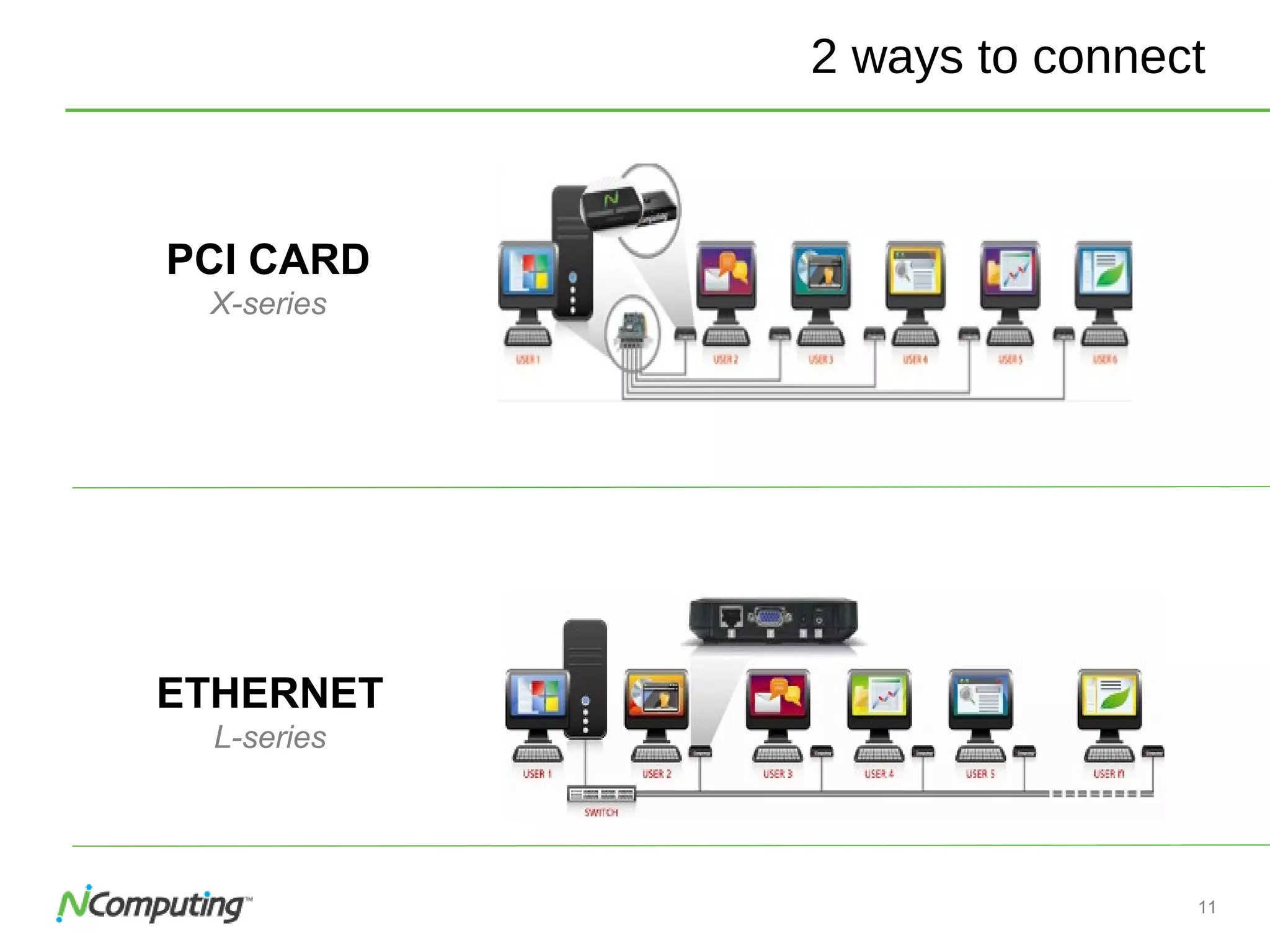
2 ways to connect
ETHERNET
L-series
PCI CARD
X-series
12Confidential
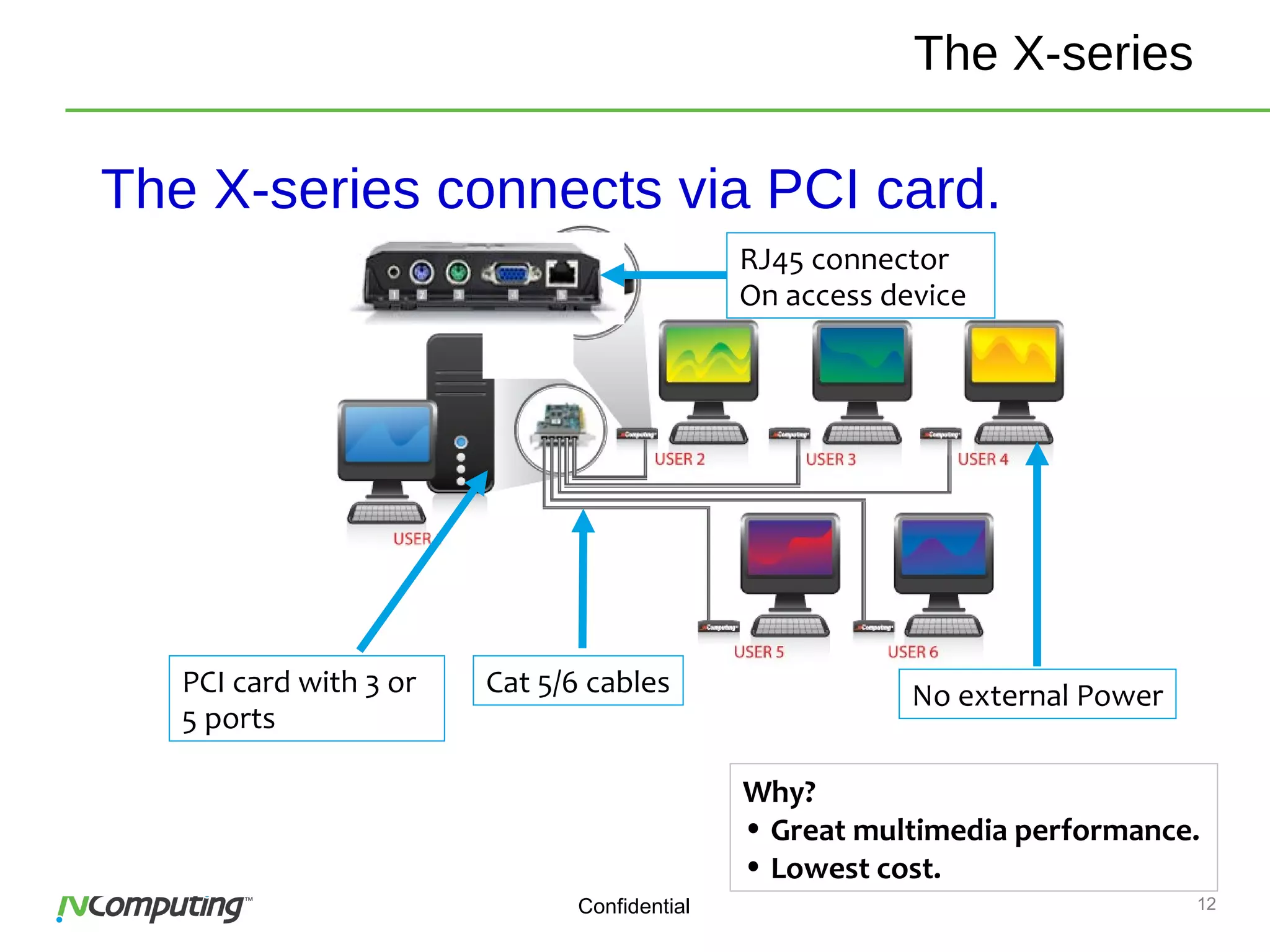
The X-series connects via PCI card.
PCI card with 3 or
5 ports
RJ45 connector
On access device
Cat 5/6 cables
Why?
• Great multimedia performance.
• Lowest cost.
The X-series
No external Power
13
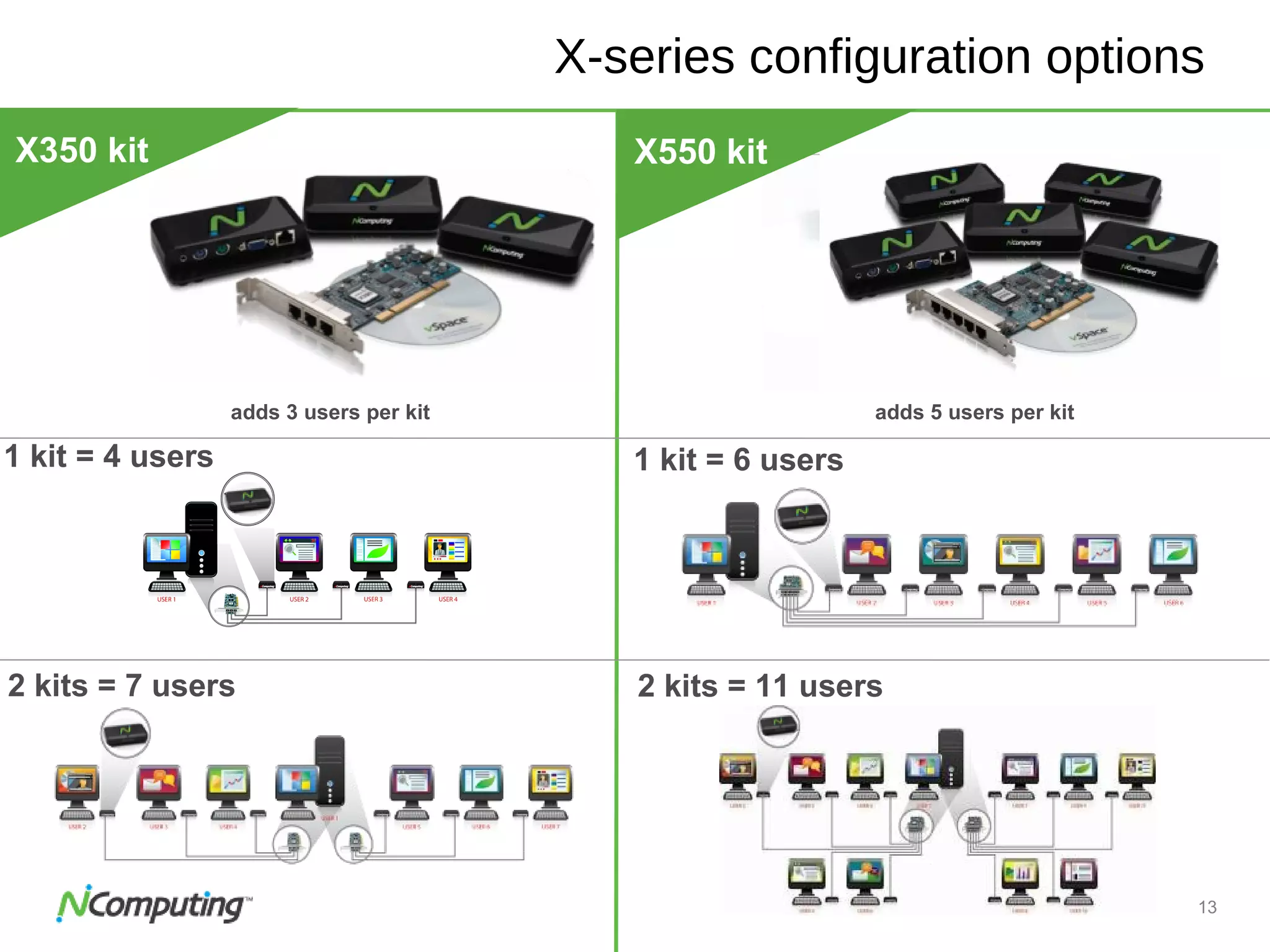
X-series configuration options
adds 3 users per kit adds 5 users per kit
X550 kit
X550
11 usersX550
11 users
X350 kit
1 kit = 4 users
2 kits = 7 users
1 kit = 6 users
2 kits = 11 users
14
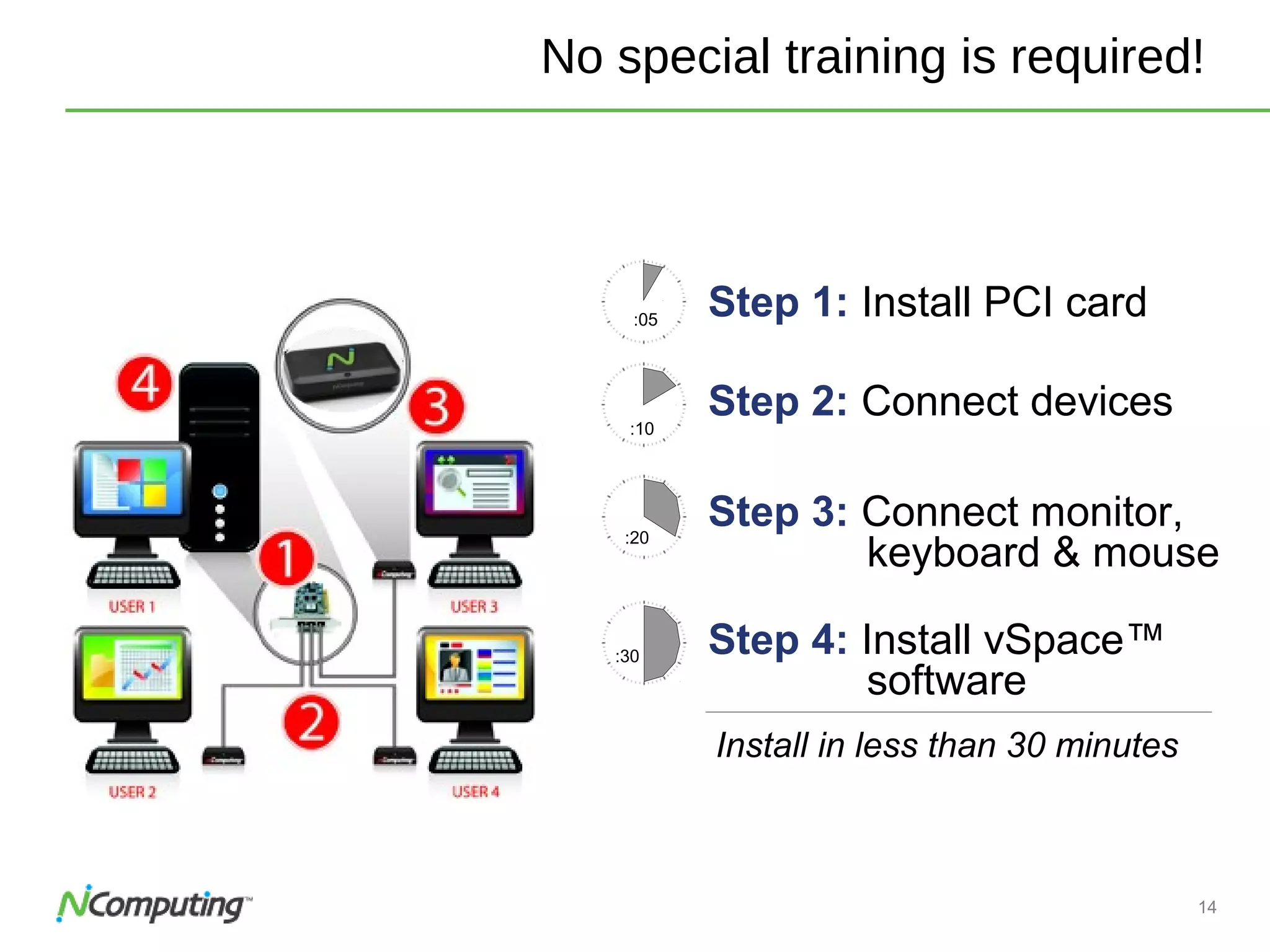
No special training is required!
Step 1: Install PCI card:05
:20
Step 3: Connect monitor,
keyboard & mouse
:10
Step 2: Connect devices
Install in less than 30 minutes
:30 Step 4: Install vSpace™
software
15Confidential
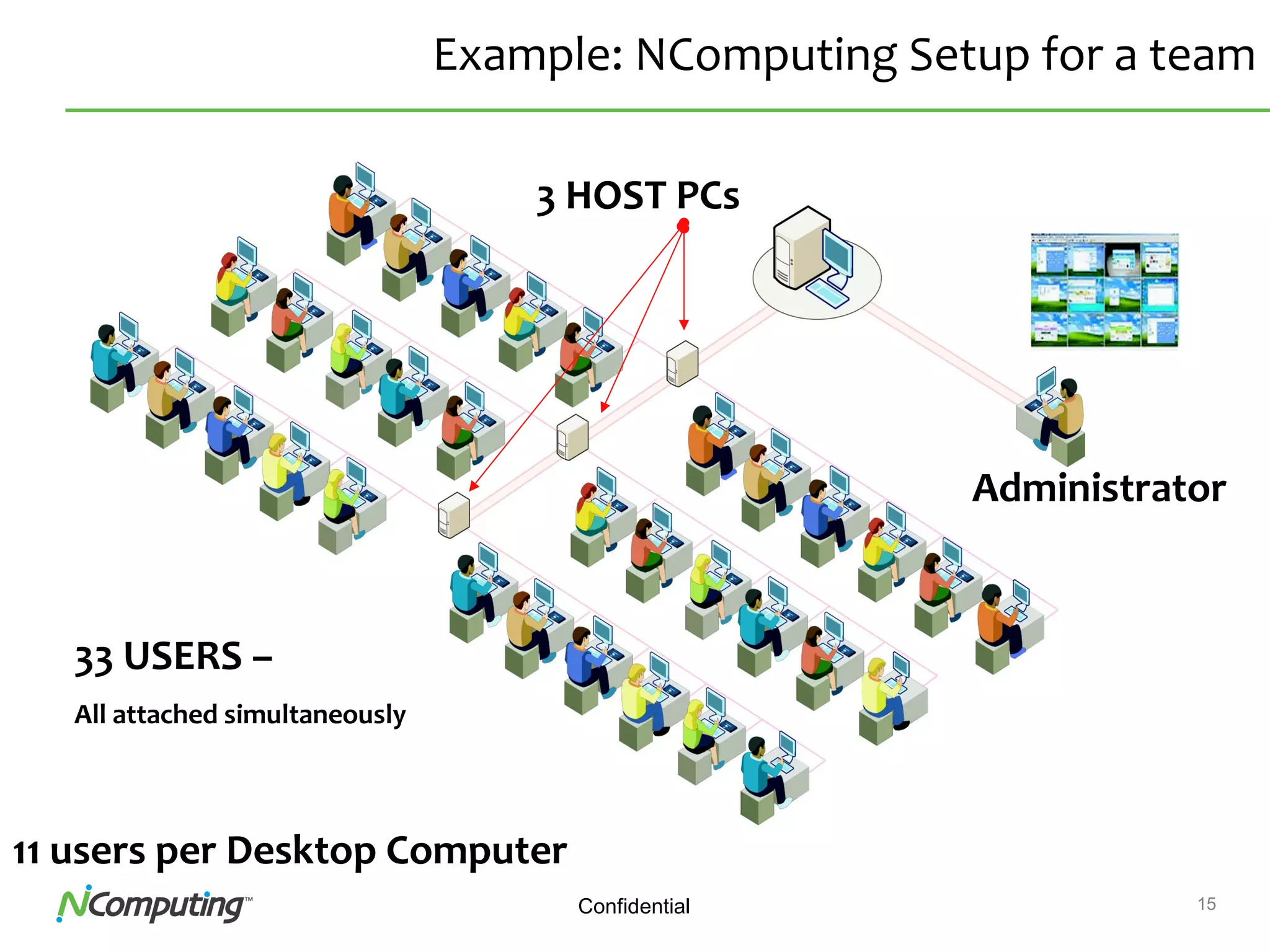
Example: NComputing Setup for a team
3 HOST PCs
Administrator
33 USERS –
All attached simultaneously
11 users per Desktop Computer
16Confidential
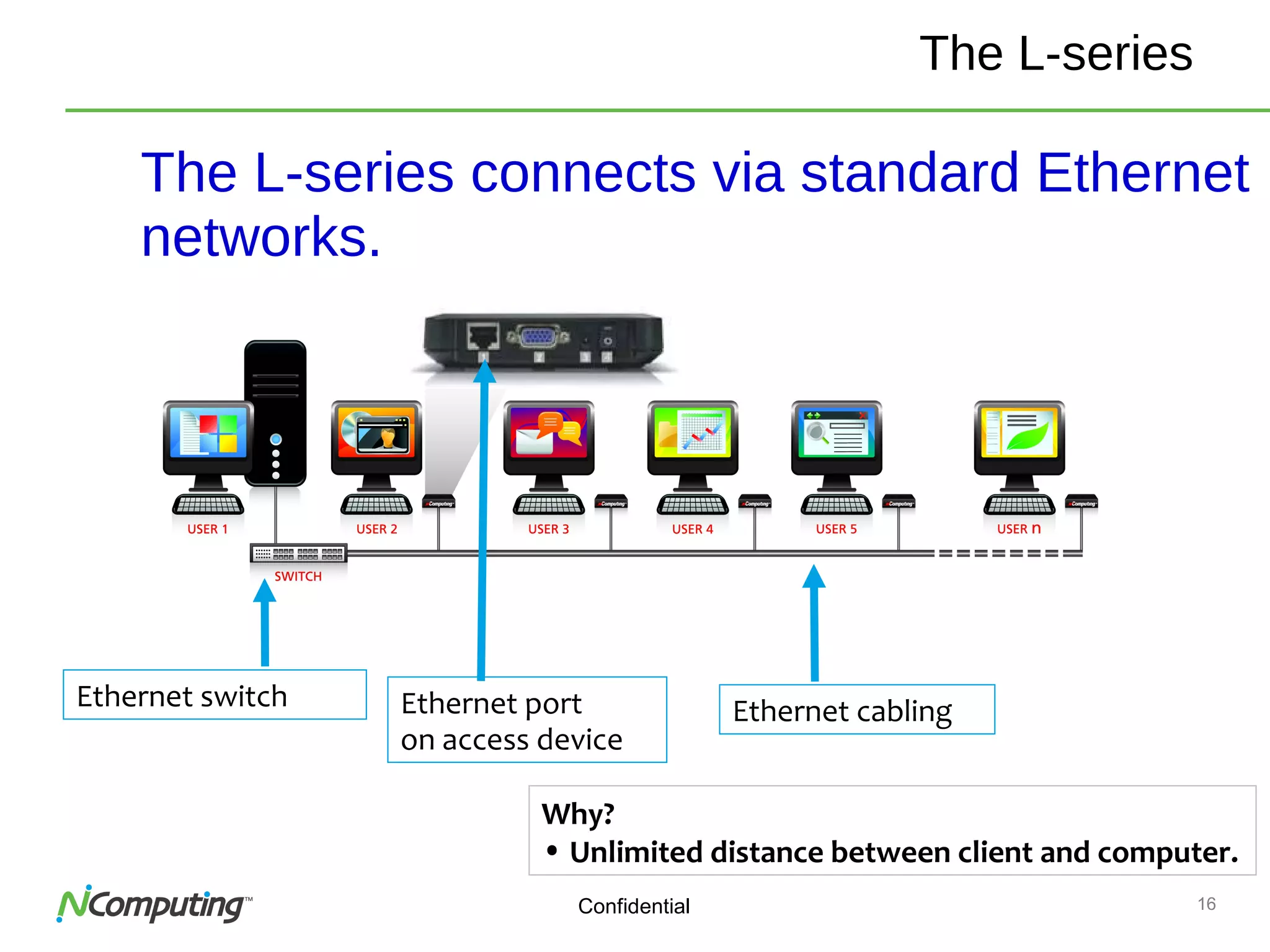
The L-series connects via standard Ethernet
networks.
Ethernet switch Ethernet port
on access device
Ethernet cabling
Why?
• Unlimited distance between client and computer.
The L-series
17Confidential
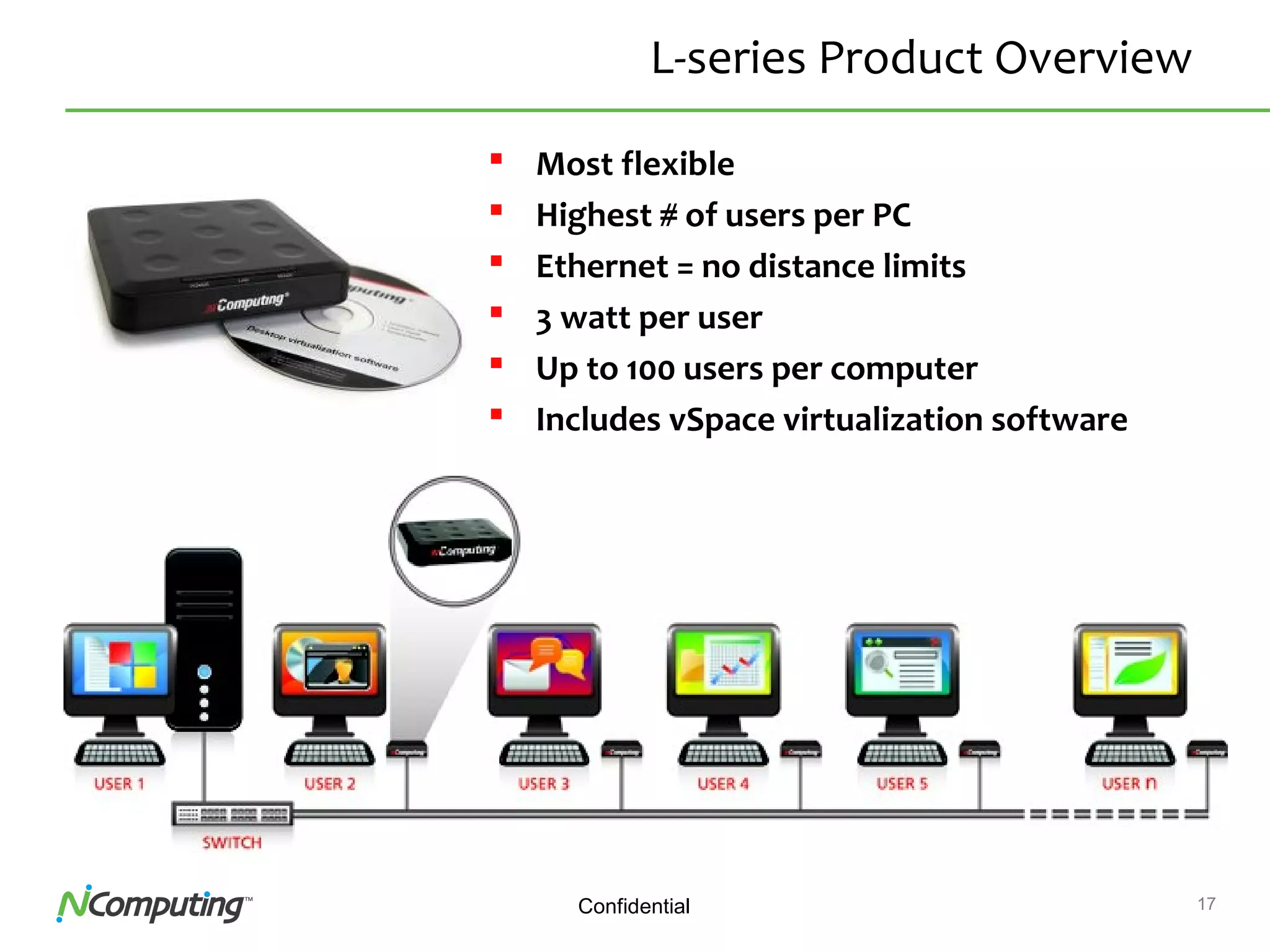
L-series Product Overview
 Most flexible
 Highest # of users per PC
 Ethernet = no distance limits
 3 watt per user
 Up to 100 users per computer
 Includes vSpace virtualization software
18Confidential 18
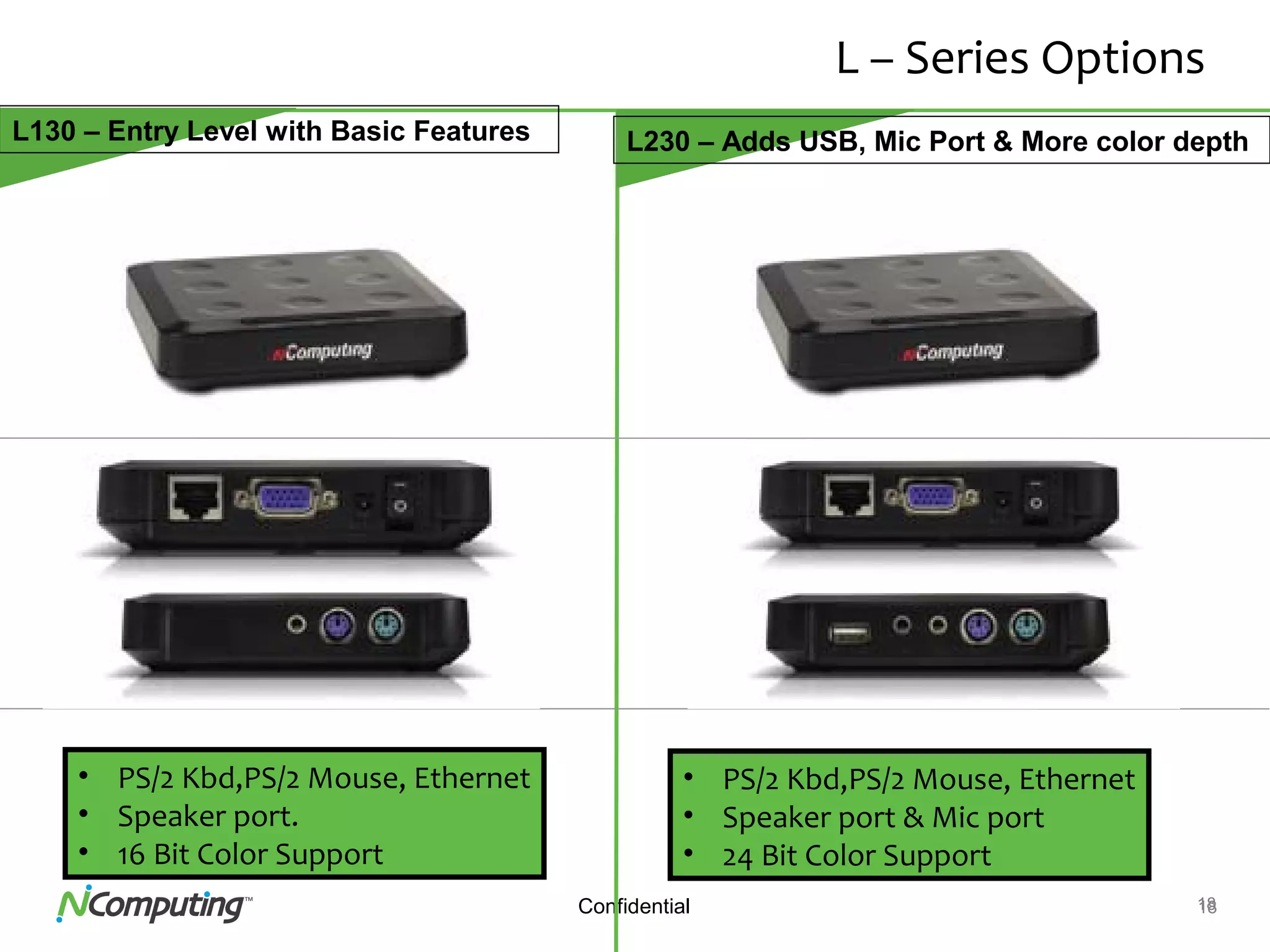
L – Series Options
X550
11 usersX550
11 users
L130 – Entry Level with Basic Features L230 – Adds USB, Mic Port & More color depth
• PS/2 Kbd,PS/2 Mouse, Ethernet
• Speaker port.
• 16 Bit Color Support
• PS/2 Kbd,PS/2 Mouse, Ethernet
• Speaker port & Mic port
• 24 Bit Color Support
19Confidential
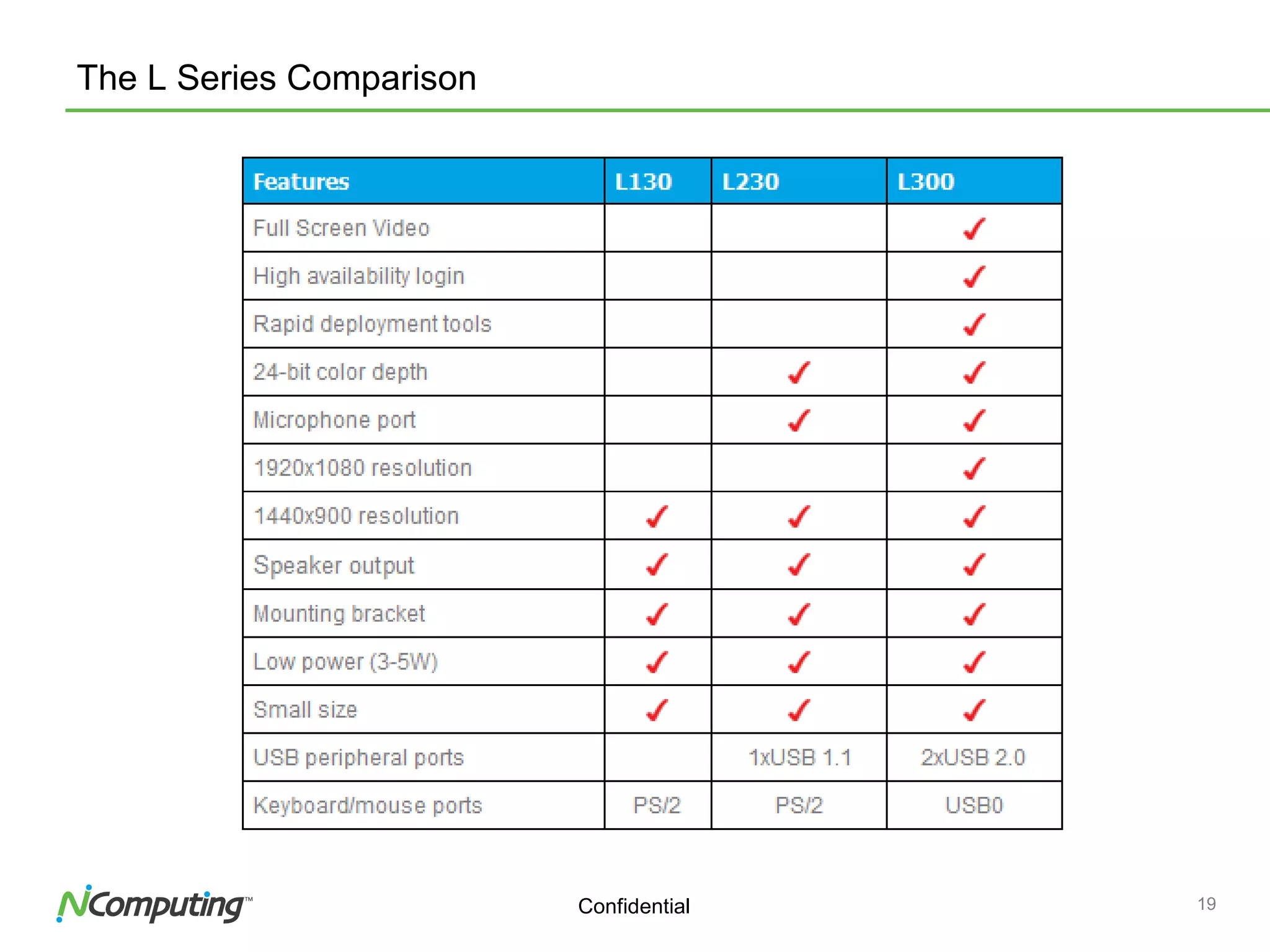
The L Series Comparison
20Confidential
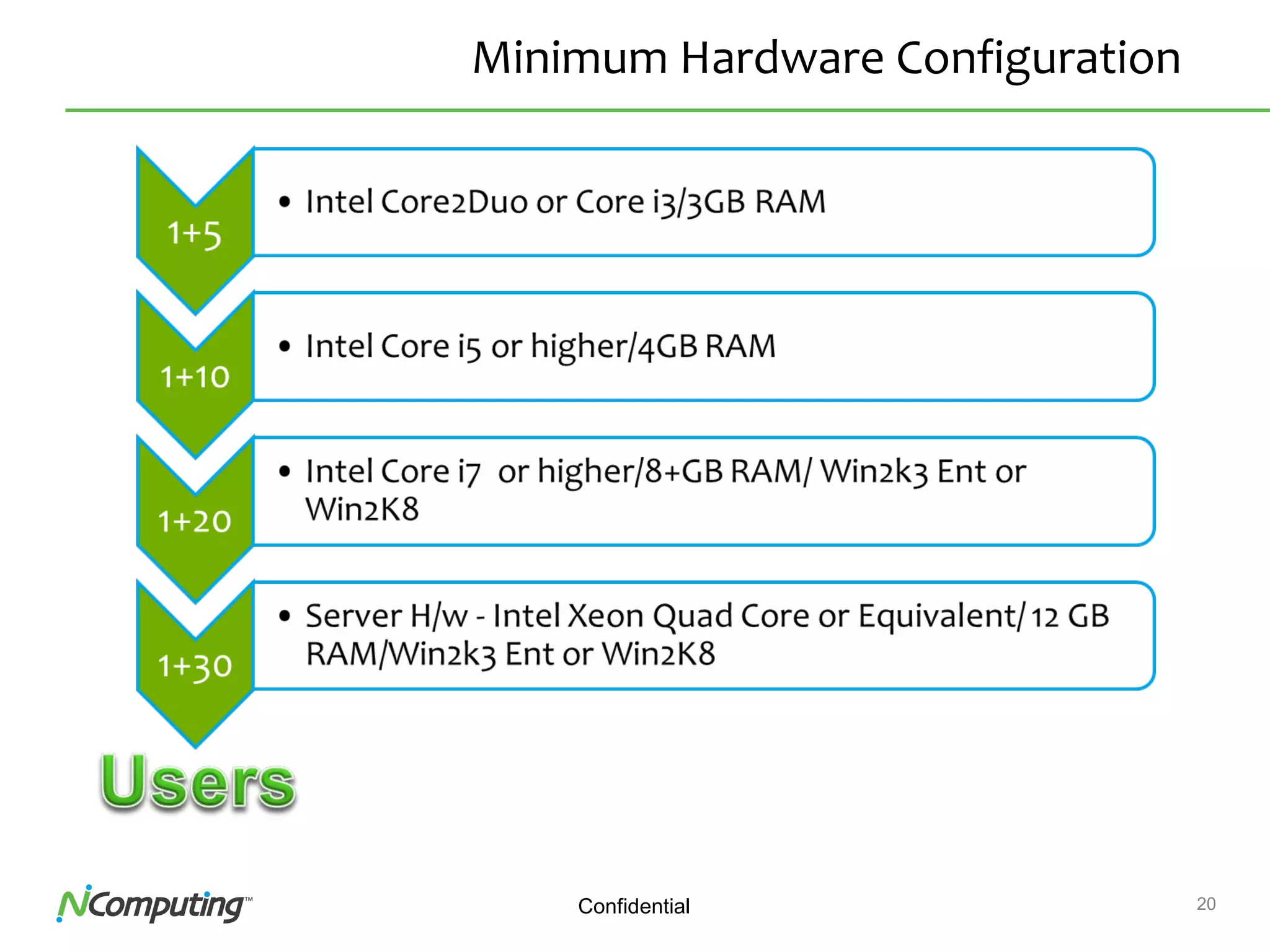
Minimum Hardware Configuration
21Confidential
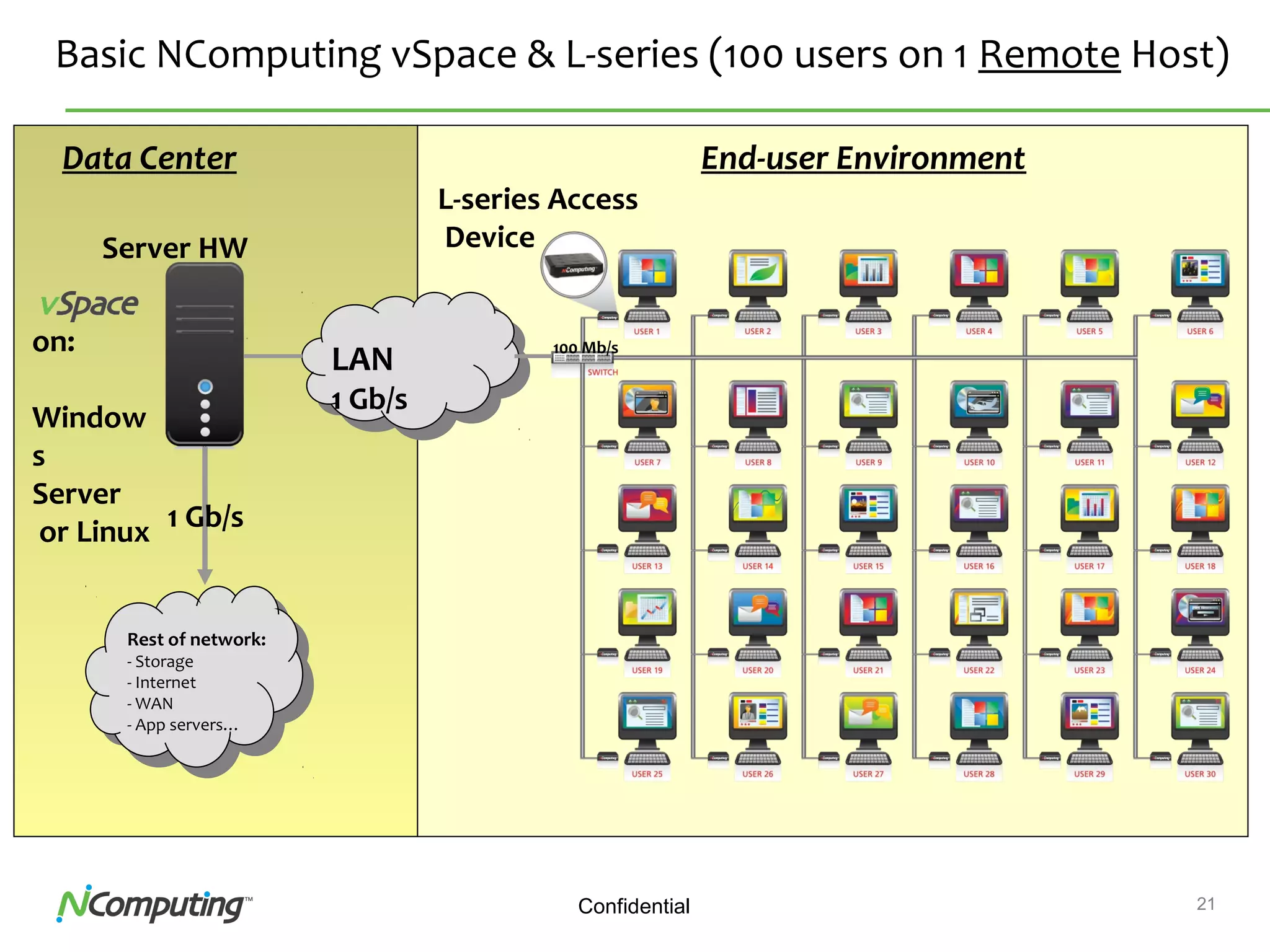
Basic NComputing vSpace & L-series (100 users on 1 Remote Host)
L-series Access
DeviceServer HW
Rest of network:
- Storage
- Internet
- WAN
- App servers…
LAN
1 Gb/s
End-user Environment
100 Mb/s
Data Center
1 Gb/s
on:
Window
s
Server
or Linux
22
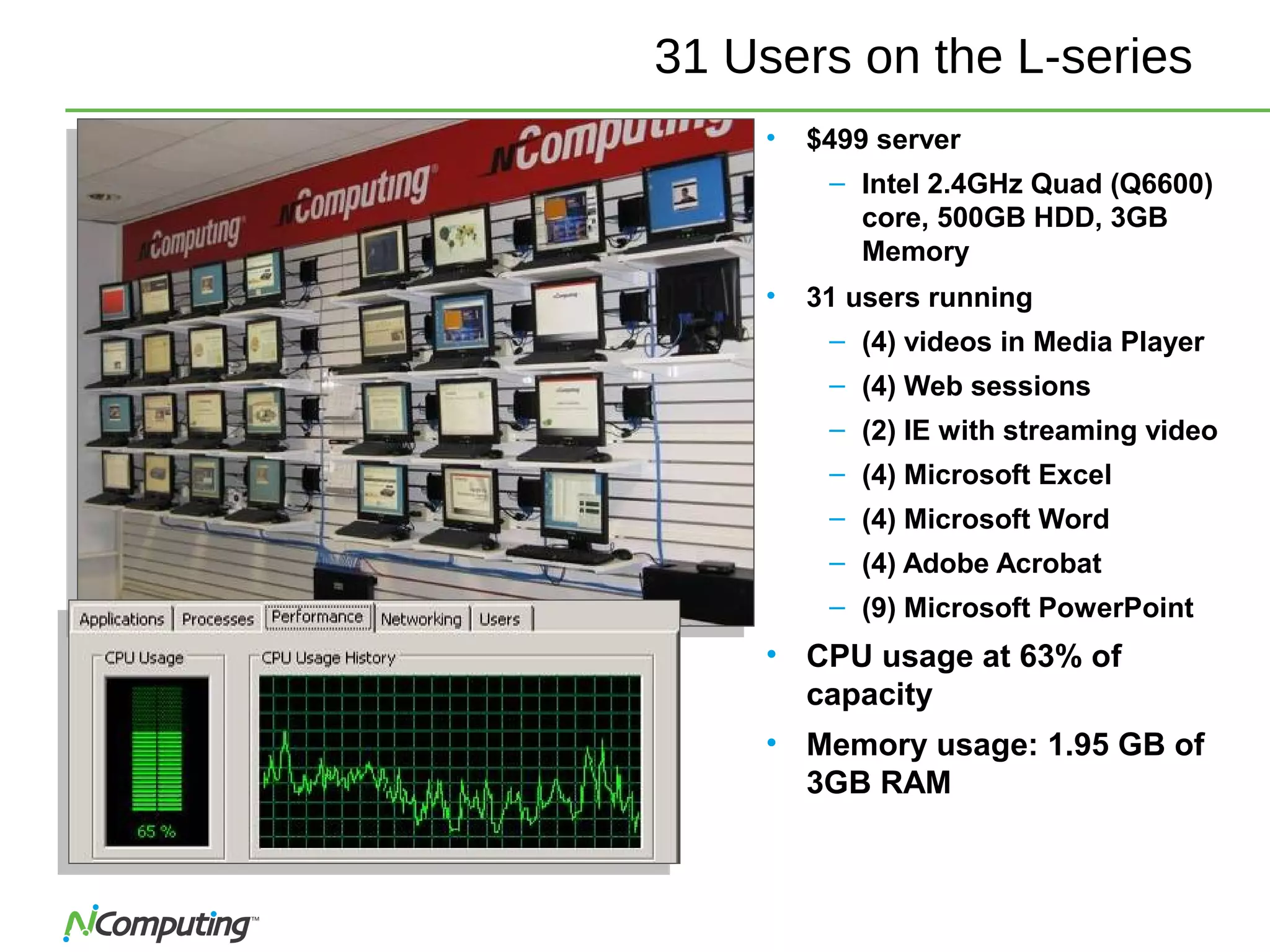
31 Users on the L-series
• $499 server
– Intel 2.4GHz Quad (Q6600)
core, 500GB HDD, 3GB
Memory
• 31 users running
– (4) videos in Media Player
– (4) Web sessions
– (2) IE with streaming video
– (4) Microsoft Excel
– (4) Microsoft Word
– (4) Adobe Acrobat
– (9) Microsoft PowerPoint
• CPU usage at 63% of
capacity
• Memory usage: 1.95 GB of
3GB RAM
23
23
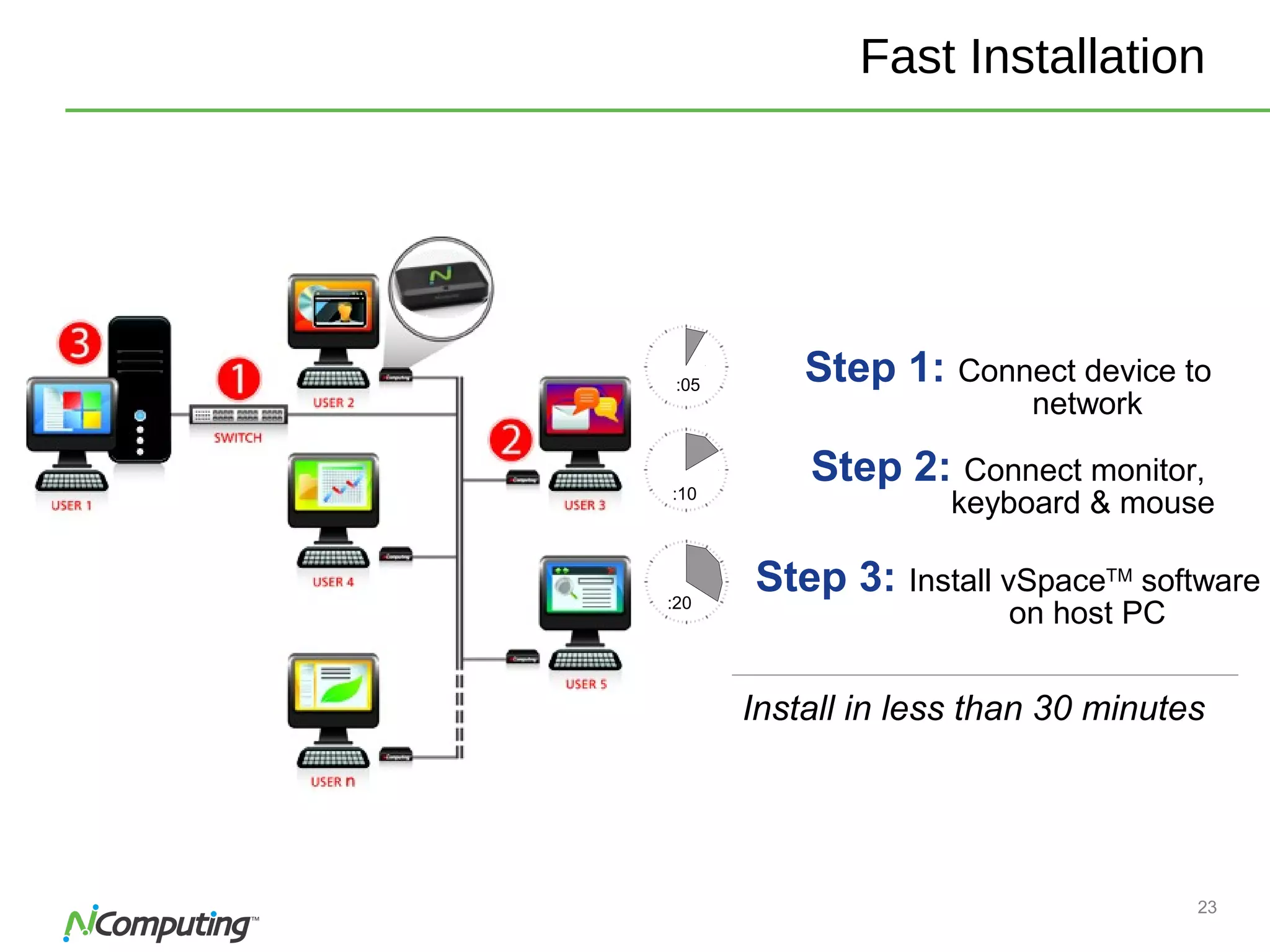
Fast Installation
Step 1: Connect device to
network
:05
:20
Step 3: Install vSpaceTM
software
on host PC
:10
Step 2: Connect monitor,
keyboard & mouse
Install in less than 30 minutes
24Confidential
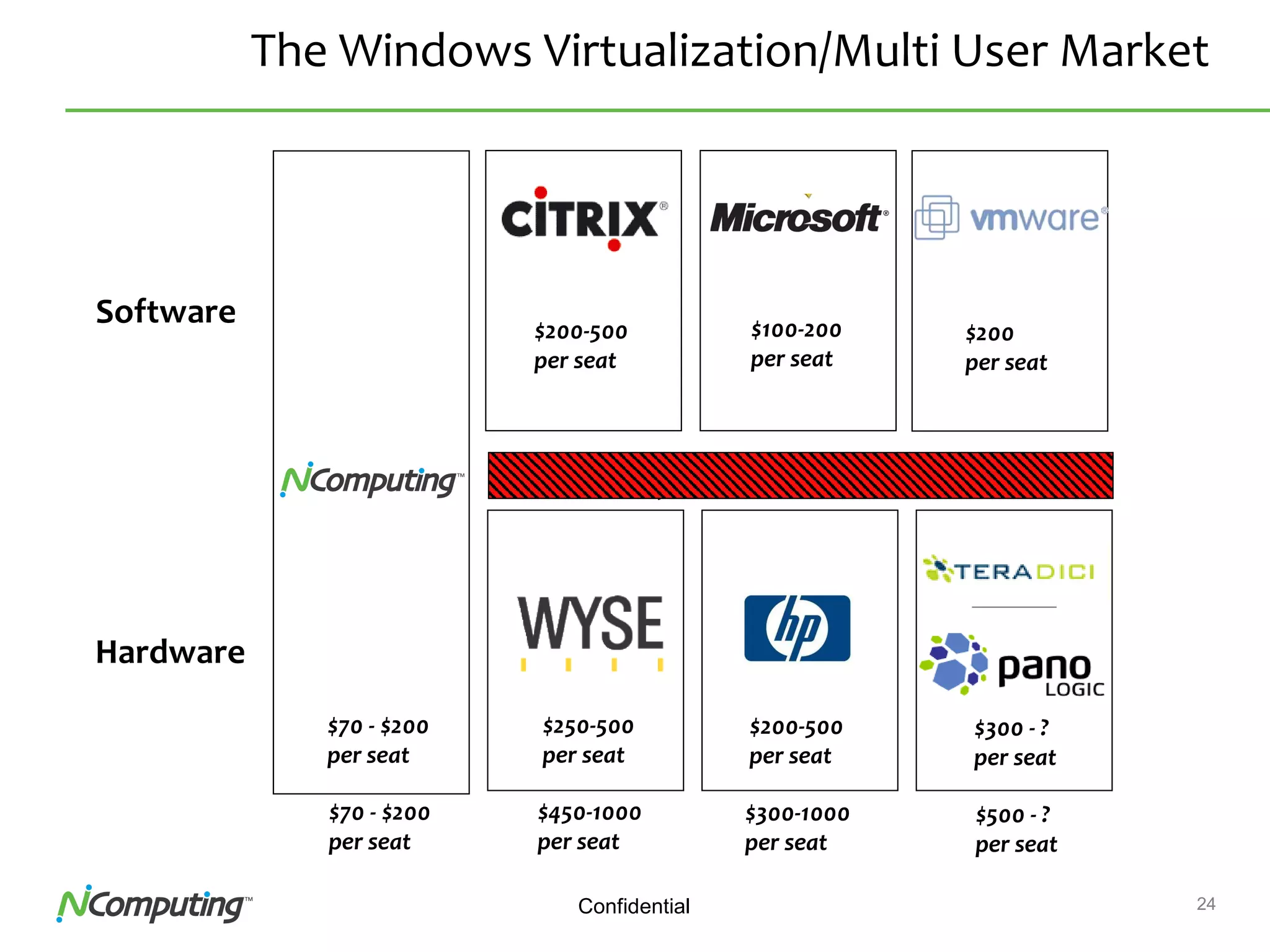
The Windows Virtualization/Multi User Market
Software
Hardware
Enterprise Focused Legacy Pricing Issues Varied priorities
$70 - $200
per seat
$250-500
per seat
$200-500
per seat
$300 - ?
per seat
Uncoordinated roadmapsMarkets Defined by Software License Fees
$70 - $200
per seat
$450-1000
per seat
$300-1000
per seat
$500 - ?
per seat
$200
per seat
$200-500
per seat
$100-200
per seat
25Confidential
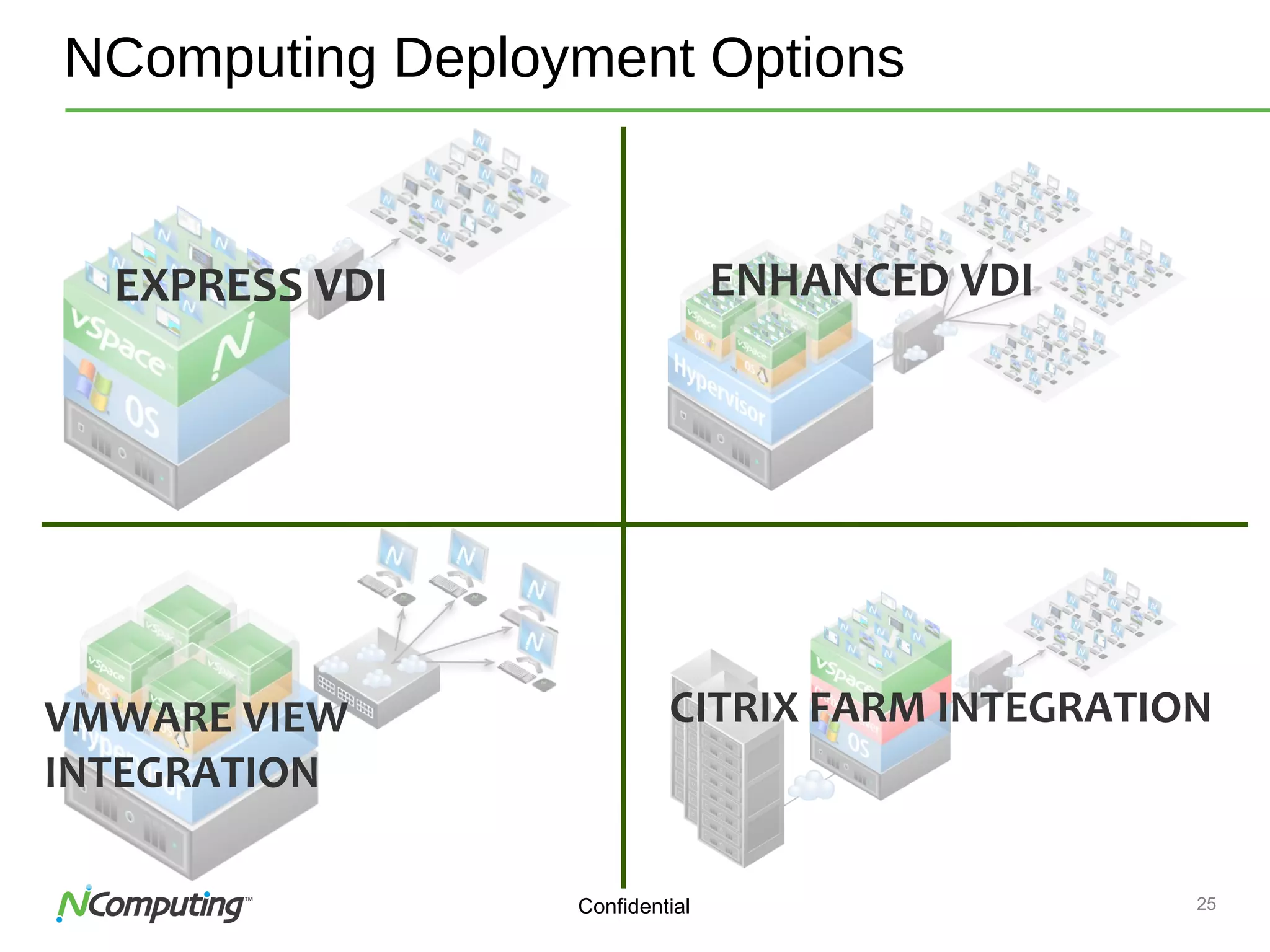
NComputing Deployment Options
EXPRESS VDI ENHANCED VDI
VMWARE VIEW
INTEGRATION
CITRIX FARM INTEGRATION
26Confidential
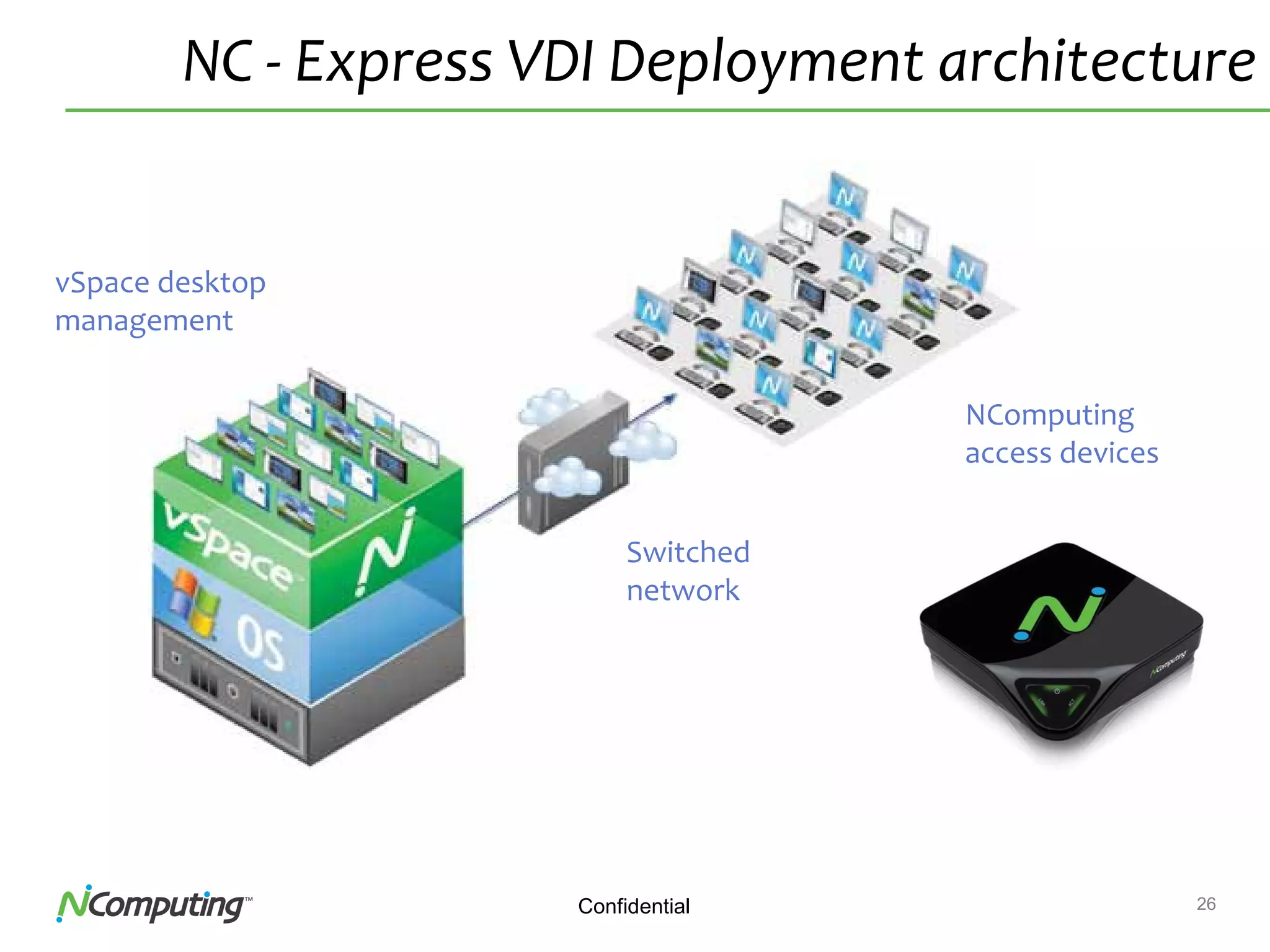
NC - Express VDI Deployment architecture
vSpace desktop
management
Switched
network
NComputing
access devices
27Confidential
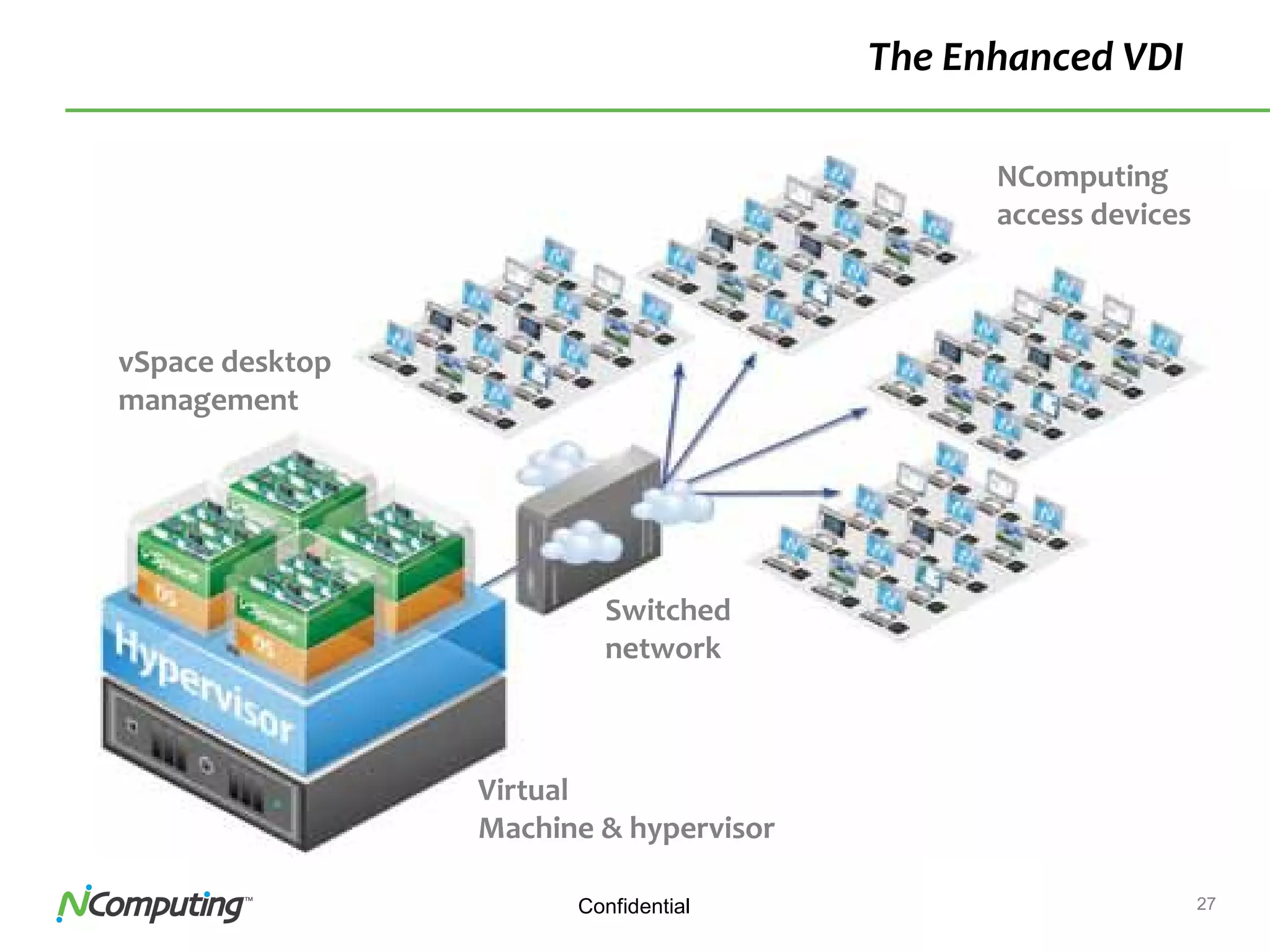
The Enhanced VDI
NComputing
access devices
Switched
network
vSpace desktop
management
Virtual
Machine & hypervisor
28
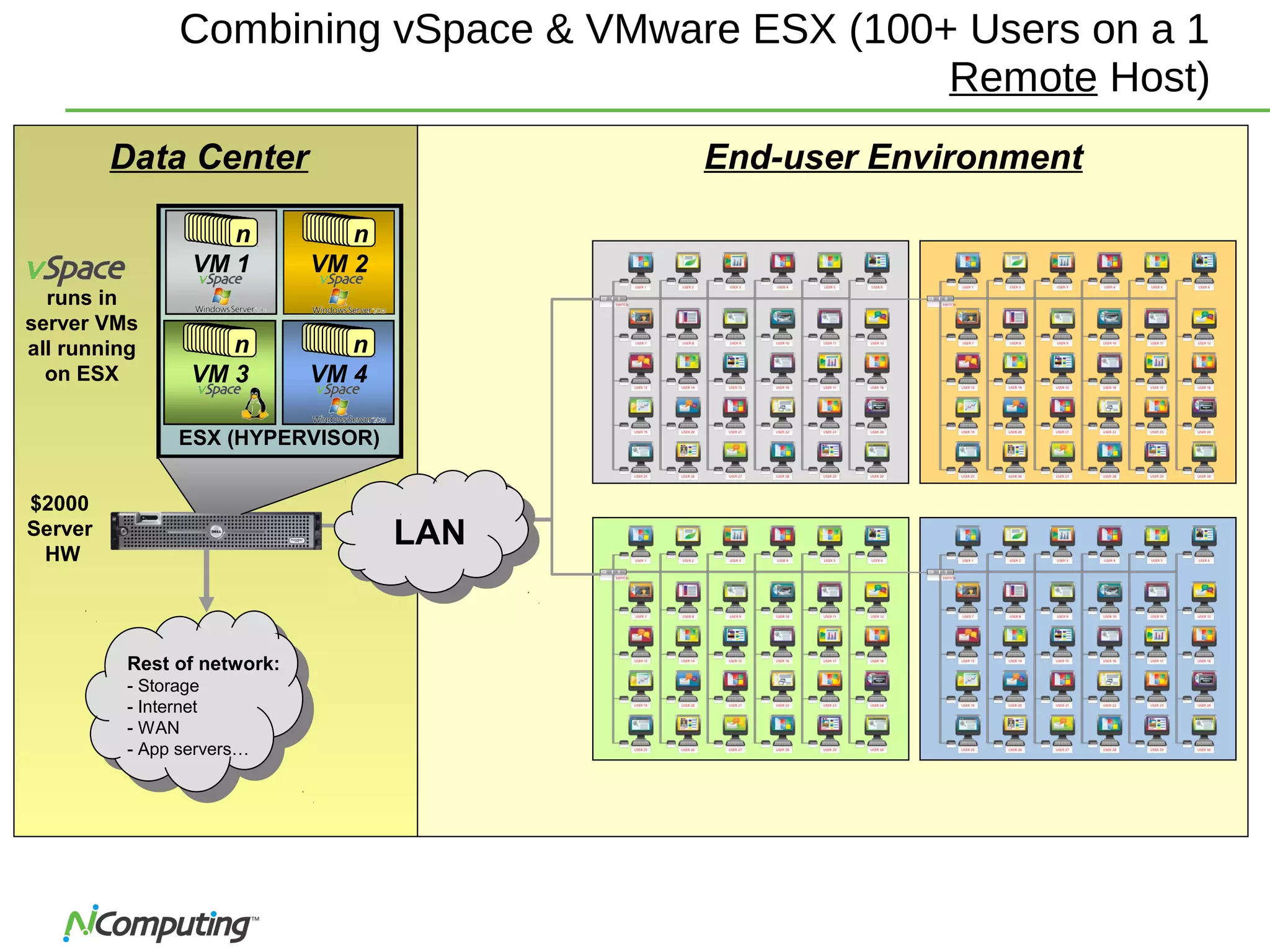
Combining vSpace & VMware ESX (100+ Users on a 1
Remote Host)
$2000
Server
HW
Rest of network:
- Storage
- Internet
- WAN
- App servers…
End-user EnvironmentData Center
runs in
server VMs
all running
on ESX
ESX (HYPERVISOR)
VM 1
n
VM 2
n
VM 3
n
VM 4
n
LAN
29Confidential
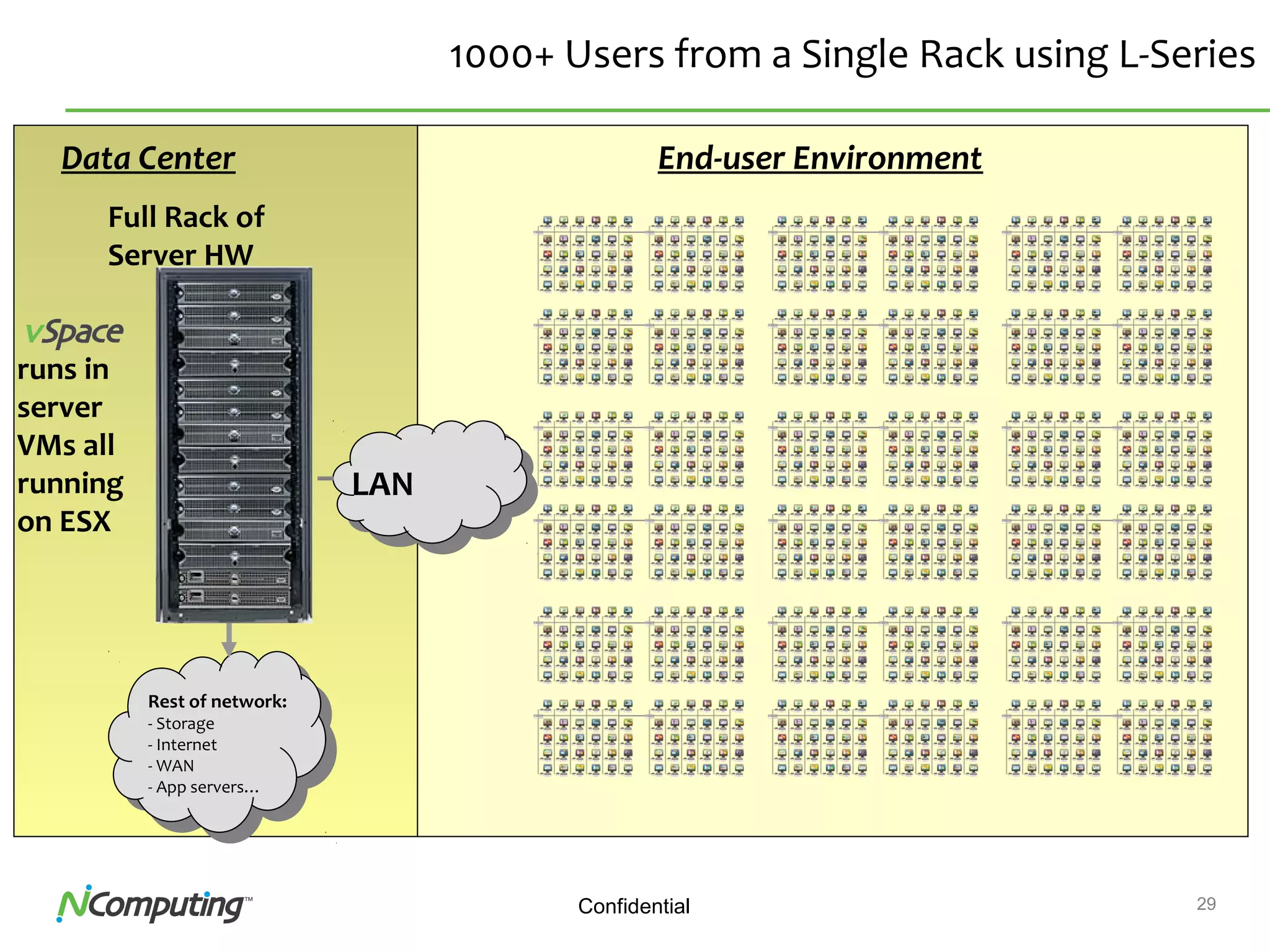
1000+ Users from a Single Rack using L-Series
Full Rack of
Server HW
Rest of network:
- Storage
- Internet
- WAN
- App servers…
End-user EnvironmentData Center
runs in
server
VMs all
running
on ESX
LAN
30Confidential
L300 Enterprise Virtual Desktop
Product Details
31Confidential
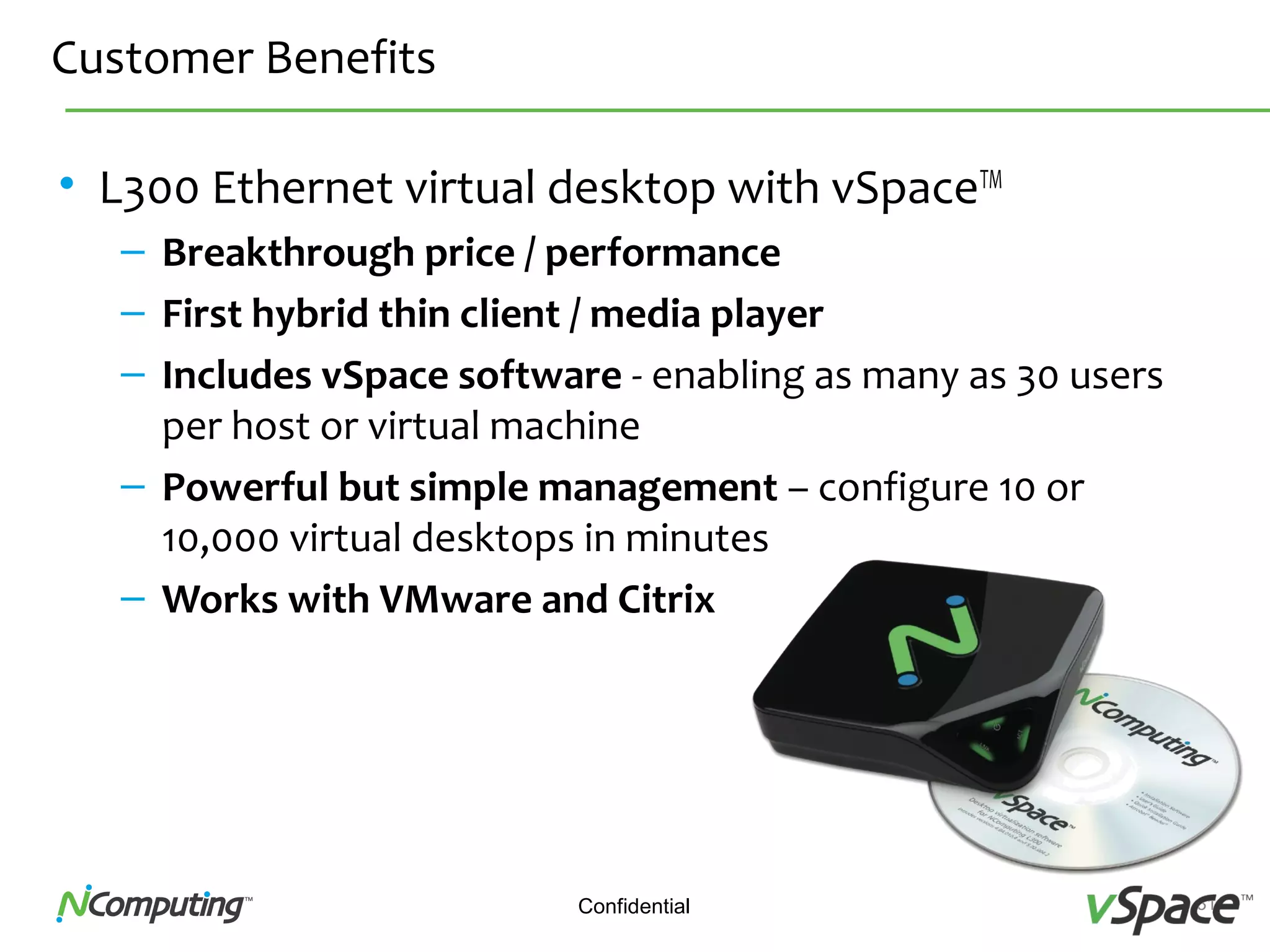
Customer Benefits
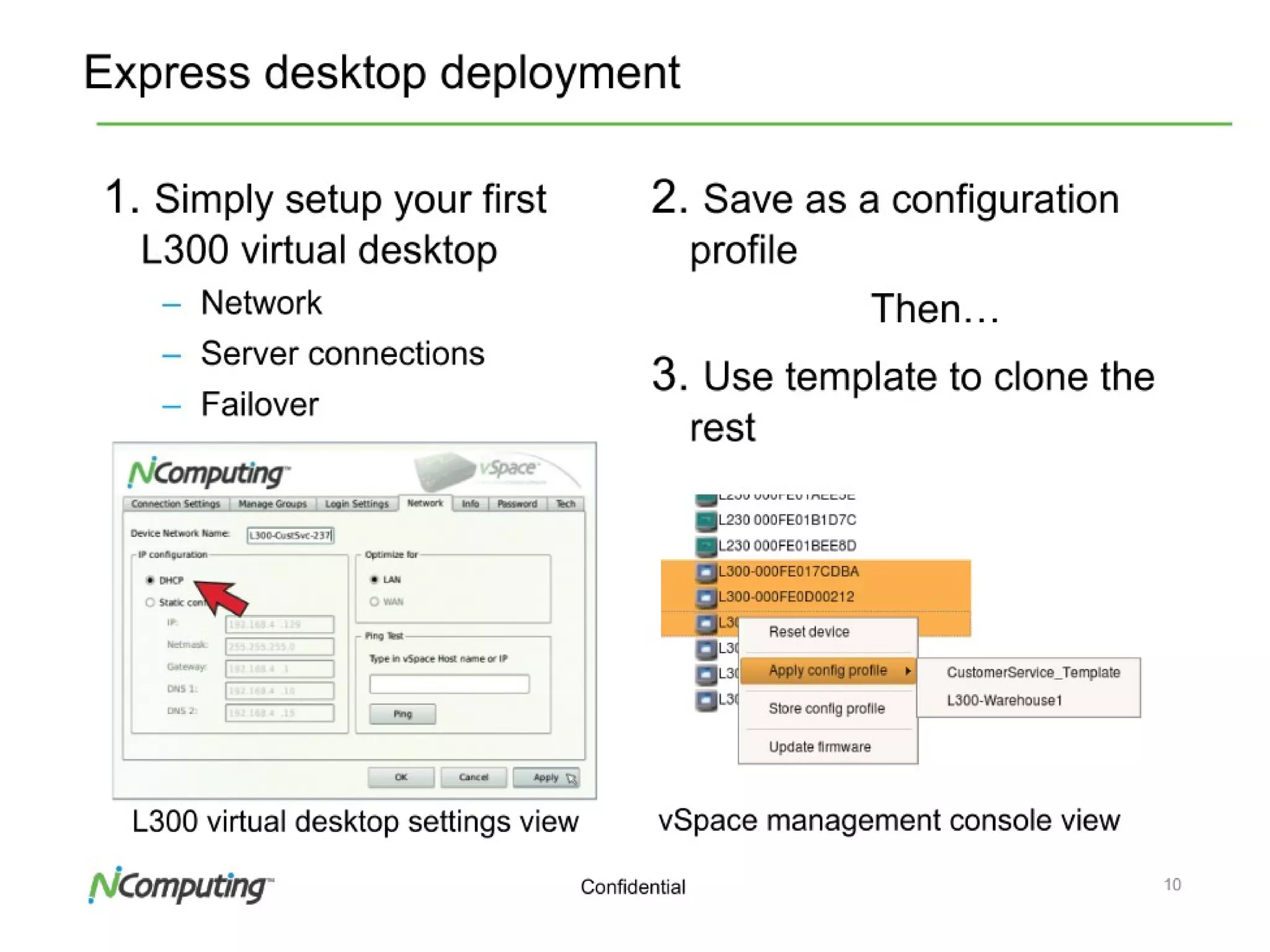
• L300 Ethernet virtual desktop with vSpaceTM
– Breakthrough price / performance
– First hybrid thin client / media player
– Includes vSpace software - enabling as many as 30 users
per host or virtual machine
– Powerful but simple management – configure 10 or
10,000 virtual desktops in minutes
– Works with VMware and Citrix
32Confidential32
33Confidential33
34Confidential34
35Confidential35
36ConfidentialNComputing Confidential, Internal Training Materials
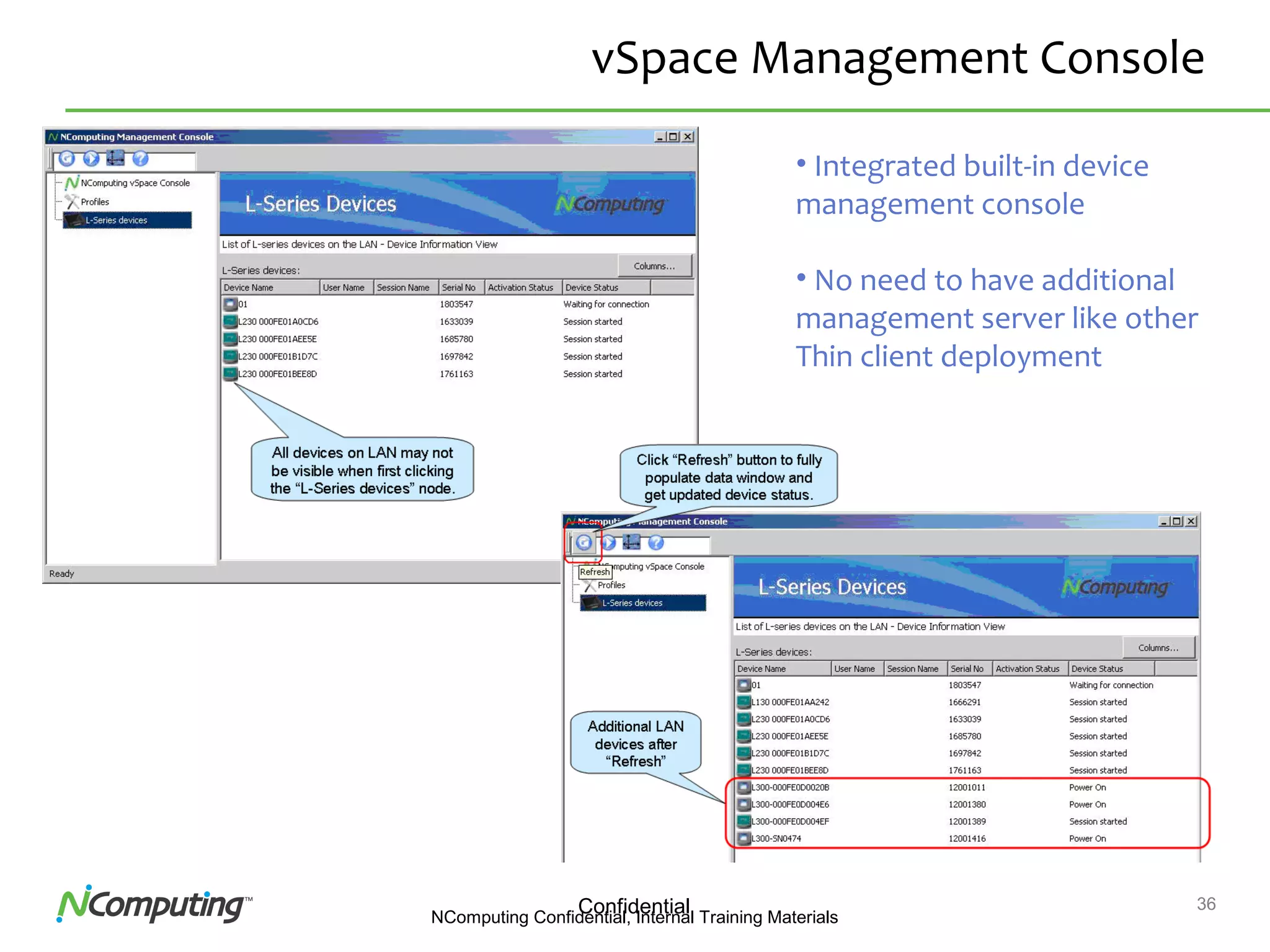
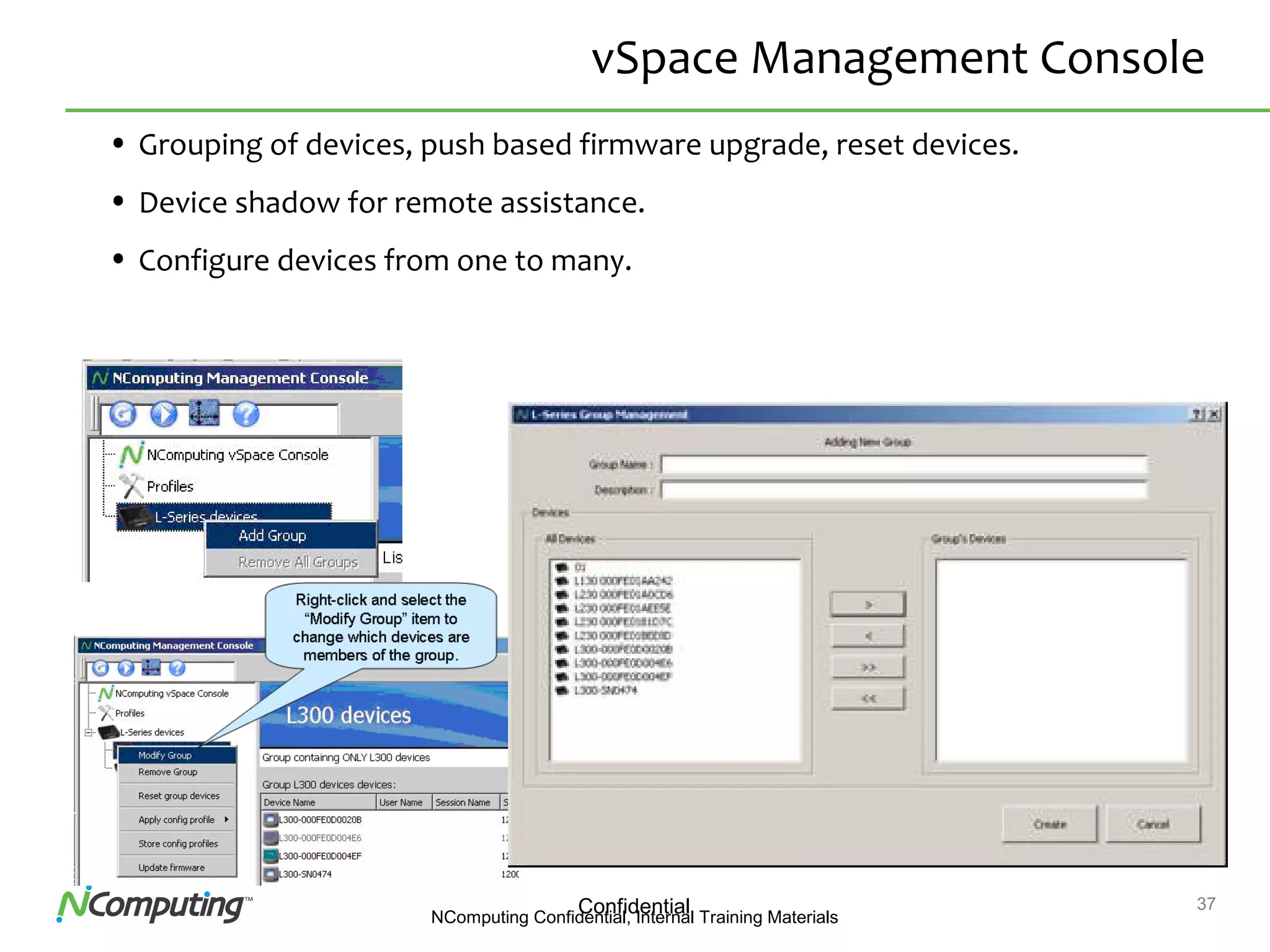
vSpace Management Console
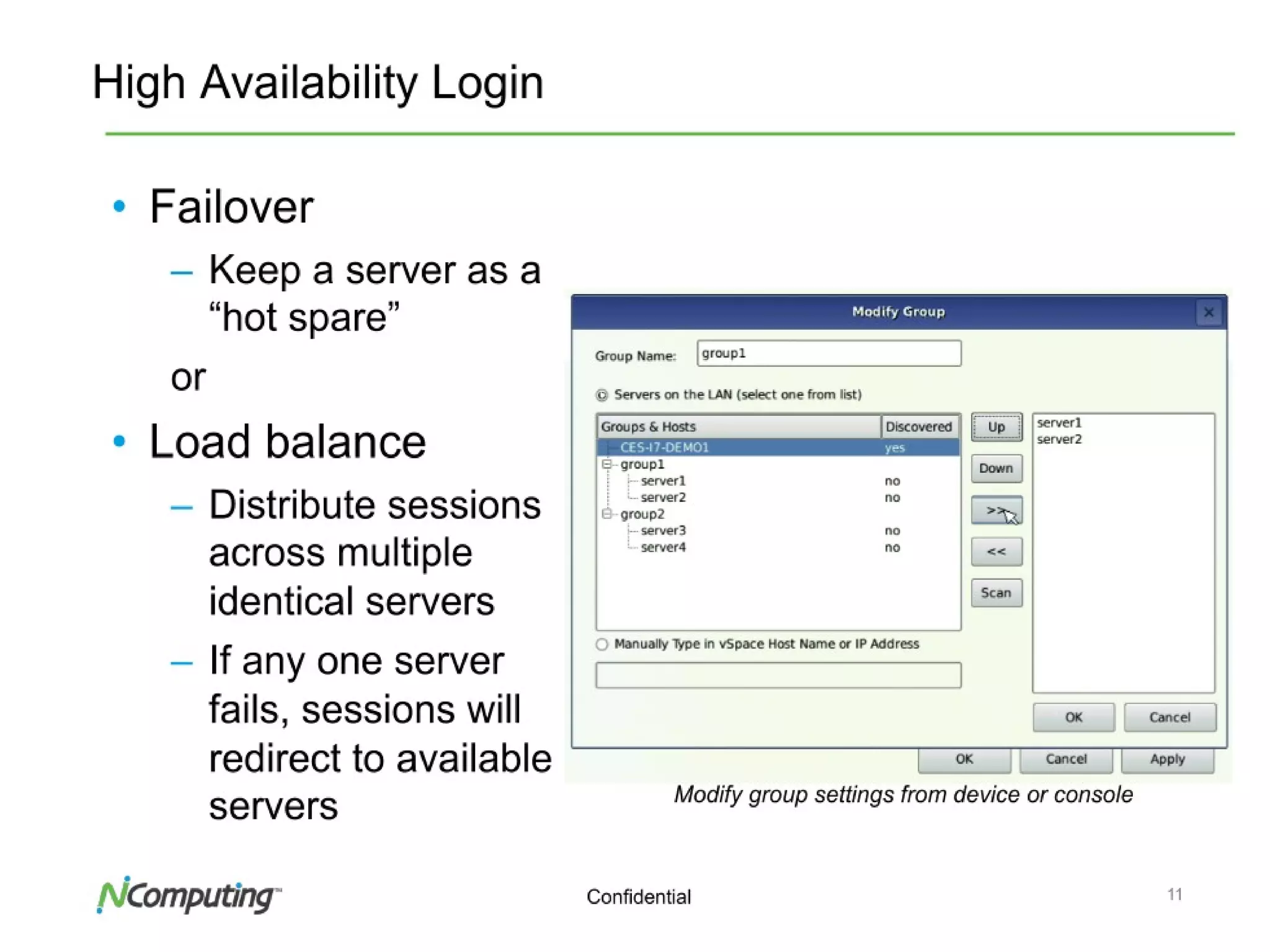
• Integrated built-in device
management console
• No need to have additional
management server like other
Thin client deployment
37ConfidentialNComputing Confidential, Internal Training Materials
vSpace Management Console
• Grouping of devices, push based firmware upgrade, reset devices.
• Device shadow for remote assistance.
• Configure devices from one to many.
38Confidential
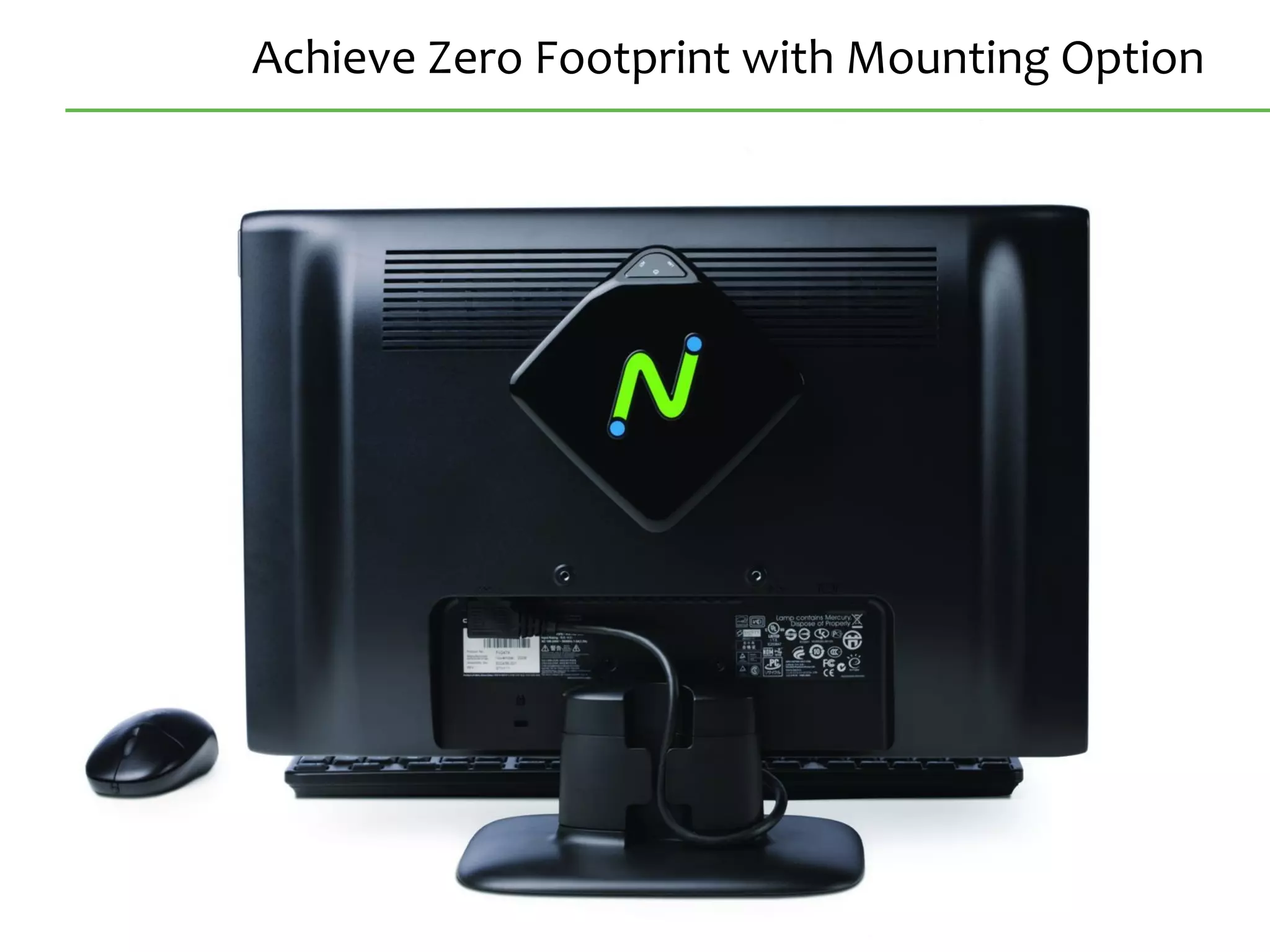
Achieve Zero Footprint with Mounting Option
39Confidential
Must-Watch L300 Videos on YouTube
• L300 Product Review
– http://www.youtube.com/watch?v=GKCPx40taeU
• L300 Evaluation Installation Video
– http://www.youtube.com/watch?v=vddsL3HjzHA
• L300 Performance Comparison with other clients
– http://www.youtube.com/watch?v=3TDERkH9CMg
• L300 Launch Video
– http://www.youtube.com/watch?v=x_Bh8xafJ1o
…and many more.
Search “NComputing” at YouTube.com
40Confidential
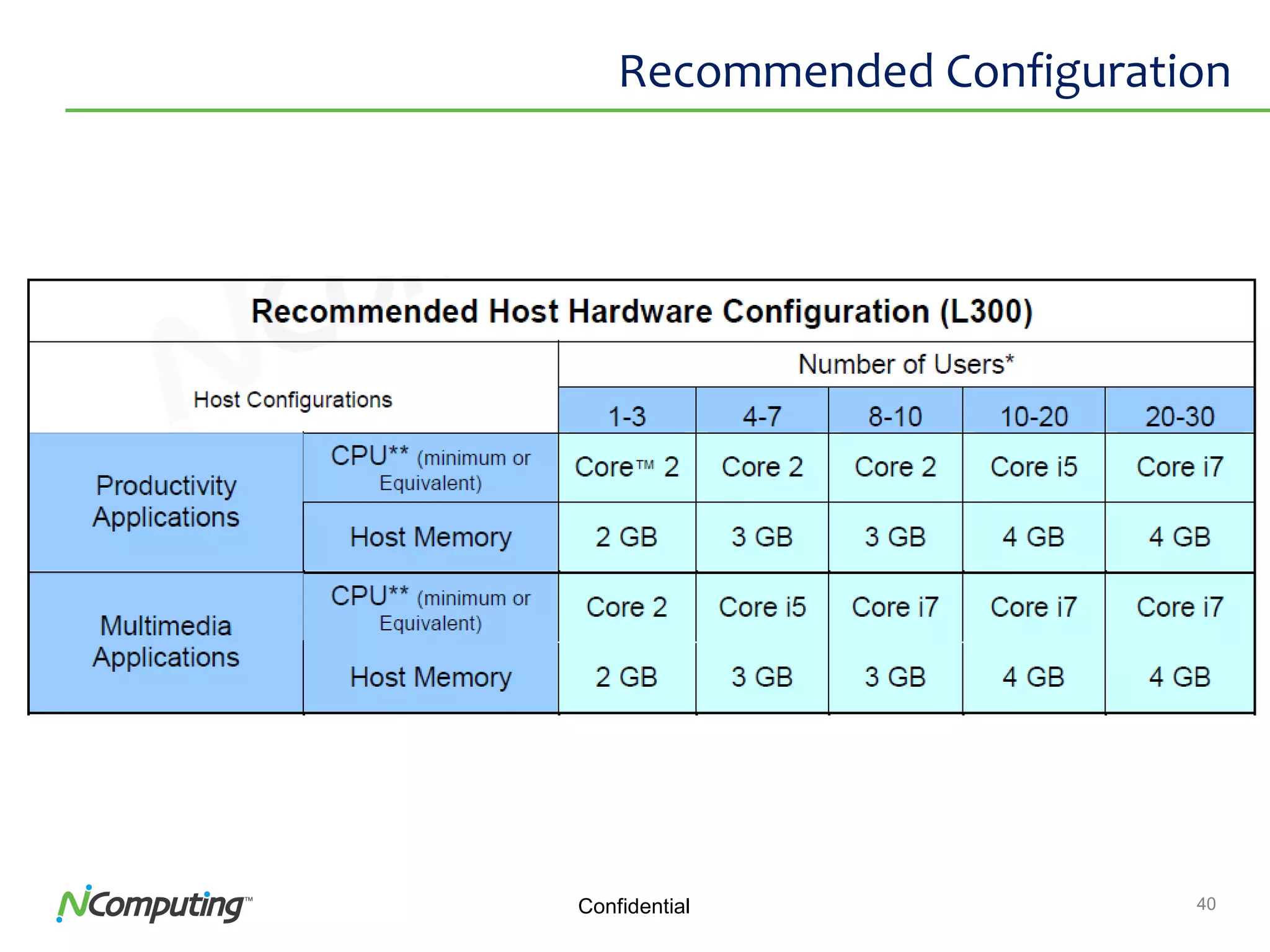
Recommended Configuration
41Confidential
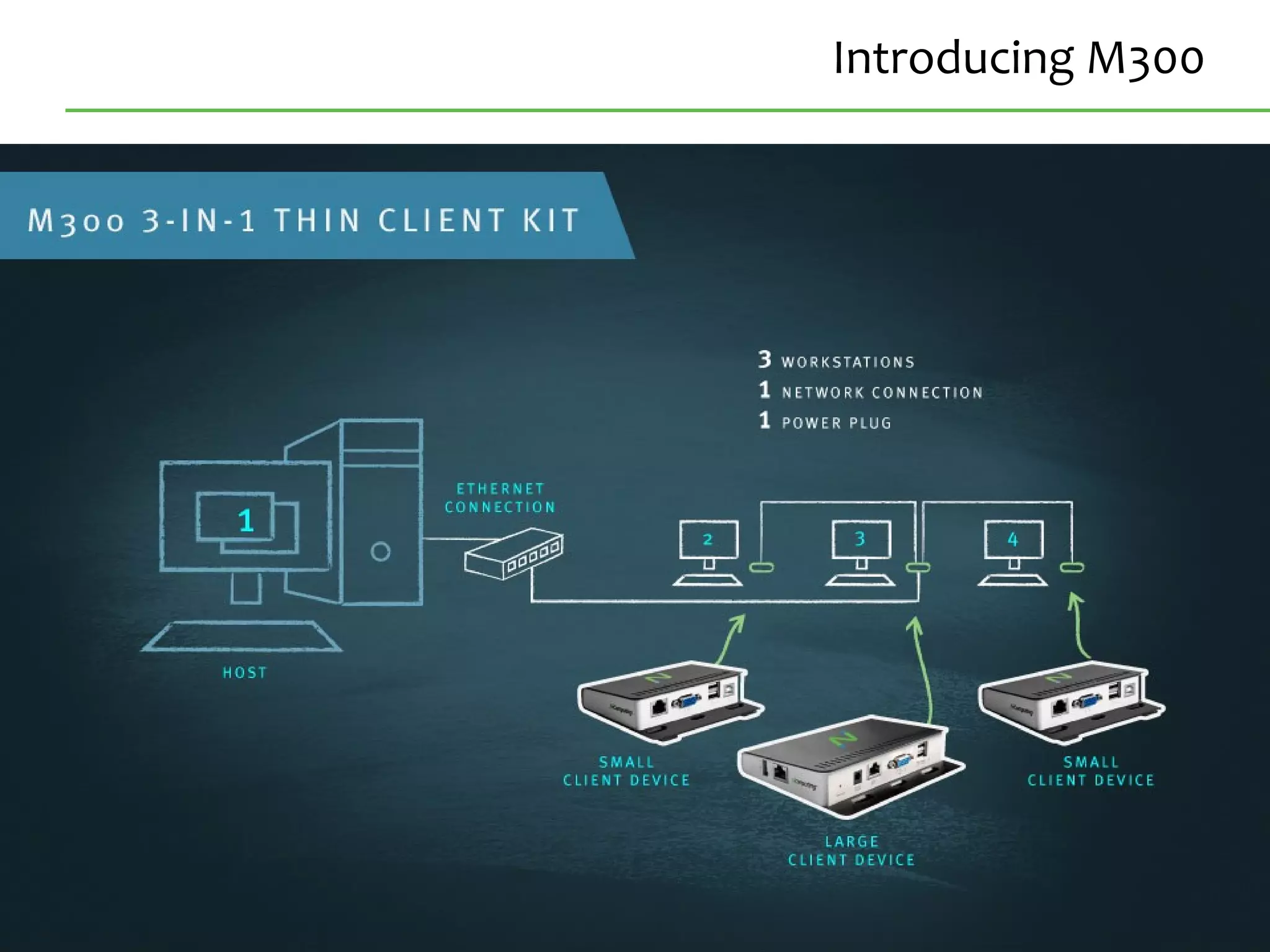
Introducing M300
42Confidential
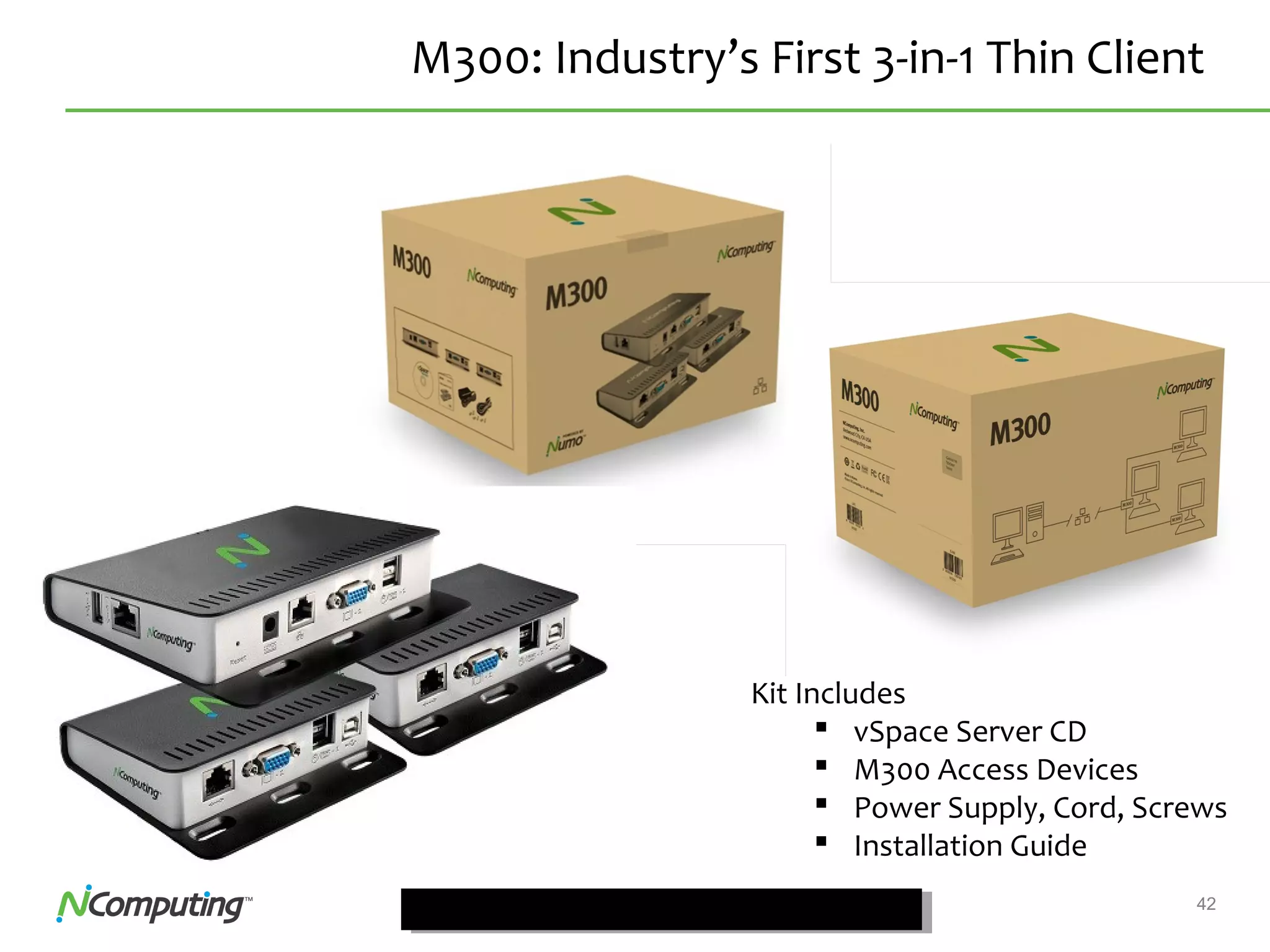
M300: Industry’s First 3-in-1 Thin Client
Kit Includes
 vSpace Server CD
 M300 Access Devices
 Power Supply, Cord, Screws
 Installation Guide
43Confidential
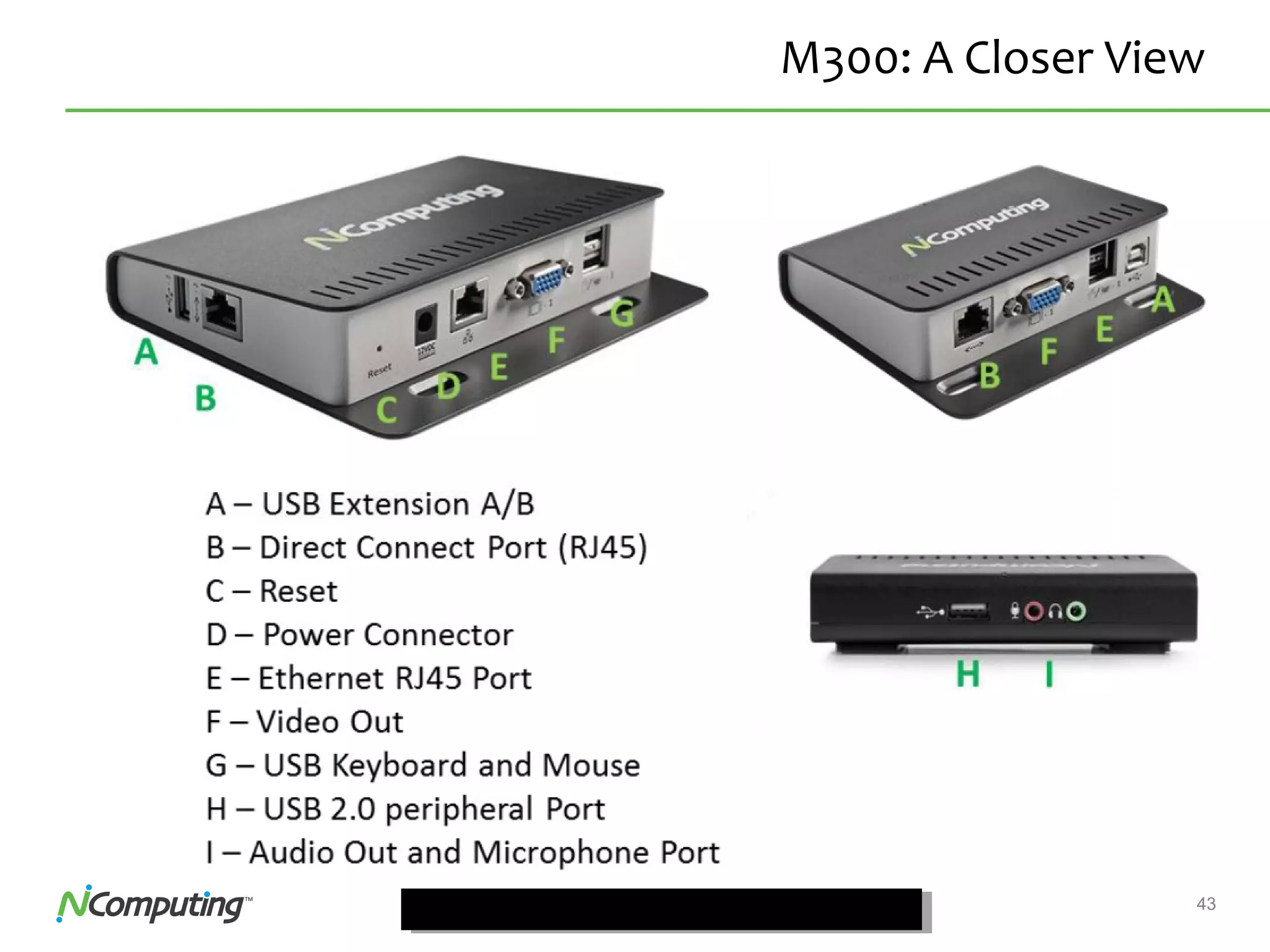
M300: A Closer View
44Confidential
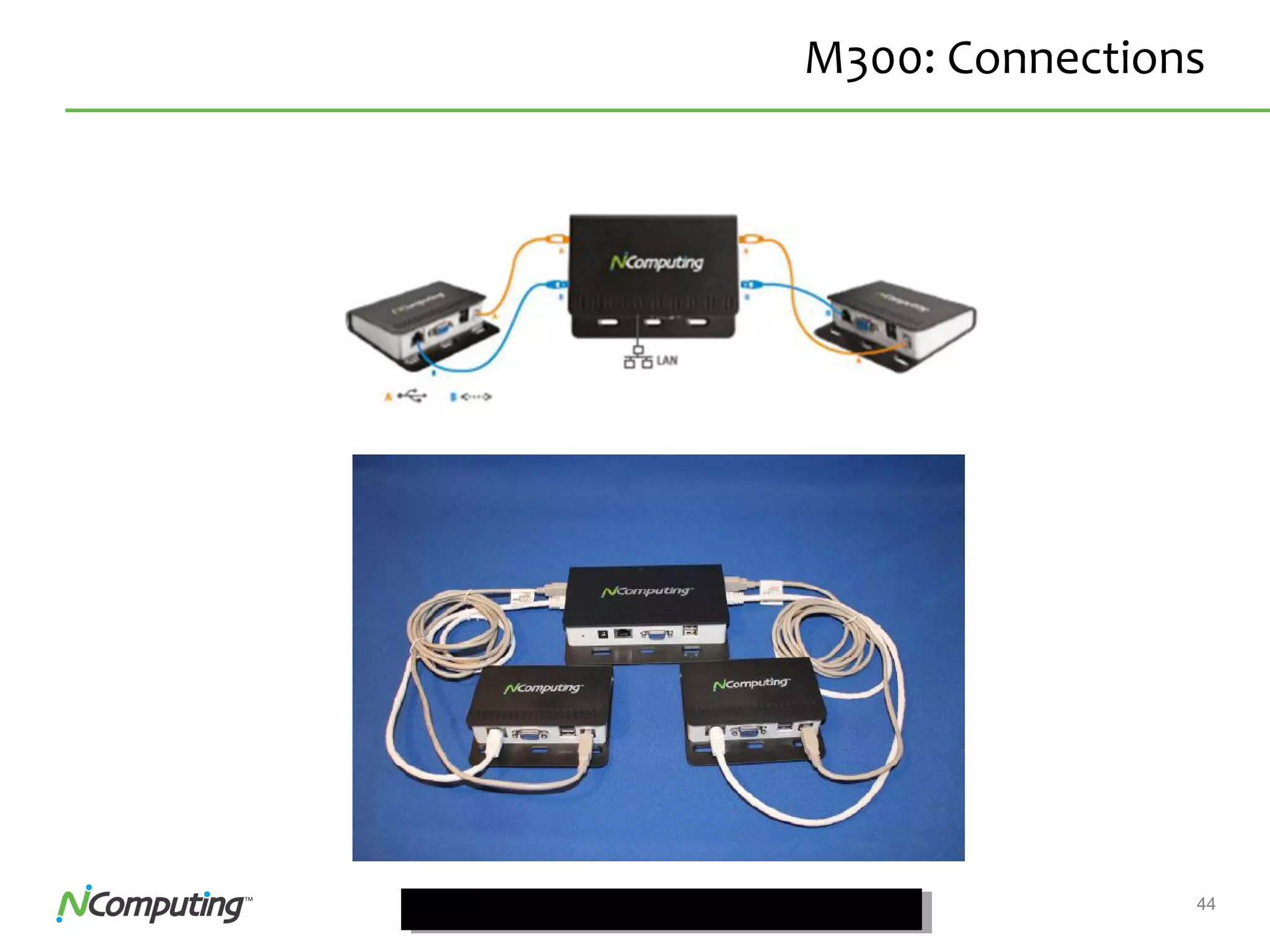
M300: Connections
45Confidential
M300: Network Topology
46Confidential
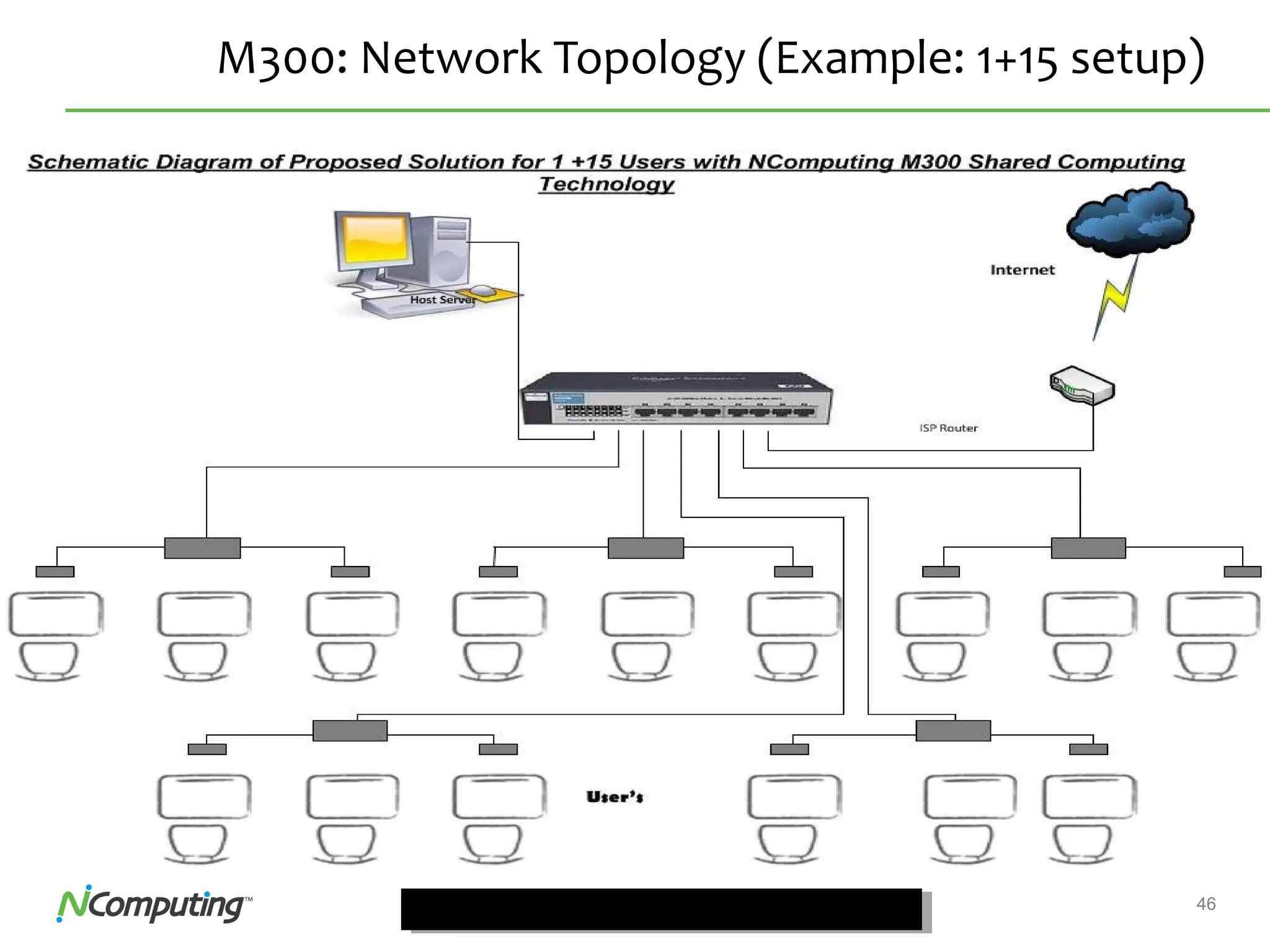
M300: Network Topology (Example: 1+15 setup)
47Confidential 47
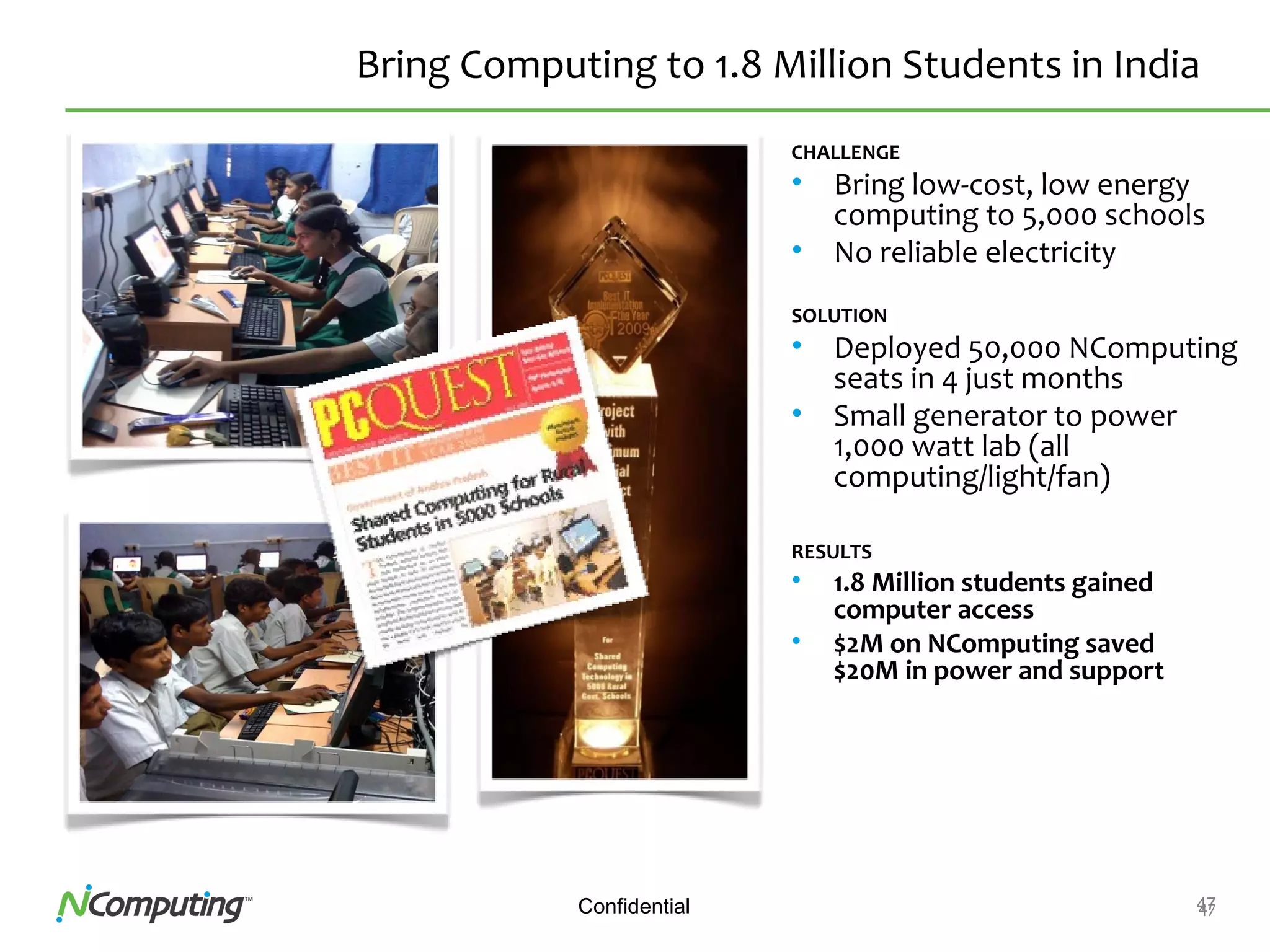
Bring Computing to 1.8 Million Students in India
CHALLENGE
• Bring low-cost, low energy
computing to 5,000 schools
• No reliable electricity
SOLUTION
• Deployed 50,000 NComputing
seats in 4 just months
• Small generator to power
1,000 watt lab (all
computing/light/fan)
RESULTS
• 1.8 Million students gained
computer access
• $2M on NComputing saved
$20M in power and support
48Confidential 48
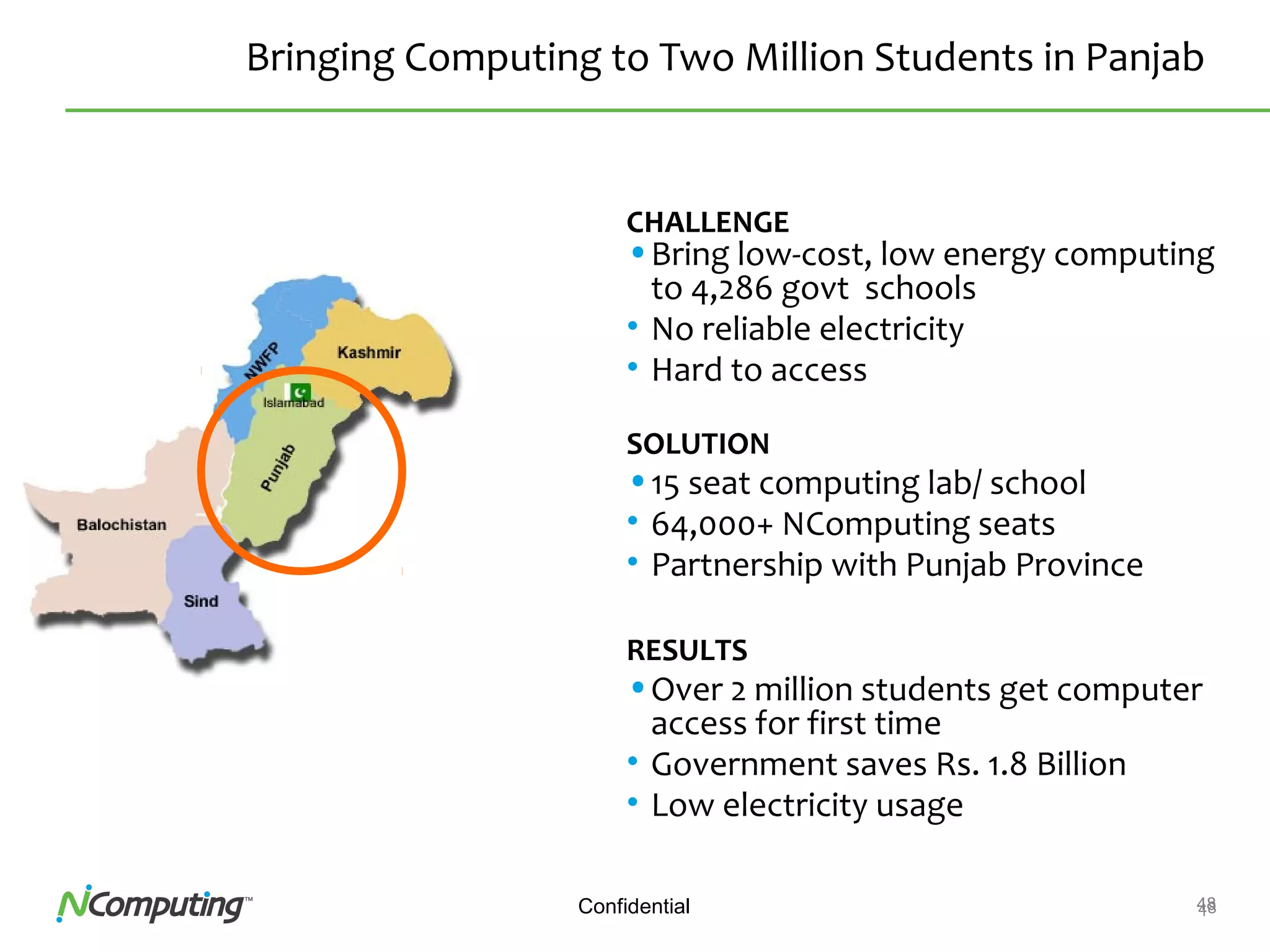
Bringing Computing to Two Million Students in Panjab
CHALLENGE
•Bring low-cost, low energy computing
to 4,286 govt schools
• No reliable electricity
• Hard to access
SOLUTION
•15 seat computing lab/ school
• 64,000+ NComputing seats
• Partnership with Punjab Province
RESULTS
•Over 2 million students get computer
access for first time
• Government saves Rs. 1.8 Billion
• Low electricity usage
49Confidential 49
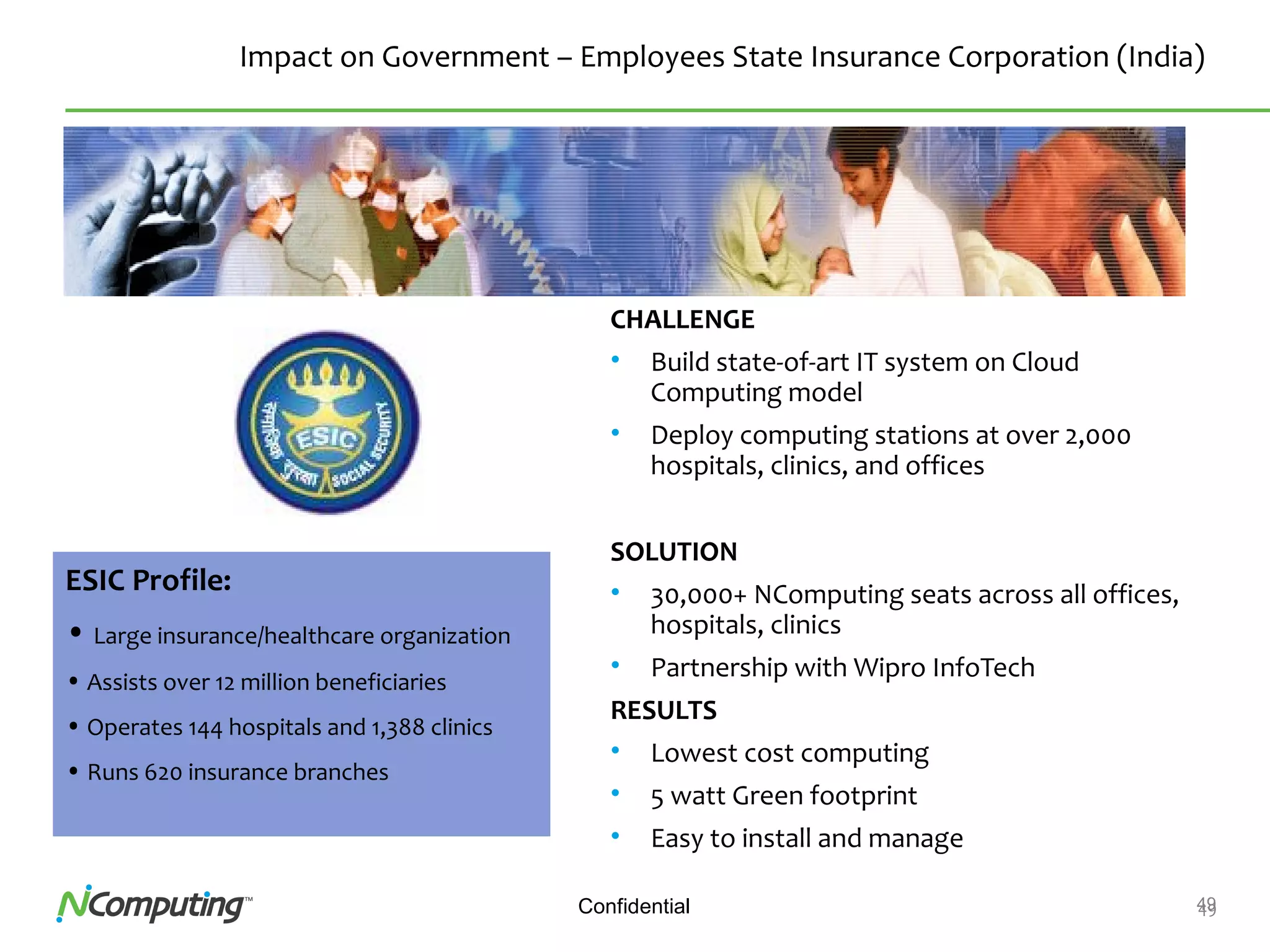
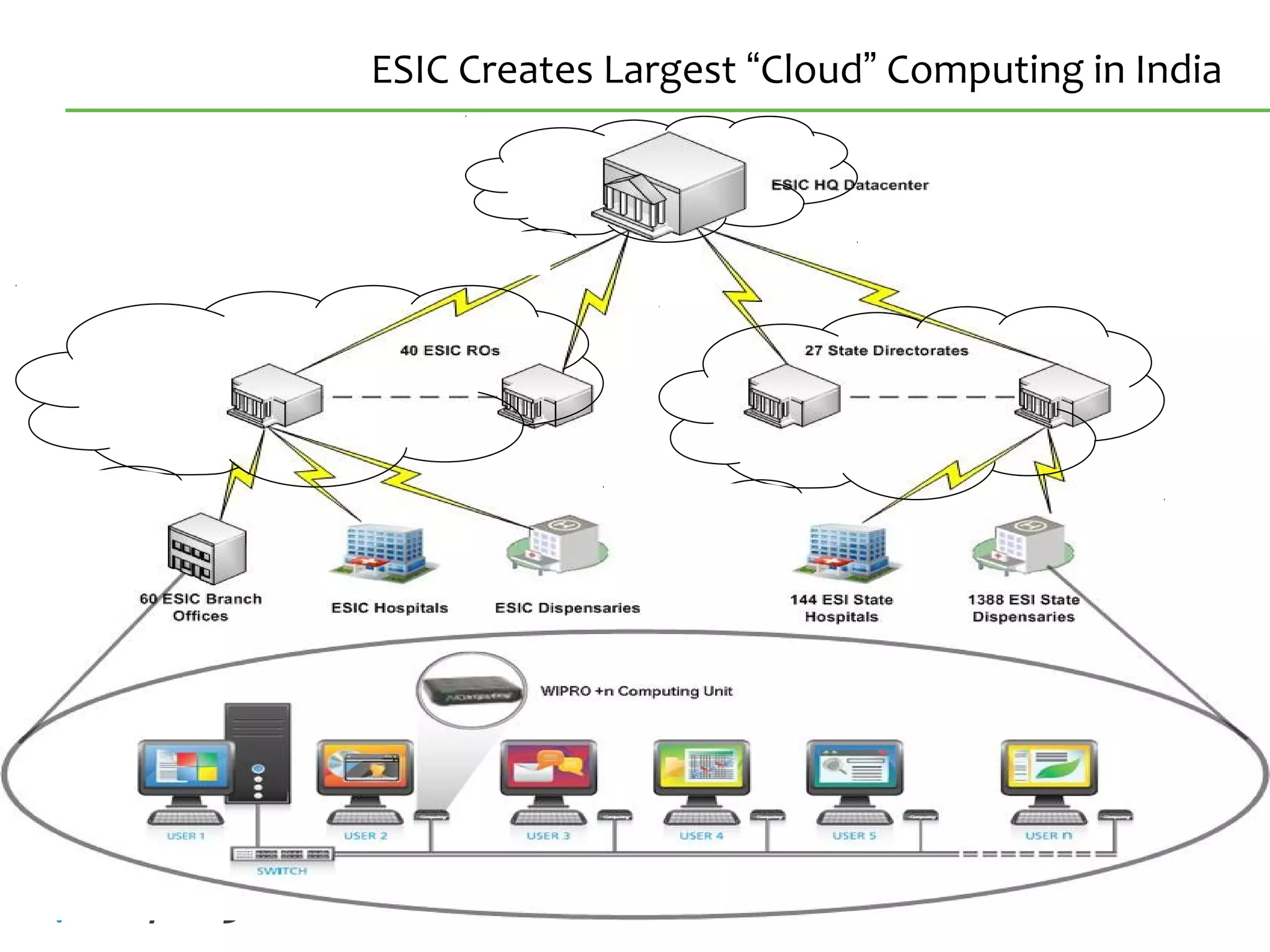
Impact on Government – Employees State Insurance Corporation (India)
CHALLENGE
• Build state-of-art IT system on Cloud
Computing model
• Deploy computing stations at over 2,000
hospitals, clinics, and offices
SOLUTION
• 30,000+ NComputing seats across all offices,
hospitals, clinics
• Partnership with Wipro InfoTech
RESULTS
• Lowest cost computing
• 5 watt Green footprint
• Easy to install and manage
ESIC Profile:
• Large insurance/healthcare organization
• Assists over 12 million beneficiaries
• Operates 144 hospitals and 1,388 clinics
• Runs 620 insurance branches
50Confidential
ESIC Creates Largest “Cloud” Computing in India
51Confidential
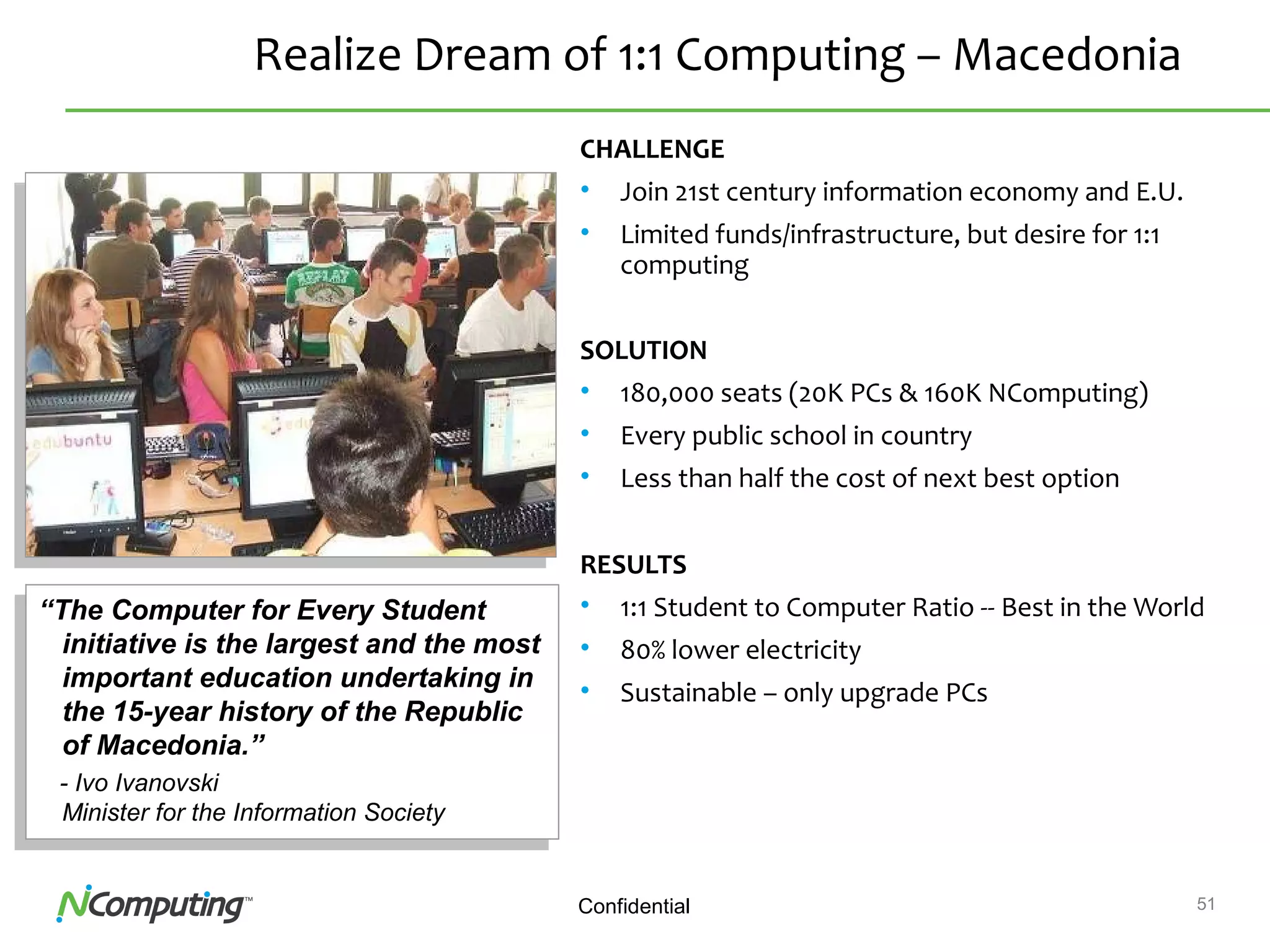
Realize Dream of 1:1 Computing – Macedonia
CHALLENGE
• Join 21st century information economy and E.U.
• Limited funds/infrastructure, but desire for 1:1
computing
SOLUTION
• 180,000 seats (20K PCs & 160K NComputing)
• Every public school in country
• Less than half the cost of next best option
RESULTS
• 1:1 Student to Computer Ratio -- Best in the World
• 80% lower electricity
• Sustainable – only upgrade PCs
“The Computer for Every Student
initiative is the largest and the most
important education undertaking in
the 15-year history of the Republic
of Macedonia.”
- Ivo Ivanovski
Minister for the Information Society
“The Computer for Every Student
initiative is the largest and the most
important education undertaking in
the 15-year history of the Republic
of Macedonia.”
- Ivo Ivanovski
Minister for the Information Society
52Confidential 52
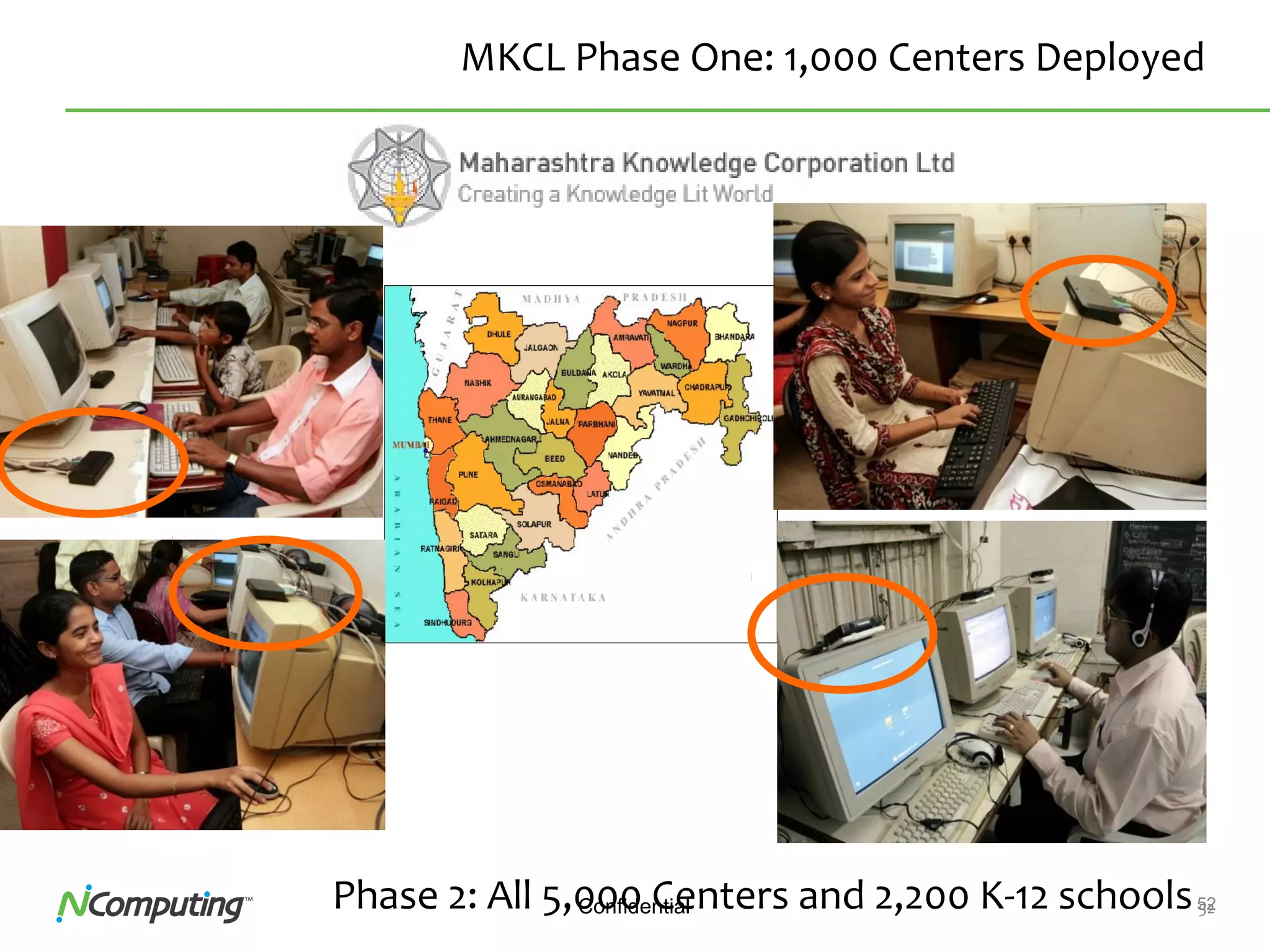
MKCL Phase One: 1,000 Centers Deployed
Phase 2: All 5,000 Centers and 2,200 K-12 schools
53Confidential
Examples of NComputing Users
54Confidential
Sales Resources
• Comprehensive info available @
– www.ncomputing.com
• Customers Success Story & Videos
– http://ncomputing.com/Community/SuccessStories.aspx
– http://ncomputing.com/Community.aspx
• Lot many videos @
– www.youtube.com
Thank You
NCS Support
033 66336524
support@ncs.net.in

NComputing Product Presentation

  • 1.
    Value & Powerof NComputing Solution
  • 2.
    2Confidential About Ncomputing … •Global Leader in Shared Computing Technology • > 2.5 + Mil devices, 20 Mil Users globally • > 2,50,000 + devices in India in < 3 years • Presence in 140 Country & 50,000 Customers 0 50000 100000 150000 200000 250000 NComputing HP Wyse
  • 3.
    3Confidential Prestigious and Wide-RangingAwards Business Education Channel Social ImpactTechnology Economic Growth Economic Development
  • 4.
    4Confidential 4 NComputing GoesMainstream: 2,400,000+ seats
  • 5.
    5Confidential NComputing is APAC#1 Desktop Virtualization Company Source: IDC 2011 Report
  • 6.
    6Confidential 6 Where arethose 2,400,000 seats? Branch offices Public access Factories Retail Call centers Education Limited IT staff Cost & maintenance Reliability Cost & reliability Cost, space, heat, flexibility Cost and obsolescence
  • 7.
    7Confidential Current Desktops areVery Powerful Machines
  • 8.
    8Confidential The Smart Question Whydo we need to buy 10 computers, when we can just buy one ?
  • 9.
    9Confidential Example: NComputing Setupfor a team 3 HOST PCs Administrator 33 USERS – All attached simultaneously 11 users per Desktop Computer
  • 10.
    10 vSpaceTM How NComputing works vSpacedesktop virtualization software creates virtual independent desktops inside any Windows or Linux machine. 1 NComputing access devices are small, silent, energy- efficient, reliable, and very inexpensive. 2
  • 11.
    11 2 ways toconnect ETHERNET L-series PCI CARD X-series
  • 12.
    12Confidential The X-series connectsvia PCI card. PCI card with 3 or 5 ports RJ45 connector On access device Cat 5/6 cables Why? • Great multimedia performance. • Lowest cost. The X-series No external Power
  • 13.
    13 X-series configuration options adds3 users per kit adds 5 users per kit X550 kit X550 11 usersX550 11 users X350 kit 1 kit = 4 users 2 kits = 7 users 1 kit = 6 users 2 kits = 11 users
  • 14.
    14 No special trainingis required! Step 1: Install PCI card:05 :20 Step 3: Connect monitor, keyboard & mouse :10 Step 2: Connect devices Install in less than 30 minutes :30 Step 4: Install vSpace™ software
  • 15.
    15Confidential Example: NComputing Setupfor a team 3 HOST PCs Administrator 33 USERS – All attached simultaneously 11 users per Desktop Computer
  • 16.
    16Confidential The L-series connectsvia standard Ethernet networks. Ethernet switch Ethernet port on access device Ethernet cabling Why? • Unlimited distance between client and computer. The L-series
  • 17.
    17Confidential L-series Product Overview Most flexible  Highest # of users per PC  Ethernet = no distance limits  3 watt per user  Up to 100 users per computer  Includes vSpace virtualization software
  • 18.
    18Confidential 18 L –Series Options X550 11 usersX550 11 users L130 – Entry Level with Basic Features L230 – Adds USB, Mic Port & More color depth • PS/2 Kbd,PS/2 Mouse, Ethernet • Speaker port. • 16 Bit Color Support • PS/2 Kbd,PS/2 Mouse, Ethernet • Speaker port & Mic port • 24 Bit Color Support
  • 19.
  • 20.
  • 21.
    21Confidential Basic NComputing vSpace& L-series (100 users on 1 Remote Host) L-series Access DeviceServer HW Rest of network: - Storage - Internet - WAN - App servers… LAN 1 Gb/s End-user Environment 100 Mb/s Data Center 1 Gb/s on: Window s Server or Linux
  • 22.
    22 31 Users onthe L-series • $499 server – Intel 2.4GHz Quad (Q6600) core, 500GB HDD, 3GB Memory • 31 users running – (4) videos in Media Player – (4) Web sessions – (2) IE with streaming video – (4) Microsoft Excel – (4) Microsoft Word – (4) Adobe Acrobat – (9) Microsoft PowerPoint • CPU usage at 63% of capacity • Memory usage: 1.95 GB of 3GB RAM
  • 23.
    23 23 Fast Installation Step 1:Connect device to network :05 :20 Step 3: Install vSpaceTM software on host PC :10 Step 2: Connect monitor, keyboard & mouse Install in less than 30 minutes
  • 24.
    24Confidential The Windows Virtualization/MultiUser Market Software Hardware Enterprise Focused Legacy Pricing Issues Varied priorities $70 - $200 per seat $250-500 per seat $200-500 per seat $300 - ? per seat Uncoordinated roadmapsMarkets Defined by Software License Fees $70 - $200 per seat $450-1000 per seat $300-1000 per seat $500 - ? per seat $200 per seat $200-500 per seat $100-200 per seat
  • 25.
    25Confidential NComputing Deployment Options EXPRESSVDI ENHANCED VDI VMWARE VIEW INTEGRATION CITRIX FARM INTEGRATION
  • 26.
    26Confidential NC - ExpressVDI Deployment architecture vSpace desktop management Switched network NComputing access devices
  • 27.
    27Confidential The Enhanced VDI NComputing accessdevices Switched network vSpace desktop management Virtual Machine & hypervisor
  • 28.
    28 Combining vSpace &VMware ESX (100+ Users on a 1 Remote Host) $2000 Server HW Rest of network: - Storage - Internet - WAN - App servers… End-user EnvironmentData Center runs in server VMs all running on ESX ESX (HYPERVISOR) VM 1 n VM 2 n VM 3 n VM 4 n LAN
  • 29.
    29Confidential 1000+ Users froma Single Rack using L-Series Full Rack of Server HW Rest of network: - Storage - Internet - WAN - App servers… End-user EnvironmentData Center runs in server VMs all running on ESX LAN
  • 30.
  • 31.
    31Confidential Customer Benefits • L300Ethernet virtual desktop with vSpaceTM – Breakthrough price / performance – First hybrid thin client / media player – Includes vSpace software - enabling as many as 30 users per host or virtual machine – Powerful but simple management – configure 10 or 10,000 virtual desktops in minutes – Works with VMware and Citrix
  • 32.
  • 33.
  • 34.
  • 35.
  • 36.
    36ConfidentialNComputing Confidential, InternalTraining Materials vSpace Management Console • Integrated built-in device management console • No need to have additional management server like other Thin client deployment
  • 37.
    37ConfidentialNComputing Confidential, InternalTraining Materials vSpace Management Console • Grouping of devices, push based firmware upgrade, reset devices. • Device shadow for remote assistance. • Configure devices from one to many.
  • 38.
  • 39.
    39Confidential Must-Watch L300 Videoson YouTube • L300 Product Review – http://www.youtube.com/watch?v=GKCPx40taeU • L300 Evaluation Installation Video – http://www.youtube.com/watch?v=vddsL3HjzHA • L300 Performance Comparison with other clients – http://www.youtube.com/watch?v=3TDERkH9CMg • L300 Launch Video – http://www.youtube.com/watch?v=x_Bh8xafJ1o …and many more. Search “NComputing” at YouTube.com
  • 40.
  • 41.
  • 42.
    42Confidential M300: Industry’s First3-in-1 Thin Client Kit Includes  vSpace Server CD  M300 Access Devices  Power Supply, Cord, Screws  Installation Guide
  • 43.
  • 44.
  • 45.
  • 46.
  • 47.
    47Confidential 47 Bring Computingto 1.8 Million Students in India CHALLENGE • Bring low-cost, low energy computing to 5,000 schools • No reliable electricity SOLUTION • Deployed 50,000 NComputing seats in 4 just months • Small generator to power 1,000 watt lab (all computing/light/fan) RESULTS • 1.8 Million students gained computer access • $2M on NComputing saved $20M in power and support
  • 48.
    48Confidential 48 Bringing Computingto Two Million Students in Panjab CHALLENGE •Bring low-cost, low energy computing to 4,286 govt schools • No reliable electricity • Hard to access SOLUTION •15 seat computing lab/ school • 64,000+ NComputing seats • Partnership with Punjab Province RESULTS •Over 2 million students get computer access for first time • Government saves Rs. 1.8 Billion • Low electricity usage
  • 49.
    49Confidential 49 Impact onGovernment – Employees State Insurance Corporation (India) CHALLENGE • Build state-of-art IT system on Cloud Computing model • Deploy computing stations at over 2,000 hospitals, clinics, and offices SOLUTION • 30,000+ NComputing seats across all offices, hospitals, clinics • Partnership with Wipro InfoTech RESULTS • Lowest cost computing • 5 watt Green footprint • Easy to install and manage ESIC Profile: • Large insurance/healthcare organization • Assists over 12 million beneficiaries • Operates 144 hospitals and 1,388 clinics • Runs 620 insurance branches
  • 50.
    50Confidential ESIC Creates Largest“Cloud” Computing in India
  • 51.
    51Confidential Realize Dream of1:1 Computing – Macedonia CHALLENGE • Join 21st century information economy and E.U. • Limited funds/infrastructure, but desire for 1:1 computing SOLUTION • 180,000 seats (20K PCs & 160K NComputing) • Every public school in country • Less than half the cost of next best option RESULTS • 1:1 Student to Computer Ratio -- Best in the World • 80% lower electricity • Sustainable – only upgrade PCs “The Computer for Every Student initiative is the largest and the most important education undertaking in the 15-year history of the Republic of Macedonia.” - Ivo Ivanovski Minister for the Information Society “The Computer for Every Student initiative is the largest and the most important education undertaking in the 15-year history of the Republic of Macedonia.” - Ivo Ivanovski Minister for the Information Society
  • 52.
    52Confidential 52 MKCL PhaseOne: 1,000 Centers Deployed Phase 2: All 5,000 Centers and 2,200 K-12 schools
  • 53.
  • 54.
    54Confidential Sales Resources • Comprehensiveinfo available @ – www.ncomputing.com • Customers Success Story & Videos – http://ncomputing.com/Community/SuccessStories.aspx – http://ncomputing.com/Community.aspx • Lot many videos @ – www.youtube.com
  • 55.
    Thank You NCS Support 03366336524 support@ncs.net.in

Editor's Notes

  • #7 The NComputing solution has been deployed by over 40,000 organizations around the world. The deployments are in almost every industry segment and every type of end-user environment. We are the ideal fit for task-workers who are in a structured environment like offices, branches, factories, retail, call centers and hospitals. Lets take a look at a few examples.
  • #8 The NComputing solution is based on a simple fact: today’s PCs are so powerful that the vast majority of applications only use a small fraction of the computer’s capacity. PCs have gotten faster and faster every year, but typical user needs have increases only slightly. Desktops are now mainframes and 3 GHz multi-core systems cost less than $700. But the typical user is word processing, web-browsing, using educational software and productivity applications like PowerPoint. So the processor utilization on a typical PC averages less than 10%. That means 90% of the computer power is wasted. What if you could harness that extra computing power? What if a single PC could be shared by many users?
  • #11 NComputing takes an ordinary PC and allows it to be shared by many users. Each user has their own keyboard, monitor, mouse and speakers Each user has their own applications Each user has their own preferences and settings and data files But all of the computing happens on the shared PC. You have just one system to manage, one system to backup. And even though it is very sophisticated technology, it only takes just minutes to install and configure.
  • #12 Now, there are three ways that the access devices can connect to the shared computer. Our L-series use standard Ethernet networks. [CLICK] The X-series comes with a PCI card, and the access devices connect directly to the PCI card. [CLICK] And the new U-series, which is scheduled to be available early in 2010, snaps into place with USB cables. Each method of connecting has its own advantages. Let’s take a closer look at each.
  • #14 We have two X-series products: the X350 and the X550. The X350 includes the vSpace virtualization software, three access devices and a PCI card with three ports on the back. If you install one X350 kit into a PC, you get a total of 4 users -- one user on the PC itself, and 3 more connected to the card. And you can install a second X350 kit and get 3 MORE users for a total of 7 users on one PC. The X350 sells for about US$219 per kit. So divide that by 3 users, and you get about $70 per seat. The X550 includes the vSpace software, a FIVE port PCI card and 5 access devices. By installing an X550 kit, you get a total of 6 users – 1 on the shared PC and the 5 additional users. You can install a second X550 kit and get 5 MORE users for total of 11 users. The X550 sells for about US$399 a kit. [NOTE: 3-card support is in testing] You might be wondering how well a PC works with 11 users on it…
  • #15 It takes about 5 minutes to install the X-series PCI card. Another 5 minutes to snap into place the access devices. Another 10 to connect the user peripherals. And another 10 to install the vSpace software. About a half hour total. And that’s the X-series. With the L-series, you don’t even need to install a PCI card. Because our solution is used around the world, we made it really easy to set up and manage. Entire computer labs can be set up in a matter of hours, not days.
  • #19 We have two X-series products: the X350 and the X550. The X350 includes the vSpace virtualization software, three access devices and a PCI card with three ports on the back. If you install one X350 kit into a PC, you get a total of 4 users -- one user on the PC itself, and 3 more connected to the card. And you can install a second X350 kit and get 3 MORE users for a total of 7 users on one PC. The X350 sells for about US$219 per kit. So divide that by 3 users, and you get about $70 per seat. The X550 includes the vSpace software, a FIVE port PCI card and 5 access devices. By installing an X550 kit, you get a total of 6 users – 1 on the shared PC and the 5 additional users. You can install a second X550 kit and get 5 MORE users for total of 11 users. The X550 sells for about US$399 a kit. [NOTE: 3-card support is in testing] You might be wondering how well a PC works with 11 users on it…
  • #21 This probably sounds too good to be true. So here is an example. Here we have a Dell 2.4GHz PC that costs under $400. You can see we are running a DVD movie on 3 screens, Outlook, PowerPoint, video from CNN.com and YouTube. All of 11 users are running concurrently on a $400 PC… And note the utlization – 65% usage with 11 users. There is still plenty of headroom. And as long as the utilization stays below 100%, each user feels as if they have the full attention of that 2.4 GHz CPU.
  • #23 We have another product line called the L-series. Here you see 30 L series access devices connected to a single $500 Dell Inspirion server. The 31 sessions are running a variety of applications including web, office productivity, and multimedia.
  • #24 Because our solution is used around the world, we made it really easy to set up and manage. Entire offices can be set up in a matter of hours, not days. Installation consists of 3 easy steps and takes about 30 minutes to get up to 20 users up and running. How long would it take to get 20 desktop PCs up and running?
  • #31 First, key messages
  • #32 The L300 Ethernet virtual desktop is a breakthrough product that creates a new category of low cost thin or zero clients that deliver the rich multimedia feature set and manageability of four and 5ive hundeed dollar thin clients. The L300 is the first hybrid thin client media player, meaning it has been designed for both standard desktop computing tasks as well as the ability to playbock high resolution video.The L300 is enabled by the most advanced version of vSpace software yet, capable of supporting 30 or even more users per host or virtual machines New vSpace features include the ability to automatically configure and manage new devices all without complex management servers or agents And finally the L300 works with many different enterprise desktop architectures including Vmware and Citrix
  • #52 Macedonia is a small country in southern Europe. The Macedonian government realized that if they wanted the country to improve its economy and become a part of the EU, it had to improve its education systems and join the information economy. It had the dream to bring 1:1 computing to every public school student in the country. But how does a relatively poor country provide 180,000 students with a ultra low-cost computer? It looked at cheap PCs, low-cost laptops, thin clients and ultimately decided NComputing was the best fit. Why NComputing? Affordable: &amp;lt;$200 per seat FULLY DEPLOYED Maintenance Costs: Follow the Shared PC’s and Monitors, our terminal devices are maintenance free. Operating Costs: At 1 watt per X300 station vs 85+ for a PC cost of ongoing operation is vastly lower, electrical costs are reduced and air conditioning is not required. Limited Obsolescence: They knew that whatever computers they chose, they would be obsolete within 5 years. They could never afford to replace 180K Systems every 5 years, but they only need to replace or upgrade the 23,000 shared computers not the 160,000 X300 terminals which simply move from the old PC’s to the upgraded units.Affordability AND Sustainability