Proposed Collaboration with
your University
Center of Excellence using AI
Who are we
Object Automation, a technology company based in California,
has been concentrating on latest technologies and emerging
tech partnerships. These include research and solution
development, the development of onshore and offshore
technology projects, the establishment of tech centers of
excellence in AI, quantum, and chip design,, technology
workshops and boot camps for corporates, special labs for
universities, and cutting-edge industry projects.
With a development center in India and numerous global
partners, the company works together to provide AI and chip
design solutions globally.
Object Automation, USA is leading the way
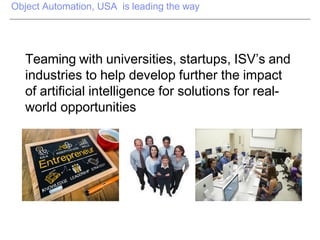
Teaming with universities, startups, ISV’s and
industries to help develop further the impact
of artificial intelligence for solutions for real-
world opportunities
Technologies
and Partners
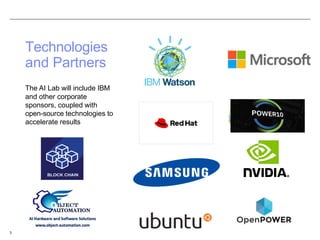
The AI Lab will include IBM
and other corporate
sponsors, coupled with
open-source technologies to
accelerate results
3
4
Why AI Center of Excellence ?
Artificial intelligence is one of the most powerful technologies for reshaping
business in decades. It can optimize many processes throughout
organizations and is already the engine behind some of the world’s most
valuable platform businesses. In our view AI will become a permanent aspect
of the business landscape and AI capabilities need to be sustainable over time
in order to develop and support potential new business models and
capabilities.
Create a vision for AI in the University. It’s important for executives to
discuss — ideally with AI experts — what AI is, what it can do, and how it
might enable new business models and strategies.
Manage external innovation
Develop and maintain a network of AI champions
Acquire and Build Talent
Spread success stories. A key success factor with AI or any new
technology is to spread early success stories with prioritized use cases.
This will build the appetite for more AI activity; in effect such
communications perform a marketing function for the AI center.
IBM Power Explained - Torbjörn Appehl
OpenPOWER Foundation
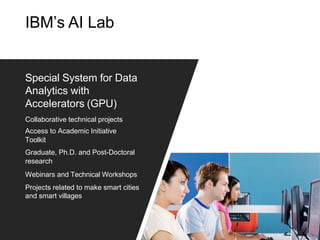
IBM’s AI Lab
Special System for Data
Analytics with
Accelerators (GPU)
Collaborative technical projects
Access to Academic Initiative
Toolkit
Graduate, Ph.D. and Post-Doctoral
research
Webinars and Technical Workshops
Projects related to make smart cities
and smart villages
University Use Cases and Scenarios of
Proposed AI Lab
AI Cloud at Universities
19
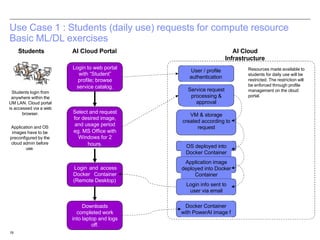
Use Case 1 : Students (daily use) requests for compute resource
Basic ML/DL exercises
Login to web portal
with “Student”
profile; browse
service catalog.
Select and request
for desired image,
and usage period
eg. MS Office with
Windows for 2
hours.
Login and access
Docker Container
(Remote Desktop)
Students AI Cloud Portal AI Cloud
Infrastructure
User / profile
authentication
Service request
processing &
approval
VM & storage
created according to
request
OS deployed into
Docker Container
Application image
deployed into Docker
Container
Login info sent to
user via email
Docker Container
with PowerAI image f
Downloads
completed work
into laptop and logs
off.
Resources made available to
students for daily use will be
restricted. The restriction will
be enforced through profile
management on the cloud
portal.
Students login from
anywhere within the
UM LAN. Cloud portal
is accessed via a web
browser.
Application and OS
images have to be
preconfigured by the
cloud admin before
use.
20
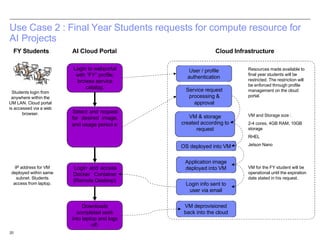
Use Case 2 : Final Year Students requests for compute resource for
AI Projects
Login to webportal
with “FY” profile;
browse service
catalog.
Select and request
for desired image,
and usage period e
Login and access
Docker Container
(Remote Desktop)
FY Students AI Cloud Portal Cloud Infrastructure
User / profile
authentication
Service request
processing &
approval
VM & storage
created according to
request
OS deployed into VM
Application image
deployed into VM
Login info sent to
user via email
VM deprovisioned
back into the cloud
Downloads
completed work
into laptop and logs
off.
Resources made available to
final year students will be
restricted. The restriction will
be enforced through profile
management on the cloud
portal.
Students login from
anywhere within the
UM LAN. Cloud portal
is accessed via a web
browser.
IP address for VM
deployed within same
subnet. Students
access from laptop.
VM and Storage size :
2-4 cores, 4GB RAM, 10GB
storage
RHEL
Jetson Nano
VM for the FY student will be
operational until the expiration
date stated in his request.
21
Use Case 3 : Final Year Students creates own application image,
and shares image with other FY students.
Student to seek
approval from
Cloud Admin to
create new app
image in cloud infra
New image is
displayed in the
service catalog
Other FY students
proceed to request,
access and use
new application (as
per Use Case 2)
FY Students Ai Cloud Admin AI Cloud
Infrastructure
To ensure proper cloud
operations, only the cloud
administrator is allowed to
manage image offereings in
the cloud.
In order to allow other
FY students to have
access to the new
application image for
their own project, the
originator of the
application has to work
with the cloud admin to
package the app as an
image offering in the
cloud.
Cloud Portal
Provisioning
manager packages
app image with OS
Image is registered
with service
automation
manager and portal
User / profile
authentication
Service request
processing
VM & storage
created according to
request
OS deployed into VM
Application image
deployed into VM
Login info sent to
user via email
VM deprovisioned
back into the cloud
22
During 2 hr class,
provides VM login
information to 40
students in class /
exam
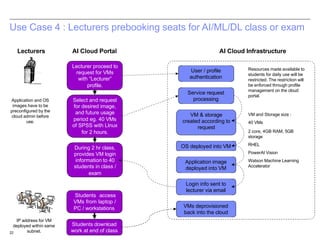
Use Case 4 : Lecturers prebooking seats for AI/ML/DL class or exam
AI Cloud Portal AI Cloud Infrastructure
User / profile
authentication
Service request
processing
VM & storage
created according to
request
OS deployed into VM
Application image
deployed into VM
Login info sent to
lecturer via email
VMs deprovisioned
back into the cloud
Resources made available to
students for daily use will be
restricted. The restriction will
be enforced through profile
management on the cloud
portal.
Lecturers
VM and Storage size :
40 VMs
2 core, 4GB RAM, 5GB
storage
RHEL
PowerAI Vision
Watson Machine Learning
Accelerator
Lecturer proceed to
request for VMs
with “Lecturer”
profile.
Select and request
for desired image,
and future usage
period eg. 40 VMs
of SPSS with LInux
for 2 hours.
Students access
VMs from laptop /
PC / workstations
Students download
work at end of class
Application and OS
images have to be
preconfigured by the
cloud admin before
use.
IP address for VM
deployed within same
subnet.
23
Use Case 5 : Researchers adding compute capacity with own
applications through the AI cloud
Researchers AI Cloud Portal Ai Cloud Infrastructure
Researchers proceed
to request, access VM
and install own
application (as per
Use Case 2)
User / profile
authentication
Service request
processing
VM & storage
created according to
request
OS deployed into VM
Application image
deployed into VM
Login info sent to
user via email
VM deprovisioned
back into the cloud
VM and Storage size :
8 cores, 16GB RAM, 250GB
storage
RHEL
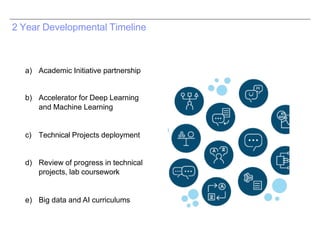
2 Year Developmental Timeline
a) Academic Initiative partnership
b) Accelerator for Deep Learning
and Machine Learning
c) Technical Projects deployment
d) Review of progress in technical
projects, lab coursework
e) Big data and AI curriculums
HPC/AI Scheduler
27
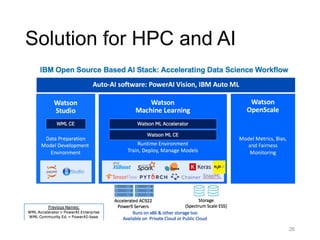
Solution for HPC and AI
28
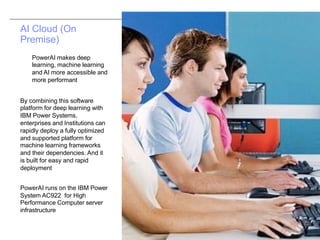
AI Cloud (On
Premise)
PowerAI makes deep
learning, machine learning
and AI more accessible and
more performant
By combining this software
platform for deep learning with
IBM Power Systems,
enterprises and Institutions can
rapidly deploy a fully optimized
and supported platform for
machine learning frameworks
and their dependencies. And it
is built for easy and rapid
deployment
PowerAI runs on the IBM Power
System AC922 for High
Performance Computer server
infrastructure
Advantages for Your Faculty and
Students
§ Talent and Skills: (Remote Interns; Skills and Training)
Students and Research scholars will start working on the
advanced technologies will enable them to work on
many applications
Publications and Mindshare: (Press releases, Articles,
and Publications; Conferences and Events)
1. Conference Paper on software-based application
research /development in 6 months
§ Intellectual Capital: (Patents, Open source; Prototypes,
Demos; Curriculum; Student projects, Theses)
1. Prototype building of many research problems using
software-centric approach (hardware-centric baseline
implementation almost getting completed)
2. Potential to file disclosures
§ Opportunities: (Seed revenue; Leverage other funding;
Build ecosystems; Build government/client relationships)
1. Once software-centric solution available with
comparable performance using latest technologies ,
your team would create prototypes which can be
demonstrated to several colleges
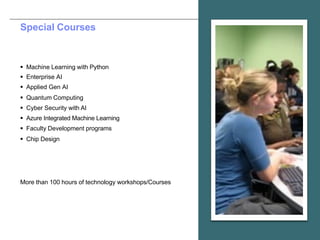
Special Courses
§ Machine Learning with Python
§ Enterprise AI
§ Applied Gen AI
§ Quantum Computing
§ Cyber Security with AI
§ Azure Integrated Machine Learning
§ Faculty Development programs
§ Chip Design
More than 100 hours of technology workshops/Courses
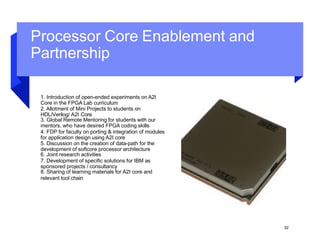
Processor Core Enablement and
Partnership
1. Introduction of open-ended experiments on A2I
Core in the FPGA Lab curriculum
2. Allotment of Mini Projects to students on
HDL/Verilog/ A2I Core
3. Global Remote Mentoring for students with our
mentors, who have desired FPGA coding skills
4. FDP for faculty on porting & integration of modules
for application design using A2I core
5. Discussion on the creation of data-path for the
development of softcore processor architecture
6. Joint research activities
7. Development of specific solutions for IBM as
sponsored projects / consultancy
8. Sharing of learning materials for A2I core and
relevant tool chain
32
University of Oregon , E4S and TAU
Collaborations
E4S or the Extreme-scale Scientific Software Stack [https://e4s.io] is a community effort to provide open-
source software packages for developing, deploying and running scientific applications on high-
performance computing (HPC) platforms. E4S provides from-source builds and containers of a broad
collection of HPC software packages. E4S exists to accelerate the development, deployment and use of
HPC software, lowering the barriers for HPC users.
§ "TAU Performance System® [http://tau.uoregon.edu] available on
OpenPOWER:
– Profiling and tracing support with 3D profile browsers
– Support for IBM XL, GNU, and LLVM Clang compilers
– Support for PowerAI, Spectrum MPI, and MVAPICH2 GDR, CUDA,
OpenACC
– Multi-platform support in TAU
• IBM Power, Cray XC, ARM64, x86_64, NVIDIA CUPTI and AMD
GPUs (ROCm)
34
Ohio State University and xScale
solutions collaborations
35
Reach US

COE AI Lab Universities

  • 1.
    Proposed Collaboration with yourUniversity Center of Excellence using AI
  • 2.
    Who are we ObjectAutomation, a technology company based in California, has been concentrating on latest technologies and emerging tech partnerships. These include research and solution development, the development of onshore and offshore technology projects, the establishment of tech centers of excellence in AI, quantum, and chip design,, technology workshops and boot camps for corporates, special labs for universities, and cutting-edge industry projects. With a development center in India and numerous global partners, the company works together to provide AI and chip design solutions globally.
  • 3.
    Object Automation, USAis leading the way Teaming with universities, startups, ISV’s and industries to help develop further the impact of artificial intelligence for solutions for real- world opportunities
  • 4.
    Technologies and Partners The AILab will include IBM and other corporate sponsors, coupled with open-source technologies to accelerate results 3
  • 5.
    4 Why AI Centerof Excellence ? Artificial intelligence is one of the most powerful technologies for reshaping business in decades. It can optimize many processes throughout organizations and is already the engine behind some of the world’s most valuable platform businesses. In our view AI will become a permanent aspect of the business landscape and AI capabilities need to be sustainable over time in order to develop and support potential new business models and capabilities. Create a vision for AI in the University. It’s important for executives to discuss — ideally with AI experts — what AI is, what it can do, and how it might enable new business models and strategies. Manage external innovation Develop and maintain a network of AI champions Acquire and Build Talent Spread success stories. A key success factor with AI or any new technology is to spread early success stories with prioritized use cases. This will build the appetite for more AI activity; in effect such communications perform a marketing function for the AI center.
  • 6.
    IBM Power Explained- Torbjörn Appehl OpenPOWER Foundation
  • 7.
    IBM’s AI Lab SpecialSystem for Data Analytics with Accelerators (GPU) Collaborative technical projects Access to Academic Initiative Toolkit Graduate, Ph.D. and Post-Doctoral research Webinars and Technical Workshops Projects related to make smart cities and smart villages
  • 8.
    University Use Casesand Scenarios of Proposed AI Lab AI Cloud at Universities
  • 9.
    19 Use Case 1: Students (daily use) requests for compute resource Basic ML/DL exercises Login to web portal with “Student” profile; browse service catalog. Select and request for desired image, and usage period eg. MS Office with Windows for 2 hours. Login and access Docker Container (Remote Desktop) Students AI Cloud Portal AI Cloud Infrastructure User / profile authentication Service request processing & approval VM & storage created according to request OS deployed into Docker Container Application image deployed into Docker Container Login info sent to user via email Docker Container with PowerAI image f Downloads completed work into laptop and logs off. Resources made available to students for daily use will be restricted. The restriction will be enforced through profile management on the cloud portal. Students login from anywhere within the UM LAN. Cloud portal is accessed via a web browser. Application and OS images have to be preconfigured by the cloud admin before use.
  • 10.
    20 Use Case 2: Final Year Students requests for compute resource for AI Projects Login to webportal with “FY” profile; browse service catalog. Select and request for desired image, and usage period e Login and access Docker Container (Remote Desktop) FY Students AI Cloud Portal Cloud Infrastructure User / profile authentication Service request processing & approval VM & storage created according to request OS deployed into VM Application image deployed into VM Login info sent to user via email VM deprovisioned back into the cloud Downloads completed work into laptop and logs off. Resources made available to final year students will be restricted. The restriction will be enforced through profile management on the cloud portal. Students login from anywhere within the UM LAN. Cloud portal is accessed via a web browser. IP address for VM deployed within same subnet. Students access from laptop. VM and Storage size : 2-4 cores, 4GB RAM, 10GB storage RHEL Jetson Nano VM for the FY student will be operational until the expiration date stated in his request.
  • 11.
    21 Use Case 3: Final Year Students creates own application image, and shares image with other FY students. Student to seek approval from Cloud Admin to create new app image in cloud infra New image is displayed in the service catalog Other FY students proceed to request, access and use new application (as per Use Case 2) FY Students Ai Cloud Admin AI Cloud Infrastructure To ensure proper cloud operations, only the cloud administrator is allowed to manage image offereings in the cloud. In order to allow other FY students to have access to the new application image for their own project, the originator of the application has to work with the cloud admin to package the app as an image offering in the cloud. Cloud Portal Provisioning manager packages app image with OS Image is registered with service automation manager and portal User / profile authentication Service request processing VM & storage created according to request OS deployed into VM Application image deployed into VM Login info sent to user via email VM deprovisioned back into the cloud
  • 12.
    22 During 2 hrclass, provides VM login information to 40 students in class / exam Use Case 4 : Lecturers prebooking seats for AI/ML/DL class or exam AI Cloud Portal AI Cloud Infrastructure User / profile authentication Service request processing VM & storage created according to request OS deployed into VM Application image deployed into VM Login info sent to lecturer via email VMs deprovisioned back into the cloud Resources made available to students for daily use will be restricted. The restriction will be enforced through profile management on the cloud portal. Lecturers VM and Storage size : 40 VMs 2 core, 4GB RAM, 5GB storage RHEL PowerAI Vision Watson Machine Learning Accelerator Lecturer proceed to request for VMs with “Lecturer” profile. Select and request for desired image, and future usage period eg. 40 VMs of SPSS with LInux for 2 hours. Students access VMs from laptop / PC / workstations Students download work at end of class Application and OS images have to be preconfigured by the cloud admin before use. IP address for VM deployed within same subnet.
  • 13.
    23 Use Case 5: Researchers adding compute capacity with own applications through the AI cloud Researchers AI Cloud Portal Ai Cloud Infrastructure Researchers proceed to request, access VM and install own application (as per Use Case 2) User / profile authentication Service request processing VM & storage created according to request OS deployed into VM Application image deployed into VM Login info sent to user via email VM deprovisioned back into the cloud VM and Storage size : 8 cores, 16GB RAM, 250GB storage RHEL
  • 14.
    2 Year DevelopmentalTimeline a) Academic Initiative partnership b) Accelerator for Deep Learning and Machine Learning c) Technical Projects deployment d) Review of progress in technical projects, lab coursework e) Big data and AI curriculums
  • 15.
  • 16.
  • 17.
    AI Cloud (On Premise) PowerAImakes deep learning, machine learning and AI more accessible and more performant By combining this software platform for deep learning with IBM Power Systems, enterprises and Institutions can rapidly deploy a fully optimized and supported platform for machine learning frameworks and their dependencies. And it is built for easy and rapid deployment PowerAI runs on the IBM Power System AC922 for High Performance Computer server infrastructure
  • 18.
    Advantages for YourFaculty and Students § Talent and Skills: (Remote Interns; Skills and Training) Students and Research scholars will start working on the advanced technologies will enable them to work on many applications Publications and Mindshare: (Press releases, Articles, and Publications; Conferences and Events) 1. Conference Paper on software-based application research /development in 6 months § Intellectual Capital: (Patents, Open source; Prototypes, Demos; Curriculum; Student projects, Theses) 1. Prototype building of many research problems using software-centric approach (hardware-centric baseline implementation almost getting completed) 2. Potential to file disclosures § Opportunities: (Seed revenue; Leverage other funding; Build ecosystems; Build government/client relationships) 1. Once software-centric solution available with comparable performance using latest technologies , your team would create prototypes which can be demonstrated to several colleges
  • 19.
    Special Courses § MachineLearning with Python § Enterprise AI § Applied Gen AI § Quantum Computing § Cyber Security with AI § Azure Integrated Machine Learning § Faculty Development programs § Chip Design More than 100 hours of technology workshops/Courses
  • 20.
    Processor Core Enablementand Partnership 1. Introduction of open-ended experiments on A2I Core in the FPGA Lab curriculum 2. Allotment of Mini Projects to students on HDL/Verilog/ A2I Core 3. Global Remote Mentoring for students with our mentors, who have desired FPGA coding skills 4. FDP for faculty on porting & integration of modules for application design using A2I core 5. Discussion on the creation of data-path for the development of softcore processor architecture 6. Joint research activities 7. Development of specific solutions for IBM as sponsored projects / consultancy 8. Sharing of learning materials for A2I core and relevant tool chain 32
  • 21.
    University of Oregon, E4S and TAU Collaborations E4S or the Extreme-scale Scientific Software Stack [https://e4s.io] is a community effort to provide open- source software packages for developing, deploying and running scientific applications on high- performance computing (HPC) platforms. E4S provides from-source builds and containers of a broad collection of HPC software packages. E4S exists to accelerate the development, deployment and use of HPC software, lowering the barriers for HPC users. § "TAU Performance System® [http://tau.uoregon.edu] available on OpenPOWER: – Profiling and tracing support with 3D profile browsers – Support for IBM XL, GNU, and LLVM Clang compilers – Support for PowerAI, Spectrum MPI, and MVAPICH2 GDR, CUDA, OpenACC – Multi-platform support in TAU • IBM Power, Cray XC, ARM64, x86_64, NVIDIA CUPTI and AMD GPUs (ROCm) 34
  • 22.
    Ohio State Universityand xScale solutions collaborations 35
  • 23.