Web 2.0   blog, wiki, tag, social network: what are they, how to use them and why they are important
This material is distributed under the Creative Commons "Attribution - NonCommercial - Share Alike - 3.0", available at  http://creativecommons.org/licenses/by-nc-sa/3.0/  . Part of the slides is the result of a welcome distance collaboration with prof. Roberto Polillo, University Milan Bicocca ( http://www.rpolillo.it )
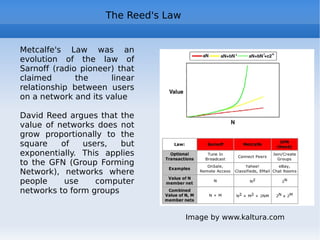
Program * Introduction, course program and start course tools  * New Web trends: the "old" Web and Web 2.0 * Web 2.0 in general: definition * What is a blog and web 2.0 contents  * What is a wiki, Wikipedia in theory and in practice * Technical Web 2.0 Specifications (Ajax, RSS, …), mash-up  * Tagging and Social bookmarking  * The Google World: the algorithm, docs.google, Android, ... * Web 2.0 and Social characteristics, social networks (Flickr, facebook, …) * Gov 2.0 Open Gov and Open Data Some theory: * Metcalfe's Law, Reed and Pareto, power curves, long tail, network theory, ...
Presentation Course organization Web 2.0 experiences: blogs, wikis and social networks (R/W) Use of 2.0 tools for the course:  starting  from the wiki  http://camerinoweb20.wikispaces.com/   Evaluation based on  - your work during lessons  - exercises on web sites of the course - final presentation of your work (use “understandable”  nickname!) Language: if you have any doubt or any question: please stop me!
Presentation Facebook
MySpace
Linkedin
Twitter
Flickr
YouTube
Slideshare
Del.icio.us Blogger
Wordpress
Wikimedia
Wikipedia
Google Docs
Google Earth
iPhone
iPad How many of you use ... self-presentation
the Web Intro:  http://www.youtube.com/watch?v=-4CV05HyAbM   (Information Revolution) http://www.worldofends.com The Internet isn't complicated
The Internet isn't a thing. It's an agreement
The Internet is stupid
Adding value to the Internet lowers its value
All the Internet's value grows on its edges
Money moves to the suburbs
The Internet has three virtues: a. No one owns it b. Everyone can use it c. Anyone can improve it
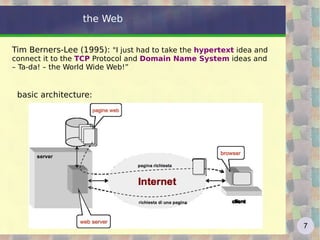
the Web Tim Berners-Lee (1995):  "I just had to take the  hypertext  idea and connect it to the  TCP  Protocol and  Domain Name System  ideas and – Ta-da! – the World Wide Web!” basic architecture:
the Web today http://www.internetworldstats.com/stats.htm   http://www.hitwise.com/us/resources/data-center   Net Neutrality: - "dumb, minimal network" with smart terminals, vs. the previous paradigm of the smart network with dumb terminals - no data discrimination (all bits are equal) - access freedom http://en.wikipedia.org/wiki/Network_neutrality   http://www.savetheinternet.com/
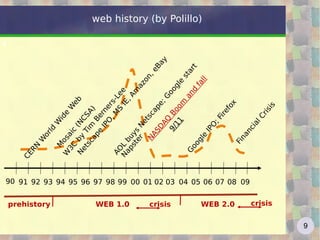
web history (by Polillo) CERN World Wide Web  Mosaic (NCSA) W3C by Tim Berners-Lee  Netscape IPO, MS IE, Amazon, eBay NASDAQ Boom and fall Google IPO; Firefox WEB 1.0 WEB 2.0 crisis prehistory AOL buys Netscape; Google start 9/11 Napster Financial Crisis  crisis 91 92 93 94 95 96 97 98 99 00 01 02 03 04 05 06 07 08 09 90
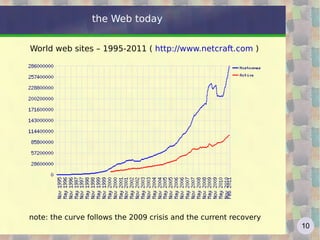
the Web today World web sites – 1995-2011 (  http://www.netcraft.com  )  note: the curve follows the 2009 crisis and the current recovery
the Web today slides by Mary Meeker (Morgan Stanley) on Internet Trends  http://www.scribd.com/doc/42793400/Internet-Trends-Presentation (have pdf or YouTube) and  http://www.slideshare.net/guest1222bdb/mary-meeker-april-2010-internet-trends
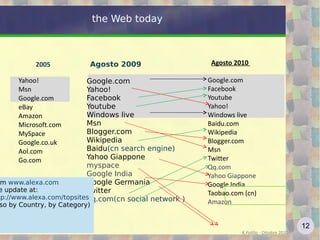
the Web today Agosto 2009 Google.com
Yahoo!
Facebook
Youtube
Windows live
Msn
Blogger.com
Wikipedia
Baidu 
(cn search engine)
Yahoo Giappone
myspace
Google India
Google Germania
Twitter
qq.com 
(cn social network ) R.Polillo - Ottobre 2010 from  www.alexa.com see update at: http://www.alexa.com/topsites   (also by Country, by Category) Agosto 2010  Google.com
Facebook
Youtube
Yahoo!
Windows live
Baidu.com
Wikipedia
Blogger.com
Msn
Twitter
Qq.com
Yahoo Giappone
Google India
Taobao.com (cn)
Amazon Yahoo!
Msn
Google.com
eBay
Amazon
Microsoft.com
MySpace
Google.co.uk
Aol.com
Go.com  2005
Web 2.0 definition The term “Web 2.0” was first used at O’Reilly Media  Web 2.0 Conference  (October 2004) It 's a catchword/slogan, which identifies a major paradigm shift in web “ Web 2.0 is the business revolution in the computer industry caused by the move to the Internet as a platform, and an attempt to understand the rules for success on that new platform”  Tim O’Reilly
Web 2.0 definition From  http://en.wikipedia.org/wiki/Web_2.0  :  “ Web 2.0 describes the changing trends in the use of World Wide Web technology and web design that aim to enhance  creativity , secure information sharing,  collaboration  and functionality of the web. Web 2.0 concepts have led to the development and evolution of web-based communities and hosted services, such as social-network sites, video sharing sites, wikis, blogs, and folksonomies.” Pronounce?? 2 - point|dot – O|0 http://www.zdnet.com/blog/saas/20-pronounced-two-point-oh/290
Web 2.0 definition still from Wikipedia: Web 2.0 can be described in 3 parts which are as follows: Rich Internet Application ( RIA ) - It defines the experience brought from desktop to browser ... Some buzz words related to RIA are AJAX and Flash
Service-oriented Architecture ( SOA ) - It is a key piece in Web 2.0 which defines how Web 2.0 applications expose its functionality so that other applications can leverage and integrate the functionality providing a set of much richer applications (Examples are: Feeds, RSS, Web Services, Mash-ups)
Social Web  - It defines how Web 2.0 tend to interact much more with the end user and making the end user an integral part.
“ Web 1.0 was all about connecting people. It was an interactive space, and I think Web 2.0 is of course a piece of jargon, nobody even knows what it means. If Web 2.0 for you is blogs and wikis, then that is people to people. But that was what the Web was supposed to be all along. And in fact, you know, this Web 2.0, quote, it means using the standards which have been produced by all these people working on Web 1.0. It means using the document object model, it means for HTML and SVG and so on, it's using HTTP, so it's building stuff using the Web standards, plus Javascript of course. So Web 2.0 for some people it means moving some of the thinking client side so making it more immediate, but the idea of the Web as interaction between people is really what the Web is. That was what it was designed to be as a collaborative space where people can interact.” http://www-128.ibm.com/developerworks/podcast/dwi/cm-int082206.txt Web 2.0 according to Tim Berners Lee
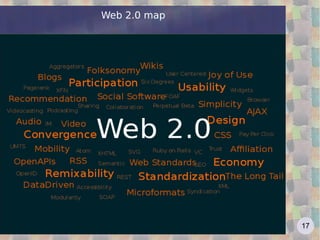
Web 2.0 map
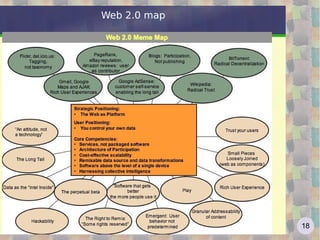
Web 2.0 map
Web 2.0 meme map A  meme , a relatively newly coined term, identifies ideas or beliefs that are transmitted from one person or group of people to another. The concept comes from an analogy: as genes transmit biological information, memes can be said to transmit idea and belief information. The word meme originated with Dawkins' 1976 book  The Selfish Gene . To emphasize commonality with genes, Dawkins coined the term "meme" by shortening "mimeme", which derives from the Greek word mimema ("something imitated")
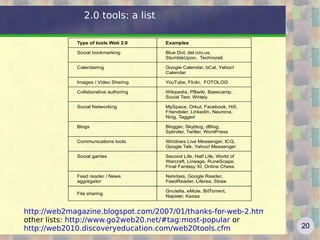
http://web2magazine.blogspot.com/2007/01/thanks-for-web-2.html other lists:  http://www.go2web20.net/#tag:most-popular  or  http://web2010.discoveryeducation.com/web20tools.cfm   2.0 tools: a list
Web 2.0 general characteristics The most important features of Web 2.0 are: Web 2.0 sites are platforms that allow a strong  interaction  between users
Users benefit from  innovative services  using powerful graphical interfaces
Users provide the value added by the  self-production of contents  and knowledge sharing. In this way we exploit and enhance the collective intelligence, real engine of Web 2.0
The services offered are  constantly updated , so as to quickly correct mistakes and add new features as they become available (this feature is also called " perpetual beta ")
Web 2.0 general characteristics From a functional point of view, what characterizes Web 2.0 is basically the central and  leading role of the  user  by user becomes more and more a controller of your data and navigating content, making the same producer of information and, simultaneously, the main Judge of the products from other All the great success stories of Web 2.0 show a true reversal of the paradigms of communication that our generation was used to. The communication " one to many " moves to " many to many "  video “The Machine is  us/ing us” http://www.youtube.com/watch?v=6gmP4nk0EOE
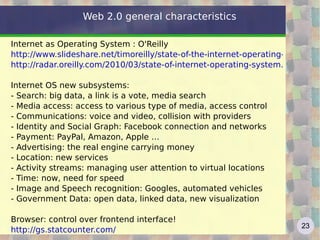
Web 2.0 general characteristics Internet as Operating System : O'Reilly http://www.slideshare.net/timoreilly/state-of-the-internet-operating-system-web2-expo10 http://radar.oreilly.com/2010/03/state-of-internet-operating-system.html   Internet OS new subsystems: - Search: big data, a link is a vote, media search - Media access: access to various type of media, access control - Communications: voice and video, collision with providers - Identity and Social Graph: Facebook connection and networks - Payment: PayPal, Amazon, Apple … - Advertising: the real engine carrying money - Location: new services - Activity streams: managing user attention to virtual locations - Time: now, need for speed - Image and Speech recognition: Googles, automated vehicles - Government Data: open data, linked data, new visualization Browser: control over frontend interface!  http://gs.statcounter.com/
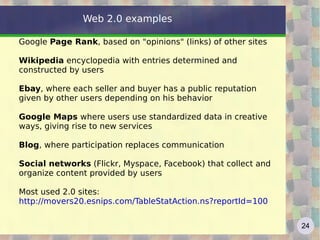
Web 2.0 examples Google  Page Rank , based on "opinions" (links) of other sites Wikipedia  encyclopedia with entries determined and constructed by users Ebay , where each seller and buyer has a public reputation given by other users depending on his behavior Google Maps  where users use standardized data in creative ways, giving rise to new services Blog , where participation replaces communication Social networks  (Flickr, Myspace, Facebook) that collect and organize content provided by users Most used 2.0 sites: http://movers20.esnips.com/TableStatAction.ns?reportId=100
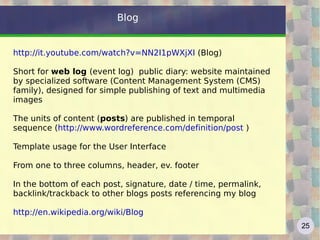
Blog http://it.youtube.com/watch?v=NN2I1pWXjXI  (Blog) Short for  web log  (event log)  public diary: website maintained by specialized software (Content Management System (CMS) family), designed for simple publishing of text and multimedia images The units of content ( posts ) are published in temporal sequence ( http://www.wordreference.com/definition/post  ) Template usage for the User Interface From one to three columns, header, ev. footer In the bottom of each post, signature, date / time, permalink, b acklink/trackback to other blogs posts referencing my blog http://en.wikipedia.org/wiki/Blog
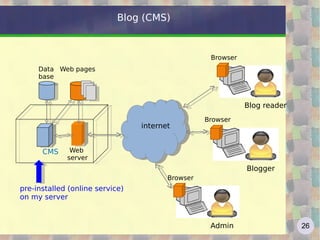
Blog (CMS) HTTP internet Web  server CMS Data base Web pages Browser Blog reader Browser Blogger Browser Admin pre-installed (online service)
on my server
Blogs use RSS feeds (see below) and “tagging” (see below) Installed on your server or on existing website (free / fee) Born in 1997, exploded in 2002, the number today? the most complete survey -who, what, how: http://www.technorati.com/blogging/state-of-the-blogosphere/   http://it.blogbabel.com/metrics/   http://vaccaricarlo.wordpress.com  (see stats) http://camerino20.wordpress.com   Blog
Bloggers' Code of Conduct 1.Take responsibility not just for your own words, but for the  comments you allow on your blog. 2. Label your tolerance level for abusive comments. 3. Consider eliminating anonymous comments. 4. Ignore the trolls. 5. Take the conversation offline, and talk directly, or find an intermediary who can do so. 6. If you know someone who is behaving badly, tell them so. 7. Don't say anything online that you wouldn't say in person. (Proposed by Tim O’Reilly, 2007  http://en.wikipedia.org/wiki/Blogger%27s_Code_of_Conduct)
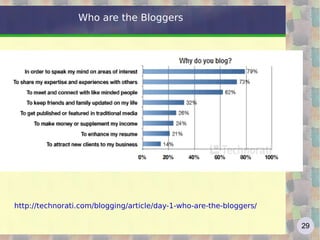
Who are the Bloggers http://technorati.com/blogging/article/day-1-who-are-the-bloggers/
Corporate Blog Corporate blog is a blog written and edited by a company to share information about their products and services Unlike a website, where communication is directed to users, a corporate blog is to exchange bidirectional. In fact, a corporate blog is a new marketing model: tools born for  consumer  used for  business A corporate blog is a way by which producer and consumer of information. The very fact of opening a blog means to start a process of analysis of company weaknesses http://googleblog.blogspot.com/   http://blog.ducati.com/  : new tools! http://mariosundar.wordpress.com/2008/05/05/top-15-corporate-blogs-ranked-may-2008/
Corporate Blog 10 Tips for Corporate Blogging http://mashable.com/2010/07/20/corporate-blogging-tips/   1. Establish a Content Theme and Editorial Guidelines 2. Choose a Blogging Team and Process 3. Humanize Your Company 4. Avoid PR and Marketing 5. Welcome Criticism 6. Outline a Comment Policy 7. Get Social 8. Promote Your Blog 9. Monitor Mentions and Feedback 10. Track Everything
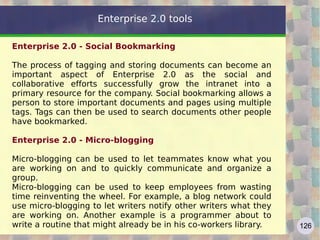
Microblogging Constant publication of short contents in the network, in the form of text messages (usually up to 140-200 bytes), images, video, MP3 audio, but also bookmarks, citations and notes These contents are published on a social networking site, visible to everyone or only to people in your community http://en.wikipedia.org/wiki/Micro-blogging   http://www.twitter.com   http://it.youtube.com/watch?v=ddO9idmax0o   (Twitter)
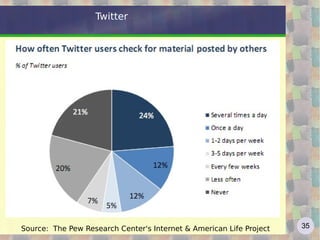
Twitter Started in 2006 Growth: TPD (tweets per day) 2007 – 40k 2008 – 1M 2010 – 65M TPS tweets per second record 6939 1.1.2011 (Japan time 00:01) sport record: Super Bowl 2011 4064 TPS http://blog.twitter.com/2011/01/celebrating-new-year-with-new-tweet.html   RT - retweet DM - direct message @user - to mention or reply to user # - hashtag also for “micro-meme” URL shortening to fit in 140 bytes used in “twitter revolutions” Egypt 2011, Tunisia 2010-2011, Iran 2009
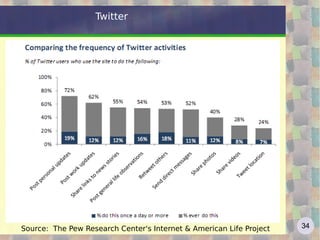
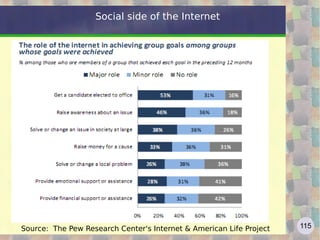
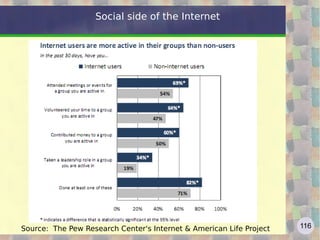
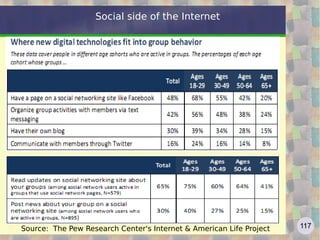
Twitter Source:  The Pew Research Center's Internet & American Life Project
User Generated Content ! (Read/Write Web) The user becomes an “active” protagonist  Now it's important not only  read  the Web but also know how to  write  the Web (Jenkins): is this the new Digital Divide? http://en.wikipedia.org/wiki/User-generated_content   two billion users, more than 200 million web sites (blogs included...) Content re-use and aggregation Web 2.0 contents - 1
Re-use Contents do not finish their life cycle when they are first published online, but thanks to re-use, are used for third party service, coupled with similar content, submitted for discussion or evaluation, tagged and socially shared, etc. . The main reuse is the  aggregation  of online content: join content from different sources The technology that aggregates is the  syndication , namely the provision of contents from Web sites and online services. The main form of syndication is the Really Simple Syndication ( RSS ) a system for distributing content via XML files, allowing to constantly update users of the service each time the content is updated Web 2.0 contents - 2
Folksonomy - Tags and metadata In Web 2.0,  tag  means that labels are posted up to content, characterizing it by categories and keywords The idea behind the tag is simple: ensure that their content becomes searchable, linkable and useful based on semantic parameters (qualitative and quantitative) defined by users 2.0 applications allow to link to any content one or more tags, selected by the user. This happens for all types of content, from text (blogs) to photographs, to the videos on YouTube. Make categorization of sites using keywords selected by users Overlapped associative relationship using Tag – More Flexible Natural Information Retrieval Using User’s Activities Example: Tagging of  Flickr  or  del.icio.us Web 2.0 contents - 3
Folksonomy and Semantic Web The idea of providing a system of classification (taxonomy) shared, open and bottom-up for the Net contents, is clearly at odds with the principles of the Semantic Web, whose goal is to build an order from the top Tagging instead produces, in a completely anarchic and efficient way, a folksonomy (neologism formed from the combination of folk (people) and taxonomy (classification)), whose goal is not to produce the absolute order, but the "best disorder possible ", ie one that meets the searches and knows how to adapt to an evolving set of content, constantly changing its system of classification according to mental model emerging among the users http://en.wikipedia.org/wiki/Semantic_Web   Web 2.0 contents - 4
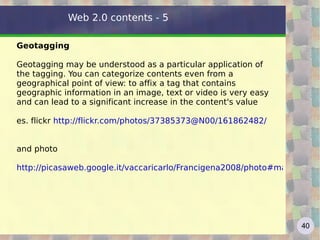
Geotagging Geotagging may be understood as a particular application of the tagging. You can categorize contents even from a geographical point of view: to affix a tag that contains geographic information in an image, text or video is very easy and can lead to a significant increase in the content's value  es. flickr  http://flickr.com/photos/37385373@N00/161862482/   and photo  http://picasaweb.google.it/vaccaricarlo/Francigena2008/photo#map   Web 2.0 contents - 5
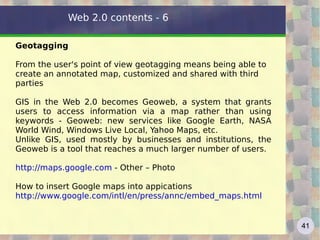
Geotagging From the user's point of view geotagging means being able to create an annotated map, customized and shared with third parties GIS in the Web 2.0 becomes Geoweb, a system that grants users to access information via a map rather than using keywords - Geoweb: new services like Google Earth, NASA World Wind, Windows Live Local, Yahoo Maps, etc.  Unlike GIS, used mostly by businesses and institutions, the Geoweb is a tool that reaches a much larger number of users. http://maps.google.com  - Other – Photo  How to insert Google maps into appications http://www.google.com/intl/en/press/annc/embed_maps.html Web 2.0 contents - 6
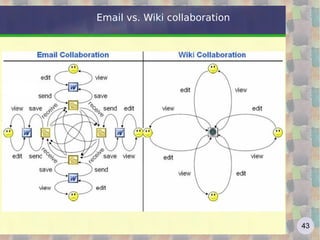
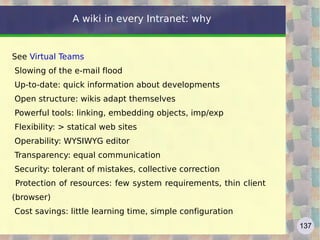
Wiki: introduction Wikis, invented in 1995 by  Ward Cunningham , have emerged as one of the simplest means to collaborate online. A wiki, a term in the Hawaiian language that means "quick" or "very fast", is a web-based environment for sharing and managing documents and files where users can view and add content, but also to modify existing content posted by other users http://www.youtube.com/watch?v=-dnL00TdmLY   (wiki) The term wiki also refers to the software used to create a wiki website (Wikipedia is the most famous website based on wiki technology) A wiki enables documents to be written collaboratively in a simple language using a web browser Wiki technology is the easiest way by which web pages can be created and updated
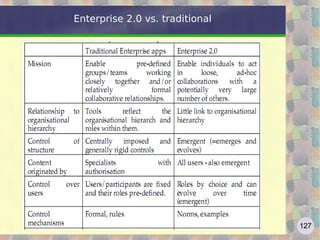
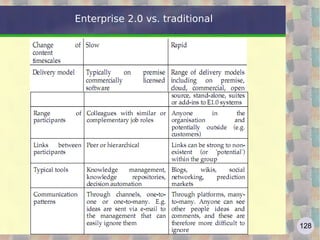
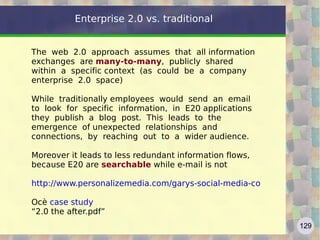
Email vs. Wiki collaboration
Wiki and wiki farms  Cunningham's  Top Ten Wiki Engines  and  Wiki Farms Wiki farms host wikis, often for free: http://en.wikipedia.org/wiki/Wiki_farm   http://en.wikipedia.org/wiki/Comparison_of_wiki_farms Wikia, founded by Jimmy Wales, Wikipedia founder (2011: 165k communities hosted, 2M users, 350M pages/month)), started for free, now  freemium  (remove ads) http://www.wikia.com/wiki/Wikia see  http://lostpedia.wikia.com/wiki/Main_Page   http://uncyclopedia.wikia.com/wiki/Main_Page   ;-) about 1 million wikis managed by  www.wikispaces.com
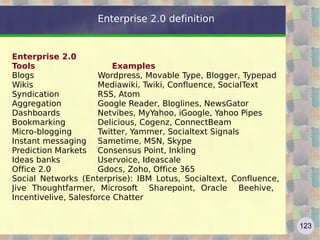
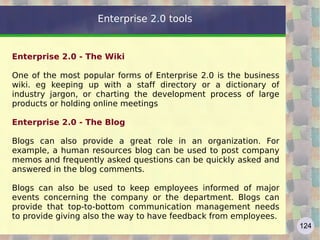
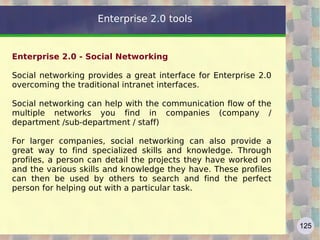
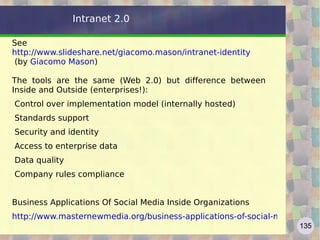
Enterprise Wiki Wikis can be a valuable support to the work activities. So a company can acquire its own wiki platforms, providing a service wiki for use by employees. The use of wikis can be a useful tool for managing business information, customers, projects and document workflow. http://www.wiki.istat.it  e  http://wiki.istat.it   http://www1.unece.org/stat/platform/display/msis/Software+Sharing http://www.essnet-portal.eu/project-information/core
Wikipedia: introduction Wikipedia is one of the major Web 2.0 sites Wikipedia was created in 2001 with the goal of an encyclopedia free and reliable. Jimmy Wales, founder of the project, spoke of "an effort to create and distribute a free encyclopedia of the highest possible quality to every single person on the planet in their own language." The result went beyond all expectations: Wikipedia, with over 18 million entries and 20 million registered users, is the largest collection of human knowledge. Wikipedia exists in over 270 different languages and receives over 60 million hits per day http://en.wikipedia.org/wiki/Wikipedia
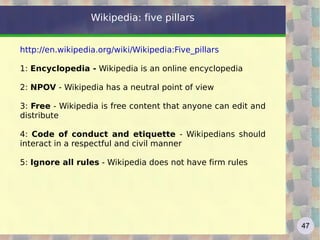
Wikipedia: five pillars http://en.wikipedia.org/wiki/Wikipedia:Five_pillars   1:  Encyclopedia -  Wikipedia is an online encyclopedia  2:  NPOV  - Wikipedia has a neutral point of view 3:  Free  - Wikipedia is free content that anyone can edit and distribute 4:  Code of conduct and etiquette  - Wikipedians should interact in a respectful and civil manner 5:  Ignore all rules  - Wikipedia does not have firm rules
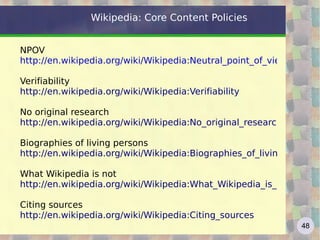
Wikipedia: Core Content Policies NPOV http://en.wikipedia.org/wiki/Wikipedia:Neutral_point_of_view Verifiability http://en.wikipedia.org/wiki/Wikipedia:Verifiability No original research http://en.wikipedia.org/wiki/Wikipedia:No_original_research Biographies of living persons http://en.wikipedia.org/wiki/Wikipedia:Biographies_of_living_persons   What Wikipedia is not http://en.wikipedia.org/wiki/Wikipedia:What_Wikipedia_is_not   Citing sources http://en.wikipedia.org/wiki/Wikipedia:Citing_sources
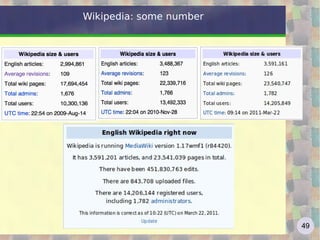
Wikipedia: some number
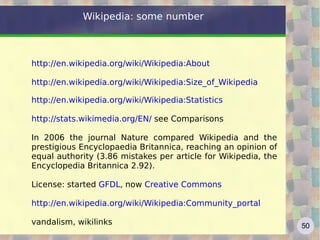
Wikipedia: some number http://en.wikipedia.org/wiki/Wikipedia:About   http://en.wikipedia.org/wiki/Wikipedia:Size_of_Wikipedia   http://en.wikipedia.org/wiki/Wikipedia:Statistics   http://stats.wikimedia.org/EN/  see Comparisons  In 2006 the journal Nature compared Wikipedia and the prestigious Encyclopaedia Britannica, reaching an opinion of equal authority (3.86 mistakes per article for Wikipedia, the Encyclopedia Britannica 2.92). License: started  GFDL , now  Creative Commons http://en.wikipedia.org/wiki/Wikipedia:Community_portal   vandalism, wikilinks
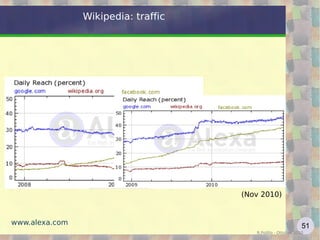
Wikipedia: traffic R.Polillo - Ottobre 2010 www.alexa.com (Nov 2010)
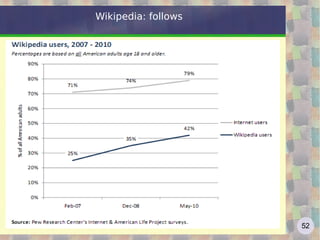
Wikipedia: follows
Wikipedia: follows "The point is not that each entry is probabilistic, but that the entire encyclopedia behave probabilistic ... To put it another way, in the Britannica quality varies from, say, 5 to 9 with an average of 7. In Wikipedia ranges from 0 to 10, with an average of, say, 5. But given that Wikipedia has ten times the voices of the Britannica, you have a better chance of finding an entry on Wikipedia sensible on any topic " "What makes Wikipedia really extraordinary is the fact that improves over time: it treats itself as if its huge and growing army of workers was an immune system" "The true miracle of Wikipedia is that this system, open to contributions from non professional users, does not collapse into anarchy" C. Anderson,  The Long Tail Wikipedia beneath the surface http://www.youtube.com/watch?v=QY8otRh1QPc
Wikipedia: follows Recent changes: http://en.wikipedia.org/w/index.php?title=Special:RecentChanges&hidebots=0&hideminor=0&hideliu=1 Who is modifying Wikipedia? (2.0 application) http://www.lkozma.net/wpv/index.html   Other Wikimedia projects http://en.wikipedia.org/wiki/Wikimedia_Foundation#Projects   Humour http://en.wikipedia.org/wiki/Wikipedia:Silly_Things   Vandalism http://en.wikipedia.org/wiki/Wikipedia:Vandalism   Wikipedia quality is not a surprise: as Eric Raymond says "given enough eyeballs, all bugs are shallow." http://en.wikipedia.org/wiki/Linus%27_Law
push vs. pull Push techologies : Es.: newsletter, mailinglist (subscribe / unsubscribe) Action taken by the server, which sends the messages to the recipients Pull technologies: Es.: Feed RSS, podcast, twitter , … Action taken by the client, which queries the server to see if there are new messages
pull benefits Can have a single "aggregator" for a variety of sources
Aggregator can filter messages from different sources, according to some criterion
No spam: the client must communicate its address
To stop the service the client should not communicate anything to the sources
The client is not "disturbed" to each new messages ->   order, security, efficiency
Web Feed Web feed: informational content, expressed in a stable form, interchangeable between applications Feeds are available from information sources (eg blogs, news sites, ...) and harvested by aggregators (or RSS readers) After the user subscription to a collection of feeds, the aggregator sends it to him on request http://en.wikipedia.org/wiki/Web_feed
RSS RSS (acronym for RDF Site Summary or for Really Simple Syndication) is based on XML, from which inherits simplicity, extensibility and flexibility. http://www.youtube.com/watch?v=0klgLsSxGsU  (RSS) Almost alternative to traditional Web page RSS since 1999, Atom since 2004 Benefits compared to newsletter: possibility of having a single aggregator for various sources
avoid spam
receive real-time information selected and customized Aggregators also for browsers: Firefox bookmarks Live, WizzRSS and other plugins https://addons.mozilla.org/en-US/firefox/search/?q=rss
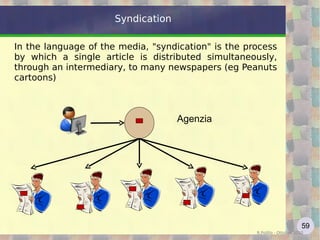
Syndication In the language of the media, "syndication" is the process by which a single article is distributed simultaneously, through an intermediary, to many newspapers (eg Peanuts cartoons) R.Polillo - Ottobre 2010 Agenzia
Aggregators: Netvibes Broadband network and billions of Web pages are valuable resources only if used carefully and intelligently. So we have to optimize time, streamlining navigation path and not get lost in the cognitive overload that often becomes chaos. For example, Netvibes allows you to organize information sources into customized grids,  now available on mobile The personalized page, easy to implement with simple drag and drop, let you keep an eye on the updates of sites of interest, mail, news, etc.. We should not worry about going to look for information on the web but these are coming in automatically, to our aggregator. http://www.netvibes.com/
Aggregators Google Reader: RSS and Atom feed aggregator, since 2005 To subscribe to a feed: URL of the feed (or the site that produces it) or search for feeds using keywords (or tags) Subscribing to RSS thematic groups of default (link "Find and search feeds ...) Google Reader has recently achieved a very cool feature, the plug-in Gears, which allows you to read feeds offline (good also for Gmail etc.) Access from mobile, including iPhone http://www.google.com/reader/m   http://en.wikipedia.org/wiki/Google_Reader
Aggregators http://www.igoogle.com   , started from 2005  Personal start page: web feeds, bookmarks, gadgets http://en.wikipedia.org/wiki/IGoogle http://news.google.com   : news aggregator since 2002 Automatically aggregates information taken from over thousand of sources of information around the world by grouping items of similar content Available for various regions and languages News selected by computer algorithms, information sources are chosen by Google, the criteria are not known
Tagging Tagging is the issuance of one or more keywords ( tags , in fact) to files on online platforms for sharing (documents, video, audio, etc) as YouTube videos or Flickr photos Tagging comes from different needs including the need to manage the huge amount of data online: in web 1.0, and even more in 2.0, information overload (cognitive overload) is an important issue and a classification is necessary for retrieving relevant information.
Tagging The tagging can be seen as an evolution of classical taxonomy: from taxonomy to  folksonomy  where folksonomy is a neologism that means a more collaborative categorization using freely chosen keywords. It's a term which in effect belongs to the 2.0 world: in its definition, it refers to the methodology used by groups of people who work voluntarily to organize information into categories available through the web http://en.wikipedia.org/wiki/Folksonomy
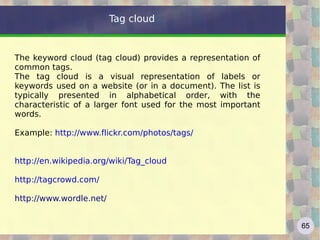
Tag cloud The keyword cloud (tag cloud) provides a representation of common tags. The tag cloud is a visual representation of labels or keywords used on a website (or in a document). The list is typically presented in alphabetical order, with the characteristic of a larger font used for the most important words. Example:  http://www.flickr.com/photos/tags/   http://en.wikipedia.org/wiki/Tag_cloud http://tagcrowd.com/   http://www.wordle.net/
Web 2.0 techniques From AJAX: HTML liberation from - Post / Get - asynchronous model (stateless)  http://gmail.com   with the "WIMP" (windows, icons, menus and pointers) GUI, the Web comes close to desktop applications and Rich Internet Applications (RIA) arise Technical tools: AJAX (Asynchronous JavaScript and XML)
ATOM - RSS
API integration - interaction
MASH-UP: Hybrid - Plugins (XUL!)
many links  http://www.onstrat.com/web2/
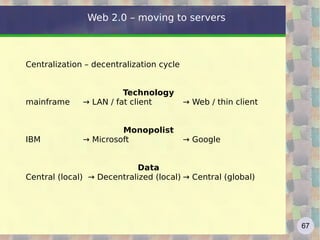
Web 2.0 – moving to servers Centralization – decentralization cycle Technology mainframe  ->  LAN / fat client   -> Web / thin client Monopolist IBM  -> Microsoft   -> Google  Data Central (local)  -> Decentralized (local) -> Central (global)
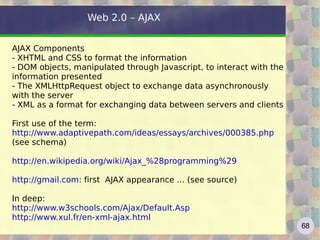
Web 2.0 – AJAX AJAX Components - XHTML and CSS to format the information - DOM objects, manipulated through Javascript, to interact with the information presented - The XMLHttpRequest object to exchange data asynchronously with the server - XML as a format for exchanging data between servers and clients First use of the term: http://www.adaptivepath.com/ideas/essays/archives/000385.php   (see schema) http://en.wikipedia.org/wiki/Ajax_%28programming%29   http://gmail.com : first  AJAX appearance ... (see source) In deep:  http://www.w3schools.com/Ajax/Default.Asp   http://www.xul.fr/en-xml-ajax.html
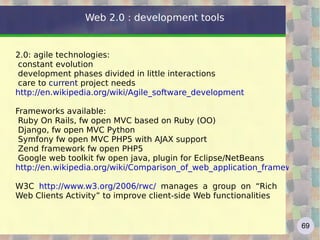
Web 2.0 : development tools 2.0: agile technologies:  constant evolution
development phases divided in little interactions
care to  current  project needs http://en.wikipedia.org/wiki/Agile_software_development   Frameworks available: Ruby On Rails, fw open MVC based on Ruby (OO)
Django, fw open MVC Python
Symfony fw open MVC PHP5 with AJAX support
Zend framework fw open PHP5
Google web toolkit fw open java, plugin for Eclipse/NetBeans http://en.wikipedia.org/wiki/Comparison_of_web_application_frameworks   W3C  http://www.w3.org/2006/rwc/  manages a group on “Rich Web Clients Activity” to improve client-side Web functionalities
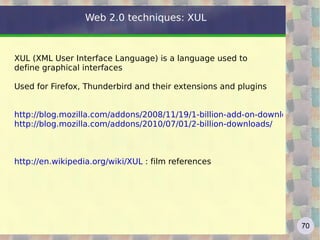
Web 2.0 techniques: XUL XUL (XML User Interface Language) is a language used to define graphical interfaces Used for Firefox, Thunderbird and their extensions and plugins http://blog.mozilla.com/addons/2008/11/19/1-billion-add-on-downloads/ http://blog.mozilla.com/addons/2010/07/01/2-billion-downloads/   http://en.wikipedia.org/wiki/XUL  : film references
Web 2.0 : mash-up Meaning:  mash  = mixture, medley   to mash  = to crush, to squeeze  (term used even in music) Web application that integrates dynamic content or services from multiple sources (eg RSS or via API) to create a new service http://en.wikipedia.org/wiki/Mashup_(web_application_hybrid) (why portal |= mashup) a good presentation:   http://www.slideshare.net/valicac/mashups-87355#slideshow_stats (choose the bes t)
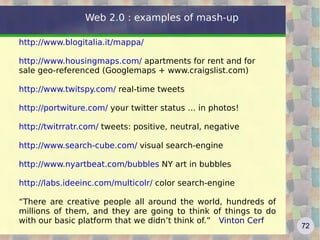
Web 2.0 : examples of mash-up http://www.blogitalia.it/mappa/ http://www.housingmaps.com/  a partments for rent and for sale geo-referenced (Googlemaps + www.craigslist.com) http://www.twitspy.com/  real-time tweets http://portwiture.com/  your twitter status … in photos! http://twitrratr.com/  tweets: positive, neutral, negative http://www.search-cube.com/  visual search-engine http://www.nyartbeat.com/bubbles  NY art in bubbles http://labs.ideeinc.com/multicolr/  color search-engine “ There are creative people all around the world, hundreds of millions of them, and they are going to think of things to do with our basic platform that we didn’t think of.” Vinton Cerf
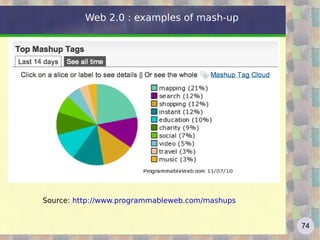
Web 2.0 : examples of mash-up http://pipes.yahoo.com/pipes/ MashMaker di Intel http://softwarecommunity.intel.com/articles/eng/1505.htm http://code.google.com/apis/gdata/basics.html   http://www.programmableweb.com/  “Keeping you up to date with APIs, mashup and the Web as a platform” Most popular mashups: http://www.programmableweb.com/mashups/directory/1?view=text   http://mashupawards.com/winners/
Web 2.0 : examples of mash-up Source:  http://www.programmableweb.com/mashups
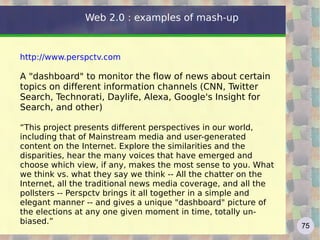
Web 2.0 : examples of mash-up http://www.perspctv.com   A "dashboard" to monitor the flow of news about certain topics on different information channels (CNN, Twitter Search, Technorati, Daylife, Alexa, Google's Insight for Search, and other) “ This project presents different perspectives in our world, including that of Mainstream media and user-generated content on the Internet. Explore the similarities and the disparities, hear the many voices that have emerged and choose which view, if any, makes the most sense to you. What we think vs. what they say we think -- All the chatter on the Internet, all the traditional news media coverage, and all the pollsters -- Perspctv brings it all together in a simple and elegant manner -- and gives a unique "dashboard" picture of the elections at any one given moment in time, totally un-biased.”
mash-up Strengths "Lightweight" application
(reduced code volume, low-cost application development)
Ease of application development
(availability of tools that do not require high technical skills - es.pipes)
Availability of large databases
Low (or no) cost of acquiring and updating data
Quick Set-up application
(time-to-market, possibility of quick prototyping)
mash-up Critical Dependence on data sources
(data quality, performance, availability and continuity of service, changes in service policies, stability ->  fragility, "the strength of its weakest link")
API standards and versioning
Intellectual property and copyright
("right to remix: to what extent?)
Privacy
(cross and filter data can generate problems not existing in the original data)
Mobilize web sites http://www.masternewmedia.org/how-to-mobilize-my-website-best-tools-to-convert-your-blog-into-a-mobile-site/   example:  http://ready.mobi/results.jsp?uri=http%3A%2F%2Fwww.istat.it&locale=en_EN   test about web sites appearance in mobile phones standard:  http://www.w3.org/TR/mobileOK-basic10-tests/
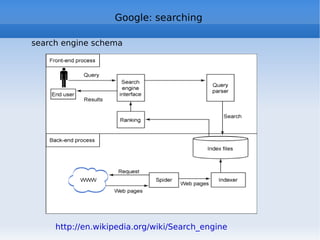
Google: searching http://techcrunch.com/2011/04/10/the-new-information-age/   Each search engine has three main components: - Crawler - Database - Interface and query software The crawler is a software program which surfs the net and brings the pages in the index. The crawler also takes note of the links it finds and uses them to gradually reach new pages with new links The index is a huge database where pages are stored with all metadata and where all the words are "reversed" by creating indexes / keys for each The interface receives the user's request, try to interpret it and passes the request to the "query processor" that works on the index
Google: searching search engine schema http://en.wikipedia.org/wiki/Search_engine
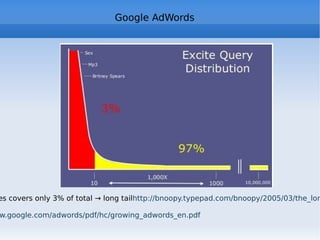
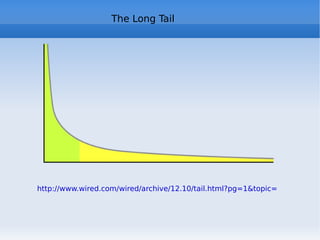
Google: searching The searches are usually very short: 20% use a word, almost 50% is composed of two or three words, only 5% more than six words Also the "searches" are distributed according to a "long tail" curve, approximately 50% of daily searches are unique. Do you know GoogleWhacking? About 90% of users use the first four engines: G Y AOL and Bing (G> 50%) The traffic on search engines has two peaks in the morning (in the office) and one in the evening (once returned home). The approx cost of acquiring a customer ranges from $ 70  mail advertising, online advertising to $ 50, $ 20 of the yellow pages up to $ 8 (!)for links related
Google: “old” searching First search engines:  Archie 1990 (ftp command line query) Veronica Gopher 1993 (search only documents title) WebCrawler 1994, the first to index the text of the pages. First  good  search engine: AltaVista (1995), born in DEC laboratories; thanks to Alpha 64bit processor it could launch a thousand crawler simultaneously. AltaVista answered the first year to 4 billion searches! Sold to Compaq, AltaVista was transformed into a portal  Yahoo! Born as "David's and Jerry's Guide to the WWW" with a directory approach (see archive.org), a great success thanks to the link with Netscape. Yahoo! used its own directory service and for the search it used outboard engine: OpenText, AltaVista, then Inktomi and Google. 2009: Yahoo! and Microsoft Bing http://ppcblog.com/search-history/   http://www.searchenginehistory.com/   http://www.wordstream.com/articles/internet-search-engines-history
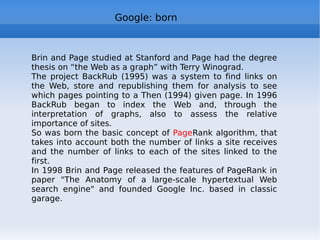
Google: born Brin and Page studied at Stanford and Page had the degree thesis on “the Web as a graph” with Terry Winograd. The project BackRub (1995) was a system to find links on the Web, store and republishing them for analysis to see which pages pointing to a  Then (1994)  given page. In 1996 BackRub began to index the Web and, through the interpretation of graphs, also to assess the relative importance of sites. So was born the basic concept of  Page Rank algorithm, that takes into account both the number of links a site receives and the number of links to each of the sites linked to the first. In 1998 Brin and Page released the features of PageRank in paper "The Anatomy of a large-scale hypertextual Web search engine" and founded Google Inc. based in classic garage.
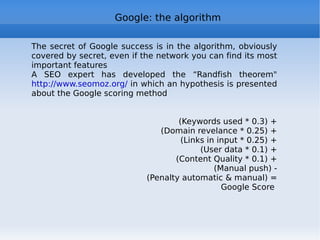
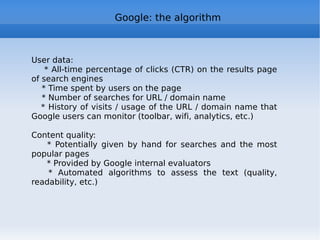
Google: the algorithm The secret of Google success is in the algorithm, obviously covered by secret, even if the network you can find its most important features A SEO expert has developed the “Randfish theorem"  http://www.seomoz.org/  in which an hypothesis is presented about the Google scoring method (Keywords used * 0.3) + (Domain revelance * 0.25) + (Links in input * 0.25) + (User data * 0.1) + (Content Quality * 0.1) + (Manual push) - (Penalty automatic & manual) = Google Score
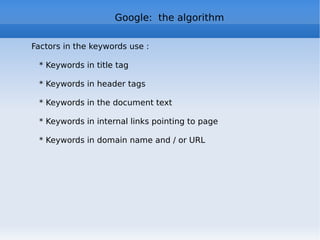
Google:  the algorithm Factors in the keywords use : * Keywords in title tag * Keywords in header tags * Keywords in the document text * Keywords in internal links pointing to page * Keywords in domain name and / or URL
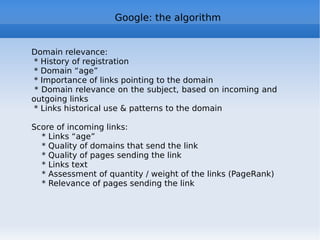
Google: the algorithm Domain relevance: * History of registration * Domain “age” * Importance of links pointing to the domain * Domain relevance on the subject, based on incoming and outgoing links  * Links historical use & patterns to the domain Score of incoming links: * Links “age” * Quality of domains that send the link * Quality of pages sending the link * Links text * Assessment of quantity / weight of the links (PageRank) * Relevance of pages sending the link
Google: the algorithm User data: * All-time percentage of clicks (CTR) on the results page of search engines * Time spent by users on the page * Number of searches for URL / domain name * History of visits / usage of the URL / domain name that Google users can monitor (toolbar, wifi, analytics, etc.) Content quality: * Potentially given by hand for searches and the most popular pages * Provided by Google internal evaluators  * Automated algorithms to assess the text (quality, readability, etc.)
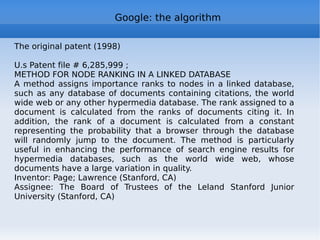
Google: the algorithm The original patent (1998) U.s Patent file # 6,285,999 ; METHOD FOR NODE RANKING IN A LINKED DATABASE A method assigns importance ranks to nodes in a linked database, such as any database of documents containing citations, the world wide web or any other hypermedia database. The rank assigned to a document is calculated from the ranks of documents citing it. In addition, the rank of a document is calculated from a constant representing the probability that a browser through the database will randomly jump to the document. The method is particularly useful in enhancing the performance of search engine results for hypermedia databases, such as the world wide web, whose documents have a large variation in quality.  Inventor: Page; Lawrence (Stanford, CA) Assignee: The Board of Trustees of the Leland Stanford Junior University (Stanford, CA)
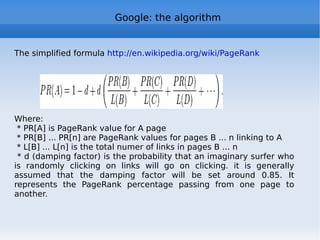
Google: the algorithm The simplified formula  http://en.wikipedia.org/wiki/PageRank   Where: * PR[A] is PageRank value for A page * PR[B] ... PR[n] are PageRank values for pages B ... n linking to A  * L[B] ... L[n] is the total numer of links in pages B ... n  * d (damping factor) is the probability that an imaginary surfer who is randomly clicking on links will go on clicking. it is generally assumed that the damping factor will be set around 0.85. It represents the PageRank percentage passing from one page to another.
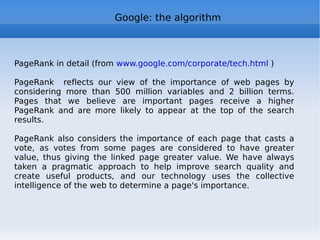
Google: the algorithm  PageRank in detail (from  www.google.com/corporate/tech.html  ) PageRank  reflects our view of the importance of web pages by considering more than 500 million variables and 2 billion terms. Pages that we believe are important pages receive a higher PageRank and are more likely to appear at the top of the search results. PageRank also considers the importance of each page that casts a vote, as votes from some pages are considered to have greater value, thus giving the linked page greater value. We have always taken a pragmatic approach to help improve search quality and create useful products, and our technology uses the collective intelligence of the web to determine a page's importance.
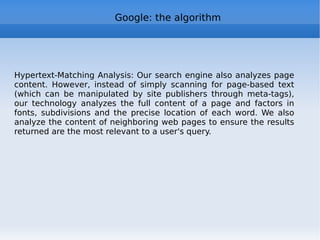
Google: the algorithm Hypertext-Matching Analysis: Our search engine also analyzes page content. However, instead of simply scanning for page-based text (which can be manipulated by site publishers through meta-tags), our technology analyzes the full content of a page and factors in fonts, subdivisions and the precise location of each word. We also analyze the content of neighboring web pages to ensure the results returned are the most relevant to a user's query.

Web 2.0: a course

  • 1.
    Web 2.0 blog, wiki, tag, social network: what are they, how to use them and why they are important
  • 2.
    This material isdistributed under the Creative Commons "Attribution - NonCommercial - Share Alike - 3.0", available at http://creativecommons.org/licenses/by-nc-sa/3.0/ . Part of the slides is the result of a welcome distance collaboration with prof. Roberto Polillo, University Milan Bicocca ( http://www.rpolillo.it )
  • 3.
    Program * Introduction,course program and start course tools * New Web trends: the "old" Web and Web 2.0 * Web 2.0 in general: definition * What is a blog and web 2.0 contents * What is a wiki, Wikipedia in theory and in practice * Technical Web 2.0 Specifications (Ajax, RSS, …), mash-up * Tagging and Social bookmarking * The Google World: the algorithm, docs.google, Android, ... * Web 2.0 and Social characteristics, social networks (Flickr, facebook, …) * Gov 2.0 Open Gov and Open Data Some theory: * Metcalfe's Law, Reed and Pareto, power curves, long tail, network theory, ...
  • 4.
    Presentation Course organizationWeb 2.0 experiences: blogs, wikis and social networks (R/W) Use of 2.0 tools for the course: starting from the wiki http://camerinoweb20.wikispaces.com/ Evaluation based on - your work during lessons - exercises on web sites of the course - final presentation of your work (use “understandable” nickname!) Language: if you have any doubt or any question: please stop me!
  • 5.
  • 6.
  • 7.
  • 8.
  • 9.
  • 10.
  • 11.
  • 12.
  • 13.
  • 14.
  • 15.
  • 16.
  • 17.
  • 18.
  • 19.
    iPad How manyof you use ... self-presentation
  • 20.
    the Web Intro: http://www.youtube.com/watch?v=-4CV05HyAbM (Information Revolution) http://www.worldofends.com The Internet isn't complicated
  • 21.
    The Internet isn'ta thing. It's an agreement
  • 22.
  • 23.
    Adding value tothe Internet lowers its value
  • 24.
    All the Internet'svalue grows on its edges
  • 25.
    Money moves tothe suburbs
  • 26.
    The Internet hasthree virtues: a. No one owns it b. Everyone can use it c. Anyone can improve it
  • 27.
    the Web TimBerners-Lee (1995): "I just had to take the hypertext idea and connect it to the TCP Protocol and Domain Name System ideas and – Ta-da! – the World Wide Web!” basic architecture:
  • 28.
    the Web todayhttp://www.internetworldstats.com/stats.htm http://www.hitwise.com/us/resources/data-center Net Neutrality: - "dumb, minimal network" with smart terminals, vs. the previous paradigm of the smart network with dumb terminals - no data discrimination (all bits are equal) - access freedom http://en.wikipedia.org/wiki/Network_neutrality http://www.savetheinternet.com/
  • 29.
    web history (byPolillo) CERN World Wide Web Mosaic (NCSA) W3C by Tim Berners-Lee Netscape IPO, MS IE, Amazon, eBay NASDAQ Boom and fall Google IPO; Firefox WEB 1.0 WEB 2.0 crisis prehistory AOL buys Netscape; Google start 9/11 Napster Financial Crisis crisis 91 92 93 94 95 96 97 98 99 00 01 02 03 04 05 06 07 08 09 90
  • 30.
    the Web todayWorld web sites – 1995-2011 ( http://www.netcraft.com ) note: the curve follows the 2009 crisis and the current recovery
  • 31.
    the Web todayslides by Mary Meeker (Morgan Stanley) on Internet Trends http://www.scribd.com/doc/42793400/Internet-Trends-Presentation (have pdf or YouTube) and http://www.slideshare.net/guest1222bdb/mary-meeker-april-2010-internet-trends
  • 32.
    the Web todayAgosto 2009 Google.com
  • 33.
  • 34.
  • 35.
  • 36.
  • 37.
  • 38.
  • 39.
  • 40.
  • 41.
  • 42.
  • 43.
  • 44.
  • 45.
  • 46.
    qq.com 
(cn socialnetwork ) R.Polillo - Ottobre 2010 from www.alexa.com see update at: http://www.alexa.com/topsites (also by Country, by Category) Agosto 2010 Google.com
  • 47.
  • 48.
  • 49.
  • 50.
  • 51.
  • 52.
  • 53.
  • 54.
  • 55.
  • 56.
  • 57.
  • 58.
  • 59.
  • 60.
  • 61.
  • 62.
  • 63.
  • 64.
  • 65.
  • 66.
  • 67.
  • 68.
  • 69.
  • 70.
    Web 2.0 definitionThe term “Web 2.0” was first used at O’Reilly Media Web 2.0 Conference (October 2004) It 's a catchword/slogan, which identifies a major paradigm shift in web “ Web 2.0 is the business revolution in the computer industry caused by the move to the Internet as a platform, and an attempt to understand the rules for success on that new platform” Tim O’Reilly
  • 71.
    Web 2.0 definitionFrom http://en.wikipedia.org/wiki/Web_2.0 : “ Web 2.0 describes the changing trends in the use of World Wide Web technology and web design that aim to enhance creativity , secure information sharing, collaboration and functionality of the web. Web 2.0 concepts have led to the development and evolution of web-based communities and hosted services, such as social-network sites, video sharing sites, wikis, blogs, and folksonomies.” Pronounce?? 2 - point|dot – O|0 http://www.zdnet.com/blog/saas/20-pronounced-two-point-oh/290
  • 72.
    Web 2.0 definitionstill from Wikipedia: Web 2.0 can be described in 3 parts which are as follows: Rich Internet Application ( RIA ) - It defines the experience brought from desktop to browser ... Some buzz words related to RIA are AJAX and Flash
  • 73.
    Service-oriented Architecture (SOA ) - It is a key piece in Web 2.0 which defines how Web 2.0 applications expose its functionality so that other applications can leverage and integrate the functionality providing a set of much richer applications (Examples are: Feeds, RSS, Web Services, Mash-ups)
  • 74.
    Social Web - It defines how Web 2.0 tend to interact much more with the end user and making the end user an integral part.
  • 75.
    “ Web 1.0was all about connecting people. It was an interactive space, and I think Web 2.0 is of course a piece of jargon, nobody even knows what it means. If Web 2.0 for you is blogs and wikis, then that is people to people. But that was what the Web was supposed to be all along. And in fact, you know, this Web 2.0, quote, it means using the standards which have been produced by all these people working on Web 1.0. It means using the document object model, it means for HTML and SVG and so on, it's using HTTP, so it's building stuff using the Web standards, plus Javascript of course. So Web 2.0 for some people it means moving some of the thinking client side so making it more immediate, but the idea of the Web as interaction between people is really what the Web is. That was what it was designed to be as a collaborative space where people can interact.” http://www-128.ibm.com/developerworks/podcast/dwi/cm-int082206.txt Web 2.0 according to Tim Berners Lee
  • 76.
  • 77.
  • 78.
    Web 2.0 mememap A meme , a relatively newly coined term, identifies ideas or beliefs that are transmitted from one person or group of people to another. The concept comes from an analogy: as genes transmit biological information, memes can be said to transmit idea and belief information. The word meme originated with Dawkins' 1976 book The Selfish Gene . To emphasize commonality with genes, Dawkins coined the term "meme" by shortening "mimeme", which derives from the Greek word mimema ("something imitated")
  • 79.
    http://web2magazine.blogspot.com/2007/01/thanks-for-web-2.html other lists: http://www.go2web20.net/#tag:most-popular or http://web2010.discoveryeducation.com/web20tools.cfm 2.0 tools: a list
  • 80.
    Web 2.0 generalcharacteristics The most important features of Web 2.0 are: Web 2.0 sites are platforms that allow a strong interaction between users
  • 81.
    Users benefit from innovative services using powerful graphical interfaces
  • 82.
    Users provide thevalue added by the self-production of contents and knowledge sharing. In this way we exploit and enhance the collective intelligence, real engine of Web 2.0
  • 83.
    The services offeredare constantly updated , so as to quickly correct mistakes and add new features as they become available (this feature is also called " perpetual beta ")
  • 84.
    Web 2.0 generalcharacteristics From a functional point of view, what characterizes Web 2.0 is basically the central and leading role of the user by user becomes more and more a controller of your data and navigating content, making the same producer of information and, simultaneously, the main Judge of the products from other All the great success stories of Web 2.0 show a true reversal of the paradigms of communication that our generation was used to. The communication " one to many " moves to " many to many " video “The Machine is us/ing us” http://www.youtube.com/watch?v=6gmP4nk0EOE
  • 85.
    Web 2.0 generalcharacteristics Internet as Operating System : O'Reilly http://www.slideshare.net/timoreilly/state-of-the-internet-operating-system-web2-expo10 http://radar.oreilly.com/2010/03/state-of-internet-operating-system.html Internet OS new subsystems: - Search: big data, a link is a vote, media search - Media access: access to various type of media, access control - Communications: voice and video, collision with providers - Identity and Social Graph: Facebook connection and networks - Payment: PayPal, Amazon, Apple … - Advertising: the real engine carrying money - Location: new services - Activity streams: managing user attention to virtual locations - Time: now, need for speed - Image and Speech recognition: Googles, automated vehicles - Government Data: open data, linked data, new visualization Browser: control over frontend interface! http://gs.statcounter.com/
  • 86.
    Web 2.0 examplesGoogle Page Rank , based on "opinions" (links) of other sites Wikipedia encyclopedia with entries determined and constructed by users Ebay , where each seller and buyer has a public reputation given by other users depending on his behavior Google Maps where users use standardized data in creative ways, giving rise to new services Blog , where participation replaces communication Social networks (Flickr, Myspace, Facebook) that collect and organize content provided by users Most used 2.0 sites: http://movers20.esnips.com/TableStatAction.ns?reportId=100
  • 87.
    Blog http://it.youtube.com/watch?v=NN2I1pWXjXI (Blog) Short for web log (event log) public diary: website maintained by specialized software (Content Management System (CMS) family), designed for simple publishing of text and multimedia images The units of content ( posts ) are published in temporal sequence ( http://www.wordreference.com/definition/post ) Template usage for the User Interface From one to three columns, header, ev. footer In the bottom of each post, signature, date / time, permalink, b acklink/trackback to other blogs posts referencing my blog http://en.wikipedia.org/wiki/Blog
  • 88.
    Blog (CMS) HTTPinternet Web server CMS Data base Web pages Browser Blog reader Browser Blogger Browser Admin pre-installed (online service)
  • 89.
  • 90.
    Blogs use RSSfeeds (see below) and “tagging” (see below) Installed on your server or on existing website (free / fee) Born in 1997, exploded in 2002, the number today? the most complete survey -who, what, how: http://www.technorati.com/blogging/state-of-the-blogosphere/ http://it.blogbabel.com/metrics/ http://vaccaricarlo.wordpress.com (see stats) http://camerino20.wordpress.com Blog
  • 91.
    Bloggers' Code ofConduct 1.Take responsibility not just for your own words, but for the comments you allow on your blog. 2. Label your tolerance level for abusive comments. 3. Consider eliminating anonymous comments. 4. Ignore the trolls. 5. Take the conversation offline, and talk directly, or find an intermediary who can do so. 6. If you know someone who is behaving badly, tell them so. 7. Don't say anything online that you wouldn't say in person. (Proposed by Tim O’Reilly, 2007 http://en.wikipedia.org/wiki/Blogger%27s_Code_of_Conduct)
  • 92.
    Who are theBloggers http://technorati.com/blogging/article/day-1-who-are-the-bloggers/
  • 93.
    Corporate Blog Corporateblog is a blog written and edited by a company to share information about their products and services Unlike a website, where communication is directed to users, a corporate blog is to exchange bidirectional. In fact, a corporate blog is a new marketing model: tools born for consumer used for business A corporate blog is a way by which producer and consumer of information. The very fact of opening a blog means to start a process of analysis of company weaknesses http://googleblog.blogspot.com/ http://blog.ducati.com/ : new tools! http://mariosundar.wordpress.com/2008/05/05/top-15-corporate-blogs-ranked-may-2008/
  • 94.
    Corporate Blog 10Tips for Corporate Blogging http://mashable.com/2010/07/20/corporate-blogging-tips/ 1. Establish a Content Theme and Editorial Guidelines 2. Choose a Blogging Team and Process 3. Humanize Your Company 4. Avoid PR and Marketing 5. Welcome Criticism 6. Outline a Comment Policy 7. Get Social 8. Promote Your Blog 9. Monitor Mentions and Feedback 10. Track Everything
  • 95.
    Microblogging Constant publicationof short contents in the network, in the form of text messages (usually up to 140-200 bytes), images, video, MP3 audio, but also bookmarks, citations and notes These contents are published on a social networking site, visible to everyone or only to people in your community http://en.wikipedia.org/wiki/Micro-blogging http://www.twitter.com http://it.youtube.com/watch?v=ddO9idmax0o (Twitter)
  • 96.
    Twitter Started in2006 Growth: TPD (tweets per day) 2007 – 40k 2008 – 1M 2010 – 65M TPS tweets per second record 6939 1.1.2011 (Japan time 00:01) sport record: Super Bowl 2011 4064 TPS http://blog.twitter.com/2011/01/celebrating-new-year-with-new-tweet.html RT - retweet DM - direct message @user - to mention or reply to user # - hashtag also for “micro-meme” URL shortening to fit in 140 bytes used in “twitter revolutions” Egypt 2011, Tunisia 2010-2011, Iran 2009
  • 97.
    Twitter Source: The Pew Research Center's Internet & American Life Project
  • 98.
    Twitter Source: The Pew Research Center's Internet & American Life Project
  • 99.
    User Generated Content! (Read/Write Web) The user becomes an “active” protagonist Now it's important not only read the Web but also know how to write the Web (Jenkins): is this the new Digital Divide? http://en.wikipedia.org/wiki/User-generated_content two billion users, more than 200 million web sites (blogs included...) Content re-use and aggregation Web 2.0 contents - 1
  • 100.
    Re-use Contents donot finish their life cycle when they are first published online, but thanks to re-use, are used for third party service, coupled with similar content, submitted for discussion or evaluation, tagged and socially shared, etc. . The main reuse is the aggregation of online content: join content from different sources The technology that aggregates is the syndication , namely the provision of contents from Web sites and online services. The main form of syndication is the Really Simple Syndication ( RSS ) a system for distributing content via XML files, allowing to constantly update users of the service each time the content is updated Web 2.0 contents - 2
  • 101.
    Folksonomy - Tagsand metadata In Web 2.0, tag means that labels are posted up to content, characterizing it by categories and keywords The idea behind the tag is simple: ensure that their content becomes searchable, linkable and useful based on semantic parameters (qualitative and quantitative) defined by users 2.0 applications allow to link to any content one or more tags, selected by the user. This happens for all types of content, from text (blogs) to photographs, to the videos on YouTube. Make categorization of sites using keywords selected by users Overlapped associative relationship using Tag – More Flexible Natural Information Retrieval Using User’s Activities Example: Tagging of Flickr or del.icio.us Web 2.0 contents - 3
  • 102.
    Folksonomy and SemanticWeb The idea of providing a system of classification (taxonomy) shared, open and bottom-up for the Net contents, is clearly at odds with the principles of the Semantic Web, whose goal is to build an order from the top Tagging instead produces, in a completely anarchic and efficient way, a folksonomy (neologism formed from the combination of folk (people) and taxonomy (classification)), whose goal is not to produce the absolute order, but the "best disorder possible ", ie one that meets the searches and knows how to adapt to an evolving set of content, constantly changing its system of classification according to mental model emerging among the users http://en.wikipedia.org/wiki/Semantic_Web Web 2.0 contents - 4
  • 103.
    Geotagging Geotagging maybe understood as a particular application of the tagging. You can categorize contents even from a geographical point of view: to affix a tag that contains geographic information in an image, text or video is very easy and can lead to a significant increase in the content's value es. flickr http://flickr.com/photos/37385373@N00/161862482/ and photo http://picasaweb.google.it/vaccaricarlo/Francigena2008/photo#map Web 2.0 contents - 5
  • 104.
    Geotagging From theuser's point of view geotagging means being able to create an annotated map, customized and shared with third parties GIS in the Web 2.0 becomes Geoweb, a system that grants users to access information via a map rather than using keywords - Geoweb: new services like Google Earth, NASA World Wind, Windows Live Local, Yahoo Maps, etc. Unlike GIS, used mostly by businesses and institutions, the Geoweb is a tool that reaches a much larger number of users. http://maps.google.com - Other – Photo How to insert Google maps into appications http://www.google.com/intl/en/press/annc/embed_maps.html Web 2.0 contents - 6
  • 105.
    Wiki: introduction Wikis,invented in 1995 by Ward Cunningham , have emerged as one of the simplest means to collaborate online. A wiki, a term in the Hawaiian language that means "quick" or "very fast", is a web-based environment for sharing and managing documents and files where users can view and add content, but also to modify existing content posted by other users http://www.youtube.com/watch?v=-dnL00TdmLY (wiki) The term wiki also refers to the software used to create a wiki website (Wikipedia is the most famous website based on wiki technology) A wiki enables documents to be written collaboratively in a simple language using a web browser Wiki technology is the easiest way by which web pages can be created and updated
  • 106.
    Email vs. Wikicollaboration
  • 107.
    Wiki and wikifarms Cunningham's Top Ten Wiki Engines and Wiki Farms Wiki farms host wikis, often for free: http://en.wikipedia.org/wiki/Wiki_farm http://en.wikipedia.org/wiki/Comparison_of_wiki_farms Wikia, founded by Jimmy Wales, Wikipedia founder (2011: 165k communities hosted, 2M users, 350M pages/month)), started for free, now freemium (remove ads) http://www.wikia.com/wiki/Wikia see http://lostpedia.wikia.com/wiki/Main_Page http://uncyclopedia.wikia.com/wiki/Main_Page ;-) about 1 million wikis managed by www.wikispaces.com
  • 108.
    Enterprise Wiki Wikiscan be a valuable support to the work activities. So a company can acquire its own wiki platforms, providing a service wiki for use by employees. The use of wikis can be a useful tool for managing business information, customers, projects and document workflow. http://www.wiki.istat.it e http://wiki.istat.it http://www1.unece.org/stat/platform/display/msis/Software+Sharing http://www.essnet-portal.eu/project-information/core
  • 109.
    Wikipedia: introduction Wikipediais one of the major Web 2.0 sites Wikipedia was created in 2001 with the goal of an encyclopedia free and reliable. Jimmy Wales, founder of the project, spoke of "an effort to create and distribute a free encyclopedia of the highest possible quality to every single person on the planet in their own language." The result went beyond all expectations: Wikipedia, with over 18 million entries and 20 million registered users, is the largest collection of human knowledge. Wikipedia exists in over 270 different languages and receives over 60 million hits per day http://en.wikipedia.org/wiki/Wikipedia
  • 110.
    Wikipedia: five pillarshttp://en.wikipedia.org/wiki/Wikipedia:Five_pillars 1: Encyclopedia - Wikipedia is an online encyclopedia 2: NPOV - Wikipedia has a neutral point of view 3: Free - Wikipedia is free content that anyone can edit and distribute 4: Code of conduct and etiquette - Wikipedians should interact in a respectful and civil manner 5: Ignore all rules - Wikipedia does not have firm rules
  • 111.
    Wikipedia: Core ContentPolicies NPOV http://en.wikipedia.org/wiki/Wikipedia:Neutral_point_of_view Verifiability http://en.wikipedia.org/wiki/Wikipedia:Verifiability No original research http://en.wikipedia.org/wiki/Wikipedia:No_original_research Biographies of living persons http://en.wikipedia.org/wiki/Wikipedia:Biographies_of_living_persons What Wikipedia is not http://en.wikipedia.org/wiki/Wikipedia:What_Wikipedia_is_not Citing sources http://en.wikipedia.org/wiki/Wikipedia:Citing_sources
  • 112.
  • 113.
    Wikipedia: some numberhttp://en.wikipedia.org/wiki/Wikipedia:About http://en.wikipedia.org/wiki/Wikipedia:Size_of_Wikipedia http://en.wikipedia.org/wiki/Wikipedia:Statistics http://stats.wikimedia.org/EN/ see Comparisons In 2006 the journal Nature compared Wikipedia and the prestigious Encyclopaedia Britannica, reaching an opinion of equal authority (3.86 mistakes per article for Wikipedia, the Encyclopedia Britannica 2.92). License: started GFDL , now Creative Commons http://en.wikipedia.org/wiki/Wikipedia:Community_portal vandalism, wikilinks
  • 114.
    Wikipedia: traffic R.Polillo- Ottobre 2010 www.alexa.com (Nov 2010)
  • 115.
  • 116.
    Wikipedia: follows "Thepoint is not that each entry is probabilistic, but that the entire encyclopedia behave probabilistic ... To put it another way, in the Britannica quality varies from, say, 5 to 9 with an average of 7. In Wikipedia ranges from 0 to 10, with an average of, say, 5. But given that Wikipedia has ten times the voices of the Britannica, you have a better chance of finding an entry on Wikipedia sensible on any topic " "What makes Wikipedia really extraordinary is the fact that improves over time: it treats itself as if its huge and growing army of workers was an immune system" "The true miracle of Wikipedia is that this system, open to contributions from non professional users, does not collapse into anarchy" C. Anderson, The Long Tail Wikipedia beneath the surface http://www.youtube.com/watch?v=QY8otRh1QPc
  • 117.
    Wikipedia: follows Recentchanges: http://en.wikipedia.org/w/index.php?title=Special:RecentChanges&hidebots=0&hideminor=0&hideliu=1 Who is modifying Wikipedia? (2.0 application) http://www.lkozma.net/wpv/index.html Other Wikimedia projects http://en.wikipedia.org/wiki/Wikimedia_Foundation#Projects Humour http://en.wikipedia.org/wiki/Wikipedia:Silly_Things Vandalism http://en.wikipedia.org/wiki/Wikipedia:Vandalism Wikipedia quality is not a surprise: as Eric Raymond says "given enough eyeballs, all bugs are shallow." http://en.wikipedia.org/wiki/Linus%27_Law
  • 118.
    push vs. pullPush techologies : Es.: newsletter, mailinglist (subscribe / unsubscribe) Action taken by the server, which sends the messages to the recipients Pull technologies: Es.: Feed RSS, podcast, twitter , … Action taken by the client, which queries the server to see if there are new messages
  • 119.
    pull benefits Canhave a single "aggregator" for a variety of sources
  • 120.
    Aggregator can filtermessages from different sources, according to some criterion
  • 121.
    No spam: theclient must communicate its address
  • 122.
    To stop theservice the client should not communicate anything to the sources
  • 123.
    The client isnot "disturbed" to each new messages -> order, security, efficiency
  • 124.
    Web Feed Webfeed: informational content, expressed in a stable form, interchangeable between applications Feeds are available from information sources (eg blogs, news sites, ...) and harvested by aggregators (or RSS readers) After the user subscription to a collection of feeds, the aggregator sends it to him on request http://en.wikipedia.org/wiki/Web_feed
  • 125.
    RSS RSS (acronymfor RDF Site Summary or for Really Simple Syndication) is based on XML, from which inherits simplicity, extensibility and flexibility. http://www.youtube.com/watch?v=0klgLsSxGsU (RSS) Almost alternative to traditional Web page RSS since 1999, Atom since 2004 Benefits compared to newsletter: possibility of having a single aggregator for various sources
  • 126.
  • 127.
    receive real-time informationselected and customized Aggregators also for browsers: Firefox bookmarks Live, WizzRSS and other plugins https://addons.mozilla.org/en-US/firefox/search/?q=rss
  • 128.
    Syndication In thelanguage of the media, "syndication" is the process by which a single article is distributed simultaneously, through an intermediary, to many newspapers (eg Peanuts cartoons) R.Polillo - Ottobre 2010 Agenzia
  • 129.
    Aggregators: Netvibes Broadbandnetwork and billions of Web pages are valuable resources only if used carefully and intelligently. So we have to optimize time, streamlining navigation path and not get lost in the cognitive overload that often becomes chaos. For example, Netvibes allows you to organize information sources into customized grids, now available on mobile The personalized page, easy to implement with simple drag and drop, let you keep an eye on the updates of sites of interest, mail, news, etc.. We should not worry about going to look for information on the web but these are coming in automatically, to our aggregator. http://www.netvibes.com/
  • 130.
    Aggregators Google Reader:RSS and Atom feed aggregator, since 2005 To subscribe to a feed: URL of the feed (or the site that produces it) or search for feeds using keywords (or tags) Subscribing to RSS thematic groups of default (link "Find and search feeds ...) Google Reader has recently achieved a very cool feature, the plug-in Gears, which allows you to read feeds offline (good also for Gmail etc.) Access from mobile, including iPhone http://www.google.com/reader/m http://en.wikipedia.org/wiki/Google_Reader
  • 131.
    Aggregators http://www.igoogle.com , started from 2005 Personal start page: web feeds, bookmarks, gadgets http://en.wikipedia.org/wiki/IGoogle http://news.google.com : news aggregator since 2002 Automatically aggregates information taken from over thousand of sources of information around the world by grouping items of similar content Available for various regions and languages News selected by computer algorithms, information sources are chosen by Google, the criteria are not known
  • 132.
    Tagging Tagging isthe issuance of one or more keywords ( tags , in fact) to files on online platforms for sharing (documents, video, audio, etc) as YouTube videos or Flickr photos Tagging comes from different needs including the need to manage the huge amount of data online: in web 1.0, and even more in 2.0, information overload (cognitive overload) is an important issue and a classification is necessary for retrieving relevant information.
  • 133.
    Tagging The taggingcan be seen as an evolution of classical taxonomy: from taxonomy to folksonomy where folksonomy is a neologism that means a more collaborative categorization using freely chosen keywords. It's a term which in effect belongs to the 2.0 world: in its definition, it refers to the methodology used by groups of people who work voluntarily to organize information into categories available through the web http://en.wikipedia.org/wiki/Folksonomy
  • 134.
    Tag cloud Thekeyword cloud (tag cloud) provides a representation of common tags. The tag cloud is a visual representation of labels or keywords used on a website (or in a document). The list is typically presented in alphabetical order, with the characteristic of a larger font used for the most important words. Example: http://www.flickr.com/photos/tags/ http://en.wikipedia.org/wiki/Tag_cloud http://tagcrowd.com/ http://www.wordle.net/
  • 135.
    Web 2.0 techniquesFrom AJAX: HTML liberation from - Post / Get - asynchronous model (stateless) http://gmail.com with the "WIMP" (windows, icons, menus and pointers) GUI, the Web comes close to desktop applications and Rich Internet Applications (RIA) arise Technical tools: AJAX (Asynchronous JavaScript and XML)
  • 136.
  • 137.
    API integration -interaction
  • 138.
    MASH-UP: Hybrid -Plugins (XUL!)
  • 139.
    many links http://www.onstrat.com/web2/
  • 140.
    Web 2.0 –moving to servers Centralization – decentralization cycle Technology mainframe -> LAN / fat client -> Web / thin client Monopolist IBM -> Microsoft -> Google Data Central (local) -> Decentralized (local) -> Central (global)
  • 141.
    Web 2.0 –AJAX AJAX Components - XHTML and CSS to format the information - DOM objects, manipulated through Javascript, to interact with the information presented - The XMLHttpRequest object to exchange data asynchronously with the server - XML as a format for exchanging data between servers and clients First use of the term: http://www.adaptivepath.com/ideas/essays/archives/000385.php (see schema) http://en.wikipedia.org/wiki/Ajax_%28programming%29 http://gmail.com : first AJAX appearance ... (see source) In deep: http://www.w3schools.com/Ajax/Default.Asp http://www.xul.fr/en-xml-ajax.html
  • 142.
    Web 2.0 :development tools 2.0: agile technologies: constant evolution
  • 143.
    development phases dividedin little interactions
  • 144.
    care to current project needs http://en.wikipedia.org/wiki/Agile_software_development Frameworks available: Ruby On Rails, fw open MVC based on Ruby (OO)
  • 145.
    Django, fw openMVC Python
  • 146.
    Symfony fw openMVC PHP5 with AJAX support
  • 147.
  • 148.
    Google web toolkitfw open java, plugin for Eclipse/NetBeans http://en.wikipedia.org/wiki/Comparison_of_web_application_frameworks W3C http://www.w3.org/2006/rwc/ manages a group on “Rich Web Clients Activity” to improve client-side Web functionalities
  • 149.
    Web 2.0 techniques:XUL XUL (XML User Interface Language) is a language used to define graphical interfaces Used for Firefox, Thunderbird and their extensions and plugins http://blog.mozilla.com/addons/2008/11/19/1-billion-add-on-downloads/ http://blog.mozilla.com/addons/2010/07/01/2-billion-downloads/ http://en.wikipedia.org/wiki/XUL : film references
  • 150.
    Web 2.0 :mash-up Meaning: mash = mixture, medley to mash = to crush, to squeeze (term used even in music) Web application that integrates dynamic content or services from multiple sources (eg RSS or via API) to create a new service http://en.wikipedia.org/wiki/Mashup_(web_application_hybrid) (why portal |= mashup) a good presentation: http://www.slideshare.net/valicac/mashups-87355#slideshow_stats (choose the bes t)
  • 151.
    Web 2.0 :examples of mash-up http://www.blogitalia.it/mappa/ http://www.housingmaps.com/ a partments for rent and for sale geo-referenced (Googlemaps + www.craigslist.com) http://www.twitspy.com/ real-time tweets http://portwiture.com/ your twitter status … in photos! http://twitrratr.com/ tweets: positive, neutral, negative http://www.search-cube.com/ visual search-engine http://www.nyartbeat.com/bubbles NY art in bubbles http://labs.ideeinc.com/multicolr/ color search-engine “ There are creative people all around the world, hundreds of millions of them, and they are going to think of things to do with our basic platform that we didn’t think of.” Vinton Cerf
  • 152.
    Web 2.0 :examples of mash-up http://pipes.yahoo.com/pipes/ MashMaker di Intel http://softwarecommunity.intel.com/articles/eng/1505.htm http://code.google.com/apis/gdata/basics.html http://www.programmableweb.com/ “Keeping you up to date with APIs, mashup and the Web as a platform” Most popular mashups: http://www.programmableweb.com/mashups/directory/1?view=text http://mashupawards.com/winners/
  • 153.
    Web 2.0 :examples of mash-up Source: http://www.programmableweb.com/mashups
  • 154.
    Web 2.0 :examples of mash-up http://www.perspctv.com A "dashboard" to monitor the flow of news about certain topics on different information channels (CNN, Twitter Search, Technorati, Daylife, Alexa, Google's Insight for Search, and other) “ This project presents different perspectives in our world, including that of Mainstream media and user-generated content on the Internet. Explore the similarities and the disparities, hear the many voices that have emerged and choose which view, if any, makes the most sense to you. What we think vs. what they say we think -- All the chatter on the Internet, all the traditional news media coverage, and all the pollsters -- Perspctv brings it all together in a simple and elegant manner -- and gives a unique "dashboard" picture of the elections at any one given moment in time, totally un-biased.”
  • 155.
  • 156.
    (reduced code volume,low-cost application development)
  • 157.
  • 158.
    (availability of toolsthat do not require high technical skills - es.pipes)
  • 159.
  • 160.
    Low (or no)cost of acquiring and updating data
  • 161.
  • 162.
  • 163.
  • 164.
    (data quality, performance,availability and continuity of service, changes in service policies, stability -> fragility, "the strength of its weakest link")
  • 165.
  • 166.
  • 167.
    ("right to remix:to what extent?)
  • 168.
  • 169.
    (cross and filterdata can generate problems not existing in the original data)
  • 170.
    Mobilize web siteshttp://www.masternewmedia.org/how-to-mobilize-my-website-best-tools-to-convert-your-blog-into-a-mobile-site/ example: http://ready.mobi/results.jsp?uri=http%3A%2F%2Fwww.istat.it&locale=en_EN test about web sites appearance in mobile phones standard: http://www.w3.org/TR/mobileOK-basic10-tests/
  • 171.
    Google: searching http://techcrunch.com/2011/04/10/the-new-information-age/ Each search engine has three main components: - Crawler - Database - Interface and query software The crawler is a software program which surfs the net and brings the pages in the index. The crawler also takes note of the links it finds and uses them to gradually reach new pages with new links The index is a huge database where pages are stored with all metadata and where all the words are "reversed" by creating indexes / keys for each The interface receives the user's request, try to interpret it and passes the request to the "query processor" that works on the index
  • 172.
    Google: searching searchengine schema http://en.wikipedia.org/wiki/Search_engine
  • 173.
    Google: searching Thesearches are usually very short: 20% use a word, almost 50% is composed of two or three words, only 5% more than six words Also the "searches" are distributed according to a "long tail" curve, approximately 50% of daily searches are unique. Do you know GoogleWhacking? About 90% of users use the first four engines: G Y AOL and Bing (G> 50%) The traffic on search engines has two peaks in the morning (in the office) and one in the evening (once returned home). The approx cost of acquiring a customer ranges from $ 70 mail advertising, online advertising to $ 50, $ 20 of the yellow pages up to $ 8 (!)for links related
  • 174.
    Google: “old” searchingFirst search engines: Archie 1990 (ftp command line query) Veronica Gopher 1993 (search only documents title) WebCrawler 1994, the first to index the text of the pages. First good search engine: AltaVista (1995), born in DEC laboratories; thanks to Alpha 64bit processor it could launch a thousand crawler simultaneously. AltaVista answered the first year to 4 billion searches! Sold to Compaq, AltaVista was transformed into a portal Yahoo! Born as "David's and Jerry's Guide to the WWW" with a directory approach (see archive.org), a great success thanks to the link with Netscape. Yahoo! used its own directory service and for the search it used outboard engine: OpenText, AltaVista, then Inktomi and Google. 2009: Yahoo! and Microsoft Bing http://ppcblog.com/search-history/ http://www.searchenginehistory.com/ http://www.wordstream.com/articles/internet-search-engines-history
  • 175.
    Google: born Brinand Page studied at Stanford and Page had the degree thesis on “the Web as a graph” with Terry Winograd. The project BackRub (1995) was a system to find links on the Web, store and republishing them for analysis to see which pages pointing to a Then (1994) given page. In 1996 BackRub began to index the Web and, through the interpretation of graphs, also to assess the relative importance of sites. So was born the basic concept of Page Rank algorithm, that takes into account both the number of links a site receives and the number of links to each of the sites linked to the first. In 1998 Brin and Page released the features of PageRank in paper "The Anatomy of a large-scale hypertextual Web search engine" and founded Google Inc. based in classic garage.
  • 176.
    Google: the algorithmThe secret of Google success is in the algorithm, obviously covered by secret, even if the network you can find its most important features A SEO expert has developed the “Randfish theorem" http://www.seomoz.org/ in which an hypothesis is presented about the Google scoring method (Keywords used * 0.3) + (Domain revelance * 0.25) + (Links in input * 0.25) + (User data * 0.1) + (Content Quality * 0.1) + (Manual push) - (Penalty automatic & manual) = Google Score
  • 177.
    Google: thealgorithm Factors in the keywords use : * Keywords in title tag * Keywords in header tags * Keywords in the document text * Keywords in internal links pointing to page * Keywords in domain name and / or URL
  • 178.
    Google: the algorithmDomain relevance: * History of registration * Domain “age” * Importance of links pointing to the domain * Domain relevance on the subject, based on incoming and outgoing links * Links historical use & patterns to the domain Score of incoming links: * Links “age” * Quality of domains that send the link * Quality of pages sending the link * Links text * Assessment of quantity / weight of the links (PageRank) * Relevance of pages sending the link
  • 179.
    Google: the algorithmUser data: * All-time percentage of clicks (CTR) on the results page of search engines * Time spent by users on the page * Number of searches for URL / domain name * History of visits / usage of the URL / domain name that Google users can monitor (toolbar, wifi, analytics, etc.) Content quality: * Potentially given by hand for searches and the most popular pages * Provided by Google internal evaluators * Automated algorithms to assess the text (quality, readability, etc.)
  • 180.
    Google: the algorithmThe original patent (1998) U.s Patent file # 6,285,999 ; METHOD FOR NODE RANKING IN A LINKED DATABASE A method assigns importance ranks to nodes in a linked database, such as any database of documents containing citations, the world wide web or any other hypermedia database. The rank assigned to a document is calculated from the ranks of documents citing it. In addition, the rank of a document is calculated from a constant representing the probability that a browser through the database will randomly jump to the document. The method is particularly useful in enhancing the performance of search engine results for hypermedia databases, such as the world wide web, whose documents have a large variation in quality. Inventor: Page; Lawrence (Stanford, CA) Assignee: The Board of Trustees of the Leland Stanford Junior University (Stanford, CA)
  • 181.
    Google: the algorithmThe simplified formula http://en.wikipedia.org/wiki/PageRank Where: * PR[A] is PageRank value for A page * PR[B] ... PR[n] are PageRank values for pages B ... n linking to A * L[B] ... L[n] is the total numer of links in pages B ... n * d (damping factor) is the probability that an imaginary surfer who is randomly clicking on links will go on clicking. it is generally assumed that the damping factor will be set around 0.85. It represents the PageRank percentage passing from one page to another.
  • 182.
    Google: the algorithm PageRank in detail (from www.google.com/corporate/tech.html ) PageRank reflects our view of the importance of web pages by considering more than 500 million variables and 2 billion terms. Pages that we believe are important pages receive a higher PageRank and are more likely to appear at the top of the search results. PageRank also considers the importance of each page that casts a vote, as votes from some pages are considered to have greater value, thus giving the linked page greater value. We have always taken a pragmatic approach to help improve search quality and create useful products, and our technology uses the collective intelligence of the web to determine a page's importance.
  • 183.
    Google: the algorithmHypertext-Matching Analysis: Our search engine also analyzes page content. However, instead of simply scanning for page-based text (which can be manipulated by site publishers through meta-tags), our technology analyzes the full content of a page and factors in fonts, subdivisions and the precise location of each word. We also analyze the content of neighboring web pages to ensure the results returned are the most relevant to a user's query.