Week-10 Introduction to Computer Networks Application of Computer Network Host, Terminal, Client Server Network, Peer to Peer Network Networking Devices  (NIC (Physical Address), Modem, Hub,    Switch & Router)  Categories of Network   Network Topology  (Bus, Star, Ring and Mesh Topology) Bandwidth, Broadband & Baseband Communication Transmission Modes  (Simplex, Half Duplex, & Full Duplex)
Network A network is a set of devices (often referred to as nodes) connected    by communication links.  A node can be a computer, printer, or any other device capable of    sending and/or receiving data generated by other nodes on the network. A group of computers and other devices joint together through some    transmission medium is called Computer Network.
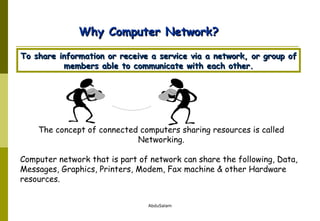
The concept of connected computers sharing resources is called Networking. Computer network that is part of network can share the following, Data, Messages, Graphics, Printers, Modem, Fax machine & other Hardware resources. Why Computer Network? To share information or receive a service via a network, or group of members able to communicate with each other.
Applications of Networks Resource Sharing Hardware (computing resources, disks, printers) Software (application software) Information Sharing Easy accessibility from anywhere (files, databases) Search Capability (WWW) Communication Email Message broadcast
What do you find on a network? The following types of nodes may be found on a data communications system.  Host: -  A central computer which stores data and executes programs for terminals.  It is usually associated with minicomputers or mainframes.  It requires a multi-tasking, multi-user operating system such as Unix.  Terminal: -  A computing device which is composed of a video screen and a keyboard. It allows a user to communicate with a host by typing in information or commands.  The host communicates with the terminal by updating the CRT (video).  Terminals cannot execute programs.
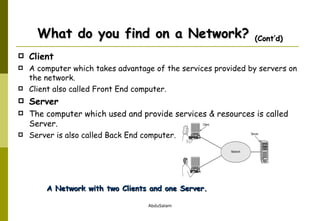
Client  A computer which takes advantage of the services provided by servers on the network. Client also called Front End computer. Server The computer which used and provide services & resources is called Server. Server is also called Back End computer. What do you find on a Network?  (Cont’d) A Network with two Clients and one Server.
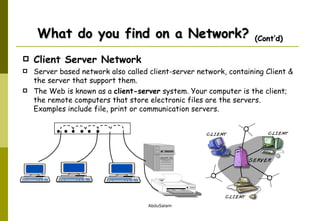
Client Server Network Server based network also called client-server network, containing Client & the server that support them.  The Web is known as a  client-server  system. Your computer is the client; the remote computers that store electronic files are the servers.  Examples include file, print or communication servers. What do you find on a Network?  (Cont’d)                
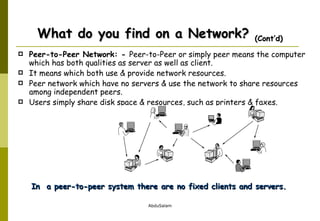
Peer-to-Peer Network: -  Peer-to-Peer or simply peer means the computer which has both qualities as server as well as client.  It means which both use & provide network resources.  Peer network which have no servers & use the network to share resources among independent peers.  Users simply share disk space & resources, such as printers & faxes. What do you find on a Network?  (Cont’d) In  a peer-to-peer system there are no fixed clients and servers.
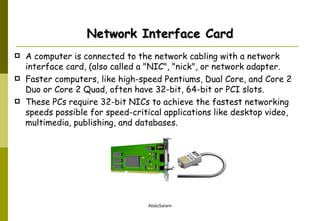
Network Interface Card A computer is connected to the network cabling with a network interface card, (also called a "NIC", "nick", or network adapter.  Faster computers, like high-speed Pentiums, Dual Core, and Core 2 Duo or Core 2 Quad, often have 32-bit, 64-bit or PCI slots.  These PCs require 32-bit NICs to achieve the fastest networking speeds possible for speed-critical applications like desktop video, multimedia, publishing, and databases.
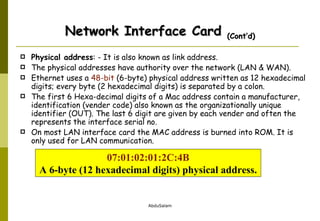
Physical address : - It is also known as link address.  The physical addresses have authority over the network (LAN & WAN).  Ethernet uses a  48-bit  (6-byte) physical address written as 12 hexadecimal digits; every byte (2 hexadecimal digits) is separated by a colon. The first 6 Hexa-decimal digits of a Mac address contain a manufacturer, identification (vender code) also known as the organizationally unique identifier (OUT). The last 6 digit are given by each vender and often the represents the interface serial no. On most LAN interface card the MAC address is burned into ROM. It is only used for LAN communication. Network Interface Card  (Cont’d) 07:01:02:01:2C:4B A 6-byte (12 hexadecimal digits) physical address.
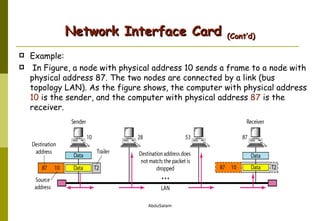
Example: In Figure, a node with physical address 10 sends a frame to a node with physical address 87. The two nodes are connected by a link (bus topology LAN). As the figure shows, the computer with physical address  10  is the sender, and the computer with physical address  87  is the receiver. Network Interface Card  (Cont’d)
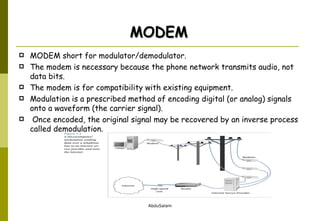
MODEM short for modulator/demodulator.  The modem is necessary because the phone network transmits audio, not data bits.  The modem is for compatibility with existing equipment.  Modulation is a prescribed method of encoding digital (or analog) signals onto a waveform (the carrier signal). Once encoded, the original signal may be recovered by an inverse process called demodulation. MODEM
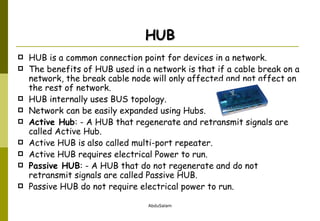
HUB HUB is a common connection point for devices in a network. The benefits of HUB used in a network is that if a cable break on a network, the break cable node will only affected and not affect on the rest of network. HUB internally uses BUS topology. Network can be easily expanded using Hubs. Active Hub : - A HUB that regenerate and retransmit signals are called Active Hub. Active HUB is also called multi-port repeater. Active HUB requires electrical Power to run. Passive HUB : - A HUB that do not regenerate and do not retransmit signals are called Passive HUB. Passive HUB do not require electrical power to run.
Connector RJ-45 The standard connector for twisted pair cabling is an RJ-45 connector. This is a plastic connector that looks like a large telephone-style connector. Cable used as a medium to carry the signal.  Coaxial Cable Twisted-Pair Cable Fiber-optic Cable
Today when we speak, we are generally referring the primary categories LAN, MAN and WAN.  The category into which a network falls is determined by  Technology,  its Size,  Standard Port & Media. Categories of Networks
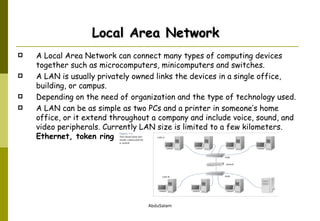
A Local Area Network can connect many types of computing devices together such as microcomputers, minicomputers and switches. A LAN is usually privately owned links the devices in a single office, building, or campus.  Depending on the need of organization and the type of technology used.  A LAN can be as simple as two PCs and a printer in someone’s home office, or it extend throughout a company and include voice, sound, and video peripherals. Currently LAN size is limited to a few kilometers.  Ethernet, token ring Local Area Network
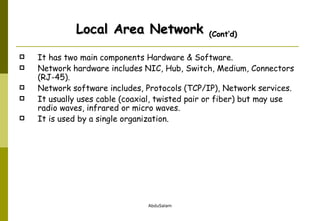
It has two main components Hardware & Software. Network hardware includes NIC, Hub, Switch, Medium, Connectors (RJ-45). Network software includes, Protocols (TCP/IP), Network services. It usually uses cable (coaxial, twisted pair or fiber) but may use radio waves, infrared or micro waves.  It is used by a single organization. Local Area Network  (Cont’d)
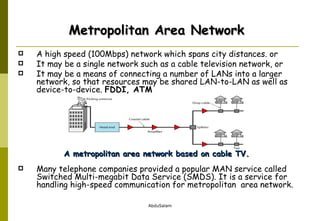
A high speed (100Mbps) network which spans city distances. or  It may be a single network such as a cable television network, or  It may be a means of connecting a number of LANs into a larger network, so that resources may be shared LAN-to-LAN as well as device-to-device.  FDDI, ATM Many telephone companies provided a popular MAN service called Switched Multi-megabit Data Service (SMDS). It is a service for handling high-speed communication for metropolitan  area network.  A metropolitan area network based on cable TV. Metropolitan Area Network
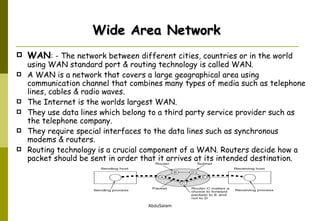
WAN : - The network between different cities, countries or in the world using WAN standard port & routing technology is called WAN.  A WAN is a network that covers a large geographical area using communication channel that combines many types of media such as telephone lines, cables & radio waves.  The Internet is the worlds largest WAN. They use data lines which belong to a third party service provider such as the telephone company.  They require special interfaces to the data lines such as synchronous modems & routers.  Routing technology is a crucial component of a WAN. Routers decide how a packet should be sent in order that it arrives at its intended destination. Wide Area Network
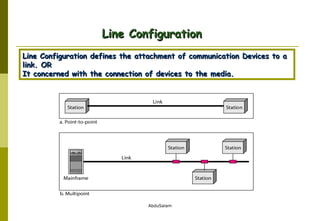
Line Configuration Line Configuration defines the attachment of communication Devices to a link. OR It concerned with the connection of devices to the media.
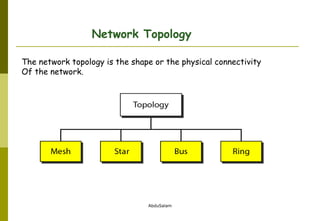
Network Topology The network topology is the shape or the physical connectivity Of the network.
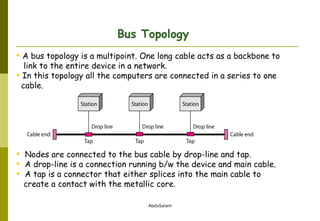
A bus topology is a multipoint. One long cable acts as a backbone to  link to the entire device in a network. In this topology all the computers are connected in a series to one  cable. Nodes are connected to the bus cable by drop-line and tap. A drop-line is a connection running b/w the device and main cable. A tap is a connector that either splices into the main cable to  create a contact with the metallic core. Bus Topology
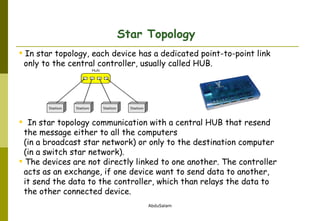
In star topology, each device has a dedicated point-to-point link  only to the central controller, usually called HUB. In star topology communication with a central HUB that resend  the message either to all the computers  (in a broadcast star network) or only to the destination computer (in a switch star network).  The devices are not directly linked to one another. The controller  acts as an exchange, if one device want to send data to another, it send the data to the controller, which than relays the data to  the other connected device. Star Topology
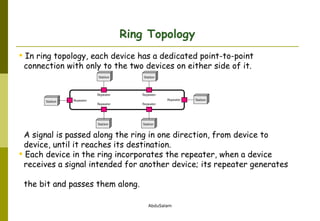
In ring topology, each device has a dedicated point-to-point  connection with only to the two devices on either side of it. A signal is passed along the ring in one direction, from device to  device, until it reaches its destination. Each device in the ring incorporates the repeater, when a device    receives a signal intended for another device; its repeater generates    the bit and passes them along.  Ring Topology
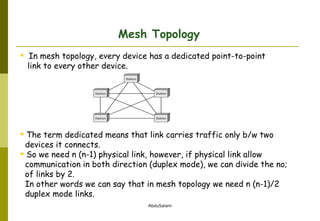
In mesh topology, every device has a dedicated point-to-point  link to every other device.  The term dedicated means that link carries traffic only b/w two  devices it connects. So we need n (n-1) physical link, however, if physical link allow communication in both direction (duplex mode), we can divide the no;    of links by 2.  In other words we can say that in mesh topology we need n (n-1)/2    duplex mode links. Mesh Topology
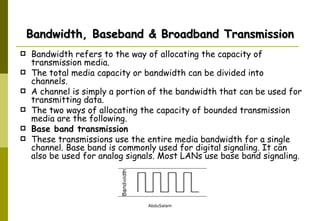
Bandwidth, Baseband & Broadband Transmission Bandwidth refers to the way of allocating the capacity of transmission media.  The total media capacity or bandwidth can be divided into channels.  A channel is simply a portion of the bandwidth that can be used for transmitting data. The two ways of allocating the capacity of bounded transmission media are the following. Base band transmission These transmissions use the entire media bandwidth for a single channel. Base band is commonly used for digital signaling. It can also be used for analog signals. Most LANs use base band signaling.
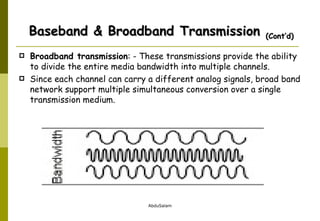
Broadband transmission : - These transmissions provide the ability to divide the entire media bandwidth into multiple channels.  Since each channel can carry a different analog signals, broad band network support multiple simultaneous conversion over a single transmission medium. Baseband & Broadband Transmission  (Cont’d)
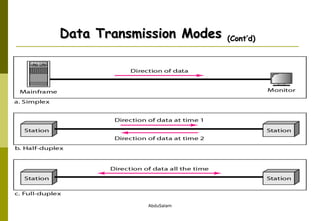
Data Transmission Modes There are three modes of communication. Simplex In simplex transmission mode, communication can take place in only one direction.  It means the sender will always send & the receiver will always receive.  An example is TV waves, we can watch different channels on TV but there is no need to send any type of signals from TV. Another example is line printer. Half-Duplex A half-duplex system can transmit data in both direction, but only in one direction at a time.  It means that at a time one computer can only send or receive, when one device completes a transmission, this device must “turn over” the medium to the other device so that this second device has turn to transmit.  e.g. wireless
Full-Duplex This mode allows a device to send & receive data simultaneously is called duplex or full-duplex mode. This mode provides two ways to simultaneously data transfer by providing each device with a separate communication channel. Voice telephone is full-duplex devices and either party to a conversation can talk at any time. Data Transmission Modes  (Cont’d)
Data Transmission Modes  (Cont’d)

W 10 introduction to network

  • 1.
    Week-10 Introduction toComputer Networks Application of Computer Network Host, Terminal, Client Server Network, Peer to Peer Network Networking Devices (NIC (Physical Address), Modem, Hub, Switch & Router) Categories of Network Network Topology (Bus, Star, Ring and Mesh Topology) Bandwidth, Broadband & Baseband Communication Transmission Modes (Simplex, Half Duplex, & Full Duplex)
  • 2.
    Network A networkis a set of devices (often referred to as nodes) connected by communication links. A node can be a computer, printer, or any other device capable of sending and/or receiving data generated by other nodes on the network. A group of computers and other devices joint together through some transmission medium is called Computer Network.
  • 3.
    The concept ofconnected computers sharing resources is called Networking. Computer network that is part of network can share the following, Data, Messages, Graphics, Printers, Modem, Fax machine & other Hardware resources. Why Computer Network? To share information or receive a service via a network, or group of members able to communicate with each other.
  • 4.
    Applications of NetworksResource Sharing Hardware (computing resources, disks, printers) Software (application software) Information Sharing Easy accessibility from anywhere (files, databases) Search Capability (WWW) Communication Email Message broadcast
  • 5.
    What do youfind on a network? The following types of nodes may be found on a data communications system. Host: - A central computer which stores data and executes programs for terminals. It is usually associated with minicomputers or mainframes. It requires a multi-tasking, multi-user operating system such as Unix. Terminal: - A computing device which is composed of a video screen and a keyboard. It allows a user to communicate with a host by typing in information or commands. The host communicates with the terminal by updating the CRT (video). Terminals cannot execute programs.
  • 6.
    Client Acomputer which takes advantage of the services provided by servers on the network. Client also called Front End computer. Server The computer which used and provide services & resources is called Server. Server is also called Back End computer. What do you find on a Network? (Cont’d) A Network with two Clients and one Server.
  • 7.
    Client Server NetworkServer based network also called client-server network, containing Client & the server that support them. The Web is known as a client-server system. Your computer is the client; the remote computers that store electronic files are the servers. Examples include file, print or communication servers. What do you find on a Network? (Cont’d)      
  • 8.
    Peer-to-Peer Network: - Peer-to-Peer or simply peer means the computer which has both qualities as server as well as client. It means which both use & provide network resources. Peer network which have no servers & use the network to share resources among independent peers. Users simply share disk space & resources, such as printers & faxes. What do you find on a Network? (Cont’d) In a peer-to-peer system there are no fixed clients and servers.
  • 9.
    Network Interface CardA computer is connected to the network cabling with a network interface card, (also called a "NIC", "nick", or network adapter. Faster computers, like high-speed Pentiums, Dual Core, and Core 2 Duo or Core 2 Quad, often have 32-bit, 64-bit or PCI slots. These PCs require 32-bit NICs to achieve the fastest networking speeds possible for speed-critical applications like desktop video, multimedia, publishing, and databases.
  • 10.
    Physical address :- It is also known as link address. The physical addresses have authority over the network (LAN & WAN). Ethernet uses a 48-bit (6-byte) physical address written as 12 hexadecimal digits; every byte (2 hexadecimal digits) is separated by a colon. The first 6 Hexa-decimal digits of a Mac address contain a manufacturer, identification (vender code) also known as the organizationally unique identifier (OUT). The last 6 digit are given by each vender and often the represents the interface serial no. On most LAN interface card the MAC address is burned into ROM. It is only used for LAN communication. Network Interface Card (Cont’d) 07:01:02:01:2C:4B A 6-byte (12 hexadecimal digits) physical address.
  • 11.
    Example: In Figure,a node with physical address 10 sends a frame to a node with physical address 87. The two nodes are connected by a link (bus topology LAN). As the figure shows, the computer with physical address 10 is the sender, and the computer with physical address 87 is the receiver. Network Interface Card (Cont’d)
  • 12.
    MODEM short formodulator/demodulator. The modem is necessary because the phone network transmits audio, not data bits. The modem is for compatibility with existing equipment. Modulation is a prescribed method of encoding digital (or analog) signals onto a waveform (the carrier signal). Once encoded, the original signal may be recovered by an inverse process called demodulation. MODEM
  • 13.
    HUB HUB isa common connection point for devices in a network. The benefits of HUB used in a network is that if a cable break on a network, the break cable node will only affected and not affect on the rest of network. HUB internally uses BUS topology. Network can be easily expanded using Hubs. Active Hub : - A HUB that regenerate and retransmit signals are called Active Hub. Active HUB is also called multi-port repeater. Active HUB requires electrical Power to run. Passive HUB : - A HUB that do not regenerate and do not retransmit signals are called Passive HUB. Passive HUB do not require electrical power to run.
  • 14.
    Connector RJ-45 Thestandard connector for twisted pair cabling is an RJ-45 connector. This is a plastic connector that looks like a large telephone-style connector. Cable used as a medium to carry the signal. Coaxial Cable Twisted-Pair Cable Fiber-optic Cable
  • 15.
    Today when wespeak, we are generally referring the primary categories LAN, MAN and WAN. The category into which a network falls is determined by Technology, its Size, Standard Port & Media. Categories of Networks
  • 16.
    A Local AreaNetwork can connect many types of computing devices together such as microcomputers, minicomputers and switches. A LAN is usually privately owned links the devices in a single office, building, or campus. Depending on the need of organization and the type of technology used. A LAN can be as simple as two PCs and a printer in someone’s home office, or it extend throughout a company and include voice, sound, and video peripherals. Currently LAN size is limited to a few kilometers. Ethernet, token ring Local Area Network
  • 17.
    It has twomain components Hardware & Software. Network hardware includes NIC, Hub, Switch, Medium, Connectors (RJ-45). Network software includes, Protocols (TCP/IP), Network services. It usually uses cable (coaxial, twisted pair or fiber) but may use radio waves, infrared or micro waves. It is used by a single organization. Local Area Network (Cont’d)
  • 18.
    A high speed(100Mbps) network which spans city distances. or It may be a single network such as a cable television network, or It may be a means of connecting a number of LANs into a larger network, so that resources may be shared LAN-to-LAN as well as device-to-device. FDDI, ATM Many telephone companies provided a popular MAN service called Switched Multi-megabit Data Service (SMDS). It is a service for handling high-speed communication for metropolitan area network. A metropolitan area network based on cable TV. Metropolitan Area Network
  • 19.
    WAN : -The network between different cities, countries or in the world using WAN standard port & routing technology is called WAN. A WAN is a network that covers a large geographical area using communication channel that combines many types of media such as telephone lines, cables & radio waves. The Internet is the worlds largest WAN. They use data lines which belong to a third party service provider such as the telephone company. They require special interfaces to the data lines such as synchronous modems & routers. Routing technology is a crucial component of a WAN. Routers decide how a packet should be sent in order that it arrives at its intended destination. Wide Area Network
  • 20.
    Line Configuration LineConfiguration defines the attachment of communication Devices to a link. OR It concerned with the connection of devices to the media.
  • 21.
    Network Topology Thenetwork topology is the shape or the physical connectivity Of the network.
  • 22.
    A bus topologyis a multipoint. One long cable acts as a backbone to link to the entire device in a network. In this topology all the computers are connected in a series to one cable. Nodes are connected to the bus cable by drop-line and tap. A drop-line is a connection running b/w the device and main cable. A tap is a connector that either splices into the main cable to create a contact with the metallic core. Bus Topology
  • 23.
    In star topology,each device has a dedicated point-to-point link only to the central controller, usually called HUB. In star topology communication with a central HUB that resend the message either to all the computers (in a broadcast star network) or only to the destination computer (in a switch star network). The devices are not directly linked to one another. The controller acts as an exchange, if one device want to send data to another, it send the data to the controller, which than relays the data to the other connected device. Star Topology
  • 24.
    In ring topology,each device has a dedicated point-to-point connection with only to the two devices on either side of it. A signal is passed along the ring in one direction, from device to device, until it reaches its destination. Each device in the ring incorporates the repeater, when a device receives a signal intended for another device; its repeater generates the bit and passes them along. Ring Topology
  • 25.
    In mesh topology,every device has a dedicated point-to-point link to every other device. The term dedicated means that link carries traffic only b/w two devices it connects. So we need n (n-1) physical link, however, if physical link allow communication in both direction (duplex mode), we can divide the no; of links by 2. In other words we can say that in mesh topology we need n (n-1)/2 duplex mode links. Mesh Topology
  • 26.
    Bandwidth, Baseband &Broadband Transmission Bandwidth refers to the way of allocating the capacity of transmission media. The total media capacity or bandwidth can be divided into channels. A channel is simply a portion of the bandwidth that can be used for transmitting data. The two ways of allocating the capacity of bounded transmission media are the following. Base band transmission These transmissions use the entire media bandwidth for a single channel. Base band is commonly used for digital signaling. It can also be used for analog signals. Most LANs use base band signaling.
  • 27.
    Broadband transmission :- These transmissions provide the ability to divide the entire media bandwidth into multiple channels. Since each channel can carry a different analog signals, broad band network support multiple simultaneous conversion over a single transmission medium. Baseband & Broadband Transmission (Cont’d)
  • 28.
    Data Transmission ModesThere are three modes of communication. Simplex In simplex transmission mode, communication can take place in only one direction. It means the sender will always send & the receiver will always receive. An example is TV waves, we can watch different channels on TV but there is no need to send any type of signals from TV. Another example is line printer. Half-Duplex A half-duplex system can transmit data in both direction, but only in one direction at a time. It means that at a time one computer can only send or receive, when one device completes a transmission, this device must “turn over” the medium to the other device so that this second device has turn to transmit. e.g. wireless
  • 29.
    Full-Duplex This modeallows a device to send & receive data simultaneously is called duplex or full-duplex mode. This mode provides two ways to simultaneously data transfer by providing each device with a separate communication channel. Voice telephone is full-duplex devices and either party to a conversation can talk at any time. Data Transmission Modes (Cont’d)
  • 30.

Editor's Notes

  • #3 The connectivity of two or more than two devices through some transmission medium and share the information to each other.
  • #7 The computer which use but do not provide network resources.. OR
  • #17 Network in small geographical Area (Room, Building or a Campus) is called LAN (Local Area Network)
  • #18 Network in a City is call MAN (Metropolitan Area Network)