vSphere Data Protection 5.5 Advanced
VMware Backup and Recovery for vSphere
Mauricio Barra, Vmware
Jeff Hunter, VMware
BCO3424
#BCO3424
3
The Importance of Data Protection in
vSphere Environments
4
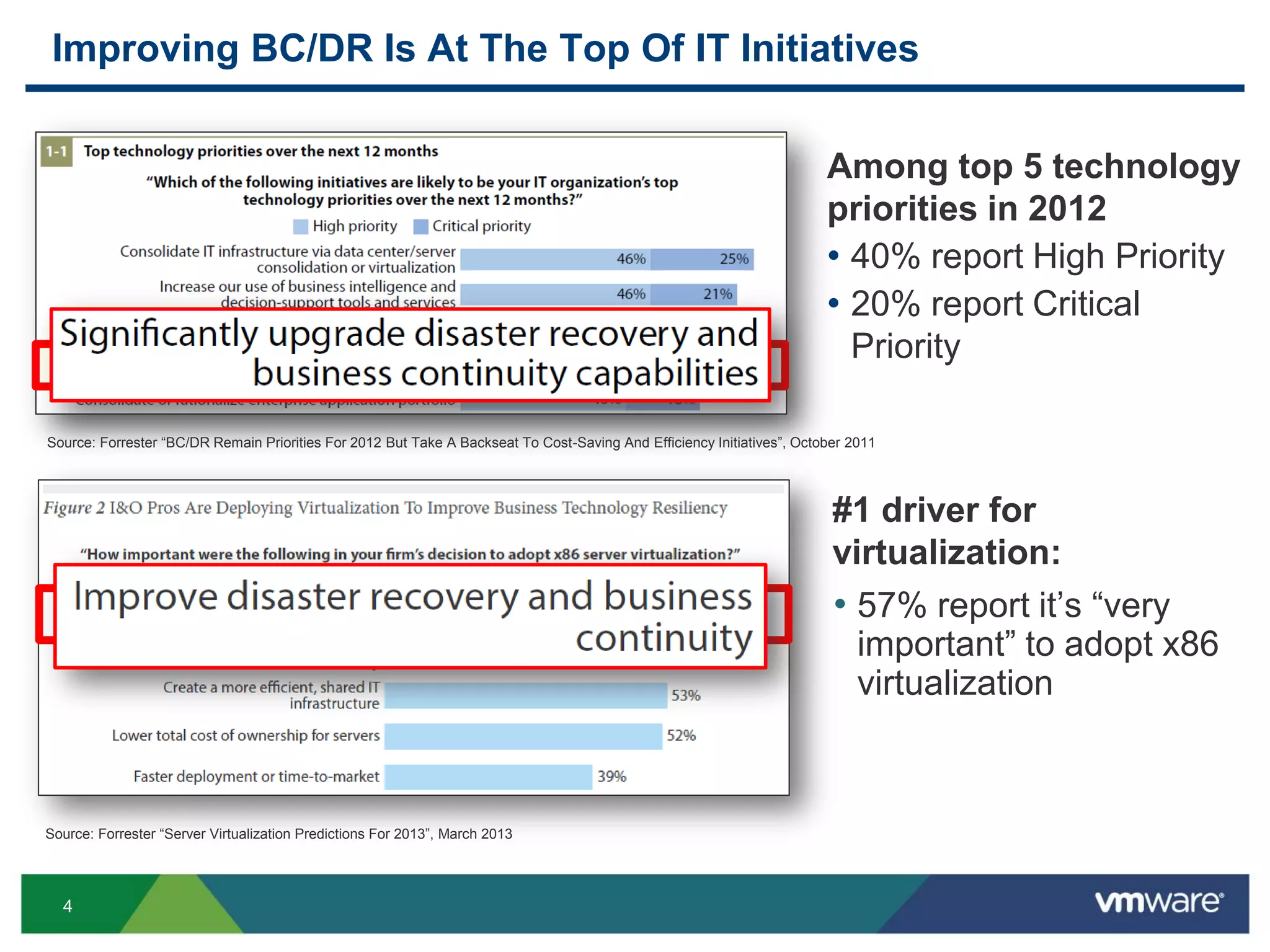
Improving BC/DR Is At The Top Of IT Initiatives
Source: Forrester “Server Virtualization Predictions For 2013”, March 2013
Source: Forrester “BC/DR Remain Priorities For 2012 But Take A Backseat To Cost-Saving And Efficiency Initiatives”, October 2011
Among top 5 technology
priorities in 2012
• 40% report High Priority
• 20% report Critical
Priority
#1 driver for
virtualization:
• 57% report it’s “very
important” to adopt x86
virtualization
5
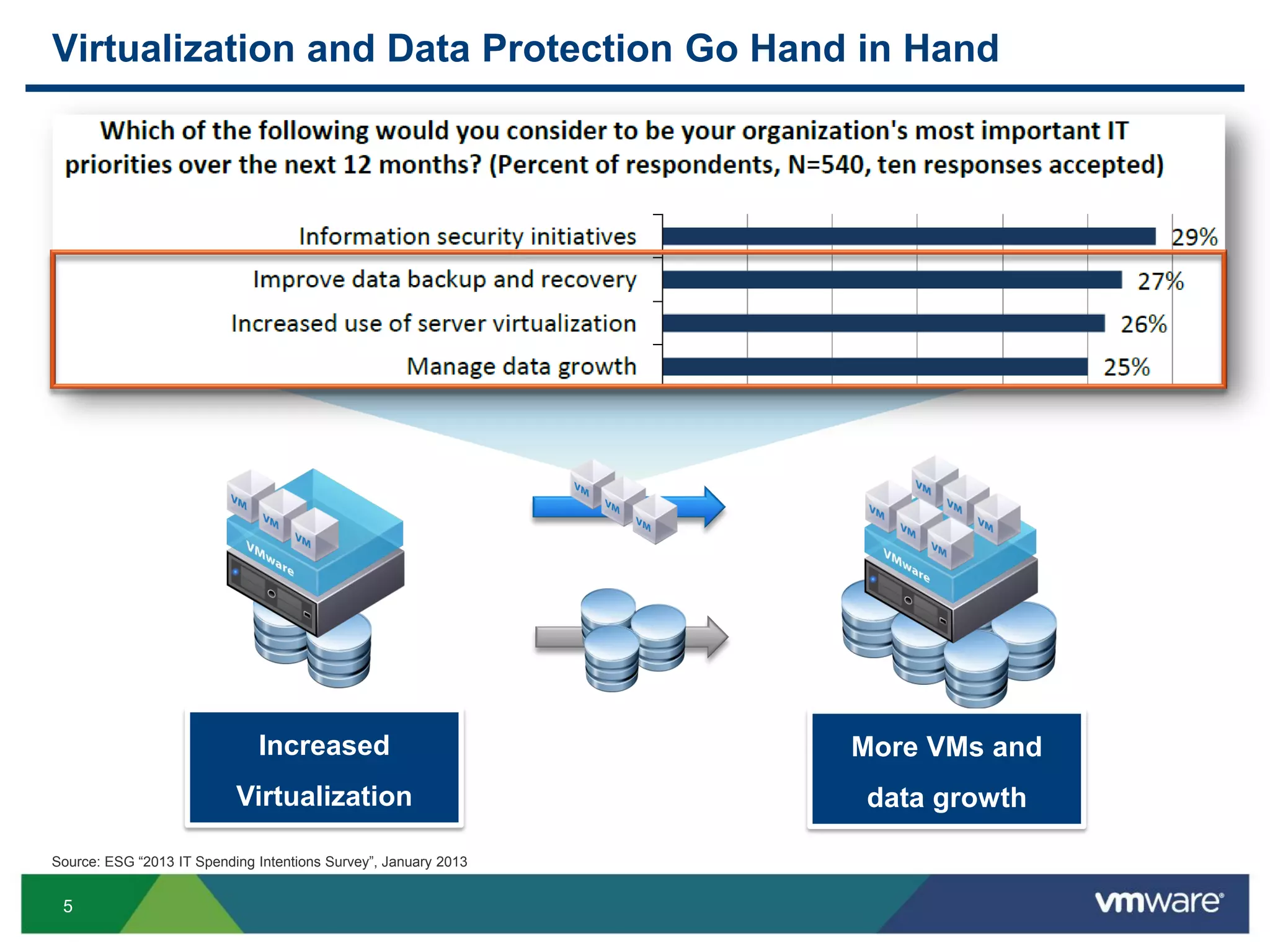
Virtualization and Data Protection Go Hand in Hand
Source: ESG “2013 IT Spending Intentions Survey”, January 2013
Increased
Virtualization
More VMs and
data growth
6
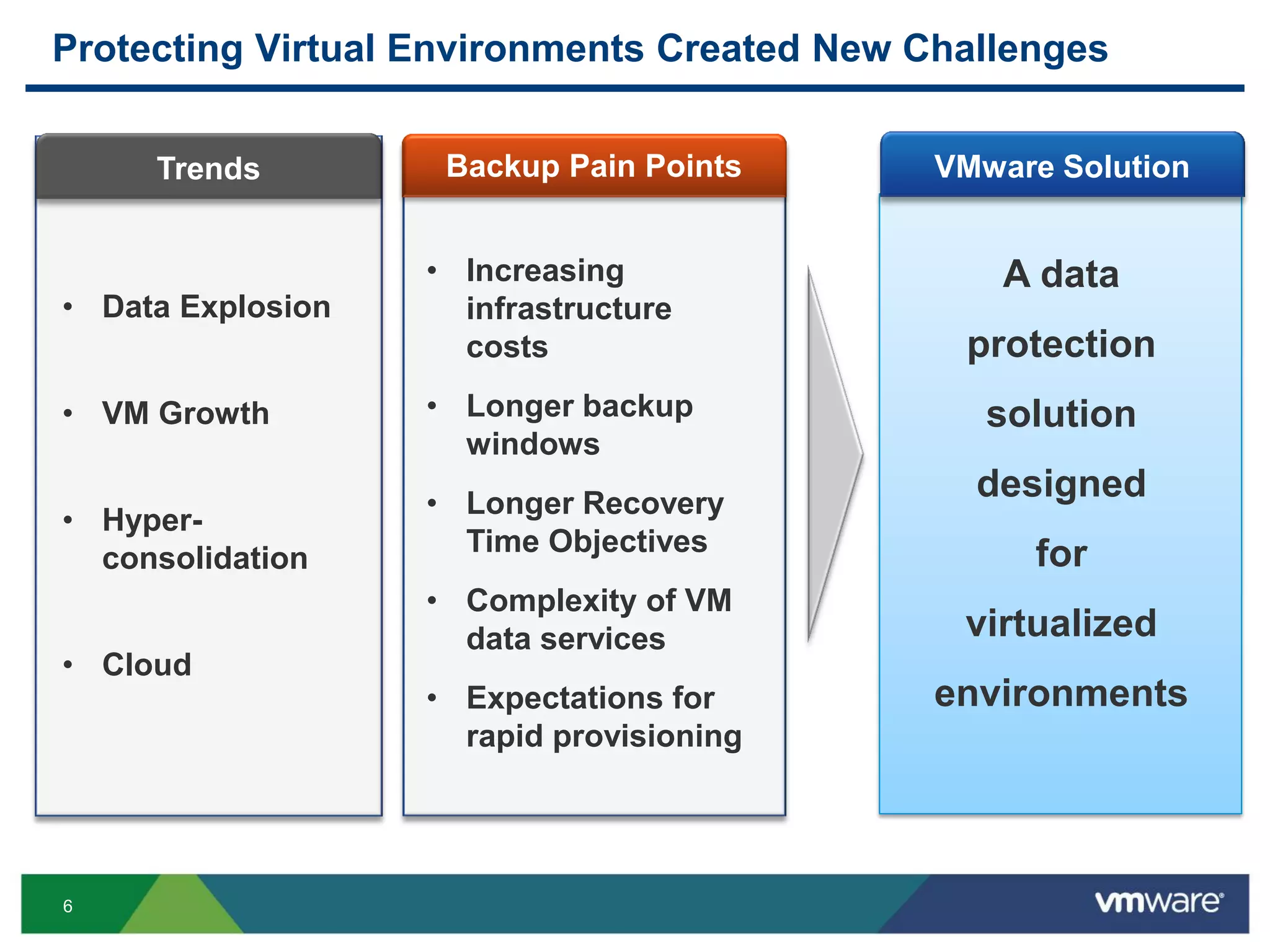
Backup Pain Points
Protecting Virtual Environments Created New Challenges
A data
protection
solution
designed
for
virtualized
environments
Trends
• Data Explosion
• VM Growth
• Hyper-
consolidation
• Cloud
VMware Solution
• Increasing
infrastructure
costs
• Longer backup
windows
• Longer Recovery
Time Objectives
• Complexity of VM
data services
• Expectations for
rapid provisioning
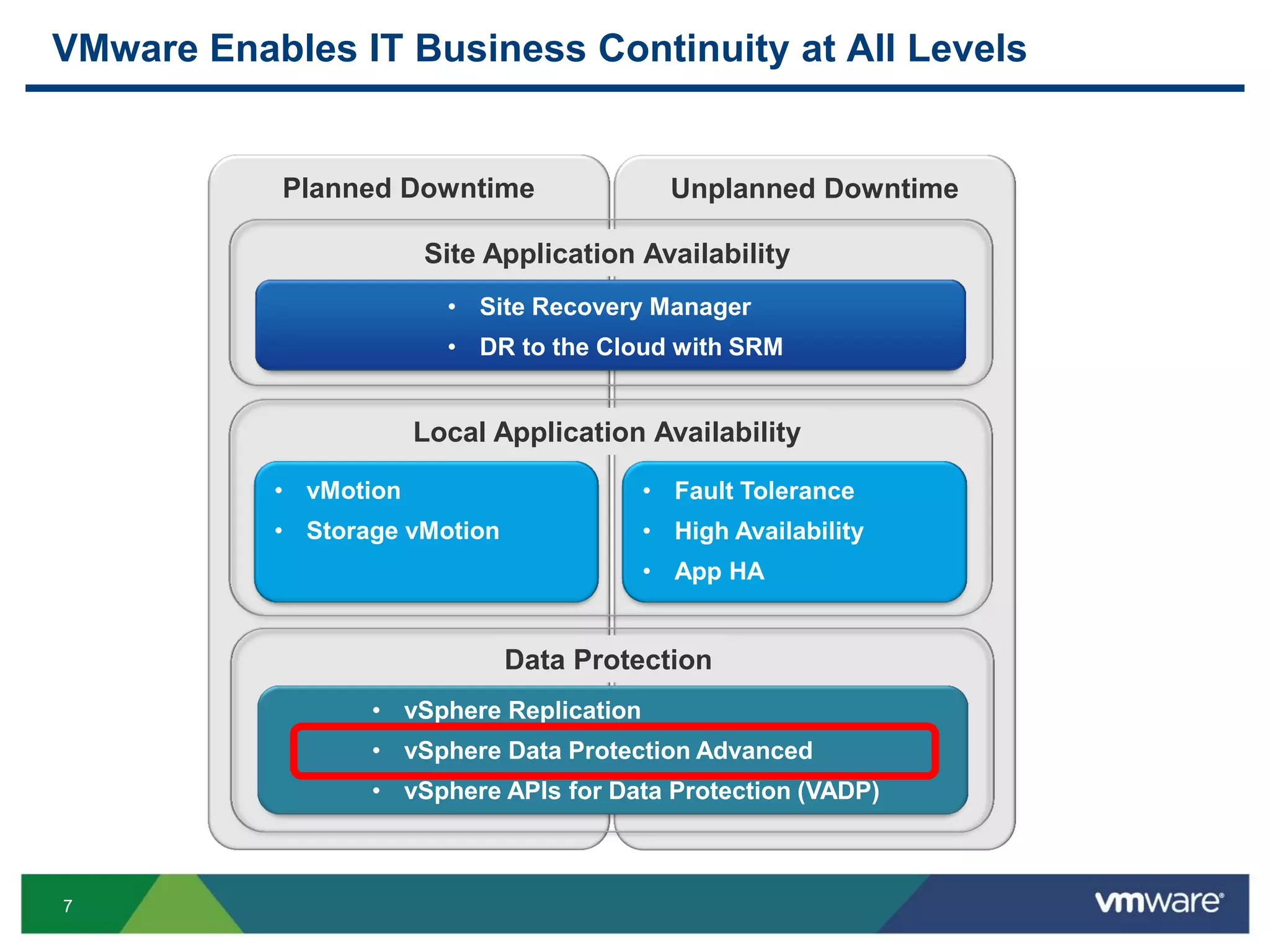
7
Planned Downtime Unplanned Downtime
VMware Enables IT Business Continuity at All Levels
• vMotion
• Storage vMotion
• Fault Tolerance
• High Availability
• App HA
• Site Recovery Manager
• DR to the Cloud with SRM
• vSphere Replication
• vSphere Data Protection Advanced
• vSphere APIs for Data Protection (VADP)
Site Application Availability
Local Application Availability
Data Protection
8
vSphere Data Protection Advanced
VMware’s Backup and Recovery Solution for vSphere
9
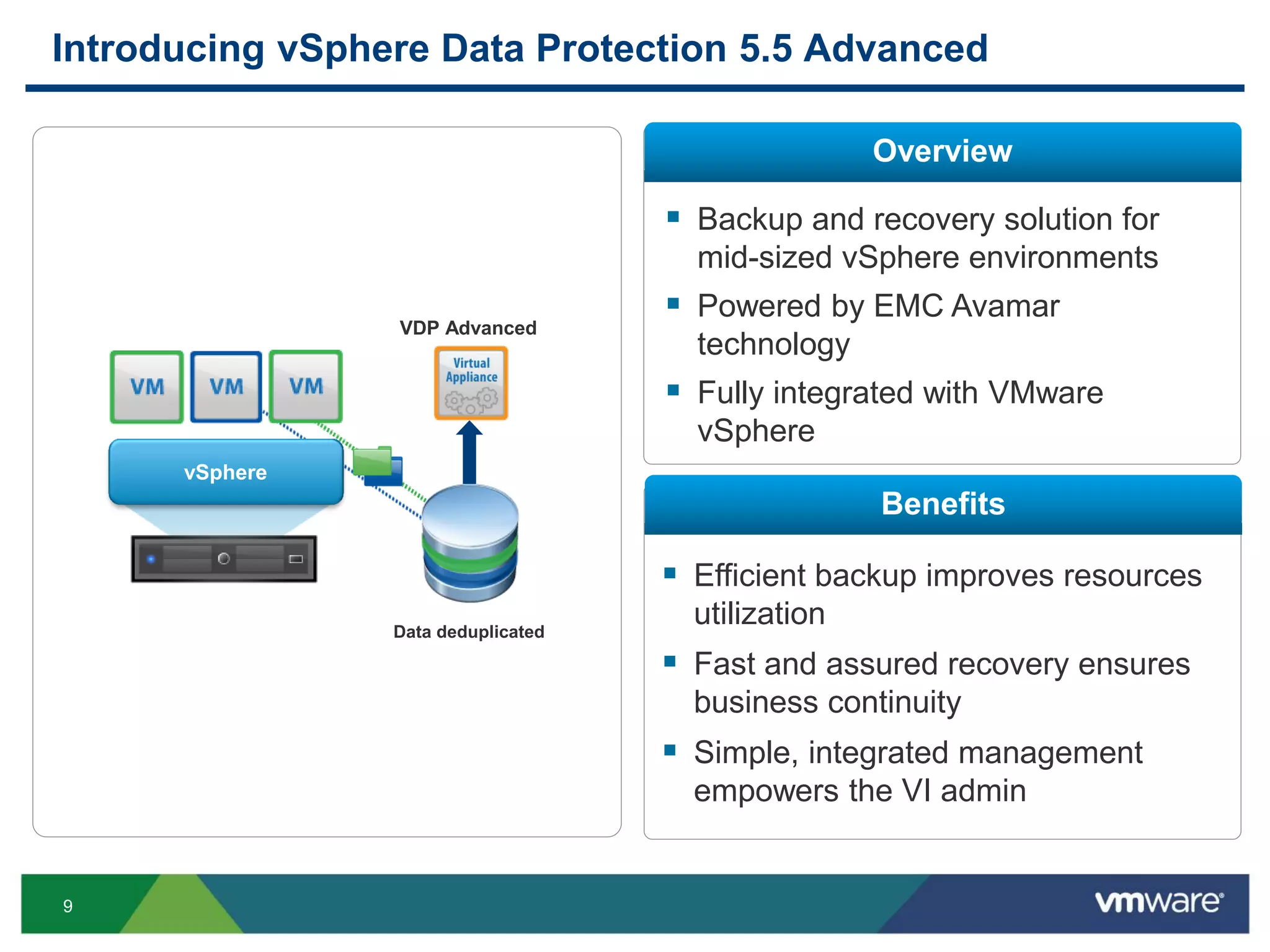
Introducing vSphere Data Protection 5.5 Advanced
vSphere
Data deduplicated
VDP Advanced
 Efficient backup improves resources
utilization
 Fast and assured recovery ensures
business continuity
 Simple, integrated management
empowers the VI admin
Overview
Benefits
 Backup and recovery solution for
mid-sized vSphere environments
 Powered by EMC Avamar
technology
 Fully integrated with VMware
vSphere
10
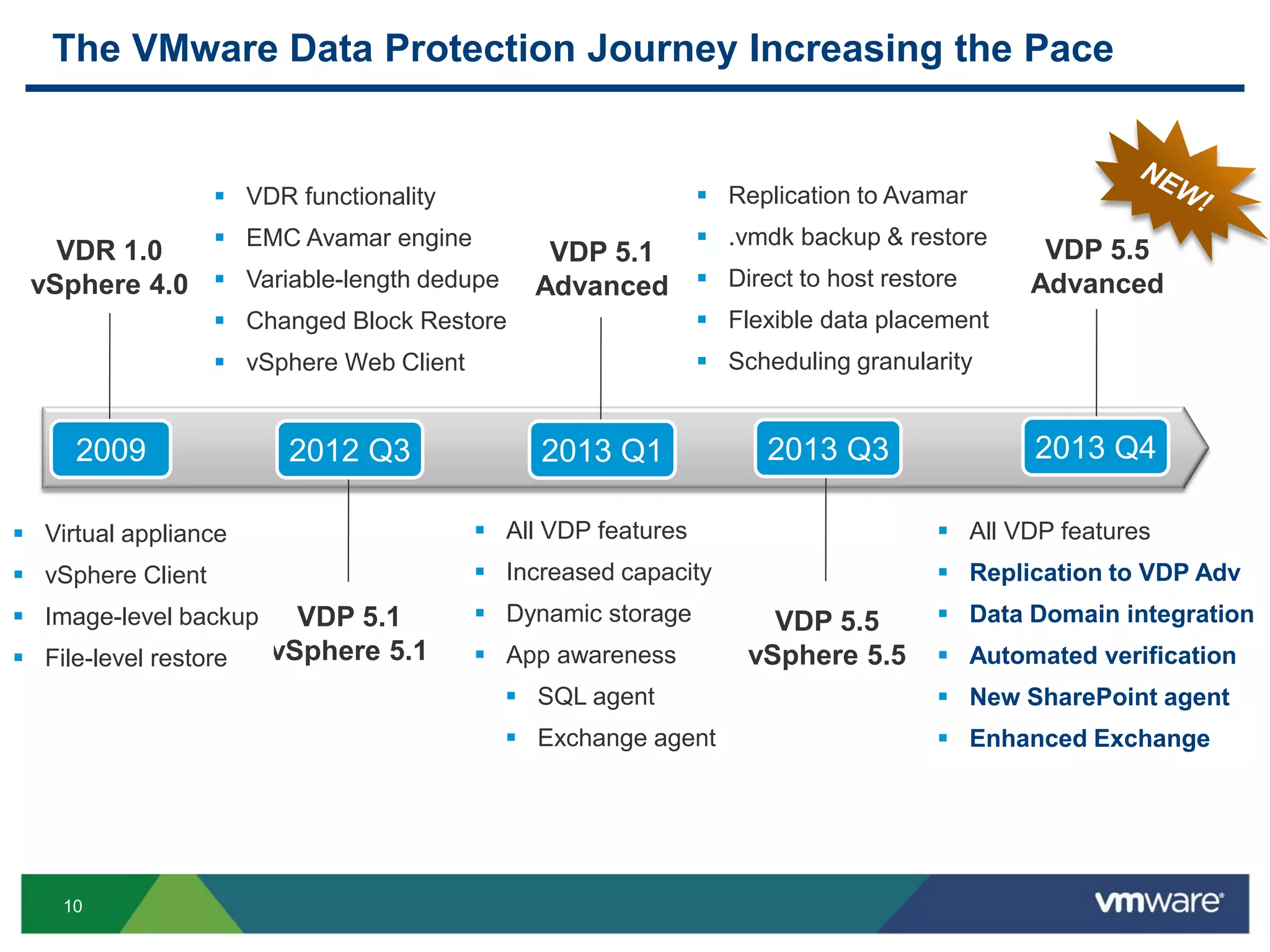
The VMware Data Protection Journey Increasing the Pace
VDP 5.5
Advanced
VDP 5.1
vSphere 5.1
VDP 5.5
vSphere 5.5
VDR 1.0
vSphere 4.0
 Virtual appliance
 vSphere Client
 Image-level backup
 File-level restore
 VDR functionality
 EMC Avamar engine
 Variable-length dedupe
 Changed Block Restore
 vSphere Web Client
 All VDP features
 Increased capacity
 Dynamic storage
 App awareness
 SQL agent
 Exchange agent
 Replication to Avamar
 .vmdk backup & restore
 Direct to host restore
 Flexible data placement
 Scheduling granularity
 All VDP features
 Replication to VDP Adv
 Data Domain integration
 Automated verification
 New SharePoint agent
 Enhanced Exchange
2009 2012 Q3
VDP 5.1
Advanced
2013 Q1 2013 Q3 2013 Q4
11
Core Features and Benefits
12
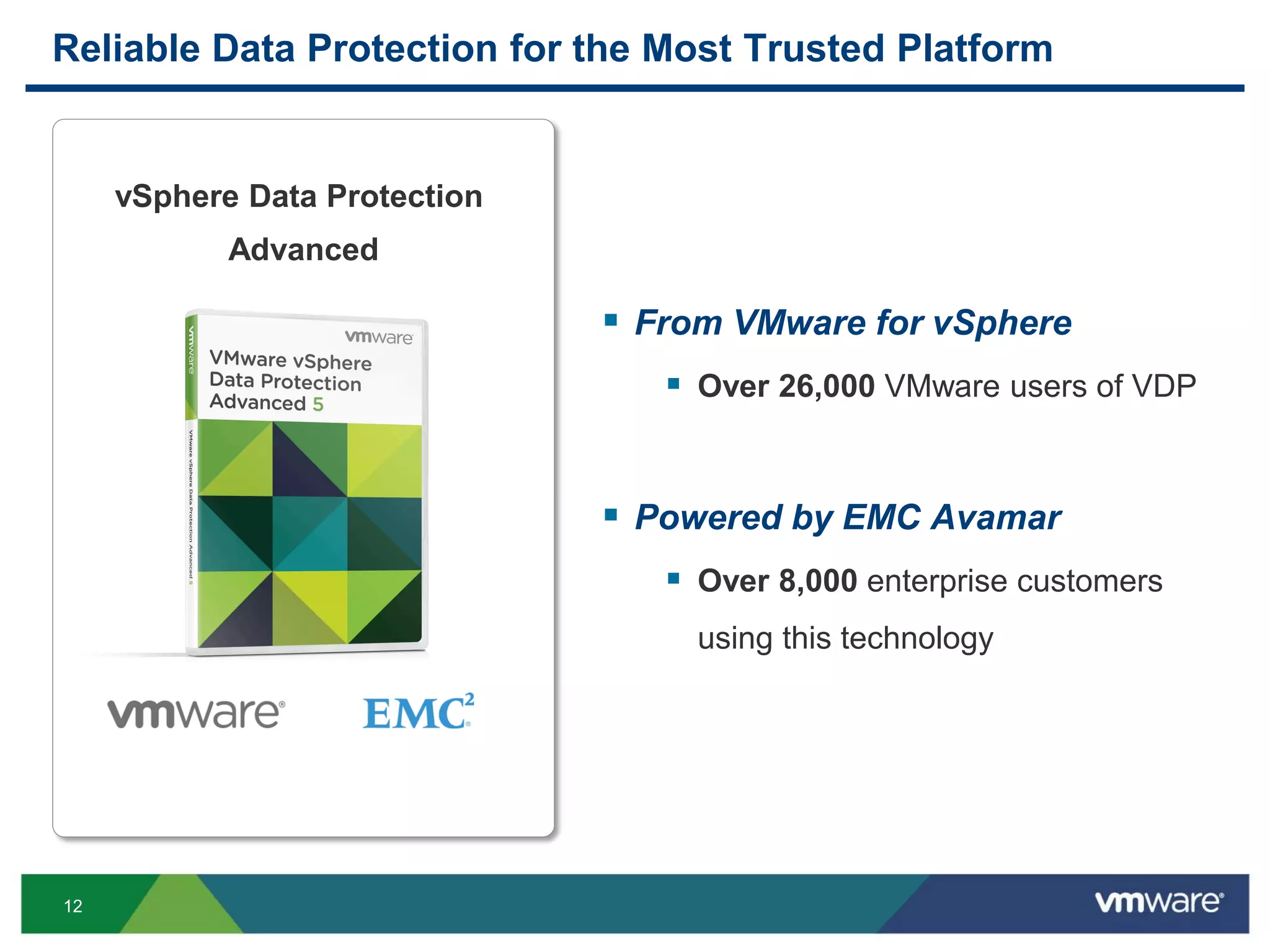
Reliable Data Protection for the Most Trusted Platform
vSphere Data Protection
Advanced
 From VMware for vSphere
 Over 26,000 VMware users of VDP
 Powered by EMC Avamar
 Over 8,000 enterprise customers
using this technology
13
4x More Storage-Efficient Using Patented Deduplication
71
19
0
20
40
60
80
Others VDP Adv
TB
Backup storage required for 200 VMs
4x
variable-length dedupe
AB
VDP
VMWARE
WXY
fixed-length dedupe
ABVMWAR
EVDPWXY
VDPABWX
YVMWARE
Source: ESG Lab Validation Report – vSphere Data Protection, February 2013
"For real backups, VMware offers vSphere Data Protection […] the deduplication levels
are amazing”
Trevor Pott -The Register
VDP
Adv
Others
Data segments
Deduplicated backup data
TCO
$84,000
TCO
$23,000
~$60K savings on storage TCO
14
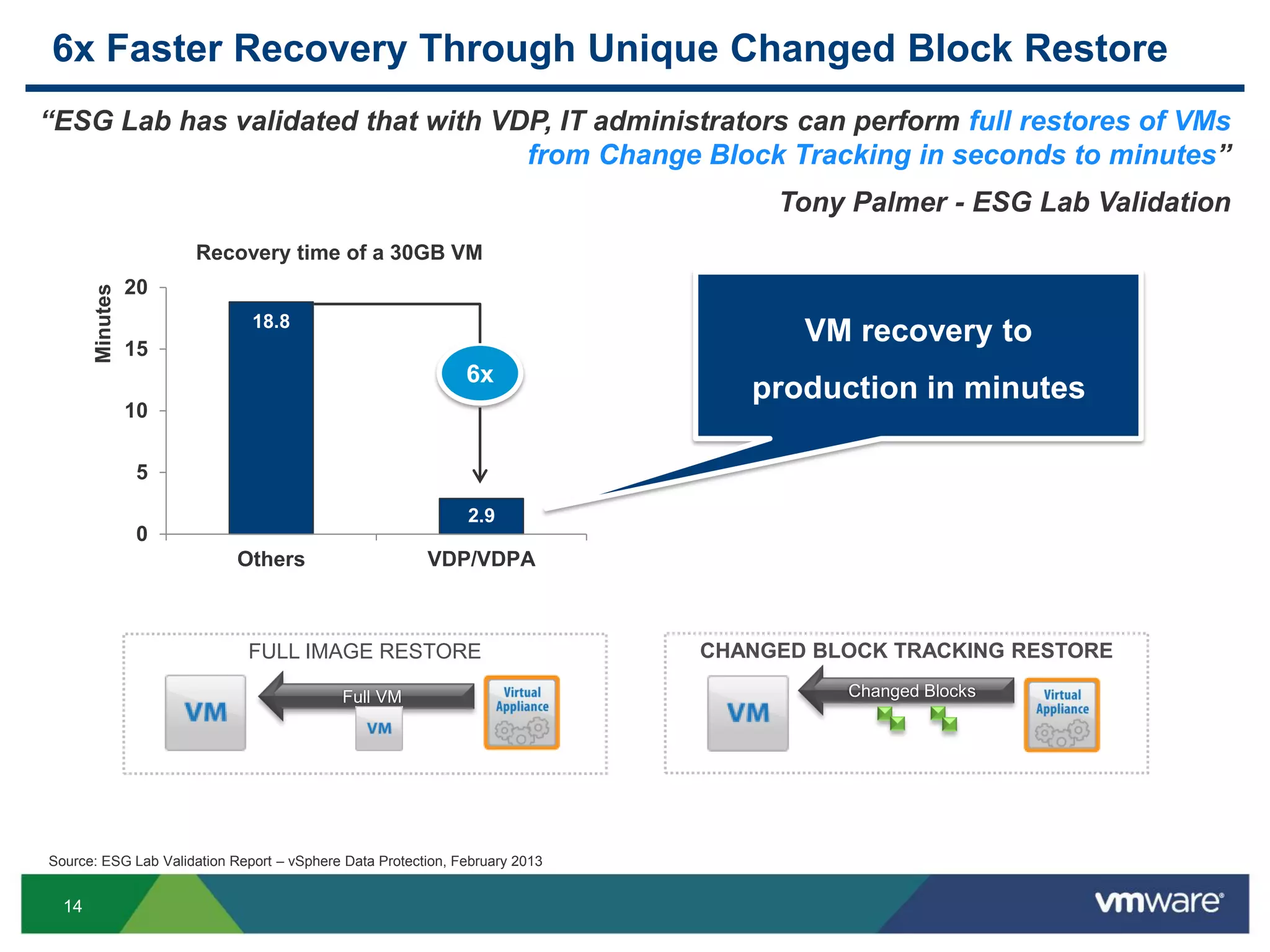
6x Faster Recovery Through Unique Changed Block Restore
18.8
2.9
0
5
10
15
20
Others VDP/VDPA
Minutes
Recovery time of a 30GB VM
6x
Source: ESG Lab Validation Report – vSphere Data Protection, February 2013
Changed Blocks
FULL IMAGE RESTORE CHANGED BLOCK TRACKING RESTORE
Full VM
“ESG Lab has validated that with VDP, IT administrators can perform full restores of VMs
from Change Block Tracking in seconds to minutes”
Tony Palmer - ESG Lab Validation
VM recovery to
production in minutes
15
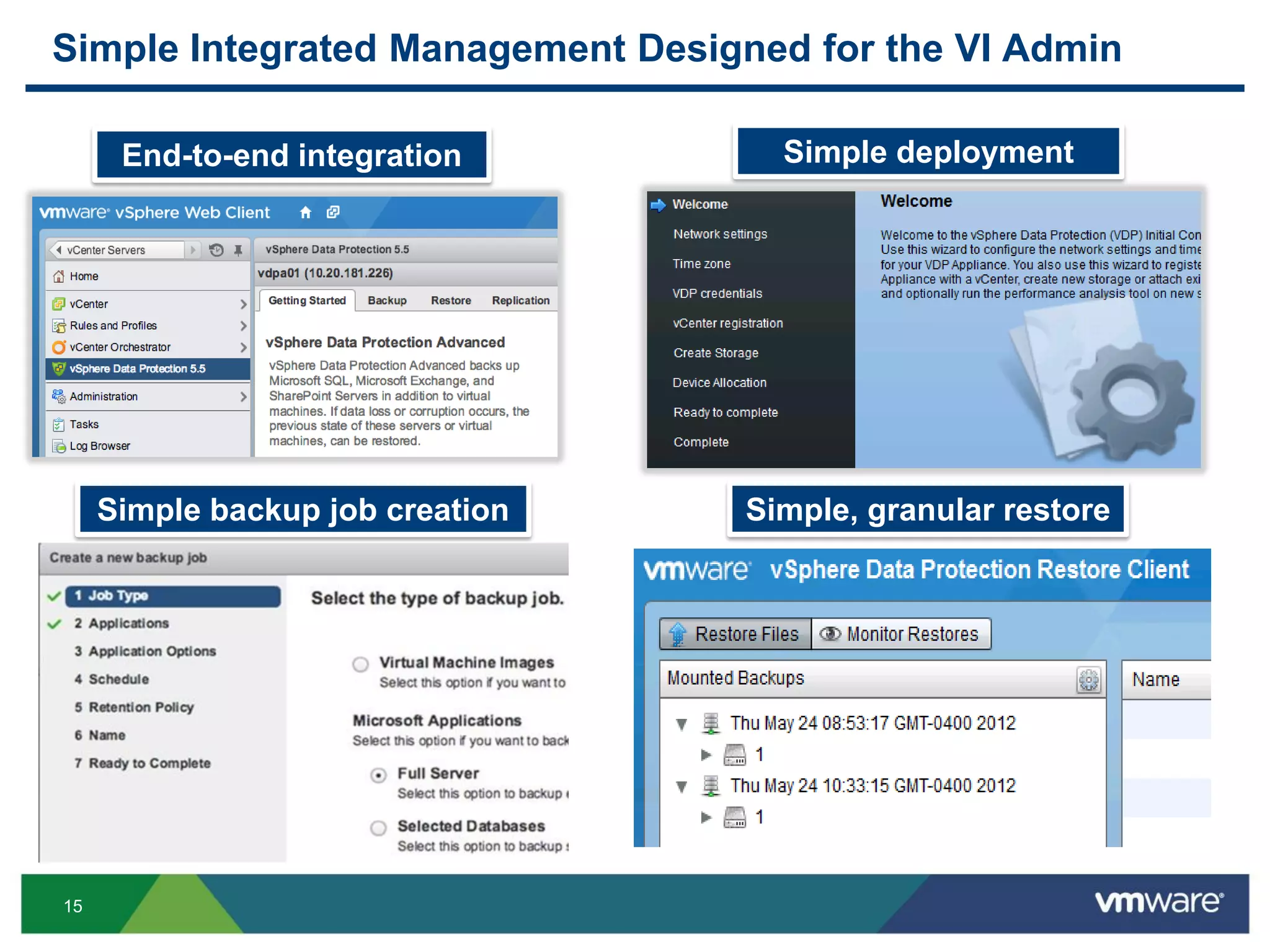
Simple Integrated Management Designed for the VI Admin
Simple backup job creation Simple, granular restore
End-to-end integration Simple deployment
vSphere Web Client integration
Backup job creation
Restore execution
Monitoring and reporting
Linux-based virtual appliance
~30 min to install and configure
Automatic VM discovery
Wizard-driven process
Specified schedules and
retentions
One-step recovery
End-user file-level restore
Image, databases, vmdk
16
What’s New with
vSphere Data Protection 5.5 Advanced
17
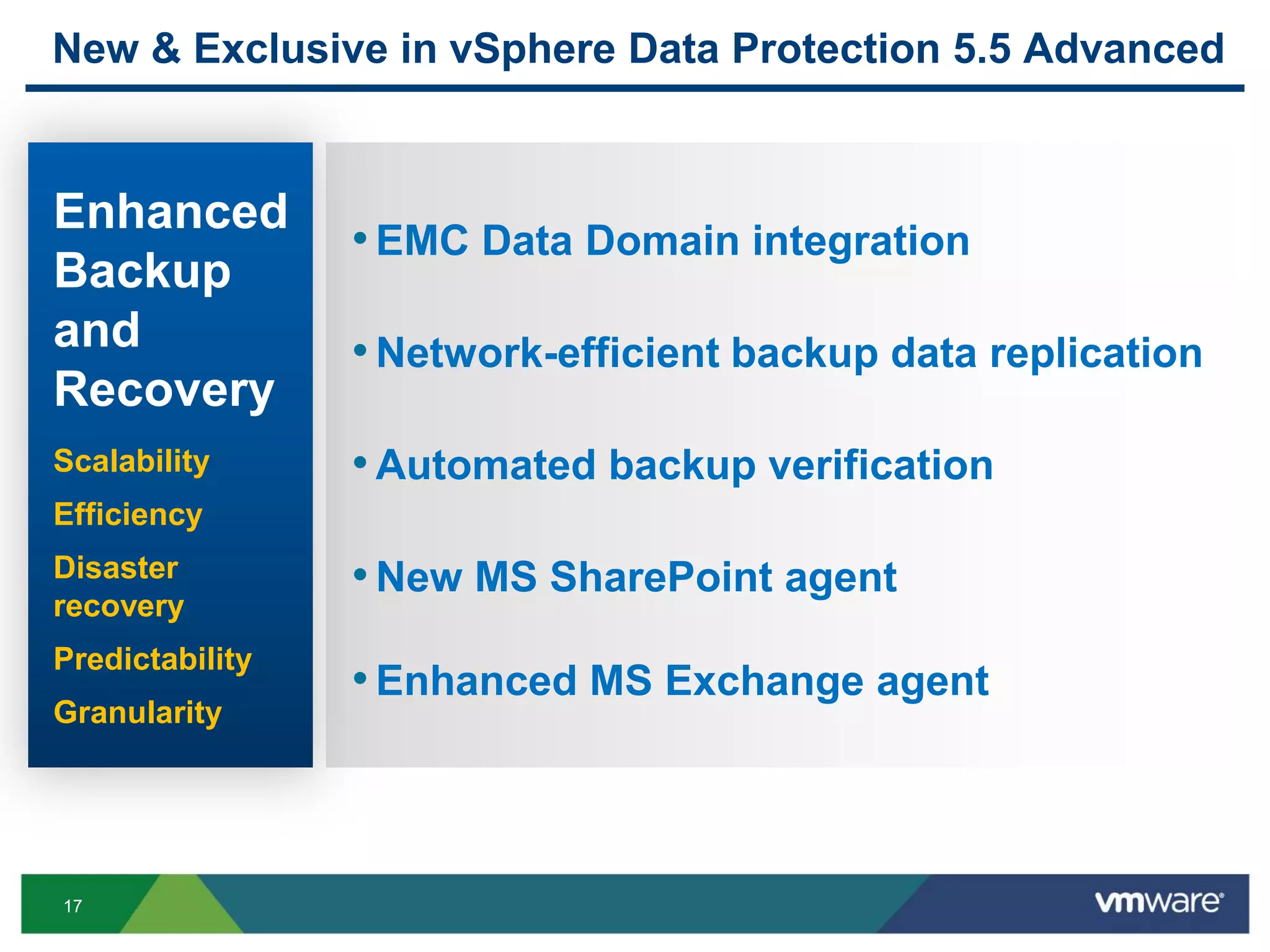
New & Exclusive in vSphere Data Protection 5.5 Advanced
•EMC Data Domain integration
•Network-efficient backup data replication
•Automated backup verification
•New MS SharePoint agent
•Enhanced MS Exchange agent
Enhanced
Backup
and
Recovery
Scalability
Efficiency
Disaster
recovery
Predictability
Granularity
18
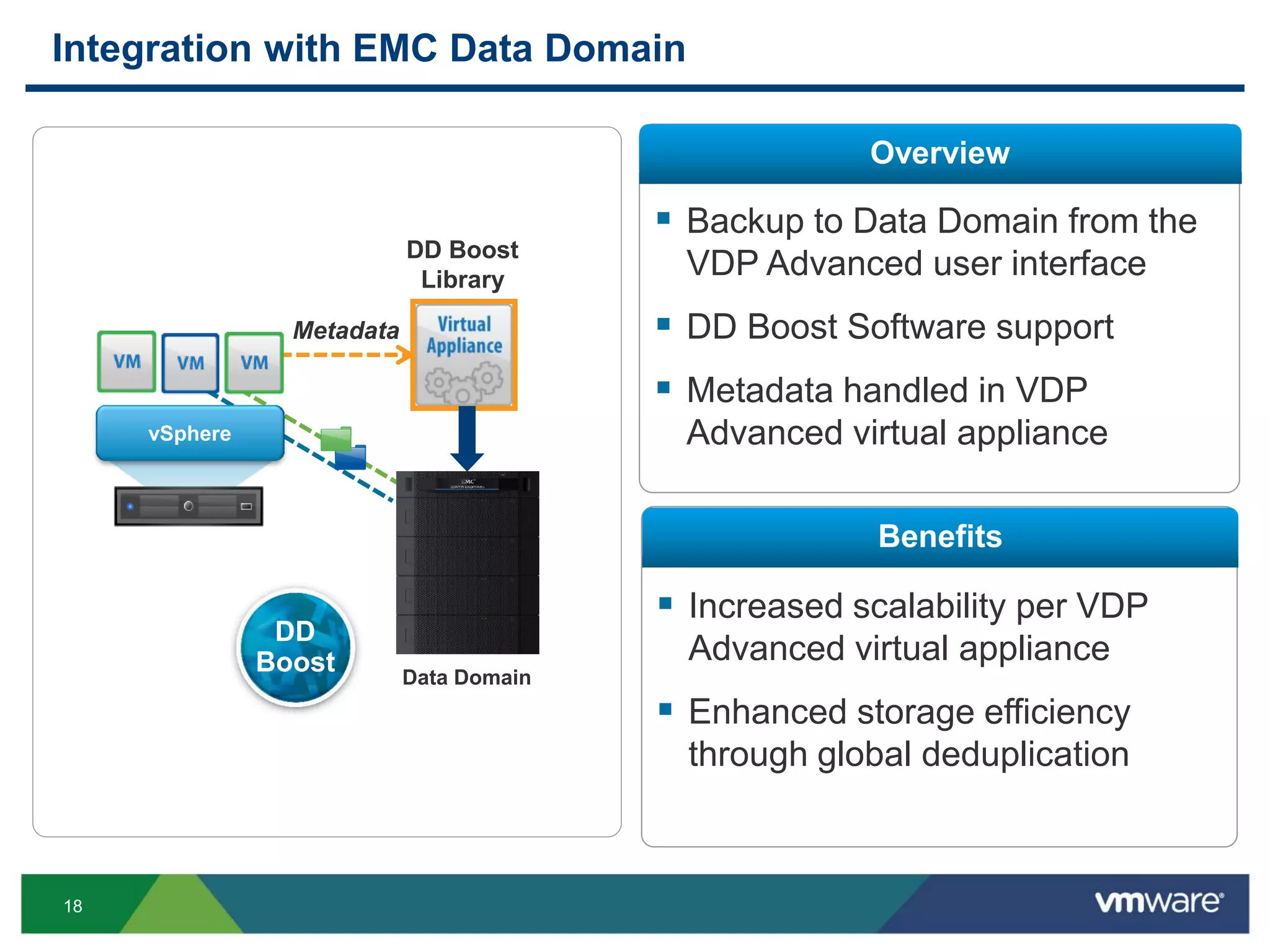
Integration with EMC Data Domain
Overview
Benefits
 Backup to Data Domain from the
VDP Advanced user interface
 DD Boost Software support
 Metadata handled in VDP
Advanced virtual appliance
 Increased scalability per VDP
Advanced virtual appliance
 Enhanced storage efficiency
through global deduplication
Data Domain
Metadata
vSphere
DD Boost
Library
DD
Boost
19
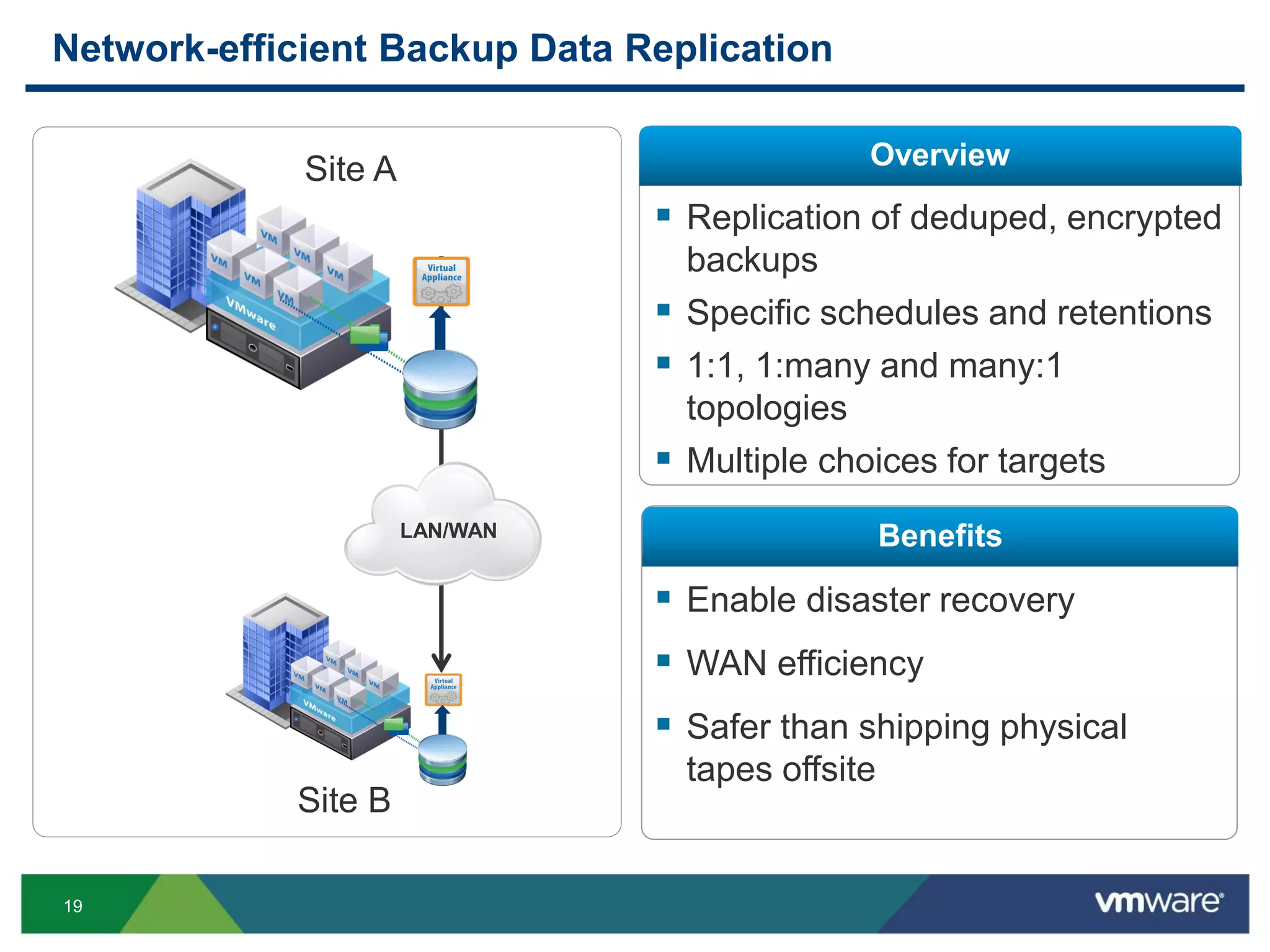
Network-efficient Backup Data Replication
Overview
Benefits
 Replication of deduped, encrypted
backups
 Specific schedules and retentions
 1:1, 1:many and many:1
topologies
 Multiple choices for targets
 Enable disaster recovery
 WAN efficiency
 Safer than shipping physical
tapes offsite
LAN/WAN
Site A
Site B
20
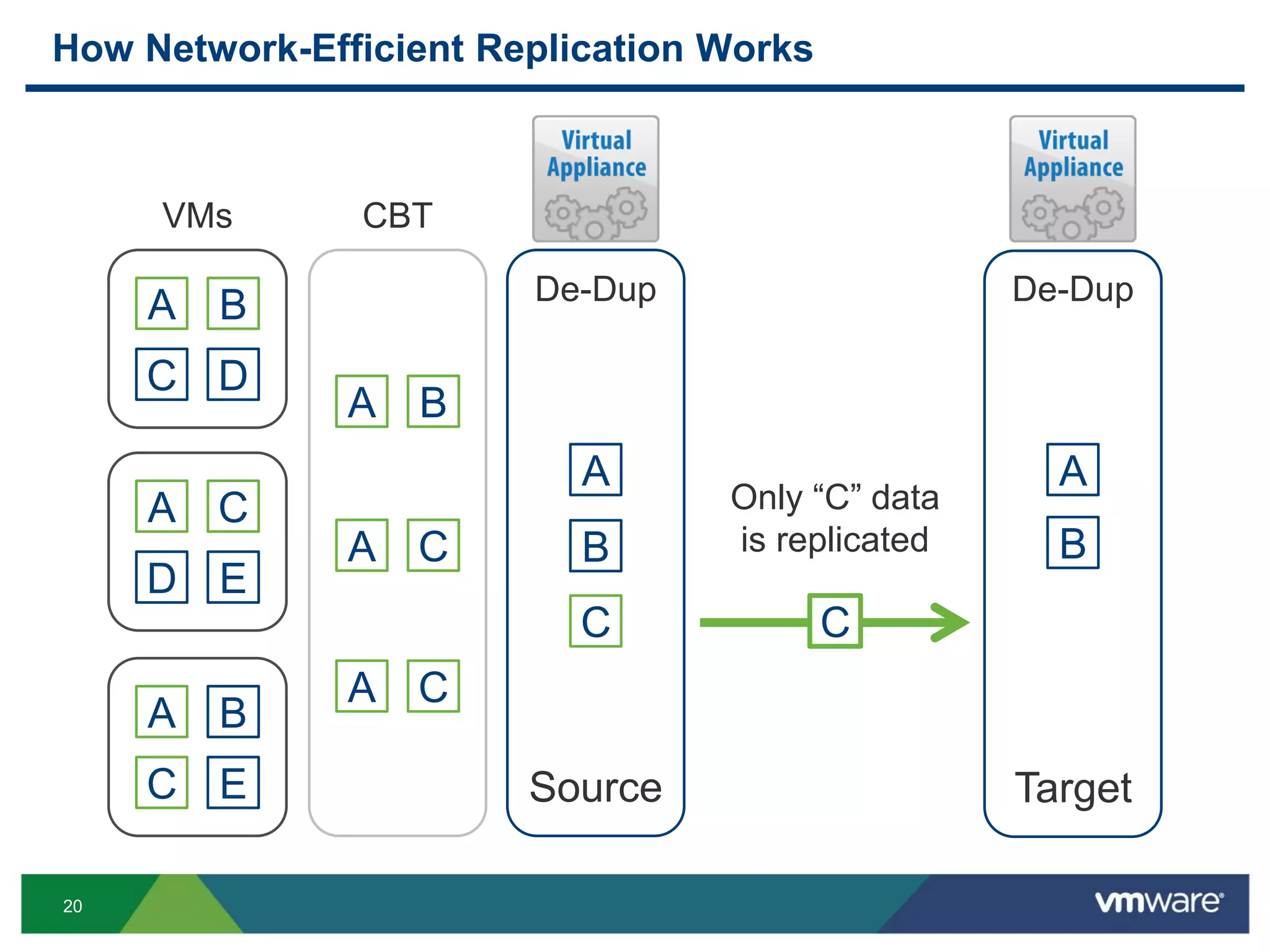
How Network-Efficient Replication Works
A
D
C
E
A
C
B
E
A
C
B
D
CBT
De-Dup
A B
A C
A C
A
B
C
A
B
C
Only “C” data
is replicated
De-Dup
VMs
Source Target
21
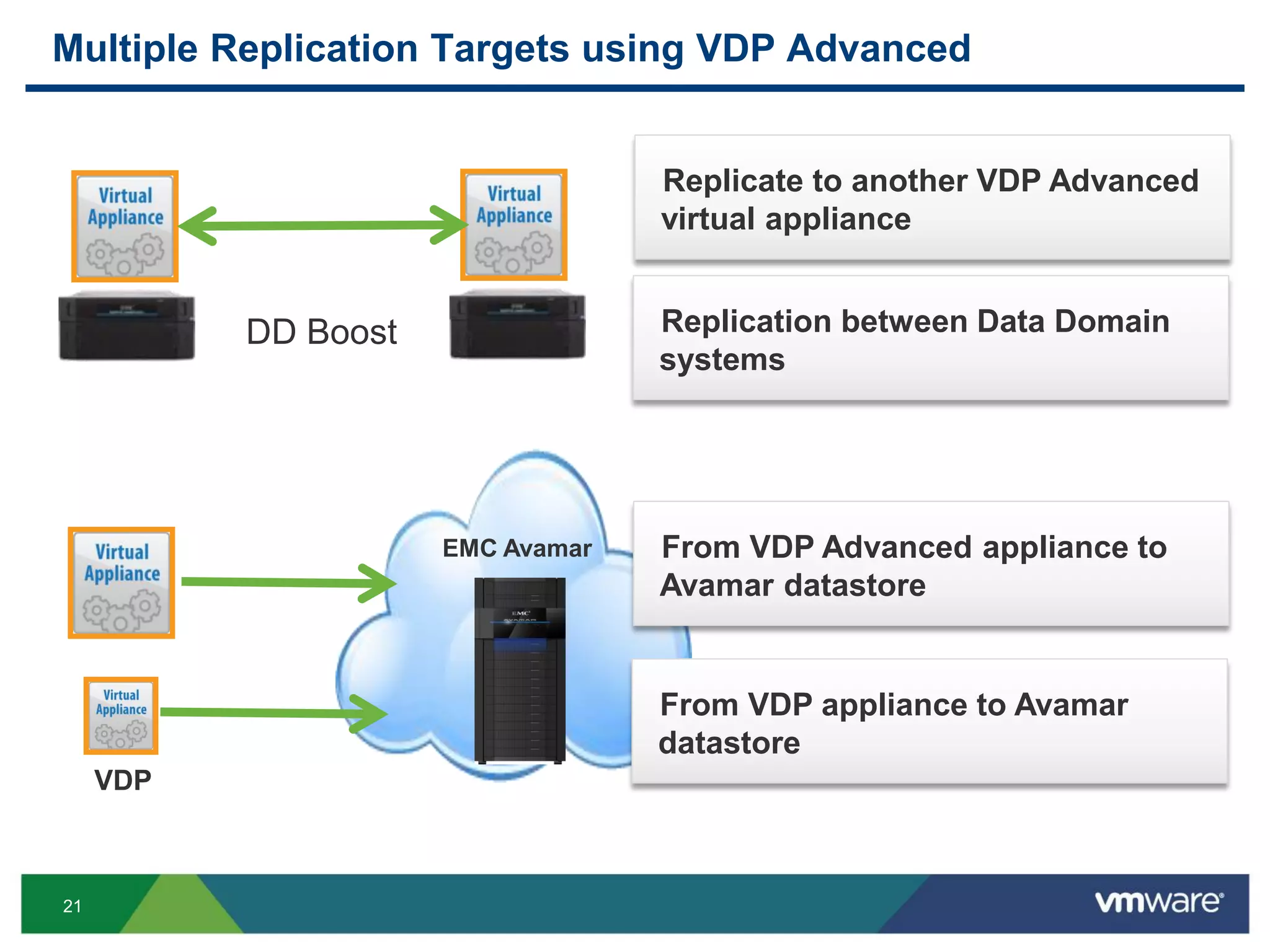
Multiple Replication Targets using VDP Advanced
Replicate to another VDP Advanced
virtual appliance
Replication between Data Domain
systems
DD Boost
EMC Avamar From VDP Advanced appliance to
Avamar datastore
From VDP appliance to Avamar
datastore
VDP
22
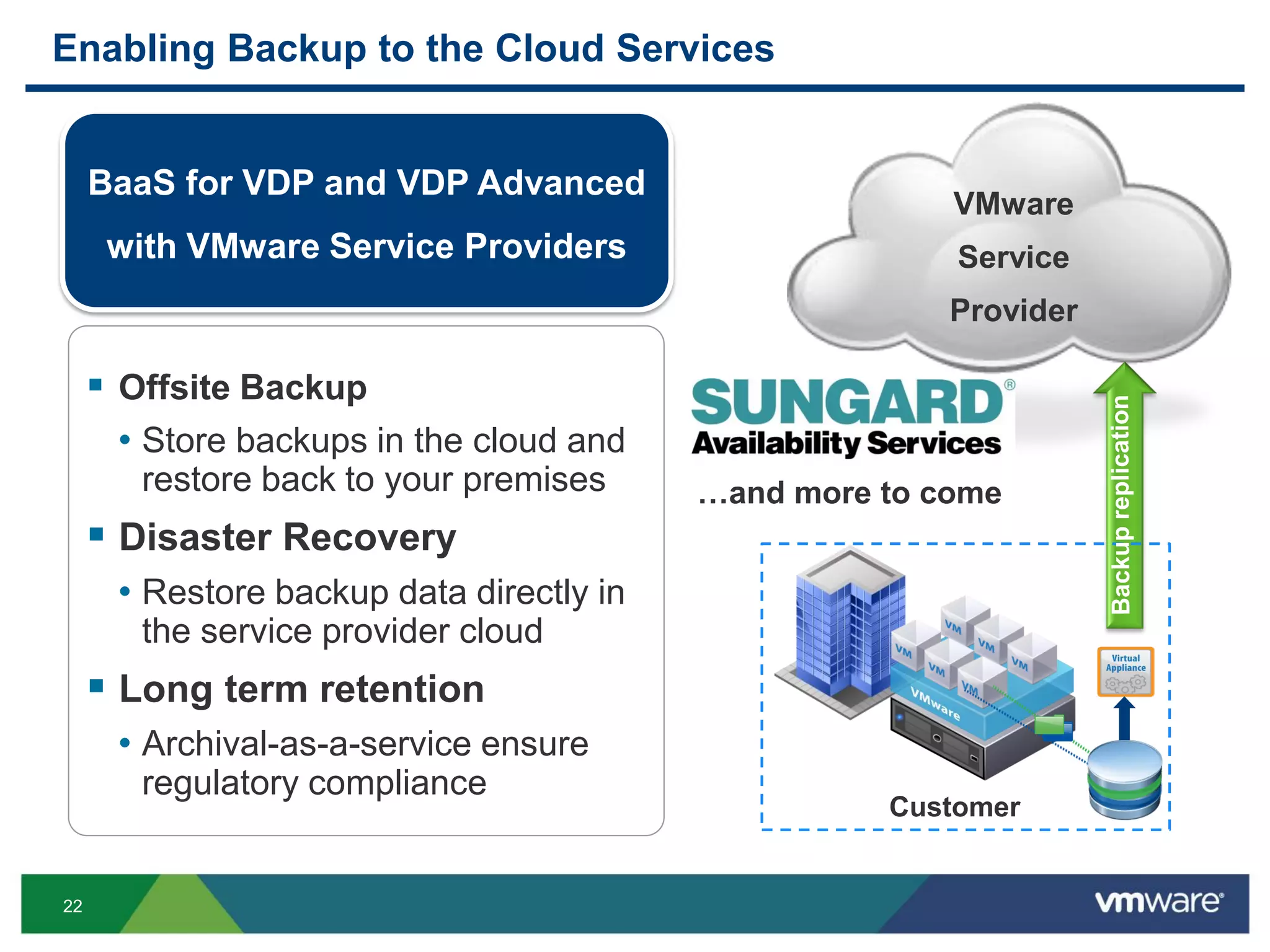
Enabling Backup to the Cloud Services
 Offsite Backup
• Store backups in the cloud and
restore back to your premises
 Disaster Recovery
• Restore backup data directly in
the service provider cloud
 Long term retention
• Archival-as-a-service ensure
regulatory compliance
VMware
Service
Provider
Customer
BaaS for VDP and VDP Advanced
with VMware Service Providers
…and more to come
23
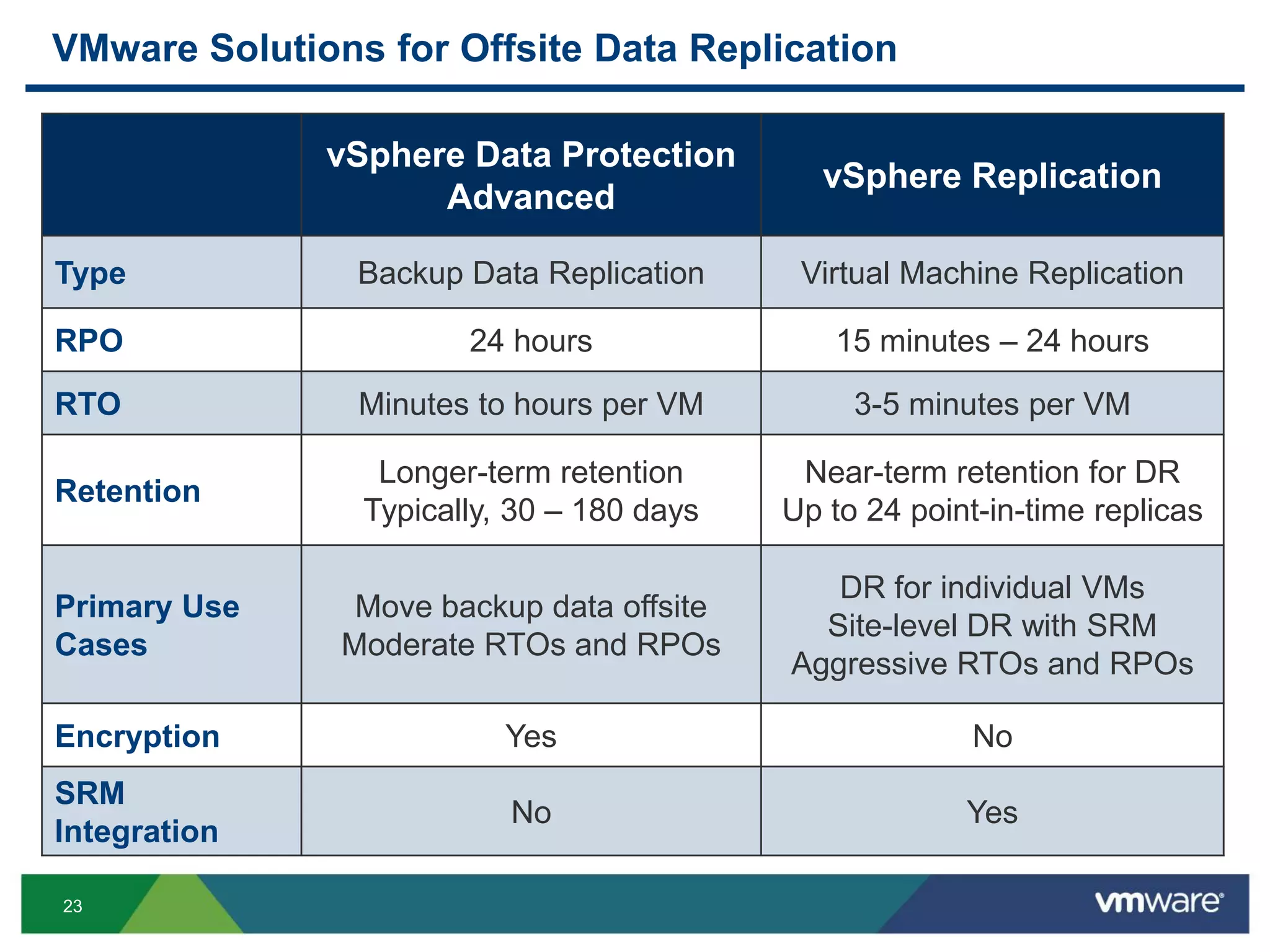
VMware Solutions for Offsite Data Replication
vSphere Data Protection
Advanced
vSphere Replication
Type Backup Data Replication Virtual Machine Replication
RPO 24 hours 15 minutes – 24 hours
RTO Minutes to hours per VM 3-5 minutes per VM
Retention
Longer-term retention
Typically, 30 – 180 days
Near-term retention for DR
Up to 24 point-in-time replicas
Primary Use
Cases
Move backup data offsite
Moderate RTOs and RPOs
DR for individual VMs
Site-level DR with SRM
Aggressive RTOs and RPOs
Encryption Yes No
SRM
Integration
No Yes
24
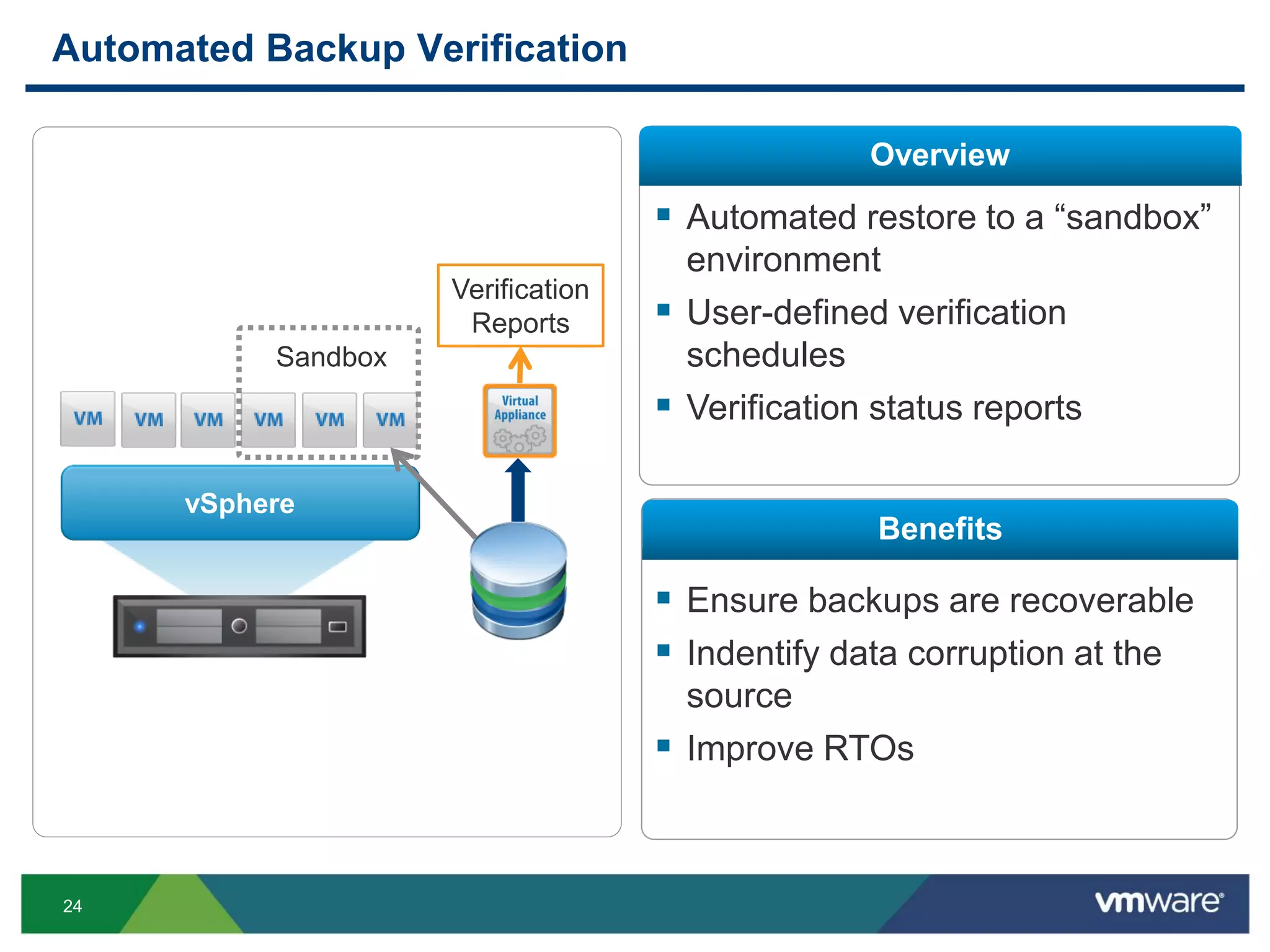
Automated Backup Verification
Overview
Benefits
 Automated restore to a “sandbox”
environment
 User-defined verification
schedules
 Verification status reports
 Ensure backups are recoverable
 Indentify data corruption at the
source
 Improve RTOs
vSphere
Verification
Reports
Sandbox
25
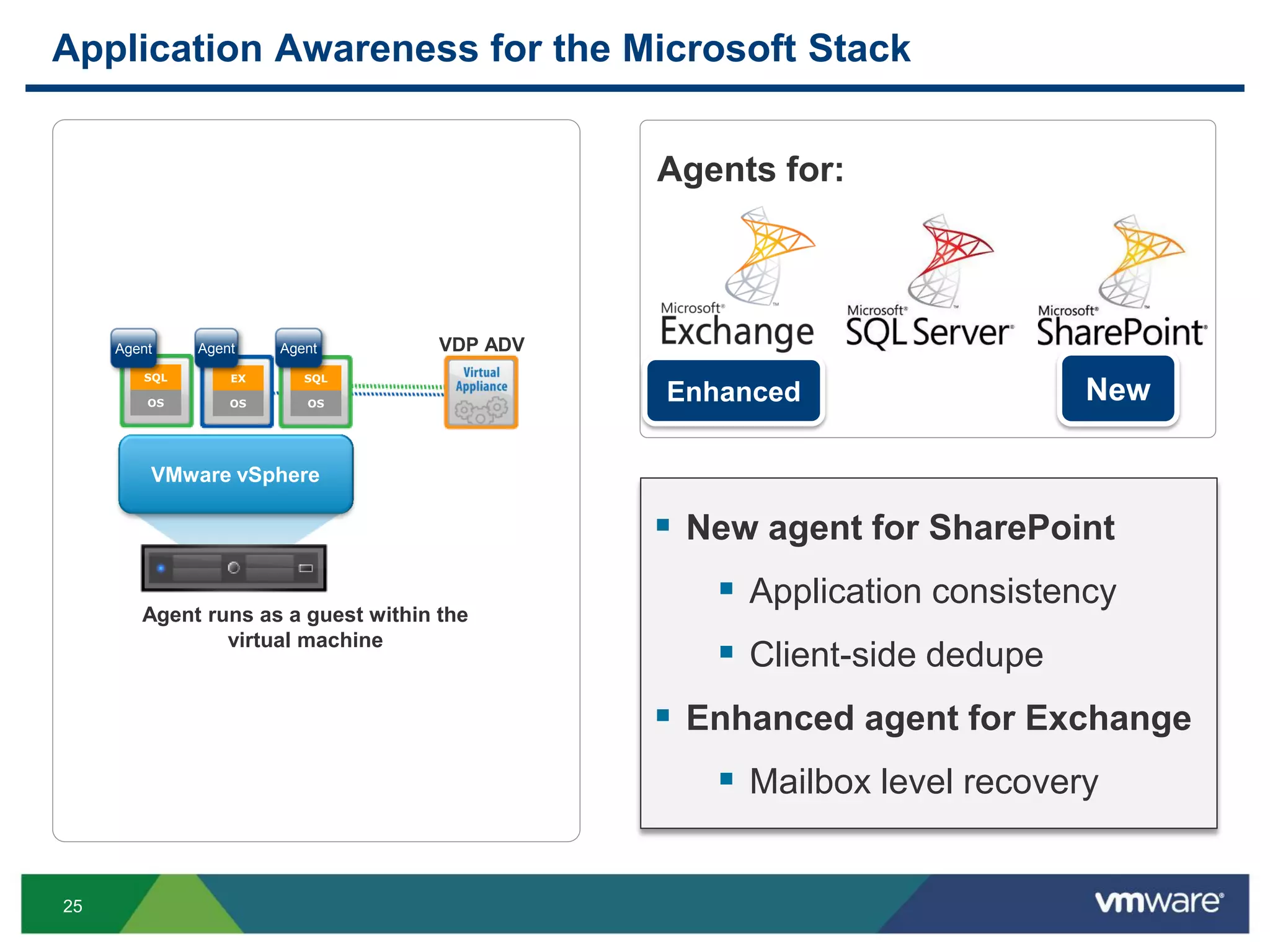
Application Awareness for the Microsoft Stack
 New agent for SharePoint
 Application consistency
 Client-side dedupe
 Enhanced agent for Exchange
 Mailbox level recovery
Agent runs as a guest within the
virtual machine
VMware vSphere
VDP ADV
SQL
OS
Agent
EX
OS
SQL
OS
Agent Agent
Agents for:
NewEnhanced
26
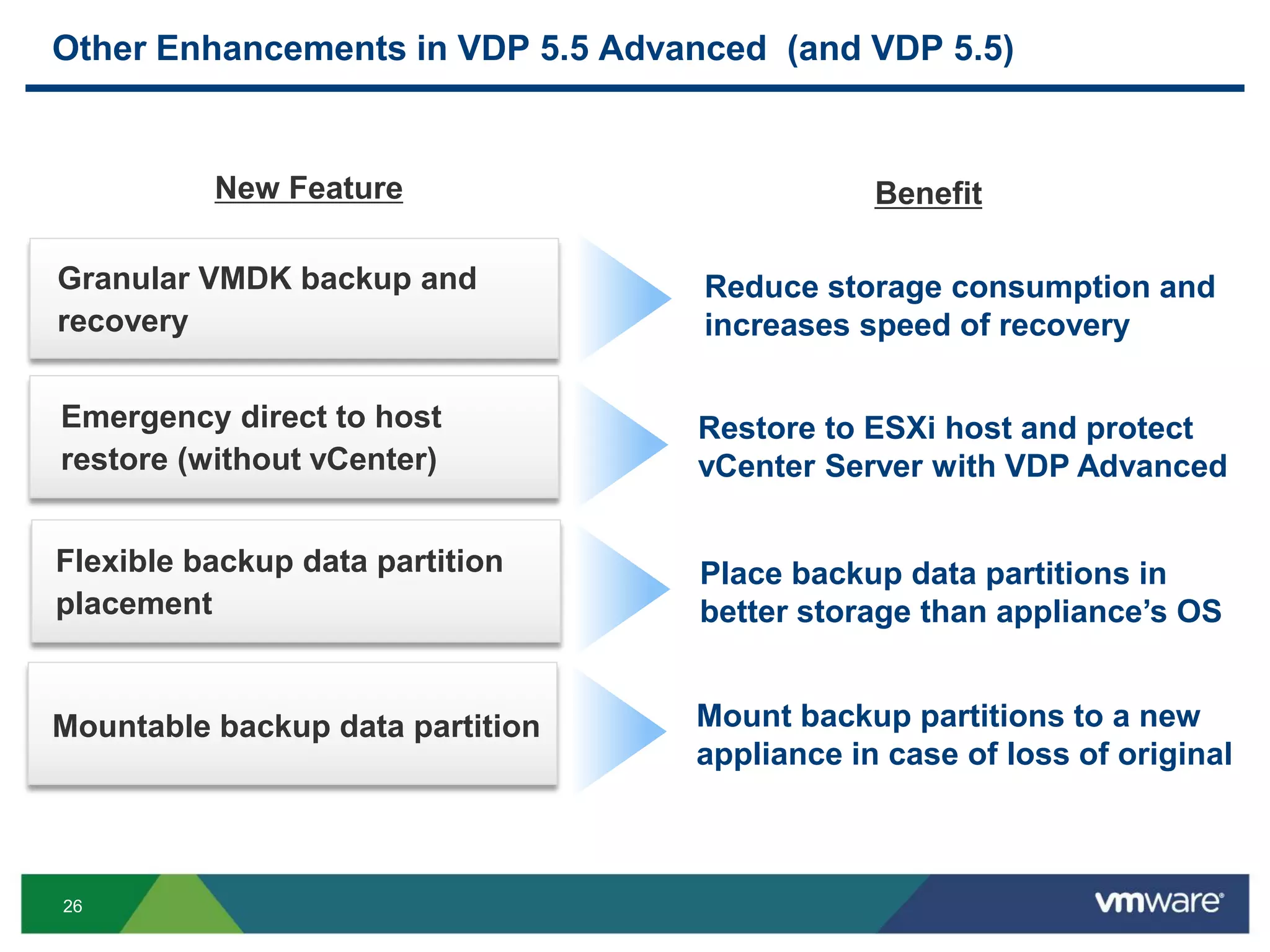
Other Enhancements in VDP 5.5 Advanced (and VDP 5.5)
Emergency direct to host
restore (without vCenter)
Reduce storage consumption and
increases speed of recovery
Restore to ESXi host and protect
vCenter Server with VDP Advanced
Granular VMDK backup and
recovery
Benefit
Flexible backup data partition
placement
Place backup data partitions in
better storage than appliance’s OS
New Feature
Mountable backup data partition Mount backup partitions to a new
appliance in case of loss of original
27
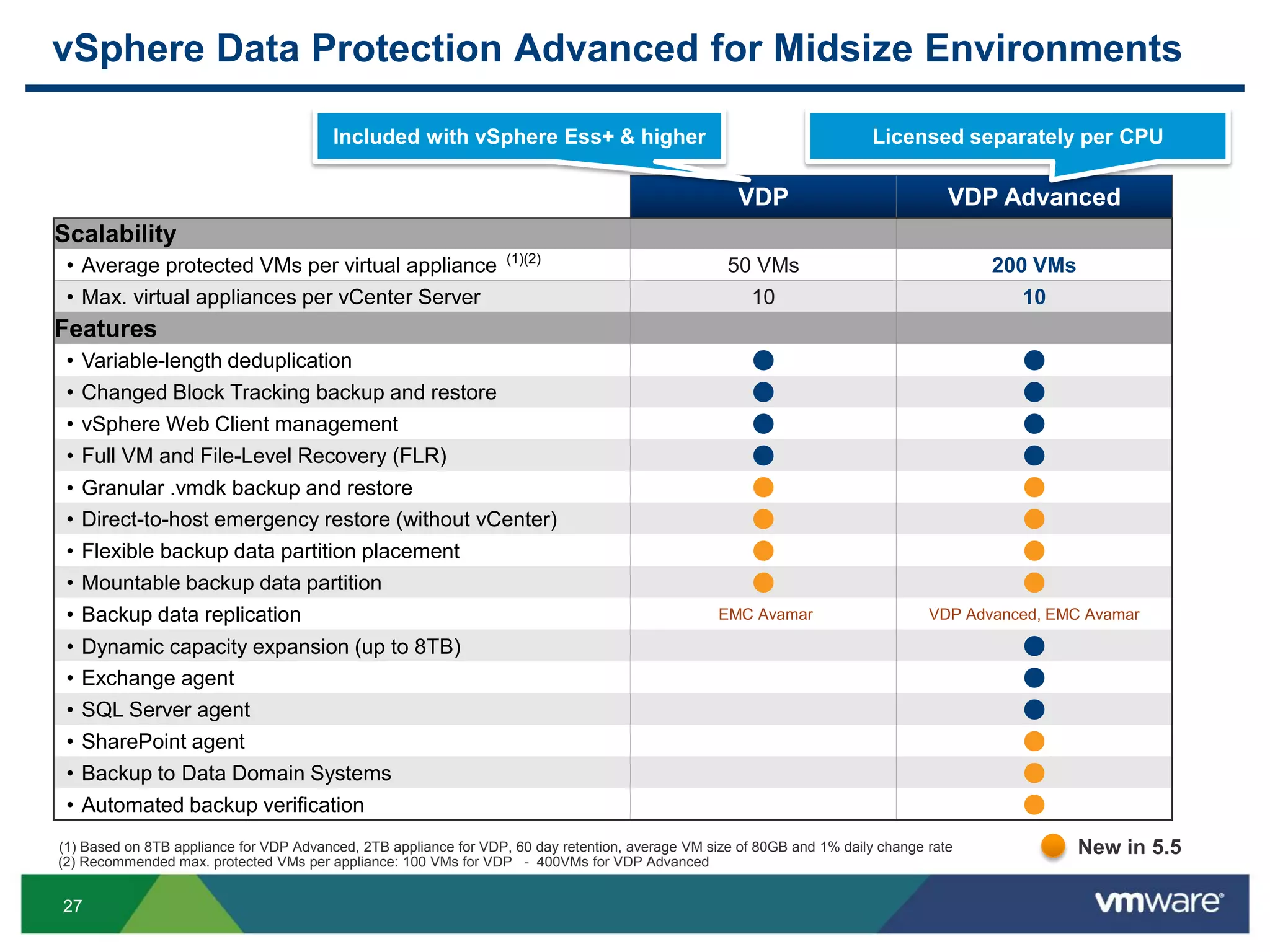
vSphere Data Protection Advanced for Midsize Environments
VDP VDP Advanced
Scalability
• Average protected VMs per virtual appliance (1)(2)
50 VMs 200 VMs
• Max. virtual appliances per vCenter Server 10 10
Features
• Variable-length deduplication ● ●
• Changed Block Tracking backup and restore ● ●
• vSphere Web Client management ● ●
• Full VM and File-Level Recovery (FLR) ● ●
• Granular .vmdk backup and restore ● ●
• Direct-to-host emergency restore (without vCenter) ● ●
• Flexible backup data partition placement ● ●
• Mountable backup data partition ● ●
• Backup data replication EMC Avamar VDP Advanced, EMC Avamar
• Dynamic capacity expansion (up to 8TB) ●
• Exchange agent ●
• SQL Server agent ●
• SharePoint agent ●
• Backup to Data Domain Systems ●
• Automated backup verification ●
New in 5.5
Included with vSphere Ess+ & higher Licensed separately per CPU
(1) Based on 8TB appliance for VDP Advanced, 2TB appliance for VDP, 60 day retention, average VM size of 80GB and 1% daily change rate
(2) Recommended max. protected VMs per appliance: 100 VMs for VDP - 400VMs for VDP Advanced
28
Pricing, Packaging and Licensing
29
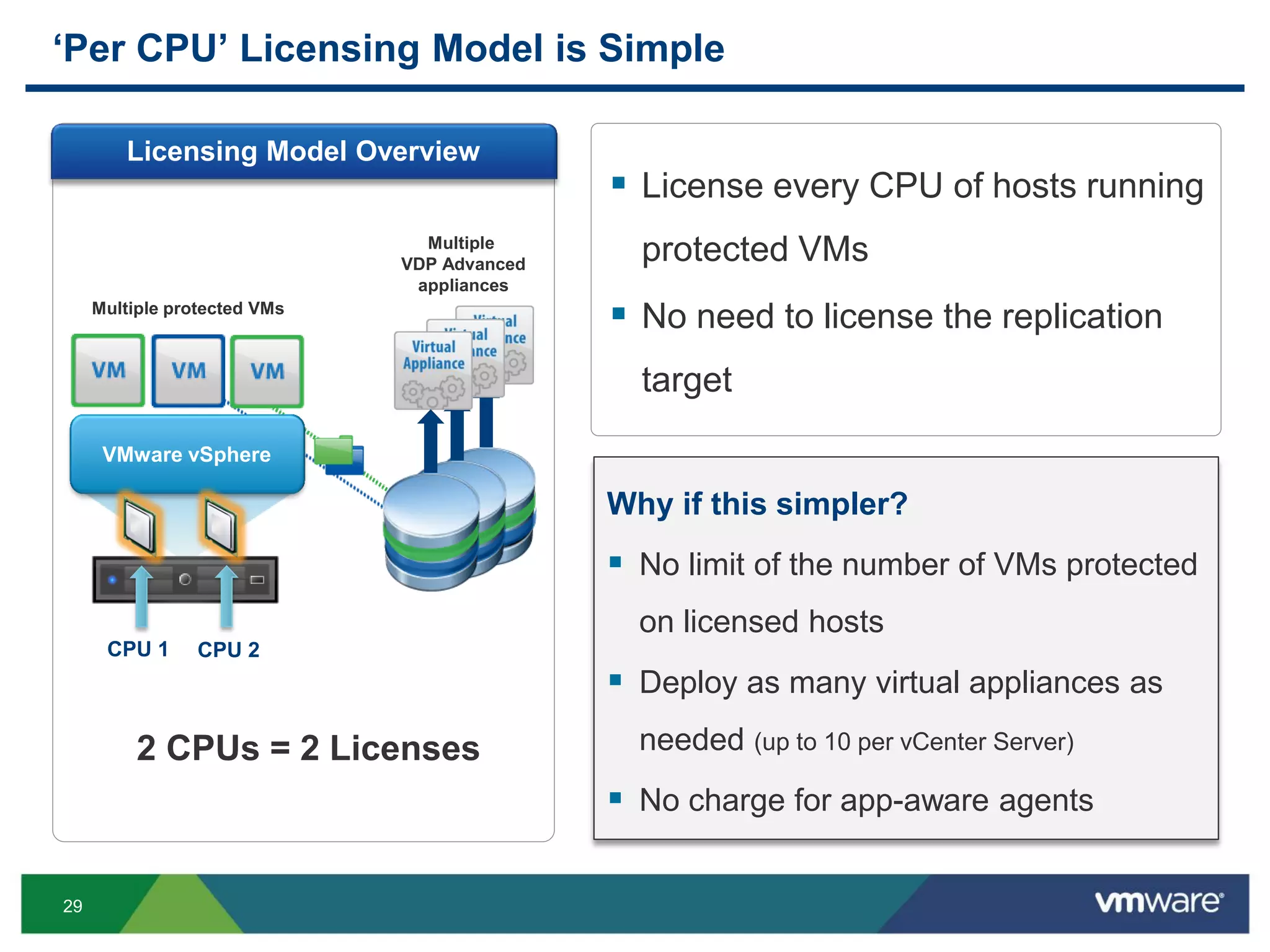
‘Per CPU’ Licensing Model is Simple
 License every CPU of hosts running
protected VMs
 No need to license the replication
target
VMware vSphere
Multiple
VDP Advanced
appliances
CPU 1 CPU 2
Why if this simpler?
 No limit of the number of VMs protected
on licensed hosts
 Deploy as many virtual appliances as
needed (up to 10 per vCenter Server)
 No charge for app-aware agents
Licensing Model Overview
Multiple protected VMs
2 CPUs = 2 Licenses
30
$
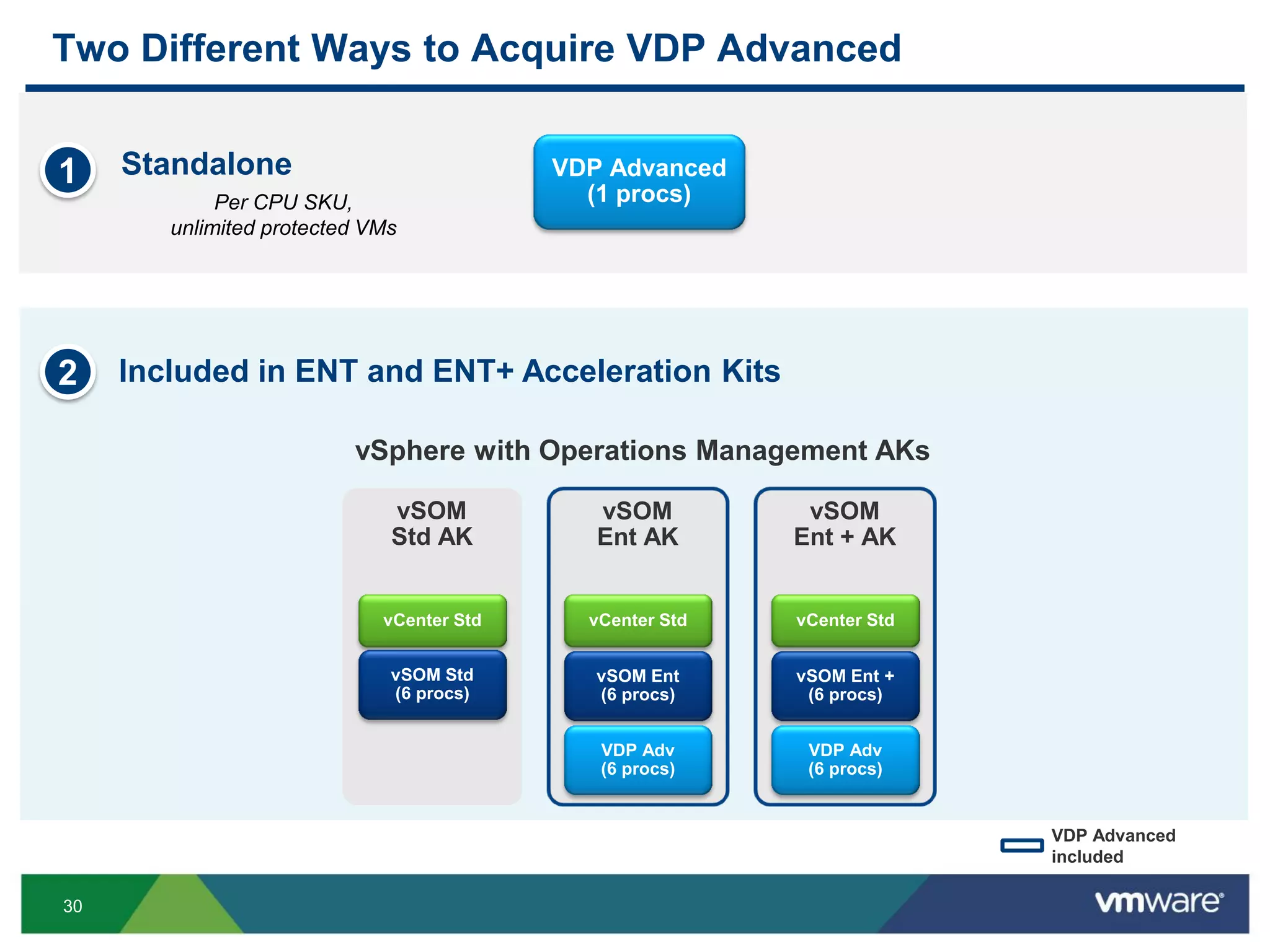
Two Different Ways to Acquire VDP Advanced
$1
Per CPU SKU,
unlimited protected VMs
Standalone VDP Advanced
(1 procs)
Included in ENT and ENT+ Acceleration Kits2
vSOM
Std AK
vCenter Std
vSOM Std
(6 procs)
vSOM
Ent AK
vCenter Std
vSOM Ent
(6 procs)
VDP Adv
(6 procs)
vSOM
Ent + AK
vSOM Ent +
(6 procs)
VDP Adv
(6 procs)
vSphere with Operations Management AKs
VDP Advanced
included
vCenter Std
31
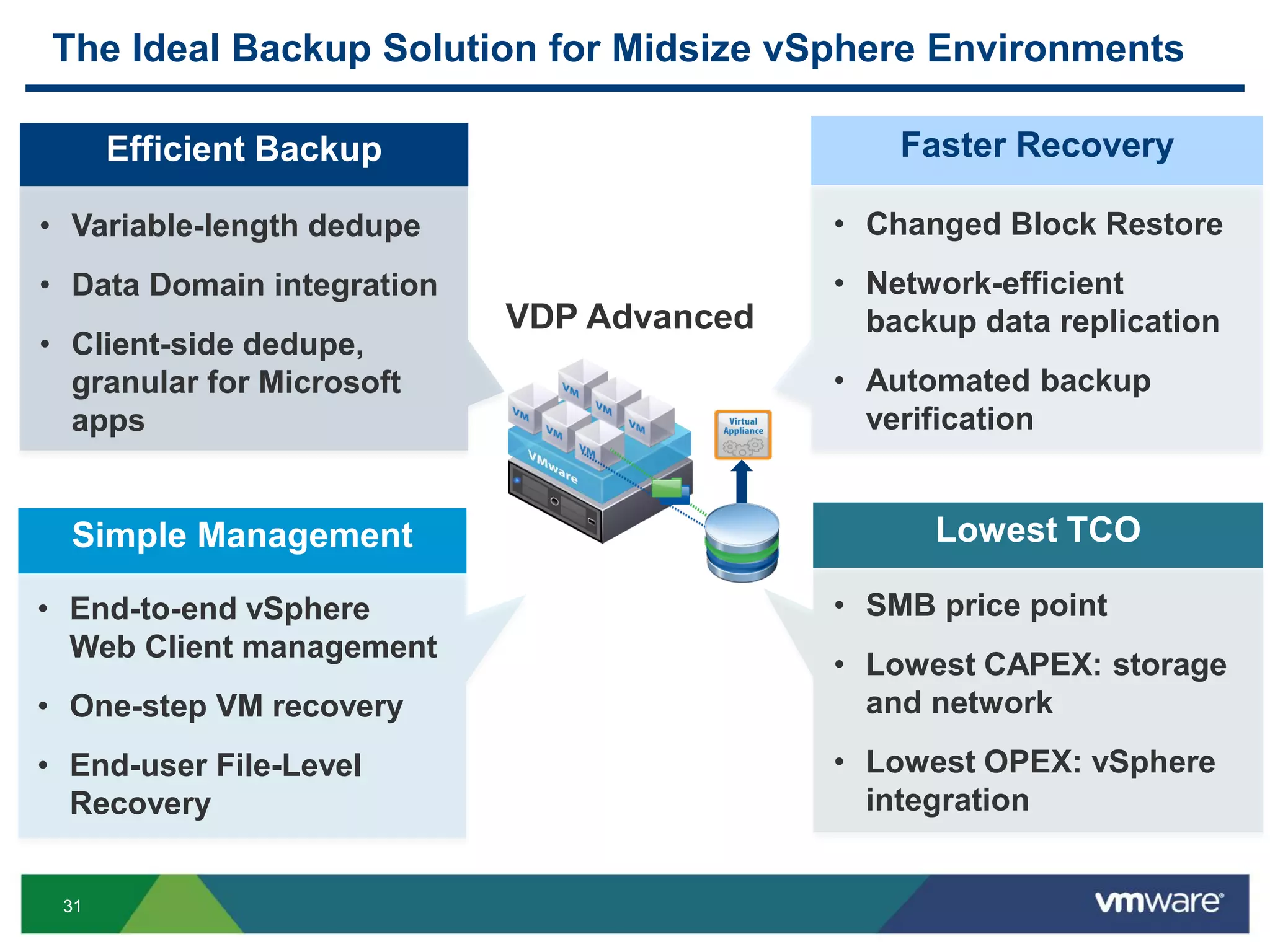
The Ideal Backup Solution for Midsize vSphere Environments
Efficient Backup Faster Recovery
Simple Management Lowest TCO
• Variable-length dedupe
• Data Domain integration
• Client-side dedupe,
granular for Microsoft
apps
• End-to-end vSphere
Web Client management
• One-step VM recovery
• End-user File-Level
Recovery
• Changed Block Restore
• Network-efficient
backup data replication
• Automated backup
verification
• SMB price point
• Lowest CAPEX: storage
and network
• Lowest OPEX: vSphere
integration
VDP Advanced
THANK YOU
VMworld 2013: vSphere Data Protection 5.5 Advanced VMware Backup and Recovery for vSphere

VMworld 2013: vSphere Data Protection 5.5 Advanced VMware Backup and Recovery for vSphere

  • 1.
    vSphere Data Protection5.5 Advanced VMware Backup and Recovery for vSphere Mauricio Barra, Vmware Jeff Hunter, VMware BCO3424 #BCO3424
  • 2.
    3 The Importance ofData Protection in vSphere Environments
  • 3.
    4 Improving BC/DR IsAt The Top Of IT Initiatives Source: Forrester “Server Virtualization Predictions For 2013”, March 2013 Source: Forrester “BC/DR Remain Priorities For 2012 But Take A Backseat To Cost-Saving And Efficiency Initiatives”, October 2011 Among top 5 technology priorities in 2012 • 40% report High Priority • 20% report Critical Priority #1 driver for virtualization: • 57% report it’s “very important” to adopt x86 virtualization
  • 4.
    5 Virtualization and DataProtection Go Hand in Hand Source: ESG “2013 IT Spending Intentions Survey”, January 2013 Increased Virtualization More VMs and data growth
  • 5.
    6 Backup Pain Points ProtectingVirtual Environments Created New Challenges A data protection solution designed for virtualized environments Trends • Data Explosion • VM Growth • Hyper- consolidation • Cloud VMware Solution • Increasing infrastructure costs • Longer backup windows • Longer Recovery Time Objectives • Complexity of VM data services • Expectations for rapid provisioning
  • 6.
    7 Planned Downtime UnplannedDowntime VMware Enables IT Business Continuity at All Levels • vMotion • Storage vMotion • Fault Tolerance • High Availability • App HA • Site Recovery Manager • DR to the Cloud with SRM • vSphere Replication • vSphere Data Protection Advanced • vSphere APIs for Data Protection (VADP) Site Application Availability Local Application Availability Data Protection
  • 7.
    8 vSphere Data ProtectionAdvanced VMware’s Backup and Recovery Solution for vSphere
  • 8.
    9 Introducing vSphere DataProtection 5.5 Advanced vSphere Data deduplicated VDP Advanced  Efficient backup improves resources utilization  Fast and assured recovery ensures business continuity  Simple, integrated management empowers the VI admin Overview Benefits  Backup and recovery solution for mid-sized vSphere environments  Powered by EMC Avamar technology  Fully integrated with VMware vSphere
  • 9.
    10 The VMware DataProtection Journey Increasing the Pace VDP 5.5 Advanced VDP 5.1 vSphere 5.1 VDP 5.5 vSphere 5.5 VDR 1.0 vSphere 4.0  Virtual appliance  vSphere Client  Image-level backup  File-level restore  VDR functionality  EMC Avamar engine  Variable-length dedupe  Changed Block Restore  vSphere Web Client  All VDP features  Increased capacity  Dynamic storage  App awareness  SQL agent  Exchange agent  Replication to Avamar  .vmdk backup & restore  Direct to host restore  Flexible data placement  Scheduling granularity  All VDP features  Replication to VDP Adv  Data Domain integration  Automated verification  New SharePoint agent  Enhanced Exchange 2009 2012 Q3 VDP 5.1 Advanced 2013 Q1 2013 Q3 2013 Q4
  • 10.
  • 11.
    12 Reliable Data Protectionfor the Most Trusted Platform vSphere Data Protection Advanced  From VMware for vSphere  Over 26,000 VMware users of VDP  Powered by EMC Avamar  Over 8,000 enterprise customers using this technology
  • 12.
    13 4x More Storage-EfficientUsing Patented Deduplication 71 19 0 20 40 60 80 Others VDP Adv TB Backup storage required for 200 VMs 4x variable-length dedupe AB VDP VMWARE WXY fixed-length dedupe ABVMWAR EVDPWXY VDPABWX YVMWARE Source: ESG Lab Validation Report – vSphere Data Protection, February 2013 "For real backups, VMware offers vSphere Data Protection […] the deduplication levels are amazing” Trevor Pott -The Register VDP Adv Others Data segments Deduplicated backup data TCO $84,000 TCO $23,000 ~$60K savings on storage TCO
  • 13.
    14 6x Faster RecoveryThrough Unique Changed Block Restore 18.8 2.9 0 5 10 15 20 Others VDP/VDPA Minutes Recovery time of a 30GB VM 6x Source: ESG Lab Validation Report – vSphere Data Protection, February 2013 Changed Blocks FULL IMAGE RESTORE CHANGED BLOCK TRACKING RESTORE Full VM “ESG Lab has validated that with VDP, IT administrators can perform full restores of VMs from Change Block Tracking in seconds to minutes” Tony Palmer - ESG Lab Validation VM recovery to production in minutes
  • 14.
    15 Simple Integrated ManagementDesigned for the VI Admin Simple backup job creation Simple, granular restore End-to-end integration Simple deployment vSphere Web Client integration Backup job creation Restore execution Monitoring and reporting Linux-based virtual appliance ~30 min to install and configure Automatic VM discovery Wizard-driven process Specified schedules and retentions One-step recovery End-user file-level restore Image, databases, vmdk
  • 15.
    16 What’s New with vSphereData Protection 5.5 Advanced
  • 16.
    17 New & Exclusivein vSphere Data Protection 5.5 Advanced •EMC Data Domain integration •Network-efficient backup data replication •Automated backup verification •New MS SharePoint agent •Enhanced MS Exchange agent Enhanced Backup and Recovery Scalability Efficiency Disaster recovery Predictability Granularity
  • 17.
    18 Integration with EMCData Domain Overview Benefits  Backup to Data Domain from the VDP Advanced user interface  DD Boost Software support  Metadata handled in VDP Advanced virtual appliance  Increased scalability per VDP Advanced virtual appliance  Enhanced storage efficiency through global deduplication Data Domain Metadata vSphere DD Boost Library DD Boost
  • 18.
    19 Network-efficient Backup DataReplication Overview Benefits  Replication of deduped, encrypted backups  Specific schedules and retentions  1:1, 1:many and many:1 topologies  Multiple choices for targets  Enable disaster recovery  WAN efficiency  Safer than shipping physical tapes offsite LAN/WAN Site A Site B
  • 19.
    20 How Network-Efficient ReplicationWorks A D C E A C B E A C B D CBT De-Dup A B A C A C A B C A B C Only “C” data is replicated De-Dup VMs Source Target
  • 20.
    21 Multiple Replication Targetsusing VDP Advanced Replicate to another VDP Advanced virtual appliance Replication between Data Domain systems DD Boost EMC Avamar From VDP Advanced appliance to Avamar datastore From VDP appliance to Avamar datastore VDP
  • 21.
    22 Enabling Backup tothe Cloud Services  Offsite Backup • Store backups in the cloud and restore back to your premises  Disaster Recovery • Restore backup data directly in the service provider cloud  Long term retention • Archival-as-a-service ensure regulatory compliance VMware Service Provider Customer BaaS for VDP and VDP Advanced with VMware Service Providers …and more to come
  • 22.
    23 VMware Solutions forOffsite Data Replication vSphere Data Protection Advanced vSphere Replication Type Backup Data Replication Virtual Machine Replication RPO 24 hours 15 minutes – 24 hours RTO Minutes to hours per VM 3-5 minutes per VM Retention Longer-term retention Typically, 30 – 180 days Near-term retention for DR Up to 24 point-in-time replicas Primary Use Cases Move backup data offsite Moderate RTOs and RPOs DR for individual VMs Site-level DR with SRM Aggressive RTOs and RPOs Encryption Yes No SRM Integration No Yes
  • 23.
    24 Automated Backup Verification Overview Benefits Automated restore to a “sandbox” environment  User-defined verification schedules  Verification status reports  Ensure backups are recoverable  Indentify data corruption at the source  Improve RTOs vSphere Verification Reports Sandbox
  • 24.
    25 Application Awareness forthe Microsoft Stack  New agent for SharePoint  Application consistency  Client-side dedupe  Enhanced agent for Exchange  Mailbox level recovery Agent runs as a guest within the virtual machine VMware vSphere VDP ADV SQL OS Agent EX OS SQL OS Agent Agent Agents for: NewEnhanced
  • 25.
    26 Other Enhancements inVDP 5.5 Advanced (and VDP 5.5) Emergency direct to host restore (without vCenter) Reduce storage consumption and increases speed of recovery Restore to ESXi host and protect vCenter Server with VDP Advanced Granular VMDK backup and recovery Benefit Flexible backup data partition placement Place backup data partitions in better storage than appliance’s OS New Feature Mountable backup data partition Mount backup partitions to a new appliance in case of loss of original
  • 26.
    27 vSphere Data ProtectionAdvanced for Midsize Environments VDP VDP Advanced Scalability • Average protected VMs per virtual appliance (1)(2) 50 VMs 200 VMs • Max. virtual appliances per vCenter Server 10 10 Features • Variable-length deduplication ● ● • Changed Block Tracking backup and restore ● ● • vSphere Web Client management ● ● • Full VM and File-Level Recovery (FLR) ● ● • Granular .vmdk backup and restore ● ● • Direct-to-host emergency restore (without vCenter) ● ● • Flexible backup data partition placement ● ● • Mountable backup data partition ● ● • Backup data replication EMC Avamar VDP Advanced, EMC Avamar • Dynamic capacity expansion (up to 8TB) ● • Exchange agent ● • SQL Server agent ● • SharePoint agent ● • Backup to Data Domain Systems ● • Automated backup verification ● New in 5.5 Included with vSphere Ess+ & higher Licensed separately per CPU (1) Based on 8TB appliance for VDP Advanced, 2TB appliance for VDP, 60 day retention, average VM size of 80GB and 1% daily change rate (2) Recommended max. protected VMs per appliance: 100 VMs for VDP - 400VMs for VDP Advanced
  • 27.
  • 28.
    29 ‘Per CPU’ LicensingModel is Simple  License every CPU of hosts running protected VMs  No need to license the replication target VMware vSphere Multiple VDP Advanced appliances CPU 1 CPU 2 Why if this simpler?  No limit of the number of VMs protected on licensed hosts  Deploy as many virtual appliances as needed (up to 10 per vCenter Server)  No charge for app-aware agents Licensing Model Overview Multiple protected VMs 2 CPUs = 2 Licenses
  • 29.
    30 $ Two Different Waysto Acquire VDP Advanced $1 Per CPU SKU, unlimited protected VMs Standalone VDP Advanced (1 procs) Included in ENT and ENT+ Acceleration Kits2 vSOM Std AK vCenter Std vSOM Std (6 procs) vSOM Ent AK vCenter Std vSOM Ent (6 procs) VDP Adv (6 procs) vSOM Ent + AK vSOM Ent + (6 procs) VDP Adv (6 procs) vSphere with Operations Management AKs VDP Advanced included vCenter Std
  • 30.
    31 The Ideal BackupSolution for Midsize vSphere Environments Efficient Backup Faster Recovery Simple Management Lowest TCO • Variable-length dedupe • Data Domain integration • Client-side dedupe, granular for Microsoft apps • End-to-end vSphere Web Client management • One-step VM recovery • End-user File-Level Recovery • Changed Block Restore • Network-efficient backup data replication • Automated backup verification • SMB price point • Lowest CAPEX: storage and network • Lowest OPEX: vSphere integration VDP Advanced
  • 31.