Implementing a Holistic BC/DR Strategy with
VMware - Part Two
Jeff Hunter, VMware
Ken Werneburg, VMware
BCO5162
#BCO5162
2
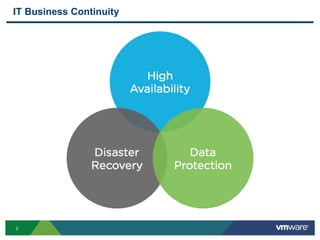
IT Business Continuity
3
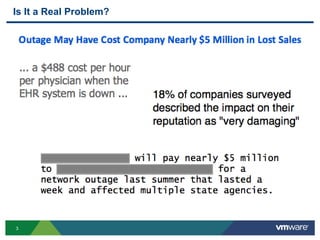
Is It a Real Problem?
4
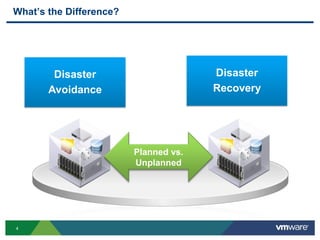
What’s the Difference?
Disaster
Avoidance
Disaster
Recovery
Planned vs.
Unplanned
5
Disaster Recovery vs. Business Continuity
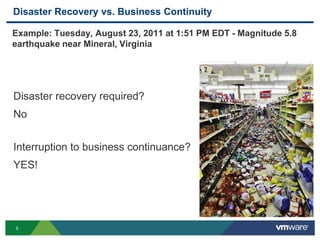
Example: Tuesday, August 23, 2011 at 1:51 PM EDT - Magnitude 5.8
earthquake near Mineral, Virginia
Disaster recovery required?
No
Interruption to business continuance?
YES!
6
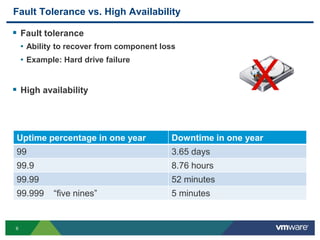
Fault Tolerance vs. High Availability
 Fault tolerance
• Ability to recover from component loss
• Example: Hard drive failure
 High availability
Uptime percentage in one year Downtime in one year
99 3.65 days
99.9 8.76 hours
99.99 52 minutes
99.999 “five nines” 5 minutes
X
7
RTO, RPO, and MTD
 Recovery Time Objective (RTO)
• How long it should take to recover
 Recovery Point Objective (RPO)
• Amount of data loss that can be incurred
 Maximum Tolerable Downtime (MTD)
• Downtime that can occur before significant loss is incurred
• Examples: Financial, reputation
8
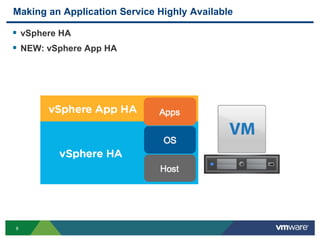
Making an Application Service Highly Available
 vSphere HA
 NEW: vSphere App HA
9
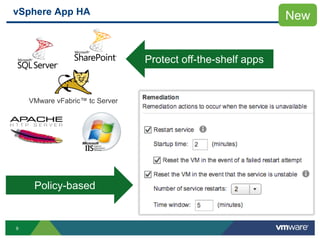
VMware vFabric™ tc Server
vSphere App HA New
Policy-based
Protect off-the-shelf apps
10
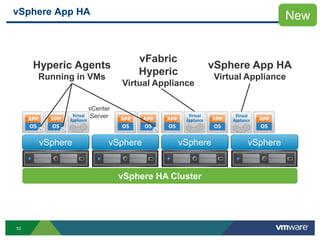
vSphere App HA
vSphere HA Cluster
vFabric
Hyperic
Virtual Appliance
vSphere App HA
Virtual Appliance
Hyperic Agents
Running in VMs
vCenter
Server
vSphere vSphere vSphere vSphere
New
11
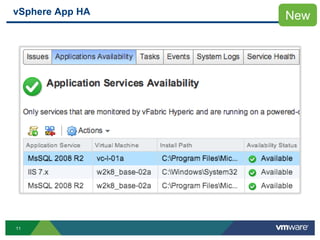
vSphere App HA New
12
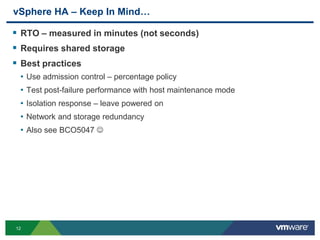
vSphere HA – Keep In Mind…
 RTO – measured in minutes (not seconds)
 Requires shared storage
 Best practices
• Use admission control – percentage policy
• Test post-failure performance with host maintenance mode
• Isolation response – leave powered on
• Network and storage redundancy
• Also see BCO5047 
13
vSphere Fault Tolerance (FT)
 Zero recovery time, data loss
• Host hardware failure only
• Does not protect against OS and application failure
 Works fine with HA, App HA
 Why not FT?
• Resource requirements – does workload really need it?
• VM has multiple CPUs – see BCO5065 
• No VM snapshots – backups require agent
14
Data Protection (Backup and Restore)
 Agents? No Agents? – Both!
• No agents for majority of workloads – keep it simple
• Agents for certain apps
 vSphere Data Protection (VDP) Advanced
• Backup and recovery for VMware, from VMware
• Based on proven, mature EMC Avamar™
• Agent-less VM backup and restore
• Agents for granular tier-1 application protection
15
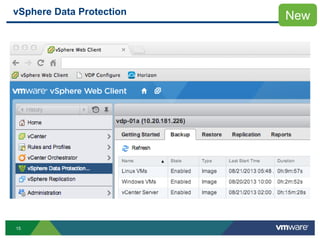
vSphere Data Protection New
16
VDP Advanced – Keep In Mind…
 Engineered for SMB environments
 Uses VADP – VM snapshots, CBT
 Utilizes Windows VSS in VMware Tools
 Works fine with HA, not with FT
 RDM – virtual yes, physical no
 Is it DR?
• Maybe – depends on RTO, RPO
• Needs replication offsite, right? – see BCO5041 
17
VDP Advanced – Keep In Mind…
 Best Practices
• Prepopulate DNS, always use FQDN
• Manage VM snapshots
• Avoid deploying to slow storage
• Do not power-off, always shut down gracefully
• Do not schedule backups during maintenance window
• Also see BCO4756 and BCO5041 
18
vCenter Availability
 Run vCenter Server application in a VM
 Run vCenter Server database in a VM
 Run both in same VM?
 Protect with vSphere HA
• vCenter and DB VM restart priority set to High
• Enable guest OS and App monitoring
 App HA can protect SQL Server database
19
vCenter Availability
 Back up vCenter Server VM and database
• Image-level backup for vCenter Server VM
• App-level backup using agent for database backup
 Why not FT for vCenter Server?
• vCenter Server requires minimum of 2 vCPUs
• FT does not protect against application failure
 Replicate vCenter Server, database VMs?
20
vCenter Availability – vCenter Server Heartbeat
 Pros
• Better RTO and RPO – typically ~5 minutes
• Protects against host and guest OS failure
• Checks network connectivity
• Monitors application services and performance
 Cons
• Complexity
• Requires double the resources
• Licensing cost
21
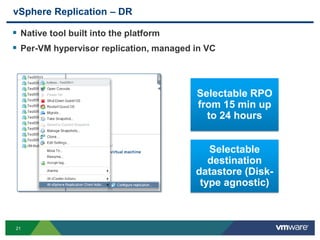
vSphere Replication – DR
 Native tool built into the platform
 Per-VM hypervisor replication, managed in VC
Selectable RPO
from 15 min up
to 24 hours
Selectable
destination
datastore (Disk-
type agnostic)
22
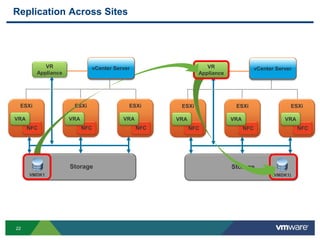
Replication Across Sites
vCenter Server
ESXi
NFC
VRA
ESXi
NFC
VRA
ESXi
NFC
VRA
Storage
Storage
(VMDK1)
vCenter Server
ESXi
NFC
VRA
ESXi
NFC
VRA
ESXi
NFC
VRA
VR
Appliance
VR
Appliance
Storage
Storage
VMDK1
vCenter Server vCenter Server
23
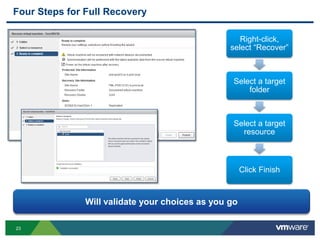
Four Steps for Full Recovery
Right-click,
select “Recover”
Select a target
folder
Select a target
resource
Click Finish
Will validate your choices as you go
24
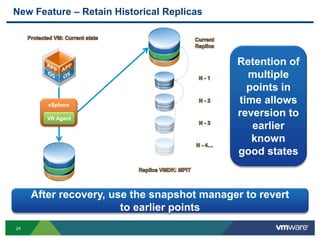
New Feature – Retain Historical Replicas
vSphere
VR Agent
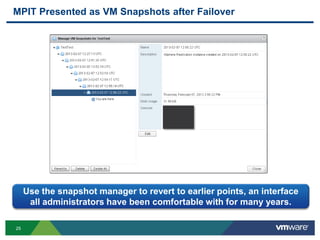
After recovery, use the snapshot manager to revert
to earlier points
Retention of
multiple
points in
time allows
reversion to
earlier
known
good states
25
MPIT Presented as VM Snapshots after Failover
Use the snapshot manager to revert to earlier points, an interface
all administrators have been comfortable with for many years.
26
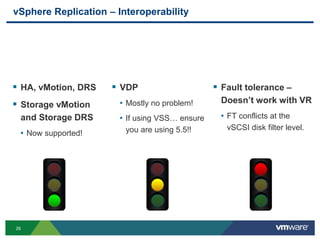
vSphere Replication – Interoperability
 Fault tolerance –
Doesn’t work with VR
• FT conflicts at the
vSCSI disk filter level.
 VDP
• Mostly no problem!
• If using VSS… ensure
you are using 5.5!!
 HA, vMotion, DRS
 Storage vMotion
and Storage DRS
• Now supported!
27
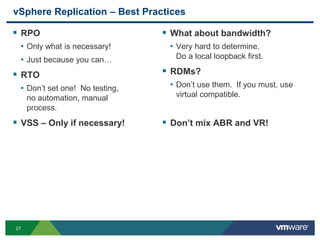
vSphere Replication – Best Practices
 RPO
• Only what is necessary!
• Just because you can…
 RTO
• Don’t set one! No testing,
no automation, manual
process.
 VSS – Only if necessary!
 What about bandwidth?
• Very hard to determine.
Do a local loopback first.
 RDMs?
• Don’t use them. If you must, use
virtual compatible.
 Don’t mix ABR and VR!
28
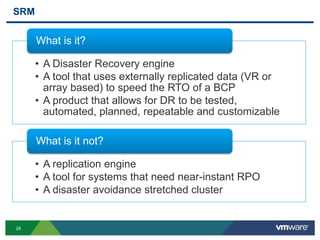
SRM
• A Disaster Recovery engine
• A tool that uses externally replicated data (VR or
array based) to speed the RTO of a BCP
• A product that allows for DR to be tested,
automated, planned, repeatable and customizable
What is it?
• A replication engine
• A tool for systems that need near-instant RPO
• A disaster avoidance stretched cluster
What is it not?
29
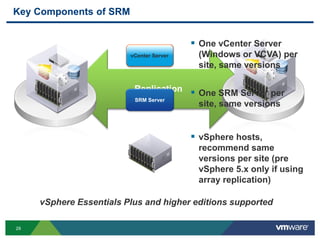
Key Components of SRM
Replication
vCenter Server
SRM Server
 One vCenter Server
(Windows or VCVA) per
site, same versions
 One SRM Server per
site, same versions
 vSphere hosts,
recommend same
versions per site (pre
vSphere 5.x only if using
array replication)
vSphere Essentials Plus and higher editions supported
vCenter Server
30
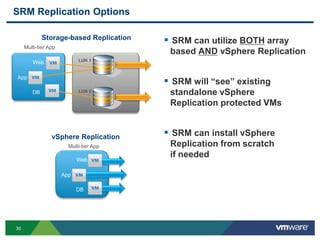
SRM Replication Options
 SRM can utilize BOTH array
based AND vSphere Replication
 SRM will “see” existing
standalone vSphere
Replication protected VMs
 SRM can install vSphere
Replication from scratch
if needed
Hub
LUN 2
Web
Multi-tier App
DB
App
vSphere Replication
Storage-based Replication
LUN 1
Web
DB
App
Multi-tier App
31
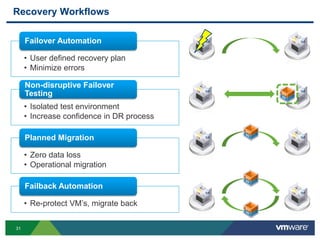
Recovery Workflows
• User defined recovery plan
• Minimize errors
Failover Automation
• Isolated test environment
• Increase confidence in DR process
Non-disruptive Failover
Testing
• Zero data loss
• Operational migration
Planned Migration
• Re-protect VM’s, migrate back
Failback Automation
32
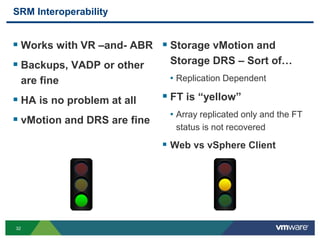
SRM Interoperability
 Works with VR –and- ABR
 Backups, VADP or other
are fine
 HA is no problem at all
 vMotion and DRS are fine
 Storage vMotion and
Storage DRS – Sort of…
• Replication Dependent
 FT is “yellow”
• Array replicated only and the FT
status is not recovered
 Web vs vSphere Client
33
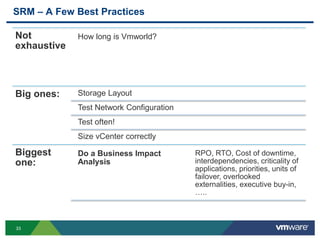
SRM – A Few Best Practices
Not
exhaustive
How long is Vmworld?
Big ones: Storage Layout
Test Network Configuration
Test often!
Size vCenter correctly
Biggest
one:
Do a Business Impact
Analysis
RPO, RTO, Cost of downtime,
interdependencies, criticality of
applications, priorities, units of
failover, overlooked
externalities, executive buy-in,
…..
34
SRM Further Detail at VMworld
• BCO5733 - vCenter Site Recovery Manager – Solution Overview and Lessons
from a Fortune 500 Health Care Company Implementation
• BCO5129 - Protection for All - vSphere Replication & SRM Technical Update
• BCO5170 - DR to The Cloud with VMware Site Recovery Manager and
Rackspace Disaster Recovery Planning Services
• BCO5652 - Three Quirky Ways to Simplify DR with Site Recovery Manager
• BCO4905 - Disaster Recovery Solution with Oracle Data Guard and Site
Recovery Manager
35
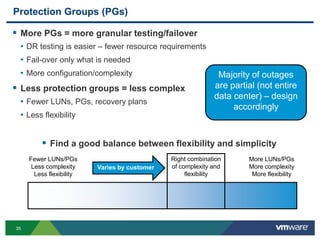
Protection Groups (PGs)
 More PGs = more granular testing/failover
• DR testing is easier – fewer resource requirements
• Fail-over only what is needed
• More configuration/complexity
 Less protection groups = less complex
• Fewer LUNs, PGs, recovery plans
• Less flexibility
 Find a good balance between flexibility and simplicity
Fewer LUNs/PGs
Less complexity
Less flexibility
More LUNs/PGs
More complexity
More flexibility
Right combination
of complexity and
flexibility
Varies by customer
Majority of outages
are partial (not entire
data center) – design
accordingly
36
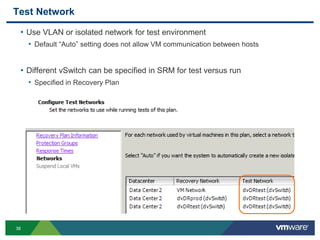
Test Network
• Use VLAN or isolated network for test environment
• Default “Auto” setting does not allow VM communication between hosts
• Different vSwitch can be specified in SRM for test versus run
• Specified in Recovery Plan
37
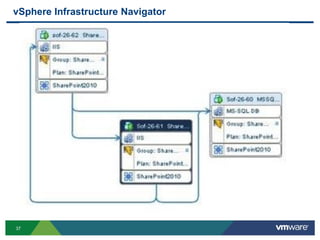
vSphere Infrastructure Navigator
38
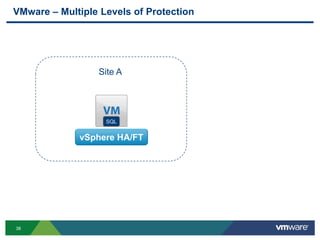
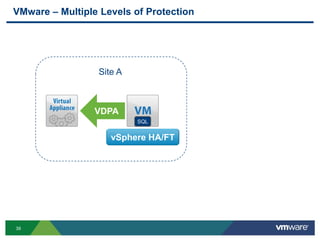
VMware – Multiple Levels of Protection
SQL
vSphere HA/FT
Site A
39
VMware – Multiple Levels of Protection
SQL
vSphere HA/FT
VDPA
Site A
40
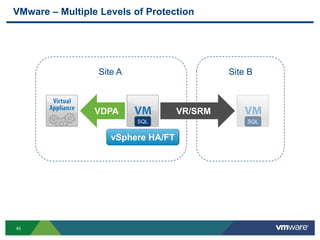
VMware – Multiple Levels of Protection
SQL
vSphere HA/FT
VR/SRM
SQL
VDPA
Site A Site B
45
Other VMware Activities Related to This Session
 HOL:
HOL-SDC-1305
Business Continuity and Disaster Recovery In Action
 VMworld Session:
BCO-5160
Implementing a Holistic BC/DR Strategy – Part 1
THANK YOU
Architecting the Software-Defined Data Center
Aidan Dalgleish, VMware
David Hill, VMware
Kamau Wanguhu, VMware
VSVC7371
#VSVC7371

VMworld 2013: Implementing a Holistic BC/DR Strategy with VMware - Part Two

  • 1.
    Implementing a HolisticBC/DR Strategy with VMware - Part Two Jeff Hunter, VMware Ken Werneburg, VMware BCO5162 #BCO5162
  • 2.
  • 3.
    3 Is It aReal Problem?
  • 4.
  • 5.
    5 Disaster Recovery vs.Business Continuity Example: Tuesday, August 23, 2011 at 1:51 PM EDT - Magnitude 5.8 earthquake near Mineral, Virginia Disaster recovery required? No Interruption to business continuance? YES!
  • 6.
    6 Fault Tolerance vs.High Availability  Fault tolerance • Ability to recover from component loss • Example: Hard drive failure  High availability Uptime percentage in one year Downtime in one year 99 3.65 days 99.9 8.76 hours 99.99 52 minutes 99.999 “five nines” 5 minutes X
  • 7.
    7 RTO, RPO, andMTD  Recovery Time Objective (RTO) • How long it should take to recover  Recovery Point Objective (RPO) • Amount of data loss that can be incurred  Maximum Tolerable Downtime (MTD) • Downtime that can occur before significant loss is incurred • Examples: Financial, reputation
  • 8.
    8 Making an ApplicationService Highly Available  vSphere HA  NEW: vSphere App HA
  • 9.
    9 VMware vFabric™ tcServer vSphere App HA New Policy-based Protect off-the-shelf apps
  • 10.
    10 vSphere App HA vSphereHA Cluster vFabric Hyperic Virtual Appliance vSphere App HA Virtual Appliance Hyperic Agents Running in VMs vCenter Server vSphere vSphere vSphere vSphere New
  • 11.
  • 12.
    12 vSphere HA –Keep In Mind…  RTO – measured in minutes (not seconds)  Requires shared storage  Best practices • Use admission control – percentage policy • Test post-failure performance with host maintenance mode • Isolation response – leave powered on • Network and storage redundancy • Also see BCO5047 
  • 13.
    13 vSphere Fault Tolerance(FT)  Zero recovery time, data loss • Host hardware failure only • Does not protect against OS and application failure  Works fine with HA, App HA  Why not FT? • Resource requirements – does workload really need it? • VM has multiple CPUs – see BCO5065  • No VM snapshots – backups require agent
  • 14.
    14 Data Protection (Backupand Restore)  Agents? No Agents? – Both! • No agents for majority of workloads – keep it simple • Agents for certain apps  vSphere Data Protection (VDP) Advanced • Backup and recovery for VMware, from VMware • Based on proven, mature EMC Avamar™ • Agent-less VM backup and restore • Agents for granular tier-1 application protection
  • 15.
  • 16.
    16 VDP Advanced –Keep In Mind…  Engineered for SMB environments  Uses VADP – VM snapshots, CBT  Utilizes Windows VSS in VMware Tools  Works fine with HA, not with FT  RDM – virtual yes, physical no  Is it DR? • Maybe – depends on RTO, RPO • Needs replication offsite, right? – see BCO5041 
  • 17.
    17 VDP Advanced –Keep In Mind…  Best Practices • Prepopulate DNS, always use FQDN • Manage VM snapshots • Avoid deploying to slow storage • Do not power-off, always shut down gracefully • Do not schedule backups during maintenance window • Also see BCO4756 and BCO5041 
  • 18.
    18 vCenter Availability  RunvCenter Server application in a VM  Run vCenter Server database in a VM  Run both in same VM?  Protect with vSphere HA • vCenter and DB VM restart priority set to High • Enable guest OS and App monitoring  App HA can protect SQL Server database
  • 19.
    19 vCenter Availability  Backup vCenter Server VM and database • Image-level backup for vCenter Server VM • App-level backup using agent for database backup  Why not FT for vCenter Server? • vCenter Server requires minimum of 2 vCPUs • FT does not protect against application failure  Replicate vCenter Server, database VMs?
  • 20.
    20 vCenter Availability –vCenter Server Heartbeat  Pros • Better RTO and RPO – typically ~5 minutes • Protects against host and guest OS failure • Checks network connectivity • Monitors application services and performance  Cons • Complexity • Requires double the resources • Licensing cost
  • 21.
    21 vSphere Replication –DR  Native tool built into the platform  Per-VM hypervisor replication, managed in VC Selectable RPO from 15 min up to 24 hours Selectable destination datastore (Disk- type agnostic)
  • 22.
    22 Replication Across Sites vCenterServer ESXi NFC VRA ESXi NFC VRA ESXi NFC VRA Storage Storage (VMDK1) vCenter Server ESXi NFC VRA ESXi NFC VRA ESXi NFC VRA VR Appliance VR Appliance Storage Storage VMDK1 vCenter Server vCenter Server
  • 23.
    23 Four Steps forFull Recovery Right-click, select “Recover” Select a target folder Select a target resource Click Finish Will validate your choices as you go
  • 24.
    24 New Feature –Retain Historical Replicas vSphere VR Agent After recovery, use the snapshot manager to revert to earlier points Retention of multiple points in time allows reversion to earlier known good states
  • 25.
    25 MPIT Presented asVM Snapshots after Failover Use the snapshot manager to revert to earlier points, an interface all administrators have been comfortable with for many years.
  • 26.
    26 vSphere Replication –Interoperability  Fault tolerance – Doesn’t work with VR • FT conflicts at the vSCSI disk filter level.  VDP • Mostly no problem! • If using VSS… ensure you are using 5.5!!  HA, vMotion, DRS  Storage vMotion and Storage DRS • Now supported!
  • 27.
    27 vSphere Replication –Best Practices  RPO • Only what is necessary! • Just because you can…  RTO • Don’t set one! No testing, no automation, manual process.  VSS – Only if necessary!  What about bandwidth? • Very hard to determine. Do a local loopback first.  RDMs? • Don’t use them. If you must, use virtual compatible.  Don’t mix ABR and VR!
  • 28.
    28 SRM • A DisasterRecovery engine • A tool that uses externally replicated data (VR or array based) to speed the RTO of a BCP • A product that allows for DR to be tested, automated, planned, repeatable and customizable What is it? • A replication engine • A tool for systems that need near-instant RPO • A disaster avoidance stretched cluster What is it not?
  • 29.
    29 Key Components ofSRM Replication vCenter Server SRM Server  One vCenter Server (Windows or VCVA) per site, same versions  One SRM Server per site, same versions  vSphere hosts, recommend same versions per site (pre vSphere 5.x only if using array replication) vSphere Essentials Plus and higher editions supported vCenter Server
  • 30.
    30 SRM Replication Options SRM can utilize BOTH array based AND vSphere Replication  SRM will “see” existing standalone vSphere Replication protected VMs  SRM can install vSphere Replication from scratch if needed Hub LUN 2 Web Multi-tier App DB App vSphere Replication Storage-based Replication LUN 1 Web DB App Multi-tier App
  • 31.
    31 Recovery Workflows • Userdefined recovery plan • Minimize errors Failover Automation • Isolated test environment • Increase confidence in DR process Non-disruptive Failover Testing • Zero data loss • Operational migration Planned Migration • Re-protect VM’s, migrate back Failback Automation
  • 32.
    32 SRM Interoperability  Workswith VR –and- ABR  Backups, VADP or other are fine  HA is no problem at all  vMotion and DRS are fine  Storage vMotion and Storage DRS – Sort of… • Replication Dependent  FT is “yellow” • Array replicated only and the FT status is not recovered  Web vs vSphere Client
  • 33.
    33 SRM – AFew Best Practices Not exhaustive How long is Vmworld? Big ones: Storage Layout Test Network Configuration Test often! Size vCenter correctly Biggest one: Do a Business Impact Analysis RPO, RTO, Cost of downtime, interdependencies, criticality of applications, priorities, units of failover, overlooked externalities, executive buy-in, …..
  • 34.
    34 SRM Further Detailat VMworld • BCO5733 - vCenter Site Recovery Manager – Solution Overview and Lessons from a Fortune 500 Health Care Company Implementation • BCO5129 - Protection for All - vSphere Replication & SRM Technical Update • BCO5170 - DR to The Cloud with VMware Site Recovery Manager and Rackspace Disaster Recovery Planning Services • BCO5652 - Three Quirky Ways to Simplify DR with Site Recovery Manager • BCO4905 - Disaster Recovery Solution with Oracle Data Guard and Site Recovery Manager
  • 35.
    35 Protection Groups (PGs) More PGs = more granular testing/failover • DR testing is easier – fewer resource requirements • Fail-over only what is needed • More configuration/complexity  Less protection groups = less complex • Fewer LUNs, PGs, recovery plans • Less flexibility  Find a good balance between flexibility and simplicity Fewer LUNs/PGs Less complexity Less flexibility More LUNs/PGs More complexity More flexibility Right combination of complexity and flexibility Varies by customer Majority of outages are partial (not entire data center) – design accordingly
  • 36.
    36 Test Network • UseVLAN or isolated network for test environment • Default “Auto” setting does not allow VM communication between hosts • Different vSwitch can be specified in SRM for test versus run • Specified in Recovery Plan
  • 37.
  • 38.
    38 VMware – MultipleLevels of Protection SQL vSphere HA/FT Site A
  • 39.
    39 VMware – MultipleLevels of Protection SQL vSphere HA/FT VDPA Site A
  • 40.
    40 VMware – MultipleLevels of Protection SQL vSphere HA/FT VR/SRM SQL VDPA Site A Site B
  • 41.
    45 Other VMware ActivitiesRelated to This Session  HOL: HOL-SDC-1305 Business Continuity and Disaster Recovery In Action  VMworld Session: BCO-5160 Implementing a Holistic BC/DR Strategy – Part 1
  • 42.
  • 44.
    Architecting the Software-DefinedData Center Aidan Dalgleish, VMware David Hill, VMware Kamau Wanguhu, VMware VSVC7371 #VSVC7371