© 2011 VMware Inc. All rights reserved
Oracle RAC on Vsphere 5
Solution Presentation - Don Sullivan
– Senior Systems Engineer - Database Specialist
sullivand@vmware.com
Don Sullivan – sullivand@vmware.com
• Oracle Certified Master, Server Products Trainer for Oracle University and
consultant with Oracle Advanced Technology Services - 1998-05.
• Oracle SA for Polyserve/HP – 05-10
• Vmware SE DB specialist 2010 – Present
2
Confidential
Agenda
•RAC on Vmware – The Vsphere Platform
• Why use vSphere 5 as the platform for Oracle RAC
• How to setup RAC on Vsphere - The installation process
• Vsphere 5 features that make Vsphere complimentary to RAC
•Performance capabilities
•Customer Success Stories
•The VRAC-DBA
•Summary
•Q/A
Why RAC on Vmware (ESX/vSphere 5)
• Uptime
 Greater uptime than RAC on physical
- Vsphere HA and RAC are complimentary technologies
• Provisioning
 New RAC nodes provisioned in minutes rather than hours
• Comprehensive Resource Management
 The VM/Server is created to the exact specifications desired
 The VM/Server resources can be adjusted as requirements change
 Zero Downtime Hardware maintenance
• The changing role of the DBA – The VRAC-DBA
 The modern Oracle DBA has influence over the entire stack
 Database Administrators do not have to re-lean their skill set
 The VRAC-DBA occupies the preeminent position in modern IT
- From the Virtualized Infrastructure to the RAC instances and Apps
- From Storage through the network Architectures
5
vSphere High Availability Features
VMware HA
• Detects operating system and hardware failures
• Automatically restarts failed database virtual machine
• Provides a simple and reliable first line of defense for all databases
• Can be used in conjunction with Symantec App HA to provide application
aware protections
VMware vMotion
• Enables live migration of database virtual machines from one physical
server to another without service interruption
• Can reduce virtual machine planned downtime
• Perform host maintenance any time of the day
VMware DRS
• Monitors state of virtual machine resource usage
• Can automatically and intelligently locate virtual machine
• Directs compute resources where needed
• Maintains database response time and SLAs
7
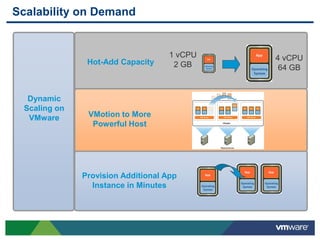
Hot-Add Capacity
1 vCPU
2 GB
4 vCPU
64 GB
VMotion to More
Powerful Host
Provision Additional App
Instance in Minutes
Dynamic
Scaling on
VMware
Scalability on Demand
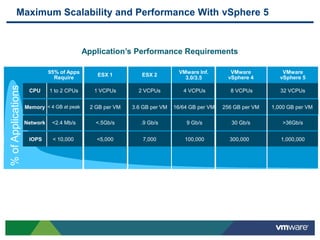
Maximum Scalability and Performance With vSphere 5
Application’s Performance Requirements
%ofApplications
95% of Apps
Require
IOPS
Network
Memory
CPU
< 10,000
<2.4 Mb/s
< 4 GB at peak
1 to 2 CPUs
VMware
vSphere 4
300,000
30 Gb/s
256 GB per VM
8 VCPUs
VMware Inf.
100,000
9 Gb/s
16/64 GB per VM
4 VCPUs
VMware
vSphere 5
1,000,000
>36Gb/s
1,000 GB per VM
32 VCPUs
ESX 2
7,000
.9 Gb/s
3.6 GB per VM
2 VCPUs
ESX 1
<5,000
<.5Gb/s
2 GB per VM
1 VCPUs
3.0/3.5
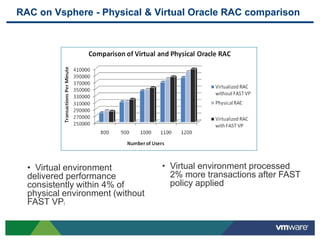
RAC on Vsphere - Physical & Virtual Oracle RAC comparison
• Virtual environment
delivered performance
consistently within 4% of
physical environment (without
FAST VP)
• Virtual environment processed
2% more transactions after FAST
policy applied
Agenda
•RAC on Vmware – The Vsphere Platform
• Why use vSphere 5 as the platform for Oracle RAC
• How to setup RAC on Vsphere - The installation process
• Vsphere 5 features that make Vsphere complimentary to RAC
•Performance capabilities
•Customer Success Stories
•The VRAC-DBA
•Summary
•Q/A
RAC on Vsphere - History
• Milestones
 Oracle support statement extension – 11.2.0.2 – Fall 2010
- MyOracleSupport.com Note 249212.1
- “For Oracle RAC, Oracle will only accept Service Requests
as described in this note on Oracle RAC 11.2.0.2 and later
releases.”
 Release of the “Oracle Databases on Vmware - RAC Deployment Guide” –
Jan 2011
• Methods
 RDMs
 ISCSI Gateway – Cognizant Corporation – Chris Williams
 VMFS/VMDK
11
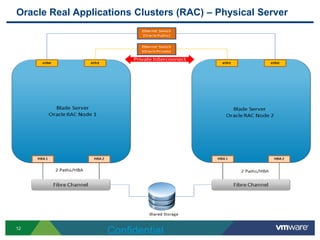
Oracle Real Applications Clusters (RAC) – Physical Server
12
Confidential
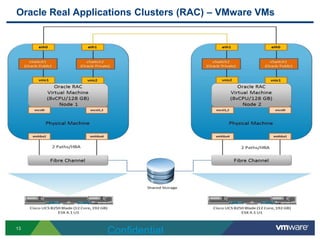
Oracle Real Applications Clusters (RAC) – VMware VMs
13
Confidential
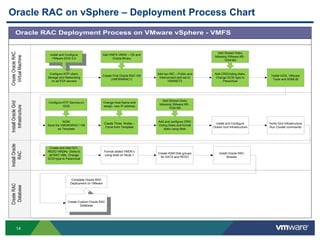
Oracle RAC on vSphere – Deployment Process Chart
14
Oracle RAC Deployment Process on VMware vSphere - VMFS
CreateRAC
Database
InstallOracle
RAC
InstallOracleGrid
Infrastructure
CreateOracleRAC
VirtualMachine
Create First Oracle RAC VM
(VMORARAC1)
Add VMFS VMDK – OS and
Oracle Binary
Add two NIC – Public and
Interconnect and set to
VMXNET3
Install GOS, VMware
Tools and ASMLIB
Add Shared Disks
following VMware KB -
1034165
Add CRS/Voting disks,
Change SCSI type to
Paravirtual
Configure NTP client,
Storage and Networking
on all ESX servers
NOW
Save the VMORARAC1 VM
as Template
Configure NTP Service on
GOS
Install and Configure
VMware ESXi 5.0
Create Three Nodes –
Clone from Template
Install and Configure
Oracle Grid Infrastructure
Add Shared Disks
following VMware KB -
1034165
Add and configure CRS/
Voting Disks and format
disks using fdisk
Change Host Name and
assign new IP address
Complete Oracle RAC
Deployment on VMware
Create Custom Oracle RAC
Database
Create and Add DAT,
REDO VMDKs Disks to
all RAC VMs. Change
SCSI type to Paravirtual
Format added VMDK’s
using fdisk on Node 1
Verify Grid Infrastructure
Run Cluster commands
Create ASM Disk groups
for DATA and REDO
Install Oracle RAC
Binares
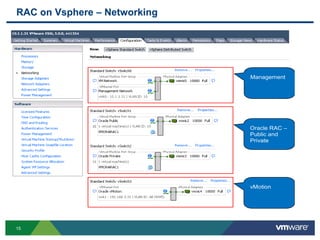
RAC on Vsphere – Networking
15
Oracle RAC –
Public and
Private
vMotion
Management
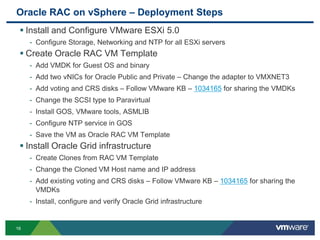
Oracle RAC on vSphere – Deployment Steps
16
 Install and Configure VMware ESXi 5.0
- Configure Storage, Networking and NTP for all ESXi servers
 Create Oracle RAC VM Template
- Add VMDK for Guest OS and binary
- Add two vNICs for Oracle Public and Private – Change the adapter to VMXNET3
- Add voting and CRS disks – Follow VMware KB – 1034165 for sharing the VMDKs
- Change the SCSI type to Paravirtual
- Install GOS, VMware tools, ASMLIB
- Configure NTP service in GOS
- Save the VM as Oracle RAC VM Template
 Install Oracle Grid infrastructure
- Create Clones from RAC VM Template
- Change the Cloned VM Host name and IP address
- Add existing voting and CRS disks – Follow VMware KB – 1034165 for sharing the
VMDKs
- Install, configure and verify Oracle Grid infrastructure
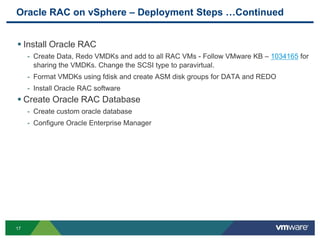
Oracle RAC on vSphere – Deployment Steps …Continued
17
 Install Oracle RAC
- Create Data, Redo VMDKs and add to all RAC VMs - Follow VMware KB – 1034165 for
sharing the VMDKs. Change the SCSI type to paravirtual.
- Format VMDKs using fdisk and create ASM disk groups for DATA and REDO
- Install Oracle RAC software
 Create Oracle RAC Database
- Create custom oracle database
- Configure Oracle Enterprise Manager
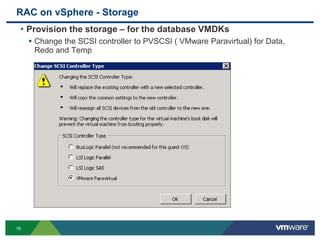
RAC on vSphere - Storage
• Provision the storage – for the database VMDKs
 Change the SCSI controller to PVSCSI ( VMware Paravirtual) for Data,
Redo and Temp
18
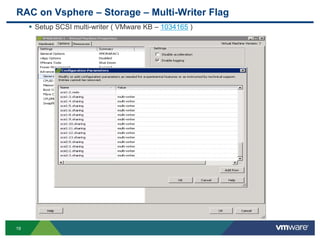
RAC on Vsphere – Storage – Multi-Writer Flag
 Setup SCSI multi-writer ( VMware KB – 1034165 )
19
RAC on vSphere – RAC VM Properties
20
For Root
Disk
For Data
and Redo
Disks
CRS
Disks
Data
Disks
OS
and
Binary
Redo
Disks
vNICs
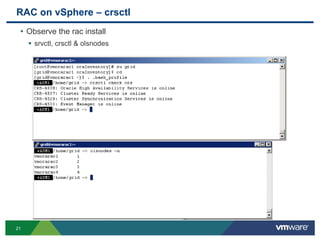
RAC on vSphere – crsctl
• Observe the rac install
 srvctl, crsctl & olsnodes
21
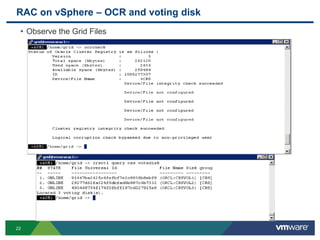
RAC on vSphere – OCR and voting disk
• Observe the Grid Files
22
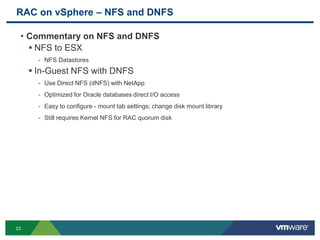
RAC on vSphere – NFS and DNFS
• Commentary on NFS and DNFS
 NFS to ESX
- NFS Datastores
 In-Guest NFS with DNFS
- Use Direct NFS (dNFS) with NetApp
- Optimized for Oracle databases direct I/O access
- Easy to configure - mount tab settings; change disk mount library
- Still requires Kernel NFS for RAC quorum disk
23
Agenda
•RAC on Vmware – The Vsphere Platform
• Why use vSphere 5 as the platform for Oracle RAC
• How to setup RAC on Vsphere - The installation process
• Vsphere 5 features that make Vsphere complimentary to RAC
•Performance capabilities
•Customer Success Stories
•The VRAC-DBA
•Summary
•Q/A
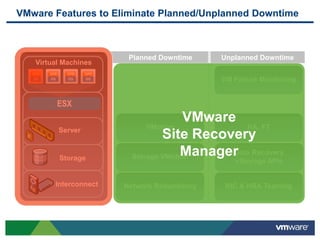
Planned Downtime
HA, FT
NIC & HBA Teaming
VMotion
Storage VMotion
Network Redundancy
VMware Features to Eliminate Planned/Unplanned Downtime
Unplanned Downtime
VM Failure Monitoring
Virtual Machines
Server
ESX
Storage
Interconnect
Data Recovery
vStorage APIs
VMware
Site Recovery
Manager
RAC on Vsphere – Vsphere 5 Features
• Useful features for RAC
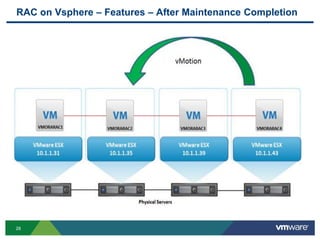
 Vmotion any Logical RAC node to an available ESX host
 HotAdd one vCPU to any node
 VMware HA – RAC Node restart on available ESX Hosts.
26
RAC on Vsphere – Features – Vmotion for Maintenance
27
RAC on Vsphere – Features – After Maintenance Completion
28
Agenda
•RAC on Vmware – The Vsphere Platform
• Why use vSphere 5 as the platform for Oracle RAC
• How to setup RAC on Vsphere - The installation process
• Vsphere 5 features that make Vsphere complimentary to RAC
•Performance capabilities
•Customer Success Stories
•The VRAC-DBA
•Summary
•Q/A
Performance - IOPS for all the Four Node Oracle RAC VMs
IOPS generated by
VMORARAC4 – Node 4
IOPS generated by
VMORARAC3 – Node 3
IOPS generated by
VMORARAC2 – Node 2
IOPS generated by
VMORARAC1 – Node 1
Total IOPS
~ 36,000 Max.
Storage: Key Indicators
Kernel Latency Average (KAVG)
• This counter tracks the latencies of IO passing thru the Kernel
• Investigation Threshold: 1ms
Device Latency Average (DAVG)
• This is the latency seen at the device driver level. It includes the
roundtrip time between the HBA and the storage.
• Investigation Threshold: 15-20ms, lower is better, some spikes okay
Aborts (ABRT/s)
• The number of commands aborted per second.
• Investigation Threshold: 1
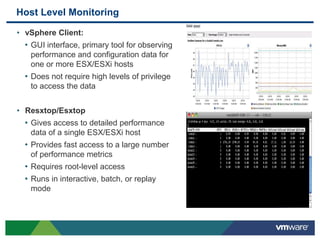
Host Level Monitoring
• vSphere Client:
• GUI interface, primary tool for observing
performance and configuration data for
one or more ESX/ESXi hosts
• Does not require high levels of privilege
to access the data
• Resxtop/Esxtop
• Gives access to detailed performance
data of a single ESX/ESXi host
• Provides fast access to a large number
of performance metrics
• Requires root-level access
• Runs in interactive, batch, or replay
mode
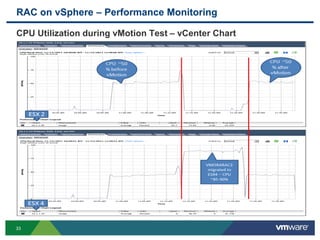
RAC on vSphere – Performance Monitoring
33
CPU Utilization during vMotion Test – vCenter Chart
Agenda
•RAC on Vmware – The Vsphere Platform
• Why use vSphere 5 as the platform for Oracle RAC
• How to setup RAC on Vsphere - The installation process
• Vsphere 5 features that make Vsphere complimentary to RAC
•Performance capabilities
•Customer Success Stories
•The VRAC-DBA
•Summary
•Q/A
Oracle RAC on vSphere – Joint Effort with Partners
• EMC
 EMC IT’s “On-Ramp” to the Journey to the Private Cloud -
http://www.emc.com/collateral/hardware/white-papers/h8170-emc-it-on-ramp-cloud-
wp.pdf
 EMC IT’s Virtual Oracle Deployment Framework, EMC IT is one the largest Oracle
deployment which is running on VMware vSphere -
http://www.emc.com/collateral/hardware/white-papers/h8989-emc-it-virtual-oracle-
deploy-framework.pdf
• NetApp
 NetApp's Oracle Database 11g Release 2 Performance Using Data ONTAP 8.1
Operating in Cluster-Mode (4- Node Oracle 11gr2 RAC on vSphere compared with
Bare Metal) - http://media.netapp.com/documents/tr-3961.pdf
35
Agenda
•RAC on Vmware – The Vsphere Platform
• Why use vSphere 5 as the platform for Oracle RAC
• How to setup RAC on Vsphere - The installation process
• Vsphere 5 features that make Vsphere complimentary to RAC
•Performance capabilities
•Customer Success Stories
•The VRAC-DBA
•Summary
•Q/A
RAC on Vsphere – VRAC-DBA
• The Future of the Oracle DBA
 Virtualization endorsement
 Where will Virtualization be in 3-5 years?
 Ubiquitous and Comprehensive Tier1 Resource management
 Provisioning turnover expectations greatly increased
 Involvement in the creation and adjustment of the VM/Server to the exact
specifications required
 Zero Downtime Hardware maintenance execution
• The changing role of the DBA – The VRAC-DBA
 The modern Oracle DBA has influence over the entire stack
 Oracle DBAs do not have to re-learn their skill set
 The VRAC-DBA occupies the preeminent position in modern IT
- From the Virtualized Infrastructure to the RAC instances and Apps
- From Storage through the network Architectures
37
Agenda
•RAC on Vmware – The Vsphere Platform
• Why use vSphere 5 as the platform for Oracle RAC
• How to setup RAC on Vsphere - The installation process
• Vsphere 5 features that make Vsphere complimentary to RAC
•Performance capabilities
•Customer Success Stories
•The VRAC-DBA
•Summary
•Q/A
RAC on Vsphere - Resources
 http://www.vmware.com/solutions/partners/alliances/oracle-
database.html
 http://www.emc.com/solutions/application-
environment/oracle/oracle-virtualization-vmware.htm
 www.houseofbrick.com/oracle-on-vmware
 http://blogs.vmware.com/apps/oracle/
 Great Videos
- http://www.youtube.com/watch?v=V51en55eVnM
- http://bit.ly/uy7o7W
- http://bit.ly/t1Kskb
© 2011 VMware Inc. All rights reserved
Thank You
Solution Presentation - Don Sullivan
– Senior Systems Engineer - Database Specialist
sullivand@vmware.com

Presentation oracle rac on vsphere 5

  • 1.
    © 2011 VMwareInc. All rights reserved Oracle RAC on Vsphere 5 Solution Presentation - Don Sullivan – Senior Systems Engineer - Database Specialist sullivand@vmware.com
  • 2.
    Don Sullivan –sullivand@vmware.com • Oracle Certified Master, Server Products Trainer for Oracle University and consultant with Oracle Advanced Technology Services - 1998-05. • Oracle SA for Polyserve/HP – 05-10 • Vmware SE DB specialist 2010 – Present 2 Confidential
  • 3.
    Agenda •RAC on Vmware– The Vsphere Platform • Why use vSphere 5 as the platform for Oracle RAC • How to setup RAC on Vsphere - The installation process • Vsphere 5 features that make Vsphere complimentary to RAC •Performance capabilities •Customer Success Stories •The VRAC-DBA •Summary •Q/A
  • 4.
    Why RAC onVmware (ESX/vSphere 5) • Uptime  Greater uptime than RAC on physical - Vsphere HA and RAC are complimentary technologies • Provisioning  New RAC nodes provisioned in minutes rather than hours • Comprehensive Resource Management  The VM/Server is created to the exact specifications desired  The VM/Server resources can be adjusted as requirements change  Zero Downtime Hardware maintenance • The changing role of the DBA – The VRAC-DBA  The modern Oracle DBA has influence over the entire stack  Database Administrators do not have to re-lean their skill set  The VRAC-DBA occupies the preeminent position in modern IT - From the Virtualized Infrastructure to the RAC instances and Apps - From Storage through the network Architectures 5
  • 5.
    vSphere High AvailabilityFeatures VMware HA • Detects operating system and hardware failures • Automatically restarts failed database virtual machine • Provides a simple and reliable first line of defense for all databases • Can be used in conjunction with Symantec App HA to provide application aware protections VMware vMotion • Enables live migration of database virtual machines from one physical server to another without service interruption • Can reduce virtual machine planned downtime • Perform host maintenance any time of the day VMware DRS • Monitors state of virtual machine resource usage • Can automatically and intelligently locate virtual machine • Directs compute resources where needed • Maintains database response time and SLAs
  • 6.
    7 Hot-Add Capacity 1 vCPU 2GB 4 vCPU 64 GB VMotion to More Powerful Host Provision Additional App Instance in Minutes Dynamic Scaling on VMware Scalability on Demand
  • 7.
    Maximum Scalability andPerformance With vSphere 5 Application’s Performance Requirements %ofApplications 95% of Apps Require IOPS Network Memory CPU < 10,000 <2.4 Mb/s < 4 GB at peak 1 to 2 CPUs VMware vSphere 4 300,000 30 Gb/s 256 GB per VM 8 VCPUs VMware Inf. 100,000 9 Gb/s 16/64 GB per VM 4 VCPUs VMware vSphere 5 1,000,000 >36Gb/s 1,000 GB per VM 32 VCPUs ESX 2 7,000 .9 Gb/s 3.6 GB per VM 2 VCPUs ESX 1 <5,000 <.5Gb/s 2 GB per VM 1 VCPUs 3.0/3.5
  • 8.
    RAC on Vsphere- Physical & Virtual Oracle RAC comparison • Virtual environment delivered performance consistently within 4% of physical environment (without FAST VP) • Virtual environment processed 2% more transactions after FAST policy applied
  • 9.
    Agenda •RAC on Vmware– The Vsphere Platform • Why use vSphere 5 as the platform for Oracle RAC • How to setup RAC on Vsphere - The installation process • Vsphere 5 features that make Vsphere complimentary to RAC •Performance capabilities •Customer Success Stories •The VRAC-DBA •Summary •Q/A
  • 10.
    RAC on Vsphere- History • Milestones  Oracle support statement extension – 11.2.0.2 – Fall 2010 - MyOracleSupport.com Note 249212.1 - “For Oracle RAC, Oracle will only accept Service Requests as described in this note on Oracle RAC 11.2.0.2 and later releases.”  Release of the “Oracle Databases on Vmware - RAC Deployment Guide” – Jan 2011 • Methods  RDMs  ISCSI Gateway – Cognizant Corporation – Chris Williams  VMFS/VMDK 11
  • 11.
    Oracle Real ApplicationsClusters (RAC) – Physical Server 12 Confidential
  • 12.
    Oracle Real ApplicationsClusters (RAC) – VMware VMs 13 Confidential
  • 13.
    Oracle RAC onvSphere – Deployment Process Chart 14 Oracle RAC Deployment Process on VMware vSphere - VMFS CreateRAC Database InstallOracle RAC InstallOracleGrid Infrastructure CreateOracleRAC VirtualMachine Create First Oracle RAC VM (VMORARAC1) Add VMFS VMDK – OS and Oracle Binary Add two NIC – Public and Interconnect and set to VMXNET3 Install GOS, VMware Tools and ASMLIB Add Shared Disks following VMware KB - 1034165 Add CRS/Voting disks, Change SCSI type to Paravirtual Configure NTP client, Storage and Networking on all ESX servers NOW Save the VMORARAC1 VM as Template Configure NTP Service on GOS Install and Configure VMware ESXi 5.0 Create Three Nodes – Clone from Template Install and Configure Oracle Grid Infrastructure Add Shared Disks following VMware KB - 1034165 Add and configure CRS/ Voting Disks and format disks using fdisk Change Host Name and assign new IP address Complete Oracle RAC Deployment on VMware Create Custom Oracle RAC Database Create and Add DAT, REDO VMDKs Disks to all RAC VMs. Change SCSI type to Paravirtual Format added VMDK’s using fdisk on Node 1 Verify Grid Infrastructure Run Cluster commands Create ASM Disk groups for DATA and REDO Install Oracle RAC Binares
  • 14.
    RAC on Vsphere– Networking 15 Oracle RAC – Public and Private vMotion Management
  • 15.
    Oracle RAC onvSphere – Deployment Steps 16  Install and Configure VMware ESXi 5.0 - Configure Storage, Networking and NTP for all ESXi servers  Create Oracle RAC VM Template - Add VMDK for Guest OS and binary - Add two vNICs for Oracle Public and Private – Change the adapter to VMXNET3 - Add voting and CRS disks – Follow VMware KB – 1034165 for sharing the VMDKs - Change the SCSI type to Paravirtual - Install GOS, VMware tools, ASMLIB - Configure NTP service in GOS - Save the VM as Oracle RAC VM Template  Install Oracle Grid infrastructure - Create Clones from RAC VM Template - Change the Cloned VM Host name and IP address - Add existing voting and CRS disks – Follow VMware KB – 1034165 for sharing the VMDKs - Install, configure and verify Oracle Grid infrastructure
  • 16.
    Oracle RAC onvSphere – Deployment Steps …Continued 17  Install Oracle RAC - Create Data, Redo VMDKs and add to all RAC VMs - Follow VMware KB – 1034165 for sharing the VMDKs. Change the SCSI type to paravirtual. - Format VMDKs using fdisk and create ASM disk groups for DATA and REDO - Install Oracle RAC software  Create Oracle RAC Database - Create custom oracle database - Configure Oracle Enterprise Manager
  • 17.
    RAC on vSphere- Storage • Provision the storage – for the database VMDKs  Change the SCSI controller to PVSCSI ( VMware Paravirtual) for Data, Redo and Temp 18
  • 18.
    RAC on Vsphere– Storage – Multi-Writer Flag  Setup SCSI multi-writer ( VMware KB – 1034165 ) 19
  • 19.
    RAC on vSphere– RAC VM Properties 20 For Root Disk For Data and Redo Disks CRS Disks Data Disks OS and Binary Redo Disks vNICs
  • 20.
    RAC on vSphere– crsctl • Observe the rac install  srvctl, crsctl & olsnodes 21
  • 21.
    RAC on vSphere– OCR and voting disk • Observe the Grid Files 22
  • 22.
    RAC on vSphere– NFS and DNFS • Commentary on NFS and DNFS  NFS to ESX - NFS Datastores  In-Guest NFS with DNFS - Use Direct NFS (dNFS) with NetApp - Optimized for Oracle databases direct I/O access - Easy to configure - mount tab settings; change disk mount library - Still requires Kernel NFS for RAC quorum disk 23
  • 23.
    Agenda •RAC on Vmware– The Vsphere Platform • Why use vSphere 5 as the platform for Oracle RAC • How to setup RAC on Vsphere - The installation process • Vsphere 5 features that make Vsphere complimentary to RAC •Performance capabilities •Customer Success Stories •The VRAC-DBA •Summary •Q/A
  • 24.
    Planned Downtime HA, FT NIC& HBA Teaming VMotion Storage VMotion Network Redundancy VMware Features to Eliminate Planned/Unplanned Downtime Unplanned Downtime VM Failure Monitoring Virtual Machines Server ESX Storage Interconnect Data Recovery vStorage APIs VMware Site Recovery Manager
  • 25.
    RAC on Vsphere– Vsphere 5 Features • Useful features for RAC  Vmotion any Logical RAC node to an available ESX host  HotAdd one vCPU to any node  VMware HA – RAC Node restart on available ESX Hosts. 26
  • 26.
    RAC on Vsphere– Features – Vmotion for Maintenance 27
  • 27.
    RAC on Vsphere– Features – After Maintenance Completion 28
  • 28.
    Agenda •RAC on Vmware– The Vsphere Platform • Why use vSphere 5 as the platform for Oracle RAC • How to setup RAC on Vsphere - The installation process • Vsphere 5 features that make Vsphere complimentary to RAC •Performance capabilities •Customer Success Stories •The VRAC-DBA •Summary •Q/A
  • 29.
    Performance - IOPSfor all the Four Node Oracle RAC VMs IOPS generated by VMORARAC4 – Node 4 IOPS generated by VMORARAC3 – Node 3 IOPS generated by VMORARAC2 – Node 2 IOPS generated by VMORARAC1 – Node 1 Total IOPS ~ 36,000 Max.
  • 30.
    Storage: Key Indicators KernelLatency Average (KAVG) • This counter tracks the latencies of IO passing thru the Kernel • Investigation Threshold: 1ms Device Latency Average (DAVG) • This is the latency seen at the device driver level. It includes the roundtrip time between the HBA and the storage. • Investigation Threshold: 15-20ms, lower is better, some spikes okay Aborts (ABRT/s) • The number of commands aborted per second. • Investigation Threshold: 1
  • 31.
    Host Level Monitoring •vSphere Client: • GUI interface, primary tool for observing performance and configuration data for one or more ESX/ESXi hosts • Does not require high levels of privilege to access the data • Resxtop/Esxtop • Gives access to detailed performance data of a single ESX/ESXi host • Provides fast access to a large number of performance metrics • Requires root-level access • Runs in interactive, batch, or replay mode
  • 32.
    RAC on vSphere– Performance Monitoring 33 CPU Utilization during vMotion Test – vCenter Chart
  • 33.
    Agenda •RAC on Vmware– The Vsphere Platform • Why use vSphere 5 as the platform for Oracle RAC • How to setup RAC on Vsphere - The installation process • Vsphere 5 features that make Vsphere complimentary to RAC •Performance capabilities •Customer Success Stories •The VRAC-DBA •Summary •Q/A
  • 34.
    Oracle RAC onvSphere – Joint Effort with Partners • EMC  EMC IT’s “On-Ramp” to the Journey to the Private Cloud - http://www.emc.com/collateral/hardware/white-papers/h8170-emc-it-on-ramp-cloud- wp.pdf  EMC IT’s Virtual Oracle Deployment Framework, EMC IT is one the largest Oracle deployment which is running on VMware vSphere - http://www.emc.com/collateral/hardware/white-papers/h8989-emc-it-virtual-oracle- deploy-framework.pdf • NetApp  NetApp's Oracle Database 11g Release 2 Performance Using Data ONTAP 8.1 Operating in Cluster-Mode (4- Node Oracle 11gr2 RAC on vSphere compared with Bare Metal) - http://media.netapp.com/documents/tr-3961.pdf 35
  • 35.
    Agenda •RAC on Vmware– The Vsphere Platform • Why use vSphere 5 as the platform for Oracle RAC • How to setup RAC on Vsphere - The installation process • Vsphere 5 features that make Vsphere complimentary to RAC •Performance capabilities •Customer Success Stories •The VRAC-DBA •Summary •Q/A
  • 36.
    RAC on Vsphere– VRAC-DBA • The Future of the Oracle DBA  Virtualization endorsement  Where will Virtualization be in 3-5 years?  Ubiquitous and Comprehensive Tier1 Resource management  Provisioning turnover expectations greatly increased  Involvement in the creation and adjustment of the VM/Server to the exact specifications required  Zero Downtime Hardware maintenance execution • The changing role of the DBA – The VRAC-DBA  The modern Oracle DBA has influence over the entire stack  Oracle DBAs do not have to re-learn their skill set  The VRAC-DBA occupies the preeminent position in modern IT - From the Virtualized Infrastructure to the RAC instances and Apps - From Storage through the network Architectures 37
  • 37.
    Agenda •RAC on Vmware– The Vsphere Platform • Why use vSphere 5 as the platform for Oracle RAC • How to setup RAC on Vsphere - The installation process • Vsphere 5 features that make Vsphere complimentary to RAC •Performance capabilities •Customer Success Stories •The VRAC-DBA •Summary •Q/A
  • 38.
    RAC on Vsphere- Resources  http://www.vmware.com/solutions/partners/alliances/oracle- database.html  http://www.emc.com/solutions/application- environment/oracle/oracle-virtualization-vmware.htm  www.houseofbrick.com/oracle-on-vmware  http://blogs.vmware.com/apps/oracle/  Great Videos - http://www.youtube.com/watch?v=V51en55eVnM - http://bit.ly/uy7o7W - http://bit.ly/t1Kskb
  • 39.
    © 2011 VMwareInc. All rights reserved Thank You Solution Presentation - Don Sullivan – Senior Systems Engineer - Database Specialist sullivand@vmware.com