Micro Focus Adaptive Backup and
Recovery Suite
Carlo Dusi Software Presales
6 Febbraio 2018
Agenda
• Micro Focus Data Protection Vision
• Licensing Model
• MF Adaptive Backup & Recovery Comprehensive Solution
• MF VMX Software
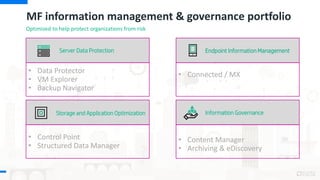
MF information management & governance portfolio
Server Data Protection
• Data Protector
• VM Explorer
• Backup Navigator
• Content Manager
• Archiving & eDiscovery
Information GovernanceStorage and Application Optimization
• Control Point
• Structured Data Manager
• Connected / MX
Endpoint Information Management
Optimized to help protect organizations from risk
• The information contained in this presentation is proprietary to Micro
Focus and is offered in confidence, subject to the terms and
conditions of a binding Confidential Disclosure Agreement (CDA)
• MF requires customers and partners to have signed a CDA in order to
view this training
• The information contained in this training is MF confidential
• This presentation is NOT to be used as a ‘leave behind’ for customers
and information may only be shared verbally with MF external
customers under NDA
• This presentation may be shared with Partners under NDA in
hard-copy or electronic format for internal training purposes only
• Do not remove any classification labels, warnings or disclaimers on
any slide or modify this presentation to change the classification
level.
• Do not remove this slide from the presentation
• MF does not warrant or represent that it will introduce any product to
which the information relates
• The information contained herein is subject to change without notice
• MF makes no warranties regarding the accuracy of this information
• The only warranties for MF products and services are set forth in the
express warranty statements accompanying such products and services
• Nothing herein should be construed as constituting an additional warranty
• MF shall not be liable for technical or editorial errors or omissions
contained herein
• Strict adherence to the MF Standards of Business Conduct regarding this
classification level is critical.
Confidential - provided to MF employees and MF Partners for internal training purposes only
Confidential Disclosure Agreement
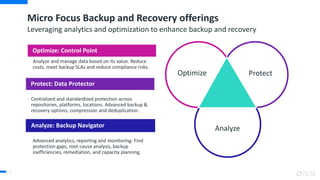
Micro Focus Backup and Recovery offerings
Leveraging analytics and optimization to enhance backup and recovery
Protect
Analyze
Optimize
Protect: Data Protector
Optimize: Control Point
Analyze: Backup Navigator
Analyze and manage data based on its value. Reduce
costs, meet backup SLAs and reduce compliance risks.
Centralized and standardized protection across
repositories, platforms, locations. Advanced backup &
recovery options, compression and deduplication.
Advanced analytics, reporting and monitoring. Find
protection gaps, root-cause analysis, backup
inefficiencies, remediation, and capacity planning.
11
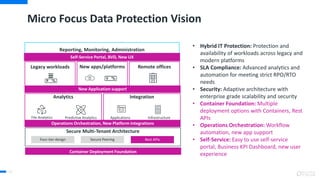
Reporting, Monitoring, Administration
Micro Focus Data Protection Vision
12
Analytics Integration
Secure Multi-Tenant Architecture
InfrastructureApplicationsPredictive AnalyticsFile Analytics
Secure PeeringFour-tier design Rest APIs
• Hybrid IT Protection: Protection and
availability of workloads across legacy and
modern platforms
• SLA Compliance: Advanced analytics and
automation for meeting strict RPO/RTO
needs
• Security: Adaptive architecture with
enterprise grade scalability and security
• Container Foundation: Multiple
deployment options with Containers, Rest
APIs
• Operations Orchestration: Workflow
automation, new app support
• Self-Service: Easy to use self-service
portal, Business KPI Dashboard, new user
experience
Operations Orchestration, New Platform Integrations
Container Deployment Foundation
New apps/platformsLegacy workloads Remote offices
Self-Service Portal, BVD, New UX
New Application support
Rest APIs
14
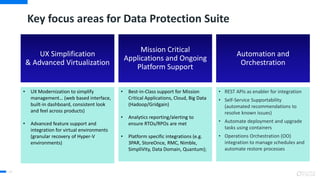
Key focus areas for Data Protection Suite
Automation and
Orchestration
• REST APIs as enabler for integration
• Self-Service Supportability
(automated recommendations to
resolve known issues)
• Automate deployment and upgrade
tasks using containers
• Operations Orchestration (OO)
integration to manage schedules and
automate restore processes
Mission Critical
Applications and Ongoing
Platform Support
• Best-in-Class support for Mission
Critical Applications, Cloud, Big Data
(Hadoop/Gridgain)
• Analytics reporting/alerting to
ensure RTOs/RPOs are met
• Platform specific integrations (e.g.
3PAR, StoreOnce, RMC, Nimble,
SimpliVity, Data Domain, Quantum);
UX Simplification
& Advanced Virtualization
• UX Modernization to simplify
management… (web based interface,
built-in dashboard, consistent look
and feel across products)
• Advanced feature support and
integration for virtual environments
(granular recovery of Hyper-V
environments)
Journey to Data Protection Suite
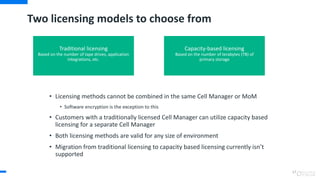
Two licensing models to choose from
• Licensing methods cannot be combined in the same Cell Manager or MoM
• Software encryption is the exception to this
• Customers with a traditionally licensed Cell Manager can utilize capacity based
licensing for a separate Cell Manager
• Both licensing methods are valid for any size of environment
• Migration from traditional licensing to capacity based licensing currently isn’t
supported
17
Traditional licensing
Based on the number of tape drives, application
integrations, etc.
Capacity-based licensing
Based on the number of terabytes (TB) of
primary storage
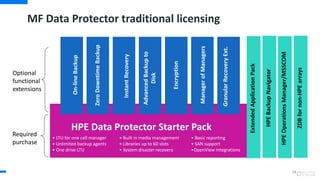
MF Data Protector traditional licensing
• LTU for one cell manager
• Unlimited backup agents
• One drive LTU
• Built in media management
• Libraries up to 60 slots
• System disaster recovery
• Basic reporting
• SAN support
•OpenView integrations
Required
purchase
ZeroDowntimeBackup
InstantRecovery
AdvancedBackupto
Disk
Encryption
ManagerofManagers
GranularRecoveryExt.
Optional
functional
extensions
HPE Data Protector Starter Pack
On-lineBackup
ExtendedApplicationPack
HPEBackupNavigator
HPEOperationsManager/MSSCOM
ZDBfornon-HPEarrays
18
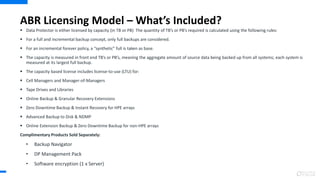
ABR Licensing Model – What’s Included?
 Data Protector is either licensed by capacity (in TB or PB) The quantity of TB’s or PB’s required is calculated using the following rules:
 For a full and incremental backup concept, only full backups are considered.
 For an incremental forever policy, a “synthetic” full is taken as base.
 The capacity is measured in front end TB’s or PB’s, meaning the aggregate amount of source data being backed up from all systems; each system is
measured at its largest full backup.
 The capacity based license includes license-to-use (LTU) for:
 Cell Managers and Manager-of-Managers
 Tape Drives and Libraries
 Online Backup & Granular Recovery Extensions
 Zero Downtime Backup & Instant Recovery for HPE arrays
 Advanced Backup to Disk & NDMP
 Online Extension Backup & Zero Downtime Backup for non-HPE arrays
Complimentary Products Sold Separately:
• Backup Navigator
• DP Management Pack
• Software encryption (1 x Server)
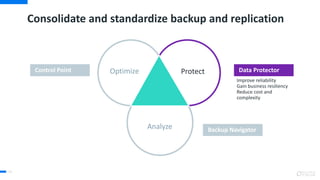
Consolidate and standardize backup and replication
41
Improve reliability
Gain business resiliency
Reduce cost and
complexity
Data ProtectorControl Point
Backup Navigator
Protect
Analyze
Optimize
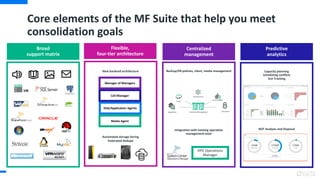
Core elements of the MF Suite that help you meet
consolidation goals
Broad
support matrix
New backend architecture
Automated storage tiering
Federated Dedupe
Flexible,
four-tier architecture
Cell Manager
Manager of Managers
Disk/Application Agents
Media Agent
Backup/DR policies, client, media management
Integration with existing operation
management tools
Centralized
management
HPE Operations
Manager
Capacity planning
Scheduling conflicts
SLA Tracking
ROT Analysis and Disposal
Predictive
analytics
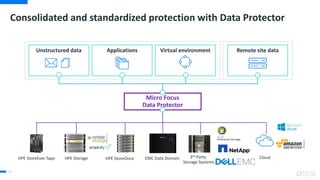
Consolidated and standardized protection with Data Protector
44
Micro Focus
Data Protector
Unstructured data Applications Virtual environment Remote site data
CloudHPE StoreOnceHPE StoreEver Tape 3rd Party
Storage Systems
EMC Data DomainHPE Storage
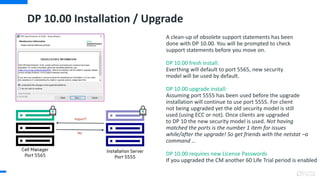
DP 10.00 Installation / Upgrade
A clean-up of obsolete support statements has been
done with DP 10.00. You will be prompted to check
support statements before you move on.
DP 10.00 fresh install:
Everthing will default to port 5565, new security
model will be used by default.
DP 10.00 upgrade install:
Assuming port 5555 has been used before the upgrade
installation will continue to use port 5555. For client
not being upgraded yet the old security model is still
used (using ECC or not). Once clients are upgraded
to DP 10 the new security model is used. Not having
matched the ports is the number 1 item for issues
while/after the upgrade! So get friends with the netstat –a
command ...
DP 10.00 requires new License Passwords
If you upgraded the CM another 60 Life Trial period is enabled
•
•
•
•
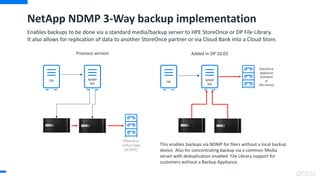
NetApp NDMP 3-Way backup implementation
Enables backups to be done via a standard media/backup server to HPE StoreOnce or DP File Library.
It also allows for replication of data to another StoreOnce partner or via Cloud Bank into a Cloud Store.
StoreOnce
Appliance
(Catalyst)
or
File Library
CM NDMP
MA
NDMP
MA
CM
Added in DP 10.03Previous version
Physical or
virtual Tape
(SCSI/FC)
This enables backups via NDMP for filers without a local backup
device. Also for concentrating backup via a common Media
server with deduplication enabled. File Library support for
customers without a Backup Appliance.
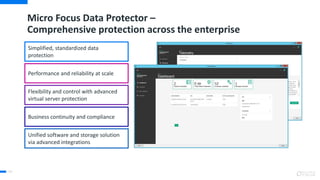
Micro Focus Data Protector –
Comprehensive protection across the enterprise
49
Simplified, standardized data
protection
Performance and reliability at scale
Flexibility and control with advanced
virtual server protection
Business continuity and compliance
Unified software and storage solution
via advanced integrations
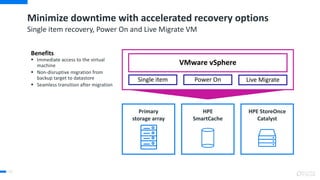
Minimize downtime with accelerated recovery options
50
Single item recovery, Power On and Live Migrate VM
Primary
storage array
HPE StoreOnce
Catalyst
HPE
SmartCache
Single item Power On Live Migrate
VMware vSphere
Benefits
 Immediate access to the virtual
machine
 Non-disruptive migration from
backup target to datastore
 Seamless transition after migration
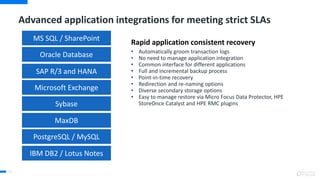
Advanced application integrations for meeting strict SLAs
51
Rapid application consistent recovery
• Automatically groom transaction logs
• No need to manage application integration
• Common interface for different applications
• Full and incremental backup process
• Point-in-time recovery
• Redirection and re-naming options
• Diverse secondary storage options
• Easy to manage restore via Micro Focus Data Protector, HPE
StoreOnce Catalyst and HPE RMC plugins
Oracle Database
SAP R/3 and HANA
Microsoft Exchange
MS SQL / SharePoint
Sybase
MaxDB
PostgreSQL / MySQL
IBM DB2 / Lotus Notes
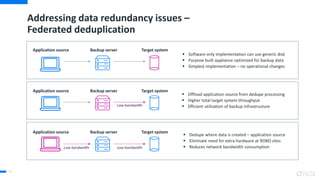
Addressing data redundancy issues –
Federated deduplication
52
 Software only implementation can use generic disk
 Purpose built appliance optimized for backup data
 Simplest implementation – no operational changes
Application source Backup server Target system
 Offload application source from dedupe processing
 Higher total target system throughput
 Efficient utilization of backup infrastructure
Application source Backup server Target system
Low-bandwidth
 Dedupe where data is created – application source
 Eliminate need for extra hardware at ROBO sites
 Reduces network bandwidth consumption
Application source Backup server Target system
Low-bandwidthLow-bandwidth
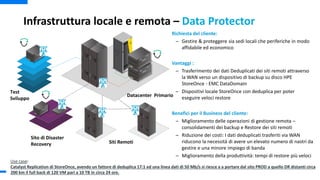
Infrastruttura locale e remota – Data Protector
Richiesta del cliente:
– Gestire & proteggere sia sedi locali che periferiche in modo
affidabile ed economico
Vantaggi :
– Trasferimento dei dati Deduplicati dei siti remoti attraverso
la WAN verso un dispositivo di backup su disco HPE
StoreOnce - EMC DataDomain
– Dispositivi locale StoreOnce con deduplica per poter
eseguire veloci restore
Benefici per il Business del cliente:
– Miglioramento delle operazioni di gestione remota –
consolidamenti dei backup e Restore dei siti remoti
– Riduzione dei costi: I dati deduplicati trasferiti via WAN
riducono la necessità di avere un elevato numero di nastri da
gestire e una minore impiego di banda
– Miglioramento della produttività: tempi di restore più veloci
Test
Sviluppo
Datacenter Primario
Sito di Disaster
Recovery Siti Remoti
Use case:
Catalyst Replication di StoreOnce, avendo un fattore di deduplica 17:1 ed una linea dati di 50 Mb/s si riesce a a portare dal sito PROD a quello DR distanti circa
200 km il full back di 120 VM pari a 10 TB in circa 24 ore.
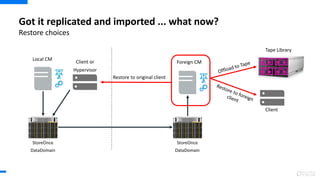
Restore choices
Got it replicated and imported ... what now?
Local CM
Foreign CM
Restore to original client
Client or
Hypervisor
Client
Tape Library
StoreOnce
DataDomain
StoreOnce
DataDomain
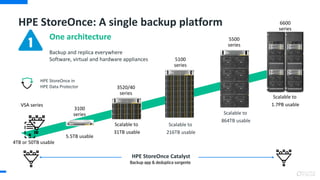
HPE StoreOnce: A single backup platform
HPE StoreOnce in
HPE Data Protector
6600
series
VSA series
Scalable to
216TB usable
5100
series
One architecture
Backup and replica everywhere
Software, virtual and hardware appliances
HPE StoreOnce Catalyst
Backup app & deduplica sorgente
Scalable to
1.7PB usable
3520/40
series
Scalable to
31TB usable
4TB or 50TB usable
5.5TB usable
3100
series
5500
series
Scalable to
864TB usable
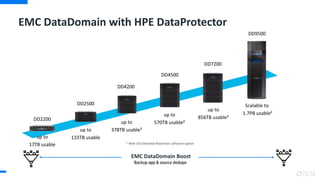
EMC DataDomain with HPE DataProtector
EMC DataDomain Boost
Backup app & source dedupe
Scalable to
1.7PB usable²
up to
17TB usable
DD9500
DD7200
DD4500
DD4200
DD2500
DD2200
up to
133TB usable
up to
378TB usable²
up to
570TB usable²
up to
856TB usable²
² With DD Extended Retention software option
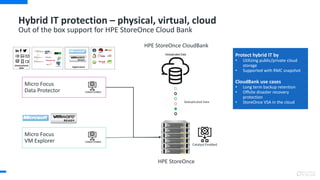
HPE StoreOnce CloudBank
Deduplicated Data
Catalyst Enabled
Hybrid IT protection – physical, virtual, cloud
Out of the box support for HPE StoreOnce Cloud Bank
Micro Focus
Data Protector
Micro Focus
VM Explorer
Protect hybrid IT by
• Utilizing public/private cloud
storage
• Supported with RMC snapshot
CloudBank use cases
• Long term backup retention
• Offsite disaster recovery
protection
• StoreOnce VSA in the cloud
HPE StoreOnce
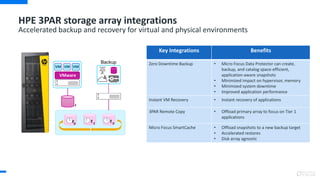
HPE 3PAR storage array integrations
Accelerated backup and recovery for virtual and physical environments
Backup
t0
t-1
t-2
t
VMware
VM VM VM
Key Integrations Benefits
Zero Downtime Backup • Micro Focus Data Protector can create,
backup, and catalog space-efficient,
application-aware snapshots
• Minimized impact on hypervisor, memory
• Minimized system downtime
• Improved application performance
Instant VM Recovery • Instant recovery of applications
3PAR Remote Copy • Offload primary array to focus on Tier 1
applications
Micro Focus SmartCache • Offload snapshots to a new backup target
• Accelerated restores
• Disk array agnostic
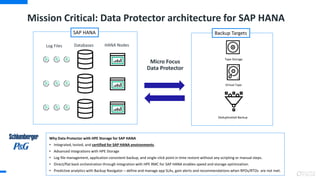
Mission Critical: Data Protector architecture for SAP HANA
Backup Targets
Tape Storage
Virtual Tape
Deduplicatied Backup
SAP HANA
HANA NodesDatabasesLog Files
Micro Focus
Data Protector
Why Data Protector with HPE Storage for SAP HANA
• Integrated, tested, and certified for SAP HANA environments.
• Advanced integrations with HPE Storage
• Log file management, application consistent backup, and single-click point in time restore without any scripting or manual steps.
• Direct/flat back orchestration through integration with HPE RMC for SAP HANA enables speed and storage optimization.
• Predictive analytics with Backup Navigator – define and manage app SLAs, gain alerts and recommendations when RPOs/RTOs are not met.
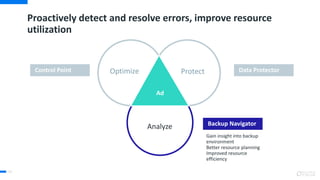
Proactively detect and resolve errors, improve resource
utilization
63
Gain insight into backup
environment
Better resource planning
Improved resource
efficiency
Data ProtectorControl Point
Backup Navigator
Protect
Analyze
Ad
Optimize
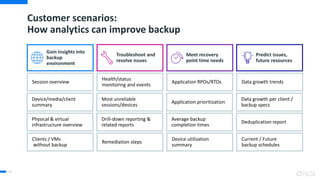
Customer scenarios:
How analytics can improve backup
64
Gain insights into
backup
environment
Troubleshoot and
resolve issues
Meet recovery
point time needs
Predict issues,
future resources
Session overview
Device/media/client
summary
Physical & virtual
infrastructure overview
Clients / VMs
without backup
Health/status
monitoring and events
Most unreliable
sessions/devices
Drill-down reporting &
related reports
Remediation steps
Application RPOs/RTOs
Application prioritization
Average backup
completion times
Device utilization
summary
Data growth trends
Data growth per client /
backup specs
Deduplication report
Current / Future
backup schedules
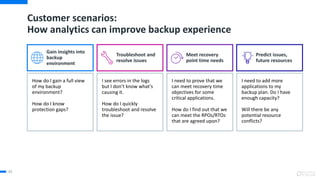
Customer scenarios:
How analytics can improve backup experience
65
Gain insights into
backup
environment
Troubleshoot and
resolve issues
Meet recovery
point time needs
Predict issues,
future resources
How do I gain a full view
of my backup
environment?
How do I know
protection gaps?
I see errors in the logs
but I don’t know what’s
causing it.
How do I quickly
troubleshoot and resolve
the issue?
I need to prove that we
can meet recovery time
objectives for some
critical applications.
How do I find out that we
can meet the RPOs/RTOs
that are agreed upon?
I need to add more
applications to my
backup plan. Do I have
enough capacity?
Will there be any
potential resource
conflicts?
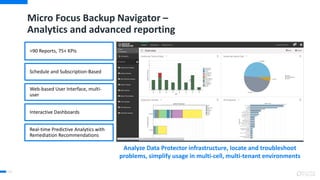
Micro Focus Backup Navigator –
Analytics and advanced reporting
66
>90 Reports, 75+ KPIs
Schedule and Subscription-Based
Web-based User Interface, multi-
user
Interactive Dashboards
Real-time Predictive Analytics with
Remediation Recommendations
Analyze Data Protector infrastructure, locate and troubleshoot
problems, simplify usage in multi-cell, multi-tenant environments
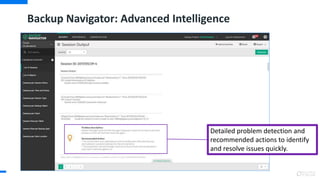
Backup Navigator: Advanced Intelligence
Detailed problem detection and
recommended actions to identify
and resolve issues quickly.
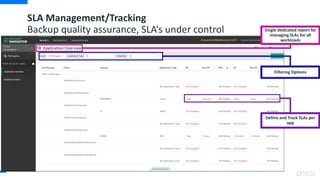
SLA Management/Tracking
Backup quality assurance, SLA‘s under control
Filtering Options
Define and Track SLAs per
app
Single dedicated report for
managing SLAs for all
workloads
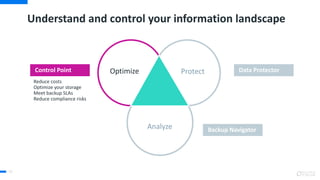
Understand and control your information landscape
70
Data ProtectorControl Point
Backup Navigator
Reduce costs
Optimize your storage
Meet backup SLAs
Reduce compliance risks
Protect
Analyze
Optimize
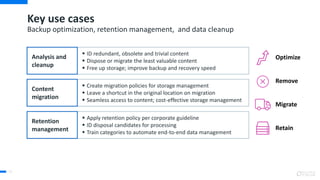
 ID redundant, obsolete and trivial content
 Dispose or migrate the least valuable content
 Free up storage; improve backup and recovery speed
 Create migration policies for storage management
 Leave a shortcut in the original location on migration
 Seamless access to content; cost-effective storage management
 Apply retention policy per corporate guideline
 ID disposal candidates for processing
 Train categories to automate end-to-end data management
Key use cases
71
Backup optimization, retention management, and data cleanup
Remove
Retain
Optimize
Migrate
Analysis and
cleanup
Content
migration
Retention
management
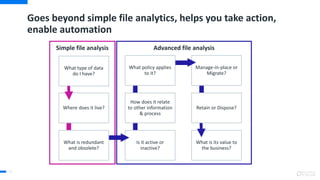
Goes beyond simple file analytics, helps you take action,
enable automation
72
Advanced file analysisSimple file analysis
What type of data
do I have?
Where does it live?
What is redundant
and obsolete?
Is it active or
inactive?
How does it relate
to other information
& process
What policy applies
to it?
Manage-in-place or
Migrate?
Retain or Dispose?
What is its value to
the business?
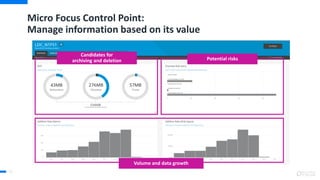
Micro Focus Control Point:
Manage information based on its value
Volume and data growth
73
Candidates for
archiving and deletion Potential risks
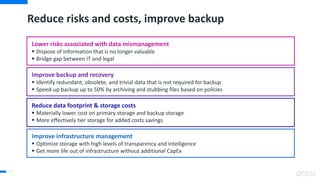
Reduce risks and costs, improve backup
74
Improve backup and recovery
 Identify redundant, obsolete, and trivial data that is not required for backup
 Speed-up backup up to 50% by archiving and stubbing files based on policies
Reduce data footprint & storage costs
 Materially lower cost on primary storage and backup storage
 More effectively tier storage for added costs savings
Lower risks associated with data mismanagement
 Dispose of information that is no longer valuable
 Bridge gap between IT and legal
Improve infrastructure management
 Optimize storage with high levels of transparency and intelligence
 Get more life out of infrastructure without additional CapEx
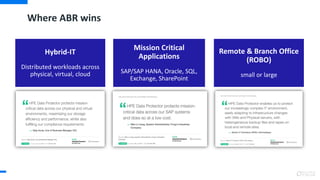
Where ABR wins
Hybrid-IT
Distributed workloads across
physical, virtual, cloud
Mission Critical
Applications
SAP/SAP HANA, Oracle, SQL,
Exchange, SharePoint
Remote & Branch Office
(ROBO)
small or large
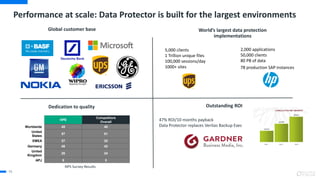
Performance at scale: Data Protector is built for the largest environments
76
World’s largest data protection
implementations
Global customer base
Outstanding ROI
47% ROI/10 months payback
Data Protector replaces Veritas Backup Exec
Dedication to quality
5,000 clients
1 Trillion unique files
100,000 sessions/day
1000+ sites
2,000 applications
50,000 clients
80 PB of data
78 production SAP instances
HPE
Competitors
Overall
Worldwide 45 40
United
States
57 51
EMEA 37 32
Germany 48 42
United
Kingdom
26 24
APJ 9 5
NPS Survey Results
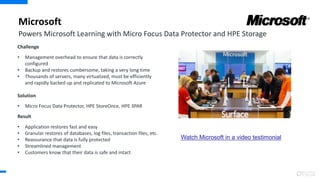
Microsoft
Challenge
• Management overhead to ensure that data is correctly
configured
• Backup and restores cumbersome, taking a very long time
• Thousands of servers, many virtualized, must be efficiently
and rapidly backed up and replicated to Microsoft Azure
Solution
• Micro Focus Data Protector, HPE StoreOnce, HPE 3PAR
Result
• Application restores fast and easy
• Granular restores of databases, log files, transaction files, etc.
• Reassurance that data is fully protected
• Streamlined management
• Customers know that their data is safe and intact
Powers Microsoft Learning with Micro Focus Data Protector and HPE Storage
Watch Microsoft in a video testimonial
Simple, reliable VM backup.
VM Explorer
Carlo Dusi
Pre Sales
06/02/2018
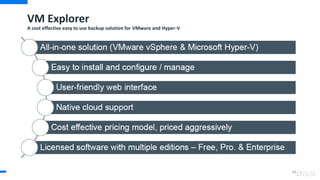
VM Explorer
A cost effective easy to use backup solution for VMware and Hyper-V
84
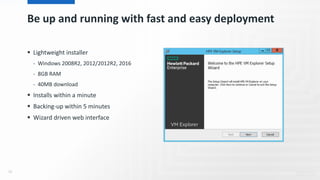
Be up and running with fast and easy deployment
 Lightweight installer
- Windows 2008R2, 2012/2012R2, 2016
- 8GB RAM
- 40MB download
 Installs within a minute
 Backing-up within 5 minutes
 Wizard driven web interface
86
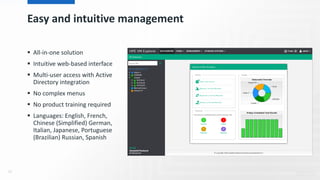
Easy and intuitive management
 All-in-one solution
 Intuitive web-based interface
 Multi-user access with Active
Directory integration
 No complex menus
 No product training required
 Languages: English, French,
Chinese (Simplified) German,
Italian, Japanese, Portuguese
(Brazilian) Russian, Spanish
87
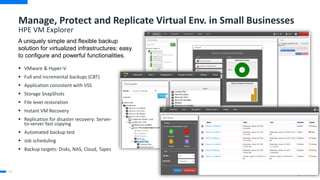
Manage, Protect and Replicate Virtual Env. in Small Businesses
HPE VM Explorer
88
 VMware & Hyper-V
 Full and incremental backups (CBT)
 Application consistent with VSS
 Storage SnapShots
 File level restoration
 Instant VM Recovery
 Replication for disaster recovery: Server-
to-server fast copying
 Automated backup test
 Job scheduling
 Backup targets: Disks, NAS, Cloud, Tapes
A uniquely simple and flexible backup
solution for virtualized infrastructures: easy
to configure and powerful functionalities.
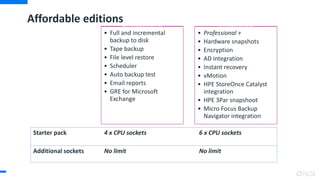
Affordable editions
Professional
• Full and incremental
backup to disk
• Tape backup
• File level restore
• Scheduler
• Auto backup test
• Email reports
• GRE for Microsoft
Exchange
Enterprise
• Professional +
• Hardware snapshots
• Encryption
• AD integration
• Instant recovery
• vMotion
• HPE StoreOnce Catalyst
integration
• HPE 3Par snapshoot
• Micro Focus Backup
Navigator integration
Starter pack 4 x CPU sockets 6 x CPU sockets
Additional sockets No limit No limit
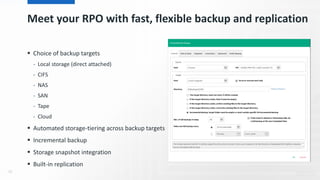
Meet your RPO with fast, flexible backup and replication
 Choice of backup targets
- Local storage (direct attached)
- CIFS
- NAS
- SAN
- Tape
- Cloud
 Automated storage-tiering across backup targets
 Incremental backup
 Storage snapshot integration
 Built-in replication
90
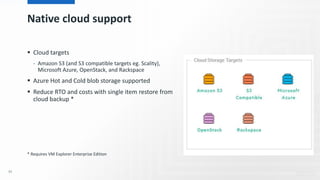
Native cloud support
 Cloud targets
- Amazon S3 (and S3 compatible targets eg. Scality),
Microsoft Azure, OpenStack, and Rackspace
 Azure Hot and Cold blob storage supported
 Reduce RTO and costs with single item restore from
cloud backup *
* Requires VM Explorer Enterprise Edition
91
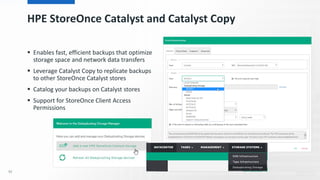
HPE StoreOnce Catalyst and Catalyst Copy
 Enables fast, efficient backups that optimize
storage space and network data transfers
 Leverage Catalyst Copy to replicate backups
to other StoreOnce Catalyst stores
 Catalog your backups on Catalyst stores
 Support for StoreOnce Client Access
Permissions
92
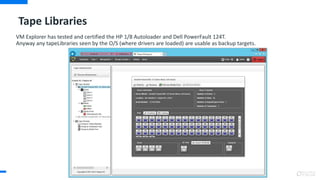
Tape Libraries
VM Explorer has tested and certified the HP 1/8 Autoloader and Dell PowerFault 124T.
Anyway any tapeLibraries seen by the O/S (where drivers are loaded) are usable as backup targets.
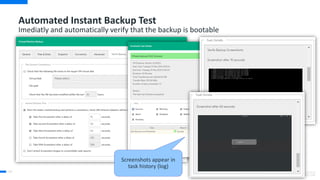
Automated Instant Backup Test
Imediatly and automatically verify that the backup is bootable
94
Screenshots appear in
task history (log)
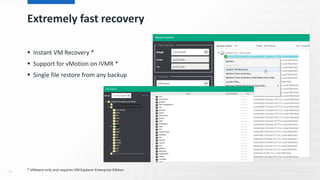
Extremely fast recovery
 Instant VM Recovery *
 Support for vMotion on IVMR *
 Single file restore from any backup
95 * VMware only and requires VM Explorer Enterprise Edition
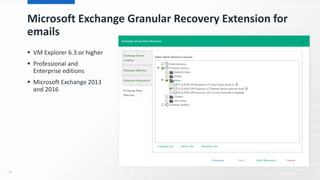
Microsoft Exchange Granular Recovery Extension for
emails
 VM Explorer 6.3 or higher
 Professional and
Enterprise editions
 Microsoft Exchange 2013
and 2016
96
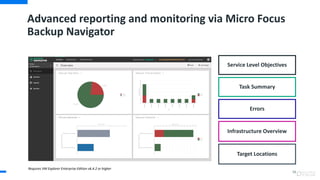
Advanced reporting and monitoring via Micro Focus
Backup Navigator
98
Requires VM Explorer Enterprise Edition v6.4.2 or higher
Service Level Objectives
Infrastructure Overview
Task Summary
Errors
Target Locations
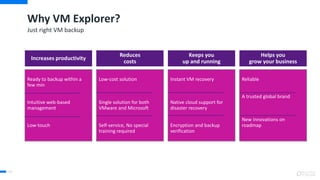
Why VM Explorer?
99
Just right VM backup
Increases productivity
Reduces
costs
Keeps you
up and running
Helps you
grow your business
Ready to backup within a
few min
Intuitive web-based
management
Low-touch
Low-cost solution
Single solution for both
VMware and Microsoft
Self-service, No special
training required
Instant VM recovery
Native cloud support for
disaster recovery
Encryption and backup
verification
Reliable
A trusted global brand
New innovations on
roadmap
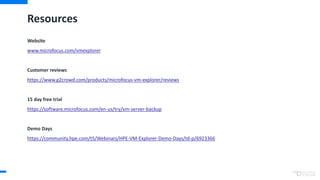
Resources
Website
www.microfocus.com/vmexplorer
Customer reviews
https://www.g2crowd.com/products/microfocus-vm-explorer/reviews
15 day free trial
https://software.microfocus.com/en-us/try/vm-server-backup
Demo Days
https://community.hpe.com/t5/Webinars/HPE-VM-Explorer-Demo-Days/td-p/6923366
100
Thank you
10
1
Thank you
For more information, go to
www.microfocus.com/abr
www.micofocus.com/dataprotector
www.microfocus.com/backupnav
www.microfocus.com/storageopt
10
2

Partner adaptive backup and recovery 2018

  • 1.
    Micro Focus AdaptiveBackup and Recovery Suite Carlo Dusi Software Presales 6 Febbraio 2018
  • 2.
    Agenda • Micro FocusData Protection Vision • Licensing Model • MF Adaptive Backup & Recovery Comprehensive Solution • MF VMX Software
  • 3.
    MF information management& governance portfolio Server Data Protection • Data Protector • VM Explorer • Backup Navigator • Content Manager • Archiving & eDiscovery Information GovernanceStorage and Application Optimization • Control Point • Structured Data Manager • Connected / MX Endpoint Information Management Optimized to help protect organizations from risk
  • 4.
    • The informationcontained in this presentation is proprietary to Micro Focus and is offered in confidence, subject to the terms and conditions of a binding Confidential Disclosure Agreement (CDA) • MF requires customers and partners to have signed a CDA in order to view this training • The information contained in this training is MF confidential • This presentation is NOT to be used as a ‘leave behind’ for customers and information may only be shared verbally with MF external customers under NDA • This presentation may be shared with Partners under NDA in hard-copy or electronic format for internal training purposes only • Do not remove any classification labels, warnings or disclaimers on any slide or modify this presentation to change the classification level. • Do not remove this slide from the presentation • MF does not warrant or represent that it will introduce any product to which the information relates • The information contained herein is subject to change without notice • MF makes no warranties regarding the accuracy of this information • The only warranties for MF products and services are set forth in the express warranty statements accompanying such products and services • Nothing herein should be construed as constituting an additional warranty • MF shall not be liable for technical or editorial errors or omissions contained herein • Strict adherence to the MF Standards of Business Conduct regarding this classification level is critical. Confidential - provided to MF employees and MF Partners for internal training purposes only Confidential Disclosure Agreement
  • 5.
    Micro Focus Backupand Recovery offerings Leveraging analytics and optimization to enhance backup and recovery Protect Analyze Optimize Protect: Data Protector Optimize: Control Point Analyze: Backup Navigator Analyze and manage data based on its value. Reduce costs, meet backup SLAs and reduce compliance risks. Centralized and standardized protection across repositories, platforms, locations. Advanced backup & recovery options, compression and deduplication. Advanced analytics, reporting and monitoring. Find protection gaps, root-cause analysis, backup inefficiencies, remediation, and capacity planning. 11
  • 6.
    Reporting, Monitoring, Administration MicroFocus Data Protection Vision 12 Analytics Integration Secure Multi-Tenant Architecture InfrastructureApplicationsPredictive AnalyticsFile Analytics Secure PeeringFour-tier design Rest APIs • Hybrid IT Protection: Protection and availability of workloads across legacy and modern platforms • SLA Compliance: Advanced analytics and automation for meeting strict RPO/RTO needs • Security: Adaptive architecture with enterprise grade scalability and security • Container Foundation: Multiple deployment options with Containers, Rest APIs • Operations Orchestration: Workflow automation, new app support • Self-Service: Easy to use self-service portal, Business KPI Dashboard, new user experience Operations Orchestration, New Platform Integrations Container Deployment Foundation New apps/platformsLegacy workloads Remote offices Self-Service Portal, BVD, New UX New Application support Rest APIs
  • 7.
    14 Key focus areasfor Data Protection Suite Automation and Orchestration • REST APIs as enabler for integration • Self-Service Supportability (automated recommendations to resolve known issues) • Automate deployment and upgrade tasks using containers • Operations Orchestration (OO) integration to manage schedules and automate restore processes Mission Critical Applications and Ongoing Platform Support • Best-in-Class support for Mission Critical Applications, Cloud, Big Data (Hadoop/Gridgain) • Analytics reporting/alerting to ensure RTOs/RPOs are met • Platform specific integrations (e.g. 3PAR, StoreOnce, RMC, Nimble, SimpliVity, Data Domain, Quantum); UX Simplification & Advanced Virtualization • UX Modernization to simplify management… (web based interface, built-in dashboard, consistent look and feel across products) • Advanced feature support and integration for virtual environments (granular recovery of Hyper-V environments)
  • 8.
    Journey to DataProtection Suite
  • 9.
    Two licensing modelsto choose from • Licensing methods cannot be combined in the same Cell Manager or MoM • Software encryption is the exception to this • Customers with a traditionally licensed Cell Manager can utilize capacity based licensing for a separate Cell Manager • Both licensing methods are valid for any size of environment • Migration from traditional licensing to capacity based licensing currently isn’t supported 17 Traditional licensing Based on the number of tape drives, application integrations, etc. Capacity-based licensing Based on the number of terabytes (TB) of primary storage
  • 10.
    MF Data Protectortraditional licensing • LTU for one cell manager • Unlimited backup agents • One drive LTU • Built in media management • Libraries up to 60 slots • System disaster recovery • Basic reporting • SAN support •OpenView integrations Required purchase ZeroDowntimeBackup InstantRecovery AdvancedBackupto Disk Encryption ManagerofManagers GranularRecoveryExt. Optional functional extensions HPE Data Protector Starter Pack On-lineBackup ExtendedApplicationPack HPEBackupNavigator HPEOperationsManager/MSSCOM ZDBfornon-HPEarrays 18
  • 11.
    ABR Licensing Model– What’s Included?  Data Protector is either licensed by capacity (in TB or PB) The quantity of TB’s or PB’s required is calculated using the following rules:  For a full and incremental backup concept, only full backups are considered.  For an incremental forever policy, a “synthetic” full is taken as base.  The capacity is measured in front end TB’s or PB’s, meaning the aggregate amount of source data being backed up from all systems; each system is measured at its largest full backup.  The capacity based license includes license-to-use (LTU) for:  Cell Managers and Manager-of-Managers  Tape Drives and Libraries  Online Backup & Granular Recovery Extensions  Zero Downtime Backup & Instant Recovery for HPE arrays  Advanced Backup to Disk & NDMP  Online Extension Backup & Zero Downtime Backup for non-HPE arrays Complimentary Products Sold Separately: • Backup Navigator • DP Management Pack • Software encryption (1 x Server)
  • 12.
    Consolidate and standardizebackup and replication 41 Improve reliability Gain business resiliency Reduce cost and complexity Data ProtectorControl Point Backup Navigator Protect Analyze Optimize
  • 13.
    Core elements ofthe MF Suite that help you meet consolidation goals Broad support matrix New backend architecture Automated storage tiering Federated Dedupe Flexible, four-tier architecture Cell Manager Manager of Managers Disk/Application Agents Media Agent Backup/DR policies, client, media management Integration with existing operation management tools Centralized management HPE Operations Manager Capacity planning Scheduling conflicts SLA Tracking ROT Analysis and Disposal Predictive analytics
  • 14.
    Consolidated and standardizedprotection with Data Protector 44 Micro Focus Data Protector Unstructured data Applications Virtual environment Remote site data CloudHPE StoreOnceHPE StoreEver Tape 3rd Party Storage Systems EMC Data DomainHPE Storage
  • 15.
    DP 10.00 Installation/ Upgrade A clean-up of obsolete support statements has been done with DP 10.00. You will be prompted to check support statements before you move on. DP 10.00 fresh install: Everthing will default to port 5565, new security model will be used by default. DP 10.00 upgrade install: Assuming port 5555 has been used before the upgrade installation will continue to use port 5555. For client not being upgraded yet the old security model is still used (using ECC or not). Once clients are upgraded to DP 10 the new security model is used. Not having matched the ports is the number 1 item for issues while/after the upgrade! So get friends with the netstat –a command ... DP 10.00 requires new License Passwords If you upgraded the CM another 60 Life Trial period is enabled
  • 16.
  • 18.
    NetApp NDMP 3-Waybackup implementation Enables backups to be done via a standard media/backup server to HPE StoreOnce or DP File Library. It also allows for replication of data to another StoreOnce partner or via Cloud Bank into a Cloud Store. StoreOnce Appliance (Catalyst) or File Library CM NDMP MA NDMP MA CM Added in DP 10.03Previous version Physical or virtual Tape (SCSI/FC) This enables backups via NDMP for filers without a local backup device. Also for concentrating backup via a common Media server with deduplication enabled. File Library support for customers without a Backup Appliance.
  • 19.
    Micro Focus DataProtector – Comprehensive protection across the enterprise 49 Simplified, standardized data protection Performance and reliability at scale Flexibility and control with advanced virtual server protection Business continuity and compliance Unified software and storage solution via advanced integrations
  • 20.
    Minimize downtime withaccelerated recovery options 50 Single item recovery, Power On and Live Migrate VM Primary storage array HPE StoreOnce Catalyst HPE SmartCache Single item Power On Live Migrate VMware vSphere Benefits  Immediate access to the virtual machine  Non-disruptive migration from backup target to datastore  Seamless transition after migration
  • 21.
    Advanced application integrationsfor meeting strict SLAs 51 Rapid application consistent recovery • Automatically groom transaction logs • No need to manage application integration • Common interface for different applications • Full and incremental backup process • Point-in-time recovery • Redirection and re-naming options • Diverse secondary storage options • Easy to manage restore via Micro Focus Data Protector, HPE StoreOnce Catalyst and HPE RMC plugins Oracle Database SAP R/3 and HANA Microsoft Exchange MS SQL / SharePoint Sybase MaxDB PostgreSQL / MySQL IBM DB2 / Lotus Notes
  • 22.
    Addressing data redundancyissues – Federated deduplication 52  Software only implementation can use generic disk  Purpose built appliance optimized for backup data  Simplest implementation – no operational changes Application source Backup server Target system  Offload application source from dedupe processing  Higher total target system throughput  Efficient utilization of backup infrastructure Application source Backup server Target system Low-bandwidth  Dedupe where data is created – application source  Eliminate need for extra hardware at ROBO sites  Reduces network bandwidth consumption Application source Backup server Target system Low-bandwidthLow-bandwidth
  • 23.
    Infrastruttura locale eremota – Data Protector Richiesta del cliente: – Gestire & proteggere sia sedi locali che periferiche in modo affidabile ed economico Vantaggi : – Trasferimento dei dati Deduplicati dei siti remoti attraverso la WAN verso un dispositivo di backup su disco HPE StoreOnce - EMC DataDomain – Dispositivi locale StoreOnce con deduplica per poter eseguire veloci restore Benefici per il Business del cliente: – Miglioramento delle operazioni di gestione remota – consolidamenti dei backup e Restore dei siti remoti – Riduzione dei costi: I dati deduplicati trasferiti via WAN riducono la necessità di avere un elevato numero di nastri da gestire e una minore impiego di banda – Miglioramento della produttività: tempi di restore più veloci Test Sviluppo Datacenter Primario Sito di Disaster Recovery Siti Remoti Use case: Catalyst Replication di StoreOnce, avendo un fattore di deduplica 17:1 ed una linea dati di 50 Mb/s si riesce a a portare dal sito PROD a quello DR distanti circa 200 km il full back di 120 VM pari a 10 TB in circa 24 ore.
  • 24.
    Restore choices Got itreplicated and imported ... what now? Local CM Foreign CM Restore to original client Client or Hypervisor Client Tape Library StoreOnce DataDomain StoreOnce DataDomain
  • 25.
    HPE StoreOnce: Asingle backup platform HPE StoreOnce in HPE Data Protector 6600 series VSA series Scalable to 216TB usable 5100 series One architecture Backup and replica everywhere Software, virtual and hardware appliances HPE StoreOnce Catalyst Backup app & deduplica sorgente Scalable to 1.7PB usable 3520/40 series Scalable to 31TB usable 4TB or 50TB usable 5.5TB usable 3100 series 5500 series Scalable to 864TB usable
  • 26.
    EMC DataDomain withHPE DataProtector EMC DataDomain Boost Backup app & source dedupe Scalable to 1.7PB usable² up to 17TB usable DD9500 DD7200 DD4500 DD4200 DD2500 DD2200 up to 133TB usable up to 378TB usable² up to 570TB usable² up to 856TB usable² ² With DD Extended Retention software option
  • 27.
    HPE StoreOnce CloudBank DeduplicatedData Catalyst Enabled Hybrid IT protection – physical, virtual, cloud Out of the box support for HPE StoreOnce Cloud Bank Micro Focus Data Protector Micro Focus VM Explorer Protect hybrid IT by • Utilizing public/private cloud storage • Supported with RMC snapshot CloudBank use cases • Long term backup retention • Offsite disaster recovery protection • StoreOnce VSA in the cloud HPE StoreOnce
  • 28.
    HPE 3PAR storagearray integrations Accelerated backup and recovery for virtual and physical environments Backup t0 t-1 t-2 t VMware VM VM VM Key Integrations Benefits Zero Downtime Backup • Micro Focus Data Protector can create, backup, and catalog space-efficient, application-aware snapshots • Minimized impact on hypervisor, memory • Minimized system downtime • Improved application performance Instant VM Recovery • Instant recovery of applications 3PAR Remote Copy • Offload primary array to focus on Tier 1 applications Micro Focus SmartCache • Offload snapshots to a new backup target • Accelerated restores • Disk array agnostic
  • 29.
    Mission Critical: DataProtector architecture for SAP HANA Backup Targets Tape Storage Virtual Tape Deduplicatied Backup SAP HANA HANA NodesDatabasesLog Files Micro Focus Data Protector Why Data Protector with HPE Storage for SAP HANA • Integrated, tested, and certified for SAP HANA environments. • Advanced integrations with HPE Storage • Log file management, application consistent backup, and single-click point in time restore without any scripting or manual steps. • Direct/flat back orchestration through integration with HPE RMC for SAP HANA enables speed and storage optimization. • Predictive analytics with Backup Navigator – define and manage app SLAs, gain alerts and recommendations when RPOs/RTOs are not met.
  • 30.
    Proactively detect andresolve errors, improve resource utilization 63 Gain insight into backup environment Better resource planning Improved resource efficiency Data ProtectorControl Point Backup Navigator Protect Analyze Ad Optimize
  • 31.
    Customer scenarios: How analyticscan improve backup 64 Gain insights into backup environment Troubleshoot and resolve issues Meet recovery point time needs Predict issues, future resources Session overview Device/media/client summary Physical & virtual infrastructure overview Clients / VMs without backup Health/status monitoring and events Most unreliable sessions/devices Drill-down reporting & related reports Remediation steps Application RPOs/RTOs Application prioritization Average backup completion times Device utilization summary Data growth trends Data growth per client / backup specs Deduplication report Current / Future backup schedules
  • 32.
    Customer scenarios: How analyticscan improve backup experience 65 Gain insights into backup environment Troubleshoot and resolve issues Meet recovery point time needs Predict issues, future resources How do I gain a full view of my backup environment? How do I know protection gaps? I see errors in the logs but I don’t know what’s causing it. How do I quickly troubleshoot and resolve the issue? I need to prove that we can meet recovery time objectives for some critical applications. How do I find out that we can meet the RPOs/RTOs that are agreed upon? I need to add more applications to my backup plan. Do I have enough capacity? Will there be any potential resource conflicts?
  • 33.
    Micro Focus BackupNavigator – Analytics and advanced reporting 66 >90 Reports, 75+ KPIs Schedule and Subscription-Based Web-based User Interface, multi- user Interactive Dashboards Real-time Predictive Analytics with Remediation Recommendations Analyze Data Protector infrastructure, locate and troubleshoot problems, simplify usage in multi-cell, multi-tenant environments
  • 34.
    Backup Navigator: AdvancedIntelligence Detailed problem detection and recommended actions to identify and resolve issues quickly.
  • 35.
    SLA Management/Tracking Backup qualityassurance, SLA‘s under control Filtering Options Define and Track SLAs per app Single dedicated report for managing SLAs for all workloads
  • 36.
    Understand and controlyour information landscape 70 Data ProtectorControl Point Backup Navigator Reduce costs Optimize your storage Meet backup SLAs Reduce compliance risks Protect Analyze Optimize
  • 37.
     ID redundant,obsolete and trivial content  Dispose or migrate the least valuable content  Free up storage; improve backup and recovery speed  Create migration policies for storage management  Leave a shortcut in the original location on migration  Seamless access to content; cost-effective storage management  Apply retention policy per corporate guideline  ID disposal candidates for processing  Train categories to automate end-to-end data management Key use cases 71 Backup optimization, retention management, and data cleanup Remove Retain Optimize Migrate Analysis and cleanup Content migration Retention management
  • 38.
    Goes beyond simplefile analytics, helps you take action, enable automation 72 Advanced file analysisSimple file analysis What type of data do I have? Where does it live? What is redundant and obsolete? Is it active or inactive? How does it relate to other information & process What policy applies to it? Manage-in-place or Migrate? Retain or Dispose? What is its value to the business?
  • 39.
    Micro Focus ControlPoint: Manage information based on its value Volume and data growth 73 Candidates for archiving and deletion Potential risks
  • 40.
    Reduce risks andcosts, improve backup 74 Improve backup and recovery  Identify redundant, obsolete, and trivial data that is not required for backup  Speed-up backup up to 50% by archiving and stubbing files based on policies Reduce data footprint & storage costs  Materially lower cost on primary storage and backup storage  More effectively tier storage for added costs savings Lower risks associated with data mismanagement  Dispose of information that is no longer valuable  Bridge gap between IT and legal Improve infrastructure management  Optimize storage with high levels of transparency and intelligence  Get more life out of infrastructure without additional CapEx
  • 41.
    Where ABR wins Hybrid-IT Distributedworkloads across physical, virtual, cloud Mission Critical Applications SAP/SAP HANA, Oracle, SQL, Exchange, SharePoint Remote & Branch Office (ROBO) small or large
  • 42.
    Performance at scale:Data Protector is built for the largest environments 76 World’s largest data protection implementations Global customer base Outstanding ROI 47% ROI/10 months payback Data Protector replaces Veritas Backup Exec Dedication to quality 5,000 clients 1 Trillion unique files 100,000 sessions/day 1000+ sites 2,000 applications 50,000 clients 80 PB of data 78 production SAP instances HPE Competitors Overall Worldwide 45 40 United States 57 51 EMEA 37 32 Germany 48 42 United Kingdom 26 24 APJ 9 5 NPS Survey Results
  • 43.
    Microsoft Challenge • Management overheadto ensure that data is correctly configured • Backup and restores cumbersome, taking a very long time • Thousands of servers, many virtualized, must be efficiently and rapidly backed up and replicated to Microsoft Azure Solution • Micro Focus Data Protector, HPE StoreOnce, HPE 3PAR Result • Application restores fast and easy • Granular restores of databases, log files, transaction files, etc. • Reassurance that data is fully protected • Streamlined management • Customers know that their data is safe and intact Powers Microsoft Learning with Micro Focus Data Protector and HPE Storage Watch Microsoft in a video testimonial
  • 44.
    Simple, reliable VMbackup. VM Explorer Carlo Dusi Pre Sales 06/02/2018
  • 45.
    VM Explorer A costeffective easy to use backup solution for VMware and Hyper-V 84
  • 46.
    Be up andrunning with fast and easy deployment  Lightweight installer - Windows 2008R2, 2012/2012R2, 2016 - 8GB RAM - 40MB download  Installs within a minute  Backing-up within 5 minutes  Wizard driven web interface 86
  • 47.
    Easy and intuitivemanagement  All-in-one solution  Intuitive web-based interface  Multi-user access with Active Directory integration  No complex menus  No product training required  Languages: English, French, Chinese (Simplified) German, Italian, Japanese, Portuguese (Brazilian) Russian, Spanish 87
  • 48.
    Manage, Protect andReplicate Virtual Env. in Small Businesses HPE VM Explorer 88  VMware & Hyper-V  Full and incremental backups (CBT)  Application consistent with VSS  Storage SnapShots  File level restoration  Instant VM Recovery  Replication for disaster recovery: Server- to-server fast copying  Automated backup test  Job scheduling  Backup targets: Disks, NAS, Cloud, Tapes A uniquely simple and flexible backup solution for virtualized infrastructures: easy to configure and powerful functionalities.
  • 49.
    Affordable editions Professional • Fulland incremental backup to disk • Tape backup • File level restore • Scheduler • Auto backup test • Email reports • GRE for Microsoft Exchange Enterprise • Professional + • Hardware snapshots • Encryption • AD integration • Instant recovery • vMotion • HPE StoreOnce Catalyst integration • HPE 3Par snapshoot • Micro Focus Backup Navigator integration Starter pack 4 x CPU sockets 6 x CPU sockets Additional sockets No limit No limit
  • 50.
    Meet your RPOwith fast, flexible backup and replication  Choice of backup targets - Local storage (direct attached) - CIFS - NAS - SAN - Tape - Cloud  Automated storage-tiering across backup targets  Incremental backup  Storage snapshot integration  Built-in replication 90
  • 51.
    Native cloud support Cloud targets - Amazon S3 (and S3 compatible targets eg. Scality), Microsoft Azure, OpenStack, and Rackspace  Azure Hot and Cold blob storage supported  Reduce RTO and costs with single item restore from cloud backup * * Requires VM Explorer Enterprise Edition 91
  • 52.
    HPE StoreOnce Catalystand Catalyst Copy  Enables fast, efficient backups that optimize storage space and network data transfers  Leverage Catalyst Copy to replicate backups to other StoreOnce Catalyst stores  Catalog your backups on Catalyst stores  Support for StoreOnce Client Access Permissions 92
  • 53.
    Tape Libraries VM Explorerhas tested and certified the HP 1/8 Autoloader and Dell PowerFault 124T. Anyway any tapeLibraries seen by the O/S (where drivers are loaded) are usable as backup targets.
  • 54.
    Automated Instant BackupTest Imediatly and automatically verify that the backup is bootable 94 Screenshots appear in task history (log)
  • 55.
    Extremely fast recovery Instant VM Recovery *  Support for vMotion on IVMR *  Single file restore from any backup 95 * VMware only and requires VM Explorer Enterprise Edition
  • 56.
    Microsoft Exchange GranularRecovery Extension for emails  VM Explorer 6.3 or higher  Professional and Enterprise editions  Microsoft Exchange 2013 and 2016 96
  • 57.
    Advanced reporting andmonitoring via Micro Focus Backup Navigator 98 Requires VM Explorer Enterprise Edition v6.4.2 or higher Service Level Objectives Infrastructure Overview Task Summary Errors Target Locations
  • 58.
    Why VM Explorer? 99 Justright VM backup Increases productivity Reduces costs Keeps you up and running Helps you grow your business Ready to backup within a few min Intuitive web-based management Low-touch Low-cost solution Single solution for both VMware and Microsoft Self-service, No special training required Instant VM recovery Native cloud support for disaster recovery Encryption and backup verification Reliable A trusted global brand New innovations on roadmap
  • 59.
    Resources Website www.microfocus.com/vmexplorer Customer reviews https://www.g2crowd.com/products/microfocus-vm-explorer/reviews 15 dayfree trial https://software.microfocus.com/en-us/try/vm-server-backup Demo Days https://community.hpe.com/t5/Webinars/HPE-VM-Explorer-Demo-Days/td-p/6923366 100
  • 60.
  • 61.
    Thank you For moreinformation, go to www.microfocus.com/abr www.micofocus.com/dataprotector www.microfocus.com/backupnav www.microfocus.com/storageopt 10 2