Maximize Database Performance in Your Software-
Defined Datacenter
Mark Achtemichuk, VMware
Michael Webster, VMware
VAPP4683
#VAPP4683
2
Introductions
 Michael Webster – websterm@vmware.com
• VCDX-066, vExpert 2012 - 2013, VMware
• Strategic Architect, APJ – Business Critical Apps
• Twitter: @vcdxnz001
• Blog: http://longwhiteclouds.com
 Mark Achtemichuk – machtemichuk@vmware.com
• VDCX-050, vExpert 2013, VMware
• Sr. Technical Marketing Architect, Performance Specialist
• Twitter: @vmMarkA
• Blog: http://virtualizationeh.ca
3
Agenda
 Introduction
 Database Performance Basics
 Software-Defined Datacenter Concepts
 Resource Allocation Models
 Storage Abstraction and Acceleration
 Ensuring Quality of Service
 Cloud Performance Management
 Common Pitfalls, Gotchas and Roadblocks
 Summary
4
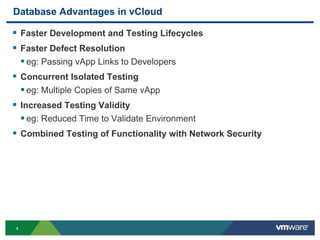
Database Advantages in vCloud
 Faster Development and Testing Lifecycles
 Faster Defect Resolution
 eg: Passing vApp Links to Developers
 Concurrent Isolated Testing
 eg: Multiple Copies of Same vApp
 Increased Testing Validity
 eg: Reduced Time to Validate Environment
 Combined Testing of Functionality with Network Security
5
Database Advantages in vCloud (Continued)
 No Need to Manually Manage Per VM Reservations
 Declarative Service Defined Architecture
 Portability Between Private, Semi-Private and Hybrid/Public Cloud
 Rapid Elasticity, Easily Burst Resources For Peak Workloads
 Multi-tiered Application Simulated in Single vApp
 Self-service Load Balancing
 vApps Automatically Monitored with vCenter Operations
6
Database Challenges with vCloud
 3rd Party Vendor Backup and Data Protection Integration with
vCloud Director
 Site Recovery Manager Integration for vCloud Director
 No Support for RDM
 No Support for Shared VMDK’s
 No Support for Multi-writer flag
 All Virtual Disks on Same Tier of Storage
 All Virtual Disks Contained within Single Datastore (by default)
 No Control Over Number of Datastores
 No Control Over NUMA Node Size
7
Database Performance Basics
8
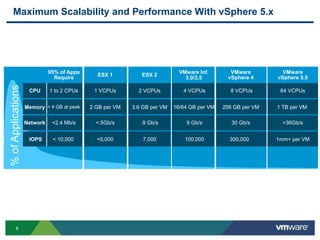
Maximum Scalability and Performance With vSphere 5.x%ofApplications
95% of Apps
Require
IOPS
Network
Memory
CPU
< 10,000
<2.4 Mb/s
< 4 GB at peak
1 to 2 CPUs
VMware
vSphere 4
300,000
30 Gb/s
256 GB per VM
8 VCPUs
VMware Inf.
100,000
9 Gb/s
16/64 GB per VM
4 VCPUs
VMware
vSphere 5.5
1mm+ per VM
>36Gb/s
1 TB per VM
64 VCPUs
ESX 2
7,000
.9 Gb/s
3.6 GB per VM
2 VCPUs
ESX 1
<5,000
<.5Gb/s
2 GB per VM
1 VCPUs
3.0/3.5
9
CPU & Memory
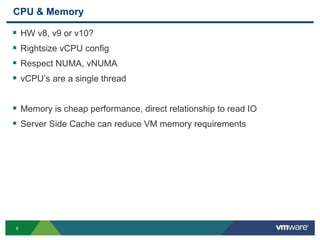
 HW v8, v9 or v10?
 Rightsize vCPU config
 Respect NUMA, vNUMA
 vCPU’s are a single thread
 Memory is cheap performance, direct relationship to read IO
 Server Side Cache can reduce VM memory requirements
10
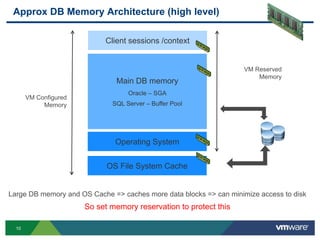
Approx DB Memory Architecture (high level)
Client sessions /context
Main DB memory
Oracle – SGA
SQL Server – Buffer Pool
Operating System
Large DB memory and OS Cache => caches more data blocks => can minimize access to disk
So set memory reservation to protect this
VM Configured
Memory
OS File System Cache
VM Reserved
Memory
11
Network
 Use vmxnet3
 Jumbo Frames
 Evaluate latency settings:
 http://www.vmware.com/resources/techresources/10220
12
“Your database is an extension of
your storage”
13
Storage
 Use top tier storage policy
 Watch fast-provisioning disk chain length
 Disk Alignment
 Use multiple vmdks on multiple vSCSI adapters
 Use multiple data files or log files per vCPU
 Queues are everywhere
14
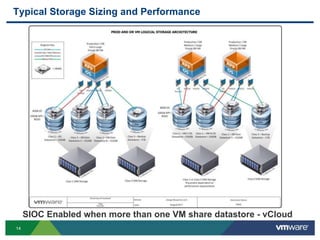
Typical Storage Sizing and Performance
SIOC Enabled when more than one VM share datastore - vCloud
15
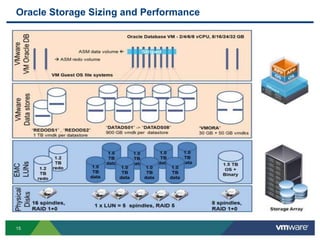
Oracle Storage Sizing and Performance
16
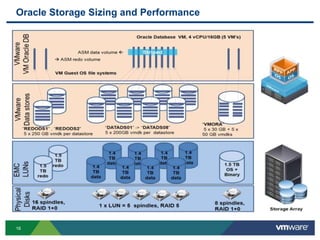
Oracle Storage Sizing and Performance
17
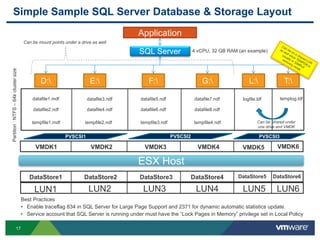
Simple Sample SQL Server Database & Storage Layout
Application
SQL Server
datafile1.mdf
datafile2.ndf
datafile3.ndf
datafile4.ndf
datafile5.ndf
datafile6.ndf
datafile7.ndf
datafile8.ndf
logfile.ldf
tempfile1.mdf tempfile2.ndf tempfile3.ndf tempfile4.ndf
LUN1 LUN2 LUN3 LUN4 LUN5
D: E: F: G: L:
LUN6
templog.ldf
T:
4 vCPU, 32 GB RAM (an example)
ESX Host
DataStore1 DataStore2 DataStore3 DataStore4 DataStore5 DataStore6
VMDK1 VMDK2 VMDK3 VMDK4 VMDK5 VMDK6
Can be mount points under a drive as well
Best Practices
• Enable traceflag 834 in SQL Server for Large Page Support and 2371 for dynamic automatic statistics update.
• Service account that SQL Server is running under must have the “Lock Pages in Memory” privilege set in Local Policy
Partition:NTFS–64kclustersize
PVSCSI1 PVSCSI3
Can be Shared under
one drive and VMDK
PVSCSI2
18
Software-Defined Datacenter Concepts
19
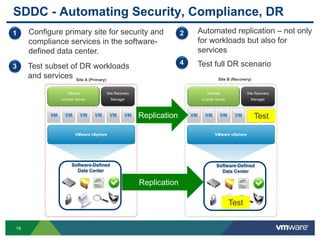
Site Recovery
Manager
VMware vSphere
VMware
vCenter Server
VMware
vCenter Server
Site Recovery
Manager
VMware vSphere
Site A (Primary) Site B (Recovery)
Servers Servers
SDDC - Automating Security, Compliance, DR
1 Configure primary site for security and
compliance services in the software-
defined data center.
Replication
Software-Defined
Data Center
Software-Defined
Data Center
2 Automated replication – not only
for workloads but also for
services
3 Test subset of DR workloads
and services
4 Test full DR scenario
Replication
Test
Test
20
Resource Allocation Models
21
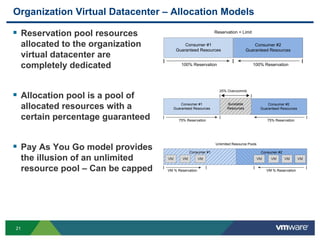
Organization Virtual Datacenter – Allocation Models
 Reservation pool resources
allocated to the organization
virtual datacenter are
completely dedicated
 Allocation pool is a pool of
allocated resources with a
certain percentage guaranteed
 Pay As You Go model provides
the illusion of an unlimited
resource pool – Can be capped
Consumer #1
Guaranteed Resources
Consumer #2
Guaranteed Resources
Reservation = Limit
| | |
100% Reservation 100% Reservation
Consumer #1
Guaranteed Resources
Consumer #2
Guaranteed Resources
25% Overcommit
| | |
75% Reservation 75% Reservation
Burstable
Resources
| |
Consumer #1 Consumer #2
Unlimited Resource Pools
| | |
VM % Reservation VM % Reservation
VM VM VM VM VMVM VM
|
22
Storage Abstraction and Acceleration
23
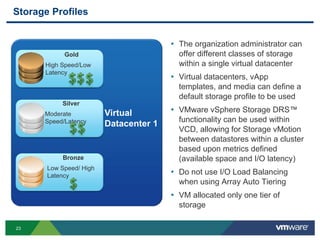
Storage Profiles
• The organization administrator can
offer different classes of storage
within a single virtual datacenter
• Virtual datacenters, vApp
templates, and media can define a
default storage profile to be used
• VMware vSphere Storage DRS™
functionality can be used within
VCD, allowing for Storage vMotion
between datastores within a cluster
based upon metrics defined
(available space and I/O latency)
• Do not use I/O Load Balancing
when using Array Auto Tiering
• VM allocated only one tier of
storage
Gold
High Speed/Low
Latency
Silver
Moderate
Speed/Latency
Bronze
Low Speed/ High
Latency
Virtual
Datacenter 1
24
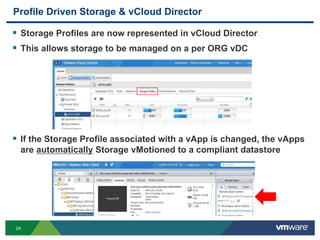
Profile Driven Storage & vCloud Director
 Storage Profiles are now represented in vCloud Director
 This allows storage to be managed on a per ORG vDC
 If the Storage Profile associated with a vApp is changed, the vApps
are automatically Storage vMotioned to a compliant datastore
25
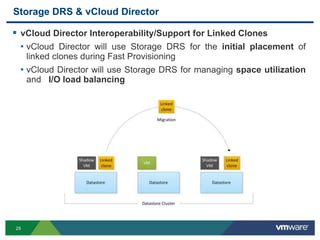
Storage DRS & vCloud Director
 vCloud Director Interoperability/Support for Linked Clones
• vCloud Director will use Storage DRS for the initial placement of
linked clones during Fast Provisioning
• vCloud Director will use Storage DRS for managing space utilization
and I/O load balancing
26
Increasing Database Performance in vCloud Director
 Queue depth
 Larger # of datastores
 Storage DRS Anti-Affinity Rules – Separate VMDK
 No Fast Provisioning for Production VM’s
 Server Side Caching
27
Ensuring Quality of Service
28
Enabling QOS
 CPU and Memory
 Use DRS for auto migration
 Use the right allocation model
 Size Application for VM Allocation Model
 Network
 Use NetIOC at lowest layer “carefully” if necessary
 What about Load Based Teaming? Not with VXLAN!
 Storage
 Use storage profiles appropriately
 Leverage array based hot block migration
 Storage IO Control
 Storage DRS
29
Cloud Performance Management
30
Slide 30
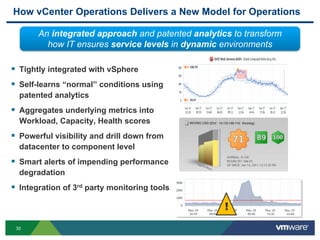
How vCenter Operations Delivers a New Model for Operations
 Tightly integrated with vSphere
 Self-learns “normal” conditions using
patented analytics
 Aggregates underlying metrics into
Workload, Capacity, Health scores
 Powerful visibility and drill down from
datacenter to component level
 Smart alerts of impending performance
degradation
 Integration of 3rd party monitoring tools
An integrated approach and patented analytics to transform
how IT ensures service levels in dynamic environments
!
31
vSphere
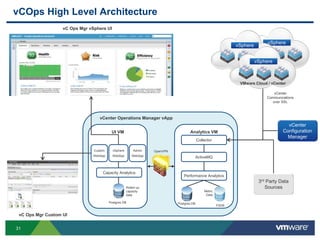
vCOps High Level Architecture
OpenVPN
Postgres DB
vSphere
WebApp
Custom
WebApp
Admin
WebApp
vCenter Operations Manager vApp
UI VM
Rolled up
capacity
data
Capacity Analytics
FSDB
Postgres DB
Collector
ActiveMQ
Performance Analytics
Analytics VM
Metric
Data
vSphere
VMware Cloud / vCenter
vSphere
vC Ops Mgr vSphere UI
vCenter
Configuration
Manager
3rd Party Data
Sources
vCenter
Communications
over SSL
vC Ops Mgr Custom UI
32
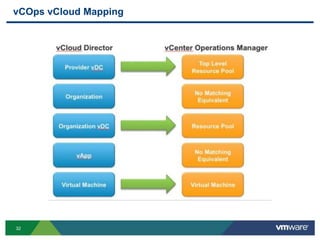
vCOps vCloud Mapping
33
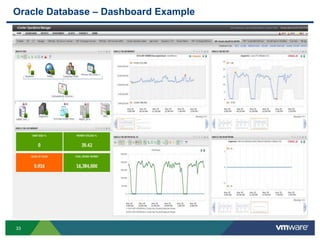
Oracle Database – Dashboard Example
34
Common Pitfalls, Gotchas, Roadblocks
35
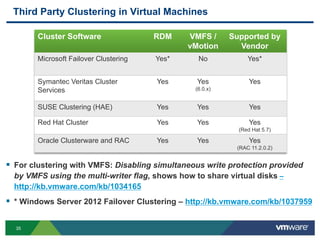
Third Party Clustering in Virtual Machines
 For clustering with VMFS: Disabling simultaneous write protection provided
by VMFS using the multi-writer flag, shows how to share virtual disks –
http://kb.vmware.com/kb/1034165
 * Windows Server 2012 Failover Clustering – http://kb.vmware.com/kb/1037959
Cluster Software RDM VMFS /
vMotion
Supported by
Vendor
Microsoft Failover Clustering Yes* No Yes*
Symantec Veritas Cluster
Services
Yes Yes
(6.0.x)
Yes
SUSE Clustering (HAE) Yes Yes Yes
Red Hat Cluster Yes Yes Yes
(Red Hat 5.7)
Oracle Clusterware and RAC Yes Yes Yes
(RAC 11.2.0.2)
36
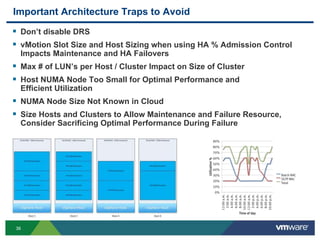
Important Architecture Traps to Avoid
 Don’t disable DRS
 vMotion Slot Size and Host Sizing when using HA % Admission Control
Impacts Maintenance and HA Failovers
 Max # of LUN’s per Host / Cluster Impact on Size of Cluster
 Host NUMA Node Too Small for Optimal Performance and
Efficient Utilization
 NUMA Node Size Not Known in Cloud
 Size Hosts and Clusters to Allow Maintenance and Failure Resource,
Consider Sacrificing Optimal Performance During Failure
37
Summary
38
Questions
39
Other VMware Activities Related to This Session
 HOL:
HOL-SDC-1304
vSphere Performance Optimization
HOL-SDC-1317
vCloud Suite Use Cases - Business Critical Applications
THANK YOU
Maximize Database Performance in Your Software-
Defined Datacenter
Mark Achtemichuk, VMware
Michael Webster, VMware
VAPP4683
#VAPP4683

VMworld 2013: Maximize Database Performance in Your Software-Defined Data Center

  • 1.
    Maximize Database Performancein Your Software- Defined Datacenter Mark Achtemichuk, VMware Michael Webster, VMware VAPP4683 #VAPP4683
  • 2.
    2 Introductions  Michael Webster– websterm@vmware.com • VCDX-066, vExpert 2012 - 2013, VMware • Strategic Architect, APJ – Business Critical Apps • Twitter: @vcdxnz001 • Blog: http://longwhiteclouds.com  Mark Achtemichuk – machtemichuk@vmware.com • VDCX-050, vExpert 2013, VMware • Sr. Technical Marketing Architect, Performance Specialist • Twitter: @vmMarkA • Blog: http://virtualizationeh.ca
  • 3.
    3 Agenda  Introduction  DatabasePerformance Basics  Software-Defined Datacenter Concepts  Resource Allocation Models  Storage Abstraction and Acceleration  Ensuring Quality of Service  Cloud Performance Management  Common Pitfalls, Gotchas and Roadblocks  Summary
  • 4.
    4 Database Advantages invCloud  Faster Development and Testing Lifecycles  Faster Defect Resolution  eg: Passing vApp Links to Developers  Concurrent Isolated Testing  eg: Multiple Copies of Same vApp  Increased Testing Validity  eg: Reduced Time to Validate Environment  Combined Testing of Functionality with Network Security
  • 5.
    5 Database Advantages invCloud (Continued)  No Need to Manually Manage Per VM Reservations  Declarative Service Defined Architecture  Portability Between Private, Semi-Private and Hybrid/Public Cloud  Rapid Elasticity, Easily Burst Resources For Peak Workloads  Multi-tiered Application Simulated in Single vApp  Self-service Load Balancing  vApps Automatically Monitored with vCenter Operations
  • 6.
    6 Database Challenges withvCloud  3rd Party Vendor Backup and Data Protection Integration with vCloud Director  Site Recovery Manager Integration for vCloud Director  No Support for RDM  No Support for Shared VMDK’s  No Support for Multi-writer flag  All Virtual Disks on Same Tier of Storage  All Virtual Disks Contained within Single Datastore (by default)  No Control Over Number of Datastores  No Control Over NUMA Node Size
  • 7.
  • 8.
    8 Maximum Scalability andPerformance With vSphere 5.x%ofApplications 95% of Apps Require IOPS Network Memory CPU < 10,000 <2.4 Mb/s < 4 GB at peak 1 to 2 CPUs VMware vSphere 4 300,000 30 Gb/s 256 GB per VM 8 VCPUs VMware Inf. 100,000 9 Gb/s 16/64 GB per VM 4 VCPUs VMware vSphere 5.5 1mm+ per VM >36Gb/s 1 TB per VM 64 VCPUs ESX 2 7,000 .9 Gb/s 3.6 GB per VM 2 VCPUs ESX 1 <5,000 <.5Gb/s 2 GB per VM 1 VCPUs 3.0/3.5
  • 9.
    9 CPU & Memory HW v8, v9 or v10?  Rightsize vCPU config  Respect NUMA, vNUMA  vCPU’s are a single thread  Memory is cheap performance, direct relationship to read IO  Server Side Cache can reduce VM memory requirements
  • 10.
    10 Approx DB MemoryArchitecture (high level) Client sessions /context Main DB memory Oracle – SGA SQL Server – Buffer Pool Operating System Large DB memory and OS Cache => caches more data blocks => can minimize access to disk So set memory reservation to protect this VM Configured Memory OS File System Cache VM Reserved Memory
  • 11.
    11 Network  Use vmxnet3 Jumbo Frames  Evaluate latency settings:  http://www.vmware.com/resources/techresources/10220
  • 12.
    12 “Your database isan extension of your storage”
  • 13.
    13 Storage  Use toptier storage policy  Watch fast-provisioning disk chain length  Disk Alignment  Use multiple vmdks on multiple vSCSI adapters  Use multiple data files or log files per vCPU  Queues are everywhere
  • 14.
    14 Typical Storage Sizingand Performance SIOC Enabled when more than one VM share datastore - vCloud
  • 15.
    15 Oracle Storage Sizingand Performance
  • 16.
    16 Oracle Storage Sizingand Performance
  • 17.
    17 Simple Sample SQLServer Database & Storage Layout Application SQL Server datafile1.mdf datafile2.ndf datafile3.ndf datafile4.ndf datafile5.ndf datafile6.ndf datafile7.ndf datafile8.ndf logfile.ldf tempfile1.mdf tempfile2.ndf tempfile3.ndf tempfile4.ndf LUN1 LUN2 LUN3 LUN4 LUN5 D: E: F: G: L: LUN6 templog.ldf T: 4 vCPU, 32 GB RAM (an example) ESX Host DataStore1 DataStore2 DataStore3 DataStore4 DataStore5 DataStore6 VMDK1 VMDK2 VMDK3 VMDK4 VMDK5 VMDK6 Can be mount points under a drive as well Best Practices • Enable traceflag 834 in SQL Server for Large Page Support and 2371 for dynamic automatic statistics update. • Service account that SQL Server is running under must have the “Lock Pages in Memory” privilege set in Local Policy Partition:NTFS–64kclustersize PVSCSI1 PVSCSI3 Can be Shared under one drive and VMDK PVSCSI2
  • 18.
  • 19.
    19 Site Recovery Manager VMware vSphere VMware vCenterServer VMware vCenter Server Site Recovery Manager VMware vSphere Site A (Primary) Site B (Recovery) Servers Servers SDDC - Automating Security, Compliance, DR 1 Configure primary site for security and compliance services in the software- defined data center. Replication Software-Defined Data Center Software-Defined Data Center 2 Automated replication – not only for workloads but also for services 3 Test subset of DR workloads and services 4 Test full DR scenario Replication Test Test
  • 20.
  • 21.
    21 Organization Virtual Datacenter– Allocation Models  Reservation pool resources allocated to the organization virtual datacenter are completely dedicated  Allocation pool is a pool of allocated resources with a certain percentage guaranteed  Pay As You Go model provides the illusion of an unlimited resource pool – Can be capped Consumer #1 Guaranteed Resources Consumer #2 Guaranteed Resources Reservation = Limit | | | 100% Reservation 100% Reservation Consumer #1 Guaranteed Resources Consumer #2 Guaranteed Resources 25% Overcommit | | | 75% Reservation 75% Reservation Burstable Resources | | Consumer #1 Consumer #2 Unlimited Resource Pools | | | VM % Reservation VM % Reservation VM VM VM VM VMVM VM |
  • 22.
  • 23.
    23 Storage Profiles • Theorganization administrator can offer different classes of storage within a single virtual datacenter • Virtual datacenters, vApp templates, and media can define a default storage profile to be used • VMware vSphere Storage DRS™ functionality can be used within VCD, allowing for Storage vMotion between datastores within a cluster based upon metrics defined (available space and I/O latency) • Do not use I/O Load Balancing when using Array Auto Tiering • VM allocated only one tier of storage Gold High Speed/Low Latency Silver Moderate Speed/Latency Bronze Low Speed/ High Latency Virtual Datacenter 1
  • 24.
    24 Profile Driven Storage& vCloud Director  Storage Profiles are now represented in vCloud Director  This allows storage to be managed on a per ORG vDC  If the Storage Profile associated with a vApp is changed, the vApps are automatically Storage vMotioned to a compliant datastore
  • 25.
    25 Storage DRS &vCloud Director  vCloud Director Interoperability/Support for Linked Clones • vCloud Director will use Storage DRS for the initial placement of linked clones during Fast Provisioning • vCloud Director will use Storage DRS for managing space utilization and I/O load balancing
  • 26.
    26 Increasing Database Performancein vCloud Director  Queue depth  Larger # of datastores  Storage DRS Anti-Affinity Rules – Separate VMDK  No Fast Provisioning for Production VM’s  Server Side Caching
  • 27.
  • 28.
    28 Enabling QOS  CPUand Memory  Use DRS for auto migration  Use the right allocation model  Size Application for VM Allocation Model  Network  Use NetIOC at lowest layer “carefully” if necessary  What about Load Based Teaming? Not with VXLAN!  Storage  Use storage profiles appropriately  Leverage array based hot block migration  Storage IO Control  Storage DRS
  • 29.
  • 30.
    30 Slide 30 How vCenterOperations Delivers a New Model for Operations  Tightly integrated with vSphere  Self-learns “normal” conditions using patented analytics  Aggregates underlying metrics into Workload, Capacity, Health scores  Powerful visibility and drill down from datacenter to component level  Smart alerts of impending performance degradation  Integration of 3rd party monitoring tools An integrated approach and patented analytics to transform how IT ensures service levels in dynamic environments !
  • 31.
    31 vSphere vCOps High LevelArchitecture OpenVPN Postgres DB vSphere WebApp Custom WebApp Admin WebApp vCenter Operations Manager vApp UI VM Rolled up capacity data Capacity Analytics FSDB Postgres DB Collector ActiveMQ Performance Analytics Analytics VM Metric Data vSphere VMware Cloud / vCenter vSphere vC Ops Mgr vSphere UI vCenter Configuration Manager 3rd Party Data Sources vCenter Communications over SSL vC Ops Mgr Custom UI
  • 32.
  • 33.
    33 Oracle Database –Dashboard Example
  • 34.
  • 35.
    35 Third Party Clusteringin Virtual Machines  For clustering with VMFS: Disabling simultaneous write protection provided by VMFS using the multi-writer flag, shows how to share virtual disks – http://kb.vmware.com/kb/1034165  * Windows Server 2012 Failover Clustering – http://kb.vmware.com/kb/1037959 Cluster Software RDM VMFS / vMotion Supported by Vendor Microsoft Failover Clustering Yes* No Yes* Symantec Veritas Cluster Services Yes Yes (6.0.x) Yes SUSE Clustering (HAE) Yes Yes Yes Red Hat Cluster Yes Yes Yes (Red Hat 5.7) Oracle Clusterware and RAC Yes Yes Yes (RAC 11.2.0.2)
  • 36.
    36 Important Architecture Trapsto Avoid  Don’t disable DRS  vMotion Slot Size and Host Sizing when using HA % Admission Control Impacts Maintenance and HA Failovers  Max # of LUN’s per Host / Cluster Impact on Size of Cluster  Host NUMA Node Too Small for Optimal Performance and Efficient Utilization  NUMA Node Size Not Known in Cloud  Size Hosts and Clusters to Allow Maintenance and Failure Resource, Consider Sacrificing Optimal Performance During Failure
  • 37.
  • 38.
  • 39.
    39 Other VMware ActivitiesRelated to This Session  HOL: HOL-SDC-1304 vSphere Performance Optimization HOL-SDC-1317 vCloud Suite Use Cases - Business Critical Applications
  • 40.
  • 42.
    Maximize Database Performancein Your Software- Defined Datacenter Mark Achtemichuk, VMware Michael Webster, VMware VAPP4683 #VAPP4683