Workload Optimization Karl Oman, Sr. Solutions Architect Double-Take Software (Canada) [email_address] www.doubletake.com
Microsite  www.doubletake.com/vmware
www.doubletake.com About Double-Take Software Focused on providing workload optimization solutions for: Disaster Recovery / Business Continuity High Availability and Failover Server/Data Migration Server and Desktop Management Headquartered in Southborough, MA  Global Reach - North America, South America, Europe, Middle East, Africa, and Asia Over 19,000 customers and 190,000 licenses Over half of the Fortune 500 21 out of 25 top US legal firms Comprehensive Professional Services and Support Strong partnerships with Microsoft, Dell, HP, IBM,  VMware and others
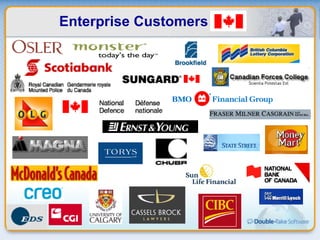
  Enterprise Customers
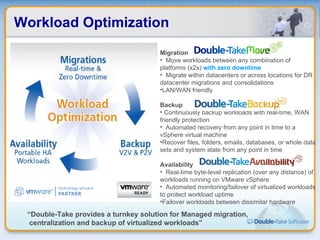
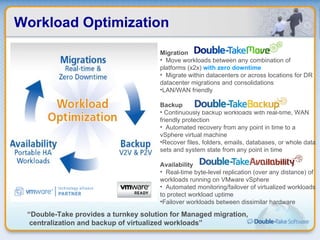
Workload Optimization Migration Move workloads between any combination of platforms (x2x)  with zero downtime Migrate within datacenters or across locations for DR datacenter migrations and consolidations LAN/WAN friendly Backup Continuously backup workloads with real-time, WAN friendly protection Automated recovery from any point in time to a vSphere virtual machine Recover files, folders, emails, databases, or whole data sets and system state from any point in time Availability Real-time byte-level replication (over any distance) of workloads running on VMware vSphere Automated monitoring/failover of virtualized workloads to protect workload uptime Failover workloads between dissimilar hardware “ Double-Take provides a turnkey solution for Managed migration, centralization and backup of virtualized workloads”
Double-Take Availability www.doubletake.com
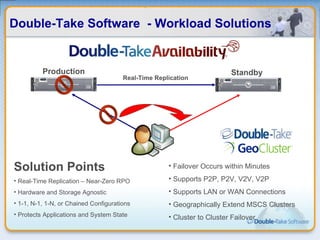
Double-Take Software  - Workload Solutions Solution Points Real-Time Replication – Near-Zero RPO Hardware and Storage Agnostic 1-1, N-1, 1-N, or Chained Configurations Protects Applications and System State Failover Occurs within Minutes Supports P2P, P2V, V2V, V2P Supports LAN or WAN Connections Geographically Extend MSCS Clusters Cluster to Cluster Failover Real-Time Replication Production Standby
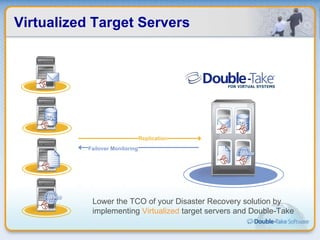
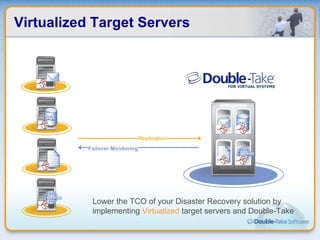
Virtualized Target Servers Failover Monitoring Replication Lower the TCO of your Disaster Recovery solution by implementing  Virtualized  target servers and Double-Take
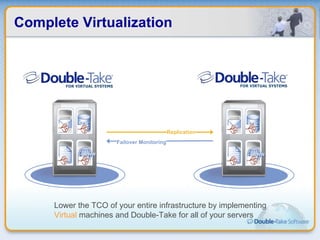
Complete Virtualization Failover Monitoring Replication Lower the TCO of your entire infrastructure by implementing  Virtual  machines and Double-Take for all of your servers
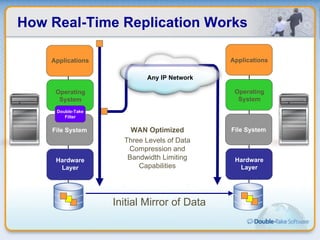
How Real-Time Replication Works Operating System Hardware Layer File System Any IP Network Applications Operating System Double-Take Filter Hardware Layer File System Applications Initial Mirror of Data WAN Optimized Three Levels of Data Compression and Bandwidth Limiting Capabilities
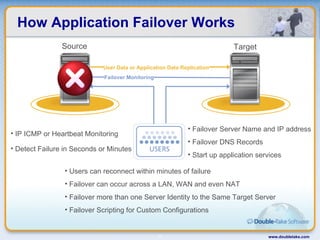
How Application Failover Works www.doubletake.com Failover Monitoring User Data or Application Data Replication IP ICMP or Heartbeat Monitoring Detect Failure in Seconds or Minutes Failover Server Name and IP address Failover DNS Records Start up application services  Users can reconnect within minutes of failure Failover can occur across a LAN, WAN and even NAT Failover more than one Server Identity to the Same Target Server  Failover Scripting for Custom Configurations Source Target
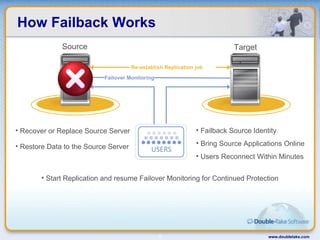
How Failback Works www.doubletake.com Failover Monitoring Source Target Recover or Replace Source Server Restore Data to the Source Server Failback Source Identity Bring Source Applications Online Users Reconnect Within Minutes  Start Replication and resume Failover Monitoring for Continued Protection Restoration of Changes Only Re-establish Replication job
Virtualized Target Servers Failover Monitoring Replication Lower the TCO of your Disaster Recovery solution by implementing  Virtualized  target servers and Double-Take
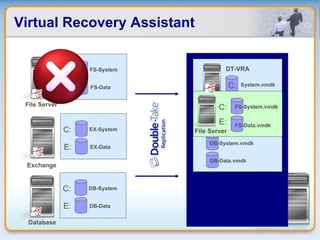
Virtual Recovery Assistant FS-System.vmdk FS-Data.vmdk EX-System.vmdk EX-Data.vmdk DB-System.vmdk DB-Data.vmdk C: System.vmdk DT-VRA FS-System FS-Data File Server Exchange Database C: E: EX-System.vmdk EX-Data.vmdk DB-System.vmdk DB-Data.vmdk C: System.vmdk DT-VRA FS-System.vmdk FS-Data.vmdk File Server C: E: EX-System EX-Data C: E: DB-System DB-Data C: E:
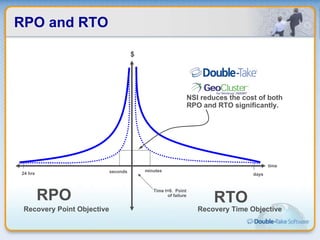
RPO and RTO time Time t=0.  Point of failure 24 hrs days RPO RTO seconds $ minutes Recovery Time Objective Recovery Point Objective NSI reduces the cost of both RPO and RTO significantly.
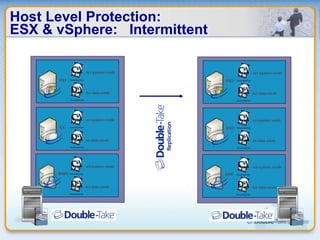
Host Level Protection: ESX & vSphere:  Intermittent w3-system.vmdk w3-data.vmdk WWW ex-system.vmdk ex-data.vmdk EX fs1-system.vmdk fs1-data.vmdk FS1 w3-system.vmdk w3-data.vmdk DRW ex-system.vmdk ex-data.vmdk EX2 fs1-system.vmdk fs1-data.vmdk FS2
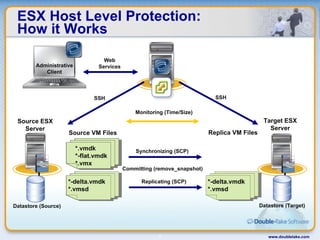
ESX Host Level Protection: How it Works www.doubletake.com Committing (remove_snapshot) Source VM Files Replica VM Files Administrative Client *-delta.vmdk *.vmsd *-delta.vmdk *.vmsd Replicating (SCP) *-delta.vmdk *.vmsd *.vmdk *-flat.vmdk *.vmx Synchronizing (SCP) Source ESX Server Datastore (Source) Target ESX Server Datastore (Target) SSH SSH Web Services *.vmdk *-flat.vmdk *.vmx Monitoring (Time/Size)
Double-Take Backup www.doubletake.com
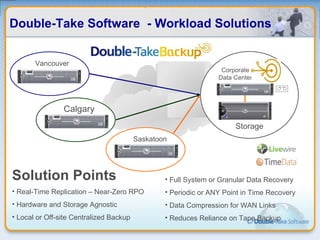
Double-Take Software  - Workload Solutions Vancouver Calgary Storage   Corporate Data Center Saskatoon Solution Points Real-Time Replication – Near-Zero RPO Hardware and Storage Agnostic Local or Off-site Centralized Backup Full System or Granular Data Recovery Periodic or ANY Point in Time Recovery Data Compression for WAN Links Reduces Reliance on Tape Backup
Workload Backup Real-time replication of system state and data Backs up server images locally or remotely Integrates with VSS for point-in-time recovery Provides centralized backup with a single repository server On-demand recovery Local or remote recovery Recovery to dissimilar hardware Supports P2P, P2V, V2V, and V2P Automatically provisions virtual machines for recovery www.doubletake.com
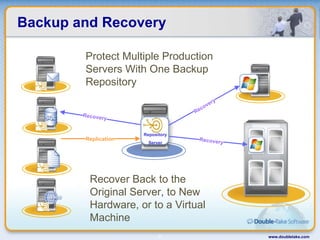
Backup and Recovery www.doubletake.com Replication Recovery Recovery Protect Multiple Production Servers With One Backup Repository Recover Back to the Original Server, to New Hardware, or to a Virtual Machine Recovery Repository Server
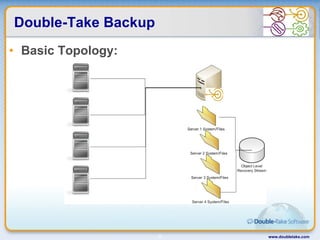
Double-Take Backup Basic Topology: www.doubletake.com
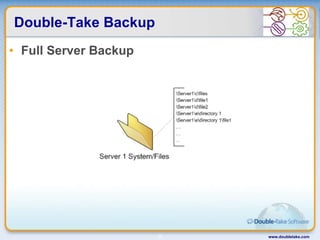
Double-Take Backup Full Server Backup www.doubletake.com
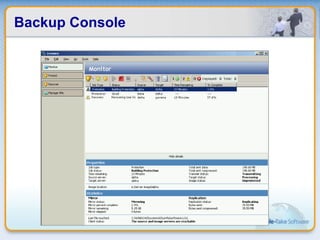
Backup Console
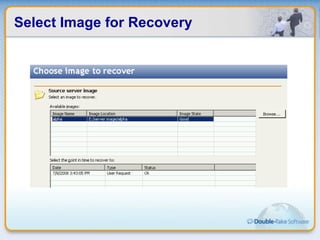
Select Image for Recovery
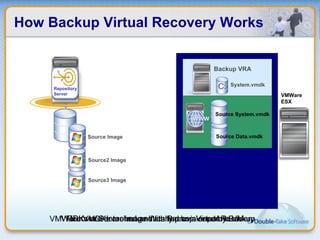
How Backup Virtual Recovery Works DB-System.vmdk DB-Data.vmdk C: System.vmdk DT-VRA System.vmdk Backup VRA Source2 Image Source3 Image LiveWire Repository Server C: Source Image Source Data.vmdk Source System.vmdk Source Data.vmdk Source System.vmdk VMWare VMDKs are automatically provisioned by Backup Recover Server Image With Backup Virtual Recovery VMDKs are detached and started as a separate VM VMWare ESX
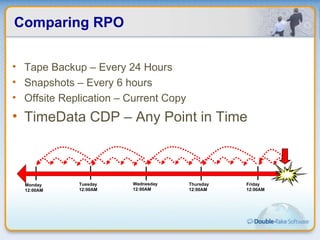
Comparing RPO Monday 12:00AM Tuesday 12:00AM Wednesday 12:00AM Thursday 12:00AM Friday 12:00AM Tape Backup – Every 24 Hours Snapshots – Every 6 hours Offsite Replication – Current Copy TimeData CDP – Any Point in Time
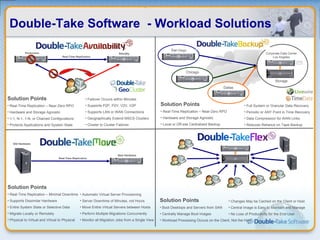
Double-Take Software  - Workload Solutions Solution Points Real-Time Replication – Near-Zero RPO Hardware and Storage Agnostic 1-1, N-1, 1-N, or Chained Configurations Protects Applications and System State Failover Occurs within Minutes Supports P2P, P2V, V2V, V2P Supports LAN or WAN Connections Geographically Extend MSCS Clusters Cluster to Cluster Failover San  Diego Real-Time Replication Production Standby Chicago Storage  Corporate Data Center Los Angeles Dallas Solution Points Real-Time Replication – Near-Zero RPO Hardware and Storage Agnostic Local or Off-site Centralized Backup Full System or Granular Data Recovery Periodic or ANY Point in Time Recovery Data Compression for WAN Links Reduces Reliance on Tape Backup Solution Points Real-Time Replication – Minimal Downtime Supports Dissimilar Hardware Entire System State or Selective Data Migrate Locally or Remotely Physical to Virtual and Virtual to Physical  Automatic Virtual Server Provisioning Server Downtime of Minutes, not Hours  Move Entire Virtual Servers between Hosts Perform Multiple Migrations Concurrently Monitor all Migration Jobs from a Single View Real-Time Replication New Hardware Old Hardware Solution Points Boot Desktops and Servers from SAN  Centrally Manage Boot Images Workload Processing Occurs on the Client, Not the Host Changes May be Cached on the Client or Host Central Image is Easy to Maintain and Manage No Loss of Productivity for the End-User
Universal Migration Solution P2V, V2P, V2V, P2P – dissimilar hardware allowed. www.doubletake.com
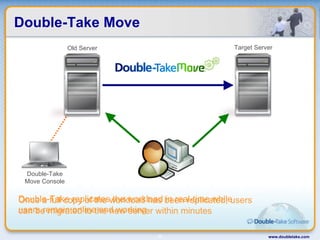
Double-Take Move www.doubletake.com Double-Take replicates the workload in real-time while users remain online and working Once a full copy of the workload has been replicated, users can be migrated to the new server within minutes Old Server Target Server Double-Take Move Console
Workload Portability – Double-Take Real-Time Replication Double-Take provides real-time replication of workloads for efficient migration with only minutes of downtime Optimized for WAN Double-Take migrates workloads over IP networks, LAN or WAN, with optimizations like compression and bandwidth limiting Double-Take makes site migration easy with options for migration across subnets and support for dissimilar hardware and storage Across Hardware and Virtualization Double-Take migrates workloads between dissimilar hardware and between physical and virtual systems in either direction www.doubletake.com
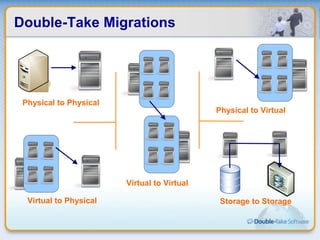
Double-Take Migrations Physical to Physical Physical to Virtual Virtual to Physical Virtual to Virtual Storage to Storage
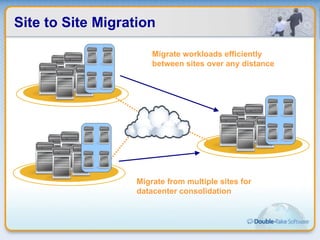
Site to Site Migration Migrate workloads efficiently between sites over any distance Migrate from multiple sites for datacenter consolidation
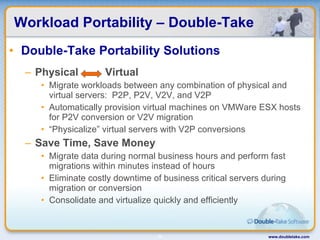
Workload Portability – Double-Take Double-Take Portability Solutions Physical  Virtual Migrate workloads between any combination of physical and virtual servers:  P2P, P2V, V2V, and V2P Automatically provision virtual machines on VMWare ESX hosts for P2V conversion or V2V migration “ Physicalize” virtual servers with V2P conversions Save Time, Save Money Migrate data during normal business hours and perform fast migrations within minutes instead of hours Eliminate costly downtime of business critical servers during migration or conversion Consolidate and virtualize quickly and efficiently  www.doubletake.com
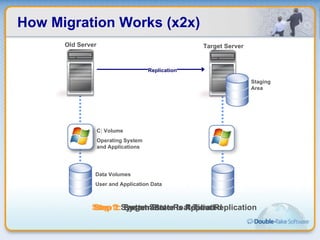
How Migration Works (x2x) C: Volume Operating System and Applications Data Volumes User and Application Data Staging Area Replication Step 3:  Target Server is Rebooted Step 1:  System State Real-Time Replication Step 2:  System State is Applied Old Server Target Server
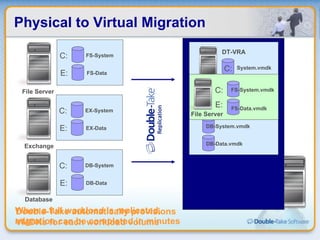
Physical to Virtual Migration FS-System.vmdk FS-Data.vmdk EX-System.vmdk EX-Data.vmdk DB-System.vmdk DB-Data.vmdk C: System.vmdk DT-VRA FS-System FS-Data Exchange Database C: E: EX-System.vmdk EX-Data.vmdk DB-System.vmdk DB-Data.vmdk C: System.vmdk DT-VRA FS-System.vmdk FS-Data.vmdk File Server C: E: EX-System EX-Data C: E: DB-System DB-Data C: E: File Server Double-Take automatically provisions VMDKs for each workload volume When a full workload is replicated, migration can be completed in minutes
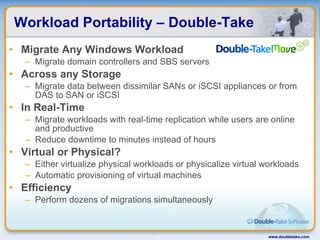
Workload Portability – Double-Take Migrate Any Windows Workload Migrate domain controllers and SBS servers Across any Storage Migrate data between dissimilar SANs or iSCSI appliances or from DAS to SAN or iSCSI In Real-Time Migrate workloads with real-time replication while users are online and productive Reduce downtime to minutes instead of hours Virtual or Physical? Either virtualize physical workloads or physicalize virtual workloads Automatic provisioning of virtual machines Efficiency Perform dozens of migrations simultaneously  www.doubletake.com
Workload Optimization Migration Move workloads between any combination of platforms (x2x)  with zero downtime Migrate within datacenters or across locations for DR datacenter migrations and consolidations LAN/WAN friendly Backup Continuously backup workloads with real-time, WAN friendly protection Automated recovery from any point in time to a vSphere virtual machine Recover files, folders, emails, databases, or whole data sets and system state from any point in time Availability Real-time byte-level replication (over any distance) of workloads running on VMware vSphere Automated monitoring/failover of virtualized workloads to protect workload uptime Failover workloads between dissimilar hardware “ Double-Take provides a turnkey solution for Managed migration, centralization and backup of virtualized workloads”
Microsite  www.doubletake.com/vmware
Q&A For More Information http://www.doubletake.com www.doubletake.com

Double-Take Software

  • 1.
    Workload Optimization KarlOman, Sr. Solutions Architect Double-Take Software (Canada) [email_address] www.doubletake.com
  • 2.
  • 3.
    www.doubletake.com About Double-TakeSoftware Focused on providing workload optimization solutions for: Disaster Recovery / Business Continuity High Availability and Failover Server/Data Migration Server and Desktop Management Headquartered in Southborough, MA Global Reach - North America, South America, Europe, Middle East, Africa, and Asia Over 19,000 customers and 190,000 licenses Over half of the Fortune 500 21 out of 25 top US legal firms Comprehensive Professional Services and Support Strong partnerships with Microsoft, Dell, HP, IBM, VMware and others
  • 4.
    EnterpriseCustomers
  • 5.
    Workload Optimization MigrationMove workloads between any combination of platforms (x2x) with zero downtime Migrate within datacenters or across locations for DR datacenter migrations and consolidations LAN/WAN friendly Backup Continuously backup workloads with real-time, WAN friendly protection Automated recovery from any point in time to a vSphere virtual machine Recover files, folders, emails, databases, or whole data sets and system state from any point in time Availability Real-time byte-level replication (over any distance) of workloads running on VMware vSphere Automated monitoring/failover of virtualized workloads to protect workload uptime Failover workloads between dissimilar hardware “ Double-Take provides a turnkey solution for Managed migration, centralization and backup of virtualized workloads”
  • 6.
  • 7.
    Double-Take Software - Workload Solutions Solution Points Real-Time Replication – Near-Zero RPO Hardware and Storage Agnostic 1-1, N-1, 1-N, or Chained Configurations Protects Applications and System State Failover Occurs within Minutes Supports P2P, P2V, V2V, V2P Supports LAN or WAN Connections Geographically Extend MSCS Clusters Cluster to Cluster Failover Real-Time Replication Production Standby
  • 8.
    Virtualized Target ServersFailover Monitoring Replication Lower the TCO of your Disaster Recovery solution by implementing Virtualized target servers and Double-Take
  • 9.
    Complete Virtualization FailoverMonitoring Replication Lower the TCO of your entire infrastructure by implementing Virtual machines and Double-Take for all of your servers
  • 10.
    How Real-Time ReplicationWorks Operating System Hardware Layer File System Any IP Network Applications Operating System Double-Take Filter Hardware Layer File System Applications Initial Mirror of Data WAN Optimized Three Levels of Data Compression and Bandwidth Limiting Capabilities
  • 11.
    How Application FailoverWorks www.doubletake.com Failover Monitoring User Data or Application Data Replication IP ICMP or Heartbeat Monitoring Detect Failure in Seconds or Minutes Failover Server Name and IP address Failover DNS Records Start up application services Users can reconnect within minutes of failure Failover can occur across a LAN, WAN and even NAT Failover more than one Server Identity to the Same Target Server Failover Scripting for Custom Configurations Source Target
  • 12.
    How Failback Workswww.doubletake.com Failover Monitoring Source Target Recover or Replace Source Server Restore Data to the Source Server Failback Source Identity Bring Source Applications Online Users Reconnect Within Minutes Start Replication and resume Failover Monitoring for Continued Protection Restoration of Changes Only Re-establish Replication job
  • 13.
    Virtualized Target ServersFailover Monitoring Replication Lower the TCO of your Disaster Recovery solution by implementing Virtualized target servers and Double-Take
  • 14.
    Virtual Recovery AssistantFS-System.vmdk FS-Data.vmdk EX-System.vmdk EX-Data.vmdk DB-System.vmdk DB-Data.vmdk C: System.vmdk DT-VRA FS-System FS-Data File Server Exchange Database C: E: EX-System.vmdk EX-Data.vmdk DB-System.vmdk DB-Data.vmdk C: System.vmdk DT-VRA FS-System.vmdk FS-Data.vmdk File Server C: E: EX-System EX-Data C: E: DB-System DB-Data C: E:
  • 15.
    RPO and RTOtime Time t=0. Point of failure 24 hrs days RPO RTO seconds $ minutes Recovery Time Objective Recovery Point Objective NSI reduces the cost of both RPO and RTO significantly.
  • 16.
    Host Level Protection:ESX & vSphere: Intermittent w3-system.vmdk w3-data.vmdk WWW ex-system.vmdk ex-data.vmdk EX fs1-system.vmdk fs1-data.vmdk FS1 w3-system.vmdk w3-data.vmdk DRW ex-system.vmdk ex-data.vmdk EX2 fs1-system.vmdk fs1-data.vmdk FS2
  • 17.
    ESX Host LevelProtection: How it Works www.doubletake.com Committing (remove_snapshot) Source VM Files Replica VM Files Administrative Client *-delta.vmdk *.vmsd *-delta.vmdk *.vmsd Replicating (SCP) *-delta.vmdk *.vmsd *.vmdk *-flat.vmdk *.vmx Synchronizing (SCP) Source ESX Server Datastore (Source) Target ESX Server Datastore (Target) SSH SSH Web Services *.vmdk *-flat.vmdk *.vmx Monitoring (Time/Size)
  • 18.
  • 19.
    Double-Take Software - Workload Solutions Vancouver Calgary Storage Corporate Data Center Saskatoon Solution Points Real-Time Replication – Near-Zero RPO Hardware and Storage Agnostic Local or Off-site Centralized Backup Full System or Granular Data Recovery Periodic or ANY Point in Time Recovery Data Compression for WAN Links Reduces Reliance on Tape Backup
  • 20.
    Workload Backup Real-timereplication of system state and data Backs up server images locally or remotely Integrates with VSS for point-in-time recovery Provides centralized backup with a single repository server On-demand recovery Local or remote recovery Recovery to dissimilar hardware Supports P2P, P2V, V2V, and V2P Automatically provisions virtual machines for recovery www.doubletake.com
  • 21.
    Backup and Recoverywww.doubletake.com Replication Recovery Recovery Protect Multiple Production Servers With One Backup Repository Recover Back to the Original Server, to New Hardware, or to a Virtual Machine Recovery Repository Server
  • 22.
    Double-Take Backup BasicTopology: www.doubletake.com
  • 23.
    Double-Take Backup FullServer Backup www.doubletake.com
  • 24.
  • 25.
  • 26.
    How Backup VirtualRecovery Works DB-System.vmdk DB-Data.vmdk C: System.vmdk DT-VRA System.vmdk Backup VRA Source2 Image Source3 Image LiveWire Repository Server C: Source Image Source Data.vmdk Source System.vmdk Source Data.vmdk Source System.vmdk VMWare VMDKs are automatically provisioned by Backup Recover Server Image With Backup Virtual Recovery VMDKs are detached and started as a separate VM VMWare ESX
  • 27.
    Comparing RPO Monday12:00AM Tuesday 12:00AM Wednesday 12:00AM Thursday 12:00AM Friday 12:00AM Tape Backup – Every 24 Hours Snapshots – Every 6 hours Offsite Replication – Current Copy TimeData CDP – Any Point in Time
  • 28.
    Double-Take Software - Workload Solutions Solution Points Real-Time Replication – Near-Zero RPO Hardware and Storage Agnostic 1-1, N-1, 1-N, or Chained Configurations Protects Applications and System State Failover Occurs within Minutes Supports P2P, P2V, V2V, V2P Supports LAN or WAN Connections Geographically Extend MSCS Clusters Cluster to Cluster Failover San Diego Real-Time Replication Production Standby Chicago Storage Corporate Data Center Los Angeles Dallas Solution Points Real-Time Replication – Near-Zero RPO Hardware and Storage Agnostic Local or Off-site Centralized Backup Full System or Granular Data Recovery Periodic or ANY Point in Time Recovery Data Compression for WAN Links Reduces Reliance on Tape Backup Solution Points Real-Time Replication – Minimal Downtime Supports Dissimilar Hardware Entire System State or Selective Data Migrate Locally or Remotely Physical to Virtual and Virtual to Physical Automatic Virtual Server Provisioning Server Downtime of Minutes, not Hours Move Entire Virtual Servers between Hosts Perform Multiple Migrations Concurrently Monitor all Migration Jobs from a Single View Real-Time Replication New Hardware Old Hardware Solution Points Boot Desktops and Servers from SAN Centrally Manage Boot Images Workload Processing Occurs on the Client, Not the Host Changes May be Cached on the Client or Host Central Image is Easy to Maintain and Manage No Loss of Productivity for the End-User
  • 29.
    Universal Migration SolutionP2V, V2P, V2V, P2P – dissimilar hardware allowed. www.doubletake.com
  • 30.
    Double-Take Move www.doubletake.comDouble-Take replicates the workload in real-time while users remain online and working Once a full copy of the workload has been replicated, users can be migrated to the new server within minutes Old Server Target Server Double-Take Move Console
  • 31.
    Workload Portability –Double-Take Real-Time Replication Double-Take provides real-time replication of workloads for efficient migration with only minutes of downtime Optimized for WAN Double-Take migrates workloads over IP networks, LAN or WAN, with optimizations like compression and bandwidth limiting Double-Take makes site migration easy with options for migration across subnets and support for dissimilar hardware and storage Across Hardware and Virtualization Double-Take migrates workloads between dissimilar hardware and between physical and virtual systems in either direction www.doubletake.com
  • 32.
    Double-Take Migrations Physicalto Physical Physical to Virtual Virtual to Physical Virtual to Virtual Storage to Storage
  • 33.
    Site to SiteMigration Migrate workloads efficiently between sites over any distance Migrate from multiple sites for datacenter consolidation
  • 34.
    Workload Portability –Double-Take Double-Take Portability Solutions Physical Virtual Migrate workloads between any combination of physical and virtual servers: P2P, P2V, V2V, and V2P Automatically provision virtual machines on VMWare ESX hosts for P2V conversion or V2V migration “ Physicalize” virtual servers with V2P conversions Save Time, Save Money Migrate data during normal business hours and perform fast migrations within minutes instead of hours Eliminate costly downtime of business critical servers during migration or conversion Consolidate and virtualize quickly and efficiently www.doubletake.com
  • 35.
    How Migration Works(x2x) C: Volume Operating System and Applications Data Volumes User and Application Data Staging Area Replication Step 3: Target Server is Rebooted Step 1: System State Real-Time Replication Step 2: System State is Applied Old Server Target Server
  • 36.
    Physical to VirtualMigration FS-System.vmdk FS-Data.vmdk EX-System.vmdk EX-Data.vmdk DB-System.vmdk DB-Data.vmdk C: System.vmdk DT-VRA FS-System FS-Data Exchange Database C: E: EX-System.vmdk EX-Data.vmdk DB-System.vmdk DB-Data.vmdk C: System.vmdk DT-VRA FS-System.vmdk FS-Data.vmdk File Server C: E: EX-System EX-Data C: E: DB-System DB-Data C: E: File Server Double-Take automatically provisions VMDKs for each workload volume When a full workload is replicated, migration can be completed in minutes
  • 37.
    Workload Portability –Double-Take Migrate Any Windows Workload Migrate domain controllers and SBS servers Across any Storage Migrate data between dissimilar SANs or iSCSI appliances or from DAS to SAN or iSCSI In Real-Time Migrate workloads with real-time replication while users are online and productive Reduce downtime to minutes instead of hours Virtual or Physical? Either virtualize physical workloads or physicalize virtual workloads Automatic provisioning of virtual machines Efficiency Perform dozens of migrations simultaneously www.doubletake.com
  • 38.
    Workload Optimization MigrationMove workloads between any combination of platforms (x2x) with zero downtime Migrate within datacenters or across locations for DR datacenter migrations and consolidations LAN/WAN friendly Backup Continuously backup workloads with real-time, WAN friendly protection Automated recovery from any point in time to a vSphere virtual machine Recover files, folders, emails, databases, or whole data sets and system state from any point in time Availability Real-time byte-level replication (over any distance) of workloads running on VMware vSphere Automated monitoring/failover of virtualized workloads to protect workload uptime Failover workloads between dissimilar hardware “ Double-Take provides a turnkey solution for Managed migration, centralization and backup of virtualized workloads”
  • 39.
  • 40.
    Q&A For MoreInformation http://www.doubletake.com www.doubletake.com

Editor's Notes

  • #6 SPLA 12-15K average sale 30-45 Average Close time 250 software services Champion/Terramake
  • #28 10/20/10 Page With traditional backup, protection is generally a disruptive daily event that has to be scheduled and managed. When there is a problem with the backup, it can fail, schedules can overlap and you are left to clean up a whole mess and try to reschedule or give up and have an even greater exposure to data loss until the next scheduled backup. The backup window has been a real nightmare for administrators, and the shift to global trade and 7 X 24 hour operation has made this impossible in some circumstances. The open file managers and specialized backup APIs have helped (when they work) by making it possible to keep files semi-open during backup. However, in reality, they do a “rolling close” and slow down operations considerably, requiring that backups still be scheduled for times where system activity is very low. Snapshots can help reduce the gaps in protection associated with backup to a point. Snapshots typically rely on proprietary hardware deployments, so cannot be used universally in a mixed environment. There are practical (often vendor imposed) limitations on the number of snapshots that can be maintained, and on how active the system can be. Integration with backup and applications is complex, and may require professional services or experienced consultants to implement and update. Replication maintains an at or near real time image of the primary dataset. While this can be helpful in the case of physical interruption, it does nothing to protect against logical corruption, nor does it provide a time dimension. Corruption or accidental deletion on the primary dataset is instantaneously replicated to the secondary – corruption time 2 phenomenon. Third mirror splits and BCVs (Business Continuance Volumes – an EMC term) may be used to “freeze” points in time. However, these are costly and complex, both in terms of disk usage and operational management. Generally, customized scripting and vendor verification are required, and this still does not eliminate the gaps in coverage between splits. TimeData continuously captures all changes that are made to the data on the server, including changes to the meta data (permissions, attributes). This is an automatic process that occurs in real time. There is no scheduling involved, and no need to pre-select times to snapshot data. Everything is captured, and no intervention is required. TimeData offers the best Recovery Point Objective available, eliminating the protection gaps inherent with backup, snapshot and replication. No pre-selection or psychic awareness required Meaningful events, such as database checkpoints, transactions, file save events, are captured and marked Data is captured exactly as it is written to the primary file system – (no secondary processing or reconstruction of blocks to file) This is not a series of granular snapshots or points in time – ALL changes are captured as and when they occur Changes are ordered and applied in the sequence in which they occur, thereby maintaining congruence at all times
  • #39 SPLA 12-15K average sale 30-45 Average Close time 250 software services Champion/Terramake