© 2017 VMware Inc. All rights reserved.
VMware Site Recovery Manager
Web Seminar
1
Luca Codispoti
Systems Engineer | VMware Italy
26/10/2017
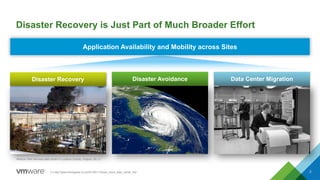
Disaster Recovery is Just Part of Much Broader Effort
2(1) http://www.theregister.co.uk/2015/01/10/aws_cloud_data_center_fire/
Amazon Web Services data center in Loudoun County, Virginia, US (1)
Disaster Recovery Disaster Avoidance HurricanesData Center Migration
Application Availability and Mobility across Sites
Source: Forrester - The State Of Business Technology Resiliency, Q2 2014
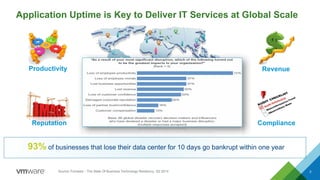
Application Uptime is Key to Deliver IT Services at Global Scale
3
Productivity Revenue
Reputation Compliance
93% of businesses that lose their data center for 10 days go bankrupt within one year
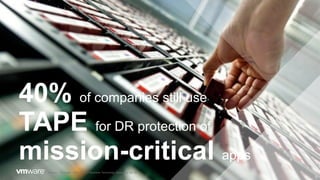
40% of companies still use
TAPE for DR protection of
mission-critical apps
Source: Forrester - The State Of Business Technology Resiliency, Q2 2014
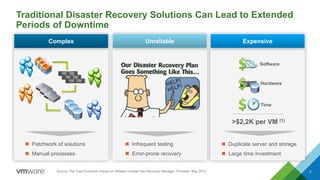
Traditional Disaster Recovery Solutions Can Lead to Extended
Periods of Downtime
5
Patchwork of solutions
Manual processes
Complex Unreliable
Infrequent testing
Error-prone recovery
Duplicate server and storage
Large time investment
Expensive
Software
Hardware
Time
>$2,2K per VM (1)
Source: The Total Economic Impact of VMware vCenter Site Recovery Manager, Forrester, May 2013
Site Recovery Manager 6.5
Solution Overview
6
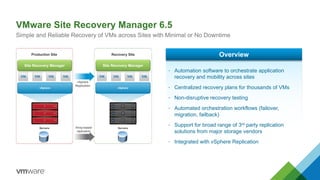
VMware Site Recovery Manager 6.5
Simple and Reliable Recovery of VMs across Sites with Minimal or No Downtime
vSphere vSphere
Production Site Recovery Site
Servers ServersArray-based
replication
vSphere
Replication
• Automation software to orchestrate application
recovery and mobility across sites
• Centralized recovery plans for thousands of VMs
• Non-disruptive recovery testing
• Automated orchestration workflows (failover,
migration, failback)
• Support for broad range of 3rd party replication
solutions from major storage vendors
• Integrated with vSphere Replication
Overview
Site Recovery Manager Site Recovery Manager
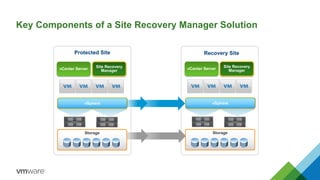
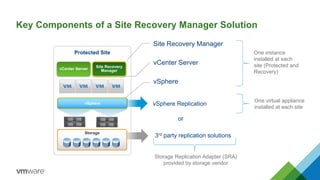
Key Components of a Site Recovery Manager Solution
vCenter Server
Site Recovery
Manager
Protected Site Recovery Site
Storage
vCenter Server
Site Recovery
Manager
vSpherevSphere
Storage
vSphere Replication
3rd party replication solutions
Key Components of a Site Recovery Manager Solution
Protected Site
vSphere
Storage
Site Recovery Manager
vSphere
or
vCenter Server
One instance
installed at each
site (Protected and
Recovery)
Storage Replication Adapter (SRA)
provided by storage vendor
One virtual appliance
installed at each site
vCenter Server
Site Recovery
Manager
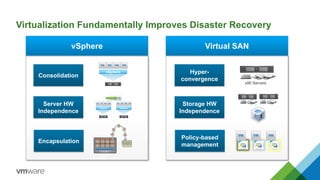
Virtualization Fundamentally Improves Disaster Recovery
vSphere Virtual SAN
Encapsulation
Consolidation
Server HW
Independence
vSphere
vSphere vSphere
Policy-based
management
Hyper-
convergence
Storage HW
Independence
x86 Servers
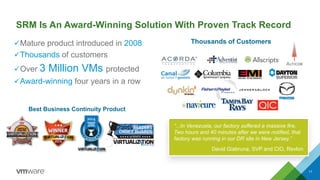
SRM Is An Award-Winning Solution With Proven Track Record
üMature product introduced in 2008
üThousands of customers
üOver 3 Million VMs protected
üAward-winning four years in a row
11
Best Business Continuity Product
“...In Venezuela, our factory suffered a massive fire.
Two hours and 40 minutes after we were notified, that
factory was running in our DR site in New Jersey.”
David Giabruna, SVP and CIO, Revlon
Thousands of Customers
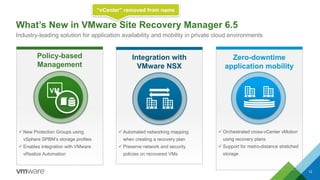
What’s New in VMware Site Recovery Manager 6.5
12
Industry-leading solution for application availability and mobility in private cloud environments
Zero-downtime
application mobility
ü Orchestrated cross-vCenter vMotion
using recovery plans
ü Support for metro-distance stretched
storage
Policy-based
Management
ü New Protection Groups using
vSphere SPBM’s storage profiles
ü Enables integration with VMware
vRealize Automation
Integration with
VMware NSX

ü Automated networking mapping
when creating a recovery plan
ü Preserve network and security
policies on recovered VMs
VM
“vCenter” removed from name
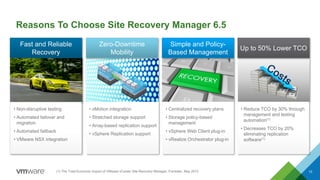
Reasons To Choose Site Recovery Manager 6.5
13
Fast and Reliable
Recovery
Simple and Policy-
Based Management
Zero-Downtime
Mobility
Up to 50% Lower TCO
• Non-disruptive testing
• Automated failover and
migration
• Automated failback
• VMware NSX integration
• vMotion integration
• Stretched storage support
• Array-based replication support
• vSphere Replication support
• Centralized recovery plans
• Storage policy-based
management
• vSphere Web Client plug-in
• vRealize Orchestrator plug-in
• Reduce TCO by 30% through
management and testing
automation(1)
• Decreases TCO by 20%
eliminating replication
software(1)
(1) The Total Economic Impact of VMware vCenter Site Recovery Manager, Forrester, May 2013
SRM 6.5 Provides
Fast and Reliable
Recovery 14
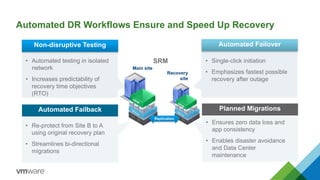
Automated DR Workflows Ensure and Speed Up Recovery
Main site
Recovery
site
Non-disruptive Testing
• Automated testing in isolated
network
• Increases predictability of
recovery time objectives
(RTO)
Automated Failback
• Re-protect from Site B to A
using original recovery plan
• Streamlines bi-directional
migrations
Automated Failover
• Single-click initiation
• Emphasizes fastest possible
recovery after outage
Planned Migrations
• Ensures zero data loss and
app consistency
• Enables disaster avoidance
and Data Center
maintenance
SRM
Replication
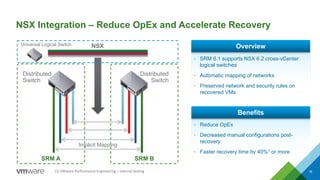
NSX Integration – Reduce OpEx and Accelerate Recovery
16
Implicit Mapping
Distributed
Switch
Distributed
Switch
SRM BSRM A
NSXUniversal Logical Switch
• SRM 6.1 supports NSX 6.2 cross-vCenter
logical switches
• Automatic mapping of networks
• Preserved network and security rules on
recovered VMs
Overview
• Reduce OpEx
• Decreased manual configurations post-
recovery
• Faster recovery time by 40%1 or more
Benefits
(1)	VMware	Performance	Engineering	– internal	testing
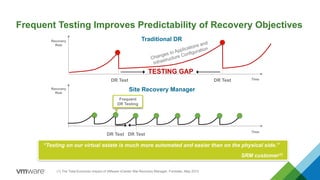
Frequent Testing Improves Predictability of Recovery Objectives
TimeDR Test DR Test
TESTING GAP
Recovery
Risk
Traditional DR
Recovery
Risk
DR Test DR Test
Time
Site Recovery Manager
Frequent
DR Testing
“Testing on our virtual estate is much more automated and easier than on the physical side.”
SRM customer(1)
(1) The Total Economic Impact of VMware vCenter Site Recovery Manager, Forrester, May 2013
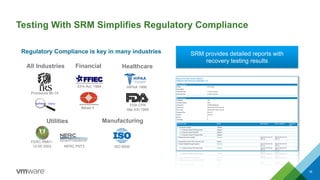
Testing With SRM Simplifies Regulatory Compliance
18
Regulatory Compliance is key in many industries
Procedure 86-19
EFA Act, 1989
BAsel II
FDA CFR
title XXI 1999
FERC RM01-
12-00 2003
HIPAA 1996
NERC P6T3 ISO 9000
All Industries Financial Healthcare
Utilities Manufacturing
SRM provides detailed reports with
recovery testing results
SRM 6.5 Enables
Zero Downtime
Application Mobility
19
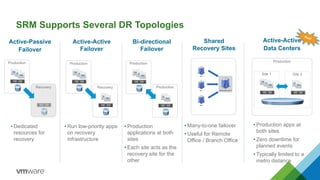
SRM Supports Several DR Topologies
Active-Passive
Failover
Active-Active
Failover
Bi-directional
Failover
Shared
Recovery Sites
Production
Recovery
Production
Recovery
Production
Production
• Dedicated
resources for
recovery
• Run low-priority apps
on recovery
infrastructure
• Production
applications at both
sites
• Each site acts as the
recovery site for the
other
• Many-to-one failover
• Useful for Remote
Office / Branch Office
Active-Active
Data Centers
Site 1 Site 2
Production
• Production apps at
both sites
• Zero downtime for
planned events
• Typically limited to a
metro distance
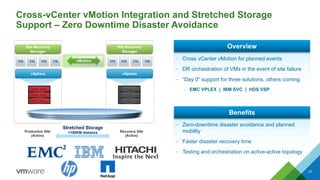
Cross-vCenter vMotion Integration and Stretched Storage
Support – Zero Downtime Disaster Avoidance
21
vSphere vSphere
Production Site
(Active)
Recovery Site
(Active)
Site Recovery
Manager
Site Recovery
Manager
Stretched Storage
<100KM distance
• Cross vCenter vMotion for planned events
• DR orchestration of VMs in the event of site failure
• “Day 0” support for three solutions, others coming:
– EMC VPLEX | IBM SVC | HDS VSP
Overview
• Zero-downtime disaster avoidance and planned
mobility
• Faster disaster recovery time
• Testing and orchestration on active-active topology
Benefits
vMotion
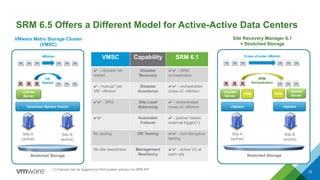
SRM 6.5 Offers a Different Model for Active-Active Data Centers
22
Stretched vSphere Cluster
Stretched Storage
HA
Restart
vMotion
vCenter
Server
Site A
(active)
Site B
(active)
vSphere
Stretched Storage
SRM
Orchestration
Cross-vCenter vMotion
vCenter
Server
Site A
(active)
Site B
(active)
vSphere
SRM
vCenter
Server
SRM
VMware Metro Storage Cluster
(VMSC)
Site Recovery Manager 6.1
+ Stretched Storage
VMSC Capability SRM 6.1
- vSphere HA
restart
Disaster
Recovery
- SRM
orchestration
- manual “per
VM” vMotion
Disaster
Avoidance
- orchestrated
cross-vC vMotion
- DRS Site Load
Balancing
- orchestrated
cross-vC vMotion
Automatic
Failover
- partner based,
external trigger(1)
No testing DR Testing - non-disruptive
testing
No site awareness Management
Resiliency
- active VC at
each site
(1) Failover can be triggered by third system witness via SRM API
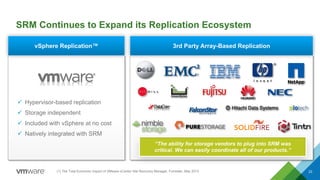
3rd Party Array-Based ReplicationvSphere Replication™
SRM Continues to Expand its Replication Ecosystem
23
ü Hypervisor-based replication
ü Storage independent
ü Included with vSphere at no cost
ü Natively integrated with SRM
“The ability for storage vendors to plug into SRM was
critical. We can easily coordinate all of our products.”
(1) The Total Economic Impact of VMware vCenter Site Recovery Manager, Forrester, May 2013
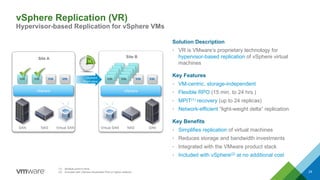
vSphere Replication (VR)
Hypervisor-based Replication for vSphere VMs
24
vSphere
Site A
vSphere
vSphere
Replication
SAN NAS Virtual SAN Virtual SAN NAS SAN
Site B
(1) Multiple point-in-time
(2) Included with vSphere Essentials Plus or higher editions
Solution Description
• VR is VMware’s proprietary technology for
hypervisor-based replication of vSphere virtual
machines
Key Features
• VM-centric, storage-independent
• Flexible RPO (15 min. to 24 hrs.)
• MPIT(1) recovery (up to 24 replicas)
• Network-efficient “light-weight delta” replication
Key Benefits
• Simplifies replication of virtual machines
• Reduces storage and bandwidth investments
• Integrated with the VMware product stack
• Included with vSphere(2) at no additional cost
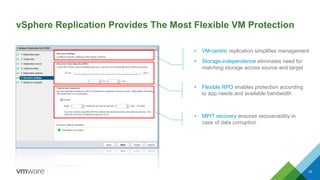
vSphere Replication Provides The Most Flexible VM Protection
25
• Flexible RPO enables protection according
to app needs and available bandwidth
• MPIT recovery ensures recoverability in
case of data corruption
• VM-centric replication simplifies management
• Storage-independence eliminates need for
matching storage across source and target
SRM 6.5 Delivers
Simple and Policy-
Based Management
26
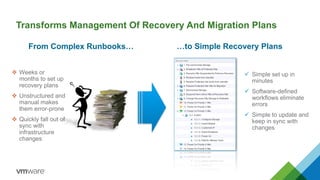
Transforms Management Of Recovery And Migration Plans
v Weeks or
months to set up
recovery plans
v Unstructured and
manual makes
them error-prone
v Quickly fall out of
sync with
infrastructure
changes
ü Simple set up in
minutes
ü Software-defined
workflows eliminate
errors
ü Simple to update and
keep in sync with
changes
From Complex Runbooks… …to Simple Recovery Plans
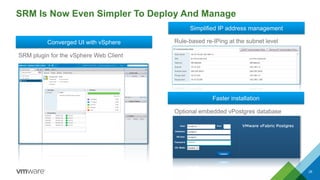
SRM Is Now Even Simpler To Deploy And Manage
28
Converged UI with vSphere
Simplified IP address management
Faster installation
SRM plugin for the vSphere Web Client
Rule-based re-IPing at the subnet level
Optional embedded vPostgres database
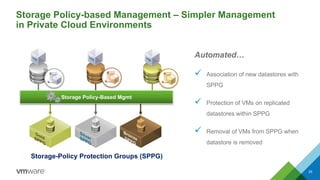
Storage Policy-based Management – Simpler Management
in Private Cloud Environments
29
Storage-Policy Protection Groups (SPPG)
Automated…
ü Association of new datastores with
SPPG
ü Protection of VMs on replicated
datastores within SPPG
ü Removal of VMs from SPPG when
datastore is removed
Storage Policy-Based Mgmt
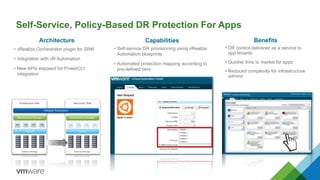
Self-Service, Policy-Based DR Protection For Apps
Capabilities
• Self-service DR provisioning using vRealize
Automation blueprints
• Automated protection mapping according to
pre-defined tiers
Architecture
Production Site
vSphere
Site Recovery Manager
Recovery Site
vSphere
Site Recovery Manager
Array-based
Replication
External Storage External Storage
vRealize Automation
• vRealize Orchestrator plugin for SRM
• Integration with vR Automation
• New APIs exposed for PowerCLI
integration
Benefits
• DR control delivered as a service to
app tenants
• Quicker time to market for apps
• Reduced complexity for infrastructure
admins
SRM 6.5 Can
Lower TCO
by up to 50%
31
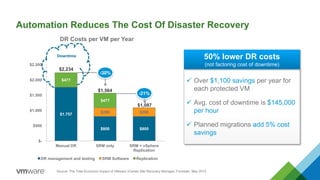
Automation Reduces The Cost Of Disaster Recovery
DR Costs per VM per Year
Source: The Total Economic Impact of VMware vCenter Site Recovery Manager, Forrester, May 2013
$1.757
$800 $800
$288 $288
$477
$477
$-
$500
$1.000
$1.500
$2.000
$2.500
Manual DR SRM only SRM + vSphere
Replication
DR management and testing SRM Software Replication
$2,234
$1,564
-30%
$1,087
-21%
Downtime
ü Over $1,100 savings per year for
each protected VM
ü Avg. cost of downtime is $145,000
per hour
ü Planned migrations add 5% cost
savings
50% lower DR costs
(not factoring cost of downtime)
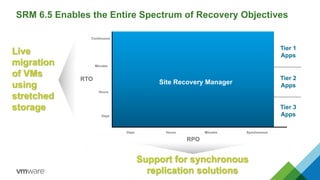
SRM 6.5 Enables the Entire Spectrum of Recovery Objectives
Continuous
Hours
Days
App-level geo-clustering / load balancing
RPO
SynchronousHoursDays
Site Recovery Manager
Tier 1
Apps
Tier 2
Apps
Tier 3
Apps
Minutes
Minutes
Support for synchronous
replication solutions
Live
migration
of VMs
using
stretched
storage
RTO
Pricing and Packaging
34
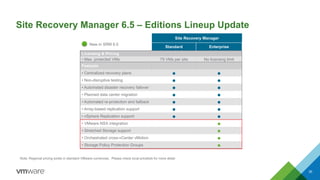
Site Recovery Manager 6.5 – Editions Lineup Update
35
Site Recovery Manager
Standard Enterprise
Licensing & Pricing
• Max. protected VMs 75 VMs per site No licensing limit
Features
• Centralized recovery plans ● ●
• Non-disruptive testing ● ●
• Automated disaster recovery failover ● ●
• Planned data center migration ● ●
• Automated re-protection and failback ● ●
• Array-based replication support ● ●
• vSphere Replication support ● ●
• VMware NSX integration ●
• Stretched Storage support ●
• Orchestrated cross-vCenter vMotion ●
• Storage Policy Protection Groups ●
Note: Regional pricing exists in standard VMware currencies. Please check local pricelists for more detail
New in SRM 6.5
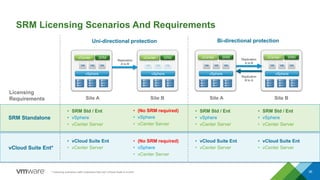
SRM Licensing Scenarios And Requirements
36
Replication
A to B
Uni-directional protection Bi-directional protection
vSphere
vCenter SRM
vSphere
vCenter SRM
vSphere
vCenter SRM
vSphere
vCenter SRM
Replication
B to A
Licensing
Requirements
SRM Standalone
vCloud Suite Ent*
• vCloud Suite Ent
• vCenter Server
• (No SRM required)
• vSphere
• vCenter Server
• SRM Std / Ent
• vSphere
• vCenter Server
• vCloud Suite Ent
• vCenter Server
• SRM Std / Ent
• vSphere
• vCenter Server
• vCloud Suite Ent
• vCenter Server
Replication
A to B
• (No SRM required)
• vSphere
• vCenter Server
• SRM Std / Ent
• vSphere
• vCenter Server
Site A Site B Site A Site B
* Licensing scenarios valid customers that own vCloud Suite 6 or prior
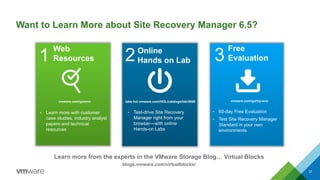
Want to Learn More about Site Recovery Manager 6.5?
37
Web
Resources1 3
Free
Evaluation
Online
Hands on Lab2
• Test-drive Site Recovery
Manager right from your
browser—with online
Hands-on Labs
• 60-day Free Evaluation
• Test Site Recovery Manager
Standard in your own
environments
• Learn more with customer
case studies, industry analyst
papers and technical
resources
Learn more from the experts in the VMware Storage Blog… Virtual Blocks
blogs.vmware.com/virtualblocks/
labs.hol.vmware.com/HOL/catalogs/lab/3666 vmware.com/go/try-srmvmware.com/go/srm
Thank You!
38

VMware Site Recovery Manager

  • 1.
    © 2017 VMwareInc. All rights reserved. VMware Site Recovery Manager Web Seminar 1 Luca Codispoti Systems Engineer | VMware Italy 26/10/2017
  • 2.
    Disaster Recovery isJust Part of Much Broader Effort 2(1) http://www.theregister.co.uk/2015/01/10/aws_cloud_data_center_fire/ Amazon Web Services data center in Loudoun County, Virginia, US (1) Disaster Recovery Disaster Avoidance HurricanesData Center Migration Application Availability and Mobility across Sites
  • 3.
    Source: Forrester -The State Of Business Technology Resiliency, Q2 2014 Application Uptime is Key to Deliver IT Services at Global Scale 3 Productivity Revenue Reputation Compliance 93% of businesses that lose their data center for 10 days go bankrupt within one year
  • 4.
    40% of companiesstill use TAPE for DR protection of mission-critical apps Source: Forrester - The State Of Business Technology Resiliency, Q2 2014
  • 5.
    Traditional Disaster RecoverySolutions Can Lead to Extended Periods of Downtime 5 Patchwork of solutions Manual processes Complex Unreliable Infrequent testing Error-prone recovery Duplicate server and storage Large time investment Expensive Software Hardware Time >$2,2K per VM (1) Source: The Total Economic Impact of VMware vCenter Site Recovery Manager, Forrester, May 2013
  • 6.
    Site Recovery Manager6.5 Solution Overview 6
  • 7.
    VMware Site RecoveryManager 6.5 Simple and Reliable Recovery of VMs across Sites with Minimal or No Downtime vSphere vSphere Production Site Recovery Site Servers ServersArray-based replication vSphere Replication • Automation software to orchestrate application recovery and mobility across sites • Centralized recovery plans for thousands of VMs • Non-disruptive recovery testing • Automated orchestration workflows (failover, migration, failback) • Support for broad range of 3rd party replication solutions from major storage vendors • Integrated with vSphere Replication Overview Site Recovery Manager Site Recovery Manager
  • 8.
    Key Components ofa Site Recovery Manager Solution vCenter Server Site Recovery Manager Protected Site Recovery Site Storage vCenter Server Site Recovery Manager vSpherevSphere Storage
  • 9.
    vSphere Replication 3rd partyreplication solutions Key Components of a Site Recovery Manager Solution Protected Site vSphere Storage Site Recovery Manager vSphere or vCenter Server One instance installed at each site (Protected and Recovery) Storage Replication Adapter (SRA) provided by storage vendor One virtual appliance installed at each site vCenter Server Site Recovery Manager
  • 10.
    Virtualization Fundamentally ImprovesDisaster Recovery vSphere Virtual SAN Encapsulation Consolidation Server HW Independence vSphere vSphere vSphere Policy-based management Hyper- convergence Storage HW Independence x86 Servers
  • 11.
    SRM Is AnAward-Winning Solution With Proven Track Record üMature product introduced in 2008 üThousands of customers üOver 3 Million VMs protected üAward-winning four years in a row 11 Best Business Continuity Product “...In Venezuela, our factory suffered a massive fire. Two hours and 40 minutes after we were notified, that factory was running in our DR site in New Jersey.” David Giabruna, SVP and CIO, Revlon Thousands of Customers
  • 12.
    What’s New inVMware Site Recovery Manager 6.5 12 Industry-leading solution for application availability and mobility in private cloud environments Zero-downtime application mobility ü Orchestrated cross-vCenter vMotion using recovery plans ü Support for metro-distance stretched storage Policy-based Management ü New Protection Groups using vSphere SPBM’s storage profiles ü Enables integration with VMware vRealize Automation Integration with VMware NSX ü Automated networking mapping when creating a recovery plan ü Preserve network and security policies on recovered VMs VM “vCenter” removed from name
  • 13.
    Reasons To ChooseSite Recovery Manager 6.5 13 Fast and Reliable Recovery Simple and Policy- Based Management Zero-Downtime Mobility Up to 50% Lower TCO • Non-disruptive testing • Automated failover and migration • Automated failback • VMware NSX integration • vMotion integration • Stretched storage support • Array-based replication support • vSphere Replication support • Centralized recovery plans • Storage policy-based management • vSphere Web Client plug-in • vRealize Orchestrator plug-in • Reduce TCO by 30% through management and testing automation(1) • Decreases TCO by 20% eliminating replication software(1) (1) The Total Economic Impact of VMware vCenter Site Recovery Manager, Forrester, May 2013
  • 14.
    SRM 6.5 Provides Fastand Reliable Recovery 14
  • 15.
    Automated DR WorkflowsEnsure and Speed Up Recovery Main site Recovery site Non-disruptive Testing • Automated testing in isolated network • Increases predictability of recovery time objectives (RTO) Automated Failback • Re-protect from Site B to A using original recovery plan • Streamlines bi-directional migrations Automated Failover • Single-click initiation • Emphasizes fastest possible recovery after outage Planned Migrations • Ensures zero data loss and app consistency • Enables disaster avoidance and Data Center maintenance SRM Replication
  • 16.
    NSX Integration –Reduce OpEx and Accelerate Recovery 16 Implicit Mapping Distributed Switch Distributed Switch SRM BSRM A NSXUniversal Logical Switch • SRM 6.1 supports NSX 6.2 cross-vCenter logical switches • Automatic mapping of networks • Preserved network and security rules on recovered VMs Overview • Reduce OpEx • Decreased manual configurations post- recovery • Faster recovery time by 40%1 or more Benefits (1) VMware Performance Engineering – internal testing
  • 17.
    Frequent Testing ImprovesPredictability of Recovery Objectives TimeDR Test DR Test TESTING GAP Recovery Risk Traditional DR Recovery Risk DR Test DR Test Time Site Recovery Manager Frequent DR Testing “Testing on our virtual estate is much more automated and easier than on the physical side.” SRM customer(1) (1) The Total Economic Impact of VMware vCenter Site Recovery Manager, Forrester, May 2013
  • 18.
    Testing With SRMSimplifies Regulatory Compliance 18 Regulatory Compliance is key in many industries Procedure 86-19 EFA Act, 1989 BAsel II FDA CFR title XXI 1999 FERC RM01- 12-00 2003 HIPAA 1996 NERC P6T3 ISO 9000 All Industries Financial Healthcare Utilities Manufacturing SRM provides detailed reports with recovery testing results
  • 19.
    SRM 6.5 Enables ZeroDowntime Application Mobility 19
  • 20.
    SRM Supports SeveralDR Topologies Active-Passive Failover Active-Active Failover Bi-directional Failover Shared Recovery Sites Production Recovery Production Recovery Production Production • Dedicated resources for recovery • Run low-priority apps on recovery infrastructure • Production applications at both sites • Each site acts as the recovery site for the other • Many-to-one failover • Useful for Remote Office / Branch Office Active-Active Data Centers Site 1 Site 2 Production • Production apps at both sites • Zero downtime for planned events • Typically limited to a metro distance
  • 21.
    Cross-vCenter vMotion Integrationand Stretched Storage Support – Zero Downtime Disaster Avoidance 21 vSphere vSphere Production Site (Active) Recovery Site (Active) Site Recovery Manager Site Recovery Manager Stretched Storage <100KM distance • Cross vCenter vMotion for planned events • DR orchestration of VMs in the event of site failure • “Day 0” support for three solutions, others coming: – EMC VPLEX | IBM SVC | HDS VSP Overview • Zero-downtime disaster avoidance and planned mobility • Faster disaster recovery time • Testing and orchestration on active-active topology Benefits vMotion
  • 22.
    SRM 6.5 Offersa Different Model for Active-Active Data Centers 22 Stretched vSphere Cluster Stretched Storage HA Restart vMotion vCenter Server Site A (active) Site B (active) vSphere Stretched Storage SRM Orchestration Cross-vCenter vMotion vCenter Server Site A (active) Site B (active) vSphere SRM vCenter Server SRM VMware Metro Storage Cluster (VMSC) Site Recovery Manager 6.1 + Stretched Storage VMSC Capability SRM 6.1 - vSphere HA restart Disaster Recovery - SRM orchestration - manual “per VM” vMotion Disaster Avoidance - orchestrated cross-vC vMotion - DRS Site Load Balancing - orchestrated cross-vC vMotion Automatic Failover - partner based, external trigger(1) No testing DR Testing - non-disruptive testing No site awareness Management Resiliency - active VC at each site (1) Failover can be triggered by third system witness via SRM API
  • 23.
    3rd Party Array-BasedReplicationvSphere Replication™ SRM Continues to Expand its Replication Ecosystem 23 ü Hypervisor-based replication ü Storage independent ü Included with vSphere at no cost ü Natively integrated with SRM “The ability for storage vendors to plug into SRM was critical. We can easily coordinate all of our products.” (1) The Total Economic Impact of VMware vCenter Site Recovery Manager, Forrester, May 2013
  • 24.
    vSphere Replication (VR) Hypervisor-basedReplication for vSphere VMs 24 vSphere Site A vSphere vSphere Replication SAN NAS Virtual SAN Virtual SAN NAS SAN Site B (1) Multiple point-in-time (2) Included with vSphere Essentials Plus or higher editions Solution Description • VR is VMware’s proprietary technology for hypervisor-based replication of vSphere virtual machines Key Features • VM-centric, storage-independent • Flexible RPO (15 min. to 24 hrs.) • MPIT(1) recovery (up to 24 replicas) • Network-efficient “light-weight delta” replication Key Benefits • Simplifies replication of virtual machines • Reduces storage and bandwidth investments • Integrated with the VMware product stack • Included with vSphere(2) at no additional cost
  • 25.
    vSphere Replication ProvidesThe Most Flexible VM Protection 25 • Flexible RPO enables protection according to app needs and available bandwidth • MPIT recovery ensures recoverability in case of data corruption • VM-centric replication simplifies management • Storage-independence eliminates need for matching storage across source and target
  • 26.
    SRM 6.5 Delivers Simpleand Policy- Based Management 26
  • 27.
    Transforms Management OfRecovery And Migration Plans v Weeks or months to set up recovery plans v Unstructured and manual makes them error-prone v Quickly fall out of sync with infrastructure changes ü Simple set up in minutes ü Software-defined workflows eliminate errors ü Simple to update and keep in sync with changes From Complex Runbooks… …to Simple Recovery Plans
  • 28.
    SRM Is NowEven Simpler To Deploy And Manage 28 Converged UI with vSphere Simplified IP address management Faster installation SRM plugin for the vSphere Web Client Rule-based re-IPing at the subnet level Optional embedded vPostgres database
  • 29.
    Storage Policy-based Management– Simpler Management in Private Cloud Environments 29 Storage-Policy Protection Groups (SPPG) Automated… ü Association of new datastores with SPPG ü Protection of VMs on replicated datastores within SPPG ü Removal of VMs from SPPG when datastore is removed Storage Policy-Based Mgmt
  • 30.
    Self-Service, Policy-Based DRProtection For Apps Capabilities • Self-service DR provisioning using vRealize Automation blueprints • Automated protection mapping according to pre-defined tiers Architecture Production Site vSphere Site Recovery Manager Recovery Site vSphere Site Recovery Manager Array-based Replication External Storage External Storage vRealize Automation • vRealize Orchestrator plugin for SRM • Integration with vR Automation • New APIs exposed for PowerCLI integration Benefits • DR control delivered as a service to app tenants • Quicker time to market for apps • Reduced complexity for infrastructure admins
  • 31.
    SRM 6.5 Can LowerTCO by up to 50% 31
  • 32.
    Automation Reduces TheCost Of Disaster Recovery DR Costs per VM per Year Source: The Total Economic Impact of VMware vCenter Site Recovery Manager, Forrester, May 2013 $1.757 $800 $800 $288 $288 $477 $477 $- $500 $1.000 $1.500 $2.000 $2.500 Manual DR SRM only SRM + vSphere Replication DR management and testing SRM Software Replication $2,234 $1,564 -30% $1,087 -21% Downtime ü Over $1,100 savings per year for each protected VM ü Avg. cost of downtime is $145,000 per hour ü Planned migrations add 5% cost savings 50% lower DR costs (not factoring cost of downtime)
  • 33.
    SRM 6.5 Enablesthe Entire Spectrum of Recovery Objectives Continuous Hours Days App-level geo-clustering / load balancing RPO SynchronousHoursDays Site Recovery Manager Tier 1 Apps Tier 2 Apps Tier 3 Apps Minutes Minutes Support for synchronous replication solutions Live migration of VMs using stretched storage RTO
  • 34.
  • 35.
    Site Recovery Manager6.5 – Editions Lineup Update 35 Site Recovery Manager Standard Enterprise Licensing & Pricing • Max. protected VMs 75 VMs per site No licensing limit Features • Centralized recovery plans ● ● • Non-disruptive testing ● ● • Automated disaster recovery failover ● ● • Planned data center migration ● ● • Automated re-protection and failback ● ● • Array-based replication support ● ● • vSphere Replication support ● ● • VMware NSX integration ● • Stretched Storage support ● • Orchestrated cross-vCenter vMotion ● • Storage Policy Protection Groups ● Note: Regional pricing exists in standard VMware currencies. Please check local pricelists for more detail New in SRM 6.5
  • 36.
    SRM Licensing ScenariosAnd Requirements 36 Replication A to B Uni-directional protection Bi-directional protection vSphere vCenter SRM vSphere vCenter SRM vSphere vCenter SRM vSphere vCenter SRM Replication B to A Licensing Requirements SRM Standalone vCloud Suite Ent* • vCloud Suite Ent • vCenter Server • (No SRM required) • vSphere • vCenter Server • SRM Std / Ent • vSphere • vCenter Server • vCloud Suite Ent • vCenter Server • SRM Std / Ent • vSphere • vCenter Server • vCloud Suite Ent • vCenter Server Replication A to B • (No SRM required) • vSphere • vCenter Server • SRM Std / Ent • vSphere • vCenter Server Site A Site B Site A Site B * Licensing scenarios valid customers that own vCloud Suite 6 or prior
  • 37.
    Want to LearnMore about Site Recovery Manager 6.5? 37 Web Resources1 3 Free Evaluation Online Hands on Lab2 • Test-drive Site Recovery Manager right from your browser—with online Hands-on Labs • 60-day Free Evaluation • Test Site Recovery Manager Standard in your own environments • Learn more with customer case studies, industry analyst papers and technical resources Learn more from the experts in the VMware Storage Blog… Virtual Blocks blogs.vmware.com/virtualblocks/ labs.hol.vmware.com/HOL/catalogs/lab/3666 vmware.com/go/try-srmvmware.com/go/srm
  • 38.