
© 2015 VMware Inc. All rights reserved.
VMworld 2016
Updates and Recap
Strategic
Announcements
Putting It All Together
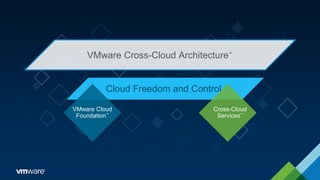
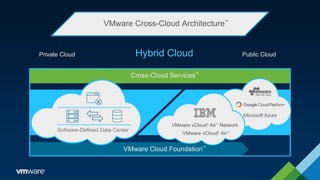
VMware Cross-Cloud Architecture™
Cloud Freedom and Control
VMware Cloud
Foundation™
Cross-Cloud
Services™
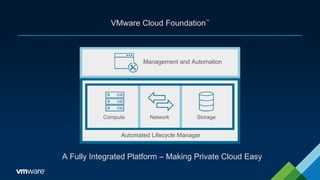
VMware Cloud Foundation™
A Fully Integrated Platform – Making Private Cloud Easy
Management and Automation
Automated Lifecycle Manager
NetworkCompute Storage
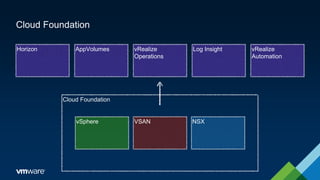
Cloud Foundation
Cloud Foundation
vSphere VSAN NSX
vRealize
Automation
Log InsightvRealize
Operations
AppVolumesHorizon
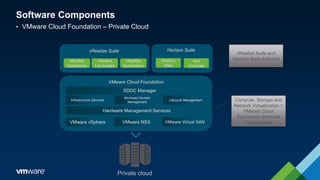
Software Components
• VMware Cloud Foundation – Private Cloud
Private cloud
vRealize
Log Insight
vRealize
Operations
Horizon
View
vRealize
Automation
App
Volumes
vRealize Suite Horizon Suite
VMware vSphere VMware Virtual SANVMware NSX
SDDC Manager
VMware Cloud Foundation
Infrastructure Services
Workload Domain
Management
Lifecycle Management
Hardware Management Services
Compute, Storage and
Network Virtualization +
VMware Cloud
Foundation Software
Components
vRealize Suite and
Horizon Suite Add-ons
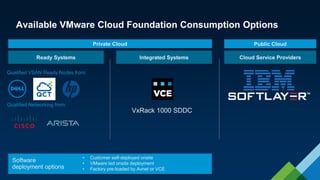
Available VMware Cloud Foundation Consumption Options
Ready Systems Integrated Systems Cloud Service Providers
Qualified VSAN Ready Nodes from:
Qualified Networking from:
VxRack 1000 SDDC
Private Cloud Public Cloud
• Customer self-deployed onsite
• VMware led onsite deployment
• Factory pre-loaded by Avnet or VCE
Software
deployment options
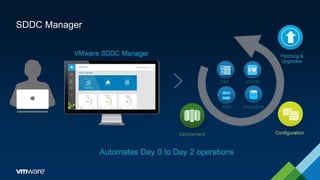
SDDC Manager
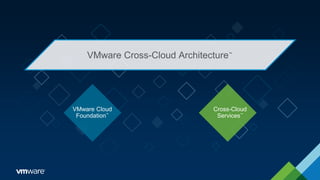
VMware Cross-Cloud Architecture™
VMware Cloud
Foundation™
Cross-Cloud
Services™
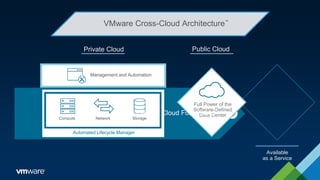
VMware Cross-Cloud Architecture™
Management and Automation
NetworkCompute Storage
Automated Lifecycle Manager
Private Cloud Public Cloud
Full Power of the
Software-Defined
Data Center
Available
as a Service
VMware Cloud Foundation
™
VMware Cross-Cloud Architecture™
VMware vCloud®
Air™
Network
VMware vCloud®
Air™
Cross-Cloud Services™
VMware Cloud Foundation™
Hybrid Cloud
Software-Defined Data Center
Public CloudPrivate Cloud
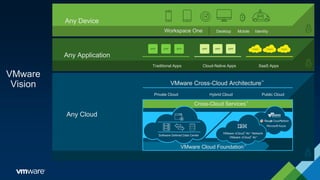
VMware
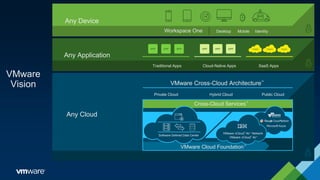
Vision
Any Application
Traditional Apps Cloud-Native Apps SaaS Apps
Any Device
Workspace One Desktop Mobile Identity
Any Cloud
VMware Cross-Cloud Architecture™
Private Cloud Hybrid Cloud Public Cloud
VMware vCloud
®
Air™
Network
VMware vCloud
®
Air™
Software-Defined Data Center
Cross-Cloud Services™
VMware Cloud Foundation™
Now How Do
You Do It
Announcements and Updates
that Support the Vision
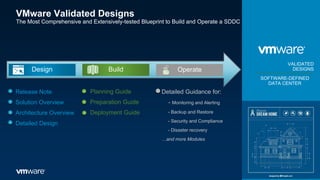
VMware Validated Designs
The Most Comprehensive and Extensively-tested Blueprint to Build and Operate a SDDC
VALIDATED
DESIGNS
SOFTWARE-DEFINED
DATA CENTER
OperateBuildDesign
Release Note
Solution Overview
Architecture Overview
Detailed Design
Planning Guide
Preparation Guide
Deployment Guide
Detailed Guidance for:
- Monitoring and Alerting
- Backup and Restore
- Security and Compliance
- Disaster recovery
…and more Modules
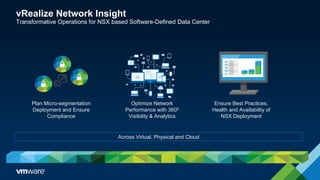
Optimize Network
Performance with 3600
Visibility & Analytics
Ensure Best Practices,
Health and Availability of
NSX Deployment
Plan Micro-segmentation
Deployment and Ensure
Compliance
Across Virtual, Physical and Cloud
vRealize Network Insight
Transformative Operations for NSX based Software-Defined Data Center
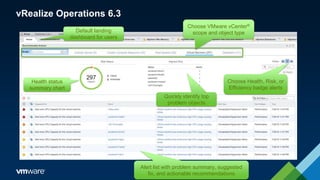
Health status
summary chart
Alert list with problem summary, suggested
fix, and actionable recommendations
Default landing
dashboard for users
Quickly identify top
problem objects
Choose Health, Risk, or
Efficiency badge alerts
Choose VMware vCenter®
scope and object type
vRealize Operations 6.3
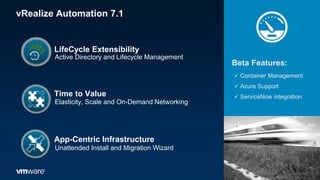
vRealize Automation 7.1
Beta Features:
 Container Management
 Azure Support
 ServiceNow integrationTime to Value
Unattended Install and Migration Wizard
App-Centric Infrastructure
Elasticity, Scale and On-Demand Networking
LifeCycle Extensibility
Active Directory and Lifecycle Management
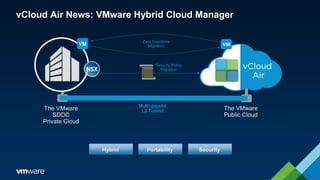
vCloud Air News: VMware Hybrid Cloud Manager
Multi-gigabit
L2 Tunnel
vCloud Air
Advanced
Networking
Services
The VMware
SDDC
Private Cloud
The VMware
Public Cloud
Zero Downtime
Migration
Security Policy
Migration
Hybrid Portability Security
End User
Computing
Mobility Enhancements that are
Simple, Secure & Scalable.
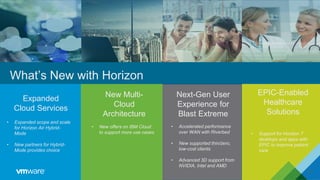
EPIC-Enabled
Healthcare
Solutions
Next-Gen User
Experience for
Blast Extreme
Expanded
Cloud Services
New Multi-
Cloud
Architecture
What’s New with Horizon
21
• Expanded scope and scale
for Horizon Air Hybrid-
Mode
• New partners for Hybrid-
Mode provides choice
• New offers on IBM Cloud
to support more use cases
• Accelerated performance
over WAN with Riverbed
• New supported thin/zero,
low-cost clients
• Advanced 3D support from
NVIDIA, Intel and AMD
• Support for Horizon 7
desktops and apps with
EPIC to improve patient
care
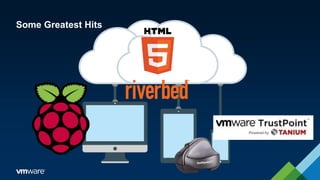
Some Greatest Hits
Integrated
Containers
Announcements and Updates
that Support the Vision
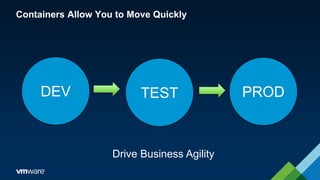
Containers Allow You to Move Quickly
DEV TEST PROD
Drive Business Agility
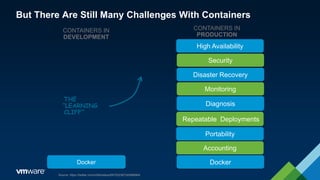
But There Are Still Many Challenges With Containers
CONTAINERS IN
DEVELOPMENT
CONTAINERS IN
PRODUCTION
THE
“LEARNING
CLIFF”
Source: https://twitter.com/mfdii/status/697532387240996864
High Availability
Security
Disaster Recovery
Monitoring
Diagnosis
Repeatable Deployments
Portability
Accounting
DockerDocker
@cloudnativeapps #vmwcna
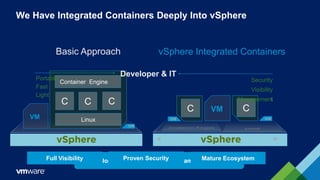
We Have Integrated Containers Deeply Into vSphere
Developers + Operators use the same abstraction
Basic Approach
Linux
Container Engine
CCC
VM
vSphere Integrated Containers
C VM C
Developer & ITPortable
Fast
Light
Security
Visibility
Management
Full Visibility Proven Security Mature Ecosystem
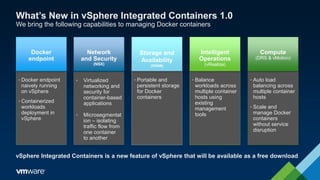
What’s New in vSphere Integrated Containers 1.0
We bring the following capabilities to managing Docker containers
• Virtualized
networking and
security for
container-based
applications
• Microsegmentat
ion – isolating
traffic flow from
one container
to another
• Portable and
persistent storage
for Docker
containers
• Balance
workloads across
multiple container
hosts using
existing
management
tools
Network
and Security
(NSX)
Storage and
Availability
(VSAN)
Intelligent
Operations
(vRealize)
• Auto load
balancing across
multiple container
hosts
• Scale and
manage Docker
containers
without service
disruption
Compute
(DRS & vMotion)
• Docker endpoint
naively running
on vSphere
• Containerized
workloads
deployment in
vSphere
Docker
endpoint
vSphere Integrated Containers is a new feature of vSphere that will be available as a free download
VMware
Vision
Any Application
Traditional Apps Cloud-Native Apps SaaS Apps
Any Device
Workspace One Desktop Mobile Identity
Any Cloud
VMware Cross-Cloud Architecture™
Private Cloud Hybrid Cloud Public Cloud
VMware vCloud
®
Air™
Network
VMware vCloud
®
Air™
Software-Defined Data Center
Cross-Cloud Services™
VMware Cloud Foundation™
www.bigvirtualme.com http://bit.ly/bvm-tv @kgroat
Jamie Mitchell
Sr. Systems Engineer
jamiemitchell@vmware.com

VMworld 2016 Recap

  • 1.
    © 2015 VMwareInc. All rights reserved. VMworld 2016 Updates and Recap
  • 2.
  • 4.
    VMware Cross-Cloud Architecture™ CloudFreedom and Control VMware Cloud Foundation™ Cross-Cloud Services™
  • 5.
    VMware Cloud Foundation™ AFully Integrated Platform – Making Private Cloud Easy Management and Automation Automated Lifecycle Manager NetworkCompute Storage
  • 6.
    Cloud Foundation Cloud Foundation vSphereVSAN NSX vRealize Automation Log InsightvRealize Operations AppVolumesHorizon
  • 7.
    Software Components • VMwareCloud Foundation – Private Cloud Private cloud vRealize Log Insight vRealize Operations Horizon View vRealize Automation App Volumes vRealize Suite Horizon Suite VMware vSphere VMware Virtual SANVMware NSX SDDC Manager VMware Cloud Foundation Infrastructure Services Workload Domain Management Lifecycle Management Hardware Management Services Compute, Storage and Network Virtualization + VMware Cloud Foundation Software Components vRealize Suite and Horizon Suite Add-ons
  • 8.
    Available VMware CloudFoundation Consumption Options Ready Systems Integrated Systems Cloud Service Providers Qualified VSAN Ready Nodes from: Qualified Networking from: VxRack 1000 SDDC Private Cloud Public Cloud • Customer self-deployed onsite • VMware led onsite deployment • Factory pre-loaded by Avnet or VCE Software deployment options
  • 9.
  • 10.
    VMware Cross-Cloud Architecture™ VMwareCloud Foundation™ Cross-Cloud Services™
  • 11.
    VMware Cross-Cloud Architecture™ Managementand Automation NetworkCompute Storage Automated Lifecycle Manager Private Cloud Public Cloud Full Power of the Software-Defined Data Center Available as a Service VMware Cloud Foundation ™
  • 12.
    VMware Cross-Cloud Architecture™ VMwarevCloud® Air™ Network VMware vCloud® Air™ Cross-Cloud Services™ VMware Cloud Foundation™ Hybrid Cloud Software-Defined Data Center Public CloudPrivate Cloud
  • 13.
    VMware Vision Any Application Traditional AppsCloud-Native Apps SaaS Apps Any Device Workspace One Desktop Mobile Identity Any Cloud VMware Cross-Cloud Architecture™ Private Cloud Hybrid Cloud Public Cloud VMware vCloud ® Air™ Network VMware vCloud ® Air™ Software-Defined Data Center Cross-Cloud Services™ VMware Cloud Foundation™
  • 14.
    Now How Do YouDo It Announcements and Updates that Support the Vision
  • 15.
    VMware Validated Designs TheMost Comprehensive and Extensively-tested Blueprint to Build and Operate a SDDC VALIDATED DESIGNS SOFTWARE-DEFINED DATA CENTER OperateBuildDesign Release Note Solution Overview Architecture Overview Detailed Design Planning Guide Preparation Guide Deployment Guide Detailed Guidance for: - Monitoring and Alerting - Backup and Restore - Security and Compliance - Disaster recovery …and more Modules
  • 16.
    Optimize Network Performance with3600 Visibility & Analytics Ensure Best Practices, Health and Availability of NSX Deployment Plan Micro-segmentation Deployment and Ensure Compliance Across Virtual, Physical and Cloud vRealize Network Insight Transformative Operations for NSX based Software-Defined Data Center
  • 17.
    Health status summary chart Alertlist with problem summary, suggested fix, and actionable recommendations Default landing dashboard for users Quickly identify top problem objects Choose Health, Risk, or Efficiency badge alerts Choose VMware vCenter® scope and object type vRealize Operations 6.3
  • 18.
    vRealize Automation 7.1 BetaFeatures:  Container Management  Azure Support  ServiceNow integrationTime to Value Unattended Install and Migration Wizard App-Centric Infrastructure Elasticity, Scale and On-Demand Networking LifeCycle Extensibility Active Directory and Lifecycle Management
  • 19.
    vCloud Air News:VMware Hybrid Cloud Manager Multi-gigabit L2 Tunnel vCloud Air Advanced Networking Services The VMware SDDC Private Cloud The VMware Public Cloud Zero Downtime Migration Security Policy Migration Hybrid Portability Security
  • 20.
    End User Computing Mobility Enhancementsthat are Simple, Secure & Scalable.
  • 21.
    EPIC-Enabled Healthcare Solutions Next-Gen User Experience for BlastExtreme Expanded Cloud Services New Multi- Cloud Architecture What’s New with Horizon 21 • Expanded scope and scale for Horizon Air Hybrid- Mode • New partners for Hybrid- Mode provides choice • New offers on IBM Cloud to support more use cases • Accelerated performance over WAN with Riverbed • New supported thin/zero, low-cost clients • Advanced 3D support from NVIDIA, Intel and AMD • Support for Horizon 7 desktops and apps with EPIC to improve patient care
  • 22.
  • 23.
  • 24.
    Containers Allow Youto Move Quickly DEV TEST PROD Drive Business Agility
  • 25.
    But There AreStill Many Challenges With Containers CONTAINERS IN DEVELOPMENT CONTAINERS IN PRODUCTION THE “LEARNING CLIFF” Source: https://twitter.com/mfdii/status/697532387240996864 High Availability Security Disaster Recovery Monitoring Diagnosis Repeatable Deployments Portability Accounting DockerDocker
  • 26.
    @cloudnativeapps #vmwcna We HaveIntegrated Containers Deeply Into vSphere Developers + Operators use the same abstraction Basic Approach Linux Container Engine CCC VM vSphere Integrated Containers C VM C Developer & ITPortable Fast Light Security Visibility Management Full Visibility Proven Security Mature Ecosystem
  • 27.
    What’s New invSphere Integrated Containers 1.0 We bring the following capabilities to managing Docker containers • Virtualized networking and security for container-based applications • Microsegmentat ion – isolating traffic flow from one container to another • Portable and persistent storage for Docker containers • Balance workloads across multiple container hosts using existing management tools Network and Security (NSX) Storage and Availability (VSAN) Intelligent Operations (vRealize) • Auto load balancing across multiple container hosts • Scale and manage Docker containers without service disruption Compute (DRS & vMotion) • Docker endpoint naively running on vSphere • Containerized workloads deployment in vSphere Docker endpoint vSphere Integrated Containers is a new feature of vSphere that will be available as a free download
  • 28.
    VMware Vision Any Application Traditional AppsCloud-Native Apps SaaS Apps Any Device Workspace One Desktop Mobile Identity Any Cloud VMware Cross-Cloud Architecture™ Private Cloud Hybrid Cloud Public Cloud VMware vCloud ® Air™ Network VMware vCloud ® Air™ Software-Defined Data Center Cross-Cloud Services™ VMware Cloud Foundation™
  • 29.
    www.bigvirtualme.com http://bit.ly/bvm-tv @kgroat JamieMitchell Sr. Systems Engineer jamiemitchell@vmware.com

Editor's Notes

  • #4 Customers are increasingly relying on multiple public and private clouds to run their applications, but are daunted by the challenge of managing and securing applications across diverse cloud platforms, When customers combine a best-in-class private cloud with leading public clouds, all enabled by VMware, they have the strongest, most flexible hybrid cloud strategy.
  • #5 VMware is extending its hybrid cloud strategy with the new VMware Cross-Cloud Architecture™, enabling customers to run, manage, connect, and secure their applications across clouds and devices in a common operating environment, delivering cloud freedom and control. As the world's most complete and capable hybrid cloud architecture, the Cross-Cloud Architecture enables consistent deployment models, security policies, visibility, and governance for all applications, running on-premises and off-premises, regardless of the underlying cloud, hardware platform or hypervisor. The VMware Cross-Cloud Architecture builds on its leading private and hybrid cloud capabilities by offering customers the freedom to innovate in multiple clouds,
  • #6 VMware Cloud Foundation delivers the next-generation hyper-converged infrastructure for building private clouds that for the first time combines VMware's highly scalable hyper-converged software (VMware vSphere and VMware Virtual SAN™) with the world's leading network virtualization platform, VMware NSX®. VMware SDDC Manager™, a core component of VMware Cloud Foundation, helps customers and service providers automate the deployment and management of VMware cloud software. SDDC Manager helps to build and maintain the entire VMware cloud software stack, freeing cloud administrators from the complex and tedious task of installing, configuring, managing and updating their cloud infrastructure, making it possible to build a complete cloud in a matter of hours. The result is that customers can gain a 6-8x reduction in time to deploy cloud infrastructure, and save 30-40 percent on TCO.
  • #8 Cloud Foundation is at the core a integrated suite of software components... Many of these will be familiar to you – vSphere, VSAN, NSX, but a few will be new – SDDC Manager, Hardware Management Service for example. Along with the Cloud Foundation components there are several “add-on solutions” that can be deployed with Cloud Foundation to provide for monitoring and alerting(vROPs & vLI) as well as automation (vRA). These include the vRealize Suite and Horizon Suite. Let’s walk through the various components in a bit more detail… <CLICK>
  • #11 VMware is extending its hybrid cloud strategy with the new VMware Cross-Cloud Architecture™, enabling customers to run, manage, connect, and secure their applications across clouds and devices in a common operating environment, delivering cloud freedom and control. As the world's most complete and capable hybrid cloud architecture, the Cross-Cloud Architecture enables consistent deployment models, security policies, visibility, and governance for all applications, running on-premises and off-premises, regardless of the underlying cloud, hardware platform or hypervisor. The VMware Cross-Cloud Architecture builds on its leading private and hybrid cloud capabilities by offering customers the freedom to innovate in multiple clouds,
  • #12 VMware Cloud Foundation runs any traditional or cloud-native application, from business-critical scale-up applications to distributed scale-out applications. Regardless of whether they are in virtual machines or containers, VMware Cloud Foundation provides a consistent infrastructure platform that delivers the unique performance, resiliency, security and manageability benefits of vSphere, Virtual SAN and VMware NSX. VMware Cloud Foundation integrates with existing VMware solutions to support cloud flexibility and choice, and enable business mobility, including VMware vRealize Suite, which delivers a comprehensive enterprise-ready cloud management platform (CMP) that can speed up IT service delivery, improves IT operations, and delivers end-user choice with control, across heterogeneous, multi-cloud environments (vSphere and non-vSphere).
  • #13 With a common operating environment for both public clouds and on-premises workloads, central IT can protect data and applications and control costs while enabling developers and the business to innovate freely in the clouds they choose. The Cross-Cloud Services VMware previewed at VMworld include: Discovery and Analytics: enabling discovery, onboarding, and governance of public cloud applications; Compliance and Security: using micro-segmentation and monitoring to provide security and compliance for applications across clouds; Deployment and Migration: providing developers the ability to work cross-cloud, and IT the ability to manage cross-cloud applications with security and compliance .
  • #14 The VMware Cross-Cloud Architecture, with Cross-Cloud services and VMware Cloud Foundation, extend the hybrid cloud strategy that is integral to VMware’s vision to help customers use any cloud to deliver any application to any device—enabling a software-defined approach to business and IT that speeds our customers’ digital transformation.
  • #16 To extend a VMware private cloud to VMware vCloud Air, the latest version of Hybrid Cloud Manager offers new enhancements that simplify application migration and improve the performance of the connection between the two environments. vCloud Air Hybrid Cloud Manager enables customers to extend on-premises networks to vCloud Air over an optimized, software-defined WAN, enabling networks to stretch in the cloud, yet perform almost as if they were local. vCloud Air Hybrid Cloud Manager also enables zero downtime, bi-directional migration of entire applications, as well as the migration of NSX security policies to vCloud Air Advanced Networking Services. Customers can move virtual machines up to 20x faster with an optimized network while retaining the same security policies and controls available on-premises, all with the least disruption to the business.
  • #17 Across Your Virtual, Physical, and Cloud Plan Micro-segmentation deployment and ensure compliance Comprehensive net flow assessment and analysis to model security groups and firewall rules Recommendations to Make micro-segmentation easier to deploy Continuously monitor and audit compliance postures over time Optimize Network Performance with 360 visibility & analytics Virtual and physical network topology mapping Performance Optimization across Overlay and Underlay Log Analytics Ensure Best Practices, Health and Availability of NSX deployments Intuitive UI, Natural language search to quickly pinpoint issues Log Analytics for troubleshooting Best practice compliance checking
  • #19 To extend a VMware private cloud to VMware vCloud Air, the latest version of Hybrid Cloud Manager offers new enhancements that simplify application migration and improve the performance of the connection between the two environments. vCloud Air Hybrid Cloud Manager enables customers to extend on-premises networks to vCloud Air over an optimized, software-defined WAN, enabling networks to stretch in the cloud, yet perform almost as if they were local. vCloud Air Hybrid Cloud Manager also enables zero downtime, bi-directional migration of entire applications, as well as the migration of NSX security policies to vCloud Air Advanced Networking Services. Customers can move virtual machines up to 20x faster with an optimized network while retaining the same security policies and controls available on-premises, all with the least disruption to the business.
  • #20 To extend a VMware private cloud to VMware vCloud Air, the latest version of Hybrid Cloud Manager offers new enhancements that simplify application migration and improve the performance of the connection between the two environments. vCloud Air Hybrid Cloud Manager enables customers to extend on-premises networks to vCloud Air over an optimized, software-defined WAN, enabling networks to stretch in the cloud, yet perform almost as if they were local. vCloud Air Hybrid Cloud Manager also enables zero downtime, bi-directional migration of entire applications, as well as the migration of NSX security policies to vCloud Air Advanced Networking Services. Customers can move virtual machines up to 20x faster with an optimized network while retaining the same security policies and controls available on-premises, all with the least disruption to the business.
  • #22 So let’s talk about what’s new with Horizon and Horizon Air that we will be announcing at VMWorld this year… This can really be broken down into (4) key areas that are designed to… Expand the scope and breadth of our Cloud Services. We have expanded the scope and scale for Horizon Air Hybrid-Mode. There are new partners available for Hybrid-Mode which offers more choices such as… Cloud managed services with on–prem infrastructure appliances. And a focus on smaller size implementations as well. The new Multi-Cloud Architecture which gives us a… Tech Preview for supporting Multiple Cloud Platform Providers. Our Next-Gen User Experience for Blast Extreme offers… Flash Redirection. Better printing and clipboarding. And support for new devices which we will talk in more detail in the next slide. We are now offering an EPIC-Enabled Healthcare Solution to support an expanded number of use cases particularly in one of our key verticals—Healthcare. For Healthcare companies, we have a target platform for apps and desktops using the EPIC healthcare system with support for Horizon 7. Together these additions help simplify desktop and app management, help customers drive down their costs, and improve user productivity and satisfaction. <CLICK>
  • #25 So what are containers? Containers allow developers to package up their applications and then seamlessly move through the application development lifecycle. From coding on their laptop, to testing in a staging environment, to production where they can deliver that application out to end users. VMware is seeing a lot of interesting use cases with containers from developers and application teams. <CLICK>
  • #26 With Containers, there are still many challenges taking them from development to production… In production, IT needs to consider aspects such as… High Availability (HA). Security. Disaster Recovery (DR). Portability. And many other aspects of managing and maintain production environments. <CLICK>
  • #27 Previously with Containers, it was not integrated into vSphere making it more difficult to integrate and manage while taking into factors such visibility and security that are needed in production environments… Now, with the integration of Containers into vSphere, it provides… A light and portable container that is faster. As well as provide more security and visibility. All of which makes manageability better than ever. <CLICK>
  • #28 What’s new in vSphere Integrated Containers (VIO) 1.0? Docker endpoints now run as containerized workloads natively on vSphere. NSX is also integrated to provide network security and microsegmentation between containers. Virtual SAN (VSAN) integrates with Docker containers to provide portable and persistent storage. vRealize Operations (vROPs) provides the ability to balance workloads across multiple container hosts. And DRS and vMotion provide auto load balancing for the container hosts to scale and manage them effectively. As a side note, vSphere Integrated Containers ( <CLICK>
  • #29 The VMware Cross-Cloud Architecture, with Cross-Cloud services and VMware Cloud Foundation, extend the hybrid cloud strategy that is integral to VMware’s vision to help customers use any cloud to deliver any application to any device—enabling a software-defined approach to business and IT that speeds our customers’ digital transformation.