VMware Software-Defined Data Center (2014)
Presented by: John Long
VCI Level 2, VCP5-DV, VCAP-DCA, VCLOUD

February 13, 2014
Agenda
•
•
•
•
•

The Software-Defined Data Center
VMware Network Virtualization with NSX
VMware Virtual SAN*
VMware vCloud Automation Center
Q&A
*product is still in Beta
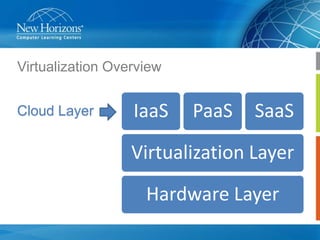
Virtualization Overview
Cloud Layer

IaaS

PaaS

SaaS

Virtualization Layer
Hardware Layer
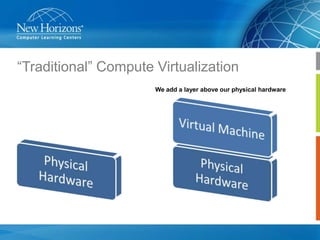
“Traditional” Compute Virtualization
We add a layer above our physical hardware
What does compute virtualization do for us?
• Consolidation
– Better use of our hardware
– Ease of management

• Flexibility
– VMs can be on any host while providing to our users

• Ease of Management
– Management at the layer(s) above the physical hardware

• Step One of our move to a Software-Defined Data Center
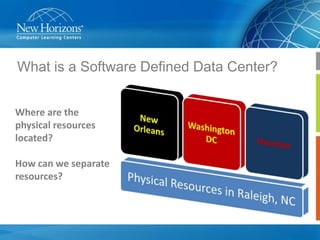
What is a Software Defined Data Center?
Where are the
physical resources
located?
How can we separate
resources?
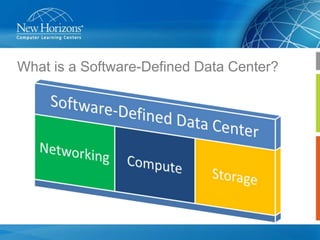
What is a Software-Defined Data Center?
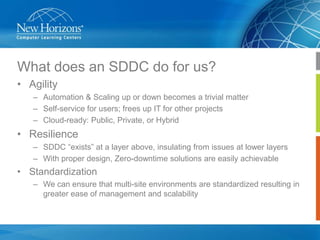
What does an SDDC do for us?
• Agility
– Automation & Scaling up or down becomes a trivial matter
– Self-service for users; frees up IT for other projects
– Cloud-ready: Public, Private, or Hybrid

• Resilience
– SDDC “exists” at a layer above, insulating from issues at lower layers
– With proper design, Zero-downtime solutions are easily achievable

• Standardization
– We can ensure that multi-site environments are standardized resulting in
greater ease of management and scalability
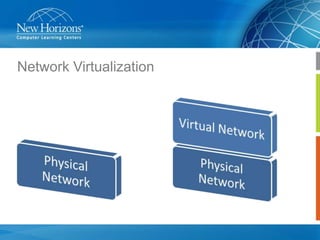
Network Virtualization
John, we already had this before!
Yes and No
What we had before solved networking at each hypervisor

Why not take this to the next level and virtualize entire networks?
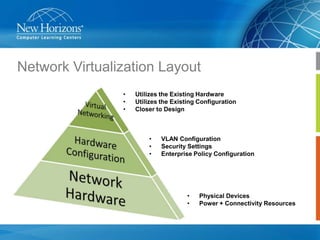
Network Virtualization Layout
•
•
•

Utilizes the Existing Hardware
Utilizes the Existing Configuration
Closer to Design

•
•
•

VLAN Configuration
Security Settings
Enterprise Policy Configuration

•
•

Physical Devices
Power + Connectivity Resources
Why VMware NSX?
•
•
•

Works with ANY hypervisor
Works with ANY network hardware
Works with ANY Cloud Management Platform

•
•
•

Provisioning is greatly simplified
Implementation speeds from weeks to seconds
Standardization

•

Who’s using this?
– AT&T, Rackspace, eBay, PayPal, and more!
More on Network Virtualization?
•
•

Official VMware Network Virtualization Blog
• http://blogs.vmware.com/networkvirtualization/
Official VMware NSX Webinar
• http://www.vmware.com/products/nsx/nsx-webinar.html
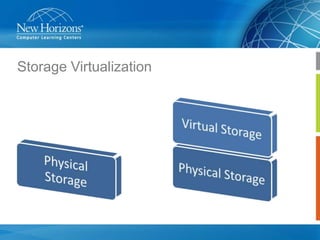
Storage Virtualization
What is VMware Virtual SAN?
•
•

•
•
•

Simple storage designed for virtual machines
Non-disruptive scalability allows you to grow your Virtual
SAN as needed
Hardware-Agnostic
Managed within the vSphere Web Client
Not only for vSphere but also Horizon View and SRM as well
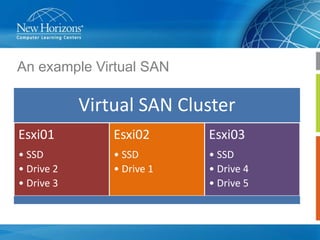
An example Virtual SAN

Virtual SAN Cluster
Esxi01

Esxi02

Esxi03

• SSD
• Drive 2
• Drive 3

• SSD
• Drive 1

• SSD
• Drive 4
• Drive 5
What does Virtual SAN do for me?
•

Reduced TCO
–

•

Low upfront cost and “grow as you go”
–

•

Distributed RAID and cache-mirroring ensures that data is safe in the
event of a disk, network, or host failure

Performance
–

•

Built in management with the vSphere Web Client

Resiliency
–

•

Three hosts and up

Manage your storage along with your compute
–

•

Inexpensive server disks and flash + Standard vSphere networking

Self-tuning storage with dynamic load balancing using DRS

Virtualized Storage is prepped for the SDDC
More on Virtual SAN?
• Official VMware Virtual SAN (Beta) Site
– http://www.vmware.com/products/virtual-san/

• Official VMware Virtual SAN Datasheet
– http://www.vmware.com/files/pdf/products/vsan/VMware_Virtual
_SAN_Datasheet.pdf
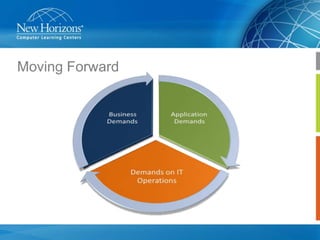
Moving Forward
What do we need from IT Operations?
•

IT has to be more flexible
–
–

•

We are not only expected to deliver basic, non-complex services any longer
User & Business demands include rapid deployment of complex, multi-tier services

IT has to have faster turnaround on requests
–
–

The never-ending IT dilemma; can we do this faster?
What is slowing down these processes?
How can we keep up with these demands?
Self-Service
– A better, stronger, faster approach than a traditional request, vet, and
deliver model
– Users have become accustomed to an “App Store” type experience

How can we implement this?
VMware vCloud Automation Center
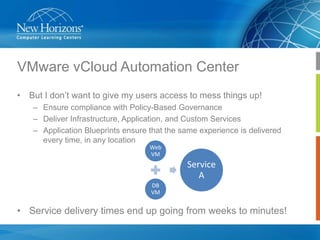
• But I don’t want to give my users access to mess things up!
– Ensure compliance with Policy-Based Governance
– Deliver Infrastructure, Application, and Custom Services
– Application Blueprints ensure that the same experience is delivered
every time, in any location
Web
VM

Service
A
DB
VM

• Service delivery times end up going from weeks to minutes!
VMware vCloud Automation Center
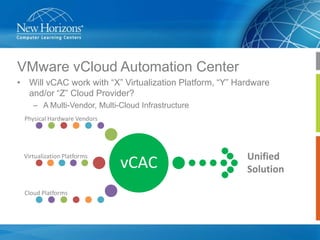
• Will vCAC work with “X” Virtualization Platform, “Y” Hardware
and/or “Z” Cloud Provider?
– A Multi-Vendor, Multi-Cloud Infrastructure
Physical Hardware Vendors

Virtualization Platforms

Cloud Platforms

vCAC

Unified
Solution
VMware vCloud Automation Center
• vCAC Advanced Service Designer
– An easy-to-use Wizard-driven approach to building a service
– This allows us to deliver “Anything-as-a-Service”
•
•
•
•
•

New Employee On-Boarding
Email Setup
Backup/Recovery
Security Compliance
Password Management

– Basically anything we can develop a workflow for can become a service
that we can deliver to users
VMware vCloud Automation Center
• What’s in it for IT Operations?
– Frees up your time for other projects and demands
– Integrated Chargeback throughout the product
• Better grasp of Budget vs. Use
• Where should this service exist?
– Keep onsite vs. Move to cloud
– “Future-Prepping”
– Happy Users = Happy Everyone
More on vCloud Automation Center?
• Official VMware vCloud Automation Center Site
– http://www.vmware.com/products/vcloud-automation-center/

• Official VMware Cloud Management Blog
– http://blogs.vmware.com/management
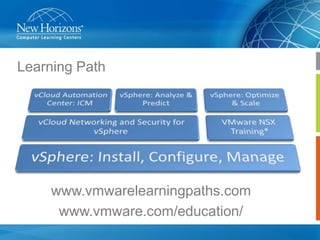
Learning Path

www.vmwarelearningpaths.com
www.vmware.com/education/
Q&A

2.13.14 v mware software defined data center (sddc) in 2014 slide deck

  • 1.
    VMware Software-Defined DataCenter (2014) Presented by: John Long VCI Level 2, VCP5-DV, VCAP-DCA, VCLOUD February 13, 2014
  • 2.
    Agenda • • • • • The Software-Defined DataCenter VMware Network Virtualization with NSX VMware Virtual SAN* VMware vCloud Automation Center Q&A *product is still in Beta
  • 3.
  • 4.
    “Traditional” Compute Virtualization Weadd a layer above our physical hardware
  • 5.
    What does computevirtualization do for us? • Consolidation – Better use of our hardware – Ease of management • Flexibility – VMs can be on any host while providing to our users • Ease of Management – Management at the layer(s) above the physical hardware • Step One of our move to a Software-Defined Data Center
  • 6.
    What is aSoftware Defined Data Center? Where are the physical resources located? How can we separate resources?
  • 7.
    What is aSoftware-Defined Data Center?
  • 8.
    What does anSDDC do for us? • Agility – Automation & Scaling up or down becomes a trivial matter – Self-service for users; frees up IT for other projects – Cloud-ready: Public, Private, or Hybrid • Resilience – SDDC “exists” at a layer above, insulating from issues at lower layers – With proper design, Zero-downtime solutions are easily achievable • Standardization – We can ensure that multi-site environments are standardized resulting in greater ease of management and scalability
  • 9.
  • 10.
    John, we alreadyhad this before! Yes and No What we had before solved networking at each hypervisor Why not take this to the next level and virtualize entire networks?
  • 11.
    Network Virtualization Layout • • • Utilizesthe Existing Hardware Utilizes the Existing Configuration Closer to Design • • • VLAN Configuration Security Settings Enterprise Policy Configuration • • Physical Devices Power + Connectivity Resources
  • 12.
    Why VMware NSX? • • • Workswith ANY hypervisor Works with ANY network hardware Works with ANY Cloud Management Platform • • • Provisioning is greatly simplified Implementation speeds from weeks to seconds Standardization • Who’s using this? – AT&T, Rackspace, eBay, PayPal, and more!
  • 13.
    More on NetworkVirtualization? • • Official VMware Network Virtualization Blog • http://blogs.vmware.com/networkvirtualization/ Official VMware NSX Webinar • http://www.vmware.com/products/nsx/nsx-webinar.html
  • 14.
  • 15.
    What is VMwareVirtual SAN? • • • • • Simple storage designed for virtual machines Non-disruptive scalability allows you to grow your Virtual SAN as needed Hardware-Agnostic Managed within the vSphere Web Client Not only for vSphere but also Horizon View and SRM as well
  • 16.
    An example VirtualSAN Virtual SAN Cluster Esxi01 Esxi02 Esxi03 • SSD • Drive 2 • Drive 3 • SSD • Drive 1 • SSD • Drive 4 • Drive 5
  • 17.
    What does VirtualSAN do for me? • Reduced TCO – • Low upfront cost and “grow as you go” – • Distributed RAID and cache-mirroring ensures that data is safe in the event of a disk, network, or host failure Performance – • Built in management with the vSphere Web Client Resiliency – • Three hosts and up Manage your storage along with your compute – • Inexpensive server disks and flash + Standard vSphere networking Self-tuning storage with dynamic load balancing using DRS Virtualized Storage is prepped for the SDDC
  • 18.
    More on VirtualSAN? • Official VMware Virtual SAN (Beta) Site – http://www.vmware.com/products/virtual-san/ • Official VMware Virtual SAN Datasheet – http://www.vmware.com/files/pdf/products/vsan/VMware_Virtual _SAN_Datasheet.pdf
  • 19.
  • 20.
    What do weneed from IT Operations? • IT has to be more flexible – – • We are not only expected to deliver basic, non-complex services any longer User & Business demands include rapid deployment of complex, multi-tier services IT has to have faster turnaround on requests – – The never-ending IT dilemma; can we do this faster? What is slowing down these processes?
  • 21.
    How can wekeep up with these demands? Self-Service – A better, stronger, faster approach than a traditional request, vet, and deliver model – Users have become accustomed to an “App Store” type experience How can we implement this?
  • 22.
    VMware vCloud AutomationCenter • But I don’t want to give my users access to mess things up! – Ensure compliance with Policy-Based Governance – Deliver Infrastructure, Application, and Custom Services – Application Blueprints ensure that the same experience is delivered every time, in any location Web VM Service A DB VM • Service delivery times end up going from weeks to minutes!
  • 23.
    VMware vCloud AutomationCenter • Will vCAC work with “X” Virtualization Platform, “Y” Hardware and/or “Z” Cloud Provider? – A Multi-Vendor, Multi-Cloud Infrastructure Physical Hardware Vendors Virtualization Platforms Cloud Platforms vCAC Unified Solution
  • 24.
    VMware vCloud AutomationCenter • vCAC Advanced Service Designer – An easy-to-use Wizard-driven approach to building a service – This allows us to deliver “Anything-as-a-Service” • • • • • New Employee On-Boarding Email Setup Backup/Recovery Security Compliance Password Management – Basically anything we can develop a workflow for can become a service that we can deliver to users
  • 25.
    VMware vCloud AutomationCenter • What’s in it for IT Operations? – Frees up your time for other projects and demands – Integrated Chargeback throughout the product • Better grasp of Budget vs. Use • Where should this service exist? – Keep onsite vs. Move to cloud – “Future-Prepping” – Happy Users = Happy Everyone
  • 26.
    More on vCloudAutomation Center? • Official VMware vCloud Automation Center Site – http://www.vmware.com/products/vcloud-automation-center/ • Official VMware Cloud Management Blog – http://blogs.vmware.com/management
  • 27.
  • 28.