Architecting a DR Solution - Best Practices
vCenter Site Recovery
Manager™
Luke Huckaba
@ThepHuck
Virtualization Architect
RACKSPACE® HOSTING | WWW.RACKSPACE.COM
This presentation outlines general information regarding our services and is for informational purposes only; all statements and information
are provided “AS IS” and are presented WITHOUT WARRANTY OF ANY KIND, EXPRESS OR IMPLIED. OUR PRODUCT/SERVICES
OFFERINGS ARE SUBJECT TO CHANGE WITHOUT NOTICE.
Rackspace is either a registered service marks or service marks of Rackspace US, Inc. in the United States and other countries.
Third-party trademarks and tradenames appearing in this document are the property of their respective owners. Such third-party
trademarks have been printed in caps or initial caps and are used for referential purposes only. We do not intend our use or display of other
companies’ tradenames, trademarks, or service marks to imply a relationship with, or endorsement or sponsorship of us by, these other
companies.
2
RACKSPACE® HOSTING | WWW.RACKSPACE.COM
•Basic SRM Functions
•Planning
•Designing & Architecting SRM
•Deployment Considerations & Road Blocks
•Maintaining, Migrating & Upgrading
3
vCenter Site Recovery Manager
Agenda
RACKSPACE® HOSTING | WWW.RACKSPACE.COM
vCenter Site Recovery Manager
How SRM Works
4
RACKSPACE® HOSTING | WWW.RACKSPACE.COM
• Test
– What does “Non Disruptive” really mean?
• Cleanup
– What happened to my test VMs?
• Recovery
– How does it really work?
– How do I “Fail Back”?
• Reprotect
– Under the hood
5
vCenter Site Recovery Manager
Basic SRM Functions
RACKSPACE® HOSTING | WWW.RACKSPACE.COM
vCenter Site Recovery Manager
Planning to use SRM
6
RACKSPACE® HOSTING | WWW.RACKSPACE.COM
• What apps should you protect?
• Where and how should you recover applications?
• Vendor Support
• SRM Operationally
• RPO
– vSphere Replication = as low as 15min
– NetApp = as low as 5min
– EMC CRR = <5min
7
vCenter Site Recovery Manager
Planning
RACKSPACE® HOSTING | WWW.RACKSPACE.COM
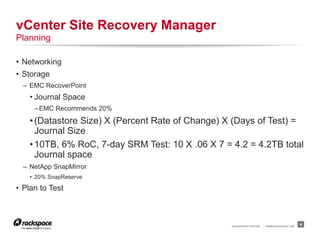
• Networking
• Storage
– EMC RecoverPoint
• Journal Space
–EMC Recommends 20%
•(Datastore Size) X (Percent Rate of Change) X (Days of Test) =
Journal Size
•10TB, 6% RoC, 7-day SRM Test: 10 X .06 X 7 = 4.2 = 4.2TB total
Journal space
– NetApp SnapMirror
• 20% SnapReserve
• Plan to Test
8
vCenter Site Recovery Manager
Planning
RACKSPACE® HOSTING | WWW.RACKSPACE.COM
vCenter Site Recovery Manager
Designing & Architecting SRM
9
RACKSPACE® HOSTING | WWW.RACKSPACE.COM
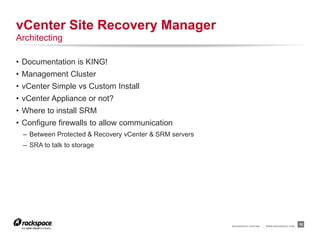
• Documentation is KING!
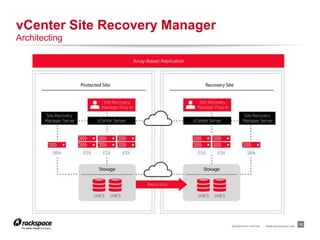
• Management Cluster
• vCenter Simple vs Custom Install
• vCenter Appliance or not?
• Where to install SRM
• Configure firewalls to allow communication
– Between Protected & Recovery vCenter & SRM servers
– SRA to talk to storage
10
vCenter Site Recovery Manager
Architecting
RACKSPACE® HOSTING | WWW.RACKSPACE.COM
11
vCenter Site Recovery Manager
Architecting
RACKSPACE® HOSTING | WWW.RACKSPACE.COM
12
vCenter Site Recovery Manager
Architecting
RACKSPACE® HOSTING | WWW.RACKSPACE.COM
vCenter Site Recovery Manager
Deployment Considerations & Road Blocks
13
RACKSPACE® HOSTING | WWW.RACKSPACE.COM
• Third party certificates
• Database Password for SRM
• SRA requirements
• Permissions
• Array Pairs
• Protection Groups
• Recovery Plans
• VM Boot Priority
• VM Boot Dependencies
• Additional Options
14
vCenter Site Recovery Manager
Deployment Considerations & Road Blocks
RACKSPACE® HOSTING | WWW.RACKSPACE.COM
vCenter Site Recovery Manager
Maintaining, Migrating & Upgrading
15
RACKSPACE® HOSTING | WWW.RACKSPACE.COM
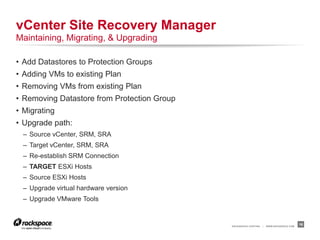
• Add Datastores to Protection Groups
• Adding VMs to existing Plan
• Removing VMs from existing Plan
• Removing Datastore from Protection Group
• Migrating
• Upgrade path:
– Source vCenter, SRM, SRA
– Target vCenter, SRM, SRA
– Re-establish SRM Connection
– TARGET ESXi Hosts
– Source ESXi Hosts
– Upgrade virtual hardware version
– Upgrade VMware Tools
16
vCenter Site Recovery Manager
Maintaining, Migrating, & Upgrading
RACKSPACE® HOSTING | WWW.RACKSPACE.COM
vCenter Site Recovery Manager
Q&A
17
18
RACKSPACE® HOSTING | 5000 WALZEM ROAD | SAN ANTONIO, TX 78218
US SALES: 1-800-961-2888 | US SUPPORT: 1-800-961-4454 | WWW.RACKSPACE.COM
RACKSPACE® HOSTING | © RACKSPACE US, INC. | RACKSPACE® AND FANATICAL SUPPORT® ARE SERVICE MARKS OF RACKSPACE US, INC. REGISTERED IN TH E UNITED STATES AND OTHER COUNTRIES. | WWW.RACKSPACE.COM

VMware Site Recovery Manager - Architecting a DR Solution - Best Practices

  • 1.
    Architecting a DRSolution - Best Practices vCenter Site Recovery Manager™ Luke Huckaba @ThepHuck Virtualization Architect
  • 2.
    RACKSPACE® HOSTING |WWW.RACKSPACE.COM This presentation outlines general information regarding our services and is for informational purposes only; all statements and information are provided “AS IS” and are presented WITHOUT WARRANTY OF ANY KIND, EXPRESS OR IMPLIED. OUR PRODUCT/SERVICES OFFERINGS ARE SUBJECT TO CHANGE WITHOUT NOTICE. Rackspace is either a registered service marks or service marks of Rackspace US, Inc. in the United States and other countries. Third-party trademarks and tradenames appearing in this document are the property of their respective owners. Such third-party trademarks have been printed in caps or initial caps and are used for referential purposes only. We do not intend our use or display of other companies’ tradenames, trademarks, or service marks to imply a relationship with, or endorsement or sponsorship of us by, these other companies. 2
  • 3.
    RACKSPACE® HOSTING |WWW.RACKSPACE.COM •Basic SRM Functions •Planning •Designing & Architecting SRM •Deployment Considerations & Road Blocks •Maintaining, Migrating & Upgrading 3 vCenter Site Recovery Manager Agenda
  • 4.
    RACKSPACE® HOSTING |WWW.RACKSPACE.COM vCenter Site Recovery Manager How SRM Works 4
  • 5.
    RACKSPACE® HOSTING |WWW.RACKSPACE.COM • Test – What does “Non Disruptive” really mean? • Cleanup – What happened to my test VMs? • Recovery – How does it really work? – How do I “Fail Back”? • Reprotect – Under the hood 5 vCenter Site Recovery Manager Basic SRM Functions
  • 6.
    RACKSPACE® HOSTING |WWW.RACKSPACE.COM vCenter Site Recovery Manager Planning to use SRM 6
  • 7.
    RACKSPACE® HOSTING |WWW.RACKSPACE.COM • What apps should you protect? • Where and how should you recover applications? • Vendor Support • SRM Operationally • RPO – vSphere Replication = as low as 15min – NetApp = as low as 5min – EMC CRR = <5min 7 vCenter Site Recovery Manager Planning
  • 8.
    RACKSPACE® HOSTING |WWW.RACKSPACE.COM • Networking • Storage – EMC RecoverPoint • Journal Space –EMC Recommends 20% •(Datastore Size) X (Percent Rate of Change) X (Days of Test) = Journal Size •10TB, 6% RoC, 7-day SRM Test: 10 X .06 X 7 = 4.2 = 4.2TB total Journal space – NetApp SnapMirror • 20% SnapReserve • Plan to Test 8 vCenter Site Recovery Manager Planning
  • 9.
    RACKSPACE® HOSTING |WWW.RACKSPACE.COM vCenter Site Recovery Manager Designing & Architecting SRM 9
  • 10.
    RACKSPACE® HOSTING |WWW.RACKSPACE.COM • Documentation is KING! • Management Cluster • vCenter Simple vs Custom Install • vCenter Appliance or not? • Where to install SRM • Configure firewalls to allow communication – Between Protected & Recovery vCenter & SRM servers – SRA to talk to storage 10 vCenter Site Recovery Manager Architecting
  • 11.
    RACKSPACE® HOSTING |WWW.RACKSPACE.COM 11 vCenter Site Recovery Manager Architecting
  • 12.
    RACKSPACE® HOSTING |WWW.RACKSPACE.COM 12 vCenter Site Recovery Manager Architecting
  • 13.
    RACKSPACE® HOSTING |WWW.RACKSPACE.COM vCenter Site Recovery Manager Deployment Considerations & Road Blocks 13
  • 14.
    RACKSPACE® HOSTING |WWW.RACKSPACE.COM • Third party certificates • Database Password for SRM • SRA requirements • Permissions • Array Pairs • Protection Groups • Recovery Plans • VM Boot Priority • VM Boot Dependencies • Additional Options 14 vCenter Site Recovery Manager Deployment Considerations & Road Blocks
  • 15.
    RACKSPACE® HOSTING |WWW.RACKSPACE.COM vCenter Site Recovery Manager Maintaining, Migrating & Upgrading 15
  • 16.
    RACKSPACE® HOSTING |WWW.RACKSPACE.COM • Add Datastores to Protection Groups • Adding VMs to existing Plan • Removing VMs from existing Plan • Removing Datastore from Protection Group • Migrating • Upgrade path: – Source vCenter, SRM, SRA – Target vCenter, SRM, SRA – Re-establish SRM Connection – TARGET ESXi Hosts – Source ESXi Hosts – Upgrade virtual hardware version – Upgrade VMware Tools 16 vCenter Site Recovery Manager Maintaining, Migrating, & Upgrading
  • 17.
    RACKSPACE® HOSTING |WWW.RACKSPACE.COM vCenter Site Recovery Manager Q&A 17
  • 18.
    18 RACKSPACE® HOSTING |5000 WALZEM ROAD | SAN ANTONIO, TX 78218 US SALES: 1-800-961-2888 | US SUPPORT: 1-800-961-4454 | WWW.RACKSPACE.COM RACKSPACE® HOSTING | © RACKSPACE US, INC. | RACKSPACE® AND FANATICAL SUPPORT® ARE SERVICE MARKS OF RACKSPACE US, INC. REGISTERED IN TH E UNITED STATES AND OTHER COUNTRIES. | WWW.RACKSPACE.COM

Editor's Notes

  • #6 TEST Non Disruptive leaves source VMs up Spins up a snapshot of data at target site, so may impact performance at target site. May have duplicate IPs Test “Bubble” networks only validate SRM functionality, not good for a real test CLEANUP Wipes away snapshot & deltas, doesn’t save anything DESTROYS data RECOVERY Storage Sync Shutdown VMs Remove Storage Final Storage Sync Stops Replication Can revive suspended Hosts or Suspend/Pause VMs Presents writable storage to hosts Imports VMs (replaces placeholders) Powers on VMs In order to failback, must run Reprotect REPROTECT Reverses Storage Replication Also reverses Recovery Plan If IP change in use, flips Protected & Recovery site config to match new Recovery site
  • #8 What apps should you protect? Business Critical Apps: Keep The [Business] Lights On (KTLO) Not everything will be needed in Disaster Recovery Apps: T0-3 Where Own a second datacenter for Active/Active? CoLo? – can downsize in Disaster to save costs Active/Active is best Vendor Microsoft = NO for DCs SQL = Log Shipping, Availability Groups SRM Separate Management Cluster All-In-One vs vCenter + SRM Still need supporting services for 5.1+: SSO, Inventory, DB, etc
  • #9 IP Change GUI = 1:1 VM change – slow, hard to manage Dr-ip-customizer.exe – easier way to export ALL VMs, update CSV, re-Import No IP Change Extend VLAN - Dot1q tunneling Same IP Segment for SRM-Only VMs Separate for everything else Routing – same IP at both sites vs IP change Testing Isolate source? AD & DC data poisoning Separate networks for testing? Storage RecoverPoint doesn’t consolidate data during a test, Journal Log may fill up, Journal Image Access may fill up NetApp – consolidates snaps while in test
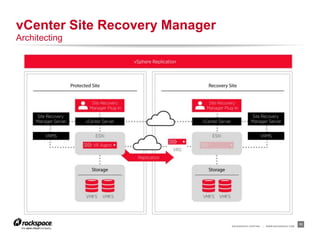
  • #11 Documentation = Visio List all communication paths of all vCenter integrations. Minimum of two hosts in management cluster for HA & DRS SSO, vCenter, Web Client, Inventory, VUM, SRM, database, & SRA communication paths, ports Storage replication connectivity Size vCenters accordingly: Min simple “all-in-one” 2CPU, 12GB RAM, 60GB disk (without DB) vCenter by itself: 2CPU 4GB RAM Appliance is self-contained SSO, Inventory, Web Client, & vCenter Sizing Limitations (internal DB): 100 hosts, 3000 VMs Same as full vCenter with Oracle db Still need Windows server for SRM & VUM Okay to install SRM on same server as vCenter if sized properly SRM Min: 1CPU, 2GB of RAM, 5GB disk space
  • #15 Get 3rd party certificates BEFORE installation CN = “SRM” SAN = server.fqdn extendedKeyUsage = serverAuth, clientAuth On 5.1, cannot use complex passwords, no special characters, check before deploying 5.5 SRA installations may require specific Java version, NetApp, for instance. vCenter “Administrator” role permissions are automatically propagated to SRM, anything else needs to be manually added Array Managers require user account with special permissions. Have to add Array Pair (source & target) and enable to discover replicated volumes, LUNs, Consistency Groups. NetApp import by export name “SRM”, EMC RPA by CG managed/Controlled by SRM Can adjust RPA Portion used image access, we set to 40% Protection Group is grouping of Datastores. Must have separate Protection Groups to failover different Apps or Tiers Datastore can be in only ONE Protection Group Protection group can be member of multiple Recovery Plans Can have multiple Recovery Plans, but Boot Priority is attribute of the VM within the Protection Group. If you change Boot Priority in one Recovery Plan, it will update it in ALL Recovery Plans Can set VM dependencies within same boot Priority group only. Can span Protection Groups, but must be in same Recovery Plan IP is Attribute of VM, only ONE IP per NIC, but DHCP, Subnet, GW, Alt GW, DNS & suffix, WINs for both Protected & Recovery sites Additional Options: Shutdown Action, Startup Action, delay for Post-Power On Action, Pre/Post Power-On Actions Pre-Power On = Script on SRM server or User Prompt Post-Power On = Script/Command on VM Guest OS, Script on SRM Server, or User Prompt
  • #17 Adding a new Datastore – Volume or LUN must be a member of the replication set and visible in the Array Manager Adding VMs requires “Configure Protection” or “Configure All” Removing VMs requires “Remove Protection” Remove Datastore from Protection Group, remove from replication set, refresh Array Manager There is no migration from different SRM servers, no export of config, no backup outside of full database backup Only “migration” would be to build a new server and point to current database