vRealize Operations 6.4
Supercharge your SDDC Intelligent Operations
vRealize Operations 6.4: Getting more done, faster
2
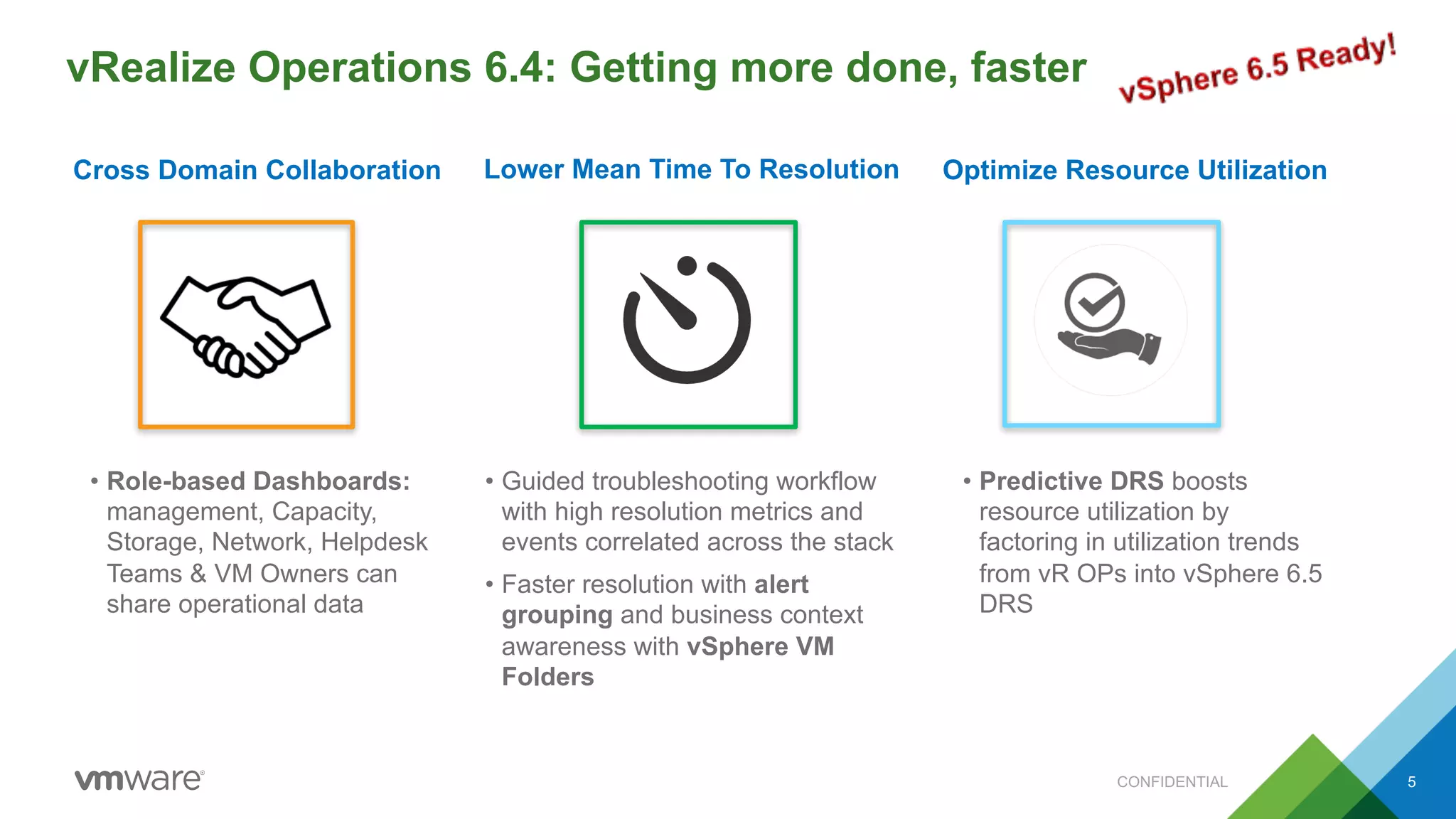
Cross Domain Collaboration Lower Mean Time To Resolution Optimize Resource Utilization
• Role-based Dashboards:
management, Capacity,
Storage, Network, Helpdesk
Teams & VM Owners can
share operational data
• Guided troubleshooting workflow
with high resolution metrics and
events correlated across the stack
• Faster resolution with alert
grouping and business context
awareness with vSphere VM
Folders
• Predictive DRS boosts
resource utilization by
factoring in utilization trends
from vR OPs into vSphere 6.5
DRS
CONFIDENTIAL 5
Three Approaches to Avoiding Contention
Optimize Resource Utilization
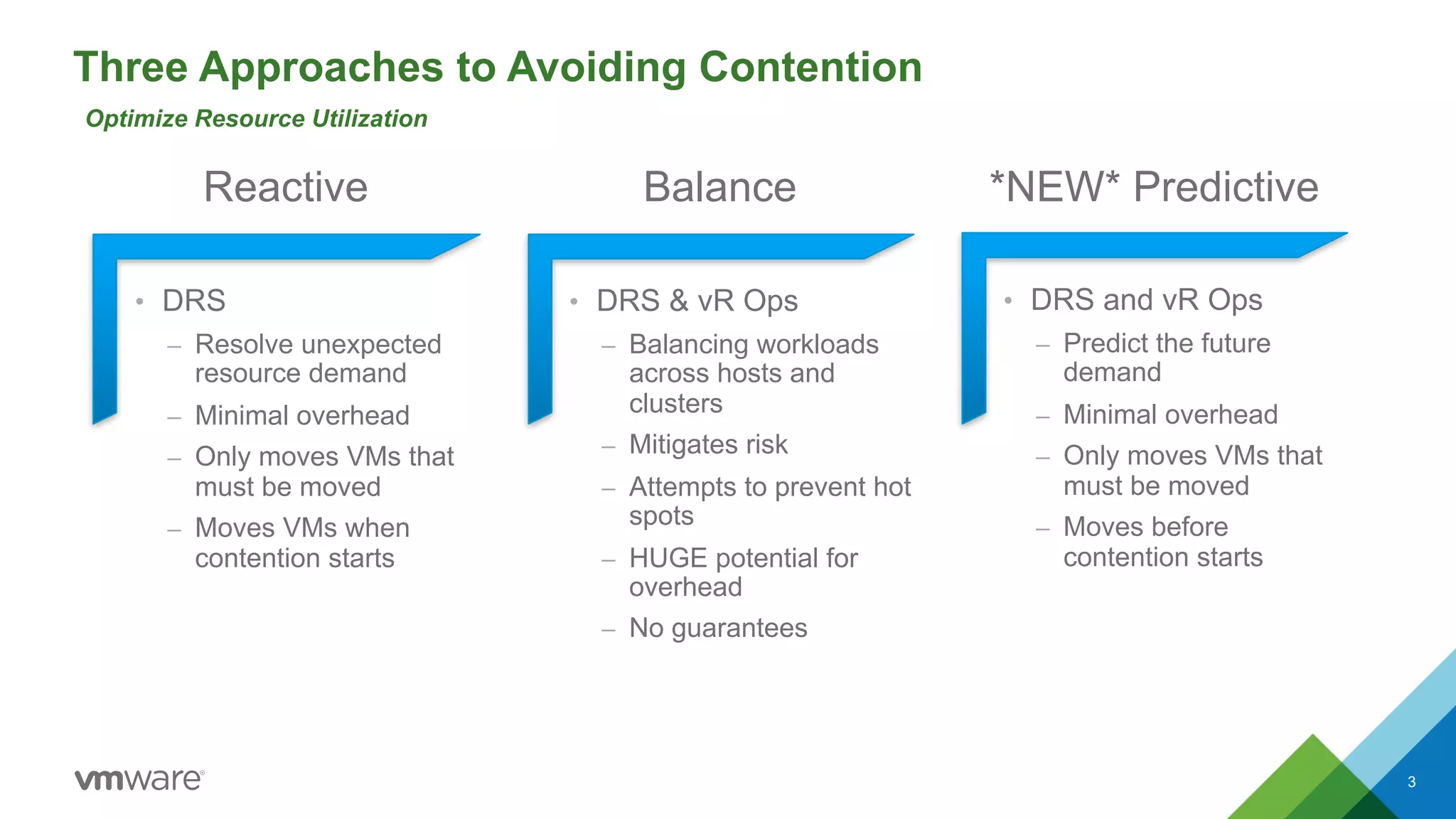
• DRS & vR Ops
– Balancing workloads
across hosts and
clusters
– Mitigates risk
– Attempts to prevent hot
spots
– HUGE potential for
overhead
– No guarantees
• DRS and vR Ops
– Predict the future
demand
– Minimal overhead
– Only moves VMs that
must be moved
– Moves before
contention starts
• DRS
– Resolve unexpected
resource demand
– Minimal overhead
– Only moves VMs that
must be moved
– Moves VMs when
contention starts
Reactive Balance *NEW* Predictive
3
How Predictive DRS Works
Optimize Resource Utilization
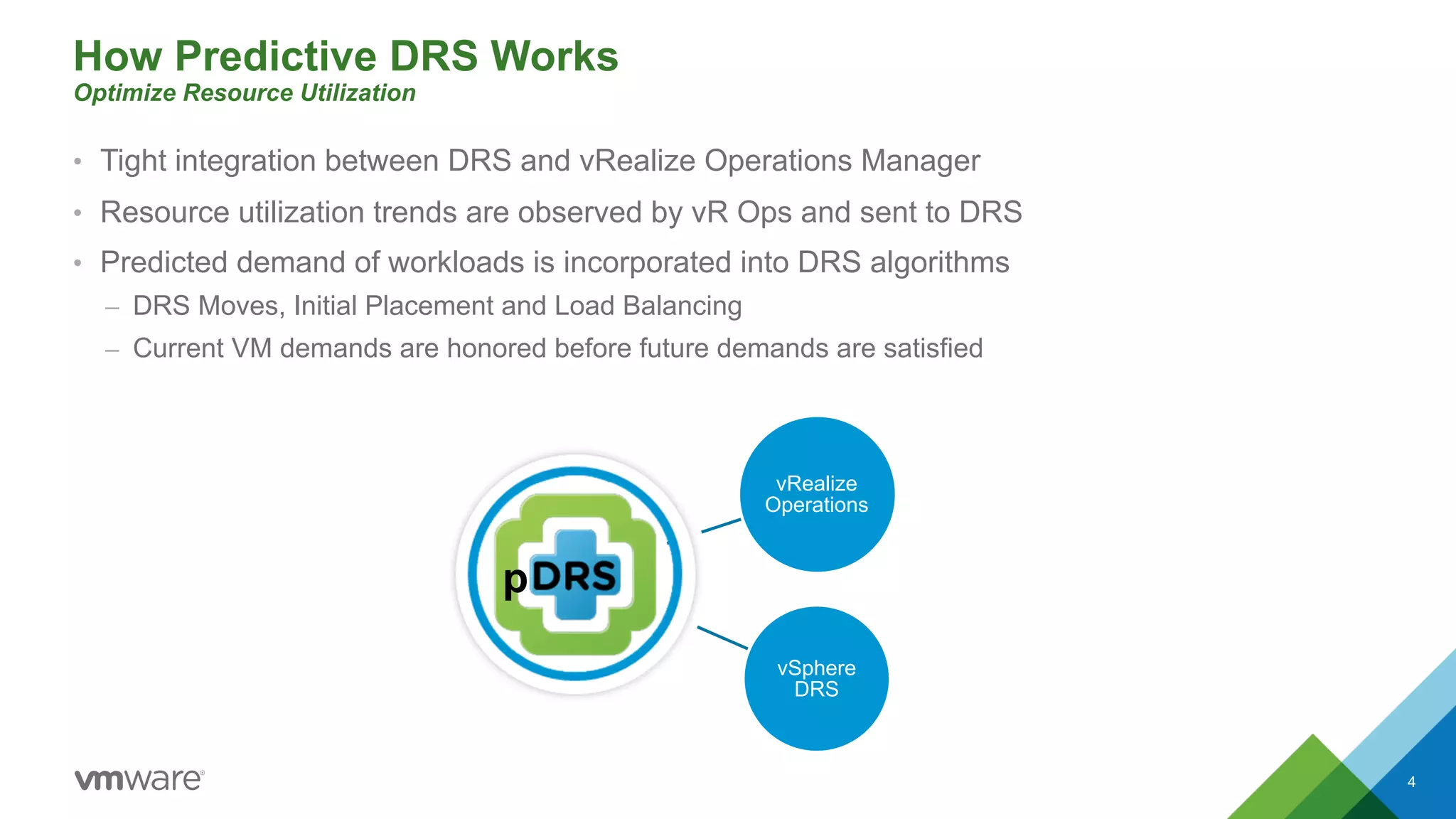
• Tight integration between DRS and vRealize Operations Manager
• Resource utilization trends are observed by vR Ops and sent to DRS
• Predicted demand of workloads is incorporated into DRS algorithms
– DRS Moves, Initial Placement and Load Balancing
– Current VM demands are honored before future demands are satisfied
4
vSphere
DRS
vRealize
Operations
p
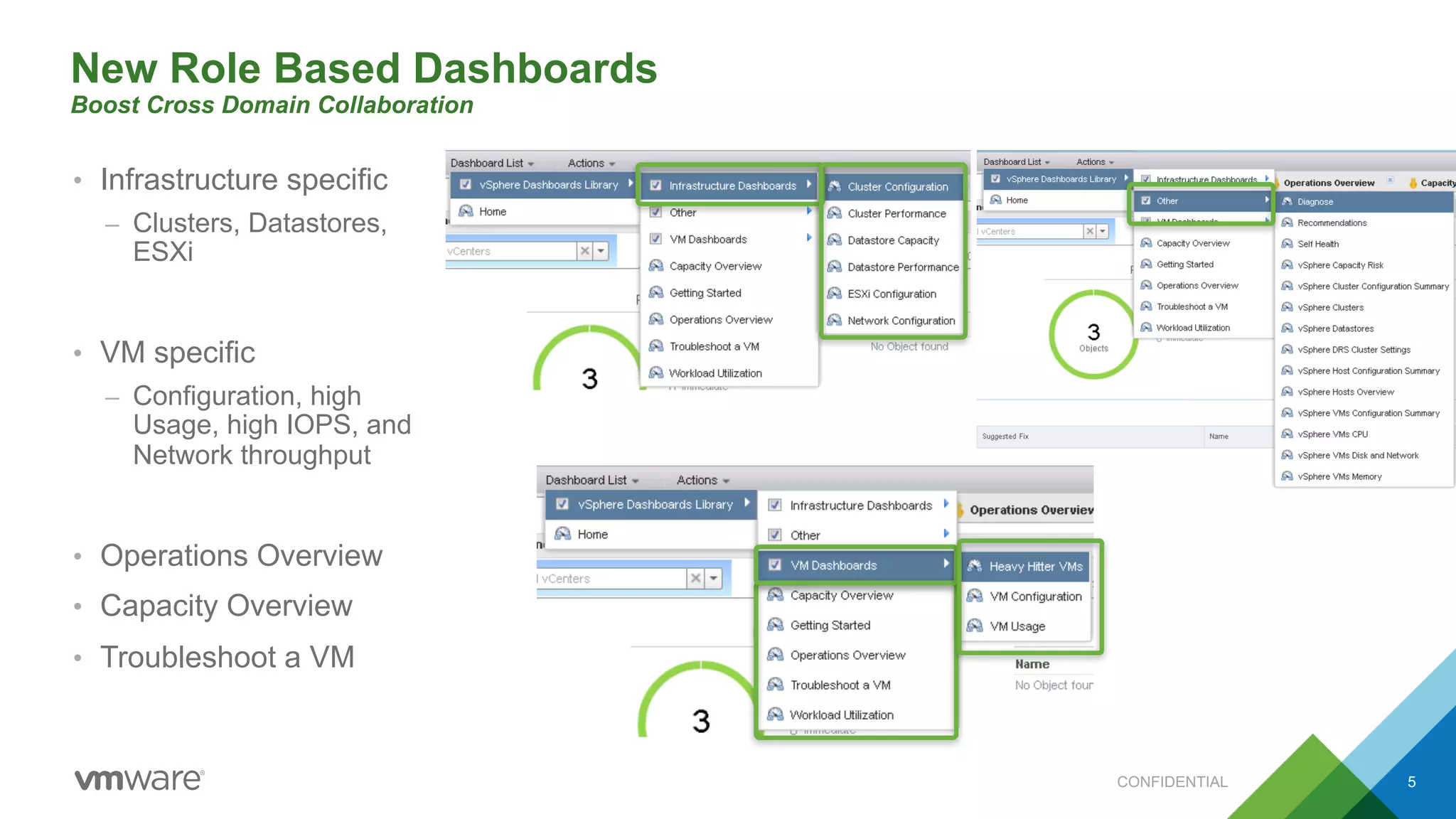
New Role Based Dashboards
Boost Cross Domain Collaboration
• Infrastructure specific
– Clusters, Datastores,
ESXi
• VM specific
– Configuration, high
Usage, high IOPS, and
Network throughput
• Operations Overview
• Capacity Overview
• Troubleshoot a VM
CONFIDENTIAL 5
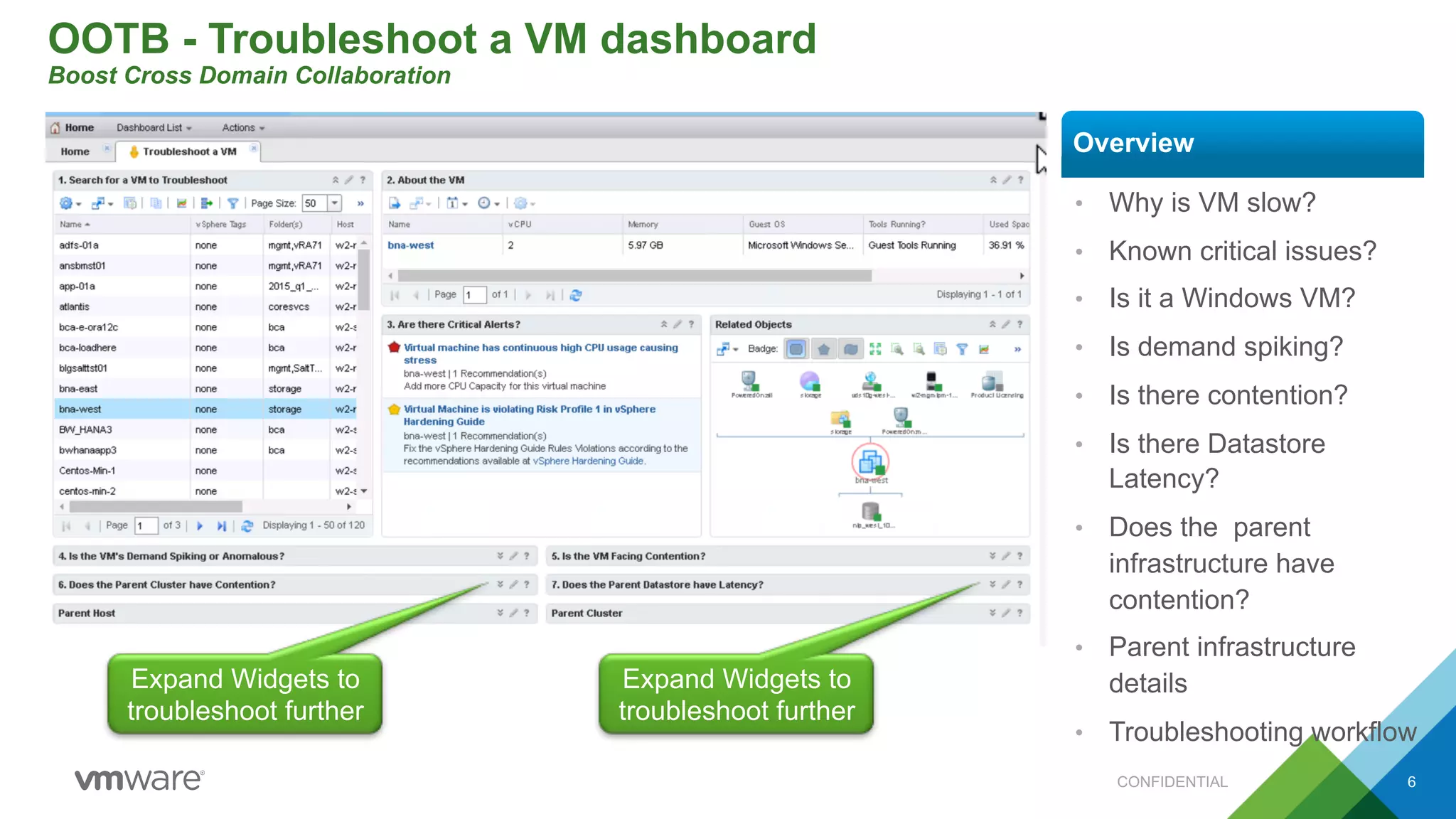
OOTB - Troubleshoot a VM dashboard
Boost Cross Domain Collaboration
CONFIDENTIAL 6
• Why is VM slow?
• Known critical issues?
• Is it a Windows VM?
• Is demand spiking?
• Is there contention?
• Is there Datastore
Latency?
• Does the parent
infrastructure have
contention?
• Parent infrastructure
details
• Troubleshooting workflow
Overview
Expand Widgets to
troubleshoot further
Expand Widgets to
troubleshoot further
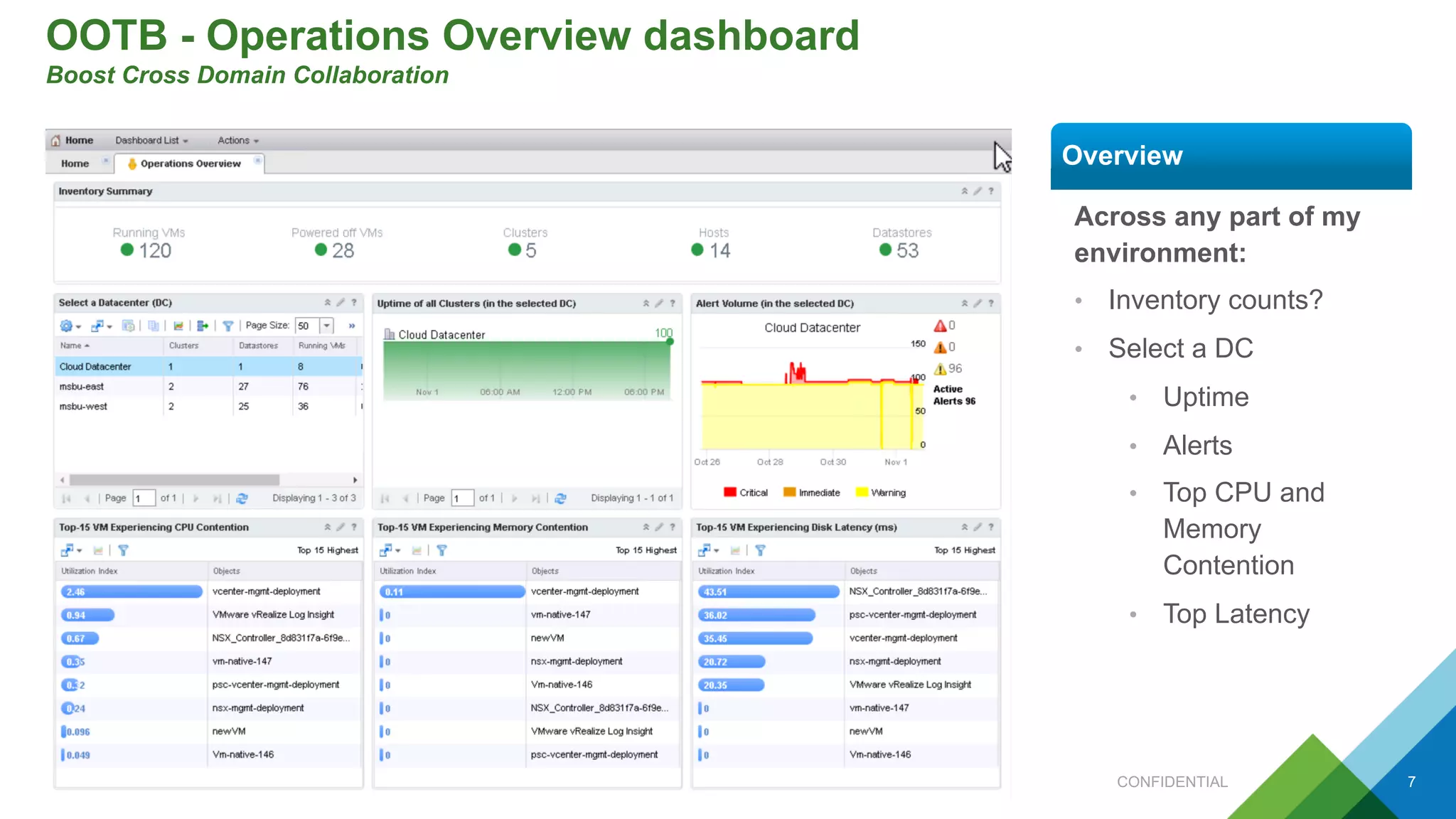
OOTB - Operations Overview dashboard
Boost Cross Domain Collaboration
CONFIDENTIAL 7
Across any part of my
environment:
• Inventory counts?
• Select a DC
• Uptime
• Alerts
• Top CPU and
Memory
Contention
• Top Latency
Overview
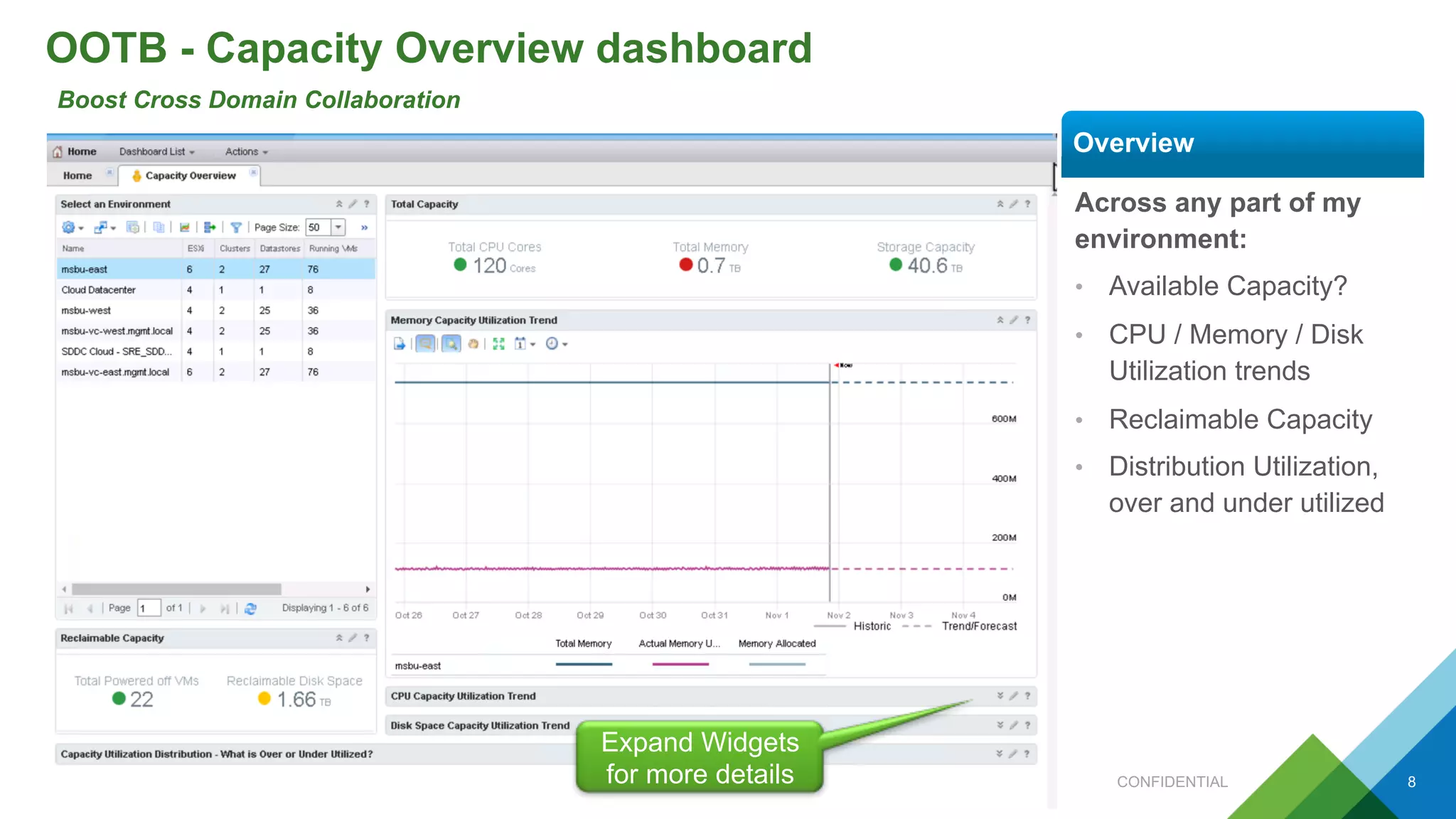
OOTB - Capacity Overview dashboard
Boost Cross Domain Collaboration
CONFIDENTIAL 8
Across any part of my
environment:
• Available Capacity?
• CPU / Memory / Disk
Utilization trends
• Reclaimable Capacity
• Distribution Utilization,
over and under utilized
Overview
Expand Widgets
for more details
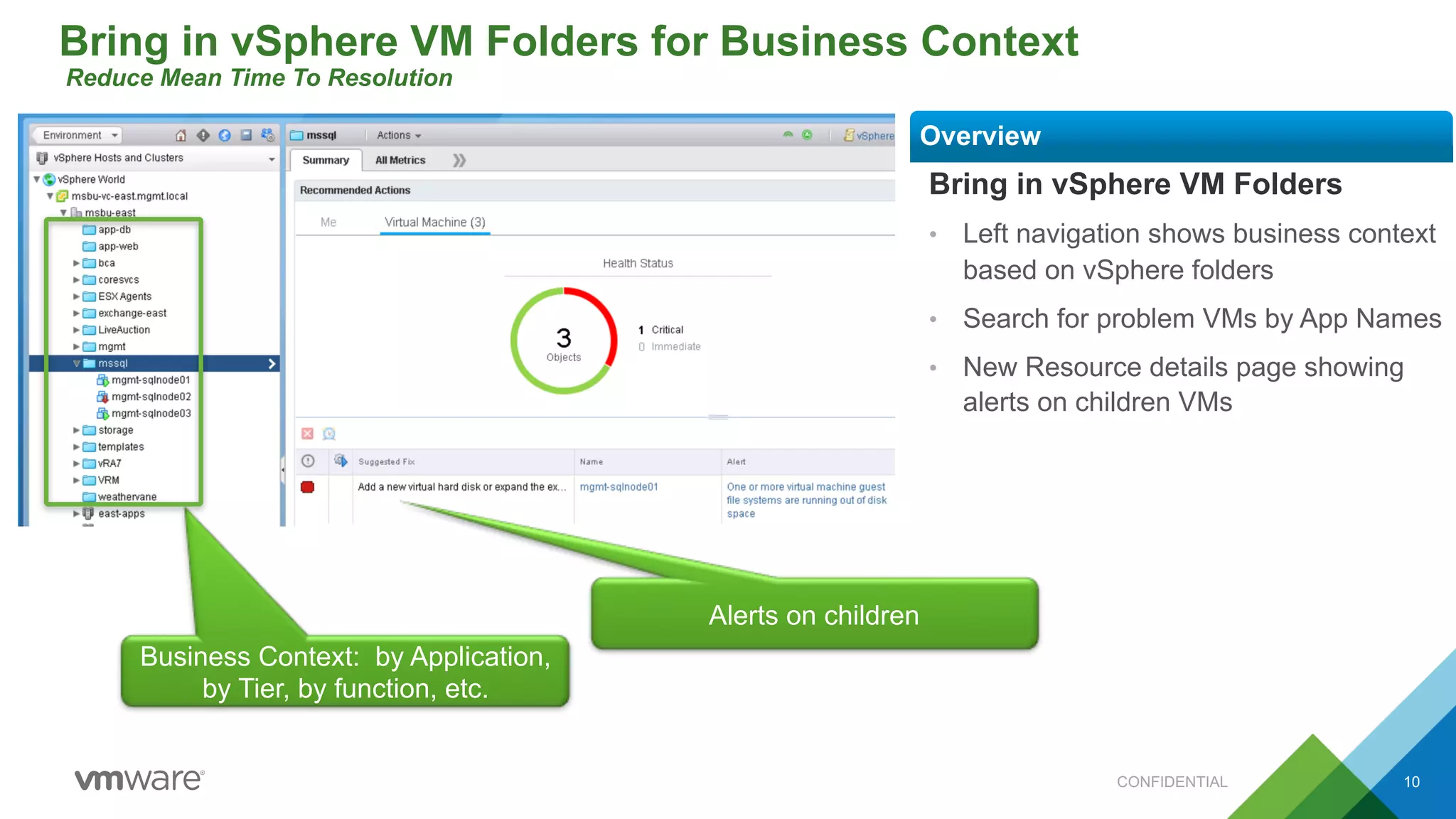
Bring in vSphere VM Folders for Business Context
Reduce Mean Time To Resolution
Bring in vSphere VM Folders
• Left navigation shows business context
based on vSphere folders
• Search for problem VMs by App Names
• New Resource details page showing
alerts on children VMs
Overview
Business Context: by Application,
by Tier, by function, etc.
CONFIDENTIAL 10
Alerts on children
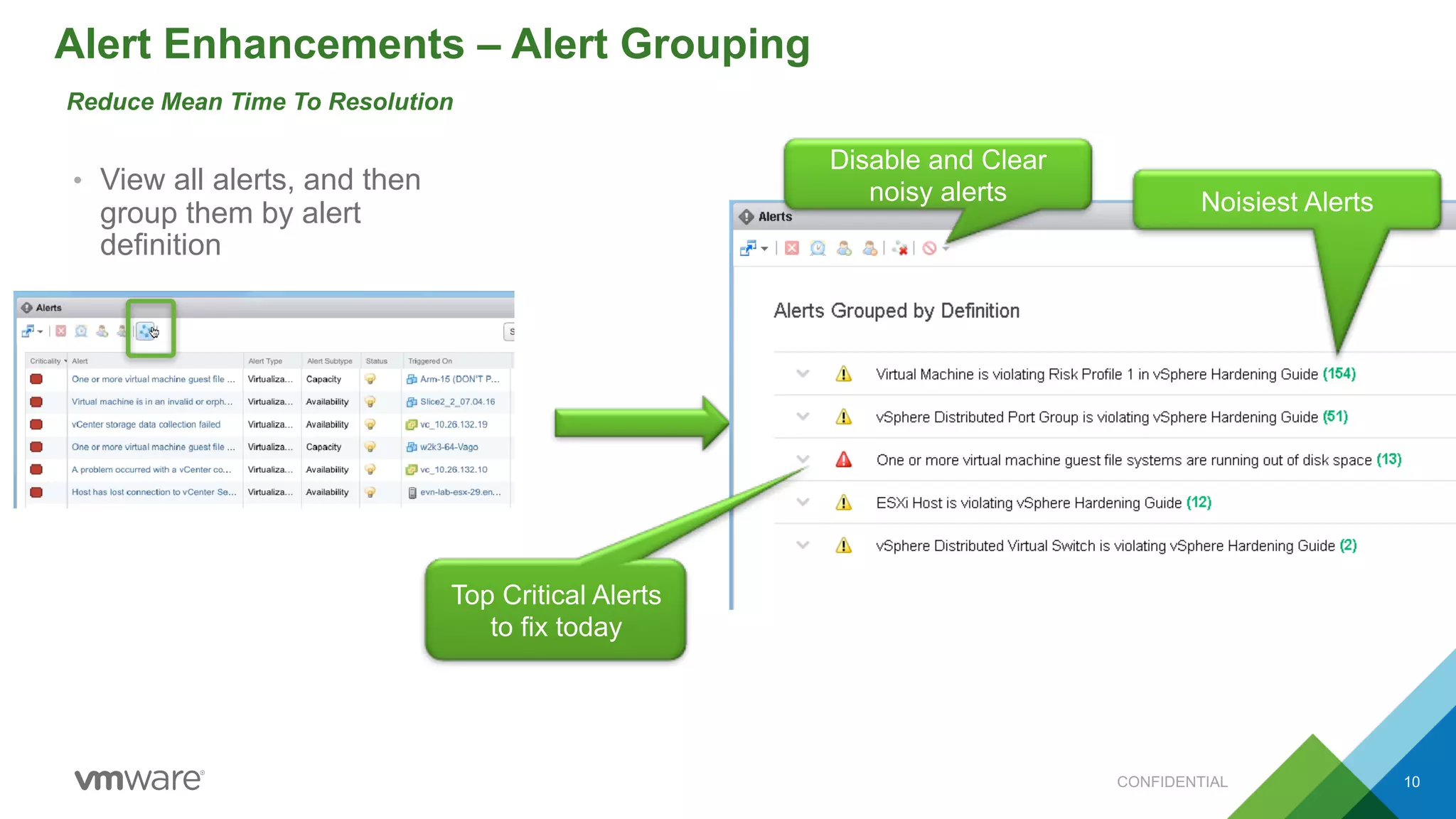
Alert Enhancements – Alert Grouping
Reduce Mean Time To Resolution
• View all alerts, and then
group them by alert
definition
CONFIDENTIAL 10
Noisiest Alerts
Disable and Clear
noisy alerts
Top Critical Alerts
to fix today

vRealize Operations 6.4: Supercharge your SDDC Intelligent Operations

  • 1.
    vRealize Operations 6.4 Superchargeyour SDDC Intelligent Operations
  • 2.
    vRealize Operations 6.4:Getting more done, faster 2 Cross Domain Collaboration Lower Mean Time To Resolution Optimize Resource Utilization • Role-based Dashboards: management, Capacity, Storage, Network, Helpdesk Teams & VM Owners can share operational data • Guided troubleshooting workflow with high resolution metrics and events correlated across the stack • Faster resolution with alert grouping and business context awareness with vSphere VM Folders • Predictive DRS boosts resource utilization by factoring in utilization trends from vR OPs into vSphere 6.5 DRS CONFIDENTIAL 5
  • 3.
    Three Approaches toAvoiding Contention Optimize Resource Utilization • DRS & vR Ops – Balancing workloads across hosts and clusters – Mitigates risk – Attempts to prevent hot spots – HUGE potential for overhead – No guarantees • DRS and vR Ops – Predict the future demand – Minimal overhead – Only moves VMs that must be moved – Moves before contention starts • DRS – Resolve unexpected resource demand – Minimal overhead – Only moves VMs that must be moved – Moves VMs when contention starts Reactive Balance *NEW* Predictive 3
  • 4.
    How Predictive DRSWorks Optimize Resource Utilization • Tight integration between DRS and vRealize Operations Manager • Resource utilization trends are observed by vR Ops and sent to DRS • Predicted demand of workloads is incorporated into DRS algorithms – DRS Moves, Initial Placement and Load Balancing – Current VM demands are honored before future demands are satisfied 4 vSphere DRS vRealize Operations p
  • 5.
    New Role BasedDashboards Boost Cross Domain Collaboration • Infrastructure specific – Clusters, Datastores, ESXi • VM specific – Configuration, high Usage, high IOPS, and Network throughput • Operations Overview • Capacity Overview • Troubleshoot a VM CONFIDENTIAL 5
  • 6.
    OOTB - Troubleshoota VM dashboard Boost Cross Domain Collaboration CONFIDENTIAL 6 • Why is VM slow? • Known critical issues? • Is it a Windows VM? • Is demand spiking? • Is there contention? • Is there Datastore Latency? • Does the parent infrastructure have contention? • Parent infrastructure details • Troubleshooting workflow Overview Expand Widgets to troubleshoot further Expand Widgets to troubleshoot further
  • 7.
    OOTB - OperationsOverview dashboard Boost Cross Domain Collaboration CONFIDENTIAL 7 Across any part of my environment: • Inventory counts? • Select a DC • Uptime • Alerts • Top CPU and Memory Contention • Top Latency Overview
  • 8.
    OOTB - CapacityOverview dashboard Boost Cross Domain Collaboration CONFIDENTIAL 8 Across any part of my environment: • Available Capacity? • CPU / Memory / Disk Utilization trends • Reclaimable Capacity • Distribution Utilization, over and under utilized Overview Expand Widgets for more details
  • 9.
    Bring in vSphereVM Folders for Business Context Reduce Mean Time To Resolution Bring in vSphere VM Folders • Left navigation shows business context based on vSphere folders • Search for problem VMs by App Names • New Resource details page showing alerts on children VMs Overview Business Context: by Application, by Tier, by function, etc. CONFIDENTIAL 10 Alerts on children
  • 10.
    Alert Enhancements –Alert Grouping Reduce Mean Time To Resolution • View all alerts, and then group them by alert definition CONFIDENTIAL 10 Noisiest Alerts Disable and Clear noisy alerts Top Critical Alerts to fix today